USING THE GOOGLE APP ENGINE PLATFORM FOR TEACHING
PROGRAMMING
Mariusz Dzieńkowski1
1 Department of Informatics Systems, Faculty of Management, Lublin University of Technology, ul. Nadbys-trzycka 38, 20-618 Lublin, Poland, e-mail: [email protected]
TEACHING PROGRAMMING – ITS
IMPORTANCE AND CHALLENGES
At present, teaching IT mainly puts emphasis on skills such as using word processors, spread-sheets, programs for presentations, multimedia and graphics. Thus the key question is how to do something without considering why it works or how it works [8]. The aspects connected with al-gorithmics and programming are still neglected in school curricula and hence, they are either marginalized or simply left out. Sometimes even students or teachers themselves tend to disregard those IT areas as they are commonly believed to be difficult, boring or likely to be of interest only to a small circle of specialists. Programming gets more attention only in high school courses with extended IT programmes or at universities where students who major in computer science study programming languages more thoroughly.
It is important to emphasize that teaching pro-gramming in schools has a lot of benefits. First of all, developing applications is a form of creative
activity which develops logical thinking and may stimulate creativity in students. Professor M.M. Sysło claims that ”programming may lead to in-novative solutions and to discoveries”. Moreover, it can be a good tool for exploring concepts from computer science and from other areas of life. It is also an easy way of combining teaching IT with teaching other subjects. Furthermore, program-ming helps in better understanding what comput-ers are like and how they function.
According to Seymour Papert, an education-alist and one of contemporary computer science gurus, the essence of human intellectual activity is the constant need to improve the way we fol-low. He maintains that conception is feasible by means of programming languages and the pro-gramming environment. Thanks to such tools it is possible to develop and edit programs, check them for mistakes, correct errors and translate the code into the machine language understand-able for the computer. Papert and his coworkers from the Artificial Intelligence Laboratory at the Massachussetts Institute Technology developed Research Journal
Volume 6, Issue 16, Dec. 2012, pp. 60–66
DOI: 10.5604/20804075.1025331 Review Article
Abstract
The article outlines the present situation connected with teaching programming to stu-dents of different levels of education in Polish schools. The observed negative trend towards marginalization of programming can be successfully reversed in education thanks to using the latest IT achievements such as cloud computing (CC). The paper presents ways in which the cloud computing technology can be used to teach how to develop and code Internet applications by means of the Google App Engine plat-form. The final part focuses on practical examples of programming problems involv -ing cloud comput-ing applications which may be solved in IT classes with students of different levels of education.
Keywords: cloud computing, Google App Engine, teaching programming, web ap-plications.
Logo, a programming language that can be used by children in their first contact with computers. In his book “Mindstorms: Children, Computers and Powerful Ideas” the author presents a sig -nificant theory about the relation between a child and a computer. He claims that it is the child that should program the computer and not the other way round, when it is the computer that programs and determines the behaviour of the young user [7]. Unfortunately the idea is often disregarded and it is still common for a computer to program the behaviour of the learner.
At present the big challenge that lies ahead is to restore the importance of teaching program-ming at schools and at universities. That task en-tails a variety of questions concerning the right choice of a programming language and the envi-ronment, the proper selection of the teaching ma-terial, interesting examples, problems and effec-tive teaching methods that could encourage and stimulate the learner at the same time fostering the awareness to learn.
Currrently, teaching programming and algo-rithmics at elementary schools and at junior high schools is based on the Logo language and Imag -ine Logo. Sometimes Elbox Laboratorium Infor -matyki ELI 2.0, a special educational software package, is also used for graphic construction of algorithms as well as for programming in Logo and Pascal. Another, relatively new program that has become popular at the level of primary schools and junior high schools is Baltie – the graphics environment for object programming based on the C# language. The languages and the tools have officially been approved as educational aids for school use by the Ministry of National Education. Thanks to them teaching computing is more attractive, student-friendly and in addition, students can use a computer in an active way to their advantage.
Secondary schools in their computer science classes, especially in the case of classes with the extended IT programme, resort to different pro-gramming languages, the most popular being Pascal, C++, PHP or Java. The choice of the lan-guage depends on the invention of teachers who quite often prepare the curriculum on their own. When making that kind of decision, one may take into account various factors including the min-isterial recommendations, previous professional experience, fads or fashions. However, one may also independently search for new solutions using the latest trends and technologies.
In the present times, the latter approach is likely to be most effective as young people rep-resent the Internet generation and hence, quite frequently belong to different network commu-nities, use mobile devices and a wide range of e-services on a daily basis. On the other hand, using new technologies in class always entails a lot of effort since the teachers are forced to constant professional self-development, raising their qualifications and updating their skills in the rapidly developing area of IT.
Another difficult aspect and challenge for teachers is the growing complexity of solutions that the didactic staff teaching computing have to face on their own. It needs to be emphasized that even the choice of the latest programming language or the environment should not over-shadow the core of teaching IT i.e. learning and understanding the basic concepts and concep-tions connected with the field of study. Raimond Reichert et al. claim that “general education is rarely applied for immediate use, but helps us put details of transient importance into a larger perspective” [8].
USING CLOUD COMPUTING
IN EDUCATION
Cloud computing providers have noticed and since exploited the big potential of the technol-ogy for schools and for university education. The world pioneer in the CC field was Amazon who offers educational institutions access to its web infrastructure. Scientists and academics need-ing high-performance computneed-ing or disk space for their research may apply to obtain grants and free usage credits to tap into the on-demand in-frastructure of the Amazon Web Services (AWS). Educators conducting courses in distributed data processing, Artificial Intelligence etc. may also try and apply for free usage of AWS. That solu-tion is a way of eliminating high costs connected with organization of the advanced hardware and software base necessary when complex research endeavors have to be tackled and big amounts of data have to be handled [2].
Another IT tycoon – Microsoft is also a big CC provider for educational institutions. The of-fer of the company in this field is aimed at three areas: connecting education communities, man-aging educational institutions and providing dif-ferent types of infrastructure. Live@Edu is one of examples of such solutions. The application includes an email account, tools for coopera-tion and communicacoopera-tion, an office package and disk space for learners, educators and teachers [6]. Another example is Office 365 – CC soft -ware including office applications and tools for cooperation. Except for popular office tools, the Office Web Apps package offers tools for web conferencing, remote desktop sharing or a virtual board. Thus, Microsoft is not only a provider of CC tools that may be used for educational pur-poses but also a provider of business and admin-istrative tools [11].
Google is one more corporation offering their web services to schools and universities. Its offer is vast and varied as the company sup-ports academic communities to help further the innovations thanks to their academic funding programmes [1]. Furthermore, Google provides educational institutions with the CC application package including email, a shared calendar, Talk – the instant messaging tool, Blogger and Google Documents. The CC technology of the company may be also useful for developing web applica-tions in the cloud. The Google App Engine is a programming platform that may be successfully used for running previously developed web ap-plications. Despite some limitations, the platform is available free of charge and thanks to its
advan-tages, it may be used for educational purposes, especially for teaching programming.
Students spend a lot of time online and therefore their habits and the knowledge of the virtual environment may be easily used as a tool to direct and foster their interests in the area of IT when they are made to develop applications in the cloud [3, 4].
BUILDING WEB APPLICATIONS
ON THE GOOGLE APP ENGINE
Google App Engine (GAE) is a popular pro-gramming platform for developing, hosting, test-ing and managtest-ing a previously built application. GAE is based on the PaaS (Platform as a Service) cloud computing model that provides access to hardware such as servers, networks etc. as well as to software including operating systems, databas-es or server applications. In a limited way, Google enabled its all interested programmers free access to its resources in the data centres. The only pre-requisite is having a standard Google account.
GAE is a specialist programming interface (API) and a secure environment isolating ap-plications, which are being developed, from the hardware, the operating system, the location on the server and from other applications. The ma-jor components of the platform are: the sandbox, runtime environments for programming languag-es and the data warehouse. The applications that are developed run in environments with a limited access to the operating system where the distribu-tion of applicadistribu-tions to many servers and load bal-ancing are provided [5]. The GAE platform makes it possible to develop a code in a static language like Java as well as in a dynamic one like Python. The programming tools used for building applica-tions for the GAE platform and belonging to the Software Development Kit include: a developer web server simulating the GAE environment on the local computer, a program for sending a code to the server as well as a program for storing and downloading data from the Datastore [10].
Internet protocols. The program structure is also different because in CC applications it helps iso-late individual segments of applications.
The process of developing cloud computing software may be conducted in two ways. The first one is connected with direct building of CC applications by means of online tools available in the Internet browser window and the remote console. There is no need to set up software on the local computer. The second approach re-quires integration of programming tools from the developer’s computer and the cloud comput-ing platform. Developcomput-ing a program in this way comprises two stages i.e. developing and testing the application on the local computer and plac-ing the code in the cloud in order to observe its behaviour. The second approach is characteristic of the GAE platform.
Internet applications are dynamic and they enable to generate websites with varied content that depends on the action of the user. Web pro-grams receive incoming requests from the brows-er, make decisions, download and modify data, prepare answers and send them to the user. WWW applications are based on the HyperText Trans-mission Protocol (HTTP) that enables a two-way data transfer between the WWW browser and the WWW server. The code of CC applications is generated as a reaction to a particular request that may come from the user [12].
Google App Engine supports programming applications in Python, Go and Java. Using the Java virtual machine (JVM) enables program-ming in other languages such as JRuby, Groovy, Scala, Clojure, Jython or PHP. The author’s recommendation for teaching programming in schools is Python. It distinguishes itself by a clear syntax and rich documentation, which make the language relatively easy to master. Furthermore, it is a multiplatform language, therefore the ap-plications created in it will run on many devices and will work with different operating systems. It is vital that Python has a lot of stable libraries and frameworks. In addition, it has many built-in types and is a fully typed language. Finally, it is important to emphasize that Python has a big and professional user community.
Google experience of using Python resulted in selecting the language as the first choice for building software for the Google App Engine platform and supporting its development [3]. Be -fore that, building Internet applications forced the developer to perform many actions like preparing
infrastructure, the operating system, providing security, back-up copies, updates etc. At present the programmer working with the GAE platform who is developing CC programs does not have to perform such actions and may fully concentrate on the software and its target users. Due to all the advantages of GAE and Python, both of them may be successfully used for teaching program-ming in lower and higher education institutions.
PROGRAMMING ENVIRONMENT
FOR DEVELOPING APPLICATIONS
ON THE GAE PLATFORM
Before an application for the GAE platform is built, it is important to prepare the work sta-tion thoroughly. First of all, the Google account needs to be created and it is necessary to log on the project website of Google App Engine. The registration of the first application entails entering the activation code that the user receives in a text message. The next stage in the registration pro-cess is choosing a unique name for the program that is created, which will be a part of the URL address in later stages. Afterwards the tools for developing software on the GAE platform have to be downloaded and installed. If the application is to be created in Python, first it is essential to set up the language programming environment e.g. 2.7 version. Later the tools from the App Engine Python SDK need to be installed. The kit includes a web application server simulating the App Engine environment on the local computer as well as the Google App Engine Launcher – a useful program with a graphical interface which makes it easier e.g. to place the application in the cloud. In order to have a fully-equipped worksta-tion one has to install the Integrated Development Environment (IDE) such as PyDev on the Eclipse platform.
EXAMPLES OF PROJECTS THAT MAY BE
USED FOR TEACHING PROGRAMMING
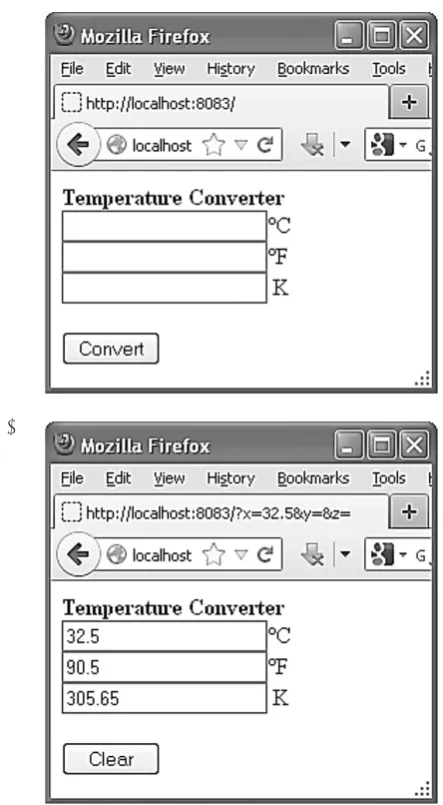
window and consists of a few components: text boxes, labels and a button. Operating the program is easy and intuitive. First a number needs to be entered i.e. the value of the temperature defined in a scale. Next a button converting the temperature into a different unit has to be pressed. The appli-cation includes a basic exception handling and er-ror monitoring. When the incorrect input data is entered, the information about the error will be generated automatically. When the user types the data to more than one text component, the content of all the boxes of that type will be removed. If the temperature is entered correctly and the right calculations are made, the button will change its name from Convert into Clear. Moreover, in that situation its function will be different. From now on it will be used to delete text boxes of the ap-plication form.
Fig. 1. The web application window for converting tem-perature in three scales a) an empty form for entering data, b) a form presenting the results of the program
The presented application was developed in the Python programming language. It uses its own framework called webapp which is easy to use. The choice of the framework determines the structure of the program. The basic elements of such applications are:
• RequestHandler classused for processing in-coming requests and generating the response,
• the instance of the WSGIApplication class used for representing the application that di-rects incoming requests to suitable Request-Handler objects,
• the run_wsgi_app() function used for realiz-ing the server loop and enablrealiz-ing the applica-tion start.
Individual code parts of the presented appli-cation fulfill the following functions:
• import of framework elements: the webapp module and the run_wsgi_app function,
• implementation of the MainPage class inher-iting from the ReqestHandler class dealing with incoming http requests and generating responses, in this case the GET request is in-terpreted by means of the get()) function,
• creating a list of operations on the basis of a dictionary including keys (temperaturę sym -bol units) and their corresponding values pre-sented in the form of short lambda functions taking arguments and returning a list with ex-pressions calculating the temperature in par-ticular units.
• taking and preliminary validation of data from the form,
• choosing the type of converting temperature or the clearing option in the form,
• performing the try-except instruction in which calculations will be made or in the case of problems, an exception will be reported,
• displaying results generated in HTML,
• building the instance of the WSGIApplica-tion class mapping incoming requests on the basis of URL into particular RequestHandler objects,
• creating the main() function, in which the run_ wsgi_app function will activate the whole ap-plication.
There are many applications that may be built in IT class devoted to programming. Below there is an example showing an application calculating biorhythms (Fig. 2).
a)
Fig. 2. The window of a biorhythm program devel-oped for the GAE platform
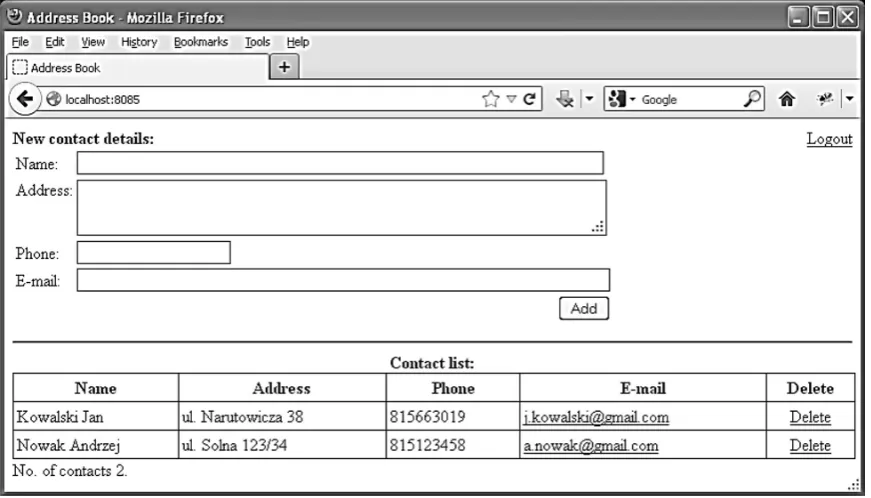
Another task that may be done in IT class is a simple database containing contact details useful for the Internet user (Fig. 3).
CONCLUSIONS
Contemporary education faces many chal-lenges and one of them is the necessity to be up-to-date in the rapidly developing IT area. Meet-ing the challenge is a significant task that all par -ticipants of the education process have to face.
It is obvious that having suitable IT skills and a knowledge of Information and Communication Technologies (ICT) is a must on the contempo-rary employment market. Therefore, nowadays the school has to use the existing tools and meth-ods, but at the same time the teaching and the learning process have to be conducted in a new, more interesting and more innovative way.
It is important to change the approach to the learner, to the education process and to the sub-ject in order to facilitate educational challenges. Hence, the student should be perceived as an interested discoverer of new technologies. The process of education should be treated like initia-tion stages on the path to higher knowledge. The subject should be like a multi-layer puzzle that may be solved thanks to the tools passed from the educator to the learner.
The paper presents one of the ways of imple-menting the above idea into educational life on the example of the conception of using program-ming computers. Teaching programprogram-ming may be combined with learning about new technologies e.g. about cloud computing. Arousing interest in CC among students can be a helpful tool in teaching programming. Modification and updat -ing the curriculum can make the didactic pro-cess more effective and more learner-friendly. Students may be encouraged and asked to build applications and web pages that will run on their own mobile appliances. Learners may also try
and develop programs that will be built in social networks that are so popular with young people nowadays.
There are lots of interesting and practical examples of teaching programming. One of the methods that can make IT classes more student-friendly is using the Google App Engine platform for developing cloud computing applications.
REFERENCES
1. Academic and External Research Support [online], http://research.google.com/university/ [1.06.2012]. 2. AWS in Education [online], http://aws.amazon.
com/education/ [1.06.2012].
3. Chu-Carroll M. C.: Google App Engine. Kod w chmurze, Helion, Gliwice 2011.
4. Dzieńkowski M.: Technologia cloud comput -ing w edukacji, [In:] “Rola informatyki w
nau-kach ekonomicznych i społecznych. Innowacje i implikacje interdyscyplinarne”, t. I, Zbigniew E. Zieliński (eds.), wyd. Wyższej Szkoły Hand -lowej, Kielce 2012.
5. Mateos A., Rosenberg J.: Chmura obliczeniowa.
Rozwiązania dla biznesu, Helion, Gliwice 2011.
6. Microsoft Edukacja. Live@Edu [online], http://
www.microsoft.com/poland/edukacja/uczelnie/ live_edu.aspx [1.06.2012].
7. Papert S.: Burze mózgów. Dzieci i komputery, PWN, Warszawa 1996.
8. Reichert R., Nievergelt J., Hartmann W.: Program-ming in schools – why, and how?, [In:] C. Pellegri-ni, A. Jacquesson (eds.) Enseigner l’informatique.
Georg Editeur Verlag, 2001, pp. 143-152,
9. The NMC Horizon Report: 2012 Higher Educa-tion EdiEduca-tion [online]. The New Media Consortium, Austin, Texas USA, http://www.nmc.org/pdf/2012-horizon-report-HE.pdf, [1.06.2012].
10. Using the webapp Framework [online], https://de - velopers.google.com/appengine/docs/python/get-tingstarted/usingwebapp [1.10.2012].
11. Usługa Office 365 dla instytucji edukacyjnych [on
-line], http://www.microsoft.com/pl-pl/office365/
education/school-services.aspx [1.06.2012]. 12. Zhu J.: Cloud Computing Technologies and Appli
-cations, [In:] Handbook of Cloud Computing, Furht