Inside this Issue Letter from the
Editor…...…..1 goalgamiPro and goalgamiPro Salesforce Edition…………..2 By Joel Bruckenstein, CFP® Tamarac Business Analytics…………..9 By Joel Bruckenstein, CFP®
How to Boost Your Firm's Annual Income by 20%……..….15 By Michael Laks, Laserfiche
Use Your CRM for Procedural Orchestration………18 By Jim Graddon, Founder, TopLine Catalyst Group Conference Sightings…………22 Newsletter Order Form………23
Letter from the
Editor
This month, Joel takes a look at goalgamiPro and Tamarac Business Analytics.
We also have a contribution from Michael Laks of Laserfiche and Jim Graddon of TopLine Catalyst Group.
Hopefully you all know by now that Joel and I
have updated our seminal technology book Virtual Office Tools for a High Margin Practice with a new edition (published by Bloomberg/Wiley, February 2013). The new edition, entitled Technology Tools for Today's High Margin Practice, contains contributions from 14 of the industry's best and brightest thinkers (too many to list here but check out the news room page at www.TechnologyToolsForToday.com to learn more). To order your copy from Amazon, click this link: http://tinyurl.com/ buyt3book.
Better yet, would you like a free copy of the book? We have ten free copies available for subscribers who will read the book and then post a review on Amazon. If you would like to be one of the ten to receive the book free, please email me at [email protected].
The next T3 conference for financial advisors will be held February 10-12, 2014 at the Hilton Anaheim. Please save the date on your calendars.
Visit www.TechnologyToolsForToday.com to learn more about the premier T3 conference for enterprises in the financial services industry November 3-5, 2013 in Chicago.
Hope you enjoy this month's issue...
David J. Drucker
Volume XI, Issue 10, October 2013
(C) Copyright 2003-2013 Virtual Office News LLC
Are You Getting All
Your Member
Benefits?
M e m b e rs h i p i n t h e T 3 Community confers benefits on you well beyond just this newsletter. Don’t forget to access the T3 Virtual Resource List, our Members-Only Discussion forum, our periodic Price Watches and Link eBlasts connecting you to other technology articles appearing in the trade press.
Free Issues of the
T3 Newsletter
As a T3 Subscriber, you've come to expect timely articles and information. Now, any existing subscriber who brings us a NEW annual subscriber (or gets an ex-subscriber who hasn't subscribed in six months or more) gets four (4) FREE months of the T3 Newsletter added onto their current subscription. In addition, your friend or colleague will receive two (2) free issues when purchasing an annual 12 month subscription. It's a win-win for both of you! Tell your friends to enter this code when they subscribe and then type in your name: REF14.
goalgamiPro and goalgamiPro Salesforce
Edition
By Joel Bruckenstein
Advisor Software Inc. (ASI), the developers of goalgamiPro planning software, recently introduced a Salesforce AppExchange version of their goalgamiPro software. For those of you unfamiliar with ASI, the firm was founded by Andrew Rudd, the co-founder and former chairman of Barra, Inc., a market leader in portfolio risk management that was acquired by Morgan Stanley Capital International (MSCI) some years ago. Mr. Rudd is a widely acclaimed expert in quantitative analysis, asset allocation, modern portfolio theory and risk management. The firm’s mission is “to advance the science of wealth planning so that financial advisors can focus on the art of advice delivery."
In the realm of financial planning, ASI created goalgamiPro to fill a gap they perceived between the financial calculators and the comprehensive financial planning applications that are marketed to advisors today. Leveraging the client’s household balance sheet, the application allows the advisor to assess client goals and determine whether or not they can be funded. Most of the planning is done on a modular basis, with each module resulting in a one page report. These reports can be combined to create a goal achievement report which covers multiple goals. Overall, it is quick and easy to use. The reports are short and to the point.
Initial Setup
In order to preview this new Salesforce version of goalgamiPro, I needed to obtain a copy of Salesforce to run it on. The folks at Salesforce were kind enough to provide me with a trial version of the enterprise version of Salesforce to conduct my tests.
Once my Salesforce account was established, I went to the Salesforce AppExchange. I searched for goalgamiPro in the search bar, located it, and navigated to the main goalgamiPro page, which provides additional information including the date it was posted to the AppExchange (9/12/2013), the price per user per month ($50.00 after a free 30 day trial), a more detailed description of the app, user reviews (none when I downloaded my version), and information about ASI, the provider.
When you click the “Get it Now” button, you are prompted to log in to the AppExchange using your Salesforce credentials. You are then prompted to install in production, or install in a sandbox (for testing by developers). When you choose to install in production, you are warned to review the customization guide (a hotlink is provided) before you install the application. The guide, which encompassed 35 pages when I accessed it, provides some installation pre-requisites. It then instructs you on steps that have to be performed once the application has been installed.
MoneyGuidePro
Partners with
Fox Financial
Planning
Network
PIEtech, maker of Money Guide Pro (MGP), the leading financial planning software for financial advisors, officially announced today the selection of Fox Financial Planning Network (FFPN) to develop a custom workflow system to enable MGP subscribers to create financial plans more efficiently as well as to drive adoption of recently added valuable features.
“We have heard advisors in the industry asking for a more streamlined approach to simplify the creation of a financial plan,” said Chad Blythe, National Sales Director of MGP. “Partnering with FFPN to create efficient, end-to-end, intuitive workflows will go a long way toward fulfilling this request so advisors can spend more time on client relationships and growing their businesses.” The FFPN custom workflow system for MGP will be designed so that workflows can be embedded into any CRM system that has a workflow engine, such as Redtail Te ch n o l o g y, t o c re a t e a standardized, sequential process for creating a financial plan. DD
Unfortunately, once I got to this point, things began to break down. For now, suffice it to say that the problems I ran into will not impact all users. I’ll discuss them in more detail later on. Before we address issues specific to the Salesforce version, let’s cover the basics of the original version, a cloud based application which advisors can subscribe to for $495 per year, with discounts available through some organizations.
goalgamiPro
The goalgamiPro application itself is appealing to the market segment it targets. It offers a quick, “lite” planning capability to financial professionals. Neal Ringquist, the President of ASI, tells me that you can create a plan in as little as ten minutes. I’d agree with his statement provided that client assets can be added automatically through web services or a file extract, and that you initially are solving for only one or two goals.
The planning process centers on the household balance sheet, a concept most consumers have some familiarity with. The application is designed to produce a series of one page reports that answer fundamental questions such as: What is my plan? Can I afford my goals? And how do I pay for my retirement? These individual reports can be combined into a single, visually pleasing client report if desired, which includes a cover page.
Data entry is straightforward. You enter names, effective tax rates, and client assets. If you are a Redtail CRM user, and you have the holdings information available in Redtail CRM, you can import it into goalgamiPro. There are a number of other similar file extracts available from other providers, including LPL, Morningstar Office, PortfolioCenter and TD Ameritrade. ASI will soon be able to populate client holdings from Redtail and TD Ameritrade’s VEO platform via web services, for a more integrated user experience.
If the holdings data is not available through a file extract or through integration, advisors can either enter holdings individually, or enter portfolios by asset class. Next, you review plan assumptions. By default, life expectancies are determined using actuarial tables, but you can over-ride them. Currently, ASI assumes a COLA of 2.5%, a future income discount rate of 3.2% and transaction costs of 1%. The software solves for three amounts: a base, necessary amount, a target amount, and an aspirational amount. ASI assigns a different discount rate to each, but you can change them if you wish.
I created a sample Smith household, with a 401(k) value of approximately $648,000, assumed future contributions to the plan of approximately $709,000 and monthly Social Security benefits, beginning at age 70, of about $3,000 monthly. I then created a retirement income goal of $6,250 (necessary), $7,083 (target amount), and $8,333 (aspirational) monthly, with retirement income starting at age 65. Moving to the next tab, I created the balance sheet, displayed in Figure 1.
Advent Black
Diamond
Integrates with
Salentica CRM
Salentica is pleased to announce their ne w Advent Black Diamond integration with Salentica CRM™. This latest integration represents the next step in Salentica’s ongoing development strategy to build out the most robust integrated CRM solution for wealth managers on the Microsoft Dynamics CRM platform. Salentica’s Advent Black Diamond integration was built using Salentica’s Data Broker platform and is powered by Microsoft Windows Azure, a s e c u r e c l o u d - b a s e d authentication broker and integration solution that supports integrations to leading back offi ce and custodian data sources.
“We are committed to providing an integrated desktop that advisors need to build their business and service their clients. Integration with a leading industry provider like Advent Black Diamond provides advisors real time access to portfolio information inside Salentica CRM which is a big part of our integration strategy,” says Bill Rourke, President of Salentica.
DD As we can see in the graph, based upon the assumptions we outlined, the
Smith’s will be able to fund their necessary goals and their target goals, but not their aspirational goals. The funding resources are listed to the left of the page, and the amount necessary to fund the goals to the right. If the resources and goals had many columns of information, you’d be able to expand a column to see the details of a particular category, such as retirement accounts, for example. At the bottom of the page we see funding percentage levels per goal. Here, we can see that although we are on track to meet our target goals, we currently project that we will only fund that level at 101%. There’s not a margin for error there, something we might want to address with the client. Next, you can generate a detailed view of all anticipated cash flows. These can be downloaded to Excel for further analysis if necessary. Finally, you select the report or reports that you want to generate. The full report includes What’s My Plan? Can I Afford My Goals? And How Do I Pay for My Retirement? Some reports contain multiple pages. You can choose to include one or more pages in those cases. A notes page can also be included, with notes generated by the advisor. The full report package, assuming one page of notes, runs about eight pages, including the cover page.
Advent Unveils
Advent Direct
To help investment managers capture the benefits of today’s transfor mative technolog y landscape, Advent has created Advent Direct™, a new cloud platform that will complement and extend the value of our existing products with a broad range of new solutions.
Specifically, Advent Direct™ consolidates previously disparate solutions and workflows, in order to unify our clients’ operations from front to back office. Advent Direct will help fi r ms improve operational efficiency, employee effectiveness, and client service.
“While advances in big data and cloud-based technologies are transfor ming the business p r a c t i c e s o f i n v e s t m e n t management firms, social and mobile consumer technologies are transforming the expectations of their employees and clients,” said Todd Gottula, Chief Technology Offi cer, Advent Software. “With the launch of Advent Direct™, we are helping our clients succeed by leveraging the benefi ts of cutting edge technology and combining them with the quality and reliability they expect from Advent." DD
goalgamiPro Salesforce Edition
The appeal of a Salesforce edition of goalgamiPro should be obvious. If you are part of an organization that uses Salesforce, the ability to launch goalgamiPro from within Salesforce is a big convenience. More importantly, the ability to store all of the account data, planning data, reports, etc. within a single database is very appealing. From a managerial perspective, the consolidation of all data on a platform such as Salesforce makes finding information and producing useful analytics easier. For example, at the individual advisor level, an advisor can track how many plans he has created, immediately query the database to identify clients who could benefit from a basic plan, etc. At the office or enterprise level, supervisors will have a much clearer picture of trends, efficiency, performance, etc. throughout the organization.
From a development standpoint, Salesforce is currently a much more attractive platform for ASI to work with than some of the industry specific software packages. With Salesforce, ASI can add extra functionality in the future without relying on the CRM counterparty. For example, if ASI wants to add features to their software in the future that entail adding additional screens, they will not require custom work on the Salesforce side; however, if they want to perform the same task in an industry specific CRM system, they will almost certainly require the cooperation of the CRM vendor. Even assuming that the cooperation is forthcoming, the time to market will be dependent to some extent on the time and resources that the CRM developer can provide. Overall, in principle, the Salesforce/ASI combination makes a great deal of sense, particularly for enterprises that are Salesforce users, but there are some caveats to be aware of.
The biggest issue that I see is the installation issue. Currently, the installation process for individual users and/or smaller independent firms is challenging. There are a number of reasons for this. Depending on the circumstances, installation may or may not be an issue for advisors who are part of larger organizations. Let’s examine why.
First of all, it needs to be stated from the outset that in order for the installation to work properly, the pre-requisite steps outlined in the customization guide must be followed. If not, some of the functionality will not be present upon installation of the software. The above statement may sound obvious, but if you don’t read the guide before trying to install the software, and in my experience, many people don’t, you will not even know that there are pre-requisite steps to be taken.
Second, in my case, the illustrations in the guide did not match the screen layouts that I was looking at in my version of Salesforce. Currently, ASI only supports two versions of Salesforce: Enterprise and Unlimited (I’m told that they will eventually support other versions that advisors might choose to use, such as Professional and Group). My initial assumption was that I was using a
version of Salesforce that was not supported, since I did not initially pay much attention to which version of Salesforce I installed. As it turned out, I was using an Enterprise version of Salesforce, just not the same one that ASI was using.
In fairness to Salesforce and ASI, this type of issue is not exactly a new one. Advisors in the past who have purchased add-ons for CRM systems such as ACT! or Goldmine may have experienced similar issues when the underlying application underwent an upgrade. It sometimes takes a while for the producer of the add-on to update their documentation and/or their code.
Now, if the advisor belongs to a large organization that already uses Salesforce and has one or more in house Salesforce experts, they will more than likely be aware of upcoming upgrades, and they will be familiar enough with the application to follow the guide in spite of some layout changes. This assumes that the large organization is provisioning Salesforce to their advisors and acting as the administrator. If the individual reps are purchasing their own version and acting as their own administrator, they will likely face the challenges that smaller firms face. Smaller firms that do not have internal Salesforce expertise are going to be at the mercy of upgrades and guides that are out of sync. Clearly, my experience is not a daily issue, and the timing of my trial was unfortunate, but past experience suggests that these issues occur with more frequency than one would expect.
Even assuming that the guide contains the proper illustrations and instructions, I believe that firms that lack internal Salesforce expertise will struggle to follow the guide and perform the necessary tasks properly on their own. To confirm my suspicions, I spoke with Eric Clarke, President of Orion Advisor Services, LLC. His firm has offered an app called Orion Connect on the AppExchange since April of 2012. Clarke told me that the installation of the app is a challenge for many firms and that his team is available to set up the app for advisors as part of the service. I suspect that ASI will either have to offer a similar setup service or, as an alternative, create a software installation package that can automate the task. The only downside of the latter approach is that if an advisor has already customized some aspects of Salesforce, the automated installation package could cause problems, but for a newly provisioned version of Salesforce, such as the one I received, such an installation package should work fine.
Just to be clear, I want to emphasize that this is not strictly a goalgamiPro issue; it perhaps should be thought of as an AppExchange issue. If an advisory firm has sufficient scale, and/or if they are a current Salesforce user, setting up and maintaining apps should not be a problem. For smaller firms that do it themselves, I’d expect a fair amount of installation trouble.
Each producer of an App on the AppExchange that targets advisors will need to have a strategy to provide support to advisors. Clearly, Orion is willing to offer this type of support to their advisors, but in their case the monthly cost of the app on the AppExchange represents only a very small percentage of Orion’s total compensation from an advisor. For firms working on tighter margins, providing individual support may not be practical. We will have to wait and see how ASI decides to handle this issue.
A second, more minor issue is that when I looked at the initial production version of goalgamiPro, it did not include the cash flow and balance sheet analysis modules that are present in the non-Salesforce version. A quick call to ASI confirmed that those modules are in development and they will be released soon.
A third issue for me, but it may not be for you, was usability. I found the regular version of goalgamiPro very easy to navigate and use. Since I am not a regular user of Salesforce, I found navigating the Salesforce
ttttversion of goalgamiPro somewhat less intuitive. For existing Salesforce users, this may not be an issue, but for new hires, getting up to speed on Salesforce and goalgamiPro will entail some learning curve. I would argue that in many situations the time invested in training will pay dividends in the form of improved data and improved productivity, but my point is that sufficient training must be part of the process.
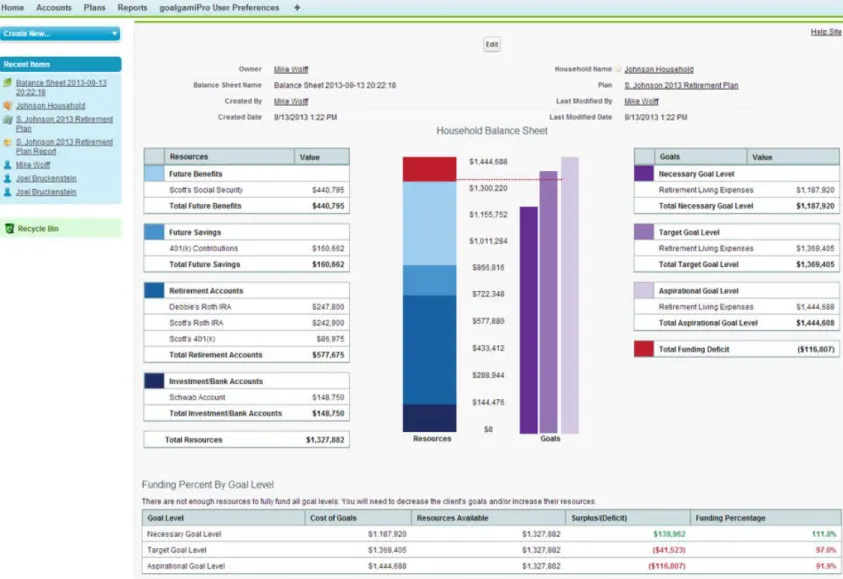
Once you become familiar with goalgamiPro in Salesforce, it generates screens that are very similar to the current version. Figure 2 shows a balance sheet screen generated from within Salesforce. Although the case is not identical, all of the design elements and outputs are.
Figure 2 Our Take
There is a gap between financial calculators and comprehensive financial planning programs; goalgamiPro may be positioned to fill that gap. Financial planning purists, no doubt, will find much to criticize about goalgamiPro. They will talk about its lack of comprehensive investment planning, income tax planning, estate planning capabilities, etc. They will argue that the application does not account for the sequence of returns during retirement.
Although I’d agree that goalgamiPro has limitations, it can be a useful tool. Americans are in dire need of basic retirement planning help, and they are not currently receiving it. According to Statistic Brain, the average savings of a 50 year old totals $43,797. Thirty six percent of Americans don’t have anything saved for retirement. These folks are not your typical financial planning client, and they are not going to pay thousands of dollars for a comprehensive financial plan. Odds are that they do interact with a bank, credit union, registered representative or some other financial professional who could profitably provide them with a basic plan at a cost they can afford.
Currently, 35% of Americans over 65 years of age rely exclusively on Social Security for retirement income. If nothing is done to better educate Americans about retirement planning, the situation is likely to get worse in the coming years. There is a great deal of talk in financial circles these days about online advice, and that may be part of the solution, particularly for future generations. But many Americans will require the help of a professional if they are to craft even a basic plan, and goalgamiPro seems suited to the task.
goalgamiPro is much improved since we last looked at it. Some plan or economic assumptions, which were fixed in the past, can now be modified as necessary by the advisor. Advisors can, for example, assign a different COLA to each goal should they desire to do so. For example, you could have one COLA for base living expenses, a second one for healthcare expenses, and a third one for college funding.
Collaboration Connect, a secure website for clients and prospects, allows individuals to develop their own goalgamiPro plans in an interactive setting. Individuals can then invite their advisor to come collaborate with them in order to better refine the plan.
goalgamiPro is now mobile and tablet friendly. You can review plans with clients while in their office or while on the road. I logged on briefly with an iPad to try it out. In the landscape mode, the user experience is just fine.
We also believe that goalgamiPro can be a good prospecting tool. So does ASI: they offer marketing seminar help that is available as a download at no additional charge. They also offer one-on-one training. All in all, you get a lot of value for $495 per year.
As for the regular version vs. the Salesforce version? Unless you are an enterprise user of Salesforce, we’d hold off for a few months at least before jumping in. The existing version is rock solid. The Salesforce version is still being built out. In addition, over time perhaps ASI will figure out how to simplify the provisioning of Salesforce through the AppExchange for smaller users.
For enterprises, it would seem that the Salesforce version is a no brainer, as soon as it offers the same functionality as the original version. The integration, analytics, and audit trail are compelling reasons to switch; just be ready to offer training and support until users adapt to the new interface.
Within the parameters that ASI has specified, we think goalgamiPro delivers. We believe that the Salesforce version will be the better choice for larger organizations that use Salesforce. For smaller firms to benefit from the Salesforce version, a better installation and training approach is required.
Tamarac Business Analytics
By Joel BruckensteinHere at T3, we’ve long maintained that one of the most underappreciated aspects of good CRM software applications is their ability to generate highly desirable business intelligence. If you want to improve your operational efficiency, you need to know where you are currently before you can map out where you want to be. Ultimately, business analytics drive the value of your business. If you are thinking about selling your practice in five or ten years, does it make sense to wait until you are ready to sell to start looking at your business analytics, or does it make more sense to familiarize yourself with key data today so that you can address any weaknesses now and make your business more attractive to a potential buyer somewhere down the road?
A number of CRM providers who serve the financial advisory community now provide some combination of business analytics reports and or widgets. Junxure, ProTracker, Redtail, Salesforce and others either offer or soon will offer these capabilities in one or more of their products. The problem is that in order to get the maximum benefit from these reporting capabilities, you need to have the appropriate data available to your CRM system. The question is: How do you get that data into your CRM system?
In a perfect world, your CRM system would be seamlessly integrated with all of the appropriate applications that are necessary to provide you with the data you need to analyze your business. The good news is that some CRM providers do a decent job of integrating with custodial back offices and other third party providers. The bad news is that level of integration across the industry is far from uniform. Some CRM providers are better than others with regard to integration, and even if your CRM provider does offer some integration, they may not offer deep integration with all of the providers that you require. That could leave you with the need to perform file imports, or worse yet, require a significant amount of manual data entry before you can access the business intelligence you require.
Tamarac CRM appears to be particularly well positioned to offer users of the Tamarac Xi Integrated RIA Platform the analytics they require with a minimal amount of user intervention. Because Tamarac Xi is an integrated platform, in contains data from a wide range of sources including: the CRM software, AdvisorView (the Tamarac portfolio reporting package), the portfolio accounting system (including billing), the client portal, outsourced portfolio services, data aggregation services, and custodial platforms. Since most of the necessary data already exists on Tamarac servers, organizing the data and producing meaningful reports can be automated to a large extent. Let’s take a brief look at some of the business intelligence capabilities of Tamarac CRM.
Tamarac currently has six analytics reports. We’ll highlight a few of them here. We expect more to be built out based upon client demand. The first report is the Client Profile overview. This report can serve a number of purposes, but a common one is to prepare for a client meeting. With this report, you can see how many open activities there are related to the client throughout the firm, you can see when the client’s portfolio was last rebalanced, and much more. In fact, you can see every activity associated with the client (the default view is the past 90 days, but it can be altered). You can also see the client’s AUM with the firm and benchmark it against the average of your other clients, the firm’s other clients, etc. The report shows how much revenue (calculated on a 12 month rolling period, updated daily) the client generates for the firm, and whether the revenue being generated is aligned well with the cost of providing services to the client, so you know if you
are charging appropriately, and more. If you set up a widget on your dashboard so that you can review your upcoming meetings, you can then run the Client Profile report with a single mouse click in advance of the meetings.
Client Profile Page
The COI (centers of influence) Profile helps you better understand who is referring the firm business, so it better helps you quantify the true value of a client. For example, if your initial review of the Client Profile leads you to believe that a client is not as profitable as you would like, a glance at the COI Profile might cause you to recalibrate your evaluation if that client refers you a significant amount of profitable business.
The COI Profile allows you to slice and dice the numbers in numerous ways. You can look at referrals at the firm level and at the individual advisor level. You can also look at who is referring. For example, you can look at all referrals from all sources firm wide or all referrals from a single source firm wide, or by advisor. At the advisor level, you can look at referrals form a single source, or all sources. You can further refine the data to show you prospects referred by a source, referrals from the source that have become clients already, or a combination of the two. This data can also give you an idea of who at the firm is best leveraging their referrals, as well as the conversion rates of referrals from various sources.
According to Tamarac, the Firm Valuation report was the most requested intelligence feature by advisors. This report provides key metrics at the firm level including total firm revenue, total number of clients, clients by geographic location, client age (average and a breakdown by ranges), client tenure, AUM (average and by demographics), and average fee per advisor. All of the data is presented in meaningful ways. You can view revenues by age ranges, so you can see if, for example, most of your revenue is coming from your oldest clients, which might be a danger sign. Tamarac can also provide you with revenue at risk by age range. This essentially looks at the older clients, the ones that would generally be at risk, to see if the next generations of that family are clients. If they are, there is less risk because it is likely that the assets will stay at the firm; if not, the assets are at risk.
Firm Valuation Profile
There are other useful reports available. For example, the Business Development Summary can help a firm view their entire sales pipeline to ensure that the biggest and best opportunities firmwide are receiving the proper attention.
Business Development Summary
We’ve only provided a brief overview of the new business intelligence capabilities that Tamarac now offers, but we hope it will be sufficient to explore how these reports and widgets can help you increase the value of your business. It is worth noting that business intelligence is included with Tamarac CRM at no additional charge. In order to take full advantage of these capabilities, you need to be using the whole Advisor Xi suite, although you can benefit from most of the analytics even if you are using the suite with the exception of the rebalancing application.
As mentioned earlier, this is a relatively new addition at Tamarac. As advisors become familiar with the capability of the product and provide feedback, we expect additional analytics to be forthcoming.
For current Advisor Xi users, these new capabilities are a meaningful enhancement. For those who are considering Tamarac Advisor Xi, business intelligence makes the offering that much more compelling. Tamarac CRM is not the only CRM system targeting advisors that provides business intelligence, but the comprehensive nature of their offering appears to give them a leg up vs. some of the competition when it comes to offering a comprehensive set of data in a timely, automated fashion.
practice and achieve bold new levels of
efficiency, service and profitability
Sick and tired of spending more time wrangling paperwork and managing your office than serving clients? Is overhead eating up your profit margins? Don't sweat it: This book has the answers to your problems.
This much anticipated update of the book that has become the financial advisor's technology bible delivers the technologies, workarounds, and procedural efficiencies you need to drastically reduce your paperwork, slash your overhead, and find anything you need in seconds—while growing your business, building your brand, and boosting your profits.
Featuring 14 contributions from an all-star team of experts that's a virtual "Who's Who of Technology for Financial Advisors", this book gives you what you need to know to take your practice to a bold new level of professionalism and efficiency. You'll find:
• Non-biased, in-depth reviews of all the CRM systems on the market, with guidance on choosing the ideal one for your practice
• The latest in financial planning and portfolio management software and how to choose the best programs for your clients and grow your business
• Guidelines for seamlessly integrating your software systems for greater efficiency, lower costs, and bigger profits
• The lowdown on The Cloud, how it's revolutionizing the financial planning industry, and how switching to a cloud-based IT infrastructure can save you big bucks
• Guidance on how to use the Web and social media to grow your business, with tips on how to manage your online presence
• A road map for making the transition from a brick-and-mortar to a digital firm—with expert advice on how to build and manage a virtual staff
• Proven methods for accurately calculating the return on your technology investments, along with solid budgeting tips
In today's shaky economic environment, the rule for financial advisors is "evolve or perish." Arming you with cutting-edge strategies and tools for evolving your practice and dramatically increasing your efficiency, customer service, and profitability, Technology Tools for Today's High-Margin Practice holds the key to your professional survival.
Available wherever books are sold online.
See the front page of this newsletter to learn how to receive a free copy of the book!
Tom Nally, President, TD Ameritrade Institutional, says this about the book:
"Drucker and Bruckenstein have brought together the industry's top tech minds to create a road map for advisors
looking to achieve scale and profitability through better use of technology. Dave and
Joel have the exceptional ability to see the 'bigger picture' and provide a fresh perspective on how advisors
can maximize their technology investments."
---John Bowen, founder and CEO, CEG Worldwide, LLC; columnist, Financial
Planning magazine, adds:
"Backed by their years of experience, David Drucker, Joel Bruckenstein and friends
share their valuable hard-learned lessons and unique insights in this great book for
financial advisors who want to use proven technology solutions for doing well by their clients so that they, as advisors, do exceptionally
well. This book is an excellent resource for any advisor focused on running an efficient and
How to Boost Your Firm's Annual Income by 20%
By Michael Laks, LaserficheAccording to recent research from Aite Group, an independent research and advisory firm focused on the financial services industry, RIAs that leverage technology integrations earn approximately 20% more in annual income than firms that do not.
What is it about integration that has such a big impact on the bottom line?
Firms that are successful in getting their software systems to work together realize productivity gains that can be invested elsewhere. In fact, Aite estimates that employees at firms that take advantage of integration spend 32% less time on operational processes, the equivalent of roughly “40 weekdays a year for every employee to engage in more revenue-generating activities, including client management and prospecting.”
Imagine how much new business you could bring in if you—and all of the advisors in your office—had 40 extra days a year. Pretty stunning, isn’t it?
So where should you start?
Because CRM systems house all critical client information, and because wealth management involves so much paperwork that’s tied to each client’s account, many firms start by integrating CRM with a document management system. Ken Severud, Senior Vice President and Chief Operating Officer of Wealth Enhancement Group, explains, “We’re a CRM-centric shop, so we wanted documents to be accessible in the CRM application that’s always live and active on our employee’s desktops.”
At Wealth Enhancement Group, integrating CRM with document management means that, when an advisor is looking at a client record in the firm’s CRM system, he can double-click on an icon within the documents tab of the CRM and the integration takes him directly to that client’s document in the document management repository.
The integration, Severud says, is “single sign-on. Very quick. Very easy.” This is important, he explains, because, “if it’s not convenient and productive, employees don’t use it.”
In terms of the productivity boost Wealth Enhancement Group gained through this integration, Severud notes that it comes within 90 days of opening a new account. “It’s generally within the first 90 days that a document is actually needed for reference or retrieval. After the first 90 days or so, you may go two or three years before a document needs to be retrieved again.”
To take advantage of this opportunity to enhance productivity, Severud says, “It’s important to invest in a document management system that allows you to easily index documents and set up automated workflows that produce consistent outcomes.”
“After we completed the upfront work to set up the document management system and the integration to our satisfaction,” he says, “the resources required for capturing, storing and retrieving documents were minimal. We knew where they were. We knew how to retrieve them easily through our CRM, and we knew they were stored in a compliant fashion.”
Severud also notes that, when it comes to the way the two systems are integrated, two-way communication is important. This means that, when a change occurs in one system, that change is immediately reflected in the other. For example, if an advisor changes a client record in the CRM system, that change will automatically be made in the document management system. This saves employees from making updates in two places, further increasing productivity.
Of course, when you integrate more than two systems, you can enhance efficiency even further. For example, some firms are now digitizing and automating the new account opening process from end to end by integrating CRM and document management with forms-filling and eSignature solutions.
With this four-part integration, forms that used to spend weeks in the mail and awaiting signatures now move automatically—with just a few clicks of the mouse—from advisors to clients to compliance supervisors. The streamlined process works as follows:
1. From the new client’s entry in the CRM system, the financial advisor sends new account data into the forms-filling program, which auto-populates the account application and all related forms.
2. With the click of a button, these forms are sent to the electronic document repository.
3. By clicking a button in the repository, advisors email the form to the account holder, requesting an e-signature.
4. Once the account holder has electronically signed the form, it is automatically sent back into the document repository.
5. The workflow component of the document management system automatically launches the review and approval processes, after which it files the forms so that advisors can begin booking revenue.
Despite the benefits that firms with integrated technology solutions accrue, many RIAs still shy away from systems integration. According to InvestmentNews’ 2011 RIA Technology Study, many firms worry that improving systems compatibility will be too time-consuming and expensive, particularly if they lack in-house IT expertise.
Wealth Enhancement Group has great IT talent in-house, and it knew that finding a turnkey integration from a trustworthy partner was the key to success. “We have a very trustworthy relationship with our vendor, and it didn’t take them long to get our integration implemented,” says Severud. “As we’ve provided feedback, they’ve also worked with us to evolve and enhance the integration, so that we are able to get as much productivity out of it as possible.”
The integration has allowed Wealth Enhancement Group to reduce costs and enhance productivity in a number of ways, most notably by:
• Reducing paper consumption by 450,000 sheets or 900 reams of paper annually.
• Freeing up nearly 2,000 square feet of physical space by archiving legacy paper records.
• Reducing the need for photocopies so much that one and a half full-time employees could be redeployed to perform value-added activities.
“When you’re in a service business, and that service is dependent on the timeliness of information, the fact that everything’s at the fingertips of the advisor teams is priceless,” says Severud. “When a client’s on a call or a vendor calls looking for information, and our advisors are able to efficiently pull up that information and answer the questions, that’s great service. And there’s nothing more I love than superior customer service.” Except, maybe, seeing annual income increase as a result.
###
Michael Laks is the Financial Program Strategist at Laserfiche. See more of his writing at: http://
www.laserfiche.com/ECMBlog/Article/3-ways-financial-advisors-can-support-regulatory-compliance#sthash. 85BGa4wF.dpuf
Use Your CRM for Procedural Orchestration
By Jim Graddon, Founder, TopLine Catalyst GroupMost advisors and firms use Customer Relationship Management (CRM) software mostly for contact management and note keeping. Some take advantage of the CRM’s inherent marketing capabilities to tie touch programs to client segmentation. However, few use CRM as a collaborative platform to help your team get the right things done at the right time. In this article, we will discuss the various types of business process and workflow software available and why the CRM-based procedural orchestration tools are quickly becoming the trending choice for people operating within professional services firms. Procedural orchestration is more often viewed in context with document management, workflow, business process management, or project management software. It is important to understand the differences in purpose for each of these powerful tools to understand why a CRM-based procedural engine is essential for financial advisory firms of all sizes.
Procedural Orchestration Software
A financial advisory firm, like most professional services firms, do not really sell products. The firm effectively provides the team’s time to a client. Time consists of the time spent with a prospect or client, preparation time in advance, and fulfillment time after. Most of the preparation and fulfillment time is doing fairly routine procedures of the type found in the firm’s procedure manual. The link between a contact, time, and projects is what a CRM excels at tracking linked together. Since scheduled time with a contact is the widget being sold, managing it carefully is paramount. The only logical way to do that is through a shared CRM platform where scheduled time and activities can guide everybody on the team to do the right step at the right time.
Many financial advisory firms become disillusioned with the usefulness of their CRM from an efficiency gain perspective. This is because the CRM is not being treated as a platform for firm-wide procedural orchestration. The orchestra is preparing for a performance without a common set of sheet music and no conductor until the day of the performance. So much can go wrong and does without a disciplined approach to using the CRM. Last minute scrambling becomes commonplace leading to cancelled meetings and additional unplanned work or interactions.
Taking the best practices from workflow automation related to document management, business process management, enterprise resource management, and project management solutions and marrying it to CRM finally allows for collaborative procedural discipline. How is this done?
1. Document procedure definitions as rules with “how to” instructions within a CRM-linked repository. The only way to ensure procedural discipline is to have a “black box” that assigns the right work the same way every time. The CRM needs a guidance system to populate it in a consistent manner. However, each firm needs the ability to compose their own procedural definitions within the guidance system version that they use. One size cannot fit all because each firm is unique and has a unique approach for at least some aspects of how they work. This knowledge needs to be transferred from individual subject matter experts into a shared knowledge base.
2. Each scheduled interaction must automatically trigger the assignment of procedure steps to the right person at the right time. When schedules change, as they often do, the procedure steps must also be dynamically rescheduled for the assignees.
3. It must be easy to see the status of all assigned steps to avoid unpleasant last minute surprises. Tracking frequency and achievement results of all procedural sets and steps can then provide management with insight to manage capacity and performance over time.
Many CRMs used in the industry provide a capability to use templates to guide individuals to add tasks to their personal CRM. Custodians and some industry thought leaders have been taking it a step further leveraging the “black box” concept applied to the Salesforce CRM platform by Orchestrate’s ProcessComposer app. Initially pioneered by Foster Group of West Des Moines, enforcing procedural discipline earned the firm a measured 31% efficiency gain and the Charles Schwab Best-in-Business Impact Award for 2012. This CRM approach to procedural orchestration is an emerging trend that the financial advisory industry is enthusiastically embracing.
Other Process-Oriented Software Document Management
Over twenty years ago the innovators in server-based document imaging systems focused on scanning and indexing business documents to attempt to eliminate filing cabinets. Financial service enterprises and legal firms were the industry segments with the most cabinets leading them to adopt systems from Wang, Filenet, and IBM. Today, there is an abundance of document imaging software alternatives that are commonly referred to as Document (DMS) or Content Management (CMS) Solutions.
Workflow logic has been associated with document management from the beginning. The central handling of incoming documents required distribution logic once scanned into electronic file folders. Each file folder was tied to a set of procedures that had role assignments. The file folder moved through a series of sequential gates until the prescribed handling was complete. Most document management or imaging systems were further integrated into administration systems so that the images could be accessed from the corresponding transaction record. Given the high volume purpose, electronic documents generally only stayed available online for a fiscal year.
An advisory firm’s workflow is one-to-one interaction driven not volume transaction driven for the most part. Though documents have a key role in each interaction, there is no volume processing component per individual document. Those who have tried to adapt DMS workflow capabilities to an advisory firm’s procedural orchestration requirements tend to give up and just use the document repository functionality for its strengths and to apply some compliance approval logic. These are still important functions but they are just the tip of the iceberg for instilling procedural discipline into all aspects of an advisory firm.
Business Process Management Software
The early attempts of process automation through document workflow evolved as the industry entered the business process reengineering (BPR) era in the 1990’s. The Michael Hammer credo introduced in his book, “Reengineering the Corporation,” sparked organizations to attempt to reengineer business processes around outcomes rather than tasks. This movement was often tied into Total Quality Management programs. BPR eventually fell on its own sword by being considered the root cause of the corporate downsizing era. However, the BPM software revolution continued its own journey.
So far, we have uncovered few advisory firms that have adopted BPM software but some do rely on the basic workflow capabilities built into some industry CRM offerings such as Redtail or Junxure. Led by process automation advocates such as ActiFi and leading custodians, the financial advisory industry is getting much
help to organize around outcomes rather than tasks with an enhanced CRM as the firm’s pseudo-BPM platform.
Project Management Software
Outcomes from a procedural orchestration perspective can also be viewed as projects or events. Project Management software often used by IT departments, such as Basecamp or AtTask, can be excellent tools to plan detailed steps as assignable tasks to be carefully tracked against due dates and estimated timelines. In advisory firms, procedure steps are also tied to schedule interactions and each interaction’s preparations and follow-up procedures. This is best handled through a direct link to a specific client and calendar management. Project management software is generally free-standing and CRM integration for standardized procedures can be quite difficult to achieve.
Best Practice for Financial Advisory Firms
A CRM is the best platform to track workflow that is schedule-driven. What you need to avoid is the chaos of inconsistent entries on a personal basis. Using an imbedded procedural orchestration engine provides significant efficiencies to ensure your team always executes in perfect harmony.
###
Jim Graddon is a strategic catalyst and evangelist for Orchestrate, LLC. For over three decades, Jim has been looking up the value chain through the unique and often ignored perspective of financial advisors and their firms. Marrying CRM and process automation concepts within the investment and insurance distribution segments has been Jim’s avocation since 1981. Learn more at www.orchestratellc.com.
Conference Sightings
During the coming months, Dave and Joel will be speaking at these conferences:
- T3 Enterprise Conference, November 3-5, 2013, Chicago, IL (Joel & Dave)
- T3 Advisor Conference, February 10-12, 2014, Anaheim, CA (Joel & Dave)
Is This Your Copy of T3??
If this not your copy of the T3 Newsletter, we’d like to welcome you to the T3 Community. In order to be a member, just use the order form on the back of this newsletter to get your own subscription.
Please be aware that it is a violation of Federal copyright law to reproduce all or part of this publication or its contents by xerography, facsimile, scanning or any other means. The Copyright Act imposes liability of up to
$100,000 per issue for infringement. Information concerning illicit duplication of this issue will be gratefully accepted. Legal reprints of this and other T3 features are available upon request.
A Little Friendly Advertising
from Joel P. BruckensteinSeldom do I tout my “outside” ventures, but I've been able to help many advisors with my consulting services, so want you to know about them in the event I can help you, too.
IT Consulting
You and your firm can hire me to improve your office efficiency and leverage your investment in technology. I will evaluate your current systems and processes, and then recommend appropriate alternatives.
I work with firms of all sizes, including major broker dealers, insurance companies and software developers. I also work with boutique RIA firms and solo practitioners. I often helps firms evaluate and implement technology tools. In addition, I consult on workflow management and outsourcing. I am available to consult on financial p l a n n i n g s o f t w a r e , p o r t f o l i o m a n a g e m e n t software,solutions, document management, software integration, custodial platforms other advisor related products as well.
Consulting fees range from $250-$400 per hour, depending on the nature and complexity of the project, with a deposit of $500, representing my minimum fee per engagement. For further information about this, or any of o u r o t h e r s e r v i c e s , p l e a s e e m a i l [email protected].