Data Base Management System DBMS-1 What is Data Base Management System
DBMS Softwares Data Base Structure Creating Data Base Editing Data Base Querying Data Base
Relational Power of Data Base
Integration of Numeric and Spatial Data
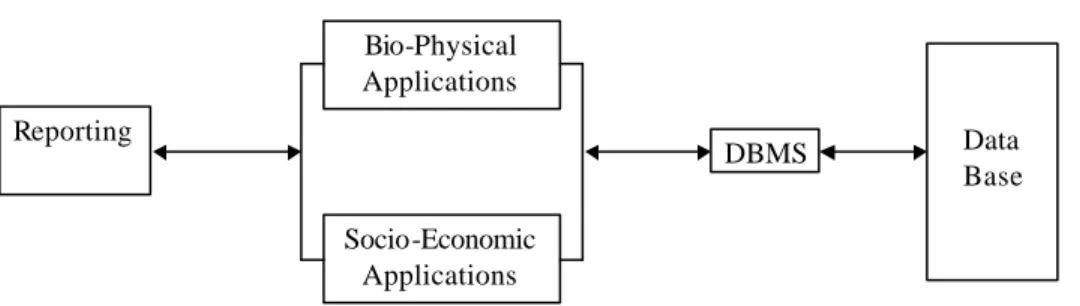
. Bio-Physical Applications Socio-Economic Applications DBMS Data Base Reporting
Data Base Management System DBMS-3 What is Data
Base Management System
Data base management system (DBMS) is a program that serves as an interface between application programs and a set of coordinated and integrated files called a data base. Before the use of DBMS there was little, if any, integration or data sharing among the functional information systems. However, there are many opportunities for these systems to share the same data. For instance, the deforestation application could share data with the land use information system.
Data base management systems are an interface between the functional applications and the data base, as shown in fig. 1. The DBMS allows the various functional systems to access the same data. The DBMS can pool together related data from deferent files. DBMS is perhaps the most important tool in decision making for sustainable development
DBMS Softwares There are many softwares which can do the job required in DBMS. These softwares are based on the same basic structures but may have different outlooks. Some commands may be available only in one or a few number versions. The syntax, menu system, and filenames may be somewhat different.
Thus it takes a little time but not much to get familiar to another version another similar software. For numeric data:
• dBASE II, dBASE III, dBASE III+, dBASE IV, dBASE V • Foxbase, Foxbase+, Foxpro
• Access • Paradox, etc. For spatial data: • ARC/INFO • ARCVIEW • MAPINFO • SPANS, etc.
Data Base Management System DBMS-5 Data Base
Structure
A database consists of a number of tables • Each row is a record
• Each column is a field
COUNTRY YEAR CH4_EMISSN SO2_EMISS N
Bangladesh 1980 52369 13370
Bhutan 1980 9372 420
India 1980 4986 34
• Each table is kept in a database file with the extension name .DBF • Each field has:
• Field name (10 characters) • Field width (fixed for each field)
• Field type : 5 types (Character, Numeric, Date, Logical, Memo, General, Float)
Character: A combination of letters, numbers, spaces, and/or punctuation marks that are treated as a text string.
Numeric: A number consisting of a number, a decimal point, and, if it exists, the decimal part of the number. For example, the number 9999.99 requires a field with of 7
Date: An 8 character wide field having the format mm/dd/yy.
Logical: A 1 character wide field containing a .T.(true or yes) or .F.(false or no). Memo: A memo field contains ASCII text.
General: This field type stores data like pictures and graphs.
Float: A floating field especially is just a special case of the numeric field type. a field
Creating
Database Basic commands in creating a database file
CREATE :Create a new database file
BROWSE :Edit and append in a similar manner to worksheet
MODIFY STRUCTURE :Change the database structure
USE :Open a database file
CLOSE DATABASE :Close all database files
CLEAR :Erase the screen
Data Base Management System DBMS-7 Editing Database
This section introduces you to commands used in editing database files
APPEND :Adds a new record to the bottom of the current database and displays an entry mask to accommodate data input
APPEND BLANK :Adds a new blank record but a data entry mask is not displayed when the BLANK clause is used
INSERT : Place a new record after the current record.
INSERT BEFORE : The BEFORE clause adds the record before the current one. INSERT BLANK : Insert a blank record after the current one.
EDIT :Edit the current record
EDIT RECORD n :Edit the designated record
EDIT FIELD Field1,Field2.. :Restrict the data entry mask to the named fields BROWSE Field1,Field2.. :Display a table that is restricted to the named fields DELETE : Mark the current record for deletion
DELETE FOR Condition :Mark all records for deletion that meet the given condition PACK :Remove those records that have been marked for deletion
COPY TO Dbfile :Copy the current database to the named file
COPY STRUCTURE TO Filename : Copy the structure of the open database file to a new database file having the given name
SORT ON Field TO Filename :Performing an ascending alphanumeric sort of the current database using one or more named fields as basis for the sort. The sorted output is copied to the named database file SORT ON Field TO Filename DESCENDING : The sorted database will be arranged in descending order
INDEX ON Field TO Indexname : Create an alphanumeric index based on the named (key) field. An index file, which has an extension like IDX, jumps the record pointer to the first record that contain the given value in the key field.
REINDEX : Reindex an open index file; required when records are records are added or deleted without the index being open.
USE Dbfile INDEX Indexfile : Open the database and index file together
Data Base Management System DBMS-9 Querying
Database
Following is a list of math operators that are commonly used in querying data Symb ol Operator Example + Addition 3+5 - Subtraction 5-3 * Multiplication 3*5 / Divide by 5/3 = Equal to X=3
> Greater than X>Y
< Less than X<Y
>= Greater than or equal to
X>=Y <= Less than or equal to X<=Y <> Not equal to X<>Y
^ Exponent 3^2
Commands commonly used in query operation.
LOCATE FOR Field=‘value’:Locates the first record in the open database file that contains a give value in the named field
SET FILTER TO: This command is used to designate a group of records with in the current table COPY TO Dbfile FOR Condition :Copy those records matching the given condition to the named file COPY TO Dbfile WHILE Condition :Copy records to the specified database while a certain condition exits
CREATE QUERY :Activate a query dialog box to select the data of interest
Data Base Management System DBMS-11 Relational Power
of Database
The real power of the database management system comes into play when you are using two or more related databases. For example, a typical air pollution database uses many different kinds of information including:
Wet deposition Air concentration Land use
These databases can be open at the same time and information can be extracted form different files. Each concurrently open file and any corresponding index files are maintained in what is called a work area. A work area is accessed using the SELECT command, described in the following command summary. The key to a successful exchange of information between open database files is to place the record pointer at the right record position within the involved database files. The record pointer stays in place within each database until moved by a command.
Work Area File
Record No.
The record pointer is moved within each database file by first selecting a database and then issuing a command such as LOCATE or GOTO.
1 wetdep 1 2 <-pointer 3 4 2 aircon 1 2 3 4 <-pointer 3 Landuse 1 <-pointer 2 3 4
Command Summary
The following command summary describes how multiple databases are opened.
SELECT n :This command is used to select a work area into which a database file and corresponding index files are maintained. The expression n is the work area number.
Example: SELECT 1 USE wetdep SELECT 2 USE aircon SELECT 3 USE landuse SELECT 1 BROWSE SELECT 2 BROWSE SELECT 3 BROWSE
Data Base Management System DBMS-13
SET RELATION TO Fieldname INTO n : This command establishes a relationship between the currently elected database and the named database (using work area number). The relationship is established based on a common key field.
Example: SELECT 1
USE wetdep INDEX wetdep SELECT 2
USE aircon INDEX aircon
SET RELATION TO sitename INTO 1 BROWSE FIELDS wetdep.ph , aircon.so2
JOIN WITH n TO newdatabasename FOR condition :This JOIN command creates a third database using fields from each of the two open database files. A common field, such as sitename, exists in the two supporting database files and can be used as a basis for joining records in the resulting database file. Example:
Put the two databases in work area 1 and 2: SELECT 1
USE landuse SELECT 2 USE wetdep
With the two databases in work areas, you are ready to use the JOIN command. You join the two databases to see all values associated with landuse and wet deposition having matching names in the sitename field. Note that the population database was the last database selected, so it is presently active. JOIN WITH landuse TO both FOR sitename = landuse.sitename
Joins the information into a new database named “both”. Now you can place the joined database, named both, in use and check the contents with the BROWSE command.
Data Base Management System DBMS-15 Integration of Numeric and Spatial data
Numeric data tables created in DBF file format can be joined with spatial data created by GIS softwares. Foxpro also have the facility to edit the spatial coverages up to some extent. Following example explain entering numeric data into an ARC/INFO coverage.
1. open the file called “pat.dbf” using database program
2. Add one additional filed (so2) to accommodate SO2 data MODIFY STRUCTURE <Enter>
5. Enter SO2 concentrations of given monitoring sites
6. Complete the data entry and exit from database program 7. Examine the modification in GIS software ARC/VIEW