Micron Technology, Inc. February 14, 2014
In the classic ROT13 method, each letter in the plain text is substituted with a corresponding letter 13 places further ahead in the alphabet.
There are many well known, proven encryption mecha-nisms, and most operate in a similar manner.
Factors Driving Adoption
More and more data storage applications are adopt-ing—and even requiring—encrypted solutions, espe-cially in mobile computing. In the past, thieves would steal laptop notebooks for the pure value of the notebook. Today, it is normal for the dollar value of the data on a storage device to be more valuable than the hardware itself—sometimes, a lot more valuable. As a
A B C D E F G H I J K L M N O P Q R S T U V W X Y Z Plain text H E L L O U R Y Y B Cipher text ROT13
What is Encryption?
In its simplest form, encryption is a mechanism used to obscure data from any unintended audiences. Methods of encrypting data range from the simple (ROT13), to the complex (ENIGMA), to the extremely complex and robust (AES).
Simple Encryption Example: ROT13
One of the simplest (and oldest) encryption mechanisms is rotation. In rotation encryptions like ROT13, values in the original, unencrypted message (plain text) are substituted for new values, which creates the encrypted message (cipher text). This substitution follows fixed rules that are known to the recipient of the cipher text so that the message can be decrypted.
The arrows show the prescribed letter replacement: “A” is replaced with “N” (and “a” is replaced with “n”; case doesn’t matter).
User file and directory area
Operating system area
Boot area
result, the target of theft has moved from the note-books themselves to the data stored on them. There are many publicized examples of mobile workers losing a notebook that contains sensitive information like client Social Security numbers, credit card information, and even business research and intelligence. All sensitive data is at risk.
Even systems that are kept in close control by their own-ers are vulnerable. Computer hacking has graduated from an annoyance to big business. Instead of wanting to impress their peers, hackers today are out to compro-mise a system and steal sensitive (and valuable) data, which they can then sell to the highest bidder.
The sheer volume of these data intrusions are now driv-ing changes to corporate policy and legal governance, demanding solutions to the problem. Federal litigation (such as Sarbanes/Oxley) puts the responsibility of data protection on both the end user and the corporate officer, with dire consequences if that protection is insufficient. Even internal corporate documents, such as security policy and processes, need to be kept private.
Data Encryption: File Level vs.
Full Disk
When considering data encryption in a computing en-vironment, it is important to think about where data is stored and accessed and how those areas are protected with common encryption techniques.
In the case of a PC (notebook, server, or desktop—it doesn’t matter), the most obvious place to start is the hard drive. The hard drive spans three high-level uses: boot area, operating system area, and user file and directory area. Disk encryption schemes protect some or all of these areas of the disk but are commonly divided into two basic types: file/folder encryption and full disk encryption (FDE).
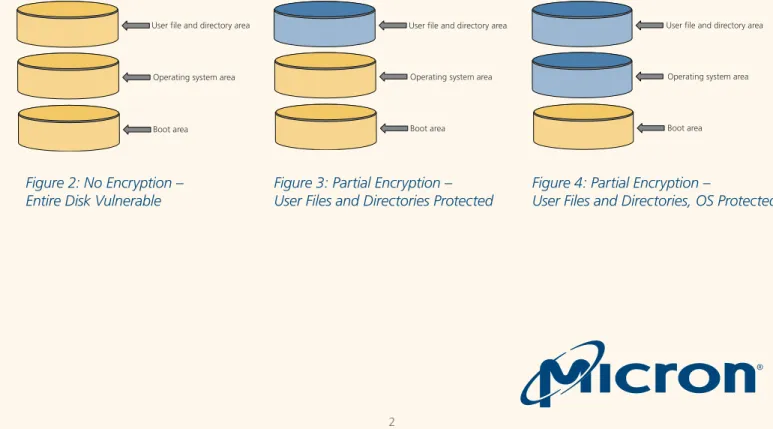
In Figure 2, the sections of the disk shown in yellow are unencrypted. Because this system has no encryption implemented, all sections of the disk are vulnerable: the boot sector, the operating system, and the user data. In Figure 3, only the user’s files and the directories they’ve created are encrypted. This section of the disk is safe because we assume that whatever means of encryption employed are sufficiently robust enough to make encrypted data essentially inaccessible to unin-tended users.
If this encryption is extended to the operating system itself, as shown in figure 4, all of the OS bits are en-crypted as well as the data that the OS creates—tempo-rary or permanent. In this example, assuming the OS is Windows, the core .dll files, executables, user settings, the registry, and even the swap file would be protected. When encryption is extended to the next logical level— the entire disk—it is commonly referred to as full disk encryption or FDE, as shown in figure 5.
Figure 4: Partial Encryption –
User Files and Directories, OS Protected
User file and directory areaOperating system area
Boot area
Figure 2: No Encryption –
Entire Disk Vulnerable
Figure 3: Partial Encryption –
User Files and Directories Protected
User file and directory area
Operating system area
With FDE, all portions of the disk are encrypted and, hence, protected from unauthorized access. From the boot area, to the operating system, to the user data files and folders—everything is protected. Full disk encryption is the most sophisticated and secure method of data encryption on a local drive.
Benefits of Folder and File
Encryption
Implementing encryption at the folder and/or file level has some advantages:
• Data encryption can be implemented on local drives or network shares, giving consistent security regard-less of the storage type (local or network). To imple-ment FDE on a network share, the hardware that serves the share must implement FDE.
• Because the same protection can be implemented on shared and local drives, it can be governed by consistent network and security policies, such as access control lists (ACLs) and authentication mecha-nisms (passwords, biometrics, etc.), and it can be easily managed from a central location (policy server, biometric record server, etc.).
• The user can specify which files/folders to encrypt. • This scheme protects data stored off drive on a USB
key or sent via e-mail.
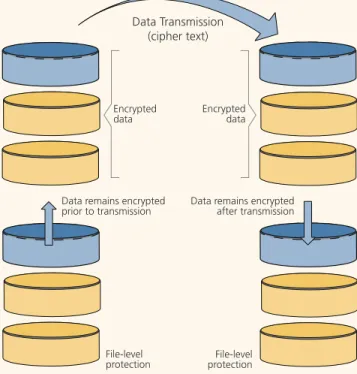
Folder- and file-level encryption offer a key advantage compared to FDE. Folder/file encryption is capable of protecting data in transit, whether sent via e-mail, shared via a removable drive, such as a USB stick drive,
Figure 4: Partial Encryption –
User Files and Directories, OS Protected
User file and directory area
Operating system area
Boot area
Figure 5: Full Encryption – Entire Disk Protected
Data Transmission (cipher text)
Encrypted
data Encrypteddata
Data remains encrypted after transmission Data remains encrypted
prior to transmission
File-level
protection protectionFile-level
Figure 6: Folder and File Encryption
selves are encrypted independent of the media on which they are stored, the protection is extended to data in transit, as shown in Figure 6.
In this example, each user is employing file/folder en-cryption. The user on the left will transmit an encrypted file to the user on the right via email. The file stored in the system on the left is protected by file-level encryp-tion and does not need to be decrypted prior to trans-mission because it is transmitted as cipher text (shown in blue). Once received by the user on the right, the file (still encrypted) can be decrypted for use, assuming the user on the right has the correct credentials.
Benefits of Full Disk Encryption
Full disk encryption (FDE) has significant benefits over other levels of encryption, including:
• The encryption mechanism itself can be implemented in hardware or software, offering design flexibility and cost reduction options.
• Every bit on the HDD is encrypted: the operating system, user and program data, the applications themselves (and the data they create during normal operation), as well as the OS swap file (which may contain data otherwise held in memory).
• A given hard disk can be married to a given platform via a trusted platform module, making drives that are removed from the platform less vulnerable. (See the TPM section.)
However, FDE is not a panacea. Other system-level vulnerabilities may exist that can’t be addressed with FDE—for example, having malware installed on a user’s system, which transmits data unknown to the user via the built-in wireless network. Since the data must be decrypted in order for the user to access it, it has to
be plain text data, yielding a potentially unprotected transmission. Similarly, data that is intentionally trans-ported (via e-mail, ftp, http, etc.) is not encrypted in FDE schemes, as shown in Figure 7.
Encryption methods for data storage devices should only be one part of an overall data security regime. FDE does not eliminate the need for data security methods such as user authentication, software and hardware firewalls, and antivirus applications.
Full Disk Encryption vs.
Self-En-crypting Drive
The terms full disk encryption (FDE) and self-encrypting drive (SED) are sometimes used interchangeably; how-ever, there are some distinct differences. FDE is a more generic term that can be used to describe full encryp-tion of a storage device’s data accomplished by either software or hardware methods. SED is a method of FDE that is always hardware-based.
An SED will always have a hardware-based encryption engine onboard—often integrated into the drive’s controller. Micron’s SEDs support the Trusted Comput-ing Group (TCG) protocols for hardware-encrypted storage devices. Specifically, Micron’s personal storage SSDs support the TCG Storage Subsystem Class Opal protocol while its enterprise storage SSDs are beginning to support the TCG Storage Subsystem Class Enterprise protocol. (Contact your Micron sales representative to determine which protocols are supported for a specific Micron model number.)
Implementation Options: Software
vs. Hardware
Full disk, partial disk, or file-level encryption can be implemented in hardware or software, each of which has its own considerations.
Considerations for Hardware Encryption
Ease of Deployment:Hardware encryption methods can be extremely easy to deploy, even in enterprises with large numbers of notebook computers. Generally, SEDs will always en-crypt the data written to the storage media, regardless Data Transmission
(plain text)
Unprotected
user data Unprotecteduser data
Data decrypted prior to transmission (ciphertextplain text)
FDE-protected
data FDE-protected data Data encrypted prior to
storage on FDE drive (plaintextcipher text)
application and clicking “Enable.” Software encryption, on the other hand, can take hours for first-time encryp-tion of user data.
Inflexible Deployment:
Because hardware encryption is implemented at the device level, changes in the encryption algorithm or key length are not easily implemented and usually require new devices. Given that Moore’s Law shows few signs of being broken, we can expect more powerful computing platforms in the near future and, hence, more powerful tools that will be able at break encryption techniques. Key lengths that were considered secure just a few years ago are now easily broken and vulnerable. A 40-bit key, for example, is easily broken via brute force because newer computing platforms have so much additional capability to increase the number of brute force attacks (password guesses) per second with each new introduction. Today’s modern 256-bit encryption keys are widely considered to be unbreakable. How -ever, it is conceivable that future development will lead to enough supercomputing power to break a long encryption key in a reasonable amount of time. Such a development would potentially require new encryption engines in hardware, which is an expensive redeploy-ment.
Encryption Key Security:
In hardware encryption, particularly for SEDs, the en-cryption key resides in hardware on the storage device. The encryption key never leaves the device and, thus, is never exposed to intrusion or detection.
Considerations for Software Encryption
Performance can be degraded:Software encryption mechanisms often rely on CPU and memory resources in the host system. Therefore, software encryption usually results in a significant and noticeable reduction in data throughput performance. End-to-end software encryption management requires encryption of data blocks that are not in use (in addi-tion to user data), which adds even more performance overhead. This is especially important for SSDs be-cause end-to-end encryption can result in an SSD that behaves as if it was 100% full. Micron has observed as much as a 20% degradation in data throughput, espe-cially for write speeds, due to software encryption.
Keys stored in memory are vulnerable:
Software encryption mechanisms typically decrypt in-formation “on the fly” as it is read from storage media. To perform this decryption with the least amount of system performance degradation possible, these en-cryption mechanisms typically store the deen-cryption in-formation in the system’s memory. Although one might expect system memory to be secure—perhaps more secure than a disk—there is at least one well document-ed example of how a system that stores decryption keys in-memory can be compromised, even when the power is turned off. Briefly, here’s what happens:
• In the course of normal operation, the decryption key is loaded into the system’s memory and the de-cryption process executes to decrypt data on the fly. • At the end of a user session, the user closes the oper
-ating system and powers down the computer. • Data stored in system memory, including the decryp
-tion key (stored in system memory as plain text), remains for some amount of time, gradually decay-ing until the data is lost.
• If the system is compromised after power-down but before the system memory data dies away complete-ly, some data (such as a decryption key) can be re-covered and exploited. The amount of data that can be recovered is inversely proportional to the time between power-down and compromise and inversely proportional to temperature. (System memory data can be preserved for long periods of time if the com-promised system is chilled quickly.)
Upgrade paths can be difficult:
Just as hardware encryption can be disruptive (install-ing new hardware), software encryption methods can be subject to interoperability concerns among software applications, operating systems, patch levels, and other software elements essential to an end user’s productiv-ity.
Most software encryption deployments prohibit certain firmware updates. All user data must first be decrypted (leaving it temporarily vulnerable) before an update is performed—and then re-encrypted after the update is complete. Even on a very fast SSD, the decrypt and en-crypt steps can take significant time. Enen-crypting 25GB of user data can take more than one hour—even on a
A time-consuming decryption step is also required when cloning a drive because cloning an encrypted drive to a new drive results in a drive full of unreadable data (because the two drives will have different encryp-tion keys).
Software can be added to existing hardware and platforms:
Fortunately, software typically does not require ad-ditional hardware to be deployed, so it can easily be added to existing environments with less disruption and less cost compared to hardware-based encryption. Often, software encryption methods can be integrated into the operating system.
The Role of the Trusted Platform
Module
The trusted platform module (TPM) is a hardware de-vice that is tamper-resistant, permanently affixed to the system mainboard, helps integrate basic security man-agement functions, and helps thwart common attacks. The TPM provides several essential functions that help make encryption easier to implement and more robust. Functions such as platform identification (to ensure that the platform accessing the data is what it claims to be), random number and hash generation, encryption/ decryption key generation, secure subsystem (to ensure a hardened area within the host), key storage, and plat-form configuration definitions (registers) are all part of the TPM, as shown in Figure 8.
Hard disk
Encrypted data Encrypted key
Hard disk
Encrypted data Encrypted key
Security chip
Storage
PC (Notebooks, Desktops, Servers)
Executive
Security EnablementI/O
Nonvolatile Secured Storage Secure Platform Configuration Registers Opt-in (default is “off”) Secure Platform Excecution Engine Key Generation HASH Random # Generator Platform ID KeysFigure 8: TPM
The following essential functions are all housed inside the TPM chip that is soldered to the mainboard of a notebook, desktop, server, or storage array:
• Nonvolatile, secure storage • Platform configuration data • Opt in/out switch
• Hardened execution partition
• Key, HASH, and random number generators • Unique platform ID keys
One essential function of the TPM is to establish the identity of the system itself with respect to the encrypt-ed data. The TPM and the disk drive can be marriencrypt-ed to one another. The data storage system (e.g., the inter-nal disk drive) and the system mainboard are closely coupled through the use of stored decryption keys. Once the disk drive and the TPM are married, it is nearly impossible to read the data on that hard drive when the drive is removed from the original system and installed in another. The TPM signatures don’t match and the data won’t decrypt.
When data is encrypted, the key used to decrypt the data must be stored somewhere. For ease of use, the key should always be readily accessible to the user and be tamper-resistant. An ideal place for key storage is the TPM itself; it provides both a secure platform execution engine and the capability to generate keys and random numbers (essential functions), as well as a tamper-resistant storage area for those keys.
In a system without a TPM (below), the decryption keys are stored on the local hard disk— the same media that should be protected with encryption. Storing the key and the data on the same media makes unauthorized access easier.
In a system with a TPM, the decryption key comes from the TPM itself. If the drive is removed from the system, the TPM and drive are “decoupled”; and since the decryption key is stored on the TPM, it is not possible to read the data.
The Role of the Trusted
Comput-ing Group
Who is the Trusted Computing Group (TCG) and how do they factor into encryption and authentication? Founded in 2003 TCG is, at its core, a standards orga-nization. Membership driven, TCG’s primary role is to gain consensus from membership, develop standards, publish them, and drive their adoption in the industry. Organized by functional area, standards are developed and proposed by groups within TCG whose members are experts in a given area. Once a standard is pub-lished, TCG drives the adoption of the standard within the developer community and end-user markets. As a standards body, the TCG plays an essential role in getting the different encryption and authentication methods to work together (via standards).
The Role of the OS
What role does the OS play in data encryption? In some cases, the OS is more of a bystander, ensuring that it doesn’t get in the way when encryption is ac-complished by add-on components. In other cases (like Microsoft’s BitLocker), its role is integral. To understand the difference, we’ll examine BitLocker more closely. BitLocker is a data encryption and user authentication
Windows startup files (boot sector) Windows non-startup files (user data, registsry, Windows core, etc.)
TPM (permanently affixed to the system) User startup key (typically USB fob,
feature first built into Windows Vista Enterprise, Vista Ultimate, and Server 2008. BitLocker ideally—but not necessarily—integrates with a TPM to ensure that the data on the drive is encrypted and that the system is not tampered with when offline. This check is performed via an early boot integrity checking mechanism.
To understand how BitLocker unlocks a system during the boot process, consider the process of enabling the following components of BitLocker on a PC or notebook.
Windows Startup Files:
Data on the hard drive that
Win-dows uses to boot; contains the command interpreter, core system files, and other components necessary for successful Windows startup.Windows Non-Startup Files:
The (larger) section of the
drive that is used to store Windows files that are not part of the first boot sequence (such as, the registry), files that were installed by Windows applications and system devices (.dll files, drivers, etc.), and user data.TPM: The tamper-resistant, hardened security device permanently affixed to the system board.
User Startup Key (typically used in non-TPM enabled systems): A removable storage device—typi-cally a USB fob—on which one authentication factor (the startup key) is stored.
User-Supplied ID:
A password or PIN that users enter
as the final step to authenticate themselves and enable data decryption.Win7/BitLocker/TPM Startup Sequence: 1. System powers up.
2. TPM uses platform configuration registers of selected (and configurable) elements of the boot sequence (in-cluding the CRTM, BIOS, MBR, and other components) to determine if something has been tampered with. If not, the boot sequence proceeds normally. If any monitored files have been tampered with, the system does not start, which alerts the user to tampering. 3. User inserts startup key (optional with TPM-enabled
systems, mandatory without TPM), and the startup key is validated. If the startup key has been tampered with, the system does not start, which alerts the user to tampering.
4. User supplies ID (password or PIN). If the user supplied
BitLocker drive encryption protects data by securing the Windows file system from attack via a lost PC, decom-missioned PC, or a malicious attack. BitLocker encrypts the entire volume, including the swap file and the disk hibernate image. When the system fails to start due to tampering or authentication failure, the data remains encrypted and is protected.
The data integrity checking/early boot checker ensures that disk decryption only takes place when the hard-ware has not been tampered with and the drive being decrypted is installed in the correct system (protecting against disk theft).
Key Storage: One downside of BitLocker is key storage. In order to use a BitLocker-protected drive, a decrypt key must be stored somewhere. On systems without a TPM, this is most commonly a USB thumb drive. If the thumb drive is compromised—stolen, lost, duplicated, tampered with—the data may no longer be secure. Keys can also be stored in an active directory, but the directory may be compromised and have its stored keys downloaded to a USB drive.
Important BitLocker Developments in Windows 8: In previous versions of Windows, BitLocker only provided software encryption. Beginning with Windows 8, BitLocker provides integrated support for either software encryption (like in Windows 7) or hardware encryption using an SED.
Microsoft deploys hardware encryption under the moniker “eDrive.” An eDrive must meet the following criteria:
1. It must be an SED that meets the TCG Opal 2.0 protocol requirements.
2. It must follow the IEEE-1667 protocol for authentica - tion of removable storage devices.
Micron’s newer SEDs meet both requirements and can be seamlessly integrated into a hardware encryp-tion system under BitLocker in Windows 8.x Enterprise and Professional versions. Contact your Micron sales representative to determine which Micron SSDs support eDrive.
Microsoft provides support documentation with impor-tant system-level requirements. Visit microsoft.com and search for “encrypted hard drive.”
The Trend Toward
Hardware-Based Encryption
Data encryption is an essential part of data security. Options for protecting data on PCs include file and folder, full disk, hardware-assisted, pure software, add-on packages, and operating system-level integra-tion—with hardware-based encryption (based on SEDs) emerging as a superior choice.
Hardware-based encryption is superior to software-based encryption in these three major categories
• Performance: Hardware encryption does not incur the CPU and memory overhead that soft -ware encryption does and, therefore, maximizes performance.
Hardware encryption will seem invisible to the user.
• Total Cost of Ownership (TCO): SEDs offer the lowest TCO for encryption solutions with the best performance, lowest acquisition costs, higher user productivity, and simplest IT man-agement and deployment. (Source: Report by Trusted Computing Group, Sept. 2010) • Data Security: 256-bit hardware-based
self-en-cryption and user authentication offer superior protection against data breaches, loss, and theft compared to software-based encryption, which is vulnerable to attack through the memory device, operating system, and BIOS. Hardware-based encryption is performed in the hard-ware—user authentication is performed by the drive before it will unlock, independent of the operating system.
Conclusion
Starting with the M500 SED, Micron provides the full benefits of hardware-based encryption to its personal storage SSDs by enabling hardware en-cryption according to the TCG Opal protocol or the ATA Security Suite. Micron’s family of SEDs provide an ideal solution for any application that needs eas-ily integrated, cost-effective data protection. Featuring an AES-256 encryption engine coupled with powerful firmware algorithms, Micron’s SEDs provide hardware-based data encryption—with no loss of SSD performance—in accordance with industry standards for trusted peripherals and government data security regulations. Micron’s SEDs are designed to work with mainstream third-party independent software vendor (ISV) encryp-tion management tools to provide a complete data security system. Micron’s SEDs are also certified under the Windows Hardware Certification Kit (WHCK), and therefore, compatible with Windows 8.x BitLocker.
System
Performance ComplexityInstallation Expense 0% 10% 20% 30% 40% 50% 60% 70% 80%
Why Isn’t Encryption
Universally Adopted?
69%
44%
25%
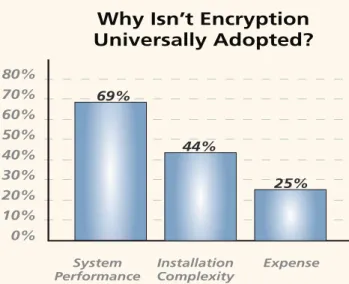
Figure 11: Perceived Impediments to Encryption Adoption
Universal Adoption of
File Encryption
Despite some concerns over vulnerability, clearly an encrypted file/drive is more secure than an unencrypted file/drive. With security garnering so much attention lately, why isn’t file encryption or FDE universally ad-opted? The Ponemon Institute, a pre-eminent research center dedicated to privacy, data protection, and infor-mation security policy, conducted an end-user survey to try and answer this. Concerns over system performance, complexity, and cost are among the top reasons stated.