Tripwire, Inc. Tripwire Enterprise Version 8.3
Security Target
Release Date:
October 19, 2014
Version:
1.2
Prepared By:
Saffire Systems
P.O. Box 40295
Indianapolis, IN 46240
Prepared For:
Tripwire, Inc.
101 SW Main Street Suite 1500
Table of Contents
1 INTRODUCTION... 1 1.1 STREFERENCE ... 1 1.2 TOEREFERENCE ... 1 1.3 DOCUMENT TERMINOLOGY ... 1 1.3.1 Acronyms ... 1 1.4 OVERVIEW ... 21.4.1 Tripwire Enterprise Nodes ... 4
1.4.2 Required non-TOE hardware/software/firmware ... 5
1.4.2.1 Tripwire Enterprise System Requirements ...6
1.4.2.2 Tripwire Enterprise Agent Requirements ...7
1.4.2.3 Tripwire Enterprise Node Requirements ...8
1.5 TOEDESCRIPTION ... 10 1.5.1 Architecture Description ... 13 1.5.2 Physical Boundaries ... 15 1.5.2.1 Hardware Components ... 16 1.5.2.2 Software Components ... 16 1.5.2.3 Guidance Documentation ... 17 1.5.3 Logical Boundaries ... 17
1.5.3.1 Intrusion Detection System ... 18
1.5.3.2 Security Audit... 19
1.5.3.3 User Data Protection ... 19
1.5.3.4 Identification and Authentication ... 20
1.5.3.5 Security Management ... 20
1.5.3.6 Protection of the TSF ... 22
1.5.4 Items Excluded from the TOE ... 23
2 CONFORMANCE CLAIMS ... 24
2.1 CCCONFORMANCE CLAIMS ... 24
2.2 PP AND PACKAGE CLAIMS ... 24
2.3 CONFORMANCE RATIONALE ... 24
3 SECURITY PROBLEM DEFINITION ... 26
3.1 THREATS ... 26
3.1.1 TOE Threats ... 26
3.1.2 IT System Threats ... 26
3.2 ORGANIZATIONAL SECURITY POLICIES ... 27
3.3 ASSUMPTIONS ... 28
3.3.1 Intended Usage Assumptions ... 28
3.3.2 Physical Assumptions ... 28
3.3.3 Personnel Assumptions ... 28
4 SECURITY OBJECTIVES ... 29
4.1 SECURITY OBJECTIVES FOR THE TOE ... 29
4.2 ITSECURITY OBJECTIVES FOR THE ENVIRONMENT ... 29
4.3 NON-ITSECURITY OBJECTIVES FOR THE ENVIRONMENT ... 30
4.4 SECURITY OBJECTIVES RATIONALE ... 30
4.4.1 Tracings between Security Objectives and the Security Problem Definition ... 30
4.4.2 Rationale For Assumption Coverage ... 32
4.4.3 Rationale For Threat Coverage ... 33
4.4.4 Rationale For Organizational Security Policy Coverage ... 36
5 EXTENDED COMPONENTS DEFINITION ... 38
5.1.1 Time stamps (FPT_STM) ... 38
5.1.1.1 FPT_STM_EXT.1.1 Reliable time stamps from the environment ... 38
5.2 CLASS IDS:INTRUSION DETECTION SYSTEM ... 38
5.2.1 System Data Collection (IDS_SDC) ... 38
5.2.1.1 IDS_SDC.1 System Data Collection ... 39
5.2.2 Analyser Analysis (IDS_ANL) ... 40
5.2.2.1 IDS_ANL.1 Analyser analysis ... 41
5.2.3 Analyser react (IDS_RCT) ... 41
5.2.3.1 IDS_RCT.1 Analyser analysis ... 41
5.2.4 Restricted Data Review (IDS_RDR) ... 42
5.2.4.1 IDS_RDR.1 Restricted Data Review ... 42
5.2.5 System Data Storage (IDS_STG) ... 42
5.2.5.1 IDS_STG.1 Guarantee of System Data Availability ... 43
5.2.5.2 IDS_STG.2 Prevention of System Data loss ... 44
6 SECURITY REQUIREMENTS ... 45
6.1 CONVENTIONS ... 46
6.2 SECURITY FUNCTIONAL REQUIREMENTS ... 46
6.2.1 Security audit (FAU) ... 46
6.2.1.1 FAU_GEN.1 Audit data generation ... 46
6.2.1.2 FAU_SAR.1 Audit review ... 48
6.2.1.3 FAU_SAR.2 Restricted audit review ... 48
6.2.1.4 FAU_SAR.3 Selectable audit review ... 48
6.2.1.5 FAU_SEL.1 Selective audit ... 48
6.2.1.6 FAU_STG.2 Guarantees of audit data availability ... 48
6.2.1.7 FAU_STG.4 Prevention of audit data loss ... 48
6.2.2 Cryptographic Support (FCS) ... 49
6.2.2.1 FCS_CKM.1 Cryptographic Key Generation ... 49
6.2.2.2 FCS_CKM.4 Cryptographic Key Destruction ... 49
6.2.2.3 FCS_COP.1a Cryptographic operation (hashing) ... 49
6.2.2.4 FCS_COP.1b Cryptographic operation (encryption/decryption) ... 49
6.2.2.5 FCS_COP.1c Cryptographic operation (public key cryptography) ... 49
6.2.2.6 FCS_COP.1d Cryptographic operation (message authentication code) ... 49
6.2.2.7 FCS_COP.1e Cryptographic operation (digital signing) ... 50
6.2.3 User data protection (FDP) ... 50
6.2.3.1 FDP_ACC.2 Complete access control ... 50
6.2.3.2 FDP_ACF.1 Security attribute based access control ... 50
6.2.4 Identification and authentication (FIA) ... 51
6.2.4.1 FIA_AFL.1 Authentication failure handling ... 51
6.2.4.2 FIA_ATD.1 User attribute definition ... 51
6.2.4.3 FIA_SOS.1 Verification of secrets ... 51
6.2.4.4 FIA_UAU.1 Timing of authentication with a third party ... 51
6.2.4.5 FIA_UID.1 Timing of identification with a third party ... 51
6.2.5 Security management (FMT) ... 51
6.2.5.1 FMT_MOF.1a Management of security functions behavior ... 51
6.2.5.2 FMT_MOF.1b Management of security functions behavior ... 52
6.2.5.3 FMT_MOF.1c Management of security functions behavior ... 52
6.2.5.4 FMT_MSA.1 Management of security attributes ... 52
6.2.5.5 FMT_MSA.3 Static attribute initialization ... 52
6.2.5.6 FMT_MTD.1 Management of TSF data ... 52
6.2.5.7 FMT_SMF.1 Specification of Management Functions ... 55
6.2.5.8 FMT_SMR.1 Security roles ... 56
6.2.6 Protection of the TSF (FPT) ... 56
6.2.6.1 FPT_ITT.1 Basic internal TSF data transfer protection ... 56
6.2.6.2 FPT_STM_EXT.1 Reliable time stamps from the environment ... 56
6.2.7 TOE access (FTA) ... 56
6.2.7.1 FTA_SSL.4 User-initiated termination... 56
6.2.8 Intrusion Detection System (IDS) ... 56
6.2.8.1 IDS_SDC.1 System Data Collection ... 56
6.2.8.3 IDS_RCT.1 Analyser react ... 57
6.2.8.4 IDS_RDR.1 Restricted Data Review ... 58
6.2.8.5 IDS_STG.1 Guarantee of System Data Availability ... 58
6.2.8.6 IDS_STG.2 Prevention of System Data loss ... 58
6.3 TOESECURITY ASSURANCE REQUIREMENTS ... 58
6.4 SECURITY REQUIREMENTS RATIONALE ... 59
6.4.1 Rationale For Not Satisfying All Dependencies ... 59
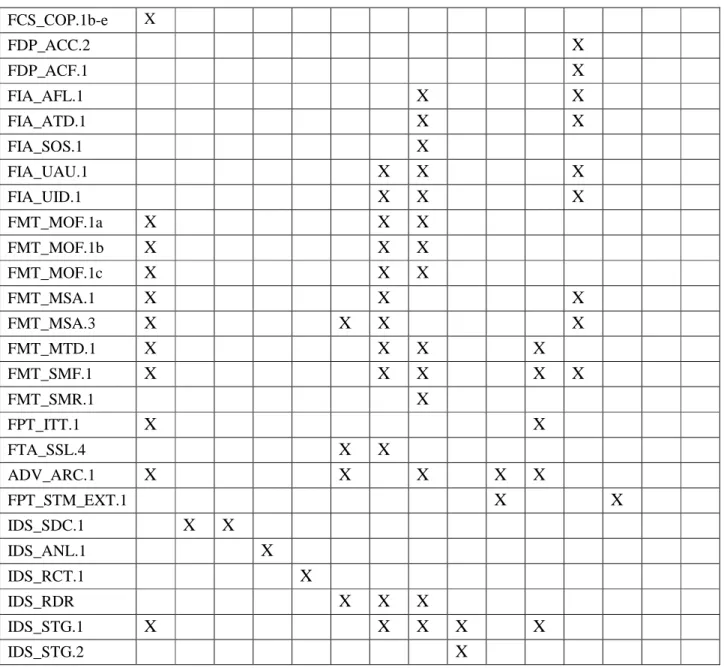
6.4.2 TOE SFR to TOE Security Objective Tracings ... 61
6.4.3 TOE SFR Rationale ... 62
6.4.4 SAR Rationale ... 67
7 TOE SUMMARY SPECIFICATION ... 69
7.1 INTRUSION DETECTION SYSTEM ... 69
7.1.1 File Integrity Monitor ... 69
7.1.2 Compliance Policy Manager ... 75
7.1.3 Remediation Manager ... 75
7.1.4 System Data Storage ... 76
7.1.5 SFR Mapping ... 76
7.2 SECURITY AUDIT ... 76
7.2.1 SFR Mapping ... 78
7.3 USER DATA PROTECTION ... 78
7.3.1 SFR Mapping ... 80
7.4 IDENTIFICATION AND AUTHENTICATION ... 80
7.4.1 SFR Mapping ... 82
7.5 SECURITY MANAGEMENT ... 82
7.5.1 SFR Mapping ... 88
7.6 PROTECTION OF THE TSF ... 89
7.6.1 SFR Mapping ... 90
8 APPENDIX A: DEFINITIONS OF USER PERMISSIONS ... 92
List of Tables
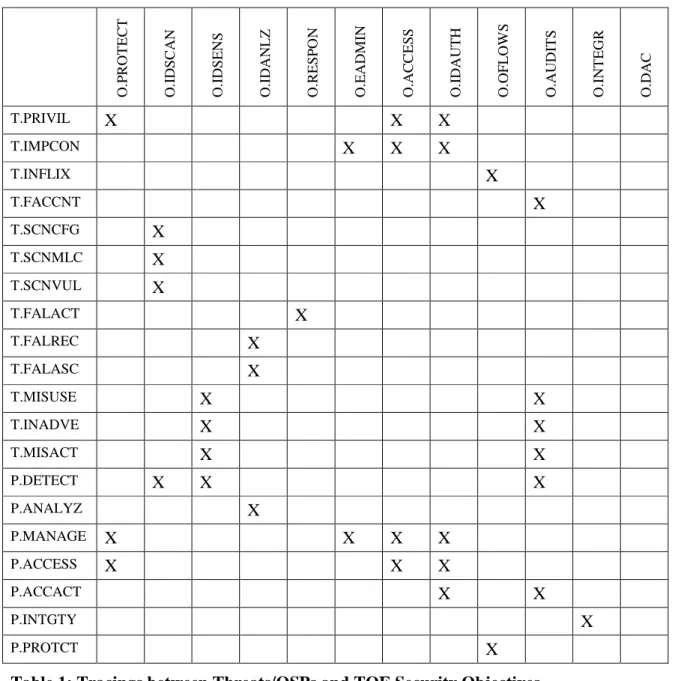
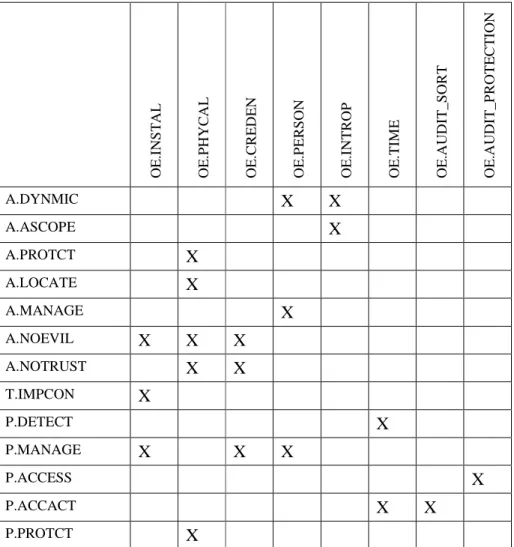
Table 1: Tracings between Threats/OSPs and TOE Security Objectives ... 31Table 2: Tracings between Assumptions/Threats/OSPs and Security Objectives for the Environment ... 32
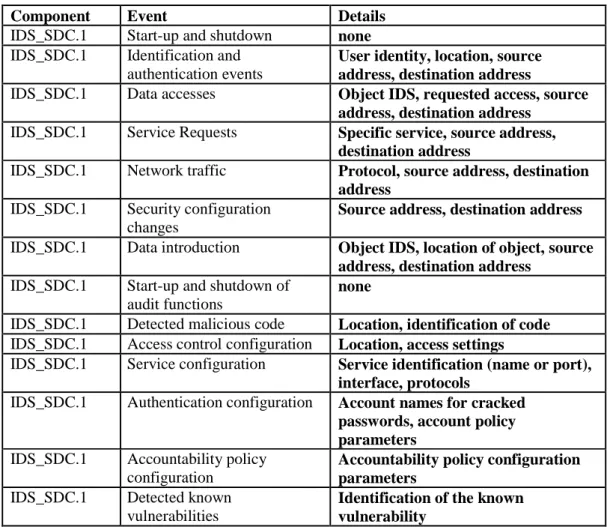
Table 3: System Events ... 40
Table 4: Security Functional Requirements ... 46
Table 5: Auditable Events ... 47
Table 6: TOE Management ... 55
Table 7: System Events ... 57
Table 8: Security Assurance Requirements ... 59
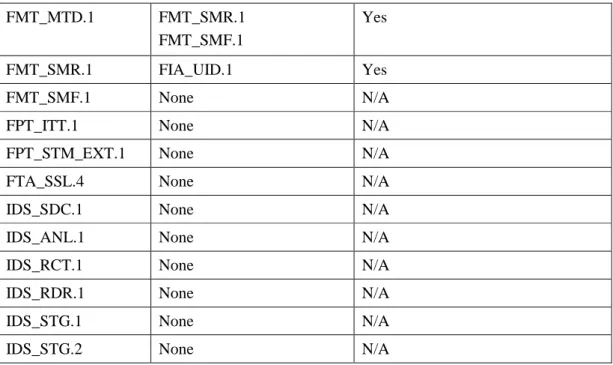
Table 9: SFR Dependencies ... 61
List of Figures
1
Introduction
This section identifies the Security Target, Target of Evaluation (TOE), conformance claims, ST organization, document conventions, and terminology. It also includes an overview of the evaluated product.
1.1
ST Reference
This section will provide information necessary to identify and control the Security Target and the TOE.
ST Title Tripwire, Inc. Tripwire Enterprise Version 8.3 Security Target
Version: 1.2
Publication Date: October 19, 2014
ST Author Michelle Ruppel, Saffire Systems Assurance Level: EAL 2 + ALC_FLR.2
1.2
TOE Reference
The TOE claiming conformance to this ST is identified as: Tripwire Enterprise, Version 8.3 with the 8.3.5 patch
1.3
Document Terminology
Please refer to CC Part 1 Section 2.3 for definitions of commonly used CC terms.
1.3.1 Acronyms
3DES Triple Data Encryption Standard
AC Access Control
ACL Access Control List
ANSI American National Standards Institute
CC Common Criteria
CLI Command Line Interface
DAC Discretionary Access Control DACL Discretionary Access Control List EAL2 Evaluation Assurance Level 2
FIPS Federal Information Processing Standard (NIST)
FTP File Transfer Protocol
GUI Graphical User Interface
HTTPS Hypertext Transport Protocol Secure IETF Internet Engineering Task Force
JAR Java Archive
JDBC Java Data Base Connectivity
JVM Java Virtual Machine
MD5 Message Digest 5
NIST National Institute of Standards and Technology OSP Organisational Security Policy
PP Protection Profile
RAM Random Access Memory
RMI Remote Method Invocation
ROM Read Only Memory
SACL System Access Control List
SFP Security Function Policy
SFR Security Functional Requirement SHA-1 Secure Hash Algorithm 1 (NIST) SMTP Simple Mail Transfer Protocol
SNMP Simple Network Management Protocol
SOF Strength of Function
SQL Structured Query Language for data base access
SSL Secure Sockets Layer
TCM Tripwire Cryptographic Module
TE Tripwire Enterprise
TLS Transport Layer Security
TOE Target of Evaluation
TSC TSF Scope of Control
TSF TOE Security Functions
TSP TOE Security Policy
UI User Interface
VPN Virtual Private Network
1.4
Overview
The TOE is Tripwire Enterprise Version 8.3 (TE v8.3) with the 8.3.5 patch, provided by
Tripwire, Inc. The TOE type is an intrusion detection system consisting of a sensor, scanner, and analyzer to monitor IT systems for activity that may indicate inappropriate activity on the IT system. The server portion of the TOE is a software-only TOE that runs on the Windows, Solaris, SuSE and Red Hat Enterprise Linux operating systems. The Agent portion of the TOE
can be installed and executed on the operating systems identified in Section 1.4.2.2. TE v8.3 performs file-integrity monitoring, change auditing, configuration assessment, and compliance reporting. The TOE is an attribute change assessment product that also reconciles the changes against existing management systems and policies.
The TOE provides three main capabilities: File Integrity Monitor, Compliance Policy
Manager, Remediation Manager. The File Integrity Monitor monitors the integrity of critical data on a wide variety of servers and network devices (e.g., routers, switches, firewalls, and load balancers) called nodes. It does this by gathering system status, configuration settings, file content, and file metadata on the nodes and checking gathered node data against previously stored node data to detect modifications. For IT systems with a TE Agent installed, the TOE is capable of monitoring the system for changes made in real-time. The Compliance Policy Manager continually assesses IT configurations against a set of policies and standards, identifying deficiencies.1 The Remediation Manager repairs/corrects configuration errors detected by the Compliance Policy Manager. The Remediation Manager supports only File Server nodes (i.e., the Remediation Manager is only able to repair/correct failures on File Server nodes).
The TOE consists of a server application component (Tripwire Enterprise Server), a client application component (Tripwire Enterprise Agent), and a client administrative console application component (Tripwire CLI). The product requires a database application to support the product’s storage needs (MySQL is bundled with TE v8.3). Since TE v8.3 supports the ability to operate with a database from differing vendors (as identified in Section 1.4.2.1), the database is considered part of the operational environment. The product supports two different installation configurations and both are allowed in the evaluated configuration. With a single-system installation, the TE Server and database are installed on the same single-system. With a distributed installation, TE Server and database are installed on different systems. In the CC evaluated configuration, the TE Server must be configured to encrypt all communications between the TE Server and the database, or the database must reside on the same system as the TE server, or the database must reside on a system located on a private physical network that is not globally routable and is protected from attacks and from unauthorized physical access. The other TOE components can run on different machines in various combinations.
There are two different cryptographic implementations used by the TOE. The TOE includes the Tripwire Cryptographic Module (TCM) which is used to implement TLS to protect
communications between distributed parts of the TOE. In the evaluated configuration, the TOE must be configured in the FIPS approved mode of operation.2 The TOE relies upon the JVM TLS implementation in the operational environment to protect communications between the TOE and the remote IT entities (e.g., the database, user’s browser, and user’s shell). The JVM is not FIPS compliant.3
TE Agent uses OpenSSL 0.98k, which is not FIPS validated, to create hashes of monitored files.
1 This evaluation did not assess whether given policy files are sufficient to confirm the intended policy or guideline,
but rather assessed whether the applicable policy checks worked correctly.
2
Tripwire Cryptographic Module (FIPS certificate number 1346).
3 The correctness of the JVM cryptographic implementation is not covered by this evaluation. It is only covered by
OpenSSL is not used for the protection of any sensitive information.
The TOE includes web server functionality that supports HTTPS (HTTP over SSL4) connections from a web browser to the TOE’s GUI and CLI. The Tripwire Enterprise Server, being a Java application, utilizes the TLS mechanism provided by the JVM in the operational environment as part of the HTTPS communication with the GUI and the CLI. The JVM is configured to use TLS for communications with the TOE. In the evaluated configuration, physical protection is assumed for all parts of the TOE and for remotely monitored nodes.
The TOE also uses RMI (Remote Method Invocation) over mutually authenticated TLS v1 network connections to protect intra-TOE communication between TE Server and the TE Agents over an untrusted network. RMI is a Java protocol that enables distributed Java-to-Java
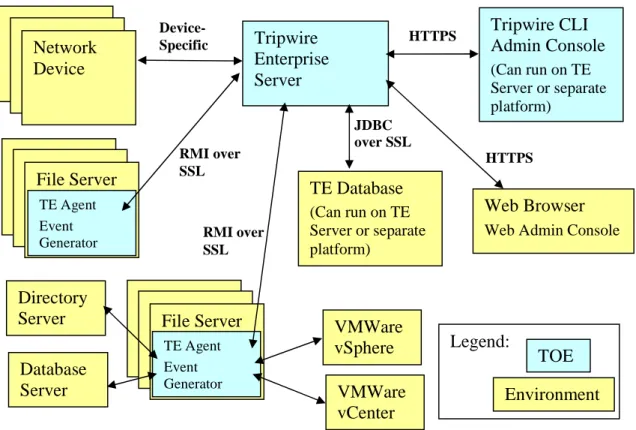
applications to invoke Java methods on other Java virtual machines, possibly on different hosts. Because RMI is only used after establishing an authenticated TLS connection between the TE Server and the TE Agents components, the RMI protocol is not available to untrusted callers. The configuration shown in Figure 1 consists of a single TE Server and database running on the same machine. It includes a Tripwire CLI application running on either the same machine as the TE Server or on another machine. Finally, Figure 1 depicts one or more TE Agents running on separate platforms (typically network servers) in the operational environment.
1.4.1 Tripwire Enterprise Nodes
A node is a server or network device to be monitored. There are multiple types of nodes – a file server node, a database node, a directory server node, a network device node, virtual
infrastructure node and a custom node5. To create a file server node (includes desktops), the TE Agent is installed on file server. The other node types are assigned a delegate TE Agent that processes some TE functions for the node.
The TE Agent portion of the TOE is installed on nodes that do not provide external management interfaces of their own. It is the Agent of the TE Server on that node. The TE Agent is always running and ready to receive instructions from the TE Server. The TE Agent executes baselines and integrity checks on its node and communicates the results from those operations to the TE Server for reporting and for integration with system-wide results. The TE Agent is capable of collecting audit events from monitored systems. The audit events are collected from logs on the systems or from the TE Event Generator. The TE Event Generator is an auditing utility for UNIX and Windows file servers that creates audit events for monitored files, directories, registry keys, and registry entries.
All of the compliance policy and standard assessments are performed on the TE Server. The execution of the corrective Remediation scripts is done on the Agent. All other actions and operations in relation to Remediation is performed on the Server.
The TE Agent is composed of three parts: Bootstrap layer, Download Code portion, and Remote Method Invocation (RMI) layer.
4
Any reference in the Security Target to SSL being used by the TOE or provided by a JVM is a generalization and actually refers to the TLSv1 protocol being invoked by the TOE and provided by the JVM.
5
The Bootstrap layer portion of the Agent is a basic Java Virtual Machine (JVM). When it starts, it registers itself with a single TE Server.
The Downloaded Code portion of the TE Agent is a set of directives it receives from the TE Server after registration. The TE Server uses the directives to customize the Agent to provide the services required by its configuration. The TE Agent is always running and ready to receive instructions from the TE Server.
TE Server receives attribute values and baseline from the TE Agent (the TE Server is responsible for storing these values). The most recent set of harvested attributes is cached on the TE Agent until it can be sent to the TE Server.
The TE Agent uses a RMI layer over TLS to communicate securely with the TE Server.
The nodes that do not require an installed TE Agent have their own built-in external management interfaces and do not have operating systems that could support a TE Agent. For these devices, TE Server uses the built-in interfaces to monitor the configurations. For the POSIX compliant UNIX systems, TE uses its proprietary Universal Device Kit (UDK) to collect information as defined by the customer.
The TE Server obtains information about the current configuration from the nodes that do not have TE Agent and compares that information to saved baseline configuration information. For each node, the TE Server uses the following access information:
• Target IP address (or hostname),
• Communications protocols, and
• Authentication credentials
Tripwire Enterprise Server uses the above information to establish a connection and authenticate itself to the TE node, as if it were an administrator. It uses its device-specific knowledge of the format and structure of the management interface to collect configuration information. When verifying the integrity of the configuration, Tripwire Enterprise Server compares newly collected information with baseline configuration information.
1.4.2 Required non-TOE hardware/software/firmware
The TOE depends upon the required platforms identified below that are in the TOE environment. The TOE relies upon the following software in the local6 operational environment of the
Tripwire Enterprise Server or the Tripwire Enterprise Agent.
• Java Virtual Machine – provides a runtime environment for the TOE.
The TOE assumes the following network IT entities are in the operating network environment.
• SMTP Server – An email server is used to facilitate delivery of integrity check results to administrators when the TOE is so configured.
6 Local operational environment refers to software running on the same host as either the server or agent
• SNMP recipient -- A network management device is used to facilitate delivery of integrity check results to administrators when the TOE is so configured.
• Syslog Server – A destination for the collection of log messages sent by the TOE.
• Workstation providing a web browser for access to the GUI
• TE Nodes
• LDAP/Active Directory server – An authentication server used to authenticate TE users when the System Login Method is set to LDAP/Active Directory.
Notification mechanisms such as email, SNMP, and syslog server are outside of the TOE boundary. The TOE implements only the client-side of these protocols. The TOE utilizes external (non-TOE) mechanisms for delivery of notifications, thus the TOE cannot guarantee delivery of notifications. Web browsers used with the web-based GUI are not part of the TOE.
1.4.2.1 Tripwire Enterprise System Requirements
The Tripwire Enterprise Server can be installed on the following platforms which are in the operating environment:
Windows Server 2003 (SP1, SP2) & R2 (32-bit & 64-bit)
Windows Server 2008 (SP1, SP2) & Server Core (32-bit & 64-bit) Windows Server 2008 R2 SP1, SP2(64-bit)
Windows Server 2012, 2012 R2(64-bit)
Solaris 10 UD1-UD9 , 11.1 (SPARC 32/64-bit)
Red Hat Enterprise Linux 5.2, 5.3, 5.4, 5.5, 5.6, 5.7, 5.8, 5.9 (x86 and x64) Red Hat Enterprise Linux 6.0, 6.1, 6.2, 6.3, 6.4 (x86 and x64)
SUSE Linux Enterprise Server 10.2 Enterprise, and 11.2 (x86, and x64) SUSE Linux Enterprise Server , 11 Enterprise, 11.1, (x86, x64 and PAE)
Tripwire Enterprise installs the following JVM for use by the TOE on these platforms. This JVM is in the operating environment.
Sun Microsystems JVM v1.5.0 for AIX and HP-UX platforms Sun Microsystems JVM v1.6.0.u45 for Linux x64 platforms
Sun Microsystems JVM v1.6.0.u33 for Linux x86 and Solaris platforms Sun Microsystems JVM v1.7.0.u60 for Windows platforms
The TE administrators need to ensure that current and patched JVMs are used during operation of the TE in order to support the security functionality provided. Tripwire makes JRE update packages available for download at the same time as Tripwire provides patch release and major updates. . Note: JRE updates are not available for AIX and HPUX Agent JVMs.
TE supports the following backend DBs which are in the operating environment: Oracle MySQL v5.1.49 (Bundled with TE)
SQL Server 2005 SP2, SP3, SP4 SQL Server 2008 SP1, 2008 R2 SP1 SQL Server 2012
Oracle 10g, 11gR1, 11gR2, 11gR3 Oracle RAC 11gR2, 11gR3
TE Web Admin Console supports the following web browsers which are in the operating environment:
Firefox 11, ESR 17 or later
1.4.2.2 Tripwire Enterprise Agent Requirements
TE Agents are installed on file servers and desktops. These nodes are the supported systems/platforms that can be monitored by the TOE.
The Tripwire Enterprise Agents can be installed on the following file servers which are in the operating environment:
Windows Server 2003 SP1, SP2 (x86 and x64) Windows Server 2003 R2 SP1, SP2 (x86 and x64) Windows Server 2008 R2 SP1 (x64)
Windows Server 2008 R2 (x64) Windows Server 2012, 2012 R2 (x64) Solaris 10 UD11
Solaris 11 (x86, UltraSPARC II) Solaris 11.1 (x86 and x64)
Red Hat Enterprise Linux 6.0, 6.1, 6.2, 6.3, 6.4, 6.5 (x86, x64, Power 6, Power 7 Editions)
Red Hat Enterprise Linux 5.6, 5.7, 5.8, 5.9, 5.10 (x86, x64, PAE, Power 6, Power 7 kernel)
Red Hat Enterprise Linux 5.3, 5.4, 5.5 (x86, x64, PAE kernel) Red Hat Enterprise Linux 5.2 (x86, x64 kernel)
SUSE Linux Enterprise Server 10.2, 11.0, 11.1, 11.2, 11.3 (x86, x64, Power 6, Power 7 Editions)
Linux Cent OS 5.2, 5.4, 5.5, 5.6, 5.7, 5.8, 5.9, 6.0, 6.1, 6.2, 6.3, 6.4 (x86 and 64 Editions) HP-UX 11i v3 UD7-UD9 (PA-RISC, Itanium)
AIX 6.1, 7.1 (64-bit) AIX 5.3 (32-bit)
The Tripwire Enterprise Agents can be installed on all versions of the following operating systems which are in the operating environment:
Windows 7 (x86 and x64) Windows 8, 8.1 (x86 and x64)
All current patches and security fixes must be installed upon these operating systems before installing the Tripwire Enterprise Agents.
The following platforms listed in the Tripwire Enterprise v8.3 marketing information were not subject to testing during this evaluation:
Apple Mac OS X 10.7.5, 10.8.2, 10.8.3, 10.8.4, 10.8.5 (64-bit) Oracle RHC 6.3 UEK 2.6.32 kernel (x86 and x64 Editions) Oracle UEK 6.3 UEK 2.6.39 kernel (x86 and x64 Editions) Oracle RHC 6.4 rhc 2.6.32-358.el6 (x86 and x64 Editions) Oracle UEK 6.4 2.6.39-400.17.1.el6uek (x86 and x64 Editions)
1.4.2.3 Tripwire Enterprise Node Requirements
In addition to desktops and file servers, TE can operate on the following types of nodes which are in the operating environment: databases, virtual environments, directory services, network devices. These nodes are the supported systems that can be monitored by the TOE.
The Tripwire Enterprise configuration can target the following databases:
IBM DB2 Enterprise Edition version 9.5 – AIX 5.x, Windows 2003, HPUX 11i SQL Server 2012
SQL Server 2005 SP2-SP4
SQL Server 2008 SP1, SP2, SP3, R2
Oracle 10g, 11, 11gR2, 11gR2.02, 11gR2.03 Sybase ASE 15.5
The Tripwire Enterprise configuration can target the following virtual environments: VMware ESX 3.0x, 3.5x, 4.0, 4.1
VMware ESXi 3i VirtualCenter 2.5
vCenter Server 4.0, 4.1, or 5.07
The Tripwire Enterprise configuration can target the following directory services: Microsoft Active Directory (Windows 2003/2003 R2, 2008, 2008 R2 Server)
7
Sun Directory Server 5.2
Novell eDirectory (8.8 through IR8)
The Tripwire Enterprise configuration can target all versions the following network devices: Alcatel OmniSwitch 6xxx/7xxx/8xxx series
Cisco Catalyst 1900/2820 Switch Cisco CatOS, IOS, PIX OS and ASA Cisco VPN 3000 Series Concentrator Extremeware Switches
F5 BigIP
Foundry FastIron Switch Foundry ServerIron Switch
HP ProCurve Series – firmware C and E HP ProCurve XL
Juniper M/T Series, Netscreen, Screen OS Ericsson/Marconi ForeThought
Nokia IPSO Firewall
Nortel Alteon and Passport Switches – Alteon OS and WebOS POSIX compliant UNIX systems (UDK)
All current patches and security fixes must be installed upon these network devices before allowing a Tripwire Enterprise Server to target the network device.The following network devices listed in the Tripwire Enterprise documentation were not subject to testing during this evaluation:
BlueCoat 4.2
Checkpoint NG on Nokia IPSO NG, CP4.1, NGx R61 Cisco VPN Concentrator v4.1.7D
Fortinet Fortigate v3
The following virtualization platforms listed in the Tripwire Enterprise documentation were not subject to testing during this evaluation:
Red Hat RHEV-H Guest OSs VMware ESXi and vSphere Oss
1.5
TOE Description
There are two classes of nodes that the TOE can monitor, those with built-in external administration interfaces and those without. Examples of the kind of node with built-in administration interfaces are databases, directory servers, firewalls, routers, switches, load balancers, etc. Some of these external interfaces use web servers and allow administration via a remote web browser, and others provide command line interfaces or other custom protocols. Examples of nodes without built-in administration interfaces are Microsoft Windows systems and UNIX systems (Solaris, AIX, HP-UX, etc.) These nodes are referred to as Agent nodes (or file server nodes) and host an installation of Tripwire Enterprise Agent.
The Tripwire Enterprise Agent provides an interface for Tripwire Enterprise Server where none otherwise exists or to provide a more fully featured interface than an existing one. Tripwire Enterprise Agents are installed on nodes that run server-type operating system. If an Event Generator is installed on an Agent system, the system can be monitored for changes made in real-time.
The TOE may also be used to monitor the configuration of its nodes, thereby identifying changes made by users or other applications, such as software-provisioning and patch-management tools that run independently of Tripwire Enterprise.
A node is represented in the TOE by its network address (hostname or IP address).
Figure 1: TOE boundary
Network Device File Server TE Agent Event Generator File Server Directory Server Database Server Tripwire Enterprise Server TE Database (Can run on TE Server or separate platform) Tripwire CLI Admin Console (Can run on TE Server or separate platform) Web Browser Web Admin Console
Environment TOE TE Agent Event Generator Legend: RMI over SSL RMI over SSL Device-Specific HTTPS HTTPS JDBC over SSL VMWare vSphere VMWare vCenter
The Tripwire Enterprise Server component delegates work to Tripwire Enterprise Agents, interacts with TE nodes, analyzes information, assesses policy compliance, repairs configuration errors, and provides a web-based user interface (or a network interface that provides limited functionality using the Tripwire CLI application component as an alternative to a web browser) for managing the TOE installation. The Tripwire Enterprise Server component is composed of five main subcomponents:
• User Interface (UI)
• Downloadable Agent Code
• Database Mapping Layer
• Remote Method Invocation (RMI) Layer
• TE Node device-specific interface
The User Interface (UI) subcomponent provides two interfaces for other programs that provide access to the administrators of the system; a graphical user interface (GUI) called the Tripwire Enterprise Web Admin Console and a command line interface (CLI) called the Tripwire CLI Admin Console. They will be referred to in this document as the GUI and CLI, respectively. The UI’s GUI is a web server running in the TOE for use by an external web browser. The web browser is not part of the TOE. The connection between the web browser and the GUI uses HTTPS to protect the integrity of the connection. The GUI provides an administrator the ability to perform such functions as add users, configure and schedule integrity checks8, configure and schedule policy compliance tests, configure remediation actions, manage nodes, and view reports. User identification and authentication is handled through the GUI.
The UI’s CLI provides an interface for scripts to perform a limited number of operations on the TOE. Its functionality is a subset of the GUI’s and is insufficient to fully administer the TOE. For example, there are no CLI commands for adding or deleting users or changing passwords. The CLI provides administrator access to the Tripwire Enterprise Server. Like the GUI interface, the CLI connects to the Tripwire Enterprise Server using HTTPS9.
Commands available through the CLI include the following:
baseline Baselines sets of monitored elements (node groups, a single node, or elements within a node).
check Checks monitored elements for change. (Also known as an integrity check)
delete Deletes specified TE objects
export Exports specified nodes or rules to an XML node file.
8
The more general term ‘integrity check’ is used in this Security Target, but is intended to have the same meaning as the term ‘version check’ which is used in Tripwire guidance documentation.
9 The Tripwire Enterprise Server uses the SSL provided by the operational environment for HTTPS
help Provides assistance in using the CLI.
import Imports an XML node file or an XML rule file into the Tripwire Enterprise configuration.
licurl Generates a Launch-in-Context URL.
promote Promotes the latest version of an element to the baseline.
promoteRefNode Copies the current baselines from one node to one or more other nodes.
report Generates Tripwire Enterprise reports, by specific nodes or rules.
runaction Runs one or more TE actions. (An action is a TE object that initiates a response to detected changes.)
runtask Runs a TE task
set Sets default arguments for common options for other CLI commands.
setcustomproperty Assigns custom-property values to specified nodes, elements, or element
versions.
variable Defines or updates a Tripwire Enterprise variable.
version Reports the current version of the CLI.
TE Server user identification and authentication credentials must be included as arguments to the
baseline, check, delete, export, import, promote, promoteRefNode, report, runaction, runtask, setcustomproperty and variable commands every time they are invoked.10 The other commands are processed locally by the CLI and are not passed to the TE Server so no
identification or authentication is performed. The set command can be used to specify the default userid and password during a CLI session, after which arguments with the default userid and password will be automatically added to each of the commands sent to the Tripwire
Enterprise Server. Tripwire Enterprise v8.3 Supplemental Common Criteria Guidance advises the administrator to not use this feature in the CC evaluated configuration. Including user
identification and authentication credentials as arguments to each command allows the Tripwire Enterprise Server to process commands from multiple users without having to maintain separate user sessions. Every command sent to Tripwire Enterprise Server stands alone and executes without a session context.
The Downloadable Agent Code is the portion of the Tripwire Enterprise Server that provides instructions to the Tripwire Enterprise Agent component about what types of operations to perform on a particular agent’s host machine. This code is a Java object that is executed by the Tripwire Enterprise Agent by means of Remote Method Invocation (RMI). This code can
10 If authentication credentials (i.e., userids and passwords) are saved in scripts on the machine being used as an
administrative workstation, protection of these scripts is outside the scope of the TOE. The storage of plaintext passwords in scripts will make some 800-53 controls/enhancements non-compliant.
contain instructions to perform any of the following activities:
• Create a baseline (a known good state)
• Run an integrity check
• Execute an action
The Database Mapping Layer provides a JDBC interface to a SQL database. If the configuration uses a remote SQL server, the TE Server must be configured to encrypt all communications between itself and the database. For local or remote MySQL DB installations a single account is automatically created in the database during TE Server installation. If the MySQL DB is used, MySQL can either be installed on the same system as the TE server or installed on a system located on a private physical network that is not globally routable and is protected from attacks and from unauthorized physical access. If the Oracle DB is used, it must be installed on a system located on a private physical network that is not globally routable and is protected from attacks and from unauthorized physical access.
For remote installations using SQL server and Oracle DBs, the administrator is instructed to create the single database account. This account is used by the Tripwire Enterprise Server when storing and accessing configuration information about monitored objects11, log messages and report data in the database. The database is relied upon to store, retrieve and protect data that it handles such that only the Tripwire Enterprise Server can access its own data.
The Remote Method Invocation (RMI) Layer allows Tripwire Enterprise Server to execute Java byte code on Tripwire Enterprise Agents. RMI runs over a mutually authenticated TLS
connection. Since the protocol transporting the RMI protocol is authenticated, RMI need not perform additional security checks. However, as a precaution, RMI messages are executed using downloaded byte code encapsulated in JAR files which are signed by another certificate. These JAR files are signed by a certificate, in which the private signing half is only held in-house at Tripwire headquarters. Any communications based on unsigned or improperly signed JARs are rejected at the start of the RMI communication.
The TE Node device-specific interface provides a custom interface for obtaining configuration parameters and other management data from a specific list of supported devices (nodes). The device-specific interfaces utilize protocols such as SSH, telnet, and FTP.12
1.5.1 Architecture Description
The components that make up the TOE are:
• Tripwire Enterprise Server – Analyzes collected information from Tripwire Enterprise nodes. Tripwire Enterprise Server includes a User Interface (UI) subcomponent that provides interfaces to both web-based (GUI) and command line (CLI) administrative interface applications.
11 This includes user names and passwords used to establish a connection to TE nodes. These passwords are stored
within the database in a hashed form.
12 Note: This use of FTP and telnet should not be confused with protocols used to manage the TOE itself. FTP and
telnet are only available for use in monitoring the management of nodes, not for managing the TOE. Only secure services are used to manage the TOE.
• Tripwire Enterprise Agent – Collects information from monitored servers for the Tripwire Enterprise Server.
• Event Generator – A real-time monitoring utility that can be installed with TE Agent on some Windows and UNIX file servers. This component is optional and is only required when real-time monitoring is desired.
• Tripwire CLI – The command-line administrative interface to the UI.
Notification mechanisms such as email, SNMP, and syslog server are outside of the TOE
boundary. The TOE implements only client-side protocols for these protocols. The TOE utilizes external (non-TOE) mechanisms for delivery of notifications, thus the TOE cannot guarantee delivery of notifications. Web browsers used with the web-based GUI are not part of the TOE. The Tripwire Enterprise Server uses various network protocols to communicate with other parts of the TOE and with the operational environment. Depending upon the communication pathway the Tripwire Enterprise Server acts either as a server or as a client on each pathway. The
following summarize the network communication pathways that exist.
• Tripwire Enterprise Server – Tripwire Enterprise Agent communication.
The Tripwire Enterprise Server and Tripwire Enterprise Agent are peers, with either able to initiate communication to accomplish the task being performed. Both the Tripwire Enterprise Server and Tripwire Enterprise Agent components of the TOE use the TLS provided by the FIPS certified Tripwire Cryptographic Module to communicate with each other. A mutually authenticated TLS connection is established that allows these components of the TOE to use the RMI protocol to exchange services.
• Tripwire Enterprise Server – TE Database
The Tripwire Enterprise Server is the only component of the TOE that communicates with the database. The TE Server uses the JDBC protocol over TLS provided by the JVM in the operational environment to connect to the database.
• Tripwire Enterprise Server – TE nodes
The Tripwire Enterprise Server initiates connections to TE nodes that do not have the TE Agent installed to obtain information made available by protocols supported by the node (e.g., FTP, Telnet, SSH). For protocols requiring user authentication, the Tripwire Enterprise Server provides login data for the specific node being accessed, then gathers information from the node as determined by rules established for that network device (e.g., a specific Cisco PIX Firewall or Netscreen device).
• Tripwire Enterprise Server – CLI & GUI
The Tripwire Enterprise Server includes web server functionality that supports HTTP over the TLS provided by the JVM in the operational environment. Thus, the
communication between the Tripwire Enterprise Server and the Tripwire CLI uses the HTTPS protocol. Similarly, communication between the Tripwire Enterprise Server and the GUI is also over the HTTPS protocol.
The Tripwire Enterprise Server is a client to SMTP/SNMP/Syslog servers. The Tripwire Enterprise Server uses these servers as configurable delivery mechanisms for TOE generated messages.
Tripwire CLI does not offer any inbound network communication pathways.
The only network protocol accepted by Tripwire Enterprise Agents is RMI that is received over an authenticated TLS connection established with the Tripwire Enterprise Server.
1.5.2 Physical Boundaries
The Evaluated Configuration includes components running in the TOE boundary and components running outside the TOE boundary. Inside the TOE boundary are Tripwire
Enterprise Server, and the Tripwire CLI running on a single computer, and one or more Tripwire Enterprise Agents running on remote servers.
The Tripwire Enterprise Server component of the TOE can operate on several supported
operating systems. Refer to Section 1.4.2 for a list of supported OSs. The host operating system for Tripwire Enterprise Server has no impact on the supported list of Tripwire Enterprise nodes that can be monitored.
The operational environment also includes a web browser and a network connecting all of the other components into a single LAN.
The TOE relies upon the following software in the operational environment.
• Database – Stores data for Tripwire Enterprise Server.
• Java Virtual Machine – provides a runtime environment for the TOE.
• Host Operating System – provides process-related (e.g., time) and network-related (e.g., name resolution) services for the JVM.
The TOE assumes the following network IT entities are in the operating environment.
• SMTP Server – An email server is used to facilitate delivery of integrity check results to administrators when the TOE is so configured.
• SNMP recipient -- A network management device is used to facilitate delivery of integrity check results to administrators when the TOE is so configured.
• Syslog Server – A destination for the collection of log messages sent by the TOE.
• Tripwire Enterprise Nodes
• LDAP/Active Directory server – An authentication server used to authenticate TE users, except the built-in “administrator” account, when the System Login Method is set to LDAP/Active Directory.
The Evaluated Configuration of the TOE does not include the Remedy AR System tickets Plug-in, the HP Openview Plug-Plug-in, or the AAA Monitoring Tool. The AAA Monitoring Tool is included within the TOE delivery. The Remedy AR System tickets Plug-in and the HP
Openview Plug-in are extra tools available from Tripwire. The guidance documentation instructs that these tools not be installed.
a CLI session is excluded from the evaluated configuration via providing guidance instructing administrators to not use the set command.
1.5.2.1 Hardware Components
The TOE is a software only TOE. All hardware used to deploy the TOE is in the operational environment.
1.5.2.2 Software Components
This table identifies software components and indicates whether or not each component is in the TOE.
TOE or Environment
Component Description
TOE Tripwire Enterprise Server, Version 8.3 with the 8.3.5 patch
Analyzes collected information from Tripwire Enterprise nodes
TOE Tripwire Enterprise Agent, Version 8.3
Collects information from monitored servers for the Tripwire Enterprise Server TOE Event Generator An auditing utility that can be installed
with TE Agent on some Windows and UNIX file servers.
TOE Tripwire CLI Admin
Console
A utility that allows TE functions to be executed using a command line, without using the TE GUI.
TOE Change-Audit License A license certificate13 that activates the TE change auditing for a single monitored system of a specific type.
TOE Configuration-Assessment License
A license certificate that enables TE to run policy tests on a single node. To generate policy test results for a node, the node must have valid
Configuration-Assessment licenses.
TOE Automated-Remediation
License
A license certificate that enables TE to remediate policy tests on a single file server node. To automatically remediate failed policy tests for a node, the node must have valid Change-Audit, Configuration-Assessment, and Automated-Remediation licenses.
Environment JVM Version 1.6.0 The Java Virtual Machine provides a TLS v1 implementation for communications between the TOE and remote trusted IT entities.
13 Note: These are X.509 certificates that are generated for each customer by Tripwire based on which licenses are
TOE or Environment
Component Description
Environment TE Server OS
(Refer to Section 1.4.2.1 for additional details)
The operating system on which the TE Server is installed
Environment Backend DB
(Refer to Section 1.4.2.1 for additional details)
The database used by TE server to store all data.
Environment TE Node
(Refer to Section 1.4.1 for additional details)
A server or network device being monitored.
Environment LDAP or
Active Directory Server
An authentication server that is required only if the LDAP/Active Directory System login method is selected.
1.5.2.3 Guidance Documentation
Tripwire provides administrator and user guidance on how to utilize the TOE security functions and warnings to administrators and users about actions that can compromise the security of the TOE.
The Tripwire Enterprise 8.3 Common Criteria Addendum contains details regarding the common criteria specific instructions and warning provided to administrators.
These activities are documented in:
• Tripwire Enterprise v8.3 Reference Guide
• Tripwire Enterprise v8.3 User Guide
• Tripwire Enterprise v8.3 Installation and Maintenance Guide
• Tripwire Enterprise v8.3 Patch README (August 2014)
• Tripwire Enterprise v8.3 Supplemental Common Criteria Guidance
• Installing TE Console on Microsoft Windows Server 2012
1.5.3 Logical Boundaries
This section identifies the security functions that the TSF provides.
• Intrusion Detection System (IDS)
• Security Audit
• User Data Protection
• Identification and Authentication
• Security Management
1.5.3.1 Intrusion Detection System
The Tripwire Enterprise Agent component of the TOE can collect object attribute information for files, directories, registry keys and registry key values. By comparing collected information against saved values, the agent monitors these resources to detect changes. Once detected, the TE Agent reports the detected change to the Tripwire Enterprise Server to allow administrator specified actions to occur. The TE Agent also checks the current monitored system/state for policy compliance. If an Event Generator is installed on an Agent system, TE can monitor the system for changes made in real-time. With real-time monitoring, the Event Generator
continuously reports any detected changes to TE.
For nodes without a TE Agent, the Tripwire Enterprise Server component collects attribute information, compares the information to baselines and initiates administrator specified actions. The Tripwire Enterprise Server can monitor files, command output, and network availability using interfaces that each node provides. TE Agent uses OpenSSL 0.98k, which is not FIPS validated, to create hashes of monitored files. OpenSSL is not used for the protection of any sensitive information.
The Tripwire Enterprise Server component can perform actions in response to object attribute comparisons, specifically: display integrity check results to the console, send integrity check results to administrators using email, send integrity check results to administrators using SNMP, send a log message to a Syslog server, execute a command on the Tripwire Enterprise Server host operating system, execute a command on the Tripwire Enterprise Agent host operating system, and promote new element versions to be a baseline. For some TE nodes, Tripwire Enterprise Server can also restore a changed element to its baseline state on. TE also uses baselining and restoration to process software installation package data14.
The syslog server, SMTP server, and recipient of SNMP messages are all external IT entities residing in the environment. It is the responsibility of these IT entities to complete the delivery of such communications. The TOE provides the functionality to send communications to these IT entities in the environment. The TOE does not rely upon these external IT entities to provide security for the TOE.
To test for policy compliance, the administrator downloads & installs TE policies from the Tripwire web site or creates a new TE policy in the Policy Manager. Policy compliance tests can be run on selected nodes and the results viewed in the Policy Manager. TE automatically runs the policy tests whenever a version check results in the creation of change versions for elements of the effective scope of the policy test. Running a policy test involves comparing each change version with the pass/fail criteria defined by the policy test, generating a policy test result for each change version, and updating the compliance statistics for each node in the policy test’s effective scope. (This evaluation did not assess the suitability of a given policy files to assess the system’s compliance against the external policy or guideline, but rather assessed whether the policy checks specified worked correctly.)
Remediation is the process of resolving failures generated by a policy test. There are two types of remediation: automated and manual. With automated remediation, the TE Agent on the node for which the policy test failed runs a script or performs other actions to bring the node into
14
compliance with the policy test. With manual remediation, a user manually performs the actions to bring the node into compliance with the policy test. In the evaluated configuration, the TOE will be configured to send an alarm when a policy test fails. 15
The TOE provides a mechanism for authorized users to read the System data. In addition, the TOE protects the collected System data from unauthorized deletion and modification at its own interfaces. It also maintains a defined amount of System data in the event of a failure. When the System data storage capacity is reached, the TOE will shutdown and send an alarm. The TOE depends upon the DB to protect the data stored in it from unauthorized access via the DB interfaces.
For the automated Remediation actions, an administrator configures the TOE to execute a administrator-supplied command or script on the Agent node.
1.5.3.2 Security Audit
The TOE provides its own security audit log mechanism, with its own security audit log trail, that can generate records containing TOE management actions and security-related events. These records are referred to as Security Audit Log (SAL) messages. In addition, the TOE generates TE log messages which record a variety of events or activities in a message log. The message log is not considered security-relevant.
The security audit function implements the SAL. The TOE stores the SAL (and message log) in the Database. The term audit data in this ST refers to the SAL messages.
The TOE provides administrators the ability to manage the Tripwire Enterprise Server SAL using administrator console interfaces. Administrators can select which security-relevant events will result in the generation of an audit record. Administrators can read and sort SAL messages in the audit trail based on date and time of the event, type of event, subject identity, and the outcome (success or failure) of the event.
The TOE protects the SAL messages from unauthorized deletion and prevents modifications at its own interfaces. When the SAL log storage capacity is reached, the TOE maintains all stored audit log messages, shuts down and sends an alarm. The TOE depends upon the DB to protect the data stored in it from unauthorized access via the DB interfaces.
The security audit function relies on the TOE’s environment to supply a reliable date and time stamp that the TOE includes in each SAL message. The security audit function also relies upon the TOE’s environment to store and protect audit data contained in a SAL message.
1.5.3.3 User Data Protection
The TOE implements access controls on eleven TE objects: nodes, and node groups, rules and rule groups, actions and action groups, tasks and task groups, TE policies, policy tests, and policy test groups. Nodes and node groups are definitions of network entities upon which some integrity check and policy compliance assessment operations are to be performed. Examples of the information the Tripwire Enterprise Server retains about a node or node group are a name,
15 All third party commands, such remediation commands, issued on a device/system in the operational environment
the type of node(s), a description, the number of elements being checked, and last check date/time.
Access to objects is controlled by the Discretionary Access Control (DAC) policy, as defined in FDP_ACF.1 in Section 6.2.3.2, for all available operations on these objects (and their contents). Node objects have access controls that can specify the user role assigned to a user or user group to define the user permissions granted to the user. These attributes are compared against user identities and groups of subjects in order to determine whether the user is granted the user role and therefore whether the requested operations should be allowed. If the access checks fail, access will be refused.
1.5.3.4 Identification and Authentication
The TOE offers a few non security-relevant mediated functions before the user is identified and authenticated. All security-relevant mediated functions require the user to be authenticated. The TOE provides two different login methods:
Password Method The TOE itself identifies and authenticates the username and password supplied. Always used for identifying and
authenticating the built-in “administrator” account.
LDAP/Active Directory Method The TOE is configured to request authentication services from a LDAP or Active Directory server for all user accounts except the built-in “administrator” account. In this case, TE depends upon the LDAP or AD server to be securely installed and
administered.
TE always authenticates Administrator accounts with the Password login method, regardless of the selected login method. The TOE maintains the following security attributes for each user account using the Password Method: user identity, authentication data, user groups, role information, and authorizations.
The TOE enforces the following default password complexity requirements when creating users and changing a password.
• Minimum password length 8
• Minimum number of numeric characters 1
• Minimum number of uppercase characters 1
• Minimum number of non-alphanumeric characters 1
Guidance provides recommendations to the users for creating strong passwords. In addition, the TOE is able to lockout user accounts if the number of consecutive unsuccessful authentication failures exceeds a threshold configured by an administrator.
1.5.3.5 Security Management
Tripwire Enterprise Server offers a graphical user interface (GUI), and a command line interface (CLI). The TOE restricts the ability to execute commands by restricting access to these user interfaces, by enforcing user permissions, and by assigning roles to users. TE Server provides management tools for:
• Modifying the behavior of system data collection, analysis, and reaction
• Enabling/disabling integrity check rules
• Enabling/disabling integrity check actions
• Managing the object and user security attributes used by the discretionary access control policy
• Query and add system and audit data
• Query and modify TOE data
The TOE also protects the collected System data from unauthorized deletion and modification at the TOE interfaces.
A user permission is a system authorization that enables a user with that permission to view, add, change, or delete data in Tripwire Enterprise. The following list defines a sample of the common types of user permissions.
• Load permissions provide read-only access to a class of Tripwire Enterprise objects and
groups. For instance, the load rules permission grants access to the Rule Manager. In the Rule Manager, users can review all rules and rule groups.
• Create permissions authorize users to create a class of Tripwire Enterprise objects and
groups. For example, the create nodes permission authorizes users to create nodes and node groups.
• Delete permissions authorize users to permanently remove objects or groups from the
system. For instance, with the delete nodes permission, users can delete both nodes and node groups.
• Update permissions enable users to modify the properties of a class of Tripwire
Enterprise objects and groups. For example, users can change the properties of nodes and node groups with the update nodes permission.
• Manage permissions authorize users to modify Tripwire Enterprise settings or
parameters.
Tripwire Enterprise includes nine (9) default user roles all of which are considered to be trusted accounts. A user role is a collection of user permissions that may be assigned to a user account or an access control entry. The default user roles are: Administrator, Monitor User, Policy Manager, Policy User, Power User, Regular User, Rule Manager, Rule User, and User
Administrator. Four of these default user roles (Administrator, Power User, Regular User, and Monitor User) are organized hierarchically from most capabilities to least capabilities being Administrator, Power User, Regular User and Monitor User. The User Administrator role is orthogonal to the other roles and has permissions to manipulate user accounts. The Policy Manager, Policy User, Rule Manager, and Rule User default roles are used in access controls applied to pre-configured TE objects. To preserve the intended purpose of these roles,
administrators are instructed in guidance to avoid assigning them directly to user accounts. TE also provides a tool called FastTrack that automatically runs only the first time that the administrator logs into the Console. This tool provides limited capabilities required to setup TE.
1.5.3.6 Protection of the TSF
The TOE ensures that the audit data and System data is available by protecting it from modification and deletion and by maintaining all of the stored data when storage exhaustion occurs.
The TOE relies on the underlying operating system to provide the abstraction of a process. The TOE uses one process for the execution of the Tripwire Enterprise Server. The database (in the operational environment) operates in its own process. Additional subordinate processes may be created by the Tripwire Enterprise Server to perform independent tasks, however, this process structure is not related to Tripwire Enterprise Server enforcement of internal user roles. It is expected that the operational environment provides protections such that the communications between the Tripwire Enterprise Server and the database cannot be spoofed. It is also expected that the database be protected such that only the TOE can access the database. This is
accomplished by requiring the communications with the database to be encrypted and requiring users to login to access the database. The database is relied upon to store, retrieve and protect data that it handles such that only the Tripwire Enterprise Server can access TOE data in the database.
The Tripwire Enterprise Server is a Java program that runs on its own JVM. The JVM is
provided as part of the TOE installation process, as a distinct product, but is not part of the TOE. The TOE itself distinguishes actions of TOE users within the TOE by associating users with threads running within the JVM. The TOE does not provide a general programming interface to TOE users. The user community of the TOE has no relationship to the users of the underlying operating system. The JVM also provides the actual implementation of TLS v1 used for communications between the TOE and remote IT products. The JVM is configured to use TLS for these communications.
TE nodes provide an interface conformant with their security model for external access to the data objects that the TOE monitors. The TOE complies with that security model in accessing the objects (e.g., by providing login credentials required by the nodes using supported network protocols such as SSH or telnet). For nodes that do not support SSH based protocols for login, it is expected that those responsible for managing the nodes have taken steps to secure the
communication pathways between the TOE and the nodes per their security environment. The TOE does not rely upon the security of these communication pathways to nodes for TOE’s self protection.
There are two different cryptographic implementations used by the TOE. The TOE includes the FIPS certified Tripwire Cryptographic Module (TCM) that is used to implement TLS to protect communications between the TE server and TE Agents. The TOE uses the JVM TLS
implementation in the operational environment to protect communications between the TOE and the remote IT entities.
The Tripwire Enterprise Server and Tripwire Enterprise Agent components of the TOE use the TLS v1 provided by the TCM to communicate with each other. The server to agent connection is established with a mutually authenticated TLS connection. This allows these components of the TOE to use the RMI protocol to exchange services.
The TOE protects the TSF data transmitted from the TSF to a remote trusted IT product using TLS/SSH from unauthorized disclosure and modification. If modifications are detected, the TOE
provides the ability to verify the integrity of the TSF data transmitted information.
Communication between the server portion of the TOE and a remote DB are protected via TLS provided by the JVM or by the private, secure network on which the DB resides.
The TOE also uses the JVM provided TLS to protect the confidentiality and integrity of its communication with the users of the GUI and CLI. This protects the data, including TOE user names and passwords, from manipulation and observation.
1.5.4 Items Excluded from the TOE
This section identifies any items that are specifically excluded from the TOE.
The Evaluated Configuration of the TOE does not include the Remedy AR System tickets Plug-in, the HP Openview Plug-Plug-in, or the AAA Monitoring Tool. The Remedy AR System tickets Plug-in and the HP Openview Plug-in are extra tools available from Tripwire. The guidance documentation instructs that these tools not be installed. The AAA Monitoring Tool is included within the TOE delivery.
The ability to transfer logs is excluded from the evaluated configuration. This capability requires the use of the Tripwire Log Center. The guidance documentation instructs that this capability not be configured.
In addition, the ability to use the set command to specify the default userid and password during a CLI session is excluded from the evaluated configuration via providing guidance instructing administrators to not use the set command.
The Tripwire Configuration Datamart (AKA Arena) is licensed separately and is excluded from the TOE.
Dynamic Software Reconciliation (DSR) is an external tool that operates as a client of the SOAP API. DSR is an optional add-on and is excluded from the TOE.
The Tripwire Enterprise and Security Content Automation Protocol is excluded from the TOE. The ability to monitor Windows DACL and SACL of file objects within the File Integrity Monitor is outside the evaluated configuration.
2
Conformance Claims
2.1
CC Conformance Claims
This ST was developed to Common Criteria (CC) for Information Technology Security Evaluation, Version 3.1, Revision 3, July 2009.
The ST claims to be:
CC Version 3.1 Revision 3 Part 2 extended CC Version 3.1 Revision 3 Part 3 conformant
2.2
PP and Package Claims
The ST claims to be Evaluation Assurance Level 2 augmented with ALC_FLR.2. The ST is claims conformance to the following Protection Profiles:
U.S. Government Protection Profile Intrusion Detection System System for Basic Robustness Environments (IDSSPP) Version 1.7, dated July 25, 2007
2.3
Conformance Rationale
The TOE type identified in Section 1.4 is an intrusion detection system which is the same as the TOE type defined in IDSPP Section 1.3. The server portion of the TOE provides the Analyzer functionality. The TE Agent portion of the TOE provides Sensor and Scanner functionality. The threats in this ST are identical to the threats in the IDSPP.
The OSPs in this ST are identical to the OSPs in the IDSPP.
The assumptions in this ST are identical to the assumptions in the IDSPP.
The ST contains all of the security objectives for the TOE defined by the IDSPP, except O.EXPORT was removed based on PD-0097. The ST defines an additional security objective: O.DAC which requires the TOE to provide discretionary access control policy to provide additional protections for nodes and node groups. This security objective further restricts the access controls provided by the IDSPP by allowing the administrators to define discretionary access controls to determine the access that each user has to each TE object.
The ST contains all of the security objectives for the TOE Environment defined by the IDSPP. The ST also contains all of the non-IT security objectives for the TOE Environment defined by the IDSPP. Each of the non-IT security objectives for the TOE Environment are met at least partially by the TOE. Therefore, some of the rationale has been updated to clarify that the TOE is also involved in meeting the security objective.
The statement of SFRs in this ST varies from that in the IDSPP as follows:
The ST defines the following additional SFRs: FCS_CKM.1, FCS_CKM.4,
FCS_COP.1a-e, FDP_ACC.2, FDP_ACF.1, FIA_SOS.1, FMT_MOF.1b, FMT_MOF.1c, FMT_MSA.1, FMT_MSA.3, FMT_SMF.1, FPT_ITT.1, and FTA_SSL.4.
the operating environment.
Per PD-0097, FPT_ITA.1, FPT_ITC.1, and FPT_ITI.1 SFRs that apply to transmitting audit and System data with remote IT products have been removed and replaced with FPT_ITT.1.
Per PD-0097, FIA_AFL.1 from the PP is not included in the ST since the TOE does not need to authenticate any remote trusted IT products. The TOE does however provide authentication failure handling for its users so FIA_AFL.1 was reproduced from CC Part 2 v3.1.
FAU_STG.2.2 was refined to indicate that the TOE prevents modifications instead of detects modifications as defined in the PP.
The IDSPP was written to conform to CC v3.1 R1 and this ST is written to conform to CC v3.1 R3. There are differences in the wording of some of the SFRs between the IDSPP / CC v3.1 R1 and CC v3.1 R3. This ST uses the wording in CC v3.1 R3 for the statement of the SFRs and does not denote the differences.
3
Security Problem Definition
The TOE is intended to be used either in environments in which, at most, sensitive but
unclassified information is processed, or the sensitivity level of information in both the internal and external networks is equivalent.
This section contains assumptions regarding the security environment and the intended usage of the TOE and threats on the TOE and the TOE environment.
3.1
Threats
The threats identified in this section may be addressed by the TOE, the IT system the TOE monitors or a combination of both. The threat agents are authorized persons/processes,
unauthorized persons/processes, or external IT entities not authorized to use the TOE itself. The threats identified assume that the threat agent is a person with a low attack potential who possesses an average expertise, few resources, and low to moderate motivation.
The TOE itself has threats and the TOE is also responsible for addressing threats to the
environment in which it resides. The assumed level of expertise of the attacker for all the threats is unsophisticated.
3.1.1 TOE Threats
T.COMINT An unauthorized user may attempt to compromise the integrity of the data collected and produced by the TOE by bypassing a security mechanism. T.COMDIS An unauthorized user may attempt to disclose the data collected and
produced by the TOE by bypassing a security mechanism.
T.LOSSOF An unauthorized user may attempt to remove or destroy data collected and produced by the TOE.
T.NOHALT An unauthorized user may attempt to compromise the continuity of the System’s collection and analysis functions by halting execution of the TOE.
T.PRIVIL An unauthorized user may gain access to the TOE and exploit system privileges to gain access to TOE security functions and data
T.IMPCON An unauthorized user may inappropriately change the configuration of the TOE causing potential intrusions to go undetected.
T.INFLUX An unauthorized user may cause malfunction of the TOE by creating an influx of data that the TOE cannot handle.
T.FACCNT Unauthorized attempts to access TOE data or security functions may go undetected.
3.1.2 IT System Threats
The following identifies threats to the IT System that may be indicative of vulnerabilities in or misuse of IT resources.