HIGH-PERFORMANCEBIGDATATEAM
http://hibd.cse.ohio-state.edu
NETWORK-BASEDCOMPUTINGLABORATORY
DEPARTMENT OFCOMPUTERSCIENCE ANDENGINEERING
THEOHIOSTATE UNIVERSITY
Copyright (c) 2011-2015 Network-Based Computing Laboratory,
headed by Dr. D. K. Panda. All rights reserved. Last revised: September 28, 2015
1 Overview of the RDMA for Apache Hadoop 2.x Project 1 2 Features 1 3 Setup Instructions 3 3.1 Prerequisites . . . 3 3.2 Download . . . 3 3.3 Installation steps . . . 4
3.3.1 Installing intergrated RDMA for Apache Hadoop package . . . 4
3.3.2 Installing RDMA-based plugin for Apache Hadoop or HDP . . . 4
3.4 Basic Configuration . . . 5
3.4.1 HDFS with Heterogeneous Storage (HHH) . . . 5
3.4.2 HDFS in Memory (HHH-M) . . . 9
3.4.3 HDFS with Heterogeneous Storage and Lustre (HHH-L) . . . 10
3.4.4 MapReduce over Lustre with Local Disks . . . 11
3.4.5 MapReduce over Lustre without Local Disks . . . 14
3.5 Advanced Configuration . . . 17
3.5.1 Parallel Replication . . . 17
3.5.2 Placement Policy Selection . . . 18
3.5.3 Automatic Placement Policy Selection . . . 18
3.5.4 Threshold of RAM Disk Usage . . . 18
3.5.5 No. of In-Memory Replicas . . . 19
3.5.6 Disk-assisted Shuffle . . . 19
4 Basic Usage Instructions 19 4.1 Startup . . . 20
4.1.1 MapReduce over HDFS . . . 20
4.1.2 MapReduce over Lustre . . . 20
4.2 Basic Commands . . . 20
4.3 Shutdown . . . 24
4.3.1 MapReduce over HDFS . . . 24
4.3.2 MapReduce over Lustre . . . 24
5 Running RDMA for Apache Hadoop with SLURM/PBS 24 5.1 Usage . . . 24
5.1.1 Configure and Start a Hadoop Job . . . 25
5.1.2 Shutdown Hadoop Cluster . . . 26
5.2 Running MapReduce over HDFS with SLURM/PBS . . . 26
5.2.1 Startup . . . 27
5.2.2 Running Benchmarks . . . 27
5.2.3 Shutdown . . . 27
5.3 Running MapReduce over Lustre with SLURM/PBS . . . 27
5.3.1 Startup . . . 27
5.3.2 Running Benchmarks . . . 28
6 Benchmarks 28
6.1 TestDFSIO . . . 28
6.2 Sort . . . 29
6.3 TeraSort . . . 30
1
Overview of the RDMA for Apache Hadoop 2.x Project
RDMA for Apache Hadoop 2.x is a high-performance design of Hadoop over RDMA-enabled Interconnects. This version of RDMA for Apache Hadoop 2.x 0.9.8 is based on Apache Hadoop 2.7.1 and is compliant with Apache Hadoop 2.7.1 and Hortonworks Data Platform (HDP) 2.3.0.0 APIs and applications. This file is intended to guide users through the various steps involved in installing, configuring, and running RDMA for Apache Hadoop 2.x over InfiniBand.
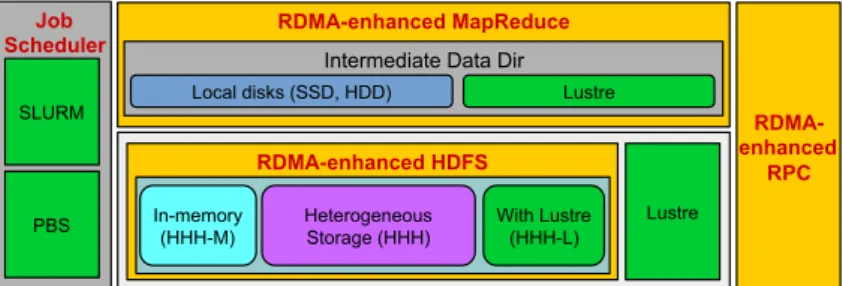
Figure 1 presents a high-level architecture of RDMA for Apache Hadoop 2.x. In this package, many different modes have been included that can be enabled/disabled to obtain performance benefits for different kinds of applications in different Hadoop environments. This package can be configured to run MapReduce jobs on top of HDFS as well as Lustre.
RDMA-enhanced MapReduce RDMA- enhanced RPC RDMA-enhanced HDFS Lustre In-memory (HHH-M) Heterogeneous Storage (HHH) With Lustre (HHH-L) Intermediate Data Dir Local disks (SSD, HDD) Lustre
Job Scheduler
SLURM
PBS
Figure 1: RDMA-based Hadoop architecture and its different modes
Following are the different modes that are included in our package.
HHH: Heterogeneous storage devices with hybrid replication schemes are sup-ported in this mode of operation to have better fault-tolerance as well as perfor-mance. This mode is enabled bydefault
in the package.
HHH-M:A high-performance in-memory based setup has been introduced in this package that can be utilized to perform all I/O operations in-memory and obtain as much performance benefit as possible.
HHH-L:With parallel file systems integrated, HHH-L mode can take advantage of the Lustre available in the cluster.
MapReduce over Lustre, with/without local disks: Besides, HDFS based solutions, this package also provides support to run MapReduce jobs on top of Lustre alone. Here, two different modes are introduced: with local disks and without local disks.
Running with Slurm and PBS:Supports deploying RDMA for Apache Hadoop 2.x with Slurm and PBS in different running modes (HHH, HHH-M, HHH-L, and MapReduce over Lustre).
If there are any questions, comments or feedback regarding this software package, please post them to rdma-hadoop-discuss mailing list ([email protected]).
2
Features
High-level features of RDMA for Apache Hadoop 2.x 0.9.8 are listed below. New features and enhancements compared to 0.9.7 release are marked as(NEW).
• High performance design with native InfiniBand and RoCE support at the verbs level for HDFS, MapReduce, and RPC components
• (NEW) Compliant with Apache Hadoop 2.7.1 and Hortonworks Data Platform (HDP) 2.3.0.0 APIs and applications
• Plugin-based architecture supporting RDMA-based designs for HDFS (HHH, HHH-M, HHH-L), MapRe-duce, MapReduce over Lustre, and RPC, etc.
– (NEW)Plugin for Apache Hadoop distribution (tested with 2.7.1)
– (NEW)Plugin for Hortonworks Data Platform (HDP) (tested with 2.3.0.0)
• Supports deploying Hadoop with Slurm and PBS in different running modes (HHH, HHH-M, HHH-L, and MapReduce over Lustre)
• Easily configurable for different running modes (HHH, HHH-M, HHH-L, and MapReduce over Lus-tre) and different protocols (native InfiniBand, RoCE, and IPoIB)
• On-demand connection setup
• HDFS over native InfiniBand and RoCE
– RDMA-based write
– RDMA-based replication
– Parallel replication support
– Overlapping in different stages of write and replication
– Enhanced hybrid HDFS design with in-memory and heterogeneous storage (HHH) ∗ Supports three modes of operations
· HHH (default) with I/O operations over RAM disk, SSD, and HDD · HHH-M (in-memory) with I/O operations in-memory
· HHH-L (Lustre-integrated) with I/O operations in local storage and Lustre
∗ Policies to efficiently utilize heterogeneous storage devices (RAM Disk, SSD, HDD, and Lustre)
· Greedy and Balanced policies support
· Automatic policy selection based on available storage types
∗ Hybrid replication (in-memory and persistent storage) for HHH default mode ∗ Memory replication (in-memory only with lazy persistence) for HHH-M mode ∗ Lustre-based fault-tolerance for HHH-L mode
· No HDFS replication
· Reduced local storage space usage • MapReduce over native InfiniBand and RoCE
– RDMA-based shuffle
– Prefetching and caching of map output
– Advanced optimization in overlapping ∗ map, shuffle, and merge
∗ shuffle, merge, and reduce
– Optional disk-assisted shuffle
– High performance design of MapReduce over Lustre ∗ Supports two shuffle approaches
· Lustre read based shuffle · RDMA based shuffle
∗ Hybrid shuffle based on both shuffle approaches · Configurable distribution support
∗ In-memory merge and overlapping of different phases • RPC over native InfiniBand and RoCE
– JVM-bypassed buffer management
– RDMA or send/recv based adaptive communication
– Intelligent buffer allocation and adjustment for serialization • Tested with
– Mellanox InfiniBand adapters (DDR, QDR, and FDR)
– RoCE support with Mellanox adapters
– Various multi-core platforms
– RAM Disks, SSDs, HDDs, and Lustre
3
Setup Instructions
3.1 Prerequisites
Prior to the installation of RDMA for Apache Hadoop 2.x, please ensure that you have the latest version of JDK installed on your system, and set theJAVA HOME andPATHenvironment variables to point to the appropriate JDK installation. We recommend the use of JDK version 1.7 and later.
In order to use the RDMA-based features provided with RDMA for Apache Hadoop 2.x, install the latest version of the OFED distribution that can be obtained fromhttp://www.openfabrics.org.
3.2 Download
Two kinds of tarballs are provided for downloading, intergrated package and plugin package.
Download the most recent distribution tarball of intergrated RDMA for Apache Hadoop package from
http://hibd.cse.ohio-state.edu/download/hibd/rdma-hadoop-2.x-0.9.8-bin.tar. gz.
Download the most recent distribution tarball of RDMA for Apache Hadoop plugin package fromhttp://
hibd.cse.ohio-state.edu/download/hibd/rdma-hadoop-2.x-0.9.8-plugin.tar.gz.
3.3 Installation steps
The RDMA for Apache Hadoop can be installed using the intergrated distribution or as plugins on existing Apache Hadoop source in use.
3.3.1 Installing intergrated RDMA for Apache Hadoop package
Following steps can be used to install the integrated RDMA for Apache Hadoop package.
1. Unzip the intergrated RDMA for Apache Hadoop distribution tarball using the following command: tar zxf rdma-hadoop-2.x-0.9.8-bin.tar.gz
2. Change directory to rdma-hadoop-2.x-0.9.8 cd rdma-hadoop-2.x-0.9.8
3.3.2 Installing RDMA-based plugin for Apache Hadoop or HDP
Following steps can be used to build and install the RDMA-based plugin for Apache Hadoop or HDP pack-age.
1. Unzip the plugin tarball of the specific distribution using the following command: tar zxf rdma-hadoop-2.x-0.9.8-plugin.tar.gz
2. Change directory to hadoop-plugin-2.7.1/rdma-plugins/ cd rdma-hadoop-2.x-0.9.8-plugin
3. Run the install scriptinstall.sh. This script applies the appropriate patch and re-builds the source from the path specified. This installation can be launched using the following command:
./install.sh HADOOP_SRC_DIR DISTRIBUTION The installation script takes two arguments:
HADOOP SRC DIR
This mandatory argument is the directory location containg Hadoop source. DISTRIBUTION
This mandatory argument specifies the Hadoop source distribution. This is necessary to choose the appropriate patch to apply.
3.4 Basic Configuration
The configuration files can be found in the directoryrdma-hadoop-2.x-0.9.8/etc/hadoop, in the intergrated RDMA for Apache Hadoop package. If the plugin-based Hadoop distribution is being used, the configuration files can be found at HADOOP SOURCE/hadoop-dist/target/etc/hadoop, where HADOOP SOURCEis the Hadoop source directory on which the plugin is being (or has been) applied.
3.4.1 HDFS with Heterogeneous Storage (HHH)
Steps to configure RDMA for Apache Hadoop 2.x include: 1. Configurehadoop-env.shfile.
export JAVA_HOME=/opt/java/1.7.0
2. Configure core-site.xml file. RDMA for Apache Hadoop 2.x 0.9.8 supports three different modes: IB, RoCE, and TCP/IP.
Configuration of the IB mode: <configuration> <property> <name>fs.defaultFS</name> <value>hdfs://node001:9000</value> <description>NameNode URI.</description> </property> <property> <name>hadoop.ib.enabled</name> <value>true</value>
<description>Enable the RDMA feature over IB. Default value of hadoop.ib.enabled is true.</description>
</property> <property>
<name>hadoop.roce.enabled</name> <value>false</value>
<description>Disable the RDMA feature over RoCE. Default value of hadoop.roce.enabled is false.</description>
</property> </configuration>
Configuration of the RoCE mode: <configuration>
<property>
<value>hdfs://node001:9000</value> <description>NameNode URI.</description> </property> <property> <name>hadoop.ib.enabled</name> <value>false</value>
<description>Disable the RDMA feature over IB. Default value of hadoop.ib.enabled is true.</description>
</property> <property>
<name>hadoop.roce.enabled</name> <value>true</value>
<description>Enable the RDMA feature over RoCE. Default value of hadoop.roce.enabled is false.</description>
</property> </configuration>
Configuration of the TCP/IP mode: <configuration> <property> <name>fs.defaultFS</name> <value>hdfs://node001:9000</value> <description>NameNode URI.</description> </property> <property> <name>hadoop.ib.enabled</name> <value>false</value>
<description>Disable the RDMA feature over IB. Default value of hadoop.ib.enabled is true.</description>
</property> <property>
<name>hadoop.roce.enabled</name> <value>false</value>
<description>Disable the RDMA feature over RoCE. Default value of hadoop.roce.enabled is false.</description>
</property> </configuration>
Note that we should not enable “hadoop.ib.enabled” and “hadoop.roce.enabled” at the same time. Also, for IB and RoCE mode, the speculative executions of map and reduce tasks are disabled by default. The Physical and Virtual memory monitoring is also disabled for these modes. As default, org.apache.hadoop.mapred.HOMRShuffleHandler is configured as the Shuffle Handler service and
org.apache.hadoop.mapreduce.task.reduce.HOMRShuffle is configured as the default Shuffle plugin. 3. Configurehdfs-site.xmlfile.
<configuration> <property>
<name>dfs.namenode.name.dir</name>
<value>file:///home/hadoop/rdma-hadoop-2.x-0.9.8/Name</value> <description>Path on the local filesystem where the NameNode
stores the namespace and transactions logs persistently.</description> </property> <property> <name>dfs.datanode.data.dir</name> <value>[RAM_DISK]file:///data01, [SSD]file:///data02, [DISK]file:///data03</value>
<description>Comma separated list of paths of the local storage devices with corresponding types on a DataNode where it should store its blocks.</description>
</property> </configuration>
4. Configureyarn-site.xmlfile. <configuration>
<property>
<name>yarn.resourcemanager.address</name> <value>node001:8032</value>
<description>ResourceManager host:port for clients to submit jobs.</description>
</property> <property>
<name>yarn.resourcemanager.scheduler.address</name> <value>node001:8030</value>
<description>ResourceManager host:port for ApplicationMasters to talk to Scheduler to obtain resources.</description> </property>
<property>
<name>yarn.resourcemanager.resource-tracker.address</name> <value>node001:8031</value>
<description>ResourceManager host:port for NodeManagers.</description>
<property>
<name>yarn.resourcemanager.admin.address</name> <value>node001:8033</value>
<description>ResourceManager host:port for administrative commands.</description>
</property> <property>
<name>yarn.nodemanager.aux-services</name> <value>mapreduce_shuffle</value>
<description>Shuffle service that needs to be set for MapReduce applications.</description>
</property> </configuration>
5. Configuremapred-site.xmlfile. <configuration>
<property>
<name>mapreduce.framework.name</name> <value>yarn</value>
<description>Execution framework set to Hadoop YARN.</description>
</property> <property>
<name>yarn.app.mapreduce.am.command-opts</name>
<value>-Xmx1024m -Dhadoop.conf.dir=${HADOOP_CONF_DIR}</value> <description>Java opts for the MR App Master processes. The
following symbol, if present, will be interpolated: @taskid@ is replaced by current TaskID. Any other occurrences of ’@’ will go unchanged. For example, to enable verbose gc logging to a file named for the taskid in /tmp and to set the heap maximum to be a gigabyte, pass a ’value’ of: -Xmx1024m -verbose:gc -Xloggc:/tmp/@[email protected]
Usage of -Djava.library.path can cause programs to no longer function if hadoop native libraries are used. These values should instead be set as part of LD_LIBRARY_PATH in the map / reduce JVM env using the mapreduce.map.env and
mapreduce.reduce.env config settings. </description>
</property> <property>
<value>LD_LIBRARY_PATH=${HADOOP_HOME}/lib/native</value> <description>User added environment variables for the MR App
Master
processes. Example :
1) A=foo This will set the env variable A to foo
2) B=$B:c This is inherit tasktracker’s B env variable. </description>
</property> </configuration>
6. Configureslavesfile. List all slave hostnames in this file, one per line. node002
node003
We can also configure more specific items according to actual needs. For example, we can configure the item dfs.blocksize in hdfs-site.xml to change the HDFS block size. To get more detailed information, please visithttp://hadoop.apache.org.
3.4.2 HDFS in Memory (HHH-M)
We can enable MapReduce over in-memory HDFS using the following configuration steps: 1. Configurehdfs-site.xmlfile.
<configuration> <property>
<name>dfs.namenode.name.dir</name>
<value>file:///home/hadoop/rdma-hadoop-2.x-0.9.8/Name</value> <description>Path on the local filesystem where the NameNode
stores the namespace and transactions logs persistently.</description> </property> <property> <name>dfs.datanode.data.dir</name> <value>[RAM_DISK]file:///data01, [SSD]file:///data02, [DISK]file:///data03</value>
<description>Comma separated list of paths of the local storage devices with corresponding types on a DataNode where it should store its blocks.</description>
</property> <property>
<value>In-Memory</value>
<description>Select In-Memory mode (HHH-M). </description> </property>
</configuration>
2. Configure theyarn-site.xmlfile as specified in Section 3.4.1. 3. Configure themapred-site.xmlfile as specified in Section 3.4.1. 4. Configure thecore-site.xmlfile as specified in Section 3.4.1. 5. Configure theslavesfile as specified in Section 3.4.1.
3.4.3 HDFS with Heterogeneous Storage and Lustre (HHH-L)
We can enable MapReduce over Luster-integrated HDFS using the following configuration steps: 1. Configurehdfs-site.xmlfile.
<configuration> <property>
<name>dfs.namenode.name.dir</name>
<value>file:///home/hadoop/rdma-hadoop-2.x-0.9.8/Name</value> <description>Path on the local filesystem where the NameNode
stores the namespace and transactions logs persistently.</description> </property> <property> <name>dfs.datanode.data.dir</name> <value>[RAM_DISK]file:///data01, [SSD]file:///data02, [DISK]file:///data03</value>
<description>Comma separated list of paths of the local storage devices with corresponding types on a DataNode where it should store its blocks.</description>
</property> <property>
<name>dfs.rdma.hhh.mode</name> <value>Lustre</value>
<description>Select Lustre-Integrated mode (HHH-L). </description>
</property> <property>
<name>dfs.replication</name> <value>1</value>
<description>Lustre provides fault-tolerance; use replication factor of 1</description>
</property> <property>
<name>dfs.rdma.lustre.path</name> <value>/scratch/hadoop-lustre/</value>
<description>The path of a directory in Lustre where HDFS will store the blocks</description>
</property> </configuration>
2. Configure theyarn-site.xmlfile as specified in Section 3.4.1. 3. Configure themapred-site.xmlfile as specified in Section 3.4.1. 4. Configure thecore-site.xmlfile as specified in Section 3.4.1. 5. Configure theslavesfile as specified in Section 3.4.1.
3.4.4 MapReduce over Lustre with Local Disks
In this mode, Hadoop MapReduce can be launched on top of Lustre file system without using HDFS-level APIs. We can enable MapReduce over Lustre with two different kinds of Hadoop configuration settings. In the first setting, we use the local disks of each node to hold the intermediate data generated in the runtime of job execution. To enable MapReduce over Lustre with this setting, we use the following configuration steps:
1. Create the data directory in the Lustre File System. mkdir <lustre-path-data-dir>
2. Configure Lustre file striping. It is recommended to use a stripe size equal to the file system block size (“fs.local.block.size”) in “core-site.xml”. For our package, we recommend to use a stripe size value of 256 MB.
lfs setstripe -s 256M <lustre-path-data-dir> 3. Configuremapred-site.xmlfile.
<configuration> <property>
<name>mapreduce.framework.name</name> <value>yarn</value>
<description>Execution framework set to Hadoop YARN.</description> </property> <property> <name>yarn.app.mapreduce.am.command-opts</name> <value>-Xmx1024m -Dhadoop.conf.dir=$HADOOP_HOME/etc/hadoop</value>
<description>Java opts for the MR App Master processes. The following symbol, if present, will be interpolated: @taskid@ is replaced by current TaskID. Any other occurrences of ’@’ will go unchanged. For example, to enable verbose gc logging to a file named for the taskid in /tmp and to set the heap maximum to be a gigabyte, pass a ’value’ of: -Xmx1024m -verbose:gc -Xloggc:/tmp/@[email protected]
Usage of -Djava.library.path can cause programs to no longer function if hadoop native libraries are used. These values should instead be set as part of LD_LIBRARY_PATH in the map / reduce JVM env using the mapreduce.map.env and
mapreduce.reduce.env config settings.</description> </property>
<property>
<name>yarn.app.mapreduce.am.env</name>
<value>LD_LIBRARY_PATH=${HADOOP_HOME}/lib/native</value> <description>User added environment variables for the MR App
Master
processes. Example :
1) A=foo This will set the env variable A to foo
2) B=$B:c This is inherit tasktracker’s B env variable. </description>
</property> <property>
<name>mapreduce.jobtracker.system.dir</name>
<value><lustre-path-data-dir>/mapred/system</value>
<description>The directory where MapReduce stores control files. </description>
</property> <property>
<name>mapreduce.jobtracker.staging.root.dir</name> <value><lustre-path-data-dir>/mapred/staging</value>
<description>The root of the staging area for users’ job files. </description>
<property>
<name>yarn.app.mapreduce.am.staging-dir</name> <value><lustre-path-data-dir>/yarn/staging</value>
<description>The staging dir used while submitting jobs. </description>
</property> <property>
<name>mapred.rdma.shuffle.lustre</name> <value>1</value>
<description>This parameter enables mapreduce over lustre with all enhanced shuffle algorithms. For MapReduce over Lustre with local disks, this parameter value should be 1. The default value of this parameter is -1, which enables RDMA-based shuffle for MapReduce over HDFS.</description> </property>
</configuration>
4. Configure thecore-site.xmlfile. <configuration>
<property>
<name>fs.defaultFS</name>
<value>file://<lustre-path-data-dir>/namenode</value>
<description>The name of the default file system. A URI whose scheme and authority determine the FileSystem
implementation. The uri’s scheme determines the config property (fs.SCHEME.impl) naming the FileSystem
implementation class. The uri’s authority is used to determine the host, port, etc. for a
filesystem.</description> </property>
<property>
<name>fs.local.block.size</name> <value>268435456</value>
<description>This value should be equal to Lustre stripe size.</description>
</property> <property>
<name>hadoop.ib.enabled</name> <value>true</value>
value of hadoop.ib.enabled is true.</description> </property>
<property>
<name>hadoop.roce.enabled</name> <value>false</value>
<description>Enable/Disable the RDMA feature over RoCE. Default value of hadoop.roce.enabled is false.</description>
</property> <property>
<name>hadoop.tmp.dir</name> <value>/tmp/hadoop_local</value>
<description>A base for other temporary directories.</description>
</property> </configuration>
5. Configure theyarn-site.xmlfile as specified in Section 3.4.1. 6. Configure theslavesfile as specified in Section 3.4.1.
3.4.5 MapReduce over Lustre without Local Disks
For MapReduce over Lustre without local disks, Lustre should provide the intermediate data directories for MapReduce jobs. However, to do this, Hadoop tmp directory (“hadoop.tmp.dir”) must have separate paths to Lustre for each NodeManager. This can be achieved by installing a separate Hadoop package on each node with difference in the configuration value for “hadoop.tmp.dir”. To enable MapReduce over Lustre with this setting, we use the following configuration steps:
1. Make the Lustre data directory and configure the stripe size as specified in Section 3.4.4.
2. Copy the hadoop installation on each of the slaves in a local dir of that node. Note that, this step is a requirement for this mode.
3. Configuremapred-site.xmlfile. <configuration>
<property>
<name>mapreduce.framework.name</name> <value>yarn</value>
<description>Execution framework set to Hadoop YARN.</description>
<property>
<name>yarn.app.mapreduce.am.command-opts</name> <value>-Xmx1024m
-Dhadoop.conf.dir=$HADOOP_HOME/etc/hadoop</value>
<description>Java opts for the MR App Master processes. The following symbol, if present, will be interpolated: @taskid@ is replaced by current TaskID. Any other occurrences of ’@’ will go unchanged. For example, to enable verbose gc logging to a file named for the taskid in /tmp and to set the heap maximum to be a gigabyte, pass a ’value’ of: -Xmx1024m -verbose:gc -Xloggc:/tmp/@[email protected]
Usage of -Djava.library.path can cause programs to no longer function if hadoop native libraries are used. These values should instead be set as part of LD_LIBRARY_PATH in the map / reduce JVM env using the mapreduce.map.env and
mapreduce.reduce.env config settings. </description>
</property> <property>
<name>yarn.app.mapreduce.am.env</name>
<value>LD_LIBRARY_PATH=${HADOOP_HOME}/lib/native</value> <description>User added environment variables for the MR App
Master
processes. Example :
1) A=foo This will set the env variable A to foo
2) B=$B:c This is inherit tasktracker’s B env variable. </description>
</property> <property>
<name>mapreduce.jobtracker.system.dir</name>
<value><lustre-path-data-dir>/mapred/system</value>
<description>The directory where MapReduce stores control files. </description>
</property> <property>
<name>mapreduce.jobtracker.staging.root.dir</name> <value><lustre-path-data-dir>/mapred/staging</value>
<description>The root of the staging area for users’ job files. </description>
</property> <property>
<value><lustre-path-data-dir>/yarn/staging</value>
<description>The staging dir used while submitting jobs. </description>
</property> <property>
<name>mapred.rdma.shuffle.lustre</name> <value>2</value>
<description>This parameter enables Mapreduce over Lustre with all enhanced shuffle algorithms. For MapReduce over Lustre without local disks, it can have a value of 0, 1, 2, or any fractional value in between 0 and 1. A value of 1 indicates that the entire shuffle will go over RDMA; a value of 0 indicates that the Lustre file system read operation will take place instead of data shuffle. Any value in between (e.g. 0.70) indicates some shuffle going over RDMA (70%); while the rest is Lustre Read (30%). A special value of 2 enables a hybrid shuffle algorithm for MapReduce over Lustre with Lustre as intermediate data dir. The default value of this parameter is -1, which enables RDMA-based shuffle for MapReduce over HDFS.</description>
</property> </configuration>
4. Configure thecore-site.xmlfile for each NodeManager separately. <configuration>
<property>
<name>fs.defaultFS</name>
<value>file://<lustre-path-data-dir>/namenode</value>
<description>The name of the default file system. A URI whose scheme and authority determine the FileSystem
implementation. The uri’s scheme determines the config property (fs.SCHEME.impl) naming the FileSystem
implementation class. The uri’s authority is used to determine the host, port, etc. for a
filesystem.</description> </property>
<property>
<name>fs.local.block.size</name> <value>268435456</value>
<description>This value should be equal to Lustre stripe size.</description>
<property>
<name>hadoop.ib.enabled</name> <value>true</value>
<description>Enable/Disable the RDMA feature over IB. Default value of hadoop.ib.enabled is true.</description>
</property> <property>
<name>hadoop.roce.enabled</name> <value>false</value>
<description>Enable/Disable the RDMA feature over RoCE. Default value of hadoop.roce.enabled is false.</description>
</property> <property>
<name>hadoop.tmp.dir</name>
<value><lustre-path-data-dir>/tmp_{$nodeID}</value> <description>A base for other temporary directories. For
MapReduce over Lustre with Lustre providing the intermediate data storage, this parameter value should be different for each NodeManager. For example, the first NodeManager in the slaves file may have a value of
<lustre-path-data-dir>/tmp_0, while the second NodeManager can be configured with <lustre-path-data-dir>/tmp_1, and so on. Any value can replace $nodeID in the value here as long as the value is different for each node.</description> </property>
</configuration>
5. Configure theyarn-site.xmlfile as specified in Section 3.4.1. 6. Configure theslavesfile as specified in Section 3.4.1.
3.5 Advanced Configuration
Some advanced features in RDMA for Apache Hadoop 2.x 0.9.8 can be manually enabled by users. Steps to configure these features in RDMA for Apache Hadoop 2.x 0.9.8 are discussed in this section.
3.5.1 Parallel Replication
Enable parallel replication in HDFS by configuringhdfs-site.xmlfile. By default, RDMA for Apache Hadoop 2.x 0.9.8 will choose the pipeline replication mechanism. This parameter is applicable for HHH and HHH-M modes as discussed in Section 3.4.1 and Section 3.4.2, respectively.
<property>
<name>dfs.replication.parallel.enabled</name> <value>true</value>
<description>Enable the parallel replication feature in HDFS. Default value of dfs.replication.parallel is false.
</description> </property>
3.5.2 Placement Policy Selection
Select specific placement policy (Greedy or Balanced) in HDFS by configuring hdfs-site.xml file. By default, RDMA for Apache Hadoop 2.x 0.9.8 selects policy automatically based on the storage types of the HDFS data directories. This parameter is applicable for HHH and HHH-L modes as discussed in Section 3.4.1 and Section 3.4.3, respectively.
<property>
<name>dfs.rdma.placement.policy</name> <value>Greedy/Balanced</value>
<description>Enable specific data placement policy. </description> </property>
3.5.3 Automatic Placement Policy Selection
By default, RDMA for Apache Hadoop 2.x 0.9.8 selects policy automatically based on the storage types of the HDFS data directories. This parameter can be used if the user wants to disable automatic policy detection. This parameter is applicable for HHH mode as discussed in Section 3.4.1.
<property>
<name>dfs.rdma.policy.autodetect</name> <value>false</value>
<description>Disable automatic policy detection (default is true). </description>
</property>
In order to use the storage policies of default HDFS, users should not use the dfs.rdma.placement.policy parameter as discussed in Section 3.5.2 and disable policy auto detection.
3.5.4 Threshold of RAM Disk Usage
Select a threshold of RAM Disk usage in HDFS by configuringhdfs-site.xmlfile. By default, RDMA for Apache Hadoop 2.x 0.9.8 uses 70% of RAM Disk when RAM Disk is configured as a HDFS data directory. This parameter is applicable for HHH, HHH-M, and HHH-L modes as discussed in Section 3.4.1, Section 3.4.2, and Section 3.4.3, respectively.
<property>
<name>dfs.rdma.memory.percentage</name> <value>0.5</value>
<description>Select a threshold (default = 0.7) for RAM Disk usage. </description>
</property>
3.5.5 No. of In-Memory Replicas
Select the number of in-memory replicas in HHH mode by configuringhdfs-site.xmlfile. By default, RDMA for Apache Hadoop 2.x 0.9.8 writes two replicas to RAM Disk and one to persistent storage (repli-cation factor = 3). The no. of in-memory replicas can be changed from one to no. of repli(repli-cation factor (all in-memory). This parameter is applicable for HHH mode as discussed in Section 3.4.1.
<property>
<name>dfs.rdma.memory.replica</name> <value>3</value>
<description>Select no. of in-memory replicas (default = 2). </description>
</property>
3.5.6 Disk-assisted Shuffle
Enable disk-assisted shuffle in MapReduce by configuring mapred-site.xmlfile. By default, RDMA for Apache Hadoop 2.x 0.9.8 assumes that disk-assisted shuffle is disabled. We encourage our users to enable this parameter if they feel that the local disk performance in their cluster is good. This parameter is applicable for all the modes in RDMA for Apache Hadoop 2.x 0.9.8.
<property>
<name>mapred.disk-assisted.shuffle.enabled</name> <value>true</value>
<description>Enable disk-assisted shuffle in MapReduce. Default value of mapred.disk-assisted.shuffle.enabled is false. </description>
</property>
4
Basic Usage Instructions
RDMA for Apache Hadoop 2.x 0.9.8 has management operations similar to default Apache Hadoop 2.7.1. This section lists several of them for basic usage.
4.1 Startup
4.1.1 MapReduce over HDFS
To run MapReduce over HDFS with any of the modes (HHH/HHH-M/HHH-L), please follow these steps. 1. Use the following command to format the directory which stores the namespace and transactions logs
for NameNode.
$ bin/hdfs namenode -format 2. Start HDFS with the following command:
$ sbin/start-dfs.sh
3. Start YARN with the following command: $ sbin/start-yarn.sh
4.1.2 MapReduce over Lustre
To run MapReduce over Lustre, startup involves starting YARN only. 1. Start YARN with the following command:
$ sbin/start-yarn.sh
4.2 Basic Commands
1. Use the following command to manage HDFS: $ bin/hdfs dfsadmin
Usage: java DFSAdmin
Note: Administrative commands can only be run as the HDFS superuser.
[-report]
[-safemode enter | leave | get | wait] [-allowSnapshot <snapshotDir>] [-disallowSnapshot <snapshotDir>] [-saveNamespace] [-rollEdits] [-restoreFailedStorage true|false|check] [-refreshNodes] [-finalizeUpgrade] [-rollingUpgrade [<query|prepare|finalize>]]
[-metasave filename] [-refreshServiceAcl] [-refreshUserToGroupsMappings] [-refreshSuperUserGroupsConfiguration] [-refreshCallQueue] [-printTopology] [-refreshNamenodes datanodehost:port]
[-deleteBlockPool datanode-host:port blockpoolId [force]] [-setQuota <quota> <dirname>...<dirname>]
[-clrQuota <dirname>...<dirname>]
[-setSpaceQuota <quota> <dirname>...<dirname>] [-clrSpaceQuota <dirname>...<dirname>]
[-setBalancerBandwidth <bandwidth in bytes per second>] [-fetchImage <local directory>]
[-shutdownDatanode <datanode_host:ipc_port> [upgrade]] [-getDatanodeInfo <datanode_host:ipc_port>]
[-help [cmd]]
Generic options supported are
-conf <configuration file> specify an application configuration file
-D <property=value> use value for given property -fs <local|namenode:port> specify a namenode -jt <local|jobtracker:port> specify a job tracker
-files <comma separated list of files> specify comma separated files to be copied to the map reduce cluster
-libjars <comma separated list of jars> specify comma separated jar files to include in the classpath.
-archives <comma separated list of archives> specify comma separated archives to be unarchived on the compute machines.
For example, we often use the following command to show the status of HDFS: $ bin/hdfs dfsadmin -report
2. Use the following command to manage files in HDFS: $ bin/hdfs dfs
Usage: hadoop fs [generic options]
[-appendToFile <localsrc> ... <dst>] [-cat [-ignoreCrc] <src> ...]
[-checksum <src> ...]
[-chgrp [-R] GROUP PATH...]
[-chmod [-R] <MODE[,MODE]... | OCTALMODE> PATH...] [-chown [-R] [OWNER][:[GROUP]] PATH...]
[-copyToLocal [-p] [-ignoreCrc] [-crc] <src> ... <localdst>]
[-count [-q] <path> ...]
[-cp [-f] [-p] <src> ... <dst>]
[-createSnapshot <snapshotDir> [<snapshotName>]] [-deleteSnapshot <snapshotDir> <snapshotName>] [-df [-h] [<path> ...]]
[-du [-s] [-h] <path> ...] [-expunge]
[-get [-p] [-ignoreCrc] [-crc] <src> ... <localdst>] [-getfacl [-R] <path>] [-getmerge [-nl] <src> <localdst>] [-help [cmd ...]] [-ls [-d] [-h] [-R] [<path> ...]] [-mkdir [-p] <path> ...] [-moveFromLocal <localsrc> ... <dst>] [-moveToLocal <src> <localdst>] [-mv <src> ... <dst>] [-put [-f] [-p] <localsrc> ... <dst>]
[-renameSnapshot <snapshotDir> <oldName> <newName>] [-rm [-f] [-r|-R] [-skipTrash] <src> ...]
[-rmdir [--ignore-fail-on-non-empty] <dir> ...]
[-setfacl [-R] [{-b|-k} {-m|-x <acl_spec>} <path>]|[--set <acl_spec> <path>]]
[-setrep [-R] [-w] <rep> <path> ...] [-stat [format] <path> ...]
[-tail [-f] <file>] [-test -[defsz] <path>]
[-text [-ignoreCrc] <src> ...] [-touchz <path> ...]
[-usage [cmd ...]] Generic options supported are
-conf <configuration file> specify an application configuration file
-D <property=value> use value for given property -fs <local|namenode:port> specify a namenode -jt <local|jobtracker:port> specify a job tracker
-files <comma separated list of files> specify comma separated files to be copied to the map reduce cluster
-libjars <comma separated list of jars> specify comma separated jar files to include in the classpath.
-archives <comma separated list of archives> specify comma separated archives to be unarchived on the compute machines. For example, we can use the following command to list directory contents of HDFS:
$ bin/hdfs dfs -ls /
3. Use the following command to interoperate with the MapReduce framework: $ bin/mapred job
Usage: JobClient <command> <args> [-submit <job-file>]
[-status <job-id>]
[-counter <job-id> <group-name> <counter-name>] [-kill <job-id>]
[-set-priority <job-id> <priority>]. Valid values for priorities are: VERY_HIGH HIGH NORMAL LOW VERY_LOW [-events <job-id> <from-event-#> <#-of-events>]
[-history <jobOutputDir>] [-list [all]]
[-list-active-trackers] [-list-blacklisted-trackers]
[-list-attempt-ids <job-id> <task-type> <task-state>] [-kill-task <task-id>]
[-fail-task <task-id>] Usage: CLI <command> <args>
[-submit <job-file>] [-status <job-id>]
[-counter <job-id> <group-name> <counter-name>] [-kill <job-id>]
[-set-priority <job-id> <priority>]. Valid values for priorities are: VERY_HIGH HIGH NORMAL LOW VERY_LOW [-events <job-id> <from-event-#> <#-of-events>]
[-history <jobHistoryFile>] [-list [all]]
[-list-active-trackers] [-list-blacklisted-trackers]
[-list-attempt-ids <job-id> <task-type> <task-state>]. Valid values for <task-type> are REDUCE MAP. Valid values for <task-state> are running, completed
[-kill-task <task-attempt-id>] [-fail-task <task-attempt-id>] [-logs <job-id> <task-attempt-id>] Generic options supported are
-conf <configuration file> specify an application configuration file
-D <property=value> use value for given property -fs <local|namenode:port> specify a namenode
-jt <local|jobtracker:port> specify a job tracker
-files <comma separated list of files> specify comma separated files to be copied to the map reduce cluster
-libjars <comma separated list of jars> specify comma separated jar files to include in the classpath.
-archives <comma separated list of archives> specify comma separated archives to be unarchived on the compute machines. For example, we can use the following command to list all active trackers of MapReduce: $ bin/mapred job -list-active-trackers
4.3 Shutdown
4.3.1 MapReduce over HDFS
1. Stop HDFS with the following command: $ sbin/stop-dfs.sh
2. Stop YARN with the following command: $ sbin/stop-yarn.sh
4.3.2 MapReduce over Lustre
1. Stop YARN with the following command: $ sbin/stop-yarn.sh
5
Running RDMA for Apache Hadoop with SLURM/PBS
To run RDMA for Apache Hadoop with SLURM/PBS, scripts inHADOOP HOME/bin/slurm pbs/ di-rectory can be used. These scripts can be used in interactive mode or batch mode. In the interactive mode, the user must allocate interactive nodes, and explicitly use the startup, run benchmark, and shutdown com-mands described Sections 5.2 or 5.3, in their interactive session. In the batch mode, the users must create and lauch a SLURM/PBS batch script with the startup, run benchmark, and shutdown commands described Sections 5.2 or 5.3.
Detailed steps for using these scripts are described in Sections 5.1, 5.2 and 5.3. 5.1 Usage
This section gives an overview of the SLURM/PBS scripts and their usage for startup and shutdown for running a Hadoop cluster.
5.1.1 Configure and Start a Hadoop Job
For installing, configuring, and starting RDMA for Apache Hadoop with any particular mode of operation, hibd install configure start.sh can be used. This script can configure and start Hadoop de-pending on the parameters provided by the user. Detailed parameter options available with this script are mentioned below:
$ ./hibd_install_configure_start.sh ?
Usage: hibd_install_configure_start.sh [options] -h <dir>
specify location of hadoop installation a.k.a. hadoop home -m <hhh | hhh-m | hhh-l | mrlustre-local | mrlustre-lustre>
specify the mode of operation (default: hhh). For more information, visit http://hibd.cse.ohio-state.edu/overview/ -c <dir>
specify the hadoop conf dir (default: ""). If user provides this directory, then the conf files are chosen from this
directory. Otherwise, the conf files are generated automatically with/without user provided configuration with flag ’-u’
-j <dir>
specify jdk installation or JAVA_HOME (default: ""). If user does not provide this, then java installation is searched in the environment.
-u <file>
specify a file containing all the configurations for hadoop installation(default: n/a). Each line of this file must be formatted as below:
"<C|H|M|Y>\t<parameter_name>\t<parameter_value>"
C = core-site.xml, H = hdfs-site.xml, M = mapred-site.xml, Y = yarn-site.xml
-l <dir>
specify the Lustre path to use for hhh-l, mrlustre-local, and mrlustre-lustre modes (default: "")
-r <dir>
specify the ram disk path to use for hhh and hhh-m modes (default: /dev/shm)
-s
-?
show this help message
5.1.2 Shutdown Hadoop Cluster
After running a benchmark with the script indicated in Section 5.1.1, stopping the Hadoop cluster with cleanup of all the directories can be achieved by using the scripthibd stop cleanup.sh. Similar to the startup script, this cleanup script can makes different parameters available to the user. Detailed parameter options available with this script are mentioned below:
$ ./hibd_stop_cleanup.sh ?
Usage: hibd_stop_cleanup.sh [options] -h <dir>
specify location of hadoop installation a.k.a. hadoop home -m <hhh | hhh-m | hhh-l | mrlustre-local | mrlustre-lustre>
specify the mode of operation (default: hhh). For more information, visit
http://hibd.cse.ohio-state.edu/overview/ -c <dir>
specify the hadoop conf dir (default: ""). -l <dir>
specify the Lustre path to use for hhh-l, mrlustre-local, and mrlustre-lustre modes (default: "")
-r <dir>
specify the ram disk path to use for hhh and hhh-m modes (default: /dev/shm)
-d
specify to delete logs and data after hadoop stops -?
show this help message
Details of the usage of the above-mentioned scripts can also be found in slurm-script.sh 5.2 Running MapReduce over HDFS with SLURM/PBS
The user can run MapReduce over HDFS in one of the three modes: HHH, HHH-M or HHH-L. Based on the parameters supplied to thehibd install configure start.shscript, Hadoop cluster will start with the requested mode of operation configuration setting.
5.2.1 Startup
To start Hadoop in HHH mode, the following command can be used:
$ hibd_install_configure_start.sh -s -m hhh-default -r /dev/shm -h $HADOOP_HOME -j $JAVA_HOME
To start Hadoop in HHH-M mode, the following command can be used:
$ hibd_install_configure_start.sh -s -m hhh-m -r /dev/shm -h $HADOOP_HOME -j $JAVA_HOME
To start Hadoop in HHH-L mode, the following command can be used:
$ hibd_install_configure_start.sh -s -m hhh-l -r /dev/shm -h $HADOOP_HOME -j $JAVA_HOME -l <lustre_path>
5.2.2 Running Benchmarks
User can launch a benchmark after successful start of the Hadoop cluster. While running a benchmark, user should provide the Hadoop config directory using--configflag with hadoop script. If user does not have any pre-configured files, the default config directory will be created in the present working directory named as conf concatenated with job id.
$ $HADOOP_HOME/bin/hadoop --config ./conf_<job_id> jar
$HADOOP_HOME/share/hadoop/mapreduce/hadoop-mapreduce-examples-*.jar randomwriter -Dmapreduce.randomwriter.mapsperhost=4
-Dmapreduce.randomwriter.bytespermap=67108864 rand_in $ $HADOOP_HOME/bin/hadoop --config ./conf_<job_id> jar
$HADOOP_HOME/share/hadoop/mapreduce/hadoop-mapreduce-examples-*.jar sort rand_in rand_out
5.2.3 Shutdown
In order to stop Hadoop and cleanup the corresponding logs, the following command can be used: $ hibd_stop_cleanup.sh -d -l <lustre_path> -h $HADOOP_HOME
5.3 Running MapReduce over Lustre with SLURM/PBS
5.3.1 Startup
$ hibd_install_configure_start.sh -s -m mrlustre-local -l <lustre_path> -j $JAVA_HOME -h $HADOOP_HOME
To start Hadoop in MapReduce over Lustre without local disks mode, the following command can be used: $ hibd_install_configure_start.sh -s -m mrlustre-lustre -l
<lustre_path> -j $JAVA_HOME -h $HADOOP_HOME
5.3.2 Running Benchmarks
Running benchmark for MapReduce over Lustre with local disks follows the same guidelines as shown above. For benchmarks running on MapReduce over Lustre without local disks, the following command should be used. $ /tmp/hadoop_install_<job_id>/bin/hadoop jar /tmp/hadoop_install_<job_id>/share/hadoop/mapreduce/ hadoop-mapreduce-examples-*.jar randomwriter -Dmapreduce.randomwriter.mapsperhost=4 -Dmapreduce.randomwriter.bytespermap=67108864 file://<lustre_path>/hibd_data_<job_id>/rand_in $ /tmp/hadoop_install_<job_id>/bin/hadoop jar /tmp/hadoop_install_<job_id>/share/hadoop/mapreduce/ hadoop-mapreduce-examples-*.jar sort file://<lustre_path>/hibd_data_<job_id>/rand_in file://<lustre_path>/hibd_data_<job_id>/rand_out 5.3.3 Shutdown
For stopping Hadoop and clean the used directories, the same command as shown above can be used.
6
Benchmarks
6.1 TestDFSIO
The TestDFSIO benchmark is used to measure I/O performance of the underlying file system. It does this by using a MapReduce job to read or write files in parallel. Each file is read or written in a separate map task and the benchmark reports the average read/write throughput per map.
On a client node, the TestDFSIO write experiment can be run using the following command: $ bin/hadoop jar
share/hadoop/mapreduce/hadoop-mapreduce-client-jobclient-*-tests.jar TestDFSIO -write -nrFiles <nfiles> -fileSize <fsize>
This command writes ‘nfiles’ files and ‘fsize’ MB each.
To run the same job with MapReduce over Lustre, one additional config parameter must be added in mapred-site.xml.
<property>
<name>test.build.data</name>
<value><lustre-path-data-dir>/benchmarks/TestDFSIO</value> </property>
After adding this config parameter, the same command as mentioned above can be used to launch TestDF-SIO experiment on top of Lustre.
6.2 Sort
The Sort benchmark uses the MapReduce framework to sort the input directory into the output directory. The inputs and outputs are sequence files where the keys and values areBytesWritable. Before running the Sort benchmark, we can use RandomWriter to generate the input data. RandomWriter writes random data to HDFS using the MapReduce framework. Each map takes a single file name as input and writes random BytesWritablekeys and values to the HDFS sequence file.
On a client node, the RandomWriter experiment can be run using the following command: $ bin/hadoop jar
share/hadoop/mapreduce/hadoop-mapreduce-examples-*.jar randomwriter -Dmapreduce.randomwriter.bytespermap=<nbytes>
-Dmapreduce.randomwriter.mapsperhost=<nmaps> <out-dir>
This command launches ‘nmaps’ maps per node, and each map writes ‘nbytes’ data to ‘out-dir’. On a client node, the Sort experiment can be run using the following command:
$ bin/hadoop jar
share/hadoop/mapreduce/hadoop-mapreduce-examples-*.jar sort -r <nreds> <in-dir> <out-dir>
This command launches ‘nreds’ reduces to sort data from ‘in-dir’ to ‘out-dir’. The input directory of Sort can be the output directory of RandomWriter.
To run the same job with MapReduce over Lustre, the following commands can be used. $ bin/hadoop jar share/hadoop/mapreduce/hadoop-mapreduce-examples-*.jar randomwriter -Dmapreduce.randomwriter.bytespermap=<nbytes> -Dmapreduce.randomwriter.mapsperhost=<nmaps> file:///<lustre-path-data-dir>/<out-dir> $ bin/hadoop jar share/hadoop/mapreduce/hadoop-mapreduce-examples-*.jar sort -r <nreds> file:///<lustre-path-data-dir>/<in-dir> file:///<lustre-path-data-dir>/<out-dir>
6.3 TeraSort
TeraSort is probably the most well-known Hadoop benchmark. It is a benchmark that combines testing the HDFS and MapReduce layers of a Hadoop cluster. The input data for TeraSort can be generated by the TeraGen tool, which writes the desired number of rows of data in the input directory. By default, the key and value size is fixed for this benchmark at 100 bytes. TeraSort takes the data from the input directory and sorts it to another directory. The output of TeraSort can be validated by the TeraValidate tool.
Before running the TeraSort benchmark, we can use TeraGen to generate the input data as follows: $ bin/hadoop jar
share/hadoop/mapreduce/hadoop-mapreduce-examples-*.jar teragen <nrows> <out-dir>
This command writes ‘nrows’ of 100-byte rows to ‘out-dir’.
On a client node, the TeraSort experiment can be run using the following command: $ bin/hadoop jar
share/hadoop/mapreduce/hadoop-mapreduce-examples-*.jar terasort <in-dir> <out-dir>
This command sorts data from ‘in-dir’ to ‘out-dir’.
The input directory of TeraSort can be the output directory of TeraGen.
To run the same job with MapReduce over Lustre, the following commands can be used. $ bin/hadoop jar share/hadoop/mapreduce/hadoop-mapreduce-examples-*.jar teragen <nrows> file:///<lustre-path-data-dir>/<out-dir> $ bin/hadoop jar share/hadoop/mapreduce/hadoop-mapreduce-examples-*.jar terasort file:///<lustre-path-data-dir>/<in-dir> file:///<lustre-path-data-dir>/<out-dir> 6.4 OHB Micro-benchmarks
The OHB Micro-benchmarks support standalone evaluations of Hadoop Distributed File System (HDFS) and Memcached (Seehere). These benchmarks help fine-tune each component avoiding the impact of others.
OSU HiBD-Benchmarks (OHB-0.8) have HDFS benchmarks for Sequential Write Latency (SWL), Se-quential Read Latency (SRL), Random Read Latency (RRL), SeSe-quential Write Throughput (SWT), Sequen-tial Read Throughput (SRT).
The source code can be downloaded fromhttp://hibd.cse.ohio-state.edu/download/
hibd/osu-hibd-benchmarks-0.8.tar.gz. The source can be compiled with the help of the
Makefile provided. More details on building and running the OHB Micro-benchmark are provided in the README.
A brief description of the benchmark is provided below:
Sequential Write Latency (SWL): This benchmark measures the latency of sequential write to HDFS. The benchmark takes five parameters: file name (-fileName), file size (-fileSize), block size (-bSize), replication factor (-rep), and buffer size (-bufSize). The mandatory parameters are file name and size (in MB). The output of the benchmark is the time taken to write the file to HDFS. The buffer size indicates the size of the write buffer. HDFS block size and replication factor can also be tuned through this benchmarks. The benchmark also prints the important configuration parameters of HDFS.
Sequential Read Latency (SRL): This benchmark measures the latency of sequential read from HDFS. The benchmark takes two parameters: file name and buffer size. The mandatory parameter is file name. The output of the benchmark is the time taken to read the file from HDFS. The buffer size indicates the size of the read buffer. The benchmark also prints the important configuration parameters of HDFS.
Random Read Latency (RRL): This benchmark measures the latency of random read from HDFS. The benchmark takes four parameters: file name (-fileName), file size (-fileSize), skip size (-skipSize) and buffer size (-bufSize). The mandatory parameters are file name and file size. The benchmark first creates a file 2x the file (read) size and then randomly reads from it with a default skip size of 10. The output of the benchmark is the time taken to read the file from HDFS. The buffer size indicates the size of the read buffer. The benchmark also prints the important configuration parameters of HDFS.
Sequential Write Throughput (SWT): This benchmark measures the throughput of sequential write to HDFS. The benchmark takes five parameters: file size (-fileSize), block size (-bSize), replication factor (-rep), buffer size (-bufSize), and an output directory (-outDir) for the output files. The mandatory parameters are file size (in MB) and the output directory. Linux xargs command is used to launch multiple concurrent writers. File size indicates the write size per writer. A hostfile contains the hostnames where the write processes are launched. The benchmark outputs the total write throughput in MBps. The buffer size indicates the size of the write buffer. HDFS block size and replication factor can also be tuned through this benchmarks.
Sequential Read Throughput (SRT): This benchmark measures the throughput of sequential read from HDFS. The benchmark takes three parameters: file size (-fileSize), buffer size (-bufSize), and an output directory (-outDir) for the output files. The mandatory parameters are file size (in MB) and the output directory. Linux xargs command is used to launch multiple concurrent readers. File size indicates the write size per reader. A hostfile contains the hostnames where the write processes are lauched. The benchmark outputs the total read throughput in MBps. The buffer size indicates the size of the read buffer.