A Case Study: Implementing Novell Identity Management
at Drew University
E. Axel Larsson
Drew University 36 Madison Avenue Madison, NJ 07940 +1 (973) 408-3048[email protected]
ABSTRACT
Starting in 2003, Drew University began a process to replace its manual account management procedures with an automated provisioning system based upon Novell technologies. Over the past two years, the scope of this project has expanded beyond managing network accounts, to include providing identity and data integration services for a wide variety of third-party and home-grown applications encompassing everything form our campus ID card system to an admitted students' portal.
This paper will present a case-study in Drew’s implementation of Novell identity management solutions for meta-directories, provisioning, and single-sign-on. Attendees will see realistic examples of the integration challenges we faced and how we solved them.
Among the challenges faced in the implementation of this solution was integration with Drew’s twenty year old legacy administrative system. This paper will show how we have been able to overcome the technical and non-technical challenges associated with legacy system integration. This paper will also show how we were able to replace the numerous ad-hoc connections that had been made between this system and other applications over its lifespan with a single bridge to the identity management system, thereby reducing costs, allowing us to support more applications, and increasing the longevity and usefulness of the legacy administrative system as well as the information contained within it.
Many institutions are currently facing the challenges associated with implementing identity management solutions. Technical managers who are interested in seeing how this technology can be applied to build a powerful infrastructure for supporting a wide variety of applications should read this paper.
Categories and Subject Descriptors
K.6.4 [Computing Milieux]: Management of Computing and Information Systems – System Management
General Terms
Management, Security, Human Factors, Standardization.
Keywords
Active Directory, Directory Services, DirXML, eDirectory, Identity Management, Novell, Password Management, Single sign on.
1. BACKGROUND
Located in Madison, New Jersey, Drew University is a primarily residential campus, consisting of approximately 2,200 students, faculty, and staff. The University comprises three schools: The College of Liberal Arts, the Theological School, and the Caspersen School of Graduate Studies.
In 1984, Drew’s College of Liberal Arts became the first liberal arts college in the United States to include a standard computer as part of tuition. This program, known as the Computer Initiative, forms the foundation of Drew’s ubiquitous computing program. Drew’s IT services organization formed to support the computer initiative. As a result, while IT at Drew has gone through various reorganizations as technology and the University’s needs have changed, IT services at Drew have always been centralized. Due to the centralized nature of the IT organization, Drew’s customers expect that computing services are offered in a fully integrated, seamless fashion, irrespective of how complex and varied the technologies may be underneath.
University Technology at Drew is divided into three departments: Administrative Computing, Computing and Network Services, and Instructional Technology Services. Administrative Computing is responsible for maintaining the University’s central administrative and student information system. Computing and Network Services is responsible for maintaining the Computer Initiative, the student-run Helpdesk, the campus network, directory services, the email system, and most web applications. Instructional Technology Services is responsible for faculty and staff development, student training, and media resources. The University supports Windows based client PCs only, and on the server side supports applications running on Windows, NetWare, and SuSE Linux operating systems. All users have access to storage space on a NetWare file/print cluster[1], email accounts provided by Novell NetMail[2], and course management provided by a combination of a home-grown solution built on Novell technologies and the Blackboard Learning System[3]. The University’s central administrative system, the Academic Institute Management System or AIMS, responsible for student Permission to make digital or hard copies of all or part of this work for
personal or classroom use is granted without fee provided that copies are not made or distributed for profit or commercial advantage and that copies bear this notice and the full citation on the first page. To copy otherwise, or republish, to post on servers or to redistribute to lists, requires prior specific permission and/or a fee.
SIGUCCS'05, November 6–9, 2005, Monterey, California, USA. Copyright 2005 ACM 1-59593-173-2/05/0011...$5.00.
information, human resources information management, general ledger and other financial functions, and alumni relations, is a legacy “green-screen” PICK based system originally installed in the early 1980s. The software has gone through several revisions and is currently supported by Aptron[4] on the IBM UniVerse database system running on AIX. This system is the primary source for authoritative data on students and employees for the University.
Prior to late 2002, Computing and Network Services (then Academic Technology) maintained a single Novell eDirectory tree that provided authentication services for all University applications, including file services, email, and web applications via a custom LDAP-based authentication and single-sign-on system for the Apache web server. In late 2002, Computing and Network Services installed a Microsoft Active Directory domain in order to support Windows XP clients and various Windows applications that required Active Directory. While not a full blown identity management solution, Drew implemented Novell’s DirXML[5] product to synchronize users and passwords from its existing Novell eDirectory tree to the new Active Directory domain, providing users with seamless access to applications using a single password across environments.
After successfully implementing DirXML to support Active Directory in our Novell environment, we became interested in expanding the solution to provide full identity management for all of our applications.
2. THE CASE FOR IDENTITY
MANAGEMENT AT DREW
2.1 Inefficient and error-prone manual
account provisioning processes.
Management of user accounts in Drew’s central eDirectory tree has largely been a manual process. For most faculty and staff, the Telecommunications office at Drew manually creates and deletes accounts in the eDirectory tree after receiving notifications of new hires, terminations, and reassignments from Human Resources. This is an error-prone process, which sometimes results in accounts failing to be created when employees start work or accounts not being removed after employees are terminated. Student account creation is somewhat more automated. Each semester, a report is generated from the administrative system for accounts to be created and deleted, and these text files are fed into a set of account management scripts. While this process handles the majority of common cases for student entry and departure, it does not cover 100% of cases, so some students do not receive accounts and must request them from the Telecom office, and others fail to get removed, particularly students who go on leave and never return to Drew.
Over time, the large number of unaffiliated users with accounts represents a security risk to the University. At one point, Drew had over 4,500 active accounts for its 2,200 faculty, staff, and students.
In addition to being error prone, the manual account management process is also inefficient. Account information must be manually entered into both the administrative system and eDirectory. Also, as the current process does not always provide for timely
notification when new accounts are to be created, it is often the case that accounts must be created “on the spot” while a new employee or student is waiting in the Telecom office.
2.2 Limited ability to support identity driven
applications.
With no direct link between the University’s central administrative system and Drew’s directory services, the amount of information stored within the directory was quite limited. This made supporting applications which required up-to-date identity data for users, such as course management, helpdesk, or a forthcoming University wide portal difficult. In most cases, Administrative Computing would provide a nightly flat file extract for the application being implemented, and Computing and Network Services would script loading this data into eDirectory or the application itself. Since the data required by different applications often overlapped, much effort was duplicated. Also, the use of nightly extracts meant that data was always at least one day old. There was no provision for changes in the administrative system to be reflected in real-time in other applications. This limitation often frustrated users, as it required up to one day before changes in AIMS were reflected in other campus systems. For example, when students added courses during the beginning of a semester, they would have to wait until the following day before they could access required course materials in the course shared folder on the network.
New employees experienced similar frustration, as information about the new hire may not have been reflected in other systems until the new employee’s second day of work, depending upon when and how Human Resources entered the information into AIMS. This made it impossible for the new hire to perform routine tasks such as log helpdesk calls on their first day.
2.3 Limited connectivity to the administrative
computing system.
As was previously mentioned, the University’s PICK-derived administrative computing system (AIMS) is a traditional green screen application running on top of IBM’s Multi-Value database UniVerse. Being a legacy system, integration options were limited.
While IBM does provide standard ODBC/JDBC interfaces to the UniVerse database, AIMS was develpped using traditional multi-value techniques, and extensive modification to the database and normalization of its data were required before the standard interfaces could be used. Flat-file extracts remain the most common means to extract and import data from a system such as AIMS. Using the tools available in UniVerse, these were slow to develop, often incomplete, and resulted in duplicated efforts, as a separate extract was created for each application or project.
3. GOALS FOR THE IDENTITY
MANAGEMENT PROJECT
Recognizing the limitations of our current practices, Computing and Network Services started investigating enhancing our current Novell eDirectory environment with automated account management and real-time synchronization of identity information from AIMS in 2003. We established several goals for this project.
3.1 Build a better infrastructure for future
applications.
As mentioned previously, Drew’s legacy administrative database made providing needed identity data to new University applications time consuming and cost prohibitive. Therefore, one of the major goals of the campus identity management project was to provide a repository of University identity data that would easily connect to a wider variety of applications. The identity management system would also need to provide updates to this data in real-time to applications that required it.
By providing more ready access to University identity information in real-time, than is provided by AIMS natively, the identity management system would enable University Technology to deploy new applications more quickly than was possible previously. Finally, the interfaces provided by the identity management system would be AIMS neutral, resulting in less disruption to services when that system is eventually replaced. The implementation of this system also provides an additional benefit. In recent years, there have been increased demands from University staff and administration to provide functionality in administrative applications that is not readily accommodated by the AIMS system. A primary goal of this project is to provide the infrastructure support necessary to assist in moving some University functions out of the AIMS system, while at the same time obviating the need for a costly and disruptive “forklift” replacement of the entire AIMS application.
3.2 Automate account provisioning processes
While the long term goals of the identity management project is to provide a critical infrastructure layer to Drew’s information systems, the short term will provide a much more immediate practical benefit: the automation of Drew’s current manual process for managing user accounts and access rights.The system will completely eliminate the need to create manually or delete manually accounts for students and regular University employees. Using live information from the Registrar’s office, the system will automatically activate network accounts in all of the campus directory services and applications for all registered students. In addition, after a grace period, the system would deactivate those accounts after a student stops attending the University.
The system would provide the same service for employees, using Human Resource data located in the AIMS system. In addition to creation and deletion of accounts, the system would also manage access rights to network folders and directory service groups, granting access to the appropriate shared departmental resources based upon an employee’s job assignment.
For loosely affiliated individuals, such as visiting scholars, non-traditional students, and other categories, the system would provide a “sponsored accounts” facility. This enables the telecommunications office to create accounts for these individuals manually, specifying an effective and automatic termination date for the account. Creation of these accounts and access to network resources must be sponsored by a University department. Information about these sponsorships is stored in the directory, and the system provides notifications to sponsors when their accounts require renewal.
By automating these processes, the identity management system would ensure that consistent policies are applied to the management of accounts and access to resources. It was also a goal of the project to provide for the ability to extend access and entitlement management to services beyond accounts and directory services, and into systems such as the phone and voicemail systems, campus cards, and keyless entry systems.
3.3 Provide a better user experience through
real-time provisioning
Development of a real-time interface to AIMS for this project was considered essential. As the identity management system would serve as a central hub for data synchronization amongst a variety of campus systems, it was considered worth the time investment to modify the AIMS system to provide updates to the identity management system in real-time.
With a real-time event notification process in place, other campus applications such as the helpdesk system, course management, and other systems that reside outside of AIMS can be as responsive and have access to the same “live” University identity data as a native AIMS application.
With real-time provisioning, we would be able to improve customer service, by providing new employees with “zero day start,”[6], meaning that all of the accounts and resources required for a new employee are available immediately on their first day of work. As another example, we would also be able to ensure that students had immediate access to the course materials they required after adding a new course.
4. IMPLEMENTATION
Having previous experience managing Novell eDirectory since our first NetWare servers were installed in 1996 and previous success integrating Active Directory with our Novell environment using Novell’s DirXML synchronization product, Computing and Network Services decided to base Drew’s new identity management system upon Novell technologies.
The metadirectory which forms the core of the system runs on Novell eDirectory 8.7. Connectivity between the metadirectory tree and other directories and applications is accomplished using Novell Nsure Identity Manager 2 (the successor to the original DirXML product). In addition, Computing and Network Services developed an application known as the Entitlement Engine to manage entitlement policies and trigger account provisioning events. Finally, Administrative Computing built an LDAP-based interface to AIMS to facilitate real-time updates to the metadirectory when AIMS data is modified.
In the following sections, we will describe the implementation of these components and how they are connected within the identity management system as a whole.
4.1 Directory services design
Drew’s primary campus directory service, used for LDAP authentication and file/print services, has been Novell eDirectory since 1995 with a single eDirectory tree (DREW). In 2002, a Microsoft Active Directory domain was created to support Windows XP clients as well as an increasing number of implemented Windows-based server applications.
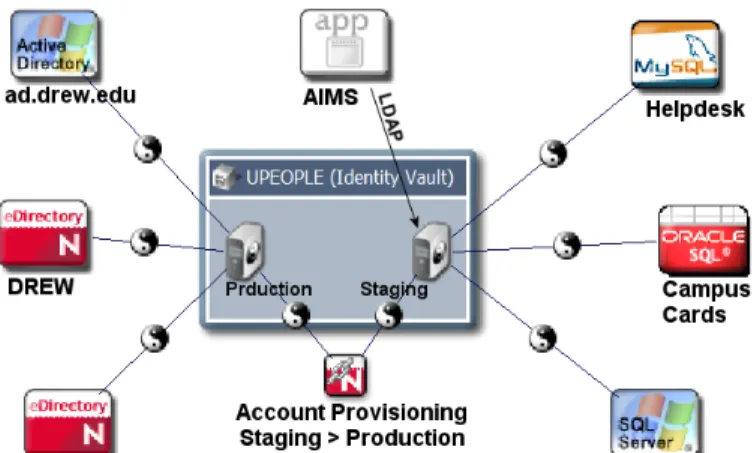
As is typical for a deployment of Novell Identity Manager, we implemented a new eDirectory tree (UPEOPLE) to serve as the metadirectory or “identity vault.” This directory serves as the central repository for University identity data and is the directory to which all other applications are connected through Identity Manager drivers.
This directory is structured differently than our existing file/print tree. The new tree is divided into two distinct sub-trees:
• Production: The production sub-tree contains user objects for all active users, as well as eDirectory groups corresponding to departments, courses, ad-hoc groups, and affiliations. Each user has one user account object in a single “flat” organizational unit. Multiple affiliations for users are represented by membership in multiple departmental eDirectory groups. User accounts and group memberships in this sub-tree are managed by Novell Identity Manager and Drew’s Entitlement Engine (described below). The production sub-tree including all users and groups is mirrored to the existing file/print tree (DREW) and our campus Active Directory domain by Identity Manager drivers.
• Identity staging: The identity staging sub-tree contains user objects for all people whose identity information is being synchronized from AIMS. This may include people who are not currently entitled to user accounts as well as those who are. User objects in this sub-tree are named according to their 7 digit Drew ID number, which is unique amongst all types of people managed by AIMS (faculty, staff, students, alumni, etc.) Objects in the staging sub-tree are updated whenever changes occur via LDAP using an update process running on the AIMS system. Objects existing in identity staging area may be mirrored to the production sub-tree via an Identity Manager driver based upon their entitlements. For the initial implementation of the identity management project, the existing enterprise eDirectory tree (DREW) was largely left unchanged. Users in this directory are organized into a single flat OU and named according to their 8 character Drew username. The users and groups in the DREW tree are mirrored directly by an Identity Manager driver from the production sub-tree of the UPEOPLE identity vault tree. This directory continues to serve as the main LDAP authentication tree for web applications, file/print services, and email service (via Novell NetMail).
Drew’s Microsoft Active Directory domain (ad.drew.edu) was also left unchanged. Like the DREW tree, users are organized into a flat OU structure with membership in one or more departmental and affiliation groups. While this directory was originally connected to the DREW tree via a Novell DirXML driver for Active Directory, it is now connected to the UPEOPLE tree via an Identity Manager driver, which mirrors the production side of UPEOPLE into the AD domain.
Within the next year, LDAP authentication for web applications via Novell iChain[7] will be split off into a separate tree, which is connected to UPEOPLE via an Identity Manager driver. By moving iChain authentication into a separate tree we will be able to provide web-applications to parents, alumni, prospective students, and other constituents without provisioning standard
Drew accounts for these users in our enterprise eDirectory tree and AD domain.
4.2 Administrative system (AIMS) interface.
In order to populate the identity vault tree (UPEOPLE) with live data from Drew’s central administrative system, Administrative Computing had to design an interface to trigger updates in eDirectory whenever changes were made in AIMS.Administrative Computing was able to make use of existing hooks that had been built into the AIMS system to audit changes to personnel and student information. Whenever a change is made to personnel or student record in AIMS, the system produces an LDIF[8] file which describes the change in a manner that can be processed by eDirectory.
LDIF files produced by AIMS are processed by the slurpd program, which is part of the OpenLDAP[9] open-source LDAP server. Slurpd is designed to be used for replicating data amongst OpenLDAP servers, processing the change log (written in LDIF format) from a master OpenLDAP server and transmitting those changes using LDAP to any number of slave LDAP servers. We have adapted it for our own purposes here. The replication logs being produced come from AIMS and the target “slave” directory service is a Novell eDirectory tree instead of an OpenLDAP server.
Identity data synchronized from AIMS extends well beyond the standard inetOrgPerson LDAP attributes. For employees, attributes pertaining to employee start/end date, supervisor, assigned departments, office locations, and other necessary information is provided. For students, attributes containing registration status, school and program codes, majors, minors, membership in courses, dorm room assignments, and other attributes are provided. These additional attributes are used to drive the creation of mailing lists, online community forums, and provision users access to networked shared space for courses.
4.3 Entitlement engine
Novell’s Nsure Identity Manager product is the successor to Novell DirXML, which was a tool designed to synchronize changes between disparate directory services. As a result, its primary strengths lie in real-time synchronization of data amongst systems, and its current release it lacks some of the time-driven workflow capabilities of competing identity management products.
An assumption in any Identity Manager implementation is that data change events generated by other systems will have an immediate effect upon provisioning of access to users, since Identity Manager policies are only applied when a change event is processed. For instance, a Human Resources system connected to eDirectory via Identity Manager may generate an event when a new employee is hired. Identity Manager policies would then instruct the system to create a new eDirectory account for the employee. If the assumption that change events always have real-time consequences is true, then it is possible to build a provisioning solution that is entirely based on Identity Manager drivers and policies.
In Drew’s case this assumption does not hold. The AIMS system may generate change events that will not have an impact on an account until a future date. For instance if a student registers for Spring 2006 term courses in the midst of the Fall 2005 term, AIMS will send a change to the eDirectory identity vault to add 2006SP to the user’s drewPersonRegisteredTerms attribute, which will not have any effect until the Spring of 2006. Similarly, the HR component of AIMS may send notification of termination or hire dates set in the future and so on.
To enable our identity management system to handle provisioning events set in the future, we developed an application known as the Entitlement Engine. Implemented as a set of T-SQL stored procedures and triggers and residing in an MS SQL Server 2000[10] database, the Entitlement Engine is connected to the Identity Vault via an Identity Manager driver.
When changes to an “entitlement affecting” attribute (such as the hire/termination date for employees, registered terms attribute for students, etc.) occur in the identity vault, these changes are communicated in real-time to the Entitlement Engine database, which executes a set of T-SQL procedures that recompute the user’s entitlements. In turn, if the change affects an immediate provisioning action, the Entitlement Engine writes back via the Identity Manager driver to a multi-valued eDirectory attribute containing the user’s current entitlements.
If the change does not affect immediate action, however, the future dated entitlement information is merely cached inside a database table in the Entitlement Engine database. A nightly process runs to apply any future dated entitlement changes by writing those changes back to the user entitlement attribute via the Identity Manager driver.
The user’s current entitlement attribute specifies the class of service (or set of services) that a user is entitled to receive. At the time of this writing, there are only three classes of service supported, one for students, one for employees, and a special “email only” category which is often used to extend email access after an employee leaves the University. The Entitlement Engine however is designed to accommodate an arbitrary number of entitlements.
It is based upon changes to the user’s current entitlements attribute in eDirectory that other Identity Manager drivers act to provision or de-provision accounts and memberships in eDirectory groups. In essence, the Entitlement Engine facilitates future dated provisioning actions by generating synthetic events for Identity Manager drivers to act upon.
4.4 Identity Manager drivers
Novell Identity Manager drivers connect the various directory services and applications in the system to the main identity vault eDirectory tree. Identity Manager drivers receive notification of changes from eDirectory or the application, apply policies written in Novell’s DirXML script language or XSLT, and then submit those changes to the application or eDirectory.
Drew’s Identity Manager drivers are divided broadly into the following categories:
• User provisioning drivers – These drivers connect the production subtree of the identity vault to the other enterprise directory services and applications that require user accounts. These drivers include an eDirectory driver to connect the identity vault to the existing DREW eDirectory tree, an Active Directory driver to connect the identity vault to the campus Active Directory domain, as well as JDBC Identity Manager drivers to connect to various applications that store their user information in a separate database, such as the vBulletin[11] software we use for Drew’s online discussion forums. These drivers incorporate few transformation policies and essentially mirror the production side of the identity vault into their respective directory services.
• Application data drivers – These drivers connect applications to the identity vault that need to subscribe to user data for purposes other than creating user accounts, such as providing a customer database. These drivers use the staging subtree of the identity vault as a data source. Examples of these drivers include using the Identity Manager driver for JDBC to connect to update customer data in Drew’s helpdesk software or the campus card system.
• Account management driver – The account management driver uses the Identity Manager driver for eDirectory to connect the staging subtree of the identity vault to the production subtree. It creates, disables, and deletes accounts in the production subtree based upon changes to the entitlements attribute updated by the Entitlement Engine.
• Policy (loopback) drivers – We use the loopback driver provided with Identity Manager to implement several policies in the identity vault tree. Management of group memberships based upon other eDirectory attributes is a common example of a policy that we implement with the loopback driver. For instance, there is a loopback driver policy to add and remove users from eDirectory groups corresponding to courses based upon the course registration attribute on a student’s user object.
5. CONCLUSION
Drew’s identity management system is continuously being developed and expanded. At that time of this writing, it is already in use to synchronize data between AIMS, two eDirectory trees, one Active Directory domain, and other applications including the campus card system, an enrolled student’s portal, and an online discussion forum application. The system will continue to expand
as we replace most of the current flat-file based integrations with AIMS with the identity management system over the coming months.
Over the course of the next year, we hope to expand the scope of the identity management project to include not only current faculty, staff, and students, but to also include alumni, prospective students, and others who have a more loose affiliation with the institution.
In conjunction with admissions and alumni portals currently in discussion, the identity management system will be an essential component of the infrastructure necessary to provide students with a single, easy to use, digital identity that will persist throughout the entire lifecycle of their relationship with Drew, from prospective student to alumni.
6. REFERENCES
[1] Novell NetWare. http://novell.com/netware.
[2] Novell NetMail. http://novell.com/netmail. [3] Blackboard Learning System.
http://blackboard.com/products/academic/ls/. [4] Aptron Corporation. http://aptron.com/. [5] Novell DirXML. http://novell.com/dirxml. [6] Novell’s Zero-Day-Start Program.
http://blackboard.com/products/academic/ls/. [7] Novell iChain. http://novell.com/ichain.
[8] Good, G. RFC 2849 – The LDAP Data Interchange Format (LDIF) – Technical Specifications.
http://www.faqs.org/rfcs/rfc2849.html. [9] OpenLDAP Project. http://openldap.org/. [10] Microsoft SQL Server. http://microsoft.com/sql. [11] vBulletin. http://vbulletin.com/.