A Virtualized Infrastructure for Automated BitTorrent Performance
Testing and Evaluation
R˘
azvan Deaconescu
George Milescu
Bogdan Aurelian
R˘
azvan Rughini¸s
Nicolae T
¸ ˘
apu¸s
University Politehnica of Bucharest
Computer Science Department
Splaiul Independent¸ei nr. 313, Bucharest, Romania
{razvan.deaconescu, george.milescu, bogdan.aurelian, razvan.rughinis, nicolae.tapus}@cs.pub.ro
Abstract
In the last decade, file sharing systems have gener-ally been dominated by P2P solutions. Whereas email and HTTP have been the “killer apps” of the earlier In-ternet, a large percentage of the current Internet back-bone traffic is BitTorrent traffic [15]. BitTorrent has proven to be the perfect file sharing solution for a de-centralized Internet, moving the burden from central servers to each individual station and maximizing net-work performance by enabling unused communication paths between clients.
Although there have been extensive studies regarding the performance of the BitTorrent protocol and the im-pact of network and human factors on the overall trans-fer quality, there has been little interest in evaluating, comparing and analyzing current real world implemen-tations. With hundreds of BitTorrent clients, each ap-plying different algorithms and performance optimiza-tion techniques, we consider evaluating and comparing various implementations an important issue.
In this paper, we present a BitTorrent performance evaluation infrastructure that we are using with two purposes: to test and compare current real world Torrent implementations and to simulate complex Bit-Torrent swarms. Our infrastructure consists of a virtu-alized environment simulating complete P2P nodes and a fully automated framework. For relevant use, differ-ent existing BitTorrdiffer-ent clidiffer-ents have been instrumdiffer-ented to output transfer status data and extensive logging in-formation.
Keywords: BitTorrent; virtualization; automa-tion; performance evaluaautoma-tion; client instrumentation
1
Introduction
P2P sharing systems are continuously developing and increasing in size. There is a large diversity of so-lutions and protocols for sharing data and knowledge which enable an increasing interest from common users and commercial and academic institutions [22].
It is assumed [15] that BitTorrent is responsible for a large portion of all Internet traffic. BitTorrent has proven to be the “killer” application of the recent ears, by dominating the P2P traffic in the Internet [24].
During the recent years BitTorrent [16] has become the de facto P2P protocol used throughout the Inter-net. A large portion of the Internet backbone is cur-rently comprised of BitTorrent traffic [18]. The decen-tralized nature of the protocol insures scalability, fair-ness and rapid spread of knowledge and information.
As a decentralized system, a BitTorrent network is very dynamic and download performance is influenced by many factors: swarm size, number of peers, network topology, ratio enforcement. The innate design of the BitTorrent protocol implies that each client may get a higher download speed by unchoking a certain client. At the same time, firewalls and NAT have continuously been a problem for modern P2P systems and decrease the overall performance.
Despite implementing the BitTorrent specification [23] and possible extensions each client uses different algorithms and behaves differently on a given situation: it may limit the number of peers, it may use heuristic information for an optimistic unchoke, it could choose a better client to download from. An important point of consideration is the diversity and heterogeneity of peers in the Internet. Some peers have low bandwidth connections, some act behind NATs and firewalls, some use certain improvements to the protocol. These
as-pects make a thorough analysis of the protocol or of its implementations difficult as there is little to no control over the parameters in a real BitTorrent swarm.
The results presented in this paper are a continu-ation of previous work on BitTorrent appliccontinu-ations as described at ICNS 2009 [1].
Our paper presents a BitTorrent performance eval-uation infrastructure [30] that enables creating a con-tained environment for BitTorrent evaluation, testing various BitTorrent implementations and offers exten-sive status information about each peer. This informa-tion can be used for analysis, interpretainforma-tion and corre-lation between different implementations and for ana-lyzing the impact of a swarms state on the download performance.
In order to simulate an environment as real as pos-sible, hundreds to thousands of computer systems are required, each running a particular BitTorrent imple-mentation. Modern clusters could offer this environ-ment, but the experiments require access to all systems, making the availability of such a cluster an issue.
The approach we propose in this paper is to use a virtualization solution to accommodate a close-to-real-world testing environment for BitTorrent applications at a fraction of the costs of a real hardware solution (considering the number of computer systems). Our virtualization solution uses the lightweight OpenVZ [21] application that enables fast creation, limited exe-cution overhead and low resource consumption. In this paper we show that, by using commodity hardware and OpenVZ, a virtual testing environment can be created with at least ten times more simulated systems than the real one used for deployment.
On top of the virtualized infrastructure, we devel-oped a fully automated BitTorrent performance evalu-ation framework. All tested clients have been instru-mented to use command line interfaces that enable au-tomated actions. Clients are started simultaneously and results are collected after the simulation is com-plete.
The paper is organized as follows: Section 2 pro-vides background information, keywords and acronyms used throughout the article, Section 3, 4, 5 present the infrastructure and framework used for our BitTor-rent experiments; Section 6 and 7 describe OpenVZ and MonALISA, the virtualization and monitoring so-lution we used; we present the experimental setups and results of various experiments in Section 8; Section 9 describes the web interface architecture built on top of the framework; Section 10 and 11 present concluding remarks and related work.
2
Background
Our paper deals with recent concepts related to peer-to-peer networks, BitTorrent in particular, and virtualization. This section gives some definitions of terms used throughout the paper.
P2P networks are part of the peer-to-peer paradigm. Each peer is simultaneously a client and a server. P2P networks are decentralized systems sharing information and bandwidth as opposed to the classical centralized client-server paradigm.
BitTorrent is the most used P2P protocol in the Internet. Since its creation by Bram Cohen in 2001, BitTorrent has proven to provide the best way to allow file distribution among its peers. The BitTorrent pro-tocol makes a separation between a file’s content and its metadata. The metadata is stored in a specialized .torrent file. The .torrent file stores piece information and hashes and tracker information (see below) and is usually distributed through the use of a web server. BitTorrent is not a completely decentralized protocol. A special server, calledtrackeris used to intermediate initial connections between peers.
A set of peers sharing a particular file (i.e. having access and using the same .torrent file) are said to be part of the sameswarm. A tracker can mediate com-munication in multiple swarms at the same time. Each peer within a swarm is either a seeder of a leecher. A seederis a peer who has complete access to the shared file; the seeder is only uploading. For a swarm to ex-ist there has to be an initial seeder with access to the complete file and its associated metadata in the .tor-rent file. A peer is a leecher as long as it has only partial access to the file (i.e. it is still downloading). A healthy swarm must contain a good number of seeders. There is a great variety of BitTorrent clients, some of which have been the subject of the experiments described in this paper. There are also BitTorrent libraries (such as rasterbar or libtorrent-rakshasa) that form the basis for particular BitTorrent implementations. Some of the more popular clients are uTorrent, Azureus, Transmission, rTorrent, BitTorrent (the official BitTorrent client, also known as Mainline). Our paper describes the use of virtualization tech-nology in the benefit of simulating partial or complete BitTorrent swarms. For our experiments we have used the OpenVZ[21] virtualization solution. OpenVZ is an operating-system level virtualization solution. This means that each virtual machine (also known asVE
-virtual environment) that it will run on the same kernel as the host system. This approach has the advantage of using a small amount of resources for virtual machine implementation. Each OpenVZ VE uses a part of the
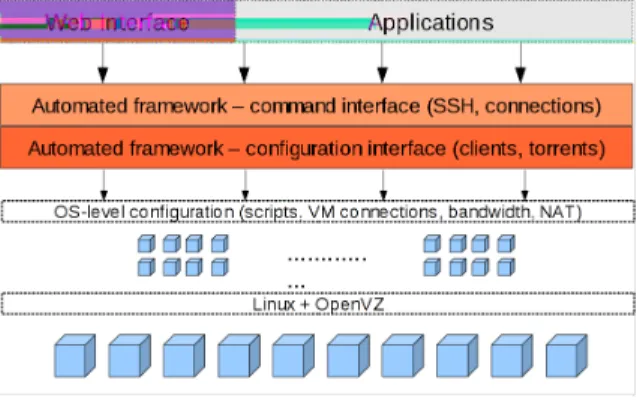
Figure 1. Overall Architecture of BitTorrent Performance Evaluation Infrastructure
host file-system and each OpenVZ process is a process in the host system.
Each host system acts as a gateway for the OpenVZ VEs. For our infrastructure, the host system uses NAT (Network Address Translation) to allow com-munication between and OpenVZ VE and the outside world. The current setup uses SNAT(Source NAT) to enable access from the OpenVZ VEs to the outside world and DNAT (Destination NAT) to enable con-nectionsto the virtual machines, for uploading.
As the base system is a Linux-based distribution NAT is handled through the use of iptables, the tool that handles packet filtering and manipulation. Our framework also usestc(traffic control) for traffic limi-tation.
SSH(Secure Shell) is the basic communication pro-tocol for commanding VEs and BitTorrent clients. It has the advantage of being secure and allowing easy communication with VEs. At the same time, it allows automating commands through a scripted interface. As the framework usesCLI(Command Line Interface) for automating commands, the use of SSH is very helpful. Our measurements use MonALISA [20] for real time monitoring of BitTorrent parameters, usually down-load speed and downdown-load percentage. MonALISA pro-vides a specialized infrastructure for storing and visu-alizing required parameters. A lightweight monitoring agent is used on each OpenVZ VE to send periodic updates to the MonALISA repository.
3
Overall architecture
Figure 1 presents a general overview of the BitTor-rent performance evaluation infrastructure.
The infrastructure consists of commodity hard-ware systems running GNU/Linux. Each system uses
OpenVZ virtual machine implementation to run mul-tiple virtual systems on the same hardware node.
Each virtual machine contains the basic tools for running and compiling BitTorrent clients. Tested Bit-Torrent implementations have been instrumented for automated command and also for outputting status and logging information required for subsequent analy-sis and result interpretation. As the infrastructure aims to be generic among different client implementations, the addition of a new BitTorrent client resumes only at adding the required scripts and instrumentation.
Communication with the virtual machines is enabled through the use of DNAT and iptables. TC (traffic control) is used for controlling the virtual links between virtual systems.
Each virtual machine uses a set of scripts to enable starting, configuration, stopping and result gathering for BitTorrent clients.
A test/command system can be used to start a series of clients automatically through the use of a scripted interface. The command system uses SSH to connect to the virtual machines (SSH is installed and communica-tion is enabled through DNAT/iptables) and command the BitTorrent implementations. The SSH connection uses the virtual machine local scripts to configure and start the clients.
The user can directly interact with the automated framework through the use of command scripts, can embed the commanding interface in an application or can use the web interface. The web interface was devel-oped to facilitate the interaction between the user, the BitTorrent clients and the virtual machines. It enables most of the actions that an user is able to accomplish trough direct use of the command scripts.
4
BitTorrent Clients
For our experiments we selected the BitTorrent clients that are most significant nowadays, based on the number of users, reported performance, features and history.
We used Azureus, Tribler, Transmission, Aria, libtorrent rasterbar/hrktorrent, BitTornado and the mainline client (open source version). All clients are open source as we had to instrument them to use a command line interface and to output verbose logging information.
Azureus, now called Vuze, is a popular BitTorrent client written in Java. We used Azureus version 2.3.0.6. The main issue with Azureus was the lack of a proper CLI that would enable automation. Though limited, a “Console UI” module enabled automating the tasks
of running Azureus and gathering download status and logging information.
Tribleris a BitTorrent client written in Python and one of the most successful academic research projects. Developed by a team in TU Delft, Tribler aims at adding various features to BitTorrent, increasing down-load speed and user experience. We used Tribler 4.2. Although a GUI oriented client, Tribler offers a com-mand line interface for automation. Extensive logging information is enabled by updating the value of a few variables.
Transmissionis the default BitTorrent client in the popular Ubuntu Linux distribution. Transmission is written in C and aims at delivering a good amount of features while still keeping a small memory foot-print. The version we used for our tests was trans-mission 1.22. Transtrans-mission has a fully featured CLI and was one of the clients that were very easy to auto-mate. Detailed debugging information regarding con-nections and chunk transfers can be enabled by setting the TR DEBUG FD environment variable.
Aria2is a multiprotocol (HTTP, FTP, BitTorrent, Metalink) download client. Throughout our tests we used version 0.14. aria2 natively provides a CLI and it was easy to automate. Logging is also enabled through CLI arguments. Aria2 is written in C++.
libtorrent rasterbar/hrktorrent is a BitTor-rent library written in C++. It is used by a num-ber of BitTorrent clients such as Deluge, BitTor-rent and SharkTorBitTor-rent. As we were looking for a client with a CLI we found hrktorrent to be the best choice. hrktorrent is a lightweight implementa-tion over rasterbar libtorrent and provides the nec-essary interface for automating a BitTorrent transfer, although some modifications were necessary. Raster-bar libtorrent provides extensive logging information by defining the TORRENT LOGGING and TOR-RENT VERBOSE LOGGING MACROS. We used version 0.13.1 of rasterbar libtorrent and the most re-cent version of hrktorrent.
BitTornado is an old BitTorrent client written in Python. The reason for choosing it to be tested was because of a common background with Tribler. How-ever, as testing revealed, it had its share of bugs and problems and it was eventually dropped.
BitTorrent Mainline is the original BitTorrent client written by Bram Cohen in Python. We used ver-sion 5.2 during our experiments, the last open-source version. The mainline client provides a CLI and log-ging can be enabled through minor modifications of the source code.
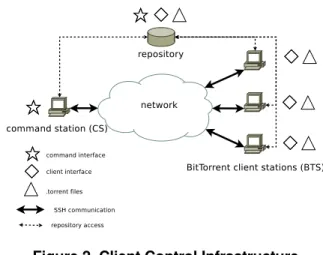
Figure 2. Client Control Infrastructure
5
Framework
As shown in Figure 2, the client control infrastruc-ture on top of which our framework runs consists of a command station, a repository and a set of client stations. Through the use of OpenVZ [21], the client stations are virtual machines simulating common fea-tures of a standard computer system.
The current infrastructure is located in NCIT Clus-ter [29] in University Politehnica of Bucharest. We are using commodity hardware systems as described in Sec-tion 8. The systems we are using for BitTorrent/P2P experiments are located in the same local area network. Each system uses a 1 Gbit Ethernet link and the cluster provides an 10 Gbit external link. Each system is able to sustain a 25 MB/s download speed from external download sources (i.e. not in cluster).
Communication between the OpenVZ virtual ma-chines is handled by the host operating system, which acts as a gateway enabling communication with other virtual machines.
Communication between the CS (Command Sta-tion) and the BTS (BitTorrent Client StaSta-tion) is han-dled over SSH for easy access and commanding. The repository is used to store the control framework im-plementation and .torrent files for download sessions. Each BTS checks out from the repository the most re-cent framework version and the .torrent files to be used. The control framework is actually a set of small shell scripts enabling the communication between the CS and the BTS and running each BitTorrent client through its command line interface.
For each download session the commander specifies the .torrent file to be used and the mapping between each BitTorrent client and a BTS. Through SSH a spe-cific script is being run on the target BTS enabling the BitTorrent client. The BTS doesn’t need to be in the
same network. The only requirement for the client sta-tions is to run an SSH server and be accessible through SSH.
Each BitTorrent client uses a specialized environ-ment for storing logging and download status informa-tion. All this data can then be collected and analyzed.
5.1
Repository access
6
Using a virtualized environment
Various extensions, sharing ratio enforcement poli-cies and moderation techniques have been deployed to improve the overall efficiency of the BitTorrent proto-col. An important point to consider is the diversity and heterogeneity of peers in the Internet. Some peers have low bandwidth connections, some act behind NATs and firewalls, some use certain improvements to the proto-col. These aspects make a thorough analysis of the protocol or of its implementations difficult as there is little to no control over the parameters in a real Bit-Torrent swarm.
A solution is creating a contained environment for BitTorrent evaluation. However, in order to simulate an environment as real as possible, hundreds to thou-sands of computer systems are required, each running a particular BitTorrent implementation. Modern clus-ters could offer this environment, the experiments re-quire access to all rere-quired systems, making the avail-ability of such a cluster an issue.
The approach we propose is to use a virtualization solution to accommodate a close-to-real-world testing environment for BitTorrent applications at a fraction of the costs of a real hardware solution (considering the number of computer systems). Our virtualization solution uses the lightweight OpenVZ [21] application that enables fast creation, limited execution overhead and low resource consumption. In this paper we show that, by using commodity hardware and OpenVZ, a virtual testing environment can be created with at least ten times more simulated systems than the real one used for deployment.
Creating a virtualized environment requires the hardware nodes where virtual machines will be de-ployed, the network infrastructure, a set of OpenVZ templates for installation and a framework that enables commanding clients inside the virtual machines.
Each virtual machine runs a single BitTorrent ap-plication that has been instrumented to use an easily-automated CLI.
6.1
OpenVZ
OpenVZ [21] is an operating system-level virtualiza-tion soluvirtualiza-tion. It can run only a Linux virtual environ-ment over an OpenVZ-enabled Linux kernel. A virtual machine is also called a container or virtual environ-ment (VE). OpenVZ is a lightweight virtualization so-lution incurring minimal overhead compared to a real environment.
OpenVZs advantages are low-resource consumption and fast creation times. As it is using the same ker-nel as the host system, OpenVZs memory and CPU consumption is limited. At the same time, OpenVZ file-system is a sub-folder in the hosts file-system en-abling easy deployment and access to the VE. Each VE is thus a part of the main file-system and can be encapsulated in a template for rapid deployment. One simply has to uncompress an archive, edit a configu-ration file and setup the virtual machine (host name, passwords, network settings).
OpenVZs main limitation is the environment in which it runs: the host and guest systems must both be Linux. At the same time certain kernel features that are common in a hardware-based Linux system are missing: NFS support, NAT, etc., due to inherent design.
Despite its limitations, OpenVZ is the best choice for creating a virtualized environment for the evalua-tion of BitTorrent clients. Its minimal overhead and low-resource consumption enables running tens of vir-tual machines on the same hardware node with little penalty.
7
Monitoring with MonALISA
Deploying a large number of virtual environments implies gathering important amount of information for analysis and interpretation. While status and logging information is gathered and stored for each experimen-tal session, we enabled the use of the MonALISA [20] client for real time monitoring and data storage.
MonALISA uses a distributed infrastructure to monitor various experiments and activities. It has a di-versity of features ranging from easily integrated API, real time monitoring, graphical representation, data storage for further use, etc.
We extended our framework to use MonALISA for real time monitoring of download speed and other fac-tors. Each client can be configured to send data to a MonALISA agent. The MonALISA agent parses that data and creates a close-to-real-time graphical evolu-tion of the download speed. There is a small delay
Figure 3. MonALISA Monitoring Infrastruc-ture
between the client collecting sufficient data and send-ing it and the MonALISA agent processsend-ing it.
Figure 3 is an overview of the monitoring infrastruc-ture involving MonALISA. All virtualized systems are able to send data to a MonALISA server and subse-quently to a MonALISA repository. A web interface application uses data from the repository to publish it as history or real time graphs. Besides the web inter-face, MonALISA offers an interactive client that must be installed on the user system. The client enables read access to information in different clusters and can be used to create on-demand graphical representation of measured features.
8
Experimental setups
We used two major experimental setups. The first setup has been used before the addition of the virtual-ized environment and was dedicated to measurements and comparisons between different BitTorrent clients. The second setup is the current one and uses two bene-fits of the virtualized environment to simulate complete swarms: client station characteristics and network in-terconnections.
8.1
Performance
evaluation
experiment
setup
Our first experimental setup consisted of six identi-cal computers running the same operating system and
Figure 4. Test Swarm 1
Figure 5. Test Swarm 2
software. The hardware configuration includes Pen-tium 4 2GHz CPU, 1 GB RAM, 160 GB HDD. We used Ubuntu 7.10 Gutsy Gibbon as an operating sys-tem.
The six computers are connected in the same net-work, thus using common bandwidth to access the In-ternet. The computers have been firewalled from each other such that communication is enabled only with peers from the Internet.
Most of our experiments were simultaneous down-load sessions. Each system ran a specific client in the same time and conditions as the other clients. Results and logging data were collected after each client fin-ished its download.
8.1.1 Results
Our framework was used to test different swarms (dif-ferent .torrent files). Most scenarios involved simul-taneous downloads for all clients. At the end of each session, download status information and exten-sive logging and debugging information were gathered from each client. Figure 4 and figure 5 are compar-isons between different BitTorrent clients running on
the same environment in similar download scenarios. The graphical representation show the download ra-tio/percentage evolution with respect to time.
The first test runs simultaneous sessions for five clients (hrktorrent, aria, azureus, transmission, tribler) part of the same swarm. The swarm uses 2900 seed-ers and 2700 leechseed-ers and a 908MB file. All clients were started at the same time on different systems in the same network. The operating system, hardware and network characteristics are identical for all clients. Aria is the clear loser of the race. A tight compe-tition is going between hrktorrent and Tribler at the beginning of the download session. Both clients dis-play a high acceleration (increase in download speed). However, Tribler’s speed/download rate is gets lower at around 20% of the download and hrktorrent comes out as the clear winner. Tribler and Azureus finish their download at around the same time, with Transmission coming out fourth, and Aria last.
The second test also runs simultaneous sessions for all clients presented in Section 4. The current swarm uses a 4.1 GB file, 761 seeders and 117 leechers. hrktor-rent again displays an excellent start, with all the other clients lagging. Tribler starts a bit late, but manages to catch up and, at about 25% of the download size, is faster than hrktorrent. At the end of the session, the first three clients are the same (hrktorrent, Tribler, Azureus) with Transmission, Aria and Mainline finish-ing last.
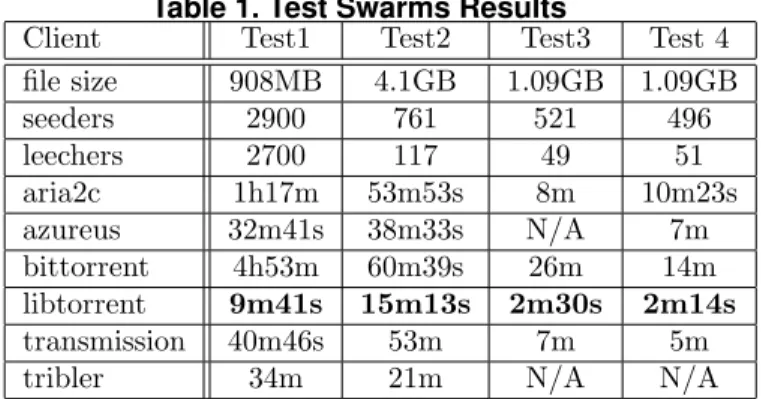
Table 1. Test Swarms Results
Client Test1 Test2 Test3 Test 4 file size 908MB 4.1GB 1.09GB 1.09GB seeders 2900 761 521 496 leechers 2700 117 49 51 aria2c 1h17m 53m53s 8m 10m23s azureus 32m41s 38m33s N/A 7m bittorrent 4h53m 60m39s 26m 14m libtorrent 9m41s 15m13s 2m30s 2m14s transmission 40m46s 53m 7m 5m
tribler 34m 21m N/A N/A
Table 1 presents a comparison of the BitTorrent clients in four different scenarios. Each scenario means a different swarm. Although much data was collected, only the total download time is presented in the table. Due to bugs with the Tribler and Azureus clients, some results are missing and are marked withN/Ain Table 1. The two clients did continue their download but at a negligible speed and they were stopped.
The conclusions drawn after result analysis were: • hrk/libtorrent is continuously surpassing the other
Figure 6. Close-to-real-time Monitoring
clients in different scenarios;
• tribler, azureus and transmission are quite good clients but lag behind hrktorrent;
• mainline and aria are very slow clients and should be dropped from further tests;
• swarms that are using sharing ratio enforcement offer better performance; a file is downloaded at least 4 times faster within a swarm using sharing ratio enforcement.
8.1.2 Integration with MonALISA
Figure 6 is a screenshot of a download session ren-dered using MonALISA. By using a MonALISA client, a close-to-real-time evolution of a BitTorrent download session can be obtained.
8.2
Virtualized experimental setup
Our current setup consists of 8 computers each run-ning 5 OpenVZ virtual environments (VEs). All sys-tems are identical with respect to the CPU power, memory capacity and HDD space and are part of the same network. The network connections are 1Gbit Ethernet links.
The hardware configuration for each system in-cludes:
• 2GB RAM
• Intel(R) Pentium(R) 4 CPU 3.00GHz dual-core • 300GB HDD
All systems are running the same operating sys-tem (Debian GNU/Linux Lenny/testing) and the same software configuration.
8.3
Resource consumption
With all 5 VEs active and running a BitTorrent client in each of them, memory consumption is 180MB-250MB per system. With no VE running, the memory consumption is around 80MB-110MB. The amount of memory used by the VEs is:
V Emem=sV Emem−smem
where:
• V Ememis the memory consumption of VEs • sV Emem is the memory consumption of
base-system and VEs
• smem is the memory consumption by the ”bare-bones” base-system
This means that the minimum and maximum values of memory consumption by the VEs are:
min V Emem=min sV Emem−max smem max V Emem=max sV Emem−min smem
Given the above values, it results that the 5 VEs use between 70MB and 170MB of RAM or a rough estimate of 15MB to 35MB per VE.
The BitTorrent client in use is hrktorrent, a libtorrent-rasterbar based implementation. hrktorrent is a light addition to the libtorrent-rasterbar library, so memory consumption is quite small while still de-livering good performance. On average, each virtual machine uses at most 40MB of RAM when running hrktorrent in a BitTorrent swarm.
The current partitioning scheme for each system leaves 220GB of HDD space for the VEs. However, one could upgrade that limit safely to around 280GB. Each basic complete VE (with all clients installed) uses 1.7GB of HDD space. During a 700MB download ses-sion, each client outputs log files using 30-50MB of space.
Processor usage is not an issue as BitTorrent appli-cations are mostly I/O intensive.
8.3.1 Scalability
As mentioned above, 5 active VEs running the hrktor-rent client use about 70 to 250MB of RAM. This gives a rough estimate of about 15 MB to 35 MB of memory consumption per VE. As the basic system also uses at most 110MB of RAM, it results that the total memory consumption is at mostnum V Es∗35M B+ 110M B. From the HDD perspective, the basic system can be tuned to use 20GB of space with no major constraints on the software configuration. Each complete VE (able to run all CLI-based BitTorrent clients) uses 1.7GB of space. At the same time, 1GB of space should be left on
each system for testing and logging purposes and 5GB for file transfer and storage. This means that about 8GB of space should be reserved for each VE.
The above values are a rough estimate. A carefully tuned system would manage to use less resources. How-ever, we aimed to show that given these high values, an average PC could still sustain a significant amount of VEs with little overhead and resource penalty.
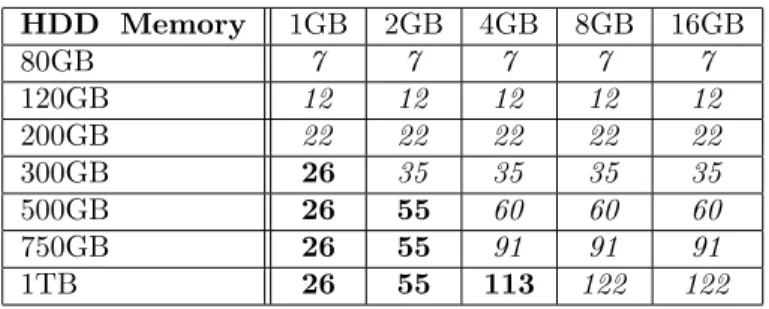
Table 2 gives an estimated maximum number of OpenVZ virtual environments a basic PC is able to run. Bold font means limitation is due to RAM ca-pacity, whileitalic font means limitation is due to HDD space.
Table 2. Estimated Maximum Number of VEs per System HDD Memory 1GB 2GB 4GB 8GB 16GB 80GB 7 7 7 7 7 120GB 12 12 12 12 12 200GB 22 22 22 22 22 300GB 26 35 35 35 35 500GB 26 55 60 60 60 750GB 26 55 91 91 91 1TB 26 55 113 122 122
The above mentioned values assume the usage of the hrktorrent/libtorrent BitTorrent client. They also assume the scheduling impact of all processes in the VEs induces low overhead on the overall performance. However, even considering the scheduling overhead, a modest system would still be able to run at least 10 to 20 VEs.
It can also be noticed that the primary limiting fac-tor is the hard-disk, not the physical memory. How-ever, given a large number of VEs the processing power also becomes important. Consequently the later num-bers are realistic only with respect to memory and HDD, neglecting the context-switch overhead and CPU power.
We can safely conclude that a virtualized testing environment based on OpenVZ would provide similar testing capabilities as a non-virtualized cluster with at most 10% of the cost. Our experimental setup consist-ing of just 8 computers is able of runnconsist-ing at least 100 virtualized environments with minimal loss of perfor-mance.
The virtualized environment is thus a cheaper and more flexible alternative to a full-fledged cluster, with little performance loss. Its main disadvantage is the asymmetry between virtualized environments that run on different hardware system. The main issue is
net-work bandwidth between VEs running on the same hardware node and VEs running on different hardware nodes. This can be corrected by using traffic limitation ensuring a complete network bandwidth symmetry be-tween the VEs.
8.3.2 Testing scenarios and results
Currently we are simulating swarms comprising of a single seeder and 39 initial leechers. 19 leechers are high bandwidth peers (512KB/s download speed, 256KB/s upload speed) and 20 leechers are low band-width peers (64KB/s download speed, 32KB/s upload speed).
The total time of an experiment involving all 40 peers and a 700MB CD image file is around 4 hours. It only takes about half an hour for the high bandwidth clients to download it.
We have been using Linux Traffic Control (TC) tool combined with iptables set-mark option to limit down-load and updown-load traffic to and from a VE.
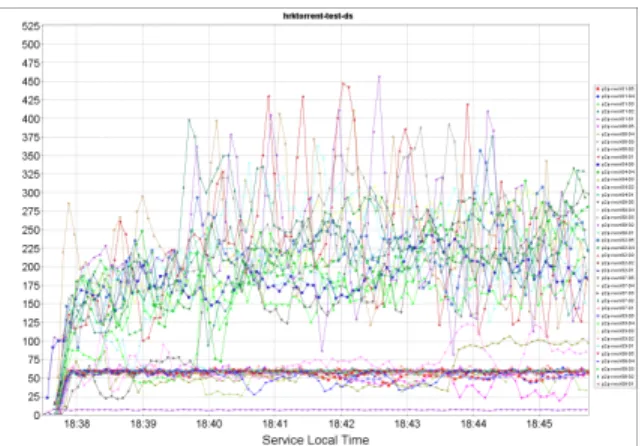
Figure 7 and Figure 8 are real time representations of download speed evolution using MonALISA. The first figure shows the initial phase (first 10 minutes) of an experiment with the low bandwidth clients limited by the 64KB/s download speed line, and the high band-width clients running between 100KB/s and 450KB/s. The second figure presents the mid-phase of an exper-iment when high bandwidth clients finished download-ing.
Figure 7 show the limitation of the low bandwidth peers while the high bandwidth peers have sparse download speed. Each high bandwidth client’s speed usually follows an up-down evolution, and an increas-ing median as time goes by.
For the second swarm, at around 13:05, the high bandwidth clients have finished their download or are finishing in the following minutes, while the low width clients are still downloading. The high band-width clients have a large speed interval, while the low bandwidth clients are “gathered” around the 64KB limitation.
9
Web interface
In order to ease the use of the automated framework we developed a web interface that acts as a front-end to the scripted framework. Functionalities provided by the scripted framework are integrated within the web interface.
A web-based approach was chosen in favor of other possible interfaces because of certain advantages. An important advantage is accessibility: a browser is all
Figure 7. Download Speed Evolution (initial phase)
Figure 8. Download Speed Evolution (mid phase)
Figure 9. Web Interface Architecture
that is required in order to use the interface. This also means that the command server (see Figure 9) is installed on a single hardware system without further installation actions on client systems available to the user.
From a resource requirements perspective, the in-terface requires little (if any) complex graphical effects or additional software packages. The web technolo-gies employed by the interface (HTTP, HTML, CSS, JavaScript) completely satisfy the requirements.
Another advantage is portability. The application, the web server and the tools employed are portable across different operating systems. From an interface point of view, this means that the application can be easily migrated from one system to another.
9.1
Web interface architecture
The web interface, as presented in Figure 9, is a front-end to the automated evaluation framework. More precisely, it is used as a substitute to the com-mand station (CS) described in Figure 2. Comcom-mand and control requests employed by the user in the CS can now be accessed through the use of the web inter-face. Communication between the web interface and the BitTorrent stations (BTS) is done, as in the case of the CS-BTS communication, through SSH. The web in-terface can be used to command, control, report client status and upload .torrent files to the client stations.
The web server used by the web interface is an Apache Tomcat server. The technologies employed are servlets, Java Server Pages, Java Struts and Java Tiles. From the application perspective, the command server (web interface server in this case) sends com-mands to clients. The clients execute the com-mands/requests and return the error status.
The web interface enables the user to configure min-imal administration of the client stations and the .tor-rent files. It can start and stop download sessions for BitTorrent clients, it can schedule starts and stops and it can report the current status for a specified
client. For flexibility reasons the interface offers means through which the machines may be commanded in-dividually or simultaneously, depending on the user’s preference.
9.2
Integration with back-end framework
The commanding module consists of multiple sub-systems, each fulfilling a specific task. It is responsible of keeping information about the client stations such as the availability information, connection details, avail-able .torrent files, running client process, download ses-sions status and scheduled tasks.Some data structures require periodic updates pro-vided by the automated framework. The command module is also responsible of launching threads at spe-cific times to complete these tasks.
The interface agent calls the BitTorrent client through the automated framework and sends it the parameters specified by the command module. Each specific action uses a different set of commanding pa-rameters. Communication between the interface agent and the automated interface is handled through SSH.
10
Related work
While there are extensive studies and proposals re-garding the internals of the BitTorrent protocol, there has been little concern about comparing and evaluating real world implementations. Guo et. al [6] developed an extensive study of P2P systems, but focusing on how the overall behavior of the swarm affects the per-formance. Pouwelse et. al [10] [11] have also gathered large amount of information and used it for detailing BitTorrent swarm behavior.
Most measurements and evaluations involving the BitTorrent protocol or BitTorrent applications are ei-ther concerned with the behavior of a real-world swarm or with the internal design of the protocol. There has been little focus on creating a self-sustained testing environment capable of using hundreds of controlled peers for gathering results and interpreting them.
Pouwelse et al. [11] have done extensive analysis on the BitTorrent protocol using large real-world swarms, focusing on the overall performance and user satisfac-tion. Guo et. al [5] have modeled the BitTorrent proto-col and provided a formal approach to the its function-ality. Bharambe et. al [3] have done extensive studies on improving BitTorrents network performance.
Iosup et al. [7] used a testing environment involving four major BitTorrent trackers for measuring topology and path characteristics. They used nodes in
Planet-Lab. The measurements were focused on geo-location and required access to a set of nodes in PlanetLab.
Garbacki et al. [4] have created a simulator for test-ing 2Fast, a collaborative download protocol. The sim-ulator was useful only for small swarms that required control. Real-world experiments involved using real systems communicating with real BitTorrent clients in the swarm.
11
Conclusions and future work
The paper presents a BitTorrent performance evalu-ation infrastructure that uses virtualizevalu-ation to simulate hardware nodes and network interconnection features. While there have been extensive studies regarding the performance of the BitTorrent protocol and how it can be improved by using carefully crafted algorithms, little attention has been given to analyzing and com-paring real world implementations of the BitTorrent specifications. We created an easily deployable solution that enables automated testing of different BitTorrent clients in real world situations.
The proposed virtualized environment enables eval-uation of the BitTorrent applications with only a frac-tion of the costs of a full-fledged cluster system. The advances of virtualization technologies and hardware systems ensure that complete experiments can be run in a virtualized environment with little penalty over a real environment.
Our approach makes use of the excellent OpenVZ virtualization software that incurs minimum overhead when creating and running virtualized environments. OpenVZ’s low memory and HDD consumption enable tens of VEs, each running a BitTorrent client, to run on an average PC system (2GB RAM, 200GB HDD, 3GHz dual core CPU).
Given its flexibility, the virtualized environment can be used for a large variety of experiments and scales very well with respect to the number of simulated peers in a swarm. Our current experiments deal with low bandwidth/high bandwidth peers. We plan to extend these experiments to more peers, and to simulate a more dynamic swarm (with clients entering and leav-ing).
Our results identified the libtorrent-rasterbar imple-mentation as the fastest client, clearly ahead of other implementations. We intend to analyze the logging output and investigate its source code to identify the clever tweaks that enable such an improvement over the other clients.
The current SSH communication means that BTS can be commanded only if its SSH server can be con-tacted. This makes it very difficult for clients that are
behind NAT or firewalls to participate in a testing sce-nario. We aim to develop and deploy a server that ac-cepts incoming connections regardless of NAT/firewall constraints and uses these connections to command BitTorrent clients.
Planned work is also to detect any potential prefer-ences among clients, by enabling different BitTorrent implementations in a single closed swarm.
At the same time we intend to expand the reporting interface with information related to processor usage, memory consumption and number of connections for easy result interpretation and analysis. The MonAL-ISA interface will also be extended for live reporting of various transfer parameters.
The virtualized environment gives easy access to modifying the number of seeders in a swarm, the num-ber of firewalled clients, seeding time and many other variables. With full control over the entire swarm, one or more of the swarm parameters could be easily altered and then measure, analyze and interpret the results.
Our infrastructure uses real-world implementations of BitTorrent clients and a low-overhead virtualized testing environment. The virtualized testing environ-ment is a novel approach that enables easy BitTor-rent experiment creation, evaluation and analysis, and its flexibility allows potential extensions and improve-ments to be added resulting in better diversity over the experiments.
12
Acknowledgements
This paper is part of the research efforts within the P2P-Next FP7 project [22]. The code used within is project is open-source. Anyone can access its repos-itory [30] or use the web interface [31] to browse the sources.
References
[1] Deaconescu, R., R. Rughini¸s, N. T¸ ˘apu¸s (2009). A BitTorrent Performance Evaluation Framework, In: Proceedings of ICNS 2009
[2] Deaconescu, R., R. Rughini¸s, N. T¸ ˘apu¸s (2009). A Virtualized Testing Environment for BitTorrent Applications, In: Proceedings of CSCS 17 [3] Bharambe, A. R., C. Herley, and V. N.
Padman-abhan (2006). Analyzing and Improving a Bit-Torrent Network’s Performance Mechanisms. In: Proceedings of Infocom’06
[4] Garbacki, P., A. Iosup, D. Epema, M. van Steen (2006). 2Fast: Collaborative Downloads in P2P Networks. In: Peer-to-Peer Computing, 23-30 [5] Guo, L., S. Chen, Z. Xiao, E. Tan, X. Ding, and
X. Zhang (2005). Measurements, Analysis, and Modeling of BitTorrent-like Systems. In: Inter-net Measurement Conference
[6] Guo, L., S. Chen, Z. Xiao, E. Tan, X. Ding, and X. Zhang (2007). A Performance Study of BitTorrent-like Peer-to-Peer Systems. In: IEEE Journal on Selected Areas in Communications, Vol. 25, No. 1
[7] Iosup, A., P. Garbacki, J. Pouwelse, D. Epema (2006). Correlating Topology and Path Charac-teristics of Overlay Networks and the Internet. In: CCGRID
[8] Mol, J. J. D, J. A. Pouwelse, M. Meulpolder, D. H. J. Epema, and H. J. Sips (2007). Give-to-Get: An Algorithm for P2P Video-on-Demand [9] Padala, P., X. Zhu, Z. Wang, S. Singhal, K. G.
Shin (2007). Performance Evaluation of Virtual-ization Technologies for Server Consolidation. In: HPL-2007-59R1
[10] Pouwelse, J. A., P. Garbacki, D. H. J. Epema, and H. J. Sips (2004). A Measurement Study of the BitTorrent Peer-to-Peer File-Sharing Sys-tem. In: Technical Report PDS-2004-003 [11] Pouwelse, J. A., P. Garbacki, D. H. J. Epema,
and H. J. Sips (2005). The BitTorrent P2P file-sharing system: Measurements and Analysis. In: Fourth International Workshop on Peer-to-Peer Systems (IPTPS)
[12] Pouwelse, J. A., P. Garbacki, J. Wang, A. Bakker, J. Yang, A. Iosup, D. H. J. Epema, M. Reinders, M. R. van Steen, H. J. Sips (2005). Tribler: a social-based peer-to-peer system. In: Concurrency and Computation: Practice and Experience, Volume 20 Issue 2
[13] Vlavianos, A., M. Iliofotou, and M. Faloutsos (2006). BiToS: Enhancing BitTorrent for Sup-porting Streaming Applications
[14] Aria, The Fast and Reliable Download Utility (2009), http://aria2.sourceforge.net/, accessed 2009 [15] Arstechnica (2009), http://arstechnica.com/ news.ars/post/20070903-p2p-responsible-for-as-much-as-90-percent-of-all-net-traffic.html, accessed 2008
[16] BitTorrent (2009), http://bittorrent.com, ac-cessed 2009
[17] Hrktorrent (2009), http://50hz.ws/hrktorrent/, accessed 2009
[18] ipoque Internet studies, 2009, http:// www.ipoque.com/resources/internet-studies/, accessed 2009
[19] Libtorrent (2009), http://www.rasterbar.com/ products/libtorrent/, accessed 2009
[20] MonALISA, MONitoring Agents using a Large Integrated Services Architecture (2009), http://monalisa.cacr.caltech.edu, accessed 2009 [21] OpenVZ wiki (2009), http://wiki.openvz.org,
ac-cessed 2009
[22] P2P-Next (2009), http://www.p2p-next.org/, accessed 2009
[23] Theory Wiki (2009), http://wiki.theory.org/ Bit-TorrentSpecification, accessed 2008 [24] TorrentFreak (2009), http://torrentfreak.com/ p2p-traffic-still-booming-071128/, accessed 2008 [25] TorrentFreak (2009), http://torrentfreak.com/ bittorrent-launches-ad-supported-streaming-071218/, accessed 2008
[26] Transmission (2009), A Fast, Easy and Free BitTorrent Client (2009), http://www.transmissionbt.com/, accessed 2009
[27] Tribler (2009), http://www.tribler.org/trac, ac-cessed 2009
[28] Vuze (2009), http://www.vuze.com/app, ac-cessed 2009
[29] http://cluster.grid.pub.ro/, accessed 2009 [30] http://svn.tribler.org/abc/branches/razvan/perf