Overhearing Conversations in Global Software
Engineering - Requirements and an Implementation
Kevin Dullemond
Delft University of TechnologyIHomer The Netherlands [email protected]
Ben van Gameren
Delft University of TechnologyIHomer The Netherlands [email protected]
Rini van Solingen
Delft University of TechnologyThe Netherlands [email protected]
Abstract—Conversations between colleagues in collaborative software engineering are important for coordinating work, shar-ing knowledge and creatshar-ing knowledge. Overhearshar-ing conversa-tions of others is useful as well since this: (i) provides access to the information discussed in the conversations, (ii) offers the possibility of joining the conversations and (iii) provides insight in the communication structure of the project team. However, when team members are geographically separated, tooling is needed to be able to support the overhearing of conversations between them. In this paper we present the requirements such tools should fulfill, discuss existing solutions and present our own implementation of such a tool: Communico.
Index Terms—Overhearing Conversations, Collaborative Soft-ware Engineering, Global SoftSoft-ware Engineering, Open Conver-sation Space, Requirements, Communico
I. INTRODUCTION
It is becoming increasingly common for collaborative Soft-ware Engineering teams to no longer conduct their work from a single office building. This happens both due to the globalization of business [1], [2], [3] and because people are starting to work from home more and more [4]. Advantages of the globalization of business include: market-proximity [5], [6], reducing time-to- market by working around the clock [1], [7], flexibility with respect to business opportunities [1], [8], reducing costs by delegating work to countries with low labor cost [9], [6] and being able to fully utilize available resources [2], [6]. Advantages of working from home include: increased autonomy [10], increased flexibility [10], increased productiv-ity [11], increased motivation [12] and improvement in the quality of the environment [10]. Since team members do not share a physical work environment when working distributed from each other, information exchange between them becomes infeasible without technological support. This information exchange, however, is necessary to acquire knowledge about the context in which you are working. This knowledge is essential in collaborative work to properly cooperate with others [13], [14] and is commonly referred to as ’awareness’
[13], [15]. In general, however, the technological support used to acquire awareness (such as telephone or email) is inferior to the way contextual information is shared in a traditional co-located setting, because in comparison it (i) takes more effort since the communication is more intentional [16], (ii) is more
obtrusive [17], (iii) happens less frequently [18], [19] and (iv) contains less information [16], [20].
One of the most important communication patterns that occur in a traditional office setting are conversations [21]. Dullemond et al. [22] define a conversation in the context of Global Software Engineering as:”An exchange of information between two or more people where those participating use syn-chronous communication directed at the other participants”. Conversations are important to integrate and coordinate work [23], [24], [25], share existing knowledge [26], [27] and create new knowledge [28], [26], [27]. When working in a distributed setting having conversations is supported by IM-tools, audio conferencing and video conferencing. However, it is not only important to have conversations yourself, but it is also important to overhear the conversations of others [22]. Firstly, this provides access to the information which is discussed in these conversations [24]. Secondly, having insight in the ongoing conversations provides the opportunity to join a conversation and take advantage of the benefits this offers [29]. Finally, by having access to the communication frequen-cies between colleagues, the insight into the communication structure of the project team is increased [30], [31], [32]. Dullemond et al. [22] define an Open Conversation Space:
”A space in which (i) conversations are possible between the actors in that space and (ii) these conversations are visible to other actors in that space.”and a Virtual Open Conversation Space:”An Open Conversation Space which is applicable in a distributed setting”. We will use these notions in this paper as well. Dullemond et al. [22] also describe a prototype tool called Communico which is intended as an initial attempt at a Virtual Open Conversation Space as well as provide an initial evaluation of this prototype.
The goal of this paper is to: Define a set of requirements of an Open Conversation Space and to discuss an improved version of Communico based on these requirements.
We will first define the set of requirements in section 2. Subsequently, in section 3, we will discuss existing tooling for communicating in a distributed setting, discuss whether or not these tools can be regarded as a Virtual Open Conversation Space and compare these with Communico based on how they implement the set of requirements. Following this, we will present an improved version of Communico in section
4 and discuss how it realizes the requirements of an Open Conversation Space. Finally, we will discuss the limitations and future work and conclude upon our research.
II. REQUIREMENTS OF ANOPENCONVERSATIONSPACE
Having introduced the concept of an Open Conversation Space we will discuss the five requirements such a space should implement in this section. These five requirements are:
REQ1. Facilitate starting conversations
REQ2. Facilitate detecting active conversations
REQ3. Facilitate monitoring active conversations
REQ4. Facilitate participating in conversations
REQ5. Facilitate the finishing of conversations
We have derived these requirements by analyzing the life cycle of a conversation in a structured fashion. First the conver-sation is started in some way, subsequently the converconver-sation is active for a certain amount of time and finally the conversation ends and reaches the end state of being a finished conversation. We will also use these three states to structure the discussion of the requirements of an Open Conversation Space. In this discussion we will illustrate the concepts by showing how the requirements are implemented in co-located situations, in particular the traditional office setting.
A. Uninitialized Conversation
In an Open Conversation Space the actors should be able to have a conversation and therefore it should be possible for conversations to be initiated (REQ1). In general, there are two ways to initiate a conversation: direct and indirect. Firstly, in an office setting the most common way to initiate a conversation is by walking up to a colleague and starting to talk to him or her. Basically, you choose a specific per-son, or a specific group of people to initially participate in the conversation. This participant-based kind of conversation initiation is a direct way to initiate a conversation. Namely, the initiation of the conversation is part of the conversation because the communication is synchronous and directed at the other participants. Examples outside of the co-located office are calling someone on the phone or sending an IM-message to someone. It is also possible to initiate a conversation indirectly. Examples are asking for help in general and making an announcement. In a traditional office setting this can be done by talking out loud or writing something on a white-board while outside of the traditional office setting a chat room or a forum can be used. Note that when initiating a conversation in this fashion, the initiation is not part of the conversation because the communication isnotdirected at the other participants (there are none), but rather at a certain group of potential participants.
B. Active Conversation
By definition, once a conversation is initiated, an Open Conversation Space should allow the overhearing of this conversation by the other actors in that space (REQ2). Firstly, they should be able to find out about the conversation either by deliberately (manually) looking for it or by automatic
detection. In a traditional office setting an example of the former is looking around actively, checking to see if people are having a conversation. An example of the latter is detecting a conversation because you hear people talk to each other or see some people group together. When looking at detecting a conversation in this fashion, it is important to note it happens mostly subconsciously and unobtrusively. When you are work-ing on a task and people talk to each other, you can continue relatively uninterrupted while your mind automatically detects whether the conversation is interesting to you. After detection of the conversation the Open Conversation Space should allow the actors to actively monitor the conversation (REQ3). In a traditional office setting this would mean actively listening to the conversation without actually joining. When actively listening to the conversation an actor has access to nearly all information about the conversation, so the things that are being said, who are participating in the conversation and who else is viewing the conversation. When not actively following a conversation, more general information about the conversation is picked up by the actor, like a phrase or a certain word.
Besides monitoring an active conversation, actors in an Open Conversation Space should also be able to participate in such a conversation (REQ4). People can become a participant in a conversation (i) because they were one of the original participants in a conversation, (ii) because they were invited into a running conversation or (iii) because they actively joined a conversation they overheard. In a traditional office setting people are usually invited into the conversation by simply being asked to do so by someone already participating. Ac-tively joining a conversation yourself can happen in multiple ways. Someone listening to the conversation can explicitly ask whether he can join, but often people will join conversations by just starting to speak. When someone participates in a conversation he can influence the conversation. He can, for example, contribute to the conversation or invite other people. Next to this he can also suggest to move the conversation to a separate office if the conversation is of a private nature, effectively taking it out of the Open Conversation Space.
C. Finished Conversation
Because we define a conversation to be a synchronous information exchange, by definition, it has to finish as well since people cannot synchronously communicate indefinitely. Therefore a conversation finishes when all participants stop communicating synchronously (REQ5). This is however not straightforward to detect. For instance, there is no definition of a certain amount of time between messages indicating the synchronous communication has ended. In a traditional office setting participants not talking for a certain amount of time and participants physically moving away from each other are usually indicators that a certain conversation has ended. Later on, it is possible for the same people to continue”where they left off”. This is however not the same conversation, but a second conversation about a related subject since conversations are synchronous exchanges of information.
to exist. In a traditional office setting people that participated or overheard the conversation usually have a recollection of the conversation while other people present in the office during the conversation can have some knowledge about it as well. Knowing about finished conversations has all benefits of overhearing conversations except being able to join the conversation since this is no longer possible.
III. RELATEDWORK
Before we discuss Communico in the next section, we will first discuss existing tools for communicating in a distributed setting and compare these with Communico based on whether and how they implement the set of requirements. Firstly, Com-munico is a Virtual Open Conversation Space, so it is different from tools which are not suitable to have conversations and tooling with which it is not possible to overhear conversations of others. As explained in section 1, an information exchange can only be considered a conversation when it is both syn-chronous and directed at one or more participants. Therefore tooling not suitable for synchronous communication (e.g. e-mail and forums) or directed communication (e.g. forums and Twitter [39]) does not support having conversations and therefore fulfills none of the five requirements. Other tools which do support having conversations do not support the detection and monitoring of these conversations by others (e.g. Instant Messaging, telephone and Google Wave [40]) and therefore are not Virtual Open Conversation Spaces as well since they do not implement REQ2andREQ3.
There are also existing solutions which fulfill all of the five requirements. We have performed a comparison between a number of these by comparing how the different tools implement the requirements. An overview of the comparison is shown in table I (REQ4 and REQ5 are omitted in this table because we could not define an orthogonal subdivision in which these requirements are divided). In this table it can be seen that the existing solutions mainly differ in three ways. Firstly, most of the tools on the list support indirect conversation initiation: they support starting a conversation by creating a topic. In three of these tools however, conversations can be initiated directly by starting to talk to a specific person. Secondly, while all the Virtual Open Conversation Spaces we looked at support manual detection of ongoing conversations, only Reachout also supports the automatic detection of the
conversations by subscribing to certain topics. Finally, with the exception of Internet Relay Chat and VirtualOffice, all solutions make the conversations explicit. In IRC and Virtu-alOffice however, all messages are shown in sequential order irrespective of what conversation they belong to.
Based on this analysis we have implemented Communico making use of the strengths of the solutions we looked at. In the design of Communico we have attempted to mimic the traditional office setting as much as possible because it is clear that collocated Software Engineering has awareness information benefits and therefore it seems like a good starting point to mimic this as much as possible [41]. So in comparison with the solutions compared in table I we have made the following design decisions: Firstly, we have chosen to use direct conversation initiation by starting to talk with one or more specific people because in our opinion this is the most common way to initiate a conversation in a traditional office setting. Secondly, we have chosen to support both the manual and the automatic detection of conversations because both occur in the traditional office setting as well: people both overhear conversations by actively looking around and by being triggered by a certain event while carrying out another task. Finally we have chosen to make conversations explicit. We did this because using implicit conversations, like in IRC, limits the creation of a structured and logical layout for group discussions [40]. In a co-located setting, conversations are also sequential in nature, but other indicators help to more easily identify conversations as such (e.g. the placement of individuals in the room and the people at whom people are looking). When only the sequential ordering of messages is known, all that is left to identify conversations is semantics. Because of this it requires more effort to be aware what conversations are going on.
We chose to develop and subsequently evaluate Communico because it is conceptually different from the existing techno-logical solutions. We will provide a detailed description of Communico in the next section.
IV. COMMUNICO
In this section we will discuss the improved version of Communico; a Virtual Open Conversation Space we developed (See [42] for a video demonstration). To do this, we will first briefly look at the technical implementation of Communico.
TABLE I
COMPARISON OFVIRTUALOPENCONVERSATIONSPACES
REQ1:Initiating REQ2:Detecting REQ3:Monitoring Direct Indirect Manual Automatic Explicit Implicit Internet Relay Chat (IRC) X X X X
VirtualOffice [33] X X X X GroupBanter [34] X X X Babble [27] X X X Loops [35] X X X ReachOut [36] X X X X Threaded Chat [37] X X X OpenMessenger [38] X X X Communico X X X X
Following this we will discuss how Communico implements the requirements of an Open Conversation Space which we discussed in section 2.
A. Technical Implementation
Communico uses Microsoft Office Communications Server1 to support having conversations in a distributed setting. The Office Communications platform supports text-based com-munication (Instant Messaging), audio conferencing, video conferencing and screen sharing. We chose to use this platform because it supports all these features and because its popularity in industry makes it easier to find a setting for performing a case study. Because we build upon an existing communication solution rather than develop our own, Communico can grad-ually be introduced into a business. This is because people using Communico and people using Office Communicator can directly communicate with each other. This does imply that only conversations in which at least one participant is using Communico are visible in the Open Conversation Space and only people using Communico have access to this space. Even so, allowing for gradual introduction of a communication tool into a business environment eases its introduction.
In Communico we chose to initially only incorporate the IM-conversations in the Open Conversation Space. We did this for three reasons. Firstly, an Instant Messaging tool sup-ports having conversations because it allows for synchronous communication2 which is directed at the other participants in
the conversation. Secondly, textual information exchange is, in comparison with audio and video, much easier to record, analyze and search through in an automated fashion. Finally, text based communication is commonly used to maintain awareness information and is very simple to use [16]. So, focusing on the IM-conversations seems like a good starting point in creating a Virtual Open Conversation Space.
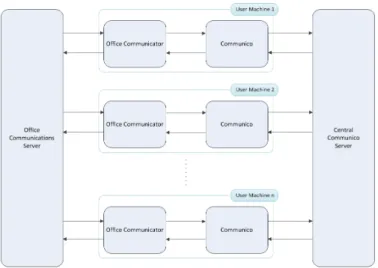
The technical infrastructure of Communico is shown in figure 1. When using Office Communications Server as a communication platform, a central server routes all commu-nication and every user of the system runs a client (in this case Office Communicator 2007 R2) to use the functionality this server offers. A Communico client runs alongside Office Communicator on the machine of everyone using Communico and all these instances are connected to a central Communico server. The Communico clients use the Office Communicator Automation API to gather data about users and conversations and send this information to the central Communico server. This server maintains a complete model of all data and sends updates to all clients when this model changes. These updates can cause the Communico clients to update its user interface or initiate a certain action, via the Office Communicator Automation API, like inviting someone into a conversation.
1http://www.microsoft.com/communicationsserver/en/in/
2We regard this as synchronous because the sending and receipt of messages
can be regarded as instantaneous.
Fig. 1. Technical Infrastructure
B. A Virtual Open Conversation Space
In this section, we will discuss Communico by going over the requirements of an Open Conversation Space discussed in the previous section.Uninitialized Conversation
In Communico conversations are initiated by double clicking the name(s) of the user(s) you wish to start a conversation with (REQ1). Because this is a direct way to initiate a conversation it mimics walking over to someone and starting to talk to him or her in a co-located setting. We chose this method of conversation initiation for two reasons. Firstly, in our opinion this is the most common way to initiate a conversation in a co-located situation. Secondly, starting a conversation in this fashion is common practice in IM-tools including Office Communicator. The choice for direct conversation initiation, however, does not rule out the introduction of an indirect form of conversation initiation (for instance topic based) in the future.
Active Conversation
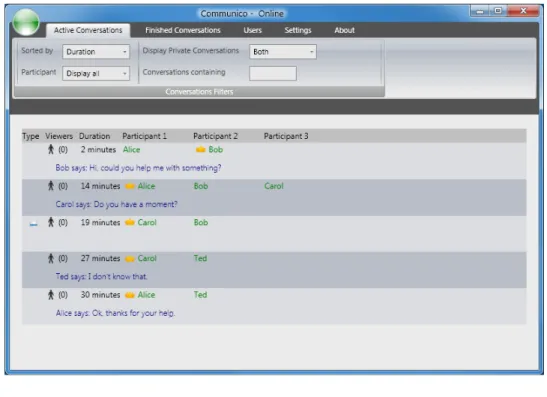
In the section about the requirements of an Open Conversation Space we discussed the three requirements of an Open Conversation Space in relation to an active conversation. Users should be able to find out about conversations (REQ2), listen to conversations of others (REQ3) and become part of a conversation (REQ4). We discussed that the two ways of finding out about a conversation are actively looking for it (i.e. by looking around in a traditional office setting) and automatic detection (i.e. subconsciously picking up on an interesting conversation while working). In Communico the former is implemented in the active conversations tab depicted in figure 2. On this tab a list is shown of all conversations that are currently going on between the members of the project team. For each conversation basic information is shown like the participants, the last thing said, and the number of viewers. A viewer of a conversation is a user that is looking at the detailed information about that conversation (discussed later). The list of active conversations can also
Fig. 2. Active Conversations Tab
Fig. 3. Desktop Alert
be sorted (e.g. the conversation with the latest message on top) and filtered (e.g. only show conversations containing a certain word or phrase) to help the user discover interesting conversations. Communcio implements the second way of finding out about conversations, the automatic detection of conversations, with the use of desktop alerts (Figure 3). Users can configure Communico to display a desktop alert if an active conversation meets a certain criteria to prevent information overload. Supported criteria for showing desktop alerts are: that a conversation (i) contains a certain key word, (ii) has a specific participant, (iii) has a certain number of viewers or (iv) is running for a certain amount of time. A disadvantage of using desktop alerts is that active notification by the system potentially disrupts the users [43], [44], [45]. However, we argue this is also the case in the traditional co-located setting, as people are also disrupted by conversations that are in fact not that interesting to them. The goal of the configurable criteria is to emulate the implicit thought process in the traditional office setting. Besides this, the field study reported in Iqbal et al. [46] also indicates the awareness gained could be worth the added disruptions caused by the desktop alerts.
After a user finds out about a conversation that is potentially
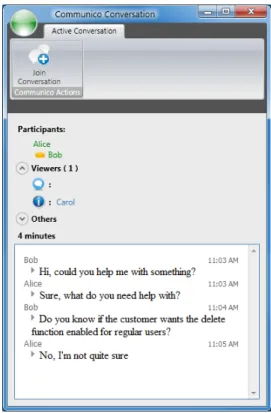
interesting he can, like in a traditional office setting, start to actively listen to the conversation. In Communico this is done either by double clicking the conversation in the active conversation tab or by clicking the desktop alert about the conversation. When this is done a window showing more detailed information about that conversation, like shown in figure 4, is opened. When viewing the detailed information about the conversation a user can also see everything that has been said in the conversation and information regarding the involvement of others in it. We choose to show the involvement of others here because (i) we regard it an integral part of a conversation, (ii) involvement information is also available in the traditional office setting and (iii) a number of sources (e.g. [37], [47]) also report on its importance. In the traditional office setting the involvement of someone in a conversation depends on how aware he is of the conversation and whether or not he participates in it. Therefore, we show all people that are currently participating and all people that are currently moni-toring the conversation (by accessing the detailed information). Next to this, we also show who monitored and participated in the conversation in the past because we think past involvement is also important when monitoring a conversation. By imple-menting these levels of involvement, Communico conforms to the model of conversation involvement proposed in Dullemond et al. [22].
People can join a conversation either by being invited by people already participating or by viewing the conversation and requesting to join it by clicking the join button. When such a join request is accepted by the owner of the conversation, the user changes from merely viewing the conversation to being a participant, resulting in the conversation window depicted
Fig. 4. Conversation Window - Viewing
in figure 5. As a participant, the user can actively contribute to the conversation. Next to this, all participants also have the option to make a conversation private, effectively hiding the content from all users that are not participating in the conversation. This functionality was added to mimic going to a separate office to talk in private in the traditional office setting.
Finished Conversation
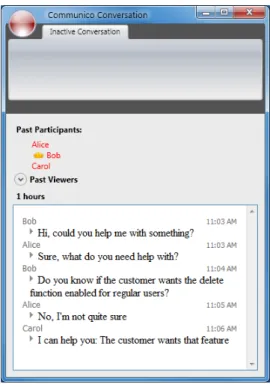
A conversation is a synchronous exchange of information and therefore its explicit end is when the synchronous communication ceases. This can however be difficult to detect because it can be unclear whether the synchronous communication has ended or all participants are simply thinking about their next reply. Because a conversation requires two or more people to communicate, in Communico we chose to define the end of a conversation as the moment the total number of participants in the conversation becomes one or zero (REQ5). So when two people participate in a conversation and one of them leaves it, either by clicking leave conversation or closing the conversation window, the conversation finishes. When a conversation finishes it becomes immutable: people can no longer join and as a result no content can be added to the conversation as well. An example of a finished conversation is shown in figure 6.
Finished conversations are not discarded, but instead made available in Communico’s finished conversations tab because past conversations are a valuable source of information [48]. In a normal office setting team members each have access to part of this information, namely the conversations which they
Fig. 5. Conversation Window - Participating
participated in or overheard. With Communcio however, team members have access to all conversations that occurred in the Open Conversation Space, can access them in full detail and can automatically search through them as well.
V. LIMITATIONS ANDFUTUREWORK
Privacy is often an issue in awareness sharing tools [49]. In Communico we primarily tried to deal with this by mimicking the co-located setting. Firstly, we only show information which is also available in the co-located setting. Secondly, we show who is viewing what information about you to prevent people feeling spied on. Finally, we also make it possible to have private conversations giving users control about the visibility of their interactions. Another limitation of Communico has to do with the fact only IM-conversations are part of the Open Conversation Space. When a subgroup of the team members is co-located they will often use verbal communication, effectively bypassing Communico. So, conversations that occur in this fashion are only visible to the people present in the same office as where the conversation occurs but not to people located remotely. A final limitation we will discuss concerns that for conversations to occur people have to be working at the same time. Therefore, in settings where colleagues have no overlap in working time, it is not possible for them to have conversations. With Communico, however, it is possible to look at the finished conversations of people working in a different time zone to acquire information. To communicate with each other they
Fig. 6. Finished Conversation Window
should use other, asynchronous, means of communication. This is however not a limitation of Communico in particular but of Open Conversation Spaces in general. If you work in a traditional office setting and one team member works during the day while the other works at night, they also cannot communicate directly and have to revert to leaving notes as well.
Based on the requirements of an Open Conversation Space we have identified several opportunities to improve Communico. Firstly, topic based conversation initiation could be added. Secondly, the conversations people see could be restricted by defining some sort of ”virtual office walls” to help prevent an overload of information. Thirdly, semantics of conversations could be researched to be able to automatically annotate conversations and help both the detection and monitoring of conversations. Fourthly, research about what other actions to influence conversations is interesting as well. An example of such an action could be notifying others about a conversation you are currently having. Finally, research could be done about detecting when a conversation finishes. As mentioned earlier, we considered the likelihood of finding a suitable setting for a case study an important factor in designing our architecture. Therefore it is clear that we consider performing an industrial case study to evaluate Communico an important next step.
VI. CONCLUSION
In this paper we have explained the value of Open Con-versations Spaces and have defined five requirements such a space should fulfill:
REQ1. Facilitate starting conversations
REQ2. Facilitate detecting active conversations
REQ3. Facilitate monitoring active conversations
REQ4. Facilitate participating in conversations
REQ5. Facilitate the finishing of conversations
Subsequently we have presented Communico which is a Virtual Open Conversation Space and therefore implements these requirements in a distributed setting. Finally, we have shown that Communico is different from existing tooling in the way it implements the requirements and have discussed opportunities for improvements. The main contributions of this paper are:
• A complete set of requirements an Open Conversation Space should fulfill
• The presentation of a novel tool which implements these requirements in a distributed setting
• A comparison of this tool with existing Virtual Open Conversation Spaces
The most prominent next step in this research is to evaluate Communico by measuring its value in a distributed industrial case setting.
REFERENCES
[1] E. Carmel, Global software teams: collaborating across borders and time zones. Upper Saddle River: Prentice Hall PTR, 1999.
[2] J. Herbsleb and D. Moitra, “Guest Editors’ Introduction: Global Soft-ware Development,”IEEE Software, vol. 18, no. 2, pp. 16–20, 2001. [3] J. Herbsleb, “Global Software Engineering: The Future of
Socio-technical Coordination,” in Proceedings of the IEEE 2007 Workshop on the Future of Software Engineering. IEEE Computer Society Press, 2007, pp. 188–198.
[4] The Dieringer Research Group Inc., “Telework Trendlines 2009: A Survey Brief by WorldatWork,” 2009.
[5] R. Grinter, J. Herbsleb, and D. Perry, “The geography of coordination: dealing with distance in R&D work,” in Proceedings of the ACM SIGGROUP 1999 International Conference on Supporting Group Work. ACM Press, 1999, pp. 306–315.
[6] D. Damian and D. Moitra, “Guest Editors’ Introduction: Global Software Development: How Far Have We Come?”IEEE Software, vol. 23, no. 5, pp. 17–19, 2006.
[7] C. Ebert and P. De Neve, “Surviving global software development,” IEEE Software, vol. 18, no. 2, pp. 62–69, 2001.
[8] J. Herbsleb and R. Grinter, “Architectures, coordination, and distance: Conway’s law and beyond,”IEEE Software, vol. 16, no. 5, pp. 63–70, 1999.
[9] E. Carmel and R. Agarwal, “Tactical approaches for alleviating distance in global software development,” IEEE Software, vol. 18, no. 2, pp. 22–29, 2001.
[10] I. Harpaz, “Advantages and disadvantages of telecommuting for the in-dividual, organization and society,”International Journal of Productivity and Performance Management, vol. 51, no. 2, pp. 74–80, 2002. [11] B. Hesse and C. Grantham, “Electronically Distributed Work
Communi-ties: Implications for Research on Telework,”Internet Research, vol. 1, no. 1, pp. 4–17, 1991.
[12] J. Pratt, “Myths and Realities of Working at Home: Characteristics of Homebased Business Owners and Telecommuters,” National Technical Information Service, Tech. Rep., 1993.
[13] K. Schmidt, “The Problem with ‘Awareness’: Introductory Remarks on ‘Awareness in CSCW’,”Computer Supported Cooperative Work, vol. 11, no. 3-4, pp. 285 – 298, 2002.
[14] A. Syri, “Tailoring cooperation support through mediators,” in Pro-ceedings of the 1997 European Conference on Computer Supported Cooperative Work. Kluwer Academic Publishers, 1997, pp. 157–172. [15] P. Dourish and V. Bellotti, “Awareness and Coordination in Shared Workspaces,” inProceedings of the ACM 1992 Conference on Computer Supported Cooperative Work. ACM Press, 1992, pp. 107–114. [16] C. Gutwin, R. Penner, and K. Schneider, “Group awareness in distributed
software development,” inProceedings of the ACM 2004 Conference on Computer Supported Cooperative Work. ACM Press, 2004, pp. 72–81. [17] J. Fogarty, S. Hudson, C. Atkeson, D. Avrahami, J. Forlizzi, S. Kiesler, J. Lee, and J. Yang, “Predicting human interruptibility with sensors,” ACM Transactions on Computer-Human Interaction, vol. 12, no. 1, pp. 119–146, 2005.
[18] J. Herbsleb and A. Mockus, “An empirical study of speed and communi-cation in globally distributed software development,”IEEE Transactions on Software Engineering, vol. 29, no. 6, pp. 481–494, 2003.
[19] T. Allen,Managing the flow of technology. MIT press, 1977. [20] J. Olson and S. Teasley, “Groupware in the wild: lessons learned from a
year of virtual collocation,” inProceedings of the ACM 1996 Conference on Computer Supported Cooperative Work. ACM Press, 1996, pp. 419– 427.
[21] D. Perry, N. Staudenmayer, and L. Votta, “People, organizations, and process improvement,”Software, IEEE, vol. 11, no. 4, pp. 36 –45, Jul. 1994.
[22] K. Dullemond, B. van Gameren, and R. van Solingen, “Virtual open conversation spaces: Towards improved awareness in a GSE setting,” in Proceedings of the 2010 International Conference on Global Software Engineering, 2010, pp. 247–256.
[23] J. Espinosa and E. Carmel, “The impact of time separation on coor-dination in global software teams: a conceptual foundation,”Software Process: Improvement and Practice, vol. 8, no. 4, pp. 249–266, 2003. [24] S. Greenberg and C. Gutwin, “A descriptive framework of workspace
awareness for real-time groupware,”Computer Supported Cooperative Work, vol. 11, no. 3-4, pp. 411–446, 2002.
[25] Y. Ren and R. Kraut, “A Simulation for Designing Online Com-munity: Member Motivation, Contribution, and Discussion Modera-tion.” Manuscript in preparation: Retrieved from: http://www.cs.cmu. edu/∼kraut on June 2nd2011.
[26] A. Webber, “What’s so new about the new economy?”Harvard Business Review, 1993.
[27] T. Erickson, D. Smith, W. Kellogg, M. Laff, J. Richards, and E. Bradner, “Socially translucent systems: social proxies, persistent conversation, and the design of babble,” inProceedings of the SIGCHI 1999 Confer-ence on Human Factors in Computing Systems. ACM Press, 1999, pp. 72–79.
[28] E. Wynn, “Office conversation as an information medium,” Ph.D. thesis, University of California, Berkely, 1979.
[29] S. Greenberg and M. Rounding, “The notification collage: posting information to public and personal displays,” in Proceedings of the SIGCHI 2001 Conference on Human Factors in Computing Systems. ACM Press, 2001, pp. 514–521.
[30] M. Sosa, S. Eppinger, M. Pich, D. McKendrick, and S. Stout, “Factors that influence technical communication in distributed product develop-ment: an empirical study in the telecommunications industry,” IEEE Transactions on Engineering Management, vol. 49, no. 1, pp. 45–58, 2002.
[31] K. R. McCord, “Managing the integration problem in concurrent engi-neering,” Master thesis, Massachusetts Institute of Technology, 1993. [32] R. Kraut, R. Fish, R. Root, and B. Chalfonte, “Informal communication
in organizations: Form, function, and technology,” inHuman reactions to technology: Claremont Symposium on Applied Social Psychology. Sage Publications, 1990, pp. 145–199.
[33] G. Sharma, G. Shroff, and P. Dewan, “Workplace collaboration in a 3d virtual office,” inVR Innovation (ISVRI), 2011 IEEE International Symposium on. IEEE, pp. 3–10.
[34] K. Inkpen, S. Whittaker, M. Czerwinski, R. Fernandez, and J. Wallace, “GroupBanter: Supporting Serendipitous Group Conversations with IM,” inProceedings of the 2008 International Conference on Collaborative Computing: Networking, Applications and Worksharing. Springer, 2008, pp. 485–498.
[35] T. Erickson, W. Kellogg, M. Laff, J. Sussman, T. Wolf, C. Halverson, and D. Edwards, “A persistent chat space for work groups: the design, evaluation and deployment of loops,” inProceedings of the ACM 2006 Conference on Designing Interactive systems. ACM Press, 2006, pp. 331–340.
[36] A. Ribak, M. Jacovi, and V. Soroka, “Ask before you search: peer support and community building with ReachOut,” in Proceedings of the ACM 2002 Conference on Computer Supported Cooperative Work. ACM Press, 2002, pp. 126–135.
[37] M. Smith, J. Cadiz, and B. Burkhalter, “Conversation trees and threaded chats,” in Proceedings of the ACM 2000 Conference on Computer Supported Cooperative Work. ACM Press, 2000, pp. 97–105. [38] J. Birnholtz, C. Gutwin, G. Ramos, and M. Watson, “OpenMessenger:
gradual initiation of interaction for distributed workgroups,” in Proceed-ings of ACM CHI 2008 Conference on Human Factors in Computing Systems. ACM Press, 2008, pp. 1661–1664.
[39] A. Java, X. Song, T. Finin, and B. Tseng, “Why we twitter: understand-ing microbloggunderstand-ing usage and communities,” inProceedings of the 2007 Workshop on Web Mining and Social Network Analysis. ACM Press, 2007, pp. 56–65.
[40] G. Trapani and A. Pash, “The complete guide to Google Wave,” 2008, Retrieved from: http://completewaveguide.com on February 24th2010.
[41] I. Omoronyia, J. Ferguson, M. Roper, and M. Wood, “Using developer activity data to enhance awareness during collaborative software devel-opment,”Computer Supported Cooperative Work (CSCW), vol. 18, pp. 509–558.
[42] K. Dullemond and B. van Gameren, “Communico: overhearing conver-sations in a virtual office,” inProceedings of the ACM 2011 conference on Computer supported cooperative work. ACM, 2011, pp. 577–578. [43] S. T. Iqbal and E. Horvitz, “Disruption and recovery of computing tasks: field study, analysis, and directions,” in Proceedings of the SIGCHI conference on Human factors in computing systems, ser. CHI ’07, 2007, pp. 677–686.
[44] E. Cutrell, M. Czerwinski, and E. Horvitz, “Notification, disruption, and memory: Effects of messaging interruptions on memory and perfor-mance.” IOS Press, 2001, pp. 263–269.
[45] M. Czerwinski, E. Horvitz, and S. Wilhite, “A diary study of task switching and interruptions,” inProceedings of the SIGCHI conference on Human factors in computing systems, ser. CHI ’04, 2004, pp. 175– 182.
[46] S. T. Iqbal and E. Horvitz, “Notifications and awareness: a field study of alert usage and preferences,” inProceedings of the 2010 ACM conference on Computer supported cooperative work, ser. CSCW ’10, 2010, pp. 27–30.
[47] M. Tran, Y. Yang, and G. Raikundalia, “Supporting awareness in instant messaging: an empirical study and mechanism design,” inProceedings of the 2005 Australian Conference on Computer Human Interaction: Citizens Online: Considerations for Today and the Future. Computer-Human Interaction Special Interest Group of Australia, 2005, pp. 1–10. [48] T. Niinimaki and C. Lassenius, “Experiences of instant messaging in global software development projects: A multiple case study,” in Proceedings of the 2008 International Conference on Global Software Engineering. IEEE Computer Society Press, 2008, pp. 55–64. [49] S. E. Hudson and I. Smith, “Techniques for addressing fundamental
privacy and disruption tradeoffs in awareness support systems,” in Proceedings of the 1996 ACM conference on Computer supported cooperative work, ser. CSCW ’96. New York, NY, USA: ACM, 1996, pp. 248–257.