A Road Map for
Data Management
1. Introduction... 1
2. The Road Map... 1
3. The Stages... 2
Stage 1 – Data Governance... 2
Stage 2 – BI and Performance Reports ... 6
Stage 3 – Data Marts... 12
Stage 4 – Data Integration... 14
Stage 5 – Data Sources ... 25
Stage 6 – Information Catalogue ... 27
Appendix A. An Environmental Case Study ... 31
1. Introduction
The Road Map recommends Best Practice in each of six major Stages for Data Management. This document defines Templates for each Stage.
2. The Road Map
This shows Stages and related Business Questions.
How can the CEO be sure that data in the Reports is consistent, correct and accurately reflects the business ?
Business Questions Stages
Do the Key Performance Indicators (KPIs) report the things that should be monitored ?
What data summaries are required for strategic Reports,
Trend analyses and so on ?
Is there a ‘Single View of the Customer’ and other important Things, like Products,
Suppliers and Employees ?
How many different sources of data have to be considered ?
Comment
Roles, Responsibilities and Compliance with ‘Doing Things Right’ Use Report Templates and Ad-Hoc Enquiries
What Information is available about Systems, Data Owners and so on ? A Generic Design to
provide totals for Reports
To provide a ‘Single View of the Truth’, with Data Quality and MDM
To record details of all major Systems
Maintain a Repository of all Databases, People and Applications
3. The Stages
For each Stage, blank and partially completed Templates are provided and a series of ’What, Why and How’ Questions are answered.
Stage 1 – Data Governance
What– is Data Governance ? This Stage is concerned with ensuring compliance with policies and procedures How– do we get started ?
Tutorial
Step 1. Establish Policies and Procedures Step 2. Define Roles and Responsibilities Step 3. Identify the individuals to fill the Roles
Step 4. Record all the results in the Information Catalogue. 1.1 Blank Template for Data Governance
TOPIC AREA NAME DESCRIPTION APPROVED
1.2 Completed Template for Data Governance
TOPIC AREA NAME DESCRIPTION APPROVED
People Data Models John Small Data Analyst Policies Data Integrity A Single
View We will aim to provide a Single View of everymajor item of data, such as Customers. Procedures Data Models Models are created in Power Designer and
stored in Dimensions after approval. Roles Data Models John Small Responsible for coordinating changes
These questions are on this page
:- http://www.databaseanswers.org/data_governance_questions.htm
What.1: What is Data Governance?
Data Governance is concerned with ensuring Compliance with corporate policies and procedures for Data Management.
It can be defined simply as ‘Doing things right’ by complying with the appropriate rules, policies and procedures.
These will all be designed to make sure that data used throughout the Enterprise is good-quality data, certainly when it appears in Performance reports.
It's worth checking out Wikipedia on Data Governance
What.2 : What is Best Practice ?
Successful Data Governance requires successful completion of many Tasks, most of which are not technical and
all of which are complex and challenging.
The process of initially establishing Data Governance will always take much longer than anticipated.
Therefore, management of expectations is very important. It is necessary to aim for collaboration and buy-in from the start. This buy-in must be top-down and bottom-up.
The top-down buy-in manifests itself by, for example, a realization that ‘Data Quality is an Enterprise Issue’.
The bottom-up buy-in is important because quality of Source data is critical and must be good, otherwise any Data Governance issue will fail.
Auditing, for example, of database changes, is a basic requirement.
What.3 : What is Data Lineage ?
Data Lineage can be defined as being able to the trace the derivation of all items of data that appear in any important Performance Reports and Management Information.
That includes
:- Who owns the original source data ?
What validation and transformations are applied to the data in its life cycle
Why.1: Why is Data Governance important ?
The CEO needs to be able to put hand-on-heart and say ‘This Data is Good’ It is also very important that Users have confidence in the data in their Reports.
Why.2 : Why should we adopt Data Governance ?
The existence of a Data Governance function is a measure of the maturity of Data Management within an organization
The first steps should be to establish a thin slice of Data Governance from top to bottom If you are active in this area, you should consider joining a professional organizational. This helps you to network with your peer group and will encourage you to keep up-to-date in knowledge and professional practice.
Here are two organisations that are playing active roles in Data Governance :-i) The Data Governance Institute - Membership starts at $150 for individuals.
ii) The Data Governance and Stewardship Community of Practice - $150/year. -It includes coverage of some very useful Case Studies.
How.1 : How do we get started ?
• Establish Policies, Procedures, Roles and Responsibilities • Look for candidates
• Aim for results in 6 months and interim results in 3 months.
How.2 : How do I verify ‘Data Lineage’ ?
The derivation of the ‘Data Lineage’ in Reports requires the use of an Information Catalogue that will record the source, processing steps and final delivery in a Report. The transformations in the processing Steps must be specified in both the processing language, for example SQL, and in plain, unambiguous English so that the Data Owner can sign-off on the Data Lineage.
How.3 : How do I get a top-down view of Data Management ?
Data Management in an organisation can be considered at different levels:- Data Governance at the top-level
Master Data Management at the mid-level
Data Integration at the mid-level
Data Owners and Sources at the lowest level
Information Catalogue mandated as the central repository of all this information
Stage 2 – BI and Performance Reports
What– are Business Intelligence and Performance Reports ?
This Stage produces and delivers Performance Reports for management Report Templates supported by the appropriate Generic software are required. How– do we get started ?
Tutorial
Step 1. Determine if Users are ready for KPIs,Traffic Lights and Dashboards. Step 2. Check availability of Master Data Models
Step 3. Check availability of Data Marts
Step 4. Check availability of Report Specifications and SQL Views for Reports Step 5. Perform ‘Gap Analysis’ to identify any missing data that must be sourced. Step 6. Analyse common aspects of requirements for Performance Reports There are three Templates in this Section
:-1. User Report Maturity Level
2. Availability of Master Data Models and Data Marts 3. Templates for Performance Reports
2.1 Assessment of User Report Maturity Level 2.1.1 Blank Template
Template Name Date
User Category Weekly Totals Traffic Lights Dashboards KPIs Other
2.1.2 Completed Template
Template Name Report Maturity Level Date April 1st. 2010
User Category Weekly Totals Traffic Lights Dashboards KPIs Other
Finance Common In use In use In use Mashups
HR Common Aware Unaware Aware
2.2 Availability of Master Data Models and Data Marts 2.2.1 Blank Template
Template Name Date
Category Master Data Models Data Marts
Finance HR Operations Movements NCTS Products Customer Warehouses 2.2.2 Completed Template
Template Name Data Model Availability Date March 18th. 2010
Category Master Data Models Data Marts
Finance N/A N/A
HR N/A N/A
Operations N/A N/A
Movements N/A N/A
NCTS Available N/A
Products SEED N/A
Customer DTR but needs work N/A
2.3 Performance Reports 2.3.1 Blank Template
Report Name Date Produced
Product Name Week 1 Date Week 2 Date Week 3 Date Week 4 Date Total <Value in £’s> <Value in £’s> <Value in £’s> <Value in £’s> <Value in £’s>
Weekly Totals <Value in £’s> <Value in £’s> <Value in £’s> <Value in £’s> <Value in £’s>
Grand Total <Value in £’s>
2.3.2 Completed Template These figures are fictitious.
Report Name Value of Weekly product Movements Date Produced March 18th. 2010
Product Name Dec 6th2009 Dec 13th2009 Dec 20th2009 Dec 27th2009 Total
Beer £40,000 £60,000 £70,000 £80,000 £160,000
Cigarettes £50,000 £60,000 £70,000 £80,000 £160,000
Cigars & cigarillos £25,000 £30,000 £31,000 £32,000 £118,000
Leaded Petrol £90,000 £91,000 £92,000 £93,000 £366,000
Unleaded Petrol £100,000 £120,000 £133,000 £140,000 £490,000
Weekly Totals £205,000 £361,000 £396,000 £425,000
These questions are from this page
:- http://www.databaseanswers.org/bi_plus_performance_reports.htm
What.1 : What are Business Intelligence ?
This Stage produces and delivers BI and Performance Reports to management
:- It must be responsive to requests for change.
Users requirements are always evolving
Therefore the approach and supporting software must be flexible
Report Templates supported by the appropriate Generic software are required. This Stage delivers Performance Reports that meet the requirements of all levels of management.
There is a need to be responsive to requests for change.
User Requirements are always evolving.
Therefore the approach and reporting software tool must be flexible.
A sensible approach is to develop Reporting Templates supported by the appropriate Generic Software.
What.2 : What is Best Practice ?
Performance Reports take data from Data Marts and many of the same considerations apply when it comes to determining Best Practice.
One difference is that is necessary to have a clearer understanding of the business operations and how the right kind of Performance Reports can provide insight to the business users.
This leads to the need for a management education process to be in place so that the evolution of Performance Reports can be planned in a logical manner, from basic summaries, to KPIs,
Dashboards and so on.
Why.1 : Why is this Stage important ?
The value and benefits of Reports are always a major part of the justification of the cost of designing and installing a Database.
How.1 : How do we get started ?
These questions are taken from this page:- http://www.databaseanswers.org/bi_plus_performance_reports_questions.htm
Here's a Kick-Start Tutorial
:- Step 1. Assess the level of Maturity of the Users concerning KPIs, Dashboards,etc..
Step 3. Check availability of Report Specifications and SQL Views for Reports
Step 4. Tailor the Approach accordingly
Step 5. Aim for results in 6 months and interim results in 3 months
If you have a Question that is not addressed here, please feel free to email us your Question at [email protected].
How.2 : How do we measure progress in Business Intelligence ?
Check for:- a Statement of User Requirements
ideally with specifications of Templates
Software Design Patterns.
How.3 : How do I combine Excel data in my Reports ?
Data in Excel Spreadsheets is structured in tabular format which corresponds exactly to the way in which data is stored in relational database.
Also Spreadsheets are commonly used and the data frequently needs to be integrated with other data within an organization.
Therefore we would expect to find a wide range of solutions are available to solve this problem. Here is a small sample
:-• An ODBC connection can be established for a spreadsheet. • Informatica allows Spreadsheets to be defined as a Data Source.
• Microsoft’s SQL Server Integrated Services also lets Excel be defined as a Source. • Oracle provides a facility to define EXTERNAL table which can be Spreadsheets. • Salesforce.com provides their Excel Communicator.
How.4 : How do you meet your Chief Executive’s Report requirements ?
In order to always respond to this situation appropriately, it is necessary to have an Information Catalogue, a Data Architecture and Data Lineage.
The solution then involves the following Steps
:-Step 1) Produce a draft Report for the Chief Execs approval
Step 2) Trace the lineage and perform a ‘gap analysis’ for all new data items.
Step 3) Talk to the Data Owners and establish when and how the data can be made available. Step 4) Produce a Plan and timescale
Step 5) Review your Plan with the Chief Exec and obtain this agreement and formal sign-off. Step 6) Deliver !!!
How.5 : How do I produce Integrated Performance Reports ? Reports for Senior Management fall into two categories
:- Standard Reports On-demand reports
For Standard Reports it is possible to define Templates.
For On-demand Reports, the aim is to define a flexible approach to be able to respond to changes to Requirements in a timely manner.
The key action here is to establish a unified Reporting Data Platform.
This will involve aspects previously discussed, including MDM, CMI and will certainly involve Data Lineage.
Senior Management will want to take a view of the integrated data and not focus on details of derivation.
Therefore, we have to follow the MDM approach with Data Lineage for each item in the Integrated Performance Reports.
Key Performance Indicators (‘KPIs’)
Question : What are Key Performance Indicators (‘KPIs’)
Key Performance Indicators (‘KPIs’) are in common use and represent one aspect of Best Practice.
A variation of this approach are Key Quality Indicators,(‘KQIs’) which are used to monitor and manage Data Quality.
Stage 3 – Data Marts
What– is a Data Mart ?
A Repository of total and detailed data with a standard structure
This structure is usually a Facts Table where all the data for analysis is held, together with a number of associated Dimension Tables.
Generic software is used, support by common Report Templates How– do we get Started ?
Step 1. Understand the User’s Data Requirements Step 2. Determine the available Data
Step 3. Reconcile standards, reference data
Step 4. Establish a common view of the Data Platform Step 5. Choose the product or use bespoke SQL
Step 6. Design the Templates and agree design with Users Step 7. Populate the Templates with sample data
3.1 Blank Template 3.2 Completed Template DATA_MART_FACTS Fact ID (PK) Dimension 1 ID Dimension 2 ID Dimension 3 ID Dimension 4 ID Dimension 5 ID Dimension 6 ID Averages Counts Totals KPIs
Other Derived Figures
DIMENSION 1 Dimension 1 ID (PK) Dimension Details 1 DIMENSIONS 2 Dimension 2 ID (PK) Dimension Details 2 DIMENSIONS 3 Dimension 3 ID (PK) Dimension Details 3 DIMENSIONS 4 Dimension 4 ID (PK) Dimension Details 4 DIMENSIONS 5 Dimension 5 ID (PK) Dimension Details 5 DIMENSIONS 6 Dimension 6 ID (PK) Dimension Details 6 DATA_MART_FACTS Fact ID (PK) Date Movement ID Product ID Product Type Code Customer ID Customer Type Code Total Movements
Total Movements by Value Total Movements by Month KPIs
Other Derived Figures
CUSTOMERS Customer ID Customer Details CALENDAR Day Number (PK) Day Date MOVEMENTS Movement ID Movement Details PRODUCTS Product ID Product Details PRODUCT TYPES
Product Type Code Product Type Details
CUSTOMER TYPES
Customer Type Code Customer Type Details
What.1 : What is a Data Mart ?
These questions are from this page:- http://www.databaseanswers.org/data_marts.htm
Data Marts are a Repository of summary, total and detailed data to meet User Requirements for Reports.
They always have a standard structure, called Dimensional Data Models, which means that it is possible to use Generic Software and adopt a common Approach based on Templates.
Describing a Data Mart is a good way to get User buy-in because they can easily be explained in a logical manner which is very user-friendly.
A Data Mart is a Repository of total and detailed data to meet User Reports requirements. It always a standard structure which means can have generic software and a common approach based on Report Templates
A Data Mart design is simple and can be described to get User buy-in
What.2 : What are Data Mart Templates ?
Data Marts have a common design ofDimensionfields andFacts.
Templates are important because they represent a tremendous Kick-Start approach to the design of Data Marts for a specific business area.
They are produced by exploiting the common design of Dimensions and Facts.
A range of Data Mart diagrams is available in the Case Studies on the Database Answers Web Site.
Why.1 : Why is this Stage important ?
It provides a single point of reference for all the data available within the organisation for producing Reports
How.1 : How do we get Started ?
These questions are form this page:- http://www.databaseanswers.org/data_marts_questions.htm To get started, follow these Steps
:- Get a broad understanding of User’s Data Requirements
Determine the available Data
Reconcile standards, reference data
Choose the product or use bespoke SQL
Use Templates and agree design with Users
Populate Templates with sample data
Get sign-off on demo specs in 1 month, aim for results for champion in 3 months and final results in 6 months.
Adjust timescales in light of experience
How.2: How do we measure progress with Data Marts ?
Check the level of Users understanding.
Check for existence of Templates.
How.3: How do I improve the performance of my Data Mart ?
Every DBMS produces what is called an Execution Plan for every SELECT statement.
The steps to improving the performance involve checking this Execution Plan against the Indexes that exist, and making sure that the Query Optimizer has used the appropriate Indexes to obtain the best performance.
This is a specialized area where DBA’s spend a lot of their time when they are looking after production databases where speed is a mission-critical factor.
Data Marts are always created to support Business Intelligence, which includes Performance Reports, Balanced Scorecards, Dashboards, Key Performance Indicators and so on.
Best practice always requires user involvement and a generic design to support a flexible approach to meeting changing requirements.
Users will always want changes to their first specifications of their requirements.
The insight that they obtain from the first Reports helps them identify more precisely what their long-term requirements will be.
Therefore flexibility is important.
A well-designed Data Mart will anticipate the areas where flexibility is required. The design process should always follow two steps
:-• Production of generic design for the Data Mart
• Implementation of the design with a specific Data Mart software product.
Stage 4 – Data Integration
What– is Data Integration ?
Data Integration provides a one view of the truth for things of importance to the organisation, such as Customers, Products and Movements.
How– do we get started ?
Step 1. Start with Data Profiling because it is a good starting-point for determining the quality of the data and drafting some simple validation and transformation that can be used to get started.
For example, replace LTD by LIMITED (or vice versa), and ‘&’ by AND. Step 2. Determine the available Data Models for major areas of the enterprise. Step 3. Determine whether Generic Data Models are available to support one
view of the truth for major entities, such as Customers or Offices.
This one view approach will be implemented as Master Data Management. Step 4. Establish a common view of the Data Platform – Reference Data,
Customers, products, Movements and so on. Step 5. Determine the available Data
Step 6. Choose an MDM product or decide on in-house SQL development. Templates are defined for important activities within Data Integration, including
:- Data Profiling Data Validation
Mapping Specifications
4.1 Templates for Data Profiling 4.1a Blank Template
DATA ITEM DESCRIPTION MIN
VALUE MAXVALUE MOST COMMONVALUE COMMENTS
4.1b Completed Template for Data Profiling DATA ITEM DESCRIPTION MIN
VALUE MAX VALUE MOST COMMON VALUE COMMENTS Withdrawn Date Date Customer’s
4.2 Templates for Data Validation 4.2a Blank Template for Data Validation
DATA ITEM DESCRIPTION Nullable RULES DATE % QUALITY
4.2b Completed Template for Data Validation
DATA ITEM DESCRIPTION Nullable RULES DATE % QUALITY Withdrawn Date Date Customer’s
Approval is withdrawn
Yes >Start Date
4.3 Templates for Mapping Specifications 4.3a Blank Template for Mapping Specifications
ETL Transformations Project Title
Known As:
Development End date: Additional Comments: Trigger
Source
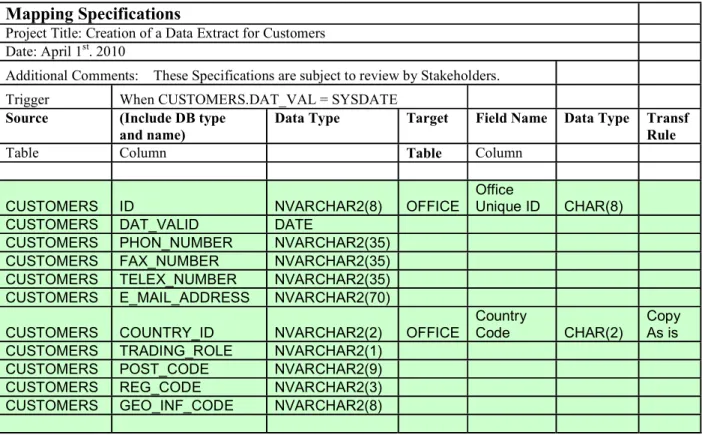
4.3b Completed Template for Mapping Specifications
Specifications taken from migrating sample Customer data.
Mapping Specifications
Project Title: Creation of a Data Extract for Customers Date: April 1st. 2010
Additional Comments: These Specifications are subject to review by Stakeholders. Trigger When CUSTOMERS.DAT_VAL = SYSDATE
Source (Include DB type and name)
Data Type Target Field Name Data Type Transf Rule
Table Column Table Column
CUSTOMERS ID NVARCHAR2(8) OFFICE
Office
Unique ID CHAR(8)
CUSTOMERS DAT_VALID DATE
CUSTOMERS PHON_NUMBER NVARCHAR2(35)
CUSTOMERS FAX_NUMBER NVARCHAR2(35)
CUSTOMERS TELEX_NUMBER NVARCHAR2(35) CUSTOMERS E_MAIL_ADDRESS NVARCHAR2(70)
CUSTOMERS COUNTRY_ID NVARCHAR2(2) OFFICE
Country
Code CHAR(2)
Copy As is CUSTOMERS TRADING_ROLE NVARCHAR2(1)
CUSTOMERS POST_CODE NVARCHAR2(9)
CUSTOMERS REG_CODE NVARCHAR2(3)
What.1 : What is Data Integration ?
Here is the Web Link:- http://www.databaseanswers.org/data_integration.htm
Data Integration is concerned with combining data from various Sources into one consistent stream.
It provides an essential Single View of Data, for example, a Single View of a Customer. It also provides a natural point at which Data Quality can be addressed.
At this Stage, Data Quality can be assessed and a Single View of a Customer can be achieved. When Data Quality is of a uniform good quality, it can be integrated and made available as a consistent View.
This will be supported using a Glossary, as described in theInformation Catalog Stage. The current incarnation of Data Integration is Master Data Management,(MDM).
Data Integration provides a one view of the truth for things of importance to the organisation, such as Traders, Products and Movements.
It provides a natural point at which data quality can be addressed.
When Data is of uniform good quality it can be integrated and made available as a consistent View.
This leads naturally to Master Data Management,(MDM).
Details of the Integration, such as mapping specifications, are held in a Glossary, which is described in Stage 6.
Some key points
:- Data Integration is concerned with combining data from various Sources into one consistent stream.
It provides an essential Single View of Data, for example, a Single View of a Customer. It also provides a natural point at which Data Quality can be addressed.
At this Stage, Data Quality can be assessed and a Single View of a Customer can be achieved.
When Data Quality is of a uniform good quality, it can be integrated and made available as a consistent View.
This will be supported using a Glossary, as described in theInformation Catalog Stage. The current incarnation of Data Integration is Master Data Management,(MDM).
Data Integration provides a ‘Single View of the Truth’ for the things of importance to the organisation, such as Traders, Products and Movements.
It provides a natural point at which data quality can be addressed.
When Data is of uniform good quality it can be integrated and made available as a consistent View.
Details of the Integration, such as mapping specifications, are held in a Glossary, which is described in Stage 6.
What.2 : What is Master Data Management (MDM) ?
One of the major components in Master Data Management (‘MDM’) is Customers. MDM can be defined a ‘Providing a Single View of the Things of Importance within an organisation’
Master Data Management applies the same principles to all the ‘Things of Interest’ in an organisation.
This can typically include Employees, Products and Suppliers.
We have discussed ‘A Single View of the Customer’ and MDM involves the same kind of operations as a CMI.
That is, identification and removal of duplicates, and putting in place to eliminate duplicates in any new data loaded into the Databases.
There is a wide choice of software vendors offering MDM products. De-duplication and Address validation is a niche market in this area.
On the Database Answers Web Site, there is a Tutorial on Getting Started in MDM There is a sister Web Site devoted to the topic of MDM-As-a-Service
What.3 : What are Conceptual, Logical and Physical Data Models ?
Wikipedia has some useful entries on Conceptual Models, Logical Models and Data Models. Conceptual Data Models do not conventionally show Foreign Keys and are very useful for making clear the Entities and Relationships in a Data Model without any Keys or Attributes. They are very useful for discussing Requirements with Users because they show only the basics. Logical Data Models add Foreign Keys and Attributes.
They are very useful for publishing a complete statement of the data involved. Physical Data Models are very close to the Database design.
They are very useful for discussions between the Data Analyst, DBAs and developers.
What.4 : What does ETL stand for ?
Wikipedia has an entry on ETL which is worth a look. ETL stands for Extract, Transform and Load.
• Extract means Extracting data from Data Sources. • Transform covers many tasks, including –
O Selection of the data of interest
o Validation and clean-up of the selected data o Changing the format and content of the data o Loading into the designated Target.
In practice, there are three options for implementing ETL:-• Develop bespoke SQL
• Use a commercial package, such as Informatica or Microsoft’s Integration Services • Some combination of these two.
For example, developing basic SQL to clarify the Requirements and then looking for a commercial product to meet the Requirements.
What.5 : What is Data Lineage ?
Data Lineage can be defined as the ability to the trace the derivation of all items of data that appear in any important Performance Reports and Management Information.
That includes
:-• Who owns the original source data
• What validation and transformations are applied to the data in its life cycle
Why.1 : Why is this Stage important ?
It provides one view of the truthIt offers a point at which Data Integrity can be measured and User involvement obtained to improve Quality until it meets User standards.
How.1 : How do we get started ?
Data Profiling is a good starting-point for determining the quality of the data and drafting some simple validation and transformation that can be used to get started. For example, replace LTD by LIMITED (or vice versa), and ‘&’ by AND.
The Design Approach requires Data Models for the areas of the within Scope.
It will also require Generic Data Models to support one view of the truth for major entities, such as Traders or Customers.
This one view will be implemented as Master Data Management (MDM). Get a broad understanding of the data available
Establish a common view of the Data Platform Get a broad understanding of Data Sources Determine the available Data
Choose the MDM product
Determine strategy for Clouds – e.g. Reference Data available globally
o In 1 month, produce Generic Data Models
o In 3 months, confirm GDM with sample data and Facilitated Workshops and choose MDM product.
o In 6 months, implement MDM and publish GDM and CMI on the Intranet.
o Adjust timescales in light of experience
Data Integration covers a number of Steps, each of which can have its own Templates. Examples are included here for Data Profiling and Mapping Specifications.
How.2 : How do we follow Best Practice
These Steps define a Tutorial of Best Practice:- Step 1. Define the Target which is usually a ‘Single View Data Model’. Step 2. Define the Data Sources
Step 3. Define the Mapping Specifications from the Sources to the Target. Step 4. Define the Data Platform
Step 5. Identify Standards to be followed.
This Tutorial is described in detail in a separate document, entitled Data_Integration_Tutorial.doc These questions come from this page
:- http://www.databaseanswers.org/data_integration_questions.htm
If you have a Question that is not addressed here, please feel free to email us your Question.
How.3 : How do we measure progress in Data Integration ?
Look for the existence of the following items :- Generic Data Models
An Enterprise Data Platform Identify the Data Sources Selection of a MDM Product
How.4 : How do we get started ?
Data Profiling is a good starting-point for determining the quality of the data and drafting some simple validation and transformation that can be used to get started.
For example, replace LTD by LIMITED (or vice versa), and ‘&’ by AND. The Design Approach requires Data Models for the areas of the within Scope.
It will also require Generic Data Models to support one view of the truth for major entities, such as Traders or Customers.
This one view will be implemented as Master Data Management (MDM). Get a broad understanding of the data available
Establish a common view of the Data Platform Get a broad understanding of Data Sources Determine the available Data
Choose the MDM product
Determine a Strategy for Clouds – e.g. Reference Data available globally o In 1 month, produce Generic Data Models
o In 3 months, confirm GDM with sample data and Facilitated Workshops and choose MDM product.
o In 6 months, implement MDM and publish GDM and CMI on the Intranet. Adjust timescales in light of experience
Data Integration covers a number of Steps, each of which can have its own Templates. Examples are included here for Data Profiling and Mapping Specifications.
How.5 : How do we follow Best Practice
These Steps define a Tutorial of Best Practice
:- Step 1. Define the Target which is usually a ‘Single View Data Model’.
Step 2. Define the Data Sources
Step 3. Define the Mapping Specifications from the Sources to the Target.
Step 4. Define the Data Platform
Step 5. Identify Standards to be followed.
This Tutorial is described in detail in a separate document, entitled Data_Integration_Tutorial.doc
These questions are from this page
:- http://www.databaseanswers.org/data_integration_questions.htm
How.6 : How do we measure progress in Data Integration ?
Look for the existence and understanding of the following items :- Generic Data Models
An Enterprise Data Platform Identify the Data Sources Selection of a MDM Product
Implementation of a Customer Master Index or appropriate alternative
How.7 : How do I establish a Strategy for Data Quality ?
A successful Strategy for Data Quality as an Enterprise Issue must include both organization and technical aspects.
Typical Organization aspects are
:- Commitment from senior management
Establishing the slogan “Data Quality is an Enterprise Issue” as a top-down edict. Identification of the ‘Top 20’ Applications and Data Owners across the Enterprise Agree sign-off procedures with Data Owners and Users
Technical aspects
Establish Key Quality Indicators (‘KQIs), for example Duplicate Customers records Agree target Data Quality percentage
Define KQI Reports and dashboards Develop SQL to measure KQIs Define procedures to improve KQIs
How.8 : How do I handle multiple types of Databases ?
This could include Oracle, SQL Server and DB2.
The key to handling multiple types of Database is to thing of them in terms of an Integrated Data Platforms, where all types of data are presented in a common fashion.
This then defines the logical requirement.
There is a then a number of options to physically meet this logical requirement.
How.9: How do I obtain a Single View of my Customers ?
This requires a method of matching Customers, de-duplication and the maintenance of a Customer Master Index, (‘CMI’) supports a Single View of a Customer.
When there are many sources of similar data, such as Customers, there are frequently duplicate records.
For example, in the US, John Doe could be also called Jon Doe, Johnny Doe, Mr.J..Doe and so on.
In the UK, Joe Bloggs could also be called Joseph Bloggs, Joey Bloggs, Mr.J.Bloggs and so on. The rules for recognizing and resolving this kind of problem has led to the development of software for De-duplicating records.
This process is informally referred to as ‘de-duping’, especially by people who do a great deal of it. Best Practice is to look for a commercial product, rather than to write your own bespoke software because it usually takes longer than expected and commercial products can be quite cheap. This page on the Database Answers Web Site is an excellent starting-point for reviewing "De-duping"
How.10 : How do I verify Report Data ?
All data in all Reports must be verifiable concerning authenticity.
This requires verification of Data Lineage with the use of an Information Catalogue that will record the source, processing steps and final delivery in a Report.
The transformations in the processing Steps must be specified in both the processing language, for example SQL, and in plain, unambiguous English so that the Data Owner can sign-off on the Data Lineage.
Stage 5 – Data Sources
What– are Data Sources ?
A Repository for all major Applications, Databases, Spreadsheets and so on. data and information related to each Stage in the Best Practice Road Map This includes details of People, Roles and Responsibilities, Applications,
Databases How– do we get started ?
Step 1. Define the initial content and revise at regular intervals.
Step 2. Follow-up a bottom-up Approach and focus on working documents, such as Invoices or Movement Authorisations.
.Step 3. Follow-up a top-down Approach and focus on Reports.
5.1 Blank Template for Data Sources
SOURCES CONTACT TYPE DATA ITEMS COMMENTS
5.2 Completed Template for Data Sources
SOURCES CONTACT TYPE DATA ITEMS COMMENTS
DTR Joe Bloggs SQL Server DB Customers ‘Golden Source’ NCTS Joe Bloggs Oracle DB Offices Official Source
What.1 : What are Data Sources ?
These questions are from this page
:- http://www.databaseanswers.org/data_sources.htm
Data Sources include all major places where important data is created or used, including :- Applications
Databases Spreadsheets XML files, and so on
It also includes Information related to each Stage in the Best Practice Road Map on People, Roles and Responsibilities.
A Repository record Data Sources for all major Applications, Databases, Spreadsheets and so on, data and information related to each Stage in the Best Practice Road Map
This includes details of People, Roles and Responsibilities, Applications, Databases
Why.1 : Is this Stage important ?
Because it provides the starting-point
How.1 : How do we get started ?
These are the basic Steps
:- Step 1. Agree initial content and revise at regular intervals.
Step 2. Identify individuals responsible for data gathering and dissemination.
Stage 6 – Information Catalogue
What– is an Information Catalogue ?
It is a common Repository for all data and information related to Data Management within the Enterprise.
The design will usually reflect the Project and Enterprise and will change over time, typically from Spreadsheets to Access Database and then Oracle. Therefore a flexible design is required, perhaps based on extendable Tables. Contents will include details of People, Roles and Responsibilities, Applications,
Databases
It will be published over the Intranet with access privileges for CRUD to designated individuals
It is updated by nominated individuals and made available to other individuals on a Publish and Subscribe basis.
How- do we get started ?
Step 1. Agree the format, perhaps start with Spreadsheet, migrate to Access then online Database and finally ‘In the Clouds’.
Step 2. Agree the initial content, distribution and responsible individuals.
6.1 Templates for the Information Catalogue
The Information Catalogue contains all the repository-type information collected during the other Stages.
Therefore it will contain all the Templates that are associated with the other Stages. Details are shown here in one place for convenience.
6.2 Blank Template for Data Governance
TOPIC AREA NAME DESCRIPTION
6.3 Blank Template for Performance Reports
Report Name : <Name up to 80 characters goes here> Date Produced :
Product Name Dec 6th2009 Dec 13th2009 Dec 20th2009 Dec 27th2009 Total
<Value in £’s>
Weekly Totals <Value in £’s>
6.4 Blank / Generic Template for Data Marts
6.5 Blank Template for Mapping Specifications
Mapping Specifications
Project Title Project : Date: Additional Comments: Trigger Source (eg Table)Data Item Data Type Target
(eg XML File) Data Item Data Type Job Schedule Rule Specification
6.6 Blank Template for Data Sources
SOURCES CONTACT TYPE DATA ITEMS COMMENTS
DATA_MART_FACTS Fact ID (PK) Dimension 1 ID Dimension 2 ID Dimension 3 ID Dimension 4 ID Dimension 5 ID Dimension 6 ID Averages Counts Totals KPIs
Other Derived Figures
DIMENSION 1 Dimension 1 ID (PK) Dimension Details 1 DIMENSIONS 2 Dimension 2 ID (PK) Dimension Details 2 DIMENSIONS 3 Dimension 3 ID (PK) Dimension Details 3 DIMENSIONS 4 Dimension 4 ID (PK) Dimension Details 4 DIMENSIONS 5 Dimension 5 ID (PK) Dimension Details 5 DIMENSIONS 6 Dimension 6 ID (PK) Dimension Details 6
These questions come from this page
:- http://www.databaseanswers.org/info_catalog.htm
If you have a Question that is not addressed here, please feel free to email us your Question.
What.1 : What is an Information Catalog ?
It is a common Repository for all data and information related to Data Management within the Enterprise.
The design will usually reflect the Project and Enterprise and will change over time, typically from Spreadsheets to Access Database and then Oracle.
Therefore a flexible design is required, perhaps based on extendable Tables.
Contents will include details of People, Roles and Responsibilities, Applications, Databases It will be published over the Intranet with access privileges for CRUD to designated individuals It is updated by nominated individuals and made available to other individuals on a Publish and Subscribe basis.
An Information Catalog is a common Repository for all data and information related to Enterprise Data Management.
As a result, it can play a very important role in Data Integration.
The design will usually reflect the Project and the culture within the organisation and change from time-to-time.
Initial format will often include Word documents and Spreadsheets, and these might migrate to a Database.
Therefore a flexible approach is required, which will usually be based onExtendable Tables. The contents will include some of these things
:- Applications Databases
Details of People, Roles and Responsibilities Mapping Specifications for Data Integration And so on
It will be published over the corporate Intranet with clearly-defined privileges for who can create, update, access and provide feedback on the content.
What.2 : What other names are used ?
An Information Catalog can also be called a Data Dictionary or an Information Repository. Wikipedia has an entry for a Data Dictionary that is worth checking out.
Wikipedia also has an entry for Information Repository which describes something different. An Information Catalogue can be used to record every activity and decision of importance relating to Data Integration at each Stage.
Then during the Data Integration Stage, it can record details of Tables, Fields, Rules for Validation, Mapping and Translation.
In the Reporting Stage, it can be used to record definitions of Report Templates and specific variations of the Templates for specific Projects.
In the Data Governance Stage, it can be used to record decisions and agreements reached in critical aspects of Data Management.
The best use of the Information is to be deployed over an Intranet and/or in the Clouds so that individuals throughout an organization
can share the Information, comment on issues and so on.
Some commercial products are available, listed here alphabetically :- ASG Rochade “The world’s leading Metadata Repository” – Computer Associates Repository for Distributed Systems IBM Repository
IBM SOA Repository
Oracle Enterprise Repository
Unisysused to market a product calledUniversal Repositorybut a search of their Web Site revealed nothing, except thatSybaseacquired the rights to it back in 1998.
The selection of a commercial product should include the ability to exchange data and metadata.
This can be achieved by XMI or by the SQL that creates the Tables.
Why.1 : Why is this Stage important ?
It provides a single point of access to details of all progress, objectives, milestones and so on. It contains the details necessary to support Data Lineage by tracking each data item from origin to destination.
How.1 : How do we get started ?
Here is the Web Link
:- http://www.databaseanswers.org/info_catalog_questions.htm Step 1. Agree the format for the initial Information Catalogue
-e.g. start with Spreadsheet, migrate to Access then online Database and finally ‘In the Clouds’.
Step 2. Agree initial content and update procedures. Step 3. Agree Publish and Subscribe procedures.
Step 4. Identify the individuals responsible for data gathering and dissemination.
How.2 : How do we measure progress ?
Progress with an Information Catalog involves identification of the following things :- Paper-based documents
A Database-supported version
Appendix
A. An Environmental Case Study
A.1 Summary of BMEWS
This Case Study discusses how the Database Answers Road Map was used to design an Environmental Monitoring System called BMEWS in London, England.
BMEWS stands for the ‘Business Monitoring and Early Warning System’.
The principle was to use Traffic Light displays to apply ‘Management by Exception’ to highlight problems requiring attention.
Key Performance Indicators,(‘KPIs’) were defined as the percentage of Red, Amber and Green within specific Areas, called Wards.
These KPIs were then compared against Threshold values and the appropriate colour of Red, Amber or Green was chosen to display the result for each Ward.
These Observations were then transmitted to a remote Database where they were consolidated to produce totals of Red, Amber and Green for specific smaller areas within the overall area being monitored.
BMEWS used State-of-the-Art
technology:-1) Smartphones were used to enter basic Observations Streets, including Photos. 2) Internet technology was used to transmit Observations to a remote Database 3) SQL was used to calculate KPIs
4) A Traffic Light display was used to show the results to senior management 5) Reports were delivered over the Internet.
A.2 Data in BMEWS
This diagram shows that Observations are entered using Smartphones. They are then transmitted to a remote Database using an Internet protocol.
Finally, Key Performance Indicators are calculated and displayed to senior management.
Key Performance Indicators (‘KPIs’)
DATA MART Data Layer of Totals
Data Layer of Basic Monitoring
A.3 As seen by Senior Management
The mission statement was to “To maintain a Clean and Green Environment”.
Typical Key Performance Indicators include percentage of Green for specific areas within the overall environment.
Green would be all areas are rated more than 90% on the ‘Clean and Green Meter’. Amber would be between 50% and 90% and Red below 50%.
Of course, these values could be changed very easily by senior management.
The Director was able to see at a glance Red areas and call the responsible managers to discuss the problem with them.
This often led to a visit by the Cleaning team to rectify the problems.
Smartphone were then used to transmit the ‘Rectification’ to the remote Database and the Director was able to see the impact in a real-time mode.
This led to a greatly increased level of performance.
Using the BMEWS System, the manager with operational responsibility for the Cleaning Team was able to follow the activities of his team in real-time and make sure that they were following his instructions.
:-A.4 As seen by the Data Architect
The BMEWS Architecture was composed of three Layers :- The Top Layer provided Performance Reports The Middle Layer is the Data Services Layer The Lowest Layer is the Data Sources
Web Services are used to implement data movements between these three Layers. The Top Layer included
:-o Traffic Light displays
o Reports
o Enquiries
o Feedback
The Data Services Layer included
:-o Web Services for Data Integration and Consolidation Data Sources included
:-o Inspections from the Monitoring Team using Smartphones
o Rectifications from the third-party Environmental Clean-up Contractor