Managing personal documents with a digital library
Imene Jaballah, Sally Jo Cunningham, Ian H. WittenDepartment of Computer Science, University of Waikato, Private Bag 3105, Hamilton, New Zealand
[ibaj1, sallyjo, ihw]@cs.waikato.ac.nz
Abstract: This paper presents a desktop system for managing personal documents. The documents can be of many types—text, spreadsheets, images, multimedia—and are organized in a personal “digital library”. The interface supports browsing over a wide variety of document metadata, as well as full-text searching. This extensive browsing facility addresses a significant flaw in digital library and file management software, both of which typically provide less support for browsing than for searching, and support relatively inflexible browsing methods. Three separate usability studies of a prototype—an expert evaluation, a learnability evaluation, and a diary study—were conducted to suggest design refinements, which were then incorporated into the final system.
1
Introduction
For nearly four decades, personal computers have been using the desktop and folder system metaphors. These metaphors use a hierarchical structure to allow users to store and access documents in their personal file space. This approach worked quite well as long as the number of items was in the range of hundreds, but it does not scale to thousands or ten of thousands of files. The challenge has shifted from deciding what to keep, to finding specific documents when they are needed [11]. The result is too many folders for the users to organize, remember and access when seeking information within their personal collection of files.
Currently, the ability of users to browse and search through their files is limited by conventional hierarchical structure and location-based browsing. Strict hierarchies map poorly to user needs. The restriction that a document can appear only in one place at any given time, and using document locations as the principle of organization structure, forces computer users to create strict categorizations for their files. Previous studies of filing practices of computer users have suggested that such restrictions to a hierarchical structure can hinder rather than help users in quickly finding desired documents. Providing other means for browsing would give users more flexibility when looking for information in their personal electronic collections.
The system described here is an attempt to provide better support for information seeking within personal information collections, through a Desktop Digital Library (DDL). Although the DDL supports both searching and browsing, the emphasis is on browsing based on document properties and document contents—that is, those
features of a document that are meaningful to users. The implementation is based on a digital library solution, Greenstone, and uses a metadata-based approach.
Previous attempts to provide different and better ways of browsing include Tree-maps, which present the relationships between two dimensional images and their representation in hierarchical tree structures [10]. Alternatively, Boardman [1] proposed a technique to organize resources at the workspace level, by sharing one hierarchy between all applications. Freeman and Gelernter have proposed the Lifestreams project which provides a complete file management system based on time stamps [4]. Lifestreams generates a visualization of documents organized by time, forming a personal history. However, all these solutions escape one fixed organizational scheme, the folder-hierarchy, to fall into another, such as the time-line. Users need not be restricted to two dimensional representations, hierarchical structures or temporal organizations.
The closest related work to this project is UpLib [5]—a personal digital library system. The system could be accessed through an active agent via a Web interface (similar to the Greenstone’s collection access method). In addition, like Greenstone it provides a full-text index of the collection documents. The system uses both document images and document text; however, it adopts an image-centric approach that produces a visual interface based on page images. Compared to the work presented here, UpLib handles smaller collections of documents than the Desktop Digital Library system. DDL aims to support very large scale collections that reflect the number of documents in actual personal information collections. Unlike the image-focused approach embraced by UpLib, DDL provides a variety of browsing methods. Documents images form an interesting navigation technique; however, users might want to navigate using other attributes.
The Greenstone digital library construction software that underpins the DDL is described in Section 2, and the DDL interfaces and sample interactions are presented in Section 3. The DDL system underwent two rounds of usability studies—an expert evaluation and a ‘learnability’ study with prospective users—and the results of these studies were used to modify the DDL design to improve its usability. Usability of the modified prototype was further evaluated through a diary study. The results of these studies are described in Section 4.
2 Implementation
The term “digital library” is used to describe the use of digital technologies to acquire, store, preserve, and provide access to information and material originally published in digital form or digitized from existing print, audio-visual or other formats [12].
The Desktop Digital Library was implemented using the Greenstone digital library software, described in Section 2.1. Although Greenstone supports storage, searching, and browsing of document collections, it is not ideally suited to organizing a personal document collection—Greenstone’s drawbacks in this regard are described in Sections 2.3, 4.1, and 4.2.
2.1 Greenstone overview
The Greenstone digital library software (www.greenstone.org) is a comprehensive system for the construction and presentation of document collections [12]. Greenstone was created by the New Zealand Digital Library research group (http://www.nzdl.org) at the University of Waikato (Hamilton, New Zealand).
Collections built by Greenstone become maintainable, searchable, and browsable. They can be large: Greenstone collections can comprise millions of documents and require gigabytes of storage. Documents in a collection can include text, images, sound, and multimedia. Greenstone facilitates the process of indexing files to make them fully searchable, by associating metadata stored in the file system and by producing browsing indexes that reflect multiple hierarchies, thereby allowing collection creators to tailor collection presentation to the needs of users.
The Greenstone system is public, extensible, and well documented. It is issued under the Gnu public license and users are invited to contribute modifications and enhancements. In addition, the system is multilingual, as it was used to construct collections in different languages. This supports the ability to extend the Desktop Digital Library interface into different languages. Moreover, Greenstone works under different platforms and only small proportions of the Desktop Digital Library system needs to be upgraded for the application to support multiple platforms.
2.2 Greenstone browsing facilities
The browsing facilities provided by Greenstone are supported via structures generated by software ‘classifiers’. These browsing structures are generated automatically from the metadata associated with each documents. Currently, there are five main types of classifiers provided by Greenstone: the list classifier, which produces an alphabetic display of selected metadata (for example, document titles); the alphabetic list classifier, which splits the metadata up into alphabetic groups for ease of browsing; the date classifier, which groups documents by date metadata (for example, date of publication, or date of file creation); the hierarchic classifier, which can display hierarchic categorizations of documents such as the Library of Congress Classification System or the Dewey Decimal system; and the key-phrase classifier Phind [8] that automatically extracts keyphrases and supports the user in browsing and searching by keyphrase.
2.3 Creating and maintaining a Greenstone collection
The Greenstone Librarian Interface is intended for use primarily by digital librarians crafting large-scale public collections. Collections are organized and built on a local machine. In keeping with the needs of its primary users—digital librarians—the Librarian Interface provides a rich set of options for adding and editing document metadata and specifying interface details. For lay users interacting with their personal documents, the Librarian Interface facilities are dizzyingly complex.
Figure 1. Desktop DDL icons Figure 2.Searching in the DDL
3
The Personal Digital Library Desktop System
The Desktop Digital Library is designed to assist users in carrying out their browsing tasks. Currently, the ability of users to browse through their personal file space is limited to folder-based access. Documents can only be browsed with respect to their location in the file system. The Desktop Digital Library system, however, provides computer users with additional browsing methods. For instance, it enables users to navigate personal documents by their type, titles, filenames, date of modification, and so on. This section will illustrate how the Desktop Digital Library is used and present the different browsing options available.
3.1 Creating and organizing a personal collection
The Desktop Digital Library is designed to allow the user to interact with the application without any prior knowledge of Greenstone and its infrastructure. The following steps need to be followed in order to create a collection of documents that is managed by the DDL (Figure 1):
1) The user needs to select a set of documents—selections could be in the form of a single document, multiple documents, a single folder or multiple folders. 2) After deciding what documents to select, the user drags the selection into the
3) Then, users need to double click on the “Organize My Documents” icon—which will display a command prompt window showing all the documents being processed.
Users are immediately able to view their personal collection of files by clicking on the “View My Documents” icon.
3.2 Searching a personal document collection
As well as browsing, the DDL, the system also offers searching facilities. Using the Greenstone capabilities, the system offers full-text searching of the documents’ text in the collection. The interface also allows the user to search filenames, date of modification, document titles, document type, and a combination of these options. In Figure 2, a user is viewing the results of a search for the words “expert evaluation”. 3.3 Browsing a personal document collection
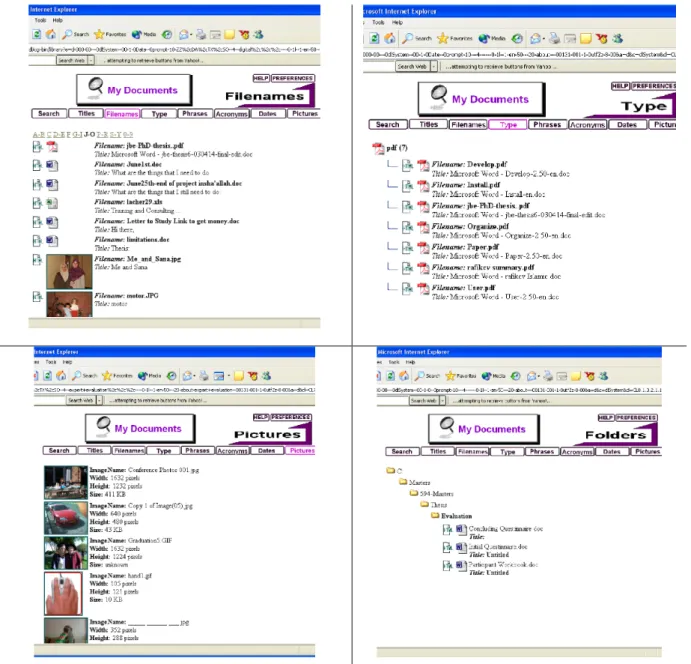
DDL currently supports eight browsing mechanisms: by Title, Type, Phrase, Acronym, Date, Picture, and Folder (Figure 3):
• The Titles interface is based on the Greenstone alphabetic list classifier (not shown in Figure 3). Title metadata is automatically extracted as the first few lines of text in a document, similar to the Microsoft Word convention of suggesting a filename for a newly created document from its initial text.
• The Filenames structure displays documents in alphabetic order by file name. It is also based on the Greenstone alphabetic list classifier.
• The Type interface allows the user to view and browse their personal documents grouped by document type. Each type is displayed with the appropriate icon and the total number of documents of that type in the collection. Clicking on a type displays those associated documents.
• The Pictures interface displays thumbnails of image files within a collection, sorted by file name.
• The Folders interface allows users to browse according to the file paths for documents within the collection. This view is similar to that provided by the user’s operating system, but is not cluttered with files outside the collection. • The Dates browsing scheme sorts documents by their latest modification date.
Dates are organized by year, and further divided into ranges of months (not shown in Figure 3).
• Phrase browsing is based on the Phind classifier [8], which automatically identifies noun phrases within the collection (not shown in Figure 3). These phrases can be searched and browsed, and by selecting a phrase a user can drill down to its context within the documents.
• The Acronyms interface allows users to view acronyms occurring in the text of collection documents (not shown in Figure 3). A compression-based algorithm automatically identifies acronyms and associates each one with its likely expansion [13].
4.
Usability evaluation
Two usability studies were conducted on the initial DDL design: an expert evaluation by usability specialists (Section 4.1) and a ‘learnability’ study whose participants were prospective users of DDL (Section 4.2). A nearly fully functional prototype was created for these studies, so that participants could gain a feeling for the interactions possible with the system rather than restricting their assessments to interface issues as visible through, for example, a paper prototype. The findings from these two studies were used to refine the initial DDL interface. A third usability analysis, a diary study, was conducted to examine the usability in real world contexts of this revised DDL prototype (Section 4.3).
4.1 Expert evaluation
The first study was an expert evaluation—specifically, a heuristic evaluation. In an expert evaluation, two or more usability specialists apply their expertise in human factors to independently evaluate a system. The evaluators examine the interface and judge its compliance with recognized usability principles (the heuristics). Skilled specialists can produce high-quality results in a limited time because the method does not involve the detailed scripting or time-consuming participant recruiting of laboratory usability testing. Thus this type of evaluation is especially valuable when time and resources are short, or as an initial overview of system usability.
Two local experts in both usability and digital libraries/information management participated in this study. Previous research indicates that while ‘single’ experts are likely to find over 40% of usability problems, ‘double experts’—those with “expertise in both usability in general and the kind of interface being evaluated”—are likely to find a higher proportion of the problems [7]. The experts each spent an hour interacting with the initial prototype of the DDL. At the beginning of each session the evaluator was given a brief introduction to the DDL through a demonstration of the typical steps a user would follow to interact with the system. Each session was video recorded for later analysis, and a researcher facilitated the sessions, answering questions as they arose.
This study uncovered a number of usability problems, both minor—for example, small inconsistencies in font or icon between the browsing facilities—and major. Many of the usability issues stemmed from what in hindsight is excessive adherence to the ‘library’ metaphor of the underlying Greenstone implementation. For example, a label in the initial search facility allowed the user to specify that a search term could match in “all fields”—where “fields” is a term familiar in the online library context, but not when looking through the contents of one’s own file space.
A more fundamental problem stemming from the library metaphor lay in Greenstone’s view of a document as being potentially part of many different collections. When a collection is built with Greenstone, it generates a copy of each document and stores the copy in the collection index; this copy is viewed when a library user searches or browses to locate a particular document, and any changes made to the copy are not saved to the original location of the document. This architecture is sensible in a digital library, where the expectation is that users will be
reading rather than modifying documents, and where it could be catastrophic to have a user’s casual annotations to a document ripple through all collections containing it.
In a personal document management, however, users naturally expect that after locating a document through the DDL search or browse facilities, clicking on the document will open the document itself—and not a mere copy. As one of the evaluators noted, this is crucial because, “Usually when users search or browse for documents, they want to perform a further action in relation to the document such as editing, modifying, deleting and so on.” A more suitable model to follow here is the standard folder system, where clicking on a file allows users to work directly on the selected document. To resolve this problem, DDL was modified to attach the original path of each document to the document representation within DDL as metadata.
Another area in which the library metaphor poses usability issues is the use of multiple icons for the DDL: specifically, the “Drag files” and “Organize My Documents” icons (Figure 1). In a physical or digital library, there is usually a distinction between selecting documents (the acquisitions process) and indexing or organizing them (creating the collection and its interface). Within a personal document collection, however, this distinction is artificial—the user should not be forced to think within the library paradigm, but rather should be allowed to concentrate on their tasks with minimal interruption by a need to manage their documents.
Within a library, the acquisitions process selects a subset of the potentially many available documents to include in a collection. For a personal document collection, acquisitions should be automatic, with any document created or saved in the user’s file space automatically added to the DDL; the user has essentially decided that the document is relevant to the personal collection by creating or downloading it. Similarly, users will wish to always interact with the latest version of their personal collection; the DDL should automatically re-build its indexes whenever new files are added, rather than requiring a separate “Organize My Documents” stage. Unfortunately, creating a single-stage acquisitions/build or an automated document addition facility remains a direction for future work.
4.2 Learnability evaluation
The second usability study focused primarily on ‘learnability’: the extent to which a user can get started with a system and use it appropriately without first undergoing training [7]. A high rate of learnability is crucial for software acceptance by users. Given the reluctance of users to consult manuals or help files, a system that can be immediately useful will be more likely to see future use.
As recommended by [6], this was a small-scale study involving six participants; the usability research literature indicates that using more than five or six participants does not necessarily gain significantly greater insight into usability issues for a system—instead, the same problems tend to be identified again and again.
Assessment of learnability includes studying system predictability—that is, the ability of users to predict system reactions [2]. Participants were asked to predict what would happen if they clicked on buttons or filled in text boxes in DDL; they were then asked to interact with these searching and browsing facilities of DDL and to
comment on whether or not they achieved the predicted response. Participants were also invited to comment on the interface design in general, and to discuss any aspect that they found confusing, unusual, or difficult to understand. Participant sessions lasted between 1 1/2 and 2 hours, and were video-recorded for later analysis.
Many—but not all—of the interface usability problems identified by these participants had also been noted by the expert evaluation. This high degree of overlap between the two studies is encouraging, as this is evidence that the experts were indeed able to tune in to the sorts of difficulties that potential DDL users might experience. The strongest—negative—reaction was to the Phrase and Acronym browsers. The purpose of the Phrase browser as distinct from a keyword/phrase search mechanism was not clear to the users, and most users could not even recall the meaning of the word ‘acronym’, let alone imagine a scenario in which they would wish to search or browse for documents containing specific acronyms. The case of the phrase browser is particularly interesting, as an earlier usability study had concluded that participants in the study liked this scheme and believed that it would be useful [3]. However, it was determined to be suitable for supporting exploratory tasks rather than at supporting more targeted searching or browsing. While these two browsing facilities may be useful in exploring a digital library whose contents are novel to a user, they are less useful in managing a personal collection where the user is likely to be familiar with the significant phrases and acronyms contained in the documents.
These issues aside, the participants found that most features of the interface were self-explanatory or could be induced through brief experimentation with DDL. The simplicity of the interface was appreciated by most participants.
4.3 Diary study
The third study was a “diary study” examination of the usability of the usability of the DDL prototype, as refined through insights gained in the first two studies. Participants recorded their daily interactions with a system on preprinted log forms (diaries) [9]. This type of study provides insights into the use and usefulness of a system in real world contexts, over a more extensive period of time than is possible in laboratory experiments.
Six participants took part over a one week period. Corresponding with the target population for the system, the participants were computer users with moderate to advanced computer skills. They used computers on a daily basis, to manage large amounts of electronic information. For the duration of the study, participants were requested to give preference to DDL whenever they need to browse through their personal file space, and to record their interactions on at least a daily basis. Participants were also asked to fill in a concluding questionnaire about their personal experience with the system and attend to a debriefing interview to discuss their recorded comments in the workbook.
Users reported that the application gave them the opportunity to explore their personal documents in a different way. Navigating through their documents using different browsers provided users with the ability to see documents that they have forgotten about or have misplaced and thought they have lost them. One of the
participants said “I have totally forgotten about this document”. Another one stated “This picture here… I never thought I still have it”.
A special interest was shown by most of the study participants in the Pictures
browser. One of the participants noted that, “It is nice to be able to see all these photos listed in one place… regardless of what folder they belong to”. Another participant made the comment, “… thumbnails allow me to have a quick look to decide which ones [image documents] I would like to go ahead and open”.
One participant complimented the concept of being able to drag documents from any arbitrary location on the file space to the application to organize and process. This participant dragged documents from a USB key and then clicked the “Organize My Documents” icon. They were able to browse these documents after being included in the application. It was mentioned that even when the USB key is not plugged in the computer, it is still possible to navigate through these documents. However, one problem arises; when the USB key is unplugged the document cannot be retrieved—when the document is clicked an error message is displayed because no link can be provided to a document that does not exist.
Overall, however, the participants reported that they preferred the Windows folder system to the DDL. The DDL presents documents differently from the folders scheme—in particular the concept of presenting documents grouped by alternative methods other than their location. Users are familiar with folders and need to spend some time before becoming familiar with the application mode of presentation. Furthermore, the application needs to be upgraded to accommodate the sorting capabilities that folders provide—being able to sort files by documents’ properties.
Further, the majority of the diary study participants found the action of dragging documents and clicking on icons to be prohibitively expensive. Despite the steps taken to simplify the users’ communication load with the application and ensure that they don’t have to know about Greenstone and its internal structure, they expect an effortless and lighter style of interaction. Documents should be automatically organized and processed by the application without the user having to click on “Organize My Documents” icon. As one of the participants commented, “I don’t have to do that [clicking on icons] when looking at my files using the Windows Explorer [the folder system]”.
Perhaps the greatest barrier to the DDL replacing a file management system is that it does not support the deletion of documents. This lack of a deletion facility is Greenstone legacy. In Greenstone’s original domain—maintaining a sizeable public document collection—documents are rarely, if ever, deleted; public digital libraries tend to grow, not reduce in size. If a document must be removed from a digital library, then the deletion is effected by removing the file from the document set prior to a ‘rebuild’ of the entire digital library. Similarly, if a document is modified then the Greenstone indexes are updated by removing the document from the collection’s files, adding the modified version, and re-building (re-indexing) the collection. The situation is radically different in a personal document collection, where documents are modified and deleted on a daily basis.
5.
Conclusions
It may seem to stretch the meaning of the term to view the collection of files on one’s own personal computer as a “digital library.” However, although today their importance has long been eclipsed by large institutional and national collections, personal libraries have a venerable history. For example, on his death in 1661 the renowned Irish man of letters Archbishop Ussher had a personal collection of 10,000 books—which could well have been Ireland’s largest library at the time.
This paper has explored the use of a standard digital library software system, Greenstone, to organize one’s own personal file space. In Greenstone each collection is designed individually by determining what searching and browsing facilities it should provide to the user, and deciding on what the pages it generates should look like. In principle, producing DDL, the Desktop Digital Library, simply amounted to creating a suitable collection design and installing it on the target computer.
However, things were not quite as easy as that. To provide a suitable interface it was necessary to augment some aspects of Greenstone with specially-tailored facilities. These included
• the ability to drag documents directly into the collection
• harvesting metadata such as file name, type, creation date, last modified date, etc. • shortcuts for organizing documents and viewing them by browsing the collection • a new way of displaying hierarchical metadata as file hierarchies
• altering some interface terms from library jargon to file space terminology • storing the original path of each document as metadata so as to give users direct
access to the document rather than a library copy of it
The system design was honed by two rounds of user studies: an expert evaluation with two interface expert, following which the system was improved, and a learnability study with six prospective users, following which it was improved further. This proved a valuable methodology, yielding a large volume of high-quality design feedback from only a few subjects. Although some duplicate points arose from the two groups, each contributed its own very different perspective. A third, diary study of the refined prototype gave further insight into the DDL’s usability in real world conditions, over a more extended period of time.
The use of a standard digital library system had some disadvantages. Two notable ones stem from different notions of “immediacy” in a library context vis a vis a personal computer context. Most libraries can tolerate a lag of a day or two between when a new document is received and when it appears in the collection. And most library browsers can tolerate the network and browser delays induced by using a shared system over the World-Wide Web. Personal computer users, however, rightly expect more. In particular, a Web browser is a cumbersome way of interacting with a locally-running software system.
Personal digital libraries differ from personal library collections of old in the amount of effort that their owners are prepared to expend in organizing them. Users want to be able to drag files into the collection having to add metadata to them manually. A certain amount of metadata (filename, type, modification date, etc) can be gleaned from the operating system; other information (title, acronyms, phrases) can be extracted from the document itself, if it is textual. This project has shown that this
automatically harvested metadata is enough to provide a rich and useful browsing structure within a standard digital library software application.
The expected lifecycle of documents also differs between personal and public document collections. In a private collection, documents are volatile; they are created, modified, and tossed away, sometimes over very short time periods. In a public digital library, documents are typically not modified or deleted from the collection—the collection tends to grow monotonically. The facilities to delete or modify documents in Greenstone are ponderous, forcing the collection maintainer to remove documents from the Greenstone filespace and re-index the collection.
References
[1] Boardman, R. Multiple hierarchies in user workspaces. In Proceedings ofCHI Conference on Human Factors in Computing Systems, (Seattle, WA). ACM Press, 2001.
[2] Dix, A., Finaly, J., Abowd, G., and Beale, R., Human-Computer Interaction. 2 ed. 1997, Glasgow: Prentice-Hall.
[3] Edgar, K.D., Nichols, D.M., Paynter, G.W., Thomson, K., and Witten, I.H. A user evaluation of hierarchical phrase browsing. In Proceedings ofEuropean
Conference on Digital Libraries, (Trondheim). 2003, 313-324.
[4] Freeman, E. and Gelernter, D., Lifestreams: A storage model for personal data. ACM SIGMOD Bulletin, March, (1996), 80-86,
[5] Janssen, W.C. and Popat, K. UpLib: a universal personal digital library system. In Proceedings ofACM Symposium on Document Engineering, (Grenoble, France). ACM Press, 2003, 234-242.
[6] Nielsen, J. and Landauer, T.K. A mathematical model of the finding of usability problems. In Proceedings ofINTERCHI'93, (Amsterdam, The Netherlands). ACM, 1993, 206-213.
[7] Nielsen, J., Usability Engineering. 1994, San Francisco, CA: Morgan Kaufmann. [8] Paynter, G.W., Witten, I.H., Cunningham, S.J., and Buchanan, G. Scalable
browsing for large collections: a case study. In Proceedings ofDigital Libraries 2000, (San Antonio, Texas). ACM Press, 2000, 215-223.
[9] Rieman, J. The diary study: a workplace-oriented research tool to guide laboratory efforts. In Proceedings ofSIGCHI Conference on Human Factors in Computing Systems, (Amsterdam, The Netherlands). ACM Press, 1993, 321-326.
[10] Shneiderman, B., Tree visualization with tree-maps: A 2-D space-filling approach.ACM Transactions on Graphics, 11, 1, (1992), 92-99,
[11] Soules, C.A.N. and Ganger, R. Why can't I find my files? New methods for automating attribute assignment. In Proceedings of9th Workshop on Hot Topics in Operating Systems). 2003, 115-120.
[12] Witten, I.H. and Bainbridge, D., How to build a digital library. 2002, San Francisco, CA: Morgan Kaufmann.
[13] Yeates, S., Bainbridge, D., and Witten, I.H. Using compression to identify acronyms in text. In Proceedings ofData Compression Conference). 2000, 582.