Proceedings of DETC’05:
25th Computers and Information in Engineering (CIE) Conference
September 24-28, 2005; Long Beach, CA
DETC2005-84692
WEB-BASED MULTIMEDIA LECTURE DELIVERY SYSTEM WITH TEXT-TO-SPEECH AND
VIRTUAL INSTRUCTORS
Ayman M. Wasfy Tamer M. Wasfy
Advanced Science and Automation Corp., Indianapolis, IN
Hazim El-Mounayri Daniel Aw
Mechanical Engineering Department
Purdue School of Eng. & Tech., IUPUI, Indianapolis, IN ABSTRACT
A web-based multimedia lecture delivery system is presented. The system provides natural-language instruction with synchronized: naturally sounding text-to-speech, written highlighted text, and animated 2D and 3D graphics. A near-photorealistic animated human avatar can present the lecture with synchronized gestures and lip-synching. The course is presented using a hierarchical structured outline. The learner can ask the virtual instructor questions using natural-language speech or typed text. The instructor first tries to answer the question from the course content. If no information is found then a web search is performed.
The key elements of the lecture delivery system are: (1) a modular unstructured knowledge-base in which knowledge is stored as HTML or XML “knowledge objects” with embedded multimedia content; (2) a hierarchical rule-based expert system that provides natural-language understanding; (3) a search engine that can provide answers to the learner’s questions from the knowledge-base; (4) natural-language voice-recognition and synthesis; (5) animated human-like virtual instructor; (6) an integrated web-based framework that includes windows for course presentation, outline, speech, photo-realistic animated agent avatar, and other utilities that can be moved and sized according the user’s preference. The application of the lecture delivery system to a sample introductory lecture on CNC milling is presented in order to demonstrate the features of the system.
1. INTRODUCTION
Online course delivery and development tools enable E-learning, which can be defined as course content or learning experiences delivered over the web by electronic technology [1]. Such tools offer significant advantages by allowing the learner to learn at his/her own pace and convenience. They also allow distributed distance-education by allowing course material delivery over the internet. Ever since the explosive
growth of the Internet, thousands of web-based courses and other educational applications have been offered. The majority of electronic learning applications consist of html pages with embedded pictures, movies, and/or Macromeadia FlashTM content. Some general tools for creating, delivering and maintaining on-line web-based courses have been developed. Most of the tools available are used to complement regular classroom delivery. Oncourse [2] is an online course environment developed at Indiana University that includes an authoring environment that allows faculty to easily create, edit and maintain course materials. Oncourse however, includes limited support for animated multimedia content and no speech or question and answer capabilities. The Advanced Learning Environment (ALE) [3] is a virtual learning portal for online education developed at the Florida Space Research Institute. ALE offers self-paced, web classes in a variety of general science and aerospace education topics. ALE supports synchronous web classes, collaboration tools, and community discussions. ALE includes a speech capability using pre-recorded speech. Another system called ANDES is used by the University of Southern California (USC) for management and delivery of web courses and has a special authoring language, called ATML, to generate Web-based courseware [4]. Some of the common characteristics of most web-based course delivery systems are that courses are linear and the content is not readily reusable.
In order to facilitate authoring, maintaining and reusing of course material, object-oriented models for course material representation have been developed. For example, Tsai et al.
[5] developed an object-oriented course model where the original teaching material is divided into objects according to the instructional objectives defined by the teacher. Those objects were then organized in a tree structure forming a hierarchical knowledge-base. The Sharable Content Object Reference Model (SCORM) [6] defines a SCO (Sharable content object) as the smallest stand-alone and meaningful component of a course that is reusable, interoperable and
Proceedings of IDETC/CIE 2005 ASME 2005 International Design Engineering Technical Conferences & Computers and Information in Engineering Conference September 24-28, 2005, Long Beach, California USA
modular. Although SCORM is not in itself a tool, it is an emerging standard that is being deployed to various degrees in some online course development tools. SCORM addresses the ability to reuse, locate, and provide for interoperability of learning content. Another feature of SCORM is separation of control and content reusable learning objects. The LMS (Learning Management System) in SCORM is responsible for controlling the delivery and organization of the content. The SCOs can be arranged in any desired meaningful order and reused in multiple courses. The SCORM standard focuses on content and metadata and its primary applications are geared towards single-learner, self-paced and self-directed training.
Most web-based course delivery systems are based on the student reading the course material and looking at static or animated illustrations. Some course delivery systems, like the ALE system, present the material using pre-recorded speech with Flash animations and movies. Pre-recorded speech makes the course very hard to maintain and update – especially for faculty members - because any small change in wording involves spending a significant amount of time re-recording speech and reprogramming the multimedia sychronization. In addition, synchronizing the speech with the Flash content using pre-recorded speech is very hard (the speech must be broken down into short phrases) because of the variation Flash playing speed under different conditions of user interactions.
Most web-based courses do not include synchronized 3D animated illustrations. Also, most web-based courses do not include intelligent photo-realistic animated human instructors. The SCORM standard is not expected to account for intelligent agents until at least 2006 [7]. The instructor can help point important parts of the course using gestures. Also, the virtual instructor can make the learning experience closer to an actual classroom learning experience. In addition, most of the web-based course delivery systems lack the interactivity provided by a physical instructor, which includes the ability of the learner to ask random questions related to the course and the system providing an intelligent answer.
In this paper a multimedia lecture delivery system called LEA (Learning Environment Agent) that addresses the aforementioned shortcomings of web-based lecture delivery systems is presented. LEA includes the following capabilities: • Ability to provide instruction with synchronized: naturally
sounding text-to-speech, written highlighted text, animated 2D and 3D graphics, and sounds.
• A web-based framework that includes windows for course presentation, outline, speech, photo-realistic animated agent avatar, help, and user’s preferences that can be moved and sized according to the user’s preference.
• A near-photorealistic animated virtual human instructor can present the lecture with synchronized gestures and lip-synching to enhance the learning experience.
• The learner can ask the virtual instructor questions using natural-language speech or typed text. The instructor first tries to answer the question from the course content. If no information is found, then a web search is performed. • A hierarchical outline can be used to present the course in
a linear structured way. Alternatively, the learner can jump to any item in the outline or click on illustrations to get
more information. The section of the outline that the learner is currently viewing is highlighted.
• A voice recognition capability that allows users to issue voice commands and ask questions in natural language. • A speech synthesis (text-to-speech) capability that allows
the virtual instructor to present the course material using naturally sounding speech.
LEA uses a similar unstructured knowledge representation as used in the SCORM standard. Knowledge is stored as self-contained modular “knowledge objects.” Each knowledge object is a small html or XML document with tags for defining synchronized multimedia content (pictures, movies, Flash animations, sounds, etc.), synchronized agent gestures, and other properties. LEA also includes a hierarchical rule-based expert system that provides natural-language understanding for the student’s voice commands and for the questions. The application of the LEA system to a course on “Introduction to CNC Milling” will be used to illustrate the application of the LEA system throughout the paper.
2. LECTURE DELIVERY SYSTEM ARCHITECHTURE
Gestures
Gestures Visemes
Natural-language interface
Rule-based expert system
Voice recognition engine Speech synthesis engine
Animated Agent Avatar
Knowledge base Multi-media
content
Course presentation window
Direction of information flow.
Knowledge-base manager
Knowledge database engine
Search engine
Knowledge disseminator
Speech window Utilities windows: Navigation; Help; User’s preferences; Agent Options.
Outline window
Course outline
User’s voice commands/questions
Animated Agent window
Figure 1 Architecture of the LEA lecture delivery system. A schematic diagram of the architecture of the LEA system is shown in Figure 1. LEA consists of three main components: • Knowledge base manager. This includes a knowledge
data-base engine, a search engine, and a knowledge disseminator. The knowledge data-base engine handles access to the knowledge-base, which consists of modular knowledge objects in the form of HTML, XML or text segments. Those segments can have hyperlinks referring to the locations of the multimedia pictures and movies files. The search engine is used to search the knowledge database. The knowledge disseminator is the traffic controller that connects the user interface with the knowledge-base. The knowledge-base requests are issued to the knowledge disseminator from either the course outline or from the user’s natural language questions. The knowledge disseminator then sends the request to the search engine which returns back the appropriate knowledge object(s). The knowledge disseminator then
sends these knowledge objects to the course presentation and speech windows to be displayed as well as to the speech synthesis engine to be spoken. Some of the graphical illustrations in the course window can be clickable, in which case the knowledge-base request associated with the click event is sent to the knowledge disseminator which fetches the corresponding knowledge object(s).
• Natural-language interface. It consists of a speech-synthesis engine, a voice-recognition engine and a rule-based expert system. The rule-rule-based expert system provides natural-language understanding. It processes voice commands and questions that are spoken or typed by the user or that come from clicking on an outline item and sends them to the knowledge disseminator.
• Animated agent avatar obtains the visemes from the speech synthesis engine to lip-synch the agent avatar. It also obtains the agent avatar’s gestures script from the knowledge disseminator and the rule-based expert system and displays the corresponding gestures.
The Knowledge base manager and the natural-language interface are packaged as one “activeX” plug-in. The agent avatar window is another activeX plug-in. Those controls are web-enabled which means they can be displayed in a web browser and can access files over the web using URLs.
3. COURSE WEB-PAGE
LEA enables delivery of rich multimedia courses over the web. Figure 2 shows a web page displaying a typical screen of a web-based course. The display is divided into the following windows:
• Course presentation window (Media Screen): shows the course material that includes text and animated 2D and 3D graphics synchronized with the speech. Parts of the illustrations can be clickable such that when the user clicks, LEA jumps to a corresponding outline item.
• Outline window: shows a hierarchical-tree representation of the course outline. Branches can be expanded or contracted by clicking on the “+” or “–” buttons, respectively, on the left of the branch. The student can click on any item of the outline at any time and the agent will jump to that item. Navigation buttons at the top of the outline allow the user to:
o Go forward/backward one outline item. o Go forward/backward one sentence. o Play/Stop the course
o Pause or resume playing the course.
• Speech window: displays what the agent is saying. The current sentence is highlighted. Also, the current word is highlighted with a different color to help the student follow the agent. The learner can read ahead or look at any text s/he missed in the speech window.
• Agent window: shows a photo-realistic animated virtual human avatar of the instructor. The lips of the avatar are synched with the speech. The avatar can gesture, point, and display facial expressions (including anger, sadness,
happiness, etc.). The user can translate, rotate, or scale the avatar.
• Voice commands window: shows a hierarchical-tree of voice commands. The user can either select the command from the list or speak the command using natural-language. • Utilities windows: Additional utility windows include:
o Agent Optionswindow: allows the user to control
the volume and speed of the speech. The user can also choose the voice of the agent such as male or female and accent from a library of text-to-speech voices. The user can interact with LEA using natural-language speech. The list of recognized words and phrases that the user uttered are displayed at the bottom of this window.
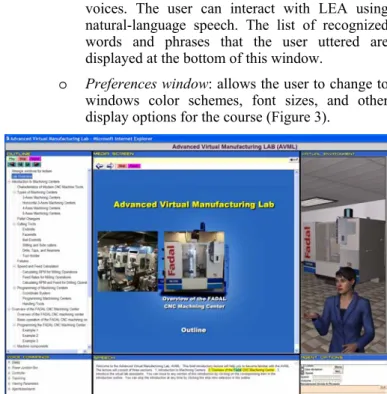
o Preferences window: allows the user to change to
windows color schemes, font sizes, and other display options for the course (Figure 3).
Figure 2 Typical screen for a web-based course consisting of: a course window, an agent window, a speech window, an outline
window, and a navigation window.
Figure 3 User’s preferences window.
The user can control the size and location of all the windows. The system remembers the user preferences. The learner can also choose from a number of default window arrangement settings.
3.1 Course Outline
The outline window is shown on the left-hand-side in Figure 2. A typical outline file (as typed by the course instructor) is shown in Figure 4. The outline consists of the subject headings with child headings indented using tabs. Each heading is “piped” into a question that is sent to the knowledge disseminator (see Figure 1).
Lab overview | what is <!IVRalias overview>
Introduction to Machining Centers | what is <!IVRalias intro>
Characteristics of Modern CNC Machine Tools | what is <!IVRalias modern_chrac>
Types of Machining Centers | what is <!IVRalias MC_types>
3-Axes Machining Centers | what is <!IVRalias 3axes>
Horizontal 3-Axes Machining Centers | what is <!IVRalias H3axes>
4-Axes Machining Centers | what is <!IVRalias 4axes>
5-Axes Machining Centers | what is <!IVRalias 5axes>
Pallet Changers | what is <!IVRalias MC_pallet>
Cutting Tools | what is <!IVRalias MC_tools>
Endmills | what is <!IVRalias endmills>
Facemills | what is <!IVRalias facemills>
Ball Endmills | what is <!IVRalias ballmills>
Slitting and Side cutters | what is <!IVRalias sidecut>
Drills, Taps, and Reamers | what is <!IVRalias drills>
Tool Holder | what is <!IVRalias toolholder>
Fixtures | what is <!IVRalias MC_fix>
Speed and Feed Calculation | what is <!IVRalias MC_Speedfeed> Figure 4 Outline of the course.
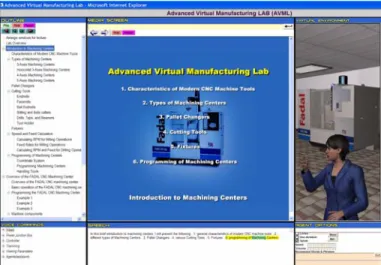
Figure 5 Partial exploded view of the lecture outline. The instructor creates the course by writing the course outline as shown in Figure 4. Figure 5 shows the corresponding outline displayed by LEA. The instructor writes the subject headings and the corresponding question, which will be sent to the knowledge disseminator. The question can be in the form of a natural-language question in which case the search engine will search the knowledge base for the “best” answer to that question. Alternatively, the question can search for a specific label in the knowledge-base and display all the knowledge objects, which have this label. This is done using the special tag “<!IVRalias label_name>”. The search engine will only return the knowledge object(s) which has the label “label_name”.
Thus, the course consists of the answers to the outline questions.
3.2 Natural-Language Understanding and Search Capability
Voice-recognition is performed using Microsoft Speech Application programming interface (SAPI) 5.1 along with any SAPI 5.1 compatible voice-recognition engine (the SAPI built-in Microsoft Voice-Recognition engbuilt-ine was used built-in this paper). A hierarchical rule-based expert system provides natural-language understanding. The rule-based expert system used here was presented in Wasfy and Noor [8]. A rule is an object consisting of a name and a list of properties and property values. A Rule has five main types of properties:
• Word properties. These properties are used to calculate a satisfaction score for the rule. If that score is greater than a certain threshold, then the rule is triggered. A command consists of a number of words. Each command word is checked against a set of “required” and “ignored” words. The total score for a rule is equal to the summation of the
plusScore for the required that are found, the minusScore
for the required that are not found, and the scoreOther for the other words that are neither required words nor ignored
words. If the plusScore for the required words is negative, this means that if those words are found then the score is reduced. Ignored words do not add or subtract from the score. Any rule with a score above a certain threshold (say 75) is triggered.
• Variable manipulation properties. These properties are used to create and set the values of variables that are stored and used during the hierarchical evaluation of a command so that they can be accessed by subsequent rules.
• Script properties. Contain the script that is to be sent to Media Window or to the agent avatar upon triggering the rule.
• Output properties. The speak and reply properties output spoken messages and on-screen message, respectively. • State properties. After a rule is triggered it leaves the
expert-system in the state specified by the state properties. This provides a context for the next command so that the user does not have to repeat that context. For example the user can say “show me the manual controller jog knob.” The LEA system stores “manual controller” in the state. In the next command, the user can say “show the axis selector knob.”
• Knowledge-base search properties. Allow the rule to initiate a knowledge base search.
• Hierarchy Properties. Allow the rule to “connect” to a group of rules thus forming the hierarchical-rules.
Typical rules are shown in Figure 6. In Figure 6a the rule that handles the user’s questions is shown. This rule “requires” the user to say “what”, “tell”, “explain”, etc. to be triggered. Using this rule the system can understand questions such as: “what are the major characteristics of machining centers?” The rule-based expert system recognizes the question by the words “what”. Then the ignored words are stripped out of the question
to yield the search string of keywords “major; characteristics; machining; centers.” LEA will then play the knowledge object that closely answers this question. Examples of questions that the user can ask are:
• “explain the function of pallet changers.” • “describe endmills.”
• “what are the types of fixtures?”
The command “searchKnowledge” (Figure 6a) instructs the search engine to search the knowledge base using the search string. The knowledge object(s) with the highest score is offered as the answer to the user’s questions. Note that if the user asks the same question twice the same answer is returned.
In Figure 6b the rule for showing the user more information is shown. This rule is triggered when the user says, for example, “tell me more.” The required words “tell” and “more” trigger the rule. The command “searchKnowledgeMore” instructs the search engine to find more documents that contain the last search string keywords ranked by relevance. Thus, the first time the user says “tell me more” the knowledge objects that give the highest search score are returned. The second time, the knowledge objects with the next highest score are returned and so on. Depending on the search score the agent will say before speaking a knowledge item an appropriate remark such as “Here is a possible answer” or “I am not sure about this answer.” Also, when any knowledge object is presented to the student, it is time stamped. This time stamp is used to insure that the “searchKnowledgeMore” does not keep returning the same answer. Any knowledge item presented within a certain time (say 5 min.) is excluded from the search.
If no more information is found, then a web search is initiated using the search keywords. LEA dynamically creates a web page of the top 4 links, displays it, and the virtual instructor speaks the content to the user.
(a)
(b)
DEF what_rule RuleType1 {
require 100 -100 [ "what" "tell" "amplify" "explain" "elaborate" "describe" "can" "how" "why" "when" “give detail” "give details" ]
require -100 0 [ "value" "color" "more" ]
ignore [ "i" "would" "to" "two" "like" "know" "a" "the" "me" "do" "does" "about" "on" "regarding" "concerning" "mean" "by" "you" ]
searchKnowledge concept_Phrases concept_Objs 2 }
DEF moreinfo_rule RuleType1 {
require 50 -100 [ "tell" "amplify" "explain" "elaborate" "describe" "can" "how" "why" "when" “give detail” “give details” ] require 50 -100 [ "more" "detail" ]
require -100 0 [ "value" "color" ]
ignore [ "i" "would" "to" "two" "like" "know" "a" "the" "me" "do" "does" "about" "on" "regarding" "concerning" "mean" "by" "you" "information" ]
searchKnowledgeMore concept_Phrases concept_Objs 3 }
Figure 6 (a) Typical question rule; and (b) typical “more information” rule.
Other rules are used to navigate within the course or to display information related to the course. For example, rules are implemented for commands such as:
• Go forward/back.
• Forward/back one sentence. • Stop/Play.
• Pause/resume. • Help.
• Show me the outline.
• Change the size of one of the windows (speech, outline, etc.) fonts.
• Change the size of the instructor’s avatar. • Change the volume of the instructor’s speech. • Change the speed of the instructor’s speech.
• Describe the various components of a typical CNC milling machine.
A list of the available voice commands is provided in a hierarchical list (see Figure 2).
3.3 Speech Synthesis
Speech synthesis is done using any SAPI 5.1 compatible text-to-speech voice library to synthesize the agent voice. The use of text-to-speech rather than pre-recorded speech greatly reduces the time and effort required to maintain and update the course material. In addition, text-to-speech generates events that are used to synchronize the course presentation so that it is coherent at any speech speed. SAPI 5.1 generates the following events during speech:
• Sentence events are triggered at the start of each sentence. Sentences are separated by a period, a question mark, or an exclamation mark.
• Word events are triggered at the start of each word. Words are separated by spaces, tabs, or a new-line.
• Viseme events are triggered at the start of each viseme (lip-position).
These events are used to synchronize all the other media (text, graphics, and sounds) that are presented. The sentence events are used to trigger the agent gestures and the animations of the graphical illustrations. They are also used to highlight the current sentence that the agent is speaking in the “Speech Window.” The word events are used to highlight the words that the agent is speaking in the “Speech Window.” The viseme events are used to set the position of the agent lips to correspond to the correct pronunciation.
3.4 Animated Human-Like Virtual Instructor
The animated human avatar is driven by the Haptek API [9] and is displayed using IVRESS [10] virtual-reality display engine. A wrapper IVRESS object encapsulates the Haptek API and allows displaying full body textured highly detailed male and female characters in a 3D virtual environment window. The character has a large set of pre-defined gestures. Typical gestures include: looking up, down, right and left; torso bend, twist, and bow; right/left hand; smile; blink; walk; etc. In addition, the gestures also include the visemes (e.g. aa, ih, g, s, eg, uh, etc.) which are lip and face positions for lip-synching.
Also, the API allows setting the character’s joints rotations and positions to any desired value. In addition, the IVRESS wrapper object allows animation of the character hand motions by linear interpolation of the joint positions or angles. In order to effectively deliver the lecture, the agent avatar includes the following capabilities:
• Lip synching. The lips of the virtual instructor avatar are synched with the speech. The text-to-speech engine “visemes” events are used to set the lip and mouth positions during speech and thus provide “lip synching”. The visemes are fed from LEA (using SAPI) to the avatar (via IVRESS) using a TCP/IP network connection.
• Natural random and cyclic motions. These include breathing, eye blinking, and natural random hand and body motions. Those motions are generated automatically by the Haptek engine.
• Gestures. These include hand gestures and pointing. These are embedded in the knowledge object HTML using a tag to send script to the avatar. An example tag is:
<!IVRscript Agent.setSw = "**count L3" IVRend> The script that is sent by LEA to the avatar (via IVRESS) is “Agent.setSw = "**count L3"”, which makes the agent use the left hand to display a count of three.
• Facial expressions. These are embedded in the knowledge object HTML using the same script tag as the gestures.
4. UNSTRUCTURED KNOWLEDGE REPRESENTATION
Unstructured knowledge is natural-language knowledge that is in sources such as scientific papers, documents, web pages, etc. The advantage of unstructured knowledge representation is that natural-language is used and therefore is readily understandable and does not require specialized expertise in a knowledge tool.
Unstructured knowledge in LEA consists of “knowledge objects” that can be arranged in any order to form a lecture. One knowledge object can be used in multiple courses. A knowledge object is a short HTML/XML segment with embedded multimedia content and LEA-specific tags (it can also be a simple ASCII text segment). The idea of self-contained knowledge objects was also adopted in the SCORM standard as mentioned above. A knowledge-base file is simply a collection of knowledge items separated by new-lines. LEA allows multiple knowledge-base files to be loaded. A file is loaded using it’s URL. Thus the knowledge base can be located anywhere on the web. LEA includes a text search capability (see Section 3.2) to enable answering the user’s questions from the unstructured knowledge-base.
The human instructor (subject-matter expert) constructs the knowledge-base by identifying the knowledge sources: papers, presentations, web content, etc. (these can also include structured knowledge bases such as an ontology or a concept map). These sources can be used directly as knowledge-base files. Alternatively, the instructor can do some editing to add multimedia content and to add LEA specific tags. For example, the instructor can create a knowledge object by cutting and
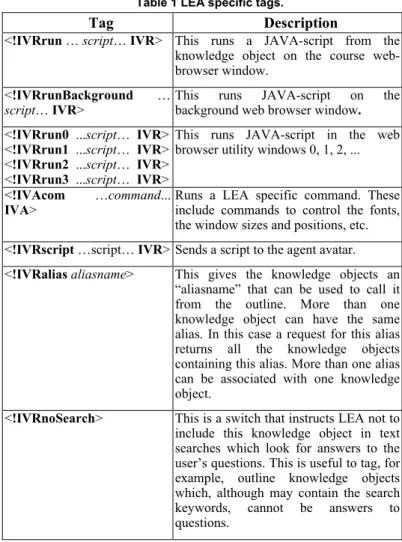
pasting a text segment from a technical source into the knowledge-base. The text segment by itself is a knowledge object. Optionally, the instructor can embed multimedia content by adding HTML tags for the multimedia content using an HTML editor. Also, optionally the instructor can then add the LEA specific tags for controlling the agent avatar and synchronize the multimedia content with the speech. A list of the LEA specific tags that can be embedded in the knowledge object along with a brief description of the function of each tag is given in Table 1.
Table 1 LEA specific tags.
Tag Description
<!IVRrun … script… IVR> This runs a JAVA-script from the
knowledge object on the course web-browser window.
<!IVRrunBackground …
script… IVR> This runs JAVA-script on the background web browser window.
<!IVRrun0 ...script… IVR> <!IVRrun1 ...script… IVR> <!IVRrun2 ...script… IVR> <!IVRrun3 ...script… IVR>
This runs JAVA-script in the web browser utility windows 0, 1, 2, ...
<!IVAcom …command...
IVA> Runs a LEA specific command. These include commands to control the fonts, the window sizes and positions, etc.
<!IVRscript …script… IVR> Sends a script to the agent avatar.
<!IVRaliasaliasname> This gives the knowledge objects an
“aliasname” that can be used to call it from the outline. More than one knowledge object can have the same alias. In this case a request for this alias returns all the knowledge objects containing this alias. More than one alias can be associated with one knowledge object.
<!IVRnoSearch> This is a switch that instructs LEA not to
include this knowledge object in text searches which look for answers to the user’s questions. This is useful to tag, for example, outline knowledge objects which, although may contain the search keywords, cannot be answers to questions.
Figure 7 shows a typical multimedia HTML knowledge object. Figure 8 shows a snapshot of the course corresponding to this knowledge object. The knowledge disseminator sends this knowledge object as is to the course presentation window, which is essentially a web browser. The LEA-specific tags are ignored by the browser because they are in the form of comment tags. The knowledge disseminator also strips all the tags from the knowledge object (thus all what is left is the text of the sentences) and then sends this text to the speech window and to the speech engine to be spoken. The text-to-speech engine provides the sentence events that are used to synchronize the animations of the graphical illustrations (in the course presentation window), the agent gestures, and the sentence highlighting. The text-to-speech engine also provides the word events that are used to highlight the words and the viseme events that are used for lip-synching of the virtual instructor.
<div align="center">
<object classid="clsid:D27CDB6E-AE6D-11cf-96B8-444553540000" width="100%" height="100%" id="intro">
<PARAM NAME=movie VALUE="Flash\MCintro.swf"> <PARAM NAME=play VALUE=false>
<PARAM NAME=loop VALUE=false> <PARAM NAME=menu VALUE=true> <PARAM NAME=quality VALUE=best> </object><br>
<comment>
In this brief introduction to machining centers, I will present the following <!IVRrun document.intro.TGotoLabel('/', 'intro');document.intro.Play(); IVRend> <!IVRscript IVRESSagent.setSw = "lookleft b" IVR>.
1, general characteristics of modern CNC machine tools
<!IVRrun document.intro.TGotoLabel('/', '1');document.intro.Play(); IVRend> <!IVRscript IVRESSagent.setSw = "talkGestL2 start" IVR>.
2, different types of Machining Centers
<!IVRrun document.intro.TGotoLabel('/', '2');document.intro.Play(); IVRend> <!IVRscript IVRESSagent.setSw = "talkGestR3 start" IVR>.
3, Pallet Changers
<!IVRrun document.intro.TGotoLabel('/', '3');document.intro.Play(); IVRend> <!IVRscript IVRESSagent.setSw = "talkGestL1 start" IVR>.
4, various Cutting Tools
<!IVRrun document.intro.TGotoLabel('/', '4');document.intro.Play(); IVRend> <!IVRscript IVRESSagent.setSw = "lookleft a" IVR>.
5, Fixtures
<!IVRrun document.intro.TGotoLabel('/', '5');document.intro.Play(); IVRend> <!IVRscript IVRESSagent.setSw = "talkGestL3 start" IVR>.
6, programming of Machining Centers
<!IVRrun document.intro.TGotoLabel('/', '6');document.intro.Play(); IVRend> <!IVRscript IVRESSagent.setSw = "**Lpoint F_up" IVR>.
</comment> </div>
<!IVRalias intro><!IVRnosearch>
<SCRIPT LANGUAGE="JavaScript" For="intro" Event="FSCommand(command,args)"><!-- // command is 'call'
switch(args) {
case 's1': label='general characteristics' ; alias='modern_chrac'; break; case 's2': label='types of Machining Centers'; alias='MC_types'; break; case 's3': label='Pallet Changers' ; alias='MC_pallet'; break; case 's4': label='Cutting Tools' ; alias='MC_tools'; break; case 's5': label='Fixtures' ; alias='MC_fix'; break; case 's6': label='programming' ; alias='MC_prog'; break; default: return;
}
document.cookie = label + ' | what is ' + '<!IVR' + 'alias ' + alias +'>'; //--></SCRIPT>
Figure 7 Typical knowledge object. The Flash multimedia content tags are shown in blue. HTML tags are shown in green. LEA specific tags are shown in red. The lecture text is shown in black.
Tags for the extra navigation script is shown in cyan.
Figure 8 Snapshot of the course corresponding to the knowledge object in Figure 7.
The graphical illustration in the knowledge object in Figure 7 is a FLASH movie. The movie is accessed using its URL and thus can be located anywhere on the web. Each sentence in the knowledge object is separated using a period. The first sentence is “In this brief introduction to machining centers, I will present the following.” At the beginning of this sentence a script is sent to the Flash movie in the course presentation window to advance the Flash movie to the next synchronization point “intro”. The script is:
“document.intro.TGotoLabel('/','intro'); document.intro.Play();”
The script is sent using the LEA tag “<!IVRrun …script… IVRend>”. This tag runs a JAVA-script segment on the course presentation window (recall that the course presentation window is web a browser). Also, a script is sent to IVRESS to instruct the instructor’s avatar to display a gesture indicated using the tag “<!IVRscript …script… IVR>”. The script that is sent to the avatar is:
Agent.setSw = "lookeleft b"
which instructs the avatar to look left. The next sentence is “1, general characteristics of modern CNC machine tools.” At the beginning of this sentence the agent avatar is instructed to do a talking left hand gesture using the script:
IVRESSagent.setSw = "talkGestL2 start"
The rest of knowledge object in Figure 7 consists of sentences with embedded JAVA-script to play the corresponding FLASH movie segment and script to control the agent gestures. At the end of the knowledge object the tag “IVRalias” defines an “alias” for this knowledge object. This alias is used in the outline to request this particular knowledge object using the “what” natural-language rule presented in Section 3.2. Note that more than one knowledge object can have the same alias. In this case a request for this alias returns all the knowledge objects containing this alias. Also, more than one alias can be associated with one knowledge object.
Another capability built into the LEA system is enabling the user to click on “hotspots” in the multimedia illustrations and jump to the corresponding lecture segment. This is enabled using the extra JAVA-script shown in cyan in Figure 7. This script uses the external script support capability in Flash through “FScommand” to instruct LEA to go to a specific knowledge object when the user clicks on the hotspot.
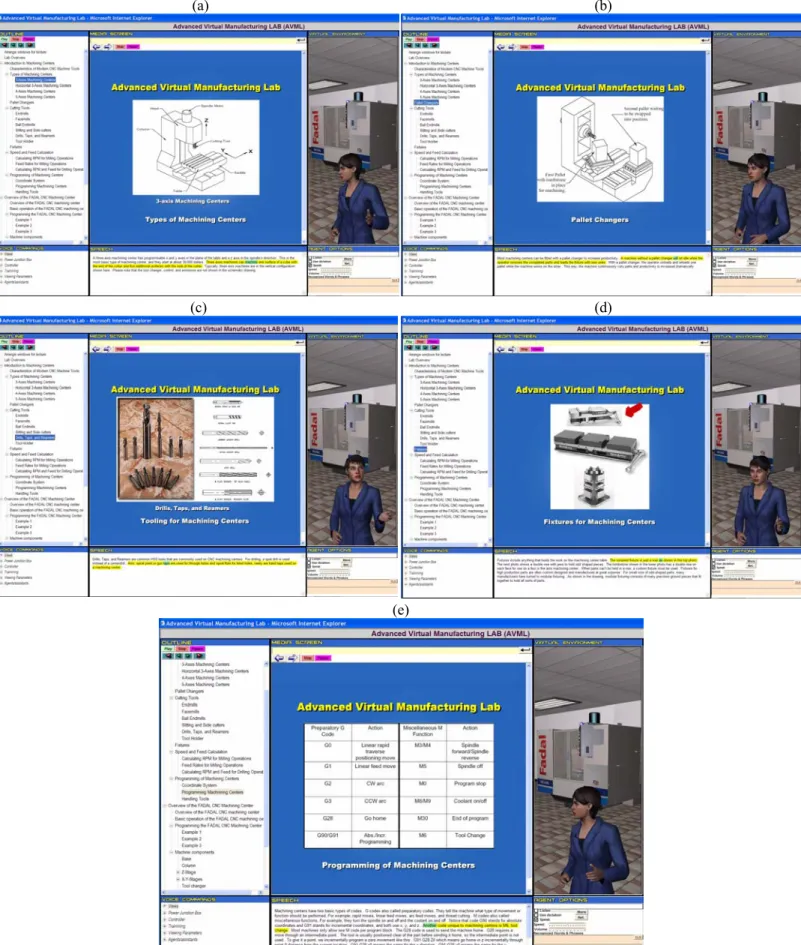
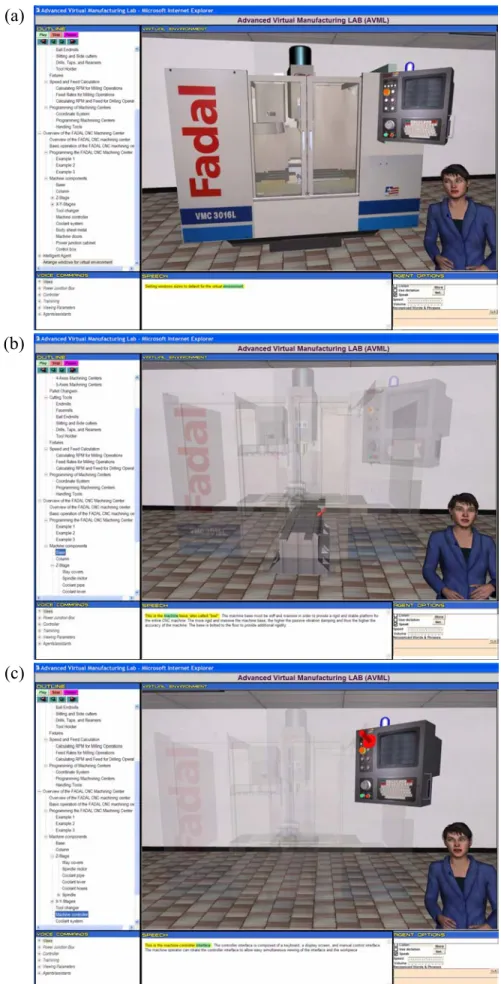
Figure 9 shows snapshots showing different parts of the lecture, including: types of machining centers (3-axis, 4-axis, or 5-axis), pallet changers, tool types, fixtures, and programming of CNC milling machines. Figure 10 shows snapshots of the lecture showing the instructor explaining the function of the various sub-components of a CNC machining center such as the machine base (Figure 10a) and the machine manual controller (Figure 10b). The machine is shown as a 3D solid model using IVRESS. When the instructor explains the function of a sub-component, the rest of the machine is made semi-transparent so that the student can better see the sub-component. Also, a flashing arrow pointing at the sub-component is displayed. This is done by embedding appropriate script in the “IVRscript” tag.
(a) (b)
(c) (d)
(e)
Figure 9 Snapshots from the course. (a) 3-axis milling machine; (b) Pallet changers; (c) tools type; (d) workpiece fixtures; (e) programming of milling machining centers.
(a)
(b)
(c)
Figure 10 Snapshots of the course explaining the functions of the various parts of CNC milling machining center using a 3D near-photorealistic model of the machine.
5. CONCLUDING REMARKS
In the present paper, a web-based multimedia lecture delivery system – LEA – was presented that can provide the following functions:
• Natural-language instruction with synchronized: naturally sounding text-to-speech, written highlighted text, and animated 2D and 3D graphics.
• A near-photorealistic animated human avatar which can present the lecture with synchronized gestures and lip-synching.
• Hierarchical structured outline. LEA allows the student to follow a structured outline in a linear systematic way. The student can also jump to any part of the course using the outline (or by clicking on the multimedia hyperlinks). • Ability to answer the learner’s natural-language speech or
typed questions. LEA first tries to answer the question by searching for the question keywords in the lecture knowledge-base. If no information is found then a web search is performed.
The key components of the LEA system are:
• A modular unstructured knowledge-base in which knowledge is stored as html or XML “knowledge objects” with embedded multimedia content. An unstructured modular knowledge-base is used in order to significantly reduce the (valuable) time that instructors (subject-matter experts) need to spend in populating, managing, and renewing the knowledge-base.
• A hierarchical rule-based expert system that provides natural-language understanding.
• A search engine that can provide answers to the learner’s questions from the knowledge-base;
• Natural-language voice-recognition and synthesis. • Animated human-like virtual instructor.
• An integrated web-based framework that includes windows for course presentation, outline, speech, photo-realistic animated agent avatar, and other utilities that can be moved and sized according the user’s preference.
The application of the lecture delivery system to a sample introductory lecture on CNC milling was presented in order to demonstrate the features of the system.
ACKNOWLEDGMENTS
Partial support for this research was provided by NSF under STTR grant number DMI-0339024 and Indiana 21st Century Research and Technology Fund under STTR matching grant number 0043. The authors would like to thank Haptek Inc. for providing the human-like avatars display engine. IVRESS and LEA were provided by Advanced Science and Automation Corp.
REFERENCES
1. A Vision of E-Learning for America’s Workforce, Report of the Commission on Technology and Adult Learning, ASTD/NGA, June 2001.
2. https://oncourse.iu.edu/
3. http://www2.learn360.com/fsri/
4. Johnson, L., Blake, T., and Shaw, E., “Automated Management and Delivery of Distance Courseware,” In Proceedings of WebNet'96 - World Conference of the Web Society Proceedings, October 1996.
5. Tsai, C.J. and Tseng, S.S., “Building a CAL Expert System based upon Two-phase Knowledge Acquisition”, Expert Systems with Applications, Vol. 22, 2002, pp. 235-248. 6. Sharable Content Object Reference Model (SCORM), 2nd
Edition, www.adlnet.org, 2004.
7. Rehak, D., "Putting ADL and SCORM into Practice", Presented at National Learning Network Interoperability Conference, London, UK, July 2002.
8. Wasfy, T.M. and Noor, A.K., “Rule-Based Natural-Language Interface for Virtual Environments,” Advances in Engineering Software, Vol. 33(3), 2002, pp. 155-168.
9. www.haptek.com
10. IVRESS (Integrated Virtual Reality Environment for
Synthesis and Simulation),
http://www.ascience.com/Science/ScProducts.htm,