Contents
Introduction ... 1
How to Use this Guide ... 1
Overview of Personalized Learning Environments ... 2
Description of Personalized Learning Environments and Key Functionalities ... 3
Learning Environments ... 3
Students ... 3
Parents/Guardians ... 3
Teachers: ... 3
Support Staff ... 4
Principals and Program Leaders... 4
District Leaders ... 4
Functionalities ... 5
What Functionalities and Tools are Grantees Implementing and Exploring? ... 6
What is a Learning Management System or a Learning Content Management System? What is the relationship of a LMS to a LCMS? ... 7
Role of LMS and LCMS in Personalized Learning Environments ... 8
Instructional and Administrative Purposes of LMS/LCMS ... 9
What Are Some of the Functional and Feature Requirements for these Systems? ... 12
LMS Functionality ... 12
LCMS Functionality ... 13
Functions and Features ... 15
Core Capabilities and Business Requirements ... 15
Portal ... 15
Curriculum and Resource Management ... 15
Teaching and Learning (Student Profile, Learning Management, Personal Workspace, Assessment Management) ... 16
Technical Requirements ... 16
Interoperability and Data Requirements ... 17
Prioritizing and Assessing Requirements and Systems ... 19
Appendix A - Functions and Features ... 21
Appendix B - Examples of Review Rubrics ... 27
Appendix C - LMS/LCMS Review Sites... 28
Appendix D - Bibliography ... 30
Disclaimer:
This resource is being provided as a reference for Race to the Top—District grantees and others engaged in education reform. Information, materials and approaches mentioned or shown in this document are provided as resources and examples for the viewer’s convenience. No official endorsement by the U.S. Department of Education of any product, commodity, service or enterprise mentioned in this resource is intended or should be inferred.
In addition, the approaches discussed or shown in this resource are not intended to mandate, direct or control a local educational agency’s or school’s specific instructional content, academic achievement system and assessments, curriculum or program of instruction.
Introduction
The Race to the Top—District grant program builds upon the momentum of other Race to the Top grant competitions by encouraging bold, innovative reforms at the district level. Grantees have proposed plans to create student-focused personalized learning
environments to improve teaching and learning and enable students to be successful in college and career pursuits.
Grantees are now in the process of implementing important educational reforms by adopting college- and career-ready standards and assessments; building data systems that measure student growth and success; increasing educator effectiveness; expanding student access to the most effective teachers and principals; and decreasing achievement gaps across student groups. The District Reform Support Network provides technical assistance to Race to the Top—District grantees as they implement reforms in education policy and practice. This paper is designed to be a support document for Race to the Top—District grantee team members. It offers functional requirements and uses of learning management systems (LMS) and learning content management systems (LCMS) in providing a robust and integrated personalized learning environment.
How to Use this Guide
This paper helps grantees involved in the process of choosing or replacing an LMS/LCMS to make informed decisions, and includes a range of items to consider. It does not contain a comprehensive survey of available systems on the market nor comparisons of these systems. It discusses the possible
1 (Brandon Hall Research, 2002).
2Irfan Süral, Procedia Social and Behavioral Sciences 9 (2010): 1145–1152.
DEFINITIONS
Brief definitions of terms that are commonly used throughout this paper.
API: An Application Programming Interface (API) provides a way for different applications to
communicate with one another in a technical manner. Common API specifications set a standard way for communicating these data.
LMS: A Learning Management System (LMS) is used primarily to support online and blended learning. At a minimum, it enables placing course materials and assessments online, associating these items with standards, associating staff and students with courses, tracking student performance, storing student
submissions, and providing systems for synchronous and asynchronous communication.
LCMS: A Learning Content Management System (LCMS) is an environment where multiple developers can create, store, reuse, manage, and deliver learning content from a central object repository.1
Learning Object Repository or Central Object Repository: A Learning Object Repository is a central database in which learning content is stored and managed. The instructional output may be delivered via the Web, CD-ROM, or printed materials. The same object may be used as many times and for as many purposes as is appropriate.2
Metadata: Information about a digital object, enabling it to be retrieved from a database. It may be located separately from the resource it describes or embedded within that resource.
educational uses for such systems in supporting personalized learning and describes different features and technical standards that should be kept in mind. It serves as a reference to the issues, opportunities, and processes that should be considered in adopting an LMS/LCMS.
Overview of Personalized Learning Environments
There is an overwhelming body of research and literature on the topic of personalized learning, with multiple definitions embedded in the literature. Gartner conducted a synthesis of personalized learning definitions across the K-12 landscape nationally and revealed the following key themes:3
A focus on the student/learner (“student-centric”)
A consideration for flexibility in the pace and location of learning
Instruction that is tailored to learner preferences, learning patterns, and needs
Shared ownership for learning
Continuous monitoring of student progress
Using assessment data to inform instruction
Individual student learning plans
In a personalized learning environment, students take increasing responsibility and ownership for learning as is developmentally appropriate. A student could learn anytime, at any place, including learning through formal and informal learning experiences, such as internships, research with museums and work-study experiences. In a personalized learning environment, learning is based on standards-based learning progressions/paths. Teachers provide both direct instruction and facilitate student learning using standards-aligned resources and assessments. In order to support a student-centered personalized approach to student learning, the development and use of information systems that include learning progressions, intelligent algorithms, and adaptive learning is increasing the “technical characteristics of this student-centered approach that are built into the information system.”4 These
changes also “include providing transparency into what the student knows and needs to accomplish, robust user tracking and reporting of performance, differentiated instruction and curriculum, and options on how students can demonstrate learning.”5
3Gartner, “Personalized Learning Business Case Development and Roadmap Phase 1 - Personalized Learning
Landscape Briefing,” October 2013.
4Liz Glowa and Susan Patrick, “Re-Engineering for Competency Education: Information Technology Design
Considerations,” February 2013,
http://www.competencyworks.org/wp-content/uploads/2013/02/iNACOL_CW_IssueBrief_ReEngineeringCompEd_final.pdf.
Description of Personalized Learning Environments
and Key Functionalities
Learning Environments
A personalized learning environment (PLE) is student-centered and should be designed to serve all key stakeholders in the school system. These stakeholders include students, parents/guardians, teachers, support staff, principals and program leaders, and district leaders. Below is a description of what a PLE means for each stakeholder group.
STUDENTS:
Provided anytime/anywhere access to a catalog of relevant and interesting courses and content based on student needs, strengths, and interests. They have the ability to learn both in and out of school synchronously and asynchronously from high quality school-based and online teachers.
Can participate in an advising program to help them define and monitor progress against their individualized learning plans and co-plan their learning with teachers and other involved stakeholders.
Authentic, inquiry-based learning projects that prepare them with the critical thinking, complex problem solving, and collaboration skills they will need for 21st century success are part of the instructional program.
Receive frequent and informative feedback from assessments and maintain an e-portfolio that
demonstrates their progress towards standards attainment and their interests.
Able to communicate and collaborate with peers and experts using multiple tools.
PARENTS/GUARDIANS:
Increased access to viewing their child’s work, and meaningful reports on their student’s progress.
Can access aligned, vetted resources provided by the school, district and state to help their children learn.
Children have increased access to relevant and interesting courses, course work, and extended learning opportunities that diminish the boundaries of time and location.
TEACHERS:
Easy access to systems that help them manage their face-to-face instruction, blended learning and online courses, easy synchronous and asynchronous communication with students, parents/guardians and peers, and tools to define and manage student attainment of key standards-based competencies.
A dashboard that includes relevant performance data for their students where teachers can enter additional performance data. Teachers can search for and review materials and strategies that would be appropriate for students based on their profiles and assign these resources to students to support their learning.
Can receive proactive alerts that specifically identify issues requiring teacher or administrator attention.
Tools to create learning resources and assessments aligned to standards and to support authentic, inquiry-based learning are provided.
Have e-portfolios to support their inquiry and professional development.
Access to aligned, vetted resources and digital content provided by the school, district and state; they can recommend or assign these resources to individual and groups of students.
Collaborative tools are available to teachers to use in professional development and professional learning communities.
SUPPORT STAFF:
Supports the teaching effort by implementing resources for students’ collaboration with teachers.
Supports the assessment effort in collaboration with teachers.
Collaborative tools are available to staff use in professional development and professional learning communities.
Technical staff provide technical support to ensure teachers and students have access to the resources they need to implement, sustain and grow a personalized learning environment.
PRINCIPALS AND PROGRAM LEADERS:
Access to an expanded catalog of high-quality learning options for their students and access to tools to define and manage student attainment of key standards-based competencies and view student progress against individualized learning plans.
Flexibility in staffing based on students’ rather than adults’ needs.
User-friendly mechanisms to allow review of digital content and analytics allow the leaders to view whether there were any standards alignment gaps in the curriculum or in how teachers are assigning resources to support student progress.
Principals and program leaders have access to a wealth of data and reports to help make instructional, curricular and administrative decisions.
DISTRICT LEADERS:
Ability to share teachers, courses and resources across schools and have a platform for teams of teachers across schools to work collaboratively.
Use tools to define standards-based competencies and to develop and align curriculum and assessments to these standards. The tools support tracking and reporting of student progress against individualized learning plans based on the standards.
Access to a dashboard that includes performance data for every student, school and program in real time and longitudinally and access to analytics that allow them to view standards alignment gaps in the curriculum and analyses of effective strategies and resources.
At the center of all of these scenarios is the focus on student mastery of standards through a variety of personalized tools, resources, and strategies, and through the use of robust data reporting and
technology support to enable personalized, data-informed instruction. Although institutions can implement personalized learning with minimal support from information systems, for personalized learning to scale and be sustainable, it requires well-designed, robust systems that are able to
communicate with each other in support of students, staff and parents. Currently,no single information technology system can perform all these functions.
Functionalities
When considering the information systems needed to support personalized learning, it can be helpful to consider them within a framework of core functional capabilities. These core functional capabilities are an organization's distinct and differentiated business capabilities that are independent of the
organization's structure, systems, processes, people or domains.
The major functionalities required to support personalized learning include:
Standards or Competency Frameworks
Student Profile
Learning Management
Personal Workspace
Assessment Management
Learning Materials Management
Curriculum & Instructional Management
Performance Management
Reporting and Analytics
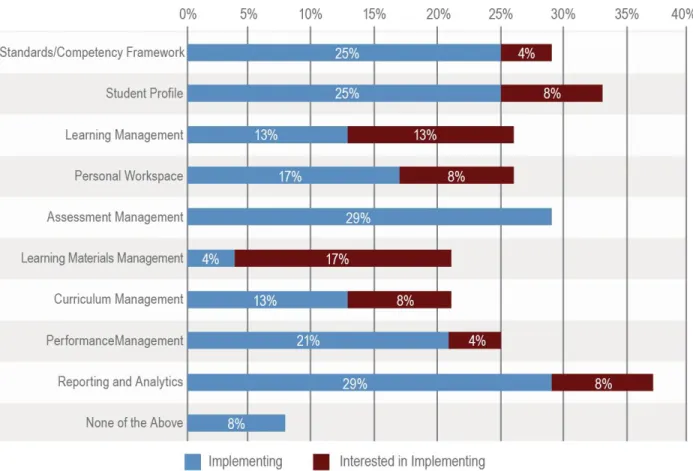
A survey of Race to the Top—District grantees during the February 26, 2014 Tools and Functionality Webinar indicated that the participants were implementing or interested in implementing all of these major functionalities.
What Functionalities and Tools are Grantees Implementing and Exploring?
Race to the Top—District grantees attending the February 26, 2014 Tools and Functionality Webinar indicated that they were already implementing or interested in implementing these key functionalities:
What is a Learning Management System or a Learning Content Management
System? What is the relationship of a LMS to a LCMS?
The systems that include the functions of a robust, multi-dimensional LMS have a variety of names, such as: Instructional Improvement Systems (IIS), Curriculum Development Systems (CDS), Content Management Systems (CMS), or Integrated Learning Systems (ILS). We will use the term LMS in this paper.
A Learning Management System (LMS) is used primarily to support online and blended learning. At a minimum, it enables placing course materials and assessments online, associating these items with standards, associating staff and students with courses, tracking student performance, storing student submissions, and providing systems for synchronous and asynchronous communication. An LCMS enables users to create, store, reuse, manage, and deliver digital content from a central object repository. A learning content management system (LCMS) focuses on the development, management and publishing of the content that will typically be delivered through an LMS, through direct searches of the object repository, or
through links to objects in the repository
embedded in web sites or other digital or print resources external to the LMS or LCMS. An integrated system provides the functionality of a LMS and a LCMS. Despite these distinctions, the term LMS is often used to refer to both an LMS and an LCMS. Either as separate platforms or as a merged product, LCMSs frequently work together with LMSs to develop and deliver course content and assessments to students.
6Peter Berking and Shane Gallagher, “Choosing a Learning Management System, Advanced Distributed Learning
(ADL) Co-Laboratories,” last modified May 2013, www.adlnet.gov/wp-content/.../Choosing-LMS-v.2.4_201104132.pdf.
Learning Management Systems are
…
“Enterprise level, server-based software
systems used to manage and deliver (through
a web browser) learning of many types,
particularly asynchronous e-learning. They
generally also include the capability of
tracking and managing many kinds of learner
data, especially that of learner performance.
Many training organizations rely on their LMS
as a single point of access for all their
e-learning content and student records. They
are a key enabling technology for anytime,
anywhere access to learning content and
administration. Some systems (LCMSs)
combine the above capabilities with
authoring and content repository functions.
In some LCMSs, you can decouple the
authoring tool or content repository
components and use them as separate
applications without relying on the LMS
component of the system.”
6Role of LMS and LCMS in Personalized Learning Environments
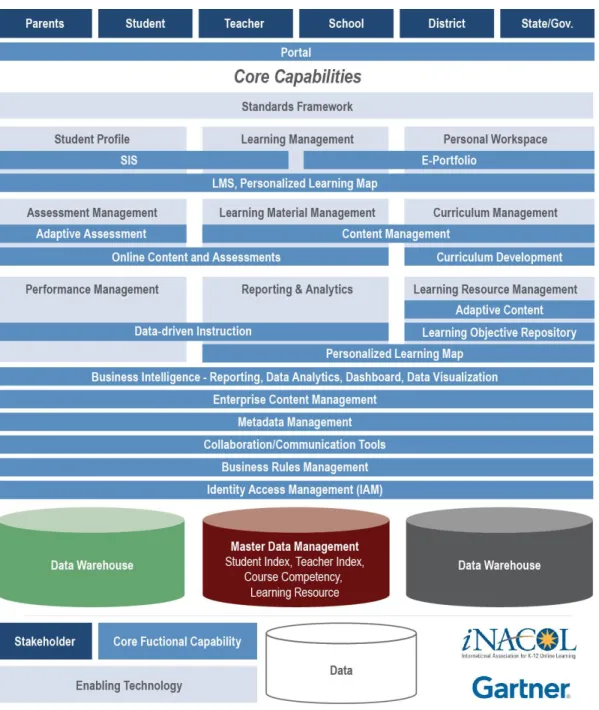
To support personalized, blended, online or competency-based learning, an organization needs to determine its core functional capabilities and what enabling technologies it wants to deploy. The diagram on the following page, created by Gartner and iNACOL, shows the relationship of the features and functionalities of personalized learning from a conceptual architecture view, and depicts a number of enabling technologies.
Learning management systems (LMS) and learning content management systems (LCMS) can support personalized learning in a variety of ways: student profiles, learning management, personal workspace, learning materials management, curriculum
management, reporting and analytics, learning resource management, metadata management and
collaboration/communication tools. Different tools have different available features that support personalized learning. For example, if an organization selects an integrated LMS/LCMS, a teacher or curriculum developer could develop curriculum and assessments within the system, align it with standards, and get a
report on which standards are covered in which curriculum pieces. Then, when a student accesses the content and completes the assessment within the system, the teacher could get a report on which standards were in the content that the student viewed and how the student performed on the assessment items that are associated with those standards.
Instructional and Administrative Purposes of LMS/LCMS
LMSs/LCMSs can support online and blended learning, as well as standards-based and competency-based education. These systems offer anytime, anywhere access to resources and assessments aligned to standards/competencies. They also provide a means for students to submit work and receive
feedback, student progress reporting, and asynchronous and synchronous communication. LMSs/LCMSs can support instructor-led, learner-led, and co-planned/led learning as well as job and task performance support through just-in-time help and performance support systems.
According to the Center for Educational Leadership and Technology (CELT), an integrated, multi-dimensional LMS can tie together current education reforms with effective and creative uses of technology in ways not possible using disparate systems.7
Learning organizations need a Learning Management System that is accessible, easy-to-use, and supports their core mission by:
7John Phillipo and Sarah Krongard, Center for Educational Leadership and Technology (CELT), “Learning
Management System (LMS): The Missing Link and Great Enabler,” October 23, 2012, http://www.celtcorp.com/resources/1/CELT_LMS_Article.pdf.
Generating accurate, reliable and timely information about student performance to make the education process visible and personalize learning;
Increasing parental involvement by improving access to relevant and current information about the student’s educational experience;
Empowering students with the resources necessary to assume an active role in and accept
responsibility for their educational experiences;
Providing staff with the opportunities to work collaboratively and interdependently to bolster cross-curricular communication, enhance productivity, and improve accountability;
Linking staff development programs and supervision/evaluation activities with student learning and achievement in a comprehensive, nuanced manner;
Correlating standards to instructional programs and assessment strategies through virtual alignment tools;
Identifying gaps and misalignment in learning programs, such as adequacy of instructional resources, assessment items, and/or staff proficiencies, by examining programs;
Enabling community members of all ages to participate more fully in the learning process through the use of online tools.8
In a study of Maine’s proficiency-based diploma program, Silvernail et. al. note that “both teachers and educational leaders stated that a working, accessible learning management system housing common learning materials and professional resources that teachers can personalize for their classrooms and students would alleviate a great deal of professional time and stress.” They go on to state, “most educators and leaders believed one-size-fits-all curriculum packages, software or textbooks were not the best resource for achieving this.” Therefore, one of the recommendations of the study was to develop a robust learning management system that allows schools to access commonly shared learning resources and curriculum materials and to utilize student assessment data and progress reports to support educating students. 9
LMSs are commonly used by a variety of user groups, including content developers, administrators, course managers, LMS system administrators, instructors, and learners. Figure 3 provides an example of how each group uses various LMS functional areas. This table gives some definition of how different types of groups use or do not use parts of the system or use them differently from others in a different role. For example, in the first row, a learner accesses curriculum assigned to or of interest to him.
8Ibid.
9David L. Silvernail et. al., MaineEducation Policy Research Institute University of Southern Maine, “Preliminary
Implementation Of Maine's Proficiency ‐ Based Diploma Program,”August 14, 2013, https://usm.maine.edu/sites/default/files/cepare/SBE%20Report.pdf.
However, a learner does not assign curricula to other students; in contrast, an instructor does assign curricula to learners.
Functional Areas Developers Content Training Admins. Managers Course Admins. System Instructors Learners
Learning Tracks & Curricula
NA Define learning tracks, curricula, and target groups associated with them
Ensure that course is correctly positioning within learning track or curriculum Maintain system integrity of learning tracks, curricula, and target groups
Assign learners to learning tracks and curricula per training needs Choose curriculum or view assigned curriculum Course Delivery Preparation Test developed courses to ensure proper functioning Review courses in curriculum for content errors Review individual course for content errors and delivery problems
Import and
configure courses Review courses to prepare for providing instructional support NA Course Delivery NA Monitor to ensure curriculum is delivered as intended in training plan Monitor to ensure course is delivered correctly Monitor and allocate course delivery per bandwidth and server constraints
NA Find, register for, and take courses
Operation of Course NA Review curriculum to ensure operation as intended Review course to ensure operation as intended Configure LMS to enable proper operation of courses Provide course instructional support (via LMS features that enable contact with instructors) Use course features as intended Course Progress and Completion NA Report progress across courses; bill for course usage (if applicable)
Report and analyze progress on course; bill for individual course usage (if applicable) Maintain tracking database and generate reports Monitor learner progress and completion and assign additional courses as necessary Gauge progress Assessment Program assessments (in LMS, if applicable) Review assessments throughout curriculum to ensure compliance with training plan
Review assessments in course Configure LMS to enable proper operation of assessments Review assessment; Review assessment results and take appropriate remedial action Take assessment Learner Performance NA Assess document and analyze performance Analyze course usage and learner performance to evaluate course effectiveness
Generate statistics and reports per needs of training admin/course manager Monitor learner performance and assign additional courses as necessary Monitor performance Competencies NA Define competencies Ensure competencies are integrated into course
Import and export competencies to/from external systems Take further actions based on learner competencies reported by LMS Receive competency certifications from LMS
Each type of user group within the organization has a different purpose for using the system, which is reflected in the roles and the permissions assigned to each role them within the system.
In summary, an LMS/LCMS can manage the administration, delivery, tracking and reporting of online and blended learning, reporting of student progress, and curriculum and assessment development and delivery external to a course structure. An LMS/LCMS can provide automation to replace expensive manual work, save time, and report on data that can be used in supporting individual learning and in program management.
What Are Some of the Functional and Feature Requirements
for these Systems?
Some LCMSs are closely related to LMSs, providing much of the same functionality. The main
differentiation is the addition of content authoring. Like LMSs, they can include support for co-planned and instructor-led learning but that is usually not their primary focus. The focus of an LCMS is on content: its creation, reuse, management, and delivery. LMS and LCMS products have varied features, but most address the following areas of functionality.
LMS FUNCTIONALITY
Course content and assessment delivery
Assignment collection and grading
Collaborative learning and communication
Skills and competencies management
Skill gap analysis
Individual development plan
Reporting and analytics
Learning record management
Course, assessment and assignment authoring, often with the ability to align items with standards
Conditional releases of content and triggered notifications
Student registration and administration
Learning event management (i.e., scheduling, tracking)
Curriculum and certification management
Configuration of permissions by role
Configuration of span of control for various learning administrator groups so that LMS
enterprise-wide administrators can manage enterprise-wide content, while local administrators work autonomously on localized content
Specific regulations related to security and accessibility
Interoperability
LCMS FUNCTIONALITY
Learning object model based
Content stored in a central database repository with metatags for advanced search
Content is reusable across courses, curricula, or across the entire enterprise
Content is not tightly bound to a specific template and can be re-deployed in a variety of formats
Complete separation of content and presentation logic
Management of content facilitated (for example, content indexing and reuse within and for different activities)
Variety of published delivery formats, such as publishing to LMS, web, and print
Workflow integration, version control and archiving capabilities
Interoperability with third-party learning management systems, other content repositories, and other enterprise applications (for example, student information systems or portal) based on standards
An optional delivery engine for serving up content, automatically adapting to user or group profiles, adding navigation controls, collaboration tools, utilities, and look and feel (skins).
Authoring templates to support non-technical (for example, non-programmers) content authors
within a managed development environment.
The following chart shows the differences in basic and mid-range LMSs and more advanced LMSs (called Integrated Learning Platforms) that include much of the functionality of traditional LCMSs.10 Appendix C
includes a list of LMS rubrics that can be used to evaluate LMSs.
10Nicole Engelbert, “Making the right choice for your institution’s long-term online learning needs: Differentiating
Use a rubric to understand solution differences and prioritize needs
Y/N Basic LMS LMS Plus Integrated Learning Platform (ILP) Critical
functionality
Basic course management and learner collaboration tools
Integrations with 3rd
-party providers to round out basic functionality
Native tools for course management and learner collaboration, including video and document viewers
Content availability Course content available online only, within the LMS
Course content also available via mobile device/app
Content extended via e-textbook platform
Delivery Cloud service, continuous delivery – depends on solution
Mobile No mobile applications Designed for mobile and also provides task-specific apps
Adds offline capability for access in low/no-bandwidth areas
Accessibility and usability
Basic Level Accessibility Gold Level Accessibility
Recurring Gold Level Accessibility and Award Distinction
Extensibility No APIs APIs available for individual, institutional, and partner use
Extensive partner network supports integrations utilizing APIs
Curriculum management
Course-level content collections Learning object repository allowing for content re-use
Open learning repository with course materials and third-party content
Integration Closed Open ecosystem and APIs
Reporting Basic assessment and grading Basic data can be exported
Alerts Notifications and alerts must be sent manually by the instructor
Pre-defined events trigger automatic notifications/alerts
Additional custom alerts based on performance- or activity-based events
Monitoring user activity
Basic access and grade monitoring
Limited information in report format (no visualizations)
Realtime data visualizations showing objective attainment, course/content access, performance, and participation
Monitoring classroom dynamics
No built-in monitoring tools Visual attendance tools
Realtime visualization using Seating Chart including visual attendance and participation tracking
Predicting student performance
None Course predictions based on pre-defined criteria
Ensemble model based on previous offerings of a course for more accurate predictions
Longitudinal data collection
None Exportable for storage outside the LMS
Data warehouse for long-term data storage, allowing institutions to see trends over time
Customization Consistent look and feel with limited customization options
Limited branding capabilities; users may customize email notifications
Complete branding control via flexible navigation, banners, widgets, etc.; user-selected language, font, and accessibility options
Personalized teaching
Pre-defined course structure and progression
Limited opportunities to customize course structure, content visibility
Instructors can customize content, look/feel, and visibility of course components
Personalized learning
One-size-fits-all progression through a course
Differing due dates or special access for individual students
Allows student choice and flexible pathways enabling a unique experience based on individual student preferences
ePortfolio No learner-controlled space Learner spaces to collect and share learning artifacts within and external to a course
Full-featured ePortfolio toolkit to create, share, and assess portfolio artifacts within an institution and via social networks; includes ongoing access after graduation to support lifelong learning
Adaptive learning No adaptation Integration with 3rd
-party content or adaptive engine providers for pre-defined paths based on performance
Course adaptations are available via release conditions or adaptive engines and initiated by instructor )(planned learning pathsS0, student (choice), or based on performance
Ovum, a technology advising company, writes that basic LMSs offer simplicity but should not be a long-term solution. A basic LMS frequently does not include features that support student engagement or enable faculty and students to personalize their learning experience in meaningful ways. A mid-range LMS may align well with current usage and expectations does not provide adequate features to support
future growth and may be quickly outgrown.Ovum advocates for more advanced LMSs, called
integrated learning platforms (ILPs). “Openness, extensibility, and the coherent integration of functionality to drive higher-quality learning experiences characterize ILP, which is inherently tied to managing and improving performance outcomes. Analytics and reporting empower a more dynamic learning environment where content and pedagogy change according to a learner's specific
circumstances.”11
Functions and Features
The list of potential features of an LMS is extensive, and the following list of business and technical capabilities of an LMS is not exhaustive. Additional detail on these features can be found in Appendix A.
Core Capabilities and Business Requirements
Business requirements are generally grouped into four categories: a single sign-on Portal, Curriculum and Resource Management, Teaching and Learning, and Administration related functions and tools. One of the business requirements that is often not prioritized by purchasers is the single sign-on (SSO) portal. Studies have shown that an SSO portal leads to a better user experience by removing the user's burden of maintaining and remembering logins and passwords for each application. In addition, it improves security by authenticating each user and the specific authorization role allowed.
The following list details some of the major business requirements and specific desired features of each.
PORTAL
Single sign-on to all systems support personalized learning
Uses identity management from district systems for user name and password
CURRICULUM AND RESOURCE MANAGEMENT
Development
Publishing
Repository
TEACHING AND LEARNING
(Student Profile, Learning Management, Personal Workspace, Assessment Management)
Communication and Collaboration
Planning and Productivity
Student involvement and informal collaborative learning
Learning profile and plan
e-Portfolio
Course/content delivery
Assessment
Grade and progression reporting
Competency alignment, tracking, and reporting
Orientation/help Tools
Mobile learning
Administration (Reporting and Analytics, Performance Management, Learning material
Management)
─
License management─
System management─
User management─
Usability/customization─
Analytics and reportingTechnical Requirements
The technical requirements for an LMS/LCMS learning platform are intended to provide a secure and scalable solution that minimizes ongoing maintenance costs and integrates with existing district source systems. The technical requirements include:
Integration with the district architecture
LMS and LCMS integration
Integration with district source systems third-party content integration and other information systems
Compliance with accessibility standards such as WAI WCAG 2.0 and Section 508 of the
Rehabilitation Act
Security
Performance
Reliability
There are hundreds of LMS products in the field. Determining which one has the right features for an institution’s needs is essential. Implementing a LMS may require significant business process
improvements and IT infrastructure upgrades.
Interoperability and Data Requirements
Personalized learning will require integration of the different teaching and learning applications. Establishing interoperability between these applications, as well as within the LMS or LCMS, will enable data to flow more seamlessly.
“Enterprise integration falls into two categories, learning related tools and business system tools. Learning related tools include support tools that are often separate but need to work in
conjunction with a Learning Management System, such as assessment builders, video-conferencing tools, and content builders,”12 as explained by
Stacy Harris. Many LMSs have begun to offer
integrated learning platforms that pre-integrate or support easy integration of tools inside the LMS. An integrated learning platform can provide a seamless end-to-end learning experience.
The second category of enterprise integration is business system integration, which can include student information systems, HR systems, enterprise resource planning systems, e-mail tools, and a multitude of unique business platforms. Harris further explains, “Some organizations are also looking at connecting their learning platforms to social environments such as YouTube, Facebook, or Twitter to access unique and dynamically generated content. All of these integrations require an organization to have a plan for mapping security requirements, login codes, shared field names, and content access across the multiple systems.”13
Several technical standards exist within the learning space to support standards interoperability. These technical standards provide a consistent way for applications to communicate with one another and in the same data format. Information systems that are standards-based and use open APIs are better
12 Stacy Harris, “Replacing your LMS?,” Research and Advisory Services Brandon Hall February, 2012,
http://www.cuenterprise.com/777pdfs/Resources/BHG_Saba_Replacing_You_LMS_RB_LIC_8_2012-FINAL%5B1%5D.pdf.
13 Ibid.
To keep up with the pace of change in
technology, we need to securely architect our
systems for interoperability and openness
from conception. We need to have common
standards and more rapidly share the lessons
learned by early adopters. We need to
produce better content and data, and present
it through multiple channels in a program and
device-agnostic way. We need to adopt a
coordinated approach to ensure privacy and
security in a digital age.
positioned for rapid implementation and development than systems that have not been developed using interoperability standards. This is often a major consideration for organizations as it can impact such things as providing student accounts and provisioning information from the student information system and allowing for single-sign on, as well as seamlessly moving content from a content management system to the LMS.
Robust standards supporting interoperability have been developed and should be strongly considered when procuring an LMS/LCMS. Several technical standard organizations exist and focus on the creation of different technical standards for interoperability. Below are several examples of technical standards created by these standards organizations and their specific focus of interoperability:
Common Education Data Standards (CEDS), developed by the National Center for Education
Statistics, CEDS focuses on creating common data standards for a key set of education data elements.
The Experience API, or xAPI, is the next generation of SCORM (Sharable Content Object
Reference Model, see below). Released in April 2013, the Experience API is a radical departure from the original SCORM standard. More than an interoperability standard between eLearning courses and learning management systems, the Experience API is a systems interface that enables use of any system to generate data describing a learning experience storable in a learning record store (LRS). A learning record store can be part of an LMS or packaged as a stand-alone product.
IMS Global has developed a number of standards for supporting interoperability, including the
IMS Common Cartridge (CC), IMS Learning Tools Interoperability (LTI), IMS Question and Test Interoperability (QTI2) standards, and the Accessible Portable Item Protocol™ (APIP).
Metadata is information about an object, be it physical or digital. As the number of objects grows exponentially, the lack of information or metadata about objects places a critical and fundamental constraint on the ability to discover, manage, and use objects. Metadata standards address this problem by defining a structure for interoperable descriptions of learning objects.
Metadata Standardsinclude Learning Materials Resources, IEEE Learning Object Metadata
(
LOM), Dublin Core, CanCore, Gateway to Educational Materials (GEMS), and other metadata schema. SCORM, Sharable Content Object Reference Model, is the Advanced Distributed Learning (ADL)
Network’s standard for publishing, launching, and tracking eLearning. ADL began as a joint project of the US Department of Defense and the Department of Labor with industry participation.
SIF Association provides technical standards, enabling diverse applications within the education
ecosystem to interact and share data efficiently, reliably, and securely. The SIF Specification provides standards for the data model as well as transport, either as an enterprise approach or REST based services.
Prioritizing and Assessing Requirements and Systems
When considering the features needed in a LMS/LCMS, an organization should determine what they want to accomplish through the use of these systems. The adoption process should start with
determining the educational goals that a LMS/LMCS will support and why a LMS/LCMS is needed in lieu of continuing without such a system. The system should be selected/designed based upon a clear definition of how it will support the educational goals of the organization.
Two of the most important things a district can do in creating this definition are to develop a business case for acquiring an LMS/LCMS and determine what users need from the system. A business case captures the reasoning for initiating the project and is designed to convince decision makers to take action as well as help guide the scope of the project. It is usually a formal document that tells what problem or situation triggered the initiative and what benefit, value or return is expected from
undertaking the project. According to Berking and Gallagher, “Projects without a clear business case are at risk for not getting funded or implemented. In addition, sustainability is threatened if the project is implemented and clear business cases have not been identified.”14
As the decision is being made to adopt an LMS, it is important to determine what users want from the system. As Ash explains, “Many LMS companies boast a dizzying array of features, says Watson, so it's important to enter the discussion with an idea of what students, teachers, and administrators need from the system.”15 Using rubrics can help institutions review systems and in developing a staggered
implementation plan.
Numerous papers have been written on choosing an LMS/LCMS, writing and evaluating RFPs, and implementation considerations and are referenced in the bibliography. What is consistent across all of these papers is the need to keep the educational goals and users need at the forefront. Once a system is implemented, a process for continuing to get user input and making decisions and improvements based on that input remains equally essential.
14Peter Berking and Shane Gallagher, “Choosing a Learning Management System, Advanced Distributed Learning
(ADL) Co-Laboratories”, last modified May 2013, www.adlnet.gov/wp-content/.../Choosing-LMS-v.2.4_201104132.pdf.
15Katie Ash, “How to Choose the Right Learning Management System”, Published Online: June 11, 2013
Conclusion
Personalized learning focuses on student mastery of standards through a variety of personalized tools, resources, and strategies, and stresses the use of robust data reporting and technology support to enable personalized, data-informed instruction. A robust integrated learning platform, which includes the functionalities of learning management systems and learning content management systems, has the potential to advance teaching and learning, if the system is used to support the implementation of personalized learning as part of a systemic, instructionally focused plan.
Appendix A - Functions and Features
This appendix includes a more thorough description of the functions and features listed earlier in the paper.
PORTAL
A portal should function as the entry point into all information and resources organized around specific audiences, programs, and content. A single-sign-on through the portal for all services should be a program requirement.
CURRICULUM AND RESOURCE MANAGEMENT
The curriculum and resource management function should:
Have the ability to upload entire directories at one time with structure retained for later viewing;
Allow user-authorized deletion of files and directories;
Allow for upload and download of files and directories;
Provide for rights assignment for content contained within the system;
Manage assets, learning objects, multimedia and interactive elements;
Check in/check out functionality for electronic documents;
Provide the ability to create and manage workflows;
Ensure version control of documents and objects as they are changed or modified;
Provide the ability to set limitations for file size, type, and naming requirement, and prevent uploading of files not meeting those specifications; and
Allow administrators to import content from third party content providers.
DISCOVERY
The discovery function should:
Provide organization, management, and access to directories and files and support for hierarchical view of content;
Provide support for full text search of content and metadata;
Provide advanced search capability using Boolean logic;
Allow users to set result display preferences, refine search results, save queries, and identify areas of interest and be notified of new objects or modifications.
AGGREGATION/PERSONALIZATION
The aggregation/personalization function should:
Provide for creation, assignment, and management of personal, course/section, and
group workspaces and collections; and
Provide the ability to set favorites for quick access to objects.
COMMUNITY AND EVALUATION
The community and evaluation function should:
Allow content sharing/reuse in regard to integration, organization, management, and delivery;
Enable collaborative document creation and/or markup; and
Allow users to attach formal and informal evaluations and annotations to learning object records.
META-TAGGING
The meta-tagging function should:
Enable indexing and searching of content by a variety of user-defined and pre-defined metadata attributes;
Receive and store content metadata from third-party content providers;
Provide the ability to export all metadata;
Specify mandatory metadata and check that it is provided before allow objects to be uploaded; and
Auto-populate certain metadata fields such as file type, date and allow the user to over-write the auto-populated input.
DIGITAL RIGHTS MANAGEMENT
The digital rights management function should provide digital rights management capabilities.
INTEGRATION AND INTEROPERABILITY
The integration and interoperability function should:
Provide built-in viewers/converters for a wide variety of file types; and
Adhere to the interoperability standards for the for import and export of items; for federated searching including the ability to transform and import records; for
harvesting; for authentication; for web services; for publishing; for storage of Digital Rights; and for library system interfaces.
CONTENT SHARING/REUSE
The content sharing/reuse function should:
Have the ability for content sharing/reuse enabling specific content created for one course to be conveniently shared with another instructor teaching a different course;
Allow instructors to share content with other instructors and students through a central learning objects repository; and
Support learning object metadata (IEEE LOM) and metadata application profiles, such as Dublin Core, Cancore, LMRI, and custom profiles.
TEACHING AND LEARNING
(Student Profile, Learning Management, Personal Workspace, Assessment Management)
The teaching and learning function should have the following features and functionalities:
Communication and Collaboration Features: Teachers and students shall be able to communicate and collaborate through the system for the purpose of exchanging ideas and presenting supplementary instruction. The interactions may be asynchronous or synchronous.
Planning and Productivity Features: Students should have tools that enable them to efficiently work towards course goals, assignments, and assessments. These
productivity tools should allow students to track their progress through course milestones, work remotely on handheld devices, and return to course materials from the last place that they left off. Additionally, to be productive in the system, students and teachers need access to materials that support their knowledge and use of the software.
Student Involvement and Informal Collaborative Learning Features: Users should be able to collaborate on learning as part of an online community. In addition, inclusion of social learning tools such as blogs, Twitter, Facebook, etc. should be seamless.
Learning Profile and Plan: The system should include the ability to support differentiated user profiles by role, including information on interests, learning
preferences and styles, information on learning strengths, needs and types of supports that have been successful in the past. A learner profile needs to be dynamic, as
individual learners are constantly growing and changing. User Learning Plans should correlate learning resources to identified learning needs, generally in a learning progression.
e-Portfolio: Students should have the ability to add artifacts to an e-Portfolio, tag them, build them into collections, and showcase their work in a variety of formats and for a variety of purposes, determine how the presentations look and who can see and/or review them, post reflections on their work, and read and comment upon the reviews by others. Students should be able to use rubrics and align their artifacts with learning objectives.
Course/Content Delivery: Course experiences should be individualized and tailored to accommodate individual learner situations. Materials should be delivered in ways that allow users and/or the system to control the presentation of the course resources, based on students’ needs and interests. The system should support the alignment of resources to learning objectives and competencies.
Assessment: Assessments should support a variety of assessment types including quizzes, surveys, the ability to submit a variety of file types, non-graded assessments that provide formative feedback, case-study tools capabilities for self-assessment, displayed on the same screen as the case-study, with a link-back to relevant/specified content based on student response. Assessments need a comprehensive array of possible question types that can be aligned to learning objectives and competencies to support content options.
GRADE AND PROGRESS REPORTING
The grade and progress reporting function should:
Provide online marking tools enabling instructors to evaluate and mark student work and give feedback.
Provide an online gradebook that keeps track of student progress and can align grades with learning objectives, and rubrics.
Include the ability to enter grades by column, individual student, and alpha or numeric format.
Allow instructors to add details and comments to the gradebook in custom columns and
for each grade item for each student.
Allow instructors to create a course grading scale that can employ percentages, letter grades, pass/fail metrics, or rubric-based grading.
Allow instructors to filter for students who have missing or incomplete assignments and to filter for assignments that have not been completed.
Competency or learning standard alignment, tracking, reporting – the system should have the ability to host a variety of competency or learning standard taxonomies, to allow users to align content, assessments, and grades at the learning objective level of the competency or learning standard, to track and report on individual user progress
towards obtaining competencies or learning standards; to track and report on curricular alignment with competencies or learning standards; to track and report of class-level progress towards obtaining competencies or learning standards; to track and report of institution-level progress towards obtaining competencies or learning standards over time.
Orientation/Help – Teachers, school leaders and students should be provided with online orientation and help tools designed to help users learn how to use the learning management system. These tools may be self-paced tutorials, user manuals, and email or telephone helpdesk support.
ADMINISTRATION
(Reporting and Analytics, Performance Management, Learning Material Management)
Administrators need tools to centralize and automate administration the LMS. These tools should support the execution of managerial, reporting and clerical activities, for example easy generation of reports. System administrators should have the ability to create an unlimited number of custom organizational units and roles with specific access privileges to course content and tools. The system must be able to interface with district systems for administrative and management functions.
License Management – The system should manage compliance with enterprise license
agreements with content providers for content purchased by the district and made available to schools, have reconciliation capability to handle the complexity of the available content provider license models, as well as with potential changes in
technology and have the flexibility to accommodate differing content licensing models.
System and User Management – System administrators should have the ability to create
an unlimited number of custom organizational units and roles with specific access privileges to course content and tools. The system must be able to interface with DOE systems for administrative and management functions.
Usability/Customization – The district should have the ability to customize the look and feel of the system and courses within the system. Users should also be allowed to customize their views of content to meet individual user needs.
Analytics and Reporting – System shall provide for online reporting to include the following:
─
Create customizable progress reports with opportunity for instructor commentson demand by course or student;
─
Generate automatic notices to students for late assignments, test/quiz scores, lack of participation in class;─
Track time on each content page, on assignments, tests, time of sessions in system and courses;─
System shall provide reports on usage of tools;─
System shall track, measure and assess achievement across course, program orinstitution-level;
─
System shall provide reports on user generated course metrics (ratings, performance, participation trends);─
System shall provide reports on license usage;─
System shall provide export of usage data for reporting purposes;─
System shall provide usage reports over distinct time periods;─
System shall provide a teacher dashboard to view real-time status of each student enrolled in the course;─
System shall allow ad-hoc reporting, data visualizations and predictive analytic capabilities.TECHNICAL REQUIREMENTS
The technical requirements for an LMS/LCMS learning platform are intended to provide a secure and scalable solution that minimizes ongoing maintenance costs and integrates with existing district source systems. The technical requirements include:
Integration with the district architecture;
LMS and LCMS integration;
Integration with district source systems;
Third-party content integration;
Compliance with accessibility standards such as WAI WCAG 2.0 and Section 508 of the
Rehabilitation Act;
Security;
Performance;
Reliability; and
Backup and disaster recovery.
Appendix B - Examples of Review Rubrics
The publications listed below are examples of documents and guides containing review rubrics.
Request for Proposals Evaluation Guide by the Reform Support Network
https://www2.ed.gov/about/inits/ed/implementation-support-unit/tech-assist/request-proposals-evaluation-guide.pdf
ADL Choosing an LMS White Paper
http://www.adlnet.gov/resources/choosing-an-lms-white-paper?type=research_paper
eLearning Guild 382 Tips for Selection of an LMS or LCMS
http://www.elearningguild.com/publications/index.cfm?id=5&from=content&mode=filter&sour ce=publications&topic=35
eLearning Guild Evaluating and Selecting a Learning Management System
http://www.elearningguild.com/research/archives/index.cfm?id=167&action=viewonly
Request for Proposals Evaluation Guide,
https://rttd.grads360.org/services/PDCService.svc/GetPDCDocumentFile?fileId=3513
What to Consider before Purchase,
https://rttd.grads360.org/services/PDCService.svc/GetPDCDocumentFile?fileId=3543 The review rubric below is a Scoring Matrix that a number of organizations have used.
Requirement # Description Functionality Category (M-mandatory, H- highly desired, O-optional) Existing, out-of-box functionality Delivered after District platform is configured (included in price) Delivered after customization (included in price) Delivered after development (included in price) Delivered through integration with Third Party Tool or existing City Application (indicate tool or City application; included in price) Not Offered
Appendix C - LMS/LCMS Review Sites
There are hundreds of different LMS/LCMS companies and more are emerging. The sites below list many of the companies and describe their uses and features.
Bersin & Associateswww.bersin.com
This company sells a variety of resources and services related to e-learning, including buyers’ guides, comparative ratings, etc. to aid in the process of choosing an LMS. Target audience is primarily business
Brandon Hallhttp://www.brandon-hall.com
This company sells a variety of resources and services related to e-learning, including buyers guides, comparative ratings, etc. to aid in the process of choosing an LMS.
The Complete(?) list of Open Source Learning Management Systems (Gilfus Education Group)
http://www.gilfuseducationgroup.com/open-source-learning-management-systems-the-complete-list
This web site has an extensive list of open source LMSs primarily for use in higher education and K12 learning.
Edutoolshttp://www.edutools.info/static.jsp?pj=4&page=HOME
This community-driven site offers a variety of resources and services related to e-learning, including buyers’ guides, comparative ratings, etc. to aid in the process of choosing an LMS
E-learning Guildhttp://www.elearningguild.com
This professional membership-driven site offers a variety of resources and services related to e-learning, including buyers guides, comparative ratings, etc. to aid in the process of choosing an LMS.
E-learning! Magazinehttp://www.2elearning.com/
This free magazine contains buyer‘s guides and articles that may be helpful for those involved in choosing an LMS.
E-learning Centre (UK)http://www.e-learningcentre.co.uk/eclipse/vendors/authoring.htm
This site is sponsored by a non-profit e-learning consulting organization. It contains free information resources related to e-learning systems and tools, including reviews to aid in the process of choosing an LMS
Directory of Learning Tools (Centre for Learning and Performance Technologies)
http://www.c4lpt.co.uk/Directory/Tools/authoring.html
This site is sponsored by a non-profit e-learning consulting organization. It contains free information resources related to e-learning systems and tools, including reviews to aid in the process of choosing an LMS.
Vendors of Learning Management and E-learning Products
http://www.trimeritus.com/vendors.pdf
This free report (updated 4/10/13) provided by Trimeritus Elearning Solutions, Inc. includes a lists of LMSs and other e-learning products.
Higher Education Use of LMS (February 10, 2014)
http://edutechnica.com/2014/02/10/lmss-of-smaller-colleges/
Appendix D - Bibliography
Ash, Katie. “How to Choose the Right Learning Management System.” Published online: June 11, 2013. http://www.edweek.org/dd/articles/2013/06/12/03lms-evaluation.h06.html. Berking, Peter and Shane Gallagher. “Choosing a Learning Management System, Advanced
Distributed Learning (ADL) Co-Laboratories.” Last modified May 2013.
http://www.adlnet.gov/wp-content/.../Choosing-LMS-v.2.4_201104132.pdf.
Engelbert, Nicole. “Making the right choice for your institution’s long-term online learning needs: Differentiating through an integrated learning platform (ILP).” Ovum Consulting, 2014.
Glowa, Liz and Susan Patrick. “Re-Engineering for Competency Education: Information Technology Design Considerations.” February 2013,
http://www.competencyworks.org/wp-content/uploads/2013/02/iNACOL_CW_IssueBrief_ReEngineeringCompEd_final.pdf. Harris, Stacey. “Replacing your LMS?” Research and Advisory Services Brandon Hall. February,
2012,
http://www.cuenterprise.com/777pdfs/Resources/BHG_Saba_Replacing_You_LMS_RB_ LIC_8_2012-FINAL%5B1%5D.pdf.
“How to Implement Blended Learning”, last modified February 4, 2013.
http://www.digitallearningnow.com/wp-content/uploads/2013/02/DLNSmartSeries-BL-infographic_final-2.4.13.pdf.
Phillipo, John and Sarah Krongard. Center for Educational Leadership and Technology (CELT). “Learning Management System (LMS): The Missing Link and Great Enabler” (October 23, 2012). http://www.celtcorp.com/resources/1/CELT_LMS_Article.pdf.
“Request for Proposals Evaluation Guide.” District Reform Support Network. 2013.
https://rttd.grads360.org/services/PDCService.svc/GetPDCDocumentFile?fileId=3513. Silvernail, David L., Erika K. Stump, Angela Atkinson Duina, and Lori Moran Gunn. Maine
Education Policy Research Institute University of Southern Maine. “Preliminary Implementation of Maine's Proficiency‐Based Diploma Program.”August 14, 2013, https://usm.maine.edu/sites/default/files/cepare/SBE%20Report.pdf.
“What to Consider before Purchase.” District Reform Support Network. 2013.