Section 2 Company and Solution Overview
Section 3 A User’s Virtual Workplace at Citrix
Section 4 Disaster Recovery Overview
4.1 Business Critical Applications
4.2 Current Safeguards
4.3 Contingencies
4.4 Assumptions
4.5 Failover Procedure
Section 5 The MetaFrame®Environment
5.1 MetaFrame Application Servers
5.2 Back-End Servers
5.2.1 File Servers
5.2.2 Microsoft®Exchange Servers
5.2.3 Microsoft SQL Servers
5.2.4 SAP R/3 Servers
5.3 Server Hardware
5.3.1 Primary Environment
5.3.2 Disaster Environment
5.4 Recovery
Section 6 The EMC Environment
6.1 Overview
6.2 Components
6.3 Reference Information
6.3.1 EMC TimeFinder
6.3.2 EMC Symmetrix Remote Data Facility (SRDF)
6.3.3 EMC Solutions Enabler
6.3.4 SRDF Volume Types
6.4 Data Flow
6.5 Disaster Recovery
6.6 Data Replication Scripts
The intention of business continuity planning is to keep a business running during a natural, man-made, or technological disaster. The need for a technology solution that enables an organization to continue business operations in light of a disaster, with little or no interruption, is of significant importance. Business continuity is critical to the survival of the organization and to the livelihood of its employees.
With this in mind, analysts are encouraging their clients to consider establishing remote work
capabilities, or virtual workplaces, to keep businesses running in the event of a disaster. Since network service may be unavailable, both Giga Information
Group and Gartner Group suggest that Web-based technologies will be best suited to facilitate employee access to critical company resources.
Citrix Systems, Inc. has standardized its computing infrastructure on Citrix®MetaFrame®application
server software and has implemented an EMC storage area network and business continuity solution. Applications are executed and managed centrally. In case of a disaster, Citrix employees can use any computing device to access their mission-critical applications and information, from anywhere, over any connection — wireless to Web.
Company and Solution Overview
Citrix Systems employs approximately 1,800 people in 21 countries worldwide. All employees, as well as many vendors and external business partners, use one or more of the following business-critical applications:
■ SAP R/3 (ERP)
■ Vantive (CRM)
■ Platinum (Accounting)
■ Microsoft®Exchange (E-Mail)
■ PeopleSoft (Human Resources)
■ Microsoft Office
These and many other applications are served to users by a MetaFrame farm located in the main data center in Fort Lauderdale, Florida. The south Florida region is susceptible to hurricanes so it is necessary to have a valid, thoroughly tested disaster recovery plan to ensure reliable access to these applications in case the main data center is taken offline.
The objective of the Citrix disaster recovery plan is to provide a defined course of action that will preserve company data and keep critical business systems running from the recovery data center in Draper, Utah in the event of a disaster in the main data center.
The data center in Draper supports a subset of all servers and network equipment required for full business support of all critical systems in Ft. Lauderdale. Near current business system data is always resident in Draper due to a continuous data transfer from Ft. Lauderdale through EMC Symmetrix storage units across an ATM Wide Area Network.
There is a completely independent MetaFrame farm in Draper whose configuration mirrors that of the Production farm in Ft. Lauderdale. The Draper farm uses the same hardware and is functionally identical to the farm in Ft. Lauderdale. All user profiles and data are continuously replicated to the EMC
Symmetrix storage unit in Draper and made available to the MetaFrame farm there. As a result, users are presented with the same environment when their applications are served from the MetaFrame farm at the Draper data center.
The MetaFrame servers in Draper are kept in a standby state until they are needed. They are not offline but users are prevented from logging into them until all of the network modifications and back-end servers that are required for proper operation are brought online in Draper. The necessary back-end servers include file servers for profiles and home directories, database servers for Platinum, Vantive and PeopleSoft, application servers for SAP R/3, and others. All of the business data and user-configuration information stored on the back-end servers is
replicated to the EMC Symmetrix storage unit in Draper using EMC Timefinder and SRDF software.
The purpose of this paper is to document how MetaFrame and Citrix NFuse™portal application
Nearly all business applications used at Citrix are delivered to users using Citrix MetaFrame and NFuse. Depending on the user’s preference, location or situation, these business applications can be accessed using a combination of thin-client terminals, PCs and wireless devices.
In a Citrix server-based computing environment, the application executes 100% on the server, so the client environment can encompass virtually any operating system. In addition, the bandwidth requirement for a running MetaFrame application is very low (10kbs), allowing users to connect quickly over any
connection. In combination with NFuse, MetaFrame users connect to their applications using a standard Web browser.
The Citrix corporate standard is to access applications from the company intranet (“http://citrite.net”) using a Wyse thin client terminal. When a user connects from outside the firewall, Citrix Extranet™— the
Citrix VPN — is used in combination with an RSA token.
For regular use, employees select the “XP-Production” farm. They will be presented with all of the
applications that they have authorization to execute, as shown below.
From a user’s perspective, the only thing that needs to be done in the event of a disaster is to select the “Draper (DR)” Disaster farm instead of the “XP-Production” farm once the IT department has completed the Disaster Recovery process. The Disaster farm is a redundant MetaFrame farm that serves all of the same applications the Production farm does and has access to a near-current copy of the user’s data and configuration.
Users will be notified of the need to select the Disaster farm via several means the most prominent being a message on the Citrite.net login page.
The user will not be aware of the background work required to restore operations to the disaster recovery site. We will highlight that in the next section.
The main business requirement driving Citrix disaster recovery planning is the need to limit unavailability of critical business applications to 4 hours or less, under any circumstances. The only reliable way of ensuring that level of availability is to maintain a warm standby data center at a remote site. The standby data center must have all of the equipment required to support critical business systems on site and ready to be used. To that end, a data center in Draper, Utah has been built to support a subset of all servers and network equipment required to serve business-critical applications.
The data center in Draper is designed to provide an environment that is functionally similar to the Production environment in Ft.
Lauderdale. All of the equipment in the Draper data center is always online but kept unused until a disaster situation occurs. EMC Symmetrix storage units and Symmetrix Remote Data Facility (SRDF) software is used to continuously replicate business critical data between similarly configured EMC Storage Area Networks (SAN) located in Ft. Lauderdale and Draper.
The disaster recovery plan is based on using Citrix MetaFrame servers to centralize access to applications and EMC SRDF software to replicate the business data used
by those applications. Using MetaFrame and NFuse, it is possible to redirect the user community to a separate MetaFrame farm serving the same
applications. All user configuration and business data is continuously replicated to the remote site using EMC SRDF so there is no significant impact to the user community if a disaster occurs, except for the amount of time it takes the IT department to bring the Disaster MetaFrame environment online.
4.1 Business Critical Applications
The following applications have been designated as business-critical applications that must be brought online within 4 hours after a disaster.
■ MetaFrame
■ SAP R/3 (ERP)
■ Vantive (CRM)
■ Platinum (Accounting)
■ Microsoft Exchange (E-Mail)
4.2 Current Safeguards
Full backups are performed every Friday evening and differential backups are performed throughout the week.
Backup tapes are kept on-site in a fireproof safe for one full week. They are then rotated to off-site, secure storage. The last five weekly backups remain in secure storage. There are three primary and four secondary designees authorized to retrieve tapes from storage.
The Citrix building housing the main data center in Ft. Lauderdale has a diesel generator that is capable of providing power to the computer room for up to one week without refueling in the event utilities degrade.
4.3 Contingencies
If a catastrophe threatens the availability of service from the main data center in spite of the safeguards described above, then the disaster recovery plan may be initiated. The specific tasks to be performed during disaster recovery depend on the amount of advance warning before the catastrophe occurs.
If there is sufficient advance notice of a catastrophe, as there would be in the case of a hurricane, then an orderly shutdown of the Ft. Lauderdale data center is performed and the EMC replication cycle is run one last time to flush all data to Draper. The benefit of this approach is that the Draper data center will be brought online with an up-to-date copy of business data.
However, the disaster recovery plan is not limited to the hurricane scenario. Although a major hurricane is the most likely disaster given the geographic location of the main data center, the procedures outlined in this document will still work if it is necessary to perform an immediate failover of systems to Draper, as in the case of a fire in the main data center. The main difference is that there may not be a chance to perform an orderly shutdown of the Ft. Lauderdale facilities or to verify that the EMC replication process has completed successfully. If the replication cycle did not complete when the catastrophe occurs then the data from the prior EMC replication cycle is used to bring the systems in Draper online.
The disadvantage of the immediate failover approach is that the last successful replication cycle will have completed as long as three or more hours earlier. Thus, a certain amount of business data will be lost when an immediate failover is performed. See sections 6.1 and 6.5 for details.
Business continuity, availability, performance and cost requirements are all design parameters that affect the design of an EMC solution. This configuration allows Citrix to implement a business continuity plan that meets corporate business requirements.
4.4 Assumptions
■ The FTL-Draper ATM line maintains sufficient bandwidth to complete final transfer of EMC data in a timely manner.
■ Staff will be on-site at Draper and perform the failover procedures.
■ All critical business systems (listed at the beginning of this section) will be unavailable from the time Ft. Lauderdale is rendered offline until the Draper Data Center is made available.
4.5 Failover Procedure
1. If possible, perform an orderly shutdown of the Ft. Lauderdale data center and wait until the final EMC replication cycle has successfully completed.
2. Perform tasks necessary to break the EMC replication link and make the replicated copy of data on the Draper Symmetrix storage unit available to the servers in Draper. If the last replication cycle did not complete before the replication link was cut then make the data from the previous replication cycle available.
3. Bring all back-end servers online.
4. Activate all redundant Wide Area Network (WAN) links so that all remote offices worldwide have network connectivity to the Draper data center without routing through the Ft. Lauderdale data center.
There are two separate MetaFrame environments that are online at all times. The primary environment is in Ft. Lauderdale, FL and houses the primary MetaFrame farm used to access business critical applications. The other environment, located in Draper, Utah, is a functionally identical replica of the main environment and is used only in case a catastrophe takes the primary data center offline.
The MetaFrame servers in each environment are grouped into load-balancing farms. The farm in the main environment is called “XP-Production” and the farm in the disaster environment is called “Disaster”. The farms are completely independent of each other and both are always online. The configuration of the Disaster farm is kept synchronized with the XP-Production farm at all times. Both farms serve the same applications and provide the same user experience.
There are various back-end servers that support the functionality requirements of a MetaFrame environment. For the MetaFrame servers to function properly, it is critical that all of these servers are available.
The back-end servers used by the MetaFrame farms are file servers for user profiles and home directories, SAP-specific application servers for R/3 users, Microsoft SQL Server databases for Vantive, PeopleSoft and Platinum and Exchange servers for e-mail users.
Users are prevented from using the disaster
environment until a catastrophe has occurred and the primary data center is offline because the back-end servers, unlike the MetaFrame servers, are not active in the disaster environment until the disaster recovery plan is executed.
Due to the nature of the services provided by the back-end servers, it would have been necessary to build server clusters over the Wide Area Network between Florida and Utah in order to keep the back-end servers online simultaneously in the main and disaster environments. The clusters would have increased administrative complexity and reduced performance due to network latency.
Another approach to the back-end servers is to maintain a redundant set of servers in the disaster data center and to replicate the business data from the main data center. The redundant servers are pre-configured to operate in the disaster environment. When a disaster is declared the redundant servers are activated and access a continuously updated copy of business data.
EMC Symmetrix storage units and Symmetrix Remote Data Facility (SRDF) software are used to continuously replicate the data to the Draper site. More details on that process provided in the next section.
Diagram 1: MetaFrame Environment
5.1 MetaFrame Application Servers
MetaFrame application servers host applications for users. MetaFrame servers are typically grouped into load-balanced server farms that mainly host published applications.
MetaFrame servers do not use any EMC storage directly. Instead they access all necessary data from end servers over the network. All of these back-end servers use EMC storage that is replicated to Draper using EMC SRDF software.
5.2 Back-End Servers
In order to run business-critical applications in Draper MetaFrame servers with those applications loaded as well as the necessary back-end servers must be available.
The back-end servers, unlike the MetaFrame servers, are not active in the disaster environment until a catastrophe takes the main data center offline and the disaster recovery procedures are executed. Section 6.4 explains the reason the back-end servers must remain offline.
5.2.1 File Servers
User data and profiles are not stored on MetaFrame servers since it would generate additional network traffic and increase latency. Instead, they are hosted on network shares from file servers and loaded by the MetaFrame servers as needed.
User home directories are stored on file servers and made available to users via network shares. For example, a user’s home directory is mapped to the V:\ drive by the login script. All user files saved to the V:\ drive will be written to the file server that is using
replicated EMC storage. Because of the EMC replication, the user’s data will still be on the V:\ drive after operations are failed over to Draper. The V:\ drive will be a share hosted by the redundant file server in Draper but the users will not be aware of that.
5.2.2 Microsoft Exchange Servers
All email messages sent and received by a user are stored on Exchange servers. The servers must be online in Draper for users to retrieve saved messages, send and receive email.
5.2.3 Microsoft SQL Servers
Some applications use databases to store data. If the databases are not online then those applications will not function correctly. Vantive, Platinum and Peoplesoft utilize SQL Server databases.
5.2.4 SAP R/3 Servers
There are several SAP Central Instances and Oracle databases that are used by the R/3 application. All of the Central Instance servers and Oracle databases must be online in Draper for the applications to work.
5.3 Server Hardware
5.3.1 Primary Environment
The production farm in Ft. Lauderdale consists of 52 servers running Windows®2000 and Citrix
MetaFrame XPe™. That total is comprised of 32
5.3.2 Disaster Environment
The Disaster farm in Draper consists of 20 Proliant 1850R servers configured in the same manner as the 1850Rs in Ft. Lauderdale. It is designed to support 200 concurrent users. Additional servers will be drop-shipped by Compaq and added to the farm in the first week after operations are failed over to the disaster recovery site. Until the additional servers arrive only a core group of users will be allowed to use the farm.
This farm is always kept online so that the applications published in it can be kept synchronized with those published on the production farm. Users are prevented from logging in until the backend servers required by the applications are brought online.
5.4 Recovery
As explained earlier, users at Citrix connect to their business applications through their “virtual
workplace” at the corporate intranet: http://citrite.net. MetaFrame and NFuse enable the virtual workplace. In a situation where a failover occurs, users can be notified several ways: by phone, email or a message on citrite.net. The message would contain information about what happened, how long it will take to get back to the normal production environment and what is being done to aid all workers. Most importantly, allowing continued/uninterrupted access to their business data and applications preserves the productivity of the users.
All applications and information will continue to be served up by MetaFrame and NFuse, regardless of the users’ locations, connections or computing devices / operating systems. The only difference is that the MetaFrame servers and the back-end data will come from the Disaster farm, a difference that the users will
not notice. Users can continue their job from their home computer, remote office or wireless device, the public library, or an Internet café, for that matter.
Note: As Citrix MetaFrame users are accustomed to centralized or server-based computing, they save their files on the file server instead of on their local drives. They do this for several reasons:
1. Company policy
2. The use of thin-clients with MetaFrame
3. Servers are backed up automatically
4. It makes data sharing easier
5. It allows files to be available when connecting from a different computing device and/or location.
The main design goal for the EMC implementation at Citrix is to provide for data integrity in the case of a disaster. This solution ensures that the data located at the disaster data center is synchronized with the data located at the primary data center by providing a mechanism that ensures critical data from the data center located in Florida is replicated to the disaster site in Utah.
Business-critical data is continuously updated to the systems in Draper through the use of EMC
Symmetrix hardware, Symmetrix Remote Data Facility (SRDF) and Timefinder software packages. Customized scripts use those products to provide the mechanism that updates the data at the failover site in Utah so that it is an exact image copy of the data at the primary data center in Florida.
The EMC Connectrix fiber channel switches are used at both
the primary and disaster sites to connect the servers to the Symmetrix units in a Storage Area Network (SAN). The Connectrix units will not be discussed further as the benefits they provide are mainly performance gains and flexibility. The data replication process does not utilize them.
6.1 Overview
The overall data replication solution utilizes two Symmetrix units in Florida (only one is pictured in Diagram 2), one Symmetrix unit in Utah, and an ATM Wide Area Network (WAN) between the respective sites. The flow of data is always from
Florida to the Utah site except when operations are being returned to Florida after having been
transferred to Utah.
The flow of data between the production and disaster sites is cyclical in nature. First a point-in-time copy of all data is created, and then only the data that has changed since the prior replication cycle (“deltas”) is transferred via the Wide Area Network (WAN) to Utah. Once the deltas have been replicated to Utah the whole process will begin anew. However, since the WAN is relatively slow it requires a significant amount of time to transfer all of that data. In the meantime, servers at the primary site are able to use and make changes to the data; however, changes made after the start of the replication cycle are not replicated until the beginning of the next cycle.
The amount of time it takes to run a replication cycle is a function of the throughput of the WAN link and the size of the deltas. The size of the deltas, in turn, is a function of the length of time since the last
replication cycle, the total size of all replicated volumes and the read/write ratio of the systems using those volumes. All of that information is site-specific.
Citrix Systems uses 7.2TB of storage on its Symmetrix units at the primary data center. Of that total, 6.1TB is business-critical data that must be replicated to the disaster site in Utah. A dedicated 35Mb ATM link is used for the WAN link. If the replication cycles are left to run one after another, without any
interruptions, then the deltas average 15-30GB during normal business operations and the replication cycle takes 3-6 hours.
6.2 Components
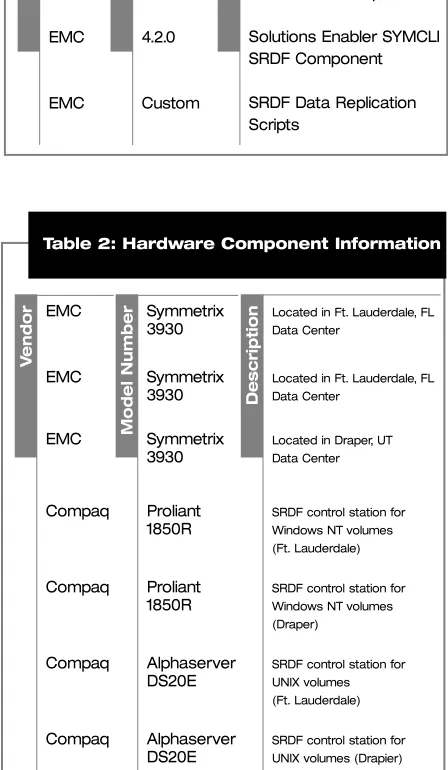
Components used in this solution are shown in the following tables. Hardware and software are listed in separate tables. Only hardware components relevant to this discussion are listed.
6.3 Reference Information
To provide for a better understanding of this solution, it is important to understand the basics of the
underlying technology. This section provides the reader with a brief overview of the components used in this solution. This section is not intended to provide a complete discussion of these topics;
it is instead intended to provide a basic understanding of these items. Please refer to the appropriate
EMC software documentation for details on each of these items.
6.3.1 EMC TimeFinder
EMC TimeFinder is a business continuance solution that allows the creation of independently addressable Business Continuance Volumes. BCVs are point-in-time mirror images of active production volumes that can be created and used without affecting the source volumes.
6.3.2 EMC Symmetrix Remote Data Facility (SRDF)
EMC SRDF is a business continuance solution that maintains a mirror image of data between two Symmetrix storage units in different locations. SRDF replicates production site data to a recovery site transparently to users, applications and databases. If the production site is no longer able to continue processing, data at the recovery site will be current.
6.3.3 EMC Solutions Enabler
EMC Solutions Enabler provides a command line interface to Timefinder and SRDF products from a Windows NT®or UNIX®workstation. It is used to
automate the data replication process.
6.3.4 SRDF Volume Types
With SRDF, the following types of volumes are used: source volumes, target volumes, and local volumes. EMC
EMC
EMC
EMC
Table 1: Software Component Information
4.2.0
4.2.0
4.2.0
Custom
Solutions Enabler SYMCLI Base Component
Solutions Enabler SYMCLI TimeFinder Component
Solutions Enabler SYMCLI SRDF Component
SRDF Data Replication Scripts D e scr ip tion V ersion V endor EMC EMC EMC Compaq Compaq Compaq Compaq
Table 2: Hardware Component Information
Symmetrix 3930 Symmetrix 3930 Symmetrix 3930 Proliant 1850R Proliant 1850R Alphaserver DS20E Alphaserver DS20E
Located in Ft. Lauderdale, FL
Data Center
Located in Ft. Lauderdale, FL Data Center
Located in Draper, UT
Data Center
SRDF control station for
Windows NT volumes (Ft. Lauderdale)
SRDF control station for
Windows NT volumes (Draper)
SRDF control station for
UNIX volumes (Ft. Lauderdale)
SRDF control station for
UNIX volumes (Drapier)
Local volumes can reside on SRDF-enabled Symmetrix units but they do not participate in SRDF activity. Local volumes are also referred to as STD volumes.
Source volumes contain data that is mirrored in a different Symmetrix unit. Source volumes are also referred to as R1 volumes. Source volumes that are also BCVs are called BCV/R1 volumes. Updates to a source volume are automatically copied to a target volume in the other Symmetrix unit.
Target volumes contain a mirrored copy of data from a source volume. Target volumes are also referred to as R2 volumes.
6.4 Data Flow
Diagram 2: Component Structure and Data Flow
Production servers are connected to, and use, STD devices in the FTL Symmetrix unit. Data flows from these devices to the BCV/R1 devices in the same Symmetrix using TimeFinder. Once the synchronization is complete the data is then synchronized with the matching R2 volumes in the DRP Symmetrix using SRDF.
As an added layer of protection, BCV devices in the DRP Symmetrix are synchronized with the R2 devices before the SRDF link to the R2 devices (Link-C) is enabled. The BCV devices provide additional protection in the event that the synchronization is not completed for any reason. Should a disaster strike which prohibits the completion of data synchronization, these devices can be restored to the R2 devices within the DRP unit. Through the use of these devices, there will always be at least one point-in-time image of the data.
Servers at the disaster site are connected to, and in the event of a catastrophe, use R2 devices in the DRP Symmetrix. The disaster servers must be kept offline until operations are failed over to the disaster site because the R2 devices only become write-enabled when the long distance SRDF process (Link-C) is halted. The disaster servers will not work properly unless the R2 devices are write-enabled.
The provided solution has three phases to update the data at the disaster site. They are:
1. Establishment of Link-B connecting FTL-STD devices and FTL-BCV/R1 devices that automatically splits Link-C.
3. Split of the FTL-STD and FTL-BCV/R1 devices that automatically establish Link-C to the DRP-R2 devices.
The condition of each link at the beginning of each cycle is as follows:
■ Link-B is disabled. FTL-STD and FTL-BCV/R1 devices are split.
■ Link-C is enabled. FTL-BCV/R1 and DRP-R2 devices are in sync.
■ Link-A is disabled. DRP-R2 and DRP-BCV devices are split.
6.5 Disaster Recovery
If a disaster situation is declared, personnel at the disaster site must wait for the last data replication cycle to complete and then manually break the long distance SRDF link (Link-C) to make the R2 devices available for use by the servers there.
If the last replication cycle was interrupted midstream or did not complete successfully for whatever reason, an additional task must be performed before bringing servers online. The R2 devices are in an inconsistent state during a replication cycle because they will have only been partially updated until the moment that replication is complete. The entire replication cycle begins again as soon as it completes successfully so the R2 devices are almost always in an inconsistent state. The servers cannot use the data on an R2 device while it is in an inconsistent state. The only solution is to restore a copy of the data from the last successful replication cycle from the BCV devices in the DRP
Symmetrix. All changes to data made since the last cycle are lost but that is the best that can be done in this situation.
6.6 Data Replication Scripts
Customized scripts are used to automate the data replication process described in the previous section. They are run on Windows NT or UNIX servers, called control stations, which have physical connectivity to Symmetrix units and have the Solutions Enabler software loaded. The custom scripts execute the Timefinder and SRDF commands in the proper sequence to complete the data
The intention of business continuity planning is to keep a business running during a natural, man-made, or technological disaster. The need for a technology solution that enables an organization to continue business operations in light of a disaster, with little or no interruption, is of critical importance.
Citrix Systems, Inc. has standardized its computing infrastructure on MetaFrame and has implemented an EMC storage area network and business continuity solution. Both EMC and Citrix promote the use of a centralized computing model, which facilities both an easy replication and recovery process.
Users gain access to their business applications through their “virtual workplace” at the corporate intranet: http://citrite.net. MetaFrame and NFuse enable the Virtual Workplace. In a situation where a failover occurs, users are given continued access to their business data and applications. All applications and information will continue to be served up by MetaFrame and NFuse, regardless of the users’ locations, connections or computing devices / operating systems. All data will remain saved and up-to-date with the EMC solution.
6400 NW 6th Way
Fort Lauderdale, FL 33309 USA Tel: +1 (800) 437 7503
European Headquarters Citrix Systems International GmbH Rheinweg 9
8200 Schaffhausen Switzerland Tel: +41 (52) 635 7700
Asia Pacific Headquarters Citrix Systems Asia Pacific Pty Ltd. Level 3, 1 Julius Avenue
Riverside Corporate Park North Ryde NSW 2113 Sydney, Australia Tel: +61 (0) 2 8870 0800