XRootD plug-in based solutions for site specific
require-ments
JanKnedlik1,∗and PaulKramp1,∗∗KilianSchwarz1,∗∗∗ThorstenKollegger1,∗∗∗∗
1GSI Helmholtzzentrum für Schwerionenforschung, Planckstraße 1, 64291 Darmstadt, Germany
Abstract.XRootD†has been established as a standard for WAN data access in
HEP and HENP. Site specific features, like those existing at GSI, have histor-ically been hard to implement with native methods. XRootD allows a custom replacement of basic functionality for native XRootD functions through the use of plug-ins. XRootD clients allow this since version 4.0. In this contribution, our XRootD based developments motivated by the use in the current ALICE Tier 2 Centre at GSI and the upcoming ALICE Analysis Facility will be shown. Among other things, an XRootD redirector plug-in which redirects local clients directly to a shared file system, as well as the needed changes to the XRootD base code, which are publicly available since XRootD version 4.8.0, will be presented. Furthermore, a prototype for an XRootD based disk caching system for opportunistic resources has been developed.
1 Introduction
GSI has long standing experience with operating an XRootD service, the established software standard for WAN data access in HEP and HENP. Accessing the scientific data, stored on-top of the HPC infrastructure at the ALICE Tier 2 centre and the ALICE Analysis Facility prototype at GSI, revealed multiple challenges and requirements. To allow efficient utilization of such HPC centers into the more open grid world, multiple solutions to adjust such software frameworks to the need of the infrastructure at GSI have already been deployed. This article describes the current state of development for XRootD based solutions for low latency access to the shared file system at GSI, especially XRootD client & server plug-ins.
2 Improving the I/O performance via a shared filesystem using
XRootD plug-ins
With the current storage infrastructure at GSI, namely the access to Lustre through the XRootD data servers, the following room for improvement has been identified:
1. Eliminate the passthrough bottleneck provided by three XRootD data servers that can provide limited I/O bandwidth
∗e-mail: [email protected] ∗∗e-mail: [email protected] ∗∗∗e-mail: [email protected] ∗∗∗∗e-mail: [email protected]
2. Remove the doubled network traffic for an I/O operation, since all data read locally via
XRootD from Lustre needs to be sent over the network twice (from Lustre to XrootD data server & from XrootD data server to client)
3. Decouple the need to scale up the number of XRootD data servers with the number of concurrent clients
As an improvement to the previous solution, an XRootD client plug-in, which had to be loaded by all clients running on GSI’s HPC farm, an XRootD redirector plug-in has been developed.
2.1 RedirLocal: A plug-in to redirect clients to local files
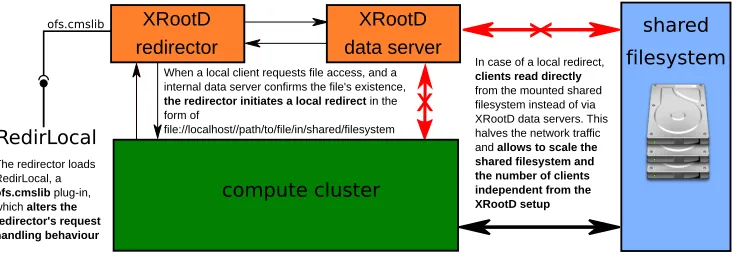
The RedirLocal plug-in[1] is an ofs.cmslib plug-in, which alters the redirector’s request han-dling behaviour. A redirector server may load this plug-in in order to redirect clients to locally available files, if both client and redirection target are inside a private network, as this guaran-tees local availability of the required file at the shared filesystem. The functionality of such a setup is illustrated in fig. 1. In order to allow a redirector to redirect to a local file, additional changes needed to be implemented into the XRootD base code[3][4].
When a local client requests file access, and a internal data server confirms the file's existence,
the redirector initiates a local redirect in the
form of
file://localhost//path/to/file/in/shared/filesystem
In case of a local redirect,
clients read directly
from the mounted shared filesystem instead of via XRootD data servers. This halves the network traffic and allows to scale the shared filesystem and the number of clients independent from the XRootD setup
RedirLocal
The redirector loads RedirLocal, a
ofs.cmslib plug-in,
which alters the redirector's request handling behaviour
x
x
sharedfilesystem
compute cluster
XRootD data server XRootD
redirector ofs.cmslib
Figure 1.Local redirection via a redirector plug-in.
2.1.1 Changes to XRootD
The cooperation with the XRootD core development team resulted in the integration of necessary client and server side changes into the XRootD base code.
1. client side
• Integration of aLocalFileHandler into XrdCl, the new XrootD client API, which enables XrdCl::File instances to handle local files themselves via a POSIX interface (protocol: file://)
• Handling of a newlocal redirection directive( SFS_REDIRECT with port¯--1) into
XrdCl, which triggers the internal usage of the new LocalFileHandler
2. Remove the doubled network traffic for an I/O operation, since all data read locally via
XRootD from Lustre needs to be sent over the network twice (from Lustre to XrootD data server & from XrootD data server to client)
3. Decouple the need to scale up the number of XRootD data servers with the number of concurrent clients
As an improvement to the previous solution, an XRootD client plug-in, which had to be loaded by all clients running on GSI’s HPC farm, an XRootD redirector plug-in has been developed.
2.1 RedirLocal: A plug-in to redirect clients to local files
The RedirLocal plug-in[1] is an ofs.cmslib plug-in, which alters the redirector’s request han-dling behaviour. A redirector server may load this plug-in in order to redirect clients to locally available files, if both client and redirection target are inside a private network, as this guaran-tees local availability of the required file at the shared filesystem. The functionality of such a setup is illustrated in fig. 1. In order to allow a redirector to redirect to a local file, additional changes needed to be implemented into the XRootD base code[3][4].
When a local client requests file access, and a internal data server confirms the file's existence,
the redirector initiates a local redirect in the
form of
file://localhost//path/to/file/in/shared/filesystem
In case of a local redirect,
clients read directly
from the mounted shared filesystem instead of via XRootD data servers. This halves the network traffic and allows to scale the shared filesystem and the number of clients independent from the XRootD setup
RedirLocal
The redirector loads RedirLocal, a
ofs.cmslib plug-in,
which alters the redirector's request handling behaviour
x
x
shared filesystem compute cluster XRootD data server XRootD redirector ofs.cmslibFigure 1.Local redirection via a redirector plug-in.
2.1.1 Changes to XRootD
The cooperation with the XRootD core development team resulted in the integration of necessary client and server side changes into the XRootD base code.
1. client side
• Integration of a LocalFileHandler into XrdCl, the new XrootD client API, which enables XrdCl::File instances to handle local files themselves via a POSIX interface (protocol: file://)
• Handling of a newlocal redirection directive( SFS_REDIRECT with port¯--1) into
XrdCl, which triggers the internal usage of the new LocalFileHandler
• The ability to perform a redirect via a new
local redirection directive( SFS_REDIRECT with port¯--1)
The aforementioned changes are available since XRootD Version 4.8.0. A local redirection of a client by a redirector is then possible with the use of the cms plug-in we developed. In addition, the plug-in is able to distinguish between new and old clients and will only redirect newer clients that have the capability to handle such a redirection to a local file.
2.2 Enabling local redirection in ROOT for high performance data processing
ROOT1has been established as the software standard framework for data analysis in HEP
and HENP and is heavily used in local environments and jobs runnning inside the WLCG. In order to use advantages of local redirection in user code and jobs that use ROOT, it has to be built with an XRootD Version>=4.8.0, since it has to use XRootD’s new client API,
XrdCl. When being built in such a way, ROOT automatically uses TNetXNGFile for all XRootD - file based interactions via TFile::Open(). Additionally, necessary changes to the ROOT library, namely to/net/netxng/TNetXNGFile have been developed. The basic idea is
to alter TNetXNGFile’s constructor to allow handling of files with a logical file name (LFN) and physical file name (PFN), since often the PFN does not show important characteristics of a file. For example, it is not used via TArchiveFile, if the file name is not ending with “.zip”. Furthermore, another necessary change had to be made to the GetVectorReadLimits() Function of TNetXNGFile. When handling a local redirect, it must not query the data server for vector read limits using the XRootD API. This would try to access an XRootD data server via the locally redirected file, and therefore query a path, not a data server, which results in a hanging process. Moreover, getting vector read limits is unnecessary for the shared filesystem, since the reads will be splitted into asynchronous filesystem calls anyway. Using these changes it is possible to use a ROOT setup in which jobs and user-code running in ROOT significantly boosts I/O performance when running inside a site where the XRootD
data resides on top of a POSIX compliant (shared) filesystem which is handled by an XRootD data server. To integrate these changes into ROOT a pull request/footnote[5] has been filed
to ROOT’s offical github.
3 XRootD Disk Caching Proxy for opportunistic resources
In cooperation with KIT, an infrastructure for the utilization of opportunistic resources such as Clouds, has been developed for the CMS experiment. The idea is to build a virtual site inside the opportunistic resource. In order to minimize external I/O and to provide high data
virtual site
shared filesystemcompute cluster XRootD
d.c. proxy
XRootD redirector
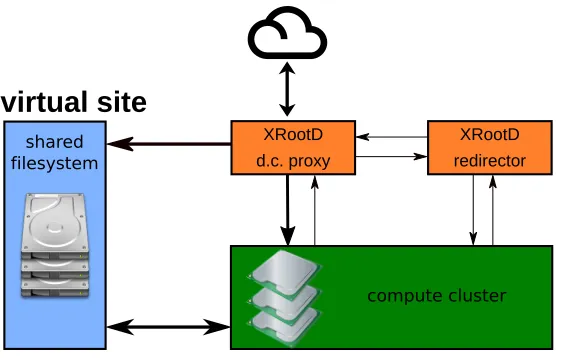
Figure 2.Disk Caching Proxy setup.
In such a setup (see fig. 2), all clients access data through a redirector, which tells the client the location of the desired data. The redirector either directs the client towards the locally available shared filesystem, in case the data exists on it, or to the disk-caching-proxy. The disk-caching-proxy forwards the request to external sites and retrieves the data. In the meantime, the data is being cached on the shared filesystem for later use. In case jobs working with the same data are bundled together, this infrastructure minimizes I/O and speeds up data
accesses inside the virtual site. This infrastructure relies on XRootD-plug-ins developed at GSI. One plug-in handles the referral to the redirector[2] while the second plug-in handles the redirection to the proxy or shared file system. A test setup has been deployed on the bwhpc4 cluster NEMO[6] at Freiburg
4 Conclusion
In conclusion we have implemented XRootD plug-ins redirecting clients to data on our shared filesystem which significantly improves the I/O performance. Proposed changes have been
integrated into the XRootD main base by the XRootD development team. Changes to allow full utilization of XRootD local redirection in ROOT has been filed in a Pull Request to ROOT. In addition, an XRootD infrastructure to utilize opportunistic resources has been developed and a test setup has been deployed at the bwhpc4 cluster NEMO at Freiburg.
References
[1] RedirLocal project, “RedirLocal” [software]. Available from https://github.com/pkramp/RedirPlugin/tree/kit-proj [accessed 2018-10-23]
[2] XrdProxyPrefix project, “RedirLocal” [software]. Available from https://github.com/jknedlik/XrdProxyPrefix/tree/kit-proj [accessed 2018-10-23]
virtual site
shared filesystemcompute cluster XRootD
d.c. proxy
XRootD redirector
Figure 2.Disk Caching Proxy setup.
In such a setup (see fig. 2), all clients access data through a redirector, which tells the client the location of the desired data. The redirector either directs the client towards the locally available shared filesystem, in case the data exists on it, or to the disk-caching-proxy. The disk-caching-proxy forwards the request to external sites and retrieves the data. In the meantime, the data is being cached on the shared filesystem for later use. In case jobs working with the same data are bundled together, this infrastructure minimizes I/O and speeds up data
accesses inside the virtual site. This infrastructure relies on XRootD-plug-ins developed at GSI. One plug-in handles the referral to the redirector[2] while the second plug-in handles the redirection to the proxy or shared file system. A test setup has been deployed on the bwhpc4 cluster NEMO[6] at Freiburg
4 Conclusion
In conclusion we have implemented XRootD plug-ins redirecting clients to data on our shared filesystem which significantly improves the I/O performance. Proposed changes have been
integrated into the XRootD main base by the XRootD development team. Changes to allow full utilization of XRootD local redirection in ROOT has been filed in a Pull Request to ROOT. In addition, an XRootD infrastructure to utilize opportunistic resources has been developed and a test setup has been deployed at the bwhpc4 cluster NEMO at Freiburg.
References
[1] RedirLocal project, “RedirLocal” [software]. Available from https://github.com/pkramp/RedirPlugin/tree/kit-proj [accessed 2018-10-23]
[2] XrdProxyPrefix project, “RedirLocal” [software]. Available from https://github.com/jknedlik/XrdProxyPrefix/tree/kit-proj [accessed 2018-10-23]
[3] Simon Michal, Paul Niklas Kramp, “XRootD” [software] com-mit 76108afd218350d655fd0b87b4394b759abe5357, available from
[4] Simon Michal, Paul Niklas Kramp, “XRootD” [software] com-mit ef28e28462158dc47eb86973f3dac2bcf4e33e33, available from https://github.com/xrootd/xrootd [accessed 2018-10-23]
[5] Jan Knedlik, Paul Niklas Kramp, “ROOT” [software] pull request 2751, available from https://github.com/root-project/root/pull/2751 [accessed 2018-10-23]