ISSN 2286-4822 www.euacademic.org
Impact Factor: 3.1 (UIF)
DRJI Value: 5.9 (B+)
Voice Chat Application Using Socket
Programming
MAHA SABRI
ALTEMEM
Ass. Lecturer
Computer Science Department, College of Science,
Karbala University, Karbala,
Iraq
Abstract:
This report presents a detail overview in developing a
client-server based voice chat application using socket programming. The
application is built using Java and is using UDP datagram. The
primary objective of this report is to present the principles behind
socket programming and the libraries available for socket
programming applications in Java
.
Key words: voice chat application, socket programming
I. Introduction
way input-output of a system is handled. An important
characteristic that has driven programmers to program using
socket based programming is due to its transparency. This
means that, regardless if a socket program is written in Java
language, it will still be able to communicate with other socket
program which was built using other languages such as C or
C++. This voice chat application using socket programming is
closely related to distributed computing whereby the client and
server paradigm is a distributed application in which the
workload are distributed among the nodes namely the client
and the server. These nodes serves the same purpose makes it
resembles
the
distributed
computing
application
characteristics
.
II. Literature Review
The socket programming concept has benefited many areas of
computer networks today. The socket application developed in
this work is based on the concept of distributed computing. This
is relevant as to that it allows for resources to be distributed
among several node in the network [1]. Socket programming
helps to implement the bottom level of network communication,
using Application Programming Interface (API). A similar
application is built by other researchers as presented in [2], [3]
and [4]. This application is also using a multicast datagram
socket class which is useful for sending and receiving IP
multicast packets. Furthermore, a multicast socket is also a
UDP datagram socket which is capable for joining “group”. This
additional functionality is an added advantage for using
multicast socket [5].
III. Methodology
A. Authentication Access
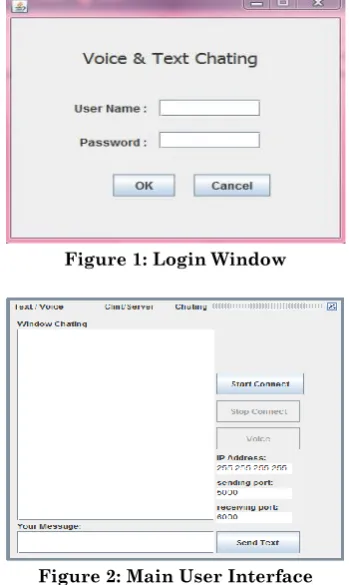
password in order to use this voice chat application. The
interface for the login window is shown in Figure 1. The
application will be launched when the user entered the correct
username and password. However, if the user entered wrong
combination of username and password more than three times,
the program will immediately terminate itself in order to avoid
further brute force attempt
.
Figure 1: Login Window
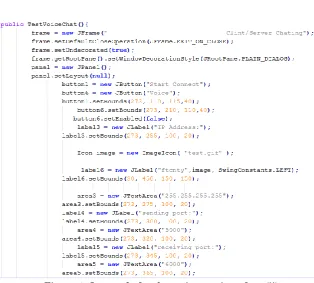
Figure 2: Main User Interface
B. Main User Interface
Figure 3: Java code for the main user interface (i)
Figure 4: Java code for the main user interface (ii)
C. Connecting to Server
option to either continue on using text chatting by writing their
message at the
‘
Your Message’ text box area or they may use
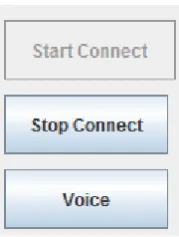
the voice functionality by clicking on the ‘Voice’ button. The
‘
Voice’ button is disabled until the user successfully connected
to the server as shown in Figure 5 and Figure 6
.
Figure 5: Disabled ‘Voice’ button before user connect to the server
Figure 6: ‘Voice’ button is enabled after the user is connected to the server
Figure 7: Java code for starting the server
D. Sending
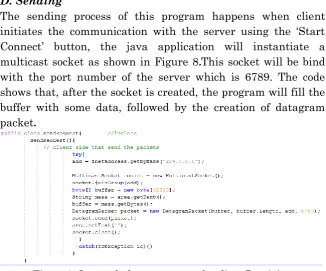
The sending process of this program happens when client
initiates the communication with the server using the ‘Start
Connect’ button, the java application will instantiate a
multicast socket as shown in Figure 8
.
This socket will be bind
with the port number of the server which is 6789. The code
shows that, after the socket is created, the program will fill the
buffer with some data, followed by the creation of datagram
packet
.
Figure 8: Java code for request sent by client Receiving
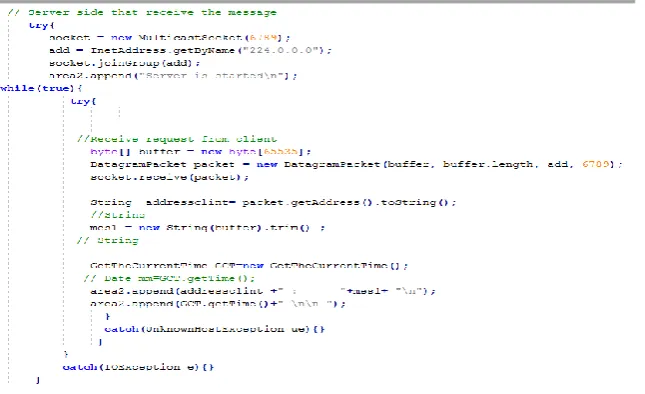
Figure 9: Java code for server side when receiving message
E. Audio
The audio part of this application is handled by the code shown
in Figure 10. In this code, we are using captureAudio( ) function
to print out the audio information. The same function contains
the required codes to get audio from the input device
(
i.e:microphone) as well as calling the thread responsible for
playing out the audio
.
Figure 10: Java code for printing audio devices information
,
F. Sending Audio
Figure 11 presents the java code for sending to the output
device which in this case is a speaker. These parts of the code
also create a thread that is responsible to play out the audio on
the speaker
.
Figure 11: Java code for sending audio and call thread to receive audio
In order to send audio to the server, we have used the following
code presented in Figure L. In order to do this, we are using a
tempBuffer ( ) function to prepare the server for receiving the
audio. The audio will be sent using a datagram with its
respective IP address and port number
.
Figure 12: Java code for sending audio to server
Figure 13: Java code for coding and formatting audio
Receiving and playing the audio from the server requires the
use of different set of functions as shown in Figure 14. The
datagram received from the server will be written to the
temporary buffer at the receiver side and the audio will played
using a thread
.
Figure 14: Java code for receiving and playing audio from server
IV. Conclusion and Discussion
This paper presents the detail implementation of a voice chat
application that is using socket programming method. In this
work, we have chosen Java as the programming language as it
covers an adequate range of functions and classes to develop
this socket-based programming application. The application is
subject to further improvement in the future in which other
functionalities may be included to enhance its overall function
.
REFERENCES
Law, K.L.E., Leung, R. 2002. "A design and implementation of
active network socket programming."
Computer
Malhotra, A., Sharma, V., Gandhi, P., Purohit, N. “UDP based
chat application." Computer Engineering and Technology
(ICCET), 2010 2nd International Conference vol.6:
pp.V6-374-V6-377. [2]
Kaur, D., Dhanda, P., Mirchandani, M. 2000. "Development of a
real time chat application on intelligent network based
on fuzzy logic," Circuits and Systems, 2000.” Proceedings
of the 43rd IEEE Midwest Symposium vol.3,
pp.1376-1380. [3]
Shirali-Shahreza, M.H., Shirali-Shahreza, M. 2007. "Text
Steganography in chat."
Internet. ICI. 3
rdIEEE/IFIP
International Conference in Central Asia pp.1-5, 26-28.
[4]
Wang, Ho Leung, Tsuhan Chen, Hendriks, F., Xiping Wang,
and Zon-Yin Shae. "eMeeting: a multimedia application
for interactive meeting and seminar."
Global
Telecommunications Conference, GLOBECOM. IEEE 3,
pp. 2994- 2998, 17-21. [5]
Appendix A
Chatting Code In JAVA Programming import javax.sound.sampled.DataLine; import javax.sound.sampled.Mixer;
import javax.sound.sampled.SourceDataLine; import javax.sound.sampled.TargetDataLine; class GetTheCurrentTime {
public Date getTime( ) {
// This Class return the time of delivered picket on Second/ Day/ Month and year // one way
long currentTimeInMillis =System.currentTimeMillis(); Date today = new
Date( currentTimeInMillis );// System.out.println( today ); // another way
import java.util.logging.Level; import java.util.logging.Logger; import
javax.sound.sampled.LineUnavailableException; import javax.swing.*;
import java.io.*; import java.util.Calendar; import java.util.Date; //for voice import java.io.BufferedInputStream; import java.io.BufferedOutputStream; import java.io.ByteArrayOutputStream; import java.io.IOException; import java.net.Socket; import javax.sound.sampled.AudioFormat; import javax.sound.sampled.AudioInputStream; import javax.sound.sampled.AudioSystem; import javax.sound.sampled.DataLine; import javax.sound.sampled.Mixer; import javax.sound.sampled.SourceDataLine; import javax.sound.sampled.TargetDataLine; class GetTheCurrentTime {
public Date getTime( ) {
// This Class return the time of delivered picket on Second/ Day/ Month and year
// one way
long currentTimeInMillis =System.currentTimeMillis(); Date today = newDate( currentTimeInMillis );
// System.out.println( today ); // another way
today = cal.getTime(); return today;
// System.out.println( today );}} public class TestVoiceChat{ String mes1,mes;
/* This class add many Buttons, Textarea for the Client/ Server User Interface */
Thread thread; MulticastSocket socket; InetAddress add; JFrame frame; JPanel panel,panel2; JTextArea area,area2,area3,area4,area5; JScrollPane pane,pane2;JLabel label,label2,label3,label4,label5,label6; JButton button,button1,button2,button6; // for voice
public static void main(String[] args) { if ( args.length == 0)
{
TestVoiceChat u = new TestVoiceChat(); }
else
System.exit(0); }
public TestVoiceChat(){
frame = new JFrame("Clint/Server Chating");
frame.setDefaultCloseOperation(JFrame.EXIT_ON_CLOSE); frame.setUndecorated(true);
frame.getRootPane().setWindowDecorationStyle(JRoo tPane.PLAIN_DIALOG);
panel = new JPanel(); panel.setLayout(null);
button1 = new JButton("Start Connect"); button6 = new JButton("Voice"); button1.setBounds(273, 110,115,40); button6.setBounds(273, 210,110,40); button6.setEnabled(false);
label3 = new JLabel("IPAddress:"); label3.setBounds(273, 255,100, 20); Icon image = newImageIcon( "test.gif" );
label6 = newJLabel("ftcnty",image, SwingConstants.LEFT); label6.setBounds(30, 450, 150,150);
area3 = newJTextArea("255.255.255.255"); area3.setBounds(273, 275,100, 20); label4 = new JLabel("sendingport:"); label4.setBounds(273, 300,100, 20); area4 = new JTextArea("5000"); area4.setBounds(273, 320,100, 20); label5 = new JLabel("receivingport:"); label5.setBounds(273, 345,100, 20); area5 = new JTextArea("6000"); area5.setBounds(273, 365,100, 20); button1.addActionListener(new ActionListener(){
public void actionPerformed(ActionEvente){ new StartServer();
button6.setEnabled(true);}}); button6.addActionListener(new ActionListener(){
public void actionPerformed(ActionEvente){ // Start Voice Code
captureAudio();
button6.setEnabled(false);}}); panel.add(button1);
panel.add(label4); panel.add(label5); panel.add(label6); panel.add(area3); panel.add(area4); panel.add(area5);
button2 = new JButton("Stop Connect"); button2.setBounds(273, 160, 110,40); button2.addActionListener(new ActionListener(){
public void actionPerformed(ActionEvent ae){ thread.interrupt();
socket.close();
area2.append("Server is stopped\n"); button1.setEnabled(true);
button2.setEnabled(false);}}); button2.setEnabled(false); panel.add(button2);
label = new JLabel("Your Message:"); label.setBounds(10, 210, 100, 360); panel.add(label);
label2 = new JLabel("Window Chating");
label2.setBounds(10, 10, 150, 20); panel.add(label2); area2 = new JTextArea();
pane2 = new JScrollPane(area2); pane2.setBounds(10, 30, 260, 350); panel.add(pane2);
area = new JTextArea(); pane = new JScrollPane(area); pane.setBounds(10, 400, 260, 40); panel.add(pane);
button = new JButton("Send Text "); button.setBounds(273,400, 110, 40); button.addActionListener(new ActionListener(){
public void
actionPerformed(ActionEvent e){ new SendRequest(); }
} ); panel.add(button); frame.add(panel); frame.setSize(410, 650); frame.setVisible(true); frame.setLocation(300, 50); }
public class StartServer implements Runnable{
StartServer(){
thread.start();
button1.setEnabled(false); button2.setEnabled(true); }
public void run(){
// Server side that receive the message
try{
socket = new MulticastSocket(6789); add = InetAddress.getByName("224.0.0.0"); socket.joinGroup(add);
area2.append("Server is started\n"); while(true){
try{
//Receive request from client byte[] buffer = new byte[65535];
DatagramPacket packet = new DatagramPacket(buffer, buffer.length, add, 6789); socket.receive(packet);
String addressclint= packet.getAddress().toString(); //String
mes1 = new String(buffer).trim() ; // String
GetTheCurrentTime GCT=new GetTheCurrentTime(); // Date mm=GCT.getTime();
area2.append(addressclint +" : "+mes1+ "\n");
area2.append(GCT.getTime() +" \n\n ");
} catch(UnknownHostException ue){} } } catch(IOException e){} } }
public class SendRequest{ //inclass SendRequest(){
// client side that send the packets try{
add = InetAddress.getByName("224.0.0.0"); MulticastSocket socket = new
MulticastSocket(); socket.joinGroup(add);
byte[] buffer = new byte[65535]; String mess = area.getText(); buffer = mess.getBytes(); DatagramPacket packet = new
DatagramPacket(buffer, buffer.length, add, 6789); socket.send(packet);
socket.close(); } catch(IOException io){} } } ///////////////////////////////////////////////////// ///////////////
// voice Classes
// first function called by main public void captureAudio() { try {
//print audio devices informatioin Mixer.Info[] mixerInfo = AudioSystem.getMixerInfo();
System.out.println("Available mixers:");
for (int cnt = 0; cnt < mixerInfo.length; cnt++) {System.out.println(mixerInfo[cnt].getName());
}
// get audio from mic X
audioFormat = getAudioFormat(); DataLine.Info dataLineInfo = new
DataLine.Info(TargetDataLine.class, audioFormat); Mixer mixer =
AudioSystem.getMixer(mixerInfo[3]); targetDataLine = (TargetDataLine) mixer.getLine(dataLineInfo); targetDataLine.open(audioFormat); targetDataLine.start();
// call thread to send audio
Thread captureThread = new CaptureThread(); captureThread.start();
// send audio to speaker X
DataLine.Info dataLineInfo1 = new DataLine.Info(SourceDataLine.class, audioFormat); sourceDataLine = (SourceDataLine)
AudioSystem.getLine(dataLineInfo1); sourceDataLine.open(audioFormat); sourceDataLine.start();
// call thread to recive audio
Thread playThread = new PlayThread(); playThread.start();
} catch (Exception e) { System.out.println(e); System.exit(0);} }
// sending audio to server
class CaptureThread extends Thread { byte tempBuffer[] = new byte[1024]; public void run() {
try {
InetAddress IPAddress =InetAddress.getByName( area3.getText()); while (true) {
int cnt =targetDataLine.read(tempBuffer, 0,tempBuffer.length); DatagramPacket send_packet = new
DatagramPacket(tempBuffer, tempBuffer.length, IPAddress,Integer.valueOf( area4.getText())); client_socket.send(send_packet);
}
} catch (Exception e) {System.out.println(e); System.exit(0);}
} }
// coding and format audio
private AudioFormat getAudioFormat() { float sampleRate = 8000.0F;
int sampleSizeInBits = 16; int channels = 1;
boolean signed = true; boolean bigEndian = false;
return new AudioFormat(sampleRate,
sampleSizeInBits, channels, signed, bigEndian); }
// recieving audio from server and play it class PlayThread extends Thread { byte tempBuffer[] = new byte[1024]; public void run() {
try {
DatagramSocket server_socket = new
DatagramSocket(Integer.valueOf( area5.getText())); while (true) {
DatagramPacket receive_packet = new DatagramPacket(tempBuffer, tempBuffer.length);
server_socket.receive(receive_packet);
sourceDataLine.write(receive_packet.getData(), 0,tempBuffer.length); }