Networking Topologies
Pankaj Bhatt; Prashant Chaudhary & Manik Singh Walia
Dronacharya College of Engineering, Gurgaon-122001, India
Email: [email protected],
Email:prashant [email protected]
Email:. [email protected]
ABSTRACT-
A computer network consists of two or more computers that are linked in order to share resources exchange files, or allow electronic communications. Now in real life scenario several networks with different protocols and architectures are need to be Interconnected for efficient communication. To support this feature there exists many networking relay devices that facilitate communication between heterogeneous networks. Network topology is the study of the arrangement of links and links and nodes in a network and the interconnection among the nodes. Network topologies information helps one analyze faults in ip networks and their locations. Networking is also the essence of communication and is impossible without communication. There are different types of the topologies like bus, ring, tree, star, mesh etc. However, we will consider five basic network structures- topology.
Keywords - How topology use, Advantages, Disadvantages.
I. INTRODUCTION
Network Topology is the study of the arrangement or mapping of the elements (links, nodes, etc.) of a network interconnection between the nodes. Topologies can be physical or logical. Physical Topology means the physical design of a network including the devices, location and cable installation. Logical Topology refers to the fact that how data actually transfers in a network as opposed to its design.
Some of the most common network
topologies are:
II. NETWORK TOPOLOGIES
TOPOLOGY – defines the structure of
the network. There are two parts to the topology definition: the physical topology which is the actual layout of the wire (media) and the logical topology which defines how the media is accessed by the hosts.
It refers also to how computers are being connected with each other. Network topologies may be physical or logical. Physical topology refers to the physical design of a network including the devices, location and cable installation. Logical topology refers to how data is actually transferred in a network as opposed to its physical design. In general physical topology relates to a core network whereas logical topology relates to basic network. Topology can be understood as the shape or structure of a network. This shape does not necessarily correspond to the actual physical design of the devices on the computer network. The computers on a home network can be arranged in a circle but it does not necessarily mean that it represents a ring topology. Any particular network topology is determined only by the graphical mapping of the configuration of physical and/or logical connections between nodes. The study of network topology uses graph theory. Distances between nodes, physical interconnections, transmission rates, and/or signal types may differ in two networks and yet their topologies may be identical.
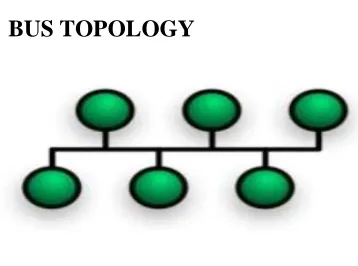
Fig 7 A Bus network
BUS TOPOLOGY
network topology in which all of the nodes of the network are connected to a common transmission medium which has exactly two endpoints. All data that is transmitted between nodes in the network is transmitted over this common transmission medium and is able to be received by all nodes in the network simultaneously. Distributed bus The type of network topology in which all of the nodes of the network are connected to a common transmission medium which has more than two endpoints that are created by adding branches to the main section of the transmission medium – the physical distributed bus topology functions in exactly the same fashion as the physical linear bus topology (i.e., all nodes share a common transmission medium).
[A]. Advantages:
− Reliable in very small networks as well
as easy to use and understand.
− Requires least amount of cable to
connect the computers (nodes) together and therefore is less expensive than other cabling arrangements.
− It's easy to extend, two cables can be
easily joined with a connector, making a longer cable for more computers to join the network.
− A repeater can also be used to extend a
bus configuration.
[B]. Disadvantages:
− Heavy network traffic can slow a bus
considerably because any computer can transmit at any time. But networks do not Coordinate when information is sent. Computer interrupting each other can use a lot of bandwidth.
− Each connection between two cables
weakens the electrical signal.
− The bus configuration can be difficult
to find and can cause the whole networks to stop functioning.
RING TOPOLOGY connects one host
to the next and the last host to the first. This creates a physical ring of cable. In a ring network, every device has exactly two neighbors for communication purposes. All messages travel through a ring in the same direction (either "clockwise" or "counterclockwise"). A failure in any cable or device breaks the loop and can take down the entire network. To implement a ring network, one typically uses FDDI, SONET, or Token Ring technology. Ring topologies are found in some office buildings or school campuses.
Fig 8 Ring topology
A]. Advantages:
− Ring networks offer high performance
for a small number of workstations or for larger networks where each station has a Similar workload.
− Ring networks can span longer
distances than other types of networks.
− Unlike Bus topology, there is no signal
loss in Ring topology because the tokens are data packets that are re-generated at each node.
[B]. Disadvantages:
− Relatively expensive and difficult to
install
− Failure of one computer on the network
can affect the whole network.
− It is difficult to find fault in a ring
network.
− Adding or removing computers can
disrupt the network.
− It is much slower than an Ethernet
network under normal load.
STAR TOPOLGY connects all cables to
a central point of concentration. This point is usually a hub or switch. It has a focal point where all the resources are there. Many home networks use the star topology. A star network features a central connection point called a "hub node" that may be a network hub, switch or router. Devices typically connect to the hub with Unshielded Twisted Pair (UTP) Ethernet. Compared to the bus topology, a star network generally requires more cable, but a failure in any star network cable will only take down one computer's network access and not the entire LAN.
Fig 9 Star topology
Extended star A type of network topology in which a network that is based upon the physical star topology has one or more repeaters between the central node (the 'hub' of the star) and the peripheral or 'spoke ‘nodes, the repeaters being used to extend the maximum transmission distance of the point-to-point links between the central node and the peripheral nodes beyond that which is supported by the transmitter power of the central node or beyond that which is supported by the standard upon which the physical layer of the physical star network is based. Distributed Star A type of network topology that is composed of individual networks that are based upon the physical star topology connected in a linear fashion – i.e., 'daisy-chained' – with no central or top level connection point (e.g., two or more 'stacked' hubs, along with their associated star connected nodes or 'spokes').
[A]. Advantages:
− It is more reliable (if one connection
− The center of a star network is a good
place to diagnose network faults and if one computer fails whole network is not disturbed. Hub detects the fault and isolates the faulty computer.
− It is easy to replace, install or remove
hosts or other devices, the problem can be easily detected-It is easier to modify or add a new computer without disturbing the rest of the network by simply running a new line from the computer to the central location and plugging it to the hub.
− Use of multiple cable types in a same
network with a hub.
− It has good performance
[B]. Disadvantages
− It is expensive to install as it requires
more cable, it costs more to cable a star network because all network cables must be pulled to one central point, requiring more cable length than other networking topologies.
− Central node dependency, if central
hub fails, the whole network fails to operate.
− Many star networks require a device at
the central point to rebroadcast or switch the network traffic.
MESH TOPOLOGY is used when there
can be absolutely no break in communications. So as you can see in the graphic, each host has its connections to all other hosts. This also reflects the design of the internet which has multiple paths to a none location. Mesh topologies involve the concept of routes. Unlike each of the previous topologies, messages sent on a mesh network can take any of several possible paths from source to destination. (Recall that even in a ring, although two cable paths exist, messages can only travel in one
direction.) Some WANs, most notably the Internet, employ mesh routing. A mesh network in which every device connects to every other is called a full mesh. As shown in the illustration below, partial mesh networks also exist in which some devices connect only indirectly to others.
Fig 10 Mesh topology
[A]. Advantages
− Yield the greatest amount of
redundancy in the event that one of the nodes fails where network traffic can be redirected to another node.
− Point-to-point link makes fault
isolation easy.
− Privacy between computers is maintained as messages travel along dedicated path.
− Network problems are easier to
diagnose.
[B]. Disadvantages
− The amount of cabling required is high. − A large number of I/O (input/output)
ports are required.
TREE TOPOLOGY Tree topologies
expandability of the network much better than a bus (limited in the number of devices due to the broadcast traffic it generates) or a star (limited by the number of hub connection points) alone.
[A]. Advantages
− Yield the greatest amount of
redundancy in the event that one of the nodes fails where network traffic can be redirected to another node.
− Point-to-point link makes fault
isolation easy.
− Privacy between computers is maintained as messages travel along dedicated path.
− Network problems are easier to
diagnose.
[B]. Disadvantages
− The amount of cabling required is high. − A large number of I/O (input/output)
ports are required.
IV. CONCLUSION
In this paper we have to study the different types of the topologies like Bus Topology, Ring Topology, Star Topology, Mesh Topology and Tree Topology.
In this paper we have considered above five topology uses and its merits and demerits that will study will help to know that which structure or topology is best
for which organization or business. We have to study the topology and finally we have to find the fact that all topologies are alternate options for business like that Bus Topology is use full for small network but it’s some demerits so its alternate option is Ring Topology. So finally, we can say that all topologies have some extra and different feature
Available from other topology and that features are making it special from other topology
REFERENCES
[2] Introduction to data communication and
networking, Behrouz Frozen, TMH.
[3] O’Hara, B. and Patrick, A., IEEE 802.11 Handbook: A Designer’s Companion, Stand adds Information Network, IEEE
Press, New York, New York, 1999.
[4] ―IEEE 802.11a White Paper.ǁ
http://www.vocal.com/data_sheets/ieee802.11a.h tml
[5] James F. Kurose, Keith W. Ross, 2004, Computer Networking – A top down approach featuring the Internet
[6] Lowe amp, B., O’Halloran, D., and Gross, T. 2001. Topology discovery for large Ethernet networks. In Proceedings of the 2001 Conference on Applications, Technologies, Architectures, and Protocols For Computer Communications (San Diego, California, United States). SIGCOMM '01. ACM Press, New York, NY, 237-248.
[7] IEEE STD 802.1D TM 2004 - IEEE Standard for Local and Metropolitan Area Networks: Media Access Control Bridges.