Edification Scenario Integrate with Learning
and Human Posture Estimation by Kinect
Ashvini G. Bais1, Prof. Pritish A. Tijare2.
M.E. Student, Department of Computer Science & Engineering, Sipna COET, Amravati, Maharashtra, India1
Associate Professor, Department of Information Technology, Sipna COET, Amravati, Maharashtra, India2
ABSTRACT: Natural user interface is an umbrella term for several technologies such as speech recognition,
Multitouch, and kinetic interfaces like Kinect. It is distinguished from the graphical user interface: the keyboard and mouse interface common to the Windows operating system and Macs. Computing advances and increased smartphone use gives technology system designers greater flexibility in exploiting computer vision to support visually impaired users. Understanding this user’s needs will certainly provide insight for the development of improved usability of computing device.
As new technologies and computer applications prove to be powerful tools for children’s with special needs in order to improve specific skills. However, there is still a gap between research development and its applicability in schools, based on their classroom education proposed framework with several activities. Furthermore, the professor in a real classroom might focus only on students who are interacting face-to-face with him. This implemented system focuses on HCI (Human Computer Interaction) and Face detection and recognition method for attendance system as well as Power point presentation, educational gamesbased on Microsoft Kinect.
Kinect has the advantage over ordinary camera because it has 2 sensor, an ordinary and depth sensor. In this system a method based on depth information is used for optimizing the face recognition combining with hand gesture which can switch automatically for students and teacher easy to operate classroom and other teaching activities related to education domain.
KEYWORDS: Human Computer Interaction (HCI), Microsoft Kinect, Human skeleton tracking.
I. INTRODUCTION
Now a day, the development of human computer interaction technology expanding rapidly in various area such as industries and in day to day human life. Interaction between human-computer is very important and interaction in natural way is also spreading widely. There is requirement of interface which is intuitive and can also allow user to employ there potential. The matter of research is that which interface one should choose. The goal of this paper is to introduce with cognitive skills for students and interfaces and also provide prototype for such interactive devices. As for capturing both depth images and color many consumer products are available, such as Microsoft’s Kinect. Microsoft Kinect sensors created many opportunities for multimedia computing. Microsoft announced the release of Kinect sensor for Windows Software Development Kit (SDK)[3]. These SDK will potentially transform HCI (Human Computer Interaction) in multiple industries, education, healthcare, retail, transportation & beyond. The Kinect sensor incorporates different advanced sensing hardware. It has an RGB camera and a dual infrared depth sensor: a projector and an infrared sensitive camera on the same band as well as a microphone array to capture the surrounding environment [4]. It runs with proprietary software which provides full-body 3D motion capture, facial recognition, and voice recognition capabilities.
will you see? The hardware components that make the Kinect sensor work. The following image shows a front view ofsensor:
A Kinect sensor that's been unwrapped from its black case. Take a look (from left to right) at its IR emitter, color camera, and IR depth.
Figure1.1 Structure of Kinect
II. RELATED WORK
In the past, human gesture recognition has been based on computer vision and video-based techniques, in which the performance of recognition depends mainly on light conditions, shadow, and camera angles. However, the system performance using a single camera may suffer in the case of obstruction of subjects. Therefore, further research used multi-camera to solve occlusion.
A. Color Based Tracking:
One of the first ideas to detect human hand is to use thecolor based filter. Every human hand has a specific color. The basic principle is to use a set of threshold ranges for every image channel separately. This solution is limited to several conditions. There should be no other objects having the same skin color characteristics in the captured image, lighting conditions have to be constant and the person has to be of the specific skin color. For example black people do not have the same range of thresholds like white people. These restrictions make this solution not very useful, but there is a number of possibilities to improve it
.
High correlation between these components and luminance mixing with the chromaticity makes this color model very sensitive to the light condition changes.B. Mean-Shift and Cam Shift:
Figure 1.2: No distraction with face using Gray Cam Shift tracking
C. Exergames:
Recently, gesture-based research has grown in the field of education, especially in motor skills learning. One important topic is focused on exergames which are video games that take advantage of their embedded motivation to undertake physical activity [10]. Moreover, exergames can be adapted for children with special needs. Hernandez et al. proposed guidelines to develop action exergames for children with cerebral palsy [11]. For instance, they suggest to reduce the simultaneous actions and to provide simple control scheme.
The existing system focuses on different activities like slide operations, hand gesture recognition and gesture identification in a classroom environment using artificial methods. The current E-learning scenario depends on the background environment because the system runs on an idle environment. This reduces the efficiency of the system. So the proposed system with Kinect makes a natural way of interaction without the need for extra equipment.
III. PROPOSED METHODOLOGY AND DISCUSSION
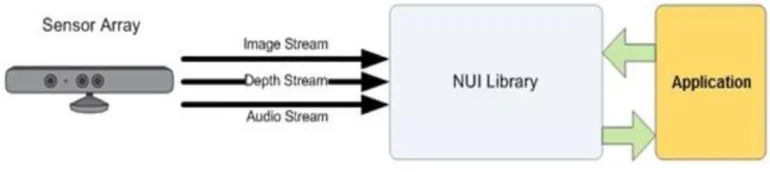
1. The NUI API is the core of the Kinect for Windows API. It support fundamental image and device management features.
2. Human Skeleton tracking with the Kinect SDK
Skeleton tracking is not just about tracking the joints by reading the player information; rather, it tracks the complete body movement. Kinect uses a rendering pipeline where it matches the incoming data (raw depth data from sensor) with sample trained data.
The human pose recognition algorithm used several base character models that varied with different heights, sizes, clothes, and several other factors.
Figure 1.3 the overall process flow that creates joint points from raw depth data
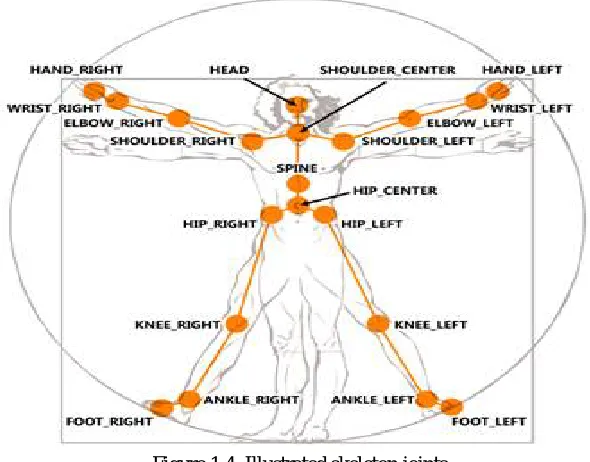
The SDK supports the tracking of up to 20 joint points. Each and every joint position is identified by its name (head, shoulders, elbows, wrists, arms, spine, hips, knees, ankles, and so on), and the skeleton-tracking state is determined by Tracked, Not Tracked, or Position Only. The SDK uses multiple channels to detect the skeleton. The default channel tracks all 20 skeletal joint positions with the Tracked, Not Tracked, or Inferred tracking mode. The following diagram represents a complete human skeleton facing the Kinect sensor, shaped with 20 joint points that can be tracked by the Kinect for Windows SDK:
Figure 1.4. Illustrated skeleton joints
III. ADAPTIVE FRAMEWORK AND RESULTS
A. Power point Presentation Control
One of the application areas of the gesture based HCI interface developed in this system is in presentation control. The simulation of the right arrow and the left arrow of the keyboard allow the presentation to move forward or go backward. Using the tracked X,Y,Z position of the head, the right hand and the left hand, two predefined gestures (Swipe Left and Swipe Right) are used for this keyboard simulation. The Swipe Left gesture is recognized once the left hand is diverged 45 cm from the head which moves the presentation one slide backward while the Swipe Right gesture which moves the presentation forward is recognized once the right hand is diverged 45 cm from the head.
B. Zoom Manipulation
I proposed and implemented one hand and two hands gestures to support “Zoom”, “Turn”, etc. This project which supports “Zoom In/Out”, “Turn Left/Right”, and “Walk”. “Zoom” gestures use two hands, two hands in front of the body and split from center is “Zoom in”, and two hands in front of body and merge together is “Zoom Out”. Right hand is dedicated to control the “Turn” gestures. Putting right hand in front of body and swipe left/right to turn left/right.
C. Shape Game
Shape Game sample application, which is included in the Kinect for Windows SDK beta from Microsoft Research. This game displays the tracked skeletons of two players together with shapes falling from the sky. Players can control the shapes by moving and speaking commands. The tracked skeleton of the players and shapes (circles, triangles, stars, and so on) falling from the sky.
Figure 1.5 Shape game sample
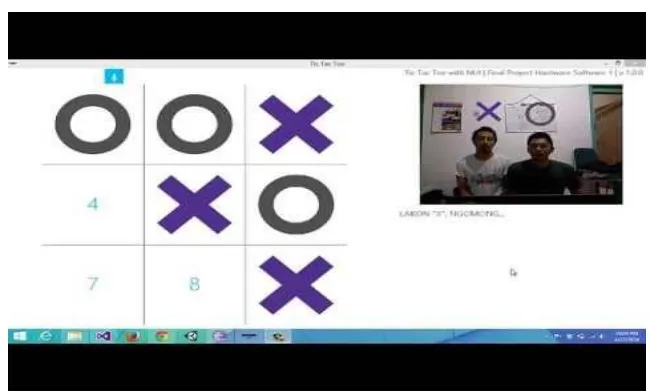
D. Tic-Tac-Toe
Figure 1.6 Tic-Tac-Toe game
IV. CONCLUSION
There is still a gap between research development and its applicability in schools, based on their classroom education proposed framework with several teaching activities like power point presentation, zoom manipulation and some educational games using human skeleton tracking and hand detection. It is used to motivate children with special needs to improving both motor and cognitive skills (beyond the physical interaction).These activities having teaching with fun in classroom, In our proposed system teacher and student interacting with each other, analyzing and recognition of gestures and react to it.
The proposed method has many advantages such as: high precision, high stability, small computation time and the influence of the key points is very small.
REFERENCES
1. ”Kinect-Based Face Recognition and Its Application in MOOCs Production” Yuran Hu E-Learning Lab,ShanghaiJiao Tong University,Shanghai,China.IEEE(2015).
2. ”Virtual Touch Screen Using Microsoft Kinect” EktaParwani, ApekshaPawar, ChiragAjwani, Prof. Govind Pole, Dept of Computer Engineering Modern Education Society’s College of Engineering Pune-411001.
3. ”Human Gesture Recognition Using Kinect Camera” OrasaPatsadu, ChakaridaNukoolkit and BunthitWatanapa School of Information Technology King Mongkut’s University of Technology Thonburi Bangkok, Thailand,JCSSE(2014).
4. ”Computer Vision for RGB-D Sensors:Kinect and Its Applications” IEEE TRANSACTIONS ON CYBERNETICS, VOL. 43, NO. 5, OCTOBER 2013
5. ”Microsoft Kinect Sensor and Its Effect” Wenjumzeng,University of Missouri,IEEE(2014).
6. ”Extended Multitouch: Recovering Touch Posture, Handedness, and User Identity using Depth Camera” SundarMurugappana, Vinayaka, NiklasElmqvistb, KarthikRamania School of Mechanical Engineering b) School of Electric Engineering Purdue University, West Lafayette, IN 47907
7. Kinect for Windows SDK Programming Guide(PDF).
8. “Hand Detecting and Positioning Based on Depth Image of Kinect Sensor” Van Bang Le, AnhTu Nguyen, and Yu Zhu International Journal of Information and Electronics Engineering, Vol. 4, No. 3, May 2014.
9. "Mobile augmented reality basedinteractive teaching & learning system with low computation “Prasad, S. Peddoju, S.K.; Ghosh, D.,ISBN: 978-1-4799-3724-0/14/$31.00 ©2014 IEEE 123 approach," Computational Intelligence in Control and Automation(CICA), 2013 IEEE Symposium on , vol., no., pp.97,103, 16-19 April 2013 doi: 10.1109/CICA.2013.6611669.
10. “The promise of exergames as tools to measure physical health. Entertainment Computing”Staiano AE, Calvert SL (2011).
BIOGRAPHY
Ms. Ashvini GaneshsinghBaisis a M.E. Student of Computer Science & Engineering
Department, Sipna college of engineering, SantGadge Baba Amravati University, Amravati,-Maharashtra.