EasyTree: A Graphical Tool for Dependency Tree Annotation
Alexa Little
∗, Stephen Tratz
†∗Yale University, New Haven, Connecticut, USA †U.S. Army Research Laboratory, Adelphi, Maryland, USA
[email protected], [email protected]
Abstract
This paper introduces EasyTree, a dynamic graphical tool for dependency tree annotation. With EasyTree, annotators can incrementally construct and label trees by manipulating an interactive graphical tree representation and then exporting the internal data representation as JSON (JavaScript Object Notation). This intuitive animated interface has a number of customizable features to assist annotators, including color-coded part-of-speech indicators and optional translation displays. It can be adapted to suit a range of different projects. Edge labels, part-of-speech categories, and many other settings can be edited from within the GUI. EasyTree uses the standard UTF-8 encoding internally and properly handles both left-to-right and right-to-left scripts. In providing a user-friendly annotation tool, our aim is to significantly reduce the time spent transforming data or learning to use software, to improve the overall user experience for annotators, and to make annotation approachable even for inexperienced users. EasyTree is built entirely with standard web technologies—JavaScript, HTML, and CSS. Thus, it is well-suited for web-based annotation efforts such as crowdsourcing efforts.
Keywords:annotation tools, dependency trees, visualization, GUI
1.
Introduction
Manually constructed linguistic resources are crucial for the training and evaluation of most state-of-the-art natural language processing tools, including dependency parsers, and enable countless research efforts. Unfortunately, the annotation process is typically very slow and tedious. This is particularly true for more complicated tasks such as de-pendency tree annotation. Although some tree-editing pro-grams have been developed to address this issue, most ei-ther rely on text-based editing, which can be slow and error-prone, or are standalone applications designed for sophisti-cated users, assuming a moderate knowledge of linguistics or computer programming. These issues are inconvenient for researchers and annotators generally but are especially problematic for low-resource language tasks, for which ex-perienced annotators may not be available, and crowdsourc-ing efforts, which typically require a browser-based anno-tation tool. To address these needs, this paper introduces EasyTree,1 a dynamic visual tree editing system designed to make tree annotation fast and intuitive.
To reduce the time and cost of training annotators— significant issues, especially for low-resource language an-notation tasks—EasyTree provides a clean, uncluttered in-terface. It provides important functionality for dealing with large trees such as panning, zooming, and subtree hiding, and it relies on intuitive, well-accepted metaphors such as drag-and-drop.
To ease deployment, EasyTree is built entirely with JavaScript, HTML, and CSS—standard web technologies that are supported by all major web browsers. Thus, EasyTree is easily deployed within web browsers, making it appropriate for online web-based annotation tasks such as crowdsourcing efforts. If running on a remote server, no client side installation is necessary; otherwise, installation is as simple as decompressing a .zip file.
In the remainder of this paper, we give an overview of EasyTree’s use and important features (Section 2), discuss
1
Available at https://github.com/alexalittle/easytree
the implementation of EasyTree (Section 3), and compare and contrast it with similar tools (Section 4).
2.
Capabilities and Use
2.1
Loading Trees
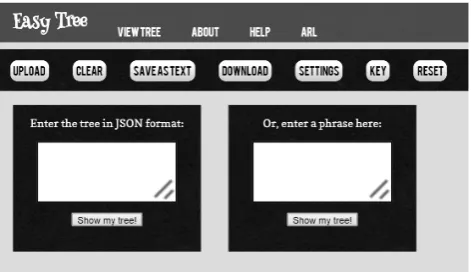
[image:1.595.305.541.430.566.2]Users can submit sentences for annotation as plain text, with individual tokens separated by whitespace, or as JSON (JavaScript Object Notation) text (See Figures 1 and 2).
Figure 1: Tree upload boxes. Trees may either be uploaded using EasyTree-compatiable JSON or plain text.
Trees created manually or via automatic dependency parsers can be visualized or edited with EasyTree after con-verting the representation into EasyTree-compatible JSON objects. For large-scale projects or for annotators who need more support, we provide a script for automatically con-verting monolingual or parallel corpora into collections of JSON files. There are also scripts for converting between the popular CoNLL-X dependency tree format used in the 2006 CoNLL-X shared task (Buchholz and Marsi, 2006) and EasyTree-compatible JSON.
2.2
Editing Trees
drag-Original:花子さん の友達は東京に住んでいます Translation: Miss Hanako’s friend lives in Tokyo JSON:
{“name”: “root”, “children”:
[{“name”: “花子”, “def”: “Hanako”, “pos”: “noun”},
{“name”: “さん”, “def”: “Miss”, “pos”: “x”},
{“name”: “の”, “def”: “s”, “pos”:“det”},
{“name”: “友達”, “def”: “friend”, “pos”:“noun”},
{“name”: “は”, “def”: “は”, “pos”:“x”},
{“name”: “東京”, “def”: “Tokyo”, “pos”:“noun”},
{“name”: “に”, “def”: “in”, “pos”:“adp”},
{“name”: “住んでいます”, “def”: “lives”, “pos”:“verb”}]}
Figure 2: Example sentence and associated EasyTree-compatible JSON.
[image:2.595.304.541.68.301.2]and-drop. As depicted in Figure 3, when the user begins dragging a node, red circles appear around the remaining nodes. These “drop zones” indicate where the node may be re-attached. When the dragged node is eventually dropped onto a drop zone, a link representing a syntactic depen-dency is created between the two nodes with the dropped node as the child. The re-attached node is inserted such that it and its new siblings remain sorted according to the orig-inal word order of the sentence. The annotator continues this incremental process until the dependency tree is fully constructed.
Figure 3: Red “drop zones” appear while dragging a node to highlight possible attachment sites.
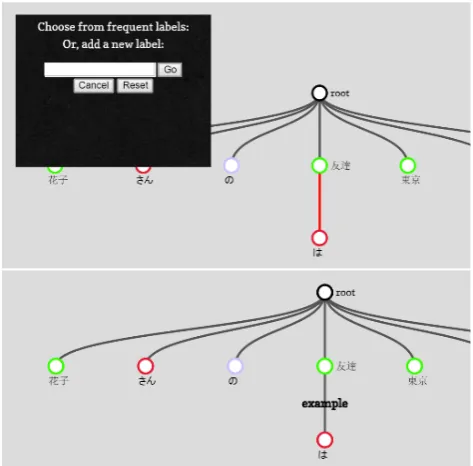
EasyTree supports both labeled dependency trees, which have syntactic labels on each dependency link, and unla-beled dependency trees, which lack such labels. To assign a syntactic label to a dependency relation, the annotator sim-ply clicks on the edge between a pair of nodes, as depicted in Figure 4, and, in response, a pop-up window appears, which enables the user to either choose the appropriate la-bel from a list of lala-bels sorted by frequency or, alternatively, enter a new label. The selected label then appears at the midpoint of the edge.
To manage large trees, which can be difficult to view in their entirety, EasyTree provides pan, collapse, and zoom capabilities. Panning is accomplished by clicking in the background and dragging the mouse in the desired direc-tion. Subtrees can be collapsed or expanded with a mouse click on the topmost node of the subtree; nodes with hidden descendants are depicted with a filled-in node as shown in
[image:2.595.53.291.71.205.2]Figure 4: Edges can be given dependency labels by clicking on an them and selecting an appropriate label.
Figure 5. Adjust the zoom factor of the tree display, the an-notator rolls the mouse scroll wheel forward or backward. Together, these functions allow users to quickly navigate very large dependency trees with minimal effort and using only the mouse.
Figure 5: Subtree collapsing/expansion. The user may click to hide/show descendants. If a node has hidden descen-dants, it is displayed with a solid node.
2.3
Visual Customization
EasyTree includes several customizable features to assist annotators.
First, in order to facilitate annotation by non-native anno-tators, if a translation or definition is available for a partic-ular word, EasyTree will display it when the user moves the mouse over that word, as shown in Figure 6. To enable this feature, the JSON for the tree node must include “def” keys for words with their translations as the corresponding values. This can be done manually or with a custom script; we provide a Python script to automatically include trans-lations based upon a user-specified dictionary.
[image:2.595.52.286.395.531.2] [image:2.595.303.541.441.531.2]cus-Figure 6: Mouseover to view translation.
[image:3.595.51.288.69.173.2]tomizable mapping persists until modified or reset by the user, enabling users to customize the color settings only once and then use them for the entire duration of the project.
Figure 7: Customizable color scheme for indicating part-of-speech.
Third, although the standard settings of EasyTree have been optimized to work with 14 different writing systems, vari-ation in word length, script type, and other factors make a one-size-fits-all display configuration unrealistic; hence, EasyTree provides a settings panel for access to the most important style settings. The customizable options accessi-ble from the settings panel are as follows:
• Increase / decrease tree width
• Increase / decrease tree height
• Increase / decrease node size
• Increase / decrease text x offset
• Increase / decrease text y offset
• Change font family of labels
2.4
Saving Trees
To save the state of the tree annotation, the user clicks the Save Tree button. EasyTree then prompts the user to down-load a copy of the JSON object representing the depen-dency annotation, and the user chooses where to save it. Users can also access the JSON directly in the EasyTree application; the Save As Text button triggers a pop-up con-taining the JSON plain text for the current state of the tree.
3.
Implementation
EasyTree is written entirely in JavaScript, CSS, and HTML. This means that it can run in modern web browsers and
Original:花子さんの友達は東京に住んでいます Translation: Miss Hanako’s friend lives in Tokyo
{“name”:“root”,“id”:9,“children”:
[{“name”:“住んでいます”,“def”:“lives”,“pos”:“verb”,“id”:1, “children”:
[{“name”:“友達”,“def”:“friend”,“pos”:“noun”,“id”:5, “link”:“subject”,“children”:
[{“name”:“花子”,“def”:“Hanako”,“pos”:“noun”, “id”:8,“link”:“DP modifier”,“children”: [{“name”:“さん”,“def”:“Miss”,“pos”:“x”,
“id”:7,“link”:“honorific”},
{“name”:“の”,“def”:“s”,“pos”:“det”,“id”:6, “link”:“possessive”}]},
{“name”:“は”,“def”:“は”,“pos”:“x”,“id”:4, “link”:“topic”}]},
{“name”:“東京”,“def”:“Tokyo”,“pos”:“noun”, “id”:3,“link”:“location”,“children”:
[{“name”:“に”,“def”:“in”,“pos”:“adp”,“id”:2,
[image:3.595.305.547.73.282.2]“link”:“dative”}]}]}]}
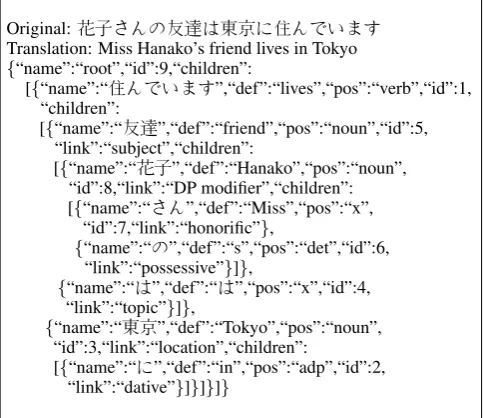
Figure 8: JSON corresponding to the tree in Figure 9.
is platform independent. For the interactive graphical dis-play, EasyTree leverages D3, a popular open source data
visualization library written in JavaScript (Bostock et al., 2011). The D3 library binds data to visual SVG (Scalable
Vector Graphics) elements, allowing manipulations of data to affect the graphics and vice versa. EasyTree utilizes the UTF-8 encoding, which enables it to work with Unicode characters.
4.
Related Work
Of the alternatives, the most relevant graphical annotation software tool is the tree editor TrEd, (Pajas and ˇStˇep´anek, 2008). TrEd is a programmable graphical user interface for editing and viewing trees and has been used for several tree-banking projects, including the Prague Arabic Dependency Treebank (Hajiˇc et al., 2004). It has a substantial number of features but can be unintuitive at times and difficult to learn; thus, it may not be a good choice for less experienced an-notators. A notable difference between TrEd, a standalone application written in Perl, and EasyTree is that EasyTree is designed to run in web browsers, making it trivial to install and, more importantly, appropriate for web-based annota-tion tasks such as crowdsourcing efforts.
A couple other notable graphical NLP annotation tools are
BRAT2(Stenetorp et al., 2012) and WEBANNO3(Yimam et al., 2013). These tools support a wide range of annotation tasks and are capable of being used for dependency annota-tion. However, the manner in which they display text—on a single line—makes following the dependency arcs some-what difficult, and, thus, these tools are probably more ap-propriate for other tasks, such as marking events and named entities. Like EasyTree, these tools are browser-based ap-plications.
Although text-based annotation for dependency trees is typ-ically avoided in favor of graphical annotation, text-based
2
http://brat.nlplab.org/ 3
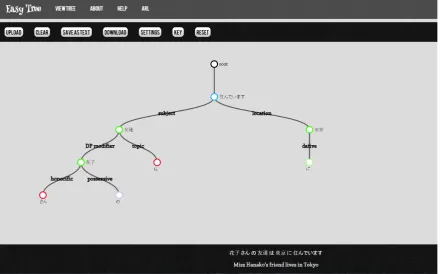
[image:3.595.53.289.275.405.2]Figure 9: Full view of EasyTree with a complete tree structure.
editing has not been completely abandoned. One recent re-search effort into lightweight dependency syntax annota-tion introduced a new text-based annotaannota-tion scheme called GFL (Graph Fragment Language) that is designed to ease such annotation (Schneider et al., 2013). A key character-istics of GFL is that it provides for underspecified trees— that is, annotators are not required to annotate the entire in-put segment but may instead annotate only the portions that are grammatical or are otherwise relevant to their particular project.
5.
Conclusion
In this paper, we described the EasyTree graphical depen-dency tree visualization and editing software. EasyTree uses the intuitive drag-and-drop metaphor for editing tree structures, and its pan, collapse, and zoom capabilities fa-cilitate the display and editing of large complex trees. It supports both unlabeled and labeled dependency annota-tion and supports a variety of customizaannota-tions. Being built entirely using standard web technologies, it runs in all ma-jor web browsers and is ideal for online annotation efforts, such as crowdsourcing efforts. It supports UTF-8 encod-ing and works with multiple writencod-ing systems includencod-ing both left-to-right and right-to-left scripts.
6.
Future Work
Possible future directions include implementing support for adding new nodes, such as nodes to represent various types of null elements, adding additional link types, such as links for connecting pronouns to their antecedents, and adding a capability to specify a restricted set of edge labels. We have also considered developing a graphical download option, so
that users can build trees and capture the resulting image. We hope to implement a web server-based active learning system with which a future version of EasyTree could di-rectly interface for the purpose of accelerating annotation tasks. Support for more complex annotation, including Ab-stract Meaning Representation (AMR) (Banarescu et al., 2013) is another possibility, and there is a wide range of additional visual customizations and file format options that could be implemented.
Acknowledgments
We wish to thank the U.S. Army’s Educational Outreach Program’s (AEOP’s) College Qualified Leaders (CQL) pro-gram for providing the internship opportunity that facili-tated this work.
References
Banarescu, L., Bonial, C., Cai, S., Georgescu, M., Grif-fitt, K., Hermjakob, U., Knight, K., Koehn, P., Palmer, M., and Schneider, N. (2013). Abstract Meaning Rep-resentation for Sembanking. InProceedings of the 7th Linguistic Annotation Workshop & Interoperability with Discourse, pages 178–186. Association for Computa-tional Linguistics.
Bostock, M., Ogievetsky, V., and Heer, J. (2011). D3
data-driven documents. IEEE Transactions on Visualization and Computer Graphics, 17:2301–2309.
Hajiˇc, J., Smrz, O., Zem´anek, P., ˇSnaidauf, J., and Beˇska, E. (2004). Prague Arabic Dependency Treebank: Develop-ment in Data and Tools. InProceedings of the NEMLAR Intern. Conf. on Arabic Language Resources and Tools, pages 110–117.
Pajas, P. and ˇStˇep´anek, J. (2008). Recent Advances in a Feature-Rich Framework for Treebank Annotation. In
Proceedings of the 22nd International Conference on Computational Linguistics, pages 673–680. Association for Computational Linguistics.
Schneider, N., O’Connor, B., Saphra, N., Bamman, D., Faruqui, M., Smith, N. A., Dyer, C., and Baldridge, J. (2013). A Framework for (Under) specifying De-pendency Syntax without Overloading Annotators. Pro-ceedings of the 7th Linguistic Annotation Workshop & Interoperability with Discourse, pages 51–60.
Stenetorp, P., Pyysalo, S., Topi´c, G., Ohta, T., Ananiadou, S., and Tsujii, J. (2012). brat: a web-based tool for nlp-assisted text annotation. In Proceedings of the Demon-strations Session at EACL 2012. Association for Com-putational Linguistics.