MUHAMMAD HANIS BIN RASHIDAN
DEVELOPMENT OF CARTOGRAPHIC STYLING TOOL TO SUPPORT GEOSPATIAL DATA INTEROPERABILITY
MUHAMMAD HANIS BIN RASHIDAN
A thesis submitted in fulfilment of the requirements for the award of the degree of
Master of Science (Geoinformatics)
Faculty of Build Environment and Surveying Universiti Teknologi Malaysia
T
he
sake of
A
llah
Al
mighty
D
earest parents, Abah &Emak,
iv
ACKNOWLEDGEMENT
ABSTRACT
vi
ABSTRAK
TABLE OF CONTENTS
CHAPTER TITLE PAGE
DECLARATION ii
DEDICATION iii
ACKNOWLEDGEMENT iv
ABSTRACK v
ABSTRAK vi
TABLE OF CONTENTS vii
LIST OF TABLES x
LIST OF FIGURES xi
LIST OF ABBREVIATION xv
LIST OF APPENDICES xvi
1 INTRODUCTION 1
1.1 Research Backgound 1
1.2 Problem Statement 4
1.3 Research Aim 7
1.4 Research Objectives 7
1.5 Research Questions 8
1.6 Research Scope 9
1.6.1 GeoPackage Styling Extension 9
1.6.2 Development and Implementation 10
1.6.3 Dataset 10
1.6.4 Software 11
1.7 Research Significance 12
viii
2 LITERATURE REVIEW 14
2.1 Introduction 14
2.2 OGC GeoPackage Data Format 15
2.2.1 Contribution to mobile-based applications 16 2.2.2 Current Status and Implementation 18 2.2.3 GeoPackage Data Model and Structure 21
2.3 OGC Styled Layer Descriptor 23
2.3.1 SLD Styling Elements 25
2.3.2 Styling for Point 28
2.3.3 Styling for Line 33
2.3.4 Styling for Polygon 39
2.4 QGIS Layer Style 46
2.5 ESRI Layer Style 47
2.6 Interoperability in GIS 49
2.7 Summary 51
3 METHODOLOGY 52
3.1 Introduction 52
3.2 Research Workflow 53
3.3 Geospatial Data Preparation 53
3.3.1 Spatial Data Acquisition 55
3.3.2 PostgreSQL Database Design and
Development 57
3.3.3 GeoPackage Data Development 59
3.4 GeoPackage Styling Extension Development 61
3.5 GeoPackage Plugin Development 64
3.6 GeoPackage Styling Implementation and Test 67
3.6.1 Implementation for Point 68
3.6.2 Implementation for Line 69
3.6.3 Implementation for Polygon 70
3.6.4 Testing in Cross-Platform Application 72 3.6.5 Testing in Different GIS Software 75
4 RESULTS AND DISCUSSION 78
4.1 Introduction 78
4.2 GeoPackage Styling Extension – Capability Evaluation 79
4.2.1 Point Layer 79
4.2.2 Line Layer 82
4.2.3 Polygon Layer 84
4.2.4 Findings 88
4.3 GeoPackage Styling Extension – Application in
Cross-Platform 88
4.4 GeoPackage Styling Extension – Different GIS
Software 93
4.5 GeoPackage for Web Application 95
4.6 Summary 96
5 CONCLUSION AND RECOMMENDATIONS 97
5.1 Introduction 97
5.2 Revisit of Research Questions and Conclusion 98
5.3 Recommendations 100
REFERENCES 101
Appendix A 105
x
LIST OF TABLES
TABLE NO. TITLE PAGE
1.1 Research questions based on the objectives 8
1.2 Software used for this study 11
2.1 GeoPackage supported data types 22
2.2 SLD-supporting software 23
3.1 Logical data design for the respective data tables 59 3.2 Logical data schema for table gpkg_point_style, gpkg_line_style, and
gpkg_polygon_style 62 3.3 Sample of basic styling for point which consists four different cases 69 3.4 Sample of basic styling for line which consists four different cases 70 3.5 Sample of basic styling for polygon which consists four different
cases 71
3.6 Pre-defined styling encoding used in the test 73
LIST OF FIGURES
FIGURE NO. TITLE PAGE
1.1 Klang Valley area viewed on OpenStreetMap 11
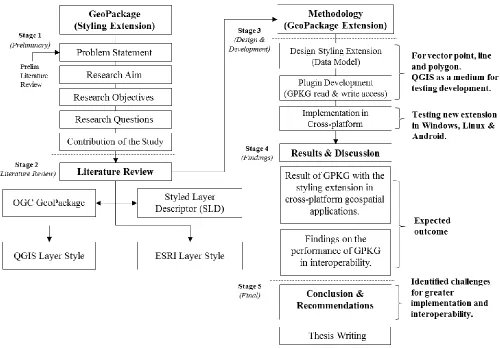
1.2 Thesis structure consists of five stages and each stage is accordingly written in the following Chapter 1, 2, 3, 4 and 5 13 2.1 GeoPackage as a multi-platform geospatial data format 16
2.2 GeoPackage tables overview 21
2.3 A basic style example of SLD applied to layer that contains points, to style as red circle with a size of 6 pixels 24 2.4 (a) Layers comprising a sequence of layer definitions. (b) Styles
comprising a sequence of styling elements 25
2.5 Elements in <Rule> 26
2.6 (a) Geometry area SLD filter (b) Feature selection SLD filter 27
2.7 Simple point 28
2.8 Red colour circular SLD styling code 29
2.9 Stroke in a simple point 30
2.10 Black colour circular point SLD styling code 30
2.11 Rotated square point 31
2.12 Green rotated square SLD styling code 31
xii
2.14 Transparent triangle SLD styling code 33
2.15 Simple line 34
2.16 SLD styling code for simple line layer 34
2.17 Bordered lines 35
2.18 Bordered line SLD styling code 36
2.19 Lines with dashes 37
2.20 SLD styling code for dashed line layer 38
2.21 Offset line 38
2.22 SLD styling code for offset line layer 39
2.23 Simple polygon 40
2.24 SLD styling code for simple polygon layer 40
2.25 Simple polygon with stroke 41
2.26 SLD styling code for simple polygon with stroke layer 41
2.27 Transparent polygon 42
2.28 SLD styling code for transparent polygon layer 42
2.29 Offset buffer polygon 43
2.30 SLD styling code for the offset buffer polygon layer 44
2.31 Polygon with graphic fill 44
2.32 SLD styling code for tiled polygon layer 45
2.33 Graphic used for fill 45
2.34 QML styling code for a point layer which defined supported QGIS version, rules, filters, and symbol properties 46 2.35 A portion of data styling (in binary) stored in a Layer file (.lyr). The
red underlined text highlights the word RSO_Malaya which is can be
2.36 Levels of interoperability 50
3.1 Research methodology framework 54
3.2 Spatial data acquisition and preparation workflow 55 3.3 Dataset loaded in QGIS software after been through data cleaning
process 56
3.4 Dataset (in Shapefile data format) imported into PostgreSQL database
through a PostGIS Import/Export Manager 57
3.5 (a) PosgreSQL database properties. (b) List of data tables in the
database 58
3.6 Process of data translation from PostgreSQL into GeoPackage data
format 60
3.7 Translated dataset in GeoPackage file format 60
3.8 GeoPackage data model (green coloured) with proposed styling data
model (peach coloured) 62
3.9 GeoPackage plugin’s graphical user interface (GUI) design using Qt
Designer software 65
3.10 Process workflow for saving styling information into GeoPackage 66 3.11 Process workflow for accessing styling information stored inside
GeoPackage 67
3.12 SQL commands for creating table gpkg_point_style in GeoPackage
data tables 68
3.13 SQL commands for creating table gpkg_line_style in GeoPackage data
tables 70
3.14 SQL commands for creating table gpkg_polygon_style in GeoPackage
xiv
3.15 Process workflows involved in testing GeoPackage styling extension
to works on different platforms 73
3.16 List of layers in the dataset loaded in ArcCatalog 75 3.17 List of identified fields accessed through Query Layer 76 3.18 Styling records from gpkg_point_style is successfully accessed in
ArcGIS desktop 76
4.1 Results of styling appearance for each case (point) 80 4.2 SQL commands for inserting styling data into gpkg_point_style
written in Python 81
4.3 Results of styling appearance for each case (line) 83 4.4 SQL commands for inserting styling data into gpkg_line_style written
in Python 84
4.5 Results of styling appearance for each case (polygon) 86 4.6 SQL commands for inserting styling data into gpkg_polygon_style
written in Python 87
4.7 GeoPackage features are loaded and randomly styled by software 90 4.8 GeoPackage plugin that developed in the research. (a) Windows, (b)
Linux, and (c) Mac OS 91
4.9 Results from the process of loading styling record stored in
GeoPackage 93
4.10 GeoPackage data layers are loaded and randomly styled by the
ArcGIS 94
4.11 Results from the process of applying styling record stored in the
GeoPackage 95
LIST OF ABBREVIATION
API - Application Programming Interface FGDC - Federal Geographic Data Committee FOSS4G - Free Open Source Software for GIS FME - Feature Manipulation Engine
GDAL - Geospatial Data Abstraction Library GeoSWG - Geospatial Science Working Group GIS - Geographic Information System IT - Information Technology
NSDI - National Spatial Data Infrastruture MyGDI - Malaysia Geospatial Data Infrastructure OGC - Open Geospatial Consortium
QML - Qt Modeling Language
SLD - Styled Layer Descriptor
SE - Symbology Encoding
xvi
LIST OF APPENDICES
APPENDIX TITLE PAGE
A Logical Data Design 105
CHAPTER 1
INTRODUCTION
1.1 Research Background
In Geographic Information Science (GIS) map is defined as a representation of earth features, and carries information about specific things. Nowadays maps can be found in several types such as topographic, physical, climate, and thematic map. A good map will make the user to understand the map faster and accurate, this can be done by organizing the elements of the map to convey its message to its users. Hence, there are several elements that play an important role in the process of map making (cartography); such as projection, scale, title, data frame, symbology and styling, generalization, legend and others. For example, styling is used for highlighting geographic features by manipulating different colours and elements.
2 There are numerous map styling encoding standards available, defined by the authorised and non-profit agencies. The purpose of the styling encoding standards is to aid cartographers in the production of map, as well as to ensure a more consistent appearance and data content. For instance, in the Malaysian Geospatial Data Infrastructure (MyGDI), the Standard Technical Committee is dedicated to develop standards for geographic information for the purpose of data sharing. There are three types of geospatial-related standards covered by the MyGDI, i.e. contents standards, access standards and exchange standards. Contents standards include land parcel identifier (UPI), features and attributes code (MS1759) and geographic place names (MyGeoName). Access standards take into account standards in the data communication such as ISO 19100 series for geographic information. Exchange standards include XML and GML.
Meanwhile, at the international level there are several agencies such as Federal Geographic Data Committee (FGDC) – a digital cartographic standard for geologic maps symbolization; Geography and Geospatial Science Working Group (GeoSWG) – cartographic guidelines for public health; United States Geological Survey (USGS) – selection of colours and patterns for geologic maps; and many more. Because of maps are the end user products, therefore they must be produced strictly under the defined guidelines and standards, in order to avoid misleading maps interpretation.
Moreover, there are variety of web GIS software (ArcGIS Server, GeoServer, MapServer, and MapGuide) and web service APIs (Google Maps, OpenLayers, ArcGIS Online, and OpenStreetMap) available for users to publish their data online. The abundance of these software packages in the market has encouraged more users to exchange their data, thus leading to the term of geospatial data sharing. Sharing geospatial data has become widespread among GIS users due to the government departments, agencies and professional are actively involved in the distribution of these data.
The geospatial data sharing activities are progressively increasing with the establishment of National Geospatial Data Infrastructure (NSDI). Developed countries have implemented and established their national geospatial data centre. The
Malaysia Geospatial Data Infrastructure or known as MyGDI is an initiative by the government to develop a geospatial data infrastructure to enhance the awareness on the availability of dataset and improve access to geospatial information (MaCGDI, 2016). MyGDI comprises of policies, standard, technology, research and development that benefits government, agencies, non-profit sectors and academic community in terms of cost effective and timely delivery of geospatial data to facilitate the sharing and dissemination of geospatial information.
4 The geopackage format was designed with a database capability, lightweight, interoperable across all computing platforms, and can be used without intermediate format translation. As this format is still under development by the OGC, exploring its benefits and uses towards interoperability would be interesting.
1.2 Problem Statement
The current practices used by geospatial communities for storing and maintaining cartographic styling are through the use of SLD (Styled Layer Descriptor), GeoJSON, ESRI Layer, or Qt Modelling Language (Ordnance Survey, 2015). These stylesheets are used to store symbology and styling, and then can be applied to the data. Styled Layer Descriptor is an XML based, specified by the OGC to allow user-defined symbolization and colouring of geographic features (OGC, 2007). It is capable of defining the rendering of vector and raster dataset and typically used to instruct Web Map Service (WMS) on how to render specific layers. In August 2007, the SLD specification was split up into two new OGC implementation specifications – Symbology Encoding (SE) and Styled Layer Descriptor (SLD) (Bacharach, 2007). Users now may use SDL or SE as a medium to carry and share their styling on the Internet. For example in GeoServer users may import SDL into styles directory to apply the defined styles on specific layers.
data) as a practical approach for defining features on a map while it preserves data cleanly and allowing a light layer of visual style.
Furthermore, ESRI introduced a Layer file (.lyr) that stores the path to a source dataset and other layer properties, including styling. In comparison to a Shapefile, a Layer file is a just a reference to actual data, such as the Shapefile, feature class, etc (ESRI, 2016a). A Layer file does not store the data's attributes or geometry since it is not an actual data. The purpose is to store the symbology and styling of the feature layers. For instance, if a Layer file (.lyr) shares to other users together with the actual data file (.shp), the new users can display the data with the applied style from the previous user.
Another method used to store styling is through the Qt Modelling Language (QML) – a user interface markup language. It is a JSON-like declarative language for designing user interface–centric applications. The use for QML for styling has commonly been used in QGIS applications (previously known as Quantum GIS). QML supports for both GML (Geography Markup Language) and Shapefile data (Ordnance Survey, 2015). To apply QML style in QGIS, users need to load the data and navigate to the style tab within the layer properties windows, and from there navigate to the directory containing the QML and apply.
6 example, QML is best to use in the QGIS, while ESRI Layer is for ArcGIS, and SLD is mainly used in GeoServer (and other web application) (Ordnance Survey, 2015).
The needs for an interoperable styling mechanism for a better geospatial data sharing is highlighted by Ardung (2017) on how to increase interoperability of ESRI Layer style between proprietary and open source GIS software. Therefore, for a greater interoperability, this study focuses on the enhancement of the GeoPackage capability to store and carry styling for cross-platform geospatial applications. If this happens, users can use GeoPackage as a medium to maintain styling which can then be opened in any working platforms such as desktop (Windows, Linux or Mac), website or mobile (Android). For this reason, a styling extension is needed for GeoPackage for greater data interoperability across multiple platforms and applications.
GeoPackage was introduced by the OGC on 13 February 2014 and became a robust geospatial data format that supports current trends and meets the geospatial data requirements in multiple domains, including defence and intelligence, emergency management, and mobile services (Daisey, 2016). GeoPackage is an open, standards-based, platform independent, portable and interoperable data format for sharing and displaying geospatial data in cross-platform desktop, website and mobile mapping applications (OGC, 2017). It has been recognized as a data format that enables the next generation of geospatial technologies (Brachman, 2017).
GeoPackage is seen to provide a greater support for cross-platform geospatial applications either on desktop, website or mobile devices. It also provides interoperability capability for the users by reducing the needs for data conversion and translation, thus facilitates the process of data sharing and exchange. However, the current version of GeoPackage is 1.0.1 does not support styling (Daisey, 2016). It has to be noted that styling is undeniably an important element in cartography because it controls how the data are manipulated and visualize in delivering information to the end users.
1.3 Research Aim
The aim of this study is to design and develop a styling extension for GeoPackage data format to enable the storage of styling data.
1.4 Research Objectives
To achieve the stated research aim, the following objectives are formulated:
a. To study the potential and suitability of GeoPackage to store styling information.
b. To design and develop a styling extension within the GeoPackage data model.
8
1.5 Research Questions
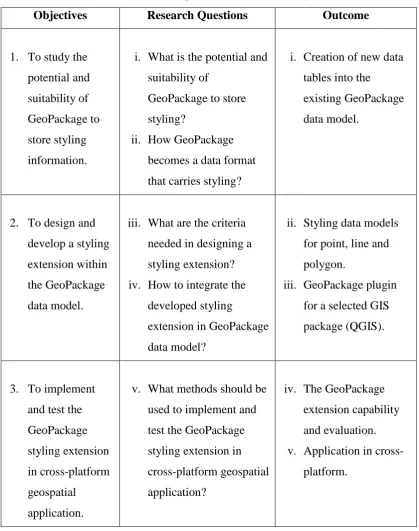
There are several research questions developed in this study, as listed in the Table 1.1 below.
Table 1.1: Research questions based on the objectives
Objectives Research Questions Outcome
1. To study the potential and suitability of GeoPackage to store styling information.
i. What is the potential and suitability of
GeoPackage to store styling?
ii. How GeoPackage becomes a data format that carries styling?
i. Creation of new data tables into the
existing GeoPackage data model.
2. To design and develop a styling extension within the GeoPackage data model.
iii. What are the criteria needed in designing a styling extension? iv. How to integrate the
developed styling
extension in GeoPackage data model?
ii. Styling data models for point, line and polygon.
iii. GeoPackage plugin for a selected GIS package (QGIS).
3. To implement and test the GeoPackage styling extension in cross-platform geospatial
application.
v. What methods should be used to implement and test the GeoPackage styling extension in cross-platform geospatial application?
iv. The GeoPackage extension capability and evaluation. v. Application in
1.6 Research Scope
The scope of the research comprises of design and development of the styling extension for GeoPackage data format which is then to be implemented and tested in cross-platform geospatial applications. Thus, there are several important aspects that need to be addressed, as described in the following sections.
1.6.1 GeoPackage Styling Extension
10
1.6.2 Development and Implementation
The development and implementation of the styling extension are done in selected software, i.e. QGIS. QGIS is one of the best Free and Open Source Software for Geospatial (FOSS4G) which offers users to create, edit, visualise, analyse and publish geospatial information on Windows, Mac, Linux, and Android. Its versatility, allows GIS users to develop their own geospatial scripts which can then be deployed in the QGIS Plugin repositories. In this study, a GeoPackage plugin is developed to support the implementation process. The plugin works by creating styling data model in the GeoPackage data model, and control read and write access for storing and accessing data styling. The implementation and testing are done in multiple platform application to test the interoperability of the new extension. A sample dataset with a custom styling standard is used to test the styling extension in Windows, Linux, Mac, and Android platforms.
1.6.3 Dataset
Figure 1.1: Klang Valley area viewed on OpenStreetMap
Source: Image captured based on OpenStreetMap
1.6.4 Software
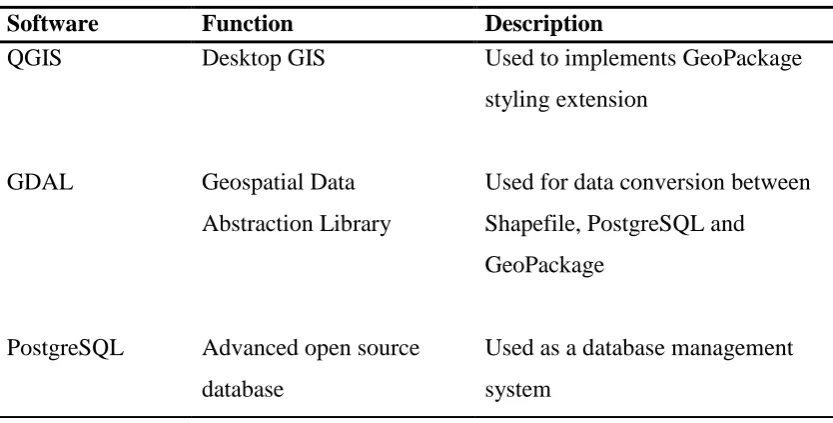
There are several important software used for this study as shown in Table 1.2.
Table 1.2: Software used for this study
Software Function Description
QGIS Desktop GIS Used to implements GeoPackage
styling extension
GDAL Geospatial Data
Abstraction Library
Used for data conversion between Shapefile, PostgreSQL and GeoPackage
PostgreSQL Advanced open source database
12
PostGIS Extension to PostgreSQL Used to provide spatial data objects
ArcGIS Desktop GIS Used to test GeoPackage styling
extension
Qt Designer Tool for designing and building graphical user interface
Used for designing the extension’s graphical user interface
Spatialite GUI Open source tool for supporting SpatiaLite
Used to check GeoPackage data table and structure.
1.7 Research Significance
1.8 Thesis Structure
101
REFERENCES
Adams, B., & Suykens, F. (2013). Astute: Increased Situational Awareness through proactive decision support and adaptive map-centric user interfaces.
European Intelligence and Security Informatics Conference, pp. 289-293. doi:10.1109/EISIC.2013.74
Agafonkin, V. (2017). Using GeoJSON with Leaflet. Retrieved from Leaflet - an open-source JavaScript library for mobile-friendly interactive maps: http://leafletjs.com/examples/geojson/
Ardung, O. (2017). Closed To Open Source GIS: First Steps In Reverse Engineering ESRI's Layer Definition File Format. Dissertation.
Bacharach, S. (2007). The OGC Announces Styled Layer Descriptor & Symbol Encoding Specifications. Retrieved from Open Geospatial Consortium Inc.: http://www.opengeospatial.org/pressroom/pressreleases/761
Bishr, Y. (1998). Overcoming the semantic and other barriers to GIS interoperability.
International Journal of Geographical Information Science, 299-314.
Borcher, E., & Ertz, O. (2015). Towards Cartographic Portrayal Interoperability – the Revision of OGC Symbology Encoding Standard. 1st ICA European Symposium on Cartography, 1, pp. 116-119.
Brachman, M. (2017). OGC GeoPackage: Enabling the Next Generation of Geospatial Technologies. Retrieved from Open Geospatial: http://www.opengeospatial.org/
Bruy, A., & Svidzinska, D. (2015). QGIS by Example - Leverage the power of QGIS in real-world applications to become a powerful user in cartography and GIS analysis. Packt Publishing Ltd.
Buehler, K., & McKee, L. (1996). The OpenGIS Guide: Introduction to Interoperable Geoprocessing: Part I of the Open Geodata Interoperability Specification (OGIS). Open GIS Consortium, Incorporated.
Christophe, S., Dumenieu, B., Turbet, J., Hoarau, C., Mellado, N., Ory, J., . . . Vergne, R. (2016). Map style formalization: rendering techniques extension for cartography. Expressive 2016 The Joint Symposium on Computational Aesthetics and Sketch-Based Interfaces and Modeling and Non-Photorealistic Animation and Rendering (pp. 59-68). The Eurographics Association.
Daisey, P. (2016). OGC® GeoPackage Encoding Standard. (J. Yutzler, Ed.)
Retrieved from Open Geospatial Consortium:
http://www.opengeospatial.org/standards/geopackage
ESRI. (1998). ESRI Shapefile Technical Description. An ESRI White Paper.
ESRI. (2016a). What is the difference between a shapefile and a layer file? Retrieved from ESRI Technical Support: http://support.esri.com/en/technical-article/000011516
ESRI. (2016b). What information is stored in a layer (.lyr) file? Retrieved from Technical Support: http://support.esri.com/en/technical-article/000004904 ESRI. (2016c). Is it possible to save a layer file into a file geodatabase? Retrieved
from Technical Support: http://support.esri.com/en/technical-article/000012097
GDAL. (2016). GeoPackage vector. Retrieved from GDAL - Geospatial Data Abstraction Library: http://www.gdal.org/drv_geopackage.html
103 GeoServer. (2016). GeoPackage Extension - A plugin to read and write GeoPackage files in GeoServer. Retrieved from GeoServer: http://docs.geoserver.org/latest/en/user/community/geopkg/
MaCGDI. (2016). Malaysia Geospatial Data Infrastructure (NSDI) Overview.
Retrieved from Malaysian Centre for Geospatial Data Infrastructure (MaCGDI): http://www.mygeoportal.gov.my/mygdi-overview
Mapbox. (2016). Mapbox Style Specification. Retrieved from Mapbox: https://www.mapbox.com/mapbox-gl-js/style-spec/
Masó, J., Diaz, P., Riverola, A., Díaz, D., & Pons, X. (2013). Exchanging the Status between Clients of Geospatial Web Services and GIS applications using Atom. Proceedings of the International MultiConference of Engineers and Computer Scientists, 1.
McBride, B. (2015). GeoJSON Feature Styling in geojson.io. Retrieved from Fulcrum mobile location leverage: http://www.fulcrumapp.com/geojson-feature-styling/
OGC. (2007). Styled Layer Descriptor profile of the Web Map Service (Implementation Specification). (M. Lupp, Ed.) Retrieved from Open Geospatial Consortium Inc.: http://www.opengeospatial.org/standards/sld OGC. (2017). An Open Format for Geospatial Information. Retrieved from
GeoPackage: http://www.geopackage.org/
OGC Network. (2016). GeoPackage. Retrieved from GeoPackage Information and Data Models: http://www.ogcnetwork.net/geopackage
Ordnance Survey. (2015). Cartographic Stylesheet: Instructions for using Ordnance Survey's cartographic stylesheets. Southampton: Ordnance Survey © Crown. doi:D11976 1015
Safe Software. (2016). Integrate OGC GeoPackage Using FME. Retrieved from Safe Software: https://www.safe.com/integrate/ogc-geopackage/
Singh, R., & Bermudez, L. (2013). Emerging Geospatial Sharing Technologies in Earth and Space Science Informatics. American Geophysical Union, Fall Meeting.
Zhang, C., Sun, Z., Heo, G., Di, L., & Lin, L. (2016). Developing a GeoPackage Mobile App to Support Field Operations in Agriculture. Fifth International Conference on Agro-Geoinformatics (Agro-Geoinformatics), pp. 1-4. doi:10.1109/Agro-Geoinformatics.2016.7577656