1 Years of networking experience: Years of experience with Cisco products:
2 I have these network types: LAN Backbone WAN
Other:
3 I have these Cisco products: Switches Routers Other (specify models):
4 I perform these types of tasks: H/W installation and/or maintenance S/W configuration Network management Other:
5 I use these types of documentation: H/W installation H/W configuration S/W configuration Command reference Quick reference Release notes Online help Other:
6 I access this information through: % Cisco.com % CD-ROM % Printed manuals % Other:
7 I prefer this access method: Cisco.com CD-ROM Printed manuals Other:
8 I use the following three product features the most:
Document Information
Document Title: Catalyst 6500 Series Switch Command Reference
Part Number: OL-8977-01 S/W Release (if applicable): 8.6 On a scale of 1–5 (5 being the best), please let us know how we rate in the following areas:
The document is complete. The information is accurate.
The information is well organized. The information I wanted was easy to find. The document is written at my
technical level of understanding.
The information I found was useful to my job.
Please comment on our lowest scores:
Mailing Information
Organization Date
Contact Name Mailing Address
City State/Province Zip/Postal Code
Country Phone ( ) Extension
Corporate Headquarters
Cisco Systems, Inc. 170 West Tasman Drive San Jose, CA 95134-1706 USA
http://www.cisco.com Tel: 408 526-4000
800 553-NETS (6387) Fax: 408 526-4100
Catalyst 6500 Series Switch
Command Reference
THE SPECIFICATIONS AND INFORMATION REGARDING THE PRODUCTS IN THIS MANUAL ARE SUBJECT TO CHANGE WITHOUT NOTICE. ALL STATEMENTS, INFORMATION, AND RECOMMENDATIONS IN THIS MANUAL ARE BELIEVED TO BE ACCURATE BUT ARE PRESENTED WITHOUT WARRANTY OF ANY KIND, EXPRESS OR IMPLIED. USERS MUST TAKE FULL RESPONSIBILITY FOR THEIR APPLICATION OF ANY PRODUCTS. THE SOFTWARE LICENSE AND LIMITED WARRANTY FOR THE ACCOMPANYING PRODUCT ARE SET FORTH IN THE INFORMATION PACKET THAT SHIPPED WITH THE PRODUCT AND ARE INCORPORATED HEREIN BY THIS REFERENCE. IF YOU ARE UNABLE TO LOCATE THE SOFTWARE LICENSE OR LIMITED WARRANTY, CONTACT YOUR CISCO REPRESENTATIVE FOR A COPY.
The Cisco implementation of TCP header compression is an adaptation of a program developed by the University of California, Berkeley (UCB) as part of UCB’s public domain version of the UNIX operating system. All rights reserved. Copyright © 1981, Regents of the University of California.
NOTWITHSTANDING ANY OTHER WARRANTY HEREIN, ALL DOCUMENT FILES AND SOFTWARE OF THESE SUPPLIERS ARE PROVIDED “AS IS” WITH ALL FAULTS. CISCO AND THE ABOVE-NAMED SUPPLIERS DISCLAIM ALL WARRANTIES, EXPRESSED OR IMPLIED, INCLUDING, WITHOUT
LIMITATION, THOSE OF MERCHANTABILITY, FITNESS FOR A PARTICULAR PURPOSE AND NONINFRINGEMENT OR ARISING FROM A COURSE OF DEALING, USAGE, OR TRADE PRACTICE.
IN NO EVENT SHALL CISCO OR ITS SUPPLIERS BE LIABLE FOR ANY INDIRECT, SPECIAL, CONSEQUENTIAL, OR INCIDENTAL DAMAGES, INCLUDING, WITHOUT LIMITATION, LOST PROFITS OR LOSS OR DAMAGE TO DATA ARISING OUT OF THE USE OR INABILITY TO USE THIS MANUAL, EVEN IF CISCO OR ITS SUPPLIERS HAVE BEEN ADVISED OF THE POSSIBILITY OF SUCH DAMAGES.
CCVP, the Cisco Logo, and the Cisco Square Bridge logo are trademarks of Cisco Systems, Inc.; Changing the Way We Work, Live, Play, and Learn is a service mark of Cisco Systems, Inc.; and Access Registrar, Aironet, BPX, Catalyst, CCDA, CCDP, CCIE, CCIP, CCNA, CCNP, CCSP, Cisco, the Cisco Certified Internetwork Expert logo, Cisco IOS, Cisco Press, Cisco Systems, Cisco Systems Capital, the Cisco Systems logo, Cisco Unity, Enterprise/Solver, EtherChannel, EtherFast, EtherSwitch, Fast Step, Follow Me Browsing, FormShare, GigaDrive, GigaStack, HomeLink, Internet Quotient, IOS, IP/TV, iQ Expertise, the iQ logo, iQ Net Readiness Scorecard, iQuick Study, LightStream, Linksys, MeetingPlace, MGX, Networking Academy, Network Registrar, Packet, PIX, ProConnect, RateMUX, ScriptShare, SlideCast, SMARTnet, StackWise, The Fastest Way to Increase Your Internet Quotient, and TransPath are registered trademarks of Cisco Systems, Inc. and/or its affiliates in the United States and certain other countries.
All other trademarks mentioned in this document or Website are the property of their respective owners. The use of the word partner does not imply a partnership relationship between Cisco and any other company. (0609R)
Catalyst 6500 Series Switch Command Reference
C O N T E N T S
Preface
xxxiAudience
xxxiOrganization
xxxiRelated Documentation
xxxiConventions
xxxiiObtaining Documentation
xxxiiiCisco.com
xxxiiiProduct Documentation DVD
xxxiiiOrdering Documentation
xxxiiiDocumentation Feedback
xxxivCisco Product Security Overview
xxxivReporting Security Problems in Cisco Products
xxxivObtaining Technical Assistance
xxxvCisco Technical Support & Documentation Website
xxxvSubmitting a Service Request
xxxviDefinitions of Service Request Severity
xxxviObtaining Additional Publications and Information
xxxviC H A P T E R 1
Command-Line Interfaces
1-1Switch CLI
1-1Accessing the Switch CLI
1-1Operating the Switch CLI
1-3Using the CLI String Search
1-13ROM Monitor CLI
1-17Accessing the ROM Monitor CLI
1-17Operating the ROM Monitor CLI
1-17C H A P T E R 2
Catalyst 6500 Series Switch and ROM Monitor Commands
2-1alias
2-2boot
2-4clear alias
2-8clear arp
2-9clear autoshut
2-11clear banner motd
2-12clear boot auto-config
2-13clear boot device
2-14clear boot system
2-15clear cam
2-16clear cam monitor
2-17clear cam notification
2-18clear channel statistics
2-20clear config
2-21clear config checkpoint
2-23clear config pvlan
2-24clear cops
2-25clear counters
2-27clear crypto key rsa
2-29clear dhcp-snooping bindings
2-30clear dhcp-snooping statistics
2-32clear diagnostic
2-33clear dot1x config
2-35clear dot1x vlan-group
2-36clear eou
2-38clear ethernet-cfm
2-40clear ftp
2-41clear gmrp statistics
2-42clear gvrp statistics
2-43clear igmp statistics
2-44clear ip alias
2-45clear ip dns domain
2-46clear ip dns server
2-47clear kerberos creds
2-53clear kerberos realm
2-54clear kerberos server
2-55clear key config-key
2-56clear l2protocol-tunnel cos
2-57clear l2protocol-tunnel statistics
2-58clear lacp-channel statistics
2-59clear lda
2-60clear localuser
2-62clear log
2-63clear log command
2-64clear logging buffer
2-65clear logging callhome
2-66clear logging callhome from
2-68clear logging callhome reply-to
2-69clear logging callhome severity
2-70clear logging callhome smtp-server
2-71clear logging level
2-72clear logging server
2-74clear macro
2-75clear mls cef
2-77clear mls cef rpf statistics
2-78clear mls entry
2-79clear mls entry cef
2-81clear mls exclude protocol
2-82clear mls multicast statistics
2-83clear mls nde
2-84clear mls nde flow
2-85clear mls statistics
2-86clear mls statistics entry
2-88clear module password
2-90clear msfcautostate
2-91clear multicast router
2-92clear pbf
2-95clear packet-capture
2-96clear pbf arp-inspection
2-98clear pbf client
2-99clear pbf gw
2-100clear pbf-map
2-101clear pbf vlan
2-103clear policy
2-104clear port broadcast
2-105clear port cops
2-106clear port eou
2-107clear port ethernet-cfm
2-108clear port ethernet-oam
2-109clear port flexlink
2-111clear port host
2-112clear port qos autoqos
2-113clear port qos cos
2-114clear port security
2-115clear port vlan-mapping
2-117clear port web-auth
2-118clear pvlan mapping
2-119clear qos acl
2-120clear qos autoqos
2-123clear qos config
2-126clear qos cos-cos-map
2-127clear qos cos-dscp-map
2-128clear qos dscp-cos-map
2-129clear qos dscp-mutation-map
2-130clear qos dscp-mutation-table-map
2-131clear qos ipprec-dscp-map
2-132clear qos mac-cos
2-133clear radius
2-140clear rcp
2-141clear rgmp statistics
2-142clear security acl
2-143clear security acl capture-ports
2-145clear security acl counters
2-146clear security acl cram
2-147clear security acl log flow
2-148clear security acl map
2-149clear security acl statistics
2-151clear snmp access
2-152clear snmp access-list
2-153clear snmp community
2-154clear snmp community-ext
2-155clear snmp group
2-156clear snmp ifalias
2-157clear snmp inform
2-158clear snmp notify
2-159clear snmp targetaddr
2-160clear snmp targetparams
2-161clear snmp trap
2-162clear snmp user
2-163clear snmp view
2-164clear spantree detected-protocols
2-165clear spantree mst
2-166clear spantree portcost
2-168clear spantree portinstancecost
2-169clear spantree portinstancepri
2-171clear spantree portpri
2-172clear spantree portvlancost
2-173clear spantree portvlanpri
2-175clear spantree root
2-176clear spantree statistics
2-178clear system info-log command
2-182clear system profile
2-183clear tacacs key
2-184clear tacacs server
2-185clear timezone
2-186clear top
2-187clear trunk
2-188clear vlan
2-189clear vlan counters
2-191clear vlan mapping
2-192clear vmps rcp
2-194clear vmps server
2-195clear vmps statistics
2-196clear vtp pruneeligible
2-197clear vtp statistics
2-198clear web-auth
2-199commit
2-200commit lda
2-202configure
2-203confreg
2-205context
2-207copy
2-209delete
2-217dev
2-218diagnostic start
2-219diagnostic stop
2-221dir—ROM monitor
2-222dir—switch
2-223disable
2-225disconnect
2-226download
2-227history—ROM monitor
2-237history—switch
2-238l2trace
2-239meminfo
2-242ping
2-243ping ethernet
2-246pwd
2-247quit
2-248reconfirm vmps
2-249reload
2-250repeat
2-251reset—ROM monitor
2-253reset—switch
2-254restore counters
2-257rollback
2-259session
2-260set
2-261set accounting commands
2-262set accounting connect
2-263set accounting exec
2-264set accounting suppress
2-266set accounting system
2-267set accounting update
2-269set acllog ratelimit
2-270set acl mac-packet-classify
2-271set alias
2-272set arp
2-273set authentication enable
2-275set authentication login
2-277set authorization commands
2-279set authorization enable
2-281set authorization exec
2-283set autoshut
2-285set banner telnet
2-289set boot auto-config
2-290set boot config-register
2-291set boot config-register auto-config
2-294set boot device
2-297set boot sync now
2-299set boot sync timer
2-300set boot system flash
2-301set cam
2-302set cam monitor
2-304set cam notification
2-306set cdp
2-309set channelprotocol
2-311set channel vlancost
2-313set config acl nvram
2-315set config checkpoint
2-316set config mode
2-318set config rollback
2-321set cops
2-322set crypto key rsa
2-324set default portstatus
2-325set dhcp-snooping
2-326set diagnostic bootup level
2-328set diagnostic diagfail-action
2-329set diagnostic event-log size
2-330set diagnostic monitor
2-331set diagnostic ondemand
2-333set diagnostic schedule
2-335set dot1q-all-tagged
2-337set dot1x
2-338set enablepass
2-343set eou logging
2-350set eou max-retry
2-351set eou radius-accounting
2-352set eou rate-limit
2-353set eou revalidate
2-354set eou timeout
2-356set errdisable-timeout
2-358set errordetection
2-360set ethernet-cfm
2-365set ethernet-cfm continuity-check
2-366set ethernet-cfm continuity-check level
2-367set ethernet-cfm domain
2-368set ethernet-cfm ping-reply
2-369set ethernet-cfm vlan
2-370set fan-tray-version
2-371set feature agg-link-partner
2-372set feature mdg
2-373set firewall
2-374set ftp
2-375set garp timer
2-377set gmrp
2-378set gmrp fwdall
2-379set gmrp registration
2-380set gmrp timer
2-381set gvrp
2-383set gvrp applicant
2-385set gvrp dynamic-vlan-creation
2-386set gvrp registration
2-387set gvrp timer
2-389set igmp
2-391set igmp fastblock
2-392set igmp fastleave
2-393set igmp flooding
2-394set igmp querier
2-397set igmp v3-processing
2-399set image-verification
2-400set inlinepower
2-401set interface
2-403set ip alias
2-406set ip dns
2-407set ip dns domain
2-408set ip dns server
2-409set ip fragmentation
2-410set ip http port
2-411set ip http server
2-412set ip permit
2-413set ip redirect
2-415set ip route
2-416set ip telnet server
2-418set ip unreachable
2-419set kerberos clients mandatory
2-420set kerberos credentials forward
2-421set kerberos local-realm
2-422set kerberos realm
2-423set kerberos server
2-424set kerberos srvtab entry
2-425set kerberos srvtab remote
2-427set key config-key
2-428set l2protocol-tunnel cos
2-429set l2protocol-tunnel trunk
2-430set lacp-channel system-priority
2-431set lcperroraction
2-432set lda
2-433set length
2-436set logging callhome from
2-444set logging callhome reply-to
2-445set logging callhome severity
2-446set logging callhome smtp-server
2-448set logging console
2-449set logging history
2-450set logging level
2-451set logging server
2-454set logging session
2-456set logging telnet
2-457set logging timestamp
2-458set logout
2-459set mac-auth-bypass
2-460set macro
2-462set macro ciscosmartports
2-465set mls agingtime
2-466set mls bridged-flow-statistics
2-468set mls cef load-balance
2-469set mls cef maximum-routes
2-470set mls cef per-prefix-statistics
2-472set mls exclude protocol
2-473set mls flow
2-474set mls nde
2-476set mls netflow-entry-create
2-481set mls netflow-per-interface
2-482set mls rate
2-483set mls statistics protocol
2-484set mls verify
2-485set module
2-487set module autoshut
2-489set module name
2-491set module power
2-492set module shutdown
2-494set multicast ratelimit
2-498set multicast router
2-499set ntp broadcastclient
2-500set ntp broadcastdelay
2-501set ntp client
2-502set ntp server
2-503set ntp summertime
2-504set ntp timezone
2-506set packet-capture
2-507set packet-capture dump-file
2-509set packet-capture filter
2-510set packet-capture limit
2-512set packet-capture snap-length
2-513set password
2-514set pbf
2-515set pbf arp-inspection
2-517set pbf client
2-518set pbf gw
2-520set pbf-map
2-522set pbf vlan
2-525set policy
2-526set poll
2-528set port arp-inspection
2-529set port auto-mdix
2-531set port auxiliaryvlan
2-533set port broadcast
2-535set port channel
2-537set port cops
2-540set port critical
2-541set port debounce
2-542set port description
2-544set port dot1qtunnel
2-552set port dot1x
2-554set port duplex
2-560set port enable
2-561set port eou
2-562set port errdisable-timeout
2-564set port errordetection
2-565set port ethernet-cfm
2-566set port ethernet-oam
2-568set port ethernet-oam action
2-569set port ethernet-oam link-monitor
2-570set port ethernet-oam mode
2-572set port ethernet-oam remote-loopback
2-574set port flexlink
2-576set port flowcontrol
2-578set port gmrp
2-580set port gvrp
2-581set port host
2-583set port inlinepower
2-584set port jumbo
2-586set port l2protocol-tunnel
2-587set port lacp-channel
2-590set port mac-auth-bypass
2-592set port macro
2-594set port membership
2-598set port name
2-600set port negotiation
2-601set port protocol
2-602set port qos
2-604set port qos autoqos
2-606set port qos cos
2-608set port qos policy-source
2-609set port qos trust
2-611set port rsvp dsbm-election
2-615set port security
2-616set port security-acl
2-620set port speed
2-622set port sync-restart-delay
2-623set port trap
2-624set port unicast-flood
2-625set port vlan-mapping
2-627set port voice interface dhcp
2-629set port vtp
2-631set port web-auth
2-632set port web-auth initialize
2-634set power redundancy
2-636set prompt
2-637set protocolfilter
2-638set pvlan
2-639set pvlan mapping
2-641set qos
2-643set qos acl default-action
2-644set qos acl ip
2-646set qos acl ipx
2-651set qos acl mac
2-654set qos acl map
2-657set qos autoqos
2-659set qos bridged-microflow-policing
2-660set qos cos-cos-map
2-661set qos cos-dscp-map
2-662set qos drop-threshold
2-663set qos dscp-cos-map
2-665set qos dscp-mutation-map
2-666set qos dscp-mutation-table-map
2-667set qos policed-dscp-map
2-675set qos policer
2-676set qos policy-source
2-678set qos rsvp
2-680set qos rxq-ratio
2-682set qos statistics export
2-684set qos statistics export aggregate
2-685set qos statistics export destination
2-686set qos statistics export interval
2-688set qos statistics export port
2-689set qos txq-ratio
2-690set qos wred
2-691set qos wrr
2-693set radius attribute
2-695set radius auto-initialize
2-696set radius deadtime
2-697set radius keepalive
2-698set radius key
2-700set radius retransmit
2-701set radius server
2-702set radius timeout
2-703set rate-limit
2-704set rcp username
2-706set rgmp
2-707set rspan
2-708set security acl adjacency
2-711set security acl arp-inspection
2-712set security acl capture-ports
2-714set security acl cram
2-715set security acl feature ratelimit
2-717set security acl ip
2-718set security acl ipx
2-724set security acl log
2-727set security acl statistics
2-735set snmp
2-736set snmp access
2-737set snmp access-list
2-739set snmp buffer
2-741set snmp chassis-alias
2-742set snmp community
2-743set snmp community-ext
2-745set snmp extendedrmon netflow
2-747set snmp group
2-748set snmp ifalias
2-749set snmp inform
2-750set snmp notify
2-752set snmp rmon
2-753set snmp rmonmemory
2-754set snmp targetaddr
2-755set snmp targetparams
2-757set snmp trap
2-759set snmp user
2-762set snmp view
2-764set span
2-766set spantree backbonefast
2-769set spantree bpdu-filter
2-770set spantree bpdu-guard
2-771set spantree bpdu-skewing
2-772set spantree channelcost
2-773set spantree channelvlancost
2-775set spantree defaultcostmode
2-776set spantree disable
2-778set spantree enable
2-780set spantree fwddelay
2-781set spantree macreduction
2-790set spantree maxage
2-791set spantree mode
2-793set spantree mst
2-795set spantree mst config
2-797set spantree mst link-type
2-799set spantree mst maxhops
2-800set spantree mst vlan
2-801set spantree portcost
2-802set spantree portfast
2-804set spantree portfast bpdu-filter
2-805set spantree portfast bpdu-guard
2-806set spantree portinstancecost
2-807set spantree portinstancepri
2-809set spantree portpri
2-811set spantree portvlancost
2-812set spantree portvlanpri
2-814set spantree priority
2-816set spantree root
2-818set spantree uplinkfast
2-821set ssh mode
2-823set summertime
2-825set system baud
2-827set system contact
2-828set system core-dump
2-829set system core-file
2-830set system countrycode
2-831set system crashinfo
2-832set system crossbar-fallback
2-834set system highavailability
2-835set system highavailability versioning
2-836set system info-log
2-838set system location
2-840set system profile
2-843set system supervisor-update
2-845set system switchmode allow
2-847set system syslog-dump
2-849set system syslog-file
2-850set tacacs attempts
2-851set tacacs directedrequest
2-852set tacacs key
2-853set tacacs server
2-854set tacacs timeout
2-855set test diagfail-action
2-856set test diaglevel
2-857set time
2-858set timezone
2-859set traffic monitor
2-860set transceiver-monitoring
2-861set trunk
2-862set udld
2-865set udld aggressive-mode
2-867set udld interval
2-868set vlan
2-869set vlan mapping
2-874set vlan verify-port-provisioning
2-876set vmps config-file
2-877set vmps downloadmethod
2-879set vmps downloadserver
2-880set vmps server
2-881set vmps state
2-883set vtp
2-884set vtp pruneeligible
2-888set web-auth
2-889set web-auth session-timeout
2-894show accounting
2-895show acllog
2-898show acl mac-packet-classify
2-899show aclmerge algo
2-900show alias
2-901show arp
2-902show authentication
2-903show authorization
2-904show autoshut
2-905show banner
2-906show boot
2-907show boot device
2-908show cam
2-909show cam agingtime
2-911show cam count
2-912show cam monitor
2-913show cam msfc
2-914show cam notification
2-915show cdp
2-919show channel
2-922show channel group
2-927show channel hash
2-931show channel mac
2-933show channelprotocol
2-934show channel traffic
2-936show config
2-937show config checkpoints
2-943show config differences
2-944show config mode
2-946show config qos acl
2-947show cops
2-948show counters
2-951show dhcp-snooping bindings
2-959show dhcp-snooping config
2-961show dhcp-snooping statistics
2-962show diagnostic
2-963show dot1q-all-tagged
2-966show dot1x
2-967show dvlan statistics
2-971show environment
2-972show eou
2-978show errdisable-timeout
2-980show errordetection
2-982show ethernet-cfm continuity-check statistics
2-983show ethernet-cfm domain
2-984show ethernet-cfm errors
2-985show ethernet-cfm maintenance-point
2-986show ethernet-cfm status
2-988show fabric channel
2-989show fabric errors
2-994show fabric status
2-996show file
2-997show firewall
2-998show flash
2-999show ftp
2-1002show garp timer
2-1003show gmrp configuration
2-1005show gmrp statistics
2-1006show gmrp timer
2-1007show gvrp configuration
2-1008show gvrp statistics
2-1010show ifindex
2-1012show igmp flooding
2-1013show igmp statistics
2-1018show imagemib
2-1020show image-verification
2-1021show inlinepower
2-1022show interface
2-1024show inventory
2-1026show ip alias
2-1028show ip dns
2-1029show ip http
2-1031show ip permit
2-1033show ip route
2-1035show ip telnet
2-1037show kerberos
2-1038show l2protocol-tunnel statistics
2-1040show lacp-channel
2-1042show lcperroraction
2-1046show lda
2-1047show localuser
2-1051show log
2-1052show log command
2-1055show logging
2-1056show logging buffer
2-1058show logging callhome
2-1059show logging callhome destination
2-1061show logging callhome from
2-1063show logging callhome reply-to
2-1064show logging callhome severity
2-1065show logging callhome smtp-server
2-1066show mac
2-1067show mac-auth-bypass
2-1070show macro
2-1072show microcode
2-1075show mls
2-1076show mls cef interface
2-1080show mls cef mac
2-1082show mls cef maximum-routes
2-1083show mls cef rpf
2-1084show mls cef summary
2-1086show mls entry
2-1088show mls entry cef
2-1094show mls entry netflow-route
2-1098show mls exclude protocol
2-1100show mls flowmask
2-1101show mls multicast
2-1103show mls nde
2-1107show mls netflow-route
2-1108show mls pbr-route
2-1109show mls statistics
2-1110show mls verify
2-1115show module
2-1116show moduleinit
2-1119show msfcautostate
2-1121show msmautostate
2-1122show multicast group
2-1123show multicast group count
2-1125show multicast protocols status
2-1126show multicast ratelimit-info
2-1127show multicast router
2-1128show multicast v3-group
2-1130show netstat
2-1131show ntp
2-1138show packet-capture
2-1140show pbf
2-1141show pbf arp-inspection
2-1144show poll
2-1151show port
2-1152show port arp-inspection
2-1160show port auto-mdix
2-1161show port auxiliaryvlan
2-1162show port broadcast
2-1164show port capabilities
2-1166show port cdp
2-1171show port channel
2-1173show port cops
2-1179show port counters
2-1181show port critical
2-1183show port debounce
2-1184show port description
2-1185show port dhcp-snooping
2-1186show port dot1q-all-tagged
2-1188show port dot1q-ethertype
2-1189show port dot1qtunnel
2-1190show port dot1x
2-1191show port eou
2-1193show port errdisable-timeout
2-1195show port errordetection
2-1197show port ethernet-oam
2-1198show port flexlink
2-1201show port flowcontrol
2-1202show port inlinepower
2-1204show port jumbo
2-1207show port l2protocol-tunnel
2-1208show port lacp-channel
2-1210show port mac
2-1213show port mac-address
2-1215show port mac-auth-bypass
2-1217show port negotiation
2-1218show port qos
2-1222show port rsvp
2-1225show port security
2-1226show port security-acl
2-1229show port spantree
2-1231show port status
2-1232show port sync-restart-delay
2-1234show port tdr
2-1235show port transceiver
2-1237show port trap
2-1240show port trunk
2-1241show port unicast-flood
2-1243show port vlan-mapping
2-1244show port voice
2-1245show port voice active
2-1248show port voice fdl
2-1252show port voice interface
2-1254show port vtp
2-1255show port web-auth
2-1257show proc
2-1259show protocolfilter
2-1263show pvlan
2-1264show pvlan capability
2-1266show pvlan mapping
2-1268show qos acl editbuffer
2-1270show qos acl info
2-1271show qos acl map
2-1273show qos acl resource-usage
2-1275show qos bridged-microflow-policing
2-1276show qos info
2-1277show qos mac-cos
2-1283show qos statistics
2-1295show qos statistics export info
2-1298show qos status
2-1299show radius
2-1300show rate-limit
2-1301show rcp
2-1303show reset
2-1304show rgmp group
2-1305show rgmp statistics
2-1306show rspan
2-1307show running-config
2-1309show security acl
2-1312show security acl arp-inspection
2-1315show security acl capture-ports
2-1316show security acl cram
2-1317show security acl feature ratelimit
2-1318show security acl log
2-1319show security acl map
2-1322show security acl resource-usage
2-1324show security acl tcam interface
2-1325show snmp
2-1326show snmp access
2-1328show snmp access-list
2-1330show snmp buffer
2-1331show snmp community
2-1332show snmp context
2-1334show snmp counters
2-1335show snmp engineid
2-1339show snmp group
2-1340show snmp ifalias
2-1342show snmp inform
2-1343show snmp notify
2-1344show snmp rmonmemory
2-1346show snmp user
2-1351show snmp view
2-1353show span
2-1355show spantree
2-1357show spantree backbonefast
2-1361show spantree blockedports
2-1362show spantree bpdu-filter
2-1363show spantree bpdu-guard
2-1364show spantree bpdu-skewing
2-1365show spantree conflicts
2-1367show spantree defaultcostmode
2-1369show spantree guard
2-1370show spantree mapping
2-1372show spantree mistp-instance
2-1374show spantree mst
2-1376show spantree mst config
2-1378show spantree portfast
2-1380show spantree portinstancecost
2-1381show spantree portvlancost
2-1382show spantree statistics
2-1383show spantree summary
2-1391show spantree uplinkfast
2-1394show ssh
2-1396show startup-config
2-1397show summertime
2-1400show system
2-1401show system health
2-1405show system highavailability
2-1407show system info-log
2-1408show system profile
2-1409show system sanity
2-1410show test
2-1418show time
2-1423show timezone
2-1424show top
2-1425show top report
2-1427show traffic
2-1429show trunk
2-1430show udld
2-1433show users
2-1435show version
2-1436show vlan
2-1439show vlan counters
2-1444show vlan verify-port-provisioning
2-1446show vmps
2-1447show vmps mac
2-1449show vmps statistics
2-1450show vmps vlan
2-1451show vtp
2-1452show vtp domain
2-1454show vtp statistics
2-1456show web-auth summary
2-1458slip
2-1460squeeze
2-1461stack
2-1462switch
2-1463switch console
2-1464switch fabric
2-1465sync
2-1466sysret
2-1467tclquit
2-1468tclsh
2-1469telnet
2-1470test cable-diagnostics
2-1471traceroute ethernet
2-1477unalias
2-1478undelete
2-1479unset=varname
2-1480varname=
2-1481verify
2-1482wait
2-1483whichboot
2-1484write
2-1485write tech-support
2-1488A P P E N D I X A
Acronyms
A-1A P P E N D I X B
Acknowledgments for Open-Source Software
B-1Preface
This preface describes the audience, organization, and conventions of this publication and provides information on how to obtain related documentation.
Audience
This publication is for experienced network administrators who are responsible for configuring and maintaining Catalyst 6500 series switches.
Organization
This publication is organized as follows:
Related Documentation
Other documents in the Catalyst 6500 series switch documentation set include the following:
• Catalyst 6500 Series Installation Guide
• Catalyst 6000 Series Installation Guide
• Catalyst 6500 Series Module Installation Guide
• Catalyst 6500 Series Software Configuration Guide Catalyst 6500 Series System Message Guide
Chapter Title Description
Chapter 1 Command-Line Interfaces
Describes the two types of CLIs found on Catalyst 6500 series switches.
Chapter 2 Catalyst 6500 Series Switch and ROM Monitor Commands
Lists alphabetically and provides detailed information for all Catalyst 6500 series switch and ROM-monitor commands.
• ATM Software Configuration Guide and Command Reference for the Catalyst 5000 Family and 6500 Series Switches
• Release Notes for Catalyst 6500 Series For information about MIBs, refer to this URL:
http://www.cisco.com/public/sw-center/netmgmt/cmtk/mibs.shtml
Conventions
This publication uses the following conventions:
Notes use the following conventions:
Convention Description
boldface font Commands, command options, and keywords are in
boldface.
italic font Arguments for which you supply values are in italics.
[ ] Elements in square brackets are optional.
{ x | y | z } Alternative keywords are grouped in braces and separated by vertical bars.
[ x | y | z ] Optional alternative keywords are grouped in brackets and separated by vertical bars.
string A nonquoted set of characters. Do not use quotation marks around the string or the string will include the quotation marks.
screen font Terminal sessions and information the system displays are in
screen font.
boldface screen
font
Information you must enter is in boldface screen font.
italic screen font Arguments for which you supply values are in italic screen font.
^ The symbol ^ represents the key labeled Control—for example, the key combination ^D in a screen display means hold down the Control key while you press the D key.
< > Nonprinting characters, such as passwords are in angle brackets.
[ ] Default responses to system prompts are in square brackets.
Obtaining Documentation
Cisco documentation and additional literature are available on Cisco.com. Cisco also provides several ways to obtain technical assistance and other technical resources. These sections explain how to obtain technical information from Cisco Systems.
Cisco.com
You can access the most current Cisco documentation at this URL:
http://www.cisco.com/techsupport
You can access the Cisco website at this URL:
http://www.cisco.com
You can access international Cisco websites at this URL:
http://www.cisco.com/public/countries_languages.shtml
Product Documentation DVD
Cisco documentation and additional literature are available in the Product Documentation DVD package, which may have shipped with your product. The Product Documentation DVD is updated regularly and may be more current than printed documentation.
The Product Documentation DVD is a comprehensive library of technical product documentation on portable media. The DVD enables you to access multiple versions of hardware and software installation, configuration, and command guides for Cisco products and to view technical documentation in HTML. With the DVD, you have access to the same documentation that is found on the Cisco website without being connected to the Internet. Certain products also have .pdf versions of the documentation available.
The Product Documentation DVD is available as a single unit or as a subscription. Registered Cisco.com users (Cisco direct customers) can order a Product Documentation DVD (product number
DOC-DOCDVD=) from Cisco Marketplace at this URL:
http://www.cisco.com/go/marketplace/
Ordering Documentation
Beginning June 30, 2005, registered Cisco.com users may order Cisco documentation at the Product Documentation Store in the Cisco Marketplace at this URL:
http://www.cisco.com/go/marketplace/
Nonregistered Cisco.com users can order technical documentation from 8:00 a.m. to 5:00 p.m. (0800 to 1700) PDT by calling 1 866 463-3487 in the United States and Canada, or elsewhere by calling 011 408 519-5055. You can also order documentation by e-mail at
[email protected] or by fax at 1 408 519-5001 in the United States and Canada,
Documentation Feedback
You can rate and provide feedback about Cisco technical documents by completing the online feedback form that appears with the technical documents on Cisco.com.
You can send comments about Cisco documentation to [email protected].
You can submit comments by using the response card (if present) behind the front cover of your document or by writing to the following address:
Cisco Systems
Attn: Customer Document Ordering 170 West Tasman Drive
San Jose, CA 95134-9883
We appreciate your comments.
Cisco Product Security Overview
Cisco provides a free online Security Vulnerability Policy portal at this URL:
http://www.cisco.com/en/US/products/products_security_vulnerability_policy.html
From this site, you can perform these tasks:
• Report security vulnerabilities in Cisco products.
• Obtain assistance with security incidents that involve Cisco products.
• Register to receive security information from Cisco.
A current list of security advisories and notices for Cisco products is available at this URL:
http://www.cisco.com/go/psirt
If you prefer to see advisories and notices as they are updated in real time, you can access a Product Security Incident Response Team Really Simple Syndication (PSIRT RSS) feed from this URL:
http://www.cisco.com/en/US/products/products_psirt_rss_feed.html
Reporting Security Problems in Cisco Products
Cisco is committed to delivering secure products. We test our products internally before we release them, and we strive to correct all vulnerabilities quickly. If you think that you might have identified a vulnerability in a Cisco product, contact PSIRT:
• Emergencies —[email protected]
An emergency is either a condition in which a system is under active attack or a condition for which a severe and urgent security vulnerability should be reported. All other conditions are considered nonemergencies.
• Nonemergencies —[email protected]
Tip We encourage you to use Pretty Good Privacy (PGP) or a compatible product to encrypt any sensitive information that you send to Cisco. PSIRT can work from encrypted information that is compatible with PGP versions 2.x through 8.x.
Never use a revoked or an expired encryption key. The correct public key to use in your correspondence with PSIRT is the one linked in the Contact Summary section of the Security Vulnerability Policy page at this URL:
http://www.cisco.com/en/US/products/products_security_vulnerability_policy.html
The link on this page has the current PGP key ID in use.
Obtaining Technical Assistance
Cisco Technical Support provides 24-hour-a-day award-winning technical assistance. The Cisco Technical Support & Documentation website on Cisco.com features extensive online support resources. In addition, if you have a valid Cisco service contract, Cisco Technical Assistance Center (TAC) engineers provide telephone support. If you do not have a valid Cisco service contract, contact your reseller.
Cisco Technical Support & Documentation Website
The Cisco Technical Support & Documentation website provides online documents and tools for troubleshooting and resolving technical issues with Cisco products and technologies. The website is available 24 hours a day, at this URL:
http://www.cisco.com/techsupport
Access to all tools on the Cisco Technical Support & Documentation website requires a Cisco.com user ID and password. If you have a valid service contract but do not have a user ID or password, you can register at this URL:
http://tools.cisco.com/RPF/register/register.do
Note Use the Cisco Product Identification (CPI) tool to locate your product serial number before submitting a web or phone request for service. You can access the CPI tool from the Cisco Technical Support & Documentation website by clicking the Tools & Resources link under Documentation & Tools.Choose
Submitting a Service Request
Using the online TAC Service Request Tool is the fastest way to open S3 and S4 service requests. (S3 and S4 service requests are those in which your network is minimally impaired or for which you require product information.) After you describe your situation, the TAC Service Request Tool provides recommended solutions. If your issue is not resolved using the recommended resources, your service request is assigned to a Cisco engineer. The TAC Service Request Tool is located at this URL:
http://www.cisco.com/techsupport/servicerequest
For S1 or S2 service requests or if you do not have Internet access, contact the Cisco TAC by telephone. (S1 or S2 service requests are those in which your production network is down or severely degraded.) Cisco engineers are assigned immediately to S1 and S2 service requests to help keep your business operations running smoothly.
To open a service request by telephone, use one of the following numbers:
Asia-Pacific: +61 2 8446 7411 (Australia: 1 800 805 227) EMEA: +32 2 704 55 55
USA: 1 800 553-2447
For a complete list of Cisco TAC contacts, go to this URL:
http://www.cisco.com/techsupport/contacts
Definitions of Service Request Severity
To ensure that all service requests are reported in a standard format, Cisco has established severity definitions.
Severity 1 (S1)—Your network is “down,” or there is a critical impact to your business operations. You and Cisco will commit all necessary resources around the clock to resolve the situation.
Severity 2 (S2)—Operation of an existing network is severely degraded, or significant aspects of your business operation are negatively affected by inadequate performance of Cisco products. You and Cisco will commit full-time resources during normal business hours to resolve the situation.
Severity 3 (S3)—Operational performance of your network is impaired, but most business operations remain functional. You and Cisco will commit resources during normal business hours to restore service to satisfactory levels.
Severity 4 (S4)—You require information or assistance with Cisco product capabilities, installation, or configuration. There is little or no effect on your business operations.
Obtaining Additional Publications and Information
Information about Cisco products, technologies, and network solutions is available from various online and printed sources.
• Cisco Marketplace provides a variety of Cisco books, reference guides, documentation, and logo merchandise. Visit Cisco Marketplace, the company store, at this URL:
• Cisco Press publishes a wide range of general networking, training and certification titles. Both new and experienced users will benefit from these publications. For current Cisco Press titles and other information, go to Cisco Press at this URL:
http://www.ciscopress.com
• Packet magazine is the Cisco Systems technical user magazine for maximizing Internet and networking investments. Each quarter, Packet delivers coverage of the latest industry trends, technology breakthroughs, and Cisco products and solutions, as well as network deployment and troubleshooting tips, configuration examples, customer case studies, certification and training information, and links to scores of in-depth online resources. You can access Packet magazine at this URL:
http://www.cisco.com/packet
• iQ Magazine is the quarterly publication from Cisco Systems designed to help growing companies learn how they can use technology to increase revenue, streamline their business, and expand services. The publication identifies the challenges facing these companies and the technologies to help solve them, using real-world case studies and business strategies to help readers make sound technology investment decisions. You can access iQ Magazine at this URL:
http://www.cisco.com/go/iqmagazine
or view the digital edition at this URL:
http://ciscoiq.texterity.com/ciscoiq/sample/
• Internet Protocol Journal is a quarterly journal published by Cisco Systems for engineering professionals involved in designing, developing, and operating public and private internets and intranets. You can access the Internet Protocol Journal at this URL:
http://www.cisco.com/ipj
• Networking products offered by Cisco Systems, as well as customer support services, can be obtained at this URL:
http://www.cisco.com/en/US/products/index.html
• Networking Professionals Connection is an interactive website for networking professionals to share questions, suggestions, and information about networking products and technologies with Cisco experts and other networking professionals. Join a discussion at this URL:
http://www.cisco.com/discuss/networking
• World-class networking training is available from Cisco. You can view current offerings at this URL:
C H A P T E R
1
Command-Line Interfaces
This chapter describes the command-line interfaces (CLI) available on the Catalyst 6500 series switches and contains these sections:
• Switch CLI, page 1-1
• ROM Monitor CLI, page 1-17
For information regarding the ATM CLI and commands, refer to the ATM Software Configuration Guide and Command Reference—Catalyst 5000 Family and 6500 Series Switches publication.
For information regarding the IDSM CLI and commands, refer to the Catalyst 6500 Series Intrusion Detection System Module Installation and Configuration Note publication.
For definitions of terms and acronyms listed in this publication, seeAppendix A, “Acronyms.”
Switch CLI
Catalyst 6500 series switches are multimodule systems. Commands you enter from the CLI can apply to the entire system or to a specific module, port, or VLAN.
You can configure and maintain the Catalyst 6500 series switches by entering commands from the switch CLI. The CLI is a basic command-line interpreter similar to the UNIX C shell. Using the CLI
session command, you can access the router configuration software and perform tasks such as history substitution and alias creation.
Accessing the Switch CLI
You can access the switch CLI from a console terminal connected to an EIA/TIA-232 port or through a Telnet session. The CLI allows fixed baud rates. Telnet sessions disconnect automatically after remaining idle for a user-defined time period.
Accessing the Switch CLI via the Console Port (EIA/TIA-232)
To access the switch through the console (EIA/TIA-232) port, perform these steps:
Step 1 From the Cisco Systems Console prompt, press Return.
Step 2 At the prompt, enter the system password. TheConsole>prompt appears, indicating that you have accessed the CLI in normal mode.
Step 3 Enter the necessary commands to complete your desired tasks.
Step 4 When finished, exit the session by entering the quit command.
After connecting through the console port, you see this display:
Cisco Systems Console Enter password: Console> <password> Console>
Accessing the Switch CLI via Telnet
To access the switch through a Telnet session, you must first set the IP address for the switch. You can open multiple sessions to the switch via Telnet.
To access the switch from a remote host with Telnet, perform these steps:
Step 1 From the remote host, enter the telnet command and the host name or IP address of the switch that you want to access.
Step 2 At the prompt, enter the password for the CLI. If no password has been configured, press Return.
Step 3 Enter the necessary commands to complete your desired tasks.
Step 4 When finished, exit the Telnet session by entering the quit command.
After connecting through a Telnet session, you see this display:
host% telnet cat6000-1.cisco.com
Operating the Switch CLI
This section describes command modes and functions that allow you to operate the switch CLI.
Accessing the Command Modes
The CLI has two modes of operation: normal and privileged. Both are password-protected. Use normal-mode commands for everyday system monitoring. Use privileged commands for system configuration and basic troubleshooting.
After you log in, the system enters normal mode, which gives you access to normal-mode commands only. You can enter privileged mode by entering the enable command followed by the enable password. Privileged mode is indicated by the word “enable” in the system prompt. To return to normal mode, enter the disable command at the prompt.
The following example shows how to enter privileged mode:
Console> enable
Enter password: <password> Console> (enable)
Using Command-Line Processing
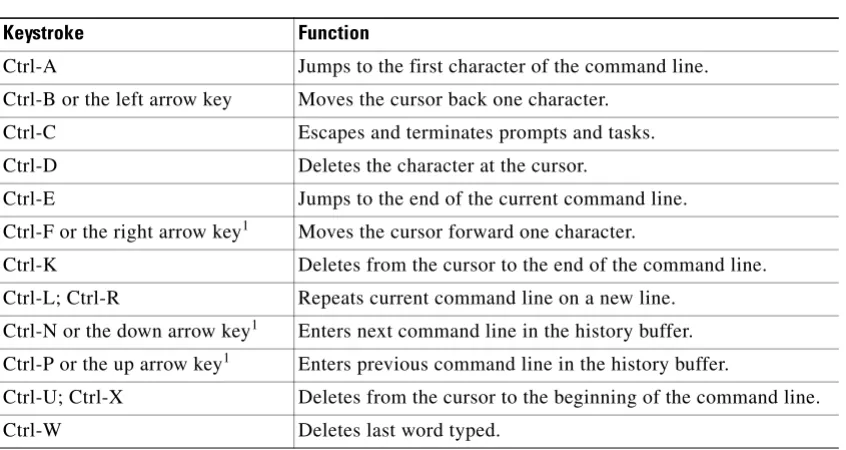
Switch commands are not case sensitive. You can abbreviate commands and parameters as long as they contain enough letters to be different from any other currently available commands or parameters. You can scroll through the last 20 commands stored in the history buffer and enter or edit the command at the prompt. (See Table 1-1.)
Table 1-1 Command-Line Processing Keystroke
Keystroke Function
Ctrl-A Jumps to the first character of the command line.
Ctrl-B or the left arrow key Moves the cursor back one character.
Ctrl-C Escapes and terminates prompts and tasks.
Ctrl-D Deletes the character at the cursor.
Ctrl-E Jumps to the end of the current command line.
Ctrl-F or the right arrow key1 Moves the cursor forward one character.
Ctrl-K Deletes from the cursor to the end of the command line.
Ctrl-L; Ctrl-R Repeats current command line on a new line.
Ctrl-N or the down arrow key1 Enters next command line in the history buffer.
Ctrl-P or the up arrow key1 Enters previous command line in the history buffer.
Ctrl-U; Ctrl-X Deletes from the cursor to the beginning of the command line.
Using the Command-Line Editing Features
Catalyst 6500 series switch software includes an enhanced editing mode that provides a set of editing key functions similar to those of the Emacs editor. You can enter commands in uppercase, lowercase, or a mix of both. Only passwords are case sensitive. You can abbreviate commands and keywords to the number of characters that allow a unique abbreviation.
For example, you can abbreviate the show command to sh. After entering the command at the system prompt, press Return to execute the command.
Moving Around on the Command Line
Perform one of these tasks to move the cursor around on the command line for corrections or changes:
Completing a Partial Command Name
If you cannot remember a complete command name, press the Tab key to allow the system to complete a partial entry. To do so, perform this task:
Esc B Moves the cursor back one word.
Esc D Deletes from the cursor to the end of the word.
Esc F Moves the cursor forward one word.
Delete key or Backspace key Erases a mistake when entering a command; reenter the command after using this key.
1. The arrow keys function only on ANSI-compatible terminals such as VT100s. Table 1-1 Command-Line Processing Keystroke (continued)
Keystroke Function
Task Keystrokes
Move the cursor back one character. Press Ctrl-B or press the left arrow key1.
1. The arrow keys function only on ANSI-compatible terminals such as VT100s.
Move the cursor forward one character. Press Ctrl-F or press the right arrow key1. Move the cursor to the beginning of the
command line.
Press Ctrl-A.
Move the cursor to the end of the command line.
Press Ctrl-E.
Move the cursor back one word. Press Esc B. Move the cursor forward one word. Press Esc F.
Task Keystrokes
In the following example, when you enter the letters conf and press the Tab key, the system provides the complete command:
Console> (enable) conf<Tab>
Console> (enable) configure
If you enter a set of characters that could indicate more than one command, the system beeps to indicate an error. Enter a question mark (?) to obtain a list of commands that begin with that set of characters. Do not leave a space between the last letter and the question mark (?). For example, three commands in privileged mode start with co. To see what they are, enter co? at the privileged prompt. The system displays all commands that begin with co, as follows:
Console> (enable) co?
configure connect copy
Pasting in Buffer Entries
The system provides a buffer that contains the last ten items you deleted. You can recall these items and paste them in the command line by performing this task:
The buffer contains only the last ten items you have deleted or cut. If you press Esc Y more than ten times, you cycle back to the first buffer entry.
Editing Command Lines That Wrap
The new editing command set provides a wraparound feature for commands that extend beyond a single line on the screen. When the cursor reaches the right margin, the command line shifts ten spaces to the left. You cannot see the first ten characters of the line, but you can scroll back and check the syntax at the beginning of the command. To scroll back, perform this task:
Use line wrapping with the command history feature to recall and modify previous complex command entries. See the “Using History Substitution” section on page 1-8 for information about recalling previous command entries.
The system assumes your terminal screen is 80 columns wide. If your screen has a different width, enter the terminal width command to tell the router the correct width of your screen.
Task Keystrokes
Recall the most recent entry in the buffer.
Press Ctrl-Y.
Recall the next buffer entry. Press Esc Y.
Task Keystrokes
Return to the beginning of a command line to verify that you have entered a lengthy command correctly.
Press Ctrl-B or the left arrow key repeatedly until you scroll back to the beginning of the command entry, or press Ctrl-A to return directly to the beginning of the line1.
Deleting Entries
Perform one of these tasks to delete command entries if you make a mistake or change your mind:
Scrolling Down a Line or a Screen
When you use the help facility to list the commands in a particular mode, the list is often longer than the terminal screen can display. In such cases, a ---More--- prompt is displayed at the bottom of the screen. To view the next line or screen, perform these tasks:
Note The ---More--- prompt is used for any output that has more lines than can be displayed on the terminal screen, including show command output.
Scrolling to Specified Text
If you enter /text and press the Return key at the --More-- prompt, the display starts two lines above the line containing the text string. If the text string is not found, “Pattern Not Found” is displayed. You can also enter “n” at the --More-- prompt to search for the last entered text string. You can use this search method on all show commands that use the more buffer to display screen by screen ouput. The following is a list of show commands that do not use the more buffer and do not support this feature:
• show cam
• show mls
• show tech-support
Task Keystrokes
Erase the character to the left of the cursor. Press the Delete or Backspace key. Delete the character at the cursor. Press Ctrl-D.
Delete from the cursor to the end of the command line.
Press Ctrl-K.
Delete from the cursor to the beginning of the command line.
Press Ctrl-U or Ctrl-X.
Delete the word to the left of the cursor. Press Ctrl-W. Delete from the cursor to the end of the word. Press Esc D.
Task Keystrokes
Redisplaying the Current Command Line
If you enter a command and the system suddenly sends a message to your screen, you can recall your current command line entry. To do so, perform this task:
Transposing Mistyped Characters
If you mistype a command entry, you can transpose the mistyped characters by performing this task:
Controlling Capitalization
You can change words to uppercase or lowercase, or capitalize a set of letters, with simple keystroke sequences:
Designating a Keystroke as a Command Entry
You can use a particular keystroke as an executable command. Perform this task:
Task Keystrokes
Redisplay the current command line. Press Ctrl-L or Ctrl-R.
Task Keystrokes
Transpose the character to the left of the cursor with the character located at the cursor.
Press Ctrl-T.
Task Keystrokes
Capitalize at the cursor. Press Esc C. Change the word at the cursor to lowercase. Press Esc L. Capitalize letters from the cursor to the end
of the word.
Press Esc U.
Task Keystrokes
Insert a code to indicate to the system that the keystroke immediately following should be treated as a command entry, not an editing key.
Using Command Aliases
Like regular commands, aliases are not case sensitive. However, unlike regular commands, some aliases cannot be abbreviated. See Table 1-2 for a list of switc