HaIRST Project
Report
Note: This report has had some of the text dealing with security scripts removed. The full text is available on application to the eprints administrator.
May 2003 – November 2004
HaIRST :: Implementation &
assessment of pilot project
St Andrews is a member of a consortium
investigating Harvesting Institutional Resources
THE HAIRST PROJECT ... 6
eprints Concept ... 6
Institutional Repositories ... 10
HARDWARE ... 11
Requirements for the present project ... 11
Requirements for University-wide Service... 11
Scanner ... 12
SOFTWARE ... 13
Front-end ... 13
Database... 14
WebServer ... 14
Web Authoring/Design ... 14
Connectivity... 14
Text Preparation Software... 15
MAINTENANCE AND SUPPORT ... 16
IT services... 16
eprints administrator... 16
General Maintenance ... 16
CONTENT ... 18
Categories ... 18
Publicising the Archive... 19
Depositing ... 19
Self-Depositing ... 20
Assisted Depositing ... 20
Art History Undergraduate Dissertations ... 21
Special Collections Materials ... 22
Copyright... 23
TEXT PREPARATION... 26
Choice of acceptable formats... 26
Preparation of electronic text... 27
Website Downloads ... 28
Preparation of Non-Electronic Text... 28
Foxing and Image Manipulation... 28
Use of Colour and Pictures ... 30
Metadata Page... 30
Keyword Extraction for Metadata Page ... 31
Converting Database Entries to eprints Format... 31
SECURITY... 34
1. Security and access to the University system as a whole... 34
2. Internal security of the eprints system... 34
Security controlled by configuration files ... 34
Registration... 34
Future enhancements ... 35
Further limitations on registration ... 35
Alert service... 36
Permissions for Depositing eprint Documents ... 36
Assigning permissions to deposited eprint documents and so controlling access... 36
Access to metadata ... 36
Updating or changing eprint documents or metadata ... 37
Removal of eprints... 37
De-registration ... 37
BEYOND THE PROJECT ... 38
Current Trends; or Why we might miss the boat... 38
German government funds OA initiative ... 38
Journals & Institutions... 38
Citations and Open Access ... 39
Open Access and Citation Impact in non-Scientific disciplines... 39
JISC report: central vs. distributed Archives ... 40
Eprints Archive Growth... 41
Action Suggested by Scottish Science Information Strategy Working Group (see Appendix VII for full report)... 41
UNESCO Electronic Theses Project... 42
eprints, Download Statistics and the Humanities ... 42
Current Trends - Conclusion ... 43
Other uses for eprints... 43
Start-up Costs... 45
Staffing ... 45
Role of eprints Administrator ... 45
Assisted Deposit ... 45
Software Maintenance ... 46
Promotion ... 47
Summary... 47
Computing Equipment... 47
ACKNOWLEDGEMENTS ... 48
APPENDIX I :: PUBLISHERS WILLING TO HAVE PRE/POSTPRINTS ON AN EPRINT SERVER (1.IX.2004) ... 50
APPENDIX II :: OPEN-ACCESS & RESEARCH IMPACT... 53
APPENDIX III :: COMMON IMAGE FILE FORMATS ... 55
APPENDIX IV :: FOXING ... 58
APPENDIX V :: KEYWORD EXTRACTION FROM PDF IMAGE FILES ... 61
APPENDIX VI :: RECOMMENDED DATA FORMATS ... 65
APPENDIX VII :: SCOTTISH SCIENCE INFORMATION STRATEGY WORKING GROUP DECLARATION (AUGUST 2004) ... 72
Research funders... 74
Universities/research institutions... 74
SHEFC ... 74
Scottish Executive ... 74
APPENDIX VIII :: SECURITY SCRIPTS ... 76
HaIRST Project Report
University of St Andrews: May 2003 – November 2004
The HaIRST Project
The HaIRST (Harvesting Institutional Resources in Scotland Testbed) project commenced at Strathclyde University in 2002 and aims to ‘investigate the deposit, disclosure and discovery of institutional resources in the JISC information
environment’.
St Andrews University is one of the partners in the project, whose overall management and direction is controlled by CDLR at Strathclyde University. Other partners in the project are Napier University and a consortium of ten Glasgow Colleges of Further Education and the John Wheatley College.
One of the key areas of the project, and the one which St Andrews is primarily involved in, is the creation of metadata which will be harvested and disclosed by Strathclyde. In order for this to be accomplished successfully, standardisation and interoperability must be issues which receive close attention. However, this will be done by CLDR at Strathclyde; consequently it does not receive attention in this report, but we have borne in mind that part of St Andrews’ remit is to:
• create a suitable archive which will deliver metadata in an approved format, simultaneously addressing the issues of standardization and interoperability;
• gather institutional material for the archive. ‘Institutional material’ means any material generated at St Andrews either in the present or in the past. The focus will be both on research work (at any level) and
administrative/informative documents. If the material is from the present, then eprints would act to disseminate current material – in the case of research, it would serve to increase the impact of any work, in the case of informative material it could be used both by prospective and by current staff and students to learn more about the University, its facilities and its regulations. From this point of view an ancillary function might be to fulfil the requirements of the Freedom of Information Act. If the material is from the past, then the eprints repository will function as an archive. Consequently this is an Institutional eprints archive which focuses on exposing the resources of a specific academic community unlike the majority of subject-specific archives which accept data from a variety of institutions e.g. ArXive, CogPrints;
• report on the problems encountered in the above two actions.
The above has focused on the rôle of St Andrews, as this is the main thrust of the current report. However, if you require more information about the entire
project’s objectives, especially on the reconciliation of heterogeneous metadata, this can be found at http://hairst.cdlr.strath.ac.uk/
eprints Concept
[email protected]; [email protected]; http://www.oaforum.org/index.php; http://www.erpanet.org; http://www.epublishingtrust.org/, and, of course, http://www.eprints.org/. There are many more, and the eprints site give a plethora of links to related sites.
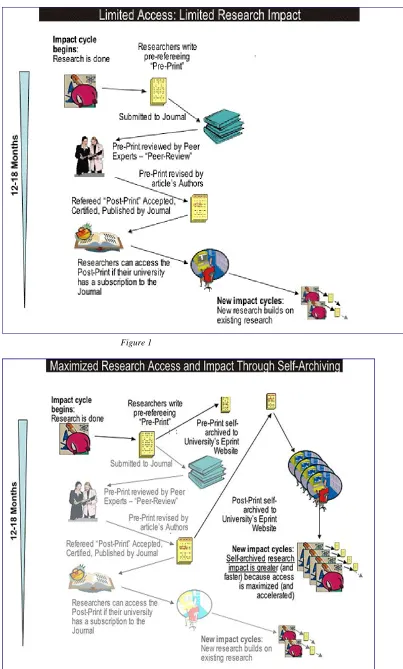
Briefly, eprints attempts to increase the impact of research through self-archiving of preprints and of final papers. In some disciplines, the time between having a paper accepted and its publication can be in excess of five years – during this period the researcher’s work has no impact on the academic community, and conversely it reflects neither on him/her self nor on the qualities of the department. This problem is recognized even by many mainstream publishers; for example Elsevier have an Open Archive compliant preprint server on which anyone can place their refereed or final articles (www.compscipreprints.com). Articles are not limited to those which are due to appear in Elsevier journals.
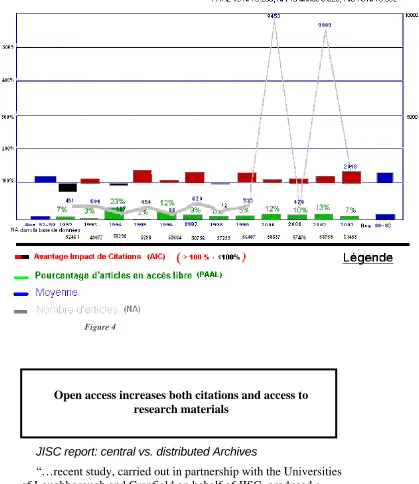
This line of though is backed up by recent research, e.g. in Antelman, Kristen. Do Open-Access Articles Have a Greater Research Impact? College and Research Libraries, 65(5), 372-382. September 2004 where the abstract reads:
Although many authors believe that their work has a greater research impact if it is freely available, studies to demonstrate that impact are few. This study looks at articles in four disciplines at varying stages of
adoption of open access-philosophy, political science, electrical and electronic engineering and mathematics-to see whether they have a greater impact as measured by citations in the ISI Web of Science database when their authors make them freely available on the Internet. The finding is that, across all four disciplines, freely available articles do have a greater research impact. Shedding light on this category of open access reveals that scholars in diverse disciplines are adopting open-access practices and being rewarded for it.
A large number of similar findings are also reported in Appendix II.
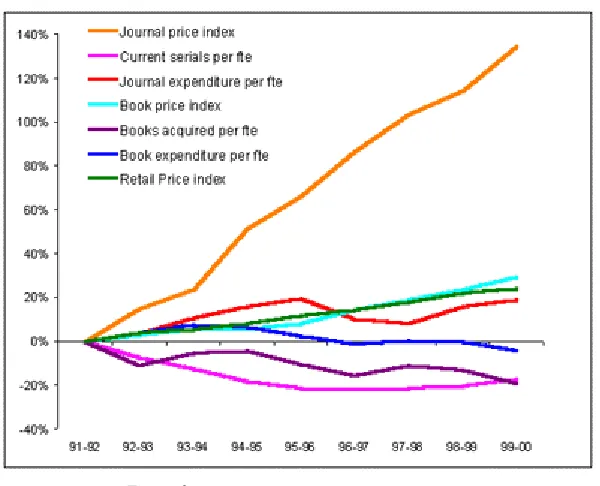
Another related feature of self-archiving is that as any work placed on the server is by default freely available to anyone who has www access, so people in institutions where the cost of subscription to learned journals is not affordable are no longer excluded from current research.
The following two diagrams (figures 1 & 2, on next page), from Stevan Harnad (Professor of Cognitive Science Southampton University) help to explain this further. Many lecturers self-archive on their own web pages and you may think that this is adequate and less trouble than maintaining an institutional site like eprints. But when they leave, these pages are not maintained and are eventually deleted. This leaves St Andrews with no on-line readily accessible way to demonstrate that quality and quantity of its work over and extended period of time.
Furthermore, even when leturers’ pages are on-line they may remain hidden to the casual Internet searcher. You need to remember that indexing by search engines is through keywords extracted from the text, and although it is possible to add metadata to a web page most people do not bother, and some search engines ignore them, anyway. Structured metadata implies consistent and accurate information retrieval even if the searcher is unaware of the title of the paper or the name of the author.
foreign policy? Maybe the EU? … . Using Google, I found that Maastricht gave about 212,000 hits.
This is not helpful.
This can be avoided to a large extent by centralising web-published papers and adding metadata in a consistent and internationally-recognised format..
This merely needs the will to do it.
Figure 1
Figure 3
Institutional Repositories
The position of an institutional repository is slightly different from a subject-specific one, as it is designed to serve a subject-specific institution rather than a discipline. Consequently it has two primary aims, viz.
• to increase the impact of research (exactly as for a subject-specific repository)
• to act as a showcase for the University.
In the latter case we took it to mean that any material produced by the University would be considered for entry into the archive. As well as research material, this could be ephemera such as the postgraduate handbook (only available on the web, and regularly updated) or the Computing Laboratory Newsletters, historical material out of copyright but not worth reprinting and theses, whether undergraduate or postgraduate. Much of this material could well disappear or be filed away only to be forgotten. By putting it on the eprints server it can remain as a record of what has happened and what is happening at the University.
This is more than a ‘nice-to-have’ concept. The reality is that information from the University is hard, if not impossible to find. It is well-known that the internal search engine used here can, at best, be described as awful. An example of this is when I tried to find out about car-parking here. The first few results, presumably the best, are given in Appendix IX. Notice that only one result has ‘car-parking’ and the most popular one is in fact dealing with car hire. (Google’s results are not brilliant, either, but at least they do deal with car parking and the information is readable.)
This is an issue which needs addressing and an institutional repository is one straightforward way of doing this.
Hardware
At one time, hardware was a major issue in the implementation of any
computer-based project. Times have changed: most ‘off-the-shelf’ hardware will do the job well enough and the short time interval between hardware being cutting-edge and being obsolete is so small – usually in the region of 3-4 years – that no special effort is required to assess whether the project needs hardware updates or not – the standard time for upgrades to servers is almost certain to be adequate; all that is needed would be to insert the eprints server into this schedule. If the server remains shared, as it is now, then upgrades/maintenance are already in place and nothing more needs to be done.
Aside from this, two issues need to be clarified when discussing hardware requirements:
• the requirements for the present project;
• requirements for university-wide operation.
Issue (2) is speculative until the time when the University comes to a decision on this matter, hence it is realistic to focus on the former. However, there are a number of factors which overlap the two domains, as we shall see.
The software chosen for this project (see next section) is designed to run on linux/unix and is open source and makes efficient use of resources. Consequently any computer platform which can run either linux or unix is suitable; in reality the most common system is an IBM or compatible with Intel processor(s), but both Sun and Apple Mac systems have also been used as shown by the correspondence on the eprints technical list (see archive at: http://software.eprints.org/tech.php/). It is almost certain that any up-to-date hardware platform which is suitable for the current testbed project would be equally suitable for a full-scale system. Thus the only
hardware technical issues we need to consider are:
• the availability of a server running linux;
• disk space.
Requirements for the present project
Space on a shared server (Kingfisher) was purchased through funds made available through HaIRST. The demands on this are not excessively high so that no more than replacement in the normal upgrade cycle is likely to be needed - say every 3-4 years as already discussed. Disk space has not proved to be a problem, with only 24% of the 30G disk space used by all the data and software (this includes a physics database and other material which is unconnected with eprints). Access time and search time were insignificant – the software reports these values and they are usually in the range of 0.1 of a second or less.
Requirements for University-wide Service
extreme a 140-page book scanned in colour occupied 17M; on the other hand the size of a research paper ( PDF, black and white) was only about 100k.
This problem is not as great as first imagined. Many Arts papers are monographs, with few, if any, coloured plates. Similarly in many of the sciences black and white predominates. Unless the eprints are all images (e.g. all scanned PDF files) then the space for each deposit will average at about 0.5 to 1.0 Mb, which is not significant in terms of today’s hard disk capacity. If more disk space needs to be purchased, the costs are insignificant; current HD prices can be as little as £75 for a 160Gb disk (Maplin web catalogue, August 2004, http://www.maplin.co.uk/) and adding disks to a unix/linux system is usually straightforward.
Another example is that the cost of storing the content of arXive , the physics and computer science eprints archive (contents exceed 250,000 eprints) was less than £300/year (prices for the first half of 2003 and it is reasonable to suppose that they would be lower now). If we add the cost of server and terminal replacement we are still budgeting at under and average of £1500 a year in 2003 figures, probably closer to £1000 when the pilot project ends in November 2004. (The above data is from JISC report: Feasibility and Requirements Study on Preservation of E-Prints, October 2003,
http://www.jisc.ac.uk/uploaded_documents/e-prints_report_final.pdf )
Scanner
Currently we have access to a fast scanner/printer (HP LaserJet 9000mfp) which not only has a document feeder but will also email the scanned file direct to a mailbox. This scanner was used in the current project to transform archive materials into PDF files, but this could have been done with a small flatbed scanner. The situation might well be very different if the project were to become University-wide. In this case the speed and ability to scan batches of sheets automatically would make this a very desirable purchase. The alternative would be to limit severely the amount of non-electronic material which could be put on eprints and in view of the rich archive materials available this would be a retrograde step.
The situation is complicated in that the scanner has not, apparently, been purchased by the University, but has been given, by HP, for a project to enable students to do distributed printing – they could email scanned materials to their mailboxes and then print them out at another computer. This project appears to have been abandoned, consequently, the ownership of the scanner would need to be clarified before its use was promoted on a wide scale.
Software
The policy of the eprints software project (http://eprints.ecs.soton.ac.uk/) is to produce quality software which is freely distributed and available to anyone under the GNU gpl license and to use other software only when it too fulfils this requirement, allowing both the eprints module and its supporting software to be freely
distributable. (see http://www.gnu.org/copyleft/gpl.htmlfor details of the license agreement and the concept of copyleft as opposed to copyright).
Unless otherwise stated, the software described below is non-proprietary, stable, scalable and with the source code available. This contrasts strongly with proprietary software (e.g. Windows/Windows-based) which appears to lack most - probably all - of these attributes. If software maintenance is to be considered in the future then issues such as source-code availability are not optional. This is an issue which is important, as the JISC support which eprints software production has had is stopping September 2004. Southampton University are committed to carry on with the eprints project (the software is the most widely used of its type in the world), nevertheless a change in both the support and software creation models is only to be expected.
A final point is that a version 3 of the software is under preparation, though it may be several years before a stable release is offered. Meanwhile the currently distributed version (2.3.x) is actively maintained and will be for a considerable time to come (information from eprints workshop, London, 23-24 June 2004). St Andrews eprints is running on version 2.2.1 which has been upgraded and modified to suit the St Andrews contribution to the HaIRST project and to remove bugs as they were reported.
Current LMS (Library Management Systems) suppliers are also discussing plug-ins which would give eprints-style functionality to current library systems; this included the supplier of this University. Of course, here you are dealing with
proprietary software which has to be bought and maintained by an external supplier. How customisable it really is and what its true costs might be have yet to be
determined. There is one certainty – you will be locked into the system.
Front-end
In discussion with CDLR at Strathclyde the GNU-licensed eprints software was chosen to host the St Andrews archive. This had the following advantages:
• relative stability;
• it was customisable;
• runs on linux and the consequently the operating system is stable;
• Perl source code available through the GNU copyleft licence;
• interfaces with a highly-stable and very fast database;
• interfaces with highly-stable web-server.
Other software for doing a similar job is also available, but many of these systems have aged; consequently they would not be a wise choice. The most popular contemporary alternative to eprints is DSpace (a joint venture between MIT and HP). It would have been useful to investigate this further, and there was a workshop in Glasgow to discuss its implementation. In spite of the fact that this was being run by the DSpace consortium and was the only one in Europe that year, it was impossible to go to Glasgow to investigate this option further. The only local experience is from Glasgow University in 2003, who found that over three months’ of part-time work were required to get the basic system running; consequently it was regarded as beta-test quality. During 2004 its stability and ease-of-installation has increase
substantially, possibly making it a viable alternative to eprints if its specific features are wanted. For example, Edinburgh University have recently used DSpace for their ‘Theses Alive!’ project and Cambridge University is using DSpace ‘to develop a digital repository for the University’. See http://www.dspace.org/ for general information and http://www.ariadne.ac.uk/issue38/jones/ for an evaluation and comparison of DSpace and ETD-db (from Virginia Tech) in Edinbugh’s Thesis Alive! It is worth noting that Dspace is also losing large-scale institutional support and, like eprints, is looking for a new funding model to continue support and development.
Database
Having decided on eprints software, the database which holds the information is effectively pre-determined, as the software is designed to interface with MySQL, a linux relational database. This is a well-proven technology, surpassing all of the commercial databases in speed, stability and scalability, though its speed advantage is at the expense of the non-implementation of some esoteric database commands.
There are times when direct control of the information stored in the database is necessary and the software used for this depends on whether control is to be from a linux system or from a remote machine running another operating system. In the current system a Windows-based program MySQL Control Centre
(http://mysql.com) was used and proved to be entirely satisfactory. It is distributed under the GNU public license, but unfortunately comes with no documentation whatsoever.
WebServer
Apache is the software of choice. It is used by the majority of web servers in the world and is stable and well-proven. Eprints interfaces directly with it.
Web Authoring/Design
Dreamweaver (http://www.macromedia.com/ and available through the University)was used for some of this work. Note that this is not free software, but is proprietary, though the University has a site license lowing the cost from about £200--£400 to about £30. In fact it was not used a great deal and could be dispensed with, depending on the skills available from technical support or the eprints administrator.
Connectivity
ws_ftp were used. Both were free, though proprietary, and available through the University. To make it straightforward to run programs such as Emacs on the linux box, an X-windows connection to linux had to be installed; this was done through the proprietary Exceed software, available through the University. Graphic linux
programs can now be run on the Windows machine via this connection.
Note that these are not required for a user to access the St Andrews eprints site - this is done through a web interface by using the following address:
http://eprints.st-andrews.ac.uk/
Text Preparation Software
Modification or adjustment of the texts was often necessary, so several pieces of software were installed to make this process easier. I list them here for
completeness, but their use will be described in greater detail in a later section Text Preparation:
• Adobe Acrobat Standard – this is not just the reader, but allows text manipulation and the insertion and removal of pages as well as the conversion of web pages and MicroSoft Word directly to PDF. This was available through the University and is commercial;
• Gimp v.2 – this is the standard image manipulation package distributed under the GNU license;
• Adobe Photoshop – similar to Gimp, but more sophisticated and commercial. This was available through the University;
Maintenance and support
IT
services
For the duration of the project, these are paid for by HaIRST. Longer term costs are affected by the expertise of the eprints administrator. If they have a basic knowledge of Windows (the least necessary skill), linux, Perl and Apache, then little outside help would be required; in most cases problems could be resolved with an average of an hour’s work per week or even less from support. This time is likely to be spread unevenly; new versions or upgrades will require more time, whereas a working system will need very little support as it is inherently very stable.
eprints
administrator
The rôle of the administrator in program maintenance will depend on their expertise as discussed above. I would emphasise again that linux skills are of value here - Windows skills are of little use unless reliance is to be placed wholly on IT services (I would assume a basic familiarity with Windows, of course: the discussion here is about maintenance which implies some in-depth knowledge).
I would suggest that passing the maintenance requirements entirely to IT would be a poor policy as even the most trivial glitches or bug fixes would incur delays which would be tiresome in an active system.
Support of users, rather than of computer software, would entail familiarity with areas such as indexing or cataloguing and also being aware of the importance of structured data (such as DC) in order to assist in creating the metadata page required for each deposit.
General Maintenance
In the current project this has involved the following:
•
Installation of the eprints system (eprints software, Perl modules, MySQL, Apache);*•
Modification of the Perl code. The eprints support list ([email protected] or the wiki connected to this(http://wiki.eprints.org/) is quite active, and modifications for bug fixes, improvements and special-purpose modifications are regularly posted. All relevant bug fixes have been implemented and so have some of the improvements. However, this has meant modification of the underlying Perl code of eprints – in this case using emacs and eXceed (the Windows interface to X on the eprints server). An average modification rate of one change every 2-3 weeks can be expected, though few of these visibly affect the user interface. All these changes have been documented on the relevant pages of the source code
•
Some changes to the MySQL database have been necessary, and may need to be done in the future, though this should be very rare. The MySQL_cc software* enables viewing and control of the remote database in a very straightforward manner. Equally it allows easy total destruction of the database, so it needs to be used carefully, or only by IT support;•
The main page of the St Andrews eprints site was designed on Dreamweaver and then transferred across to the linux server using ws_ftp. This was the easiest way to design a graphically-oriented page which was meant to be similar in appearance to the University Library home page. Other pages were modified using emacs on linux, but there is no reason why they should not be made in a way similar to the opening page.Regarding the last point, eprints software has a page-modification facility using XML elements called ‘pins’ which enables text to be inserted or modified. E.g. the majority of the text used is in the file ‘phrases-en.xml’ and have the form:
<ep:phrase ref=”eprint_fieldopt_month_jun”>June</ep:phrase> which allows the word ‘June’ to be automatically inserted at any point in the page layout where ‘eprint_fieldopt_month_jun’ appears.
Content
So far I have looked at the hardware and software requirements for the St Andrews eprints project and also at the maintenance and support issues – all of which need to be addressed before a system like this is launched. It is now time to consider the function of eprints – to present content to the St Andrews community or to the outside world (so long as they have access to a reliable www connection, which will exclude most of the world’s population).
It will be best to look at content from several viewpoints:
• The categories of materials deemed suitable;
• Publicizing the archive;
• Depositing
• Self-depositing by users;
• Assisted depositing;
• Transforming the text to a suitable format – this implies a certain regularization of format and issues of file size, whether due to length or to the presence of colour;
• Availability and security;
• Copyright.
… and I will take them in that order.
Categories
As this is an institutional archive then virtually any material released by St Andrews is a potential candidate for inclusion. This would include:
• Research papers at any level; staff, postgraduate and undergraduate. These may be preprints (drafts), material already accepted for publication or material already published. They may also be ‘grey literature’ – items such as good undergraduate theses which usually disappear onto departmental shelves, never to be consulted again;
• research material not formally refereed, but presented as position papers, conference posters etc.;
• book/monograph chapters (it is not envisaged that whole books would be put onto the server unless they are out of print and of historical interest). These chapters or summaries would act as ‘tasters’ for the purchase of the whole book;
• material often classed as ‘ephemera’ such as guides to departments or to libraries. These can be of interest to the future historian, especially as much is now published on the web only, and is changed or deleted as the occasion demands. An example of this is the postgraduate handbook at: http://www.st-andrews.ac.uk/publications/pghandbook/ whose 2003-2004 version has now been preserved on our eprints server;
• other departmental material;
Publicising the Archive
Publicising the archive can be on a number of levels and all need to be
addressed, probably over a long period of time, for success to ensue. This is largely due to the need for a change of orientation from staff, both administrative and academic, and a percolation of this change down to the student level. It is unlikely that these changes will come either quickly or without any resistance. Certainly there will be those who would welcome the idea of eprints, and due to the very brief nature of the project, publicity was directed at this group whenever possible, encouraging them to deposit their papers etc. in eprints. On the other hand, other departments had little interest and were very resistant to the whole idea. Some of this may well be a reflection of the culture of St Andrews, on the other hand, some disciplines are known to be resistant to this idea on a world-wide scale; for example there are very few chemistry archives, whereas physics and computer science have been very much at the forefront of eprints internationally, though little enthusiasm was seen at this University.
Apart from approaching individuals with a known interest in eprints, other methods of publicity were tried, including presentations at seminars (e.g. Arts & Humanities computing Workshop, IPR workshop) and specific eprints presentations. In spite of publicity though LIS newsletters etc. the latter had a very poor attendance of non-library staff.
Having contacted individuals and given broad-based presentations, another method for publicity was to target departmental heads and vice-chancellors. These were viewed with interest, but little more came of them with the exception of Art History, which was willing to allow me to write to the students who had obtained a First Class Honours in the summer 2004 exams to see whether they would be willing to place their dissertations on the eprints server after removal of any copyright images. Although eprints could be seen as an institutional resource, therefore making a case for all undergraduate theses to be made available, the feedback from all the schools was that only Firsts should be exposed in this way.
What was strange (and I did not get to the bottom of this) was that a number of schools initially were interested in an eprints presentation, but simply failed to respond when I suggested that we should set a date and time. Nor did they respond to a reminder.
Depositing
During the publicity stage, one of the matters I was very conscious of was that fact that I was asking people to do extra work. Natural resistance makes it unlikely that they would wish to deposit material if it cost them time and trouble, so we went to some effort to ensure that they all knew that they could either deposit the material themselves, or that if they sent it to me as a PDF, MS-Word orRTFfile, then I could do all the work for them. This was also made clear on the website home page with a prominent line labelled ‘Let us archive it for you’.
One of the other factors was that the HaIRST project was due to finish in November 2004, giving less than a year of activity (the software had to be
customized to suit St Andrews and to become an institutional, rather than a subject-specific, repository, also the last month or two of part-time work would be writing reports etc.) At the time of the various eprints presentations I was asked to make it clear that this was a trial project and that users should not expect this to become a service. Naturally, this would put a damper on even the most enthusiastic advocate of eprints. Why should they bother if everything was to end in less than a year? This is always a problem, but I felt that it was particularly unhelpful in a project which was being promoted as an archive and as a way of displaying work at the University – both having implications of persistent data. One of the lessons learned was that a considerable push ‘from the top’ is needed for people to take this as a serious option and that the effort to self-archive simply will not take place unless the lecturers have some confidence in the long-term prospects of their work bearing some fruit in terms of greater visibility and a higher likelihood of citations.
I will now deal with the two methods of depositing – self-depositing and assisted depositing.
Self-Depositing
This is the ideal of the eprints concept, and has been used successfully for over a decade in some subject-specific repositories such as ArXive, but this depends on a culture of self-deposit either at the University or at a School/Departmental level. I was surprised at the resistance to self-deposit at St Andrews even in departments where lecturers had their papers on their own websites. Unfortunately it might mean that if other universities are pursuing the open access model more vigorously, then much of the research work at St Andrews remains unseen and wasted compared to the impact it would otherwise have (this is probably more so in the sciences than the arts). For more information see Citations and Open Access under Beyond the Project.
Views from others working in this field show that the main way to change this – perhaps the only way to change this – is by a mandated policy to deposit research material, whether this be by self-deposit or by assisted deposit.
As it turned out, only two papers were self-deposited by one author and one paper by another author.
Some other researchers were very interested in depositing older papers which had already been published, but this proved to be difficult as the copyright issues were difficult for me to resolve, and is discussed further in the subsequent section Copyright.
Finally, you need to be aware that only those who have registered with eprints can deposit material, though anyone can look at it unless permission to view it outside St Andrews has been revoked. And registration has to be done from a St Andrews domain address; this implies that self-depositing is only possible by those working in the University, making this a truly institutional site. You may have questions about what I have just said, so the issues raised in this paragraph are discussed in far greater depth in an entire section Security.
Assisted Depositing
the long-term view I think it would change if eprints became an institutional resource. However, there would always be need for assisted depositing as people may not have enough time, or feel familiar enough with computing, to be confident about self-depositing. For those members of staff who did want to deposit their papers, virtually all of them either emailed the PDF or Word file to me or gave me a URL where I could find it. It was then purely a matter of cut-and-paste – the title, abstract, author etc. were normally part of the paper and so could be inserted directly into the eprints metadata page. The paper itself was simply loaded into eprints at the appropriate stage of the depositing process. It was very straightforward, and ideally occupied little more than 10 mins.
The last point to consider in assisted deposits is the creation of metadata. In the case of papers or dissertations, this is not a problem, as items such as keywords, abstract title etc. can simply be transferred by cut-and-paste from PDF files which have been created from text documents (this is not possible with PDFs which are essentially pictures – there is a facility for character recognition in Acrobat but at best this can only be considered as poor. Tests on scanned documents have confirmed this.) The time taken to transfer a document to the eprints archive, including the time taken to create the metadata page, can be in the region of 10 minutes.
If all the metadata is not present (e.g. a keyword list is missing, or there is no abstract) then the time to deposit will reflect the time to create this information. Perhaps 15-20 minutes should be allowed – certainly the time is very unlikely to exceed the latter value. The author could be asked to supply the information, or a list of possible entries created by the administrator could be sent for their approval. Where I have created some of the metadata, I emailed the author(s) and asked them to check it and either correct it themselves (they never did) or email me any corrections (this they did do).
Clearly, assisted depositing is bound to take more time from the administrator’s point of view, but it is to be expected that an initial service would be largely of this nature and that self-deposit would creep in over a period of years. I find it difficult to image that self-deposit would replace assisted depositing entirely.
Art History Undergraduate Dissertations
For this pilot project, some students in Art History were approached and asked whether I could put their final-year dissertation on eprints i.e. they were not given the option of self-deposit. This part of the project was accomplished with the help and co-operation of the Professor of Art History, Ian Carradice, and after discussing the matter with him, we agreed that only those who obtained a first class degree should be asked. This is likely to have limited the response to an extent as the students had left University by the time the results were announced, however out of twelve letters sent (14th July 2004), there were five replies by the end of August. They could be classified as follows:
• two still intend to send their work to eprints, but are chasing up copyright issues. I have had recent emails from one and they are still trying to send material to the site. This can show how keen some students would be to have their work publicised in this way;
• two have submitted their work, which is now on eprints. In both cases pictures were removed by the authors;
It is still possible that more material may come to eprints through this, but in essence it shows that the students are prepared to go to considerable effort to put their work on eprints and have all the publicity which that entails (the metadata page is picked up and indexed by all the major search engines within a few days). If a similar eprints strategy were to be implemented earlier in the year (being quite open about the fact that only those getting firsts would be asked to have their material put on eprints) then I think that the take-up across all disciplines is likely to be quite high. Also, copyright issues are usually clearly defined at these levels.
Special Collections Materials
To increase the bulk of the archive, and to have some materials to show during initial presentations, I scanned some archive material of institutional relevance and put it onto eprints. This consisted of the following:
• entire books which were out of print but available in the library.
Examples would be some of the Rectorial addresses from the late 19th to the early 20th century;
• publications by the library itself such as a book on the heraldry of St Andrews (this was scanned in colour);
• publications of a genuinely ephemeral nature such as the Computing Laboratory Newsletters, which started in the 1970s and show the evolution of hardware and software over that period, the rules of a Hall of Residence for 1948, floor plans of the original new library building;
• current internet-only material such as the Postgraduate Handbook which would otherwise disappear completely when revised for the next
academic year (2004-2005).
Fairly current materials have the advantage of already being in electronic format, hence putting them on eprints is fairly straightforward, taking not much more than about 10-15 minutes, most of this time being taken up with creating PDFs, or downloading websites, then creating and filing the metadata. For the older materials, scanning time has to be taken into account and although no book took longer than about 90 minutes, the work was very tedious.
Quality Issues
The depositing process in eprints automatically addresses quality issues. The results of the deposit are OIA- and DC-compliant (Open Archives Initiative : http://www.openarchives.org/ ; Dublin Core: http://dublincore.org/) and are harvested by OAI-compliant archives, e.g. OIAster
(http://oaister.umdl.umich.edu/o/oaister/) whose purpose is to:
create a collection of freely available, previously difficult-to-access, academically-oriented digital resources that are easily searchable by anyone.
This template is customisable by the eprints administrator and has fairly extensive help associated with it. Customisation can involve the addition or removal of certain fields, making some fields compulsory (such as author, title, abstract, keywords) and giving some fields a default value e.g. the ‘Institution’ field defaults to ‘University of St Andrews’.
When a person self-deposits, the document does not appear on eprints until it has been approved by the administrator, who will check that the fields are completed appropriately. In this way quality is controlled outside the actual depositing process – it is the next stage, which precedes publication on the eprints server.
One of the problems when staff have their own web pages is that metadata will almost certainly be absent, and even if present will not follow OAI/DC
recommendations, yet we can easily implement a service which will do all of this automatically – in fact the service exists – it only needs full-scale implementation.
Copyright
The issues of copyright for depositing new materials are very straightforward in many cases. For example research material produced by the university has copyright vested in the author - exclusively so in the case of undergraduates, but in a slightly more complex way in the case of postgraduates where there may be issues of potential patenting. However, postgraduates have a supervisor whom they would consult in this matter as they would normally do in publishing any of their material no matter what medium or format it is in. Staff are in a similar situation to
postgraduates regarding copyright and intellectual property.
A large number of publishers, including the stable of imprints owned by Elsevier and Springer, allow for electronic publication on servers such as eprints, so long as the material does not duplicate the layout of the journal. A full list of these publishers, and the issues surrounding them, are on
http://www.lboro.ac.uk/departments/ls/disresearch/romeo/ or http://www.sherpa.ac.uk/romeo.php
For depositing older materials, the situation can be more complex as the author:
• may be a joint author, in which case the other authors would need to be contacted;
• a copyright agreement may already have been signed with the publisher, and it is virtually impossible to find out what this agreement allowed or prohibited.
In the latter case, I tried to obtain a response from six publishers in order to put one lecturer’s past papers on eprints. Only one publisher replied, though they were surprisingly supportive considering the rather heavy tone of their website on the subject of copyright; they were happy to have a postprint which was not a copy of the published article i.e. they claimed a copyright on the layout, not on the content. The effort in tracking down the right person to contact, explaining the situation and asking for permission makes this impractical in all but the most important cases unless the publisher has a blanket policy to allow eprints, as for example, Elsevier have (they even have their own preprint server), in which case the paper can be put straight on eprints after ensuring that it is not a copy of the published paper.
And here again, I came across problems.
not possible to do this as it was no longer possible to recreate a PDF file from the original text.
If a person self-deposits, then they are responsible for checking the copyright issues. If the depositing is by the eprints administrator, then they will check this as best they can based on the information with which they have, but would also need an assurance from the author. Many publishers ask for copyright to be transferred to them if their journal wants to publish a paper. Some demand this transfer even if they decide not to publish! This transfer of copyright can simply be deleted when the author signs the form, or changed from giving them an ‘exclusive right to publish’ to a ‘non-exclusive’ right. The Romeo project has not reported a single publisher objecting to this alteration of terms, and many (like Elsevier mentioned above, and Nature) are building these changes into their conditions for authors.
In view of this, it is recommended that the focus of eprints should be on
archiving current content rather than trying to untangle the web of ownerships of past papers. Unfortunately, this does imply that older, but still valuable, papers –
especially ones from obscure or obsolete journals – will only be available as photocopies from large central repositories and will be denied wide exposure and straightforward retrieval, but this cannot be helped unless a great deal of extra work is allowed for.
The need for copyright clearance is clearly shown as part of the eprints depositing process, where the following message is shown:
For work being deposited by its own author: In self-archiving this collection of files and associated bibliographic metadata, I grant St Andrews eprint Archive the right to store them and to make them permanently available publicly for free on-line. I declare that this material is my own intellectual property and I understand that St Andrews eprint Archive does not assume any responsibility if there is any breach of copyright in distributing these files or metadata. (All authors are urged to prominently assert their copyright on the title page of their work.)
For work being deposited by someone other than its author: I hereby declare that the collection of files and associated bibliographic metadata that I am archiving at St Andrews eprint Archive) is in the public domain. If this is not the case, I accept full responsibility for any breach of copyright that distributing these files or metadata may entail.
Clicking on the deposit button indicates your agreement to these terms
So in both cases it is assumed that no copyright restrictions prevent the dissemination of the paper via the University eprints server. Most publications are happy to allow this (though they would not give permission if this was a ‘for profit’ company).
In my experience many of any of the problems associated with depositing eprints are perceived to be ones of copyright. Possible solutions to this are:
• increased awareness of copyright issues by university staff. This could be done by:
• explanation of the problem by hooking into other seminars, e.g. computing for the arts and humanities;
• departmental presentations;
• dissemination of information through newsletters.
• Delegating the more complicated areas of copyright to the eprints administrator or some other member of LIS. It would be particularly important for this contact to be made before a member of staff signs a copyright agreement with a publisher. This method of dealing with copyright may be particularly appropriate for assisted deposit;
• A change in University policy to encourage awareness of copyright and how to deal with open access issues. This is – at least in theory – simpler than it seems; the University, as employer, owns the copyright of material produced by its employees, but in the case of academic staff has chosen not to exercise this right. It could choose to exercise it if it wanted to (this would probably be a form of suicide), but could also put pressure on staff to become aware of what they are signing away when a paper is accepted for publication.
Text
Preparation
This naturally falls into several sections:
• choice of acceptable formats;
• preparation of electronic text;
• website downloads;
• preparation of non-electronic text;
• foxing and image manipulation;
• use of colour and pictures;
• keyword extraction for metatdata page;
• converting database entries to eprints format. I will look at each of these in order.
Choice of acceptable formats
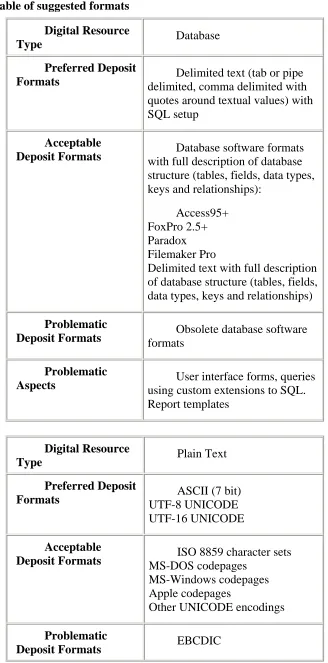
This was governed largely by the recommendations of the AHDS (Arts & Humanities Data Service http://ads.ahds.ac.uk) and is presented on the eprints website as well as in Appendix VI of this report. Please note that the
recommendations of AHDS may change from time to time, and the information in the Appendix is the same as on the eprints website.
The formats available are required i.e. eprints will reject files which are not in these formats. In reality it simply looks at the file extensions, so it would be easy to deposit a file in a different format by changing this extension. However, it would not render (display) correctly as a specific file format means that an appropriate rending algorithm is used to display it.
To quote from the eprints page:
We have a number of Required Formats for your files and you must deposit at least one file in a required format. At present these are:
• ASCII or unicode
• HTML
• postscript
• rich text format
In general we would like you to save texts either as plain ascii/unicode or as PDF
Virtually every computer user can read these formats and knows how to open the files.
Multiple files should be zipped (or tar/gzipped) for uploading; eprints automatically unzips them. However, there is an option to add a document after you have uploaded a file, so you can add that file you forgot!
LaTeX files can cause a lot of problems with (a) .eps files for illustrations (postscript is proprietory and liable to change), and (b) the host of macros which most LaTeX files need. The advantage of LaTeX is that at core it is an ASCII file so that essential information is normally preserved even in the absence of these items. Comments on the suitability, or otherwise, of LaTeX and its variants would be welcome.
unless they are accompanied by another file in one of the required formats.
If people felt unable (or were unwilling) to convert their texts to PDF or any of the other required formats, I was prepared to do this for them i.e. this was now assisted depositing. This fact was clearly presented on the above web page.
It is quite possible to change (add or remove) any of the required formats, but adding a format also implies that some way of rendering the text (to display it correctly) needs to be added to the eprints code; this may, or may not be
straightforward, depending on whether there are public domain or copyleft versions of software required to do this. Removing a required format simply means removing it from a list – the rendering code is retained making it a straightforward job to reinstate that format if required.
The principal aim of required formats is simply to allow long-term readability of the submitted paper or document. In general I prefer PDF files as:
• the reader is free for download (contrast this to Word files where you have to have Word, or a Word-compatible program);
• the US government have said that they would maintain this format even if Adobe (the creators of Acrobat) no longer are able to do so;
• most computers have Acrobat Reader installed on them;
• most people recognise what PDF files are and how to open them. Some of these points may appear to be trivial, but only if we consider
computing in the first world. Many other countries do not have the resources to keep up with changes in computing hardware and software, but they, too, deserve
consideration if we are looking at word-wide dissemination of the work and history of this university.
Preparation of electronic text
All the texts I received were either already in PDF format or were in Microsoft Word, so little effort was required to make these suitable for eprints.
Using Acrobat Standard it was possible to convert text directly from Word or a Web page to a PDF file and this worked well with no problems with all the texts I processed.
Texts which were already in PDF were either put on eprints ‘as is’ or some very minor changes were made at the request of the author. There are two avenues open for this so long as the original text was in electronic format i.e. not scanned in:
• modify the text directly from Acrobat. As this is line-oriented, no justification or word-wrapping is available unless I do it myself. Hence if words are replaced and the text is right-justified, the modified line is likely to be shorter or longer than the original. Adding or deleting whole paragraphs will create less disruption to the layout than working on word or sentence level. Note that this sort of manipulation is really only effective for the most minor changes. If more substantial alterations are required then it is best to ask the author to do this on the original file and then re-save it as a PDF;
text, formatting appeared to be randomised as did the typeface and point size. This option might be worthwhile for short, simple documents, but as formatting gets more complex the usefulness of this process becomes very questionable.
Website Downloads
For some texts it was necessary to download a whole website; an example of this would be the Postgraduate Handbook of this University, which is made up of a number of web pages. To do this I used Webreaper (detailed in the previous section Text Preparation Software). This was set up to gather all the pages from the site, but not to follow any external links. The output file consisted of the website which could then be converted to a PDF using Acrobat Standard.
All the procedures worked well and were straightforward – Webreaper had a ‘wizard’ to aid the creation of appropriate filters and Acrobat had sections in its help file (very badly indexed, as most help files are) which showed how to convert from website to PDF.
This section, which at first had the potential to be the most troublesome, in fact proved to be the easiest of all.
Preparation of Non-Electronic Text
The only realistic method was scanning straight into a PDF file. We had an appropriate scanner which could email me PDFs of scanned documents (see section on Hardware above). One problem which was found is that the default size of mail inbox was far too small to accept these files. Cramming a too-large file into the inbox completely locked up my mail system, and the file had to be deleted or moved by Support. At that point it could be copied by FTP onto the host computer. To avoid this problem in future, the mailbox size was increased to about 80Mb, which is large enough to hold just about any set of scanned files until they are retrieved by the host machine and subsequently deleted from the mailserver. Another problem was the absence of any documentation for the scanner, making its use one of trial and error. There are still facilities which are not available as they are locked by a password.
In theory, the scanned PDF files could be put through Adobe’s
word-recognition software and converted to ASCII or Word-compatible format. The results of this were amusing, but of no use whatsoever. Words were misread or omitted, and formatted text (e.g. in columns, or running around a picture) caused nothing but more confusion. I doubt that more than 20% of the words were recognised at all, especially in older books.
Consequently scanned PDFs should be regarded as unchangeable except by image manipulation software.
Foxing and Image Manipulation
In the case of the current archive, the oldest books were from the mid 19th century and all the text was black so the problem of differentiating ink from foxing did not arise, but this may be a problem if we mine the St Andrews collection from earlier centuries. A very slow and tedious method to do this removal stain by stain is possible, by sampling the background colour at that point and then covering it with that chosen colour, but it is likely that the time and effort would only be justified if creating an electronic version of a text was part of a large project to disclose manuscripts or incunabula from the University archives.
Two possibilities remain for dealing with foxing on the documents which I used:
1. scan in colour. Here we are relying on the ability of the human eye to distinguish foxing from text on the basis of both colour and context (stains are random, printed text is not). Scans in black and white are completely
unsatisfactory as they usually darken the foxing to the point that it is the same shade of black (if black has shades) as the text. Consequently the text is completely obscured by the now-black foxing. Scanning in b/w does have the advantage of producing files which are approximately 4x – 6x smaller than their colour equivalents, which could be an important issue if file downloads are over a slow or unreliable connection.
2. remove the foxing by some form of thresholding based on colour or
brightness. Once this has been done, then the de-foxed page can be saved as a b/w document. Using Adobe’s Photoshop or The Gimp it is possible to do this not only for one page, but to create a macro which enables straightforward processing of the whole document, assuming that the staining is of the same colour and intensity throughout. This was tried with Photoshop for the simple reason that there were manuals and help files. At the time of these tests, Gimp v2 had only just been released and although macros were possible there was no information on how to access them – a common problem with GNU software is lack of documentation or documentation that is virtually incomprehensible unless you understand the program in the first place. Full details of the Photoshop procedure suggested by TASI is given in Appendix IV, but my own tests have shown that other methods of thresholding using the Gimp can also be used. An example follows:
• load image into Gimp;
• right click on image;
• choose layer;
• choose colour;
• increase contrast;
• from colour choose levels;
• pick a point which is heavily foxed;
• This will set the white level to be the same as the foxed point; i.e. the foxing and all colours lighter than this will be assumed to be white, thus removing foxing whilst still leaving the text readable. It can then be saved as a b/w image.
No doubt there are other, similar methods which are just as effective; the point is that this sort of staining is removable without a great deal of effort, making b/w scans of older texts a realistic proposition.
Use of Colour and Pictures
This has been mentioned in passing in the above section, but will be repeated here. The problem is that coloured file images take up about 4x – 6x as much space as their b/w equivalents. I do not think that this should be seen as a problem in terms of disk storage; under £75 can buy up to 160Gb storage (Maplin catalogue,
September 04) so adding extra storage is trivial in terms of money, and also in terms of installation in a linux system. The real issue is of download times.
We should not assume that the whole world is connected through a very fast gigabyte network such as JANET. On the contrary, many Universities and most Colleges in the world struggle with slow and unreliable connections. In this case the difference between downloading a b/w and coloured version of a file is the difference between downloading and not downloading. Hence if we are to use eprints as a St Andrews portal, showing the work and achievements of staff and students, then we should be aware of this issue.
Of course, there are files which become virtually meaningless if they are not in colour or if coloured pictures are transformed to greyscale and for these other
strategies could be used. For example:
• we could keep b/w and coloured versions; if the b/w downloaded version looks very useful the researcher could ask for a reprint;
• the coloured sections, such as pictures, could be separated from the b/w text and could be downloaded each as a separate file.
Ultimately, this is a management decision which depends on deciding on how broadly we want to disseminate information.
Metadata Page
Before an eprint can be deposited, a metadata page needs to be completed. This page is always open to view and can be harvested no matter what permissions are set for the eprint itself (see later section on Security for information about this). It is a template which can be customised to suit the needs of an institution and which is also inherently dynamic. This means that the information requested varies according to the type of eprint being deposited. Thus a book will call for an ISBN, a paper will call for the name of the journal, a thesis will ask for the type of thesis (Mphil, PhD etc.), and so on. Furthermore, certain field can be made compulsory, such as author, title, abstract, keywords etc., other fields, such as the name of the University, can be pre-filled.
Keyword Extraction for Metadata Page
One of the tasks for assisted depositing is to create a keyword list if the original document does not have one.
Clearly, if the document is current, then the author could be asked to supply one, or more realistically, would be asked to approve one which the eprints administrator has created from the original text – especially the abstract.
In older texts this is not possible, so a short experiment was done on a medium-sized monograph which was scanned in (a rectorial address) to see whether a simple way of extracting keywords had any chance of success using an image as source.
Full details of the algorithm are given in Appendix V, but briefly, it consists of allowing Acrobat to try to recognise as many words as it could and then save a file of these words.
This file would then be processed by reducing all instances of words to singletons, removing any stopwords (e.g. function words) and also removing any words not in a dictionary (hence removing badly-recognised ‘words’). The dictionary chosen was the Oxford psycholinguistic dictionary with everything except the head words removed. This was created in about 1980 and has not been updated since, but this is hardly a problem with older texts. The stopwords were based on van
Rijsbergen (Information Retrieval: Butterworth, 1979) and are adequate for a simple trial such as this one, though they are largely based on business correspondence.
After processing, what is left should be a list of real words, with no
duplications, and with stopwords removed. These could be put into the ‘keywords’ section of the metadata page, or, more realistically due to the length of the list, be put as an invisible, but searchable, layer of the PDF file.
Unsurprisingly, the results were far from useful. As the dictionary was general-purpose and, in contrast, the words which described the contents of the document accurately were specialised, then the keywords garnered by this method were too general to be of use. However, if there is a corpus of texts dealing with a specific subject, e.g. a series of papers from the 19th century about a single topic, then a specialised dictionary could be constructed and used in combination with the more general-purpose one. This approach might well lead to a useful set of keywords which could be incorporated in a hidden layer, but is likely to be intolerably long for metadata purposes.
This remains a topic which could be investigated.
Converting Database Entries to eprints Format
One other problem I came across was the possibility of re-using some database information of researchers’ publications which had already been gathered by
Research and Enterprise Services (RES). This information was very similar to the contents of the metadata page, but lacked the abstract, keywords and the paper itself.
Although this was not really satisfactory, I thought that if I was to present the core of the information on eprints, I could either:
• inform the member of staff and ask them to add any missing information and approve the publication of the information; or
• ask them for the URL of the paper and use that; or
• ask them to email us a PDF of the paper and I would do the rest.
the information. It would have taken considerable effort to clean up the data, and even then there may be very few actual papers suitable to put on eprints, that I decided not to pursue this any further. There were, after all, a large number of resources readily available in the library itself which could be used without any of these problems.
On the other hand, I did think that it was worth looking at how we could transfer the database information into eprints if we needed to, as it is quite possible that other, more appropriate, databases may be found in the future, so I did a preliminary investigation into this:
• the database entries were held on a Microsoft spreadsheet (Excel), and we needed to transfer them to XML format as (a) XML is the native format of eprints; (b) Excel is a proprietary format and Microsoft have consistently refused to reveal what it is – the best anyone has done is to reverse-engineer a format which appears to work identically as
Microsoft’s own;
• the XML list of records had to be pruned (automatically, if possible) to leave ones which fulfil the minimum criteria for eprints metadata, whilst at the same time skipping over irrelevant fields. This is much easier in
XML either by writing Perl scripts, using the CPAN modules or pre-existing tools for doing just this, such as the XML toolset from Edinburgh University;
• eprints had to be modified to accept metadata only (no files);
• eprints had to be modified to allow batch loading of metadata.
Apart from the last item on the list, all the other points were resolved as follows:
• Conversion to XML: there are two issues here – (a) conversion from Excel, (b) conversion from a csv (comma-separated values) list. As I wanted the solution to be generic if at all possible, I opted for
conversion from a csv list. This is quite easy to do as there is a CPAN Perl module XML::SAXdriver::CSV which does exactly this job (see http://www.cpan.org). There are some help files with this module, but also fuller documentation and sample scripts in the book: XML and Perl: M Riehl & I Sterin. If for some reason it was felt necessary to convert Excel files directly, there is also a module
XML::SAXdriver::Excel which you could use. However, as Excel format may change without notice, this may be a less reliable way of tackling the problem, especially as all spreadsheets and databases can save in csv. The current version of Excel is supposed to save data in
XML, but I did not have access to this software and also MicroSoft’s track record in following any standards at all is poor.
• Getting the csv-to-XML module to run is not much more complicated than typing in the sample script given in the book and modifying the Writer object to write the output file in the format you want. It works.
• Pruning the output list is equally free of problems. A simple Perl script – effectively a set of rewrite rules – would process the XML file a line at a time. As each field now has a start tag and end tag (e.g.
absence of alphanumerics between the start and end tags. So …>Y</… would pass and …></…. would not. Of course the system could be made more sophisticated by testing for the presence of acceptable values on a field by field basis; the principle remains the same.
• To accept metadata only eprints has to be modified to accept no papers is explained in the eprints documentation. What needs to be done is to have no ‘required formats’ in the file ArchiveConfigure.pm i.e. you set $c->{required_formats} =
[ ];
After the batch loading, it would be necessary to reset this value back to the original list.
Batch loading of the files was not investigated as correspondence on the technical email list for eprints seemed to suggest that although it was possible to do this fairly readily, it was also possible to create major database access problems during the process. As we had a working eprints system with quite a number of large documents deposited, I decided not to experiment any further with this, especially as there was no real data to go into eprints at the end of the exercise.
It is curious that no-one at LIS knew of this database which was duplicating parts of the eprint project, though not giving access to papers and having inconsistent data which was not DC. This form of wasted effort should be avoided by the