treatment
M. J. Wentzel (s0188530)
Communication Studies
University of Twente
17 September 2009
Committee:
Dr. J.E.W.C. van Gemert-Pijnen (University of Twente)
Drs. S.M. Kelders (University of Twente)
van velen was het natuurlijk nooit gelukt en daarom is het gepast om iedereen die een bijdrage geleverd
heeft aan het welslagen van mijn onderzoek en scriptie daar hartelijk voor te bedanken: bedankt!
Natuurlijk zijn er een aantal mensen die in het bijzonder genoemd mogen en moeten worden. Allereerst
zijn dat mijn begeleiders: Saskia, Bart en Lisette. Jullie hebben mij mijn gang laten gaan, maar me op de
noodzakelijke momenten met woord en daad bijgestaan. Ik kijk terug op een prettige samenwerking
waarin ik veel van jullie heb geleerd. Hopelijk kijken jullie ook positief terug op mijn Dieetcoach
avontuur!
Dan is er nog een grote groep mensen die direct en indirect een bijdrage geleverd hebben aan mijn
afstuderen: studiegenoten, vrienden, familie, collega’s bij Medicinfo. Iedereen bedankt voor de getoonde
interesse en bij tijd en wijle goede ideeën of oppeppende woorden.
Contents
Abstract... 3
Samenvatting ... 3
Introduction ... 4
User characteristics that influence use ... 4
User Centered Design ... 5
Acceptation and implementation ... 6
Weight loss intervention ... 7
Research questions ... 9
Methods... 10
Setting ... 10
Program description ... 10
Recruitment ... 13
Subjects ... 13
Mixed methods ... 14
Procedure ... 15
Materials ... 16
Questionnaires ... 16
Usability tests... 17
Interviews ... 17
Analyses ... 18
Results ... 21
Questionnaires ... 21
Usability tests ... 23
Usability ... 25
Implementation ... 26
Quality of care ... 27
Summary ... 27
User interviews ... 28
Usability ... 29
Implementation ... 30
Quality of care ... 31
Summary ... 34
Non-user interviews ... 35
Background ... 36
Implementation ... 37
Quality of care ... 40
Summary ... 42
Log files ... 43
Discussion ... 47
Conclusions ... 47
Questionnaires ... 47
Usability tests... 48
User interviews ... 49
Non-user interviews ... 51
Log files ... 52
Discussion of used methods ... 56
Questionnaires ... 56
Usability tests... 56
Interviews ... 57
Log files ... 57
Limitations ... 58
Future research ... 59
Literature ... 61
Appendix 1. Questionnaires ... 65
Abstract
Developing eHealth programs that comply with end-users needs and expectations and offer a good means
of receiving care is a challenge for developers. Involving end-users in the development of eHealth
programs offers possibilities to fit the program to the specific needs users have. By fitting the features and
user friendliness to end-users’ needs, users are better able to profit from the program’s effect on the
quality of care. By involving end-users throughout the development and evaluation phases,
implementation and acceptation can be facilitated. Thus, evaluating programs on these aspects offers
insight into the acceptation and perceived increase in quality of care. In this study, UCD principles are
applied to the evaluation of an online supplement to weight loss treatment. During the pilot study
dieticians and their clients used this program and participated in usability tests and interviews. Further,
interviews and surveys were conducted. Also, actual use was registered in log files. These methods
provided information on the target group characteristics, program functioning and user experiences,
implementation issues, and the perceived quality of care. The results show that program functionalities,
functioning, and implementation affect users’ perception of the quality of care the program delivers.
Involving end-users in the developmental process has proven to be of importance for successful program
development.
Samenvatting
Het ontwikkelen van eHealth programma’s die aansluiten op de precieze wensen en eisen van de
eindgebruikers vormt een uitdaging voor ontwikkelaars. Door de eindgebruiker te betrekken in het
ontwikkelingsproces van eHealth programma’s kunnen deze beter aangepast worden aan de specifieke
wensen en mogelijkheden van de doelgroep. Wanneer de functies en de gebruiksvriendelijkheid van het
programma overeenkomen met de wensen van de eindgebruikers kunnen zij gemakkelijker profiteren van
het effect dat het programma op de kwaliteit van de zorg heeft. Ook kan door eindgebruikers te betrekken
in de ontwikkeling en evaluatie van programma’s de implementatie en acceptatie van het eindproduct
worden vergemakkelijkt. In dit onderzoek zijn UCD methoden gebruikt om de Dieetcoach, een online
aanvulling voor gewichtsverliesbehandeling, te evalueren. Tijdens het pilot onderzoek maakten diëtisten
en hun cliënten gebruik van het programma en deden zij mee aan gebruikerstesten en interviews. Ook
werden interviews gehouden en vragenlijsten verspreid. Tot slot werd het gebruik van het programma
geregistreerd in logfiles. De resultaten laten zien dat de functies, de werking en de implementatie effect
hebben op de ervaren kwaliteit van de zorg wat het programma biedt. Het betrekken van de eindgebruiker
Introduction
New technologies are increasingly being applied in health care and health communication. Technology
can aid persons in exchanging health related messages and managing health and disease, especially when
chronic care is concerned (Demeris & Eysenbach, 2002). eHealth can be used within healthcare in
different ways, for example to increase patient self management. Also, different types of users can be
involved in an eHealth application; patient self directed, patient focused with case manager linkage,
patient focused with physician linkage, and clinician focused (LeGrow & Metzger, 2001).
Several examples exist of how eHealth is applied to the field of weight loss interventions. For
example, interventions with or without personal (face-to-face) treatment were compared (Svetkey et al.,
2008) and interventions aiming at short term weight loss and weight loss maintenance have been tested,
all with promising results for eHealth (Rothert et al., 2006; Tate, Wing & Winett, 2001; Tate, Jackvony &
Wing, 2003; Harvey-Berino, Pintauro & Gold, 2002). eHealth weight loss interventions seem to sort the
best effect and the least participant dropout when eHealth is combined with regular, personal care and/or
when the eHealth components are personalized or tailored (Tate, Wing & Winett, 2001; Tate, Jackvony &
Wing, 2003; Glasgow et al., 2007b; Oenema, Brug & Lechner, 2001). Thus, eHealth possibilities are
promising, but some hurdles have to be cleared before online programs can be implemented, accepted and
used by its intended target group.
User characteristics that influence use
For eHealth programs to be used correctly and thus sort the desired effect, good program design and
implementation strategies are necessary. Developers should look further than the program’s content alone,
because several barriers can obstruct eHealth use and thus prevent the user from reaching and learning the
treatment’s content, such as users’ computer/internet access and skills, motivation, attitude, beliefs about
relevance, usefulness, and privacy, and cost in time and money (Bush, Bowen, Wooldridge, Ludwig,
Meischke & Robbins, 2004; Brouwer, Oenema, Crutzen, de Nooijer, de Vries & Brug, 2008; Glasgow,
2007a; Nijland, 2009; Gallant, Irizarry & Boone, 2009).
Internet access, and more specific health-related internet access, is comprised of two components
according to Bush and colleagues: connectivity and human interface (Bush, Bowen, Wooldridge, Ludwig,
Meischke & Robbins, 2004). The first, connectivity focuses on access to and the quality of hard- and
software to use the internet. Human interface is defined by factors as language, literacy, or eHealth
literacy, education, race, ethnicity and culture, income, disability, age, experience and familiarity, and
skill and training (Gerber et al., 2005; Norman & Skinner, 2006a; Bush, Bowen, Wooldridge, Ludwig,
Besides these background- or factual factors that explain access to eHealth, attitude, motivation,
and other psychological factors have to be considered (Tate & Zabinsky, 2004). Persons can differ in their
appreciation of the internet, their motivation to use it, and their confidence or self efficacy (SE) to use it
correctly (Bush et al., 2004; Brouwer et al, 2008). Also, motivation to accomplish (treatment) goals may
influence eHealth use and its effect (Tate & Zabinsky, 2004; Glasgow et al., 2007b). More specifically,
motivation plays an important role in visiting an online treatment website, but originates in attitude,
perceived behavioral control or self efficacy, and other psychosocial constructs (Brouwer et al., 2008). In
addition, patients’ and care providers’ beliefs may influence their motivation and intention to use eHealth:
trust in the reliability, privacy and confidentiality of eHealth can function as barriers (Anderson, 2007).
Knowing the end-users’ internet access levels and possible psychosocial barriers are important
when designing interventions and eHealth programs, in order to ensure the program can be implemented,
adopted, and used effectively. But how can designers take into account the specific wishes and
characteristics of their end-users throughout the development process?
User Centered Design
As mentioned before, research has shown that eHealth can be just as effective as regular communication
means within treatment, but access and psychological factors can be obstacles. User Centered Design
(UCD) may offer eHealth designers a means to evaluate and adjust their products to specific end-user
wishes and needs and by this, facilitate implementation and acceptation (Stone, Jarret, Woodroffe, &
Minocha, 2005; Glasgow, 2007; Mauro & Bernaldo de Quiros, 2009). In addition, involving the end-users
and program stakeholders in different ways during the evaluation improves the quality, usefulness, and
effectiveness of the end product (Eng et al, 1999). Product or program evaluation should take place
throughout the different stages of development; during the design phase, the implementation phase, and
the assessment and refinement phase evaluation is needed (Eng, Gustafson, Henderson, Jimison &
Patrick, 1999). UCD methods offer a means to accomplish such evaluation:
In UCD, developers adjust the design to the wishes, needs, limitations, and skills of the end-users.
The end-user, or patient when eHealth is concerned (Patient Centered E-Health Design, PCEH), can be
involved in the developmental and evaluative process in several ways. Mauro and Bernaldo de Quiros
(2009) describe several research methods fit for PCEH. In early stages, applying contextual inquiry,
ethnographic studies, and questionnaires provides information about the user’s needs and environment.
These methods try to reveal the user’s situation or background by asking about and/or observing it. When
a design or prototype has been made, a cognitive walkthrough and/or usability tests give information
about the functioning and appreciation of the design/prototype. A cognitive walkthrough is done by
the goal (completing the task). This renders information about possible unclearness in the design or
malfunctioning of the prototype which may be further tested in usability tests. During usability tests
end-users are asked to perform tasks with the prototype which are audio-visually registered by means of video
equipment or software, and later analyzed. These tests give insight into the way users use the prototype.
In addition, applying think-aloud protocols gives insight into users’ appreciation of the prototype and
other thoughts because it requires users to express their thoughts verbally while performing the tasks
(Mauro and Bernaldo de Quiros, 2009; Kaufman et al., 2003; Kushniruk & Patel, 2004). These methods
are often applied to adjust designs or prototypes to end-users skills and wishes. Often, these users are
considered the patients, even though researchers stress the importance of involving all stakeholders
throughout the development and evaluation process (Eng et al, 1999).
Acceptation and implementation
Using UCD principles can and should thus be applied not only during the design phase of eHealth
programs, because applying UCD principles can also aid adaptation and implementation (Eng et al,
1999). All stakeholders, thus not solely end-users, should be involved in program development and
evaluation (Glasgow, 2007; Stone, Jarret, Woodroffe & Minocha, 2005; Eng et al, 1999). Researchers
have shown that different aspects are of importance for future eHealth users. Gallant, Izarry and Boone
(2009) propose constructs from the Technology Acceptance Model and the UCD approach to describe
why users adopt eHealth. Usefulness, ease of use, trust, privacy and personalization are important in
possible users’ acceptance of eHealth (Gallant, Izarry & Boone, 2009). A study on usability and
acceptance of eHealth programs has shown that users (patients and care providers) judge programs on
their content, presentation and interactive components, and trustworthiness (Kerr, Murray, Stevenson,
Gore, & Nazareth, 2006).
Even though eHealth programs need to fit all end users’ capabilities and needs and overcome
barriers relevant to them, care providers play a key role in the implementation process; they take up the
eHealth program as a part of treatment and offer it to the patient. Or, as Whitten & Mackart (2005) put it,
they are gatekeepers of eHealth. For care providers, additional considerations to those mentioned above
may play a role in accepting and using eHealth, such as costs and reimbursements, incentives,
compatibility with current practice methods and possibility to exchange data with others and other
programs, the program’s complexity, ease of use, and reach or acceptance among patients (Tate &
Zabinsky, 2004; Whitten & Mackart, 2005; Anderson, 2007; Demeris & Eysenbach, 2002). In addition to
these possible barriers, insufficient training, privacy concerns, perceived clinical usefulness, insufficient
McNicol, Brebbner, & Godden, 2005). Lastly, considering the dynamics of diffusion of innovation, as
described by Cain and Mittmann (2002), can help understanding implementation and acceptation issues.
Among other things, the relative advantage of the program needs to be addressed to ensure acceptation.
Also, good instructions and being able to try out a new program and observing others using it can increase
acceptation likelihood (Cain & Mittmann, 2002).
During the evaluation of the implementation process, multiple UCD methods can be applied and
complement each other to gather a variety of information about the programs’ user-friendliness, the way it
is used, and whether it meets user demands (Greene, Caracelli, & Graham, 1989; Eng, et al., 1999;
Nijland et al, 2009). By involving users, the implementation strategy can be adjusted to the needs and
demands of future users.
Thus, to ensure no barriers obstruct the implementation process, an implementation strategy that
addresses the above mentioned barriers and dynamics is necessary. For example, care providers need to
be informed about the program’s intended target group. Based on the above possible barriers to eHealth
adaptation and implementation, sufficient instructions for all end users are indispensible for correct use
and acceptation. Observing others using it, or being able to try out the program can help during this first
introduction. Also, the program’s costs and possible reimbursements need to be addressed. Further,
changes to the care providers’ and care receivers’ equipment or work procedures may be necessary for a
good fit into current practice methods. In addition, the program needs to fulfill users’ wishes regarding
ease of use, trust and security, usefulness (functionalities), and content (Richards et al., 2005; Whitten and
Mackart, 2005; Gallant, Irizarry, Boone; Cain & Mittman, 2002; Epping-Jordan, Pruitt, Bengoa, &
Wagner, 2004; Anderson, 2007).
Weight loss intervention
Combining the usual (behavioral) treatment with an online program can lead to greater treatment
compliance and better self management (Tate & Zabinsky, 2004; Nijland et al., 2008). Further,
regulations from the KNMG (Royal Dutch Society for the advancement of Medicine) prescribe that
physicians can only use eHealth as an addition to (the usual) face-to-face treatment (KNMG, 2007).
Dieticians are also held by this standard regarding eHealth. Thus, eHealth cannot (legally) replace
medical or professional treatment but can be used to complement it. The eHealth application central to
this study offers dieticians a means to provide their clients an online program, the Weight Loss Coach
(WLC, original Dutch name is ‘Dieetcoach’) in addition to the usual weight loss treatment. The factors
related to eHealth use; the factors involved in the development and implementation of an eHealth
First, an understanding of the intended target group (end users) needs to be gained by determining the
characteristics of the target group. These characteristics include background, literacy, eHealth literacy,
computer access, computer skills, (co)morbidity, motivations, (treatment) self efficacy, and satisfaction
with care.
Based on the end-users’ needs, a program can be designed. The system can have certain
functionalities such as (1) a logistical function: exchanging data, offering assignments, etc. Also, (2) the
system can offer a means of communication: clients and dieticians can interact via the system (ask
questions, send email, and give feedback). Another function can be (3) providing information: the system
gives information via general texts, assignments, or automatic feedback. Monitoring (4) is a function that
enables clients and dieticians to keep track of variables important to determine progress. For example,
weight, mood, or physical activity levels can be kept and reviewed via the system. In addition to the
system's functions, usability influences future use. The level of user-friendliness and the way the system
is operated needs to be adjusted to the end-users wishes and abilities.
The implementation strategy depends from the systems’ characteristics and user characteristics
and demands. For example, when the system is user friendly, when it is easy to learn how to operate it,
and users have sufficient computer skills, few instructions are needed. Also, users’ expectations about
security and the way this is expressed in the system (e.g. by secured log in) determines if security
concerns will hinder implementation.
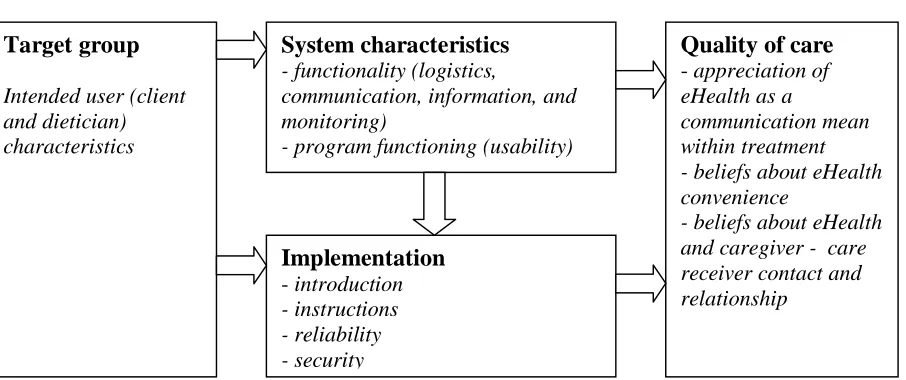
Target group
Intended user (client and dietician) characteristics
System characteristics
- functionality (logistics,communication, information, and monitoring)
- program functioning (usability)
Implementation
- introduction - instructions - reliability - securityQuality of care
- appreciation of eHealth as acommunication mean within treatment - beliefs about eHealth convenience
[image:10.612.66.519.107.297.2]- beliefs about eHealth and caregiver - care receiver contact and relationship
The system characteristics and the way it is implemented together influence how the quality of
care via this eHealth program is experienced. For example, a system can have all relevant functions, but
when insufficient instructions are given, users will be unable to use it and experience the beneficial
effects on care. Vice versa, a program can be implemented perfectly, but when users feel the program is
not user friendly or when essential functions lack, the program adds little to the experienced quality of
care. The elements of the framework and their interdependence are researched by applying UCD
principles to the WLC and result in research questions that are described in the next paragraph.
Research questions
The goal of this study is to gain insight into the background, motivations and expectations of both users
and non-users of the WLC. Also, WLC use is researched to determine user appreciation of the WLC, and
to provide insight into usage problems and necessary improvements for the WLC. Furthermore, (future)
users’ wishes and prerequisites regarding implementation process of an eHealth program are investigated.
The following research questions were formed:
1. What are the WLC user characteristics?
For clients this includes background, level of computer literacy, eHealth literacy, and general literacy,
motivations for use or non-use, expectations, self efficacy regarding treatment and treatment goals.
Dietician characteristics include level of computer literacy, eHealth literacy, and general literacy,
motivations for use, and expectations.
2. How do users experience working with the WLC?
The experience is expressed by appreciation of the functionalities, possible changes in judgment with
increasing experience, the level of fulfillment of expectations, possible difficulties encountered during
implementation, and suggestions for improvement users have.
3. Which aspects play a role in the implementation and acceptation of the WLC?
What expectations and demands do future users have regarding the introduction, functionalities,
effectiveness, advantages, disadvantages and the target group?
4. In what way contributes the WLC to the treatment according to users?
What does the WLC offer in terms of motivating clients, getting clients actively involved in their
Methods
Setting
From January 2009 until June 2009, three dieticians of healthcare organization Thebe used the WLC
during a pilot phase. These dieticians were involved in the development of the WLC and were stimulated
to use the WLC in their daily practice. Their clients were opted the WLC by their dietician as an addition
to the regular treatment and twelve clients agreed to use the WLC. The dieticians and their clients were
located in and around the city of Tilburg (the Netherlands). Interviews and usability-tests took place at the
dietician’s office or in the client’s home.
Program description
The WLC is an online program which is used as a supplement to regular (face-to-face) weight loss
treatment by dieticians. At the time of the study, the program was available exclusively to dieticians and
clients of healthcare organization Thebe. Dieticians offer clients who need to lose weight the WLC
instead of the regular pen and paper assignments. WLC using clients receive the same amount of
face-to-face guidance as clients who do not use the WLC. During the face-to-face-to-face-to-face consults assignment results and
treatment progress are discussed, so clients do not rely on online or automatic (WLC) feedback solely.
During the first consult the dietician explains what the WLC is and asks the client if he or she
wants to use it. Subsequently, the dietician creates a new user account and gives the client a login name
and password. Besides login information, users need a computer with internet connection to access the
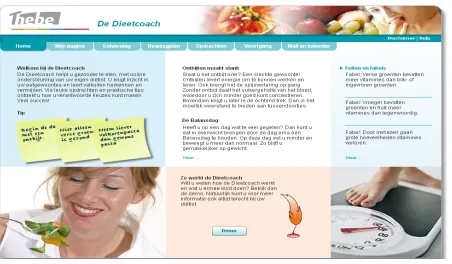
Figure 2. WLC front page
The WLC has several functionalities; logistics (data or assignment exchange), client-dietician
communication, provision of information, and monitoring. The functionalities are translated into several
features. The main WLC components are discussed briefly: the home page offers different sorts of
information; Tips, News (weight loss related), Facts and fables, and the WLC demo. After clicking on one
of the tabs, dieticians and clients enter the secured area by entering in a username and password.
Depending on the type of user (dietician/client), menu options appear in tabs. Figure 2 shows the (default)
client options: Home, My page, Nutrition diary, Exercise plan, Assignments, Progress, and Email and
calendar. Via these menu options, clients can access different assignments that aim at giving information,
insight into behavioral or emotional patterns, or suggestions and tips on adopting a healthier lifestyle. An
example of an assignment can be seen in Figure 3. The assignments can be sent to the dietician when they
are finished and the dietician can then give the client standardized or personal feedback via the built-in
feedback option or by sending an email. Clients and dieticians can keep track of the client’s progress via
charts and overviews. With the email function, clients can exchange email messages with their dietician.
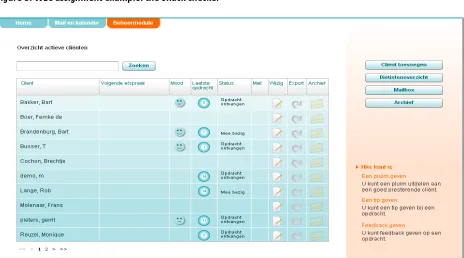
The dieticians’ secured page consists of a calendar and email box, and a client overview.
Dieticians can check each client’s use or treatment status by opening the client’s page, where they can
also open new assignments or give feedback (see Figure 4 for a client overview). Dieticians can offer
guidance to clients via email, by giving feedback or hints, or by commenting on progress. Lastly,
messages alerts and the export function which should allow dieticians to export client files to locations
[image:14.612.73.542.107.396.2]outside of the WLC.
Figure 3. WLC assignment example: the Snack checker
[image:14.612.76.540.404.662.2]Recruitment
Dieticians selected clients that were eligible to participate in the pilot based on age, computer experience,
and morbidity (receiving weight loss treatment). These clients were informed about the project and the
possibilities of the WLC by their dietician. Also, they were told that the project was in a developmental
phase and that they could, by using the WLC and participating in the study, contribute to its development.
All 13 clients who used the WLC and the 3 dieticians involved in the development of the WLC were
approached by the researcher to participate in the study. All 3 dieticians and 7 clients agreed to
participate. Dieticians who had no knowledge of the WLC project were approached by phone or email to
invite them for an interview. Further, clients of healthcare organization Thebe who did not use (or chose
not to use) the WLC were involved in the study through a survey on direct invitation of their dietician.
Subjects
In this study, multiple methods were used within, and between different groups of subjects. First, a
division was made between subjects who use (or had used) the WLC (users), and subjects who do not use
the WLC (non-users). These users and non-users can be further divided into two categories: dieticians and
clients. The usability test sample was based on convenience, because of the restricted availability of the
WLC for dieticians and clients at the moment of the study. In addition, a questionnaire was distributed
among all clients of the participating dieticians (also clients who did not participate in the pilot study and
had no experience using the WLC). Dieticians with no knowledge of the WLC (non-user dieticians) were
approached for interviews.
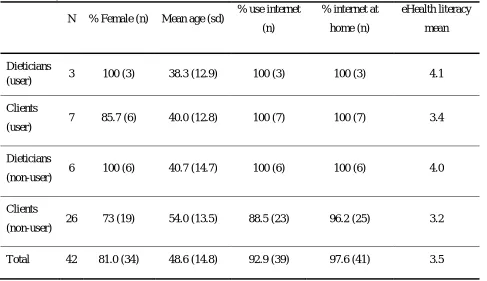
Table 1 shows general characteristics of all participating subjects (participating in usability tests,
interviews, or survey). Overall, more women than men participated: 34 women and 8 men. The
participants’ age ranges from 21 to 74 years old, with an overall mean of 48.6 years. Almost all subjects
use the internet and have an internet connection at home (respectively 92.9% and 97.6%), group specific
figures show that not all non-user clients use the internet (88.5% use the internet) and nearly all have an
internet connection at home (96.2%). Further, eHealth literacy was measured with the eHealth Literacy
Scale, EHEALS (Norman & Skinner, 2006b), the subjects score on average 3.5, on a scale of 1 to 5 (1 is
low and 5 is high eHealth literacy). Table 1 shows that dieticians score slightly higher on eHealth literacy
Table 1. Subject characteristics
N % Female (n) Mean age (sd) % use internet (n)
% internet at
home (n)
eHealth literacy
mean
Dieticians
(user) 3 100 (3) 38.3 (12.9) 100 (3) 100 (3) 4.1
Clients
(user) 7 85.7 (6) 40.0 (12.8) 100 (7) 100 (7) 3.4
Dieticians
(non-user) 6 100 (6) 40.7 (14.7) 100 (6) 100 (6) 4.0
Clients
(non-user) 26 73 (19) 54.0 (13.5) 88.5 (23) 96.2 (25) 3.2
Total 42 81.0 (34) 48.6 (14.8) 92.9 (39) 97.6 (41) 3.5
Mixed methods
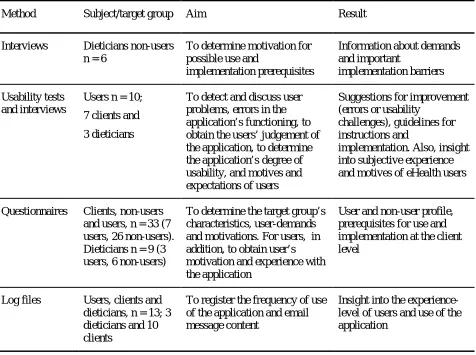
By using different methods (see Table 2), a variety of data was collected about the usability and
implementation of the WLC (Greene, Caracelli, & Graham, 1989; Eng, Gustafson, Henderson, Jimison, &
Patrick, 1999). Usability tests were administered to gain information about the user friendliness of the
WLC and user experiences. Also, the usability tests rendered cues for refinement of the program based on
the difficulties clients and dieticians encountered when interacting with the WLC (Kushniruk & Patel,
2004).
Questionnaires were distributed among users and non-users of the WLC to retrieve information
about users and non-users such as computer/internet use, motivation and self efficacy levels, WLC
experience, appraisal of WLC characteristics and functionalities, motives and intentions for use or
non-use (Nijland et al., 2005; Glasgow et al., 2007a; Glasgow, 2007b). eHealth Literacy was measured with
the eHealth Literacy Scale (Norman & Skinner, 2006b) and eating self-efficacy was measured on a three
item scale adapted from Wamsteker and colleagues (2005).
The usability test session (for WLC users; dieticians and clients) was concluded with an
interview. These interviews provided in-depth information about the proceedings and results of the
usability test, and the responses in the questionnaire that was filled in at the beginning of the session.
were also held with non-user dieticians to discuss reasons and prerequisites to WLC and more generally
eHealth use (Richards et al., 2005; Whitten & Mackart, 2005; Gallant, Irizarry, Boone; Cain & Mittman,
2002; Epping-Jordan, Pruitt, Bengoa, & Wagner, 2004; Anderson, 2007).
Lastly, to measure and analyze the actual WLC use (frequency, assignments offered and completed), log
files were kept and analyzed. These log files contained the following information: date/time, user id (who
logs on), status of assignments (inactive/active/handed out/completed/finished/ provided with feedback),
and content of sent email messages. Log files were kept from April 11, 2009 until July 18, 2009 (14
[image:17.612.71.547.250.605.2]weeks). Email messages were logged from January 11, 2009 until July 18, 2009.
Table 2. Methods
Method Subject/target group Aim Result
Interviews Dieticians non-users n = 6
To determine motivation for possible use and
implementation prerequisites
Information about demands and important
implementation barriers
Usability tests and interviews
Users n = 10;
7 clients and
3 dieticians
To detect and discuss user problems, errors in the application’s functioning, to obtain the users’ judgement of the application, to determine the application’s degree of usability, and motives and expectations of users
Suggestions for improvement (errors or usability
challenges), guidelines for instructions and
implementation. Also, insight into subjective experience and motives of eHealth users
Questionnaires Clients, non-users and users, n = 33 (7 users, 26 non-users). Dieticians n = 9 (3 users, 6 non-users)
To determine the target group’s characteristics, user-demands and motivations. For users, in addition, to obtain user’s motivation and experience with the application
User and non-user profile, prerequisites for use and implementation at the client level
Log files Users, clients and dieticians, n = 13; 3 dieticians and 10 clients
To register the frequency of use of the application and email message content
Insight into the experience-level of users and use of the application
Procedure
Users (both clients and dieticians) did a usability test and were interviewed about their experience with
the WLC. This was done in a 1h-1.5h session, during which a questionnaire was first completed, then a
real-time usability test was taken, and lastly the interview was held. The questionnaires, occurrences
with clients took place at their homes. Audio recordings were made during the session, as well as
computer recordings of the WLC use. The clients received a €15 gift voucher after the session. The
dieticians’ sessions took place at their offices and again audio and computer recordings were made. Since
the dieticians were part of the pilot and initiated the project, they were not (monetary) rewarded for their
participation.
The non-using dieticians were interviewed about their attitude and motivation towards eHealth
and the WLC during a one hour interview in their office. Audio recordings of these interviews were
made. Afterwards the dieticians received an entrance voucher for an exposition. All interviews were
verbatim transcribed. All participants were ensured confidentiality and anonymity during further data
processing and in the final reports of the results.
The questionnaires for non-using clients were handed out by the dieticians before or after a
regular appointment. Subjects were asked to complete the questionnaire in the healthcare center and
return it in a closed envelope to the dietician, or take it home and send it back through regular mail.
Completing the questionnaire took about 10 minutes. The participants were ensured anonymity but
received no reward.
Materials
Questionnaires
For the survey, questionnaires were developed using existing scales and previous similar studies and
literature (Nijland et al., 2005; Glasgow et al., 2007a; Glasgow, 2007b; Norman & Skinner, 2006b;
Wamsteker et al., 2005). The type of questionnaire a participant received depended on the group they
were part of (dietician/client, user/non-user). All questionnaires were divided into different subsections;
some were equal among all groups (computer/internet, background), some sections were group-specific:
the WLC section differed for users/non-users and dieticians/clients, and the treatment section was
administered to clients only. In sum, the questionnaire contains the following sections: computer/internet
(all subjects), treatment (user and non-user clients), WLC (client user, dietician user, client non-user), and
background (all subjects). A more detailed description of the questionnaires can be found in appendix A.
All dieticians and WLC-using clients filled out a questionnaire. Of the 120 questionnaires that
were spread among clients of Thebe that were receiving weight-reduction treatment, 27 were filled out
and returned to the researcher (response rate 23%). One questionnaire was excluded from further analysis
Usability tests
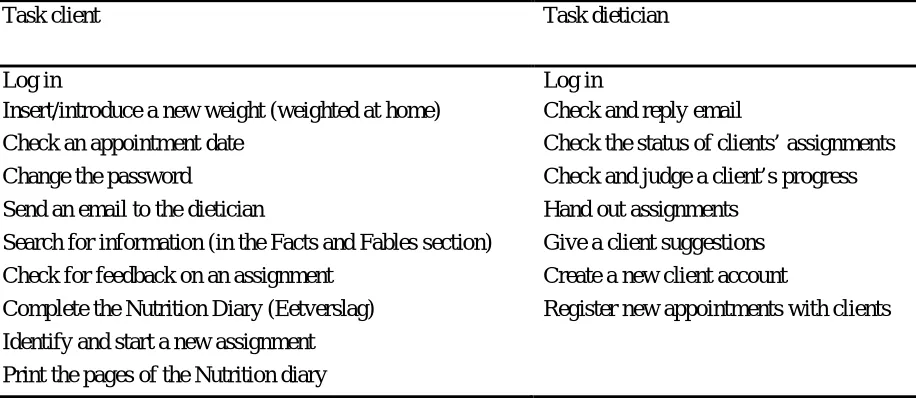
Different tasks were performed by clients and dieticians during the usability tests. The main
functionalities of the WLC were translated into different tasks and were checked by the dieticians to
ensure they represent normal WLC use (for clients as well as dieticians). Within some tasks, the subject
asked to perform actions that may not be regular but can be useful to probe for problems when using the
program or that may evoke a reaction about the subjective experience of the user. For example, changing
a user’s password is not a regular action performed by users. It may however be difficult to perform, due
to users’ unawareness of the secured ‘profile’ section. Therefore, letting users change the password
renders possibilities to talk about trust and security of the WLC. See Table 3 for the tasks used in the
tests. During the tests, users were asked to think aloud and thus verbalize their thoughts.
The tasks were performed using the WLC (online), on a Dell Inspirion 6400 laptop. A regular
mouse and keyboard were connected to the laptop to increase the subject’s convenience. The computer
actions were recorded using Morae (3.1.0) and recordings of the users’ face during the test and sound
(talk) were made using a webcam with integrated (Logitec) microphone. Also, an mp3 player (iAudio,
[image:19.612.71.529.381.580.2]F2) was used for audio recordings during the user tests and the interviews.
Table 3. Usability test tasks
Task client Task dietician
Log in Log in
Insert/introduce a new weight (weighted at home) Check and reply email
Check an appointment date Check the status of clients’ assignments
Change the password Check and judge a client’s progress
Send an email to the dietician Hand out assignments
Search for information (in the Facts and Fables section) Give a client suggestions Check for feedback on an assignment Create a new client account
Complete the Nutrition Diary (Eetverslag) Register new appointments with clients
Identify and start a new assignment
Print the pages of the Nutrition diary
Interviews
Interview schedules were created based on existing literature about barriers and advantages of eHealth for
users such as usability, concerns about safety, reliability of information, and contact opportunities (Kerr,
Murray, Stevenson, Gore, & Nazareth, 2006; Eng, Gustafson, Henderson, Jimison, & Patrick, 1999). The
interviews with users after the real time usability tests were guided by the interview schedule and the
To gather information about the motives and demands of health professionals to use, or start
using eHealth applications, interviews were also held with dieticians who do not use the WLC. Based on
literature, several underlying factors of eHealth use and barriers to use are discussed. These topics include
ease of use (usability), computer/internet skills of the user, benefits of the application, trust, security, fit
with current work procedure, compatibility with current techniques, social norm, incentives, financial
costs, development and content, and implementation (Richards et al., 2005; Whitten & Mackart, 2005;
Gallant, Irizarry & Boone, 2009; Cain & Mittman, 2002; Anderson, 2007; Epping-Jordan, Pruitt, Bengo,
& Wagner, 2004; Stone, Jarret, Woodroffe, & Minocha, 2005). The (non-using) dieticians were probed
about these topics. To encourage the dieticians to think about different possibilities of eHealth
applications, several scenarios were discussed. The scenarios represent different ways of using eHealth in
weight loss treatment and they are based on existing and fictive applications. The scenarios differ in the
following eHealth aspects: online/offline, interactivity (none, patient-to-patient, caregiver-to-patient, or
one-way-communication), advice (general information, personalized), and professionalism (Tate, Wing,
& Winett, 2001; Yoon, & Kim, 2008; De Dieetcoach, Medicinfo; De Gezond Gewicht Assistent,
Voedingscentrum; Tate, & Zabinski, 2004). Appendix B gives an overview of the scenarios.
Analyses
The usability tasks and interviews were analyzed by means of content analyses. Codebooks were created
to be able to code all events and remarks during the usability tests and interviews. During the test, only
events that marked a problem or difficulty with use were coded; successful actions were not coded. All
remarks about using the WLC and its functioning that users made during the test (positive or negative)
were coded. The codebook was based on three main categories: user friendliness, implementation, and
quality of care (Nijland et al., 2008). After a first analysis of the data small adjustments were made to the
codebook and all data was coded accordingly using Morae Manager (3.1.0). A second coder coded two
tests (one dietician test, one client test). Differences in coding between both coders were discussed until
agreement was reached, resulting in minor changes to the codebook. All usability tests were then coded
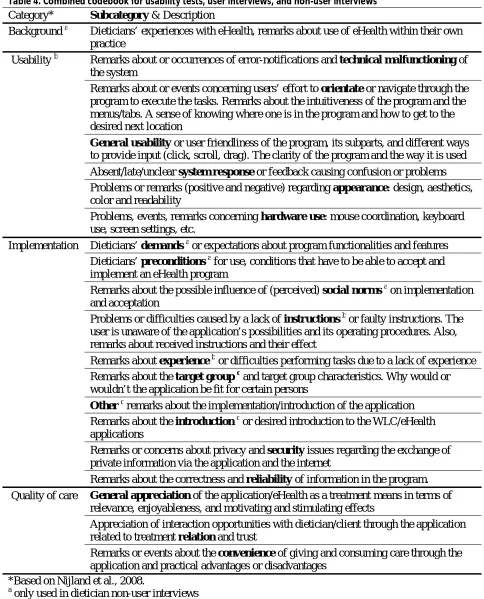
according to the new codebook. The combined usability test, user interview, and non-user interview
codebook can be seen in Table 4.
The interviews were analyzed similarly, using a predefined codebook resembling the usability
test codebook, but with some differences (Table 4). The interview transcripts were coded using Nvivo (8).
A second coder coded >10% of the data and where disagreement existed, discussion was held and
adjustments to the codebook were made until agreement on all categories and codes was reached. All
Table 4. Combined codebook for usability tests, user interviews, and non-user interviews Category* Subcategory & Description
Background a Dieticians’ experiences with eHealth, remarks about use of eHealth within their own practice
Usability b Remarks about or occurrences of error-notifications and technical malfunctioning of the system
Remarks about or events concerning users’ effort to orientate or navigate through the program to execute the tasks. Remarks about the intuitiveness of the program and the menus/tabs. A sense of knowing where one is in the program and how to get to the desired next location
General usability or user friendliness of the program, its subparts, and different ways to provide input (click, scroll, drag). The clarity of the program and the way it is used Absent/late/unclear system response or feedback causing confusion or problems Problems or remarks (positive and negative) regarding appearance: design, aesthetics, color and readability
Problems, events, remarks concerning hardware use: mouse coordination, keyboard use, screen settings, etc.
Implementation Dieticians’ demands a or expectations about program functionalities and features Dieticians’ preconditions a for use, conditions that have to be able to accept and implement an eHealth program
Remarks about the possible influence of (perceived) social norms a on implementation and acceptation
Problems or difficulties caused by a lack of instructions b or faulty instructions. The user is unaware of the application’s possibilities and its operating procedures. Also, remarks about received instructions and their effect
Remarks about experience b or difficulties performing tasks due to a lack of experience Remarks about the target group c and target group characteristics. Why would or wouldn’t the application be fit for certain persons
Other cremarks about the implementation/introduction of the application Remarks about the introduction c or desired introduction to the WLC/eHealth applications
Remarks or concerns about privacy and security issues regarding the exchange of private information via the application and the internet
Remarks about the correctness and reliability of information in the program. Quality of care General appreciation of the application/eHealth as a treatment means in terms of
relevance, enjoyableness, and motivating and stimulating effects
Appreciation of interaction opportunities with dietician/client through the application related to treatment relation and trust
Remarks or events about the convenience of giving and consuming care through the application and practical advantages or disadvantages
*Based on Nijland et al., 2008.
a
only used in dietician non-user interviews
b
only used in usability tests and user interviews
c
The questionnaires were analyzed using SPSS (version 16.0). Because of the low non-user response rate
(23%) and the disappointing amount of clients using the WLC (twelve clients, of whom seven
participated in tests and interviews), no statistical tests were done to compare WLC users to WLC
non-users. However, descriptive statistics (mean, frequency, standard deviation) were applied to gain some
insight into users’ and non-users’ characteristics, motives, and expectations.
Frequency of use was calculated based on the log files and all logged email content was analyzed
using Nvivo (8), by applying a codebook based on the content of the emails. Also, a second coder coded
all email messages according to the codebook. The inter rater reliability was calculated by Nvivo; κ
values on the separate categories ranged from 0.72 to 0.93. Differences in coding were discussed and
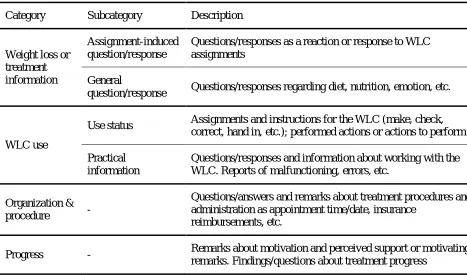
agreement was reached. Small changes to the codebook were made and all email messages were again
[image:22.612.67.534.305.580.2]categorized (see Table 5).
Table 5. Codebook sent email messages
Category Subcategory Description
Weight loss or treatment information
Assignment-induced question/response
Questions/responses as a reaction or response to WLC assignments
General
question/response Questions/responses regarding diet, nutrition, emotion, etc.
WLC use
Use status Assignments and instructions for the WLC (make, check, correct, hand in, etc.); performed actions or actions to perform
Practical information
Questions/responses and information about working with the WLC. Reports of malfunctioning, errors, etc.
Organization &
procedure -
Questions/answers and remarks about treatment procedures and administration as appointment time/date, insurance
reimbursements, etc.
Results
Questionnaires
As was mentioned before, no statistical tests were performed on the questionnaire data. However, some
results may still be of interest and will therefore be displayed by showing frequencies or mean values. No
strong conclusions can however be drawn from these results since statistical testing could not be done.
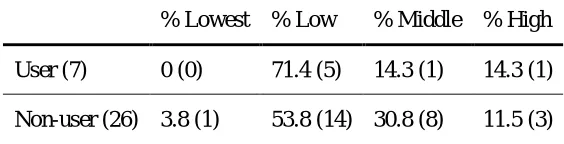
Table 6 shows that the majority of user and non-user clients fall into the low level of maximum
completed education: fifteen non-user clients (57.6%) and 5 user clients (71.4%). Almost one third of non
using clients has completed some form of education that falls into the middle category; 30.8%, whereas
14.3% of user clients did. Having completed some form of higher education is uncommon in both groups;
[image:23.612.65.347.323.395.2]14.3% of user clients and 11.5% of non-user clients fall into this category.
Table 6. Clients’ highest level of completed education*
% Lowest % Low % Middle % High
User (7) 0 (0) 71.4 (5) 14.3 (1) 14.3 (1)
Non-user (26) 3.8 (1) 53.8 (14) 30.8 (8) 11.5 (3)
*according to CBS classifications (SOI 2006)
The WLC is used in weight loss treatment, but 65.4% of non-user clients and 42.9% of the user clients
report to have some sort of co-morbidity besides being overweight. These mentioned co-morbidities
include: diabetes (9), high blood pressure (4), joint problems/rheumatism (4), high cholesterol (3),
diaphragmatic or hiatus hernia (2), asthma (2), depression (1), hernia (1), breast cancer (1), serotonin
shortage (1), pregnancy (1), heart disease (1).
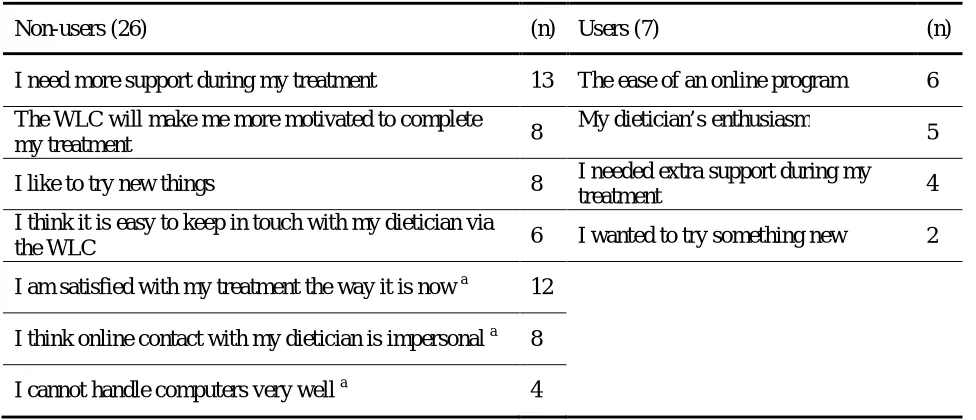
Not all non-user clients (N=26) are equally interested in using the WLC if they could; 8 clients do
not want to use it, 6 clients are neutral, and 12 clients want to use the WLC. Table 7 shows what reasons
Table 7. Clients’ reasons for use or non-use
Non-users (26) (n) Users (7) (n)
I need more support during my treatment 13 The ease of an online program 6
The WLC will make me more motivated to complete
my treatment 8
My dietician’s enthusiasm
5
I like to try new things 8 I needed extra support during my
treatment 4
I think it is easy to keep in touch with my dietician via
the WLC 6 I wanted to try something new 2
I am satisfied with my treatment the way it is now a 12
I think online contact with my dietician is impersonal a 8
I cannot handle computers very well a 4
a
reasons for not wanting to use the WLC
Table 8 shows the expectations non-users have, and users had about the WLC. Expectations about
[image:24.612.64.548.400.660.2]motivation occur most in both groups.
Table 8. Clients’ expectations about the WLC
Non-users (26) (n) Users (7) (n)
More motivation to engage in my treatment 13 A greater motivation to engage in
treatment clients 6
More motivation to finish my treatment 10 A bigger motivation to finish my
treatment 4
More insight into my own progress during treatment 10 More insight into my own progress
during treatment 3
More knowledge about food and losing weight 10 A faster treatment 3
More contact with my dietician 5 More knowledge about food and losing
weight 3
A faster treatment 3 More contact with my dietician 1
Being involved in my treatment in between
appointments more often 7
Treatment will be more fun 3
Based on differences in mean scores (Table 9) non-user clients (mean score 4.00) appear slightly more
satisfied with their treatment than WLC users (mean score 3.86). There is no strong need for more
face-to-face contact with the dietician in both groups, but non-users (mean score 3.27) show a slightly higher
need than users (mean score 3.00), who score neutral. Non-users also score slightly higher than users on
the need for more contact with the dietician, with mean scores of respectively 3.35 versus 3.00. Further,
both groups seem motivated to finish their treatment but again non-users score higher than users; mean
scores are respectively 4.31 and 4.00. Non-users and users are neutral to positive about being capable to
reach their target weight, with higher scores for non-users (3.64) than for users (3.50). Both groups score
slightly more positive than neutral in their belief that their current treatment helps them accomplish
treatment goals, and again this belief is stronger in non-users (3.77) than in users (3.29). Non-users appear
to have a higher eating self efficacy than users who score nearly neutral on eating SE, but again
[image:25.612.66.516.335.531.2]differences between non-users and users are small: mean scores of 10.1 and 9.14 (see Table 9).
Table 9. Cognitions about treatment
Client user mean score (sd) Client non-user mean score (sd)
Satisfied with treatment 3.86 (0.7) 4.00 (0.9)
Need for more face-to-face contact 3.00 (1.0) 3.27 ( 1.0)
Need for more contact 3.00 (0.8) 3.35 (0.9)
Motivation to finish treatment 4.00 (0.8) 4.31(0.6)
Target weight self efficacy 3.50 (0,5) 3.64 (0.8)
Belief in helpfulness treatment 3.29 (1.1) 3.77 (0.7)
Eating self efficacy (3 items) 9.14 (0.9) 10.1 (1.7)
Client user n=7, client non-user n=26
All items were measured on 5-point scales; 1=fully disagree to 5=fully agree
Usability tests
The usability tests were coded according to the codebook displayed in Table 4. Most problems or remarks
were coded in the usability category. Implementation was coded second most often and quality of care
third (Figure 5). Figure 5 also shows that dieticians and clients show the same pattern of coded events per
category. They roughly encounter the same problems or make remarks on similar topics, except specific
comments about functionalities that are unique to their user-type. For example, many clients encounter
clock, and express their discontent with this subparts’ user friendliness. Dieticians however have no such
data-entry methods but have encountered other usability-problems that are impossible for clients to
[image:26.612.71.535.139.452.2]experience.
Figure 5. Usability test coding per main category N=10 (3 dieticians and 7 clients)
Table 10 shows how often each subcategory was coded and how many remarks/events were positive or
negative. The positive and negative events do not necessarily add up to the sum of coding per category;
sometimes one event or comment contained both positive and negative elements, or was neutral (not
marked negative or positive). Usability coding concerns mostly problems with use during the test or
problems with general use (past experiences of users). Implementation and quality of care consist of
remarks users made during the test about one of the topics. The ‘other’ category consists of instructions
that were given by the test leader to help users to continue when they did not know how or where to
Table10. Usability test remarks or events
Category Client (7) + - Dietician (3) + - Total (10)
Usability User friendliness 54 17 40 23 5 20 77
Hardware use 4 0 4 2 0 2 6
Orientation 31 0 31 18 0 18 49
Appearance 8 6 3 1 0 1 9
System response 12 0 12 3 0 3 15
Technical malfunctioning 22 0 22 0 0 0 22
Implementation Instructions 6 2 4 7 1 2 13
Experience 40 6 36 12 1 11 52
Security 1 1 0 0 0 0 1
Reliability 2 2 1 0 0 0 2
Quality of care General appreciation 21 13 9 11 5 7 32
Convenience 9 2 7 1 0 2 10
Relationship 4 1 2 4 1 2 8
Other Instructions by test leader 35 x x 4 x x 39
Usability
User friendliness was coded negatively 40 times during the client tests, and 20 times during the dietician
tests (Table 10). Typical user friendliness problems were: not being able to find the right button or
clickable element to enter the desired page, not being able to skip data entries when they are not relevant
to the user or change data entries when a mistake was made, laborious data-entry methods (typing is
easier than using the mouse or + and – buttons, but sometimes there is no choice). Negative remarks were
also made, for example about the client overview which provides insufficient and irrelevant information
according to dieticians. Clients also made negative remarks about some WLC features’ user friendliness,
such as the print option in the nutrition diary; printing one day at a time is laborious and renders poor
program is clear, but you have to look good or search a bit sometimes’, and ‘once you know how it works
it is clear’.
Problems with hardware did not occur often; only six times during the test. Problems in this
category consist mainly of not typing correctly (passwords) and not being able to double-click.
Orientation was a problem during the user tests (49 negative references). These problems may be
caused by users’ lack of WLC use experience, as was often mentioned while searching. For example,
users sometimes had difficulties finding the email box section of the WLC, even when they were already
on the correct page. Especially users without any prior experience with the email box had to search, but
also dieticians who claimed to use the email regularly sometimes lost track of how to get there. Users
most often had problems finding the right page or location, they sometimes were insecure about which
buttons to use or where to find the right button. For example, a client wanted to save an assignment by
pressing the ‘send’ button instead of the ‘save’ button that was right next to it.
Appearance coding was positive regarding the program’s and looks and clarity (6 positive
references). For example, email box was considered lucid and easy to use because it looks like the
Microsoft Office Outlook mailbox. Negative remarks (4) were made about the layout or titles, for
example, the facts and fables and news sections on the front page are not recognizable as such.
During the test some users became confused because of slow system response. It occurred that an
action did not yield visible results, making the user wonder if anything had happened. In one case, the
system response was unclear; the client forgot to enter the new password twice (confirm it), but the
system responded with ‘invalid entry’. It was not clear to the client that the response was because a
confirmation had to be done. Overall, 15 negative system response events were coded.
Only clients experienced technical problems during the test, or reported prior technical
malfunctioning of the program; 22 negative events were coded. Saving assignments or entering data often
resulted in system errors. Some remarks were made about the negative effect it has on users’ motivation
to continue to work with the WLC. For example, one user experienced technical errors when saving data
which was frustrating because all entered data got lost.
Implementation
Clients mentioned that they received few or no instructions. The remarks were mainly positive (2); the
WLC is easy to learn with few instructions. Dieticians mentioned they have little time to explain clients a
lot about the WLC, but the program speaks for itself. Also, some parts have not been explained to
dieticians either.
the program which resulted in orientation problems. Most dieticians and clients mentioned that they have
no experience sending or receiving Clues/hints. Three clients remarked they have not used the WLC
much at all. One dietician regretted her lack of experience which was caused by inactive clients. Positive
remarks (7) were made about successfully used features and motivations to start using features that were
first noticed during the test; sometimes you have to see it first before it becomes clear.
During the test, one positive remark was made about security; it was not considered a problem
barrier to use. Because the dietician created the account, changing the password is not considered
important and it is assumed to be safe.
Regarding reliability and appreciation of the information, two clients mentioned that they
appreciate the information the WLC offers. Without change however, the information becomes
uninteresting and outdated.
Quality of care
The appreciation category holds positive (18) and negative remarks (16) about the usefulness and
relevance. Some assignments are appreciated by clients and dieticians because they look good, give useful
information, or entertain. The snack checker for example was appreciated on all these three points by
some clients and dieticians. Negative coding concerns judging of irrelevancy, such as entering
home-weight home-weightings. Clients differed in their opinions; filling in why a certain food was eaten is considered
useful by some and not useful by others. The dieticians remarked this too, not all features are useful for
all clients.
A dietician mentioned the WLC offers little convenience since it is not compatible with their
current electronic registration system. Some clients remarked that an online program is more convenient
because it is accessible everywhere, others said that using an online program is less convenient because
one needs to have a computer nearby in order to use it; using pen and paper is more convenient.
Mixed remarks were made about online interaction and relationship. Positive remarks (2) include
one dietician’s assumption that the interaction possibilities are appreciated by clients. Negative remarks
(4) include clients mentioning they do not need the email or other online interaction possibilities. On the
other hand, a dietician and a client expressed the need for more or other interaction possibilities; more
automatic responses and being able to respond directly to a dietician’s feedback as a client.
Summary
Overall, the usability tests showed that clients and dieticians encountered problems orientating themselves
in the WLC; they had difficulties finding the right page or knowing where to click. Also, user friendliness
the WLC’s clear structure, its logical menus and nice looks. Concerning implementation the usability tests
showed that users’ WLC experience levels are low. Dieticians further mentioned that they do not give
many instructions because the program speaks for itself and dieticians lack time during consults for
extensive instructions. A coding overview of positive and negative coding can be seen in Figure 6.
[image:30.612.71.547.167.379.2]
Figure 6. Usability test coding: positive and negative events/remarks
User interviews
After the usability test was performed, interviews were held. Figure 7 shows how the interviews were
coded on the main categories. In comparison to the usability tests, usability was coded less, and quality of
[image:30.612.72.543.499.693.2]Usability
Usability was coded less often in the interviews than during usability tests. Table 11 shows that 12
remarks concerned technical malfunctioning, comprising complaints about errors or malfunctioning of the system:
Interviewer: You are not particularly motivated to keep using the WLC. Is that
because of the technical…
Client: Yes, that is because of the technical errors. Because if that wasn’t there, I
would really, I would work with it more. But because of the technical malfunctioning,
you always encounter problems: ‘it is not working again’.
Interviewer: So that reduces you motivation a bit?
Client: Yes.
Two users mentioned not having experienced technical problems with the system. Users who had encountered a technical error stress that these should be resolved because it prevents them from using the
WLC optimally.
Users made 17 comments about the appearance of the WLC and in general, users are positive
about it, as a client said: “I think it looks err, not too intensive, very subtle. So yes, it looks very good”.
Some users mentioned that the layout is not very clear or attractive: “I can read it very well, but it
concerns the layout. I think they did not do much with it, they just typed the text and supposed it was ok
(…) because the other assignments look good and have pictures in them, so yes, put some effort into that
too” (dietician).
User friendliness coding (31) contains positive remarks about the program’s user friendliness such as: “It is a clear and easy webpage” (client). However, some parts of the program need
improvement:
Client: A disadvantage of the Snacks assignment, or what went wrong with it, is that
when you’ve eaten more than one item of something, so you enter two or three, it stays
set on that number automatically.
Interviewer: So if you do not notice that…
Client: You’ll eat a lot, and you cannot undo it. It’s too bad that that’s not possible.
Dieticians mentioned they the program lacks good overview in the client overview and the handed in
assignments: “I think, when they fill it in they get a clear outline, why don’t I get an outline too? First of
all it costs a lot of time and paper, and well, what do I do with this? (shows printed pages) It’s pitiful”
Three times a user remarked that the absence of a clear system response caused uncertainty about the performed action: “What I said, sometimes I think: well, has that been send or not?” (dietician).
Implementation
Remarks about instructions were coded 33 times. On the one hand clients and dieticians said that dieticians give a short instruction and that clients just figure it out by themselves: “I just clicked on a lot
of things and just tried it. (…) that worked fine, she’d explained it a little bit, and told me to look there
and there” (client). On the other hand, clients appreciated the extra instructions they received during the
usability tests: “Well, it might be useful at the beginning, when you start with the WLC to receive
instructions like these. (…) because now I know more about the possibilities and I think I am more likely
to look at it” (client). Dieticians feel that a short explanation should be enough when clients are familiar
with computers. Also because the program, contains a help and demo function: “Well, I have seen that
there is a short manual. I do not know if it can be found under the help function. But I think, one can
learn by doing it. Yes, that is how I have learned it. But I will not give extensive instructions. (…) I think
the clients that I have now are pretty skilled regarding internet use” (dietician).
Client and dieticians expressed how much experience they have with the program and what effect this has on WLC use and treatment judgment (25): “Well, I took a look at it when I came from her
office and maybe afterwards once again. That’s it” (client), “I am not using it enough to be able to judge
that” (dietician).
Introduction was coded 25 times. Clients use the WLC because their dietician gave them a choice between the WLC and pen and paper assignments. Working online fits some clients’ daily
activities and was thus preferred: “I told her: I’ll take the internet option. Because I spend much time
online, so that’s why” (client). Also, clients mentioned they were interested in helping to test the
program and receiving extra guidance. Dieticians said they had some problems fitting the program into
their practice, since giving instructions, using the program, and keeping files and expense claims up to
date takes time: “Well, it might be useful for the client but I feel like I’m doing things double because they
come to an appointment and I write it down on an appointment card. And I’ll tell them to check that card.
I could do it with the WLC, it’s a choice I make, but I will not do it twice” (dietician). In a response to the
question whether the dietician prefers to treat clients with the WLC or without it she answered: “At this
moment it depends. If there are already six clients who have said yes, I would say ‘no’ for the seventh
because it just costs much more time. But eventually I think, again, it has its advantages and you have to
consider the service for clients (…). And yes, if the client wants it, fine”.
weight: “Everyone who goes to a dietician and knows a little bit how to use the computer, because that
may be a problem for many persons” (client). Dieticians claimed they select WLC clients on age, only
not-elderly adults, and background; non-ethnic, preferably working with computers. Dieticians ask clients