PROCESSING OF CLAIMS
FOR PART A AND PART B
E N T E R P R I S E A R C H I T E C T U R E
Chapter 1 Introduction...1-1
Chapter 2 Business Architecture...2-1
BUSINESS SERVICE MODEL... 2-1
KEY TO PROCESS MAPS ... 2-6
PROCESS MAPS: MANAGE CLAIMS (1)FF ... 2-8
Establish and Maintain Claims Processing Environment (1.1) ... 2-8
Process Claims (1.2) ... 2-15
Support Claims Analysis and Reporting (1.3) ... 2-20
PROCESS MAPS: MANAGE MEDICARE FINANCES (2) ... 2-22
Manage Claims Expenditures (2.1) ... 2-23
Perform Fiscal Integrity Functions (2.2)... 2-35
Perform MSP Processing (2.3) ... 2-39
Perform Cost Report Settlement (2.4) ... 2-42
PROCESS MAPS: PROVIDE CUSTOMER SERVICE (3)... 2-44
Manage Providers (3.1) ... 2-44
Support Beneficiary Inquiries (3.2) ... 2-49
Manage Other Stakeholders (3.3) ... 2-50
Manage Appeals (3.4) ... 2-51
PROCESS MAPS: MANAGE FFS ENVIRONMENT (4) ... 2-53
Perform Transition Activities (4.1)... 2-53
Manage Contracts (4.2) ... 2-54
Manage and Monitor MAC Performance (4.3) ... 2-59
Manage Interfaces and Interactions (4.4) ... 2-61
Chapter 3 Application Architecture...3-1
OVERVIEW ... 3-1
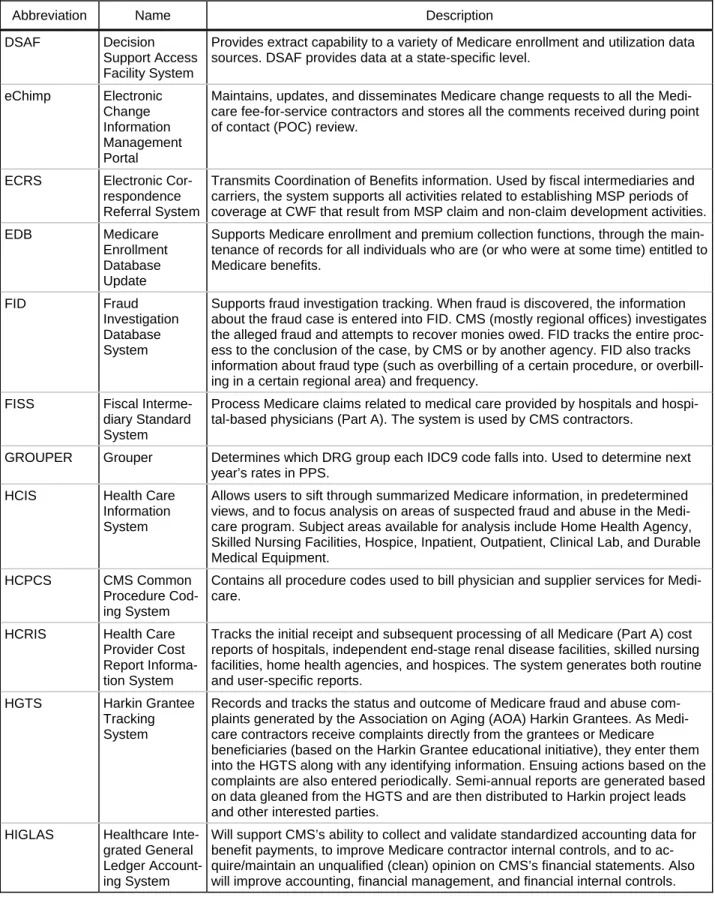
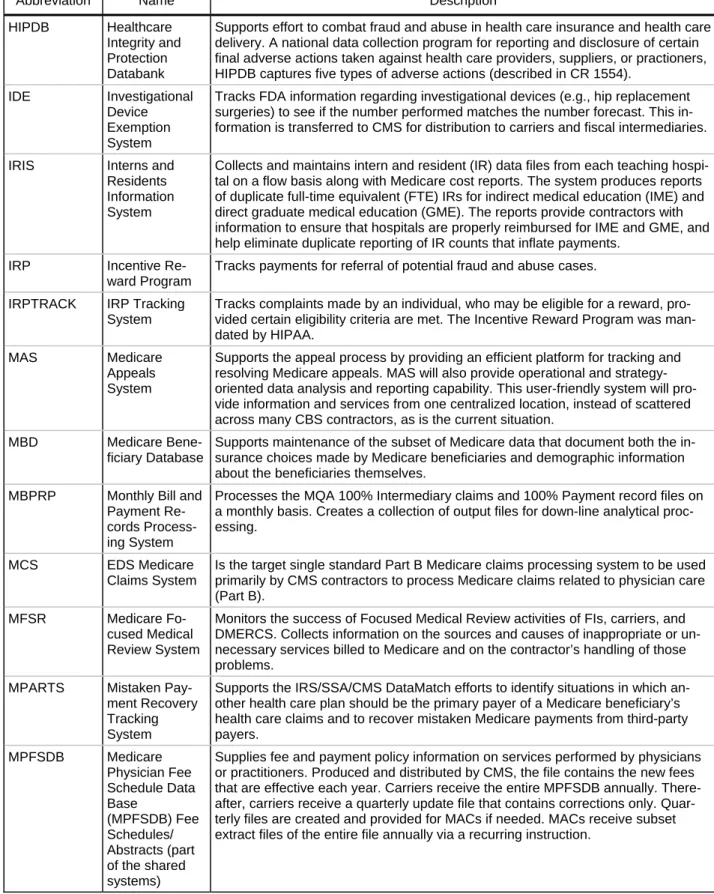
APPLICATION INVENTORY ... 3-2
PROCESSES SUPPORTED BY APPLICATIONS ... 3-10
Chapter 4 Infrastructure Architecture ...4-1
OVERVIEW ... 4-1
ENTERPRISE DATA CENTERS ... 4-2
PRODUCTS INVENTORY ... 4-3
APPLICATIONS SUPPORTED BY PRODUCTS ... 4-6
TECHNICAL OPERATING LOCATIONS OF APPLICATIONS ... 4-7
INFRASTRUCTURE REQUIRED FOR PROCESSING CLAIMS... 4-7
Appendix A Glossary of Key Terms
Appendix B Abbreviations
Figures
Figure 1-1. Interrelationship of Architecture Domains
in Part A/B MAC Environment ... 1-2
Figure 2-1. CMS Business Service Model for FFS Claims Processing ... 2-2
Figure 2-2. Decomposed Business Service Model for FFS Claims Processing ... 2-3
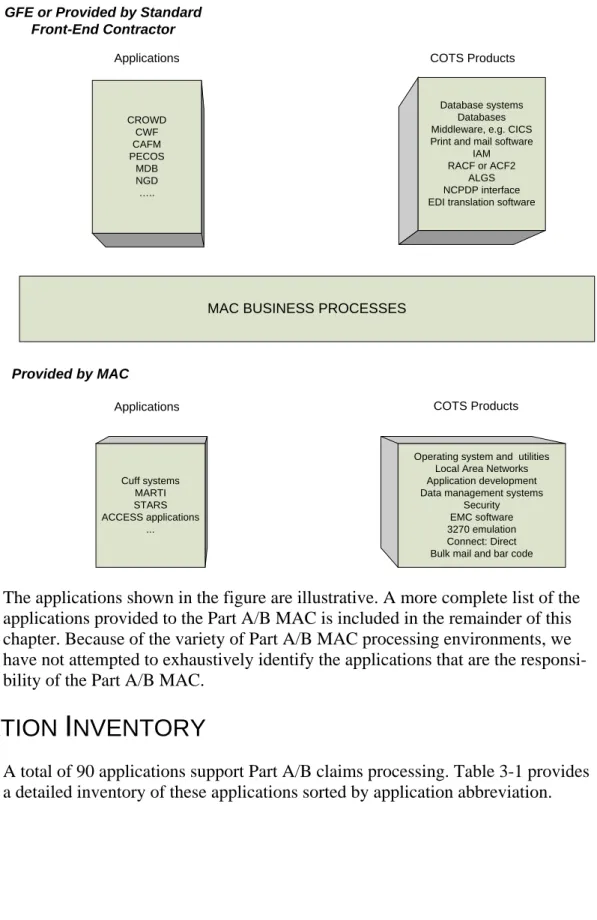
Figure 3-1. Part A/B MAC Software Environment ... 3-2
Figure 4-1. Part A/B MAC Infrastructure Environment ... 4-2
Tables
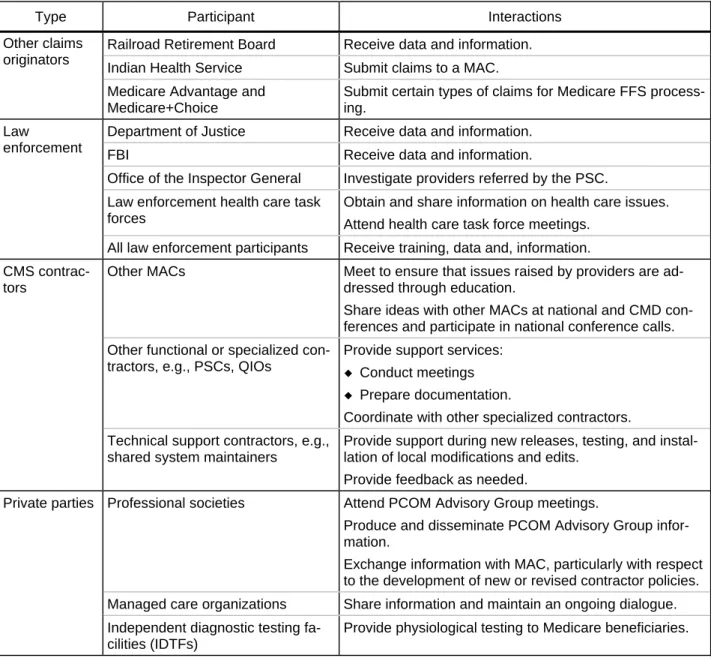
Table 2-1. Organizational Interactions ... 2-61
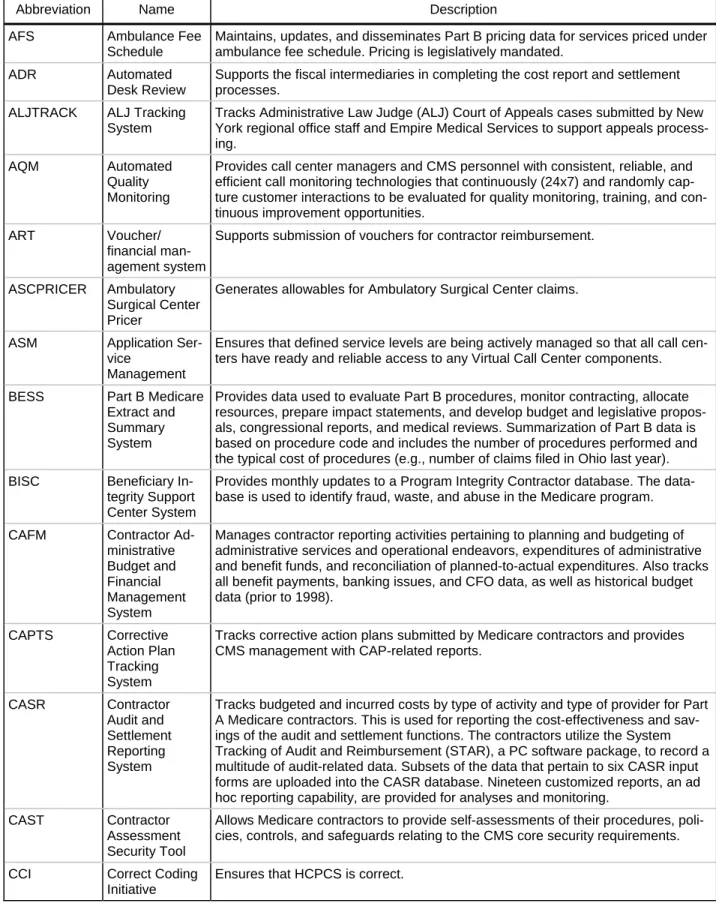
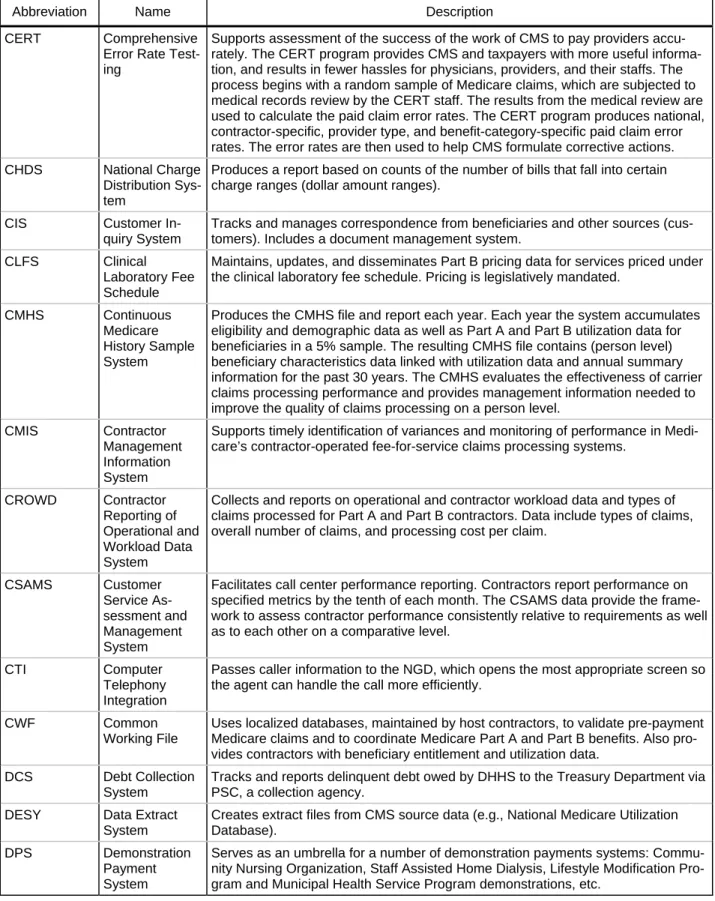
Table 3-1. Current FFS Applications... 3-3
Table 3-2. Number of Applications Supporting FFS Claims... 3-10
Table 3-3. Applications Supporting Part A/B Claims Processes ... 3-11
Table 3-4. MAC-Provided Modules ... 3-14
Table 4-1. Products Inventory ... 4-4
Table 4-2. Number of Claims Applications Supported by Products ... 4-6
Introduction
From Medicare’s start, the federal government has used private insurance compa-nies to process claims and perform related administrative services for the pro-gram’s beneficiaries and health care providers. Today, the Centers for Medicare and Medicaid Services (CMS) relies on a network of contractors to process nearly 1 billion Medicare claims each year from more than 1 million health care provid-ers. In addition to processing claims, the contractors, in conjunction with other entities, enroll health care providers in the Medicare program and educate them on Medicare billing requirements, handle claims appeals, answer beneficiary and provider inquiries, and detect and prevent fraud and abuse.
At present, the contractors include 23 fiscal intermediaries (FIs) and 17 carriers that process fee-for-service (FFS) claims. FIs process claims for Medicare Parts A and B for facilities, including hospitals and skilled nursing facilities. Carriers process claims for Medicare Part B, in particular for physician, laboratory, and other services. In addition, 4 FIs serve as regional home health intermediaries (RHHIs), concentrating exclusively on home health and hospice (HH) claims. Similarly, 4 carriers serve as durable medical equipment regional carriers
(DMERCs), focusing exclusively on claims for durable medical equipment, pros-thetics, orthotics, and supplies.
This document, a companion document to Processing of Fee-for-Service Claims for Part A and B: Concept of Operations,1 presents a detailed enterprise architec-ture (EA) view of the FFS business, focusing on the functional and technical envi-ronments for processing FFS claims. The EA describes the Medicare Part A and B environment as it will exist after the MAC contracts are awarded; it is not in-tended to represent the current environment of the FIs and carriers. One purpose of this document is to provide potential MACs some key information they need to develop proposals that effectively address CMS requirements.
This document presents the enterprise architecture for processing Part A/B claims in three domains:
¡ The business architecture represents the functions and processes that
sup-port the business, the organizations that perform the business, and the lo-cations where the business is performed.
¡ The application architecture identifies and describes applications and
modules, as well as their relationships to business processes and other ap-1
CMS, Processing of Fee-for-Service Claims for Part A and B: Concept of Operations, Au-gust 2005.
plications systems and modules. Major influences include technologies employed and interface requirements.
¡ The infrastructure architecture identifies and describes the hardware, software, and communications network technologies required to manage business applications in the Part A/B MAC environment.
The business architecture represents the Part A/B claims processing functions— the functional environment. The application and infrastructure architectures represent the technical environment in which the processing occurs.
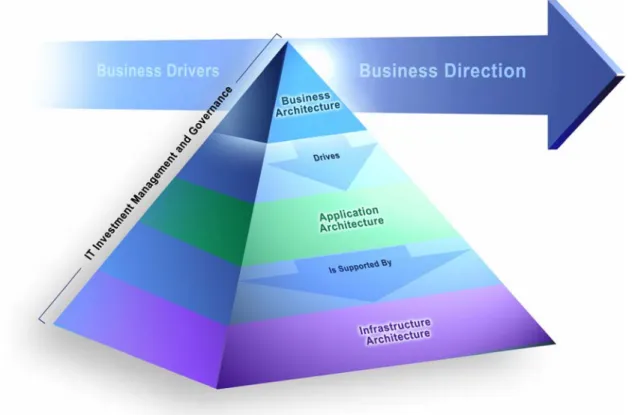
Figure 1–1 depicts the domains and their interrelationships. The conceptual framework has various components that fit into the interrelated architectural layers, and security is integrated throughout the conceptual framework.2
Figure 1-1. Interrelationship of Architecture Domains in Part A/B MAC Environment
The enterprise architecture is presented in Chapters 2, 3, and 4, each devoted to one of three domains of the CMS enterprise architecture framework. The
appendixes contain a glossary of key terms and abbreviations related to Part A/B claims processing.
2
Security has many owners and many facets, including the contents of personnel policies and hiring practices, internal controls of functions such as the approval process, data access and update rights, and firewalls and encryption.
Business Architecture
The business architecture represents the functions and processes that support the business, the entities that perform the business, and the locations where the busi-ness is performed. In other words, the busibusi-ness architecture addresses how the mission-critical functions of fee-for-service (FFS) processing are accomplished. It is a portrayal of how the organization actually accomplishes its mission rather than how it is organizationally structured to manage its mission. The business ar-chitecture also encompasses a strategic direction that an organization strives to attain. Major influences on the business architecture are laws and regulations, ex-ternal and inex-ternal policies, organizational structures, organizational culture, busi-ness change, people, budgets, and technology. This layer ignores any physical constraints and contains no element of system design.
This chapter describes and depicts the high-level business architecture for Part A/B claims processing and thus focuses on the Medicare administrative contractor (MAC) and its relationship with CMS and various other entities known as func-tional contractors. A funcfunc-tional contractor is an entity that performs an FFS busi-ness function, e.g., prevention of fraud and abuse that traditionally had been performed by Medicare carriers and intermediaries. Although this document fo-cuses on MAC activities, it describes all activities (and entities) involved in the Medicare FFS process for Part A/B claims.
The chapter begins with the business service model, providing the context and high-level breakdown, or decomposition, of the Part A/B claims processing func-tion. The business service model displays what Part A/B claims processing is do-ing. Next, the chapter presents process maps and descriptions of the individual steps in each of the major claims processing functions. The process maps display how Part A/B claims processing functions are carried out. The processes depicted in this chapter represent the anticipated environment upon award of a MAC con-tract.
The processes are depicted as if there is a single A/B processing system. How-ever, two distinct shared claims processing systems are used: Fiscal Intermediary Standard System (FISS) (for Part A claims) and Multi-Carrier System (MCS) (for Part B claims). The process maps and descriptions note when a business process or functionality is exclusive to either Part A or Part B.
B
USINESS
S
ERVICE
M
ODEL
A business service model depicts the business architecture at the highest level. To put it another way, the model shows the major relationships among service
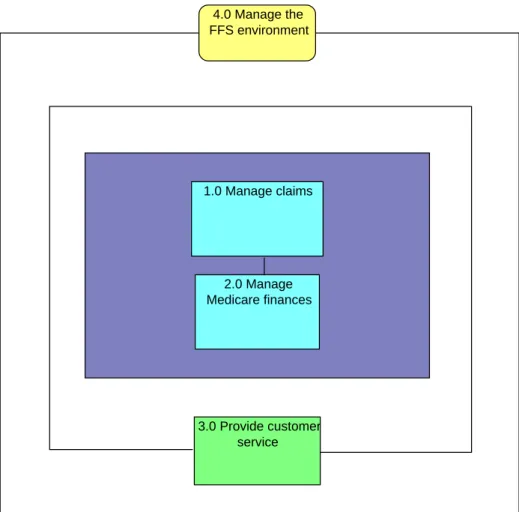
groups. Figure 2-1 depicts the business service model for Part A/B claims proc-essing. Please note that this document should be understood and viewed in the larger context of the overall FFS process as described in the previously published Concept of Operations (ConOps). The ConOps describes CMS’ vision for the fu-ture of the fee-for-service environment.
Figure 2-1. CMS Business Service Model for FFS Claims Processing
4.0 Manage the FFS environment Guiding Services Core Services 1.0 Manage claims 2.0 Manage Medicare finances Enabling Services 3.0 Provide customer service
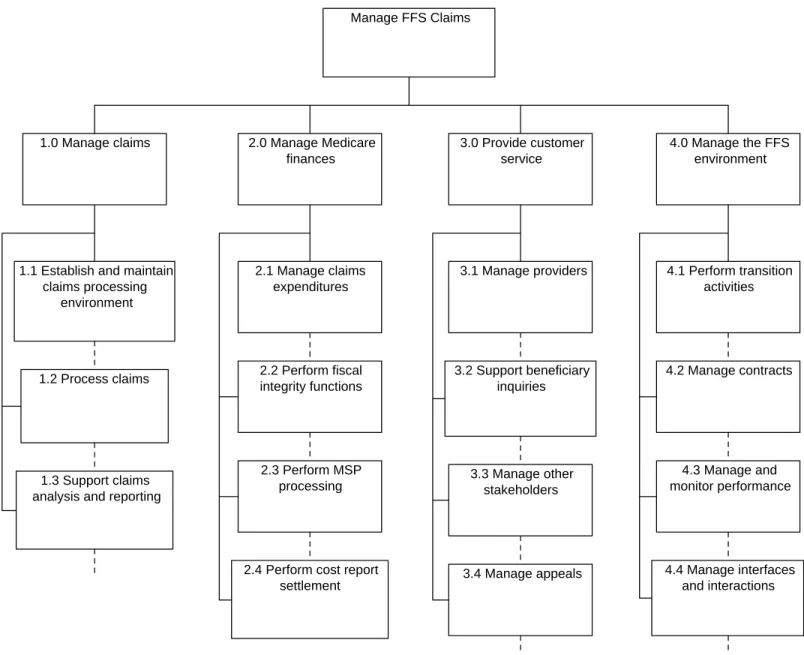
The business service model decomposition identifies the individual processes per-formed within the organization, decomposed to a level of detail appropriate for the scope of the review. Specifically, the model shows the hierarchal relationships between service groups, major business processes, and processes. The focus is on what the organization does, not on who does it, where and when it is done, what technologies or resources are used, or what flows of inputs, outputs, or interac-tions occur.
Figure 2-2 depicts the decomposed business service model for Part A/B claims processing. The top tier of the model represents the service group level of detail, the second tier represents the major business process level of detail, and lower-level tiers represent the process lower-level of detail.
Figure 2-2. Decomposed Business Service Model for FFS Claims Processing
Manage FFS Claims
1.0 Manage claims 2.0 Manage Medicare 3.0 Provide customer 4.0 Manage the FFS
finances service environment
1.1 Establish and maintain 2.1 Manage claims 3.1 Manage providers 4.1 Perform transition
claims processing expenditures activities
environment
1.2 Process claims 2.2 Perform fiscal integrity functions
3.2 Support beneficiary inquiries
4.2 Manage contracts
1.3 Support claims analysis and reporting
2.3 Perform MSP
processing 3.3 Manage other stakeholders
4.3 Manage and monitor performance
2.4 Perform cost report
settlement 3.4 Manage appeals
4.4 Manage interfaces and interactions
The Part A/B MAC’s major FFS claims processes are defined as follows:
1 Manage claims—establish all of the environmental business processes and busi-ness rules that are needed to complete an individual claim; the receipt, edit, and adjudication of claims; and the analysis and reporting associated with claims files created during these processes.
1.1 Establish and maintain claims processing environment—provide founda-tion for claims processing by establishing the work flow that is best suited to a MAC’s workforce environment, defining the edits that will be used to validate the claims, establishing prices, determining local medical policies, establish-ing prepay processestablish-ing rules, and integratestablish-ing the definitions and restrictions as-sociated with demonstration projects or specialty claims processing.
1.2 Process claims—process claims and adjustments from original receipt through determination of disposition (does not include payment-related proc-esses). Specific functions include receiving, verifying, and logging claims and adjustments received; performing internal claims edits; performing claim vali-dation edits; completing claims development and adjudications; maintaining pricing and user files; and generating reports.
1.3 Support claims analysis and reporting—conduct error analysis, reporting, and management activities and specialized processes, including medical re-view of claims, routine and ad hoc reporting, and reporting of claim payments to insurance companies and Medicaid.
2 Manage Medicare finances—create, maintain, and track payments for services provided under Medicare from the Medicare trust funds or from the CMS admin-istrative budget. Collect payments owed to CMS. Maintain information on pro-viders, beneficiaries, insurers, employers, Medicaid state agencies, and other entities. Maintain and reconcile financial transactions. Perform financial reporting and financial audits.
2.1 Manage claims expenditures—create, maintain and track payments for the services provided under Medicare, collect payments owed to CMS, maintain information on providers and other payees, and manage all financial transac-tions associated with claims. Managing the expenditures includes payables management, receivables management, and financial reconciliation.
2.2 Perform fiscal integrity functions—establish program safeguards to pro-tect the Medicare program from fraud and abuse by providers or beneficiaries and ensure the proper adjudication of claims and administration of Medicare program activities. This includes conducting provider audits, performing data analysis, utilizing corrective actions to reduce improper billing, and develop-ing fraud and abuse cases.
2.3 Perform MSP processing—safeguard the trust fund where Medicare is the secondary payer and is not responsible for paying first on a claim. The term “coordination of benefits” is used to describe the situation in which two or more payers are responsible for parts of a claim. Coordination of benefits in-cludes creating and updating eligibility information and processing Medicare secondary payer (MSP) claims.
2.4 Perform cost report settlement—safeguard payments made to institutional providers, which are paid on an interim basis and whose reimbursement is fi-nally settled through the submission of an annual Medicare cost report. The audit process includes the timely receipt and acceptance of provider cost re-ports, desk review and audit of those cost rere-ports, and the final settlement of the provider cost reports. In addition, the audit process includes such adminis-trative functions as intermediary hearings and appeals to the Provider Reim-bursement Review Board.
3 Provide customer service—ensure customer satisfaction of providers, other stakeholders, and ultimately the beneficiaries.
3.1 Manage providers—enroll providers and update provider information, of-fer general education to providers on Medicare processing, educate individual providers on specific issues, manage specialty and demonstration contractors, and handle provider inquiries.
3.2 Support beneficiary inquiries—update beneficiary information and re-spond to complex beneficiary inquiries referred from the Beneficiary Contact Center (BCC).
3.3 Manage other stakeholders—manage business dealings with numerous stakeholders and participants beyond those that give and receive health care. These stakeholders include commercial services such as banks and billing agencies, which are key players in billing financial functions and payment; law enforcement agencies, ranging from local ones to the Federal Bureau of Investigation (FBI), which investigate fraud and abuse cases; professional so-cieties such as local physician groups or the American Medical Association (AMA); and employers, and their health plans, which play a key role in de-termining who is paying for particular services.
3.4 Manage appeals—receive, track, investigate, and issue decisions on claims appeals received from beneficiaries and providers (excluding the review of re-quests for waiver under debt collection). Medicare has six levels of appeals. A first-level appeal is called a “request for redetermination” and involves a sim-ple reconsideration of the initial decision. Second-level (“request for reconsid-eration)” and third-level (“request for administrative law judge” or ALJ) appeals are forwarded to the appropriate Qualified Independent Contractor (QIC). Higher-level appeals may go to the federal courts. The result of an ap-peal is that a previous determination is affirmed or reversed (in full or in part). Effectuate timely adjustments based on the results of appeals.
4 Manage the FFS environment—manage transitions and contracts, manage and monitor performance, manage administrative budget, and manage interfaces and interactions with CMS and functional contractors to optimize the FFS environ-ment for cost and operational effectiveness.
4.1 Perform transition activities—manage transitions as work is consolidated from multiple fiscal intermediaries (FIs) and carriers in a region. From an in-coming MAC’s perspective, a contractor transition encompasses all of the tasks it must perform to assume the duties of an incumbent (outgoing) con-tractor running a Medicare FFS claims processing operation. Among those du-ties are successful transfers of claims processing operations and all related files, processes, and other activities from the outgoing contractors, and educa-tion of providers, and other affected parties regarding the change. All these ac-tivities need to be done with minimum disruption to payments and services.
4.2 Manage contracts—manage administrative budgets, ongoing expenditures, performance, and compliance activities. Manage the process for exercising a contract option with CMS as well as ongoing modifications to the contract. Manage contract costs by employing a work breakdown structure (WBS). 4.3 Manage and monitor MAC performance—manage performance in accor-dance with CMS-published performance standards and processing require-ments for claims processing contractors; establish procedures, gather data, and submit data to CMS. CMS will review Part A/B MAC performance and fol-low up as appropriate. Manage award fee process for costs related to esti-mated (or target) costs and a larger potential award fee related to the quality and efficiency of services provided.
4.4 Manage interfaces and interactions—manage organizational and technical interactions. Manage and maintain relationships with functional contractors that will increase the efficiencies of Medicare services for beneficiaries and providers. Functional contractors include Beneficiary Contact Centers (BCCs), a Coordination of Benefits Contractor (COBC), Program Safeguard Contractors (PSCs), and Qualified Independent Contractors (QICs). Manage technical interactions and interfaces of an operational environment in which CMS, other contractors, and the MACs themselves provide applications, tech-nology, and services (operations).
K
EY TO
P
ROCESS
M
APS
A process map depicts the sequence of steps necessary to complete a major busi-ness process at the lowest level appropriate. By convention, a process map identi-fies the event that triggers the process, the steps involved in completing the
process, the organizational unit responsible for each step, and the specific output of the process.
The following sections present the process map for and briefly describe each ma-jor fee-for-service process. The symbols used in the maps are as follows:
Symbol Definition Symbol Definition
Cost Accumulated
Event that triggers proc-esses. Denoted by a right-facing arrow. Result Cost information maintained Outcome of a process. Denoted by a left-facing arrow. Process/activity Identify personal skill gap
Activity or group of activi-ties. Denoted by a rec-tangular box.
Mandatory connector Path that the process
always follows.
Swim lane
CMS
Logical organization unit. Denoted by two horizon-tal lines that surround one or more processes. Processes surrounded by the swim lane take place in the organization indi-cated.
Optional connector Path that the process
may follow, depending on the conditions.
Note: The process maps correspond to the Part A/B MAC business functions as they are represented in the statement of work for future MAC operations. They do not necessarily represent current operations of FIs and carriers.
1
P
ROCESS
M
APS
: M
ANAGE
C
LAIMS
(1)
F F“Manage Claims” consists of three major functions: establish and maintain claims processing environment, process claims, and support claims analysis and report-ing.
Establish and Maintain Claims Processing Environment (1.1)
ESTABLISH EDITS (1.1.1), ESTABLISH PRE-PAY PROCESSING RULES (1.1.3)
CMS MAC PSC Edit circumstances identified Policy or regulation changed System edits updated Local change rules required Receive changes to national edits Receive changes to local edits Determine new or changed edits Determine new or changed edits (CWF)
Install edit in system and test Determine new or changed edits national edits local edits Events
Policy or regulation changed—CMS implements a new law, new policy, or policy reconsideration that requires edits or pre-processing rules to change.
Local change rules required—MAC identifies a process improvement or local situation for edit.
Edit circumstances identified—PSC identifies a need for an edit. 1
The numbers in parentheses are the “ConOps IDs” that refer to the business function model shown, at a high level, in Figure 2-2.
Process Steps
Determine new or changed edits (CWF)—The shared systems contain extensions or user facilities that can be tailored by the MACs. The shared systems, common working file, and Healthcare Integrated General Ledger Accounting System (HIGLAS) are described in Chapter 4. The MAC can also tailor the hardware and software that it controls, such as the front-end or back-end electronic data inter-change (EDI) (prior to the implementation of a standard front-end contract). The MAC’s local change control process should approve the technical aspects of the edit, after the business or functional change control process has been completed. If the edit would be part of the shared systems or other CMS
government-furnished item (GFI), the MAC should submit the recommendation to CMS. Install edit in system and test—CMS shared system maintainer installs edits in the prescribed manner for the system or tool used. All edits are tested before being placed in production.
Receive changes to local edits—MAC receives changes to local edits from the PSC.
Receive changes to national edits—CMS is responsible for Common Working File (CWF) edits that are programmed and managed by CWF contractors or shared system maintainers.
Results
ESTABLISH PRICES (1.1.2)
The prices allowed for claims payments are normally established through fee schedules. If, however, the claim has a code that does not have a payment associ-ated with it, the MACs will need to create local prices for the payments.
CMS MAC Physician fee updates sent to CMS Fee schedules updated Price for reasonable charge entered Part A prospective payment prices updated
Establish fees for services computed under reasonable
charge Update PRICER files
Update DRG files
Enter fee Establish fees for those
not computed by CMS Obtain current fee
schedule
Pricing files updated
Events
Part A prospective payment prices updated—CMS updates the prospective pay-ment prices. This includes fee schedules for inpatient, skilled nursing facility, and other Part A institutional providers.
Fee schedules updated—CMS updates the master files containing the various Medicare fee schedules used by the MAC to pay for covered services. This in-cludes the physician fee schedule, laboratory rates, and ambulance charges.
Process Steps
Update DRG files—CMS updates the Diagnosis Related Group (DRG) system file by updating the weights of the DRGs and by adding or subtracting medical procedures and diagnoses.
Update PRICER files—CMS updates the PRICER file in the Prospective Payment System (PPS) to reflect the updated price that is payable to an institution for a particular treatment category or DRG.
Obtain current fee schedule—MAC downloads the latest fee schedule from the master files and updates provider-specific files (Part A) for all payment factors. Examples of payment factors include Disproportionate Share Hospital, Indirect Medical Education, Cost to Charge Ratio, and Tax Equity and Fiscal Responsibil-ity Act of 1982 (TEFRA). Note: For NOC procedure codes, the allowance is typi-cally established based on “individual consideration” on a claim-by-claim basis. Establish fees for services computed under reasonable charge—MAC adds price developed for services computed under reasonable charge. A reasonable charge is based on the method that uses billed amounts and arrays them to determine the allowed amount.
Establish fees for those not computed by CMS—MAC adds price for services not computed by CMS.
Enter fee—Enter fee from fee schedule.
Results
Physician fee updates sent to CMS—CMS receives information to use in future schedules.
Pricing files updated—MAC has updated pricing file in shared systems for future claims pricing.
Price for reasonable charge entered—MAC enters amount for reasonable charge in the shared systems.
ESTABLISH LOCAL COVERAGE DETERMINATIONS (1.1.4) MAC CMS Providers educated on new NCD New NCD created LCD posted New or modified LCD required Local Coverage Determination developed Review NCD to determine if change or new LCD is needed Post NCD on MCD Include NCD in NCD manual on CMS website Post NCD on coverage website
Develop final LCD and possible new edits Consult with external
MDs Consult with MAC MDs
Review comments and revise LCD as
necessary Publish draft LCD and
solicit comments
Draft new/revised or retire LCD
Consider provider request for change to
LCD Determine if change to LCD warranted Post official LCD to MCD Change warranted Change warranted Events
New NCD created—CMS creates a new National Coverage Determination (NCD).
New or modified LCD required—MAC requires a new Local Coverage Determi-nation (LCD).
Process Steps
Post NCD on coverage website—CMS posts the official NCD on the coverage website.
Include NCD in NCD manual on CMS website—CMS posts the official NCD to the NCD manual on CMS website.
Post NCD on MCD—CMS posts the official NCD to the Medicare Coverage Da-tabase (MCD).
Review NCD to determine if change or new LCD is needed—MAC reviews the NCD to see if the current LCD needs to be changed.
Consult with MAC MDs—MAC consults MAC MDs on changes to LCD. Consult with external MDs—MAC consults with external MDs on changes to LCD.
Determine if change to LCD warranted—MAC reviews the National Coverage Decision to determine if a change to its LCD is warranted. LCDs must be consis-tent with statutes, rules, regulations, NCD, payment, and coding policies. A change is warranted if the LCD is in conflict with the new National Coverage De-cision or if the MAC wants to supplement the new deDe-cision.
Consider provider request for change to LCD—MAC reviews the request for change to its LCD submitted by a provider.
Draft new/revised or retire LCD—MAC drafts a new or revised LCD, or decides to retire a LCD. LCDs explain when an item or service will be considered covered (including when it is “reasonable and necessary”) and how it should be coded. Publish draft LCD and solicit comments—MAC publishes its draft LCD, typi-cally by posting it to the MCD, and solicits public comment.
Review comments and revise LCD as necessary—MAC reviews comments re-ceived on its draft LCD and revises it as necessary.
Develop final LCD and possible new edits—MAC develops the final LCD and possible new edits.
Post official LCD to MCD—MAC posts the official LCD to the MCD.
Results
Providers educated on new NCD—MAC educates providers on new NCD. Local Coverage Determination developed—LCD has been developed. LCD posted—LCD has been posted to the MCD.
ESTABLISH DEMO PROJECTS AND SPECIALTY CLAIMS ENVIRONMENT (1.1.5 AND 1.1.6)
CMS establishes demonstration projects to test the feasibility of a benefit; demon-stration projects are generally limited in scope and limited in duration. Specialty claims are processed by one MAC (or a limited number of MACs); such claims are generally small in number and/or require particular expertise.
CMS MAC Environment completed Specialty claims process required Demonstration project initiated Define eligibility processing Validate processing environment Define education and
training for MAC staff Define education and
training requirements Document exceptions
to normal claims processes Define local edits or
processing rules Define national rules
and edits Define eligibility and
enrollment rules
Events
Demonstration project initiated—CMS initiates a demonstration project to meet legislative or policy mandates.
Specialty claims process required—CMS requires particular specialty claims processing and determines that one or more MACs will process those claims.
Process Steps
Define eligibility and enrollment rules—CMS determines the type of medical procedures, the jurisdictions, and the providers for either the demonstration or specialty processing, and identifies the MACs that will perform the processing. Define national rules and edits—CMS determines the rules for processing and for editing claims and enters them into the change control process for the shared sys-tems or other government-furnished equipment (GFE).
Define eligibility processing—MAC, in conjunction with CMS, determines and documents how eligibility and enrollment will be done.
Define local edits or processing rules—MAC determines any special processing requirements to be met. (The process for implementing the rules is part of Estab-lish Edits 1.1.1 and EstabEstab-lish Pre-Pay Processing Rules).
Document exceptions to normal claims processes—MAC identifies any special processing, such as medical review that will be required.
Define education and training requirements—MAC identifies education and train-ing requirements. (Implementation and delivery are part of provider education in 3.1.2 and 3.1.3.)
Define education and training for MAC staff—MAC identifies education and training needed for internal staff to process the claims. (Implementation and de-livery are part of MAC training in 4.3.3.)
Validate processing environment—MAC ensures that all business, technical, and staff actions are complete so that special processes can begin.
Results
Environment completed—MAC has all business processes in place to support the demonstration or specialty claim processing.
Process Claims (1.2)
INPUT AND ACCEPT CLAIMS (1.2.1),
PERFORM INTERNAL CLAIM CONSISTENCY EDITS (1.2.2),
PERFORM CLAIM VALIDATION EDITS AGAINST EXTERNAL FILES (1.2.3)
MAC
MEDIS (or Contractor's Own Front-end)
Incomplete claims returned to submitters
for correction and resubmission Adjustments from
internal sources
Claim entered or correction received (DDE Part A Only) Adjustments from external sources Denial notice Claims submitted (paper) Claim received and controlled electronically Prepare to run automated edits and batch processing Image paper claims and
attachments and assign control number
Assign control number and create copy of electronic
claim
Perform initial processing of claims/adjustments
Validate beneficiaries and providers Stamp date of receipt
Perform EDI translation
Claim complete
Claim incomplete or missing documentation
Bene & provider validated
Events
Claims submitted (paper)—Provider submits claims in hard-copy format. Adjustments submitted from internal sources—Provider submits claims in elec-tronic format (includes direct data entry, or DDE). Adjustments may also be pro-duced by MAC, or internally generated, to correct errors or effect redetermination appeal results.
Adjustments submitted from external sources—QIC submits notices of effectua-tion following reconsideraeffectua-tion and ALJ appeals processing.
Claim entered or correction received (DDE Part A only)—Provider enters Part A claims correction data via DDE.
Claim received and controlled electronically—Claim received through standard front-end contractor (or MAC front end) processing system.
Process Steps
Stamp date of receipt—MAC stamps the date of receipt on paper claims when they are received.
Image paper claims and attachments and assign control number—MAC creates and stores images of incoming documents. MAC tracks information on incoming paper claims.
Perform EDI translation—Standard front-end contractor (or MAC front end) translates the incoming transactions into flat-file formats and automated processes perform an initial format validation check. Health Insurance Portability and Ac-countability Act (HIPAA) compliancy edits are performed as well as “Medicare return as unprocessable” edits. The standard front-end contractor (or MAC front end) creates a backup copy of the electronic files for audit and archival purposes, sorts the claims, assigns control numbers, and sends them in batches to the shared systems. Any claims submitted electronically that do not pass the edits are re-jected back to the provider.
Assign control number and create copy of electronic claim—MAC assigns a unique identifier to the claim and creates a copy of the claim.
Perform initial processing of claims/adjustments—MAC receives and controls claims:
¡ Claims submitted in electronic format are processed by the standard front-end contractor (or MAC front front-end) and made available to MAC for claims processing.
¡ MAC batches claims submitted in hard-copy format; captures them for
audit and archival purposes using imaging, microfilming, or intelligent character recognition (ICR/OCR); assigns a control number to each claim; manually keys in claim information or uses ICR technology; and then submits the claims to the shared system.
¡ MAC inputs adjustments in the appropriate system in as timely a manner as possible. These adjustments may be generated internally to correct er-rors, may result from effectuation of redetermination appeals, or may be forwarded from the QIC to effectuate results of reconsideration or ALJ appeals.
Validate beneficiaries and providers—MAC checks the beneficiary and provider data on the claim against the data in the corresponding beneficiary and provider data files. If the provider or beneficiary data on the claim do not match the data on file, the claim is rejected.
Results
Incomplete claim returned to submitters for correction and resubmission—claim is returned with needed additional information identified.
Complete claim ready for automated edits and batch processing—claim moves to the next processing stage.
ADJUDICATE CLAIMS (1.2.4), REPORT RESULTS (1.2.5)
COBC
MAC
PSC
Claims/adjustments processed and sent for financial processing
Results documented to provider and beneficiary Claim denied Program integrity issue identified Automated edits and batch processing initiated
Run automated edits and batch processing
Create edit Send to PSC
Review program integrity issue
Adjust price for MSP Price claims/adjustments Perform program integrity activities Prepare remittance/MSN Develop claims and
adjustments CWF verifies claims/adjustments Resolve suspension Denied Ok Ok Not Confirmed Confirmed Ok Crossover claims Suspension identified Information complete Further adjudication indicated
More info required OK
Possible program integrity issue
Ok Denied Denied
Cross over claims information sent
to COBC
Events
Automated edits and batch processing initiated—Automated edits and batch proc-essing are initiated in order to process claims.
Program integrity issue identified—Program integrity edits screen the claim.
Process Steps
Run automated edits and batch processing—MAC runs automated edits and batch processing. Automated edits check for completeness, valid submittals, valid val-ues, and data consistency. The edits also apply rules and guidelines, check for du-plicates and suspensions, and validate provider and beneficiary eligibility. If suspensions are generated or further investigation is required, the
claim/adjustment may undergo further manual processing. Rejections may be generated by line or by claim; if some parts of the claim are acceptable, that part of the claim may be paid. Once the claim/adjustment is complete, it goes through pricing and is then sent to the CWF for verification.
Perform program integrity activities—Once these edits are resolved, they reenter the normal claims process.
Send to PSC—MAC sends claims with potential program integrity issues to PSC for review.
Review program integrity issue—PSC reviews claim and makes determination of any problems.
Create edit—If needed, PSC will define a program integrity edit to be added to normal processing.
Resolve suspension—MAC resolves other suspensions generated during the auto-mated edits process.
Price claims/adjustments—MAC runs claims through automated processes to ap-ply pricing to the claims.
Adjust price for MSP—MAC adjusts claims payment amount to account for MSP status.
Verify claims/adjustments—MAC submits claim/adjustment to the CWF for veri-fication. When the claim/adjustment returns from the CWF, it may either go back through the adjudication process or move forward to finalization. For claims that have multiple payment sources, the claims are forwarded to the COB contractor. Develop claims and adjustments—MAC develops the claim/adjustment. Devel-opment is done until all information for adjudication is collected and the
claim/adjustment is ready to send to the CWF for verification. If development in-dicates the claim/adjustment cannot be processed, or if no timely response to con-tractor inquiries is received, the claim/adjustment is returned to the provider. Prepare remittance/MSN—MAC issues the claim/adjustment payment and remit-tance decision. The actual provider reimbursement amount is determined, taking into account any required interest, offsets, or other adjustments. Whether a claim is accepted or denied, the beneficiary is notified via a Medicare Summary Notice (MSN) and the provider is notified through remittance advice.
Results
Cross over claims information sent to COBC—Information on fully adjudicated claims for which there are payment sources other than Medicare are sent to the COB contractor.
Claims/adjustments processed and sent for financial processing—
Results documented to provider and beneficiary—Remittance advice and Medi-care Summary Notice have been sent.
Claim denied—Claims/adjustments have been returned to the provider, either be-cause the claim information is incomplete, or bebe-cause the claim has been denied.
Support Claims Analysis and Reporting (1.3)
PERFORM ANALYSIS OF CLAIMS (1.3.1)
Claims data are saved at various points in processing, beginning with the front-end documentation of the submission of an electronic claim, through the history files that are stored to ensure that duplicate claims are not paid. The MACs and other contractors use these files both to improve their processing of claims and to meet various business functions. The following are sample types of analyses:
¡ Processing by the Comprehensive Error Rate Testing (CERT) contractor
¡ Conducting research and analysis to support claims edit and medical re-view processing
¡ Identifying program vulnerabilities (PSC contractor)
¡ Screening claims to identify those related to settlements
¡ Performing statistical sampling for claims for overpayment estimation
¡ Analyzing data to design/support provider education programs
¡ Determining Claims Submission Errors (CSEs) or patterns of errors
¡ Reviewing provider billing records
¡ Monitoring limits, for example, annual expenditure ceilings for independ-ent rehabilitation facilities and critical access hospitals
¡ Using HIGLAS history to track trends for accounts receivable
¡ Monitoring limiting charges for providers who do not accept assignment
PERFORM MEDICAL REVIEW (1.3.2) MAC QIO PSC/QIO Claims program data analyzed Potential fraud cases received Recommended action performed Potential problems identified
Receive claim data
Receive selected sample of claim
Send potential fraud cases to the PSC Determine disposition Review claim Perform follow-up Prioritize problems Determine disposition Analyze claim Determine appropriate progressive corrective action Validate claims problems Route claims for MR
and QIO
Events
Potential problems identified—MAC identifies program vulnerabilities that threaten the Medicare Trust Fund. Examples of potential problems include pro-viders incorrectly billing for services and propro-viders submitting claims for numer-ous services during a specified time period.
Process Steps
Route claims for MR and QIO—MAC runs automated edits and batch processing. Automated edits check for completeness, valid submittals, valid values, and data consistency. The edits also apply rules and guidelines (including various business rules and LCDs), check for duplicates and suspensions, and validate provider and beneficiary eligibility. If suspensions are generated or further investigation is re-quired, the claim/adjustment undergoes further manual processing. Denials may be generated by line or by claim. Once the claim/adjustment is complete, it goes through pricing and is then sent to CWF for verification.
Receive claim data—PSC or Quality Improvement Organization (QIO) receives claim for review.
Prioritize problems—MAC prioritizes claims for reviews.
Validate claims problems—MAC reviews claims rejected by edits and determines disposition. Some edits, such as those for PSC, cause automatic routing and do not require analysis by the MAC.
Determine appropriate progressive corrective action—MAC determines whether claim requires further information or further review before adjudication can be completed.
Perform follow-up—MAC performs follow-up activities with providers based on the determination.
Send potential fraud cases to the PSC—If it suspects a benefit integrity issue, MAC sends case to PSC.
Analyze claim—PSC or QIO analyzes claims for problems. Review claim—QIO reviews claims.
Determine disposition—QIO or PSC makes decision.
Results
Claims program data analyzed—Errors are tracked for potential follow-up. Recommended action performed—MAC performs any actions needed by PSC or QIO.
Potential fraud cases received—PSC performs additional analysis on potential fraud cases.
REPORT CLAIM ACTIVITY TO INSURANCE COMPANIES AND MEDICAID (1.3.3)
Insurance companies who provide Medigap or other policies that can be affected by the FFS determination and valuation of claims can provide the COBC a file of beneficiaries whom they insure. Periodically, the MAC provides a report back to the insurance companies on claims processed for these beneficiaries.
P
ROCESS
M
APS
: M
ANAGE
M
EDICARE
F
INANCES
(2)
Manage Medicare finances has four components: manage claims expenditures, perform fiscal integrity functions (performed primarily by the PSCs), perform MSP processing, and perform cost report settlement. (The establishment of bank-ing or clearbank-inghouse relationships is part of 3.3 Manage other stakeholders.)
Manage Claims Expenditures (2.1)
MANAGE CONTRACTOR PAYABLES (2.1.1)
Maintain Payees (2.1.1.1) MAC New payee identified Payee updated Updated payee information received Update payee information Enter payee information
Events
New payee identified—New payee is identified. Payees include providers, benefi-ciaries, insurers, employers, institutions, Medicaid state agencies, and other enti-ties.
Updated payee information received—MAC receives updated information. Process Steps
Enter payee information—MAC or other entity creates the entries that allow payments to be issued, based on the type of payee and the type of information to be updated. Payee data are maintained for each so that the name, provider num-ber, payment address, payment method, and tax identification number are accu-rate. Entry may be automated or manual. Information on the different payees is maintained in the following systems:
¡ Providers—maintained in the shared systems, Provider Enrollment Chain
Ownership System (PECOS), and HIGLAS.
¡ Employers, Medicaid state agencies—maintained by the MACs in the
shared systems, PECOS, and HIGLAS.
Update payee information—MAC (or other record maintainer) updates new in-formation, such as address changes, bank inin-formation, or similar information needed to support payment management. Payee information also needs updating from business events, such as changes in ownership, mergers and acquisitions, or consolidations. Payee may also be requesting an Extended Repayment Plan for outstanding receivables.
Results
Payee updated—all data needed for claims or payment transactions have been en-tered into the appropriate system and are accessible to the MAC as needed.
Establish Payables (2.1.1.2) MAC Adjudicated claim received Advance payment requested Establish amount of payment
Send payment for processing Recognize and record
payment owed to provider Payment information and financial transaction released Events
Adjudicated claim received—Claims processing has been completed and has re-sulted in CMS owing funds for this transaction.
Advance payment requested—Provider is eligible for advance payments. Process Steps
Recognize and record payment owed to provider—MAC processes individual claims that potentially require disbursement and records accrued liabilities upon receipt and acceptance of services. Processing includes automated payables, man-ual payables, manman-ual prepayments, automated payable adjustments, manman-ual pay-able adjustments, and paypay-able withholds. For advance or accelerated payments, payments may be made as a one-time charge or, more usually, on an ongoing ba-sis until the situations that caused the issues are resolved. Another option to pay
the institutional providers on an ongoing basis is under the Periodic Interim Pay-ment (PIP) method. PIP is a mechanism by which a provider receives a flat bi-weekly payment to approximate the allowable costs of covered services during that period.
Establish amount of payment—MAC may make advanced or accelerated pay-ments under specific circumstances to institutions (e.g., hospitals or, less fre-quently, non-institutional providers). Payments may be made to ensure cash flow for the entity for either capital or operating expenses. MAC determines the
amount of the payment based on geography, facility type, wage rates, past history and other factors.
Send payment for processing—MAC holds approved payables on the payment floor until the correct time period has elapsed for the MAC to issue payment. The period varies depending on the type of claim and the method by which it was submitted.
Results
Payment information and financial transaction released—completed payment is ready to be processed on the appropriate date.
Generate Payments (2.1.1.3)
MAC
Payment floor daily processing
Compute offset through AR/AP netting Compute disbursements
with interest, withholdings and penalties
Update payment history for audit Update payment with
confirmation Receive confirmation
from financial institution Disburse payment
Prepare Treasury report on disbursements Identify and select claim for cycle
Send payment data to PSC -.' Accounting transaction created and processed Payment disbursed PSC Payment data received
Events
Payment floor daily processing—Shared system examines payment floor holding file each day for claims with charges to be paid.
Process Steps
Identify and select claim for cycle—Shared systems automatically select com-pleted claims held on the payment floor based on their due date. The due date var-ies depending on the type of claim and the method by which it was submitted. The claims are forwarded to HIGLAS for processing.
Compute disbursements with interest, withholdings, and penalties—HIGLAS computes the amount to be paid for the completed claims. Processing includes CPT interest calculations and confirmation of payment batches. Processing also includes payment adjustments such as stops, voids, and reissues and processing of stale-dated checks. HIGLAS returns payment instructions to the MAC for dis-bursement. Physician incentives, payments for Health Professional Shortage Ar-eas (HPSAs), and Physician Scarcity ArAr-eas (PSAs) are also calculated by HIGLAS.
Compute offset through AR/AP netting—HIGLAS adjusts payment for out-standing accounts receivable balances (accounts receivable/accounts payable net-ting or, more traditionally, offset).
Disburse payment—MAC distributes payments electronically and, in a few cases, prints the checks or prints the Medicare Summary Notice for each disbursement. The MAC prepares the materials for mailing and mails them to proper recipients. Prepare Treasury report on disbursements—HIGLAS creates the Treasury report for disbursements being made.
Receive confirmation from financial institution—MAC updates the payment in-formation with date, time, and related inin-formation from the financial institution that makes the payment.
Update payment with confirmation—MAC adds confirmation information to payment transaction.
Update payment history for audit—MAC updates payment records to reflect processing. All accounting transactions are created and processed.
Send payment data to PSC—MAC sends payment data to PSC for program integ-rity analysis.
Results
Accounting transaction created and processed—Accounting transaction has been created and processed.
Payment disbursed—Check or electronic funds transfer (EFT) (accompanied by remittance advice) and Explanation of Medicare Benefits (EOMB) or statement have been sent to payee for a claim, or an advance payment has been made to an institution or provider.
Payment data received—PSC has received the payment data sent from the MAC.
Process Period End (2.1.1.4)
MAC Period end processed End of day, month, quarter or year 1099 created Process tax reporting
Maintain period dependent configurations Maintain period statuses Reconcile period AP activity Transfer payable transactions from sub-ledger to general sub-ledger
Events
End of day, month, quarter, or year—Accounting period ends. Process Steps
Transfer payable transactions from sub-ledger to the general ledger—If it uses sub-ledgers, MAC enters all payables into the HIGLAS general ledger according to CMS-defined accounting rules.
Reconcile period AP activity—MAC reconciles results of all transactions for the period and monitors financial transaction flow through the system.
Maintain period statuses—MAC keeps appropriate status for financial reporting at any of the period levels, using HIGLAS.
Maintain period dependent configurations—MAC keeps information such as the current interest rate so that payment information can be recomputed or confirmed in audit.
Process tax reporting—MAC creates and records Internal Revenue Service (IRS) information, including 1099 forms.
Results
Period end processed—Period-end balances for each account are correct. 1099 created—IRS Form 1099 has been created.
MANAGE CONTRACTOR RECEIVABLES (2.1.2)
Maintain Customer (2.1.2.1) MAC New customer identified Update customer information received Enter customer information Update customer information Customer information updated Events
New customer identified—MAC is informed of new customer. Customers include physicians, beneficiaries, insurers, employers, institutions, and other entities. Updated customer information received—MAC receives information on an exist-ing customer.
Process Steps
Enter customer information—MAC creates the entries that allow payments to be issued. Information on the different customers is maintained in the following sys-tems:
¡ Institutions—information created by CMS and maintained by MAC
¡ Providers—maintained by MAC
¡ Beneficiaries (eligibility information)—maintained in CWF
¡ Employers, Medicaid state agencies—maintained in shared system files
¡ MSP information—resides in CWF loaded by the COBC.
Update customer information—MAC (or other maintainer) updates new informa-tion, such as address changes, bank informainforma-tion, or similar information needed to support payment management. Updates may be made in PECOS, shared systems, and/or HIGLAS.
Results
Customer information updated—All customer data needed for claims or payment transactions have been entered into the appropriate system and are accessible to the MAC as needed.
Establish Receivables (2.1.2.2) MAC New receivable created Billable service provided Overpayment identified Calculate, generate, and post accounts
receivable
Print demand letters Record adjustments
Establish receivable
Events
Overpayment identified—MAC identifies situation in which the customer owes CMS funds. Overpayments can also be identified by other contractors, e.g., QIOs.
Process Steps
Establish receivable—MAC uses HIGLAS and creates the financial transactions and tracking entries that identify the customer and related information for the overpayment.
Calculate, generate, and post accounts receivable—MAC calculates, generates, and posts accounts receivable based on a source, event, or time period and type of claim in accordance with CMS program requirements.
Record adjustments—MAC creates and maintains the financial transactions asso-ciated with changes to a receivable.
Print demand letters—MAC prints the demand letter for the receivable. Results
New receivable created—All financial transactions have been properly recorded.
Process Collections (2.1.2.3) MAC Funds deposited or deposit confirmation report Reduction or offset determined Receivable status report received Receivable updated Record revenue, expenditure or other reduction Establish receivable if needed Adjust receivable Perform collection activities
Prepare and issue dunning letters Determine balance
remaining
Liquidate
Create payable
Record activity and status Write off needed
Writeoff not needed
= 0
< 0 > 0
Events
Funds deposited or deposit confirmation report—MAC receives cash, check, or payment.
Reduction or offset determined—Reductions or offsets to existing receivables are required due to settlements, appeals, or other events.
Receivable status report received—Periodic reports are required on delinquent debt and debtors.
Process Steps
Record revenue, expenditure, or other reduction—MAC records cash or check and creates HIGLAS financial transaction. The MAC also records revenues, ex-penditure reductions, or other appropriate amount associated with collections for unapplied collections for which no receivable was previously established; records deposits and related debit vouchers for reconciliation to deposit confirmation in-formation provided by Treasury or the banking system; and matches receipts to appropriate receivables.
Establish receivable if needed—MAC establishes receivable for funds received, if one does not already exist.
Adjust receivable—MAC adjusts the existing receivable to reflect the current ac-tivity; processes refunds, waivers, compromises, and appeals; and makes other receivable adjustments.
Determine balance remaining—MAC takes action based on adjusted balance of the receivable.
Liquidate—MAC removes receivable that is now satisfied. MAC, using the shared systems or HIGLAS, liquidates and accounts for receivables that are set to $0, either through payments or write-offs, and writes off receivables that meet CMS criteria for being uncollectible. The contractor also identifies and reports receivable for bad debt provisions or write-off.
Create payable—For receivables that are positive, MAC creates a payment trans-action to be added to next payment cycle.
Perform collection activities—For delinquent receivables, MAC initiates or con-tinues collection activities, based on circumstances of the debt and the CMS es-tablished time frames. MAC processing includes assessing and maintaining interest, processing Currently Non-Collectible receivables, managing collection activities such as preparing dunning letters, and managing debt referrals, write-offs, and offsets to other payables and receivables. The MAC may suspend pay-ments to providers to help ensure proper recovery of overpaypay-ments.
Prepare and issue dunning letters—MAC issues letters or other collection activi-ties for delinquent receivables.
Record activity and status—MAC tracks the current balances and status of money owed CMS and creates and maintains the financial tracking information for the receivable and any adjustments, such as those from appeals. The MAC must maintain proper allowance for uncollectible accounts (that is, maintain the finan-cial position to meet statutory requirements for uncollectible debts) and create and maintain all accounting transactions associated with receivables. MAC supports online queries on receivable and account information.
Results
Receivable updated—All financial, tracking, and history data for the receivable have been updated.
Manage Receivables (2.1.2.4)
The following description is a high-level view of how the receivables are handled by the MACs. MAC Receivables managed Outstanding receivables created
Communicate with RAC
Refer debt Alter normal payment
processes Communicate with
providers
Write-off bad debt
Events
Outstanding receivables created—Receivables that have been created, but not off-set by AR/AP netting, require further action.
Process Steps
Communicate with providers—MAC periodically analyzes underpayments and overpayments to determine actions needed. MAC issues demand letters and Intent to Refer letters based on CMS standards.
Alter normal payment processes—MAC alters the standard payment processes to handle exceptional situations such as bankruptcies, extended repayment requests, provider suspensions, and Treasury collections.
Communicate with RAC—MAC communicates with the Recovery Audit Con-tractor (RAC), if one is involved, to develop and implement standards for com-municating adjustments, collections, and processes with any recovery audit contractor in their jurisdiction.
Refer debt—MAC implements CMS instructions and develops standard processes for referring debt to Treasury.
Write off bad debt—MAC implements CMS regulations for writing off bad debt. Results
Receivables managed—MAC has taken action to recover outstanding receivables. MANAGE CONTRACTOR GENERAL LEDGER (2.1.3)
MAC GL updated Accounting transactions created and processed
Maintain GL Generate journal entries Post GL entries
Events
Accounting transactions created and processed—Financial records for all of the transactions and activities of managing finance are recorded and stored in the general ledger.
Process Steps
Maintain GL—MAC ensures that financial transactions can be captured, classi-fied, processed, stored, and retrieved in a controlled, consistent manner. MAC also defines and maintains posting and editing rules for transactions, and main-tains general ledger configuration of general and subsidiary ledger accounts,
summary accounts/periods, and calendar periods. The GL is maintained in HIGLAS.
Generate journal entries—MAC imports posting and reconciliation of accounting transactions from the sub-ledger to GL (if sub-ledgers used), inputs recurring en-tries, and reconciles sub-ledgers.
Post GL entries—MAC enters various accruals, generates reversals automatically or manually, generates reports on journal activity, and updates balances in detail and summary accounts in the general ledger.
Results
GL updated—General ledger accurately reflects the financial status of the Medi-care funds. RECONCILE PAYMENTS (2.1.4) MAC Payment information received Bank reconciliation processed Reconcile bank-cleared check payments Reconcile bank-settled EFT payments
Reconcile zero dollar payments
Create and reconcile miscellaneous
transactions
Events
Payment information received—Financial institution reports processing of trans-action.
Process Steps
Reconcile bank-cleared check payments—MAC updates transactions to show that payment has cleared the bank.
Reconcile bank-settled EFT payments—MAC updates transactions to show set-tled EFT payments.
Reconcile zero dollar payments—MAC completes special financial processing for proper netting of zero dollar payments.
Create and reconcile miscellaneous transactions—MAC updates transaction status for miscellaneous transactions.
Results
Bank reconciliation processed—Check and EFT reconciliation has been processed and HIGLAS data have been updated.
Perform Fiscal Integrity Functions (2.2)
PERFORM AUDIT (2.2.1) MAC PSC PSC request for review of provider received Audit completed Accounting period end Develop corrective action plan Perform claims audit Perform independent
audit
Events
Accounting period end—Routine or ad hoc audits are required.
Request for review of provider received—PSC receives a request to review a pro-vider.
Process Steps
Perform claims audit—PSC audits claims. Claims audits can include special monitoring of types of codes or complex reviews of providers.
Perform independent audit—CMS CFO asks independent auditors to certify all aspects of claims processing to meet the laws and regulations pertaining to finan-cial certification. MAC participates in these audits as needed.
Develop corrective action plan—MAC and/or CMS determine actions to respond to audit findings.
Results
Audit completed—Audits have been completed and results reported to MAC and CMS. SCREEN COMPLAINTS (2.2.2) MAC PSC Payment recovered Provider complaint received Initial screening performed Identify overpayment
Send demand letter and recoup the
overpayment
Send overpayment information and request
for edits to MAC Generate overpayment demand letters Conduct second-level screening Conduct initial screening Events
Initial screening performed—Inquiries are identified for resolution and/or referral of potential fraud and abuse complaints to second-level screeners.
Process Steps
Conduct initial screening—MAC resolves as many inquiries as possible in the initial screening with the data available. When the complaint or inquiry cannot be resolved, the issue is referred for more detailed second-level screening.
Conduct second-level screening—MAC performs more detailed screening, order-ing medical records when necessary and performorder-ing a more thorough review. MAC immediately refers potential fraud and abuse complaints to PSC. Identify overpayment—PSC discovers overpayment.
Send overpayment information and request for edits to MAC—PSC refers over-payment information to MAC.
Generate overpayment demand letters—MAC generates a demand letter when an overpayment is identified by the PSC.
Send demand letter and recoup the overpayment—MAC sends the demand letter to recoup the overpayment.
Results
Payment recovered—Payments have been recovered through normal financial processing, and MAC has notified the PSC of the amount recouped, per the Joint Operating Agreement (JOA).
SERVE PSC LIAISON (2.2.3) PSC MAC PSC liaison role established PSC supported
Develop and update JOA Forward information requested by the PSC
to PSC
Serve as a resource for CMS
Conduct meetings with MAC Conduct meetings in
support of PSC Share information with
PSC
Serve as a resource for MAC
Events
PSC liaison role established—MAC has a specific PSC to work with.
Process Steps
Share information with PSC—MAC and the PSC routinely share information about potential benefit integrity claims.
Conduct meetings in support of PSC—MAC conducts meetings, provides train-ing, and supplies additional documentation.
Forward information requested by the PSC to PSC—MAC responds to PSC re-quests.
Serve as a resource for CMS—PSC assists CMS as an expert in program integrity issues.
Serve as a resource for MAC—PSC assists MAC on program integrity issues. Develop and update JOA—MAC and PSC use Joint Operating Agreements to es-tablish roles and responsibilities.
Conduct meetings with MAC—PSC leads meetings with MACs.
Results
PSC supported—Stakeholders are informed and supported in a variety of ways.
Perform MSP Processing (2.3)
CREATE AND UPDATE ELIGIBILITY INFORMATION (2.3.1) COBC MAC MSP information received Beneficiaries subject to MSP identified MSP information received Investigate MSP information Obtain information from
beneficiary surveys at enrollment
Obtain information from self reports
Route MSP information to COBC
Update systems with new information Obtain information from
employers or beneficiaries Use data matches to
identify MSP beneficiaries
Events
MSP information received—MSP information is received through the surveys provided from the initial enrollment questionnaire, voluntary data sharing, and self-reports.
Process Steps
Route MSP information to COBC—MAC forwards MSP information received as part of claim file to COBC.
Obtain information from beneficiary surveys at enrollment—MAC reviews initial enrollment application to determine MSP information.
Use data matches to identify MSP beneficiaries—COBC uses Recovery Man-agement and Accounting System (REMAS) to identify MSP status.
Obtain information from employers or beneficiaries—Employers and beneficiar-ies provide information on MSP situations.
Obtain information from self-reports—Providers and beneficiaries provide infor-mation to the COBC.
Investigate MSP information—COBC investigates MSP information and enters flags in CWF.
Update systems with new information—CWF, REMAS, and HIGLAS receive MSP status information.
Results
Beneficiaries subject to MSP identified—MSP flags have been set for proper processing of claims.
PROCESS MSP CLAIMS (2.3.2) MAC COBC Updates to edits performed MSP claim processed MSP bills/claims initiated Confirm MSP record Notify COBC through
ECRS
Create temporary MSP record
Contact provider for clarification Compare data
Process MSP edits occurring in claim adjudication process
No MSP record If further information needed
If sufficent information exists on the claim
Events
MSP bills/claims initiated—Claims processing indicates potential or actual sec-ondary payer.
Process Steps
Process MSP edits occurring in claim adjudication process—MAC verifies MSP information when edits indicate potential secondary payer.
Notify COBC through ECRS—MAC uses third-party system—Electronic Corre-spondence Referral System (ECRS)—to communicate with COBC.
Compare data—COBC performs data matches or employer searches to identify secondary payer information.
Create temporary MSP record—If it receives MSP information, MAC creates a temporary CWF record so that information can be processed.
Contact provider for clarification—MAC requests additional information where needed.
Confirm MSP record—COBC confirms temporary information and records per-manent data.