1
HTML Source Code
Abdo Beirekdar1, Jean Vanderdonckt1, and Monique Noirhomme-Fraiture2
1Institut d’Administration et de Gestion (IAG)
Université Catholique de Louvain (UCL)- Unité de Systèmes d’Information (ISYS) Place des Doyens, 1 – B-1348 Louvain-la-Neuve (Belgium)
E-mail:{beirekdar,vanderdonckt}@isys.ucl.ac.be
URL: http://www.isys.ucl.ac.be/bchi/members/ abe, jva /index.htm Tel.: +32-10-47 {8349, 8525} – Fax: +32-10-478324
2Institut d’Informatique, Facultés Universitaires Notre-Dame de la Paix
rue Grandgagnage, 21 – B-5000 Namur (Belgium) E-mail: {abe,mno}@info.fundp.ac.be
Abstract Usability guidelines are supposed to help web designers to design usable sites. Unfortunately, studies carried out that applying these guidelines by designers is difficult, essentially because of the way of structuring or formulating them. One possible way to help designers in their task is to provide them with tools that evaluate the designed site (during or after design) and alerts them about usability errors. Ideally, these tools would support an appropriate guidelines definition language that enables structuring any guideline in an evaluation-oriented form. In this paper we propose a framework and guideline definition language for usability (automatic) evaluation.
Keywords: Automatic evaluation, Guideline Definition Language, Usability guidelines.
1.
INTRODUCTION
In recent years, there has been very increasing interest in using internet as a universal show room for almost every kind of information (commercial, educational, personal, etc.). As a result, the number of web sites is increasing exponentially. Although most of these sites try to be distinguished using all
possible means: design technology, presentation, interactivity, etc., they all have at least one common objective: be usable by everyone (and every-where). This obvious objective is not always reached for many reasons: · In many cases, site designers have little or no experience in ergonomic
web design; all their attention is focused on publishing their sites, gener-ally using web design tools that do not integrate any kind of assistance concerning designing usable sites.
· The compatibility problem between different web technologies (editors, browsers, platforms, etc.) makes it difficult and time and effort consum-ing to design sites compatible with multiple browsers.
· Web browsers do not immediately support new publishing technologies, and obviously, old browsers that are still used by many users do not sup-port them.
· Many sites change their content continuously by adding, removing or up-dating web pages. These changes could be done by different persons and are generally a main source of usability problems, especially for very large web sites.
To help designers to reach this objective, web usability guidelines were proposed by usability and web experts, and many evaluation tools like Bobby [2], A-Prompt [1], WebSat [17], and 508 Accessibility Suite [19] that were developed to enable designers and evaluators verify the (non) respect of a page or a web site to one or many of these guidelines. A comparison of some of these tools is provided in [4].
The efficiency of these tools varies according to their scope (one element, one page, entire site) and to the evaluated guidelines set. They all have the same functioning principle: to detect usability problems by analysing the HTML code of the target page to verify some predefined evaluation condi-tions.
The main inconvenience of such tools is that the guidelines’ evaluation logic is hard coded in the evaluation engine. This leads to many limitations: 1. Web guidelines are evolving with the continuing technology evolution;
so, adding new guidelines or modifying the existing evaluation logic be-comes difficult and requires modifying and recompiling the evaluation engine even for minor code modification.
2. The variety of web users stereotypes, their navigation purposes, their navigation tools, etc. makes it very probable that they do not have the same usability constraints. Thus, for many of them a site could be con-sidered satisfying a guideline even if it does some partial checkpoint are fulfilled. Hard coding makes it impossible to specify such evaluation constraints.
3. It is sometimes desired to evaluate a site against multiple guideline sets coming from different sources. Hard coding each of these sets in a sepa-rate tool complicates this task.
2.
OBJECTIVES
Automated usability evaluation of web sites, although largely underex-plored, shows promises to complement traditional usability evaluation for very large web sites, or when guidelines need interpretation [5,9].
Our ultimate goal is to develop a language, a framework and a prototype to automatically evaluate the usability of web sites and to show that this combination can solve unprecedented testing issues and can break the barrier of 44% of possibly automatable guidelines [6]. For this purpose, some web design usability guidelines are formalized in a flexible high-level definition language exploited in a structured step-wise method and automatically tested in a prototype showing the feasibility and the validity of this approach.
Guidelines are numerous and distributed among different sources: rec-ommendation papers [15], design standards (e.g., [7]), style guides that are specific to a particular environment (e.g., [8]), design guides (e.g., [12,16]) and algorithms for ergonomic design (e.g., [3]). They vary in format, level of confidence, and expressiveness, they need to be re-expressed according to a canonical common organization scheme. For this purpose, the EvalWeb [13] scheme was selected and used.
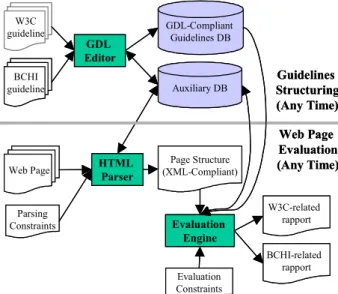
W3C guideline GDL Editor GDL-Compliant Guidelines DB BCHI guideline Evaluation Engine Web Page W3C-related rapport BCHI-related rapport Evaluation Constraints Auxiliary DB HTML Parser Page Structure (XML-Compliant) Parsing Constraints Guidelines Structuring (Any Time) Web Page Evaluation (Any Time) W3C guideline GDL Editor GDL-Compliant Guidelines DB BCHI guideline Evaluation Engine Web Page W3C-related rapport BCHI-related rapport Evaluation Constraints Auxiliary DB HTML Parser Page Structure (XML-Compliant) Parsing Constraints Guidelines Structuring (Any Time) Web Page Evaluation (Any Time)
This natural language scheme will lead to a potentially expressive, yet formal expression of the guideline in Guideline Definition Language (GDL). This language is able to express guideline information in a sufficiently rich enough manner to enable an evaluation engine to perform an automated evaluation of any GDL-compliant guideline by static analysis of the HTML code. Fig. 1 shows the architecture of a web evaluation tool supporting the proposed GDL.
The next section of the paper presents an intuitive framework that an evaluator would use to structure a guideline for automatic evaluation. Some interesting concepts emerging from the framework are then underlined and completed with some others to form the set of our GDL concepts. The ERA schema of the GDL is presented and described in section 3. We conclude by discussing the interests and the scope of the language.
3.
THE FRAMEWORK
In order for an artefact to be usable, it must be designed according to the way users use it [11], thus this framework organises guidelines according to evaluator’s use. Here we use the framework to introduce the GDL concepts, but it is also recommended to follow this framework for future structuring of a guideline with the GDL-based evaluation tool.
The framework is defined as a sequence of six steps and is intended to help the evaluator to:
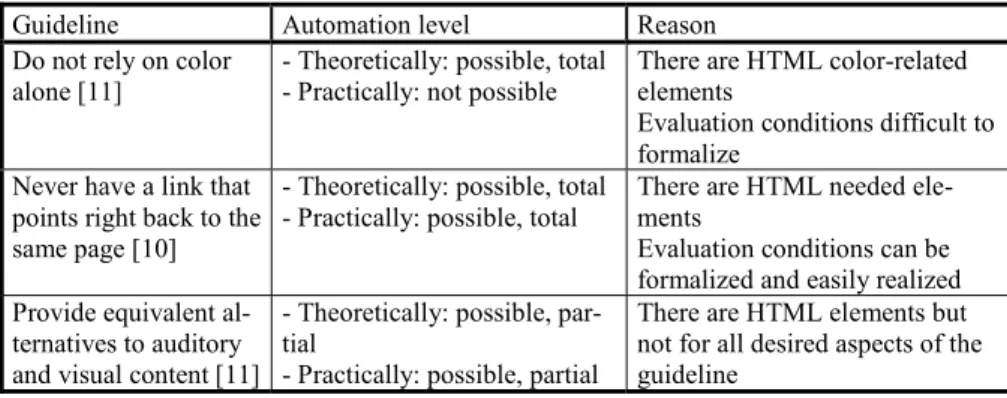
· Identify the theoretical and practical levels of automation of the guide-line evaluation. Applying the framework will allow the user to see if the automation of a guideline will be theoretically or practically possible or not, total or partial (Table 1), and perhaps underline any reason why it is not automatable.
· Systematically and consistently structure each guideline.
· Optimise the guideline structuring by identifying and optionally elimi-nating any elements redundant in the evaluation-oriented structuring. The framework is criteria-oriented: for all steps, some criteria guide the user in selecting appropriate concepts, in defining its automation level, and in defining evaluation conditions.
The framework’s steps are exemplified on the guideline “Never have a link that points right back to the same page” [10]. We chose this guideline because it is reasonably simple for our understanding purpose, yet often violated, especially in home pages.
3.1
Step 1: Determining Interesting Elements
The first step consists of identifying and isolating the HTML elements on which the automated evaluation will be performed. Then, the guideline is said to be theoretically possible, respectively impossible, to evaluate if there is at least one, respectively no, HTML element on which the evaluation can be conducted. The evaluation is said to be total if all identified HTML ele-ments are expressive enough to evaluate the complete guideline. If this is not the case, i.e. at least one part of the general guideline cannot be evaluated on identified HTML elements, it is said to be partial. The resulting set of HTML elements could be different from one user to another according to the HTML experience, interpretation, and understanding of the guideline’s aims.
In our example, we found the following HTML elements: 1. The A element, which defines an anchor:
– The A element’s content defines the position of the anchor.
– The name attribute names the anchor so that it may be the destination of zero or more links.
– The href attribute makes this anchor the source anchor of exactly one link.
Authors may also create an A element that specifies no anchors, i.e., that does not specify href, name or id. Values for these attributes may be set at a later time through scripts.
2. The id attribute: it may be used to create an anchor at the start tag of any element (including the A element).
3. The LINK element: it defines a link. Unlike A, it may only appear in the
HEAD section of a document, although it may appear any number of times. Although LINK has no content, it conveys relationship information that may be rendered by user agents in a variety of ways (e.g., a toolbar with a drop-down menu of links).
Table 1. Examples of guidelines and their (estimated) evaluation characteristics.
Guideline Automation level Reason
Do not rely on color
alone [11] - Theoretically: possible, total- Practically: not possible There are HTML color-relatedelements Evaluation conditions difficult to formalize
Never have a link that points right back to the same page [10]
- Theoretically: possible, total - Practically: possible, total
There are HTML needed ele-ments
Evaluation conditions can be formalized and easily realized Provide equivalent
al-ternatives to auditory and visual content [11]
- Theoretically: possible, par-tial
- Practically: possible, partial
There are HTML elements but not for all desired aspects of the guideline
3.2
Step 2: Classifying Selected Elements into
Evaluation Sets
After identifying the HTML elements which are important for the guide-line’ scope, we determine if they could be grouped into evaluation sets in some way. For this purpose, grouping principles need to be defined, such as: group elements by similar semantics. Some of these sets could be more im-portant for the guideline evaluation than others. Thus, each set is assigned to a priority level to express its importance in conformance with W3C specifi-cation [17]:
1. Priority 1: A web content developer must satisfy the conditions for posi-tive evaluation of this set. Satisfying this set is a basic requirement for the web content to respect the guideline.
2. Priority 2: A web content developer should satisfy the conditions for positive evaluation of this set. Satisfying this set will remove significant barriers for the web content to respect the guideline.
3. Priority 3: A web content developer may address this set. Satisfying this set will improve respect of the web content to the guideline.
Some sets have a priority level that may change under certain conditions. In our example, we could group the selected HTML elements into two sets: 1. Set1: Navigation links (or visible links) [Priority 1]. Links helping to
navigate between any web pages. This set contains the HTML elements:
A, href, name, and id.
2. Set2: No-navigation links (or hidden links) [Priority 2]. Links expressing other relationships between pages than simply activating a link to visit a related resource. This set contains the following HTML elements: LINK,
rel, rev, and href.
3.3
Step 3: Defining Atomic Evaluation Sets
An atomic evaluation set is defined as a minimal set of elements that al-low the evaluation of a precise objective (like “linking between two web re-sources”). After grouping the HTML elements as mentioned in step 2, we examine each evaluation set to find whether it contains any atomic set. Some evaluation sets could remain the same when they are already atomic. Here again grouping principles need to be defined.
In our example, the following atomic evaluation sets are derived:
1. Atom1: Destination anchors specified by A element (visible links). In
name will be used to designate the destination when linking it to any other source anchor. The atomic corresponding set is: A, href, and name.
2. Atom2: Destination anchors specified by elements other that the A
ele-ment (visible links). In this case, we use the id attribute of any HTML element making it the destination anchor. The atomic corresponding set is: A, href, and id.
3. Atom3: Destination anchors specified by LINK and rel elements The rel
attribute of a LINK element describes the relationship from the current document to the anchor specified by the href attribute. The atomic corre-sponding set is: LINK, href, and rel.
4. Atom4: Destination anchors specified by LINK and REV elements. The
rev attribute of a LINK element describes reverse link from the anchor specified by the href attribute to the current document. The atomic corre-sponding set is: LINK, href, and rev.
3.4
Step 4: Defining Evaluation Conditions
Using elements of the atomic sets, we precise the cases or situations where the guidelines is considered respected or violated. Evaluation condi-tions are defined as triples (HTML element, Desired value, Error ID) or any combination of these triples. Logical operators (OR, AND, XOR, NOT) are then used to compose the full evaluation condition based on the individual element conditions. Predefined functions and values that can be typically used in some situations are available. The predefinition could be related to Java (the language used to develop our evaluation engine), or to the tool it-self.
In our example, we specify the cases where the studied guideline is con-sidered violated.
– Guideline violation condition: for Atom1, 2, 3, 4:
Href = URI of current page [link to current page] OR
Href = "#…." [internal link] OR
Href = URI+ "#…." [internal link]
Error ID=1 (the page has a link to itself)
In this violation condition, it is assumed that having internal navigation links (as from a table of contents to sections in the same page) are not al-lowed. Otherwise, we must eliminate the last two conditions, thus producing another interpreted guideline. Verifying that a web page respects a guideline suggests a rather different approach than identifying violation points. In the first case, the condition must be satisfied for all HTML elements, whereas in the second, the evaluation stops as soon as one guideline violation is
de-tected. One or more violation/respect conditions are defined without caring if the violation or the respect of the guideline will be preferred. This choice is done at step 6.
3.5
Step 5: Cleaning Up Evaluation Sets
It is likely that after step 4 some information may become unnecessary for the evaluation. Thus, they will be eliminated. Under certain circum-stances, this could lead to eliminating an entire set or atomic set.
In our example, if we do not consider other verification (like if the ele-ment in href is really in the courant page), the following elements are not needed: Atom1 (name), Atom2 (id), Atom3 (rel) and Atom4 (rev). If we consider that the normal use of the LINK element is to link to external re-sources, we could eliminate Set1 entirely, and so on for its atomic sub-sets (Atom3, 4).
3.6
Step 6: Defining Guideline Evaluation
Interpreta-tions (Algorithm)
A guideline could be evaluated differently from one evaluation context to another. The same guideline could have more than one interpretation, de-pending on the interpreter. Verifying a guideline may also change from one context to another. In some situations, it may turn out that evaluating a guideline, although theoretically possible, is not practically possible for various reasons: too many evaluation sets, a lot of code to perform the evaluation, many possible evaluation cases, etc.). Therefore, we suggest that a guideline evaluation algorithm must be defined using the sets of step 2: 1. The order of testing the evaluation sets. In some cases, according to the
experience or to some statistics, we can predict the evaluation sets the most possible to be encountered in an evaluated page(s). To optimize the evaluation process, we would test these sets first, especially if we want to see if our main concern is to see if the guideline is violated or not.
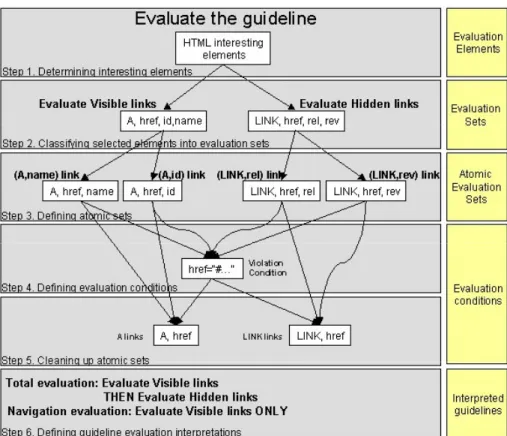
2. The evaluation sets considered sufficient to evaluate the guideline at a given acceptance level. Priority levels assigned to evaluation sets are normally determined according to some considerations (priorities defini-tion). This means that, in some contexts, we can ignore some of them without dramatically influencing mean guideline’s ergonomic value. Fig. 2 summarizes the steps of the framework and underlines the inter-esting concepts.
Figure 2. Illustration of the framework steps and the interesting evaluation concepts.
4.
THE GUIDELINE DEFINITION LANGUAGE
A key component of any software for automated web usability evaluation is the language structuring the evaluated guideline. This language must trade-off between the richness of structuring definition and the ease with which this definition can be built [9].
As we mentioned above, the framework allows us to underline the main concepts needed by an evaluator to structure a guideline towards (auto-matic) evaluation. The ERA schema of Fig. 3 shows these concepts and the relationships among them. According to this schema, the evaluation of a
guideline may engender one or many interpreted guidelines according the evaluation context. The interpretation is defined as an algorithm that organ-ises the execution of the evaluation sets. Each set consists of at least one HTML element that the evaluator specifies as helpful to evaluate the respect or violation of the guideline. An evaluation set could be divided into smaller sets by applying some grouping criteria until we reach atomic evaluation sets
witch focus on one precise HTML element (step 3 of Fig. 2). The condition of (non) respecting a guideline is expressed as mentioned in step 4 of the framework. The evaluated value could be a string, a Boolean value, a num-ber, etc. Every condition is associated with an Error ID that will be generated if the condition value is false.
Figure 3. ERA Schema of GDL main concepts.
The GDL editor of Fig. 1 will allow the evaluator to structure a guide-line, then, to save it in a XML-compliant format respecting the GDL-based DTD.
5.
CONCLUSION
A framework and a GDL that enable an evaluator to structure guidelines towards automated evaluation are given. Structuring guidelines with our GDL would have the following advantages:
· Decomposing guidelines into evaluation sets enables the evaluator to re-use common sets to optimise the evaluation execution.
· Identifying guidelines that are semantically close by identifying common structuring elements (HTML elements, evaluation sets).
· Possibility of evaluating guidelines in multiple evaluation contexts · Possibility of evaluating many interpretations of a guideline in the same
evaluation context.
· Possibility of calculating the automation level and the automation feasi-bility of a guideline by model checking techniques.
· Putting structured guidelines under XML-compliant format enables us to realize mathematical proof of properties (such as completeness, consis-tency) and to benefit from the existing XML audience and tools suite (e.g., theorem prover, model checker, syntax validator).
The example of Fig. 2 and other simple ones showed that our approach is promising, but we are working on more complex guidelines to get more ac-curate results.
ACKNOWLEDGMENTS
The research of Abdo Beirekdar in Belgium is funded by the Atomic En-ergy Commission of Syria.
REFERENCES
[1] A-Prompt Accessibility Toolkit Project, Adaptive Technology Resource Center (Univer-sity of Toronto) and Trade Center (Univer(Univer-sity of Wisconsin), Canada & USA, April 1999, accessible at http://aprompt.snow.utoronto.ca/.
[2] Bobby Version 2.0, HTML Web analyser, Center for Applied Special Technology (CAST), National Universal Design Laboratory, Peabody, Massachusetts, 2002, Acces-sible at http://www.cast.org/bobby.
[3] Bodart, F. and Vanderdonckt, J., On the Problem of Selecting Interaction Objects, in Proceedings of HCI'94 (Glasgow, 23-26 August 1994), Cambridge University Press, Cambridge, 1994, pp. 163-178.
[4] Brajnik, G., Automatic web usability evaluation: where is the limit?, in Ph. Kortum and E. Kudzinger (eds.), Proc. of 6th Conf. on Human Factors and the Web HFWeb’2000
(Austin, 19 June 2000), University of Texas, Austin, 2000.
[5] Cooper, M., Evaluating Accessibility and Usability of Web Sites, in J. Vanderdonckt and A.R. Puerta (eds.), Computer-Aided Design of User Interfaces II, Proc. of 3rd Int. Conf.
on Computer-Aided Design of User Interfaces CADUI’99 (Louvain-la-Neuve, 21-23 October 1999), Kluwer Academics, Dordrecht, 1999, pp. 33-42.
[6] Farenc, Ch., Liberati, L., Barthet, M.-F., Automatic Ergonomic Evaluation: What are the Limits?, in J. Vanderdonckt (ed.), Computer-Aided Design of User Interfaces, Proc. of 2nd Int. Workshop on Computer-Aided Design of User Interfaces CADUI’96 (Namur,
5-7 June 1996), Presses Universitaires de Namur, Namur, 1996, pp. 159-15-70, accessible at http://lis.univ-tlse1.fr/~farenc/papers/cadui96-cf.ps.
[7] ISO/WD 9241, Ergonomic requirements for Office Work with Visual Displays Units, International Standard Organization, 1992.
[8] IBM Common User Access Guidelines, Object-Oriented Interface Design, Document SC34-4399, IBM Corp. Publisher, 1993.
[9] Ivory, M.Y., Sinha, R.R., and Hearst, M.A., Empirically Validated Web Pages Design Metrics, in Proc. of ACM Conf. on Human Aspects in Comp. Systems CHI’2001 (Seat-tle, 31 March-5 April 2001), ACM Press, New York, pp. 61-68.
[10] Nielsen, J., Website accessible at http://www.useit.com/.
[11] Norman, D.A., The psychology of everyday things, Harper and Collins, 1988.
[12] Scapin, D.L., Guide ergonomique de conception des interfaces homme-ordinateur, Re-search report INRIA N°77, INRIA, Le Chesnay, 1986.
[13] Scapin, D.L., Leulier, C., Vanderdonckt, J., Mariage, C., Bastien, Ch., Farenc, Ch., Pal-anque, Ph., and Bastide, R., A Framework for Organizing Web Usability Guidelines, in Ph. Kortum and E. Kudzinger (eds.), Proc. of 6th Conf. on Human Factors and the Web
HFWeb’2000 (Austin, 19 June 2000), University of Texas, Austin, 2000, accessible at http://www.tri.sbc.com/hfweb/scapin/Scapin.html .
[14] Smith, G.B. and Howes, A., Constraints on a representation language for automated evaluation, in Ch. Johnson (ed.), Proceedings of 8th International Workshop on Design,
Specification and Verification of Interactive Systems DSV-IS’2001 (Glasgow, 13-15 June 2001), Glasgow, 2001, accessible at http://www.dcs.gla.ac.uk/~johnson/papers/ dsvis_2001/smith/
[15] Smith, S.L., Standards Versus Guidelines for Designing User Interface Software, in M. Helander (ed.), Handbook of Human-Computer Interaction, North-Holland, Amsterdam, 1988, pp. 877-889.
[16] Vanderdonckt, J., Guide ergonomique des interfaces homme-machine, Presses Universi-taires de Namur, Namur, 1994, ISBN 2-87037-189-6.
[17]WebMetric Tools, National Institute for Standards and Technology, 1999, accessible at http://zing.ncsl.nist.gov/webmet.
[18]W3C Web Content Accessibility Guidelines 1.0, accessible at http://www.w3.org/TR/ WCAG10/.
[19]508 Accessibility Suite, Program to test websites accessibility, UsableNet Inc., New York, 2001, accessible at http://508as.usablenet.com/508AS/1.0/help/Help.html.