Sokratis Karkalas and Manolis Mavrikis
UCL Knowledge Lab, UCL Institute of Education, London, WC1N 3QS, U.K.
Keywords: Feedback Authoring, Exploratory Learning Environments.
Abstract: This paper presents a tool for the configuration of logging and authoring of automated feedback for exploratory learning objects (ELOs). This tool has been developed in the context of a larger project that is developing a platform for authoring interactive educational e-books. This platform comprises an extendable set of diverse widgets that can be used to generate instances of exploratory activities that can be employed in various learn-ing scenarios. AuthELO was designed and developed to provide a simple, common and efficient authorlearn-ing interface that can normalise the heterogeneity of these widgets and give the ability to non-experts to easily modify — if not program themselves — the feedback that is provided to students based on their interaction. We describe the architecture and design characteristics of AuthELO and present a small-scale evaluation of the prototype that shows promising results.
1 INTRODUCTION
Authoring educational interactive tasks is a challeng-ing and time consumchalleng-ing endeavour particularly if they include some form of adaptive or intelligent support to the learner. While there is an abundance of tools that allow non-expert developers, such as educational designers or teachers, to author their preferred ac-tivities, these are limited to static content or to pre-defined question-answer activities. As we review in Section 2, researchers in the field of Intelligent Tu-toring Systems are looking into the development of tools that ease the authoring process for ITS but have largely remained in the realm of structured interac-tion. We are interested in highly interactive, ex-ploratory activities that take place within open learn-ing environments, also known as microworlds. Al-though such environments can be effective in support-ing learners’ development of conceptual knowledge, they require significant amount of intelligent support. Despite the fact that research in the area has demon-strated that it is possible to delegate part of this sup-port to intelligent components (e.g. Bunt et al. 2001; Mavrikis et al. 2013), there have been little attempts to reduce the entry threshold for both programmers and end-users (Blessing et al., 2007).
This paper presents AuthELO, a tool for author-ing exploratory learnauthor-ing objects (ELOs), configurauthor-ing the logging and programming the automated feedback they provide. This tool has been developed in the context of the Mathematical Creativity Squared
(MC-Squared) EU-funded project (http://mc2-project.eu/) that is developing a platform for authoring interactive educational e-books. This platform comprises an ex-tendable set of diverse widgets that can be used to generate instances of exploratory learning activities that can be employed in various learning scenarios. In this project we designed and developed a tool that is able to provide a simple, common and efficient au-thoring interface that can normalise the heterogeneity of these widgets and reduces the time it takes and the skills required to program the feedback that can be provided to students based on their interaction.
Section 3 presents the development methodology that underpins the design of AuthELO. Sections 4 and 5 present the architecture and the tool in detail. Sec-tion 6 presents an evaluaSec-tion of the current prototype with three real scenarios and Section 7 concludes the paper.
2 RELATED WORK
The development of learning material that is inter-active and provides automated intelligent feedback to the students falls naturally into the category of ITS authoring systems. There have been many such systems developed in the past. Database-related tu-tors like SQL-Tutor, EER-Tutor and Normit (Mitro-vic, 2012) are cases that follow the constraint-based modelling approach. To author web- and constraint-144
Karkalas, S. and Mavrikis, M.
based tutors Mitrovic et al. (2009) developed AS-PIRE. The use of simulation-based authoring is pre-sented in Munro (2003). An approach that is used for the development of adaptive hypermedia is pre-sented in Brusilovsky (2003). An attempt to lower significantly the skill threshold required is the model-tracing approach (Blessing et al., 2007). Most of these approaches, although different, they converge in that they all presuppose the use of low level technical ex-pertise for the authoring. Systems that require no pro-gramming include the ASSISTment Builder (Razzaq et al., 2009) and Redeem (Ainsworth et al., 2003). The latter is an approach that combines existing ma-terial with teaching expertise to develop simple intel-ligent ITSs. A mixed system that supports the devel-opment of two types of ITSs is CTAT (Aleven et al., 2009; Koedinger et al., 2004). It supports the develop-ment of cognitive tutors and example-tracing tutors. The latter case requires no programming at all.
All of these systems are typically domain-specific solutions that may require low level technical exper-tise and usually offer fairly limited and not easily generalisable output. That seriously limits the appli-cability of these tools to a wider range of learning scenarios. One of the most recent developments in the field is the Generalized Intelligent Framework for Tutoring (GIFT) (Sottilare et al., 2012) that provides tools to support various elements of the authoring pro-cess. Although GIFT targets domain experts with lit-tle or no knowledge of computer programming or in-structional design, at the moment it mostly enables rapid development of expert models and other domain knowledge. This results in a fully-fledged ITS that depends on the services provided by GIFT. That may limit the re-usability of the authoring tool with other learning platforms or may be beyond what is needed or what is possible with limited resources (e.g. of a teacher wanting to adapt a simple activity). At a con-ceptual and architectural level our system resembles SEPIA (Ginon et al., 2014). SEPIA is designed so that automated support can be added in the form of an epiphytic application that is external to the learning environment. Integration does not require changes in the target environment and interoperation is not based on domain specific models and tools.
From an end-user pespective, the most relevant so-lution to our approach, and the one that seems to re-quire the least amount of cognitive load for the au-thor, is the example-tracing approach (Aleven et al., 2009). The author develops feedback by executing the activity like a student. This provides the author with a tree-like view that is representative of the cur-rent state of the student. The author can then annotate the diagram and determine the behaviour of the tutor.
The disadvantage of this approach is that it is domain-specific and not generalisable beyond structured tasks that have a relatively limited range of possible alter-native paths. In an exploratory learning environment these paths are potentially infinite.
In our system we follow the example-tracing ap-proach but we are not using the visualisation part sim-ply because it is impossible to represent visually all the possible states in such diverse domains and open environments. Our tool must be generic enough so that it can be used with exploratory learning environ-ments. Support is expected to be task-dependent but tasks may not be structured. Authoring must be based on data that becomes available as the student inter-acts with the environment. The author generates data and utilises this information in order to form sensi-ble rules for the generation of feedback. These rules are currently expressed through programming but our intention is to provide a service that can be accessi-ble through different levels of specificity. That will make the system usable by authors with different lev-els of expertise without compromising the ability to intervene at the lowest level if necessary. A high level language that is specialised in feedback author-ing and a visual programmauthor-ing shell will be the high level constructs that will make it easily accessible to non-technical users.
3 METHODOLOGY
In this project the main objective is to design and de-velop an authoring tool for the engineering of auto-mated (intelligent) support for online learning activi-ties. As mentioned, we are interested in highly inter-active ’widgets’ that can either be standalone activi-ties or live in the context of an e-book. Such widgets offer learning opportunities through exploration and discovery of knowledge in an unstructured manner.
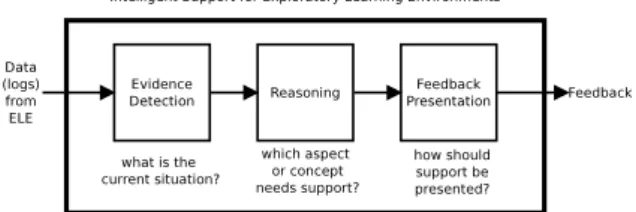
The methodology we have followed for the de-sign and development of AuthELO is based on previ-ous work presented in (Gutierrez-Santos et al., 2012). This approach is based on the premise that the com-plexity of the task can be reduced and made man-ageable through the compartmentalisation of different concerns regarding the different aspects of the prob-lem. In practice this can be done by focusing on the three most important questions related to support:
• What is the situation now? (evidence)
• Which aspect needs support? (reasoning) • How should the support be presented for
Figure 1: Conceptual data flow of support for exploratory learning. From Gutierrez-Santos et al. (2012).
Each one of these questions corresponds to different aspects of the problem and thus may require differ-ent approaches and expertise. Considering these as-pects separately reduces the skill threshold required to deal with the problem in its entirety. Typically, in this scheme, the development of support moves to-wards the opposite direction of the data flow. Design-ers would start from the presentation and the process would gradually move towards the development of components that produce evidence. In this project the presentation is designed based on the assumption that an exploratory learning system should not intervene in the process in an intrusive manner (Mavrikis et al., 2013). Support should not be provided in order to ma-nipulate the students and control their behaviour. The system should be discreet and inform the users for po-tential issues but not interrupt the learning process. On the other hand support should always be available on demand. Students may not be able to exploit the full potential of such learning environments if there is not enough support available to direct them (Mayer, 2004; Klahr and Nigam, 2004; Kirschner et al., 2006). In this tool support is provided after the student initi-ates the process. We also provide the learning plat-form the ability to use the same functionality in order to display informative messages to the users regarding the current state of the activity.
The focus of this work is on reasoning and the ac-quisition of evidence that can support it. For the for-mer we collected a number of use cases of specific learning activities developed in GeoGebra1, Malt+2
and FractionsLab3. Expert designers and educators
provided us with complete usage scenarios for each activity that include potential student misconceptions, landmarks that can indicate important states of the constructions and the respective feedback that the sys-tem is expected to provide to students. This informa-tion helped us form the initial requirements for the reasoning part and they have also been transformed into batteries of tests for the technical evaluation of the software.
1https://www.geogebra.org/ 2http://etl.ppp.uoa.gr/malt2/ 3http://fractionslab.lkl.ac.uk/
The data acquisition part comes after because it depends on the reasoning part. Having all the infor-mation about the needs of the reasoning part enables us to identify the requirements for the evidence part. The challenges we identified for that part follow:
• need for methods to make the widgets generate
the required data
• need for methods to transfer this data between tiers
• need for methods to efficiently store that data in
the tool and make it processable so that it can be used for answering queries to the reasoning part
4 ARCHITECTURE
The tool is a native HTML5 application with no external dependencies and is physically decoupled from learning platforms. It does not implement any platform-specific or proprietary functionality and therefore its service is not limited to an existing plat-form. It has been designed in a way so that its func-tionality can be provided in a service oriented ap-proach using standardised communication protocols and data formats. After the tool is virtually integrated with a learning platform from the users’ perspective the whole system looks unified and homogeneous. In-tegration is seamless and requires nothing more that setting up a url along with the parameters that provide information on how to instantiate the learning object to be configured and where to store the configuration data. This information is stored in the learning plat-form and is used whenever an author wants to con-figure logging and automated feedback for a learning object.
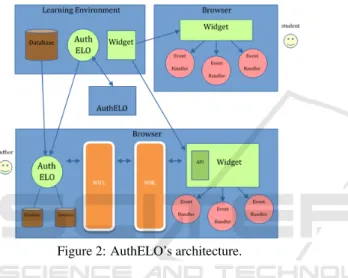
The author initiates this process in the learning platform and implicitly gets redirected to AuthELO. From that point on the tool takes over. It creates an instance of the widget that lives in its own private and secure space (sandbox). The two software com-ponents operate as independent applications in par-allel (asynchronously) within the same browser in-stance. The glue between them is another compo-nent that is called Web Integration & Interoperabil-ity Layer (WIIL). WIIL as the name suggests, is a web component that can be used to integrate other web components with a platform. It can also provide a simple yet efficient communication mechanism so that the integrated components can be interoperable. This is described in (Karkalas et al., 2015b). An ear-lier version of the WIIL and its potential usage was presented in (Karkalas et al., 2015a).
Upon instantiation, the widget sends to AuthELO its widget-specific metadata. That is information about the types of elements that can exist in the wid-get environment and the types of events that these el-ements can generate. This data is maintained in lo-cal in-memory databases4 at the AuthELO side of
the browser. AuthELO uses this information to con-struct dynamically a graphical user interface for the configuration of logging. Something that needs to be noted here is the dynamic nature of this process. There are no presumptions about the information that is received from the widgets. Different widgets may provide different metadata and that, in turn, may re-sult in the formation of different interfaces.
Figure 2: AuthELO’s architecture.
This GUI is immediately usable by the author. The author can set up data logging rules that have immediate effect on how the instance behaves. The rules are stored in local databases in AuthELO and they are also sent to the widget so that the respective event handlers can be registered. After registration, the widget is able to generate data according to what the author prescribed in the configuration interface. This data becomes directly available to the author for inspection through the WIIL (see activity log in fig. 2). The author uses this information to make deci-sions about what feedback needs to be provided to the students (fig. 8). This part of the configuration is also stored in local databases.
The logging and feedback configuration is then passed by the tool to the learning platform, so that these settings can become available to the actual wid-get instances that are going to be used by students. The learning platform sends these settings as part of the initialisation parameters during the widget launch process.
4We used TaffyDB (http://www.taffydb.com/) — an open source, lightweight and efficient NoSQL database
5 THE AUTHELO TOOL
AuthELO is designed to provide a generic interface between web-based learning objects, learning plat-forms and authors that want to synthesise exploratory learning activities with them. The design is based on the following five main requirements:
• Authors must be able to dynamically configure
what data will be logged by a learning object dur-ing a session with a user. This can be data gen-erated from interactions between the user and the widget and derivative data that gets generated by the widget itself as a result of some event.
• Authors must be able to specify rules about real-time feedback that should be provided to the stu-dents. These rules should be based on log data that is dynamically generated as the student en-gages with the activity.
• It should be possible for authors to configure all the available widgets through a common interface. This interface should be able to hide the diversity of potentially heterogeneous learning components that might be offered in the system.
• The tool must not impose barriers in terms of skills and technological expertise. Teachers with a certain degree of IT literacy should be able to use it for authoring of interactive learning material.
• The tool must be able to offer opportunities for exploratory authoring of feedback reducing the cognitive load that is expected for non-structured tasks of exploratory activities.
The general aim of this project is to provide a tool that offers the following:
• It is simple to use
• It can be used with diverse learning components • It can be used effectively to configure feedback for
non-structured tasks in exploratory learning envi-ronments
5.1 The Authoring Interface
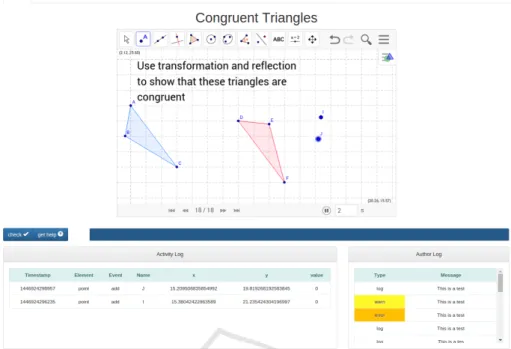
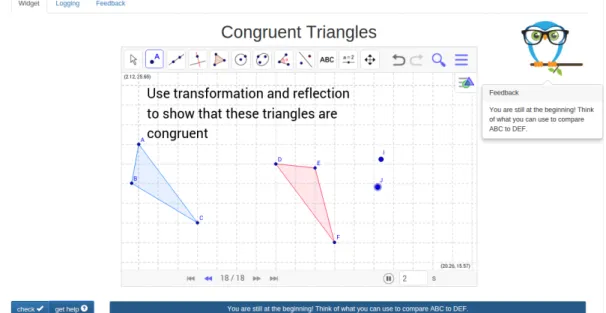
When the tool gets instantiated it looks like Figure 3. The authoring interface is provided as a triplet of tabs named ’widget’, ’logging’ and ’feedback’. The first page (widget) provides a visual of the activity along with a basic toolset that can be used for testing and debugging. In the middle of the page there is a live instance of the widget that represents the activity that is going to be presented to the student through the learning platform. The author can interact with it in the same way that a student would and experiment
Figure 3: The authoring interface provides a live instance of the activity along with a toolset for testing and debugging.
with different configurations until the result satisfies the learning objectives that have been set. During this interaction the author can see what data gets gener-ated and display messages useful for debugging.
5.2 Authoring Logging
Configuration options for logging are given in the homonymous tab-page. This page is dynamically constructed by the application using information re-trieved from the live widget instance that represents the activity.
Figure 4: Logging Configuration.
That means that this part of the tool dynamically changes for different widgets or widgets that contain different constructions. The aim is to for the tool to work with different widget ‘instances’ i.e. different
configurations of the same widget but for different activities. The challenge is that these instances con-tain different types of elements able to generate dif-ferent types of events. The tool is able to dynamically query the instance and obtain all the information that is necessary to reconstruct itself and adapt to the in-dividual characteristics and needs of the activity. But how can that be possible? Widgets may be third party components that do not provide standard communica-tion interfaces and data formats. So how do we deal with diversity? There is no magic behind this wonder-ful feature. Communication and interoperability be-tween the tool and widget instances go through WIIL (Karkalas et al., 2015b). In that layer we can reshape APIs and semantically enhance the metadata that is received from instances whenever that is deemed nec-essary. That takes care of diversity but what happens if the initial construction that is given for the activ-ity does not contain all the necessary elements and events? The assumption is that the tool queries the live instance and retrieves information about what is currently present in the construction. For that part there is no easy answer. You either get the widget implementers to expose a method that provides infor-mation about all the possible elements and events for that particular widget or you get the activity author to create extra elements that may need to be recorded in the log files and hide them from the user. In this particular implementation we followed the second ap-proach simply because it would be impossible to force widget vendors to change their implementations and
it would be impractical to visualise endless lists of el-ement and event types that would not be used in the activity. Cluttering the authoring interface with un-necessary information would compromise the usabil-ity of the tool.
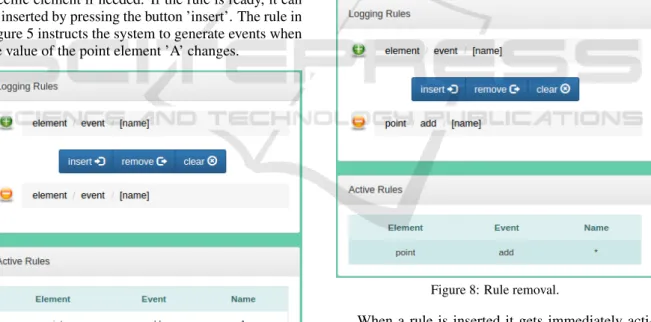
In this page the author can see a list of the el-ement types that are supported by the widget along with the types of events that these elements can gener-ate. These lists are presented as sequences of buttons. The author can press a button and select an element or an event type. When that happens the name of the selected entity appears in the ’logging rules’ section next to the plus sign.
The rules have immediate effect on how the in-stance behaves. They are stored in local databases in AuthELO and they are also sent to the widget so that the respective event handlers can be registered. WIIL takes care of the underlying operations for that. After registration, the widget is able to generate data ac-cording to what the author prescribed. In Figure 5 we can see where new rules are formed. A combination of an element type with an event type gives us a valid rule. The author can optionally provide a name for a specific element if needed. If the rule is ready, it can be inserted by pressing the button ’insert’. The rule in Figure 5 instructs the system to generate events when the value of the point element ’A’ changes.
Figure 5: Rule insertion.
If we want to generate update events for any ele-ment of a point type then we can omit the name. If we attempt to insert a more generic rule than one that already exists then the system will give us a warning message but it will allow the operation.
The opposite is not true. If we attempt to insert a more specific rule than one that already exists then the system will not perform the operation because it will not have any effect at all.
Figure 6: More general rule.
Figure 7: More special rule.
If the rule is exactly the same as an already existing one the system will reject it. If a rule needs to be removed then the author can select it by clicking on the list in the ’Active Rules’ section. The selected rule will then appear in the ’Logging Rules’ section next to the minus sign. The rule can be deleted by pressing the ’remove’ button.
Figure 8: Rule removal.
When a rule is inserted it gets immediately acti-vated. That means that the author can go back to the ’Widget’ tab and start generating data by interacting with the widget. The data appears at the bottom of the page.
5.3 Authoring Feedback
The configuration or authoring of feedback can be done through the editor that is provided in the ’Feed-back’ tab-page (see Figure 9). In this part the author can utilise the data generated and displayed in the ’Widget’ tab-page and specify rules that state what
Figure 9: Feedback authoring through a specialised editor and system log.
needs to be done if certain conditions are satisfied. In this version of the tool these rules must be expressed in JavaScript. This is done through a specialised edi-tor that provides support to the author and basic error checking5. This way the author can dynamically
in-ject new functionality into the system.
Feedback is presented either through an area un-der the widget instance or through an intelligent assis-tant that looks like an owl and displays the message in a bubble (see Figure 10). Authors simply have to change a parameter when they call the function to dis-play the message in order to select one or the other.
After the implementation of feedback rules, the author can go back to the ’Widget’ tab and test the feedback. If the author makes a mistake the system displays an error notification under the column named ’System Log’ indicating the problem. In this case the changes are not saved and the new functionality is not applied.
Something that needs to be noted here is that this part of the tool is work in progress. We are work-ing towards an intuitive and simple user interface that would not require high-level of programming exper-tise from an author (particularly a teacher). In the meantime, both in order to test the system but also to ensure that it can be immediately used in the con-text of the project, we exposed a part of the actual JavaScript code that is used to provide the feedback. This does not affect the usability of the system at
5We incorporated the ace editor (http://ace.c9.io) which is a high performance web-based JavaScript tool. The tool is parameterized to process JavaScript code and display it accordingly. It is equipped with syntax highlighters, auto-matic code indentation, and code quality control and syn-tax checking that is based on the well-known tool JSHint (http://jshint.com/)
this stage, only requires a level of expertise from the author that should be able to at least understand JavaScript syntax.
6 PROTOTYPE EVALUATION
In order to evaluate the current state of our prototype, we employed the use case scenarios that informed the methodology for the design and implementation, as authoring scenarios during an evaluation study. Three representative learning activities, one for each wid-get, were selected and used in this process. Three de-velopers, all experts on their respective widgets were asked to develop code to address the needs of the learning scenario without the use of AuthELO. We asked developers (and not teachers) as at this stage of the project the code part of the tool is targeted to JavaScript developers. To facilitate the process and have a meaningful comparison, we followed three dif-ferent approaches based on the particularities of the widget:
1. Geogebra widget: To our knowledge, there is no standard way of authoring feedback on dynamic geometry activities like GeoGebra. We followed our previous work (Karkalas et al., 2015a,b) and provided an experimental platform that takes ad-vantage of Geogebra’s API and allows quick in-tegration of widgets and event handling capabili-ties to ease the work of the programmers. A wid-get was preconfigured to generate every possible event for every element present in the construction and the data was collected in the central repository of the learning platform.
2. FractionsLab widget: FractionsLab was devel-oped in C# in Unity (see Hansen et al. 2015). For
Figure 10: Help messages.
authoring feedback the developer wrote code for a particular task, after a framework for support had been developed in the Unity Development Envi-ronments.
3. MALT+ widget: This is an HTML-based widget developed in JavaScript. For authoring feedback the corresponding developer first established an approach to handle key events from the environ-ment and then wrote code in JavaScript.
We allowed this way the strength of each platform, programming language and developer expertise to manifest itself rather than setting up the three devel-opers to fail. After the task, we interviewed them to identify key phases in the process, which we sum-marise below.
1. find the item(s) of interest in the construction 2. consult the documentation of the widget to see
how they are represented in the data
3. go to the back-end database server or intercept data locally (e.g. consulting the browser console) to determine how events from the system can pro-vide epro-vidence for determining the feedback 4. write the code that uses this evidence to generate
the message
5. reset (e.g. reload or in some cases re-compile) the system and start again the activity
6. perform all the actions needed to form the state that generates the feedback
7. check whether the feedback is correct and either move on or repeat the process
This cycle requires a significant amount of time if the author needs to move back and forth between the server and the client part of the application multiple times. This is the case even if both the client and server components reside in the same physical tier. Configuration for the data logging may not be needed but the fact that the database may be filled with irrel-evant data makes retrieval and processing more diffi-cult. The fact that new code cannot have immediate effect and the author has to reset the system and go through the activity steps again is possibly the biggest obstacle in this process. Things become even more complicated if the author makes a mistake. This te-dious process can be an exhaustive experience for the author. It is pretty obvious that the process as a whole imposes a high cognitive load and reduces the effec-tiveness of the authoring task.
The second part of the experiment was to ask the authors to repeat the task but this time using Auth-ELO. After a short demonstration of the tool using a toy problem, the authors were allocated to a different widget than the one they were familiar with and were asked to review the scenario. The results are given on Table 1.
It is evident that there are substantial time saving possibilities with AuthELO. Especially if we take into account the fact that in the first experiment the authors did not have to configure data logging at all and they could start directly with authoring the feedback, we can see that in all cases, in line with our expectations and our design decisions, the task was completed by a different developer in a shorter time than the original expert in this tool.
Table 1: Time (in minutes) to develop feedback per sce-nario. Numbers in brackets indicate familiarisation time with the particular activity and the key events that had be used to author the required feedback.
Native AuthELO % GeoGebra 245 (45) 135 (50) 55.1 FractionsLab 330 (25) 250 (45) 75.7 MALT+ 103 (10) 82 (20) 79.6 Observing the developers using AuthELO we con-firmed that, despite the short familiarisation session, developers were able to select the items of interest and check directly whether the widget generates the data required. The data gets displayed dynamically as the author interacts with the widget. There is no need to consult the widget documentation for anything or to switch context and query the back-end database. We think that this is a really important point, contributing significantly to reducing the overall time, particularly because otherwise one needs to spend a significant amount of time going through the events that generate data — especially in the context of exploratory learn-ing objects. This is not somethlearn-ing we can expect the average teacher to have the training or time to do.
The feedback code has immediate effect and mes-sages can be generated on the spot. There is no need to reset the system and repeat the activity. Testing the changes is a matter of pressing a button. Mistakes can easily be fixed. Syntax problems appear dynamically as the author is typing the code. Author messages that display values for debugging are presented in the front page when the logic for the feedback is checked. In conclusion the whole cycle is performed at one place and the available utilities simplify and speed up the process.
7 CONCLUSIONS
In this paper we presented the AuthELO tool that pro-vides a simple yet effective environment for the con-figuration of logging and the authoring of feedback on exploratory learning objects. The system is a web-based stand-alone application that offers its function-ality as a service and can be integrated seamlessly with any learning platform without much develop-ment or administrative overhead. AuthELO has been thoroughly tested for usability and robustness and its final version works flawlessly with key web-based interactive widgets of the M C Squared project and particularly GeoGebra for dynamic geometry, the 3D Logo environment MALT+, and the virtual manipula-tive FractionsLab. In addition, it is straightforward to incorporate other web-based interactive widgets. We
have also measured the tool’s potential in enhancing author performance and productivity and the prelimi-nary results have been more than promising.
We have so far aimed at reducing the skill thresh-old of the developers involved in relation to the partic-ular programming language used for the widget, and the time it would take to put a framework in place that captures and processes events. The system was tested by programmers and although we consider the outcome a valid indication of the system’s ability to increase the efficiency and effectiveness of the au-thoring process, further work is needed to simplify authoring. In the next version we envisage providing the same service through a mixed environment that will be a combination of visual programming and a high level language especially designed for that type of authoring. We expect these changes to lower the threshold of programming skills even further and en-able teachers or other educational designers with lim-ited or no programming expertise no programming skills to at least configure or tweak the pre-defined feedback if not author parts of it.
ACKNOWLEDGEMENTS
The research leading to these results has re-ceived funding from the European Union Seventh Framework Programme (FP7/2007-2013) under grant agreement N◦610467 - project ‘M C Squared’. This
publication reflects only the authors’ views and the European Union is not liable for any use that may be made of the information contained therein.
REFERENCES
Ainsworth, S., Major, N., Grimshaw, S., Hayes, M., Un-derwood, J., Williams, B., and Wood, D. (2003). Re-deem: Simple intelligent tutoring systems from usable tools. InAuthoring Tools for Advanced Technology Learning Environments, pages 205–232. Springer. Aleven, V., Mclaren, B. M., Sewall, J., and Koedinger, K. R.
(2009). A new paradigm for intelligent tutoring sys-tems: Example-tracing tutors. International Journal of Artificial Intelligence in Education, 19(2):105–154. Blessing, S., Gilbert, S., Ourada, S., and Ritter, S. (2007). Lowering the bar for creating model-tracing intelli-gent tutoring systems. Frontiers in Artificial Intelli-gence and Applications, 158:443.
Brusilovsky, P. (2003). Developing adaptive educational hypermedia systems: From design models to author-ing tools. InAuthoring tools for advanced technology Learning Environments, pages 377–409. Springer.
Bunt, A., Conati, C., Huggett, M., and Muldner, K. (2001). On improving the effectiveness of open learning envi-ronments through tailored support for exploration. In 10th World Conference of Artificial Intelligence and Education, AIED 2001.
Ginon, B., Jean-Daubias, S., Lefevre, M., Champin, P.-A., et al. (2014). Adding epiphytic assistance systems in learning applications using the sepia system. InOpen Learning and Teaching in Educational Communities, pages 138–151. Springer.
Gutierrez-Santos, S., Mavrikis, M., Magoulas, G. D., et al. (2012). A separation of concerns for engineering intelligent support for exploratory learning environ-ments. Journal of Research and Practice in Informa-tion Technology, 44(3):347.
Hansen, A., Mavrikis, M., Holmes, W., and Geraniou, E. (2015). Designing interactive representations for learning fraction equivalence. In Proceedings of the 12th International Conference on Technology in Mathematics Teaching, Faro, Portugal.
Karkalas, S., Bokhove, C., Charlton, P., and Mavrikis, M. (2015a). Towards configurable learning analytics for constructionist mathematical e-books.Intelligent Sup-port in Exploratory and Open-ended Learning Envi-ronments Learning Analytics for Project Based and Experiential Learning Scenarios, page 17.
Karkalas, S., Mavrikis, M., and Charlton, P. (2015b). The web integration & interoperability layer (wiil). turning web content into learning content using a lightweight integration and interoperability technique. In Knowledge Engineering and Ontology Develop-ment (KEOD), 7th International Conference on. Kirschner, P. A., Sweller, J., and Clark, R. E. (2006). Why
minimal guidance during instruction does not work: An analysis of the failure of constructivist, discovery, problem-based, experiential, and inquiry-based teach-ing.Educational psychologist, 41(2):75–86.
Klahr, D. and Nigam, M. (2004). The equivalence of learn-ing paths in early science instruction effects of direct instruction and discovery learning.Psychological Sci-ence, 15(10):661–667.
Koedinger, K. R., Aleven, V., Heffernan, N., McLaren, B., and Hockenberry, M. (2004). Opening the door to non-programmers: Authoring intelligent tutor behav-ior by demonstration. InIntelligent Tutoring Systems, pages 162–174. Springer.
Mavrikis, M., Gutierrez-Santos, S., Geraniou, E., and Noss, R. (2013). Design requirements, student perception indicators and validation metrics for intelligent ex-ploratory learning environments. Personal and Ubiq-uitous Computing, 17(8).
Mayer, R. E. (2004). Should there be a three-strikes rule against pure discovery learning? American Psycholo-gist, 59(1):14.
Mitrovic, A. (2012). Fifteen years of constraint-based tu-tors: what we have achieved and where we are going. User Modeling and User-Adapted Interaction, 22(1-2):39–72.
Mitrovic, A., Martin, B., Suraweera, P., Zakharov, K., Mi-lik, N., Holland, J., and McGuigan, N. (2009). Aspire:
an authoring system and deployment environment for constraint-based tutors.
Munro, A. (2003). Authoring simulation-centered learn-ing environments with rides and vivids. In Author-ing Tools for Advanced Technology LearnAuthor-ing Environ-ments, pages 61–91. Springer.
Razzaq, L., Patvarczki, J., Almeida, S. F., Vartak, M., Feng, M., Heffernan, N. T., and Koedinger, K. R. (2009). The assistment builder: Supporting the life cycle of tutoring system content creation. Learning Technolo-gies, IEEE Transactions on, 2(2):157–166.
Sottilare, R. A., Goldberg, B. S., Brawner, K. W., and Holden, H. K. (2012). A modular framework to support the authoring and assessment of adaptive computer-based tutoring systems (cbts). In Proceed-ings of the Interservice/Industry Training, Simulation, and Education Conference.