An Automatic Transcriber of Meetings Utilising Speech
Recognition Technology
Steve Graham and Jarrah Sladek
Command and Control Division
Information Sciences Laboratory
DSTO-CR-0355
ABSTRACT
Conducting meetings is an important part of the Australian Defence Organisation (ADO) activities. Meetings span a broad range of knowledge sharing and collaborative activities; examples are interviews, informal discussions, brain-storming sessions, video-conferences and presentations. Thus, looking at ways to improve the capture of information from these meetings is of interest to the ADO. This report presents progress towards the application of speech recognition technology to automatically produce text transcriptions of collaborative meetings. The report reviews the literature on automatic transcription systems and describes the progress on the research and development of a concept demonstrator named AuTM (Automatic Transcriber of Meetings).
RELEASE LIMITATION
Published by
DSTO Information Sciences Laboratory PO Box 1500
Edinburgh South Australia 5111 Australia Telephone: (08) 8259 5555
Fax: (08) 8259 6567
© Commonwealth of Australia 2004 AR-013-054
March 2004
An Automatic Transcriber of Meetings Utilising
Speech Recognition Technology
Executive Summary
The aim of this report is to inform the sponsors of the DSTO Task JTW 01/092, Human Computer Interaction Research, including Speech and Natural Language Approaches, for Command Support of the work being conducted in using automatic speech
recognition (ASR) technology to automatically capture the discussions in collaborative work efforts. Our sponsors requested this research in an effort to reduce the workload involved in capturing information generated from collaborative efforts such as
meetings, brainstorming sessions, interviews or other domains where people need to communicate verbally.
The approach taken was to first develop a concept demonstrator that could demonstrate that it is possible to utilise current ASR technology in producing a useful textual transcript of everything that is said during a collaborative effort. This transcript could then be kept as a full record of the collaboration or be used to produce a summary and formal minutes.
The concept demonstrator used the concept of time stamping each utterance as it is spoken and then interleaving these utterances based on the timestamps. This concept demonstrator was first developed using multiple computers with their clocks synchronised via infra-red (IR) devices. Each computer had a software program that managed this time stamping and a separate program would interleave these utterances at the end of a meeting. The transcript was not available in real time and relied heavily on specially built hardware. A more flexible, portable and less hardware-dependent concept demonstrator was desirable.
In 2001 work commenced on developing a concept demonstrator, now known as AuTM (Automatic Transcriber of Meetings). This system would allow computers to connect via a Local Area Network (LAN) and produce a transcript in near real time utilising ASR technology. The DSTO Technical Report DSTO-TR-1498 describes this early version of the system.
This Client Progress Report focuses on the development of the AuTM project during 2002 and early 2003. It describes work conducted on the development of a more modularised system architecture that will allow for a flexible approach to further development. As part of this modularisation process new components were researched and designed including a component that would allow the system to use
streaming audio components were added to allow the system to be used in a distributed meeting environment, not just in the one room. As the system developed its usability was considered and automating the meeting logon process, to minimise the information a user would need to provide, was investigated.
In conjunction with the development of the concept demonstrator we investigated what other organisations are doing in the area of computerised meeting room systems and multimedia meeting capture tools. At the time of the investigation there were separate projects being conducted by BBN Technologies, International Computer Science Institute (ICSI) Berkeley University and Interactive Systems Laboratory (ISL) Carnegie Mellon University. All three projects used automatic speech recognition technology but focused on developing their own in-house speaker-independent ASR applications as opposed to commercially available speaker-dependent ASRs as used in AuTM. These projects focused strictly on the meeting room environment where AuTM is designed to be a more flexible and portable system.
Future work for the project is also proposed in this report including the evaluation of the current system, further improvements to the video display and audio steaming, use of third party messaging systems, operation on multiple platforms, transcript storage and retrieval, and integration with language translation systems.
Continuation of the project will depend on future resources and the further development of ASR technology. As this technology improves so will the accuracy and usability of the AuTM system.
The results from the work carried out by the AuTM project team will assist DSTO and the task sponsors in utilising ASR technology to capture and produce textual transcripts of meetings and collaborative efforts. This research will also keep the Australian Defence Organisation informed on what is happening in the area of computerised meeting room systems and multimedia meeting capture tools.
Authors
Steve Graham
Command and Control Division
Steve Graham graduated with a B. Information Technology in the School of Informatics and Engineering from the Flinders University of South Auistralia in 2001. In 2002 he undertook a Graduate Diploma in Business Enterprise with the University of Adelaide whilst working at DSTO on the AuTM project. Steve had a successful fifteen year career with the Department of Employment, Education, Training And Youth Affairs before returning to study to 1998. His interests include integration of speech technology, information capture storage and retrieval, and software configuration management.
____________________ ________________________________________________
Jarrah Sladek
Command and Control Division
Jarrah Sladek graduated with a B.Comp.Sc. in the School of Mathematics and Computer Science from the Adelaide University in 2001. In 2002 he completed a Graduate Diploma in Business Enterprise at the University of Adelaide, whilst undertaking placement with DSTO as part of the Graduate Industry Linked Entrepreneurial Scholarship. In 2003 he completed a Master in Project Management whilst undertaking full-time work at DSTO. His areas of interest include intelligent environments, computer supported collaborative work tools, speech recognition and speech integration.
Contents
1. INTRODUCTION ... 1
2. RESEARCH INTO COLLABORATIVE TECHNOLOGIES... 2
2.1 Computerised Meeting Room Systems ... 2
2.2 Multimedia Meeting Capture Systems... 4
2.3 Other Commercial Activities ... 4
2.4 Summary of research findings ... 5
3. AUTM PROJECT BACKGROUND ... 7
3.1 Automated Text Extraction of Meetings... 7
3.2 Automatic Transcriber of Meetings ... 8
3.3 Field Voice Recognition System ... 8
4. SUMMARY OF WORK ... 9
4.1 Overview ... 9
4.2 System Architecture ... 9
4.2.1 Modularisation... 9
4.2.2 Combining the Client and Server into One Application ... 12
4.2.3 Improving Source Code Readability ... 13
4.3 Multiple Speech Recognition Engines ... 14
4.3.1 Microsoft Speech API... 14
4.3.2 SAPI Compliant Third Party Components ... 14
4.3.3 Comparison of SREs With SAPIs ... 16
4.3.4 Automatic Speech Recognition (ASR) Interface Component... 16
4.4 Graphical User Interface... 17
4.5 Video Streaming ... 20
4.6 Audio Issues ... 23
4.6.1 Audio Recording ... 24
4.6.2 Audio Streaming... 27
4.7 System Connectivity... 28
4.7.1 Automating the Connection Between Client and Server... 28
4.7.2 Upgrade of Sockets... 30
5. CONCLUSIONS ... 32
6. FUTURE WORK ... 33
6.1 Evaluation of the AuTM Prototype ... 33
6.2 Video display and Recording ... 35
6.3 Improving Connectivity ... 35
6.4 Use of Third Party Messaging Systems... 35
6.5 AuTM on Multiple Platforms... 35
6.6 Transcript Storage and Retrieval ... 36
6.7 Language Translation... 36
APPENDIX A: ASSESSMENT OF VIDEO CODECS... 40
A.1. Aim:... 40
A.2. Background: ... 40
A.3. Method: ... 40
A.4. Results: ... 40
APPENDIX B: TESTING THE WINDOWS 98 VERSION OF WAVECLONE... 42
B.1. Overview... 42
B.2. Aims... 42
B.3. Methodology ... 42
B.4. Results ... 43
APPENDIX C: BRIEFING PAPER ON AUTM’S UTILISATION OF ELVIN... 44
C.1. Introduction... 44
C.2. What is Elvin? ... 44
C.3. How could AuTM use Elvin?... 44
C.4. Possible Advantages... 45
Acronyms
API Application Programming Interface
ASR Automatic Speech Recognition
AuTM Automatic Transcriber of Meetings
COTS Commercial of the Shelf
CSCW Computer Supported Collaborative Work
EMS Electronic Meeting Systems
FVRS Field Voice Recognition System
GUI Graphical User Interface
LAN Local Area Network
NS or DNS Dragon NaturallySpeaking
PDA Personal Digital Assistant
SAPI Speech API
SDK Software Development Kit
SMAPI Speech Manager API
SRE Speech Recognition Engine
SSL Secure Socket Layer
TATF Time and Text File program
TETES
Text Extractor of Time Embedded Speech program
TCP/IP Internet Protocol
VAC Virtual Audio Cable
VCL Delphi Visual Component Library
DSTO-CR-0355
1. Introduction
This report provides information to the clients of DSTO Task JTW 01/092, Human Computer Interaction Research, including Speech and Natural Language Approaches, for Command Support. The report is written in response to the milestone: Application of language technology for speech-to-text transcription
.
A pertinent application of speech recognition technology is automatic speech-to-text transcription during collaborative work within headquarters. Recording minutes of a meeting, an interview, or automatically taking notes from a brainstorming session into a database can be very efficient and cost-effective in terms of human resource requirements. This concept has generated considerable interest in the Australian Defence Force (ADF).
In response to this interest the Speech and Natural Language Task has conducted considerable research and development in this area of speech-to-text transcription during collaborative work. A prototype of an automatic transcriber of meetings known as AuTM has been developed. It uses the Dragon NaturallySpeaking (NS) automatic speech recogniser (ASR) to produce a transcription of a meeting or collaborative work effort. A detailed technical description of this prototype can be found in Zschorn, et al (2003).
There were two major aims in continuing the AuTM project. Firstly, continue the research in using ASRs to automatically produce records of meetings. Secondly, develop further improvements to the AuTM software prototype. These improvements are to advance the software from a concept demonstrator to a stage where external contractors can develop the software for production. This software could then be used by the ADF to automatically transcribe meetings and produce reliable accurate records. To gain an overall picture of what is occurring in the area of automating collaborative work environments, section 2 details the investigation of what research and development other organizations are doing in this area and how it compares to the work with AuTM. Considerable research is being conducted mainly in large US organizations and universities. Section 3 provides some background on the development of AuTM from its original conception and a brief description of its features. The details of the work carried out during 2002 and the first half of 2003 are included in section 4. Section 5 provides some conclusions on the work conducted during this period. Finally Section 6 briefly describes intended future work for the AuTM project to improve the prototype further.
DSTO-CR-0355
2. Research into Collaborative Technologies
This section details the research work that relates to AuTM in the main areas of computerised meeting room systems and multimedia meeting capture tools. It also details information on commercially available products that are similar to AuTM.
2.1 Computerised Meeting Room Systems
Previous work outlined by Zschorn et al (2003) has indicated there are at least three projects related to AuTM. These are being conducted at:
• BBN Technologies (Colbath et al, 1998),
• International Computer Science Institute (ICSI) Berkeley University (Janin 2001, Morgan et al 2001), and
• Interactive Systems Laboratory (ISL) Carnegie Mellon (Waibel et al 1998, 2001; Yu et al 1998, 1999 and 2000; Gross et al 2000).
While these projects are all very similar to each other in their approach, they differ significantly from AuTM’s approach.
Each project uses speaker-independent speech recognisers that were initially developed for slightly different purposes and then adapted and optimised for the meeting domain to enable them to recognise the speech of all speakers. This is the most significant difference between these projects and AuTM, which uses a commercial of the shelf (COTS) speaker-dependent speech recogniser for each participant in the meeting. The BBN, ICSI, and ISL projects take the approach of developing and optimising their own speaker-independent speech recogniser to capture utterances from all speakers. While this approach means they have far more control over the speech recogniser, these speech recognition systems are less powerful than NS. For instance, NS version 6 has a vocabulary of approximately 250,000 words (Scansoft 2002), while the speech recognisers used in the other projects have between 30,000 and 45,000 words (Yu et al 2000, Colbath et al 1998). This makes out-of-vocabulary (OOV) errors a major problem for the other projects. To help solve the OOV problem the ISL project (Yu et al 2000) uses the Internet to obtain extra vocabulary for the speech recogniser.
The BBN technologies (Colbath et al, 1998) and ISL (Waibel et al, 1998) projects have a strong emphasis on meeting browsers. These are applications used to navigate text, audio and video records of a meeting. The BBN meeting browser is particularly advanced, with time-aligned automatic topic classification, and a search function. In contrast, AuTM produces simple HTML or MS Word transcripts. The automated approach of the BBN and ISL systems contrasts with that of AuTM, which leaves the summarising to the moderator of the meeting. It is assumed that AuTM’s approach is more accurate, but at the expense of operator time.
DSTO-CR-0355
Waibel et al (2001) mentions using the ISL system with speakers in remote locations. This is clearly where AuTM is heading in the near future, and a task to which it is particularly suited. Although it is not stated explicitly, the other three projects centre on a ‘special’ meeting room, which may be wired with microphones and computers. In contrast AuTM has a more mobile, distributable nature.
Like AuTM, the ICSI project (Morgan et al 2001) uses head-set microphones, although they also make recordings on lapel and desk microphones in the hope of introducing this less obtrusive technology in the future. ISL’s system uses lapel microphones only (Yu et al 2000).
Another related research project is the Meeting Manager work at Massachusetts Institute of Technology (MIT) (Oh et al 2001). It is part of their e21 and Oxygen projects. This project is focused on aiding the facilitator work and compiling summaries of meetings. The work centres on recording short movie clips of important sections of a meeting, rather than using a speech recogniser to put the discussion into text. The facilitator is responsible for identifying which parts of the discussion need to be recorded, and they can label and annotate those movie clips with text information using various methods, including speech recognition. The facilitator is responsible for formulating detailed agenda information. At the conclusion of the meeting this information is included with the movie clips and entered into a SQL (Structured Query Language) database. So, like AuTM, the MIT project is reliant on a human moderator to input intelligent annotation and summaries of the discussion.
Much work has been conducted on Electronic Meeting Systems (EMS) (Nunamaker et al 1991). These systems typically consist of 10-20 personal computers linked together in special meeting rooms running custom software. The user interface for the meeting tools is based on text/keyboard input. The software often organises meetings by dividing proceedings into three phases: idea generation (brainstorming), organisation (grouping), and prioritisation (voting). The meeting software needs to be configured before the meeting starts. After the configuration is completed, participants are required to follow a predefined procedure and organisation of the group process. This allows less room for informal interactions and ways of capturing these interactions. No connection to a publicly available interactive workspace or display is supported. EMS has been shown to improve the quality of group decisions and the time needed to reach agreements (Nunamaker et al 1991). However, the hardware needed to run these systems makes them prohibitively expensive and impractical to use in many settings. Furthermore, these systems may force the focus of meetings to document creation, redirect some of the group’s attention to complex computer interfaces, or require participants to type during meetings, which can be disruptive (Landay et al 1999). AuTM was specifically designed without relying on custom hardware. That is, the system uses a COTS ASR and desktop or laptop PCs. Systems such as EMS are better suited for certain types of structured meetings, such as those focused on
DSTO-CR-0355
making or idea generation. In contrast AuTM imposes less meeting structure and supports a wide variety of meeting styles.
Meeting rooms equipped with special equipment are expensive, so AuTM addresses the fundamental problems of other systems: cost and lack of ubiquity. The AuTM system can basically be used wherever a laptop and network connection exists, which in today’s environment poses minimal restrictions. There are a number of advantages in using COTS software. It is freely accessible to users, available at a cheaper cost when purchasing in larger volumes, and readily integrated with other COTS products.
2.2 Multimedia Meeting Capture Systems
Multimedia notes and records of meetings provide many benefits over traditional paper counterparts. A video recording of a meeting allows people to review a meeting that they have attended or to catch up on a meeting that they have missed (Chiu et al 1999).
An example of a multimedia meeting capture system is LiteMinutes. The system assumes one person is taking the notes, and those notes are typed into an applet on a wireless laptop (Chiu et al 2001). After the meeting, the notes are parsed and a file with the slides and video correlated by the time to each note is emailed to all participants. Users can revise the notes in their email editors and send them back to the server, thus updating the notes displayed on a common web page. Notes, slides and video can also be accessed during a meeting for “instant replays”.
Another multimedia meeting capture system is called NoteLook, which is a client server note taking system designed to run on tablet computers (Chiu et al 1999). Users can take ink notes, add thumbnail images, annotate video streams, place slides or images on the background of a page, and then view the note files created on a web page. An interesting feature is the ability to summarise notes, by taking snapshots regularly and capturing all slides viewed from all sources.
2.3 Other Commercial Activities
Based on extensive research, conducted on the Internet, into commercial bodies developing speech recognition applications, there appears to be no commercial activity, which replicates the exact functions of the AuTM system. However, there are a number of systems that are similar in architecture but are not used in a meeting environment.
Dictaphone Corporation has produced a number of products that are based on the principle of distributive speech recognition with multi-user voice input stations (Kuhnen et al 1999). In particular ExSpeech is a system that involves a number of voice input stations and document review work-stations connected to a central dictation
DSTO-CR-0355
system running on a server computer (Dictaphone, 2002). These voice input stations could be either handheld microphones or headsets connected to networked computers. Speaker recognition capabilities are provided at each voice input station and any authorised user may use the station. The e-mail system of the computer network is used to transport voice files from the voice–input stations to the central transcription system. This system has been deployed in large hospitals to allow medical professionals to dictate and retrieve patient case notes.
The idea of a number of distributed clients communicating to a central server is very similar to the AuTM prototype. It is unclear how the audio signals are converted over the network. Unlike the Dictaphone system outlined, AuTM does not incorporate document review work-stations (Kuhnen et al 1999) to carry out error correction duties. AuTM is considered to be far more portable in terms of error correction strategies and hardware components needed for operation.
IBM Corporation is also a company that has invested heavily in the area of pervasive computing and distributed speech recognition. The IBM Websphere Voice Server for Transcription (IBM Corporation(1), 2002) is a specialised speech recognition product that is aimed at software developers and services providers. According to IBM ‘the product provides transcription (or deferred recognition) functions that can be integrated into a workflow or document management application’. IBM also states that ‘multiple users can dictate audio text from various locations and devices such as microphones, handheld recorders and telephones’. The initial market segments that IBM have targeted focus on the transcription services for the medical and legal communities. The work being conducted by IBM has far more in common with Dictaphone Corporation products than AuTM.
Dictaphone and IBM make mention of their products being used in a ubiquitous manner similar to the AuTM system, however, their applications are not specifically designed for group meetings. Furthermore, AuTM provides the ability to annotate the record with functionality such as client/server messaging, and the creation of motion and action items
2.4 Summary of research findings
There are a number of research projects and commercial products that share the same goals as AuTM. The four research projects (BBN, MIT, ICSI, ISL) are quite similar, but these have far more in common with each other than any of them have with AuTM. All of these use a single, in-house speaker–independent speech recogniser rather than AuTM’s use of a COTS, speaker-dependent, speech recogniser for each meeting participant. AuTM implements a continuous speech recogniser in a manner that increases the capacity of the overall system by offering less specialised operational components. AuTM is intended to be mobile and not rely on specialist hardware, while each of the four projects (BBN, MIT, ISL and ICSI) appear to have been used in
DSTO-CR-0355
specially set-up meeting rooms. The four projects are older than AuTM, and some have extra, useful features such as automatic summarisation and purpose-built meeting browsers. In practice it seems that all four relevant research projects try to coherently summarise a meeting and make it accessible afterwards, using a timeline to display relevant information, and marking important points of the meeting. AuTM together with the ISL, BBN, and ICSI projects share some characteristics with the MIT project, but what sets the MIT project apart is its use of selectively storing movie clips of meetings, rather than using speech-to-text to generate text transcripts.
The work being conducted at Dictaphone Corporation and IBM uses technology and architecture similar to the AuTM prototype, though they do not focus on the meeting and collaborative work environment.
A scan of the literature has concluded that the most unique features of the AuTM software are: the live development of transcription capabilities created through a computer network, the ability to annotate the transcript during a meeting, the time stamping of utterances and audio recording for correction of utterances. These unique features ensure an accurate record of who said what and when in a meeting transcript and help differentiate AuTM from any other research.
DSTO-CR-0355
3. AuTM Project Background
The AuTM project has been running for three and a half years. It has involved various groups of students working on research in using ASRs to automatically produce records of meetings. The results of this research were then implemented in software to demonstrate the concepts learnt. Three prototypes have been developed, each with a different focus. The first prototype called Automated Text Extraction of Meetings (ATEM) was focused on using Infra Red (IR) devices to synchronise computers during the meeting. This prototype proved the concept of using ASRs in automatically transcribing meetings but was not practical because of the extra hardware required. The second prototype was focused on automatically producing a transcript only using software and removing the need for specialised hardware. AuTM was developed from this prototype. The third prototype developed was focused on automatically producing transcripts of interviews rather than meetings. This prototype was produced for a specific need. These three prototypes are described in this section.
3.1 Automated Text Extraction of Meetings
In 2000, a group of final year Electrical and Electronic Engineering students from the University of Adelaide developed an Automated Text Extraction of Meetings (ATEM). The ATEM project was an integrated system capable of recording the conversation at a meeting and converting those utterances into a transcript of the meeting. This has been achieved through the design and fabrication of four pieces of hardware and the design and development of two independent software programs.
The hardware comprises an IR transmitter module and three IR receiver modules, each of which is connected to a computer via a serial port. These modules provide a means for the computer clocks to synchronise so that all computers at the meeting have access to a synchronised time.
A Time and Text File program (TATF) connects to the NS speech engine, which allows the spoken utterances to be transcribed. The synchronised time is then used to time stamp the text at the beginning and end of each speaker’s utterance. The speaker’s name is also stamped on each line of text and at the end of the meeting the individual text transcripts are saved for further processing. The TATF software is required to be installed on the computers of each of the meeting participants.
At the completion of the meeting, all the time stamped text transcripts of the individual speakers are collected and uploaded to a computer, which contains the Text Extractor of Time Embedded Speech program (TETES). In TETES the number of speakers involved in the meeting and the associated text files are selected. The program then
DSTO-CR-0355
aligns the text, so the dialogue appears in a chronological order to provide a complete transcription of the meeting [Krishnamoorthy, 2000].
3.2 Automatic Transcriber of Meetings
Following on from the ATEM project, two Graduate Industry Linked Entrepreneurial Scheme (GILES) students from the University of Adelaide developed a Speech-to-text Transcriber for Computer Supported Collaborative Work (CSCW) [Hashemi and Littlefield, 2000], later known as AuTM.
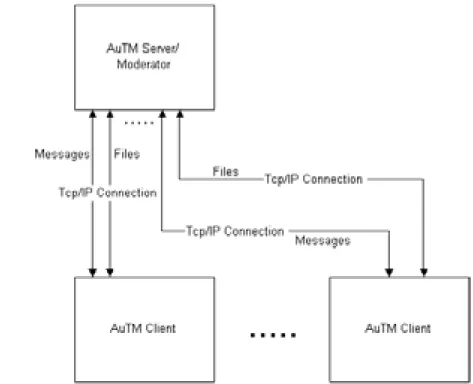
The AuTM prototype uses speech recognition technology to aid transcription of meetings and other collaborative work efforts. The system allows up to eight meeting participants each with a microphone and a computer running an AuTM client program. Each meeting requires one of the participants to run an AuTM moderator program. The AuTM client and moderator programs communicate over a TCP/IP network rather than using IR devices, as is the case in the ATEM prototype. During the meeting each of the AuTM client programs transcribe spoken utterances into text, logs their start and stop times, and saves the audio as wave files. The saving of audio allows for future error correction in the text if required. To allow the spoken utterances to be transcribed and recorded at the same time an audio splitter was required to provide separate audio sources.
The AuTM moderator program allows the meeting moderator to annotate the transcription during the meeting by including an agenda, highlights, motions and actions items. The final transcription can be saved as either an MS Word document for further manipulation, or as a HTML document to be viewed over the Internet. By the end of 2001, the AuTM prototype had reached version 1.3 and was developed using Delphi 5 and the commercial speech recogniser used was NS Professional v 5 [Zschorn et al., 2003]. The client and moderator programs have now been combined into the one program to simplify the system.
3.3 Field Voice Recognition System
The Field Voice Recognition System (FVRS) was developed in 2001 as a result of a request from Land Operations Division for a system that could automatically transcribe interviews in the field. It was specially developed for operations in East Timor in February 2002. It utilises much of the technologies and techniques developed in AuTM but does not include the meeting annotation features. It includes the ability to prerecord interviews for later transcription using a mini-disc player. Because this system was to be used on laptops in the field, keyboard commands were included. The system was deployed with extensive documentation and help files. Although the development of this system was not continued in 2002 some of the technologies used have been employed in the further development of the AuTM project.
DSTO-CR-0355
4. Summary of Work
4.1 Overview
During 2002 the project team looked at a number of areas that would progress the development of the software and further the aims of the project. These areas included: • Describing, documenting and developing the system architecture of the
application.
• Developing components or modules that could effectively plug into the application with little development work required.
• Improving the Graphical User Interface to make it easier for users to interact with the application.
• Including streaming video and audio to allow the system to be used in a distributed environment and not just in a single room.
• Researching the elimination of extra hardware needed to split the audio signal from a single microphone.
• Combining the two separate server and client applications into the one application so that a user can act as a meeting moderator or meeting participant depending on their role in a meeting.
• Researching other work being conducted with other CSCW tools.
• Researching the automation of the network connectivity of each computer involved in an AuTM meeting. This includes accessing and setting IP addresses.
• Researching the use of third party messaging systems that are being used within DSTO such as Elvin.
Two GILES students, and other students on short-term and work experience placements contributed to this work. The work undertaken culminated in the release of version 1.5.2 of the system.
4.2 System Architecture
4.2.1 Modularisation
When the AuTM system was originally developed in 2001 the main push of the project was to quickly develop a concept prototype to show that using automatic speech recognition technology could be used in a collaborative environment for automatically producing a transcript of the discussions. To enable this to happen a Rapid Application Development process was adopted by the developers to provide a concept demonstrator as quickly as possible. Due to this rapid development the overall architecture of the system was not fully considered. During 2002 much thought went into the system architecture of AuTM. A number of meetings were held with
DSTO-CR-0355
stakeholders in the project to decide on the future architecture. The following aspects were considered:
• What functionality is required and what features should be included to obtain this functionality?
• Could the system be broken up into semi autonomous modules that are loosely coupled together? This could then give the system a more plug-and-play approach that would allow using different components to achieve certain functionality. From these meetings three modes of operation were considered. These included:
1. A system for meetings being conducted in the one conference room where all participants, including the meeting moderator, would have their own computer and microphone.
2. A system where there is only one computer but there is a microphone for each participant.
3. A system for meetings where some participants would be in a separate room and therefore not be able to directly talk to the other meeting participants.
Each operational mode would require the system to have some different functionality. It was decided that all these operational modes should be explored depending on the availability of resources.
The first operational mode was most closely aligned with AuTM version 1.3 so development continued on this system to make it more robust and user friendly. Aspects of the other modes such as multiple microphones on the one computer were investigated but further research will be carried out in the future. Some features of the distributed mode where participants are in different locations were explored. These features included video and audio streaming; refer to sections 4.5 and 4.6 for more information on the research and implementation of these features.
The team decided that the project would benefit from attempting to modularise the system so it would not have to rely on particular third party components or software applications. Any newly developed or third party components could then be easily plugged into AuTM with the minimum of programming effort. For example, the user could select from a range of speech recognisers that they may have on their computer and not have to rely on any particular one. Or the system could use any protocol such as SSL (Securer Socket Layer) for enhanced security rather than TCP/IP. This modularisation concept was kept in mind when further developing the components and features of AuTM. To help developers with this concept of modularisation high-level architectural diagrams of the system were constructed.
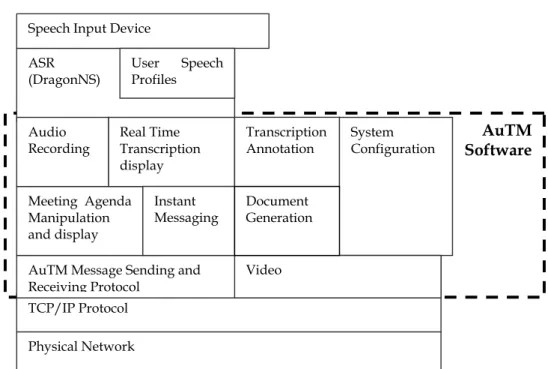
Figure 1 is a simple block diagram of AuTM 1.3.4 and is the first attempt at modelling the system. This model illustrates the components of the system and how these components fit together. It helped the developers understand the overall system structure and was useful in explaining the system to others interested in the project.
DSTO-CR-0355 System Configuration Physical Network TCP/IP Protocol
AuTM Message Sending and Receiving Protocol
Meeting Agenda Manipulation and display Audio
Recording Real Time Transcription display Document Generation Video Instant Messaging Transcription Annotation ASR
(DragonNS) User SpeechProfiles Speech Input Device
AuTM Software
Figure 1 Architecture Diagram of AuTM 1.3.4
As work on the software continued a more sophisticated model was needed to show the connections between the various software components and concepts. To organize this a new model using a layered approach was constructed. Figure 2 illustrates this model showing the AuTM modules and the other components these modules interact with.
Figure 2 Layered architecture diagram for AuTM 1.5
The Data layer shows various formats of data that AuTM uses or stores during its operation. It uses an ini file to store and retrieve the configuration information for the application. All audio data is stored in wav files, which get created by the clients then transferred to the moderator application for playback when correcting the transcript. Later versions of AuTM used the NS .dra format. The final transcript is then stored in
DSTO-CR-0355
HTML or MS Word format for future editing or viewing by other applications. The Subsystem layer defines the various modules of the AuTM system similar to those illustrated in Figure 1. The Application Support Layer shows components contained in the Delphi Visual Component Library, which provide tools to allow AuTM modules to access external applications or the Windows operating system environment. The 3rd
Party Application layer currently includes NS but may contain other applications in the future. Because AuTM uses a network to communicate between computers this layer has been included. The Platform layer describes the operating systems on which AuTM will run.
During the AuTM project, version control numbering, in the form XX.XX.XX, was used to name each version of the system. As there does not seem to be an agreed industry standard to identify what constitutes a number change, the following protocol was used. The third level identifies minor fixes of bugs and cosmetic changes to the GUI. The second level number changed when extra functionality was included and the first level was when major architectural changes were made.
4.2.2 Combining the Client and Server into One Application
The architectural model developed for AuTM was based on a client/server model where there were separate client and server applications to perform different tasks. The client application used NS to convert speech into text, time stamped these utterances then sent them to the server application. The client application also displayed information received from the server, such as the utterances, agenda information, meeting participant information, annotations and video. The server acted as an application for routing the information received from one client to the rest of the clients in the meeting. It also provided the same displays as the clients. Although it could display information to the user, the user would also have to run a client application if they wanted to participate in the meeting. This arrangement was fine for a concept demonstrator but is considered to be overly complicated for a real application. To simplify AuTM and make it more user-friendly the two applications were combined into one.
When combining the client and server the assumption was made that all participants in a meeting will want to contribute to the meeting and that their utterances should be recorded, transcribed and included as part of the meeting record. It was assumed that AuTM would mainly be used in an environment where a meeting moderator would contribute to the meeting and look after advancing the agenda and adding annotations to the transcript as the meeting progressed.
Taking a client and then adding the server functionality, as an option, when the program starts up, was the approach taken when combining the AuTM client and server into the one application. Depending on which option the user requests, the application would either start as a straight client, with an ASR to convert speech into
DSTO-CR-0355
text, or the application would be both a client and a server. The user who chooses to act as the meeting moderator will have the extra functionality of setting up and advancing the agenda, adding annotations to the transcript and broadcasting messages to all participants. They are also responsible for ending the session and saving the transcript.
In the process of combining the client and server a number of issues were encountered. One major difficulty was the issue of setting the focus for the ASR as NS will direct its output to whichever component has focus. For AuTM to operate properly the focus needs to be on the DictEdit component box which is where NS directs its output after an utterance is spoken. A component obtains the focus when a user clicks on it with the mouse pointer. For example, if the AuTM application is set up to be the meeting moderator, the focus will be set to the agenda component when the user clicks on an agenda item to advance the agenda. The effect of this is that transcription no longer works. To deal with this problem the focus was reset to the DictEdit box each time it looses focus. This issue was not such a problem in the pre-combined version, as the user didn’t need to interact with the program via the mouse apart from turning the microphone on and off.
The other major issue was the arrangement of the program source code, which had to be revised to facilitate the new combined functionality. In revising this code procedures and functions were arranged into logical groupings and order. This process also included the underlying concept of modularising the code. This included creating some new units and encapsulating some code from the Main unit into these new units.
4.2.3 Improving Source Code Readability
The main reasons for reducing the size of the source code in AuTM’s Main form was to increase the readability of the code and work towards modularisation of the application. Two extra units were created to encapsulate some code from the Main form. The MainTypes unit encapsulated all the variables, classes and functions that were considered global and could be used by other units apart from the Main form. This will help as AuTM becomes more modularised in the future. The other unit created, called MessagingUtils, encapsulates the messaging subsystem used by an AuTM client. Prior to combining the client and server the code relating to messaging was a complex series of ‘if else’ statements that were effective but difficult to read and understand. This unit uses layers of procedures to encapsulate this functionality, which makes the code easier to read and therefore debug.
DSTO-CR-0355
4.3 Multiple Speech Recognition Engines
As part of the modularization thrust of the AuTM project and to make the system more flexible it was decided to investigate the use of multiple speech recognition engines (SREs). A user could then select the speech recognizer they wish to use from a range of speech recognizers they have available on their computer. The team first investigated the Microsoft Speech API then some products that utilise this technology. We also compared SREs with various development interfaces to see if the concept of selecting multiple SREs is possible to implement in AuTM. In anticipation of this being plausible a separate speech engine component was developed.
4.3.1 Microsoft Speech API
Microsoft has developed their own Speech Recognition Engine (MSRE) and a Speech Application Programming Interface (SAPI) to access this engine. We were motivated to investigate the use of these technologies, for AuTM, as they are free to obtain and free to re-distribute with any application. Currently there are two versions of the SAPI we are interested in. These are versions 4 and 5.1. The older version 4 supports the NS SRE so theoretically we could have AuTM accessing either the NS SRE or the MSRE through the use of the SAPI. Unfortunately the SAPI does not provide the high level components that are provided by the NS Software Development Kit (SDK). The NS SDK uses ActiveX compontents to access this high level functionality. NS takes care of saving audio, controlling speakers, audio devices etc. They also provide a microphone button that looks after input volume levels, and an edit box for the text being produced by the engine. The SAPI components provide none of this functionality that is provided in NS (Blaney,2002).
4.3.2 SAPI Compliant Third Party Components
We also investigated other companies that were providing similar components to those we were using with NS. These products had to be SAPI compliant to allow us to use either of the two compliant engines we had available, i.e. the NS speech recognition engine and the MSRE. The IBM ViaVoice engine is also available for development, but this uses its own interface called the Speech Manager API (SMAPI). It is unlikely ViaVoice would ever support SAPI since it is a competing technology.
The commercial components that exist for SAPI are wrappers on those provided by Microsoft through their SAPI library. They all start with the basic engine controls mentioned above and introduce the extra functionality such as microphone buttons and speaker controls. For this reason, it would be possible to write our own components based on the SAPI components. It is intended to include this as future work for 2003.
DSTO-CR-0355
The first commercial components looked at were produced by a company called Wizzard Software (www.wizzardsoftware.com). They produce two sets of components, one that implements SAPI and another that implements SMAPI. Both are available as a free download trial version. Because Wizzard allows access to both the SAPI and the SMAPI, this product looked promising. Unfortunately we quickly discovered a problem in its compatibility with Delphi. Apparently a bug exists in Delphi that will not allow the components to install properly. This product should be looked at again when future versions of Delphi are released.
The next commercial component was called DTalk, made by O&A Productions
(www.o2a.com/dtalk.htm). They provide some useful components that are at a similar level to the NS components currently used in AuTM. They offer a standard speech recogniser component, similar to that provided in SAPI and the NS SDK. DTalk also provides several other useful components that can create dialogue boxes, which allow the user to choose between the available SAPI compliant speech recognition engines and the audio devices on the computer. Using the DTalk components, we attempted to implement the ability to access both the NS and the Microsoft speech recognition engine within the same program. There are some issues that will need to be dealt with if implementing this arrangement in AuTM.
The first is that NS saves audio files to the .dra file format and MSRE uses the .wav format, these are very different and incompatible formats. NS provides a microphone button component that currently provides two important functions in AuTM. It provides the ability to pause and resume the engine from processing audio, and provides a volume input level display. DTalk does not provide components with this functionality so they would have to be built using SAPI components. It may be easier to build separate NS and DTalk programs than try to combine them into one.
A third commercial component was SpeechKit 4 produced by Chant (www.chant.net). It provides a large set of components that access SAPI 5.1. We were able to implement the components but discovered an issue that could not be resolved. AuTM is designed to automatically start and stop recording and transcribing an utterance when a speaker starts and stops talking without them having to manually interact with the application. The system does not record the silence between utterances as it only starts recording and transcribing when the speaker’s voice is above a certain level. Unfortunately the current version of SpeechKit requires the user to click on a button to start and stop recording an utterance. SpeechKit can record the entire session for a speaker but cannot record individual utterances. This behaviour is not what is required as AuTM needs to record individual utterances to allow them to be interleaved with other meeting participant’s utterances.
DSTO-CR-0355
4.3.3 Comparison of SREs With SAPIs
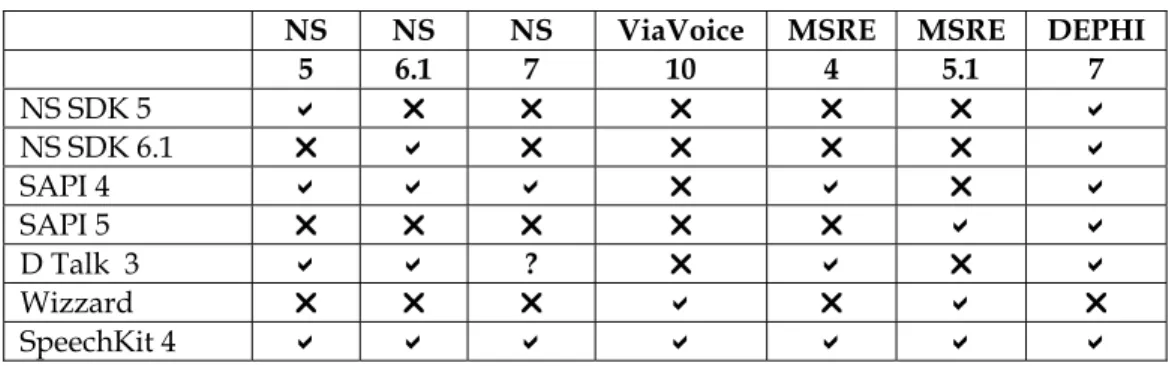
In trying to find a solution for having multiple ASRs available for an AuTM meeting we compared the compatibility of various SREs with certain interfaces that can be used in developing an ASR for AuTM. Table 1 shows the results of these comparisons and indicates that Chant’s SpeechKit is the only product that will provide access to all versions of the three speech recognition engines investigated. Unfortunately this product is still under development and, as explained earlier, currently does not provide all the features we require
Table 1 Comparison of Speech Recognition Engines with Development Interfaces
NS NS NS ViaVoice MSRE MSRE DEPHI
5 6.1 7 10 4 5.1 7 NS SDK 5 ! " " " " " ! NS SDK 6.1 " ! " " " " ! SAPI 4 ! ! ! " ! " ! SAPI 5 " " " " " ! ! D Talk 3 ! ! ? " ! " ! Wizzard " " " ! " ! " SpeechKit 4 ! ! ! ! ! ! !
Investigation will continue on this matter of trying to accommodate multiple ASRs in AuTM. In anticipation of finding a solution and to further develop the modularisation of AuTM, a new ASR interface component was developed.
4.3.4 Automatic Speech Recognition (ASR) Interface Component
The first stage of introducing multiple ASRs was to separate the speech recognition procedures from the main form. It was decided to create a separate code unit that could then encapsulate the speech recognition processes. This separate unit could then interface with the API of any speech recognition engine. The system would allow the user to enter the name of the recogniser at the start of a meeting and meeting participants would not need to all be using the same recogniser. This Engine Interface component was set up to handle NS, IBM ViaVoice and MSRE. Only NS has been implemented so far as it has proven more difficult than originally thought to include other recognisers.
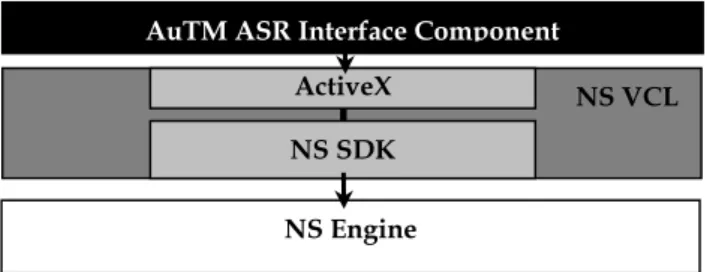
AuTM accesses the functionality of the NS recognition engine through the use of ActiveX components. The system uses the DgnEngineControl, DgnMicBtn and DgnDictEdit; components which are part of the NS Software Development Kit (SDK). The NS SDK is a component of the Delphi Visual Component Library (VCL). Figure 3 illustrates the connections between these components.
The new interface unit sets up pointers to these NS SDK components, registers the components with the Windows Registry and handles destroying these components
DSTO-CR-0355
when the program is closed. The unit also handles displaying the dialogue boxes associated with creating, enrolling and changing user profiles plus setting and checking audio input devices. The unit displays messages to the user when there is a problem with any of these dialogue boxes. The procedures in this unit are accessed as the program starts, for initializing the components, and then during the meeting session as the participant uses the microphone button and speaks.
AuTM ASR Interface Component
ActiveX NS SDK
NS VCL
NS Engine
Figure 3 Architecture diagram for current implementation for the interface between AuTM and NS using ActiveX controls.
4.4 Graphical User Interface
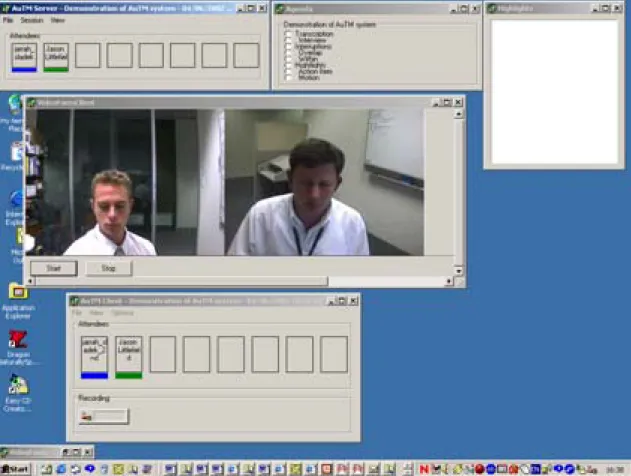
The AuTM software relies on a Graphical User Interface (GUI) to provide some interaction between the user and the software. Part of the development of the AuTM system involved changing and optimising the existing user interface developed by Zschorn et al (2003). Previously, the GUI developed in the early stage of the project was based on a number of separate windows for each visual component. These windows included a main form identifying the meeting participants, agenda, transcription and highlights. These were all displayed through the main menu. As can be seen in figure 4, each of these windows could be made visible independently of the others, at any time while the program was running. Refer to Zschorn et al (2003) for more detail on the old GUI. Although this was a very flexible architecture for the GUI, controlling the positioning of the windows on screen was often a problem when different size monitors or screen resolutions were used. The use of multiple windows, which could be opened and closed during the meeting, caused some confusion with new users. It was also time consuming to position the windows on the screen. Furthermore, changes to the interface were needed, in order to reflect new additions to the AuTM system such as video.
DSTO-CR-0355
Figure 4 A screen shot of a previous version of AuTM.
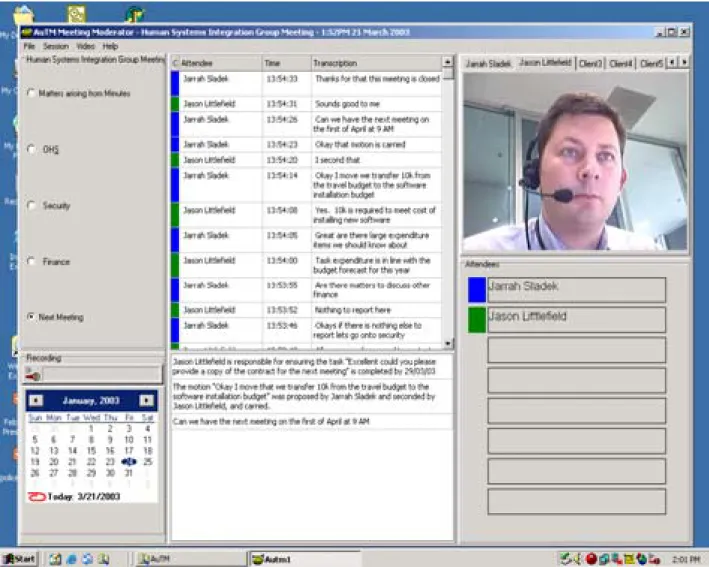
The development team decided to change this GUI architecture from multiple windows to one window with multiple frames. Each frame would contain a visual component. A number of GUI experts at DSTO were consulted when deciding on the final GUI architecture. We wanted the GUI to be as usable as possible and ensure proper visual design principles were followed. We consider version 1.5 of AuTM represents a more ideal user interface that would have much more real world use. Figure 5 shows the new single, symmetric client/server program.
The menu structure for the program provides access to functions relating to control of the transcript, meeting session, video imagery and help facility. As the program is designed for the Western hemisphere, where the eye moves from left to right when reading, these critical functions have been placed in the top left hand corner of the GUI. This will enable the user to spot them quickly.
DSTO-CR-0355
Figure 5.5 AuTM User Interface
The agenda frame occupies the next most important screen area of the GUI to reflect the importance of the agenda during a meeting. The microphone button has been placed near the calendar and agenda frame, as these components will be manipulated during the meeting using the mouse pointer. Keeping the agenda and microphone button closely positioned enables the user to control their contribution of spoken utterances without getting too side tracked by other graphical elements.
The real-time transcription frame is positioned in the middle of the GUI and features quite prominently in the design. The position of the video frame occupies a less important area on the right of screen. By offsetting its position it was hoped that the user could focus attention not just on video, but agenda and transcription as well. Other less prominent functions of the AuTM system include the highlights and user awareness frames, which have subsequently been placed in the lower half of the GUI as these visual components need only be glanced at periodically during a meeting.
DSTO-CR-0355
4.5 Video Streaming
In real-life communication, speakers are largely dependent on both auditory and visual information, including speaker’s facial expressions, posture, movements, and appearance (Nazikian et al 2002). According to Mehrabian (1971) as much as 93% of total meaning of a message can result from the non-verbal, visual cues, and only a small percentage is attributed to verbal communication. Whilst it is difficult to gauge an accurate rating of the importance of non-verbal communication, there is little doubt that it is a very important area in face-to-face communication.
In the case of a distributed meeting where speakers are located in different meeting rooms, the streaming of video and audio offers a means of aiding both verbal and non-verbal communication. For example, such functions as identifying and verifying a speaker are more difficult without visualisation of their face.
Implementation of the AuTM video module uses Video For Windows Application Programming Interface to carry out the function. There are two steps involved in streaming video across a TCP/IP network:
(1) Video capture- This capability is handled by using a Microsoft windows message-based interface to access video acquisition hardware. This stage involves connecting the capture window to the camera (capture driver). Each camera capture driver can provide up to four dialog boxes to control aspects of video digitisation and capture process, and define compression attributes used in reducing the size of the video data. Video steaming involves capturing the video frame locally then sending each frame remotely across the network.
(2) Video Compression Manager (VCM) – Provides a means of compressing and decompressing the video data such that it can be easily transported across the network. In general, an application uses VCM to perform the following tasks:
a. Locate, open, or install a codec (COmpression/DECompression algorithm).
b. Configure or obtain information about the compressor or decompressor c. Use a series of functions to compress, decompress, or display the data to
screen.
DSTO-CR-0355
A previous version of the AuTM system shown in Figure 4 was designed such that the video could be viewed optionally from the client main menu, consisting of a floating non-maximised window. It was anticipated that the amount of on-screen clutter generated from opening all the windows from the main window would be confusing to the user. Hence this provided one of the main motivations to incorporate the GUI into a single window as described in section 4.4.
Compression was an important factor that determined the layout of the captured video. Digital video needs to be compressed because it takes up a large amount of disk size and bandwidth in its original form. Video compression essentially makes it easier to store and distribute digital video amongst a network.
According to Cisco systems, a market leader in IP video conferencing products, video has a very high and extremely variable packet rate, with a higher than average transmission rate across a network such as TCP/IP.
An analysis of video compression was carried out to determine the average packet size and compression ratios of various codecs that were available. The results of these comparisons are detailed in Appendix C. The results showed that the uncompressed packet size was 230 Kbps. Whilst compression ratios varied greatly between codecs, on average packet size was reduced in the order of 20 times, approximately equating to 9Kbps.
Most personal computer video capture and editing systems capture video using Motion JPEG video compression (MJPEG). In motion JPEG, each video frame is compressed separately using JPEG still image compression standard. MJPEG is a lossy
compression technique, which means there is some loss in video data as a result of compression and decompression. Testing revealed that a MPEG 3 codec such as Morgan Multimedia (http://www.morgan-multimedia.com/) was best suited to the AuTM application. This was mainly due to the variable settings that optimised the display of streamed video across the network. These settings also gave the user the ability to control the quality of the video, by:
• increasing the quality, which increases the packet size and hence time to compress/decompress the frame sent across the network, and
• decreasing the quality, which decreases the packet size and transmission time of packets sent through the network.
Unfortunately this codec is not free to distribute and so has not been included in the current version of AuTM. Future versions of AuTM may be packaged with proprietary licensed codecs such as Morgan Multimedia in order to optimise video display.
Bandwidth was another important factor that determined the resolution and screen layout of each captured video. According to Microsoft the following factors are found
DSTO-CR-0355
to affect the amount of network bandwidth that audio and video conferencing scenarios use:
(1) The amount of motion for video; more motion equals higher bandwidth. (2) The size of the video window — small, medium, or large.
(3) The quality of the video — faster video or better quality.
(4) The type of camera used — black-and-white or colour. The more central processor power the camera uses, the slower the performance, and the less bandwidth used.
(5) The microprocessor type and speed, and the network speed.
As AuTM utilises the Microsoft Video For Windows Application Programming Interface there are several video dialog boxes, which the systems developer can use to control various aspects of the video digitisation and capture process. These dialog boxes include:
Video Source – This provides a selection of input video channels and parameters affecting the video image being digitised in the frame buffer. Such functions as hue, contrast, and saturation of the video are controllable.
Video Format –This controls selection of the digitised video frame dimensions and image-depth, and compression options of the captured video.
Video Display –This controls the appearance of the video on the monitor during capture. The controls in this dialog box have no effect on the digitised video data, but they might affect the presentation of the digitised signal.
Video Compression (video Codec) – This is used to open an installed Compressor/Decompressor algorithm to be used for the streaming of video, and control the video frames rate.
In order to shield users from the complexities of video streaming, only the video format
and video compression dialog boxes are made available at run-time through the AuTM application. A default low bandwidth video codec, Indeo 5.1, has been programmatically chosen to carry out compression/decompression duties of video frames. This video codec is installed by default with Windows 95/98/2000/XP, so is free to distribute and gives reasonable quality results. AuTM users can change this default codec. However, testing over a LAN revealed that for video transmission to occur, compression and decompression must be processed by the same installed codec for every user. Implementing the codec this way means that users can immediately select the ‘start’ and ‘stop’ menu items and begin video transmission without the need to notify every speaker with which video codec will be chosen for the AuTM session.
DSTO-CR-0355
As mentioned in section 4.4 one of the problems with the earlier GUI design shown in figure 4 was the amount of screen space taken up by the video. As the AuTM application was designed for a maximum of 8 clients, the practical display of each of these clients’ video at a resolution of 320x240 pixels was not possible. Concurrent display of eight video clients could only be made possible if video resolution were halved to 160x120 pixels. It was decided that the decreased resolution of video below 320x240 pixels was no longer effective in aiding in speaker identification and facial expression of remote speakers.
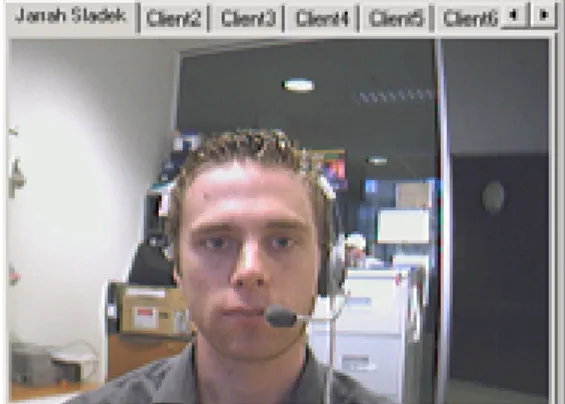
In order to overcome the above design issues, the current video interface of AuTM consists of a tabbed panel, whereby each new tab represents a new client in a meeting, as can be seen in Figure 7. This tab display is very similar to the video interface of version 3.0 of Lotus SameTime (IBM Corporation (2), 2002).
Figure 7 Screen shot of the current video display
Participants are made responsible for sending their own video by using the start and stop menu items on the main window. A participant’s video is sent via the network to the server, this is then broadcast to all participants in the meeting including the originating participant. The video is then displayed locally.
4.6 Audio Issues
Audio is an important aspect of the AuTM system as it is used for correcting transcription errors and could be used for a distributed version of the system. This section describes the problems we have encountered with recording the audio for correction, what research was undertaken, and finally, the solution that was implemented and why this solution is not the most desirable.
DSTO-CR-0355
To enable AuTM to be distributed so that meeting participants can be in separate rooms, it is essential they can hear each others’ speech in real time, not just read it on the screen. Streaming audio was developed to allow this but not implemented in AuTM 1.5 because of the problem described below.
4.6.1 Audio Recording
As no ASR is 100% accurate, corrections to utterances will need to be made at the end of each meeting. To enable a user to correct the transcript they need to be able to listen to what was actually said by each participant, so all utterances have to be recorded in real time. The AuTM client records this utterance as a wave file, which is sent to the server program at the end of the meeting. The NS software controls the device that the audio signal is sent to from the microphone. This device is the driver software that controls the sound card or USB audio port. This means that no other software, including AuTM, can access this audio signal for the purpose of recording.
To overcome this situation and allow both NS and AuTM to have a signal for recording, hardware was developed to split the signal so it can be fed into two separate audio devices. These might be two sound cards or two USB ports. This signal splitting is a usable solution to the problem for demonstration software but it is very inconvenient, as the user needs to ensure they have this extra hardware. This is not a desirable long-term solution to the problem as this hardware was specifically built for this purpose and is not commercially available. To avoid the signal splitting hardware, a software solution was required.
In finding a software solution, the team searched for existing potential solutions and identified two possibilities. These included the Virtual Audio Cable (VAC) (Muzychenko(1), 2002) and WaveClone (Muzychenko(2), 2002). Evaluation copies of these products were obtained and assessed.
VAC is a Windows multimedia driver allowing the transfer of audio (wave) streams from one application to another. It creates a pair of Wave In/Out devices for each cable. Any application can send an audio stream to an Out device, and any other application can receive this stream from an In device. All transfers are made digitally, providing no loss of sound quality. (Muzychenko (1), 2002)
If more than one application is sending audio to the VAC, it will mix all streams together. If more than one application is receiving audio from the VAC, it will share the same audio data between all targets. This is the feature that interested the AuTM team when investigating this as a possible solution.
The VAC is useful to record a synthesizing application's audio output in real time, or transferring a sound stream to another application for processing. You can, for example, use two or more software audio generators, synthesizers or sequencers to
DSTO-CR-0355
produce audio streams sending them to VAC Out, and recording the mixed stream from VAC In using recording software such as Windows Sound Recorder,
At the time of conducting the research on the VAC we did not fully understand how the application worked as a virtual audio device. It appeared from the literature (Muzychenko (1), 2002) that the software could only transfer a sound stream from one application to another. This would not provide a solution to the audio splitting problem as neither NS nor AuTM outputs an audio stream. We have since discovered that coupling another piece of software produced by Muzychenko called an Audio Repeater may provide the solution to the audio splitting problem. This Audio Repeater application can transfer the real-time audio stream from any Wave In port to any Wave Out port. This means that an Audio Repeater can be used with the VAC to feed the audio from a real sound card to the Wave Out port of a virtual cable. Because the virtual cable allows for multiple clients, both NS and AuTM could access the Wave In port of the same virtual cable. Figure 8 illustrates this arrangement with arrows showing the flow of the audio signal. This would then give both applications access to the same audio stream. This solution is yet to be fully tested but has been included in future work on AuTM.
Figure 8 How VAC would be used to connect AuTM to a sound card
WaveClone is an application that effectively allows the user to clone or copy a particular port on an audio device. The clone can then be used in conjunction with the original device to provide an audio stream to both AuTM for recording and to NS for transcribing. The application needs to be registered with Windows on a computer as an audio device. Unfortunately only the demonstration version for Windows 98 was available at the time the research was conducted. AuTM is currently set-up and configured to operate as a concept demonstrator on the Windows 2000 operating system and at present this is the preferred configuration. A demonstration version of WaveClone was tested on a Tecra 8000 laptop running the Windows 98 operating system. Details of the experiment are provided in appendix B. The results showed that this application could provide a simple and acceptable solution to the audio splitting problem if a version was to be developed for the Windows 2000 operating system. With these results in mind we contacted the applications author, Eugene Muzychenko to enquire about access to the source code and to arrange a possible