Next-Generation Web
Frameworks in
Python
by Liza Daly
Copyright © 2007 O'Reilly Media, Inc. ISBN: 978-0-596-51371-9
Released: April 18, 2007
With its flexibility, readability, and ma-ture code libraries, Python is a natural choice for developing agile and main-tainable web applications. Several frameworks have emerged in the last few years that share ideas with Ruby on Rails and leverage the expressive nature of Py-thon. This Short Cut will tell you what you need to know about the hottest full-stack frameworks: Django, Pylons, and TurboGears. Their philosophies, relative strengths, and development status are described in detail.
What you won't find out is, "Which one should I use?" The short answer is that all of them can be used to build web ap-plications—the challenge for the reader is to find the one that fits his or her project or coding style best.
Contents
Welcome to the Next
Generation ... 2
What Is a Web Framework and Why Would I Want to Use One? ... 2
Why Python Now? ... 3
What Makes a Framework "Next-Generation"? ... 4
Django ... 6
TurboGears ... 18
Pylons ... 28
Welcome to the Next Generation
This Short Cut is meant to be a complete and high-level overview of the three most prominent "next-generation" frameworks. I provide code samples throughout as concrete examples, not as application how-tos. Each of these frameworks comes with excellent tutorial-level documentation that walks novices through the process of creating a simple application, if that is what you need.
I expect that readers are familiar with basic Python syntax, database design, and general web development practices. I hope that if there are any unfamiliar con-cepts, the ample links I provide will suffice.
About the Code Samples
The code in this Short Cut is based on a simple application: a system to catalog a collection of wine. The basics of wine can be easily represented through a relational database, and the requirements of such a system are those of any content-based application: create, read, update, and delete op-erations (CRUD), search, and browse.
A quick specification of the application would look like this:
• The system should model the main characteristics of a wine: its name, price, producer, region, and one or more grapes used in its production. • The user should be able to retrieve wines by various fields: search by title, list recently added items, browse by related fields (e.g., show all wines made with Chardonnay).
• The system should allow only admin-level users to add wines to the da-tabase, but allow public visitors to rate or add comments on a wine. In some cases we will show an entire feature set. More often we will dem-onstrate just some of these features, to contrast their implementation in one framework with their implementation in another.
What Is a Web Framework and Why Would I Want to Use One?
Back at the dawn of time (1996–1998), dynamic web sites were coded strictly through the use of the Common Gateway Interface, or CGI. Most sites used simple form-driven methods of retrieving user input, had ad-hoc implementations of fea-tures because best practices had not been established, and only supported a minimal amount of reuse or extensibility.
Eventually the web increased in popularity and become accountable for an in-creasing amount of mission-critical and financial data. Stability, code reuse, and
standardization of practices became imperative. Early attempts to unify code li-braries resulted in the first wave of web frameworks, which provided convenience methods for common features and streamlined deployment and other kinds of overhead. The use of scripting languages like Perl lost favor, as developers grappled with idiosyncratic legacy code, riddled with security holes, that was often written by non-programmers. "Real" web programming was done with industry-backed languages like Java™ and C#, employing deep layers of abstraction over HTTP. The idea that a "framework" could provide stable APIs and a common language across web products became established practice, especially in the Java community with the introduction of J2EE and web servlets.
By the mid-2000s, many developers thought the pendulum had swung too far to the other side. Heavyweight frameworks that required dozens of configuration files were the norm. Outside of the web development community, traction was building for so-called "agile" development practices that emphasized less up-front model-ing, fast iterations, and a process-wide acknowledgment that requirements and features may change quickly.
Agile methodologies had particular resonance with web developers, which became clear with the instant excitement generated by Ruby on Rails (http:// www.rubyonrails.org) in 2004. Its emphasis on "convention over configuration" was a breath of fresh air to developers who had struggled with configuration-heavy Java frameworks such as Struts. Ruby's status as a next-generation scripting lan-guage inspired programmers who had fond memories of quick Perl projects but did not want to trade flexibility for readability.
The success of Rails thus far has been measured more in interest than in widespread adoption—large data-heavy sites are still produced largely in Java or .NET. Rails has ignited interest not just in the Ruby programming language, but in revisiting scripting languages as valuable tools in web application development. It also pio-neered some best practices that, almost overnight, have become expected features in any new web framework, not just in Ruby but in any language.
Why Python Now?
Perl took the lead as the de facto scripting language of the early web, when exper-imentation and isolated code silos were rampant. As a result, it was tarred (perhaps unfairly) as an unmaintainable generator of spaghetti code. Developers felt that stricter languages such as Java were better suited to large-scale, multiprogrammer projects, where extensive advance modeling through UML and other tools could guide project development.
Fast-forward to the agile "revolution," where these tools were frequently viewed as unnecessary or even detrimental to successful projects when teams were small and well focused. Ruby demonstrated that a dynamically typed language (espe-cially one with strong object orientation) could be both clean and efficient. Python, whose syntax is extremely clean, would seem to be a natural alternative.
Python's Zope, developed in the aforementioned dawn of time, has much in com-mon with the heavyweight frameworks of the late '90s and was very much a reaction to the mess made with Perl/CGI. Unfortunately, this means that Zope can be very idiosyncratic and requires a steep learning curve, undercutting the flexi-bility derived from using a language like Python in the first place. Although Zope and its subprojects like Plone have been quite successful and are still in wide use, not all developers take to them.
Ambitious programmers in the last few years have shown that mixing agile prac-tices and Python can result in a successful programming tool. The three frame-works profiled here—Django, TurboGears, and Pylons—all share ideas that have galvanized the web community. Yet they are distinctly different, serving different types of applications and reflecting different values in programming.
What Makes a Framework "Next-Generation"?
The Model-View-Controller pattern (http://en.wikipedia.org/wiki/Model-view-controller) has proven itself to be a successful way of structuring a web framework. As applied to web projects, the pattern requires a separation between the repre-sentation of the data (the model), the way the data is presented in an HTML page to the user (the view), and the methods used to move data from component to component and map URLs to functional pieces (the controller). On large projects each of these layers may be performed by different individuals or different teams, and frameworks that enforce this separation can facilitate smooth development across varying skill sets. Rails is an MVC framework, as are all three of the frame-works discussed in this Short Cut.
Central to the adoption of Rails have been some previously overlooked "marketing" features:
• Easy-to-follow screencasts and tutorials
• Project creation scripts that set up running applications right away • Integrated zero-configuration development servers
These three features enable anyone with 20 minutes to jump into a framework and start producing results. A kind of arms race has emerged in this area, with various
frameworks jostling to pack the greatest number of features into a "20 minute" wiki or blog application.
Rails includes the now-standard "full-stack" feature set:
• An Object Relational Model (ORM): a code library which maps SQL database rows and tables onto objects and classes
• Clean template language • Ajax integration
• One-step package installs
• "Don't repeat yourself" (DRY) and "convention over configuration"
Relational database modelers represent database tables as Python objects or oth-erwise reduce the amount of raw SQL code a developer needs to construct. Outside of the Python world, packages like Java's Hibernate have demonstrated that ORMs can be reliable and scalable.
Also critically important is the "view" or templating layer. Web frameworks have come a long way from this:
print "<title>%s</title>" % page_title
However, the needs served by a templating layer can vary widely across projects. Some teams need strict, well-formatted templates with no room for error. Others need clean, lightning-fast templates with minimal overhead. Here Python has quite an advantage over Ruby—there are dozens of well-regarded templating languages, and frameworks increasingly allow developers to take their pick.
No Web 2.0 site would be complete without some fancy Ajax features, and the success of the Rails-inspired Script.aculo.us has driven other JavaScript libraries to become more tightly integrated with frameworks both in the Python world and elsewhere.
Python Eggs (http://peak.telecommunity.com/DevCenter/PythonEggs) and the Cheeseshop (http://cheeseshop.python.org/pypi) have greatly facilitated pack-age download and deployment. Like Java's Jar files, Eggs are used not only to pull in published packages, but also to bundle project resources for easy deployment elsewhere. Because deployment is a central concern to well-structured web projects, Eggs have become critical in making component reuse and iterative re-leases feasible.
"Don't repeat yourself" is perhaps the most important concept in differentiating a next-generation framework from earlier systems, and part of an overall less-is-more
approach. Earlier products required developers to specify and re-specify configu-ration elements in multiple places. Rails takes the philosophy that there should be only one place to store any kind of information, and that unless otherwise specified, details about the rest of the system can be derived from that. If I define a path in my URL as "edit", it's expected that there's a method edit() to deal with it, and I should only have to tell Rails about it if I'm going to vary from the pattern. The Python frameworks I discuss in this Short Cut take different approaches to this philosophy, but all of them follow it in one way or another.
That's what these projects have in common. Let's dive into how they're different, how they work, and who can benefit most from them.
Django
Philosophy: A Unified Package to Develop Applications Quickly
Django (http://www.djangoproject.com) got its start as an environment for run-ning newsroom applications. Later it was abstracted and released as an open-source web framework. This heritage is apparent throughout the package—in the documentation, in the built-in administration interface, and in the standard li-brary. Despite its origins, Django includes all the components necessary to develop any basic web application: an object-relational mapper for the database, a tem-plating system for inserting dynamic content into output pages, and a place to hang Python functions that tie it all together.
Django does not use a third-party application server such as CherryPy (see the TurboGears chapter). It does come with a manager script ("manage.py") that can invoke a simple development server, but relies on a web server running mod_py-thon or FastCGI for production deployment.
Only features and syntax available in Django 0.95 are described next. This is the latest stable release as of this writing.
Data Modeling: An ORM of One's Own
Django advocates a "model-centric" approach to development, in which all the essential fields and behaviors of the data (and thus much of the behavior of the application itself) are part of the model. As in the other frameworks discussed here, the model is meant to be designed primarily in Python code. The database schema and data maintenance process are handled by Django based on that model. This is the core of Django's adherence to the "don't repeat yourself" principle: the model is described in one place, and the messy details of persisting it to a database are hidden.
In Django's ORM, a table is defined as a class that inherits from
django.db.models.Model:
from django.db import models class Wine(models.Model):
name = models.CharField(maxlength=500)
price = models.PositiveSmallIntegerField()# Let's be reasonable year = models.IntegerField('vintage year', null=True)
comment = models.TextField(blank=True) def __str__(self):
return "%s %d" % (self.name, self.year)
Some field types, like CharField, have required parameters such as maxlength. Most of these parameters inform not just the creation statements in the database but also the administration interface (see below) and the validation routines provided by the system. Django allows for fields to be optional (blank=True), and for null values to be distinguished from empty fields (null=True).
Let's broaden the model beyond just the primary object type of a wine and think about its defining characteristics. Wines are made by producers, and most quality wines are associated with a given region (and a region belongs to a specific coun-try). We'll create classes for Producer, Region, and Country very simply:
class Producer(models.Model): name = models.CharField(maxlength=500) class Country(models.Model): name = models.CharField(maxlength=500) class Region(models.Model): name = models.CharField(maxlength=500) country = models.ForeignKey(Country)
The field models.ForeignKey sets up the many-to-one relationship between a Re-gion and a Country (that is to say, a Country has many ReRe-gions, but a ReRe-gion belongs to only one Country). Django's ORM also provides many-to-many and one-to-one relationships.
Knowing that this is all we need to create relationships between tables, we can modify our Wine class to hook it up to the metadata classes we've defined:
class Wine(models.Model): ...
region = models.ForeignKey(Region) producer = models.ForeignKey(Producer)
Unique to Django's ORM are a number of ways to customize the model's display, either in its admin interface or in any default view of the data. Many of these are common tasks that one would need to customize in any model of sufficient com-plexity, such as ordering or access permissions.
Some are purely cosmetic changes that apply to the admin interface. For example, to tell Django that our Country class is not pluralized as "Countrys," we add to it:
class Country(models.Model): ....
class Meta:
verbose_name_plural = "countries" ordering = ['name']
The Meta class option "ordering" allows us to specify which fields in the model should be used to order the object (otherwise the ordering is unspecified). As it is only a list of tuples, it does not allow us to do more complex ordering, such as sorting "United States" before all other countries regardless of alphabetical order. (That would likely be handled by a custom __cmp__() method that would not be usable by the Django admin.)
Once the models have been created in the database (using "manage.py syncdb"), data is retrieved from the model using methods provided by models.Model. As-suming we have already entered some of the recent additions to our collection:
>>> from winedb.wines.models import * >>> Wine.objects.all()
[<Wine: Conundrum 2005>, <Wine: Otono 2004>, <Wine: Vigna Martina 2003>] >>> wine_list = Wine.objects.filter(name__contains='Otono') >>> wine_list [<Wine: Otono 2004>] >>> wine = wine_list[0] >>> wine.region <Region: Mendoza> >>> wine.region.country <Country: Argentina>
Making updates to existing models is simple:
>>> wine.comment = "Extremely chuggable." >>> wine.save()
Never Build Another Admin Interface
In most MVC web frameworks, once the model is built the programmer will start working on the view. Depending on the project this may be the customer- or public-facing view, or it may be the backend administration system. Django provides a running start by shipping with a customizable admin interface that can handle a majority of the usual data manipulation use cases, from basic CRUD to search and browse.
After enabling the admin interface, a model object is added to the interface by providing an Admin inner class:
class Wine(models.Model): class Admin:
pass
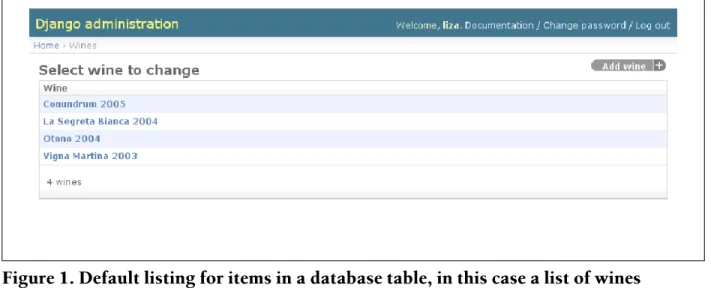
Now we should see the wines we have in our database in a default listing ( Fig-ure 1).
Specifically, Django is displaying the string representation of each object, which we defined in our custom __str__() method. The first improvement to make is to show more fields than that. We'll tell Django's "list" view which fields to display:
class Wine(models.Model): class Admin:
list_display = ('name', 'producer', 'region', 'year') list_filter = ['region','year']
Spare Any Change?
Changes to model meta-information, such as contents of the Meta or Admin classes, do not require a database re-sync and should be immediately avail-able on page refresh.
The admin interface now displays our custom fields and filters (Figure 2).
In addition to showing more information about each wine, Django has automat-ically added sorting controls and field-based filters.
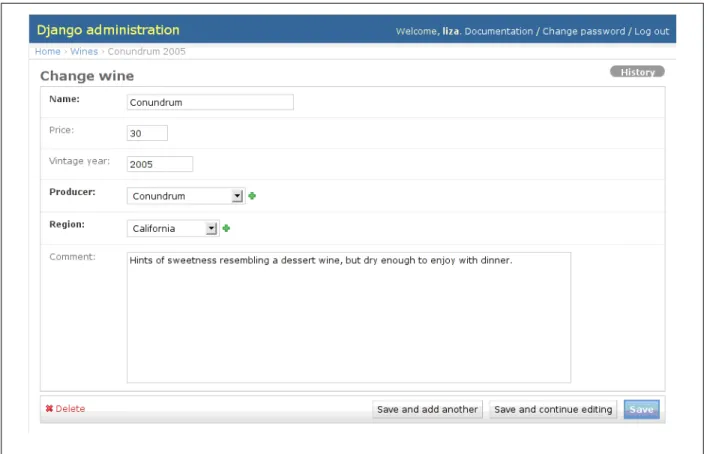
Clicking on a wine will bring up the editor interface, with HTML form fields gen-erated for each editable database field (Figure 3).
Optional fields are displayed in gray, and foreign-key fields have a handy "add" feature next to the select control to allow content editors to easily expand the number of options.
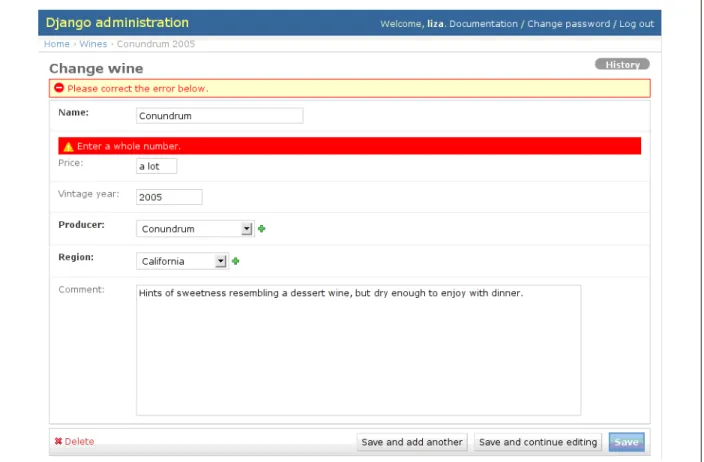
Django's model classes come with a set of validators associated with their datatype. If we attempt to enter a non-integer value into the "price" column, you can see what happens in Figure 4.
The admin interface can be extended in a variety of ways, and provides clever methods for handling complex data relationships such as many-to-many foreign
Figure 2. Modified listing showing our custom fields, which are automatically filterable and sortable
keys. Ultimately, many applications will require custom administration interfaces that exceed the capabilities of the default admin, but for quick prototyping, basic data access, and population or limited requirements, it is extremely powerful and is perhaps the framework's "killer app."
Fast Templating: HTML, CSV, or Anything
Although it can use any of the other templating systems described in this Short Cut, Django comes with a system of its own that is optimized for speed and flex-ibility. Although the most common use case is generating HTML templates, Django's designers think that one of the system's strongest points is that it is format agnostic. Django templates can easily output text files, CSV, or other arbitrary formats. XML is also an output possibility but the template engine itself cannot assist in validating the output. A side effect is that because the system does not rely on any underlying XML parsers, template rendering is extremely fast.
Like most other templating languages, Django designates functional code with special characters:
Figure 3. Default view for editing a table entry, with pull-down menus for foreign keys and gray text indicating optional fields
{{ variable interpolation }} {% Django tag %}
Tag Soup
A Django "tag" should not be confused with an XML or HTML tag.
Django does not allow arbitrary Python code to be executed within a template, by design.
Variables
Django's variable interpolation is more expansive than Python's. When Django encounters variable.attribute, it tries the following in order:
1. Dictionary lookup 2. Attribute lookup 3. Method call
Figure 4. Automatic validation will highlight values which do not match the field's data type
4. List-index lookup (e.g. list_name.3 == list_name[3])
If none of these evaluate, or if variable does not exist, Django returns the empty string.
Filters
Filters extend the power of variable interpolation by allowing variables to pass through a series of pre-defined functions. Filters can be chained, using a | (pipe) notation familiar to Unix programmers:
<h1>{{ wine.name|lower|escape }}</h1>
This filter chain will take the name of our wine, convert it to lower case, and convert any ampersands in the string into XML-escaped &. For example, if we have a bottle of "Moet & Chandon" in our database, the final output will be valid XHTML:
<h1>moet & chandon</h1>
Django provides a number of filters, from the general-purpose (length, random) to the bizarrely specific (phone2numeric, addslashes). Custom filters can be added by the application programmer.
A list of all built-in Django filters is available at: http://www.djangoproject.com/ documentation/templates/#built-in-filter-reference.
Tags
Django tags are used for flow control, to describe template inheritance, and for debugging. Like filters, they can be extended by custom Python methods. Tag basics are easy to understand by example. To display a list of the wines in our database, we would start with a template like this:
{% if wine_list %}
<h1>Wines available:</h1> <ul>
{% for wine in wine_list %}
<li><a href="/wines/wine/{{wine.id}}">{{ wine }}</a></li> {% endfor %}
</ul> {% else %}
<p>No wines are available.</p> {% endif %}
A list of all built-in Django tags is available at: http://www.djangoproject.com/ documentation/templates/#built-in-tag-reference.
Note that there is no HTML wrapper around our page. This is best provided using Django's inheritance system. Let's start with a base HTML page that does include all the requisite elements and call it base.html:
<!DOCTYPE html PUBLIC "-//W3C//DTD XHTML 1.0 Transitional//EN" "http://www.w3.org/TR/xhtml1/DTD/xhtml1-transitional.dtd"> <html xmlns="http://www.w3.org/1999/xhtml" xml:lang="en" lang="en"> <head>
<title>{% block title %}Wine database{% endblock %}</title> </head>
<body>
{% block content %}{% endblock %}
</body> </html>
The tag "block" takes a name as an argument (here "title" and "content"), and then all the code between the block's start and the endblock tag belong to that block. In a parent template such as this, the block's content is considered to be the "default" value. If we want to override that region in a child template, we re-define that block in the child.
Updating our original page, we first declare that it inherits from our "base.html" above, then override the page title, and finally override the main content area, to fill it with our content:
{% extends "base.html" %} {% block title %} Wine list {% endblock %}
{% block content %} {% if wine_list %}
... [rest of our page here] ... {% endif %}
{% endblock %}
Templates can be infinitely nested, and child templates have access to parent con-tent if necessary.
Tying It All Together in the View
Typically, the "view" in MVC is the code-driven template. In the Java/J2EE world this is the JSP or equivalent layer; in Rails it is the RHTML files; in TurboGears it is provided by Kid templates. Django is different—it considers the view layer to be a combination of the templates and some backing Python methods in
If Django has a controller layer (other than Django itself), it is the URL mapper. One Django design philosophy is to decouple the visible URLs in the browser from the application itself. This facilitates deployment and allows changes to the URL mapping to be independent of the methods that handle those URLs. This feature is configured in urls.py:
from django.conf.urls.defaults import * urlpatterns = patterns('', # Public site (r'^$', 'winedb.wines.views.index'), (r'^wine/(?P<wine_id>\d+)', 'winedb.wines.views.detail'), (r'^search', 'winedb.wines.views.search'), # Admin interface (r'^admin/', include('django.contrib.admin.urls')), )
These regular expressions map URLs to method names in our views.py file: • Our home page is mapped to views.index()
• /wine/2 would call our views.detail() method, passing 2 as the value for the named parameter wine_id
• /search will call our views.search() method
• Lastly, we have a mapping from /admin to the default Django admin interface Query string values are not considered at the URL mapping layer, although users are encouraged to use URLs such as /wine/123 that are clean, RESTful, and search-engine friendly.
Consider our template displaying our wine list:
{% if wine_list %}
<h1>Wines available:</h1> <ul>
{% for wine in wine_list %}
<li><a href="/wines/wine/{{wine.id}}">{{ wine }}</a></li> {% endfor %}
</ul> {% else %}
<p>No wines are available.</p> {% endif %}
We need to pull our wine list from the database first (based on some criteria), invoke this template, and return the rendered content to the browser. This method will be named index() to map it to our web root (/):
from django.template import Context, loader from winedb.wines.models import Wine
def index(request):
wine_list = Wine.objects.all().order_by('name') t = loader.get_template('wines/index.html') c = Context( { 'wine_list': wine_list, } ) return HttpResponse(t.render(c))
Django's template loader consults a list of template directories in the application's configuration file to find matching templates. Context holds a dictionary of all user data needed by a given template. Django templates are capable of rendering them-selves based on a context and this rendered output is returned as an HttpRes ponse. Although normally the response type will be a variant of HTML, it may be XML, plain text, or some other type.
Because the above scenario is common, Django provides a wrapper function to instantiate a template, pass it data, and return a response:
def index(request):
wine_list = Wine.objects.all().order_by('name')
return render_to_response('wines/index.html', {'wine_list' : wine_list})
Another helper function is provided for "detail" pages: pages called with a partic-ular object ID with the intent to display the object's contents. We use this to display the detail page for our wine:
def detail(request, wine_id):
wine = get_object_or_404(Wine, pk=wine_id)
return render_to_response('wines/detail.html', { 'wine': wine} )
The variable "wine_id" is set by the named parameter in our urls.py:
(r'^wine/(?P<wine_id>\d+)', 'winedb.wines.views.detail')
urls.py does not provide access to query string values, so there is a different meth-od for accessing those in the view. Imagine a search feature in which we can type the name of a wine and find matching wines in our database. This would be con-structed using a normal HTML form, using the GET method to submit the results. Our view method would be:
def search(request):
search_term = request.GET['search'] try:
except Wine.DoesNotExist: results = []
return render_to_response('wines/search.html', {'results' : results,
'search_term' : search_term})
And our results page:
{% if results %}
<h1>Wines found for search '{{search_term}}':</h1> <ul>
{% for wine in results %}
<li><a href="/wines/wine/{{wine.id}}">{{ wine.name }}</a></li> {% endfor %}
</ul> {% else %}
<p>No wines were found.</p> {% endif %}
Django promotes the "redirect-after-POST" pattern, in which forms which intend to modify data are encoded as POST requests, and once the update has been com-pleted, the server sends a redirect to a new URL rather than returning a response from the same URL. This prevents accidental form resubmissions when users hit "refresh." Let's say we don't want public site users to add or edit our wines, but they should be able to submit a numbered rating from 1 to 10. After updating our model, we provide the following view method:
def update(request):
wine_id = request.POST['wine_id'] rating = request.POST['rating']
wine = get_object_or_404(Wine, pk=wine_id) wine.rating = rating
wine.save()
return HttpResponseRedirect("/wines/wine/%s" % wine_id)
Django's creators feel strongly that GET and POST variables should be retrieved explicitly, while other frameworks invisibly provide form parameters from either submission method.
Documentation
Because the application is unified, keeping the documentation consistent and cur-rent is vastly simpler than in a meta-framework like TurboGears or a loosely coupled one like Pylons. The tutorial (http://www.djangoproject.com/documen tation/tutorial1) is simple and effective. There are cases where some features available only in the development branch are mixed in with standard features, but this is called out. Users are encouraged to post comments at the end of each
doc-umentation section, which can be helpful in resolving common mistakes or installation problems.
At the time of this writing, a pre-release version of the Django book is available for free at http://www.djangobook.com. Chapters are released incrementally and user comments are solicited.
Testing
Django 0.95 does not provide a full-stack testing framework, and direct support for the standard Python tests doctest (http://docs.python.org/lib/module-doctest.html) and unittest (http://docs.python.org/lib/module-unittest.html) is not available in that release. Django 0.96, released on March 23, 2007, does have support for both of these (http://www.djangoproject.com/documentation/test ing).
Model-level testing is quite easy using the Django manage.py shell command. "Shell" sets up the project environment before invoking the Python shell, allowing the user to immediately inspect the model code. Automated browser-level testing is not a part of Django but is available using external tools such as twill (http:// twill.idyll.org) and the JavaScript-driven Selenium (http://www.openqa.org/se lenium).
TurboGears
Philosophy: a Megaframework at 1.0
When you use Django, you are using the Django templating system with the Djan-go database mapper with the DjanDjan-go URL/controller framework. TurboGears (http://www.turbogears.com) takes the opposite approach, unifying mature projects into a "mega-framework." Central to the mega-framework approach is the idea that, while core packages should be supported out-of-the-box, it should be easy to plug in or replace most of the layers.
Powered by CherryPy
The single un-replaceable subproject in TurboGears is CherryPy (http:// cherrypy.org), the multithreaded web server written entirely in Python. It is less analogous to a pure HTTP server such as Apache and is more of a runtime con-tainer, as Tomcat is for Java. CherryPy provides mechanisms for responding to requests, attaching methods to serve those requests, and establishing session, re-quest, and response objects. TurboGears is essentially an extension of CherryPy. Unlike the Django development server or WEBrick in Rails, CherryPy is a pro-duction-level server. CherryPy can be mounted behind Apache or IIS for
deploy-ment purposes but CherryPy will handle the actual work of servicing user requests in a TurboGears project. It supports all the standard HTTP server functions, in-cluding serving static assets (such as images), file upload, exception handling, and logging.
Having a production-quality server embedded in the framework is a huge win at launch time, as any developer who has struggled to migrate to mod_python or
mod_ruby can attest. However, performance and scalability of a TurboGears appli-cation are first and foremost limited by CherryPy's capacity—if CherryPy can't handle the request volume, there is no other option available.
CherryPy a la Mode
At the time of this writing, TurboGears sites are not easily deployable as WSGI applications, nor can foreign WSGI applications be easily included in a TurboGears site. This functionality will become available when Turbo-Gears supports use of CherryPy 3.0 (expected in TurboTurbo-Gears 1.1).
In Django, URIs and methods are completely decoupled. CherryPy (and therefore TurboGears) takes a direct approach to URL-to-method mapping. By default, all requests for the application root (/) are mapped to a Root controller class. The Root controller exposes methods that are automatically mapped to the matching URI. For example, if I create an exposed method called view() and attach that to my root controller, requests for the URI /view will be dispatched to that method, without further configuration.
For novice users, the CherryPy/TurboGears approach is great: name the method, expose it, and it is immediately available for use from the web. Advanced users who want fine-grained URI control or those integrating with an existing system may find the CherryPy approach to be too coarse.
The simplest possible TurboGears URI mapping is the default case of a class called
Root which has a single index() method, to handle requests to /:
class Root(controllers.RootController): @expose(template="winedb.templates.index") def index(self):
return dict()
TurboGears makes frequent use of Python decorators (http://www.python.org/ dev/peps/pep-0318) to annotate user methods appropriately. The @expose deco-rator shown here performs two functions: it notifies CherryPy that this method
pa-rameter with the name of the template returned from this method. Because Kid templates are compiled into Python byte-code, we pass the fully qualified package and class name winedb.templates.index, rather than a file path like winedb/ templates/index.kid.
XML Is Not a Four-Letter Word: Kid Templates
The default TurboGears templating package is Kid (http://kid-templating.org), and all Kid templates are XML. Whether XML is an appropriate format for humans is something of a religious war. Some developers (such as the Django team) think that XML is overly verbose and restrictive, getting in the way of programmers just writing code. Others find the restrictions imposed by XML to be a useful tool for immediate template validation. Templates that are viewable in a browser may en-courage less technical web site developers (such as graphic designers or HTML production teams) to work directly with real application pages and not just static mock-ups. Although XML-driven templates are as central to TurboGears as they are anathema to Django, both systems allow the templating layer to be swapped out, so it is largely a matter of programmer preference.
Genshi: Kid All Grown Up
Kid is still the official templating package for TurboGears but will eventually be superseded by Genshi (http://genshi.edgewall.org). The APIs for both projects are extremely similar and the concepts presented here are largely transferable between the two. Specific differences are documented at http:// genshi.edgewall.org/wiki/GenshiVsKid.
Kid is an attribute language (as is Zope's TAL). Python code is evaluated inside tags that contain attributes in Kid's "py" namespace, or from within processing instruction blocks. The simplest attribute is py:content, which evaluates some Py-thon code and returns the result inside the attached element:
<span py:content="grape.name">Grape name will appear here</span>
This would be rendered as:
<span>Chardonnay</span>
The content inside the Kid tag gets thrown away; it is used only to help when previewing templates in a web browser, or as handy inline documentation.
Kid also supports the common ${expr} notation (found in JSTL and other tem-plating languages) for directly evaluating an expression. The above could also have been written as <span>${grape.name}</span>.
Unlike Django, Kid allows arbitrary Python to be embedded in a template, al-though overuse of this feature is discouraged. Python code is included in a processing instruction <?python>, which is ignored by an XML parser.
<?python
from time import strftime now = strftime("%I:%M %p") ?>
The current time is ${now}.
When a Kid template is first executed it is compiled down to Python byte-code— subsequent executions are extremely fast. Internally it uses the ElementTree parser (http://effbot.org/zone/element-index.htm), which trades speed for some fea-tures available in other XML parsers, such as verbose error reporting.
And We Mean Well-Formed
Kid templates are required to be well-formed both at "compile time" (when the templates on disk are evaluated by Kid) and at "run time" (when the variables inside the template are evaluated). If a Kid template is going to output markup, either in XML or HTML, that markup must be well-formed. This can be a problem for legacy or externally sourced content; workarounds are available.
A basic Kid template is a single, well-formed XML document. After it is evaluated, it will be serialized out to a defined output format. TurboGears supports output-ting Kid templates in either HTML 4.01 or XHTML through the @expose decorator:
class Admin(controllers.Controller): @expose(template="tgwinedb.templates.admin.index", format="xhtml") def index(self): wines = Wine.select() grapes = Grape.select() return dict(wines=wines,grapes=grapes)
When included as part of a TurboGears project, a Kid template will receive a dic-tionary of all variables returned from the corresponding controller method. Kid will automatically "do the right thing" with lists or generators, providing iteration through them:
<li py:for="wine in wines">
<span py:replace="wine.name">wine name</span> (<span py:replace="wine.year">wine year</span>)
</li>
Unlike in Django, it is not possible to make the following kind of markup error:
<ol>
<li py:for="l in my_list"> <b> Some text I want to bold. </li>
</b> </ol>
Kid will catch that error immediately upon compilation, and in fact if the developer is using an XML-aware editor the problem should be apparent even before saving. If the error were uncaught, most browsers would display the page as intended but the HTML would not validate.
Kid templates can inherit from other templates, as in Django:
<!DOCTYPE html PUBLIC "-//W3C//DTD XHTML 1.0 Transitional//EN" "http://www.w3.org/TR/xhtml1/DTD/xhtml1-transitional.dtd"> <html xmlns="http://www.w3.org/1999/xhtml" xmlns:py="http://purl.org/kid/ns#" py:extends="'base.kid'"> <head> <title>Add a wine</title> </head> <body> ... content here ... </body> </html>
Here we are using the py:extends attribute to indicate that this template inherits from base.kid. The shell of base.kidlooks like this:
<!DOCTYPE html PUBLIC "-//W3C//DTD XHTML 1.0 Transitional//EN" "http://www.w3.org/TR/xhtml1/DTD/xhtml1-transitional.dtd"> <?python import sitetemplate ?>
<html xmlns="http://www.w3.org/1999/xhtml" xmlns:py="http://purl.org/kid/ns#" py:extends="sitetemplate">
<head py:match="item.tag=='{http://www.w3.org/1999/xhtml}head'"> <title py:replace="''">This title is never shown</title> <meta py:replace="item[:]"/>
</head>
<body py:match="item.tag=='{http://www.w3.org/1999/xhtml}body'"> <div id="content">
</div> </body>
</html>
Let's start with what's going on in <head>—the important items here are the
py:match and py:replace attributes. py:replace is simple: it evaluates the expres-sion in the attribute, and replaces the entire element with the result of the evaluation (by contrast, py:content just inserts the evaluation into the enclosing element). In the case of <title>, we are saying, "Replace the entire title element with the empty string." This doesn't just mean the text children of <title> (i.e., the phrase "This title is never shown"), but the entire element. It just disappears. Then why is it there? Because <title> is the only element required in all HTML documents, and each Kid template should be a valid XHTML document suitable for viewing in a web browser. This is by philosophy but is not required—the tem-plate needs only to be well-formed XML for Kid to actually work. Neither Kid nor TurboGears would care if the <title> was omitted in base.kid, and if you don't find that you need valid templates, you are free to ignore this convention.
py:match is somewhat more complicated. The presence of py:match on an element indicates that a "Match Template" is being created. Any element that matches the expression inside the attribute will be replaced by the match template. The original element is available as the variable item, which also contains a list of all its child nodes. In some sense it's the reverse of py:replace: when you add py:replace to element "foo", "foo" is replaced. When you create a match template "foo" that matches the element "bar", "foo" replaces "bar."
Let's look again at what's going on in <head>, omitting the title:
<head py:match="item.tag=='{http://www.w3.org/1999/xhtml}head'"> <style type="text/css">@import /static/css/base.css</style> <meta py:replace="item[:]"/>
</head>
The py:match here means, "Create a Match Template that will override all other occurrences of <head>." The py:replace then means, "Replace the contents of this meta element with all the children of the original <head>." Why pick <meta>? Be-cause it's a valid child of<head>. Again, this is just a Kid convention to make the templates as valid as possible—we could have used <p> or <div> or even <foo> as the placeholder here.
The result of this block is to copy all the children of the page template's <head> into the base template's <head>. In a real application, these could be page-level style-sheets and JavaScript files which would be included along with the default styles
here imported frombase.css. Because the py:replace occurs after base.css, any local styles would override those in the site-level stylesheet.
The second half of the file should be easy to understand now:
<body py:match="item.tag=='{http://www.w3.org/1999/xhtml}body'"> <div id="content">
<div py:replace="[item.text]+item[:]"/> </div>
</body>
base.kid will slurp up all the contents of the child <body>, but rather than just inserting them as-is, it will wrap them in a <div> which can be accessed by CSS. We could also include common navigation, sidebars, and footers here and they will appear automatically on all our pages.
Kid offers another method to construct a site-wide template, using py:layout, but most TurboGears developers find that the py:match/py:replace combination is more flexible.
Simple ORM with SQLObject
Like Kid, the object relational model in TurboGears is swappable (usually for SQLAlchemy—see the Pylons section), but the default package is SQLObject (http://www.sqlobject.org). It is superficially similar to Django's SQL mapper: database objects are written in Python and automatically mapped to the underlying database through SQL statements. Although it is preferable to write the Python classes first and let SQLObject handle the table creation, it is possible to map legacy databases to SQLObject.
Here's our wine class:
class Wine(SQLObject):
name = UnicodeCol(length=1000, alternateID=True) price = IntCol() year = IntCol() producer = ForeignKey('Producer') region = ForeignKey('Region') grape = ForeignKey('Grape') comment = StringCol() def __str__(self): if (self.year):
return "%s %d" % (self.name, self.year) return self.name
The only real difference between this and the Django equivalent is the absence of fields to support the Django validation and admin components. The optional
alternateID=True parameter in the name field tells SQLObject to put a "unique" constraint on the name. It also automatically generates a class method getName()
(or whatever the field name is) to retrieve a record by that value rather than by ID. SQLObject provides two forms of multiple joins that are confusingly named.
MultipleJoin provides a many-to-one relationship. If we want to support listing all wines by grape, we can create our Grape class with a MultipleJoin to Wine:
class Grape(SQLObject):
name = UnicodeCol(length=1000, alternateID=True) wines = MultipleJoin('Wine')
Because we initially defined a wine's relationship to a grape as a ForeignKey rela-tionship, right now each wine can be made up of only one grape. In reality most wines are blends of multiple grapes, so it would be better to represent this with a many-to-many relationship: a wine can be composed of many grapes and a grape can be found in many wines. In SQLObject this is a RelatedJoin:
class Grape(SQLObject):
name = UnicodeCol(length=1000, alternateID=True) wines = RelatedJoin('Wine')
class Wine(SQLObject): ...
grape = RelatedJoin('Grape')
SQLObject provides numerous methods for accessing data. Many of them use the class method select():
wines = Wine.select() # Get all wines
wines = Wine.select(orderBy=Wine.q.name)[0] # Get the first wine alphabetically by name
wines = Wine.select(Wine.q.name.startswith('Black Swan')
num_wines = Wine.select().count() # Get the number of wines in the database
Inside the Sausage Factory
Adding the debug=True parameter to the sqlobject.dburi option will cause SQLObject to print its raw SQL calls to the console, which can be helpful in both debugging and performance testing, as ORMs can sometimes gen-erate extremely inefficient queries.
SQLObject's documentation is infamously spotty: common tasks such as row de-letion aren't even mentioned. Users who will want to make extensive use of SQLObject should be prepared to read some source code.
Don't Invent It Here: Identity, Widgets, and Easy Ajax
In addition to the usual stack of MVC layers and bundled ORM, TurboGears 1.0 includes a number of other packages to help developers get working applications quickly. In future releases many of these will be superseded or split off into their own modules, so they are not discussed here at length.
Identity
The Identity module (http://docs.turbogears.org/1.0/IdentityManagement) provides user authentication, authorization, and role management through the use of decorators and some default SQL tables.
A typical use of the identity module would be to restrict access to an administration portion of a site, such as our wine database. We could rewrite our main Admin method like so:
class Admin(controllers.Controller): @expose(template="tgwinedb.templates.admin.index", format="xhtml") @identity.require(identity.in_group("admin")) def index(self): wines = Wine.select() grapes = Grape.select(orderBy=Grape.q.name) return dict(wines=wines,grapes=grapes)
Provided we have such a role, only users with it will be able to access the resource. Otherwise they will be redirected to a login page. The login/logout pages and skel-eton identity database tables are created automatically by TurboGears when a project is "quickstarted" with the identity option.
Advanced users may find the identity module not flexible enough for their needs, but for basic role/rights management and access control the bundled package is easy to use. Django provides a similar type of authentication tied to its adminis-tration module (rather than as an independent subproject). Pylons does not have a particular identity package ready-to-go but does recommend some middleware options.
Widgets
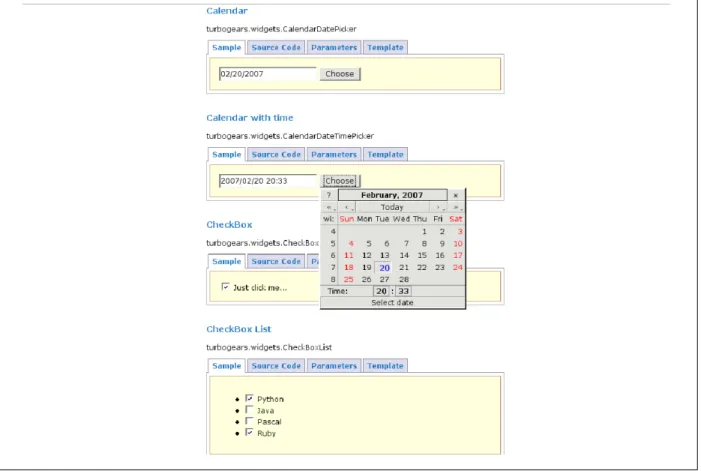
Widgets are pluggable code snippets that generate reusable HTML in your Kid templates. TurboGears comes packaged with a number of basic widgets to handle common Ajax or form tasks, such as autocompletion or data grid generation. TurboGears widgets are packaged with the ToolBox, a small TurboGears appli-cation that is accessible by running tg-admin toolbox from a command prompt. The ToolBox includes a Widget Browser that provides source code and samples for all of the available packaged widgets (Figure 5).
The existing TurboGears widgets package is likely to be replaced by ToscaWidgets (http://toscawidgets.org), which is independent of TurboGears/CherryPy and can in fact be used in other Python frameworks such as Pylons.
CatWalk
Also worth mentioning from the TurboGears ToolBox is CatWalk, a model brows-er with some similarity to the Django admin tool. CatWalk is much less mature, and not designed for end users to manage content directly. Instead it provides a quick mechanism for adding and modifying database content during development.
MochiKit
TurboGears is often described as having Ajax integration "built-in," when in fact it simply comes bundled with an external package called MochiKit (http:// mochikit.com). MochiKit was selected as the default JavaScript library primarily for its syntactical similarities to Python. The only true integration provided by TurboGears is its native support for sending and receiving data in JSON (http:// www.json.org), or JavaScript Object Notation, which makes it trivial to design controller methods which respond to Ajax rather than typical web page form sub-missions.
Documentation
Part of the philosophy of a mega-framework is that TurboGears documentation should only cover TurboGears itself—the task of documenting the subprojects is left to those developers. In the case of MochiKit, this works quite well, as Mochi-Kit's documentation has always been excellent and the library is only loosely incorporated in the framework. The documentation for other core components such as CherryPy and SQLObject has been less successful. Not only are these packages quite complex, but there is a constant tension between the versions of the software that are supported by TurboGears and the versions that are thor-oughly documented.
In addition, TurboGears' development has been much more open than that of Django and has included many more participants. Users writing TurboGears are too busy coding to thoroughly document; users interested in documentation are often unfamiliar with the latest changes. Keeping current docs has been an ongoing challenge for the project that is still not resolved even at the 1.0 version number.
Testing
Since its early alpha releases TurboGears has included a testing framework. Testing is provided via Nose (http://somethingaboutorange.com/mrl/projects/nose) and both unit tests and functional tests are available. TurboGears even provides a method for in-memory database testing using SQLite. More information on Tur-boGears testing is available at http://docs.turbogears.org/1.0/Testing.
Pylons
Philosophy: Component Reuse and Native WSGI Support
Of the three frameworks profiled here, Pylons (http://pylonshq.com) is the most lightweight. It is not a complete bundle like Django nor does it officially support any particular template or database layer like TurboGears. There is clean, up-to-date documentation and an active user community, but the project is the youngest of the three and also the most philosophically "hackeresque." A new Pylons user will spend very little time reading documentation on the Pylons site, and instead will dive into the components almost right away. For this reason it tends to appeal to developers with unusual project technology stacks, whereas creators of tradi-tional CRUD-heavy content-driven sites may be more comfortable with Django. It can also be appealing to framework-haters, who may appreciate having some components ready-to-use but can easily dispose of others that are unnecessary or insufficient.
Startup and Deployment: It's Okay to Eat Paste
Like Django and TurboGears (and Rails), Pylons comes with an installation script to bootstrap a new project:
paster create --template=pylons winedb
Paste is a Pylons-related component that acts as a kind of meta-framework creator (http://pythonpaste.org). It provides methods to start projects (see above), deploy using WSGI (see below), and even build simple web frameworks, acting as the "glue" (get it?) between various components. For Pylons developers interested in simply getting started with Pylons, Paste can be considered no more than the ad-ministration script that can get the application rolling.
Because of Paste, a Pylons application is immediately deployable as a Python egg. The egg can be used for internal use or registered with the Python Cheeseshop (http://cheeseshop.python.org/pypi). This emphasis on neat package bundling is part of the Pylons philosophy stressing component reuse.
The paster program provides not just project "quickstarting" but also a develop-ment server. A new Pylons project will be started with a tutorial available as the default page (Figure 6), providing new users with immediate feedback about next steps.
Running paster serve --reload development.ini will start a local server with the home page shown here:
Individual controllers are also generated through paster:
$ paster controller wines
Creating /proj/winedb/winedb/controllers/wines.py
Creating /proj/winedb/winedb/tests/functional/test_wines.py
Note that a stub test is also immediately created after the controller. (This is inar-guably good practice until, inevitably, someone complains that it violates "test first.")
A basic controller is pretty minimal:
from winedb.lib.base import *
class WineController(BaseController): def index(self):
return Response('')
Request parameters in controllers are accessed via a dictionary-like interface on a request object:
request.params['wine_name']
GET and POST variables are both mapped to the same object, unlike in Django. Pylons provides three basic methods of returning from a controller:
• Request('some string') will return a raw string result.
• render_response('some template at URI') will return the result of evaluating a template at that URI. Any variables added to the magic "c" (context) object will be automatically available to the template. Contrast this with Django and TurboGears, which require returning a dictionary of values explicitly.
• h.redirect_to(action="method name") will issue a redirect to a different meth-od (generally used for redirect-after-POST).
Pylon's magic variables are worth mentioning:
• The context object "c" will supply values to the template. Variables generated inside a controller method have to be added to the context explicitly. "Action
parameters" (see the next section on Can't Get There From Here: Routes) are automatically added to the context.
• The helper object "h" contains functions especially useful in templates for gen-erating URLs and other common tasks: http://pylonshq.com/WebHelpers/ module-index.html.
Can't Get There from Here: Routes
Routes is core to Pylons but not strictly part of it (http://routes.groovie.org/ docs). It is a Python implementation of the Routes system in Ruby on Rails. As in Django, controller code in Pylons is decoupled from the URL, but the mapping mechanism in Routes is quite different. A route is managed by a Mapper, which has a method connect() used to link a URI to a controller:
map.connect('', controller='wines', action='index')
This will map the URI '' (the empty string, equivalent to /) to the controller
wines and its method index(). The corresponding controller looks like this:
from winedb.lib.base import *
class WinesController(BaseController): def index(self):
return Response('Hello from wine database!')
We haven't specified a template yet, so this response just returns a raw string.
paster will also set up the following special Route:
map.connect(':controller/:action/:id')
This automatically matches the pattern /controller class/method/id (or more abstractly, /noun/verb/direct object), so basic URIs of that form do not have to be explicitly defined as routes. This is somewhat similar to the behavior of Cher-ryPy and TurboGears, but developers who desire only explicitly defined routes can simply remove this mapping.
Prefixing a route part with a colon (:) will cause the generation of a "route variable." The value matching the expression will be assigned to a variable with the name in the route; in the above example, wines will be assigned to controller, edit to
action, and 1 to id. While controller and action are part of any Pylons route, any additional variables (such as "id") can be entirely user-defined.
Values provided without the colon prefix are assumed to be static values: the route will only match that exact text, not the overall pattern. In cases where the controller
or action is statically defined, it is necessary to manually set those variables in the mapper.
Imagine we have an interface to browse wines by grape. We can set up URIs as:
/browse/<grapename>/1/20
This shows all matching wines under grapename from 1 to 20. The route for this could be specified as:
map.connect('/browse/:grapename/:start/:end', controller='browse', action='by_grape')
This will route to a controller class browse with a method by_grape, which will expect three arguments: grapename, start, and end.
Routes provides the ability to define default values for any route variable, so we can assume, for example, that /browse/<grapename> alone will show the first page of results:
map.connect('/browse/:grapename', controller='browse', action='by_grape', start=1, end=20)
From a design standpoint, though, it may be better to define such defaults in the controller than in the mapper—it's up to the developer.
Routes includes more advanced mapping features, including grouping (as in reg-ular expressions) and filtering. See the Routes manual for details: http:// routes.groovie.org/manual.html.
Magical Data Modeling with SQLAlchemy
Unlike Django and TurboGears, Pylons does not come with a default object rela-tional mapper, and projects started with paster do not assume any database will be used. This may mean that Pylons is more desirable for projects that will not use a SQL-driven database—there's less "cruft" in the framework. In fact, the "Getting Started" documentation (http://pylonshq.com/docs/0.9.4.1/ getting_started.html) does not even mention a database, which may be a hurdle for novice developers.
The majority of web-based projects do use such databases, so Pylons comes ready for use with one. The paster-created project will include a models directory where database configuration can be made. Because the database layer is not so tightly coupled to Pylons, setup is still largely a matter of preference. We'll follow the example set by the QuickWiki Tutorial (http://pylonshq.com/docs/ quick_wiki.html).
Inside models/__init__.py we add the following:
from sqlalchemy import *
from sqlalchemy.ext.assignmapper import assign_mapper from pylons.database import session_context
meta = DynamicMetaData()
wines_table = Table('wines', meta,
Column('id', Integer, primary_key=True), Column('name', String(40), key='name'), Column('price', Integer),
Column('year', Integer),
Column('comment', String(), default='') )
class Wine(object):
def __init__(self, name): self.name = name def __str__(self): return self.name
page_mapper = assign_mapper(session_context, Wine, wines_table)
Assignmapper
Here we are using the SQLAlchemy "assignmapper" extension, which pro-vides a cleaner interface and is the preferred method in Pylons.
This is quite a bit more code than is necessary in SQLObject or Django, and this only defines a single table with no relationships to other tables. It does illustrate a central difference between SQLAlchemy and the other database mappers: SQLAl-chemy is not exclusively an ORM and does not attempt to fully abstract tables as objects.
Instead, SQLAlchemy enforces the creation of separate table and object classes, and requires that they be explicitly mapped in the context of a particular database session. This does violate the Django rule of "don't repeat yourself" but is also a key to the success of SQLAlchemy in more advanced database applications. In fact, SQLAlchemy is really two packages: the ORM framework shown above and a "SQL Construction Language," which adheres much more closely to basic SQL while still providing the flexibility of Python. Users whose schemas are com-plex, or who have legacy databases or strict performance requirements, often cannot use ORMs, even those that provide a raw SQL layer.
SQLAlchemy is a very large, complex package whose documentation is practically a small book in its own right. We will only touch on the most basic functionality here.
After the initial setup, accessing mapper data in SQLAlchemy is quite similar to the other ORMs:
wine = Wine('Mad Dog 20/20') wine.price = 4.00
wine.comment = 'Tastes as good as you would expect'
We can access this wine later using methods that generate SQL statements:
Wine.select() # Retrieve all wines
# Retrieve the first wine with this exact name Wine.selectfirst(name='Mad Dog 20/20')
# Retrieve all wines with a name starting with "Mad" Wine.select_by(Wine.c.name.like('Mad%'))
Let's expand the above definition to include both Wines and Grapes, with a many-to-many relationship between the two. Unlike SQLObject or Django, SQLAl-chemy requires that the mapping table be explicitly created:
grapes_table = Table('grapes', meta,
Column('id', Integer, primary_key = True), Column('name', String(40), key='name')) class Grape(object):
def __init__(self, name): self.name = name def __str__(self): return self.name
grapewines_table = Table('grapes_wines', meta, Column('grape_id', Integer, ForeignKey('grapes.id')),
Column('wine_id', Integer, ForeignKey('wines.id'))) assign_mapper(session_context, Wine, wines_table,
properties = dict(grapes = relation(Grape, secondary=grapewines_table)))
assign_mapper(session_context, Grape, grapes_table)
The pattern should be familiar to any database designers: the Wine table and the Grape table are created along with a table that maps one grape's ID to one wine's ID. The SQLAlchemy magic happens in the mapper, where we assign the "grapes"
property to the Wine class that will behave like a Python list. This will allow us to do the following:
# Create some grapes of mixed quality Grape("Concord")
Grape("Pinot Noir") Grape("Chardonnay")
session_context.current.flush() # Update our database # Create our wine
wine = Wine('Mad Dog 20/20')
wine.grapes.append(Grape.get_by(name="Concord")) wine.grapes.append(Grape.get_by(name="Pinot Noir")) Elixir
There have been several attempts to make SQLAlchemy more declarative, in the manner of SQLObject or the ActiveRecord package in Rails. In early 2007 the maintainers of these individual attempts announced a new extension developed in cooperation called Elixir (http://elixir.ematia.de). Although still young, Elixir has generated a great deal of excitement in the SQLAlchemy community and, if the project remains active, will likely be key in displacing SQLObject as the default ORM for TurboGears (a switch expected to happen in TurboGears 2.0).
Templating: Myghty, Mako, and More
The default templating system for Pylons is Myghty (http://www.myghty.org), the Python port of the highly successful Perl package HTML::Mason. "Default templating system" in Pylons is used more loosely than in TurboGears or Django, in part because Pylons is built with a template API called Buffet (http:// projects.dowski.com/projects/buffet). Buffet is employed in TurboGears as well, but its emphasis on being a full-stack framework means that this feature is some-what obscured.
Buffet itself does not support any particular templating system, but instead relies on external plug-ins. Pylons installs with not just the Myghty plug-in but also Kid, which means that a switch from one framework to another can require very little work (although in practice there will usually be TurboGears- or Pylons-specific code in complex templates). Using template plug-ins in Pylons is documented at http://pylonshq.com/docs/template_plugins.html.
Myghty includes a number of features that have been essentially superseded by the framework itself and are no longer considered desirable. Thus attention has shifted to Mako (http://www.makotemplates.org), which has a similar (but simpler) API and is among the fastest of all Python templating systems at rendering output. At
the time of this writing Myghty is still the default template, but because the Myghty project has been officially discontinued, we will provide examples from Mako. To start out, let's change our default template system. Opening winedb/config/ middleware.py, we change:
config.init_app(global_conf, app_conf, package='winedb')
To:
config.init_app(global_conf, app_conf, package='winedb', template_engine='mako')
Starting the development server now will return the error, "Please install a plug-in for 'mako' to use its functionality," so we need to actually install Mako! The code
# easy_install mako
will do it.
Mako syntax is extremely simple, which will be a relief to anyone who suffered through the Kid chapter. Given a controller like this:
class WinesController(BaseController): def index(self):
c.wines = [wine for wine in Wine.select()] return render_response('/wines.mako')
We can display all the wines and list their grapes like this:
<ul>
% for wine in c.wines: <li>
${ wine } <ol>
% for grape in wine.grapes: <li> ${ grape.name }</li> % endfor
</ol> </li> % endfor </ul>
Any text after the % character is a Python control expression, such as "for" loops or conditionals. Because of Python's unique whitespace significance, blocks are closed by "end" followed by the name of the closing expression, so "endfor" will close a "for" loop and "endif" will close an "if" statement.
Arbitrary Python expressions are evaluated by the ${expr} syntax (found in many systems, including Kid), and whole blocks of Python can be executed inside <% % > tags. Functions within templates can be defined and can take blocks as named arguments—this is the preferred way to implement layout templates.
Compared to the strict use of XML and complex inheritance in Kid, or the tag soup of Django, Mako is extremely simple. It is also renders quickly and, like Django's templates, can easily output formats besides HTML and XML. On the other hand, it is not designer-friendly—templates will not display in any useful way in Dream-weaver or other HTML editors, and the simple code block boundaries would be easy for a non-programmer to break. The use of pure Python encourages crossing the MVC boundary. The includes/layout system does not feel as mature as other templating systems. At least for now, Mako is probably best left to programmers who want an extremely fast system for minimally designed pages.
Testing
Pylons includes a nose-driven test engine called paste.fixture. Fixture provides unit testing at the level of controller methods, including access to request lifecycle objects such as the session. It is also possible to generate testable mock objects by adding them to the dict paste.testing_variables. Mock objects require more work on the part of the test-writer but enable tests to be run much more quickly than if a test- or in-memory database were used for data retrieval.
Debugging
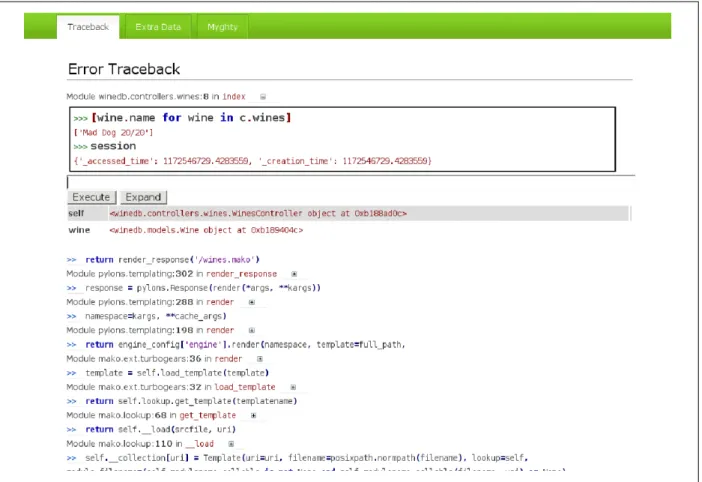
For a small framework, Pylons contains one "killer app": the interactive debugger
(Figure 7). It is implemented as WSGI middleware and so can be used in any
WSGI-compliant framework, but is ready-to-go in Pylons. When enabled (and it should be enabled only in a development environment!) it allows the user to enter Python expressions in any point in the traceback, right in the web page:
WSGI: The Framework Killer
The core of Pylons is its strict adherence to the Python Web Server Gateway In-terface (PEP 333, at http://www.python.org/dev/peps/pep-0333). Proposed in 2003 but not widely implemented until recently, WSGI aims to be for Python web development what the Servlet API has been for Java: a common platform on which framework developers can standardize and which can be supported by a variety of web servers. Unlike the Servlet API, WSGI says nothing about sessions, request/ response objects, or other "standard" API classes—handling of those is left up to the framework. In theory, application developers need to know virtually nothing