CRITICAL ANALYSIS ON USABILITY
EVALUATION TECHNIQUES
ANUBHA GULATI
1and SANJAY KUMAR DUBEY
2Computer Science and Engineering Department, Amity University,
Sector-125, NOIDA, U.P., India
1
[email protected],
2[email protected]
Abstract :
In recent years, the usability of software systems has been recognized as an important quality factor. Many
techniques have so far been proposed for usability evaluation but they are not well integrated and fail to cover
all the aspects of usability. The aim of this paper is to compare and contrast various existing usability evaluation
techniques so as to highlight their respective advantages and disadvantages.
Keywords: Usability; evaluation; inspection; testing; inquiry.
1.
Introduction
In recent years, the demand for quality software has increased exponentially. Usability has been recognized as a
key component in the overall quality of a software product and research shows that the lack of usability can
determine the success or failure of a software system. ISO 9241-11 defines usability as “the extent to which a
product can be used by specified users to achieve specified goals with effectiveness, efficiency and satisfaction
in a specified context of use”. As defined by the Institute of Electrical and Electronics Engineers (IEEE),
usability is “the ease with which a user can learn to operate, prepare inputs for and interpret outputs of a system
or component”.
Usable software systems are not only more efficient, accurate and safe but are also much more successful.
Several studies have shown the benefits of incorporating usability evaluation in the process of software
development. Therefore, usability evaluation has become an important research field.
A number of usability evaluation techniques have been given by various researchers. They can be mainly
categorized as inspection, testing and inquiry techniques. One or more of these methods may be chosen for
usability evaluation on the basis of available resources, abilities of evaluator, types of users and environment.
This paper provides an analytical comparison of these evaluation techniques.
2.
Literature Survey
A number of methods have been given by various researchers over the last few decades for evaluating the
usability of software systems. These can be divided into three main categories, namely, Inspection, Testing and
Inquiry.
2.1.
Inspection Techniques
2.1.1.
Cognitive Walkthrough
It is a task-based methodology that centers the tester’s attention on user’s actions while performing a task and
checking if the system design supports the effective accomplishment of these goals [Wharton (1994)].
2.1.2
Heuristic Evaluation
A group of evaluators are given an interface and asked to judge if each of its elements follows a set of
established usability heuristics such as Error Prevention, Flexibility, Efficiency of use, Help and Documentation,
etc. [Nielsen and Molich (1990)].
2.1.3
Feature Inspection
2.1.4
Pluralistic Walkthrough
A group comprising of product developers, human factor engineers and representative users, meet together to
perform a set of tasks on the interface [Bias (1994)].
2.1.5
Perspective based Inspection
Interfaces are inspected from three different perspectives i.e. novice use, expert use and error handling; taking
one perspective at a time [Zhang (1998)].
2.1.6
Formal Usability Inspection
It is a six step procedure that combines heuristic evaluation and cognitive walkthrough. The steps include
planning, kickoff meeting, review, logging meeting, rework and follow-up [Bell (1992)].
2.1.7
Consistency Inspection
Experts review products to ensure consistency across multiple interfaces and see if it does things in the same
way as other designs. It gives a summary of the inconsistencies [Wixon
et al.
(1994)].
2.1.8
Standards Inspection
An expert checks the interface for compliance with a defined standard [Wixon
et al.
(1994)].
2.2.
Testing Techniques
2.2.1
Remote Testing
The testers and participants are separated in space and/or time. It may be same time different place or different
time different place, depending on the need [Hartson
et al.
(1996)].
2.2.2
Coaching Method
The users ask system related questions from an expert/coach who tries to answer them to the best of his ability.
Purpose is to find the information needs of users so as to provide adequate documentation and training [Nielsen
(1993)].
2.2.3
Performance Measurement
This technique is used to obtain data about user’s performance while performing specific tasks. It is conducted
in a formal usability laboratory and the session is recorded for future analysis [Nielsen (1993)].
2.2.4
Co-Discovery Learning
Users are paired together to perform certain tasks during which they are observed. The users can help each other
and they are requested to explain what they are thinking about while performing the tasks [Nielsen (1993)].
2.2.5
Question Asking Protocol
The testers prompt the users by asking direct questions about the software in order to analyze users’
understanding of the system and where they have trouble using it [Dumas and Redish (1993)].
2.2.6
Retrospective Testing
The tester can collect more information by reviewing the videotape of a usability test session along with the user
and asking them questions about their behavior during the test [Nielsen (1993)].
2.2.7
Teaching Method
2.2.8
Thinking Aloud Protocol
The users are asked to verbalize their thoughts and opinions while interacting with the system. There are two
variations i.e. critical response and periodic response [Nielsen (1993)].
2.2.9
RITE Method
In Rapid Iterative Testing and Evaluation (RITE) method, the participants are chosen, brought into the lab and
engaged in a verbal protocol. Changes are made to the interface as soon as a problem is identified, before it is
tested on the next user [Wixon
et al.
(2002)].
2.2.10
MUSiC Method
MUSiC (Metrics for Usability Standards in Computing) includes tools for measuring user performance and
satisfaction. Its four major aspects are: Usability Context & Analysis, User Performance Measurement, User
Satisfaction Measurement and Cognitive Workload Measurement [Macleod
et al.
(1997)].
2.3.
Inquiry Techniques
2.3.1
Field Observation
Testers go to the user’s workplace and observe them work to understand the thought process that the users have
about the interface. It also includes interviewing users about their jobs and the way they use the product [Nielsen
(1993)].
2.3.2
Focus Groups
Data collecting technique in which a group of users are brought together to discuss issues related to the product.
A tester plays the role of the moderator who prepares a list of issues to be discussed and captures user’s
reactions [Nielsen (1993)].
2.3.3
Interviews
Testers formulate questions about the interface and then interview users to gather desired information. The
responses of the users are recorded. Interviews may be structured or unstructured [Nielsen (1993)].
2.3.4
Logging Actual Use
It involves automatic collection of statistics by the computer about the detailed use of the system. Typically an
interface log contains statistics about the frequency with which the user has used each feature and frequency of
various events e.g. error messages, undo, redo, etc. [Nielsen (1993)].
2.3.5
Questionnaires
It consists of a series of questions for the purpose of gathering user’s response to the interface. It is focused on
assessing the software keeping in mind a few factors that are essential for usability. For example, SUMI
(Software Usability measurement inventory), WAMMI (Website Analysis and Measurement Inventory), etc.
[Soken
et al.
(1993)].
3.
Comparative Analysis of Evaluation Techniques
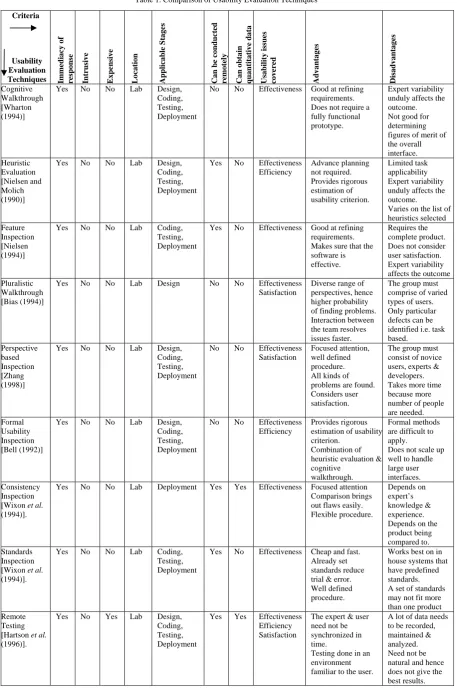
Table 1. Comparison of Usability Evaluation Techniques
Criteria
Usability Evaluation
Techniques Immediacy of response Intrusive Expensive Location Applicable S
tages
Can be condu
cted
remot
ely
Can obtain qua
n tita tiv e da ta
Usability issues covered Advant
ages Disadvant ages Cognitive Walkthrough [Wharton (1994)]
Yes No No Lab Design,
Coding, Testing, Deployment
No No Effectiveness Good at refining
requirements. Does not require a fully functional prototype.
Expert variability unduly affects the outcome. Not good for determining figures of merit of the overall interface. Heuristic Evaluation [Nielsen and Molich (1990)]
Yes No No Lab Design,
Coding, Testing, Deployment
Yes No Effectiveness
Efficiency Advance planning not required. Provides rigorous estimation of usability criterion. Limited task applicability Expert variability unduly affects the outcome.
Varies on the list of heuristics selected Feature
Inspection [Nielsen (1994)]
Yes No No Lab Coding,
Testing, Deployment
Yes No Effectiveness Good at refining
requirements. Makes sure that the software is effective.
Requires the complete product. Does not consider user satisfaction. Expert variability affects the outcome Pluralistic
Walkthrough [Bias (1994)]
Yes No No Lab Design No No Effectiveness
Satisfaction
Diverse range of perspectives, hence higher probability of finding problems. Interaction between the team resolves issues faster.
The group must comprise of varied types of users. Only particular defects can be identified i.e. task based. Perspective based Inspection [Zhang (1998)]
Yes No No Lab Design,
Coding, Testing, Deployment
No No Effectiveness
Satisfaction
Focused attention, well defined procedure. All kinds of problems are found. Considers user satisfaction.
The group must consist of novice users, experts & developers. Takes more time because more number of people are needed. Formal
Usability Inspection [Bell (1992)]
Yes No No Lab Design,
Coding, Testing, Deployment
No No Effectiveness
Efficiency
Provides rigorous estimation of usability criterion.
Combination of heuristic evaluation & cognitive
walkthrough.
Formal methods are difficult to apply.
Does not scale up well to handle large user interfaces. Consistency
Inspection [Wixon et al. (1994)].
Yes No No Lab Deployment Yes Yes Effectiveness Focused attention
Comparison brings out flaws easily. Flexible procedure.
Depends on expert’s knowledge & experience. Depends on the product being compared to. Standards
Inspection [Wixon et al. (1994)].
Yes No No Lab Coding,
Testing, Deployment
Yes No Effectiveness Cheap and fast.
Already set standards reduce trial & error. Well defined procedure.
Works best on in house systems that have predefined standards. A set of standards may not fit more than one product Remote
Testing [Hartson et al. (1996)].
Yes No Yes Lab Design,
Coding, Testing, Deployment
Yes Yes Effectiveness
Efficiency Satisfaction
The expert & user need not be synchronized in time.
Testing done in an environment familiar to the user.
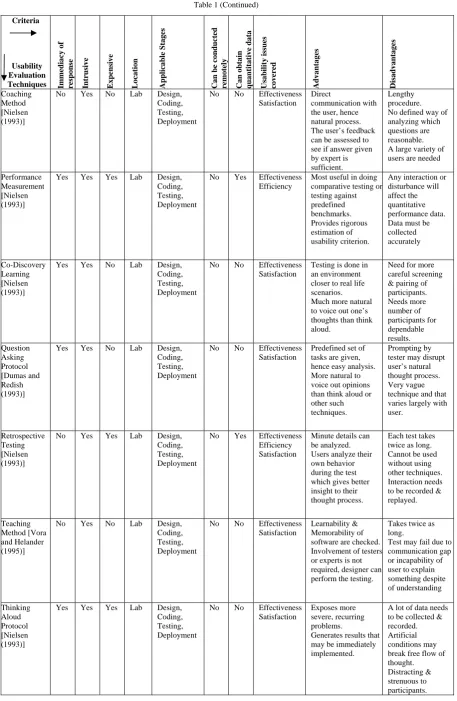
Table 1 (Continued)
Criteria
Usability Evaluation
Techniques Immediacy of response Intrusive Expensive Location Applicable S
tages
Can be condu
cted
remot
ely
Can obtain qua
n tita tiv e da ta
Usability issues covered Advant
ages Disadvant ages Coaching Method [Nielsen (1993)]
No Yes No Lab Design,
Coding, Testing, Deployment
No No Effectiveness
Satisfaction
Direct
communication with the user, hence natural process. The user’s feedback can be assessed to see if answer given by expert is sufficient.
Lengthy procedure. No defined way of analyzing which questions are reasonable. A large variety of users are needed
Performance Measurement [Nielsen (1993)]
Yes Yes Yes Lab Design,
Coding, Testing, Deployment
No Yes Effectiveness
Efficiency
Most useful in doing comparative testing or testing against predefined benchmarks. Provides rigorous estimation of usability criterion.
Any interaction or disturbance will affect the quantitative performance data. Data must be collected accurately Co-Discovery Learning [Nielsen (1993)]
Yes Yes No Lab Design,
Coding, Testing, Deployment
No No Effectiveness
Satisfaction
Testing is done in an environment closer to real life scenarios. Much more natural to voice out one’s thoughts than think aloud.
Need for more careful screening & pairing of participants. Needs more number of participants for dependable results. Question Asking Protocol [Dumas and Redish (1993)]
Yes Yes No Lab Design,
Coding, Testing, Deployment
No No Effectiveness
Satisfaction
Predefined set of tasks are given, hence easy analysis. More natural to voice out opinions than think aloud or other such techniques.
Prompting by tester may disrupt user’s natural thought process. Very vague technique and that varies largely with user.
Retrospective Testing [Nielsen (1993)]
No Yes Yes Lab Design,
Coding, Testing, Deployment
No Yes Effectiveness
Efficiency Satisfaction
Minute details can be analyzed. Users analyze their own behavior during the test which gives better insight to their thought process.
Each test takes twice as long. Cannot be used without using other techniques. Interaction needs to be recorded & replayed.
Teaching Method [Vora and Helander (1995)]
No Yes No Lab Design,
Coding, Testing, Deployment
No No Effectiveness
Satisfaction
Learnability & Memorability of software are checked. Involvement of testers or experts is not required, designer can perform the testing.
Takes twice as long.
Test may fail due to communication gap or incapability of user to explain something despite of understanding Thinking Aloud Protocol [Nielsen (1993)]
Yes Yes Yes Lab Design,
Coding, Testing, Deployment
No No Effectiveness
Satisfaction
Exposes more severe, recurring problems.
Generates results that may be immediately implemented.
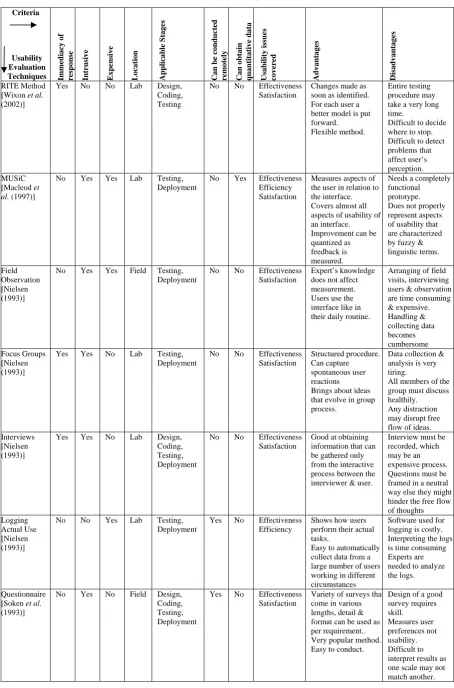
Table 1 (Continued)
Criteria
Usability Evaluation
Techniques Immediacy of response Intrusive Expensive Location Applicable S
tages
Can be condu
cted
remot
ely
Can obtain qua
n tita tiv e da ta
Usability issues covered Advant
ages
Disadvant
ages
RITE Method [Wixon et al. (2002)]
Yes No No Lab Design,
Coding, Testing
No No Effectiveness
Satisfaction
Changes made as soon as identified. For each user a better model is put forward. Flexible method.
Entire testing procedure may take a very long time.
Difficult to decide where to stop. Difficult to detect problems that affect user’s perception. MUSiC
[Macleod et al. (1997)]
No Yes Yes Lab Testing,
Deployment
No Yes Effectiveness
Efficiency Satisfaction
Measures aspects of the user in relation to the interface. Covers almost all aspects of usability of an interface. Improvement can be quantized as feedback is measured.
Needs a completely functional prototype. Does not properly represent aspects of usability that are characterized by fuzzy & linguistic terms.
Field Observation [Nielsen (1993)]
No Yes Yes Field Testing,
Deployment
No No Effectiveness
Satisfaction
Expert’s knowledge does not affect measurement. Users use the interface like in their daily routine.
Arranging of field visits, interviewing users & observation are time consuming & expensive. Handling & collecting data becomes cumbersome Focus Groups [Nielsen (1993)]
Yes Yes No Lab Testing,
Deployment
No No Effectiveness
Satisfaction
Structured procedure. Can capture spontaneous user reactions Brings about ideas that evolve in group process.
Data collection & analysis is very tiring.
All members of the group must discuss healthily. Any distraction may disrupt free flow of ideas. Interviews
[Nielsen (1993)]
Yes Yes No Lab Design,
Coding, Testing, Deployment
No No Effectiveness
Satisfaction
Good at obtaining information that can be gathered only from the interactive process between the interviewer & user.
Interview must be recorded, which may be an expensive process. Questions must be framed in a neutral way else they might hinder the free flow of thoughts Logging
Actual Use [Nielsen (1993)]
No No Yes Lab Testing,
Deployment
Yes No Effectiveness
Efficiency
Shows how users perform their actual tasks.
Easy to automatically collect data from a large number of users working in different circumstances
Software used for logging is costly. Interpreting the logs is time consuming Experts are needed to analyze the logs.
Questionnaire [Soken et al. (1993)]
No Yes No Field Design,
Coding, Testing, Deployment
Yes No Effectiveness
Satisfaction
Variety of surveys that come in various lengths, detail & format can be used as per requirement.. Very popular method. Easy to conduct.
4.
Conclusion
In this paper we reviewed the various usability evaluation methods that have been proposed so far. We then
gave an analytical comparison of these evaluation methods. It was found that each method has its own
advantages and disadvantages. One or more of these methods may be chosen for evaluating the usability of a
software system depending on a number of factors, e.g. the type and quantity of resources available, type of
users, abilities of the evaluators, type of environment, which attributes need to be measured essentially, if
quantitative data can be obtained or not, if the response of the method is quick or not, if the method is
expensive, etc.
Although there are many techniques for usability evaluation, they are not well integrated and hence lack in
one way or the other. This is primarily due to the varying usability standards and definitions. This brings forth
the need of a well integrated and consolidated model of usability. In future, we plan to propose such a model.
References
[1] Abran A., Khelifi A., & Suryn W., Usability meanings and interpretations in ISO standards. Software Quality Journal, 11, 325–338,
2003
[2] Bell B., Using programming walkthroughs to design a visual language. Technical Report CU-CS-581-92 (Ph.D. Thesis), University of
Colorado, Boulder, CO., 1992.
[3] Bevan N. & Macleod M., Usability measurement in context. Behaviour and Information Technology, 13, 132–145, 1994
[4] Bevan N., Kirakowski J. & Maissel J., What is usability? Proceedings of the 4th International Conference on HCI, 651–655, 1991
[5] Bias R., "The Pluralistic Usability Walkthrough: Coordinated Empathies," in Nielsen, Jakob, and Mack, R. eds, Usability Inspection
Methods. New York, NY: John Wiley and Sons, 1994.
[6] Blackmon, Polson M. H., Muneo P. G., Kitajima M. & Lewis C., Cognitive Walkthrough for the Web CHI 2002 vol.4 No.1, 2002
[7] Donyaee M. and Seffah A. , QUIM: An Integrated Model for Specifying and Measuring Quality in Use, Eighth IFIP Conference on
Human Computer Interaction, Tokyo, Japan, 2001
[8] Dumas J. S. and Redish J. C., A Practical Guide to Usability Testing, 1993.
[9] Hartson H., Remote Evaluation: The Network as an Extension of the Usability Laboratory, in CHI96 Conference Proceedings.
[10] Holzinger A., Usability engineering methods for software developers. Communications of the ACM, 48(1), 71–74, January 2005
[11] Institute of Electrical and Electronics Engineers. IEEE standard glossary of software engineering terminology, IEEE std. 610.12-1990.
Los Alamitos, CA: Author, 1990
[12] International Organization for Standardization. ISO 9241-11:1998, Ergonomic requirements for office work with visual display
terminals (VDTs), Part 11: Guidance on usability. Geneva, Switzerland: Author, 1998
[13] International Organization for Standardization/International Electrotechnical Commission. ISO/IEC 9126-1:2001, Software
engineering, product quality, Part 1: Quality model. Geneva, Switzerland: Author, 2001
[14] ISO 9126: Information Technology-Software Product Evaluation-Quality Characteristics and Guidelines for their Use. Geneva, 1991.
[15] Jeffrey R., Handbook of Usability Testing, John Wiley, 1994.
[16] Lewis C. H., Using the Thinking Aloud Method In Cognitive Interface Design (Technical report), IBM. RC-9265, 1982.
[17] Macleod M., Bowden R., Bevan N. and Curson I., The MUSiC performance method, Behaviour and Information Technology 16:
279-293, 1997.
[18] Maguire M., Context of use within usability activities. International Journal of Human-Computer Studies, 2001.
[19] Medlock M. C., Wixon D., Terrano M., Romero R. and Fulton B., Using the RITE method to improve products: A definition and a
case study. Presented at the Usability Professionsals Association 2002, Orlando Florida, 2002.
[20] Molich R. and Nielsen J., Improving a human-computer dialogue: What designers know about traditional interface design, 1990.
[21] Nielsen J. and Loranger H., Prioritizing web usability. Berkeley, CA: New Riders Press, 2006.
[22] Nielsen J. and Molich R., Teaching user interface design based on usability engineering, 1989.
[23] Nielsen J., Usability engineering. London: Academic Press, 1993.
[24] Nielsen J., Usability Inspection Methods. New York, NY: John Wiley and Sons, 1994.
[25] Preece J., Benyon D., Davies G., Keller L. and Rogers Y., A guide to usability: Human factors in computing. Reading, MA:
Addison-Wesley, 1993.
[26] Preece J., Rogers Y., Sharp H., Benyon D., Holland S. and Carey T., Human-computer interaction. Reading, MA: Addison-Wesley,
1994.
[27] Quesenbery W., Dimensions of usabilility: Opening the conversation, driving the process. Proceedings of the UPA 2003 Conference,
2003.
[28] Quesenbery W., What does usability mean: Looking beyond “ease of use.” Proceedings of the 18th Annual Conference Society for
Technical Communications, 2001.
[29] Rubin J., Handbook of Usability Testing, New York: John Wiley, 1994
[30] Sauro J. and Kindlund E., A method to standarize usability metrics into a single score. Proceedings of the SIGCHI Conference in
Human Factors in Computing Systems, 401–409, 2005.
[31] Seffah A., Donyaee M., Kline R. B. and Padda H. K., Usability measurement and metrics: A consolidated model. Software Quality
Journal, 14, 159–178, 2006.
[32] Shackel B., Usability – Context, framework, definition, design and evaluation. In Human Factors for Informatics Usability, ed. Brian
Shackel and Simon J. Richardson, 21–37. New York, Cambridge University Press, 1991.
[33] Shneiderman B. and Plaisant C., Designing the User Interface: Strategies for Effective Human-Computer Interaction, Addison Wesley,
Boston, MA, 2005.
[34] Soken N., Reinhart B., Vora P., & Metz S., Methods for evaluating usability, 1993.
[35] Vora P. and Helander M., "A teaching method as an alternative to the concurrent think-aloud method for usablity testing", in Y. Anzai, K. Ogawa and H. Mori "Symbiosis of Human and Artifact", pp.375-380, 1995.
[36] Wharton C., Rieman J., Lewis C. and Polson P., The cognitive walkthrough method: A practitioner’s guide. In Nielsen, J., and Mack,
R. (Eds.), Usability inspection methods. New York, NY: John Wiley & Sons, Inc, 1994.
[37] Wixon D. and Wilson C., The Usability Engineering Framework for Product Design and Evaluation, in Handbook of
[38] Wixon D., Jones S., Tse L. and Casaday G., Inspections and design reviews: Framework, history, and reflection. In Nielsen, J., and Mack, R.L. (Eds.), Usability Inspection Methods, John Wiley & Sons, New York, 79-104, 1994.
[39] Zhang Z., Basili V., Shneiderman B., An empirical study of perspective-based usability inspection, Proceedings of the Human Factors