PLM based Customization for Extraction of NX
Assembly from Team center to Local Drive
Jaykumar Yoga Mule
Mechanical Department PES College of EngineeringAurangabad-431028
ABSTRACT
This paper proposes a novel methodology of PLM system. Various PLM software solutions are available in the market these software’s have not been fully satisfying as per the need of every organization so the organization goes for customization which not only satisfy the requirement of every organization but makes the software user friendly. Product lifecycle management (PLM) is the process of managing the entire lifecycle of a product and related services from its conception, through design and manufacture, to service and recycling or ultimate disposal. PLM help organization to integrate people, data, processes and business systems and provides a product related information in the right context at the right time can be made available across the extended enterprise throughout the product lifecycle.In today’s engineering world, people are searching for a way to utilize computing technologies to solve complex problems. The organization requirement of the Extraction of NX assembly from Teamcenter to local drive a feature not found in current PLM systems. The research work is carried out for the creation of new utility in Teamcenter. A customized UG assembly extractor plan can then be developed for the organization to build up a performance oriented and reduce data export work of administrator. A case study is conducted in organization to verify the feasibility of our method.
Keywords
Basic Concept of PLM, Teamcenter Architecture overview, Extraction of Assembly Methodology, Case Study
1.
INTRODUCTION
The research work is carried out for the creation of new utility in Teamcenter extraction of NX assembly from Teamcenter to local drive because a feature not extensively found in current PLM systems. Company manufacturing of sheet metal components, metal forming and fabrication of automotive components, such as Auto-Rickshaw bodies, Light & Heavy Tooling manufacturing, welded sub-assembly these data manage in Teamcenter. These automobile components and dies are designed in CAD software of NX integrated in Teamcenter. The administrator or vendors of the organization need extract the NX assembly to physical location in the system. The data (NX assembly/Part) is stored in the Teamcenter in the form of datasets. This data (assembly/Part) needs to be exported to physical location. The name reference function is available in Teamcenter by which assembly and parts are exported to local drive. The part can be opened in NX, but while opening the assembly file it gives “failed to find file using current search options part left unloaded error”. This process does not allow the assembly to display in NX. This process was time consuming and increases the data exporting work of administrator. All these facts revealed that
customize the Teamcenter software to fulfill their requirement & increased PLM system performance
2.
BASIC CONCEPT OF PLM
Product lifecycle management (PLM) helps organization to integrate people, date, processes and business systems and manage product related information across the extended enterprise throughout the entire product lifecycle [1].This vision is enabled by recent advances on information and communication technologies and is needed to support current industry needs for faster innovation cycles combined with effective time & reduces costs by taking advantage of the efficiencies and effectiveness that come from improved market intelligence and business collaboration [2,4]. PLM has recently attracted both at industry and research because of its potential benefits with current manufacturing challenges [3].PLM is a strategic business approach that enable organization achieve its business goals of reducing costs, improving quality, Decreased scrap and rework during production and shortening time to market, while innovating its products, services, and business operations. Direct savings include reductions in the time and cost to design products, reduced inventory, and better reuse of components, establishes a more comprehensive and collaborative relationship with customers, suppliers, and business partners helps to deliver more innovative products and services in a shorter time [2]
2.1
Need of PLM Customization
Teamcenter is collaborative product data management tool to help organize all process necessary to design, manufacture, and support a product throughout its lifecycle [5]. The part of Teamcenter power is its adaptability to each company’s work processes and user interface preferences another powerful Teamcenter tool is the ability to integrate data from other applications. You can customize Teamcenter so its meets your company product life cycle management needs and your users working preferences. The objectives of this paper is to review
Exported data should maintain the data integrity. While exporting the assembly, all child parts should be export along with assembly.
Should reduce data exporting time and work of administrator.
The result should be display in part file. Exported data should be modify The draft file should be exported.
2.2 Scope of PLM Customization
result in part file. These exported data should maintain the data integrity. According to following requirements.
Business need. Customer requirement. Technological advance. Legal requirements. User friendly.
Increased PLM system performance.
3.
TEAMCENTER ARCHITECTURE
OVERVIEW
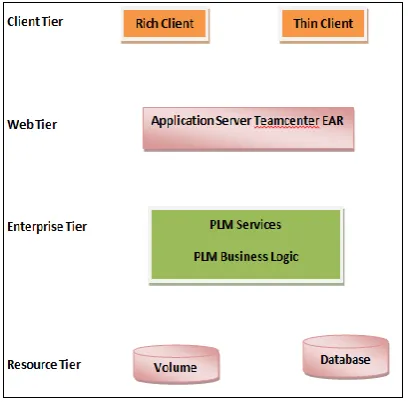
Teamcenter is constructed in tiers. The lowest tiers are closest to the database server and volumes server and the highest tiers are closest to the client. The Teamcenter architecture consists of the following tiers [6].The PLM systems typically follow Teamcenter four tier architecture as shown in Figure 1 [6].
Figure 1.Four-Tier Teamcenter Architecture [6]
Client tier, Web tier, Enterprise tier & Resource tier, The Teamcenter client tier comprises the rich client, thin client, and Client Tier provides user interface for accessing PLM services from other application programs The rich client can be deployed with additional functionality, such as Lifecycle Visualization, Teamcenter's Integration for Microsoft Office, and Teamcenter Integration for CAD.The Web Tier supports operational functions in PLM system [7]. The Web tier is a Java application that runs in a Java 2 Enterprise Edition (J2EE) application server [6]. It can work as Web pplications Server in simple systems. The Enterprise Tier manifests data model in PLM applications and processes the request of database transactions and comprises a configurable pool of Teamcenter C++ server processes and a server manager. The enterprise tier retrieves data from the database and stores data in the database. A server manager manages a pool of Teamcenter server processes. This is the tier where use ITK programming to customize Teamcenter on the server side [6].Hence the proposed Extraction method focused on this tier. The resource tier comprises a database server, database volumes, and file servers with two file management systems Teamcenter File Management System & Teamcenter File Services [6]
3.1
Team center Customization
Teamcenter can be customized on both the client and server side to deliver integration solution using the Teamcenter APIs and different toolkit [8].
Figure 2: Teamcenter customization types
3.1.1 Client Side Customization
The client side customization can be performed by using programming language (Java) and wizards available in Teamcenter. The client side customization can be used for adding new Application in Teamcenter, such as Menu bar, Toolbar, UI (User Interface) form on client side. Also it includes the customization for ex- form creation, POM classes creation etc. as per the organization requirement [9]
3.1.2 Server Side Customization
The server is being customized using Teamcenter API (Application program interface) called as ITK (Integration Toolkit), C /C++. The (ITK) is a set of software tools which you can use to integrate third party or user-developed applications with Teamcenter. The ITK is a set of C functions used directly by Teamcenter and Unigraphics. Also BMIDE can be used for codeless and code full customization [9]
3.2
Customization Tools
Teamcenter customization can be performed in different ways. There are non- programming and programming customizations.
3.2.1 Non-programming
Non-programming customization can be performed by using the wizards available in Teamcenter and making the entries in the registry files [9]
3.2.2 Programming customization
Programming customization can be performed by using programming languages i.e. C, C++, Java. This can be classified into server side and client side customization. Client side is customized using Java language and server side is by using ITK. The detail about different tools is given as follows [9]
3.2.2.1 ITK
3.2.2.2 Portal Customization
Portal customization is performed by using Java programming. This can be used to add the new application or customize the menu bar and toolbar within Teamcenter engineering application.
3.2.2.3 Command Suppression
This can be used by administrator to control the display of menu bar and toolbar commands within Teamcenter engineering applications and control the user rights. This will be used for following purposes [6]
• Suppress the display of commands for entire groups of users.
• Suppress the display of commands for users who are assigned a specific role within a group.
• Suppress the display of specific commands on a designated menu.
• suppress the display of entire menus.
3.2.2.4 Business Modeler IDE
BMIDE (Business Modeler Integrated Development Environment) is used by administrators to create new data model objects such as Business objects (for example, items and datasets), classes attribute, Lists of values (LOVs), Option, & Rules [6]
3.2.2.5 Registry Editor
This application can be used only for editing the registry files that are used for internationalization, dynamic class invocation, and configuration in the portal framework of Teamcenter.
3.2.2.6 Application Wizard
This utility provided in software to simplify the task of creating or integrating applications within the portal. The application wizard prompts the developer for the information required to create the application package, classes, and registry files. The application is automatically registered with the portal and added into specified group [6]
4.
EXTRACTION OF NX ASSEMBLY
METHODOLOGY
The paper proposes a systematic new method for extraction of NX assembly from teamcenter to local drive. The layers of rich client architecture are same as explained in Teamcenter architecture. This Figure shows the detailed communication between this layers by using various programming and scripting languages.
Figure 3.Rich Client Architecture of Teamcenter [From 12] The Persistent Object Manager (POM) is the core module in Teamcenter Engineering. The POM is the tool that we provide for internal programmers, third parties, and customers to define their own data business objects, create and access their own data, and access simple Teamcenter data. The POM interfaces the applications modules to the system modules. The primary system module in Teamcenter Engineering is oracle relational database management system. The POM allows applications to interface to oracle relational database management system at a higher level of data abstraction than oracle relational database management system relational tables. For example, an application may request the POM to create a folder in Teamcenter Engineering. The POM interprets this command and generates the necessary SQL statement to create the relational data [12]. The proposed new method extraction of NX assembly from teamcenter to local drive will be focused on enterprise tier because enterprise tier comprises a configurable pool of Teamcenter C++ server processes and a server manager [6]. The enterprise tier allows users to search and retrieve a large number of records very rapidly and stores data in the database [10]. A server manager manages a pool of Teamcenter server processes. This is the tier where use ITK programming to customize Teamcenter on the server side [6]. One of the main reasons for using ITK for server side customization the Integration Toolkit (ITK) is a set of server-side software tools can use to integrate third-party or user-developed applications within Teamcente . The Integration Toolkit is a set of callable subroutines that act as a programmatic interface to Teamcenter. It is the means by which both internal and external applications integrate within the Teamcenter. Internal applications are those supplied such as UG External applications are those that you decide to integrate into Teamcenter [6].
4.1 UG assembly opening error
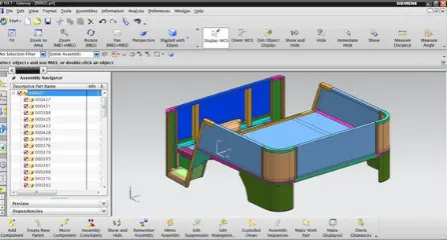
Figure 4 Created Assembly in TC [13]
Figure 5 Exported Assembly part by name reference application [13]
Figure 6 Exported Assembly and its child Part to Local drive [13]
Figure 7 Exported assembly opening error[13]
4.2 Technology used
Integration Tool Kit with C
Server side customization for user exits
Platform used
Executable file
Object file
4.3 Programmatic Authentication
This research will focus on Teamcenter API which is called the Integrated Tool Kit. The Integration Toolkit (ITK) is a set of server-side software tools can use to integrate third-party or user-developed applications with Teamcenter. The ITK is a set of C and C++ functions used directly by Teamcenter and UG. The Integration Toolkit is a set of software tools that act as a programmatic interface to Teamcenter [6]. It is the means by which both internal and external applications integrate with the Teamcenter. Internal applications are those supplied such as UG. External applications are those that you decide to integrate into Teamcenter. To run or execute the program, you must have Teamcenter system privileges (in other words, an account on Teamcenter). If your program is called without the ITK_auto_login function, supply the arguments for user, password and group [15]
Code Fragment 1 – without auto login ITK
The first modules used in authentication are ITK this modules have functions which initialize the connection and log the user into the PLM server. Below functions provide support for command line argument user needs to give input as a username, password, group, part no., stage dir.
user=ITK_ask_cli_argument("-u=");
Code Fragment 2- Module initialization
This functions provide initialize the ITK and it copy username, password, group, and stage dir in put given by the user
status=ITK_init_module(user,pass,grp);
strcpy(u_name,user);
Code Fragment 3- Find Item
The code fragment will scan the database for all items with the same name as the items that are being exported. This function finds the item, item name, item id, and latest revision of item, list of BOM views.
status=ITEM_find_item(part_no,&item);
status=ITEM_ask_id(item,item_id);
Code Fragment 4-Make Dump Directory
REP_create_temp_directory(dumpDirectory,&created_dir,&d ir_name);
copy_file(datapath);
Code Fragment 5- Copy dataset
The code fragment copy dataset from database using Teamcenter (UG/Manager mode) V2007 connected to the database and this datasets copy to physical location (where these files need to be copied) [16]
void copy_Dataset(char* partno,char *dpath,char *u_name,char *u_pass,char *u_grp)
strcpy(command,"START ");
4.4 Steps to be followed execute the utility
1. Go to Teamcenter dos prompt.
C:\PLM\Tc2007\TR\tc_menu>
2. Go to your utility directory.
(The directory where you have placed your exe file)
C:\PLM\Tc2007\TR\tc_menu>
C:\A>
3. Execute the utility as per below syntax
C:\A>ug_assembly_extractor.exe
C:\A>ug_assembly_extractor.exe –u=username – p=password –g=group –partno=part Number – stage=Dump Directory <d:\export>
C:\A>
4. Execute the utility as per above syntax.
C:\A>ug_assembly_extractor.exe –u=infodba – p=infodba –g=dba –partno=000421 –stage=D: \ASSLY
5. This is the general flow of execution of utility.
6. After the proper execution of utility SUCCESS message will appear on the screen.
7. After the proper execution of utility, folder is created in staging directory which is having name identical to item‐id.
This directory will contain all the exported parts and
assembly.
Figure 8 Exported ASSLY and Its child Parts by utility
8. And according to the requirement Exported assembly is
opened in UG and user can do modification in assembly
5.
CASE STUDY
The case study is taken of company to checking the compatibility of newly created utility of extraction of NX assembly from Teamcenter to local drive. Compare the results of the utility with the manual exporting data (NX assembly/Part) and verify the results. A case study is conducted of company to verify the feasibility of newly created utility. They use PLM software Teamcenter for product data management. The company is manufacturers of sheet metal components, metal forming and fabrication of automotive components, such as Auto-Rickshaw bodies, Light & Heavy Tooling manufacturing, welded sub-assemblies etc. These data manage in Teamcenter. These automobile components and dies are designed in CAD software of NX integrated in Teamcenter. The administrator or vendors of the organization requires extract the NX assembly to physical location in the system .The data (NX assembly/Part) is stored in the Teamcenter in the form of datasets. This data (assembly/Part) needs to be exported to physical location. The designer was exporting the assembly and its child parts by name reference function are available in Teamcenter and assembled all parts on physical location. This process was time consuming and increases the data exporting work of administrator.
Test case I (Old Method)
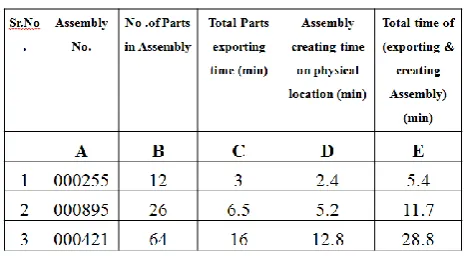
Table 1 manually exported data (Assembly/Parts) to local drive test case.
The results of the manually exports data (Assembly/Parts) to local drive test case are shown in table 1. The table shows three assemblies in Column A and column B shows number of parts in each assembly, column C shows total assembly parts exporting time in local drive in minute, column D shows assembly creating time on local drives, and column E shows the total time of exporting and creating assembly in minutes.
Test Case II (New Method)
Table 2 Assembly exported time by new utility
The results of the utility exported data (Assembly/Parts) to local drive test case are shown in table 2 the table shows three assemblies in Column A and column B shows number of parts in each assembly, column C shows assembly exporting time to local drive in second. Then compare the result of two cases manually exporting time with new utility exporting time
5.1
Results and Discussions
Compares the results of the utility with the manual exporting UG assemblies’ time and verifies the result. A company may have thousands of assemblies, each with multiple parts. The manual process of exporting UG assemblies from Teamcenter to local drive was time consuming process and increases the data exporting work of administrator. A newly created utility of extraction of NX assembly from Teamcenter to local drive are extremely helpful according to a company requirements in this research.
5.2
Benefits of Application
The output and results discussion reach to some benefits of this newly created utility of extraction of NX assembly from Teamcenter to local drive. The Advantages of this utility are as below
Exported data maintain the data integrity.
While export the assembly all the child parts export along with assembly.
Reduce data exporting time and work of administrator
Display the result in part file Exported data can be modify The draft file can export.
6.
CONCLUSIONS
The research work is carried out for the creation of new utility in Teamcenter for extraction of NX from Teamcenter to local drive as per the requirement of organization. A feature not extensively found in current PLM systems. A customized UG assembly extractor plan can then be developed PLM system performance and reduce data exporting time and work of administrator, exported data maintain the data integrity, While export the assembly all child parts export along with assembly , easy-to-export data, Exported data can be modified, The draft file can be export. A case study is conducted to verify the feasibility of our method. A newly created utility are extremely helpful according to a company requirements in this research. The promising result of the case study gives rise to the potential and possibility to derive further research based on this work.
7.
REFERENCES
[1]Gunther Schuh , Henrique Rozenfeld , Dirk Assmus , Eduardo Zancul, by Process oriented framework to support PLM implementation, Science Direct, Computers in Industry 59 (2008) 210–218, Available online 21 August 2007.
repair and overhaul, Science Direct ,Computers in Industry 59 (2008) 296–303, Available online 15 August 2007.
[3] R.M. Rangan, S.M. Rohde, R. Peak, B. Chadha, P. Bliznakov, Streamlining product lifecycle processes: a survey of product lifecycle management implementations, directions, and challenges, Journal of Computing and Information Science in Engineering 3 (2005) 227–23
[4] D. Dutta, J.P. Wolowicz (Eds.), An Introduction to Product Lifecycle Management (PLM), ISPE, 2005
[5] Siemense.com/PLM by Teamcenter overview
[6] Teamcenter Online Help (2008)
[7] Yuan-Ping Luh, Chih-Hsing Chu, Chih-Chin Pan,Deployment Methodology of distributed PLM platform architecture, 6th International Conference on Digital Enterprise Technology,Hong Kong,14-16 December 2009
[8 ]Grahani McCall, by A brief guide to integrating Teamcenter with other enterprise system, AESSIS, 2010
[9] Shrikant Basarkod, by PLM Neutral Customization frame work, White paper, Geometric, June 2009
[10] Jonathan G. Lund, Nathaniel L. Fife, C. Gregory Jensen, PLM-Based Parametrics for Design Automation and
Optimization, Computer-Aided Design & Applications, Vol. 2, Nos. 1-4, 2005, page no 37-45
[11] Teamcenter Engineering Integration Toolkit Programmer’s Guide, Publication Number ENG000
[12] Teamcenter 2005 SR1engineering process management Teamcenter Engineering Rich Client Customization Programmer’s Guide Publication Number ENG00007 D
[13] YPCPL MIDC Waluj Aurangabad.
[14] SGGSIE&T Nanded
[15] C. Greg Jensen, Chair, Spencer P. Magleby, Jordan J. Cox, by Automated Data Import and Revision Management in a Product Lifecycle Management Environment thesis, Department of Mechanical Engineering,Brigham Young University, December 2009
[16] Anand, faith PLM solution pune
[17] Pawar Devidas Harishchandra, (2005),” Client side customization of Teamcenter engineering”. MTech Thesis SGGSIE&T (2005-2006)
[18] Farhad Ameri1 and Deba Dutta2 (2005), “Product Lifecycle Management: Closing the Knowledge Loops” The University of Michigan, Ann Arbor, Computer-Aided Design & Applications, Vol. 2, No. 5, pp 577-590
![Figure 3.Rich Client Architecture of Teamcenter [From 12] The Persistent Object Manager (POM) is the core module in](https://thumb-us.123doks.com/thumbv2/123dok_us/1329815.1641231/3.595.317.541.84.284/figure-client-architecture-teamcenter-persistent-object-manager-module.webp)
![Figure 4 Created Assembly in TC [13]](https://thumb-us.123doks.com/thumbv2/123dok_us/1329815.1641231/4.595.54.240.236.371/figure-created-assembly-in-tc.webp)