EyePhy: Detecting Dependencies in Cyber-Physical
System Apps due to Human-in-the-Loop
Sirajum Munir
∗Bosch Research and Technology Center
Pittsburgh, PA 15203
[email protected]
Mohsin Y. Ahmed, John A. Stankovic
University of Virginia
Charlottesville, VA 22904
{mohsin.ahmed, stankovic}@cs.virginia.edu
ABSTRACT
As app based paradigms are becoming popular, millions of apps are developed from many domains including energy, health, security, and entertainment. The US FDA expects that there will be 500 million smart phone users download-ing healthcare related apps by 2015. Many of these apps are Cyber-Physical System (CPS) apps. In addition to sens-ing, communication, and computation, they perform inter-ventions to control human physiological parameters, which can cause dependency problems as multiple interventions of multiple apps can increase or decrease each others effects, some of which can be harmful to the user. Such depen-dency problems occur mainly because each app is unaware about how other apps work and when an app performs an intervention to control its target parameters, it may affect other physiological parameters without even knowing it. We present EyePhy, a system that detects dependencies across interventions by having a closereyeon thephysiological pa-rameters of the human in the loop. To do that, EyePhy uses a physiological simulatorHumModthat can model the com-plex interactions of the human physiology using over 7800 variables. EyePhy reduces app developers’ efforts in speci-fying dependency metadata compared to state of the art so-lutions and offers personalized dependency analysis for the user. We demonstrate the magnitude of dependencies that arise during multiple interventions in a human body and the significant ability of detecting these dependencies using EyePhy.
Categories and Subject Descriptors
H.4 [Information Systems Applications]: Miscellaneous; C.3 [Special-Purpose and Application-Based Systems]: Real-time and Embedded Systems
General Terms
Algorithms
∗
This work was performed while the author was at the Uni-versity of Virginia.
Keywords
Dependency analysis, Conflict detection, Human-in-the-loop, Interventions, Control
1.
INTRODUCTION
As app based paradigms are becoming popular for smart phones and smart homes [23] [16], millions of apps are devel-oped spanning many domains including energy, health, secu-rity, and entertainment. Currently, Apple and Google each have more than 1 million apps in their app stores. Among these apps, a significant number of medical apps already ex-ist and newer apps are being developed every day. The US Food and Drug Administration expects that there will be 500 million smart phone users downloading healthcare re-lated apps by 2015 [1]. Many of these app users are patients of one or more diseases. In 2005, 44% of all Americans had at least one chronic disease and 13% had three or more. By 2020, 157 million Americans are predicted to have more than one chronic disorder, with 81 million having multiple conditions, and many of them are likely to use healthcare apps [8]. Many of these appsperform interventions to controlsome physiological parameters of the human body.
This control part of medical apps poses several challenges because of two reasons. First, each app is developed inde-pendently and when it performs a control action, i.e., inter-vention on the human body, it does so without much knowl-edge about how the other apps work. Second, humans are an integral part of the feedback control loop. Therefore, when an app performs an intervention to control its target param-eters, it may affect other physiological parameters without even knowing it since human body parts are very connected. As a result, if the user installs redundant apps, multiple apps may administer the same drug independently that may re-sult in a drug overdose. Also, multiple interventions can increase or decrease each other’s effects, some of which can be harmful to the user. To the best of our knowledge, no existing app engines available in the market perform any analysis across apps’ control actions on the human body.
State of the art techniques, e.g., DepSys [23], require app developers to specify the effect of each actuation in order to detect the dependency at the actuator level. For example, an app that controls a humidifier specifies its effect < hu-midity><increase> while another app that controls a de-humidifier specifies its effect<humidity><decrease>in the app metadata. Such a strategy works well in a home set-ting where there are only a few environmental parameters
MOBIQUITOUS 2015, July 22-24, Coimbra, Portugal Copyright © 2015 ICST
that can be affected by an intervention. App developers may even skip some effects in a home setting, e.g., an app that increases the room temperature by turning on an HVAC sys-tem may increase the humidity a little bit, but this effect is minor and is ignored and/or is not safety critical. However, we can not ignore such secondary effects in the context of a human body. So the state or art strategy of specifying the effect of actuations or intervention does not work because a human body has many interconnected parts. In other words, using current solutions app developers would have to spec-ify hundreds or even thousands of parameters in order to specify the effects of an intervention on the human body.
We design EyePhy, a system that detects dependencies across interventions of human-in-the-loop CPS medical apps. We call it EyePhy as it has a closer eye on the physiological parameters of the involved human being. It uses a physi-ological simulator calledHumMod [19] that can model the complex interactions of the human physiology using over 7800 variables capturing cardiovascular, respiratory, renal, neural, endocrine, skeletal muscle, and metabolic physiol-ogy. HumMod is constructed by the medical community from the empirical data collected from peer-reviewed physi-ological literature over more than 20 years, and it has been validated [19] on the criteria established in [26]. HumMod also permits specification of personalized information such as age, sex, weight, and medical condition, thus it is possible to model the physiology of people of both gender having vari-ous physical characteristics. Using a physiological simulator to detect dependencies has many advantages. First, it al-lows us to perform dependency analysis across a wide range of physiological parameters, e.g., HumMod’s 7800 variables. Second, it enables us to take into account drug dosage and the time gap between the interventions in the dependency analysis. Some websites [2] [4] can be used to check for po-tential drug interactions, but they do not take into account these other issues. Also, they can’t provide interaction anal-ysis between a drug and a non-drug intervention, e.g., exer-cise, that our solution offers. Third, our dependency analysis is personalized, e.g., if someone has heart related problems, he can focus the dependency analysis on the heart. And fourth, all of these can be done without much effort from the app developers in specifying dependency metadata.
This work has five major research contributions. First, to the best of our knowledge, EyePhy is the first system to pro-vide a comprehensive dependency analysis across human-in-the-loop medical apps by modeling the environment, i.e., the human body using over 7800 variables. Second, our solution takes into account drug dosage, time effect of interventions, and the time gaps between the dug dosages and interventions in the dependency analysis. Third, it reduces app develop-ers’ efforts in specifying dependency metadata compared to the state of art systems such as DepSys [23]. Fourth, it offers personalized dependency analysis for the user. Fifth, by us-ing the HumMod simulator, we demonstrate the magnitude of dependencies that arise during multiple interventions in a human body and the significant ability of detecting these dependencies using EyePhy.
2.
RELATED WORK
There are app based paradigms for smart phones (Android, iOS) and for smart homes, e.g., HomeOS [16] and DepSys
[23]. There are techniques that have been proposed to de-tect and resolve conflicts that arise when multiple apps try to control a sensor or an actuator. HomeOS can detect ac-tuator level conflicts when multiple apps try to control the same actuator in a conflicting way, e.g., one app wants to turn on a light while another app wants to turn in off, and it resolves the conflict in favor of the higher priority app. DepSys can detect conflicts that occur across devices, e.g., one app is running a humidifier while another app is running a dehumidifier in the same room using additional meta data called effect, emphasis, and condition. It can resolve con-flicts by understanding the contexts using the meta data. Also, it can automatically resolve control conflicts of the sensors by considering app priority, sensor resource avail-ability constraint, and app requirements. These systems do not deal effectively with large numbers of secondary depen-dencies such as is found for human health.
PhysicalNet [27] provides a generic paradigm for managing and programming world-wide distributed heterogeneous sen-sor and actuator resources in a multi-user and multi-network environment. By allowing owners to specify fine grained ac-cess control and conflict resolution mechanism, PhysicalNet allows sharing of resources and increases the number of con-current applications running on the devices. When multiple users simultaneously specify contradictory requirements on the same resource, PhysicalNet uses resolvers to resolve con-flicts. Although some of the of conflicts that take place in a home occur due to human-in-the-loop, none of these tech-niques address the physiological aspect of the human being.
Human-in-the-loop is an active area of research. Humans are incorporated as a part of the feedback control loop in many systems including physiological control systems [11, 24], mo-bile sensing and computing systems [21, 25, 10, 28], thermal control systems [22], and robotic systems [20]. These works demonstrate that feedback control can be effectively used to control systems with direct feedback from the user. Some of the physiological control systems control the physiologi-cal parameters of the user. However, they do not consider the case of multiple interventions from multiple applications conflicting on the physiological parameters of the human.
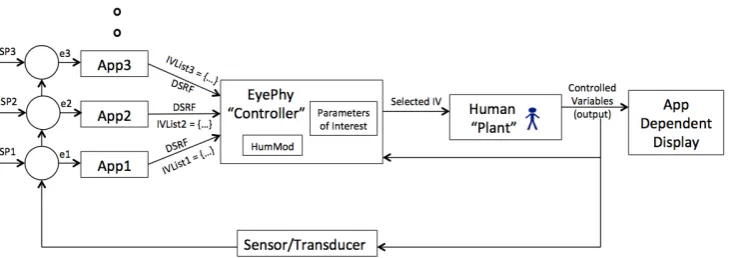
Figure 1: Runtime Dependency Detection by EyePhy
neural, endocrine, skeletal muscle, and metabolic physiology as a function of a person’s age, weight, sex, and other per-sonalized information. The model it uses is developed using the empirical data collected from peer-reviewed physiolog-ical literature. HumMod provides a model to understand the complex interactions of integrative human physiology and allows the simulation of different interventions on the human body. We choose to use this simulator as it is the leading physiological simulator in the medical community.
3.
APPROACH
In this section, we describe our overall architecture, details on the classification of parameters and dependencies, the stakeholders and their responsibilities with suggested app metadata, and installation time and runtime dependency detection and resolution.
3.1
Architecture
We assume a centralized architecture for the app-based paradigm, which is common for smart phones and smart homes [16] [23]. Apps are run at the top layer by an app engine, which is the OS of a smart phone or a smart home. EyePhy runs as a service for the app engine, and detects dependencies at app installation time and at runtime.
At installation time a new app is compared to all previ-ously installed apps by analyzing meta data and by running a simulation of the effects of possible interventions on the person for 3 hours (a tunable parameter) into the future. If there are serious conflicts the new app is not installed. More details are given in section 3.5.1.
The way EyePhy controls apps’ interventions to a human at runtime is shown in Figure 1. Each app has one or more physiological parameters of interest that it monitors and tries to control. The app may have a setpoint that is used to compute an error, e.g., App1 has setpointSP1 and it com-putes an errore1 based on that. Then each app offers a list of suggested interventions to EyePhy, e.g.,IVList1 is a list of one or more interventions suggested by App1. The list may contain the same drug with different dosage level, or different drugs, or other interventions. EyePhy uses Hum-Mod to determine potential interactions with other previous interventions and selects an intervention that doesn’t con-flict with the previous ones. It projects the effects of all the interventions on the human for the next 3 hours (tunable). The selected intervention affects the physiological parame-ters, some of which are captured by the sensor/transducer
and is used for determining the next interventions. An app uses its sensor data, if available, to update the values of phys-iological parameters of HumMod as shown DSRF (Dynamic Sensor Readings Feedback) in Figure 1. Figure 1 also shows how humans are part of the control loop. The controller also directly senses physiological responses of the user through available sensors to update the HumMod model, thus closing the loop. There are three novelties in our proposed system in Figure 1 compared to other human-in-the-loop feedback control systems. First, each app suggests a list of interven-tions instead of just one intervention, when possible. Sec-ond, EyePhy automatically detects interactions among the interventions not only at the current time, but out into a future time horizon and this is based on the patient current state. Third, it considers the parameters of interest of the user when detecting interactions, which allows dependency analysis to be personalized.
3.2
Parameter and Dependency Classification
HumMod models human physiology using over 7800 vari-ables. If EyePhy uses all the variables for dependency de-tection, then almost any two interventions will interact with each other. We realize that all interactions are not neces-sarily harmful to the human body and hence to understand the dependencies, we categorize the parameters and depen-dencies as follows.
3.2.1
High level and low level parameters
High level parameters are the physiological parameters that are used to assess the general health of a person in most medical settings. These are also called vital signs. These parameters are as follows.
1. Body temperature
2. Heart rate
3. Blood pressure
4. Respiratory rate
5. Glucose
(a) Systolic Blood Pressure (b) Heart Rate (c) Kidney Blood Flow
Figure 2: The effects of two interventions on the (a) Systolic Blood Pressure, (b) Heart Rate, and (c) Kidney Blood Flow.
Figure 2 shows how two different interventions can affect the high and low level physiological parameters. We con-sider two interventions,InterVention #1 (IV #1) and In-terVention #2 (IV #2) in this analysis. We also consider the case without any intervention (shown asNo IV in the figure). We use HumMod to simulate the effect of these interventions on the physiological parameters of a human body. The simulated person takes breakfast from 7 AM to 8 AM in the morning. In case ofIV #1, we administer a drug calledDigoxin at 8 AM after eating the meal, which is used to treat heart failure, and simulate the physiological parameters for the next 3 hours. In case ofIV #2, we ad-minister a drug calledSpironolactone, which is used to treat patients with hyperaldosteronism, at 8 AM after eating the meal independently from the previous run and simulate the physiological parameters for the next 3 hours. In case of
No IV, we just simulate the physiological parameters for 3 hours from 8 AM without performing any intervention.
We show the effect of these interventions on three physio-logical parameters (systolic blood pressure, heart rate, and kidney blood flow) in Figure 2 for the next 3 hours from the 8AM of the simulated time. When we analyze the ef-fect on the high level parameters (blood pressue and heart rate) we do not see any conflicts between the two interven-tions. Because, we see in the figure thatIV #1increases the blood pressure and decreases the heart rate, whileIV #2has minor effect on these parameters. Hence, they aren’t con-sidered conflicting. However, when we observe the effect of these two interventions on the kidney blood flow, which is a low level parameter, we see that they have completely op-posite effect there. IV #1 increases the kidney blood flow, whileIV #2 decreases it. There are other high level param-eters that we don’t show in this figure due to lack of space. But it clearly shows that using only high level parameters is not sufficient to detect conflicting interventions.
3.2.2
Numbers of Parameters
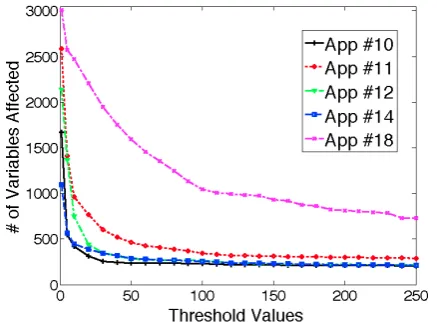
We run an experiment to see the how many physiological parameters can be affected by an intervention and check whether it is feasible to ask the app developers to specify all the physiological parameters that can be affected by their interventions. We use interventions performed by App #10, #11, #12, #14, and #18 from Table 1 in this study. Hum-Mod does not provide any built in technique to determine whether a variable is affected by an intervention. Hence, we use a threshold (X) for each parameter to determine that.
Figure 3: Number of variables affected by different apps’ interventions with different threshold values
More specifically, for each intervention, we run the experi-ment two times, one with normal behavior (no intervention) and one with the intervention. We run both experiments for 3 hours of simulated time on the human body and col-lect all the variables’ values once per minute. Assume that at minute t1, for variable v1, we observe v1=n1 for nor-mal behavior and v1=iv1 for the intervention. Variable v1 is considered affected by the intervention if |n1−iv1|/n1
> X for at least one observation within the 3 hours. We count the number of variables affected by each intervention for different values of X ranging from 1% to 250% and show it in Figure 3. For the interventions that administer drugs (App #10, #11, #12, #14), we administer the app’s first preferred dosage as mentioned in Table 1. For app #18, we assume that the app suggests to do biking for 30 minutes.
3.3
Stakeholders and Their Responsibilities
To better describe EyePhy we list the various stakeholders and describe how they use the system.
• App developers: They develop apps and describe the primary and secondary dependencies using the high level parameters (just five parameters, unless extended) as app metadata. They can also specify low level pa-rameters if known. In order to ensure all the app developers use the same terminology, we suggest us-ing the parameter names specified in HumMod. They must also specify all the interventions performed by this app.
Dependency information involving a physiological pa-rameter consists of two components: effectand depen-dency type. Effect of an intervention on a physiological parameter specifies the impact of the intervention on the parameter, which can be of three types as described below.
– increase: The parameter’s value is increased by this intervention
– decrease: The parameter’s value is decreased by this intervention
– null: The parameter’s value is no affected by this intervention
Note that the effect can be bothincreaseanddecrease. The dependency type metadata can be eitherprimary
or secondary. We suggest the app developers to use the parameter names specified in the HumMod to de-scribe the effects so that dependency metadata can be compared across apps. For example, if an app wants to perform an intervention that increases the heart rate, which causes a primary dependency, the app specifies the following dependency information in the app meta-data.
<param> Heart-Rate.Rate </param> <effect> increase </effect> <dependency> primary </dependency>
To specify interventions, app developers are suggested to use the parameter names specified in HumMod. For example, an app that wants to administer 10 mg dosage of a drug called Midodrine specifies the inter-vention as shown below.
<intervention> MidodrineSingleDose.Dose
</intervention>
<dosage> 10 </dosage>
• Users: They install apps and the installed apps con-trol their physiological parameters. If they have some basic knowledge of human physiology, they can choose parameters of their own interest, e.g., if someone has heart related problems, he can choose heart related low level parameters. However, we do realize that most users are not knowledgeable enough to choose param-eters by their own.
• Caregivers and doctors: The caregivers and doctors can specify low level parameters of interest to focus the simulation. This allows personalized dependency analysis without requiring the patients to know about any low level parameters.
• Physiological model developers: They develop the phys-iological simulator HumMod that can simulate the ef-fect of various interventions on the human body.
• EyePhy developers: We, the EyePhy developers, in-tegrate the efforts of all other stakeholders to provide personalized dependency analysis for the users involv-ing human-in-the-loop.
Note thatUnspecified parameters are the parameters iden-tified by EyePhy automatically because of the significant impact on these parameters by the apps’ interventions. The unspecified parameters are presented to the users, caregivers, and doctors for additional consideration. If they select any of these parameters, the selected unspecified parameters are treated as caregiver specified parameters in the subsequent analysis.
3.4
EyePhy Dependency Checking
EyePhy considers all the specified parameters in the depen-dency analysis regardless of developer specified or caregiver specified. It also updates the list of unspecified parameters after performing the dependency analysis. EyePhy performs the following dependency checking at installation and run-time, respectively.
3.4.1
Installation Time Checking
When a new app is installed, EyePhy performs dependency analysis across all other installed apps forall the interven-tions specified in the new app. The new app is considered conflicting if at least one of the following two conditions is satisfied over a tunable future time horizon when compar-ing one of its intervention with another intervention from an already installed app.
(a) There is an opposite effect on at least one parameter, or (b) There is a same effect on at least one parameter, where the joint intervention can exceed the normal range of the parameter
3.4.2
Runtime Checking
At runtime, when an app requests to perform an actuation on the human body, that intervention request contains the suggested metadata related to the intervention. EyePhy checks whether the newly requested intervention can con-flict with the previously granted interventions by checking for the conditions specified above in the installation time checking. However, there are two major differences from the installation time checking. First, EyePhy takes into ac-count the time difference between the interventions at the runtime dependency analysis. To do that it uses the times-tamps of interventions that are given input to EyePhy by the apps when they perform a direct actuation on the body or by the users when they listen to a suggestion, e.g., tak-ing a drug or dotak-ing exercises. Second, at runtime, Eye-Phy maintains and updates the HumMod simulator based physiological model of the user by taking into account all the previously granted interventions and the current state of the patient based on sensor values. The apps that con-tinuously monitor physiological parameters are allowed to provide input to EyePhy that is used to correct the phys-iological model. To determine whether the new interven-tion can conflict with the previously granted interveninterven-tions, EyePhy checks whether the new intervention can cause any opposite effect with the most updated model (containing all the previous interventions) within theWindow duration in at least one specified parameter using HumMod. It also checks whether the new intervention can cause any same effect with the most updated model and allowing the new intervention can exceed the normal range of at least one high level parameter, where the new intervention is started at the moment of request in the simulation.
An app’s runtime intervention request contains a list of pro-posed interventions. EyePhy checks for conflicts for each intervention as mentioned above. It grants the first non-conflicting intervention in the list. If all the interventions in the list are conflicting, EyePhy doesn’t grant the access of any intervention in the list. It notifies the user that the in-tervention request is denied and provides a brief explanation of why it is denied containing the parameter names where potential conflicts could occur. It also keeps a log of all the denied interventions to present to the caregivers and doctors. For each granted intervention, EyePhy updates a list ofK
unspecified parameters that are most significantly affected (highest % change from the without intervention value) by the intervention, which is later shown to the caregivers or doctors for additional consideration. Their chosen parame-ters are treated as caregiver specified parameparame-ters and used in subsequent dependency analysis.
4.
EVALUATION
In this section, we demonstrate the conflict detection and resolution capability of EyePhy involving the human-in-the-loop apps. We describe a list of human-in-the-loop apps for the evaluation, low level parameters of interest, experi-mental setup, and installation time and runtime dependency detection capability of EyePhy.
4.1
App Selection
In order to evaluate EyePhy, we need a list of human-in-the-loop apps. Although there are many healthcare related apps in Apple App Store and Google Play, the apps usually
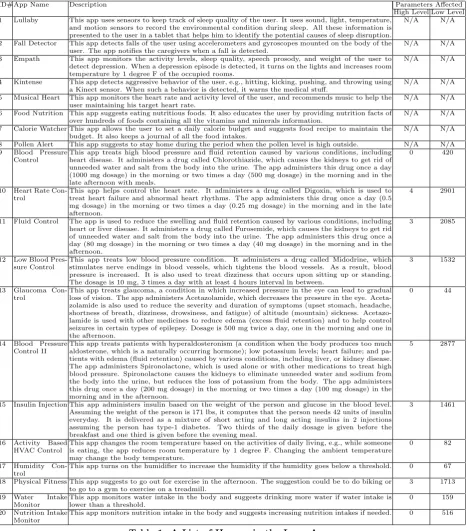
provide health related tips and do not perform any direct actuation on the human body due to strict FDA regulation. Hence, we design the 20 human-in-the-loop apps for the eval-uation as shown in Table 1. These apps are representative of the research work in the wireless sensor networks area and the available healthcare apps in smart phones. When design-ing these apps, we consider many types of human-in-the-loop apps including the ones that just monitor health conditions with no interventions, apps that perform direct actuations on the human body, apps that provide health related sugges-tions, and apps that perform actuation on the environment that affects the human body. Among thousands of medical conditions, we only choose a few of the medical conditions (between App #9 and App #14), because HumMod can directly simulate their effects on the human body. Drug de-scriptions and dosages are obtained from [6]. We only use the 12 apps (from App#9 to App#20) from Table 1 in the subsequent evaluation since the interventions performed by these apps can be simulated by HumMod. Also, the medical conditions treated by these apps, e.g., blood pressure, heart rate, fluid control, glaucoma control, and insulin injection are very common as many elderly suffer from such simulta-neous chronic conditions. We also determine the number of high level and low level parameters affected by these 12 apps by emulating their behaviors using HumMod for 3 hours and checking whether an intervention increases or decreases pa-rameter values beyond two standard deviation of their nor-mal values and show it in Table 1. Other apps in Table 1 provides an overview about what else is proposed in the literature and available in the app markets. As HumMod supports more and more interventions, EyePhy will be able to perform dependency analysis across more apps.
4.2
Low Level Parameters of Interest
Based on the medical condition, specific low level physio-logical parameters need to be monitored for a user. In the evaluation, we consider three case studies focusing on three different parts of the human body.
1. 5 low level parameters related to the kidney: Kidney-ArcuateArtery.BloodFlow, Kidney-CO2.PCO2, Kidne y-EfferentArtery.VasaRectaOutflow, Kidney-Lactate. Flow, and Kidney-Fuel.TotalGlucoseUsed(Cals/Min). 2. 5 low level parameters related to the heart: LeftHea rt-BetaReceptors.Activity, LeftHeart-Flow.BloodFlo w, LeftHeart-Flow.O2Use, LeftHeart-Flow.PO2Effec t, and Heart-Ventricles.Rate.
3. 5 low level parameters related to the liver: Liver-O2 .BloodFlow, Liver-Fuel.GlucoseDelivered(Cals/Min), ADHClearance.Liver, GlycerolPool.LiverFARelease, and Liver-O2.InflowPO2.
4.3
Experimental Setup
ID# App Name Description Parameters Affected High Level Low Level 1 Lullaby This app uses sensors to keep track of sleep quality of the user. It uses sound, light, temperature,
and motion sensors to record the environmental condition during sleep. All these information is presented to the user in a tablet that helps him to identify the potential causes of sleep disruption.
N/A N/A
2 Fall Detector This app detects falls of the user using accelerometers and gyroscopes mounted on the body of the user. The app notifies the caregivers when a fall is detected.
N/A N/A
3 Empath This app monitors the activity levels, sleep quality, speech prosody, and weight of the user to detect depression. When a depression episode is detected, it turns on the lights and increases room temperature by 1 degree F of the occupied rooms.
N/A N/A
4 Kintense This app detects aggressive behavior of the user, e.g., hitting, kicking, pushing, and throwing using a Kinect sensor. When such a behavior is detected, it warns the medical stuff.
N/A N/A
5 Musical Heart This app monitors the heart rate and activity level of the user, and recommends music to help the user maintaining his target heart rate.
N/A N/A
6 Food Nutrition This app suggests eating nutritious foods. It also educates the user by providing nutrition facts of over hundreds of foods containing all the vitamins and minerals information.
N/A N/A
7 Calorie Watcher This app allows the user to set a daily calorie budget and suggests food recipe to maintain the budget. It also keeps a journal of all the food intakes.
N/A N/A
8 Pollen Alert This app suggests to stay home during the period when the pollen level is high outside. N/A N/A 9 Blood Pressure
Control
This app treats high blood pressure and fluid retention caused by various conditions, including heart disease. It administers a drug called Chlorothiazide, which causes the kidneys to get rid of unneeded water and salt from the body into the urine. The app administers this drug once a day (1000 mg dosage) in the morning or two times a day (500 mg dosage) in the morning and in the late afternoon with meals.
0 420
10 Heart Rate Con-trol
This app helps control the heart rate. It administers a drug called Digoxin, which is used to treat heart failure and abnormal heart rhythms. The app administers this drug once a day (0.5 mg dosage) in the morning or two times a day (0.25 mg dosage) in the morning and in the late afternoon.
4 2901
11 Fluid Control The app is used to reduce the swelling and fluid retention caused by various conditions, including heart or liver disease. It administers a drug called Furosemide, which causes the kidneys to get rid of unneeded water and salt from the body into the urine. The app administers this drug once a day (80 mg dosage) in the morning or two times a day (40 mg dosage) in the morning and in the afternoon.
3 2085
12 Low Blood Pres-sure Control
This app treats low blood pressure condition. It administers a drug called Midodrine, which stimulates nerve endings in blood vessels, which tightens the blood vessels. As a result, blood pressure is increased. It is also used to treat dizziness that occurs upon sitting up or standing. The dosage is 10 mg, 3 times a day with at least 4 hours interval in between.
3 1532
13 Glaucoma Con-trol
This app treats glaucoma, a condition in which increased pressure in the eye can lead to gradual loss of vision. The app administers Acetazolamide, which decreases the pressure in the eye. Aceta-zolamide is also used to reduce the severity and duration of symptoms (upset stomach, headache, shortness of breath, dizziness, drowsiness, and fatigue) of altitude (mountain) sickness. Acetazo-lamide is used with other medicines to reduce edema (excess fluid retention) and to help control seizures in certain types of epilepsy. Dosage is 500 mg twice a day, one in the morning and one in the afternoon.
0 44
14 Blood Pressure Control II
This app treats patients with hyperaldosteronism (a condition when the body produces too much aldosterone, which is a naturally occurring hormone); low potassium levels; heart failure; and pa-tients with edema (fluid retention) caused by various conditions, including liver, or kidney disease. The app administers Spironolactone, which is used alone or with other medications to treat high blood pressure. Spironolactone causes the kidneys to eliminate unneeded water and sodium from the body into the urine, but reduces the loss of potassium from the body. The app administers this drug once a day (200 mg dosage) in the morning or two times a day (100 mg dosage) in the morning and in the afternoon.
5 2877
15 Insulin Injection This app administers insulin based on the weight of the person and glucose in the blood level. Assuming the weight of the person is 171 lbs, it computes that the person needs 42 units of insulin everyday. It is delivered as a mixture of short acting and long acting insulins in 2 injections assuming the person has type-1 diabetes. Two thirds of the daily dosage is given before the breakfast and one third is given before the evening meal.
3 1461
16 Activity Based HVAC Control
This app changes the room temperature based on the activities of daily living, e.g., while someone is eating, the app reduces room temperature by 1 degree F. Changing the ambient temperature may change the body temperature.
0 82
17 Humidity Con-trol
This app turns on the humidifier to increase the humidity if the humidity goes below a threshold. 0 67
18 Physical Fitness This app suggests to go out for exercise in the afternoon. The suggestion could be to do biking or to go to a gym to exercise on a treadmill.
3 1713
19 Water Intake Monitor
This app monitors water intake in the body and suggests drinking more water if water intake is lower than a threshold.
0 159
20 Nutrition Intake Monitor
This app monitors nutrition intake in the body and suggests increasing nutrition intakes if needed. 0 516
Table 1: A List of Human-in-the-Loop Apps
rate is between 60 and 100 beats per minute, and tempera-ture is between 97.8 and 99.1 degrees Fahrenheit.
4.4
Static Analysis
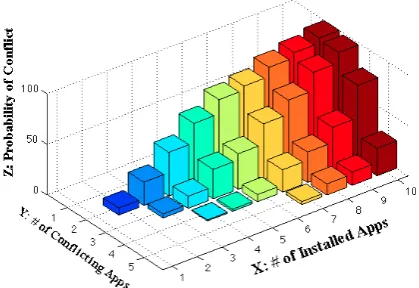
At the time of app installation, EyePhy performs installa-tion time check to detect potential conflicts with the previ-ously installed apps by analyzing the dependency informa-tion specified in the app metadata and running a simulainforma-tion for 3 hours into the future. Figure 4 shows the probability of conflict between at least j apps when i apps are installed from the 12 apps (App #9 to App #20) in Table 1 using the
high level parameters only. Figure 5 shows the case when we consider the low level parameters in addition to the high level parameters. For each value x in the X axis, we ran-domly select x apps 100 times and compute the probability of conflict between at least y apps, where 1≤y≤5 and y
Figure 4: Installation time conflict detection on high level parameters
Figure 6: Runtime conflict detection on high level parameters
respectively in addition to the high level parameters. Hence, using low level parameters enables us to detect more poten-tial conflicts in a personalized manner. We also see that installing more apps increases the probability of conflict. As we see in Figure 4, there is a 62% probability of conflict between at least 2 apps when someone installs 5 apps if we just use high level parameters. This probability becomes 98%, 75%, and 88% if we also use low level parameters re-lated to the kidney, heart, and liver, respectively as shown in Figure 5. When someone installs 10 apps, the probability of conflict between at least two apps is 99% when we only consider the high level parameters. If we also consider any of the three low level parameters, the probability becomes 100% for each of the three cases. These results show the severity of conflicts involving high level and low level physi-ological parameters among the human-in-the-loop apps and demonstrate the need for a runtime system for detecting these conflicts.
4.5
Runtime Analysis
In order to evaluate the runtime performance of EyePhy, we need to install some human-in-the-loop apps and let them perform interventions on one or more human subjects with and without EyePhy. However, doing simultaneous inter-ventions from Table 1 on a human body may not be safe for the subject. Hence, instead of using real human subjects, we use HumMod to simulate the effect of interventions on the human body for the runtime analysis.
We assume that the user installs App #9 to App #20 in Table 1 in this evaluation. It may be questioned whether someone will install so many health related apps. We argue that more than 100,000 mobile medical apps are currently available [5], and in the Android app store itself, there are over 80 diabetes apps offering many functionalities includ-ing self monitorinclud-ing of blood glucose recordinclud-ing, medication or insulin logs, and insulin dose calculator [15]. Although we do not have a statistic on the number of medical apps that people install in their smart phones, we see that average Android and iPhone users have 32 and 44 apps downloaded in their smart phones, respectively, based on a recent study [3]. Hence, it is not unreasonable to assume that some peo-ple will install a number of human-in-the-loop apps, often without a doctor’s knowledge. We also expect this number to increase in the future.
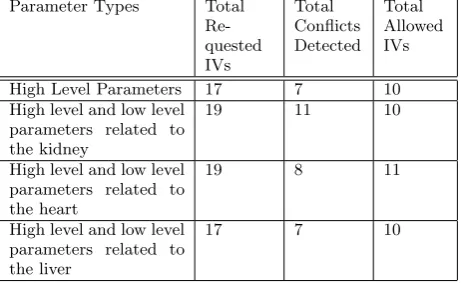
The way these apps (App #9 to App #20) perform inter-ventions is described in Table 1. We run the experiment for a whole simulated day for an adult person using HumMod. The interventions depend on the lifestyle of the person. By default, in HumMod, the person sleeps from 10 PM to 6 AM and eats breakfast, lunch, and dinner between 7AM and 8 AM, 12 PM and 1 PM, and 6 PM and 7 PM, respectively. The apps that administer drugs take into account the meal times. App #16 (Activity based HVAC control) also takes into account the times of eating the meals. As we use this setting, the apps perform interventions based on the time of the day by considering the lifestyle of the person. We com-pute the number of intervention requests, the number of conflicts detected, and the number of allowed interventions by EyePhy in every hour during the day. We show the re-sults in Figure 6 when considering the high level parameters and in Figure 7 when considering the low level parameters related to the kidney, heart, and liver in addition to the high level parameters. For brevity, we call these four cases as high-level, kidney, heart, and liver cases, respectively in the following description. The interventions take place in the following order in the four cases.
• At 6 AM, App #17 requests to perform an intervention to increase the room humidity, which is granted.
• At 7 AM, before the breakfast, App #15 requests to inject insulin. Also, at 7 AM App #16 requests to reduce room temperature by 1 degree F for the dura-tion while the resident is having the breakfast. Both requests are granted in all the cases except the kid-ney case where we observe a conflict at the parameter Kidney-CO2.PCO2.
(a) Kidney (b) Heart (c) Liver
Figure 5: Installation time conflict detection on low level parameters related to the (a) Kidney, (b) Heart, and (c) Liver in addition to the high level parameters.
(a) Kidney (b) Heart (c) Liver
Figure 7: Runtime conflict detection on low level parameters related to the (a) Kidney, (b) Heart, and (c) Liver in addition to the high level parameters.
administer at 8 AM and at 7 PM. App #13 and #14’s requests are granted in all the cases. App #9, #10’s requests are granted in the high level case and the liver case. In case of the heart, App #9’s request is granted, but App #10’s request is denied because of a conflict at a heart related parameter LeftHeart-Flow.PO2Effect. In the case of kidney, App #9 and #10 both experience conflict for the daily dosage. However, both requests are resolved by using their half daily dosages that do not cause any conflict. The half daily dosage requests are granted.
• At 9 AM, App #11 requests for interventions, where the intervention list contains a daily dosage and a half daily dosage. If none of the dosages are allowed, App #11 retries at 10 AM. App #11’s request is granted in all the cases except the case with the heart where we observe a conflict at the parameter LeftHeart-Flow.PO-2Effect. In case of the heart, App #10 retries at 9 AM as its request at 8 AM is denied, which is denied again due to a conflict at a heart related parameter.
• At 10 AM, App #12 requests to perform an interven-tion, which is denied in all the cases due to a conflict with a high level parameter. In the case of the heart, App #11 retries at 10 AM, which is denied again due to conflict at a heart related parameter.
• At 11 AM, App #19 and #20 request to perform in-terventions. App #20’s request is granted in all the cases. App #19’s request is denied in all the cases except the case with the heart, where it is granted.
We skip the description of the other interventions due to the lack of space. But the results clearly show that Eye-Phy’s conflict detection and resolution can be personalized
Parameter Types Total
Re-quested IVs
Total Conflicts Detected
Total Allowed IVs
High Level Parameters 17 7 10
High level and low level parameters related to the kidney
19 11 10
High level and low level parameters related to the heart
19 8 11
High level and low level parameters related to the liver
17 7 10
Table 2: Summary of the interventions of 24 hours
by focusing the analysis to specific low level parameters.
of the conflicts could be detected without EyePhy. Note that detecting a single conflict involving human-in-the-loop can be crucial for making a life saving decision in some contexts.
5.
DISCUSSION
Since EyePhy uses HumMod to simulate the interventions, the simulation may incur non-negligible energy consumption if EyePhy runs on a smart phone. Therefore, we run EyePhy in a desktop as HumMod is not ported to any smartphone platform yet. On the desktop, it takes about 2 seconds of real time to perform 10 minutes of simulation. However, as part of a future development plan, we envision a mobile-cloud platform for EyePhy which will be more realistic and user-friendly for end users. In total, the runtime depen-dency analysis does not incur tremendous computational ef-fort since we only need to do the simulation when an app requests an intervention, which happens only about 20 times in a day in our evaluation.
We did not perform any direct comparison with DepSys in the evaluation section. However, as described in Section 1, DepSys’s employed strategy works well when the number of parameters affected by each intervention is limited. EyePhy reduces app developers efforts significantly in specifying de-pendency metadata. As an example, for each of the last 12 apps in Table 1, EyePhy requires specifying only five param-eters and intervention description, whereas app developers would have to specify hundreds or even thousands of pa-rameters if DepSys’s employed strategy were used. We see a similar trend for the six apps in Figure 3, where differ-ent thresholds are used to determine whether a variable is affected by an intervention. Also, personalized dependency analysis is not addressed in DepSys.
6.
CONCLUSION
Independently developed human-in-the-loop CPS apps pose new challenges for controlling human physiological param-eters. This is primarily due to complex dependency issues of the apps’ interventions. As far as we know, EyePhy is the first system to directly address these issues. EyePhy uses a novel approach by employing a medically accepted physiological simulator that can model the complex inter-actions of the human physiology using over 7800 variables. Our solution takes into account a wide range of physiologi-cal parameters at the time of dependency analysis as well as performs personalized dependency analysis over a time hori-zon. The end result permits a significant number of conflicts among the interventions to be detected. This is a major step towards the complete analysis of human-in-the-loop apps.
7.
ACKNOWLEDGEMENT
This work was supported, in part, by NSF grant CNS-1239483 and by Microsoft SEIF.
8.
REFERENCES
[1] http://lifescientist.com.au/content/biotechnology/article/the-rise-of-smartphone-health-and-medical-apps-1072193834. [2] http://reference.medscape.com/drug-interactionchecker. [3]
http://velositor.com/2012/02/27/the-average-iphone-user-has- 44-apps-on-their-device-versus-only-32-apps-for-android-smartphone-users/.
[4] http://www.drugs.com/drug interactions.php.
[5] http://www.informationweek.com/regulations/lawmakers-try-to-sharpen-fda-focus-on-healthcare-apps/d/d-id/1112095?
[6] http://www.nlm.nih.gov/medlineplus/druginformation.html. [7] http://www.nlm.nih.gov/medlineplus/ency/article/002341.htm. [8] Tackling the burden of chronic diseases in the usa.The Lancet,
373(9659):185, Jan. 2009.
[9] S. R. Abram, B. L. Hodnett, R. L. Summers, T. G. Coleman, and R. L. Hester. Quantitative circulatory physiology: an integrative mathematical model of human physiology for medical education.Advances in Physiology Education, 31(2):202–210, 2007.
[10] M. Y. Ahmed, S. Kenkeremath, and J. Stankovic. Socialsense: A collaborative mobile platform for speaker and mood identification. InEWSN, 2015.
[11] D. Arney, M. Pajic, J. M. Goldman, I. Lee, R. Mangharam, and O. Sokolsky. Toward patient safety in closed-loop medical device systems. InICCPS, 2010.
[12] D. A. Beard. Modeling of oxygen transport and cellular energetics explains observations on in vivo cardiac energy metabolism.PLoS Comput Biol, 2(9):107, 2006.
[13] T. G. Coleman and J. E. Randall. Human—a comprehensive physiological model. Technical report, The Physiologist, 1983. [14] A. Das, Z. Gao, P. P. Menon, J. G. Hardman, and D. G. Bates.
A systems engineering approach to validation of a pulmonary physiology simulator for clinical applications.Journal of The Royal Society Interface, 8(54):44–55, 2011.
[15] A. P. Demidowich, K. Lu, R. Tamler, and Z. Bloomgarden. An evaluation of diabetes self-management applications for android smartphones. volume 18, 2012.
[16] C. Dixon, R. Mahajan, S. Agarwal, A. Brush, B. Lee, S. Saroiu, and P. Bahl. An operating system for the home. InNSDI, 2012. [17] A. C. Guyton, T. G. Coleman, and H. J. Granger. Circulation:
Overall regulation.Annual Review of Physiology, 34(1):13–44, 1972.
[18] J. G. Hardman, N. M. Bedforth, A. B. Ahmed, R. P. Mahajan, and A. R. Aitkenhead. A physiology simulator: validation of its respiratory components and its ability to predict the patient’s response to changes in mechanical ventilation.British Journal of Anaesthesia, 81(3):327–32, 1998.
[19] R. Hester, A. Brown, L. Husband, R. Iliescu, W. A. Pruett, R. L. Summers, and T. Coleman. Hummod: A modeling environment for the simulation of integrative human physiology.Frontiers in Physiology, 2(12), 2011. [20] D.-J. Kim and A. Behal. Human-in-the-loop control of an
assistive robotic arm in unstructured environments for spinal cord injured users. InHRI, 2009.
[21] X. Liu, H. Ding, K. Lee, L. Sha, and M. Caccamo. Feedback fault tolerance of real-time embedded systems: issues and possible solutions.SIGBED Rev., April 2006.
[22] J. Lu, T. Sookoor, V. Srinivasan, G. Gao, B. Holben, J. Stankovic, E. Field, and K. Whitehouse. The smart thermostat: using occupancy sensors to save energy in homes. InSenSys, 2010.
[23] S. Munir and J. A. Stankovic. Depsys: Dependency aware integration of cyber-physical systems for smart homes. In
ICCPS, 2014.
[24] S. Munir, J. A. Stankovic, C.-J. M. Liang, and S. Lin. Cyber physical system challenges for human-in-the-loop control. In
Feedback Computing, 2013.
[25] S. Munir, J. A. Stankovic, C.-J. M. Liang, and S. Lin. Reducing energy waste for computers by human-in-the-loop control.
IEEE Transactions on Emerging Topics in Computing, to appear.
[26] R. L. Summers, K. R. Ward, T. Witten, V. A. Convertino, K. L. Ryan, T. G. Coleman, and R. L. Hester. Validation of a computational platform for the analysis of the physiologic mechanisms of a human experimental model of hemorrhage.
Resuscitation, 80(12), 2009.
[27] P. A. Vicaire, Z. Xie, E. Hoque, and J. A. Stankovic. Physicalnet: A generic framework for managing and programming across pervasive computing networks. InRTAS, 2010.