Oracle and SQL Server: BFF?
By Hope Foley, SQL Server DBA, Perpetual Technologies, Inc.
BFF (Best Friends Forever)? Not quite. More like two kids on the DBMS playground that would just as soon throw spitballs at each other as play nice together.
However, with the release of SQL Server 2005, it has become easier than ever to coexist with rival Oracle.
In this article, I provide an overview of some of the new and old ways to
successfully exchange data between Oracle and SQL Server 2005 instances. The sharing of data between the two is becoming a very widely desired process, in part due to the licensing of the reporting tool for SQL Server. SQL Server Reporting Services (SSRS) is a free component with a valid license of SQL Server (although you must have per-processor licensing to use Internet reporting). In many cases, data is ported over solely to run reports. Some simply need to retrieve data that is partially in SQL and partially in Oracle. Whatever the reason, with more and more database shops containing both products, the need is greater than ever to share data between the two unlikely playmates.
There are three common ways to get data from Oracle into SQL Server:
1. SQL Server Integration Services (SSIS) – pump data from Oracle into SQL Server databases
2. Replication – set up Oracle in SQL Server to be a replication publisher 3. Linked server – run queries directly from SQL Server to Oracle databases
after linking
SQL Server Integration Services
SSIS is a data integration tool that also is included free with a license of SQL Server (except for the Express version). It is the replacement for what was previously referred to as Data Transformation Services (DTS). Essentially, SSIS is a very powerful enterprise-class extract, transform and load (ETL) tool. It allows you to move data from Oracle or other sources into SQL Server in a few simple steps, although additional steps can be added to cleanse the data in countless ways prior to loading it into SQL Server. The Oracle client is a prerequisite installation on the server you are going to import the data into or the location where you will be running your SSIS package. In addition, a valid userid/password for the Oracle database is required. You are now ready to begin setting up your SSIS package.
1. In SQL Server, open Business Intelligence Development Studio (BIDS) and create an Integration Services project.
2. Move a data flow task into the control flow design pane. Double-click on this task and it will bring you into the data flow pane. Here you will create the tasks to move your Oracle data.
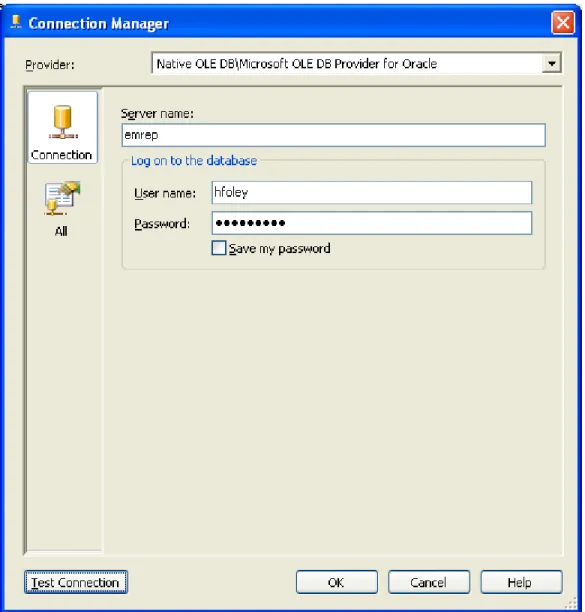
3. Move an OLE DB source task into the design pane. Double-click it and configure a connection to your Oracle database (Figure 1). You will supply either the table or view you want to copy or you can supply a SQL command to pull portions of the data. You can then add any cleansing tasks needed to the data or directly copy it into SQL Server. The only thing needed now is a destination for your data. You can put it in numerous formats or into a SQL Server database.
Figure 1. Input your Oracle connection information in OLE DB Source.
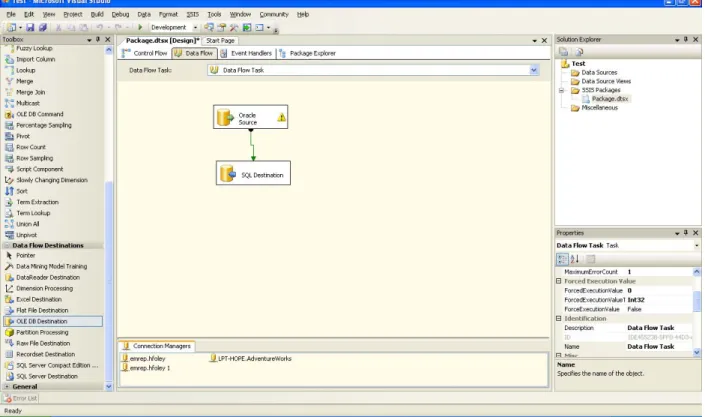
4. Move an OLE DB Destination task into the pane, connect the source task to the destination task, and then configure the destination. You now have an SSIS package to copy data from Oracle (see Figure 2). It can be deployed and scheduled to run at regular intervals in an SQL Agent job.
Figure 2. What the SSIS package will look like from Data Flow pane.
Replication
Replication has been in place within SQL Server since version 6.0. New in SQL Server 2005 is the ability to set up an Oracle publisher (with Oracle versions 8.0.5 and higher). Replication, in a nutshell, is a method to copy data and objects
between servers and keep them synchronized. A media metaphor is used: first, the data and objects to be copied are contained in an article. A publication can then contain one or more articles. Next, there is a subscriber, which is an instance of SQL Server that can access that publication. The subscriber requests the publication through a subscription. Finally, there is also a distributor, which handles the
passing of the subscription from the publisher to the subscribers.
There are three types of replication that can occur in SQL Server: merge,
transactional, and snapshot. Merge replication allows for updates to occur at the subscribers and publisher; the data is then synchronized between all. This can create conflicts but there are numerous methods to handle those conflicts.
Transactional replication only allows for changes at the publisher. The incremental changes are then propagated down to the subscribers in near real time. Snapshot replication copies all data from the publication to the subscribers at specified
intervals and does not monitor changes. Snapshot works well only when needing to copy small amounts of data infrequently and when high latency is not an issue. Replicating with an Oracle database only allows for snapshot and transactional replication.
Here are the steps to set up an Oracle publisher in SQL Server:
1. Ensure that you have a separate distributor set up to aid in the replication. 2. Create a replication administrative user within the Oracle database. SQL
Server provides a sample script you can use to create the user in \\Program Files\Microsoft SQL Server\<instance name>\MSSQL\Install\oracleadmin.sql. The user that runs the script on the Oracle database must have admin
privileges.
3. Grant select permissions to the replication admin user implicitly (i.e., not through a role).
4. Install the latest Oracle client on the distributor, stop/start the SQL instance, and verify connectivity.
5. Set up the Oracle database as a publisher, as well as the publication or what data you will exchange. You can do this via Wizards from the distributor (right-click local publications from within SQL Server Management Studio and select “Add Oracle Publication”).
Linked servers
Linked servers are a third method to access Oracle information with SQL Server. Once linked servers are set up, you have the ability to run distributed queries against Oracle via SQL Server. To use this method, an Oracle client must be
installed on your SQL Server machine and a valid Oracle user/password is needed. Setting up the linked server is simple; simply run the following command:
EXEC sp_addlinkedserver
@server = 'Name of Linked server’, @srvproduct = 'Oracle',
@provider = 'MSDAORA',
@datasrc = 'Data Source Name' GO
Then you must add the login for the linked server: EXEC sp_addlinkedsrvlogin
@rmtsrvname = 'Name of Linked Server', @useself = 'false',
@locallogin = 'Local SQL login', @rmtuser = 'Oracle User',
@rmtpassword = 'Oracle Password'
You then can query the Oracle database using full syntax. For example: SELECT * FROM <Name of Linked Server>..<Oracle Schema>.<Table Name>
Conclusion
While Oracle and SQL Server may never be BFF, you can use these methods to access Oracle data from within SQL Server. Your data comes together, your
customers are happy, and the world is a better place. And besides, if these two old rivals did become best friends, what would Oracle and SQL Server DBAs have to argue about?
About the author
Hope Foley is a SQL Server DBA and analyst for Perpetual Technologies, Inc. (PTI) in Indianapolis, Indiana. PTI provides mission-critical database and information systems support for SQL Server and Oracle environments nationwide. PTI experts plan, design, develop, deploy, and manage database
environments and applications to achieve the best
combination of tools and services for each client need. As a respected member of the PTI team, Hope brings 7 years of IT experience to PTI and is responsible for database design, administration and support, data warehousing and data mining, and custom database solutions for business enterprises across the United States.