E s s e n t i a l f o r s o f t w a r e t e s t e r s
TE TER
SUBSCRIBE
It’s FREE
for testers
Simulation
virtualization
June 2013
£
4
/
¤
5
v2.0
number 21
Including articles by: Howard Osborne e-Testing
Huw Price and Llyr Jones Grid-Tools Vu Lam QASymphony Stephen Johnson ROQ IT Doug Lawson Bogdan Bereza VictO A bunch of developers Coverity THIS ISSUE OF PROFESSIONAL TESTER IS SPONSORED BY
Continuous
testing and
delivery
Continuous
testing and
delivery
Including articles by:
Bogdan Bereza VictO Roy de Kleijn Polteq Mark Lehky Jessica Schiffmann Prism Informatics Eric M.S.P. Veith
Its impending decline has been rumoured for years, but Flash remains one of the most popular ways to create rich Internet applica-tions. By testers, it is often perceived as
difficult to automate. In this article I will try to dispel misconceptions and explain how effective test automation of Flash applications can be achieved easily: and when and why it cannot.
Technology overview
Most web Flash applications can be described very well by the three-tier architecture model (see figure 1). Ideally, none of the tiers knows anything about the platform, technology, or structure of any of the others, and therefore any one can easily be swapped out as new
development (or test) needs arise. If the model is adhered to strictly, test automa-tion becomes simple: any of the tiers can be replaced with virtually any tool. If, due to design and/or development decisions, the boundaries between the tiers start to blur, testing (and future development) become more difficult. This is one of the reasons testing should get involved in the design process as early as possible. The data tier is usually, and should be, unimportant from the test point of view. It should have very little impact on the tiers above, and the choice of database engine is usually dictated by other factors such as performance, security and cost.
The logic tier should be responsible for transmitting, recoding, and processing all messages. Transmission of messages is usually done over classic HTTP or Real Time Messaging Protocol (RTMP). The content of the messages is usually encoded using Action Message Format (AMF). If the application is written in Java, then the logic tier server is typically BlazeDS; if the application is written in C# .NET, the server will likely be FluorineFX. Some logic tiers are very complex and use multiple technologies (web server, mes-sage queue, etc). Here I will deal with the most common AMF messages only. The presentation tier of a Flash application is most often written in ActionScript. This has the look and feel of Java: object-ori-ented design, compile-once-run-anywhere to produce an SWF file playable by a large number of available player applica-tions on all desktop and mobile platforms. This technology is completely different to HTML, but the player can be made com-patible with a web browser via a plug-in: I am often (ie several times a week) asked: “can I automate Flash with Selenium?”. The answer is no. Sort of.
Flash light
by Mark Lehky
Mark Lehky illuminates
Flash for testers
UI automation with Genie
Selenium is not a tool, but a library avail-able in many programming languages that allows the coder to access and manipulate objects (text, controls, images etc) in a web browser’s Document Object Model (DOM). Many technologies, eg HTML5, JavaScript, AJAX and others, generate or manipulate the DOM. Flash does not. The fact that a web browser requires a plug-in to be able to display Flash appli-cations is the first giveaway that Selenium cannot automate Flash. A Flash applica-tion is separate to the DOM, even though it can be displayed in the browser window alongside DOM objects. Selenium was never intended to automate Flash, and in all likelihood never will.
Fortunately, there are other libraries to enable you to manipulate objects in a Flash application. Here I will discuss one of them, Genie (http://sourceforge.net/ adobe/genie/). Another example, also often recommended, is flash-selenium (http://code.google.com/p/flash-selenium/). One reason, and probably the most
important, why you would want to choose Genie over selenium is that flash-selenium is dependent on Selenium Remote Control, which was deprecated (in favour of WebDriver) in July 2011. Genie depends on nothing and can be used completely standalone, or combined with anything else you may want to use. It can be plugged into almost any existing framework or toolset (Ant, Maven, JUnit, TestNG, etc etc).
Unlike Selenium, Genie is only available in Java and some of its development sup-port tools will only work in Eclipse. This is a barrier for testers using only .NET and Visual Studio. Genie is open source so a port is possible but I don’t foresee it. If you need to test Flash and want to use Genie but don’t know Eclipse I strongly recommend the tutorials at http://eclipse. org/resources/.
Before installing Genie you will need to install Eclipse, the Java Development Kit (JDK) at least version 1.5, and the debug version of Flash Player. The Genie down-load comes with full instructions. You will
also need to run a Genie Socket Server (reminiscent of the old Selenium Server). After that, things get pretty easy.
Genie browser
Genie automation scripts refer to objects by their GenieID. This is similar to the HTML element id or the element locators used by Selenium, but more complex: it is formed from several attributes of the Flash application determined by its devel-opers together with some cryptic portions assigned by Genie itself. The result can look quite cryptic, for example SP^botBa rContainer:::FP^userBox:::SE^imgBox:: PX^2::PTR^0::IX^2::ITR^0. GenieIDs are difficult to predict, even in close collabora-tion with developers.
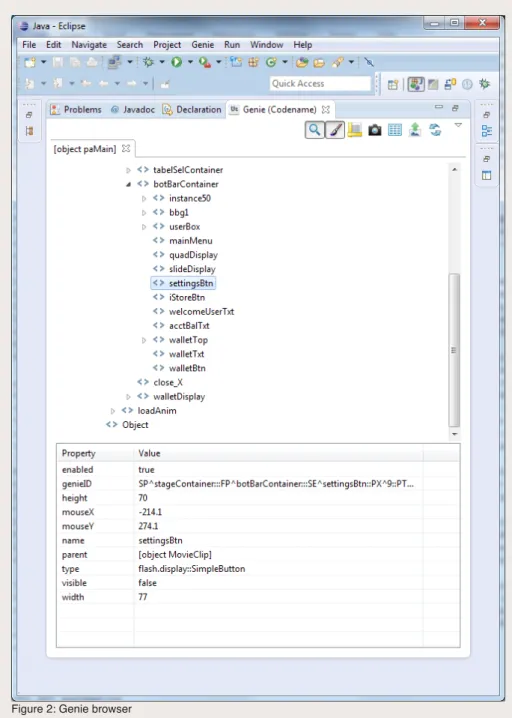
Genie includes a browser (figure 2) that helps you locate elements and discover their GenieIDs and other attributes.
Genie recorder
User actions within the Flash application are recorded as a generic Java script. Genie has no playback functionality; the script is intended to be pasted into Eclipse and run from there, somewhat similar to recording a script with Selenium IDE and then exporting it to Java.
An example Genie script is shown in figure 3. It is somewhat similar to Selenium RC code, and the recorder will help to ease you into Genie program-ming. There is no contextual menu to help create assertions; they have to be inserted manually, in Eclipse. Once you become proficient at writing code by hand you will almost never use Genie recorder again.
As can be seen from the script, Genie has its own test framework called GenieScript. This is all you need to create and execute extensive test suites,
Figure 1: three-tier architecture (public domain image from http://en.wikipedia.org/wiki/ File:Overview_of_a_three-tier_application_vectorVersion.svg)
Database Storage
>GET SALES
TOTAL >GET SALES TOTAL
GET LIST OF ALL SALES MADE LAST YEAR
ADD ALL SALES TOGETHER 4 TOTAL SALES
QUERY SALE 1SALE 2 SALE 3 SALE 4
Data tier
Presentation tier
Logic tier
This layer coordinates the application, processes commands, makes logical decisions and evaluations, and performs calculations. It also moves and processes data between the two surrounding layers.
Here information is stored and retrieved from a database or file system. The information is then passed back to the logic tier for processing, and then eventually back to the user. The top-most level of the application is the user interface. The main function of the interface is to translate tasks and results to something the user can understand.
although it does not have all the features of more mature frameworks such as JUnit or TestNG which are often used instead. Genie also features built-in custom logging which produces an XML file, with an XSLT provided to convert it to viewable HTML. The file can of course be parsed with any tool, but it does not follow any established format such as JUnit’s. Furthermore, the log is limited to only Genie commands: if your test fails in any other step (for example an assert), this will not be logged automati-cally. Genie does have extra commands to log your own events, but this is additional overhead.
If you decide to use some other frame-work such as JUnit or TestNG you will probably use the logging capabilities it provides so the logs can be parsed automatically by your continuous integra-tion server, and once you have finished debugging your test will want to turn off Genie’s logging. This is done with:
1. LogConfig logger = new
LogConfig();
2. logger.
setNoLogging(true);
All your Selenium skills (and frustrations) still apply!
Because Genie, like Selenium, is a Java library, having the framework of your choice run your tests is trivial. Figure 4 shows how to do this with JUnit; figure 5 combines it with Selenium.
I have also found that all my Genie tests run with no problems extended from GroovyTestCase. This is significant because Groovy, a scripting language for the Java platform, is natively understood by SoapUI. I’ll explain this significance further in the section on API automation below.
The Page Object Model
Think of your application as a collec-tion of screens, each with a number of controls and actions that it can perform. If you can describe one screen’s actions as a collection of methods, abstracting away all the controls, and make it independent of any other screen, then you have a PageObject. Alan Richardson described the advantages of this in Professional Tester August 2012 (http://professionaltester. com/magazine/backissue/PT016/ ProfessionalTester-August2012-Richardson.pdf).
Genie, with its obscure GenieIDs, is perfect for this approach! Further, because Flash is often embedded in a webpage via a browser plug-in, there is great incentive to combine the automation with Selenium. Using the PageObject pattern, you can effectively hide which actions require accessing Selenium and which are accessing Genie.
Page loading delays
As with any web technology, there are issues with page loading delays. Since the Flash application runs in a plug-in you will not be able to query the browser to see if the page is loaded – it is always loaded.
1. package scripts;
2.
3. import com.adobe.genie.genieCom.SWFApp;
4. import com.adobe.genie.executor.GenieScript;
5. import com.adobe.genie.executor.components.*;
6. import com.adobe.genie.executor.uiEvents.*;
7. import static com.adobe.genie.executor.GenieAssertion.*;
8. import com.adobe.genie.executor.enums.GenieLogEnums;
9.
10.
11. /**
12. * This is a sample Genie script.
13. */
14. //Change name of the class
15. public class Unnamed extends GenieScript {
16.
17.
public Unnamed() throws Exception {
18.
super();
19.
20.
}
21.
22.
@Override
23.
public void start() throws Exception {
24.
//Turn this on if you want script to exit
25.
//when a step fails
26.
EXIT_ON_FAILURE = false;
27.
28.
//Turn this on if you want a screenshot
29.
//to be captured on a step failure
30.
CAPTURE_SCREENSHOT_ON_FAILURE = false;
31.
32.
SWFApp app1=connectToApp(“[object paMain]”);
33.
(new GenieDisplayObject(“SP^stageContainer:::FP^loginContainer:::SE^userN
ameTxt::PX^6::PTR^0::IX^1::ITR^0”,app1)).click(56,17,436,174,1090,821,3,f
alse);
34.
(new GenieTextInput(“SP^stageContainer:::FP^loginContainer:::SE^userNameT
xt::PX^6::PTR^0::IX^1::ITR^0”,app1)).selectText(0,0);
35.
(new GenieTextInput(“SP^stageContainer:::FP^loginContainer:::SE^userNameT
xt::PX^6::PTR^0::IX^1::ITR^0”,app1)).input(“147258369”);
36.
(new GenieDisplayObject(“SP^stageContainer:::FP^loginContainer:::SE^passw
ordTxt::PX^6::PTR^0::IX^2::ITR^0”,app1)).click(63,12,443,246,1090,821,3,f
alse);
37.
(new GenieTextInput(“SP^stageContainer:::FP^loginContainer:::SE^passwordT
xt::PX^6::PTR^0::IX^2::ITR^0”,app1)).selectText(0,0);
38.
(new GenieTextInput(“SP^stageContainer:::FP^loginContainer:::SE^passwordT
xt::PX^6::PTR^0::IX^2::ITR^0”,app1)).input(“1234”);
39.
(new GenieDisplayObject(“SP^stageContainer:::FP^loginContainer:::SE^login
Btn::PX^6::PTR^0::IX^4::ITR^0”,app1)).click(42,44,1011,218,1090,821,3,fal
se);
40.
}
41. }
1. import junit.framework.TestCase;
2.
3. import com.adobe.genie.executor.Genie;
4. import com.adobe.genie.executor.LogConfig;
5. import com.adobe.genie.executor.components.GenieDisplayObject;
6. import com.adobe.genie.executor.components.GenieTextInput;
7. import com.adobe.genie.genieCom.SWFApp;
8.
9. public class MyTestSuite extends TestCase {
10.
11.
Genie jean;
12.
SWFApp app1;
13.
14.
protected void setUp() throws Exception {
15.
super.setUp();
16.
17.
LogConfig logger = new LogConfig();
18.
logger.setLogFolder(“log”);
19.
jean = Genie.init(logger);
20.
app1 = jean.connectToApp(“[object paMain]”);
21.
jean.EXIT_ON_FAILURE = true;
22.
jean.EXIT_ON_TIMEOUT = true;
23.
jean.CAPTURE_SCREENSHOT_ON_FAILURE = false;
24.
}
25.
26.
protected void tearDown() throws Exception {
27.
28.
jean.stop();
29.
30.
super.tearDown();
31.
}
32.
33.
void testCase_LogIn() {
34.
35.
(new GenieDisplayObject(“SP^stageContainer:::FP^loginContainer:::SE^userN
ameTxt::PX^6::PTR^0::IX^1::ITR^0”, app1)).click();
36.
(new GenieTextInput(“SP^stageContainer:::FP^loginContainer:::SE^userNameT
xt::PX^6::PTR^0::IX^1::ITR^0”, app1)).selectText(0, 100);
37.
(new GenieTextInput(“SP^stageContainer:::FP^loginContainer:::SE^userNameT
xt::PX^6::PTR^0::IX^1::ITR^0”, app1)).input(“147258369”);
38.
(new GenieDisplayObject(“SP^stageContainer:::FP^loginContainer:::SE^passw
ordTxt::PX^6::PTR^0::IX^2::ITR^0”, app1)).click();
39.
(new GenieTextInput(“SP^stageContainer:::FP^loginContainer:::SE^passwordT
xt::PX^6::PTR^0::IX^2::ITR^0”, app1)).selectText(0, 100);
40.
(new GenieTextInput(“SP^stageContainer:::FP^loginContainer:::SE^passwordT
xt::PX^6::PTR^0::IX^2::ITR^0”, app1)).input(“1234”);
41.
(new GenieDisplayObject(“SP^stageContainer:::FP^loginContainer:::SE^login
Btn::PX^6::PTR^0::IX^4::ITR^0”, app1)).click();
42.
}
43.
44.
void testCase2() {
45.
...
46.
}
47. }
1. import junit.framework.TestCase;
2.
3. import org.openqa.selenium.WebDriver;
4. import org.openqa.selenium.firefox.FirefoxDriver;
5.
6. import com.adobe.genie.executor.Genie;
7. import com.adobe.genie.executor.LogConfig;
8. import com.adobe.genie.executor.components.GenieDisplayObject;
9. import com.adobe.genie.executor.components.GenieTextInput;
10. import com.adobe.genie.genieCom.SWFApp;
11.
12. public class MyTestSuite extends TestCase {
13.
14.
Genie jean;
15.
SWFApp app1;
16.
WebDriver driver;
17.
18.
protected void setUp() throws Exception {
19.
super.setUp();
20.
21.
driver = new FirefoxDriver();
22.
driver.get(“http://some.server.test/login/”);
23.
24.
LogConfig logger = new LogConfig();
25.
logger.setLogFolder(“log”);
26.
jean = Genie.init(logger);
27.
app1 = jean.connectToApp(“[object paMain]”);
28.
jean.EXIT_ON_FAILURE = true;
29.
jean.EXIT_ON_TIMEOUT = true;
30.
jean.CAPTURE_SCREENSHOT_ON_FAILURE = false;
31.
}
32.
33.
protected void tearDown() throws Exception {
34.
35.
jean.stop();
36.
driver.quit();
37.
38.
super.tearDown();
39.
}
40.
41.
void testCase2() {
42.
// tests now have access to Selenium such as
43.
driver.findElement(By...)
44.
}
45. }
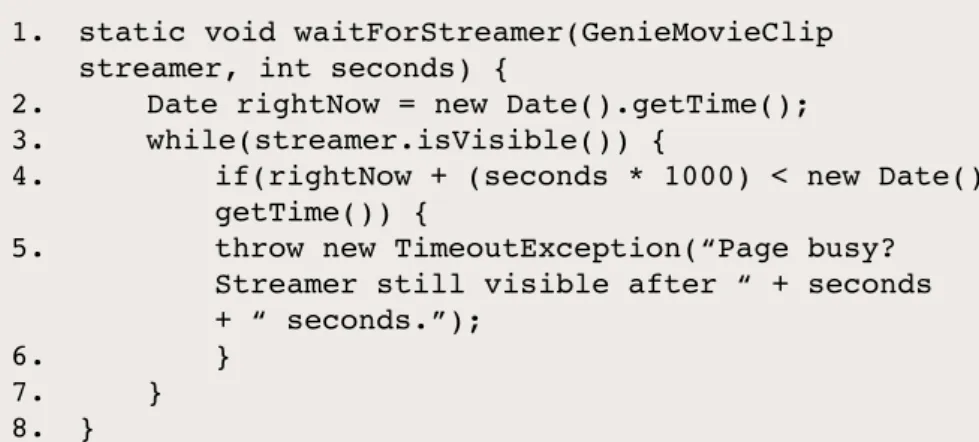
Just as in Selenium, you will need to use tricks to discover if elements are present, detect busy streamers, and so on. Genie has methods for all elements, such as .isEnabled(), .isPresent(), and .isVisible(). So, for example, waiting for something like a busy streamer to go away is simple (figure 6).
XPath and PageFactory
Neither XPath not PageFactory (a design pattern used in a framework to make discovery of elements simpler and more dynamic) is implemented in Genie. However a useful feature of the Genie browser gives Genie the ability to handle both: it can dump an XML representa-tion of the entire applicarepresenta-tion. The code to do this is shown in figure 7 and you can then search for GenieIDs using XPath as shown in figure 8.
The Genie IDs are guaranteed to be consistent from one run of your applica-tion to the next. However, it is possible for the developer to create a Flash applica-tion in which controls look the same but are instantiated on the fly, making the GenieIDs effectively dynamic. This can be a problem but PageFactory solves it by finding the GenieIDs on the fly.
To build your own PageFactory you will need to add the Java Reflection library to your framework.
API automation with SoapUI
In many Flash projects the underlying API will be available to testing long before the UI materializes (assuming it ever does). It makes sense to test the API first.
The popular API testing framework SoapUI has limited support for AMF mes-sages and no support for any flavour of the RTMP protocol. To test the APIs you
will need to have HTTP enabled on the server: RTMP and HTTP can be enabled simultaneously. Although you may not be doing this in production, bear in mind that (i) you are not testing the protocol nor, probably, the server configuration; (ii) transmission via the RTMP protocol will be validated as part of your end-to-end test, which you will probably do through the UI. Right now we are concerned only with functional testing of the APIs.
There is no call discovery for AMF mes-sages in SoapUI. This is the equivalent of reading in a WSDL for SOAP endpoints, or a WADL for REST endpoints. For AMF everything has to be done by hand. However SoapUI does provide other goodies: test scripting, Groovy exten-sions and XML parsing of responses. We
will now see how to hook up AMF with SoapUI tests. There is a useful, short tutorial on these at http://soapui.org/AMF/ calling-amf-services.html.
Method discovery
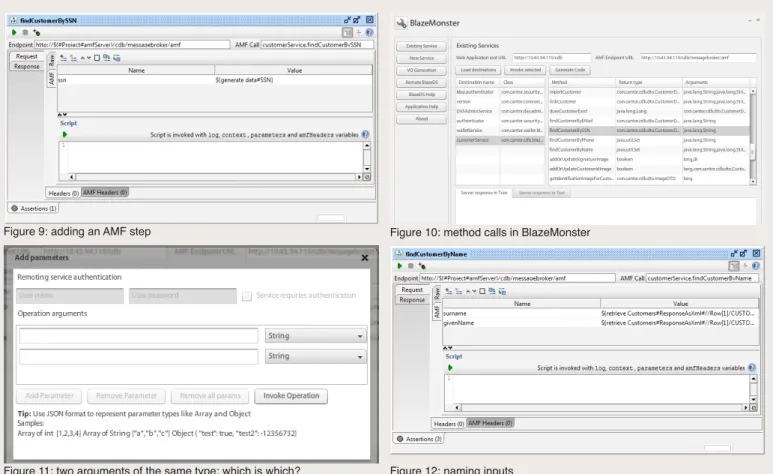
As there is no way to define an AMF endpoint in SoapUI, one just creates an empty project (unless the project also contains SOAP and/or REST endpoints) and a new test case. When you add an AMF step to your test case you will need to provide three pieces of information: the endpoint, the AMF call, and all the inputs (figure 9). If you are lucky you will be able to get these from a detailed technical specification provided by your developers. If you are like me and you want any documentation you will have to write it yourself.
1. static void waitForStreamer(GenieMovieClip
streamer, int seconds) {
2.
Date rightNow = new Date().getTime();
3.
while(streamer.isVisible()) {
4.
if(rightNow + (seconds * 1000) < new Date().
getTime()) {
5.
throw new TimeoutException(“Page busy?
Streamer still visible after “ + seconds
+ “ seconds.”);
6.
}
7. }
8. }
Figure 6: waiting for a busy streamer to go away
1. String appXml = SynchronizedSocket.getInstance().
getAppXMLGeneric(app.name);
2. ByteArrayInputStream inputStream = new
ByteArrayInputStream(appXml.getBytes());
3. DocumentBuilder docBuilder =
DocumentBuilderFactory.newInstance().
newDocumentBuilder();
4. Element docElement = docBuilder.parse(inputStream).
documentElement;
5. XPath xpath = XPathFactory.newInstance().
newXPath();
Figure 7: dumping an XML representation of the application
1. Node page = xpath.evaluate( “//*[@name=” +
fieldname + “’]”, pageNode, XPathConstants.NODE );
2. return pageNodes.attributes.
getNamedItem(“genieID”).getNodeValue();
AMF endpoint
This is made up of several parts as follows: {protocol}://{server}/{service}/mes-sagebroker/amf. You will have to find out the parts in curly brackets from develop-ment. Remember that for SoapUI the protocol has to be http or https: rtmp will not work. For secure messaging the last part is sometimes “messagebroker/amf”. Note however that this does not make the messaging secure: configured secure transmission (the “s” part of https) does. Again, remember that for now we are only concerned with functional testing of the APIs and everything else just gets in the way of that.
AMF call
Now that we have an endpoint, we need to know the method calls. The tool BlazeMonster (http://sujitreddyg. wordpress.com/blazemonster/) can be used for, among other things, discovering them. For that we need only its “Existing Services” function. To use it, enter the web application’s root URL, that is the variable parts of the endpoint, and click “Load
destinations”. If everything is configured correctly, BlazeMonster fills in the AMF endpoint URL automatically and all the method calls are loaded up (figure 10). Note that BlazeMonster is not perfect. It shows all the method calls on the server, whether they are public (available to be called) or private (not exposed as callable methods). Later on, when you are actually making the call using SoapUI, if you get a response that such a method does not exist even though BlazeMonster says it does, check with your development whether that particular method is public or private. You can now determine the AMF call. It is {destination name}{method} as those are shown in BlazeMonster: I usually have both BlazeMonster and SoapUI open on facing screens, and just copy-paste every-thing between the two windows.
Now you can click on the “run step” button in SoapUI, and should get an error response saying that you did not supply any inputs (unless that call does not require any).
Simple inputs
These are simply added to the input window of SoapUI. In the example shown, the call is named “findCustomerBySSN” and it takes only one input: probably the SSN (social security number). I say “probably”, because BlazeMonster tells us only that there is one argument and that it is of type java.lang.String. It is able to read only the method signature so knows the number and type of inputs, but not what they represent. We can test our guess from within BlazeMonster using the “Invoke selected” button.
Unfortunately, things are seldom that simple! If the AMF call takes more than one argument, guessing what they are becomes harder. Even if you can do that, guessing which is which becomes very hard, especially if more than one of them are of the same type (figure 11).
The order in which the parameters are dis-played now becomes important. You will need to find out where, in the source code repository, is the interface to the service, then read the code and find the method by
Figure 9: adding an AMF step Figure 10: method calls in BlazeMonster
name, eg “findCustomerByName(String surname, String givenName)”. Then when creating the AMF step in SoapUI, give the inputs the same or similar names in the same order (figure 12). The name is not actually important, only the order is.
Complex inputs
Things now (as always in testing) get worse. We are accessing via AMF the underlying methods, right in the technology layer. That means the arguments of some of the calls are probably not simple numeri-cal or string variables. They may be java. util.Collection, or a custom object. Custom objects are easy to identify (their type starts with com.<your_company_name>) but dif-ficult to deal with. Selecting a method with these argument types in BlazeMonster and clicking the “Invoke selected” button gives the error message “Selected operation expects object types which are not sup-ported by this application. Generate code for invoking this operation”.
And so we return to Groovy, the scripting language that can be used to generate the inputs for the call within SoapUI. Luckily for non-Groovers, Groovy is source-com-patible with Java. You can write simple Java code to create the needed object(s) and it should work in your SoapUI AMF step with very little modification. First, create a new AMF step in the way already described: enter the endpoint and AMF call and name the input. There could be more than one input, but in that case you should have a discussion with devel-opment about whether they would want to consider redesigning this call.
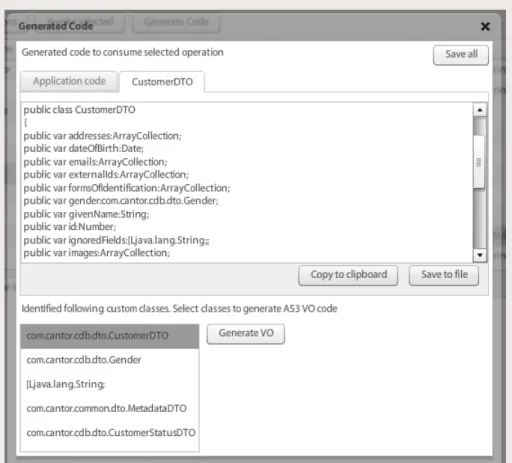
Next, in BlazeMonster, select the appropri-ate method and click on “Generappropri-ate code”. A new window appears (figure 13) contain-ing AS3 (ActionScript) VO (Value Objects) code for Java classes. The lower pane
Figure 13: AS3 VO code and custom objects
1. package com.company.dto
2. {
3. [Bindable]
4. [RemoteClass(alias=’com.company.dto.CustomerDTO’)]
5. public class CustomerDTO
6. {
7. public var dateOfBirth:Date;
8. public var givenName:String;
9. public var id:Number;
10. public var surname:String;
11.
12. public function CustomerDTO()
13. {
14. super()
15. }
16. }
17. }
Figure 14: AS3 VO code for a specific custom object
1. import com.company.dto.CustomerDTO
2. def scriptCustomer = new CustomerDTO()
3. scriptCustomer.givenName = “Peter”
4. scriptCustomer.surname = “Parker”
5. scriptCustomer.dateOfBirth = new GregorianCalendar
(1962, Calendar.AUGUST, 15).getTime()
6. parameters[‘customer’] = scriptCustomer
lists the input and output custom classes. Select the class you are trying to create and click on “Generate VO”. This opens a new tab with more AS3 code, which gives a lot of hints about what is needed. Copy-paste it into the script pane of the AMF call in SoapUI. An example of what it looks like is shown in figure 14.
Now we will convert this to Groovy code SoapUI can understand. I usually start by enclosing all the code in a comment block. Now change lines 4 and 5 to lines 1 and 2 of the Groovy script as shown in figure 15. Next, we need the jar file that defines the object: place this in SoapUI’s bin/ext folder and restart SoapUI to load it into the ses-sion. Now click the run button. If you get a dialog saying something like “paramets {} amfHeaders {}” you’re OK! If you get errors, don’t move on until you resolve them. Then, continue building the script inputs (lines 3-5 in figure 15, replacing lines 7-9). You will have to find out, from the source code (which may not be trivial) or from developers, which variables are required: in this example, we’ll assume id is optional. Note also that our three new lines do not introduce the variables in the same order as the old ones: this is fine because it’s Groovy.
SoapUI cannot handle the situation where one of the variables is another custom object. Even if you do get all the pieces lined up, the call will probably fail. I don’t have any way around this brick wall at present except that, again, the design might be questioned. Once the object has been built up, assign it back to the variable name (line 6 in figure 15) and run the script. If you see a dialog showing your inputs (figure 16), you are ready to run the test step.
Figure 16: call inputs confirmed
1. <flex.messaging.io.amf.ASObject>
2.
<dateOfBirth>1962-08-15 00:00:00.0 PDT
<dateOfBirth>
3. <givenName>Peter</givenName>
4. <surname>Parker</surname>
5. </flex.messaging.io.amf.ASObject>
Figure 17: the response as XML (simple objects)
1. <flex.messaging.io.amf.ASObject
serialization=”custom”>
2.
<string>dateOfBirth</string>
3.
<date>1962-08-15 00:00:00.0 PDT</date>
4. <string>givenName</string>
5. <string>Peter</string>
6. <string>surname</string>
7. <string>Parker</string>
8. </flex.messaging.io.amf.ASObject>
Complex responses
The AMF response is a binary object. You can see a representation of sorts on SoapUI’s “Raw response” tab. However SoapUI also goes to great lengths to give you a more familiar representation: “Response as XML”.
For simple response objects it usually does a pretty good job of guessing what belongs where so the output is quite readable (figure 17). For example, givenName could be validated using the XPath //givenName. For complex custom objects, the
response can be more verbose (figure 18). In this case XPath axis is needed, eg //string[text()=’givenName’]/ following-sibling::*[1].
Dealing with multiple architectures
Unfortunately this method for handling complex inputs will not work for .NET logic tiers, not least because SoapUI cannot import DLLs and serialization of objects is done differently by .NET and Java.
I have seen some workarounds tried: for example publishing the information on a special JMS test queue; duplicat-ing information in the message headers; exposing methods as a SOAP call. All achieved some success but all require additional development work. If you will be testing a Flash application using .NET the only suggestion I can offer at present is that you address this issue as urgently as possible
Mark Lehky has worked in test automation in multiple industries since 1999. He blogs on the subject at http://siking.wordpress.com and keeps in touch via LinkedIn (http://linkedin.com/in/marklehky)
Achieve test coverage of up to 95% Increase test automation up to 90% Reduce your time-to-market
Free Demo
www.tricentis.com/PT
Achieve test coverage of up to 95% Increase test automation up to 90% Reduce your time-to-market