the part of Dialogic Inc. and its affiliates or subsidiaries (“Dialogic”). Reasonable effort is made to ensure the accuracy of the information contained in the document. However, Dialogic does not warrant the accuracy of this information and cannot accept responsibility for errors, inaccuracies or omissions that may be contained in this document.
INFORMATION IN THIS DOCUMENT IS PROVIDED IN CONNECTION WITH DIALOGIC® PRODUCTS. NO LICENSE, EXPRESS OR IMPLIED, BY ESTOPPEL OR OTHERWISE, TO ANY INTELLECTUAL PROPERTY RIGHTS IS GRANTED BY THIS DOCUMENT. EXCEPT AS PROVIDED IN A SIGNED AGREEMENT BETWEEN YOU AND DIALOGIC, DIALOGIC ASSUMES NO LIABILITY WHATSOEVER, AND DIALOGIC DISCLAIMS ANY EXPRESS OR IMPLIED WARRANTY, RELATING TO SALE AND/OR USE OF DIALOGIC PRODUCTS INCLUDING LIABILITY OR WARRANTIES RELATING TO FITNESS FOR A PARTICULAR PURPOSE, MERCHANTABILITY, OR INFRINGEMENT OF ANY INTELLECTUAL PROPERTY RIGHT OF A THIRD PARTY.
Dialogic products are not intended for use in certain safety-affecting situations. Please see http://www.dialogic.com/about/legal.htm for more details. Due to differing national regulations and approval requirements, certain Dialogic products may be suitable for use only in specific countries, and thus may not function properly in other countries. You are responsible for ensuring that your use of such products occurs only in the countries where such use is suitable. For information on specific products, contact Dialogic Inc. at the address indicated below or on the web at www.dialogic.com. It is possible that the use or implementation of any one of the concepts, applications, or ideas described in this document, in marketing collateral produced by or on web pages maintained by Dialogic may infringe one or more patents or other intellectual property rights owned by third parties. Dialogic does not provide any intellectual property licenses with the sale of Dialogic products other than a license to use such product in accordance with intellectual property owned or validly licensed by Dialogic and no such licenses are provided except pursuant to a signed agreement with Dialogic. More detailed information about such intellectual property is available from Dialogic’s legal department at 9800 Cavendish Blvd., 5th Floor, Montreal, Quebec, Canada H4M 2V9. Dialogic encourages all users of its products to procure all necessary intellectual property licenses required to implement any concepts or applications and does not condone or encourage any intellectual property infringement and disclaims any responsibility related thereto. These intellectual property licenses may differ from country to country and it is the responsibility of those who develop the concepts or applications to be aware of and comply with different national license requirements.
Dialogic, Dialogic Pro, Dialogic Blue, Veraz, Brooktrout, Diva, Diva ISDN, Making Innovation Thrive, Video is the New Voice, VisionVideo, Diastar, Cantata, TruFax, SwitchKit, SnowShore, Eicon, Eiconcard, NMS Communications, NMS (stylized), SIPcontrol, Exnet, EXS, Vision, PowerMedia, PacketMedia, BorderNet, inCloud9, I-Gate, ControlSwitch, NaturalAccess, NaturalCallControl, NaturalConference, NaturalFax and Shiva, among others as well as related logos, are either registered trademarks or trademarks of Dialogic Inc. and its affiliates or subsidiaries. Dialogic's trademarks may be used publicly only with permission from Dialogic. Such permission may only be granted by Dialogic’s legal department at 9800 Cavendish Blvd., 5th Floor, Montreal, Quebec, Canada H4M 2V9. Any authorized use of Dialogic's trademarks will be subject to full respect of the trademark guidelines published by Dialogic from time to time and any use of Dialogic’s trademarks requires proper acknowledgement.
The names of actual companies and products mentioned herein are the trademarks of their respective owners. Publication Date: June 2012
1.1 Introduction . . . 17
1.2 Media Server Operating Model . . . 17
2 Configuration . . . 19
2.1 media_server Application . . . 19
2.2 mediaserver Configuration Script . . . 19
2.3 Configuring Schema Validation . . . 20
2.4 media_server.xml Configuration File . . . 20
Example of Default media_server.xml File . . . 23
3 Feature and Protocol Package Support . . . 25
3.1 Feature Highlights . . . 25
3.2 Media Server Markup Language (MSML) Protocol Package Support. . . 26
3.3 MSML Support Details. . . 49
3.3.1 MSML Core Package Support . . . 49
3.3.2 MSML Conference Core Package Support. . . 49
<asn> . . . 51
<audiomix>. . . 52
<clamp> . . . 53
<createconference> . . . 54
<destroyconference> . . . 56
<gain> . . . 57
<join> . . . 59
<modifyconference> . . . 61
<modifystream> . . . 63
<n-loudest>. . . 64
<region>. . . 65
<root> . . . 69
<selector> . . . 70
<stream> . . . 71
<unjoin> . . . 74
<var> . . . 75
<var> Variable Types and Subtypes . . . 76
<videolayout> . . . 80
3.3.3 MSML Dialog Package Support. . . 81
3.3.4 MSML Audit Package Support . . . 81
4 Deviations from IETF RFC. . . 83
5 Feature Details . . . 85
5.1 SIP Session Timer . . . 85
5.1.1 Feature Description . . . 85
5.1.2 Enabling SIP Session Timer . . . 85
MS: SIP response to request for session timer support . . . 86
AS: SIP UPDATE request. . . 87
MS: SIP response to SIP UPDATE request . . . 87
5.1.3 Using SIP Session Timer with Dialogic® HMP Software . . . 87
5.2 SIP re-INVITE . . . 88
5.2.1 Feature Description . . . 89
5.2.2 Media Stream Direction Support . . . 89
5.3 HTTP Play and Record. . . 90
5.3.1 Feature Description . . . 90
5.3.2 Requirements for HTTP Support . . . 90
5.3.3 Dialog Execution . . . 90
5.3.4 Audio and Video Playback. . . 90
5.3.5 Audio and Video Recording . . . 91
6 Diagnostics . . . 93
6.1 Overview. . . 93
6.2 Logging Configuration. . . . 93
6.2.1 Configuration File Format . . . 93
6.2.2 Logging Labels . . . 94
6.2.3 Client Categories . . . 95
6.3 Log File Format. . . 96
7 Sample Use Case. . . 99
7.1 Use Case Description . . . 99
7.2 MSML Control Syntax in Use Case . . . 101
7.2.1 Establish Connections . . . 101
7.2.2 Play Main Prompt . . . 101
7.2.3 Play Video Portal Prompt. . . 102
7.2.4 Play Video Clip . . . 104
7.2.5 Record Message . . . 106
7.2.6 Replay Main Prompt . . . 107
7.2.7 Terminate Connections . . . 108
8 MSML Script Examples. . . 109
8.1 MSML Scripts for Audio Conferencing . . . 109
8.1.1 Creating a basic audio conference with <asn> and <n-loudest>. . . 109
8.1.2 Modifying a basic audio conference with <asn> and <n-loudest> . . . 109
8.1.3 Joining preferred party, full-duplex and listen-only parties to an audio conference. . 110 8.1.4 Call center coach-pupil conference . . . 110
8.1.5 Setting <stream> attribute for echo cancellation . . . 111
8.1.6 Muting an audio stream flowing into a conference . . . 111
8.1.7 Un-muting an audio stream flowing into a conference. . . 111
8.1.8 Un-joining streams using wildcards . . . 113
8.1.9 Continuous digit collection on a conference participant. . . 114
8.1.10 Destroying a conference . . . 116
8.2 MSML Scripts for Video Conferencing . . . 116
8.2.1 Creating a four party layout video conference . . . 116
8.2.2 Expanding a four party layout to a six party layout video conference . . . 117
8.2.3 Contracting a six party layout to a four party layout video conference . . . 118
8.2.8 Playing audio into a video conference . . . 122
8.3 MSML Scripts Examples for <var> element . . . 122
8.3.1 Playing the prompt for date. . . 122
8.3.2 Playing the prompt for digits . . . 123
8.3.3 Playing the prompt for duration. . . 123
8.3.4 Playing the prompt for money. . . 123
8.3.5 Playing the prompt for month . . . 123
8.3.6 Playing the prompt for number . . . 124
8.3.7 Playing the prompt for silence . . . 124
8.3.8 Playing the prompt for time. . . 124
8.3.9 Playing the prompt for weekday . . . 125
8.3.10 Playing the prompt for string. . . 125
A Media Server Markup Language (MSML) Overview . . . 127
A.1 Introduction . . . 127
A.2 MSML Elements . . . 127
A.2.1 <msml> . . . 128
A.2.2 <send> . . . 128
A.2.3 <result>. . . 128
A.2.4 <event>. . . 128
A.3 Stream Manipulation Elements . . . 128
A.3.1 <join> . . . 128
A.3.2 <modifystream> . . . 128
A.3.3 <unjoin> . . . 128
A.4 Conference Elements . . . 129
A.4.1 <createconference> . . . 129
A.4.2 <modifyconference> . . . 129
A.4.3 <destroyconference> . . . 129
A.5 Dialog Elements. . . 129
A.5.1 <dialogstart > . . . 129
A.5.2 <dialogend > . . . 129
A.6 Receiving Events from a Client . . . 129
A.7 Sending Events and Transaction Results to a Client. . . 130
A.7.1 Transaction Results . . . 130
A.7.2 Events. . . 130
A.8 Media Server Object Model . . . 130
A.8.1 Network Connections (conn) . . . 130
Definition . . . 130
Object Creation . . . 130
A.8.2 Conference (conf) . . . 131
Definition . . . 131
Object Creation . . . 132
A.8.3 Dialog (dialog). . . 132
Definition . . . 132
Object Creation . . . 132
A.8.4 Operator (oper) . . . 133
Object Creation. . . 133 Glossary. . . 135
1 Media Server Operating Environment . . . 18 2 Audio/Video Play/Record Scenario . . . 100 3 Network Connection Creation . . . 131
Tables
1 High-Level Feature Summary. . . 26
2 MSML Protocol Supported Packages. . . 27
3 MSML Core Package Support . . . 28
4 MSML Conference Core Package Support . . . 28
5 MSML Dialog Core Package Support. . . 32
6 MSML Dialog Base Package Support . . . 34
7 MSML Dialog Group Package Support . . . 41
8 MSML Dialog Transform Package Support . . . 41
9 MSML Audit Core Package Support. . . 43
10 MSML Audit Conference Package Support . . . 43
11 MSML Audit Connection Package Support . . . 45
12 MSML Audit Dialog Package Support . . . 47
Document No. Publication Date Description of Revisions
05-2513-009 June 2012 Updated for additional feature support.
MSML Control Syntax in Use Case section: Changed all instances of type="application/msml+xml"> to type="application/moml+xml">. (IPY00100293)
Configuration chapter: Updated media_server.xml Configuration File section with new keywords for multiple RTP IP address load balancing capabilities: MEDIA_CONTROL_PROTOCOL_RTP_IPADDR_MODE,
MEDIA_CONTROL_PROTOCOL_RTP_IPADDR1-4; and updated media_server.xml file example.
Feature and Protocol Package Support chapter: In Table 6, indicated support for the <var> element and its attributes. Added a reference page for the <var> element. Added the audio <stream> element attribute, dlgc:echo_cancel, added the “true_enhanced” value to the “preferred” attribute, updated the meaning of the "true" value by adding “when speech is present”.
MSML Script Examples chapter: Added a section for Setting <stream> attribute for echo cancellation. Added a section for <var> element usage.
Diagnostics chapter: Updated Configuration File Format section with new client RTP_INFO and Client Categories section with RTP_INFO description.
MSML Script Examples: Changed msml version="1.0" to msml version="1.1" throughout the examples.
05-2513-008 March 2012 Feature and Protocol Package Support chapter: In Table 4. MSML Conference Core Package Support, Section 8.12.2.1, added comments to the <clamp> element and the dtmf attribute.
05-2513-007 February 2012 Feature and Protocol Package Support chapter: Changed the <n-loudest> element from not supported to supported in Table 4. Added a section about MSML Support Details and added several element description to MSML Conference Core Package Support.
Deviations from IETF RFC chapter: Removed the <unjoin> element from the fourth bullet because wildcards for the <unjoin> element are now supported. Removed the last bullet because the notice about amt no longer applies.
05-2513-006 October 2011 Removed Dialogic® Multimedia Software for AdvancedTCA from the document
because this product is no longer supported.
Replaced <msml version="1.0"> with <msml version="1.1"> throughout the code.
About This Publication chapter: Updated Purpose and Scope sections.
Configuration chapter: Added the media_server.xml Configuration File section.
Feature and Protocol Package Support chapter: Updated this chapter in its entirety. Added the following tables, MSML Audit Core Package Support, MSML Audit Conference Package Support, MSML Audit Connection Package Support,
MSML Audit Dialog Package Support, and MSML Audit Stream Package Support.
Media Server Markup Language (MSML) Overview chapter: Updated the Introduction section.
05-2513-005 December 2010 Updated for HMP 4.1LIN support.
High-Level Feature Summary table: Updated to show support for Dialogic® HMP
Software 4.1LIN. Changed the PSTN row for Dialogic® HMP Software 3.0WIN
and Dialogic® HMP Software 3.1LIN to “D” for deprecated. Added “D” for
deprecated to the table legend.
Configuration chapter: added a paragraph about what to do after changing the media_server startup mode in the mediaserver Configuration Script section. (IPY00080612)
Client Categories section: Added OFFER_ANSWER to the SIP Call Control category and added PORT_STREAM to the Connections category.
05-2513-004 September 2008 High-Level Feature Summary table: Updated to show PSTN not supported for Dialogic® HMP Software 3.0WIN and Dialogic® HMP Software 3.1LIN.
05-2513-003 February 2008 High-Level Feature Summary table: Updated to reflect PSTN support for Dialogic®
HMP Software 3.0WIN and Dialogic® HMP Software 3.1LIN and Video
support for Dialogic® HMP Software 3.0WIN.
05-2513-002 December 2007 About This Publication chapter: Updated Scope section (audio conferencing is supported).
Configuration chapter: Updated media_server Application section and mediaserver Configuration Script section to identify Linux specific information and add Windows information. Updated Configuring Schema Validation section to include msml.xsd and information on enabling/disabling feature on Windows® systems.
Sample Use Case chapter: Added I-frame information to Step 5G in Record Message section. Updated Audio/Video Play/Record Scenario figure to include step 5G.
Feature and Protocol Package Support chapter: Added Feature Highlights section. Renamed title of MSML and MOML sections from “...Feature Support Matrix” to “...Protocol Support Matrix”.
Feature Details chapter: New chapter. Includes SIP Session Timer, SIP re-INVITE, and HTTP Play and Record (the last section also includes HTTP requirements information which was moved from Feature Support chapter).
Guide” and removed certain references to MOML within the document. Configuration chapter: Added new section: Configuring Schema Validation. MOML Feature Support Matrix table: Changed the postspeech attribute in the
<record> section to supported.
05-2513-001-03 August 2006 General: Updates for “http://” scheme support.
MSML Feature Support Matrix table: Updated to reflect conference support. Deviations from IETF Draft chapter: Added two items related to conference support. Configuration File Format section: Added MEDIA_CODER component for RTF
logging.
Client Categories section: Updates to reflect conference support.
Conference Elements section: Added brief descriptions of the conference elements. Media Server Object Model section: Added a subsection describing the “Conference”
object.
05-2513-001-02 June 2006 Updates for diagnostics integration with RTF. 05-2513-001-01 April 2006 Initial version of document.
• Purpose
• Scope
• Intended Audience
• How to Use This Publication
• Related Information
Purpose
This publication documents the Media Server Markup Language (MSML) Media Control Interface software that provides an interface between an application server (AS) and Dialogic’s host-based PowerMedia Server.
This publication is for users of the MSML Media Server Software who choose to write applications that require remote control management of MS resources available on platforms running Dialogic®
PowerMedia™ Host Media Processing (HMP) software.
Additionally, this publication documents Dialogic’s compliance with the IETF RFC 5705 MSML specification, describing extensions, deviations, and/or omissions from the standard. RFC 5707 is considered the normative implementation reference that readers and developers should consult in conjunction with this guide.
Scope
The MSML Media Server Software functionality is being introduced in a phased approach. A phase typically introduces support for a previously unsupported package(s), element(s) or attribute(s). This manual documents the functionality provided by the current set of supported MSML packages as described in RFC5707 as implemented in this version of the MSML Media Server Software. This includes the following packages:
• MSML Core Package
• MSML Conferencing Core Package • MSML Dialog Core Package • MSML Dialog Base Package
• MSML Dialog Group Module Package (parallel topology only) • MSML Dialog Transform Primitives ModulePackage (gain only)
• MSML Dialog Speech Package • MSML Dialog Fax Detect Package • MSML Dialog Fax Send / Receive Package
Future implementation phases are planned to provide additional MSML support.
Intended Audience
This publication is for: • System Integrators
• Independent Software Vendors (ISVs) • Value Added Resellers (VARs)
• Original Equipment Manufacturers (OEMs)
This publication assumes that the reader is familiar with the Session Initiation Protocol (SIP) as defined in IETF RFC3261.
How to Use This Publication
This manual is divided into the following sections:
• Chapter 1, “MSML Media Server Software Overview” describes the role of the MSML Media Server Software in a Media Server environment.
• Chapter 2, “Configuration” explains how to configure the MSML Media Server Software for operation on a Media Server.
• Chapter 3, “Feature and Protocol Package Support” specifies high-level feature support by platform and identifies packages, elements, and attributes (as documented in the MSML IETF standard RFC5707) currently supported or not supported by the MSML Media Server Software.
• Chapter 4, “Deviations from IETF RFC” explains deviations from the MSML IETF RFC 5707 specification.
• Chapter 5, “Feature Details” provides details on features supported, including a feature description and how-to information.
• Chapter 7, “Sample Use Case” presents an application that demonstrates many of the features currently supported by the MSML Media Server Software.
• Chapter 6, “Diagnostics” describes the logging capabilities available to the MSML Media Server Software for diagnostic purposes.
• Appendix A, “Media Server Markup Language (MSML) Overview” provides a high-level introduction to MSML.
• http://www.dialogic.com/manuals/ (for Dialogic® product documentation) • http://www.dialogic.com/support/ (for Dialogic technical support)
This chapter provides an overview of the MSML Media Server Software. Topics include: • Introduction . . . 17
• Media Server Operating Model . . . 17
1.1
Introduction
The MSML Media Server Software is an integral part of the system software provided by Dialogic® Host Media Processing (HMP) Software Release 4.1LIN.
When the Dialogic® system software is installed on a media server (MS), the MSML Media Server Software enables a remote client, also known as an application server (AS), to control media resources.
Note: The MSML Media Server Software is based on the evolving Media Server Markup Language (MSML) as defined in the MSML IETF RFC 5707, which combines the original MSML and Media Object Markup Language (MOML) drafts.
The connection between the AS and MS is established using the SIP protocol; thereafter, media control commands/responses (in the form of MSML control syntax) are exchanged in SIP messages, such as the INFO message or the 200 OK response.
1.2
Media Server Operating Model
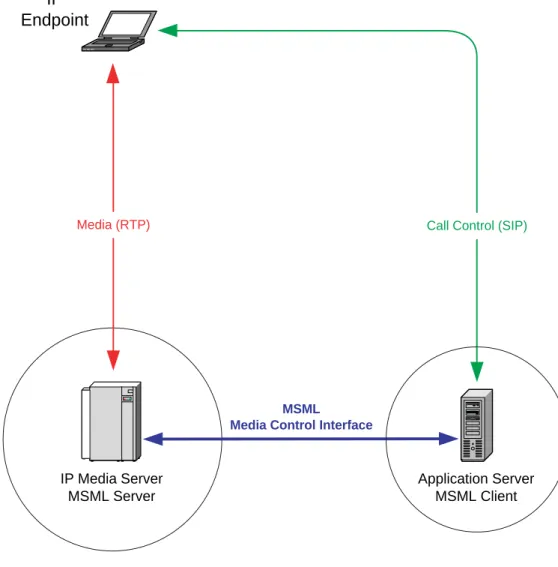
Figure 1 shows an environment where the media server (MS) and application server (AS) operate as separate entities. The MSML Media Server Software runs on the MS and provides the interface between the AS and the MS as shown. The MS is responsible for media processing only; call control is the responsibility of the AS.
The AS, as a MSML client, must be capable of interpreting and generating MSML control syntax and must support the SIP INVITE, 200 OK, ACK, BYE and INFO messages.
Figure 1. Media Server Operating Environment
Application Server MSML Client
IP
Endpoint
IP Media Server MSML Server
MSML
Media Control Interface
MSML Media Server Software.
• media_server Application . . . 19
• mediaserver Configuration Script . . . 19
• Configuring Schema Validation . . . 20
• media_server.xml Configuration File . . . 20
2.1
media_server Application
The media_server application runs on the media server and provides the MSML Media Server Software functionality.
On Linux, the media_server application can be configured using the mediaserver configuration script as described in Section 2.2, “mediaserver Configuration Script”, on page 19.
On Windows, the media_server application runs as a Windows service.
2.2
mediaserver Configuration Script
On Linux, the mediaserver configuration script is used to enable/disable and start/stop the
media_server application and is located in the bin directory.
The mediaserver configuration script provides the following options: mediaserver enable
Enables the media_server application. All subsequent calls to dlstart start the media_server
application. All subsequent calls to dlstop stop the media_server application. mediaserver disable
Disables the media_server application. Subsequent calls to dlstart do not start the
media_server application. mediaserver start
Starts the media_server application. The media_server application must be started after dlstart
successfully completes. mediaserver stop
After changing the media_server startup mode, and before starting the Dialogic® system (via
dlstart), logout and then login, or open a new shell and issue dlstart.
2.3
Configuring Schema Validation
When enabled, the schema validation functionality included in the product validates each and every XML body received from the application server against a pre-installed MSML schema,
msml.xsd, located in the cfg directory. The inbound XML body must pass the schema validation before it will be executed by the media server. This is especially useful for application developers during the development process. It ensures that the syntax and attribute definitions in the XML body are correct and match the supported functionality in the schema.
• To reduce CPU utilization, this functionality is disabled by default. It is recommended that it remain disabled in a production runtime environment.
• To enable this functionality, edit the media_server.xml configuration file, which is located in the cfg directory.
2.4
media_server.xml Configuration File
Additional customization of the MSML media server is available by modifying the
media_server.xml configuration file. This file is located in the cfg directory and is used by the media server during initialization to configure feature and system parameters. The following configurable parameters are supported:
• ConferenceAGC
–Controls automatic gain control (AGC) of the audio stream into the conference. –Values: ENABLE, DISABLE
–Default: ENABLE
• MEDIA_CONTROL_PROTOCOL_APP_SRV_ACCESS
–Controls access to the MSML media server. When enabled, only trusted application servers that are listed in the “TrustedAppList” table can access the media server. –Values: ENABLE, DISABLE
–Default: DISABLE (this allows access for all application hosts) • TrustedAppList
–Contains the IP addresses of all trusted servers that have authorization to access the MSML media server.
–Values: IP address name and dot-notation IP address pair for each entry –Default: Empty
• MEDIA_CONTROL_PROTOCOL_SIP_IPADDR –IP Address of the MSML media server
–Values: IP address name and dot-notation IP address pair –Default: Set by the MSML media server
• MEDIA_CONTROL_PROTOCOL_SIP_PORT –SIP port used for control messages
–SIP Transport protocol –Values: UDP, UDP_TCP –Default: UDP
• MEDIA_CONTROL_PROTOCOL_RTP_IPADDR_MODE
– Specifies the method to be used for selecting the media server IP address for RTP media sessions. There are three modes of operation:
LOAD_BALANCE: Used for up to four RTP IP addresses
(MEDIA_CONTROL_PROTOCOL_RTP_IPADDR1-4). Load balancing means the MSML Media Server distributes RTP sessions across active RTP IP addresses. If the link status of an RTP IP address goes down, then the remaining IP addresses are used. If the link status of all RTP IP addresses goes down, then SIP calls are rejected with error code 503 (Service Unavailable). Link status for each IP address is monitored automatically. In the case of a SIP ReINVITE, the SIP INVITE RTP IP address is re-used unless the link is down.
ACTIVE_STANDBY: Used for only two RTP IP addresses
(MEDIA_CONTROL_PROTOCOL_RTP_IPADDR1-2). The first RTP IP address is active and the second RTP IP address is in standby mode. If the link status of the first address goes down, then the second address becomes active.
LEGACY: Used for a single RTP IP address.
(MEDIA_CONTROL_PROTOCOL_RTP_IPADDR1 if specified, or default set using the CLI, is used for RTP media.)
–Values: LOAD_BALANCE, ACTIVE_STANDBY, LEGACY –Default: LEGACY
• MEDIA_CONTROL_PROTOCOL_RTP_IPADDR1 –IP address of the MSML media server used for RTP –Value: valid IP address
–Default: empty
• MEDIA_CONTROL_PROTOCOL_RTP_IPADDR2 –IP address of the MSML media server used for RTP –Value: valid IP address
–Default: empty
• MEDIA_CONTROL_PROTOCOL_RTP_IPADDR3 –IP address of the MSML media server used for RTP –Value: valid IP address
–Default: empty
• MEDIA_CONTROL_PROTOCOL_RTP_IPADDR4 –IP address of the MSML media server used for RTP –Value: valid IP address
– Default: empty • HTTPCaching
–Controls a caching mechanism to improve performance when servicing network/remote file operations.
–Values: ENABLE, DISABLE
–Default: DISABLED (Do not perform caching; all network request will result in remote access.)
• SchemaValidation
–Controls activation of the XML validation of the media control message body. Validation is performed based on the msml.xsd XML schema definition file. This feature is MIPs intensive and is recommended during application development and trouble shooting. Not recommended for normal operation.
–Values: ENABLE, DISABLE –Default: DISABLE
• DefaultStorageDirectory
–Defines the local directory used to store recorded files. This is the default directory when an explicit directory is not defined in the msml request.
–Value: local directory
–Default: C:\MediaServerRecordings • MSMLVersion
–MSMLversion used by the media server –Values: 1.0, 1.1
–Default: 1.1 • ContentType
–MSML control package Content Type –Values: xml, msml-xml
–Default: xml • Encoding
–XML encoding –Values: utf_8, us_ascii –Default: utf_8
• VideoFastUpdate
–Specifies the control method for receiving Video Fast Update request. –Values: INFO, DISABLE
–Default: INFO (request sent in SIP INFO message) • ResourceUsage
–Controls the media devices that are reserved for use by the media server. The media server will control the first 1 to N resources of a specified resources. N must be less than or equal to the maximum defined for each resource type contained in the HMP license. For example, if 100 IPM resources are defined in the license and 50 IPM resources are specified in this section, the MSML media server will control the first 50 resources (i.e. 1-50). The remaining 51-100 IPM resources are available for use by another application. –Values: -1, 1-N where N is less than or equal to maximum as defined by the HMP license.
<?xml version="1.0"?> <MEDIA_CONTROL_CONFIG> <Table>VirtualBoardConfig <row>Board_1
<Param>
<!-- ENABLE: Only allow access to application hosts that are in the Trusted App List --> <!-- DISABLE: allows access for all application hosts -->
<name>MEDIA_CONTROL_PROTOCOL_APP_SRV_ACCESS</name> <ParamValue>DISABLE</ParamValue>
</Param> <Param>
<!-- DEFAULT: SIP IP Address will be determined by the server --> <!-- SIP IP Address format has to be like: 192.168.1.1 --> <name>MEDIA_CONTROL_PROTOCOL_SIP_IPADDR</name>
<ParamValue>DEFAULT</ParamValue> </Param>
<Param>
<!-- SIP PORT -->
<name>MEDIA_CONTROL_PROTOCOL_SIP_PORT</name> <ParamValue>5060</ParamValue>
</Param> <Param>
<!-- SIP TRANSPORT either UDP or UDP_TCP --> <name>MEDIA_CONTROL_PROTOCOL_SIP_TRANSPORT</name> <ParamValue>UDP</ParamValue>
</Param> <Param>
<!-- RTP_IPADDR_MODE either LEGACY (default), LOAD_BALANCE or ACTIVE_STANDBY. --> <name>MEDIA_CONTROL_PROTOCOL_RTP_IPADDR_MODE</name>
<ParamValue>LEGACY</ParamValue> </Param>
<!-- RTP IP Address format has to be like: 192.168.1.1 --> <!-- For LOAD_BALANCE mode, up to 4 RTP IP addresses should be updated. --> <!-- For ACTIVE_STANDBY mode, up to 2 RTP IP addresses should be updated.--> <!-- For LEGACY mode, a single RTP IP address, --> <!-- MEDIA_CONTROL_PROTOCOL_RTP_IPADDR1 if specified, --> <!-- or default set using the CLI, is used for RTP media. --> <!-- <Param> -->
<!-- <name>MEDIA_CONTROL_PROTOCOL_RTP_IPADDR1</name> --> <!-- <ParamValue>146.152.1.10</ParamValue> --> <!-- </Param> --> <!-- <Param> --> <!-- <name>MEDIA_CONTROL_PROTOCOL_RTP_IPADDR2</name> --> <!-- <ParamValue>146.152.1.11</ParamValue> --> <!-- </Param> --> <!-- <Param> --> <!-- <name>MEDIA_CONTROL_PROTOCOL_RTP_IPADDR3</name> --> <!-- <ParamValue>146.162.1.10</ParamValue> --> <!-- </Param> --> <!-- <Param> --> <!-- <name>MEDIA_CONTROL_PROTOCOL_RTP_IPADDR4</name> --> <!-- <ParamValue>146.162.1.11</ParamValue> --> <!-- </Param> --> </row>
</Table>
<Table>TrustedAppList
<!-- Commented example of the syntax required to list a Trusted App IP address. <row>
<Param>
<name>IPAddress</name>
</Param> </row> --> </Table>
<AdaptorPort>32868</AdaptorPort> For Internal Use <!-- HTTP Caching - either ENABLE or DISABLE --> <HTTPCaching>DISABLE</HTTPCaching>
<!-- Schema Validation - either ENABLE or DISABLE --> <SchemaValidation>DISABLE</SchemaValidation>
<!-- Default Storage Directory - Fully qualified directory path used as a default directory for storage -->
<!-- Commented examples of using the Default Storage Directory. --> <DefaultStorageDirectory>C:\MediaServerRecordings</DefaultStorageDirectory> <!-- MSMLVersion - either 1.0 or 1.1 -->
<MSMLVersion >1.1</MSMLVersion>
<!-- ContentType - either xml or msml_xml --> <ContentType >xml</ContentType>
<!-- Encoding - either utf_8 or us_ascii --> <Encoding >utf_8</Encoding>
<!-- ClearDB - either ENABLE or DISABLE -->For Internal Use Only <ClearDB>DISABLE</ClearDB> For Internal Only
<!-- DTMFStartTimer - either ENABLE or DISABLE --><DTMFStartTimer>DISABLE</DTMFStartTimer> For Internal Only
<!-- AdvDigitPattern - either ENABLE or DISABLE --> <AdvDigitPattern>DISABLE</AdvDigitPattern> For Internal Only <!-- VideoFastUpdate - either INFO or DISABLE -->
<VideoFastUpdate >INFO</VideoFastUpdate >
<!-- Explicitly define the maximum number of each resource type that is available to the media server.
-1 = use all resources of that type. --> <ResourceUsage>
<MaxIpm>-1</MaxIpm> <MaxIpt>-1</MaxIpt> <MaxDx>-1</MaxDx> <MaxMm>-1</MaxMm> </ResourceUsage> </MEDIA_CONTROL_CONFIG>
This chapter describes the high-level features supported by the current version of the MSML Media Server Software, MSML protocol support, and other related topics.
• Feature Highlights . . . 25
• Media Server Markup Language (MSML) Protocol Package Support . . . 26
• MSML Support Details . . . 49
3.1
Feature Highlights
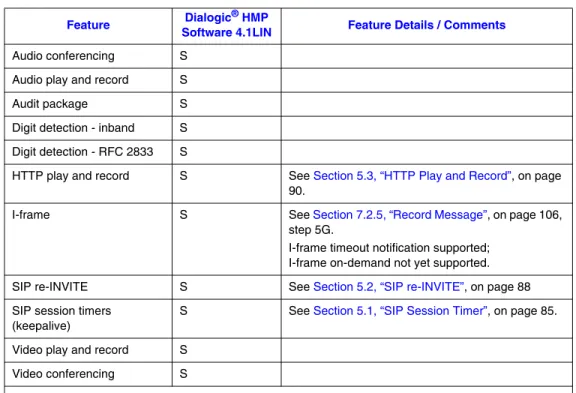
The MSML Media Server Software level of support varies in conjunction with the associated Dialogic Host Media Processing platform which it uses to provide media operations and services. Table 1 presents the high-level features and functionality supported in the current version of the MSML Media Server Software with respect to Dialogic platforms.
As new features and functionality are introduced, this table will be updated to reflect the latest supported capability.
3.2
Media Server Markup Language (MSML) Protocol
Package Support
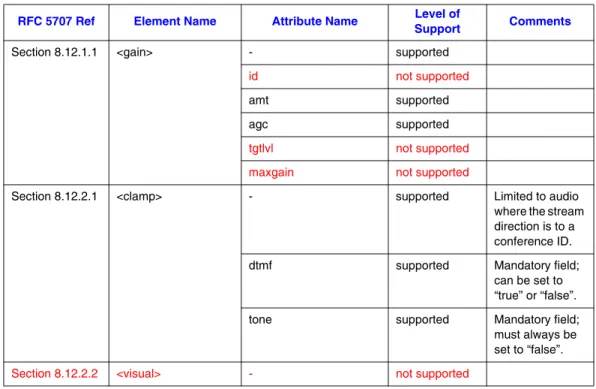
The following section describes the current level of support for MSML Packages and the elements and attributes defined within each MSML Package. Supported items are shown in black text; unsupported items are shown in red text. The “Comment” column indicates restrictions or limitations that the current version of the MSML Media Server Software imposes.
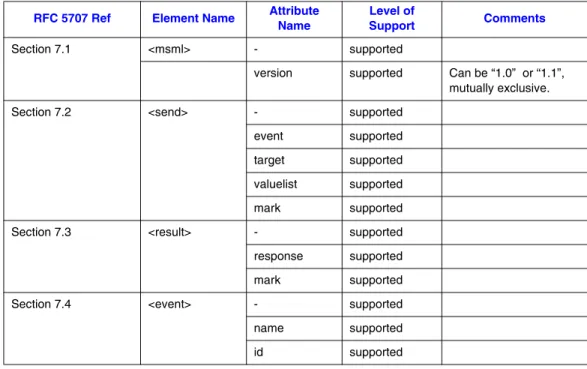
Table 2 shows the high-level support view for the complete set of packages as defined in RFC5707. Additional details are provided in subsequent tables describing element and attribute level support for each package available.
Note: The level of support is correlated against the IETF standard RFC 5707 Media Server Markup Language.
Table 1. High-Level Feature Summary
Feature Software 4.1LINDialogic® HMP Feature Details / Comments
Audio conferencing S
Audio play and record S
Audit package S
Digit detection - inband S Digit detection - RFC 2833 S
HTTP play and record S See Section 5.3, “HTTP Play and Record”, on page 90.
I-frame S See Section 7.2.5, “Record Message”, on page 106,
step 5G.
I-frame timeout notification supported; I-frame on-demand not yet supported.
SIP re-INVITE S See Section 5.2, “SIP re-INVITE”, on page 88
SIP session timers (keepalive)
S See Section 5.1, “SIP Session Timer”, on page 85.
Video play and record S
Video conferencing S
Legend:
S = supported; NS = not supported
RFC 5707 Ref
Package
Name Requirement Level of Support
Section 7 MSML Core
Package
Mandatory Supported, see Table 3, “MSML
Core Package Support”, on page 28.
Section 8 MSML
Conference Core Package
Conditionally Mandatory, for Conferencing
Supported, see Table 4, “MSML Conference Core Package Support”, on page 28. Section 9.6 MSML Dialog
Core Package
Conditionally Mandatory, for Dialogs
Supported, see Table 5, “MSML Dialog Core Package Support”, on page 32.
Section 9.7 MSML Dialog Base Package
Conditionally Mandatory, for Dialogs
Supported, see Table 6, “MSML Dialog Base Package Support”, on page 34.
Section 9.8 MSML Dialog Group Package
Optional Supported, see Table 7, “MSML
Dialog Group Package Support”, on page 41.
Section 9.9 MSML Dialog Transform Package
Optional Supported, see Table 8, “MSML
Dialog Transform Package Support”, on page 41. Section 9.10 MSML Dialog
Speech Package
Optional Not Supported
Section 9.11 MSML Dialog Fax Detection Package
Optional Not Supported
Section 9.12 MSML Dialog Fax
Send/Receive Package
Optional Not Supported
Section 10.1 MSML Dialog Audit Core Package
Conditionally Mandatory, for Auditing
Supported, see Table 9, “MSML Audit Core Package Support”, on page 43.
Section 10.2 MSML Audit Conference Package
Conditionally Mandatory, for Auditing Conference, Conference Dialog, and Conference Stream
Supported, see Table 10, “MSML Audit Conference Package Support”, on page 43. Section 10.3 MSML Audit
Connection Package
Conditionally Mandatory, for Auditing Connection, Connection Dialog, and Connection Stream
Supported, see Table 11, “MSML Audit Connection Package Support”, on page 45. Section 10.4 MSML Audit
Dialog Package
Conditionally Mandatory, for Auditing Dialog
Supported, see Table 12, “MSML Audit Dialog Package Support”, on page 47.
Section 10.5 MSML Audit Stream Package
Conditionally Mandatory, for Auditing Stream
Supported, see Table 13, “MSML Audit Stream Package Support”, on page 48.
Table 3. MSML Core Package Support
RFC 5707 Ref Element Name Attribute Name Level of Support Comments
Section 7.1 <msml> - supported
version supported Can be “1.0” or “1.1”, mutually exclusive.
Section 7.2 <send> - supported
event supported target supported valuelist supported mark supported
Section 7.3 <result> - supported
response supported mark supported
Section 7.4 <event> - supported
name supported id supported
Table 4. MSML Conference Core Package Support
RFC 5707 Ref Element Name Attribute Name Support Level of Comments
Section 8.3 <createconference> - supported
name supported
deletewhen supported
term supported
mark supported
Section 8.3.1 <reserve> - not supported
required not supported
Section 8.3.1.1 <resource> - not supported
n not supported
type not supported
Section 8.4 <modifyconference> - supported
id supported mark supported
Section 8.5 <destroyconference> - supported
id supported mark supported
Section 8.6 <audiomix> - supported
id supported
samplerate not supported
Section 8.6.1 <n-loudest> - supported
n supported
Section 8.6.2 <asn> - supported
ri supported
asth not supported
Section 8.7 <videolayout> - supported
type supported
id supported
Section 8.7.1 <root> - supported
size supported
backgroundcolor not supported backgroundimage not supported Support
Section 8.7.2 <region> - supported id supported left supported top supported relativesize supported priority supported
title not supported
titletextcolor not supported titlebackgroundcolor not supported
bordercolor not supported
borderwidth not supported
logo not supported
freeze not supported
blank not supported
Section 8.7.4 <selector> - supported Supported only
for single party layout, no regions defined.
id supported
method supported Supports “vas”
only.
status not supported
blankothers not supported
Table 4. MSML Conference Core Package Support
Section 8.7.3.1 <vas> - not supported
si not supported
speakersees not supported
Section 8.8 <join> - supported
id1 supported id2 supported mark supported
Section 8.9 <modifystream> - supported
id1 supported id2 supported mark supported
Section 8.19 <unjoin> - supported
id1 supported id2 supported mark supported
Section 8.11 <monitor> - not supported
id1 not supported
id2 not supported
compressed not supported
Section 8.12 <stream> - supported
media supported dir supported
compressed not supported
Section 8.12.1 Audio Stream Properties
preferred supported
Section 8.12.1.1 Video Stream Properties
display supported
override not supported
Section 8.12.1.1 <gain> - supported
id not supported
amt supported agc supported
tgtlvl not supported
maxgain not supported
Section 8.12.2.1 <clamp> - supported Limited to audio
where the stream direction is to a conference ID.
dtmf supported Mandatory field;
can be set to “true” or “false”.
tone supported Mandatory field;
must always be set to “false”.
Section 8.12.2.2 <visual> - not supported
Table 4. MSML Conference Core Package Support
RFC 5707 Ref Element Name Attribute Name Support Level of Comments
Table 5. MSML Dialog Core Package Support
RFC 5707 Ref Element Name Attribute/Event/Shadow Variable Name Level of Support Comments
Section 9.6.1 <dialogstart> - supported
attributes:
-target supported
src supported Supports the
following schemes: • “file://” • “http://”
type supported Vxml not
supported; only moml
name supported
mark supported
Section 9.6.2 <dialogend> - supported
attributes:
id supported
Section 9.6.3 <send> supported
attributes:
event supported target supported namelist supported
Section 9.6.4 <exit> not supported
attributes:
namelist not supported
Section 9.6.5 <disconnect> not supported
attributes:
namelist not supported
Table 6. MSML Dialog Base Package Support
RFC 5707 Ref Element Name Attribute/Event/Shadow Variable Name Level of Support Comments
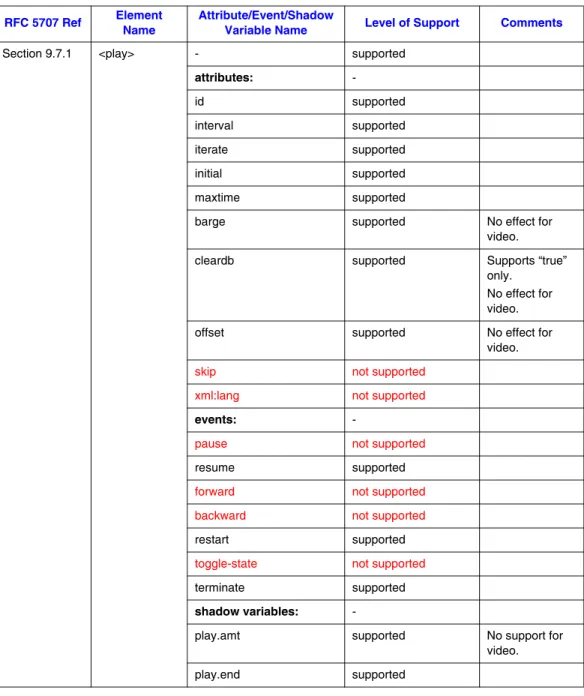
Section 9.7.1 <play> - supported
attributes:
-id supported
interval supported iterate supported
initial supported maxtime supported
barge supported No effect for
video.
cleardb supported Supports “true”
only. No effect for video.
offset supported No effect for
video.
skip not supported
xml:lang not supported
events:
-pause not supported
resume supported
forward not supported
backward not supported
restart supported
toggle-state not supported
terminate supported
shadow variables:
-play.amt supported No support for
video. play.end supported
Section 9.7.1.1 <audio> - supported
attributes:
uri supported Supports the
following schemes: “file://” “http://”
format supported Supports
“audio/wav” and “audio/vox;code cs=value” only. Codecs are ignored for wav format. Codecs are required for vox format; valid codecs are: “mulaw”, “alaw”, “pcm”,
“dialogic_adpcm ”, “g726”
audiosamplerate supported Ignored for wav
format. Required for vox format; valid values are: 6, 8, 11
audiosamplesize supported Ignored for wav
format. Required for vox format; valid values are: 2, 4, 8
iterate supported
xml:lang not supported
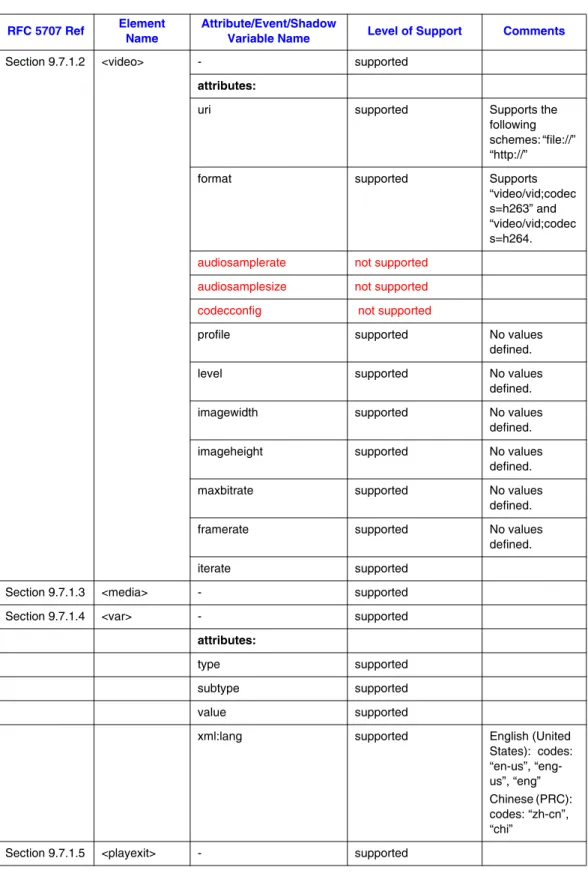
Section 9.7.1.2 <video> - supported
attributes:
uri supported Supports the
following schemes: “file://” “http://”
format supported Supports
“video/vid;codec s=h263” and “video/vid;codec s=h264. audiosamplerate not supported
audiosamplesize not supported
codecconfig not supported
profile supported No values
defined.
level supported No values
defined.
imagewidth supported No values
defined.
imageheight supported No values
defined.
maxbitrate supported No values
defined.
framerate supported No values
defined.
iterate supported
Section 9.7.1.3 <media> - supported
Section 9.7.1.4 <var> - supported
attributes:
type supported
subtype supported
value supported
xml:lang supported English (United
States): codes: “en-us”, “eng-us”, “eng” Chinese (PRC): codes: “zh-cn”, “chi”
Section 9.7.1.5 <playexit> - supported
Table 6. MSML Dialog Base Package Support
Section 9.7.2 <dtmfgen> - supported
attributes:
id supported
digits supported
level supported
dur supported
interval supported
shadow variables:
dtmfgen.end supported
Section 9.7.2.1 <dtmfgenexit> - supported
Section 9.7.3 <tonegen> - not supported
attributes:
-id not supported
iterate not supported
events:
-terminate not supported
shadow variables:
-tonegen.end not supported
Section 9.7.3.1 <tone> - not supported
attributes:
-duration not supported
iterate not supported
<tone1> - not supported
attributes:
-freq not supported
atten not supported
<tone2> - not supported
attributes:
-freq not supported
atten not supported
Section 9.7.3.2 <silence> - not supported
attributes:
-duration not supported
Section 9.7.3.3 <tonegenexit> - not supported
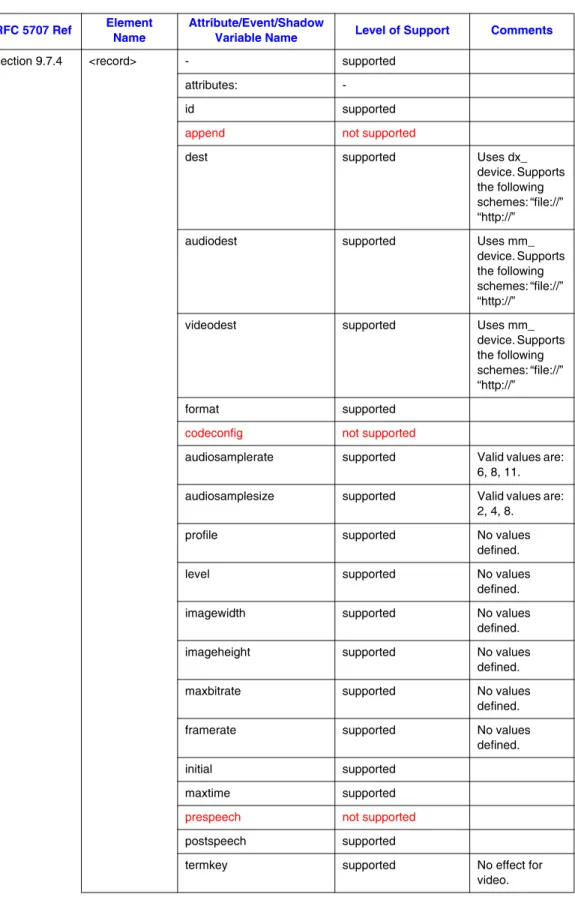
Section 9.7.4 <record> - supported
attributes:
-id supported
append not supported
dest supported Uses dx_
device. Supports the following schemes: “file://” “http://”
audiodest supported Uses mm_
device. Supports the following schemes: “file://” “http://”
videodest supported Uses mm_
device. Supports the following schemes: “file://” “http://”
format supported
codeconfig not supported
audiosamplerate supported Valid values are:
6, 8, 11.
audiosamplesize supported Valid values are:
2, 4, 8.
profile supported No values
defined.
level supported No values
defined.
imagewidth supported No values
defined.
imageheight supported No values
defined.
maxbitrate supported No values
defined.
framerate supported No values
defined.
initial supported
maxtime supported
prespeech not supported
postspeech supported
termkey supported No effect for
video.
Table 6. MSML Dialog Base Package Support
Section 9.7.4 <record> events:
-pause not supported
resume supported
toggle-state not supported
terminate supported
terminate.cancelled not supported terminate.finalsilence not supported
nospeech not supported
shadow variables:
-record.len not supported
record.end not supported
record.recordid not supported
<play> (child) - not supported See <play> definition. <tonegen>
(child)
- not supported See <tonegen>
definition.
Section 9.7.4.3 <recordexit> - supported
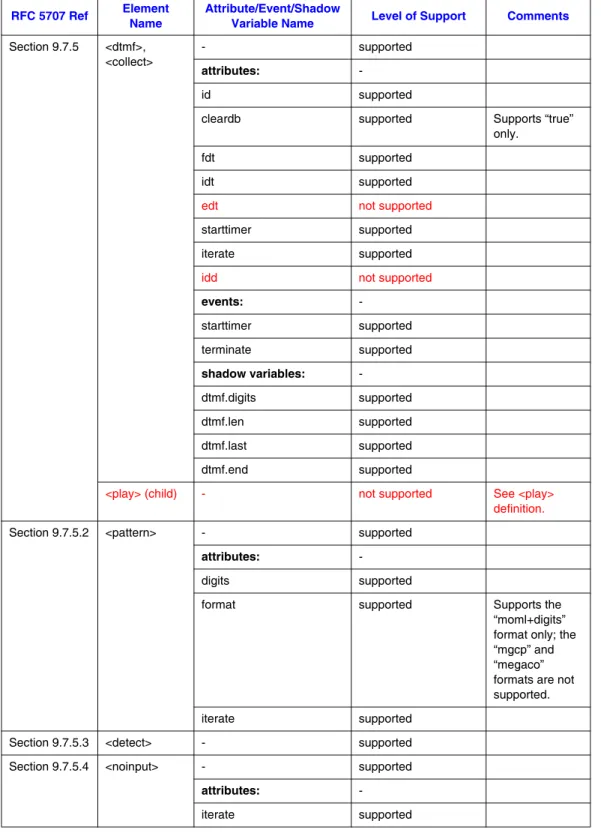
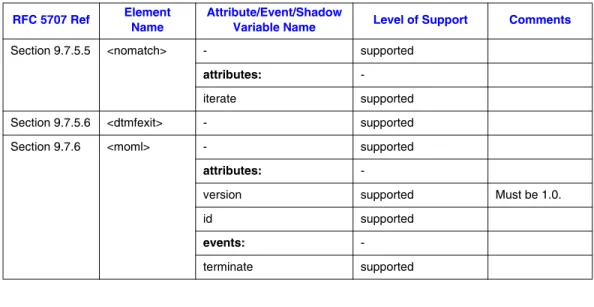
Section 9.7.5 <dtmf>, <collect>
- supported
attributes:
-id supported
cleardb supported Supports “true”
only.
fdt supported
idt supported
edt not supported
starttimer supported iterate supported
idd not supported
events:
-starttimer supported
terminate supported
shadow variables:
-dtmf.digits supported
dtmf.len supported
dtmf.last supported
dtmf.end supported
<play> (child) - not supported See <play> definition.
Section 9.7.5.2 <pattern> - supported
attributes:
-digits supported
format supported Supports the
“moml+digits” format only; the “mgcp” and “megaco” formats are not supported. iterate supported
Section 9.7.5.3 <detect> - supported
Section 9.7.5.4 <noinput> - supported
attributes:
-iterate supported
Table 6. MSML Dialog Base Package Support
Section 9.7.5.5 <nomatch> - supported
attributes:
-iterate supported
Section 9.7.5.6 <dtmfexit> - supported
Section 9.7.6 <moml> - supported
attributes:
-version supported Must be 1.0.
id supported
events:
-terminate supported
Name Variable Name
Table 7. MSML Dialog Group Package Support
RFC 5707 Ref Element Name Attribute/Event Name Level of Support Comments
Section 9.8.1 <group> - supported
attributes:
-topology supported Supports
“parallel” topology only.
id supported
events:
-terminate supported
Section 9.8.2 <groupexit> - supported
Table 8. MSML Dialog Transform Package Support
RFC 5707 Ref Element Name Attribute/Event Name Level of Support Comments
Section 9.9.1 <vad> - not supported
attributes:
-id not supported
starttimer not supported
events:
-starttimer not supported
Section 9.9.1.1 <voice>, <silence>, <tvoice>, <tsilence>
- not supported
attributes: -
len not supported
sen not supported
Section 9.9.2 <gain> - supported
attributes: -
id not supported
incr supported
amt supported Valid values are
in the range: -10 to +10.
events:
-mute not supported
unmute not supported
reset supported louder supported softer supported amt supported
Section 9.9.3 <agc> - not supported
attributes: -
id not supported
tgtlvl not supported
maxgain not supported
events:
-mute not supported
unmute not supported
Section 9.9.4 <gate> - not supported
attributes: -
initial not supported
events:
-mute not supported
unmute not supported
Section 9.9.5 <clamp> not supported
attributes: -
id not supported
Table 8. MSML Dialog Transform Package Support
Table 10. MSML Audit Conference Package Support
Section 9.9.6 <relay> not supported
attributes: -
id not supported
Name
Table 9. MSML Audit Core Package Support
RFC 5707 Ref Element Name Attribute Name Level of Support Comments
Section 10.1.1 <audit> - supported
queryid supported
statelist supported
mark not supported
Section 10.1.2 <auditresult> - supported
targetid supported
RFC 5707 Ref
Element
Name State Parameters Attribute Name
Level of
Support Comments
Section 10.2.1
<audit> Prefix: “audit.conf” - supported Based on Table 9
Audit Core framework.
confconfig - supported
confconfig.audiomix - supported
confconfig.audiomix. asn - supported confconfig.audiomix. n-loudest not supported confconfig.videolayo ut not supported confconfig.videolayo ut.root not supported confconfig.videolayo ut.selector not supported
confconfig.controller - supported
dialog - supported
stream - supported
Section 10.2.2
<auditresult> - - supported Based on Table 9
Audit Core framework. Section
10.2.2.1
confconfig - supported
deletewhen supported
term not
supported Section
10.2.2.2
confconfig.audiomix - supported
Id supported samplerate not supported Section 10.2.2.3 confconfig.audiomix. asn - supported ri supported asth not supported Section 10.2.2.4 confconfig.audiomix. n-loudest n not supported Section 10.2.2.5 confconfig.videolayo ut id not supported type not supported Section 10.2.2.6 confconfig.videolayo ut.root size not supported backgroundcolor not supported backgroundimage not supported Section 10.2.2.7 confconfig.videolayo ut.selector id not supported method not supported status not supported blankothers not supported si not supported speakersees not supported Section 10.2.2.8
confconfig.controller - supported
RFC 5707 Ref
Element
Name State Parameters Attribute Name
Level of
10.2.2.9 Section 10.2.2.10
stream - supported
Table 11. MSML Audit Connection Package Support
RFC 5707 Ref
Element
Name State Parameters
Attribute Name
Level of
Support Comments
Section 10.3 <audit> Prefix: “audit.conn”
- supported Based on Table 9
Audit Core framework. Section
10.3.1
sipdialog - supported
sipdialog.localseq - supported
sipdialog.remotes eq
- supported
sipdialog.localURI - supported
sipdialog.remoteU RI
- supported
sipdialog.remoteta rget
- supported
sipdialog.routeset - supported
localsdp - supported
remotesdp - supported
dialog - supported
stream - supported
Section 10.3.2.1
<auditresult> sipdialog callid supported Based on Table 9 Audit Core framework. localtag supported remotetag supported Section 10.3.2.2
sipdialog.localseq - supported
Section 10.3.2.3 sipdialog.remotes eq - supported Section 10.3.2.4
sipdialog.localURI - supported
Section 10.3.2.5 sipdialog.remoteU RI - supported Section 10.3.2.6 sipdialog.remoteta rget - supported Section 10.3.2.7
sipdialog.routeset - supported
Section 10.3.2.8
localsdp - supported
Section 10.3.2.9
remotesdp - supported
Section 10.3.2.10
dialog - supported
Section 10.3.2.11
stream - supported
Table 11. MSML Audit Connection Package Support
RFC 5707 Ref
Element
Name State Parameters
Attribute Name
Level of
RFC 5707 Ref
Element
Name State Parameters
Attribute Name
Level of
Support Comments
Section 10.4 <audit> Prefix:
“audit.conf.dialog” or
“audit.conn.dialog
- supported Based on Table 9
Audit Core framework -Prefix selection depends on context of the stream state queried. Section
10.4.1
dialog - supported
dialog.duration - supported
dialog.primitive - supported
dialog.controller - supported
Child Elements
Section 10.4.2
<auditresult> dialog src supported Based on Table 9
Audit Core framework.
type supported
name supported
Section 10.4.2.1
dialog.duration - supported
Section 10.4.2.2
dialog.primitive - supported
Section 10.4.2.3
Table 13. MSML Audit Stream Package Support
RFC 5707 Ref
Element
Name State Parameters
Attribute Name
Level of
Support Comments
Section 10.5 <audit> Prefix:
“audit.conf.dialog” or
“audit.conn.dialog
- supported Based on Table 9
Audit Core framework -Prefix selection depends on context of the stream state queried. Section
10.5.1
stream - supported
stream.clamp - supported
stream.gain - supported
stream.visual - not
supported Section
10.5.2
<auditresult> stream joinwith supported Based on Table 9 Audit Core framework. media supported dir supported compressed not supported display not supported override not supported preferred not supported Section 10.5.2.1
stream.clamp - supported
Section 10.5.2.2
stream.gain - supported.
Section 10.5.2.3
stream.visual not
3.3.1
MSML Core Package Support
This section will be provided in a future release.
3.3.2
MSML Conference Core Package Support
The following pages provide details about the MSML Conference Core Package elements listed below.
<asn>
controls conference active speaker notification
<audiomix>
specifies the properties of the conferencing audio mix
<clamp>
filters tones and/or DTMF digits from an audio stream
<createconference>
allocates and configures the media mixing resources for conferences
<destroyconference>
deletes mixers or the entire conference.
<gain>
specifies the gain characteristics applied to an audio stream, including the ability to mute and un-mute the stream
<join>
creates one or more streams between two independent objects
<modifyconference>
modifies the properties of an audio mix or the presentation of a video mix of a conference
<modifystream>
modifies properties of an existing stream
<n-loudest>
defines the number of participants that will be included in the conference mix based upon their audio energy
<region>
defines video panes (or tiles) that are used to visually display participants of a video conference
<root>
<selector>
specifies methods and associated parameters for automatic selection and displaying of video within a region or the root window of a conference
<stream>
manipulates and/or specifies properties of specific streams
<unjoin>
removes one or more streams between two independent objects
<var>
specifies the generation of audio using prerecorded audio segments
<videolayout>
Description
The <asn> element is a child of the <audiomix> element and may be used when creating or modifying a conference. It enables/disables notification of active speakers. Active speakers are notified using the <event> element with an event name of "msml.conf.asn". The namelist of the event consists of the set of active speakers. The name of each item is the string "speaker" with a value of the connection identifier for the connection.
Attributes
Events
msml.conf.asn
This is the active speaker notification event that will be generated by the media server. An example of an active speaker notification is as follows:
<event name="msml.conf.asn" id="conf:example"> <name>speaker</name>
<value>conn:hd93tg5hdf</value> <name>speaker</name>
<value>conn:w8cn59vei7</value> <name>speaker</name>
<value>conn:p78fnh6sek47fg</value> </event>.
Shadow Variables
None.
Examples
The following examples illustrate the usage of the <asn> element:
• Section 8.1.1, “Creating a basic audio conference with <asn> and <n-loudest>”, on page 109. • Section 8.1.2, “Modifying a basic audio conference with <asn> and <n-loudest>”, on page
109.
none
Child Elements:
Attributes Description
ri Mandatory. Specifies the minimum reporting interval which defines the minimum duration of time that must pass before changes to active speakers will be reported. A value of zero disables active speaker notification.
The minimum reporting interval may be set from 500 ms to 120 seconds. Values may be specified as milliseconds (i.e. 500ms), seconds (i.e. 2s), or minutes (i.e. 2m). Values specified without units will be interpreted as milliseconds. Values specified as milliseconds that are not multiples of 10ms will be rounded up to the nearest 10ms divisible value. Specifying values outside of the supported time interval range for “ri”, or values that are invalid in any other way, such as unsupported units (i.e. 10x), will result in an error response code of 410, invalid attribute value, being returned.
<audiomix>
Description
The <audiomix> element specifies the properties of the conferencing audio mix. The properties of the overall audio mix are specified using the <audiomix> element and child elements <n-loudest>
and/or <asn>.
Attributes
Events
None.
Shadow Variables
None.
Examples
The following examples illustrate the usage of the <audiomix> element:
• Section 8.1.1, “Creating a basic audio conference with <asn> and <n-loudest>”, on page 109. • Section 8.1.2, “Modifying a basic audio conference with <asn> and <n-loudest>”, on page
109.
Parent: <createconference>, <modifyconference>, <destroyconference> <n-loudest>, <asn>
Child Elements:
Attributes Description
Description
The <clamp> element is used to filter tones and/or DTMF digits from an audio stream and is support for audio streams flowing from a network connection object towards a conferencing object.
Attributes
Events
None.
Shadow Variables
None.
Examples
None.
None
Child Elements:
Attributes Description
dtmf Mandatory: This attribute is used to enable DTMF tone clamping. A value of “true” enables DTMF tone clamping. A value of “false” disables DTMF tone clamping. The default value is “true”.
tone Mandatory: This attribute is used to enable tone clamping and is not supported. Must be set to “false”.
<createconference>
Description
The <createconference> element is used to allocate and configure the media mixing resources for conferences. A description of the properties for each type of media mix required for the conference is defined within the content of the <createconference> element. Mixer descriptions are described in Audio Mix and Video Layout sections. When no mixer descriptions are specified, the default behavior is equivalent to inclusion of a single<audiomix>.
Clients can request that a media server automatically delete a conference when a specified condition occurs by using the "deletewhen" attribute.
Attributes
Events
None.
Parent: <msml>
<audiomix>, <videolayout>
Child Elements:
Attributes Description
name Optional. Specifies the instance name (identifier) of the conference. If the attribute is not present, the media server assigns a globally unique name for the conference. If the attribute is present but the name is already in use, an error (432) will result and MSML document execution will stop. Events that the conference generates will use this name as the value of their "id" attribute.
deletewhen Optional. Defines whether a media server should automatically delete the conference. Possible values are "nomedia", "nocontrol", and "never". Default is "nomedia".
•A value of "nomedia" indicates that the conference MUST be deleted when no participants remain in the conference. When this occurs, an "msml.conf.nomedia" event notification is sent to the MSML client.
•A value of "nocontrol" indicates that the conference MUST be deleted when the SIP [n1] dialog that carries the <createconference> element is terminated. When this occurs, the media server terminates all conference participant dialogs by sending a BYE for their associated SIP dialog.
•A value of "never" leaves the ability to delete a conference under the control of the MSML client.
term Optional. Possible values are "true", and "false". Default is "true".
•A value of “true” indicates that the media server MUST send a BYE request on all SIP dialogs still associated with the conference when the conference is deleted. •For a value of “false”, SIP dialogs associated with the conference will not be automatically deleted by the media server when the conference is deleted. mark Optional. A token that MAY be used to identify execution progress in the case of
errors. The value of the mark attribute from the last successfully executed MSML element is returned in an error response. Therefore, the value of all mark attributes within an MSML document should be unique.
Examples
The following examples illustrate the usage of the <createconference> element:
• Section 8.1.1, “Creating a basic audio conference with <asn> and <n-loudest>”, on page 109. • Section 8.2.1, “Creating a four party layout video conference”, on page 116.
<destroyconference>
Description
The <destroyconference> element is used to delete mixers or to delete the entire conference and all state and shared resources. When a conference is destroyed, SIP dialogs for any remaining participants are maintained or removed based on the value of the "term" attribute when the conference was created. When there is no element content, <destroyconference> deletes the entire conference.
Attributes
Events
None.
Shadow Variables
None.
Examples
The following example illustrates the usage of the <destroyconference> element: • Section 8.1.10, “Destroying a conference”, on page 116.
Parent: <msml> none
Child Elements:
Attributes Description
id Mandatory. This attribute specifies the identifier of the conference to be destroyed or to have mixers removed.
mark Optional. A token that MAY be used to identify execution progress in the case of errors. The value of the mark attribute from the last successfully executed MSML element is returned in an error response. Therefore, the value of all mark attributes within an MSML document should be unique.