RESOURCE AND PATIENT MANAGEMENT SYSTEM
Office of Information Technology (OIT)
Practice Management Application
Suite
(BPRM)
Technical Manual
Version 3.0
May 2015
Technical Manual Table of Contents May 2015
Table of Contents
1.0 Introduction ... 1
2.0 Orientation ... 2
3.0 Implementation and Maintenance ... 3
3.1 General Information ... 3
3.2 System Requirements ... 3
3.2.1 Application Server Resources ... 3
3.2.2 Database Server Resources ... 4
3.2.3 Workstation Resources ... 5
3.3 Package-wide Variables ... 5
3.4 Menu and Security Keys ... 5
4.0 Menu/Security Keys ... 7
5.0 Routine Descriptions ... 8
6.0 Files and Tables ... 9
6.1 File List ... 9
6.2 File Access ... 9
6.3 Cross References ... 9
6.4 Table File ... 9
6.5 Database Views ... 9
6.6 Stored Procedures ... 11
7.0 External Relations ... 14
7.1 Callable Routines... 14
7.2 Published Entry Points ... 14
7.3 Exported Options ... 14
8.0 Internal Relations ... 15
9.0 Archiving and Purging ... 16
10.0 Documentation Resources ... 17
11.0 SAC Requirements and Exemptions ... 18
Glossary ... 19
Acronym List ... 21
Technical Manual Preface May 2015
Preface
The Practice Management Application Suite (BPRM) is a browser-accessible graphical user interface (GUI) for the Indian Health Service (IHS) Resource and Patient Management System (RPMS) applications. It provides easier, more intuitive access to existing RPMS data, and streamlines the input of new patient data. This suite is also referred to by its development name, Moonwalk.
The purpose of this manual is to provide technical information related to the BPRM package. The BPRM package has the following features:
• A browser-based user interface
• A unified One View architecture for RPMS
• Tightly linked to RPMS patient and clinic data
Technical Manual Introduction May 2015
1.0
Introduction
This manual provides IHS site managers with a technical description of the Practice Management Application Suite routines, files, menus, cross references, globals, and other necessary information required to effectively manage the system.
All routines, files, options, and keys are namespaced starting with the letters “BPRM.”
Technical Manual Orientation May 2015
2.0
Orientation
The BPRM package has no RPMS server menu options. The RPMS server
preparation needed to run the BPRM package is to mount the BPRM database. Refer to the current Practice Management Application Suite (BPRM) Installation Manual
for server and client installation.
Interaction of BPRM with the RPMS system is accomplished through ODBC (Open Database Connectivity) calls.
Technical Manual Implementation and Maintenance May 2015
3.0
Implementation and Maintenance
BPRM provides a browser-based graphical user interface for RPMS. See the current
Practice Management Application Suite (BPRM) Installation Manual for detailed information on implementation.
3.1
General Information
The following components must be installed for BPRM to work properly:
Table 3-1: Required Components
Component Description
BMW CACHE.DAT Mount and Configure cache database file for Windows or AIX systems running Ensemble version 2012.2.0
BPRM Application Server Installer Install bprm0300.msi
Note: The BMW Cache.dat file is delivered to support two operating systems: One for Microsoft® Windows® systems and the other for IBM® AIX® systems. These files are provided by OIT SQA and are not included in the distribution package.
3.2
System Requirements
Table 3-2: System Requirements
Module Minimum Version
Intersystems Ensemble® Ver. 2012.2.x
Kernel (XU) Ver. 8.0
IHS Dictionaries (Pointers) (AUT) Ver. 98.1 patch 26 IHS Dictionaries (Patient) (AUPN) Ver. 99.1 patch 23 IHS VA Support Files (AVA) Ver. 93.2 patch 22
IHS PCC Suite (BJPC) Ver. 2.0 patch 10
Patient Information Management System (PIMS) Ver. 5.3 patch 1017 Patient Registration (AG) Ver. 7.1 patch 11 Clinical Scheduling GUI (BSDX) Ver. 3.0
3.2.1
Standalone Application Server Resources
The following resources are required for a standalone application server:
Technical Manual Implementation and Maintenance May 2015
• Microsoft IIS® 7.0 (available with Windows 2008 server by default)
• Microsoft .NET Framework 4.5
• Four processor cores running at 2.0 GHz or faster (for site)
• Eight processor cores running at 2.4 GHz or faster (for area office)
• 4 GB RAM running at 1333 MHz (for site)
• 12 GB RAM running at 1333 MHz (for area office)
• 50 GB minimum free disk space (disk drives should be 10K RPM or faster)
3.2.2
Shared Application/MongoDB Server Resources
The following resources are required if the MongoDB is installed on the application server:
• Microsoft® Windows® 2008 Server x64 bit and up
• Microsoft IIS® 7.0 (available with Windows 2008 server by default)
• Microsoft .NET Framework 4.5
• Four processor cores running at 2.0 GHz or faster (for site)
• Eight processor cores running at 2.4 GHz or faster (for area office)
• 8 GB RAM running at 1333 MHz (for site)
• 12-16 GB RAM running at 1333 MHz (for area office)
• 80 GB minimum free disk space (disk drives should be 10K RPM or faster)
3.2.3
Standalone MongoDB Server Resources
The following resources are required if the MongoDB server is a standalone system:
• Microsoft® Windows® 2008 Server x64 bit and up
• Minimum two processor cores running at 2.0 GHz or faster (for site)
• Minimum four processor cores running at 2.4 GHz or faster (for area office)
• 4 GB RAM running at 1333 MHz (for site)
• 12 GB RAM running at 1333 MHz (for area office)
• 50 GB minimum free disk space (disk drives should be 10K RPM or faster)
3.2.4
Database Server Resources
Database servers running the BPRM application require a minimum 5 GB of free disk space.
Technical Manual Implementation and Maintenance May 2015
3.2.5
Workstation Resources
The following resources are recommended for any workstations accessing the BPRM application:
• Dual-core processor running at 1.8 GHz or faster
• 4 GB of RAM
• 20 GB free disk space
• Screen resolution of 1024 x 768 or higher
• Windows 7 (highly recommended) or Windows XP
• Internet Explorer® 9 (highly recommended) or Internet Explorer 8
• Microsoft Silverlight® 5.0 plugin for Internet Explorer (required)
The Silverlight plugin can be rolled out on an enterprise basis using Group Policies or another enterprise deployment tool, or it can be installed individually on the workstation. Silverlight is available from Microsoft at this location:
http://www.microsoft.com/getsilverlight/get-started/install/default.aspx
3.3
Package-wide Variables
There are no package-wide variables used in the BPRM system.
3.4
Menu and Security Keys
There are no package-specific security keys. The BPRM package operates on existing RPMS security keys.
BPRM security is built on top of the RPMS Menus and Keys system. The following table defines the relationship between BPRM Roles and RPMS security keys.
Note: If a user has AKMOCORE or AKMOEVE primary menu options, they will have access to all modules and features.
Table 3-3: Security Keys
Role Secondary Menu Option Security Keys
(Must include all)
ADT Clerk BDGMENU DGZADT
DGZNUR DGZMENU
ADT Coder BDGMENU DGZPCC
Technical Manual Implementation and Maintenance May 2015
Role Secondary Menu Option Security Keys
(Must include all)
ADT Supervisor BDGMENU DGZADT
DGZICE DGZNUR DGZSUP DGZSYS DGZMENU
ADT Non-Clinical BDGMENU DGZNOCLN
DGZMENU
Admin XUPROG
XUPROGMODE
CQM Clerk APCLMENU APCLZMENU
CQM Supervisor APCLMENU APCLZMENU
Flag Manager DGPF MANAGER
Flag Assignment DGPF ASSIGNMENT
Flag Access DGPF PRF ACCESS
PHR Operate AGPAT -or- AGVIEWONLY
AGZPHROPT Registration Clerk AGPAT -or-
AGMENU
AGZMENU
Registration Supervisor AGMENU AGZMENU
AGZMGR AGZHOME AGZREPORTS AGZDELHRN Registration View Only AGPAT -or-
AGVIEWONLY
AGZVIEWONLY
Scheduling Clerk BSDMENU SDZMENU
Scheduling Supervisor BSDMENU -or-
BSD MENU SUPERVISOR
SDZMENU SDZSUP
Technical Manual Menu/Security Keys May 2015
4.0
Menu/Security Keys
Technical Manual Routine Descriptions May 2015
5.0
Routine Descriptions
Technical Manual Files and Tables May 2015
6.0
Files and Tables
There are no files distributed as part of this package.
6.1
File List
The BPRM application suite consumes Cache classes generated by the Fm2Class utility, which maps onto FileMan files. Create, read, update, and delete operations can then be performed over the generated Cache classes (SQL tables) via the ADO.NET provider for Intersystems Ensemble/Cache.
6.2
File Access
Not applicable.
6.3
Cross References
Not applicable.
6.4
Table File
Not applicable.
6.5
Database Views
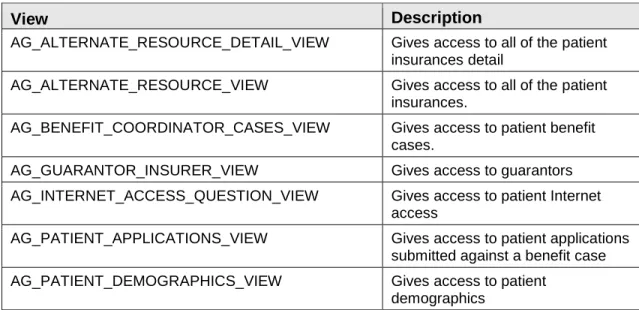
Table 6-1 lists the database views used by the BPRM application suite.
Table 6-1: Database Views
View Description
AG_ALTERNATE_RESOURCE_DETAIL_VIEW Gives access to all of the patient insurances detail
AG_ALTERNATE_RESOURCE_VIEW Gives access to all of the patient insurances.
AG_BENEFIT_COORDINATOR_CASES_VIEW Gives access to patient benefit cases.
AG_GUARANTOR_INSURER_VIEW Gives access to guarantors AG_INTERNET_ACCESS_QUESTION_VIEW Gives access to patient Internet
access
AG_PATIENT_APPLICATIONS_VIEW Gives access to patient applications submitted against a benefit case AG_PATIENT_DEMOGRAPHICS_VIEW Gives access to patient
Technical Manual Files and Tables May 2015
View Description
AG_PATIENT_FACE_SHEET_VIEW Gives access to patient information for face sheet
AG_PATIENT_FLAG_VIEW Used for checking whether the patient record is flagged or not
AG_PATIENT_NOTES Gives access to patient notes (
additional registration info ) AG_PATIENT_OTHER_LANGUAGES_VIEW Gives access to the patient’s other
languages
AG_PATIENT_PROFILE_VIEW Gives access to the patient information other than demographics
AG_PATIENT_SEARCH_VIEW Gives access to patient records for searches
AG_PRF_ASSIGNMENT_VIEW Gives access to patient record flag information
AG_PRIOR_AUTHORIZATIONS_VIEW Gives access to patient prior authorizations
AG_RESOURCE_ELIGIBILITY_VIEW Gives access to all of the patient insurance eligibilities
AG_SEQUENCE_EFFECTIVE_DATE_GROUP_VIEW Gives access to a patient’s insurance category sequence list AG_SEQUENCE_GROUP_VIEW Gives access to a patient’s
insurance category sequence detail
AG_SEQUENCE_VIEW Gives access to patient insurance
sequencing
BDG_ADMITTED_PATIENTS_VIEW Gets info from VA_PATIENT for patients who are currently admitted BDG_CURRENT_ADMISSION_VIEW Gets details about all patients
currently admitted
BDG_INCOMPLETE_CHART_STATISTICS_VIEW Gets statistics for incomplete chart dashboard
BDG_INCOMPLETE_CHART_STATUS_VIEW Gets data to display on A&D Dashboard and Incomplete Charts tab
BDG_INCOMPLETE_CHART_VIEW Gets all incomplete charts
BSDX_APPOINTMENT_VIEW Gives access to patient
appointments
BSDX_CLINIC_WORKLOAD_VIEW Used for calculating appointments for the Clinic Workload report BSDX_WAITING_LIST_VIEW Gives access to the clinic waiting
Technical Manual Files and Tables May 2015
6.6
Stored Procedures
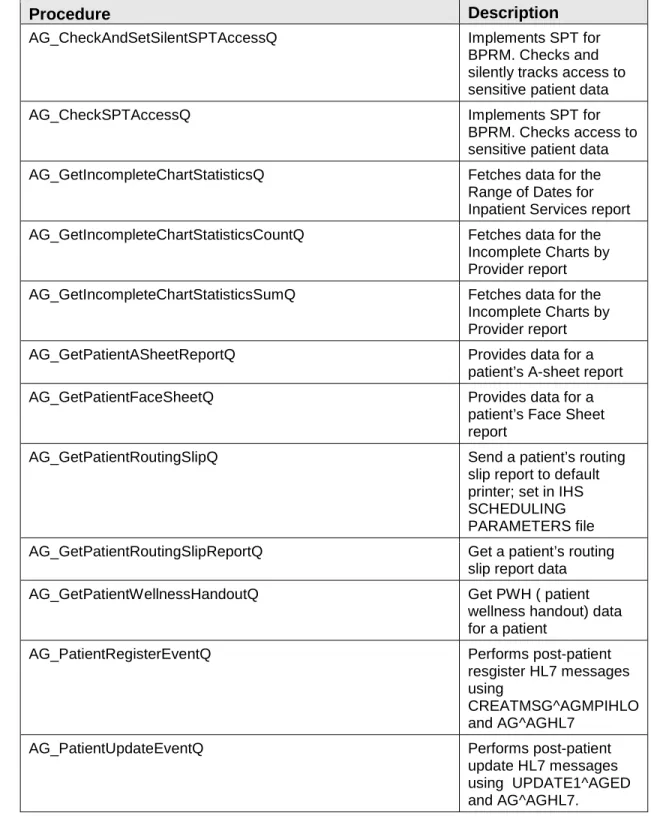
Table 6-2 lists the stored procedures used by the BPRM application suite.
Table 6-2: Stored Procedures
Procedure Description
AG_CheckAndSetSilentSPTAccessQ Implements SPT for BPRM. Checks and silently tracks access to sensitive patient data
AG_CheckSPTAccessQ Implements SPT for
BPRM. Checks access to sensitive patient data AG_GetIncompleteChartStatisticsQ Fetches data for the
Range of Dates for Inpatient Services report AG_GetIncompleteChartStatisticsCountQ Fetches data for the
Incomplete Charts by Provider report AG_GetIncompleteChartStatisticsSumQ Fetches data for the
Incomplete Charts by Provider report
AG_GetPatientASheetReportQ Provides data for a
patient’s A-sheet report
AG_GetPatientFaceSheetQ Provides data for a
patient’s Face Sheet report
AG_GetPatientRoutingSlipQ Send a patient’s routing
slip report to default printer; set in IHS SCHEDULING PARAMETERS file AG_GetPatientRoutingSlipReportQ Get a patient’s routing
slip report data
AG_GetPatientWellnessHandoutQ Get PWH ( patient
wellness handout) data for a patient
AG_PatientRegisterEventQ Performs post-patient
resgister HL7 messages using
CREATMSG^AGMPIHLO and AG^AGHL7
AG_PatientUpdateEventQ Performs post-patient
update HL7 messages using UPDATE1^AGED and AG^AGHL7.
Technical Manual Files and Tables May 2015
Procedure Description
AG_SearchPatientQ Performs patient search
by Name, SSN, DOB, Gender, Eligibility Status, HRN , Phone Number, InPatient Or Outpatient.
AG_SetPatientGenderQ MU2- updates patient’s
gender in all related files, when gender is updated through BPRM. Using SEXELIG^AGUTL AG_PatientInsuranceAddCategorySequenceQ Add a sequence for
patient’s insurance category
AG_PatientInsuranceRemoveCategorySequenceQ Remove a sequence for patient’s insurance category
AG_SetPatientTempHRNQ Assigns temp HRN to
patients added using quick registration
AG_SetSPTAccessQ Implements SPT for
BPRM. Tracks access to sensitive patient data
BDG_GetAdsReportQ Get ADS report data
BDG_GetIsReAdmitCheckQ Should BPRM ask if this
discharge will be a Re-Admit
BDG_GetRangeOfMonthCensusQ Get census report data
(ADT)
BDG_SetPatientAdmissionQ Admit patient
BDG_SetPatientMovementDischargeQ Discharge patient BDG_SetPatientSpecialtyTransferQ Specialty transfer for
patient
BDG_SetPatientTransferQ Ward transfer for patient
BSD_GetSchedulingAccessBlocksQ Get a clinic availability for a date range
BSD_GetSchedulingAvailableSlotsQ Get a clinic’s future available appointment slots
BSD_GetConfigAccessBlocksQ Provides the clinic
availabilities upto on year in future
BSD_SetPatientAppointmentQ Creates an appointment
on schedule command BSD_SetPatientAppointmentCheckInQ Creates a visit on
Technical Manual Files and Tables May 2015
Procedure Description
BSD_SetPatientAppointmentUndoCheckInQ Undo check-in : delete visit if exists
BSD_SetSchedulingAddHolidayQ Add a holiday to
scheduling configuration BSD_SetSchedulingRemoveHolidayQ Remove a holiday from
scheduling configuration
Core_AuthenticateUserQ Authenticates access and
verifies codes on login.
Core_ChangeVerifyCodeQ Change user verify code
Core_GetDatabaseTimeQ Get current datetime of
DB (RPMS/Ensemble) server
Core_SetBusaAuditLogQ Set MU Busa audit log
Core_SetPatientContextQ Set DFN variable to
patient’s id in session’ symbol table for current transaction
Core_SetRemotePatientContextQ Set DFN for an outside application ( Switch patient in EHR for the user, when a patient is selected in BPRM)
Core_SetSessionVariablesQ Sets session variables
Core_SetWordProcessingQ Set word processing data
field (can be used to insert data into any word processing field
Core_VerifyESignatureQ Verify patients
E-signature
CQM_GetPatientAdmissionOrderListQ Get patient admission orders
CQM_GetPatientLabOrderListQ Get patient Laboratory orders
CQM_GetPatientMedicationListQ Get patient medication orders
CQM_GetPatientRadOrderListQ Get patient Radiology
Technical Manual External Relations May 2015
7.0
External Relations
No special integration agreements exist between BPRM and any other package.
7.1
Callable Routines
No callable routines exist in the BPRM package.
7.2
Published Entry Points
No published entry points exist in the BPRM package.
7.3
Exported Options
Technical Manual Internal Relations May 2015
8.0
Internal Relations
Technical Manual Archiving and Purging May 2015
9.0
Archiving and Purging
Technical Manual Documentation Resources May 2015
10.0 Documentation Resources
The BPRM package does not provide any methods to generate online technical documentation.
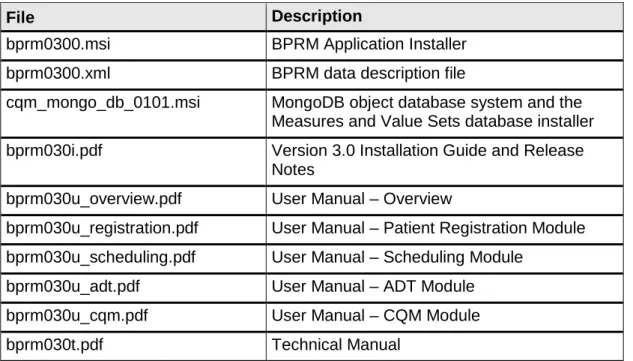
The documentation shown in Table 10-1 is included with the BPRM distribution:
Table 10-1: Documentation Resources
File Description
bprm0300.msi BPRM Application Installer bprm0300.xml BPRM data description file
cqm_mongo_db_0101.msi MongoDB object database system and the Measures and Value Sets database installer bprm030i.pdf Version 3.0 Installation Guide and Release
Notes
bprm030u_overview.pdf User Manual – Overview
bprm030u_registration.pdf User Manual – Patient Registration Module bprm030u_scheduling.pdf User Manual – Scheduling Module
bprm030u_adt.pdf User Manual – ADT Module bprm030u_cqm.pdf User Manual – CQM Module bprm030t.pdf Technical Manual
Technical Manual SAC Requirements and Exemptions May 2015
11.0 SAC Requirements and Exemptions
Technical Manual Glossary May 2015
Glossary
ADO.NETA set of computer software components that programmers can use to access data and data services. It is a part of the base class library that is included with the Microsoft .NET Framework. It is commonly used by programmers to access and modify data stored in relational database systems, though it can also access data in non-relational sources.
Archiving
The storing of historical or little used data off-line (often on tape).
Cache Class
An object-oriented structure used to store data.
FileMan files
FileMan files define the schema of an RPMS database.
Fm2Class
A utility from InterSystems that converts FileMan file definitions to Cache class definitions.
Kernel
The set of MUMPS software utilities that function as an intermediary between the host operating system and application packages, such as Laboratory and Pharmacy. The Kernel provides a standard and consistent user and
programmer interface between application packages and the underlying MUMPS implementation. These utilities provide the foundation for RPMS.
Menu
A list of choices for computing activity. A menu is a type of option designed to identify a series of items (other options) for presentation to the user for selection. When displayed, menu-type options are preceded by the word “Select” and followed by the word “option” as in Select Menu Management option: (the menu’s select prompt).
Namespace
A unique set of two to four alpha characters assigned by the database administrator to a software application.
Technical Manual Glossary May 2015
Option
An entry in the Option file. As an item on a menu, an option provides an opportunity for users to select it, thereby invoking the associated computing activity. Options may also be scheduled to run in the background, non-interactively, by TaskMan.
Schema
Technical Manual Acronym List May 2015
Acronym List
Acronym Definition
API Application Programming Interface GUI Graphical User Interface
IHS Indian Health Service
Technical Manual Contact Information May 2015
Contact Information
If you have any questions or comments regarding this distribution, please contact the OIT Help Desk (IHS).
Phone: (888) 830-7280 (toll free)
Web: http://www.ihs.gov/helpdesk/