Preeta Banerji
Program Manager, Intel IT Julian Braham
Senior Systems Engineer, Intel IT John Mahvi
Windows Client Platform Product Manager, Intel IT
Roy Ubry
Staff Engineer, Intel IT
Executive Overview
As part of managing the more than 100,000 PCs in use at Intel, Intel IT spends a significant amount of time and effort managing operating system deployment. Historically, new OS versions have been released every few years. Today, the industry is transitioning to an OS-as-a-service model, with updates and new features delivered on a continual basis.
This shift in delivery method requires us to develop some new best practices and modify others. For example, we need to create a permanent testing environment and layer applications and configurations on the platform so that frequent changes to the underlying OS do not disrupt employee productivity.
As the industry evolves toward OS as a service, we must understand and accommodate the continuous delivery model. The changes we are making to our operating system deployment best practices will improve our flexibility and agility, enabling us to continue providing top-quality support to the enterprise.
Best Practices for Operating
System Deployment
We are adapting our best practices for OS delivery to accommodate continual updates while maintaining the ability to efficiently evaluate, test, and deploy.
Contents
1 Executive Overview 2 Business Challenge 3 Solution
–OS Evaluation –Migration Readiness –Deployment
11 Conclusion
Business Challenge
In the last decade, Intel IT has successfully migrated Intel’s more than 100,000 PCs1 from one OS to another several times—for example, from Microsoft Windows XP* to Windows* 7, and more recently from Windows 7 to Windows 8.1. Between major migrations, we have also deployed many OS updates and upgrades across our compute environment. These experiences led us to establish best practices for periodically evaluating and testing a new OS and for operating system deployment. Using these best practices, we have been able to accomplish these migrations quickly and effectively. Our best practices are now evolving to keep up with the required and more frequent OS updates and releases. New versions are now released more often. In fact, OS suppliers are transitioning to a continual-service model. This new delivery model raises several challenges for IT organizations and will cause a substantial shift in future OS-delivery strategies. Instead of a major migration every few years, supported by a large IT team, the OS-as-a-service model will require us to update our processes so that we can manage continual OS updates.
The changes we need to make include the following:
• We must be prepared to make continual decisions about when to deploy a new OS or a new set of features and when to delay deployment. • The testing environment must become permanent, with a ringed
deployment approach in which certain segments of users adopt and test changes sooner than the rest of the enterprise.
• We need to layer applications and configurations on the platform.2 This approach enables us to make frequent changes to the underlying OS without disrupting employee productivity or the user experience. Learning how to use cloud services to the best advantage will help with the layering process.
• We should constantly verify that our suppliers are in sync and have tested and support the latest OS updates. We also need to verify that our application development standards meet enterprise standards to be able to support continuous OS updates.
1 In this paper, “PC” is used generically, and includes desktop, laptop, and multiuser systems. 2 In this context, “platform” refers to the device and the operating system.
Solution
As we adapt to the OS-as-a-service model, we will continue to use many of our previous best practices for operating system deployment. At the same time, we are adding best practices to our portfolio to accommodate the increasing pace at which OS upgrades are being released. Our updated set of best practices fall into three categories:
• OS evaluation • Migration readiness • Deployment
OS Evaluation
To best support our enterprise, we need to be fully educated about upcoming technology changes that will impact Intel and our customers. To that end, we evaluate each new OS before it is readily available. We quantify the costs and benefits prior to the OS being released by the independent software vendor.
Best Practice #1: Test the OS
The computing environment at Intel includes many types of devices. Most are IT-provided while others are department- or employee-owned. Some support touch and some do not. Form factors include tablets and 2-in-1s; smartphones and miniPCs; and business Ultrabook™ devices, laptops, and desktop PCs. We test the new OS on a representative sample of our client fleet to gain a full understanding of how the OS will work in each case. Historically, this type of assessment and testing would occur only for a new OS release, typically every few years. As OS-as-a-service becomes prevalent, we envision moving to a shorter cycle, with testing becoming almost continuous.
As we test, we focus on stability, performance, and user experience, because these three aspects of the OS have the biggest impact on employee productivity and satisfaction. We also test the following areas: • The integration of the new OS within our IT support structure
• Device security with only the minimum security features enabled • Network and connectivity
• Cloud storage and synchronization
• Privacy, legal, financial, and software licensing • Manageability
Third-party applications are an integral part of our computing environment. Therefore, our testing also includes conversations with suppliers to evaluate their readiness for the new OS.
We test the new OS on a representative sample of our client fleet to gain a full
understanding of how the OS will work in each case.
Best Practice #2: Establish the Business Value of the OS We usually move to a new OS only when we expect a long-term benefit. We evaluate the OS in terms of productivity, overall cost and return on investment, and security.
Productivity
Our evaluation explores ways that new features can enhance employee productivity and provide new valuable capabilities. We also look beyond the feature set itself because, in many cases, the productivity value of the new OS can be enhanced by supplementary tools. During our evaluation, we identify such tools and create roadmaps for their development.
For example, when we migrated from Windows 7 to Windows 8.1, we realized that much of the business value and productivity enhancement associated with the new OS came from touch capabilities. Therefore, we focused on adding touch to enterprise applications, and we added 2-in-1 devices with touch capabilities as a standard offering for Intel’s PC refresh cycle.3
Pilot projects, usually conducted with a few hundred participants, aid us in developing a comprehensive understanding of the business value of the new OS.
Cost and Return On Investment
Besides features and their effect on productivity, we consider cost when we evaluate OS business value. For example, if we expect a new OS with significant value to be released soon, we may delay PC refresh by a quarter so that we can cost-effectively couple hardware and software upgrades. Conversely, we might accelerate refresh if the new OS is immediately available. Deployment timing varies with the expected end-of-life date for the current OS and the effect that supporting multiple operating systems will have on our support structure.
Software suppliers often provide new tools that support simpler migrations. For example, a tool might take advantage of OEM builds to migrate from one product SKU to another without manual intervention. Such tools can considerably reduce the cost and complexity of OS migration.
Security
Security is another primary factor we consider when deciding whether to deploy a new OS. For example, when we evaluated Windows 8.1, we saw significant value in new security features such as secure boot, support for UEFI (Unified Extensible Firmware Interface), and built-in access to new Intel® technologies such as multifactor authentication and Intel® Identity Protection Technology. Enhanced security features often impel us to move more quickly than usual to a new OS.
3 See the Intel IT white papers “Factory Mobile Computing Proves Enterprise Value of 2‑in‑1 Devices” and “Exploring the Rise of Ultrabook™ 2‑in‑1 Device Usage at Intel.”
Upgrading Mobile Device
Operating Systems
Intel’s original program for corporate mobile devices supported three mobile operating systems and used 70 service providers
worldwide. As we considered enabling personal devices in the enterprise, we needed to address the potential for overwhelming the IT Help Desk with requests for device support. In 2011 alone, about 250 smartphone models were released on seven or eight of the most popular mobile operating systems—and that doesn’t include tablets and other kinds of mobile devices. Today, Intel employees are using approximately 1,400 mobile device models with six major OS versions. When a new device is released in the marketplace, naturally some employees buy it and expect Intel’s BYOD program to support it. Given the number of models and operating systems, the traditional IT approach of certifying each device and OS version would require us to do more than 500 certifications per year. Clearly, a more efficient process is needed to support this aspect of consumerization.
Our approach to mobile device certification has evolved and matured over the years. We segment our certification into four areas: hardware, client OS, foundational IT service components, and apps.
We do not certify hardware for personally owned mobile devices. Some employees are eligible for Intel-owned devices as part of their job. We run a standard set of certification tests on these devices. The tests are not as extensive as those we run on Windows*-based computers, but they involve significantly more than the tests we ran a few years ago. Intel-owned devices that are used in clean rooms go through an additional set of certifications on the hardware, including use of the screen with gloves, microcontamination risk, and electromagnetic interference levels.
We establish a minimum version level for each of the major mobile operating systems in use today. These operating systems either support mature security features—including password, remote wipe, policy enforcement, and encryption—or they support an encryption container (software-based or hardware-(software-based) that enables us to grant them access to enterprise email, contact, and calendar services in a secure manner. Devices with older OS versions are dropped from service. To minimize time and cost, we tend to certify major OS releases only (one or two per year). At the end of the certification process, we create a position statement that says whether we will support the new hardware, OS, or OS version. We make these statements available to employees through a web portal so that they know which devices they can use with the BYOD program.
Best Practice #3: Consider User Demand
Consumerization continues to be a force in IT—employees rarely differentiate between corporate and personal technology. If a new OS is popular, employees usually upgrade their home PCs and expect to use the new OS at work, too. While user demand is not a primary factor when evaluating a new OS, we do take it into account.
Migration Readiness
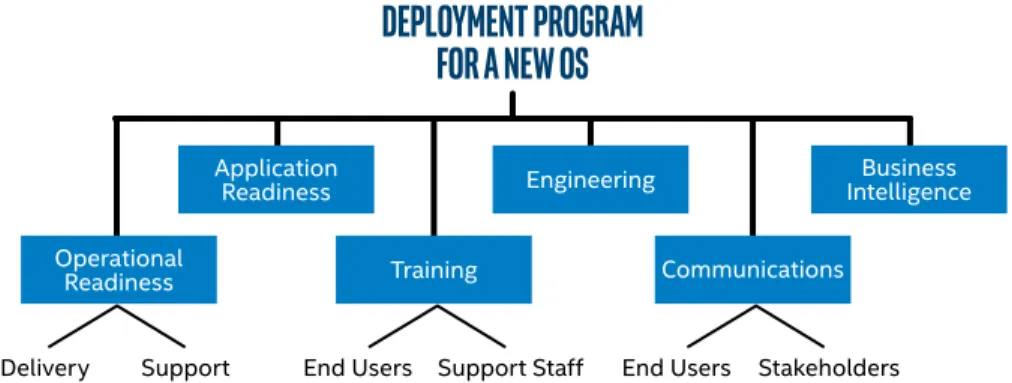
Before deployment, we verify we have all the capabilities required to deploy, integrate, and support the new OS. Migration readiness includes both operational readiness and application readiness. As shown in Figure 1, we also address several other aspects of migration readiness, such as engineering, training, communications, and business intelligence integration.
Best Practice #4: Plan for Operational Readiness (Delivery and Support)
We verify that we can deliver the new OS in both deployment scenarios: OS upgrades and installation on new PCs.4 We also evaluate what changes we need to make to support the new OS both during and after the migration. We identify the following:
• How much first-line and second-line support will be needed • The tools that we will need to develop, such as support scripts • The appropriate incident management system configuration
Because the migration may take weeks or months, support agents may need access to both the old and the new OS.
To minimize cost, we often use client-hosted virtualization, using Intel® Virtualization Technology, to provide support agents with multiple
operating systems. In some situations we may provide them with multiple PCs or with multiple form factors with the new OS. We often migrate
4 This best practice is primarily concerned with single‑user desktop and laptop PCs. We use a slightly different methodology for multiuser PCs.
Figure 1. Migration readiness involves many activities that must be closely coordinated. Here is our program structure for managing operating system
deployment. We verify that we can
deliver the new OS in both deployment scenarios: OS
upgrades and installation on new PCs.
DEPLOYMENT PROGRAM
FOR A NEW OS
Business Intelligence Engineering
Application Readiness
Communications
Delivery Support
Operational
Readiness Training
in-stock systems to the new OS so that these agents do not have to incur the additional costs of new systems.
Best Practice #5: Verify Application Readiness
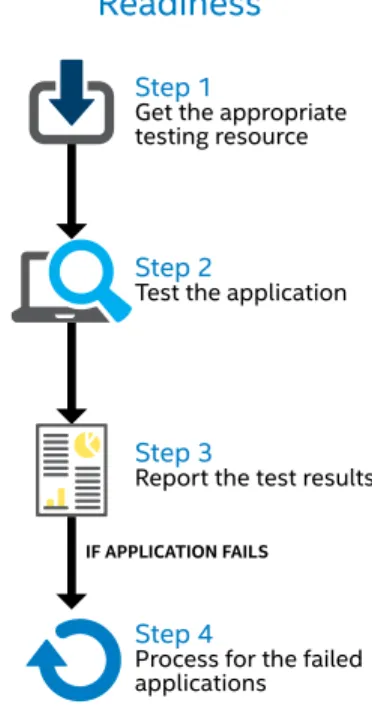
We use an application repository to store information about all enterprise applications in use at Intel—about 3,000 of them. This repository is a critical component of application readiness. Verifying that all these applications work with a new OS, and mitigating the impact of those that are not immediately compatible, requires a thorough plan, summarized in Figure 2. We use the following techniques to help verify application readiness: • Establish a permanent test environment. For past migrations and
major upgrades, we set up a test environment with a limited life span. With OS as a service becoming the norm, we must create a permanent test environment with associated processes and infrastructure that can continually test new features. We now have a permanent environment where application owners and testers can request access, create virtual machines (VMs), test applications, and then tear down those VMs when testing is complete. We plan to identify a segment of users who can adopt new features faster than most to help with testing.
• Develop a plan. We include application owners in planning, communicate testing expectations early, and use a phased approach to schedule their test cycles. As shown in Figure 3, we use a variety of methods for testing. Most testing is done on VMs. We also use loaner systems, existing PCs, and USB drives or compute sticks.
• Prioritize critical and widely used applications. We create a list of applications that are considered critical to the business and widely used (more than 10 percent of the employee base). We also rely on representatives from various business groups to identify key applications. We place the greatest emphasis on these applications. We track these business-critical applications closely and do not deploy the new OS enterprise-wide until these key applications are ready. We test the rest of the applications in parallel but do not consider them potential obstacles to enterprise-wide deployment.
• Decentralize testing but maintain communication. We use a
decentralized approach to testing applications rather than building a large test team within Intel IT. We engage with representatives from various business groups and provide a channel for two-way communication between IT’s OS program team and the business groups. Business groups and application owners take responsibility for testing their applications; Intel IT provides help as necessary. For example, we can provide test scenarios, test systems running the new OS, and remediation consulting to address compatibility issues encountered with individual applications. We also publish common problems and best known methods on Intel’s enterprise wiki so that application owners can take advantage of them. The wiki encourages dialogue and the sharing of practices between application owners and developers.
Figure 2. After inventorying all the enterprise applications, we use a methodical process to test each one. A central application
repository helps us with inventory, and careful tracking and reporting keeps our testing organized and efficient.
Figure 3. Making several methods
available for applications readiness testing enables us to broaden the scope of our testing. We use several methods, including
virtual machines, loaner systems, existing PCs, and compute sticks and USB drives.
Applications Readiness
Testing Methods
VMs
Loaner Systems Existing PCs Other
80%
5% 8%
7%
Step 3
Report the test results
Step 4
Process for the failed applications
Step 1
Get the appropriate testing resource
Step 2
Test the application
IF APPLICATION FAILS
Verifying Application
Readiness
• Collaborate with application development teams. We work with these teams to confirm that they update their enterprise standards to reflect changes in the new OS and possibly new Internet browser version. These standards also need to accommodate the OS-as-a-service model.
• Track application testing progress. We track which applications are certified for the new OS, and we publish the application testing results so that employees can validate whether the applications they use are certified before they decide to migrate.
• Use existing virtualization infrastructure for a safety net. If an application fails one of the test scenarios, it is tested in alternative environments, such as in a different browser or on a virtualization solution. Because we have an existing virtualization infrastructure, there is no additional cost for implementing the safety net.
• Prepare the ecosystem, such as platforms, security, and support models. We certify as many platforms as possible so that early adopters can participate. We also engage our security team early because their requirements take time to implement.
• Accelerate application release schedules. Intel works with many suppliers. We try to synchronize our OS-delivery schedule with them. Sometimes suppliers are not scheduled to release software compatible with the new OS before we’re ready to deploy. In these cases, we invoke management support to pull in supplier delivery dates, thereby minimizing the impact on our schedule.
Best Practice #6: Complete Engineering Tasks
The engineering tasks associated with an OS migration fall into several categories:
• OS image. We create an Intel IT OS image ready to deploy on all eligible PCs. This custom image packages together the following components: OS, drivers, and core applications (for security, manageability, connectivity, and productivity).
• Quality assurance. We thoroughly test individual image
components as well as the complete final image. We certify the image’s compatibility with all supported platforms.
• Security engineering. This includes engineering the security and manageability components and policies of the image and maintaining the security infrastructure.
• User experience. We evaluate the user experience of the image and make improvements if needed.
We are investigating containerization techniques that enable us to integrate the OS image with personalized configurations that may be on a device as well as with ecosystem adjustments (such as group policies). For more information, see the discussion of layering the compute environment in Best Practice #10: Layer the Compute Environment.
Simplifying Self-Service
Ordering
In addition to our best practices, we also use technology to simplify and expedite IT processes. For example, we have developed the IT Device Market (ITDM), which is a unified ordering interface for software and hardware. This sleek interface resembles a consumer shopping experience. Customers can view, compare, and order their desired device within the “store” with related photos, details, and—in the next release—smart recommendations based on recent ITDM activities and purchases.
Because the entire ITDM experience is similar to a consumer shopping experience, the ITDM reinforces employees’ sense of IT as a forward-thinking and responsive organization. The world of lengthy email messages and old-fashioned interaction with our customers is history. Now, employees can go directly to the ITDM and order a device in only a few minutes.
Intel employees can use the ITDM for all PC-delivery activities, such as PC refresh, storage and memory upgrades, and purchases of accessories, such as docking stations. In an upcoming release, employees will also be able to schedule their PC delivery based on the selected device’s availability, the technicians’ availability, the accessory availability, and the refresh-cycle guidelines.
Employees can access the ITDM from a link in a refresh invite or go directly to the site using a web browser. Currently, about 10,000 employees visit the ITDM per year, completing their tasks, on average, within four minutes.
Best Practice #7: Initiate Training
Training encompasses both end users and support staff. End Users
To speed migration, we offer online community support to early adopters of the new OS. Once the migration gains momentum, we focus on the productivity features we identified during the evaluation phase, training end users to maximize the benefit of these new features.
We use a combination of methods to deliver training, such as online FAQs and knowledge bases, videos, how-to tips, printable job aids, interactive quizzes (which make the learning process more engaging), a social media platform where employees can discuss issues and share information, a decal on the laptop with the training website URL, and email communications (see Best Practice #8: Communicate Regularly for more information). Using these training tools, users can find answers quickly without needing to call the Intel Help Desk.
Support Staff
We begin training support staff early by means of an online training course on the new OS. This training familiarizes them with new features, changes from previous operating systems, and changes to components in the OS image. We also create knowledge articles to help the support staff troubleshoot issues. We give them early access to the new OS either by means of VMs or laptops. A well-trained support staff that is already familiar with the new OS can smooth the transition to the new OS for the rest of the users.
Best Practice #8: Communicate Regularly
We provide relevant, timely information to employees to create enthusiasm and positive momentum for our enterprise-wide deployment strategy and to stakeholders to help ensure their continued support. Communication with Employees
We appoint a lead person responsible for employee communications and channel all communications through that person. This helps create a measured flow of communications with a consistent look, feel, and voice while avoiding the pitfall of issuing too many messages. We deliver updates through Intel’s employee portal and targeted emails, and we provide hands-on experience with the OS through road shows and other activities.
Communication with Internal Customers and Stakeholders
We create a team of customer representatives, including subteams dedicated to managing relationships with each business group. These representatives coordinate activities with the business groups, including application readiness and deployment schedules. We keep stakeholders up to date with weekly reports and biweekly presentations.
Best Practice #9: Integrate Business Intelligence Tools
We use third-party and internally developed tools to provide timely and relevant information that helps us track progress and make data-driven decisions during the entire OS delivery process. These tools include dashboards that show progress for the critical success indicators listed in Table 1. Examples of what we measure include call quality during online meetings in the new OS (using the existing OS as a baseline) and unexpected shutdowns.
Best Practice #10: Layer the Compute Environment
The emerging continuous-delivery model for operating systems necessitates transformation of the traditional compute environment. Changes to the OS will be happening frequently, and we need to accommodate those changes without disrupting employees’ productivity. So we are exploring containerization techniques, which will enable us to deconstruct the compute environment into discrete layers for applications, content, and personalization. In this way, we can make changes to one layer (such as the OS) without altering other layers. We anticipate that cloud services can help with the layering process.
Layering the compute environment is part of our Workspace Moves with Me initiative. The layering will enable us to deliver information in a way that is best suited to a particular device while providing a consistent user experience across devices (see Figure 4). For example, if a user is reading page 5 of a document on a laptop and has the view set to 150 percent and then switches to a tablet and opens that document, the same page and view will appear.
We also intend to capture what apps are open on a device so that when the user moves to a different compute environment, those same apps are available. In some cases, such as moving from a laptop to a smartphone, we will be able to reconstruct only a partial workspace due to platform limitations. Although we will use the cloud as a central repository for the deconstructed layers, we are not using the web as a portal—the apps and data will be live on each device and be kept in sync automatically using the cloud.
Our Workspace Moves with Me initiative will improve employee productivity and user experience, especially in individual and shared compute use cases. We intend to conduct a proof of concept in late 2015, which will test our workspace engine on PC-to-PC transitions (complete reconstruction of the workspace) and PC-to-smartphone transitions (partial reconstruction). Later we will add capabilities and support more form factors.
Table 1. Critical Success Indicators Process and Tools
CRITICAL SUCCESS INDICATORS DESCRIPTION TARGET
Streamline and harden migration methods Minimize the impact to user productivity by using a
consistent, repeatable process ≤ 2 hours
User satisfaction with the migration process Based on survey responses > 90 percent
User training satisfaction Based on survey responses > 90 percent
Number of upgrades Validate refresh capacity, migration process, and tools ≥ 3,000 users
Success rate of safety net Viability of safety net methods > 97 percent
Platform Acceptance
CRITICAL SUCCESS INDICATORS DESCRIPTION TARGET
User satisfaction with OS (3 weeks after migration) Value perceived by user > 90 percent
Rollbacks to previous OS Stability, usability, and performance < 3 percent of deployed base
Intel Help Desk contact rate (OS issues only) Stability, usability, and performance < 8 percent of deployed base
Figure 4. The layered environment we are creating will provide users with an enterprise workspace composed of the user’s applications, content, and personalization across any device.
Based on the device’s capability, trust level, and context, the appropriate workspace will be made available.
Applications Content Personalization
OS
HARDWARE
Deployment
When we determine that the enterprise is ready to migrate, the following best practices will help us make operating system deployment as cost-effective as possible with minimum negative effect on employee productivity and user experience.
Best Practice #11: Deploy in Phases
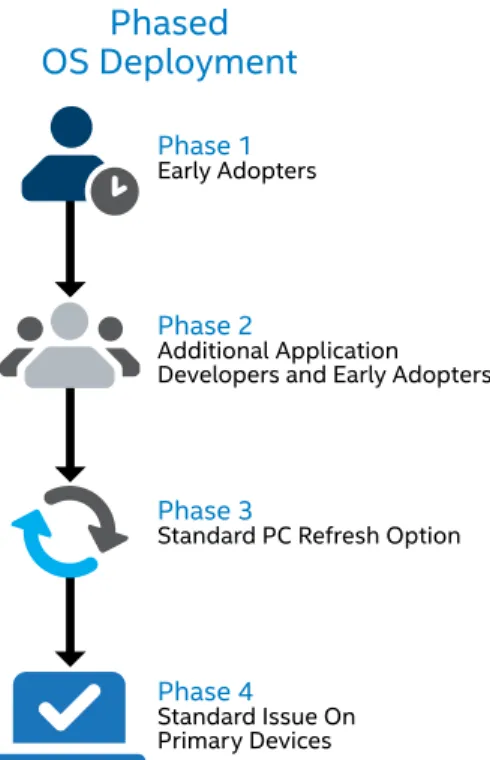
As shown in Figure 5, we typically use a four-phase deployment plan, starting with users who are tolerant of risk. We communicate the plan widely so that employees know what to expect.
Phase 1 – Deploy to Early Adopters
In the past, early adopters received an OS update or new version only periodically. The OS-as-a-service model requires us to define a permanent set of early adopters, both developers and Intel engineers, and send them updates on a regular basis, well ahead of deploying to the rest of the enterprise. We typically deploy the new OS to early adopters concurrently with our application-readiness efforts. These users can assess and drive user acceptance of the new OS and can also help fine-tune the IT processes required for full enterprise deployment. Generally the early adopter phase involves about 500 employees. Early adopters can range from office workers and developers to executives across multiple divisions.
We look for users who have a business-critical requirement for the OS, such as developers who need to help verify application compatibility and sales people who need to showcase the latest Intel® processors on a system running the new OS. To find these users, our customer-management team communicates with business units to identify appropriate employees within their own organizations.
Phase 2 – Deploy to Additional Application Developers and Early Adopters In this phase, we broaden the deployment to include more application developers and testers involved in the application readiness process. We also include some employees who want to migrate to the new OS as early adopters using their existing systems that are compatible with our early-adopter OS image. The user base for this phase is about 2,000 users. Phase 3 – Deploy the Standard PC Refresh Option
In this phase, we offer the new OS as an option in our standard PC refresh process. New employees and employees who are receiving new PCs through the regular refresh cycle can choose either the new or the old OS on their primary PCs (laptop, business Ultrabook device, desktop PC, or tablet with an Intel® Core™ vPro™ processor). By introducing the OS through refresh, we can migrate a large number of users with no increase in effort, saving time and money in the long-term.
Phase 4 – Deploy as Standard Issue on Primary Devices
In the final phase of deployment, the new OS becomes the standard-issue OS for primary devices. Employees can choose to have the new OS or the old one on their secondary devices.
Figure 5. A phased operating system deployment helps make the migration to the new OS as smooth as possible.
Phase 2
Additional Application Developers and Early Adopters
Phase 3
Standard PC Refresh Option
Phase 4
Standard Issue On Primary Devices
Phased
OS Deployment
Phase 1
Best Practice #12: Use a Broad Range of Migration Methods
We have developed several effective migration methods and scenarios that deliver a new OS to employees while minimizing employee downtime. We may use all of these methods or a subset, depending on users’ needs at the time of migration. These methods include the following:
• Upgrade a user’s PC in our migration lab (a one- to two-day process, depending on whether the site is remote)
• Hold migration fairs
• Migrate entire sites or teams at once
• Enable self-upgrades, where sophisticated users initiate the migration with just one click
For future migrations, we are investigating simplified processes that support in-place upgrades instead of full rebuilds. In addition, new tools are now making it possible to transform an OEM platform into an enterprise-ready platform without having to reformat the hard drive and install an IT image on it. These new tools will enable us to support more platforms with less effort.
Conclusion
Intel IT is working to increase our agility in evaluating the business value of OS features, achieving migration readiness, and updating operating systems across the enterprise. We are modifying several of our operating system deployment best practices to accommodate the emerging OS-as-a-service model, where OS updates are delivered continuously. Layering applications and configurations on the platform using containerization techniques and establishing a permanent testing infrastructure are just two of the ways in which our operating system deployment best practices are evolving. Other best practices, such as using a phased approach to deployment, will continue to serve us well with the new OS delivery model.
For more information on Intel IT best practices,
visit
www.intel.com/IT
.
Receive objective and personalized advice from unbiased
professionals at
advisors.intel.com
. Fill out a simple form and one
of our experienced experts will contact you within 5 business days.
Intel technologies’ features and benefits depend on system configuration and may require enabled hardware, software or service activation. Performance varies depending on system configuration. Check with your system manufacturer or retailer or learn more at intel.com.
THE INFORMATION PROVIDED IN THIS PAPER IS INTENDED TO BE GENERAL IN NATURE AND IS NOT SPECIFIC GUIDANCE. RECOMMENDATIONS (INCLUDING POTENTIAL COST SAVINGS) ARE BASED UPON INTEL’S EXPERIENCE AND ARE ESTIMATES ONLY. INTEL DOES NOT GUARANTEE OR WARRANT OTHERS WILL OBTAIN SIMILAR RESULTS.
INFORMATION IN THIS DOCUMENT IS PROVIDED IN CONNECTION WITH INTEL PRODUCTS AND SERVICES. NO LICENSE, EXPRESS OR IMPLIED, BY ESTOPPEL OR OTHERWISE, TO ANY INTELLECTUAL PROPERTY RIGHTS IS GRANTED BY THIS DOCUMENT. EXCEPT AS PROVIDED IN INTEL’S TERMS AND CONDITIONS OF SALE FOR SUCH PRODUCTS, INTEL ASSUMES NO LIABILITY WHATSOEVER AND INTEL DISCLAIMS ANY EXPRESS OR IMPLIED WARRANTY, RELATING TO SALE AND/OR USE OF INTEL PRODUCTS AND SERVICES INCLUDING LIABILITY OR WARRANTIES RELATING TO FITNESS FOR A PARTICULAR PURPOSE, MERCHANTABILITY, OR INFRINGEMENT OF ANY PATENT, COPYRIGHT OR OTHER INTELLECTUAL PROPERTY RIGHT.
Intel, the Intel logo, Intel Core, Intel vPro, and Ultrabook are trademarks of Intel Corporation in the U.S. and other countries.
IT@Intel
We connect IT professionals with their IT peers inside Intel. Our IT department solves some of today’s most demanding and complex technology issues, and we want to share these lessons directly with our fellow IT professionals in an open peer-to-peer forum.
Our goal is simple: improve efficiency throughout the organization and enhance the business value of IT investments. Follow us and join the conversation: • Twitter
• #IntelIT
• IT Center Community
Visit us today at intel.com/ IT or contact your local Intel representative if you would like to learn more.
Related Content
Visit intel.com/IT to find content on related topics:
• Best Practices for Migrating a Large Enterprise to Microsoft Windows 7*
• Best Practices Help Minimize Microsoft Windows* 8 Migration Costs
• Deploying Microsoft Windows* 8 in the Enterprise
• Deploying Windows* 8 on Intel® Architecture-based Tablets: Intel’s Approach
• Evaluating Microsoft Windows* 8 Security on Intel® Architecture Tablets