Reference Guide for SQL Server and Sybase Adaptive Server Migrations
Release 9.2.0 for Microsoft Windows 98/2000/NT and Microsoft Windows XP
September 2002 Part Number: B10254-01
This reference guide describes how to migrate from Microsoft SQL Server 6.5, Microsoft SQL Server 7.0, Microsoft SQL Server 2000, Sybase Adaptive Server 11, and Sybase Adaptive Server 12 to Oracle9i or Oracle8i.
Copyright © 1998, 2002 Oracle Corporation. All rights reserved.
The Programs (which include both the software and documentation) contain proprietary information of Oracle Corporation; they are provided under a license agreement containing restrictions on use and disclosure and are also protected by copyright, patent and other intellectual and industrial property laws. Reverse engineering, disassembly, or decompilation of the Programs, except to the extent required to obtain interoperability with other independently created software or as specified by law, is prohibited. The information contained in this document is subject to change without notice. If you find any problems in the documentation, please report them to us in writing. Oracle Corporation does not warrant that this document is error free. Except as may be expressly permitted in your license agreement for these Programs, no part of these Programs may be reproduced or transmitted in any form or by any means, electronic or mechanical, for any purpose, without the express written permission of Oracle Corporation. If the Programs are delivered to the U.S. Government or anyone licensing or using the programs on behalf of the U.S. Government, the following notice is applicable:
Restricted Rights Notice Programs delivered subject to the DOD FAR Supplement are "commercial computer software" and use, duplication, and disclosure of the Programs, including documentation, shall be subject to the licensing restrictions set forth in the applicable Oracle license agreement. Otherwise, Programs delivered subject to the Federal Acquisition Regulations are "restricted computer software" and use, duplication, and disclosure of the Programs shall be subject to the restrictions in FAR 52.227-19, Commercial Computer Software - Restricted Rights (June, 1987). Oracle Corporation, 500 Oracle Parkway, Redwood City, CA 94065.
The Programs are not intended for use in any nuclear, aviation, mass transit, medical, or other inherently dangerous applications. It shall be the licensee's responsibility to take all appropriate fail-safe, backup, redundancy, and other measures to ensure the safe use of such applications if the Programs are used for such purposes, and Oracle Corporation disclaims liability for any damages caused by such use of the Programs.
Oracle is a registered trademark, and Oracle8, Oracle8i, Oracle9i, SQL*Plus, PL/SQL, and Pro*C are trademarks or registered trademarks of Oracle Corporation. Other names may be trademarks of their respective owners.
Send Us Your Comments
... ixPreface
... xiAudience ... xii
What You Should Already Know... xii
How this Reference Guide is Organized ... xii
Using This Reference Guide... xiii
Documentation Accessibility ... xiii
Accessibility of Code Examples in Documentation... xiii
Related Documentation ... xiii
Conventions... xiv
1
Overview
Introduction... 1-1 Product Description... 1-1 Features... 1-2 Glossary... 1-32
Microsoft SQL Server, Sybase Adaptive Server, and Oracle Compared
Schema Migration... 2-1 Schema Object Similarities ... 2-1 Schema Object Names... 2-3 Table Design Considerations ... 2-3 Data Types... 2-3
Unique Key Constraints ... 2-7 Check Constraints... 2-7
Data Types... 2-8 Data Types Table ... 2-9
Data Storage Concepts... 2-21 Data Storage Concepts Table ... 2-21
Data Manipulation Language... 2-26 Connecting to the Database... 2-27 SELECT Statement... 2-28 SELECT with GROUP BY Statement ... 2-35 INSERT Statement ... 2-36 UPDATE Statement ... 2-37 DELETE Statement ... 2-39 Operators ... 2-40 Comparison Operators ... 2-40 Arithmetic Operators ... 2-44 String Operators... 2-44 Set Operators ... 2-45 Bit Operators ... 2-45 Built-In Functions ... 2-46 Character Functions ... 2-46 Miscellaneous Functions ... 2-48 Date Functions ... 2-49 Mathematical Functions ... 2-51 Locking Concepts and Data Concurrency Issues... 2-52 Locking... 2-52 Row-Level Versus Page-Level Locking... 2-55 Read Consistency... 2-56 Logical Transaction Handling ... 2-57
Individual SQL Statements ... 3-13 Logical Transaction Handling ... 3-14 Error Handling within the Stored Procedure... 3-15
Data Types... 3-16 Local Variable... 3-17 Server Data Types... 3-17 Composite Data Types... 3-17
Schema Objects... 3-17 Procedure... 3-18 Function ... 3-24 Package... 3-28 Package Body ... 3-32 T/SQL Versus PL/SQL Constructs... 3-36 CREATE PROCEDURE Statement ... 3-38 Parameter Passing ... 3-39 DECLARE Statement ... 3-40 IF Statement... 3-41 RETURN Statement ... 3-45 RAISERROR Statement ... 3-46 EXECUTE Statement... 3-47 WHILE Statement... 3-48 GOTO Statement ... 3-53 @@Rowcount and @@Error Variables ... 3-54 ASSIGNMENT Statement ... 3-55 SELECT Statement ... 3-56 SELECT Statement as Part of the SELECT List ... 3-59 SELECT Statement with GROUP BY Clause... 3-61 Column Aliases... 3-62 UPDATE with FROM Statement... 3-63 DELETE with FROM Statement ... 3-65 Temporary Tables... 3-67 Result Set (Converted Using a Cursor Variable) ... 3-68 Cursor Handling... 3-70
Transaction Handling Semantics... 3-73 Conversion Preparation Recommendations... 3-76 Exception-Handling and Error-Handling Semantics ... 3-77 Special Global Variables ... 3-79 Operators ... 3-80 Built-in Functions... 3-80 Sending Data to the Client: Result Sets ... 3-80 Single Result Set... 3-80 Multiple Result Sets... 3-81 About Converting a T/SQL Procedure with a Result Set ... 3-82 DDL Constructs within Microsoft SQL Server and Sybase Adaptive Server Stored
Procedures 3-84
4
Distributed Environments
Distributed Environments... 4-1 Accessing Remote Databases in a Distributed Environment ... 4-1 Oracle and Remote Objects ... 4-2 Microsoft SQL Server and Sybase Adaptive Server and Remote Objects ... 4-2 Replication ... 4-3
Application Development Tools... 4-4
5
Migrating Temporary Tables to Oracle
Temporary Table Usage... 5-1 Simplify Coding... 5-2 Simulate Cursors when Processing Data from Multiple Tables... 5-4 Improve Performance In a Situation Where Multi-Table Joins are Needed... 5-4 Associate Rows from Multiple Queries in One Result Set (UNION) ... 5-5 Eliminate Re-Querying Data Needed for Joins ... 5-6 Consolidate the Data for Decision Support Data Requirements ... 5-7
Maintenance of Temporary Tables ... 5-10 Definition of t_table_catalog ... 5-11 Package Body t_table ... 5-11
6
Disconnected Source Model Loading
Generating Database Metadata Flat Files... 6-1 Flat File Generation Scripts ... 6-1 Running the Scripts... 6-2
Migration Workbench Reference Guide for SQL Server and Sybase Adaptive Server Migrations, Release 9.2.0 for Microsoft Windows 98/2000/NT and Microsoft Windows XP.
Part Number: B10254-01
Oracle Corporation welcomes your comments and suggestions on the quality and usefulness of this publication. Your input is an important part of the information used for revision.
■ Did you find any errors?
■ Is the information clearly presented?
■ Do you need more information? If so, where?
■ Are the examples correct? Do you need more examples? ■ What features did you like most about this manual?
If you find any errors or have any other suggestions for improvement, please indicate the chapter, section, and page number (if available). You can send comments to us in the following ways:
■ Electronic mail: [email protected] ■ Tel: +353-1-8031000, Fax: +353-1- 8033321
■ Attn: Oracle Migration Workbench ■ Postal service:
Oracle Migration Workbench Documentation Oracle Corporation
Block P5
East Point Business Park Clontarf, Dublin 3 Ireland
The Oracle Migration Workbench Reference Guide for SQL Server and Sybase Adaptive Server Migrations provides detailed information about migrating a database from Microsoft SQL Server 6.5, Microsoft SQL Server 7.0, Microsoft SQL Server 2000, Sybase Adaptive Server 11, and Sybase Adaptive Server 12 to Oracle9i or Oracle8i. It is a useful guide regardless of the conversion tool you are using to perform the migration, but the recommended tool for such migrations is Oracle Migration Workbench (Migration Workbench). This reference guide describes several
differences between Microsoft SQL Server and Sybase Adaptive Server and Oracle and outlines how those differences are handled by the Migration Workbench during the conversion process.
This chapter contains the following sections:
■ Audience
■ What You Should Already Know ■ How this Reference Guide is Organized ■ Using This Reference Guide
■ Documentation Accessibility
■ Accessibility of Code Examples in Documentation ■ Related Documentation
Server and Sybase Adaptive Server database to Oracle using the Migration Workbench.
What You Should Already Know
You should be familiar with relational database concepts and with the operating system environments under which you are running Oracle and Microsoft SQL Server and Sybase Adaptive Server.
How this Reference Guide is Organized
This reference guide is organized as follows:Chapter 1, "Overview"
Introduces the Migration Workbench and outlines features of this tool.
Chapter 2, "Microsoft SQL Server, Sybase Adaptive Server, and Oracle Compared"
Contains detailed information about the differences between data types, data storage concepts, schema objects, and the data manipulation language in Microsoft SQL Server and Sybase Adaptive Server and Oracle.
Chapter 3, "Triggers and Stored Procedures"
Introduces triggers and stored procedures, and compares T-SQL and PL/SQL language elements and constructs in Microsoft SQL Server and Sybase Adaptive Server and Oracle.
Chapter 4, "Distributed Environments"
Describes when and why distributed environments are used, and discusses application development tools.
Chapter 5, "Migrating Temporary Tables to Oracle"
Describes how to emulate temporary tables in Oracle9i and Oracle8i.
chapter provides an introduction to the concept and terminology of the Migration Workbench.
Documentation Accessibility
Our goal is to make Oracle products, services, and supporting documentation accessible, with good usability, to the disabled community. To that end, our documentation includes features that make information available to users of assistive technology. This documentation is available in HTML format, and contains markup to facilitate access by the disabled community. Standards will continue to evolve over time, and Oracle Corporation is actively engaged with other
market-leading technology vendors to address technical obstacles so that our documentation can be accessible to all of our customers. For additional information, visit the Oracle Accessibility Program Web site at
http://www.oracle.com/accessibility/
Accessibility of Code Examples in Documentation
JAWS, a Windows screen reader, may not always correctly read the code examples in this document. The conventions for writing code require that closing braces should appear on an otherwise empty line; however, JAWS may not always read a line of text that consists solely of a bracket or brace.
Related Documentation
For more information, see these Oracle Migration Workbench resources:
■ Oracle Migration Workbench Frequently Asked Questions (FAQ) ■ Oracle Migration Workbench Release Notes
■ Oracle Migration Workbench Online Help
To download free release notes, installation documentation, white papers, or other collateral, please visit the Oracle Technology Network (OTN). You must register online before using OTN; registration is free and you can do it at:
http://otn.oracle.com/tech/migration/workbench
Conventions
This section describes the conventions used in the text and code examples of the this documentation. It describes:
■ Conventions in Text
■ Conventions in Code Examples
Conventions in Text
We use various conventions in text to help you more quickly identify special terms. The following table describes those conventions and provides examples of their use.
Convention Meaning Example
Bold Bold type indicates GUI options. It also
indicates terms that are defined in the text or terms that appear in a glossary, or both.
The C datatypes such as ub4, sword, or
OCINumber are valid.
When you specify this clause, you create an
index-organized table.
Italics Italic typeface indicates book titles, emphasis, syntax clauses, or placeholders.
Reference Guide
Run Uold_release.SQL where old_release
refers to the release you installed prior to upgrading.
UPPERCASE monospace (fixed-width font)
Uppercase monospace typeface indicates elements supplied by the system. Such elements include parameters, privileges, datatypes, RMAN keywords, SQL keywords, SQL*Plus or utility commands, packages and methods, as well as system-supplied column names, database objects and structures, user names, and roles.
You can specify this clause only for a NUMBER
column.
You can back up the database using the BACKUP command.
Conventions in Code Examples
Code examples illustrate SQL, PL/SQL, SQL*Plus, or other command-line statements. They are displayed in a monospace (fixed-width) font and separated from normal text as shown in this example:
SELECT username FROM dba_users WHERE username = ’MIGRATE’;
The following table describes typographic conventions used in code examples and provides examples of their use.
monospace (fixed-width font)
executables and sample user-supplied elements. Such elements include computer and database names, net service names, and connect identifiers, as well as user-supplied database objects and structures, column names, packages and classes, user names and roles, program units, and parameter values.
The department_id, department_name, and location_id columns are in the hr.departments table.
Convention Meaning Example
Square Brackets [ ] Indicates that the enclosed arguments are
optional. Do not enter the brackets.
DECIMAL (digits [ , precision ])
Curly Braces { } Indicates that one of the enclosed
arguments is required. Do not enter the braces.
{ENABLE | DISABLE}
Vertical Line | Separates alternative items that may be
optional or required. Do not type the vertical bar.
{ENABLE | DISABLE} [COMPRESS | NOCOMPRESS] Ellipses ... Indicates that the preceding item can be
repeated. You can enter an arbitrary number of similar items. In code
fragments, an ellipsis means that code not relevant to the discussion has been omitted. Do not type the ellipsis
CREATE TABLE ... AS subquery;
SELECT col1, col2, ... , coln FROM employees;
Italics Indicates variables that you must supply particular values.
filenames or directory names, commands, command keywords, initializing
parameters, data types, table names, or object names. Enter text exactly as spelled; it need not be in uppercase
employees;
SELECT * FROM USER_TABLES; DROP TABLE hr.employees;
lowercase Lowercase words in example statements indicate words supplied only for the context of the example. For example, lowercase words may indicate the name of a table, column, or file.
SELECT last_name, employee_id FROM employees;
1
Overview
This chapter introduces the Oracle Migration Workbench (Migration Workbench) under the following headings:■ Introduction
■ Product Description ■ Features
■ Glossary
Introduction
The Migration Workbench is a tool that simplifies the process of migrating data and applications from an Microsoft SQL Server and Sybase Adaptive Server
environment to an Oracle9i or Oracle8i destination database. The Migration Workbench allows you to quickly and easily migrate an entire application system, that is the database schema including triggers and stored procedures, in an integrated, visual environment.
Product Description
The Migration Workbench allows you to migrate a Microsoft SQL Server and Sybase Adaptive Server database to an Oracle9i or Oracle8i database. The Migration Workbench employs an intuitive and informative User Interface and a series of
Note: Microsoft SQL Server is used in this document to refer to both Microsoft SQL Server 6.5, Microsoft SQL Server 7.0, and Microsoft SQL Server 2000 unless otherwise stated.
wizards to simplify the migration process. To ensure portability, all components of the Migration Workbench are written in Java.
The Migration Workbench uses a repository to store migration information. This allows you to query the initial state of the application before migration. By initially loading the migratable components of the application system into a repository, you can work independently of the production application.
Furthermore, the Migration Workbench saves useful dependency information about the components you are converting. For example, the Migration Workbench keeps a record of all the tables accessed by a stored procedure. You can then use this
information to understand the impact of modifying a given table.
Features
The Migration Workbench release 9.2.0 is a wizard-driven tool. It is composed of core features and Microsoft SQL Server and Sybase Adaptive Server migration specific features. The Migration Workbench allows you to:
■ Migrate a complete Microsoft SQL Server and Sybase Adaptive Server database to an Oracle9i or Oracle8i database.
■ Migrate groups, users, tables, primary keys, foreign keys, unique constraints, indexes, rules, check constraints, views, triggers, stored procedures,
user-defined types, and privileges to Oracle.
■ Migrate multiple Microsoft SQL Server and Sybase Adaptive Server source databases to a single Oracle database.
■ Customize the parser for stored procedures, triggers, or views.
■ Generate the Oracle SQL*Loader and SQL Server BCP scripts for offline data loading.
■ Display a representation of the source database and its Oracle equivalent. ■ Generate and view a summary report of the migration.
■ Customize users, tables, indexes, and tablespaces. ■ Customize the default data type mapping rules.
Glossary
The following terms are used to describe the Migration Workbench:
Application System is the database schema and application files that have been developed for a database environment other than Oracle, for example, Microsoft SQL Server and Sybase Adaptive Server.
Capture Wizard is an intuitive wizard that takes a snapshot of the data dictionary of the source database, loads it into the Source Model, and creates the Oracle Model. Dependency is used to define a relationship between two migration entities. For example, a database view is dependent upon the table it references.
Destination Database is the Oracle database to which the Migration Workbench migrates the data dictionary of the source database.
Migration Component is part of an application system that can be migrated to an Oracle database. Examples of migration components are tables and stored procedures.
Migration Entity is an instance of a migration component. The table EMP would be a migration entity belonging to the table MIGRATION COMPONENT.
Migration Wizard is an intuitive wizard that helps you migrate the source database to Oracle.
Migration Workbench is the graphical tool that allows migration of an application system to an Oracle database environment.
Navigator Pane is the part of the Migration Workbench User Interface that contains the tree views representing the Source Model and the Oracle Model.
Oracle Model is a a series of Oracle tables that is created from the information in the Source Model. It is a visual representation of how the source database looks when generated in an Oracle environment.
Properties Pane is the part of the Migration Workbench User Interface that displays the properties of a migration entity that has been selected in one of the tree views in the Navigator Pane.
Progress Window is the part of the Migration Workbench User Interface that contains informational, error, or warning messages describing the progress of the migration process.
Software Development Kit (SDK) is a set of well-defined application programming interfaces (APIs) that provide services that a software developer can use.
Source Database is the database containing the data dictionary of the application system being migrated by the Migration Workbench. The source database is a database other than Oracle, for example, Microsoft SQL Server and Sybase Adaptive Server.
Source Model is a replica of the data dictionary of the source database. It is stored in the Oracle Migration Workbench Repository and is loaded by the Migration Work-bench with the contents of the data dictionary of the source database.
Workbench Repository is the area in an Oracle database used to store the persistent information necessary for the Migration Workbench to migrate an application system.
2
Microsoft SQL Server, Sybase Adaptive
Server, and Oracle Compared
This chapter contains information comparing the Microsoft SQL Server and Sybase Adaptive Server database and the Oracle database. It includes the following sections:■ Schema Migration ■ Data Types
■ Data Storage Concepts ■ Data Manipulation Language
Schema Migration
The schema contains the definitions of the tables, views, indexes, users, constraints, stored procedures, triggers, and other database-specific objects. Most relational databases work with similar objects.
The schema migration topics discussed here include the following:
■ Schema Object Similarities ■ Schema Object Names ■ Table Design Considerations
Schema Object Similarities
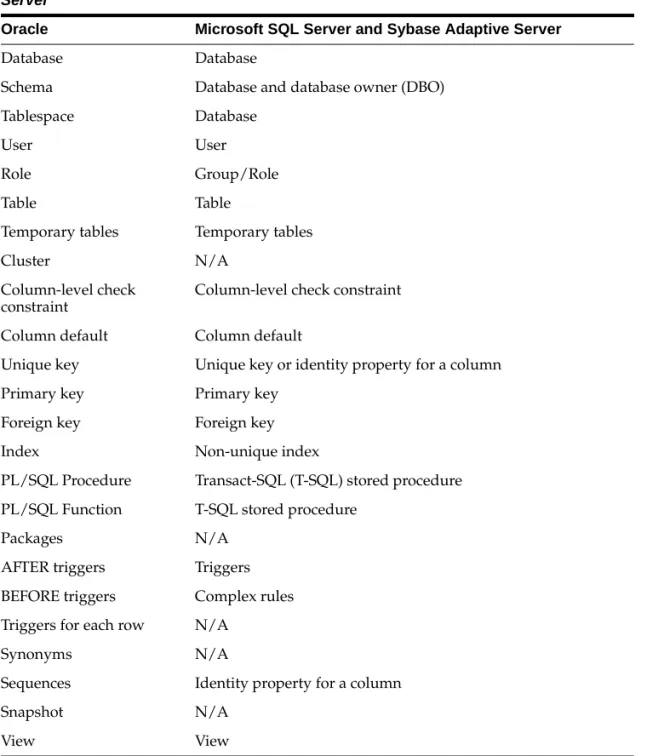
There are many similarities between schema objects in Oracle and schema objects in Microsoft SQL Server and Sybase Adaptive Server. However, some schema objects
Table 2–1 Schema Objects in Oracle and Microsoft SQL Server and Sybase Adaptive Server
Oracle Microsoft SQL Server and Sybase Adaptive Server
Database Database
Schema Database and database owner (DBO)
Tablespace Database
User User
Role Group/Role
Table Table
Temporary tables Temporary tables
Cluster N/A
Column-level check constraint
Column-level check constraint
Column default Column default
Unique key Unique key or identity property for a column
Primary key Primary key
Foreign key Foreign key
Index Non-unique index
PL/SQL Procedure Transact-SQL (T-SQL) stored procedure
PL/SQL Function T-SQL stored procedure
Packages N/A
AFTER triggers Triggers
BEFORE triggers Complex rules
Triggers for each row N/A
Synonyms N/A
Schema Object Names
Reserved words differ between Oracle and Microsoft SQL Server and Sybase Adaptive Server. Many Oracle reserved words are valid object or column names in Microsoft SQL Server and Sybase Adaptive Server. For example, DATE is a reserved word in Oracle, but it is not a reserved word in Microsoft SQL Server and Sybase Adaptive Server. Therefore, no column is allowed to have the name DATE in Oracle, but a column can be named DATE in Microsoft SQL Server and Sybase Adaptive Server. Use of reserved words as schema object names makes it impossible to use the same names across databases.
You should choose a schema object name that is unique by case and by at least one other characteristic, and ensure that the object name is not a reserved word from either database.
For a list of reserved words in Oracle, see the Oracle9i SQL Reference, Release 1 (9.0.1).
Table Design Considerations
This section discusses the many table design issues that you need to consider when converting Microsoft SQL Server and Sybase Adaptive Server databases to Oracle. These issues are discussed under the following headings:
■ Data Types
■ Entity Integrity Constraints ■ Referential Integrity Constraints ■ Unique Key Constraints
■ Check Constraints
Data Types
This section outlines conversion considerations for the following data types:
■ DATETIME Data Types
■ IMAGE and TEXT Data Types (Binary Large Objects)
■ Microsoft SQL Server and Sybase Adaptive Server User-Defined Data Types DATETIME Data Types
The date/time precision in Microsoft SQL Server and Sybase Adaptive Server is 1/300th of a second. Oracle9i has a new data type TIMESTAMP which has a
precision of 1/100000000th of a second. Oracle also has a DATE data type that stores date and time values accurate to one second. The Migration Workbench has a default mapping to the DATE data type.
For applications that require finer date/time precision than seconds, the
TIMESTAMP data type should be selected for the datatype mapping of date data types in Microsoft SQL Server and Sybase Adaptive Server. The databases store point-in-time values for DATE and TIME data types.
As an alternative, if an Microsoft SQL Server and Sybase Adaptive Server application uses the DATETIME column to provide unique IDs instead of point-in-time values, replace the DATETIME column with a SEQUENCE in the Oracle schema definition.
In the following examples, the original design does not allow the DATETIME precision to exceed seconds in the Oracle table. This example assumes that the DATETIME column is used to provide unique IDs. If millisecond precision is not required, the table design outlined in the following example is sufficient:
Original Table Design
Microsoft SQL Server and Sybase Adaptive Server: CREATE TABLE example_table
(datetime_column datetime not null, text_column text null, varchar_column varchar(10) null)
Oracle:
CREATE TABLE example_table
(datetime_column date not null, text_column long null, varchar_column varchar2(10) null)
The following design allows the value of the sequence to be inserted into the integer_column. This allows you to order the rows in the table beyond the allowed precision of one second for DATE data type fields in Oracle. If you include this column in the Microsoft SQL Server and Sybase Adaptive Server table, you can keep the same table design for the Oracle database.
(datetime_column datetime not null, integer_column int null, text_column text null, varchar_column varchar(10) null)
Oracle:
CREATE TABLE example_table
(datetime_column date not null, integer_column number null, text_column long null, varchar_column varchar2(10) null)
For the Microsoft SQL Server and Sybase Adaptive Server database, the value in the integer_column is always NULL. For Oracle, the value for the field integer_column is updated with the next value of the sequence.
Create the sequence by issuing the following command: CREATE SEQUENCE datetime_seq
Values generated for this sequence start at 1 and are incremented by 1.
Many applications do not use DATETIME values as UNIQUE IDs, but still require the date/time precision to be higher than secondS. For example, the timestamp of a scientific application may have to be expressed in milliseconds, microseconds, and nanoseconds. The precision of the Microsoft SQL Server and Sybase Adaptive Server DATETIME data type is 1/300th of a second; the precision of the Oracle DATE data type is one second. The Oracle TIMESTAMP data type has a precision to 1/100000000th of a second. However, the precision recorded is dependent on the operating system.
IMAGE and TEXT Data Types (Binary Large Objects)
The physical and logical storage methods for IMAGE and TEXT data differ from Oracle to Microsoft SQL Server and Sybase Adaptive Server. In Microsoft SQL Server and Sybase Adaptive Server, a pointer to the IMAGE or TEXT data is stored with the rows in the table while the IMAGE or TEXT data is stored separately. This arrangement allows multiple columns of IMAGE or TEXT data per table. In Oracle, IMAGE data may be stored in a BLOB type field and TEXT data may be stored in a CLOB type field. Oracle allows multiple BLOB and CLOB columns per table. BLOBS and CLOBS may or may not be stored in the row depending on their size.
If the Microsoft SQL Server and Sybase Adaptive Server TEXT column is such that the data never exceeds 4000 bytes, convert the column to an Oracle VARCHAR2 data type column instead of a CLOB column. An Oracle table can define multiple VARCHAR2 columns. This size of TEXT data is suitable for most applications.
Microsoft SQL Server and Sybase Adaptive Server User-Defined Data Types
This Microsoft SQL Server and Sybase Adaptive Server T-SQL-specific enhancement to SQL allows users to define and name their own data types to supplement the system data types. A user-defined data type can be used as the data type for any column in the database. Defaults and rules (check constraints) can be bound to these user-defined data types, which are applied automatically to the individual columns of these user-defined data types.
While migrating to Oracle PL/SQL, you must determine the base data type for each user-defined data type, to find the equivalent PL/SQL data type.
Entity Integrity Constraints
You can define a primary key for a table in Microsoft SQL Server and Sybase Adaptive Server. Primary keys can be defined in a CREATE TABLE statement or an ALTER TABLE statement.
Oracle provides declarative referential integrity. A primary key can be defined as
Note: User-defined data types make the data definition language code and procedural SQL code less portable across different database servers.
Referential Integrity Constraints
You can define a foreign key for a table in Microsoft SQL Server and Sybase Adaptive Server. Foreign keys can be defined in a CREATE TABLE statement or an ALTER TABLE statement.
Oracle provides declarative referential integrity. A CREATE TABLE or ALTER TABLE statement can add foreign keys to the table definition. For information about referential integrity constraints, see the Oracle9i Database Concepts, Release 1 (9.0.1).
Unique Key Constraints
You can define a unique key for a table in Microsoft SQL Server and Sybase Adaptive Server. Unique keys can be defined in a CREATE TABLE statement or an ALTER TABLE statement.
Oracle defines unique keys as part of CREATE TABLE or ALTER TABLE statements. Oracle internally creates unique indexes to enforce these constraints.
Unique keys map one-to-one from Microsoft SQL Server and Sybase Adaptive Server to Oracle.
Check Constraints
Check constraints can be defined in a CREATE TABLE statement or an ALTER TABLE statement in Microsoft SQL Server and Sybase Adaptive Server. Multiple check constraints can be defined on a table. A table-level check constraint can reference any column in the constrained table. A column can have only one check constraint. A column-level check constraint can reference only the constrained column. These check constraints support complex regular expressions.
Oracle defines check constraints as part of the CREATE TABLE or ALTER TABLE statements. A check constraint is defined at the TABLE level and not at the COLUMN level. Therefore, it can reference any column in the table. Oracle, however, does not support complex regular expressions.
SQL Server Rule: create rule phone_rule as
@phone_number like
"([0-9][0-9][0-9])[0-9][0-9][0-9]-[0-9][0-9][0-9][0-9]"
This rule passes all the phone numbers that resemble the following: (650)506-7000
This rule failes all the phone numbers that resemble the following: 650-506-7000
650-GET-HELP
There are a few ways to implement this INTEGRITY constraint in Oracle:
■ Simulate the behavior of phone-rule in a check constraint using a combination of SUBSTR, TRANSLATE, and LIKE clauses
■ Write a trigger and use PL/SQL
Table-level check constraints from Microsoft SQL Server and Sybase Adaptive Server databases map one-to-one with Oracle check constraints. You can implement the column-level check constraints from the Microsoft SQL Server and Sybase Adaptive Server database to Oracle table-level check constraints. While converting the regular expressions, convert all simple regular expressions to check constraints in Oracle. Microsoft SQL Server and Sybase Adaptive Server check constraints with complex regular expressions can be either reworked as check constraints including a combination of simple regular expressions, or you can write Oracle database triggers to achieve the same functionality.
Data Types
This chapter provides detailed descriptions of the differences in data types used by Microsoft SQL Server and Sybase Adaptive Server and Oracle databases.
Specifically, this chapter contains the following information:
■ A table showing the base Microsoft SQL Server and Sybase Adaptive Server data types available and how they are mapped to Oracle data types
Data Types Table
Table 2–2 Data Types in Oracle and Microsoft SQL Server and Sybase Adaptive Server
Microsoft SQL Server and Sybase Adaptive
Server Description Oracle Comments
INTEGER Four-byte integer, 31
bits, and a sign. May be abbreviated as "INT" (this abbreviation was required prior to version 5).
NUMBER(10) It is possible to place a table
constraint on columns of this type (as an option) to force values between -2^31 and2^31. Or, place
appropriate constraints such as: STATE_NO between 1 and 50
SMALLINT Two-byte integer, 15 bits,
and a sign.
NUMBER(6) It is possible to place a table
constraint on columns of this type (optionally) to force values between -2^15 and 2^15. Or, place
appropriate constraints such as: STATE_NO between 1 and 50
TINYINT One byte integer, 8 bits
and no sign. Holds whole numbers between 0 and 255.
NUMBER(3) You may add a check
constraint of (x between 0 and 255) where x is column name.
REAL Floating point number. Storage is four bytes and has a binary precision of 24 bits, a 7-digit
precision.
Data can range from –3.40E+38 to 3.40E+38. In Sybase the range of values and the actual representation is
platform dependent. This can result in incorrect interpretation if data is moved between platforms. REAL numbers are stored in 4 bytes and can represent about 6 decimal digits with reasonable accuracy. Sybase REALs are mapped to the ANSI equivalent in Oracle.
FLOAT The ANSI data type
conversion to Oracle for REAL is FLOAT(63). By default, the Oracle
Migration Workbench maps REAL to FLOAT(24) that stores up to 8 significant decimal digits in Oracle. The Oracle NUMBER data type is used to store both fixed and floating-point numbers in a format that is compatible with decimal arithmetic. You may want to add a check constraint to constrain range of values. Also, you get different answers when performing operations on this data type as the Oracle NUMBER type is more precise and portable than REAL. Floating-point numbers can be specified in Oracle in the following format: FLOAT[(b)]. Where [(b)] is the binary precision b and can range from 1 to 126. [(b)] defaults to 126. To check what a particular binary precision is in terms of decimal precision, multiply [(b)] by 0.30103 and round up to the next whole number.
Table 2–2 Data Types in Oracle and Microsoft SQL Server and Sybase Adaptive Server(Cont.)
Microsoft SQL Server and Sybase Adaptive
FLOAT A floating point number. This column has 15-digit precision.
FLOAT The ANSI data type
conversion to Oracle for FLOAT(p) is FLOAT(p). The ANSI data type conversion to Oracle for DOUBLE PRECISION is FLOAT(126). By default, the Oracle Migration Workbench maps FLOAT to FLOAT(53), that stores up to 16 significant decimal digits in Oracle. The Oracle NUMBER data type is used to store both fixed and floating-point numbers in a format compatible with decimal arithmetic.You get different answers when performing operations on this type due to the fact that the Oracle NUMBER type is much more precise and portable than FLOAT, but it does not have the same range. The NUMBER data type data can range from
-9.99.99E+125 to 9.99.99E+125 (38 nines followed by 88 zeros). NOTE: If you try to migrate floating point data greater than or equal to 1.0E+126 then Migration Workbench will fail to insert this data in the Oracle database and1 will return an error.This also applies to negative values less than or equal to -1.0E+126.
Table 2–2 Data Types in Oracle and Microsoft SQL Server and Sybase Adaptive Server(Cont.)
Microsoft SQL Server and Sybase Adaptive
Floating-point numbers can be specified in Oracle using FLOAT[(b)], where [(b)] is the binary precision [(b)] and can range from 1 to 126. [(b)] defaults to 126.To check what a particular binary precision is in terms of decimal precision multiply [(b)] by 0.30103 and round up to the next whole number.
If they are outside of the range, large floating-point numbers will overflow, and small floating-point numbers will underflow.
BIT A Boolean 0 or 1 stored
as one bit of a byte. Up to 8-bit columns from a table may be stored in a single byte, even if not contiguous. Bit data cannot be NULL, except for Microsoft SQL Server 7.0, where null is allowed by the BIT data type.
NUMBER(1) In Oracle, a bit is stored in a
number(1) (or char). In Oracle, it is possible to store bits in a char or varchar field (packed) and supply PL/SQL functions to set / unset / retrieve / query on them. Table 2–2 Data Types in Oracle and Microsoft SQL Server and
Sybase Adaptive Server(Cont.) Microsoft SQL
Server and Sybase Adaptive
CHAR(n) Fixed-length string of exactly n 8-bit characters, blank padded. Synonym for CHARACTER. 0 < n < 256 for Microsoft SQL Server and Sybase Adaptive Server.
0 < n < 8000 for Microsoft SQL Server 7.0.
CHAR(n) Pro*C client programs must
use mode=ansi to have characters interpreted correctly for string comparison, mode=oracle otherwise.
A CHAR datatype with a range of 2001 to 4000 is invalid. The Migration Workbench automatically converts a CHAR datatype with this range to
VARCHAR2.
VARCHAR(n) Varying-length character
string. 0 < n < 256 for Microsoft SQL Server and Sybase Adaptive Server.
0 < n < 8000 for Microsoft SQL Server 7.0.
VARCHAR2(n)
TEXT Character string of 8-bit
bytes allocated in increments of 2k pages. "TEXT" is stored as a linked-list of 2024-byte pages, blank padded. TEXT columns can hold up to (231-1) characters.
CLOB The CLOB field can hold up
to 4GB.
IMAGE Binary string of 8-bit
bytes. Holds up to (231-1) bytes of binary data.
BLOB The BLOB field can hold up
to 4GB. Table 2–2 Data Types in Oracle and Microsoft SQL Server and Sybase Adaptive Server(Cont.)
Microsoft SQL Server and Sybase Adaptive
BINARY(n) Fixed length binary string of exactly n 8-bit bytes.
0 < n < 256 for Microsoft SQL Server and Sybase Adaptive Server.
0 < n < 8000 for Microsoft SQL Server 7.0.
RAW(n)/BLOB
VARBINARY(n) Varying length binary string of up to n 8-bit bytes.
0 < n < 256 for Microsoft SQL Server and Sybase Adaptive Server.
0 < n < 8000 for Microsoft SQL Server 7.0.
RAW(n)/BLOB Table 2–2 Data Types in Oracle and Microsoft SQL Server and Sybase Adaptive Server(Cont.)
Microsoft SQL Server and Sybase Adaptive
DATETIME Date and time are stored as two 4-byte integers. The date portion is represented as a count of the number of days offset from a baseline date (1/1/1900) and is stored in the first integer. Permitted values are legal dates between 1st January, 1753 AD and 31st December, 9999 AD. Permitted values in the time portion are legal times in the range 0 to 25920000. Accuracy is to the nearest 3.33 milliseconds with rounding downward. Columns of type DATETIME have a default value of 1/1/1900.
DATE The precision of DATE in
Oracle and DATETIME in Microsoft SQL Server and Sybase Adaptive Server is different. The DATETIME data type has higher precision than the DATE data type. This may have some implications if the DATETIME column is supposed to be UNIQUE. In Microsoft SQL Server and Sybase Adaptive Server, the column of type DATETIME can contain UNIQUE values because the DATETIME precision in Microsoft SQL Server and Sybase Adaptive Server is to the hundredth of a second. In Oracle, however, these values may not be UNIQUE as the date precision is to the second. You can replace a DATETIME column with two columns, one with data type DATE and another with a sequence, in order to get the UNIQUE
combination. It is preferable to store hundredths of seconds in the second column.
The Oracle TIMESTAMP data type can also be used. It has a precision of 1/10000000th of a second. Table 2–2 Data Types in Oracle and Microsoft SQL Server and
Sybase Adaptive Server(Cont.) Microsoft SQL
Server and Sybase Adaptive
SMALL-DATET IME
Date and time stored as two 2-byte integers. Date ranges from 1/1/1900 to 6/6/2079. Time is the count of the number of minutes since midnight.
DATE With optional check
constraint to validate the smaller range.
MONEY A monetary value
represented as an integer portion and a decimal fraction, and stored as two 4-byte integers. Accuracy is to the nearest 1/10,000. When
inputting Data of this type it should be preceded by a dollar sign ($). In the absence of the "$" sign, Microsoft SQL Server and Sybase Adaptive Server create the value as a float. Monetary data values can range from
-922,337,203,685,477.5808 to
922,337,203,685,477.5807, with accuracy to a ten-thousandth of a monetary unit. Storage size is 8 bytes.
NUMBER(19,4) Microsoft SQL Server
and Sybase Adaptive Server input MONEY data types as a numeric data type with a preceding dollar sign ($) as in the following example, select * from table_x where y > $5.00 You must remove the "$" sign from queries. Oracle is more general and works in international environments where the use of the "$" sign cannot be assumed. Support for other currency symbols and ISO standards through NLS is available in Oracle. Table 2–2 Data Types in Oracle and Microsoft SQL Server and
Sybase Adaptive Server(Cont.) Microsoft SQL
Server and Sybase Adaptive
NCHAR(n) Fixed-length character data type which uses the UNICODE UCS-2 character set. n must be a value in the range 1 to 4000. SQL Server storage size is two times n. Note: Microsoft SQL Server storage size is two times n. The Oracle Migration Workbench maps columns sizes using byte semantics, and the size of Microsoft SQL Server NCHAR data types appear in the Oracle Migration Workbench Source Model with "Size" specifying the number of bytes, as opposed to the number of Unicode characters. Thus, a SQL Server column
NCHAR(1000) will appear in the Source Model as NCHAR(2000).
CHAR(n*2)
Table 2–2 Data Types in Oracle and Microsoft SQL Server and Sybase Adaptive Server(Cont.)
Microsoft SQL Server and Sybase Adaptive
NVARCHAR(n) Fixed-length character data type which uses the UNICODE UCS-2 character set. n must be a value in the range 1 to 4000. SQL Server storage size is two times n. Note: Microsoft SQL Server storage size is two times n. The Oracle Migration Workbench maps columns sizes using byte semantics, and the size of Microsoft SQL Server NCHAR data types appear in the Oracle Migration Workbench Source Model with "Size" specifying the number of bytes, as opposed to the number of Unicode characters. Thus, a SQL Server column
NCHAR(1000) will appear in the Source Model as NCHAR(2000).
VARCHAR(n*2)
SMALLMONEY Same as MONEY above except monetary data values from
-214,748.3648 to +214,748.3647, with accuracy to one ten-thousandth of a
NUMBER(10,4) Since the range is
-214,748.3648 to 214,748.364, NUMBER(10,4) suffices for this field.
Table 2–2 Data Types in Oracle and Microsoft SQL Server and Sybase Adaptive Server(Cont.)
Microsoft SQL Server and Sybase Adaptive
TEXT and IMAGE data types in Microsoft SQL Server and Sybase Adaptive Server follow the rules listed below:
■ The column of these data types cannot be indexed. ■ The column cannot be a primary key.
■ The column cannot be used in the GROUP BY, ORDER BY, HAVING, and DISTINCT clauses.
■ IMAGE and TEXT data types can be referred to in the WHERE clause with the LIKE construct.
■ IMAGE and TEXT data types can also be used with the SUBSTR and LENGTH functions.
In Microsoft SQL Server and Sybase Adaptive Server only columns with
variable-length data types can store NULL values. When you create a column that allows NULLs with a fixed-length data type, the column is automatically converted
TIMESTAMP TIMESTAMP is defined
as VARBINARY(8) with NULL allowed. Every time a row containing a TIMESTAMP column is updated or inserted, the TIMESTAMP column is automatically
incremented by the system. A TIMESTAMP column may not be updated by users.
NUMBER You must place triggers on
columns of this type to maintain them. In Oracle you can have multiple triggers of the same type without having to integrate them all into one big trigger. You may want to supply triggers to prevent updates of this column to enforce full compatibility.
SYSNAME VARCHAR(30) in
Microsoft SQL Server and Sybase Adaptive Server. NVARCHAR(128) in Microsoft SQL Server 7.0. VARCHAR2(30) and VARCHAR2(12 8) respectively. Table 2–2 Data Types in Oracle and Microsoft SQL Server and Sybase Adaptive Server(Cont.)
Microsoft SQL Server and Sybase Adaptive
to a system variable-length data type, as illustrated in Table 2–3. These
variable-length data types are reserved system data types, and users cannot use them to create columns
Recommendations
In addition to the data types listed in Table 2-2, users can define their own data types in Microsoft SQL Server and Sybase Adaptive Server databases. These user-defined data types translate to the base data types that are provided by the server. They do not allow users to store additional types of data, but can be useful in implementing standard data types for an entire application.
You can map data types from Microsoft SQL Server and Sybase Adaptive Server to Oracle with the equivalent data types listed in the above table. The Migration Workbench converts user-defined data types to their base type. You can defined Table 2–3 Data Type Conversion for NULL Values
Fixed-Length Data Type Variable-Length Data Type
CHAR VARCHAR NCHAR NVARCHAR BINARY VARBINARY DATETIME, SMALLDATETIME DATETIMN FLOAT FLOATN INT, SMALLINT, TINYINT INTN DECIMAL DECIMALN NUMERIC NUMERICN
MONEY, SMALLMONEY MONEYN
Note: The Oracle Migration Workbench Source Model will display table system data types for each column.
Data Storage Concepts
This section provides a detailed description of the conceptual differences in data storage for the Microsoft SQL Server and Sybase Adaptive Server and Oracle databases.
Specifically, it contains the following information:
■ A table comparing the data storage concepts of Microsoft SQL Server and Sybase Adaptive Server, and Oracle databases
■ Recommendations based on the information listed in the table
Data Storage Concepts Table
Table 2–4 Data Storage Concepts in Oracle and Microsoft SQL Server and Sybase Adaptive Server
Microsoft SQL Server and Sybase Adaptive
Server Oracle
Database Devices:
A database device is mapped to the specified physical disk files.
Datafiles:
One or more datafiles are created for each tablespace to physically store the data of all logical structures in a tablespace. The combined size of the datafiles in a tablespace is the total storage capacity of the tablespace. The combined storage capacity of a the tablespaces in a database is the total storage capacity of the database. Once created, a datafile cannot change in size. This limitation does not exist in Oracle.
Page:
Many pages constitute a database device. Each page contains a certain number of bytes.
Data Block:
One data block corresponds to a specific number of bytes, of physical database space, on the disk. The size of the data block can be specified when creating the database. A database uses and allocates free database space in Oracle data blocks.
Extent:
Eight pages make one extent. Space is allocated to all the databases in increments of one extent at a time.
Extent:
An extent is a specific number of
contiguous data blocks, obtained in a single allocation.
N/A Segments:
A segment is a set of extents allocated for a certain logical structure. The extents of a segment may or may not be contiguous on disk, and may or may not span the datafiles.
Segments (corresponds to Oracle Tablespace):
A segment is the name given to one or more database devices. Segment names are used in CREATE TABLE and CREATE INDEX constructs to place these objects on specific database devices. Segments can be extended to include additional devices as and when needed by using the SP_EXTENDSEGMENT system procedure.
The following segments are created along with the database:
■ System segment
Stores the system tables.
■ Log segment
Stores the transaction log.
■ Default segment
All other database objects are stored on this segment unless specified otherwise. Segments are subsets of database devices.
Tablespace (corresponds to Microsoft SQL Server and Sybase Adaptive Server Segments):
A database is divided into logical storage units called tablespaces. A tablespace is used to group related logical structures together. A database typically has one system tablespace and one or more user tablespaces.
Tablespace Extent:
An extent is a specific number of contiguous data blocks within the same tablespace.
Tablespace Segments:
A segment is a set of extents allocated for a certain logical database object. All the segments assigned to one object must be in the same tablespace. The segments get the extents allocated to them as and when needed.
There are four different types of segments as follows:
■ Data segment
Each table has a data segment. All of the table's data is stored in the extents of its data segments. The tables in Oracle can be stored as clusters as well. Table 2–4 Data Storage Concepts in Oracle and Microsoft SQL Server and Sybase Adaptive Server (Cont.)
Microsoft SQL Server and Sybase Adaptive
Tablespace Segments (Cont):
■ Index segment
Each index has an index segment that stores all of its data.
■ Rollback segment
One or more rollback segments are created by the DBA for a database to temporarily store "undo" information. This is the information about all the transactions that are not yet
committed. This information is used to generate read-consistent database information during database recovery to rollback uncommitted transactions for users.
■ Temporary segment
Temporary segments are created by Oracle when a SQL statement needs a temporary work area to complete execution. When the statement finishes execution, the extents in the temporary segment are returned to the system for future use.
Log Devices:
These are logical devices assigned to store the log. The database device to store the logs can be specified while creating the database.
Redo Log Files:
Each database has a set of two or more redo log files. All changes made to the database are recorded in the redo log. Redo log files are critical in protecting a database against failures. Oracle allows mirrored redo log files so that two or more copies of these files can be maintained. This protects the redo log files against failure of the hardware the log file reside on.
Table 2–4 Data Storage Concepts in Oracle and Microsoft SQL Server and Sybase Adaptive Server (Cont.)
Microsoft SQL Server and Sybase Adaptive
Database Devices:
A database device contains the database objects. A logical device does not necessarily refer to any particular physical disk or file in the file system.
The database and logs are stored on database devices. Each database device must be initialized before being used for database storage. Initialization of the database device initializes the device for storage and registers the device with the server. After initialization, the device can be:
■ Allocated to the free space available to a
database
■ Allocated to store specific user objects
■ Used to store the transaction log of a
database
■ Labeled as default device to create and
alter database objects
The SP_HELPDEVICES system procedure displays all the devices that are registered with the server. Use the DROP DEVICE DEVICE_NAME command to drop the device. The system administrator (SA) should restart the server after dropping the device. A device can be labeled as a default device so that the new databases need not specify the device at the time of creation. Use the SP_ DISKDEFAULT system procedure to label the device as a default device.
N/A
Dump Devices
These are logical devices. A database dump is stored on these devices. The DUMP
N/A
Table 2–4 Data Storage Concepts in Oracle and Microsoft SQL Server and Sybase Adaptive Server (Cont.)
Microsoft SQL Server and Sybase Adaptive
Recommendations:
The conceptual differences in the storage structures do not affect the conversion process directly. However, the physical storage structures need to be in place before conversion of the database begins.
Oracle, Microsoft SQL Server and Sybase Adaptive Server all have a way to control the physical placement of a database object. In Microsoft SQL Server and Sybase Adaptive Server, you use the ON SEGMENT clause and in Oracle you use the TABLESPACE clause.
An attempt should be made to preserve as much of the storage information as possible when converting from Microsoft SQL Server and Sybase Adaptive Server to Oracle. The decisions that were made when defining the storage of the database objects for Microsoft SQL Server and Sybase Adaptive Server should also apply for Oracle. Especially important are initial object sizes and physical object placement.
N/A Control Files:
Each database has a control file. This file records the physical structure of the database. It contains the following information:
■ database name
■ names and locations of a database's
datafiles and redo log files
■ time stamp of database creation
It is possible to have mirrored control files. Each time an instance of an Oracle database is started, its control file is used to identify the database, the physical structure of the data, and the redo log files that must be opened for the database operation to proceed. The control file is also used for recovery if necessary. The control files hold information similar to the master database in Microsoft SQL Server and Sybase Adaptive Server.
Table 2–4 Data Storage Concepts in Oracle and Microsoft SQL Server and Sybase Adaptive Server (Cont.)
Microsoft SQL Server and Sybase Adaptive
Data Manipulation Language
This section uses tables to compare the syntax and description of Data Manipulation Language (DML) elements in the Microsoft SQL Server and Sybase Adaptive Server, and Oracle databases. Each table is followed by a recommendations section based on the information in the tables. The following topics are presented in this section:
■ Connecting to the Database ■ SELECT Statement
■ SELECT with GROUP BY Statement ■ INSERT Statement ■ UPDATE Statement ■ DELETE Statement ■ Operators ■ Comparison Operators ■ Arithmetic Operatorss ■ String Operators ■ Set Operators ■ Bit Operators ■ Built-In Functions ■ Character Functions ■ Date Functions ■ Mathematical Functions
■ Locking Concepts and Data Concurrency Issues ■ Locking
■ Row-Level Versus Page-Level Locking
Connecting to the Database
The statement illustrated in the following table connects a user to a database.
Recommendations:
This concept of connecting to a database is conceptually different in the Microsoft SQL Server and Sybase Adaptive Server, and Oracle databases. An Microsoft SQL Server and Sybase Adaptive Server user can log on to the server and switch to another database residing on the server, provided the user has privileges to access that database. An Oracle Server controls only one database, so here the concept of a user switching databases on a server does not exist. Instead, in Oracle a user executes the SET ROLE command to change roles or re-issues a CONNECT command using a different user_name.
Table 2–5 Connecting to the Database in Oracle and Microsoft SQL Server and Sybase Adaptive Server
Microsoft SQL Server and Sybase
Adaptive Server Oracle
Syntax: USE database_name Syntax: CONNECT user_name/password SET role Description:
A default database is assigned to each user. This database is made current when the user logs on to the server. A user executes the USE DATABASE_ NAME command to switch to another database.
SELECT Statement
The statement in the following table retrieves rows from one or more tables or views.
Table 2–6 SELECT Statements in Oracle and Microsoft SQL Server and Sybase Adaptive Server
Microsoft SQL Server and Sybase
Adaptive Server Oracle
Syntax:
SELECT [ALL | DISTINCT] {select_list} [INTO [owner.]table] [FROM [owner.]{table | view}[alias] [HOLDLOCK] [,[owner.]{table | view }[alias] [HOLDLOCK]]...] [WHERE condition]
[GROUP BY [ALL] aggregate_ free_expression [, aggregate_ free_expression]...]
[HAVING search_condition] [UNION [ALL] SELECT...] [ORDER BY {[[owner.]{table | view }.]column | select_list_ number | expression} [ASC | DESC] [,{[[owner.]{table | view }.]column | select_list_ number | expression} [ASC | DESC]...] [COMPUTE row_ aggregate(column) [,row_aggregate(column)...] [BY column [, column...]]] [FOR BROWSE]
The individual element in the select list is as follows: [alias = ] {* | [owner.]{table | view}.* | SELECT ... | {[owner.]table.column | constant_literal | expression} [alias]} Syntax:
SELECT [ALL | DISTINCT] {select_list} FROM [user.]{table | view } [@dblink] [alias]
[, [user.] {table | view3} [@dblink] [alias]...
[WHERE condition] [CONNECT BY condition [START WITH condition]] [GROUP BY aggregate_free_ expression [,aggregate_free_ expression]...] [HAVING search_ condition]
[ {UNION [ALL] | INTERSECT | MINUS} SELECT ...]
[ORDER BY {expression | position} [ASC | DESC]...]
[FOR UPDATE [OF [[user.]{table | view}.]column
[,[[user.]{table | view}.]column... ]
[noWAIT] ]
The individual element in the select list is as follows:
{ * | [owner.]{table | view | snapshot | synonym}.* | {[owner.]table.column | constant_literal | expression } alias]}
Description:
DISTINCT eliminates the duplicate rows.
The INTO clause and the items that follow it in the command syntax are optional, because Microsoft SQL Server and Sybase Adaptive Server allow SELECT statements without FROM clauses as can be seen in the following example:
SELECT getdate()
SELECT...INTO allows you to insert the results of the SELECT statement into a table.
SELECT_LIST can contain a SELECT statement in the place of a column specification as follows:
SELECT d.empno, d.deptname, empname = (SELECT ename FROM emp WHERE enum = d.empno) FROM dept d
WHERE deptid = 10
The above example also shows the format for the column alias.
ALIAS = selected_column COMPUTE attaches computed values at the end of the query. These are called row_aggregates.
Outer joins are implemented as follows:
WHERE tab1.col1 *= tab2.col1;
Description:
DISTINCT eliminates the duplicate rows. The INSERT INTO <table> SELECT FROM.... construct allows you to insert the results of the SELECT statement into a table.
COLUMN ALIAS is defined by putting the alias directly after the selected COLUMN.
If you use TABLE ALIAS, the TABLE must always be referenced using the ALIAS.
You can also retrieve data from SYNONYMS. EXPRESSION could be a column name, a literal, a mathematical computation, a function, several functions combined, or one of several
PSEUDO-COLUMNS.
Outer joins are implemented as follows: WHERE tab1.col1 = tab2.col1 (+);
Where all values from TAB1 are returned even if
TAB2 does not have a match or WHERE tab1.col1 (+) = tab2.col1;
where all values from TAB2 are returned even if
TAB1 does not have a match.
If a GROUP BY clause is used, all non-aggregate select columns must be in a GROUP BY clause. The FOR UPDATE clause locks the rows selected by the query. Other users cannot lock these row until you end the transaction. This clause is not a direct equivalent of the FOR BROWSE mode in Microsoft SQL Server and Sybase Adaptive Server.
Table 2–6 SELECT Statements in Oracle and Microsoft SQL Server and Sybase Adaptive Server(Cont.) (Cont.)
Microsoft SQL Server and Sybase
SELECT Statements without FROM Clauses:
Microsoft SQL Server and Sybase Adaptive Server support SELECT statements that do not have a FROM clause. This can be seen in the following example
SELECT getdate()
Oracle does not support SELECTs without FROM clauses. However, Oracle provides the DUAL table which always contains one row. Use the DUAL table to convert constructs such as the one above.
Translate the above query to: SELECT sysdate FROM dual; where all values from TAB1 are returned even if TAB2 does not have a match or
WHERE tab1.col1 =* tab2.col1; where all values from TAB2 are returned even if TAB1 does not have a match.
If a GROUP BY clause is used, all non-aggregate select columns are needed.
FOR BROWSE keywords are used to get into browse mode. This mode supports the ability to perform updates while viewing data in an OLTP environment. It is used in front-end applications using
DB-Library and a host programming language. Data consistency is maintained using the TIMESTAMP field in a multi-user environment. The selected rows are not locked; other users can view the same rows during the transaction. A user can update a row if the TIMESTAMP for the row is unchanged since the time of selection.
Table 2–6 SELECT Statements in Oracle and Microsoft SQL Server and Sybase Adaptive Server(Cont.) (Cont.)
Microsoft SQL Server and Sybase
SELECT INTO Statement:
The Microsoft SQL Server and Sybase Adaptive Server SELECT INTO statement can insert rows into a table. This construct, which is part SELECT and part INSERT, is not supported by ANSI. Replace these statements with INSERT...SELECT
statements in Oracle.
If the Microsoft SQL Server and Sybase Adaptive Server construct is similar to the following:
SELECT col1, col2, col3 INTO target_table FROM source_table WHERE where_clause
you should convert it to the following for Oracle: INSERT into target_table
SELECT col1, col2, col3 FROM source_table WHERE where_clause
Subqueries in Place of Columns:
In Microsoft SQL Server and Sybase Adaptive Server, a SELECT statement may appear anywhere that a column specification appears. Oracle does not support this non-ANSI extension to ANSI SQL. Change the subquery in the SELECT list either by using a DECODE statement or by dividing the query into two different queries. Use the following sales table as a basis for the examples below:
Year Quantity Amount
1993 1 1.3
1993 2 1.4
1993 3 3
Microsoft SQL Server and Sybase Adaptive Server:
If you want to select the year, q1 amount, q2 amount, q3 amount, and q4 as a row, Microsoft SQL Server and Sybase Adaptive Server accept the following query: SELECT distinct year,
q1 = (SELECT amt FROM sales
WHERE qtr=1 AND year = s.year), q2 = (SELECT amt FROM sales
WHERE qtr=2 AND year = s.year), q3 = (SELECT amt FROM sales
WHERE qtr=3 AND year = s.year), q4 = (SELECT amt FROM sales
WHERE qtr=4 AND year = s.year) FROM sales s
Oracle:
In this example, replace the SELECT statements with DECODE so that the query functions as normal. The DECODE function is much faster than Microsoft SQL Server and Sybase Adaptive Server subqueries. Translate the above query to the following for Oracle:
SELECT year, DECODE( qtr, 1, amt, 0 ) q1, DECODE( qtr, 2, amt, 0 ) q2, DECODE( qtr, 3, amt, 0 ) q3, DECODE( qtr, 4, amt, 0 ) q4 FROM sales s;
If you cannot convert the query using the above method, create views and base the query on the views rather than on the original tables.
For example, consider the following query in Microsoft SQL Server and Sybase Adaptive Server:
SELECT name,
sumlength = (SELECT sum(length) FROM syscolumns WHERE id = t.id), count_indexes = (SELECT count(*) FROM sysindexes WHERE id = t.id) FROM sysobjects t
This query returns the sum of the lengths of the columns of a table and the number of indexes on that table. This is best handled in Oracle by using some views. Convert this to the following in Oracle:
CREATE view V1 ( sumlength, oid ) as SELECT sum(length), id FROM syscolumns
GROUP BY id
CREATE view V2 ( count_indexes, oid ) AS SELECT count(*), id FROM sysindexes GROUP BY id
SELECT name, sumlength, count_indexes FROM sysobjects t, v1, v2
WHERE t.id = v1.oid AND t.id = v2.oid
Comparing Subqueries to Subqueries:
Microsoft SQL Server and Sybase Adaptive Server also allow a SELECT statement in the WHERE clause. For example, consider the following statement from Microsoft SQL Server and Sybase Adaptive Server:
SELECT empname, deptname FROM emp, dept
WHERE emp.empno = 100 AND(SELECT security_code FROM employee_security WHERE empno = emp.empno) = (SELECT security_code FROM security_master
WHERE sec_level = dept.sec_level)
Convert this to the ANSI-standard statement below for Oracle: SELECT empname, deptname
FROM emp, dept WHERE emp.empno = 100
AND EXISTS (SELECT security_code FROM employee_security es WHERE es.empno = emp.empno AND es.security_code = (SELECT security_code FROM security_master WHERE sec_level = dept.sec_level));