2350 Mission College Blvd. Suite 600 Santa Clara, CA 95054
Release Notes
BLADEHarmony Manager
Version 3.2
TM
Copyright © 2009 Blade Network Technologies, Inc., 2350 Mission College Blvd., Suite 600, Santa Clara, California, 95054, USA. All rights reserved. Part Number: BMD00093.
This document is protected by copyright and distributed under licenses restricting its use, copying, distribution, and decompilation. No part of this document may be reproduced in any form by any means without prior written authorization of Blade Network Technologies, Inc. Documentation is provided “as is” without warranty of any kind, either express or implied, including any kind of implied or express warranty of non-infringement or the implied warranties of merchantability or fitness for a particular purpose.
U.S. Government End Users: This document is provided with a “commercial item” as defined by FAR 2.101 (Oct. 1995) and contains “commercial technical data” and “commercial software documentation” as those terms are used in FAR 12.211-12.212 (Oct. 1995). Government End Users are authorized to use this documentation only in accordance with those rights and restrictions set forth herein, consistent with FAR 12.211- 12.212 (Oct. 1995), DFARS 227.7202 (JUN 1995) and DFARS 252.227-7015 (Nov. 1995). Blade Network Technologies, Inc. reserves the right to change any products described herein at any time, and without notice. Blade Network Technologies, Inc. assumes no responsibility or liability arising from the use of products described herein, except as expressly agreed to in writing by Blade Network
Technologies, Inc. The use and purchase of this product does not convey a license under any patent rights, trademark rights, or any other intellectual property rights of Blade Network Technologies, Inc.
BLADEHarmony Manager is a trademark of Blade Network Technologies, Inc. in the United States and certain other countries. Any other trademarks appearing in this manual are owned by their respective companies.
New applications and services that support strategic business functions depend on complex network services and protocols. Technology professionals must manage network configuration and reliability across increasingly large and complex server deployments. Lost productivity and missed opportunities because of network downtime are costly to an enterprise.
BLADEHarmony Manager is a web-based client/server application that is designed to manage blade server switches and top-of-rack switches. You can just point and click to administer and monitor switches in a single-blade chassis, multiple-blade chassis, or large
multi-rack deployments.
These release notes provide the latest information regarding BLADEHarmony Manager. This supplement modifies information found in Using BLADEHarmony Manager. Please keep these release notes with your product manuals.
Installing BLADEHarmony Manager
This section describes system requirements, prerequisites and related information.
System Requirements
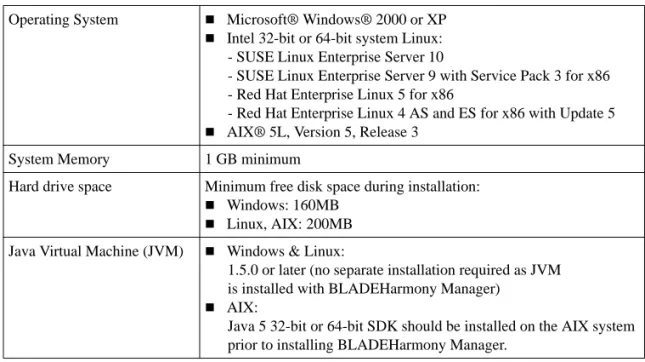
Before you install and access BLADEHarmony Manager, make sure that your computer meets the requirements that are described in Table 1.
Prerequisites
Windows Operating System
BLADEHarmony Manager 3.2 requires the exclusive use of port 162 and 514 for SNMP trap and Syslog messages. Before you start the BLADEHarmony Manager service, you must stop the SNMP Trap Service or any service that uses port 162 or 514. Complete the following steps to stop the SNMP Trap Service.
1 Click Start > Control Panel > Administrative Tools > Services. 2 Click SNMP Trap Service.
3 Click Stop the service.
To check whether port 162 or 514 is in use, issue the following command:
# netstat -an -p UDP
Table 1 BLADEHarmony Manager 3.2 System Requirements
Operating System Microsoft® Windows® 2000 or XP
Intel 32-bit or 64-bit system Linux: - SUSE Linux Enterprise Server 10
- SUSE Linux Enterprise Server 9 with Service Pack 3 for x86 - Red Hat Enterprise Linux 5 for x86
- Red Hat Enterprise Linux 4 AS and ES for x86 with Update 5
AIX® 5L, Version 5, Release 3 System Memory 1 GB minimum
Hard drive space Minimum free disk space during installation:
Windows: 160MB
Linux, AIX: 200MB Java Virtual Machine (JVM) Windows & Linux:
1.5.0 or later (no separate installation required as JVM is installed with BLADEHarmony Manager)
AIX:
Java 5 32-bit or 64-bit SDK should be installed on the AIX system prior to installing BLADEHarmony Manager.
Linux Operating System
BLADEHarmony Manager 3.2 requires the exclusive use of port 162 and 514 for SNMP trap and Syslog messages. Before you start the BLADEHarmony Manager service, you must stop any service that uses port 162 or 514. To check whether port 162 or port 514 is in use on Linux, issue the following commands:
# lsof –i :162 # lsof –i :514
NOTE – The ‘lsof’ command is found in the following directory: /usr/bin or /usr/sbin
AIX Operating System
BLADEHarmony Manager 3.2 requires the exclusive use of port 162 and 514 for SNMP trap and Syslog messages. Before you start the BLADEHarmony Manager service, you must stop any service that uses port 162 or 514. To check whether port 162 or port 514 is in use on AIX, issue the following commands:
# lsof –i :162 # lsof –i :514
Browser Requirements
BLADEHarmony Manager 3.2 is a web-based application. You can log in to BLADEHarmony Manager from any system that supports the following browser versions:
Microsoft Internet Explorer version 6.x and 7.x
Mozilla Firefox version 2.x and 3.x
You must enable JavaScript on each browser.
Requirement: Java must be installed on the system on which the browser is running if you want to launch a telnet session from BLADEHarmony Manager.
Enabling JavaScript in Microsoft Internet Explorer
1 Open Microsoft Internet Explorer. 2 Click Tools > Internet Options. 3 Click Security.
4 Click the Internet icon. 5 Click Custom Level. 6 Scroll to Scripting.
7 Click Enable Active Scripting. 8 Click OK.
Enabling JavaScript in Mozilla Firefox
1 Open Mozilla Firefox. 2 Click Tools > Options. 3 Click Content.
4 Click Enable JavaScript. 5 Click OK.
Switch Configuration Requirements
Be sure that each switch that you plan to discover meets the following requirements.
Ensure that SNMP access is enabled on the switch. See the Command Reference for your switch to get information about how to enable SNMP access.
Ensure that the switch is physically connected to the network.
Ensure that the switch is turned on and receiving power.
Ensure that the switch has a correct IP address.
Ensure that the switch is not blocking access from the client IP address.
Be sure that you can successfully ping the switch.
If you want to use automatic discovery, you must configure the switches with either SNMPv1 or SNMPv2c authentication. Automatic discovery does not support switches that use SNMPv3 authentication.
If you plan to use the BLADEHarmony Manager manual discovery feature, you can configure the switch with SNMPv1, SNMPv2c orSNMPv3 authentication.
Port Requirements
BLADEHarmony Manager uses the HTTP, HTTPS, and RMI service ports described below. Ensure that no other applications use the ports, or configure BLADEHarmony Manager to use different ports.
Port 40080 for HTTP
Port 40443 for HTTPs
Port 40199 for RMI Service
BLADEHarmony Manager also uses the following standard ports. Ensure that no other appli-cations use the ports.
Port 162 for SNMP trap reception
Switch Support
The following list contains the names of all of the switch types supported by BLADEHarmony Manager 3.2. BLADEHarmony Manager does not support switch types that are not listed below. Click Help > About to view the list of switches supported by BLADEHarmony Man-ager.
BNT/Nortel Layer 2-3 Gigabit Ethernet Switch Module
BNT/Nortel Layer 2-3 Gigabit Ethernet Switch Module, SmartConnect
BNT/Nortel Layer 2-7 Gigabit Ethernet Switch Module
BNT/Nortel 1/10Gb Uplink Ethernet Switch Module
BNT/Nortel 1/10Gb Uplink Ethernet Switch Module, SmartConnect
Nortel 10Gb Uplink Ethernet Switch Module
BNT/Nortel 6-port 10Gb Ethernet Switch Module
BNT 10-port 10Gb Ethernet Switch Module
HP ProLiant BL p-Class GbE2 Interconnect Switch
HP GbE2c/GbE2c Layer 2/3 Ethernet Blade Switch
HP 1:10Gb Ethernet BL-c Switch
HP 1:10Gb Ethernet BL-c Switch, SmartConnect
HP 10Gb Ethernet BL-c Switch
NEC 1Gb Intelligent L2 Switch
SmartPanel for NEC SIGMABLADE
NEC 1Gb Intelligent L3 Switch
NEC 10Gb Intelligent L3 Switch
BNT RackSwitch G8000
BNT RackSwitch G8100
New Features
The list of features below briefly summarizes the new functionality of BLADEHarmony Man-ager (BHM). For detailed information about system capabilities and feature configuration, see
Using BLADEHarmony Manager.
Added support for the BNT 10-port 10Gb Ethernet Switch Module.
New Manager-of-Managers feature provides the ability to consolidate the management of multiple deployments of BHM into one interface. This allows you to consolidate thou-sands of devices from multiple instances of BHM into one console.
The BLADEHarmony Manager service is now supported on AIX 5.3
Comprehensive Command Line Interface to most BLADEHarmony Manager functions. In addition to the browser-based user interface, users can now manage devices by executing CLI commands in a script or interactive shell.
BLADEHarmony Manager is now fully internationalized to support running on two-byte character operating systems.
A new Health Status page has been added to report vital switch statistics:
Port state, speed and utilization of each port on the switch
Management Processor memory and CPU utilization
ARP and Routing table utilization
Temperature Sensors
A search function allows you to quickly find a specific device in the device list.
Displays, reports, and support of stacked switches has been improved:
The status, chassis ID, and module bay are reported for each switch in the stack.
Individual switches in a stack can be rebooted.
VMready support has been added:
Detect, report, and notify when virtual machines (attached to VMready switches) move across the datacenter (either intra- or inter-switch moves).
Additional performance monitoring of the following statistics (on applicable switches):
Switch > NTP Statistics
Switch > Trunk Groups
Port > LACP Aggregator
Port > LACP Port Aggregator
Port > Authenticator Diagnostics Statistics
Port > IP Statistics
Bridge > STP
Routing > IP Interface Statistics
Routing > TCP Connections
Routing > UDP Information
Routing > Routes
Routing > Routes Standard
Routing > Route Statistics
Routing > ARP
Routing > ARP Statistics
Routing > Gateway Information
Routing > IP Address Information
Routing > BGP Peers Summary
Routing > BGP Routing Table
Routing > RIP Route Information
Routing > OSPF Area Information
Routing > OSPF Area Interface Information
Routing > OSPF Neighbor Interface Information
Routing > OSPF Virtual Interface Information
Routing > OSPF Stats2 Information
Routing > OSPF Link-State DB Information
Routing > OSPF External Link=State DB Information
Routing > OSPF Summary Range Information
Routing > OSPF Routes Information
Routing > OSPF > Timer Kickoffs
Hotlinks > Statistics
802.1x/p > General
802.1x/p > 802.1p Priority COSq
802.1x/p > Port Priority
Other improvements:
Graphing and charting of performance statistics
Non-BNT device support (health status and description)
Configurable TFTP timeout
Supplemental Information
This section provides additional information about configuring and operating BLADEHarmony Manager 3.2.
Switch Support Limits
BLADEHarmony Manager can manage more than 1000 switches if the system on which BLADEHarmony Manager is installed is configured with at least 2GB of RAM.
Known Issues
This section describes known issues in BLADEHarmony Manager 3.2
SNMPv3 Traps
SNMPv3 Traps are not supported.
HP 10Gb Ethernet BL-c Switch Configuration
Config Sync operation does not work between firmware versions 5.0 and 5.1. The working combination is 5.0 to 5.0, or 5.1 to 5.1
Configuration Script Mismatch Between AOS and ISCLI
Issue: If you use BLADEHarmony Manager to push a configuration script to a switch, the switch might report a successful update, even though the script was not interpreted correctly. The problem occurs when the switch is set to use one command-line interface (AOS or ISCLI) and the configuration script is written for the other interface. The switch generates a syslog error when this condition is detected.Solution: Make sure that the configuration script matches the CLI mode in which the switch is operating.
An AOS script should be sent when the CLI boot mode is set to aoscli or if the user chose
aoscli when prompted for the CLI mode when logging in via telnet/ssh.
An isCLI script should be sent when the CLI boot mode is set to iscli or if the user chose
iscli when prompted for the CLI mode when logging in via telnet/ssh.
Incomplete Configuration Script Might Erase Some of the
Current Configuration
Issue: If you use BLADEHarmony Manager to push a partial configuration script to a switch, the switch may erase those configuration that are not present in the partial configuration script.
Solution: Download the current configuration and then add the new configuration parameters to the script file that you downloaded.
Unsupported Operations for Nortel/BNT Layer 2/3 GbESM
with SmartConnect
The following operations are not supported in BLADEHarmony Manager when you adminis-ter the BNT/Nortel Layer 2/3 GbESM with SmartConnect, because it has limited SNMP func-tionality.
Actions Menu:
View Ports
Config Sync
Apply
Save
Diff Config
Diff Flash
Config Dump
Reboot Switch
Switch version report and device list:
Save Pending
Config For Next Reset
Rack/Chassis
Module Bay
Manufacture Date
Image 1 / 2 Software Version
Showing a Device as a BNT Device
BLADEHarmony Manager displays a device as a Blade Network Technologies (BNT) device only when BLADEHarmony Manager cannot completely retrieve the switch parameters. This is a rare case, but might happen when MIB variables are not implemented by an SNMP agent.
Unresponsive Script Warning Message in Mozilla
Browser Family
The browser might display a warning message that includes a reference to Unresponsive script. This might occur if there are too many rows in a table and you attempt to add or remove col-umns. If you see this message, click Continue to complete your task.
Deactivating Clicking Sound in Internet Explorer Browser
Issue: Internet Explorer generates a clicking sound when you manually or automatically refresh a BLADEHarmony Manager Web page. To turn off or suppress the clicking sound, complete the following steps on the computer that you use to access BLADEHarmony Man-ager.1 Click Start.
2 Click Control Panel > Sounds and Audio Devices. 3 Click Sounds.
4 Scroll to the Windows Explorer section of the Program events list. 5 Click Start Navigation.
6 Select (None) from the Sounds list (see Figure 1). Tip: Do not change the Sound scheme setting.
7 Click Apply. 8 Click OK.
Limited Functionality in Telnet Window
The following features are not available if you click Actions > Launch and open a Telnet ses-sion from BLADEHarmony Manager:
Tabbing
Copy and Paste functionality
Printing
When printing from BLADEHarmony Manager, the output might be split horizontally across multiple pages.
Traps and Syslogs
Before you install BLADEHarmony Manager, check to see if any other applications bind to Trap (default 162) and Syslog (default 514) ports. If another application binds to those ports, BLADEHarmony Manager cannot receive traps and syslog messages.
SmartConnect/VMready/Stacking Support
The following Monitoring pages are not supported since they are not supported by the devices:
Switch > STP Statistics Switch > UFD Statistics Switch > UFD Information Port > 802.1x Statistics Bridge > Base Port Information Bridge > CIST Bridge Information Bridge > CIST Port Information
Routing > DNS, RIP, and OSPF Statistics Routing > IGMP Information
Routing > Multicast Router Information Virtual Routing (all monitoring pages) Access Control List > ACL Port Statistics
RackSwitch SNMP Support
These devices have limited SNMP functionality so only the following features are supported in BLADEHarmony Manager:
Auto and Manual Discovery
Actions Menu
Summary
View Events
View Syslog
View Ports
Delete
Web Launch
Telnet Launch
Reboot
Group Operations Menu
Image download
Image backup
Config Download1
Config backup
Switch Version Report and Device List2
Monitor Menu
Health Status
Switch > SNMP Statistics
Switch > UFD Statistics
Port > Summary
Port > Bridge Statistics
Port > Ethernet Error Statistics
Bridge > Forwarding Database Information
Routing > IP Interface Statistics
Routing > Interface Information
Routing > TCP Statistics
Routing > TCP Connections
Routing > UDP Statistics
Routing > UDP Information
Routing > ICMP IN Statistics
Routing > ICMP OUT Statistics
Routing > IP Address Information
1 Configuration download updates the "Active Configuration" block of the switch and the switch must be rebooted manually in order for the configuration to take effect.