Software Requirements
Specification
for
easyRent
Version 2.0
Prepared by
Group Name: Foo-‐Tang Clan
Abraham Dela Cruz [email protected]
Raj Luhar [email protected]
Chris Horuk [email protected]
Joey Phommasone [email protected]
Zack Warburg [email protected]
Instructor:
Chandra KrintzCourse:
CMPSC 189ATeaching Assistant:
Stratos DimopoulosDate:
March 7th, 2013Contents
CONTENTS ... 2
1 OVERALL DESCRIPTION ... 3
1.1 PRODUCT PERSPECTIVE ... 3
1.2 PRODUCT FUNCTIONALITY ... 3
1.3 USERS AND CHARACTERISTICS ... 4
1.4 OPERATING ENVIRONMENT ... 4
1.5 DESIGN AND IMPLEMENTATION CONSTRAINTS ... 5
2 SPECIFIC REQUIREMENTS ... 6
2.1 EXTERNAL INTERFACE REQUIREMENTS ... 6
3 FUNCTIONAL REQUIREMENTS ... 11
1
Overall Description
1.1
Product Perspective
AppFolio currently has an existing software package, AppFolio Property Manager, which has been in use for over 5 years. This vertical software package already has a sizable market and is used by property managers for everything from tracking vacancies to accurate
accounting. What this setup lacks, however, is a tenant portal that would allow residents of a property to communicate with their property managers and fellow tenants. This is where easyRent comes in. This application will leverage AppFolio’s existing backend that has been used for years with their Property Manager application.
The easyRent app will add the necessary tenant-‐related information to the backend databases to allow it to accurately track each tenant. It will interface with AppFolio Property Manager and allow property managers to post information such as general messages to all tenants or messages specific to a certain unit. Likewise, tenants will be able to send messages to their property managers regarding rent payments and maintenance requests and even post messages for all tenants within their building to see.
The need for such an app is apparent: rent payments and maintenance requests are tasks that tenants must perform frequently and tenants do not generally have a simple way to perform them. By providing tenants with a mobile application that lets them handle these menial tasks in an efficient and centralized manner, their lives will be made easier and they will have to worry less about how they can contact their property manager.
1.2
Product Functionality
• Accountso Each tenant will have their own account o They will have the ability to login and out
o Users will be able to retrieve/reset forgotten passwords.
• Paying rent
o Users will be able to pay their rent through the app
o Upon submitting payment, a confirmation number will be provided o Users will be able to review their payment history
o Users will be able to schedule future, recurring payments
o Roommates will be able to see who in their unit has/has not paid o Users will be able to see if they currently have an outstanding balance • Maintenance request
o Users will be able to submit a maintenance request through the app o A log will be kept of all previous maintenance request
o This log will be shared by roommates so tenants can see if someone else in their unit has already submitted request for “this” issue
o Users will have the ability to attach images to maintenance request
o Users will be able to see a notification of any fees associated with the maintenance
o Finally, users will be able to see an ETA on when the issue will be resolved • Rent Reminders
o Users will be able to sign up for reminders to pay rent
o These reminders can be sent through the app, via text message or via e-‐mail o Can be set to occur multiple times (week before due, day before due, day of, etc.) • Additional Features
o Users will be able to send an email to their property manager through the app o Property managers will be able to send out a mass alert through the app. This
will be used for things like “Water will be off for an hour tomorrow for maintenance”.
o A list of quick fixes will be provided on the maintenance page. A “Before you submit a request, have you tried…” type thing.
1.3
Users and Characteristics
Users of easyRent will consist of rental tenants and their respective property management companies looking for a more efficient and faster way of communicating with each other. The focus of the application will be geared more towards a tenant’s view of the system, e.g.
communication on the property management’s end will mostly use the existing AppFolio Property Management software, but the tenant will be able to see these notifications or messages in a centralized location from a smartphone or tablet via this web application. The tenant’s level of access will be restricted to paying rent, making maintenance requests, and communicating with the property management via an email client.
1.4
Operating Environment
The system is designed to function within a web browser and within an application on various mobile devices. To implement this cross-‐platform portability, the system will be built using HTML5, CSS3, and JavaScript rather than a native language of a particular platform. This also means that a web browser must be a able to support HTML5, CSS, and JavaScript to have the application running. This cross-‐platform portability should also come with device
portability and scale to device specifications. The system should be able to detect the screen size of the device and optimize the interface for that specific screen size. An example of this is the use of SVG images that scale according to screen size. Ruby on rails and MySQL will be used to talk with the backend servers that store and deal with the data.
1.5
Design and Implementation Constraints
Security:This application, easyRent, deals with private user information that would require greater levels of security to ensure proper safety standards. User information will include data; such as name, home address, phone number, and possibly credit card information, which require proper security protocols to prevent data from being compromised. The application must be able to safely protect each user's data without fault.
Privacy:
The target audience for this application includes tenants and property management whom will store information to the AppFolio databases. This creates the possible problem of
information being breached by other users of the system. The application must have well developed security standards to ensure data from users do not unintentionally interact and cause problems for the system and its database.
Learning New Technologies:
With little background in most of the technologies used, easyRent must be developed using technologies unfamiliar to the team. Ruby on Rails, HTML5, CoffeeScript, Backbone.js, and MongoDB are the technologies used to create a secure and concrete product for release.
Monetary Transaction Handling:
Along with security, the product will be requesting user and property manager's bank information to allow for over the Internet payments. This is an issue because of the security behind handling third-‐party bank accounts. With credit card information a requirement to use this application, we will be working closely with AppFolio to guarantee our users' credit card information is secure.
Cross Platform implementation:
The easyRent app is targeted to be used with any media device. HTML5 is responsible for browser interfaces and the application will be native with both Android OS and iOS. To properly tailor to all operating systems would require translating the HTML5 interface to an efficient Android and iOS without losing any security and privacy requirements.
2
Specific Requirements
2.1
External Interface Requirements
2.1.1 User InterfacesThe easyRent app will have multiple user-‐facing views. The first set of views is for logging in to the app. These views consist of:
• Login –The login page will provide users with two separate fields to enter their username and password and a login button that will submit that information. The user will also have links for requesting an account, retrieving a lost password and unlocking their account.
• Request Account – The request account page will allow the user to submit their email address and request an account be setup for them.
• Reset Password – The reset password page will have users submit their email address in order to receive instructions on how to reset their password. • Unlock Account – The unlock account page will allow users to have unlock
instructions be sent to their e-‐mail address
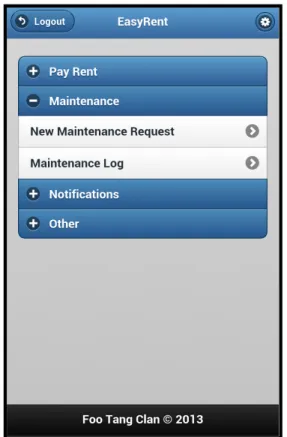
For the rest of the pages, a general template is assumed. The header for every page in the protected area of easyRent will display a button for the user to modify their general
application settings and a back button that will take them back to the main page. From the main page, the user will be able to navigate to the following pages:
• Pay Rent – The rent page will allow the user to submit a new payment. It will have inputs for the payment amount, the date on which to pay, the users name and the user’s bank account information.
• Payment History – The payment history page will display a log of all payments that have been made for a given unit. It will display not only the user’s payments but those of his or her roommates as well.
• Maintenance Request – The maintenance page will allow the user to submit a new maintenance request. This form will allow them to describe the issue and indicate whether maintenance personnel have permission to enter the complex.
• Maintenance Log -‐ The maintenance log will display a record of all past and current maintenance requests for the tenant’s unit. It will also display the current status of each request as well as whom in the unit made the request.
• Notifications – The notifications page will display a log of all notifications the user has received.
• Contact – The contact page is a simple form that the user can use to contact their property manager.
• Change Password – The password settings page will allow the user to change the password that they use to log in to the app.
• Notification Settings – The notification settings page will allow the user to customize the types of alerts they receive and how they receive them
Each page in easyRent will have the same underlying style, with a carefully constructed color scheme and a layout that builds off of jQuery mobile. The app will also be tailored to the specific device OS. This means that both Android users and iOS users will see a UI that feels native to their device. These native style themes will also be supplied via jQuery mobile.
Figure 1 -‐ Home Page User Interface
2.1.2 Hardware Interfaces
In terms of hardware interfaces, the system should be able to function on any device with a working web browser that supports HTML5, CSS and JavaScript. We can abstract our system from directly communicating with the hardware and use the web browser as a means of communication to both the backend of the system, which is a centralized server/database, and to the device itself. The communication between the application and the backend servers will be done through Ruby on Rails. If the device is an iOS or Android mobile device, the
application can be started through a respective native application. 2.1.3 Software Interfaces
The application will be cross-‐platform, as it is an HTML5 web app that will be able to be run from any mobile web browser. As far as native operating systems (iOS and Android) we will be making web containers using the Android SDK and Xcode to display the web
application content as a "native" application. The application will communicate with AppFolio's backed servers using Ruby on Rails while data will be stored using MongoDB. Financial functions such as submitting rental payments will be executed using AppFolio's existing payment system, as to avoid any extra security violations. Communications between the tenant and property management will be based on email. Maintenance requests will be sent using a method existing in AppFolio's Property Manager in which they would be sent to the property manager's account and the requests could be seen by the property management in AppFolio's Property Manager Software.
2.1.4 Communications Interfaces
A user will be able to access the product through native applications or through the device's web browser. A login will be required to ensure only registered users may use the product as well as to protect their content; such as credit information. The login process will provide encrypted username and password information using AES, Advanced Encryption Standard. When logged in, the user is given the options to pay rent, make maintenance requests, and message any other inquiries to their property management.
All options will be conveniently located on every page of the application's interface, and all completed requests will be logged and stored for individual users to create a history of transactions.
Communication from users and electronic forms on the site will be handled through HTML5 and payments through credit card information will be shall be securely handled by AppFolio's own backend tools. Payment data will be encrypted as well. When signing up, users will be asked to fill out electronic forms requesting their information as well as the
information of their property management. Information will be stored in AppFolio's secure servers. To prevent incorrect information being stored from different devices, the product will only use the most recent change through all forms of access. Data will be transferred using UDP because the product is not "data-‐heavy" and will not require large amounts of bandwidth to transfer information.
3
Functional Requirements
3.1
Users Stories
3.1.1 Login – As a tenant, I should be able to log in so that I can access all of the application’s functionality.
Acceptance Test: Logging In
Given that the tenant has supplied a valid email address and the corresponding password associated with this email address, when they submit their login request then they should be presented with the protected features of easyRent.
3.1.2 Registration – As a tenant, I should be able to register for an account so that I can log in and use easyRent’s features.
Acceptance Test: Creating an Account
Given that a tenant is a member of a specific property management’s list of clients, he or she will be able to create a login ID based on their email address as well as a password that will eventually be entered into the login page so that the tenant will be able to use the application features.
3.1.3 Recover Password – As a tenant, I should be able to retrieve a forgotten password so that I can access all of the application’s functionality even if I forget my password.
Acceptance Test: Retrieving a Lost Password
Given that the tenant has supplied a valid email address that is already associated with an easyRent account, when they submit their lost password retrieval request then an email containing a reset password link should be sent to the email address provided.
3.1.4 Pay Rent – As a tenant, I should be able to pay rent online using the application so that I can pay my rent anywhere I have an internet connection.
Acceptance Test: Rent Payment
Given that a tenant has logged into their account and provides correct payment information, he or she should be able to pay rent and it will reflect in his balance.
3.1.5 Submit Maintenance Request – As a tenant, I should be able to submit maintenance requests so that the maintenance issue can be processed and handled quickly and efficiently.
Acceptance Test: Submitting Maintenance Requests
Given that a tenant has logged into their account, when they submit a maintenance request then they should see it appear in their activity log and be notified about its progress according to their saved notification preferences.
3.1.6 Receipts – As a tenant, I should be able to get a confirmation number after making a rent payment so that I know that my money has been sent and received by the property management.
Acceptance Test: Payment Receipt
Given that a tenant is already logged in and has submitted a rent payment, the system should verify that the tenant’s funds have been transferred using a confirmation number.
3.1.7 Payment History – As a tenant, I should be able to view my payment history so I can see all of the payments I have made.
Acceptance Test: Viewing Payment History
Given that a tenant has logged onto his account and actually has a payment history, a history of his transactions should be made viewable.
3.1.8 Maintenance Log – As a tenant, I should be able to view a log of my previous
maintenance requests so I can see what Maintenance work has been done and when it was done.
Acceptance Test: Viewing Maintenance Log
Given that a tenant is already logged in and has maintenance requests already made for the tenant’s unit, a log of maintenance work should be viewable with various details of the work such as date and type of maintenance.
3.1.9 Reminders – As a tenant, I should be able to receive rent reminders via a text message so that I can easily pay rent on time
Acceptance Test: Rent Reminder
If a tenant has forgotten to mark his or her calendars with a reminder to pay rent on a specific day, the application will automatically send a text message reminder to the tenant stating that his or her rent is due.
3.1.10Fees – As a tenant, I should be notified of any fees incurred as part of a maintenance request so that I am not surprised when my account balance changes.
Acceptance Test: Maintenance Fees
Given that the user has submitted a maintenance request that has been processed and handled and that extra fees are associated with this specific maintenance request, when the user checks their account balance then they should see a maintenance fee in their log and they should be notified by email of this fee as well.
3.1.11Photos – As a tenant, I want to be able to send photos with my maintenance requests to speed up the process of determining my issue’s priority.
Acceptance Test: Leaking pipes
Given my kitchen floor is covered in water and the problem are the pipes under the sink. When an issue such as this arises in a user’s apartment, then the user may take a photo and send it along with their maintenance request for faster processing
3.1.12Communication – As a tenant, I want to be able to message my property manager to notify them of any issues with the leased apartment.
Acceptance Test: User wants to communicate with property manager
Given the user has a question for their property managers and don’t want to deal with writing an email. When the user wants to find out about their security deposit, then they may contact them via easyRent and can receive messages as well.