Paper ID #29779
Implementing
Bluebeam
Software
in
Architectural
Engineering
Design
Courses
MichaelJamesDeigertP.E.,CaliforniaPolytechnicStateUniversity,SanLuisObispo Dr.AnahidBehrouzi,CaliforniaPolytechnicStateUniversity,SanLuisObispo
Anahid Behrouzi is an assistant professor of architectural engineering at California Polytechnic State University - San Luis Obispo. She has been involved with STEM education beginning in 2003 as a volunteer and summer instructor with the North Carolina Museum of Life and Science. She has been engaged with undergraduate/graduate course delivery in the topic areas of engineering problem-solving, structural engineering, and reinforced concrete design at North Carolina State University (2008-2011), the University of Illinois at Urbana-Champaign (2012-2015), Tufts University (2015-2016), and Cal Poly - SLO (2016-present). She has a BS in civil engineering and BA in Spanish language & literature from North Carolina State University, and a MS/PhD in civil engineering from the University of Illinois at Urbana-Champaign.
Dr.PamaleeA.Brady,CaliforniaPolytechnicStateUniversity,SanLuisObispo
Pamalee Brady is a Professor at California Polytechnic State University, San Luis Obispo. She teaches courses in structural systems, concrete, steel and wood design as well as structural engineering courses for architecture and construction management students. Prior to joining the faculty at Cal Poly she worked in applied research at the U.S. Army Construction Engineering Research Laboratory in Champaign, Illinois. She is a member of the Education Committee of the ASCE Forensic Engineering Division. Her research is in the areas of engineering education, including engineering case studies in undergraduate education as well as early education to promote interest in engineering.
Implementing Bluebeam Software in
Architectural Engineering Design Courses
Abstract
A critical aspect of structural engineering education is helping students develop effective
electronic graphical communication skills to convey their design solutions. Many undergraduate civil and architectural engineering programs address this at the document creation stage by teaching Autodesk AutoCAD or Revit to create 2-D or 3-D structural design files. However, students tend to have limited exposure to commercial software for document management and markup that allows for coordination between the engineer, architect, and contractor teams. Bluebeam Revu is one such software that has emerged as an industry standard for annotation and markup of engineering design documents.
Previous educational studies on the use of Bluebeam have been in construction management courses where students practice plan reading. The main motivation for instructors to incorporate this software in their classes is to expose students to technology they will encounter as
practitioners, especially significant since contractors view these drawings as a legal description of their scope of work. Therefore, the production and interpretation of the documents requires that they exhibit a high level of accuracy, specificity, and clarity.
This paper focuses on the use of Bluebeam markup and grading in architectural engineering courses to enable communication between faculty and students during the iterative structural design process. The paper provides sample student hand calculations, sketches, and CAD structural drawings with Bluebeam markups provided by practitioner faculty. This markup describes and models how the student might implement necessary design changes.
Feedback collected via interviews of course graders, surveys of students, and faculty co-authors is included and illustrates that the use of Bluebeam markup in architectural engineering courses provides a meaningful and efficient review during the development of a structural design solution. The goal of this paper is to show instructors how to integrate Bluebeam into a course, beyond plan reading activities. Faculty will thus be equipped to educate students on a software commonly used in structural design firms for quality assurance/quality control (QA/QC) and communication between the design and construction disciplines.
Introduction
Use of Bluebeam and Similar Tools in Industry Practice
In recent years, the architecture, engineering, and construction (AEC) industry has been shifting towards an electronic document workflow that facilitates clear, real-time communication
between designers, plan checkers, and contractors. A number of software packages are leading this coordination of interdisciplinary collaboration for large-scale structural engineering projects including Bluebeam Revu [1], Procore [2], BIM 360 [3], and PlanGrid [4]. Each of these
document management tools allow user groups to produce and share design drawings,
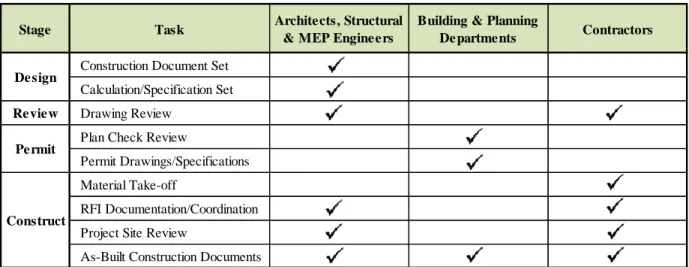
Table 1: AEC Discipline Use of Document Management Software
Stage Task Architects, Structural
& MEP Engineers
Building & Planning
Departments Contractors
Construction Document Set Calculation/Specification Set
Review Drawing Review Plan Check Review
Permit Drawings/Specifications Material Take-off
RFI Documentation/Coordination Project Site Review
As-Built Construction Documents
Design
Permit
Construct
Of the document management tools, this paper specifically investigates Bluebeam Revu due to its prevalent usage in structural engineering firms hiring from the authors’ institution and its free availability to students and educators in AEC programs. Various engineering case studies
illustrate the advantages of document management in Bluebeam [6]. Beyond improved efficiency and clarity of AEC team communication through PDF files, benefits include:
▪ Text/object recognition: search for and count specific text comments or graphics, can support material take-off calculations
▪ Custom toolbox: create standardized, discipline-specific text comments and graphics that can be exported and re-used for markup in future projects
▪ Markup metadata: log user name and timestamp for all comments and changes, can be shown in real-time markup panel in Bluebeam or exported as a record to text/spreadsheet
▪ Data precision: calibrate scale to accurately measure from and draw on existing plans
▪ Drawing layers: enable spatial coordination between disciplines as they can overlay drawings to explore feasibility of various design iterations
▪ Dynamic hyperlinks: create buttons in drawings to link to details, specifications, RFIs, or site walk-through photographs
▪ Secure format: establish user permissions for intellectual property protection and enable electronic sign-off to expedite approval process
The flexible functionality of Bluebeam Revu has allowed users of all disciplines to discover new ways to utilize the software beyond its original design. As the AEC industry is moving towards
direct digital exchange of documents [8], it is necessary that current students receive training in
the relevant software.
Course Details
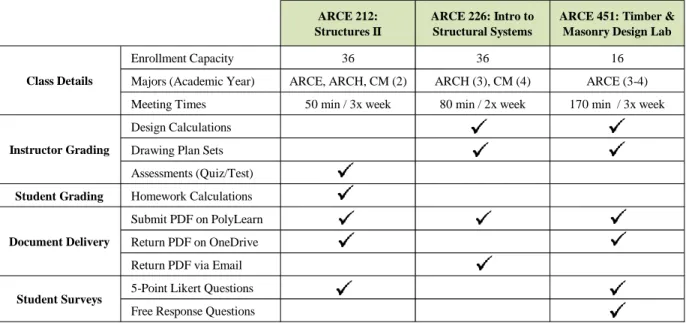
calculations for lower-division classes vs. project design calculations and drawings for upper-division courses). The majority of Bluebeam markup is carried out by practitioner-faculty, but senior-level student graders employed for ARCE 212 also grade homework assignments using the software. Details about each course as well as Bluebeam grading, delivery, and student
surveys are summarized in Table 2. Note that in this table “PolyLearn”refers to a
university-specific online course management website where students can submit assignments, and “OneDrive” refers to the university-affiliated Microsoft OneDrive system that faculty/graders can return marked up documents to each student via a shared folder. A document sharing alternative that is made available with every Bluebeam Revu license is Bluebeam Studio [9].
Table 2: Details on Relevant Courses: Bluebeam Grading, Document Delivery, and Student Surveys
ARCE 212: Structures II
ARCE 226: Intro to Structural Systems
ARCE 451: Timber & Masonry Design Lab
Enrollment Capacity 36 36 16
Majors (Academic Year) ARCE, ARCH, CM (2) ARCH (3), CM (4) ARCE (3-4)
Meeting Times 50 min / 3x week 80 min / 2x week 170 min / 3x week
Design Calculations
Drawing Plan Sets
Assessments (Quiz/Test)
Student Grading Homework Calculations
Submit PDF on PolyLearn
Return PDF on OneDrive
Return PDF via Email
5-Point Likert Questions
Free Response Questions
For major : ARCE = Architectural Engineering, ARCH = Architecture, CM = Construction Management For academic year : 2 = 2nd year (sophomore), 3 = 3rd year (junior), etc.
Class Details
Instructor Grading
Document Delivery
Student Surveys
The following sections will provide examples of the markup functionalities that the instructors and graders utilized in these courses to provide feedback to students using Bluebeam Revu.
Description of Implementation of Bluebeam
Implementation in ARCE 212: Structures II
Bluebeam was used in a large lower-division course with a conventional lecture format where ARCE, ARCH, and CM students have frequent homework assignments as well as quizzes and exams. The key with using this software tool to provide feedback in a larger enrollment course is converting student submissions to PDF format.
classes and had some interaction with Bluebeam via prior courses or internships; they were also provided training on the Bluebeam grading process and capabilities.
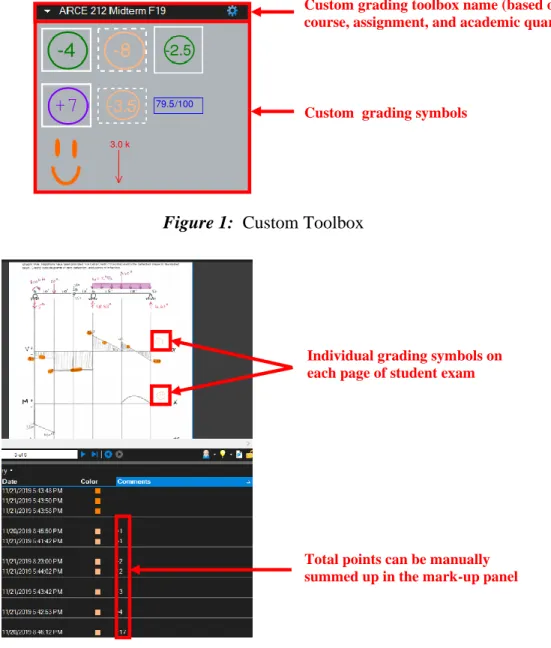
For in-class assessments, the instructor scanned the entire batch of quizzes or exams for a class section as a single PDF document for grading. A custom toolbox of comments and symbols could be developed and saved for each course and individual quiz or exam (Figure 1). Point deductions could easily be calculated by adding the total points shown in the markup list, as assessments tended to be relatively small document files (Figure 2). It is possible to create a counting template at the beginning of a document that sums the number of each unique
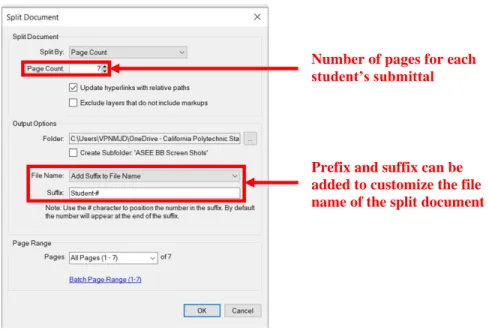
deduction symbol within the document, yet this approach still requires manual addition to arrive at a total score. Each student assessment had the same number of pages, so once the faculty completed all the grading, it was possible to use Bluebeam to split the document with a single command (Figure 3). Graded assessments were also returned via a shared folder on OneDrive.
Custom grading toolbox name (based on course, assignment, and academic quarter)
Custom grading symbols
Figure 1: Custom Toolbox
Individual grading symbols on each page of student exam
Total points can be manually summed up in the mark-up panel
v
Number of pages for each student’s submittal
Prefix and suffix can be added to customize the file name of the split document
Figure 3: Splitting Documents
The faculty found this tool improved grading efficiency and consistency across multiple sections of a large enrollment class. The graders found it attractive, as they did not have to wait to pick up homework assignments from the professor. Both faculty and graders appreciated that they did not have to carry around stacks of paper. They had the flexibility to grade anywhere using their laptop with the downloaded PDFs of student work.
Implementation in ARCE 226: Introduction to Structural Systems
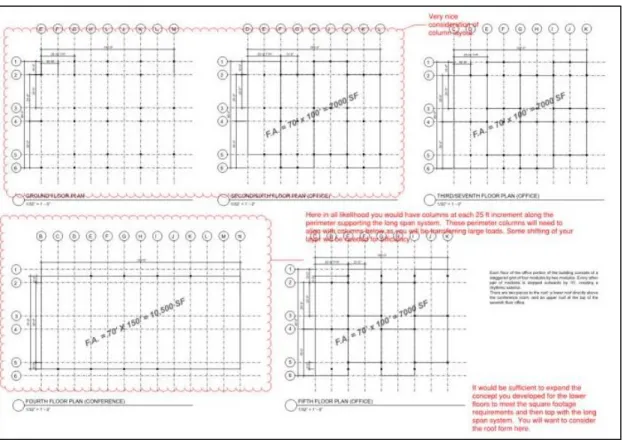
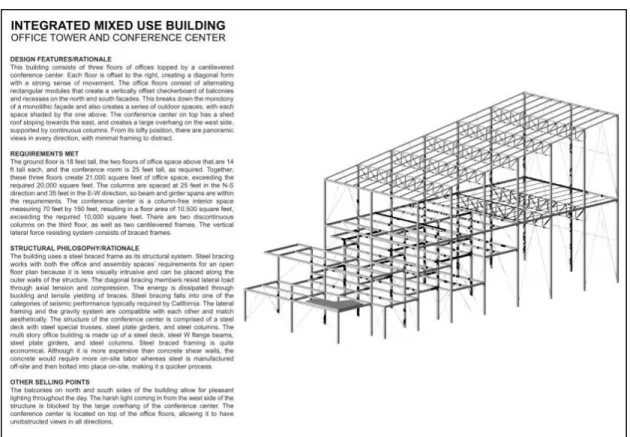
The architectural engineering department offers a course that introduces ARCH and CM students to structural systems. The final project consists of interdisciplinary teams of 3 students where they are tasked with developing an architectural building form and supporting structural framing for a mixed use project (office tower with multiple stories and a conference center). Over the course of a month, teams submitted deliverables including conceptual, structural system, and framing systems represented in various 2D and 3D drawings of the building as well as physical models. The instructor used Bluebeam to provide feedback on the various iterations of student
design drawings –drawings in PDF format.
Figure 4: Submittal 1a –3D drawing of original building form
Figure 6: Submittal 3a –Refined Framing plans
Figure 8: Final Submittal –Representative Framing Plans
The noted advantages of using Bluebeam for the review of student submittals in ARCE 226 included: reducing the instructor’s handling of paper copies; facilitating thorough, consistent, and simultaneous communication with all student team members; providing continuous tracking of comments and corrections; and contributing to a more sustainable classroom environment. Also, the fact that Bluebeam utilizes the PDF file type simplifies project document submittal for ARCH and CM students. While students from these disciplines may learn different computer programs for developing design and construction documents, PDF is a universal file format for exporting from those programs and for scanning hardcopies to compile into a single digital file.
Implementation in ARCE 451: Timber & Masonry Design Lab
The ARCE curriculum requires upper-division students to complete three structural design lab courses on steel, timber/masonry, and concrete. In each, students have a culminating project where they assemble a complete calculation and drawing package for an assigned building; these submittals often involve 2-3 students and hundreds of pages of documents. The ARCE 451 faculty elected to grade student submittals in Bluebeam (a tool utilized in the industry review and permitting process) to provide feedback to the students. Adopting this grading methodology meant that hardcopy paper student submittals were replaced by PDF files containing drawings and scans of hand calculations, which the students organized in Bluebeam and then uploaded to PolyLearn.
Student Use of Bluebeam Revu to Organize Project Submittals
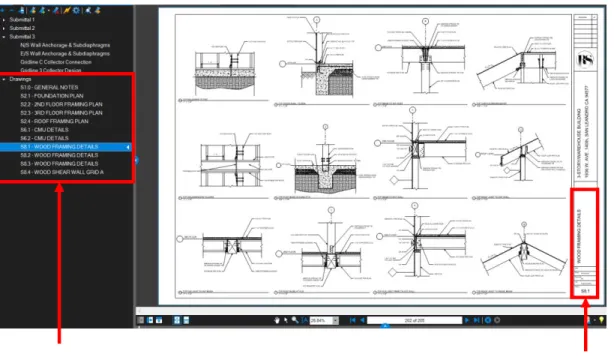
For the new digital submission process implemented in ARCE 451, most student groups utilized Bluebeam Revu to compile and organize their calculations and drawings into a single PDF
document. Students learned to leverage Bluebeam’s functionalities tocreate/organize an easily
navigable submission with bookmarks, dynamic links, and standardized title blocks.
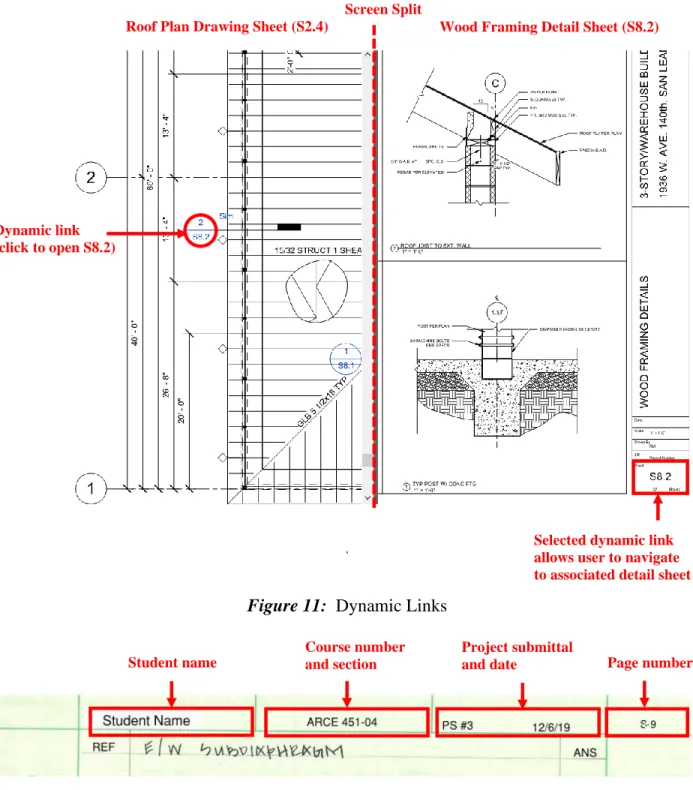
automatically create dynamic links in Bluebeam for drawing sheets. Where details are referenced on drawings using a typical detail callout, dynamic links could be auto-generated by Bluebeam to navigate directly to the appropriate sheet once the callout is selected (Figure 11). Additionally, students used Bluebeam to efficiently place customized title blocks on their handwritten and computer-generated calculation sheets (Figure 12) including their team member’s names, project name, course number, and page number.
List of all bookmarks in submittal package
Selected bookmark allows user to navigate to calculation page shown at the right
Figure 9: Bookmarks to Calculation Sections
Bookmarks for drawing sheets Drawing sheet
(includes number & title) number and title
(click to open S8.2)
Screen Split
Roof Plan Drawing Sheet (S2.4) Wood Framing Detail Sheet (S8.2)
Dynamic link
9
Selected dynamic link allows user to navigate to associated detail sheet
Figure 11: Dynamic Links
Course number Project submittal
Student name and section and date Page number
v v
Figure 12: Bluebeam Headers for Hand Calculations
Faculty Use of Bluebeam Revu for Submittal Grading and Markup
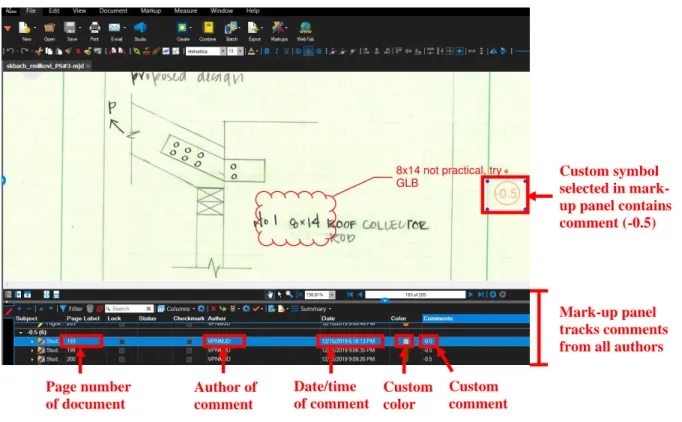
One of the goals of the ARCE 451 instructor in using Bluebeam Revu for student submittal markup was to simulate an actual plan check experience, since many jurisdictions are converting to an electronic plan check process utilizing this software. There were two primary types of feedback that the instructor provided to students on their PDF document: text comments specific to the student team and common comments stored to a custom toolbox applied to multiple teams’ submissions (Figure 13). The document was returned via a shared folder on Microsoft OneDrive, which was reviewed and addressed by the student team. One functionality in Bluebeam that expedites the revision process is the markup pane that stores a list of each reviewer comment with a timestamp and author. Upon selecting a markup in the list, the software automatically navigates to the associated page in the main display window (Figure 14) which significantly reduces the time to address all or a selection of comments in a PDF document that contains many pages. Once students had made the corrections, they met with the instructor for review of
original and revised submittals side-by-side to finalize their grade.
Custom comments
Custom symbols for Student #2
Custom symbols for Student #1
Custom symbols for Student #3
Number of occurrences of grading symbol in document
Custom color-coded grading symbol (for each student)
Custom symbol selected in mark-up panel contains comment (-0.5)
Mark-up panel tracks comments from all authors
Page number Author of Date/time Custom Custom
of document comment of comment color comment
Figure 14: Bluebeam Mark-up Panel (Database)
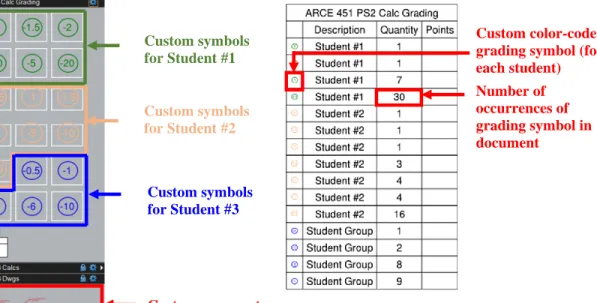
In addition to providing students with technical comments necessary to revise their original design solution, the Bluebeam custom toolbox was useful for grading the lengthy calculation/ drawing sets assembled by multiple students. By assigning a distinct color to symbols and text to each student, it was possible to easily and quickly insert student-specific deductions and
comments into the document (Figure 13 and 15). Once the instructor completed the document review, the data was exported to a spreadsheet format to sort and compile points for each student (Figure 16 and 17). Also, since all comments are tracked via the markup pane, it was possible to analyze this data to identify where students were having difficulties with course topics to address these during lecture or one-on-one project team meetings.
Figure 15: Custom color symbols for each student
Yellow symbols for Student #2
Sort using instructor-defined color, unique for each student
Individual comments to students as they appear on each page
Figure 16: Raw data export to Excel with color code sorting
Student color codes from Bluebeam
Summary totals for each student including ½ points for team graded items
Figure 17: Summary of raw data for each student
Student & Grader Assessments
Description of Student Survey
Surveys from students enrolled in ARCE 212 (38 respondents) and ARCE 451 (16 respondents) during the F19 quarter were examined to gauge student perceptions of Bluebeam in the mark-up of their course deliverables and assessments. Interviews were also conducted with the two ARCE 212 senior-level graders who used Bluebeam to provide feedback on student homework.
Summary of ARCE 212 Student Feedback
The ARCE 212 survey contained seven 5-point Likert scale questions where students were asked to compare feedback provided on homework, quizzes, and midterm on an electronic PDF marked in Bluebeam versus hand grading from their prior ARCE 211 course. The survey questions were posed as statements where students can select 5 = Strongly Agree and 1 = Strongly Disagree. The statements are listed below with average student scores. Results are shown in Figure 18.
Q1. I prefer turning in my homework on PolyLearn as a scanned PDF compared to turning
in a hardcopy. (3.05)
Q2. I prefer receiving homework on Cal Poly OneDrive as an annotated PDF compared to receiving a hand-graded hardcopy. (2.92)
Q3. I prefer receiving assessments (quizzes/midterms) on Cal Poly OneDrive as an annotated PDF compared to receiving a hand-graded hardcopy. (2.84)
Q4. The feedback provided on graded homework/quizzes/midterms in the annotated PDF is more understandable, legible, and organized than a hand-graded hardcopy. (3.29) Q5. The feedback provided on graded homework/quizzes/midterms in the annotated PDF is
more consistent and fair. (3.50)
Q6. I would recommend that the instructor and graders continue using Bluebeam PDF to annotate graded homework/ quizzes/ midterms in future offerings of the course. (3.39) Q7. I would recommend that other instructors use Bluebeam PDF to annotate graded
homework/ quizzes/ midterms for similar calculation-based courses. (3.32)
The average survey results indicate that students in the relatively large, lower-division lecture course found Bluebeam feedback on PDF files of assignments/ assessments to be more clear and consistent than hand-grading. There appears to be support for utilizing Bluebeam as a grading and markup tool for other courses with frequent calculation assignments. This is likely because the instructor or grader was able to:
▪ Develop a standardized custom toolbox for each assignment to use on all student
submissions, resulting in consistent technical content in text comments and visual appearance of graphical markup;
▪ Utilize a digital font in a bright color that was clear to read, removing any uncertainties
arising from interpreting variations in instructor/grader hand-writing; and
▪ Modify comments and point deductions digitally across the entire set of student
submissions without any whiteouts or cross-outs, limiting confusion on any changes.
The other advantages students may have recognized in the quantitative survey responses are that in returning group activities each student received a graded electronic copy to their OneDrive folder, and that all graded assignments could be easily accessed via a mobile device for studying for ARCE 212 and would remain available for reference during subsequent academic quarters.
Though there are a number of benefits of using Bluebeam for grading ARCE 212, the students seem somewhat reluctant to scan hand solutions for homework submissions. This may have to do with lack of access to either a document scanning smartphone application that produces clear images or the departmental copy-scanner machine, as few students likely have a scanner at home. Aside from the physical act of scanning the documents there is the slight inconvenience of compiling the file into one PDF and submitting the assignment to the online course management system. Since a scanned PDF solution of hand calculations is not the standard submission approach for other calculation-based classes, this process may seem tedious.
The lowest average scores on the survey indicate students do not prefer viewing their graded work as annotated PDFs through OneDrive. This is likely since students are accustomed to receiving marked up hardcopies during the class, where they can immediately compare with student peers and ask the instructor questions. Students are relatively unfamiliar with the method of receiving graded work via an OneDrive folder. Though an automated email alerts the student when the folder is created, there are no additional alerts when new graded documents are uploaded. For most students, this would result in a delay in reviewing feedback and making the learning gains that come from asking questions about their errors. Additional guidance on accessing the OneDrive, instructor or grader-generated alerts when graded documents are available, and allotted time during class to review feedback could resolve the identified issues.
Summary of ARCE 451 Student Feedback
Results of Multiple Choice Questions
For ARCE 451 course, the survey was comprised of eight 5-point Likert scale questions and
three free response questions on the student’suse of Bluebeam to assemble calculation packages
Q1. I prefer turning in design submittals on PolyLearn as a scanned PDF compared to turning in a hardcopy. (4.13)
Q2. I prefer receiving design submittals on Cal Poly OneDrive as an annotated PDF compared to receiving a hand-graded hardcopy. (3.81)
Q3. I feel confident in using Bluebeam to assemble calculation packages including adding relevant section headers, page numbering, bookmarks, annotations, and/or embedded images. (3.31)
Q4. The feedback provided on graded design submittals in the annotated PDF is more understandable, legible, and organized than a hand-graded hardcopy. (3.50) Q5. The feedback provided on graded design submittals in the annotated PDF is more
consistent and fair. (3.06)
Q6. The opportunity to review the graded and revised design submittal (side-by-side in Bluebeam) with the instructor models “plan check” that would occur with a senior
engineer in practice. (3.42*)
Q7. I would recommend that the instructor continue using Bluebeam to annotate graded design submittals in future offerings of this course and similar design labs. (4.25) Q8. I would recommend that other instructors use Bluebeam to annotate graded design
submittals for similar courses. (3.80*)
* Average excludes students that either answered N/A or did not provide a response.
Figure 19: Distribution of ARCE 451 Student Reponses to 5- Point Likert Scale Questions (5 = Strongly Agree, 3= Neutral, 1 = Strongly Disagree, N/A = not applicable or no response)
that utilize digital document management, are more receptive to electronic submissions. It is not unusual for them to scan hand calculations to compile with computer calculations and drawings to submit as a single package online. However, these students did have lower perceptions of the fairness and consistency that was achieved when using Bluebeam to grade the design submittals. This may stem from the fact that structural design for an entire building system does not yield a closed-form solution the way that the short homework assignments in ARCE 212 do. Therefore, the feedback cannot be captured solely with a limited number of text or graphical comments in a custom toolbox that could be reused liberally across the student submissions, there were unique comments and point deductions for individual errors.
Results of Free Response Questions
The three free response questions were intended to gauge student experience with Bluebeam prior to and during the ARCE 451, as well as their perceived value of this tool in their future career as a structural engineering professional.
Q1. What was your previous experience with using Bluebeam in courses or internships? (If none, indicate “none”.)
Q2. How did you utilize Bluebeam during ARCE 451 for your calculation and drawing submittals? Be as specific as possible.
Q3. Did you find using Bluebeam in ARCE 451 valuable as a future structural design professional? How so?
For Q1, students indicated they had no classroom experience (18.75%) and little to moderate in-class experience (50%) through CM 115: Fundamentals of Construction Management, ARCE 257: Structural CAD for Building Design, or another design labs requiring production of drawings and specifications. Students tended to have more exposure to Bluebeam through summer internships. Students identified themselves as having no Bluebeam internship
experience (18.75%), little experience (12.5%), and moderate to high experience (43.75%). The remainder of students, to reach 100 % of exposure via coursework or internship, did not
explicitly specify Bluebeam exposure in one or both of the academic or workplace settings.
In response to Q2, students indicated they utilized Bluebeam to compile and organize a single PDF package from various scans and digital documents (43.75%), create standardized headers/ title blocks or bookmarks (37.5%), look over markup comments or revisions (25%), and make minor calculation edits and annotations after scanning document (12.5%). One student noted using the key word searching functionality. The percentages stated for students’ use of Bluebeam functionalities exceeds 100%, because each unique student comment is coded individually.
With respect to Q3, most students (68.75%) indicated that they believed Bluebeam to be useful in structural design industry as a tool for organizing, editing, commenting, and reviewing calculation/drawing packages. The students with the most positive responses tended to be those that had high levels of exposure to Bluebeam through summer internships and directly
Responses from students with prior Bluebeam experience in the industry setting:
“Yes! As the industry moves to digital formats, it seems even moreimportant to be able to effectively
edit &organize documents.”
“Using Bluebeam is valuable because it is so widely used in the industry and good to know it well now”
“Absolutely! It seems to be used a lot in the workforce and Ithink it’s a huge advantage if we know how
to use it before we graduate. I wish ARCE’s had a class or part of a class dedicated to learning it.”
Summary of ARCE 212 Grader Feedback
Individual semi-structured interviews were conducted of the two senior-level ARCE 212 graders to collect their perspectives on using Bluebeam to grade approximated 36 student homework assignments each week for their course section. The interview questions included:
Q1. Describe the learning curve with Bluebeam to prepare yourself for your grading role in ARCE 212.
Q2. What was your previous experience with using Bluebeam in courses or internships? Q3. What were some of the major benefits of grading with Bluebeam?
Q4. What were the major challenges of grading with Bluebeam?
Q5. What, if any, are resolutions you think could easily resolve the challenges you identified?
Q6. Did you find using Bluebeam as a grader in ARCE 212 valuable as a future structural design professional? If so, how?
The graders indicated that utilizing Bluebeam to provide ARCE 212 students with homework feedback was relatively intuitive. It took about 30 minutes to develop adequate proficiency to set up a custom toolbox to re-use on various assignments (including check mark, bubbles containing point deductions, and standardized comments) as well as learning to add text and lines. Both graders had exposure to Bluebeam in a summer internship where they used it to organize documents as well as add text comments and call-outs. One of the graders also indicated
additional experience with Bluebeam through ARCE 257 lab reports. This involved assembling screenshots of a REVIT model with text comments to submit online to the instructor, who would provide markup using Bluebeam and return to students to complete revisions.
The graders identified benefits of using Bluebeam for grading ARCE 212 homework:
▪ Copy/paste text comments and point deduction bubble: facilitates efficient and consistent
grading if there are similar issues among a large group of students;
▪ Key word search function and markup pane: increases efficiency to find and update
comments or point deductions;
▪ File organization: makes it easier to keep track of all student file submissions and adding
up points using the markups tab at the bottom of the main screen;
▪ Digital text in various colors/weights: improves legibility and varied color usage better
highlights certain parts of the problem and associated issues in the student solution; and
▪ Continuous electronic accessibility: enables full access of digital documents to instructor,
The graders also pointed out some challenges with using Bluebeam for grading the homework:
▪ Graphical annotations: increases difficulty in trying to provide feedback on drawings like
shear and moment diagrams, often cannot use a standardized drawing stamp created in a toolbox and stretch it to accurately fit the students’ existing drawing
▪ Digital document storage in OneDrive: decreases student’s access and motivation to
address feedback copies compared to handing back hardcopies in class, leads to repeated student mistakes across multiple assignments despite graders corrections.
▪ Standardization of comments: loses touch of personal comments like “cheers”
(encouraging or celebratory text/graphics handwritten to promote student morale)
Conclusions
In addition to modelling the digital review process that students will be later exposed to in industry, the use of Bluebeam as a grading tool provides several advantages to the architectural engineering instructor teaching a calculation or drawing intensive class:
▪ Grading is now possible from any location and can be distributed to a number of parties.
▪ Bluebeam allows for reviewing, commenting and tracking the evolution of student work
over a multi-phase project.
▪ Bluebeam’s individual profile settingspermit maintaining a markups list, which keeps
track of all notes created for future use.
▪ Bluebeam allows downloading data for accessing the frequency that a particular
comment has been applied in multiple submittals.
The disadvantages or challenges in using Bluebeam in the classroom are limited:
▪ There is a learning curve, as in acquiring any new skill, for the instructor. The degree of
investment in this learning will result in more efficiency. For example, developing custom toolboxes or utilizing advanced features can expedite review of student
submittals and facilitate a more detailed understanding of the degree of student learning.
▪ Some instructors find flipping between file pages to relate one drawing to another more
cumbersome than flipping sheets of construction documents. This may potentially be remedied by using multiple screens to see multiple pages or documents simultaneously.
▪ The review process can potentially generate considerable email traffic between instructor
and/or grader and students. This can be remedied by establishing a file system on a common drive were files are deposited and students access them.
Of course, the use of Bluebeam does not eliminate the important face-to-face discussion between instructor and student or student group that is essential to clarifying feedback, instructing and ultimately connecting with students.
Future Work
Acknowledgements
The authors would like to thank all the student survey respondents as well as the graders that participated in interviews for this study.
References
[1] Bluebeam, Inc. “Bluebeam.” https://www.bluebeam.com/ (accessed March 25, 2020).
[2] Procore Technologies, Inc. “Procore.” https://www.procore.com/ (accessed March 25, 2020).
[3] Autodesk Inc. “Autodesk BIM 360.” https://www.autodesk.com/bim-360/ (accessed March 25, 2020).
[4] PlanGrid, Inc. “PlanGrid: An AutoDesk Company.” https://www.plangrid.com/ (accessed March 25, 2020).
[5] Tingerthal, J., Bruner, R., Francis, A.M. (2015). Integrated Construction Laboratory –Lessons Learned. Proceedings of the 2015 American Society of Engineering Education Conference.
[6] Bluebeam, Inc. “Featured Case Studies.” https://www.bluebeam.com/solutions/customers (accessed March 25, 2020).
[7] Evernote Corporation. “Scannable –Scannerapp for documents.” https://evernote.com/products/scannable (accessed March 25, 2020).
[8] Hutchinson, D.A., Morrison, W., Hutchinson, C., Oliver, J. (2010). Integrated Steel Design and Delivery (ISDD): Challenges, Pitfalls, and Opportunities. Proceedings of the 2010 Structures Congress. American Society of Civil Engineers –Structural Engineering Institute.