TECHNICAL UNIVERSITY OF CLUJ-NAPOCA
ACTA TECHNICA NAPOCENSIS
Series: Applied Mathematics, Mechanics, and Engineering Vol. 60, Issue III, September, 2017
A MULTITHREADED JAVA CLIENT-SERVER MODEL
FOR ROBOT INTERACTION
Tiberiu Alexandru ANTAL, Julieta Daniela CHELARU
Abstract: The paper describes a java multithreaded client-server application that can be used to transfer a file from the client to the server, linked to a simulated robot, under the circumstances of holding the connection until the end of the processing on the robot side.
Key words: client, java, multithreaded, robot, simulation, server.
1. INTRODUCTION
Often we are in the situation to interact with a remote device via Internet. This paper describes the special case of interaction between clients who want to access a resource called server. Specific to this connection is that when it is made it must be maintained until all lines from the client program are processed at the server. Such a processing mode is specific to robots which are running a remote program. If, for some reason, the connection falls and the transmission no longer works the client must find out that the processing was interrupted and the program execution was compromised at the robot side. While one client connection is up other clients must not gain access to the robot and should be announced that the robot is busy processing other client request.
2. JAVA AND THE CLIENT-SERVER SIMULATION CONTEXT
The server side code is ran on a Raspberry Pi 3 (RPi3) microcontroller under Raspbian OS that is able to interact with the user based on a ELEGOO 3.5” touch screen device installed only as an LCD screen (the soft keyboard is not installed). Communication with the server from the RP3 is made over the LAN (eth0). The server
is a Java application that has to be started in order to communicate with the client.
If the VNC sever is enabled on the RPi3 then VNC Viewer (using the RPi3 credentials, user: pi, password: raspberry) from Windows can be used to see the Terminal screen on the RPi3. However, tightvncserver, at this moment, gives a better view of the RPi3 screen on the Windows desktop using the free TightVNC viewer (http://www.tightvnc.com/) as described in [1]. This is important as the server must be started as a Java application on the RPi3 from the command line.
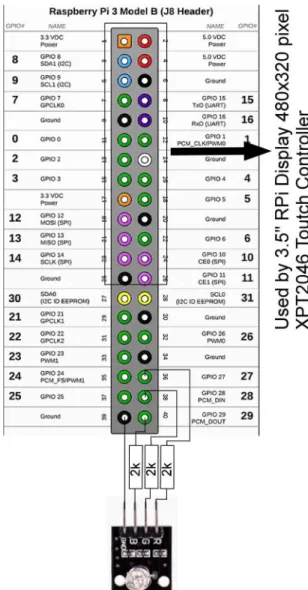
The simulation context is based on a RGB Led from the KUMAN sensor kit for Arduino that contains three independently programmable LEDs connected to the RPi3 board as shown in Fig. 1.
in [5]. The Java RPi3 interaction is based on the Pi4J project that must be downloaded and installed to the desktop machine and included in the jar file. Thus, the installation of the Pi4J on the RPi3 can be avoided, as this would require some knowledge of the Raspbian OS. However, to create such a file JDeveloper must be configured properly. The project directory ([AppRaspberryPi] is the application directory and [Pi] is the project directory) will contain the full Pi4J project downloaded as seen in Fig. 2 to the [pi4j-1.1] directory. From Build>Deploy a new deployment profile must be created. In the JAR Deployment Profile Properties at JAR Options the JAR File is set to D:\JDeveloper\mywork\AppRaspberryPi\Pi\dep loy\pi4j.jar also the Main Class set to ServerMThread and at Library Dependencies the Pi4j-core.jar must be checked.
Fig. 1. - The project wiring diagram.
At Project Properties the Pi4j-core.jar must be added. When deploying the application the pi4j.jar will be created in the [deploy] directory. Then, the jar file has to be transferred from the desktop over the network to the RPi3 using the FTP protocol. To find out more about the connection of the RPi3 to the network, under Raspbian, the ifconfig must be used as shown in Fig. 3.
Fig. 2. – JDeveloper files structure to create jar files for RPi3 Network information on the RPi3 under Raspbian
OS using Pi4J.
Fig. 3. – Network information on the RPi3 under Raspbian OS.
The prg1.rob file from Fig. 2 is a text file that contains statements to program the robot on the server.
3. THE JAVA SERVER
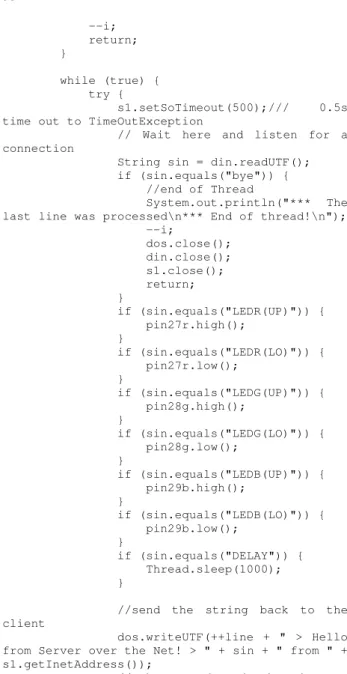
the “Server is busy” message. Clients must make new connection attempts to be the first at getting the released connection. A static variable is used in the ThreadedServer class to store the number of started threads. If this variable is greater than 1, all other new client requests will be refused. The server code that runs on the RPi3 machine can be stopped only by interrupting the process (this means that the “Server has been stopped.” will never be reached). The while loop is infinite and the blocking function call
serverSocket.accept() will wait until a
client connects to the port. The statements sent over the network are compared to those from the branching statements and if a match is found actions are sent to the robot (in this case, as this is a simulation, the colors of the LEDs will change).
import java.net.*; import java.io.*;
public class ServerMThread {
public static void main(String[] args) throws IOException {
boolean isRobotProcessing = false; ServerSocket serverSocket = null; boolean listening = true;
try {
serverSocket = new ServerSocket(5432);
} catch (IOException e) {
System.err.println("Server - port 5432 is taken.");
System.exit(-1); }
System.out.println("Server is up, ready 4 file processing.");
while (listening) {
Runnable r = new ThreadedServer(serverSocket.accept());
Thread t = new Thread(r); t.start();
}
System.out.println("Server has been stopped.");
serverSocket.close(); }
}
import com.pi4j.io.gpio.GpioController; import com.pi4j.io.gpio.GpioFactory;
import com.pi4j.io.gpio.GpioPinDigitalOutput; import com.pi4j.io.gpio.PinState;
import com.pi4j.io.gpio.RaspiPin; import
com.pi4j.io.gpio.exception.GpioPinExistsExceptio n;
import java.io.DataInputStream; import java.io.DataOutputStream;
import java.io.IOException; import java.io.InputStream; import java.io.OutputStream;
import java.net.Socket;
import java.net.SocketException; import java.net.SocketTimeoutException;
public class ThreadedServer extends Thread { private String name; // The name of this thread.
static int i = 0; int line = 0;
static GpioController gpio = null;
static GpioPinDigitalOutput pin29b = null, pin28g = null, pin27r = null;
Socket s1 = null;
OutputStream s1out = null; DataOutputStream dos = null; InputStream s1in = null; DataInputStream din = null;
void InitSocketandStrems(int port) { try {
// Get output/input streams associated with the socket
s1out = s1.getOutputStream(); dos = new DataOutputStream(s1out); s1in = s1.getInputStream(); din = new DataInputStream(s1in); //now close it as we don't want orthers to mixt with the code
} catch (IOException e) {
} catch (NullPointerException e) { System.out.println("The sever is already running !");
} }
public ThreadedServer(Socket socket) { super("ServerMThread");
++i;
this.s1 = socket; }
public void run() { // The run method prints a message to standard output.
InitSocketandStrems(5432);
System.out.println("*** Server is UP! *** > connection is locked > " + i);
System.out.flush();
try {
gpio = GpioFactory.getInstance();
pin29b =
gpio.provisionDigitalOutputPin(RaspiPin.GPIO_29, "PinLED", PinState.LOW);
pin28g =
gpio.provisionDigitalOutputPin(RaspiPin.GPIO_28, "PinLED", PinState.LOW);
pin27r =
gpio.provisionDigitalOutputPin(RaspiPin.GPIO_27, "PinLED", PinState.LOW);
} catch (GpioPinExistsException eg) { //it's ok don't stop just skip it }
if (i > 1) { try {
dos.writeUTF("Server is busy! > Program execution count is: " + i);
dos.flush();
--i; return; }
while (true) { try {
s1.setSoTimeout(500);/// 0.5s time out to TimeOutException
// Wait here and listen for a connection
String sin = din.readUTF(); if (sin.equals("bye")) { //end of Thread
System.out.println("*** The last line was processed\n*** End of thread!\n"); --i;
dos.close(); din.close(); s1.close(); return; }
if (sin.equals("LEDR(UP)")) { pin27r.high();
}
if (sin.equals("LEDR(LO)")) { pin27r.low();
}
if (sin.equals("LEDG(UP)")) { pin28g.high();
}
if (sin.equals("LEDG(LO)")) { pin28g.low();
}
if (sin.equals("LEDB(UP)")) { pin29b.high();
}
if (sin.equals("LEDB(LO)")) { pin29b.low();
}
if (sin.equals("DELAY")) { Thread.sleep(1000); }
//send the string back to the client
dos.writeUTF(++line + " > Hello from Server over the Net! > " + sin + " from " + s1.getInetAddress());
//make sure that the data is sent dos.flush();
Thread.sleep(500);
//write on the serve screen now System.out.println(i + " > Hello from Server over the Net! > " + sin);
} catch (SocketTimeoutException e) { System.out.println("3 >>>> Socket timed out! " + e);
gpio.shutdown(); i = 0;
return;
} catch (IOException e) { gpio.shutdown();
System.out.println("1 >>>> " + e);
i = 0; return;
} catch (InterruptedException e) { gpio.shutdown();
System.out.println("2 >>>>> " + e);
i = 0; return; }
} } }
The jar file is executed on the RPi3 using the text line from Fig. 3. If a file is processed at the server side, every successfully processed line in the sequence will be printed to the LXTerminal and returned in echo to the client.
Fig. 3. – The server jar executed on the RPi3 under Raspbian OS.
4. THE JAVA CLIENT
The Java client is implemented in the ClientFileV1 class and is reading the prg1.rob text file that contains robot statements. For this simulation the file contains statements like LEDR(UP), LEDG(UP), LEDB(UP) to light up and LEDR(LO), LEDG(LO), LEDB(LO) to turn off the RGB led components and DELAY to make a 1s delay. Each statement is sent to the server, processed at the server side and sent back to the client with the execution confirmation.
import java.net.*; import java.io.*;
public class ClientFileV1 {
public static void main(String args[]) { String infilename = "prg1.rob";
String[] infiledata = new String[100];
String linie;
//The BufferedInputStream class provides buffering to your input streams.
//Buffering can speed up IO quite a bit. BufferedReader difile;
try { // Create the input stream.
//The Java FileReader class (java.io.FileReader) makes it
//possible to read the contents of a file as a stream of characters of texts.
difile = new BufferedReader(new FileReader(infilename));
return; // End the program by returning from main().
}
int l = 0; try {
while ((linie = difile.readLine()) != null) {
infiledata[l] = linie; ++l;
}
difile.close();
} catch (IOException e) { }
Socket s1 = null; InputStream is = null; DataInputStream dis = null; OutputStream os = null; DataOutputStream dos = null;
try {
// Open your connection to a server, at port 5432 s1 = new Socket("192.168.1.105", 5432); // Get an input stream from the socket
is = s1.getInputStream(); os = s1.getOutputStream();
// Decorate it with a "data" input stream dis = new DataInputStream(is); dos = new DataOutputStream(os); for (String it : infiledata) { if (it == null)
break;
dos.writeUTF(it);
System.out.println("The server said <" + dis.readUTF());
}
dos.writeUTF("bye"); dis.close();
dos.close(); s1.close();
} catch (ConnectException connExc) {
System.err.println("Could not connect to the server. Server is DOWN! > " + connExc);
} catch (SocketException e) {
System.out.println("The server was shut down! > " + e);
} catch (IOException e) { // ignore
} } }
If processing interruption occurs, the following cases are monitored and caught by the server:
• 1 >>>> java.net.SocketException: Connection reset if the client, for some reason, closes the connection before program termination;
• 3 >>>> Socket timed out! java.net.SocketTimeoutException: Read timed out if the blocking read at din.readUTF() is delayed or the communication is dropped due to
network problems before program processing termination;
In both cases, the current connection is closed and a new client will be able to connect to the server to process a new file. If the sever has problems the client will issue the following errors:
• Could not connect to the server. Server is DOWN! > java.net.ConnectException: Connection timed out: connect if the server is down;
• The number of the processed lines is less than those from the original file if the server was stopped, for some reason, on the RPi3.
Socket communication in Java needs an IP address and a TCP port. The TCP port used in this application is 5432 and the IP address of the server machine is 192.168.1.105. If the IP address is routable then proper port forwarding must be done in the router to access the server over the Internet.
5. CONCLUSION
for the client access and a multithreaded approach the LED control.
6. REFERENCES
[1] ANTAL, T. A., GUI's in JDeveloper, Acta Technica Napocensis, Series: Applied Mathemathics and Mechanics, Nr. 52, Vol. IV, 2009, p.27-32, ISSN 1221-5872.
[2] ANTAL, T .A., Programming AutoCAD using JAWIN from Java in JDeveloper, Acta Technica Napocensis, Series: Applied Mathemathics and Mechanics, Nr. 53, Vol. III, 2010, p.481-486, ISSN 1221-5872. [3] ANTAL, T. A., Elemente de Java cu
JDeveloper - îndrumător de laborator, Editura UTPRES, 2013, p.150, ISBN: 978-973-662-827-6.
[4] ANTAL, T. A., Java - Iniţiere - îndrumător de laborator, Editura UTPRES, 2013, p. 246, ISBN: 978-973-662-832-0.
[5] ANTAL, Tiberiu Alexandru. Raspebrry Pi 3 programming, in java, using Blue J and JDeveloper based on Pi4J. Acta Technica Napocensis - Series: Applied Mathematics, Mechanics and Engineering, [S.l.], v. 60, n. 1, p.13-18. 2017. ISSN 1221-5872.
[6] ANTAL, Tiberiu Alexandru. Arduino Leonardo programming under Windows, in Java, from JDeveloper using Ardulink. Acta Technica Napocensis - Series: Applied Mathematics, Mechanics and Engineering, [S.l.], v. 60, n. 1, p.7-12. 2017. ISSN 1221-5872.
[7] Aurora Felicia Pop (Cristea),, Mariana Arghir. Hand ArmSimulation, under the Vibration Action with Vibration Flow Divider. 2010 IEEEInternational Conference on Automation, Quality and Testing, RoboticsAQTR 2010 - THETA 17th edition - May 28-30 2010, Cluj-Napoca, Romania, ISBN: 978-1-4244-6724-2, pag. 348-351. [8] Pop (Cristea) Aurora Felicia. Analysis of
methods of hand-arm system subjectedto vibrations by mechanical modelling and simulation. ESCTAIC 2011- The 22 Annual Meeting Conference Erlangen, Germania,12-15 oct. 2011, pag. 65-66.
[9] Pisla, D., Cocorean, D., Vaida, C., Gherman, B., Pisla, A., Plitea, N. Application oriented design and simulation of an innovative parallel robot for brachytherapy. (2014)
Proceedings of the ASME Design
Engineering Technical Conference, Volume 5B, 2014.
[10] Plitea, N., Szilaghyi, A., Cocorean, D., Vaida, C., Pisla, D. Inverse dynamics and simulation of A 5-DOF modular parallel robot used in brachytherapy. 2016. Proceedings of the Romanian Academy Series A - Mathematics Physics Technical Sciences Information Science, 17 (1), pp. 67-75.
[11] http://learnrobotix.com/open-source-robotics-software.html. Date accessed: May 1, 2017.
UN MODEL JAVA, DE INTERACŢIUNE CLIENT-SERVER CU UN ROBOT, UTILIZÂND FIRE MULTIPLE DE EXECUŢIE
Lucrarea prezintă un model de aplicaţie java, client-server, cu fire multiple de execuţie, care poate transfera un fişier cu instrucţiuni robot de la un client, la un server, robot simulat hard şi soft, în condiţiile păstrării conexiunii până la terminarea execuţiei programului pe robot.
ANTAL Tiberiu Alexandru, Professor, dr. eng., Technical University of Cluj-Napoca,
Department of Mechanical System Engineering, [email protected], 0264-401667, B-dul Muncii, Nr. 103-105, Cluj-Napoca, ROMANIA.
CHELARU Julieta Daniela, Assistant professor dr.eng., Babeș-Bolyai University, Faculty of Chemistry and Chemical Engineering, Department of Chemical Engineering,