Introduction
Virtual Data Centre
Service Description
This document is the copyright of Claranet Ltd (“Claranet”) and is for internal use and Customer distribution. The purpose of this document is to define the design and performance that Claranet provide on the Virtual Data Centre Service. This document will also define what the boundaries within which the Virtual Data Centre Service operates and the support available for the Service.
This Service Description forms part of the Agreement between the Customer and [Claranet], together known as the “Parties”.
Contents
Introduction ... 1
1.1. Overview ... 3
1.2. Hypervisor Orchestration ... 4
1.3. Virtual Machine Specification ... 5
1.4. Storage ... 5
1.5. Networking ... 6
1.6. Monitoring ... 6
1.7. Connecting to Virtual Data Centre ... 7
1.7.1 MPLS Interconnect Service ... 7
1.7.2 Cloud VLAN Interconnect (Data Centre Interconnect) ... 7
1.7.3 Managed Cloud Connector ... 8
1.7.4 Dedicated IP Range ... 8
1.8. Data location and governance ... 9
1.9. Data boundaries ... 9
1.10. Software Licensing ... 10
1.11. Virtual Machine Templates ... 11
1.12. Third Party Software ... 11
1.13. Backup – Data Protection ... 12
1.14. Backup - Data Restoration ... 13
1.15. Application Programming Interface (API) ... 13
1.16. On-boarding Process ... 14
1.17. Off-boarding Process ... 14
1.18. Service Support... 15
1.19. Service Billing... 16
1.20. Change Log ... 18
1.1. Overview
Virtual Data Centre (VDC) is an enterprise-grade „infrastructure as a service‟ platform on which customers can self-provision virtual machines. Claranet manage the platform up to the hypervisor, and the Customer/Partner manages the operating system and their applications/databases.
The key benefits of this service are self-service provisioning, a „pay for what you use‟ flexible billing model and presence in multiple European countries. Additionally, partners and customers with the right expertise can integrate VDC provisioning into their own portals and processes using the VDC API.
VDC is provided using a number of nodes in multiple European countries. The Customer chooses which node(s) in which to provision virtual machines. The current nodes are:
UK – Hoddesdon UK – London France – Paris Germany – Frankfurt Netherlands – Eindhoven Spain - Barcelona
Whilst the VDC service is available in two UK datacentres, Claranet do not currently provide a disaster recovery option or the components required for disaster recovery services between the sites, such as SAN replication. Nodes in the United Kingdom are provided in Tier 3 datacentres1.
The VDC service includes service levels for uptime and latency, which are defined in a separate SLA document. Service levels for provisioning of a virtual machine are not included, as this is affected by factors such as the choice of operating system being used and the configuration of the operating system itself.
1.2. Hypervisor Orchestration
The Virtual Data Centre Service infrastructure consists of an Orchestration Layer which manages a Hypervisor and associated physical resources.
Currently, Claranet use vmware vSphere as the Hypervisor. However, not all vmware capabilities are exposed by the Orchestration Layer, and some are restricted to use only by Claranet for platform administration.
The Virtual Data Centre Service has a principle of being hypervisor-agnostic, so if Claranet were to offer a secondary hypervisor, Customers would see little difference in the offering. The following table shows well-known features of vmware and where these are available and used in the VDC service:
VMware vSphere Feature
Enterprise Tier
Boot from CDROM (ISO Image) Unavailable Modify (extend or shrink) disk size UnavailableHigh-Availability (HA) Active but not exposed to the Customer Distribution Virtual Switching (DVS) Available as standard, not exposed to the
Customer
Create blank image Customers cannot create blank Virtual Servers through the portal, this must be done offline and the finished image uploaded to VDC
Virtual Machine snapshot The VMware snapshot capability is not available, however a VDC snapshot capability is available, but this does not cover any Remote Storage volumes. The snapshot capability does not retain Virtual Machine RAM and CPU settings.
Anti-Affinity Not available
Distributed Resource Scheduling Not available
vMotion Active but not exposed to the Customer
1.3. Virtual Machine Specification
The following describes the maximum specification of each individual virtual machine. Claranet will maintain an appropriate contention ratio of physical CPUs to virtual CPUs. Memory is uncontended, so a virtual machine with 1GB vRAM allocated through the Cloud Portal will have 1GB of physical memory reserved on the host hypervisor.
Specification All Nodes
Processor architecture Intel Xeon Series [4]
Max number of virtual CPUs (vCPU) 8 [1] [2]
Max memory (vRAM) 64GB[3]
Maximum local storage disk size 2TB
Maximum number of Network Interface Connections (NICs) 10
[1] Only if operating system supports addressing of 8 physical CPUs, please consult with Operating System vendor documentation.
[2] A vCPU is the equivalent of 1 physical processor as seen by the Virtual Machine. Multi-core technology is not exposed to the Virtual Machine.
[3] Operating System dependent, 64-bit or PAE kernels will support more than 4GB of RAM. [4] Exact processor may vary between nodes
1.4. Storage
Each virtual machine is provided with one storage volume, typically used for the operating system. Storage is provided using enterprise-grade storage from major industry vendors. The use of disks on the hypervisor hosts is not permitted.
Other functionality of the SAN device, such as replication or snapshotting, is not accessible to the Customer.
Additional storage volumes, called Remote Storage Volumes, are empty writeable disk volumes that can be attached or unattached to a Virtual Machine. The virtual machine will see these volumes as a separate physical disk with no file system. To provision a Remote Storage volume, the Customer must choose one of a list of fixed sizes (listed below) within the Cloud Portal. Storage is then provisioned and will accessible from the virtual machine, subject to sufficient storage being available on the VDC platform.
List of Available Storage Sizes:
16GB, 32GB, 64GB, 128GB, 256GB, 384GB, 512GB, 640GB, 768GB, 896GB. 1024GB, 1152GB, 1280GB,1408GB,1536GB, 1664GB, 1792GB, 1920GB, 2047GB.
Raw Device Mappings (RDMs) are not available.
Latency is the time taken to complete an I/O request and is most commonly measured in milliseconds (msec). Latency or performance guarantees are not provided with the service.
1.5. Networking
Each hypervisor host has a redundant pair of gigabit Ethernet connections to the Claranet network (and via the network to the Internet). In normal circumstances, this provides throughput of 2Gbps to the hypervisor, which is shared across all virtual machines that are using that hypervisor host. In the event of failure of one of the NICs, the connectivity will continue to function, but at a temporary reduced rate of 1Gbps.
Each virtual machine virtual NIC (vNIC) will be set to a speed of 1Gbps, but will achieve a throughput lower than 1Gbps because the hypervisor connectivity is shared with other virtual machines. The throughput will vary over time depending on the volume of traffic to and from each virtual machine on the host.
Each Virtual Machine is connected to a central Virtual Data Centre network, where Virtual Machines can communicate using VLANs. Once a VLAN is created, it only exists once within that Cloud Data Centre, therefore providing a dedicated and secure method for transferring network data between virtual machines in a Virtual Data Centre. Bandwidth between virtual machines within the same node and within the same VLAN is provided at 1Gbps.
IP addresses are managed by the Virtual Data Centre orchestration system and delivered using DHCP. Each Virtual Machine will be given a permanent DHCP lease to maintain its IP address. Virtual Machine templates must have DHCP enabled (the use of static IPs is not permitted) and must be compatible with DHCP in order to receive network addresses and communicate on the Virtual Data Centre network.
Each NIC can only have 1 IPv4 address. IPv6 is not yet supported.
1.6. Monitoring
Claranet monitor the underlying Infrastructure of Virtual Data Centre for availability, performance, capacity and utilization. These reports are not made available to the Customer but are used to provide Claranet with the information to operate and deliver the Virtual Data Centre SLA.
Claranet does not automatically monitor the availability of Customer Virtual Machines, even if created using Claranet templates. Claranet guarantees the availability of the platform under the SLA but as the Virtual Machines are Customer controlled, the availability of a specific Virtual Machine cannot be guaranteed.
If a Service outage has affected Virtual Machines on Virtual Data Centre, a Customer initiated credit request will put into a process where Claranet coalesce the systems monitoring data and logs with the Customer‟s own record of when and where an outage occurred. The Service credits will be available for that agreed window. Customers have the option to dispute records with Claranet, where upon systems monitoring data can be provided to the Customer.
1.7. Connecting to Virtual Data Centre
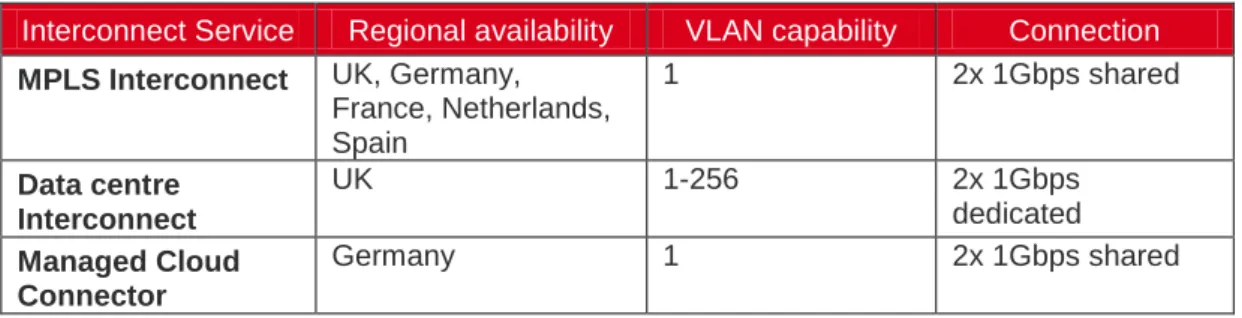
Interconnect options are as follows:Interconnect Service Regional availability VLAN capability Connection
MPLS Interconnect UK, Germany,
France, Netherlands, Spain 1 2x 1Gbps shared Data centre Interconnect UK 1-256 2x 1Gbps dedicated Managed Cloud Connector Germany 1 2x 1Gbps shared
1.7.1 MPLS Interconnect Service
The MPLS interconnect Service is for connecting a Claranet MPLS network to a Virtual Data Centre. Each instance of this interconnect Service will connect one MPLS VRF (Virtual Routing & Forwarding) network to a Virtual Data Centre External VLAN and present a number of Customer specified MPLS IPv4 addresses.
Customers can use these addresses to attach to a Virtual Server or Virtual Firewall to communicate with other hosts on the MPLS network.
Virtual Data Centre
Claranet VPN:ng router Customer Device Customer Device Customer Site A Claranet MPLS Network Virtual Firewall Virtual Machine
Figure 1: Example network diagram
1.7.2 Cloud VLAN Interconnect (Data Centre Interconnect)
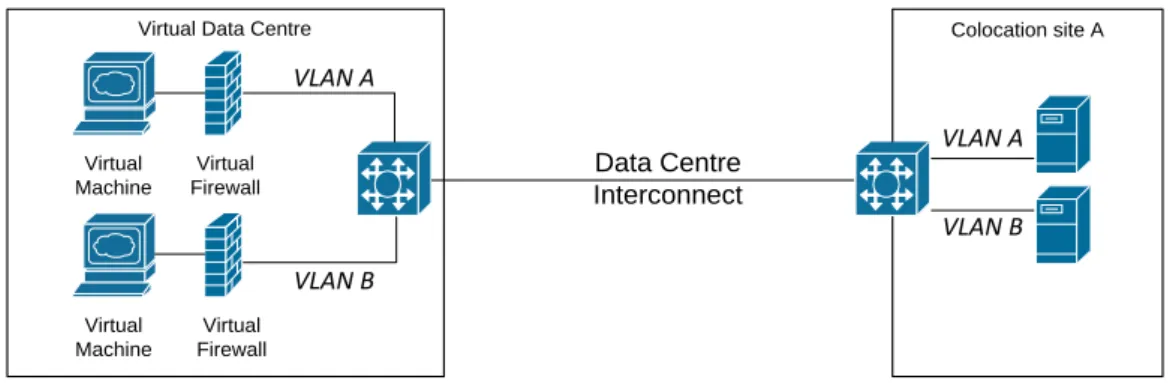
The Cloud VLAN Interconnect Service is used to connect a Claranet hosted environment (such as co-location) to the Virtual Data Centre. This interconnect can act a bridge for 1 VLAN or multiple nominated VLANs. Other uses of the service include presenting multiple Virtual Data Centre VLANs to a physical firewall as virtual interfaces.
Virtual Data Centre Colocation site A Virtual Firewall Virtual Machine Virtual Firewall Virtual Machine VLAN A VLAN B Data Centre Interconnect VLAN A VLAN B
Figure 2: Example network diagram
1.7.3 Managed Cloud Connector
The Claranet Cloud Connector Service is available to connect a single Virtual Network in Virtual Data Centre to a Claranet Germany Managed Service such as a firewall, load balancer or server.
Shared Internet Addressing (SIA)
Public Internet addresses in the Virtual Data Centre service use Shared Internet Addressing (SIA) by default, meaning the subnet is shared between multiple Customers. If a Customer consumes a single public IP address, the next address in that range could be used by another Customer. The broadcasting traffic cannot be seen by another Customer so there is no risk of „packet sniffing‟ between Customers.
Reverse DNS
SIA addresses will automatically have a reverse DNS (PTR) record in the following format:
host-<ip>.Customer.uk.clara.net with a matching forward (A) record. Customers cannot request custom PTR records on the SIA product.
1.7.4 Dedicated IP Range
Dedicated IP Range is an optional VDC Service and provides a dedicated subnet of IP addresses, presented to a Virtual Data Centre.
Routing a DIA subnet
There is a limitation of 1 SIA Public IP address per network interface on a Virtual Server and 10 network interfaces per Virtual Server. Customers wishing to expose multiple public IP addresses through a single Virtual Firewall may find this a constraint. In this case, a Dedicated IP range can be routed through a single public SIA IP address. The Virtual Firewall will then be configured with the external IPs, and the internal IPs of the servers will be public IP addresses. The Virtual Firewall must support „routed‟ mode and not NAT or transparent.
Reverse DNS
DIA addresses will automatically have a reverse DNS (PTR) record in the following format host-<ip>.Customer.uk.clara.net with a matching forward (A) record. Customers can request custom PTR records on the DIA product.
1.8. Data location and governance
The location, transmission and sharing of data within the Claranet Cloud platform has been strongly considered and we wish to make this transparent to both parties. The principle of “always in-country” has been followed, but in circumstances where the Customer wishes to take Cloud Compute or Cloud Storage resources in different Data Centres, network traffic and data may be shared within countries.
The location of data is as per this table:
Type of data Scenario Boundary
IP traffic Customer assigns a public IP to the Virtual Server
Global
IP traffic Customer has a single Virtual Data Centre with a single VLAN
Cloud Network VLAN
IP traffic Customer has a single Virtual Data Centre with multiple VLANs
Cloud Data Centre
IP traffic Customer has a dual Virtual Data Centre environment with a single VLAN being shared between Virtual Data Centres. Virtual Data Centres are located in the same physical Data Centre
Cloud Data Centre
IP traffic Customer has a dual Virtual Data Centre environment with a single VLAN being shared between Virtual Data Centres. Those Virtual Data Centres are located in different physical data centres, but within the same country
Country
IP traffic Customer has an MPLS network across the Claranet network with CPEs in offices across different countries. The Customer chooses to connect to their Virtual Servers over their MPLS network
Claranet Network
1.9. Data boundaries
If the data is within a boundary, each of the boundaries below will also be able to send or receive that data. For example, if the IP traffic is sent within a Country, the Virtual Data Centres within that country and the Cloud Network VLANs within those Virtual Data Centres will also be within that data boundary.
“Global” – The data is accessible over the WAN
“Claranet Network” – The data is sent over the Claranet network
“Country” – The data will be sent within the country in which the Virtual Data Centres are located
“Cloud Data Centre” – the data will not leave the physical data centre where it is provisioned, except for operational or technical reasons. IP switching is provided using VLANs. Broadcast networks are private to each Cloud Network VLAN.
“Cloud Network VLAN” – The switching VLAN broadcast network within a Cloud Data Centre.
1.10. Software Licensing
Claranet provides a number of Virtual Machine templates free of charge. The Claranet Virtual Data Centre Service is fully inclusive of Microsoft Windows Server® licensing.
Further software licenses must be provided and maintained by the Customer.
Operating System/Appliance name License Requirements
Microsoft Windows Server ® Platform is fully licensed under the Microsoft Service Provider License Agreement, Customers have unlimited usage of the Windows Server® product set on the VDC platform.
RedHat Enterprise Linux ® Customer must provide own license
Ubuntu Server Offered free of charge, usage rights may be applicable for software contained within the image. Please consult vendor documentation for further information ( http://www.ubuntu.com/project/about-ubuntu/licensing)
CentOS Offered free of charge, usage rights may be
applicable for software contained within the image. Please consult vendor documentation for further information (http://www.centos.org/)
Vyatta firewall Offered free of charge, usage rights may be applicable for software contained within the image. Please consult vendor documentation for further information (http://www.vyatta.com/)
Pfsense Offered free of charge, usage rights may be
applicable for software contained within the image. Please consult vendor documentation for further information (http://www.pfsense.org/)
1.11. Virtual Machine Templates
A range of virtual machine templates are available on the VDC portal. These are pre-built operating system instances from which virtual machines can quickly be deployed.
Images are not maintained, which means that the template is not updated/patched after it is first created. Claranet reserves the right to add and remove templates over time.
The following templates are currently available:
Linux operating systems
o Centos 5.7
o Centos 6.0
o Debian 6.0.3
o Redhat Linux Enterprise 5.7
o Redhat Linux Enterprise 6.2
o Redhat Linux Enterprise 6.4
o Ubuntu 10.04.3 (Lucid) o Ubuntu 11.10 (Oneiric) o Ubuntu 12.04 (Precise) Firewall appliances o Citrix Netscaler VPX 9.3 o pfSense 2.0.1 2 Interface
o pfSense Firewall SSL VPN Edition
o Vyatta
Microsoft Operating Systems
o Windows Server 2008 R2 SP1 Standard
o Windows Server 2008 SP2 Standard
o Windows Server 2012 (Beta Only)
Customers may upload and download their own images via FTP and the VDC portal. Customers must only download their own images, unless Claranet have provided written permission to do otherwise. Template images provided by Claranet use Claranet-owned software licenses, which are permitted for use in Claranet facilities only.
The customer is solely responsible for the content downloaded and uploaded, and any material or information that is transmitted.
Claranet are able to provide an additional Service to install licenced commercial software. A copy of the licenced image will be provided in the Customer‟s image library. The licenced image may only be deployed a set number of times according to the number of licences purchased. Customers must not clone, copy or download the virtual machine without written permission from Claranet.
1.12. Third Party Software
It is the Customer‟s responsibility to ensure that any other software supplied by the Customer is licensed in accordance with the vendor‟s licensing agreements.
1.13. Backup – Data Protection
Virtual machine snapshots are used to backup virtual machines (and their attached volumes) sitting on the VDC platform.
By default, no virtual machines will be backed up. The Customer must manually provide a list to Claranet Solution Support containing the names and UUIDs of each virtual machine that should be included in the backup. The list must include the full name and UUID of each virtual machine.
Once received, Claranet will configure the backups. It may take several days from receipt of the list before the first full backup has been successfully taken.
Backups will not occur if the Customer does not inform Claranet of the UUID of the Virtual Machines they wish to back up. The Customer accepts responsibility for ensuring that this information is provided, if the Customer wishes for backups to be taken.
Claranet does not accept any responsibility for virtual machines that are not backed-up because of an incorrect UUID being provided on the list.
Attached volumes will also be backed-up (but will not be backed up if detached for any reason).
When a virtual machine is re-deployed, a new UUID is generated. Once the UUID has changed, backups will no longer take place, and the backup data will be permanently lost for the virtual machine at the end of the retention period.
Customers are responsible for notifying Claranet of any changes to the backup list, including notifying Solution Support of any virtual machines which need to be backed up and that have been created, modified, redeployed or deleted.
Claranet will take a backup of each virtual machine on the list on a daily basis, between 6pm and 8am. This backup will be stored on a separate storage platform to that used for VDC. Claranet will retain the most recent 30 daily backups (the “retention period”), after which data is permanently deleted.
In most cases, the service is able to take backups of open files, but Claranet cannot guarantee that data yet to be written to disk (e.g. uncompleted database transactions) will be backed-up consistently. If this is an issue, the data in question (such as SQL Server logs) should be exported so that a backup can be taken of a file that is closed.
The backup process is fully monitored. After every backup cycle, Claranet systems engineers are notified of any backup failures. If a backup failure is detected, Claranet will attempt to troubleshoot and fix the problem. Claranet will contact the Customer if the problem persists and will work with the Customer to resolve the problem and resume normal backups.
The Customer must ensure that Claranet has the correct contact details of the person within the Customer organisation to contact in the result of a backup failure.
1.14. Backup - Data Restoration
Claranet will perform data restores on an “as needed” basis. A restore is invoked by a request to Claranet Solution Support. The Customer must provide the following information when raising a request with Solution Support:
VDC Enterprise Name (typically starts EN)
The name of the virtual machine to recover
The UUID of the virtual machine
The date and time (backup window 6pm-8am) to which you wish to recover
The target time to initiate data recovery (from the point at which the recovery is requested by the Customer) is four working hours. The recovery itself can take many hours. The time to recover data increases as the amount of data being backed up increases. Other factors influencing the time taken to recover data include, but not limited to, the type of data and the number of individual files to be restored. As such, Claranet cannot guarantee a time to complete recovery.
The Customer can request the restoration of any daily backup set taken during the retention period.
At the request of the Customer, Claranet will restore the snapshot into the VDC image library for the Customer to deploy as a virtual machine, which can subsequently be used to manually extract files and data as appropriate. The Customer will require available burst resources to deploy the new virtual machine. The newly provisioned virtual machine will not be backed-up, and it is the responsibility of the Customer to inform Claranet if the new virtual machine must be backed up.
For restores of external volumes, Claranet Solution Support will consider the most appropriate method to restore the data for the application which is using the data.
1.15. Application Programming Interface (API)
The API is targeted at expert developers who wish to control their Virtual Data Centre from their own code.
The API for Virtual Data Centre will allow developers to perform the following functions against their VDC account:
List Virtual Data Centres List Virtual Appliances List Virtual Machines Create Virtual Appliance Modify Virtual Appliance Deploy Virtual Appliance Undeploy Virtual Appliance Delete Virtual Appliance Create Virtual Machine
The API uses the RESTful architecture which means that data is submitted and received via XML. Credentials for an API account are passed (with basic authentication) to the Claranet
Full documentation and example can be found at http://cloudhelp.claranet.com/content/api-documentation.
Each Customer (Enterprise) requires an API Login /Password, this can be set up by sending a request to [email protected] with your Enterprise ID and Virtual Data Centre reference (EG. EN**_****_0001 and VD**_0123). Claranet Solution Support will activate access to the API on the appropriate Enterprise and inform the Customer when this is done. The API will be available to all Virtual Data Centre users upon request. Claranet reserves the right to discontinue the API in the future for commercial reasons, and to remove access to certain users if their use of the service is detrimental to the stability of the platform of services provided to other users. Claranet also reserves the right to modify the API specification at any time.
The API is supported through our Virtual Data Centre SLA. Claranet will support the availability of the API, but will not support the writing, testing, or debugging of the API. Claranet reserve the right to reasonably limit the rate at which some or all requests can be submitted into the API, in order to protect the quality of service for all users.
1.16. On-boarding Process
The key stages of the on-boarding process are as follows:
New order raised by Claranet Sales
Claranet Sales Support input the order into internal systems
Order is approved by Sales Managers / Directors
Order is approved by credit control
Claranet Project Office move the order into provisioning
Claranet Project Office set the customer up on Claranet support network
Claranet Project Office generate account on VDC platform
Any additional configuration is applied
Claranet Project Office provide Welcome Pack to Customer
Claranet Project Office send login details to Customer
The order is set to delivered
1.17. Off-boarding Process
The key stages of the off-boarding process, which is used when a Customer wishes to terminate their use of the VDC service, are as follows:
Customer submits cancellation request to Claranet retentions team
Retentions team cease the order on the internal systems
Claranet Solution Engineering deactivate monitoring
Claranet Cloud Provisioning delete IPs, virtual machines, configuration and data
Order is considered cancelled
1.18. Service Support
Claranet provide a portal through which Customers can provision Virtual Machines onto Claranet operated virtual infrastructure.
Claranet support and maintain the hypervisor platform, networking and storage. Claranet also operate and support the portal software through which Customers interact with this environment. The support of operating system images and Customer installed software on those images is not covered by this Service.
Description Claranet’s responsibility Customer responsibility
Monitoring Hypervisor
hardware and Storage system
Monitoring Virtual Machine performance and application availability
Detecting hardware failures
and replacing components
Patching and securing of
Virtual Machines
Patching and securing of Hypervisor hardware and Storage system
Diagnosis of errors given in
the Claranet Cloud Portal
Diagnosis of Virtual Machines
that have failed to boot
Diagnosis of Customer
provided images
Diagnosis of storage or performance issues in Claranet provided images
Diagnosis of networking issues in Claranet provided images
Diagnosis of storage or performance issues in Claranet provided images
Diagnosis of configuration or connectivity issues in Claranet provided Firewall and Load Balancer appliances
Support or assistance on Customer installed software on either Claranet or Customer provided images
1.19. Service Billing
Each Customer purchases a VDC Enterprise account, which includes:
100GB of library storage for customer-created images 1 VLAN
Free Internet Bandwidth (subject to any Acceptable Usage Policy) Licensing for Microsoft Windows Server used on VDC virtual machines
In addition to the Enterprise account, the Customer pays charges for:
Backup
Deployed virtual machine resources
Software licenses (excluding operating systems) – e.g. Microsoft SQL Server
The minimum contract length is one month. Claranet does not charge a fee to cease usage of the service, other than any resource commitments made by the Customer. For Customers who pay on a monthly basis, payment is made by direct debit or credit card. For other Customers, payment for the service can be made by direct debit, credit/debit card, BACS or cheque.
Claranet can provide trial accounts for prospective Customers. These are limited to one month in duration and cannot be extended. There is no obligation to continue usage after the initial month, and if an order is not placed before the end of that month, all data will be deleted immediately.
Claranet measure utilisation through a built-in mechanism which captures the current „state‟ of resources within an Enterprise every hour. Virtual machines are chargeable if deployed, even if in a standby/powered off state. If a virtual machine is not required, and resources should no longer be billed, the virtual machine must be un-deployed. A history of changes to the Enterprise account, such as a list of virtual machines that have been provisioned or de-provisioned, is available in the Cloud Portal.
The following is a list of „resources‟ within an Enterprise:
Unit Frequency Measurement
Local Storage Hourly Gigabyte allocated
Remote Storage Hourly Gigabyte allocated
Memory Hourly Gigabyte allocated
CPU Hourly vCPU allocated
VLAN Hourly VLAN count created
IP Hourly IP provisioned
For billing purposes, the maximum in each hour will be recorded. For example, if 10GB RAM was consumed for 30 minutes, then 3GB RAM for the remaining 30 minutes in the hour, the system would register 10GB RAM as the consumed resource in that hour.
Backup is charged for on a „transferred data‟ basis. The sum of the total data transferred from the VDC virtual machine to the Claranet backup platform is called “transferred data”. Claranet measures the total quantity of transferred data used by the Customer on the 1st of each month. There is a full back up each Monday and an incremental backup each day.
The Customer may request, at the time of quote, for a committed quantity of transferred backup capacity. This is paid in advance. The Customer will be liable for the cost of additional transferred backup capacity used above this committed capacity.
Claranet offer three virtual machine billing models. Customers have the option to use either one model or a combination of models to meet their commercial requirements.
Virtual Machine Pay-per-Hour Model (‘burst’)
The pay-per-hour model is the most flexible billing model. A charge is made for each hour that a resource is used.
The total cost is calculated as (quantity of resource x number of resource hours consumed in a month x hourly rate). For example: a customer with a Virtual Machine with 2 vCPU, which is deployed for 100 hours over a month, would be billed for (2 * 100 * hourly rate). The customer receives a breakdown of their usage and a bill at the end of the month. The customer is therefore in control to amend usage to meet their commercial requirements. The Customer specifies a maximum monthly spend limit in order to manage cost.
Virtual Machine Committed Model
The Committed Model is the most cost-effective model for fixed requirements. The Customer commits to a volume of resource usage for the entire month at a lower rate than the pay-per-hour model. For example, a customer may commit to a pool of 10 vCPU, 10GB RAM and 200GB Storage, which may be allocated to multiple virtual machines.
Lower cost can be achieved by buying a greater volume of resource and by committing for a longer contract length. The Customer can use as much or as little of that resource as they wish over the month, with the bill staying the same.
All committed resource is based on 744 hours in a month (31 days).
Virtual Machine Committed and Scalable Model
This model is similar to the committed model, except that the Customer also has the ability to use more than the stated amount when required, and is charged for the extra as „burst‟ capacity. The „burst‟ capacity is charged as per the pay-per-hour model. To achieve this, Claranet set account limits that are higher than the committed amount.
Customers receive a bill for committed usage at the end of the month, together with a breakdown of usage above the committed usage, as if they were using the Pay-per-Hour Model. Customers using the Commit Model can upgrade to this model at any time during their contract.
Customers must agree a limit to burst capacity in advance. If no burst is set, the Customer cannot accrue Additional Charges in this manner.
1.20. Change Log
For convenience, the following is a summary of changes made to the document. It is not intended be an exhaustive or definite list.
Vers ion
Changes
3 Cosmetic changes to the layout and content of the document. Addition of Change Log.
Removal of the „Private Tier‟.
Modification to backups section to emphasise that Customers are responsible for notifying Claranet of details for each virtual machine that needs to be backed up.
Added introduction section, modified data boundaries section. Clearer explanation of how each virtual machine is connected to the network and that the links are contended.
Addition of Hoddesdon datacenter.
Specified that VMDKs used where appropriate; RDMs not available. Removed CPU and RAM sizing section.
3.1 Addition of section regarding G-Cloud 4 framework
Clarification that restores from backup can take many hours, and the time taken increases based on a number of factors
Addition of on-boarding and off-boarding section Improvements to Billing section
Image Management section renamed to Virtual Machine Templates, and list of templates added
Reference to SLA document and datacenter tier information added Changes to the overview section
Appendix A: UK Government G-Cloud Framework
This service has been submitted for accreditation to the UK Government G-Cloud 4 framework. The following information is provided for consideration for situations where the G-Cloud Framework applies and the use of VDC is being considered:
The VDC service is not accredited to process and store data at any of the public sector impact levels;
The VDC service is able to provide a Public Cloud solution, which is defined as
“Utility Computing that is available to individuals, public and private sector organisations… is often non-geographically specific and can be accessed wherever there is an Internet connection”;
The VDC service is not able to provide a Private Cloud, which is defined as “a Utility
Computing infrastructure exclusively for the use of one organisation or community” because elements of the infrastructure are shared between customers;
The VDC service is connected only to the Internet, and is not directly connected to
other networks such as PSN, GSI, N3 or JANET;
The information principles for the UK Public Sector are not supported or documented
in the VDC service;
The ICT Strategy and Greening ICT Strategies are not supported or documented in
the VDC service;
Whilst Claranet is confident that our data removal procedures are reasonable, we do
not believe that the VDC service satisfies the data extraction/removal criteria of G-Cloud 4. The reason for this is that data will not be purged from backups until the end of a backup retention window, and physical disks are not destroyed;