© 2017, IRJET | Impact Factor value: 5.181 | ISO 9001:2008 Certified Journal
| Page 1938
The LINQ between XML and Database
Surbhi Jain
Assistant Professor, Department of Computer Science, India
---***---Abstract -LINQ (Language Integrated Query, pronounced “link”) is a data choice mechanism designed to provide
programs the flexibility to pick data within
the same approach from any information supply. The
Language Integrated Query provides a unified paradigm for querying relations and XML. Ideally the program would be able to use exactly the same method to fetch data whether it’s stored in arrays, lists, relational databases, XML data, Excel worksheets, or some other data store. In this paper, we'll explore, in brief, the usage of LINQ with XML and with SQL databases. And also describes a suite of code for using LINQ to query a relational database returning XML results, to query XML, and to transform the structure of one XML document to another.
Key Words: LINQ, LINQ tools, XML, System.Xml,
XElement
1. INTRODUCTION
Software is simple. It boils down to two things: code and data. Writing software is not so simple, and one of the major activities it involves is programming code to deal with data. Whatever the language we end up with, at some point we will have to deal with data. This data can be in files on the disk, tables in a database, XML documents coming from the Web, and very often we have to deal with a combination of all of these. Ultimately, managing data is a requirement for every software project we work on.
Given that dealing with data is such a common task for developers, one would expect rich software development platforms like the .NET Framework to provide easy means for this. NET does provide wide support for working with data. We will see however that something is yet to be achieved: deeper language and data integration. This is where LINQ to Objects, LINQ to XML and LINQ to SQL fit in. LINQ tools are divided into the three categories summarized in the following list:
LINQ to Objectsrefers to LINQ functions that interact with
Visual Basic objects such as arrays, dictionaries, and lists.
LINQ to XMLrefers to LINQ features that read and write XML
data. Using LINQ, we can easily exchange data between XML ladders and other Visual Basic objects.
LINQ to ADO.NETrefers to LINQ features that let us write
LINQ - style queries to extract data from relational databases.
1.1. LINQ Syntax
LINQ's syntax is declarative, using from-where-select clauses. The from clause iterates over collections (of tuples or XML elements), the where clause filters select clause specifies the structure of the returned result.
The execution order of the clauses is based on the underlying formalism of functional programming. As an example query, consider the following LINQ expression that returns the names of employees who are database administrators, where employees is a collection of employee tuples [employee(eID, eLast, eFirst, eTitle, eSalary)] and the result is a collection of strings representing employee names:
var dbas = from e in employees
where e.eTitle == "Database administrator" select e.eLast + ", " + e.eFirst;
When we represent information in the form of real word objects as in the case of object- oriented programming, the database model is known as an Object database (also called object-oriented database)
To access a specific kind of data source, something called a provider is employed. Providers primarily gives a link between LINQ and the appropriate data source. Knowledge of the provider was, of course, unnecessary to the task..NET also comes with other providers, such as LINQ to XML and LINQ to SQL, which we'll be using in this article, and it's possible to create providers; a number of third party providers are available.
For instance, while writing an application using .NET, probability is high that at some point there is a need to persist objects to a database, query the database and load the results back into objects. The problematic thing is that in most cases (at least with relational databases), there is a gap between the programming language and the database. Good attempts have been made to provide object-oriented databases, which would be closer to object-oriented platforms and vital programming languages like C# and VB.NET. However, after all these years, relational databases are still prevalent and we still have to struggle with data-access and persistence in all programs.
© 2017, IRJET | Impact Factor value: 5.181 | ISO 9001:2008 Certified Journal
| Page 1939
Objects), databases (LINQ to SQL), XML documents (LINQ to XML), a file-system, or from any other source.
2. Basic need of LINQ
One of the key aspects of LINQ is that it was designed to be used against any type of objects or data Source, and provide a consistent programming model for doing this. LINQ ships with implementations that support querying against regular object collections, databases, entities, and XML sources. Developers can integrate LINQ and other data sources with ease due to its support of rich extensibility.
Another vital side of LINQ is that once we use it, we work in a strongly-typed world. All the queries are checked at the compile time. Unlike SQL statements, where we only find out after execution, if something is wrong. This means validity of code can only be detected during development. Most of the time problems come from human factors. Strongly-typed queries allow detecting early typos and mistakes done by the developer of the keyboard.
LINQ is a step toward a more declarative software design.
There is duality in LINQ. We can perceive LINQ as two balancing things: a set of tools that work with data, and a set of programming language extensions.
Lot of time is spent on writing plumbing code. Removing this burden would increase the productivity in data-intensive programming, which LINQ helps us do.
2.1 Object-relational mapping
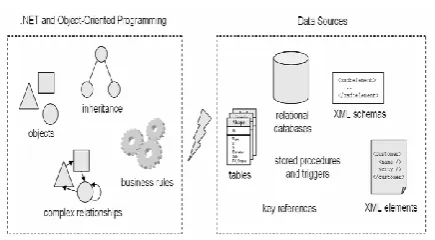
If we take the object-oriented paradigm and the relational paradigm, the mismatch exists at several levels.
Let’s just name a few.
- Relational databases and object-oriented languages don’t share the same set of primitive data types. OOP and relational theories come with different data models. For performance reasons and due to their intrinsic nature, relational databases need to be normalized.
Fig.1 Here is how we could represent the LINQ building blocks and toolset in a diagram
-Programming models:In SQL, we write queries, and so we
have a higher-level declarative way of stating the set of data that we are interested in. With general purpose vital programming languages like C# or VB.NET, we have to write iterative statements (for loops) and decision statements (if statements and so forth).
-Encapsulation:Objects include data as well as behavior.
They are self-contained. In databases, data records don’t have behavior.
A descriptive explanation for bridging object-oriented languages and relational databases is object-relational mapping which is provided by LINQ
2.2 Object-XML mapping
The mismatch which is there between object-relational databases, a similar mismatch also exists between objects and XML. For example, the type system part of the W3C XML Schema specification has no one-to-one correspondence with the type system of the .NET Framework. Because of the presence of APIs, using XML in a .NET application is not very problematic. We have APIs that deal with this under the
System.Xml namespace and built-in support for object
to/from XML serialization and deserialization. Even after these, a lot of difficulties are faced for doing even simple things on XML documents.
© 2017, IRJET | Impact Factor value: 5.181 | ISO 9001:2008 Certified Journal
| Page 1940
Fig. 2 .NET applications and data sources are different worlds. The concepts used in object-oriented programming are different from the concepts used with
relational databases and XML.
2.3 LINQ to OBJECTS
The methods that enable a program to fetch data from objects extended by LINQ extension methods are referred to as LINQ to object methods. These methods extend IE numerable(Of T) so that they relate to any class that implements IE numerable(Of T) including Dictionary(Of T), Hash Set(Of T), LinkedList(Of T), Queue(Of T), Sorted Dictionary(Of T), Sorted List(Of T), Stack(Of T), and others.
For example, the following code searches the employees_master list for employees with account balances less than 100. It orders them by account balance and returns their names and balances.
Dim overdue_emp =
From emp In employees_master Where emp.AccountBalance < 100 Order By emp.AccountBalance Ascending Select emp.Name, emp.AccountBalance
This query will result in an IEnumerable object that the program can repeat through to take action for the selected employees.
2.4 LINQ to XML: Querying XML documents
A new insight to represent and work with XML is given by LINQ to XML. For demonstrating the novel API provided by LINQ to XML, we first need to build the XML document. We will have to import the System.Xml.Linq namespace to get started. This namespace provides a variety of classes, of which we will use a few. XDocument: This class signifies an XML document. Our entire document above can be contained within an XDocument class. XDeclaration: This class contain the first line of our document – the XML declaration. XElement: This class signifies an element. The body of our document can be represented by nesting XElement objects.
XML querying capabilities can be incorporated into host programming languages with the help of LINQ to XML, a
member of the LINQ family of technologies. It takes advantage of the LINQ framework and adds query extensions specific to XML. The query and the transformation power of XQuery and XPath integrated into .NET is what is provided by LINQ to XML.
Why we need LINQ to XML
XML is globally used in programs written using all-purpose programming languages like C# or VB.NET. It is used to exchange data between applications, to store configuration information, to persist temporary data, as a base for generating web pages or reports, and for many other things. It is everywhere.
Until now, XML hasn’t been natively supported by the programming languages, which required using APIs to deal with XML data. These APIs include XmlDocument,XmlReader, XPathNavigator, XslTransform for XSLT, and SAX and XQuery implementations. It offers the expressive power of XPath and XQuery but with C# or VB as the programming language and with type safety and IntelliSense. While working on XML documents with .NET, we use the XML DOM (Document Object Model) available through the System.Xml namespace. These classes contained in the System.Xml.Linq namespace correspond to the classes in the System.Xml namespace. The names of the new classes begin with “ X ” instead of “ Xml. ” For example, for the System.Xml class XmlElement the LINQ class will be XElement.
The new System.Xml.Linq classes provide new LINQ - oriented features along with the features similar to those provided by the System.Xml classes. One of the most visible of those features is the ability to use XML literal values. For example, the following code creates an XDocument object that contains three Employees elements:
Dim xml_literal As XElement = _ < AllEmployees >
< Employee FirstName="Joe" LastName="Ben" > 100.00 < / Employee >
< Employee FirstName="Mary" LastName="Best" > -24.54 < / Employee >
< Employee FirstName="John" LastName="Arthur" > 62.40 < / Employee >
< /AllEmployees >
code snippet EmployeesToXml
VB LINQ translates this literal into an XML object hierarchy holding a root element named AllEmployees that in it contains three Employee elements. Each Employee element has two attributes, FirstName and LastName.
© 2017, IRJET | Impact Factor value: 5.181 | ISO 9001:2008 Certified Journal
| Page 1941
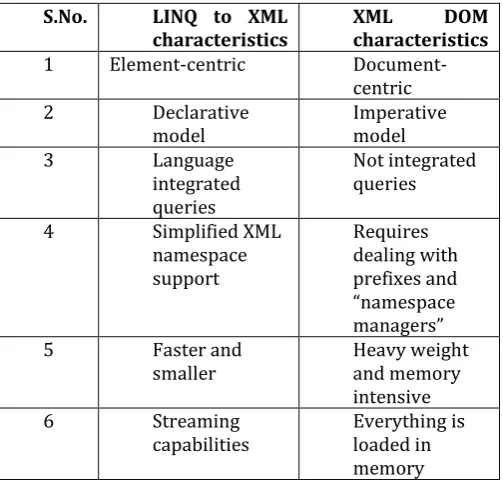
Let’s compare the characteristics of LINQ to XML with the ones of the XML DOM:
S.No. LINQ to XML
characteristics XML characteristics DOM
1 Element-centric
Document-centric
2 Declarative
model Imperative model
3 Language
integrated queries
Not integrated queries
4 Simplified XML
namespace support
Requires dealing with prefixes and “namespace managers”
5 Faster and
smaller Heavy weight and memory intensive
6 Streaming
capabilities Everything is loaded in memory
In our first LINQ to XML example, we want to filter and save a set of Book objects as XML. Here is how
class Book {
public string Publisher; public string Title; public int Year;
public Book(string title, string publisher, int year) {
Title = title;
Publisher = publisher; Year = year;
} }
Let say we have the following collection of books: Book[] books = new Book[] {
new Book("Ajax in Action", "Manning", 2015),
new Book("Windows Forms in Action", "Manning", 2016), new Book("ASP.NET 2.0 Web Parts in Action", "Manning", 2016)
};
Here is the result we would like to get if we ask for the books published in 2016:
<books>
<book title="Windows Forms in Action"> <publisher>Manning</publisher> </book>
<book title="ASP.NET 2.0 Web Parts in Action"> <publisher>Manning</publisher>
</book> </books>
Using LINQ to XML, this can be done with the following code: XElement xml = new XElement("books",
from book in books where book.Year == 2016 select new XElement("book", new XAttribute("title", book.Title),
new XElement("publisher", book.Publisher) ) );
LINQ can also query collections of XML elements, known as LINQ to XML. The XElement type has methods to assist in the navigation of XML. Initially, the XML data is loaded into main memory using the Load method, assigning the XML document to a variable of type XElement:
XElement db = XElement.Load(@"employees.xml");
The XElement type has a robust public interface with many methods.
[image:4.595.36.288.133.374.2]Elements returns immediate children and Descendants returns all descendants of the node. There are also versions of these methods that accept a parameter, returning only the elements or descendants that correspond to the name of the parameter. There are Element and Attribute methods to access a named element or attribute of the node. A Value property accesses the value of an element or attribute. Consider an element-based representation of the employee table as XML with each column in the table corresponding to an element in XML, with a distinguished root element employees and each tuple contained in an employee element. The following query that returns the database administrators over the XML data illustrates the use of the methods provided by the XElement type. The changes to the query from its relational version are marked in bold:
var dbasXML = new XElement("dbas", from e in db.Descendants("employee")
where e.Element("eTitle").Value == "Database Administrator"
select new XElement("dba",
new XAttribute("eID", e.Element("eID").Value),
e.Element("eLast").Value + ", " + e.Element("eFirst").Value));
Transforming XML
© 2017, IRJET | Impact Factor value: 5.181 | ISO 9001:2008 Certified Journal
| Page 1942
Sample code that uses LINQ to query a database and create and XML document
// Retrieve customers from a database var contacts =
from customer in db.Customers
where customer.Name.StartsWith("S") &&
customer.Orders.Count > 5 orderby customer.Name
select new { customer.Name, customer.Phone };
// Generate XML data from the list of customers var xml =
new XElement("contacts", from contact in contacts select new XElement("contact",
new XAttribute("name", contact.Name), new XAttribute("phone", contact.Phone) ) );
2.5LINQ TO ADO.NET
DLinq, more popularly known as LINQ to ADO.NET, provides tools that let the applications implement LINQ - style queries to objects used by ADO.NET for storing and interacting with relational data.
LINQ to ADO.NET have three main components, namely LINQ to SQL, LINQ to Entities, and LINQ to DataSet.
2.5.1 LINQ to SQL and LINQ to Entities
LINQ to SQL and LINQ to Entities are object - relational mapping (O/RM) tools that build strongly typed classes for modeling databases. They generate classes to represent the database and the tables that it contains. LINQ features provided by these classes allow a program to query the database model objects. For example, to build a database model for use by LINQ to SQL, select the Project menu’s Add New Item command and add a new “ LINQ to SQL Classes ” item to the project. This opens a designer where we can define the database’s structure. Now we can drag SQL Server database objects from the Server Explorer to build the database model. If we drag all of the database’s tables onto the designer, we will be able to see all of the tables and their fields, primary keys, relationships, and other structural information.
Querying relational Databases
LINQ to SQL needs to map information which it uses either from information encoded in .NET custom attributes or contained in an XML document. This information is used to automatically handle the persistence of objects in relational databases. A table can be mapped to a class, the table’s columns to properties of the class, and relationships between tables can be represented by behavior. LINQ does not replace SQL but works with the SQL industry standard.
Specifically, LINQ queries over relational data sources are automatically converted to SQL by the underlying framework and sent to the database for the result.
The DataContext
The next thing we need to prepare before being able to use
language-integrated queries is a
System.Data.Linq.DataContext object. To translate requests for objects into SQL queries made against the database and then assemble objects out of the results is the work of
DataContext.
string dbPath =
Path.GetFullPath(@"..\..\..\..\Data\northwind.mdf"); DataContext db = new dataContext(dbPath);
The constructor of the DataContext class takes a connection string as a parameter.
The DataContext provides access to the tables in the
database. Here is how to get access to the Contacts table mapped to our Contact class:
Table<Contact> contacts = db.GetTable<Contact>();
DataContext.GetTable is a generic method, which allows
working with strongly-typed objects. This is what will allow us to use a LINQ query.
LINQ to SQL automatically keeps track of changes on objects and updates the database accordingly through dynamic SQL queries or stored procedures. This is why we don’t have to provide the SQL queries every time on our own.
The following C# code snippet filters an in-memory collection of names based on their ages:
from name in contacts where name.Age >= 30 select name;
Using LINQ to SQL, performing the same query on data coming from a relational database is direct:
from name in db.GetTable<Contact>() where name.Age >= 30
select name;
This query works on a list of contacts from a database. Notice how refined the difference is between the two queries. In fact, only the object on which we are working is different, the query syntax is exactly the same.
What has been done automatically for us by LINQ to SQL?
Opening a connection to the database
Generating the SQL query
Executing the SQL query against the database
© 2017, IRJET | Impact Factor value: 5.181 | ISO 9001:2008 Certified Journal
| Page 1943
Using LINQ Results
A LINQ query expression returns an IEnumerable containing the query’s results. A program can iterate through this result and process the items that it contains.
To determine what objects are contained in the IEnumerable result, we need to look carefully at the Select clause. If this clause chooses a simple value such as a string or integer, then the result contains those simple values only. For example, the following query selects customer’s first and last names concatenated into a single string. The result is a string, so the query’s IEnumerable result contains strings and the “For Each” loop treats them as strings.
Dim query = From cust In all_customers Select cust.FirstName & " " & cust.LastName For Each cust_name As String In query Debug.WriteLine(cust_name)
Next cust_name
But the Select clause usually chooses some kind of object. For example, the following query selects the Customer objects contained in the all_customers list. The result will contain Customer objects, so the code can explicitly type its looping variable and treat it as a Customer.
Dim query = From cust In all_customers Select cust
For Each cust As Customer In query
Debug.WriteLine(cust.LastName & " owes " & cust.AccountBalance)
Next cust
2.5.2 LINQ to DataSet
LINQ to DataSet lets a program use LINQ - style queries to select data from DataSet objects. A DataSet contains an in - memory representation of data contained in tables. A DataSet represents data in a more concrete format than is used by the object models used in LINQ to SQL and LINQ to Entities. DataSets are useful as they make lesser assumptions about how the data will be loaded. A DataSet can hold data and provide querying capabilities irrespective of the fact whether the data is loaded from SQL Server, by the program’s code or using some other relational database. However, The DataSet object does not provide us with many LINQ features within it. It is useful because it holds DataTable objects that represent groupings of items. LINQ eliminates many hurdles between objects, databases and XML. It enables us to work with all these paradigms using the same language-integrated facilities. For example, we are able to work with XML data and data coming from a relational database within the same query.
Here is an example code sample using the power of LINQ to retrieve data from a database and create an XML document in a single query.
Working with relational data and XML in the same query
var database = new RssDB("server=localhost; initial catalog=RssDB");
XElement rss = new XElement("rss", new XAttribute("version", "2.0"), new XElement("channel"),
new XElement("title", "LINQ in Action RSS
Feed"),newXElement("link", "http://LinqInAction.net"), new XElement("description", "The RSS feed for this book"), from post in database.Posts
orderby post.CreationDate descending select new XElement("item",
new XElement("title", post.Title),
new XElement("link", "posts.aspx?id="+post.ID), new XElement("description", post.Description), from category in post.Categories
select new XElement("category", category.Description) )));
3. FUTURE SCOPE
LINQ is a powerful tool in the .NET developer's toolbox. It integrates data access directly into .NET languages, providing a very readable query language that can be used on a variety of data sources. In this paper, we covered objects, XML files and databases, but LINQ supports other data sources too, that we may want to look into. LINQ is limited to:
SQL server at backend.
Requires at least .net 3.5 version to run
Somewhat limited in that tables are mapped strictly on a 1:1 basis (one table = one class)
The LINQ to SQL code generator does not support stored procedures that use dynamic SQL to return result sets. This is because, when a stored procedure containing conditional logic to build a dynamic SQL statement is called, LINQ to SQL cannot acquire metadata for the resultset as the query used to generate the resultset is not known until run time. Also, the stored procedures that produce results based on temporary tables are not supported.
4. DISCUSSION AND CONCLUSIONS
When we look at these domains, we get to know how different they are. The main source of contention relates to the fact that:
Relational databases are based on relation algebra and are all about tables, rows, columns, queries, etc. XML is all about text, angle brackets, elements,
attributes, hierarchical structures, etc.
© 2017, IRJET | Impact Factor value: 5.181 | ISO 9001:2008 Certified Journal
| Page 1944
Depending on which form of LINQ we are using, the development environment may provide strong type checking and IntelliSense support. LINQ provides the ability to perform SQL - like queries within Visual Basic.
LINQ to Objects allows a program to query arrays, lists, and other objects that implement the IEnumerable interface. LINQ to XML and the new LINQ XML classes allow a program to extract data from XML objects and to use LINQ to generate XML hierarchies.
LINQ to ADO.NET (which includes LINQ to SQL, LINQ to Entities, and LINQ to Dataset) allow a program to perform queries on objects representing data in a relational database. Together these LINQ tools allow a program to select data in powerful new ways.
5. REFERENCES
[1] Marco Russo, Paolo Pialorsi, “Programming Microsoft LINQ”, May 2008
[2] Jennifer Hawkins, “Linq: for starters”, 2016 [3]
http://www.manning.com/marguerie/marguerie_meapch1. pdf
[4] Ben Albahari, Joseph Albahari, “C# 6.0 in a Nutshell”, 6th Edition