Examination Management Automation System
Vamsi Krishna Yepuri
1, Gopi Chand Pamu
2, Naveen Kodali
3, Pradyumna L V
41234 Department of Information Technology, V R Siddhartha Engineering College,
Kanuru, Vijayawada, Andhra Pradesh, India 520 007.
---***---Abstract -
Examination is a core activity of any educationalinstitution. As the examination arrives there exists a lot of work like consolidating the time table, seating arrangement and invigilation allotment which will be done manually and it takes lot of time and requires man power. Thus, an automated system would solve the above stated problem in just few clicks of work. The purpose of developing Examination Management Automation System is to computerize the traditional way of conducting exams. It is a web and android application that can be used by students and exam cell coordinator using their smart phones or PCs. The project keeps track of various details in modules such as Students Details, Staff Details, and Hall Details with proper descriptions. It also has some features to generate reports for bundle handovers, absentee’s statement and roll lists.
Key Words: Examination System, Invigilation allotment,
Seating Arrangement, Notice Board, Absentees Statement.
1. INTRODUCTION
The proposed system is an android and web based application that is designed to manage and handle the operations in an educational institute during the time examinations. It is an application that can be used by all the students and staff in an educational institute in order to facilitate the communication between them. The application is easily adaptable as it is used on a desktop systems and mobile device. Since the developed application is used on a mobile devices, it improves connectivity between the users, thus helping the institution to provide a more transparent system altogether. The Examination Management Automation System was developed for the educational institute to simplify the allocation of halls, seating arrangement of students and allocating staff to the examination halls. Allocation of faculty to corresponding rooms will be done by the exam cell coordinator in the form of word documents and excel sheets and also allocation of students to their corresponding rooms is a frantic work which will be done manually and it takes lot of time and requires man power. The project keeps track of various details in modules such as Students Details, Staff Details, and Hall Details with proper descriptions.
Most of the important processes in an educational institute are carried out manually such as teaching and non-teaching staff details, student information and number of halls available for the examination as all these process is done manually it increase the work load and easily prone to errors. The current systems are traditional systems which support manual processes leading to an immense time consumption and pile of hard copies. Existing system is
inefficient, ineffective and less accurate, in such a situations report generation is not an simple task also if report is generated calculations has to be done manually which will surely results in errors.
2. PURPOSE
The purpose of developing the Examination Management Automation System is to automate the regular way of organizing the examinations in an educational institute and generating reports according to the examination type and time.
A. Disadvantages of current system:
Takes a lot of time.
Resembles like a complex problem while allocating faculty to different rooms.
Less Accurate.
Requires more manual work.
Paper work required.
Previous records not stored.
B. Advantages over current system:
Easy to handle and operate.
Friendly interface.
Fast and convenient.
Less human effort.
Easy to update.
Easy message passing.
Smart way of communication
No paper work required.
3. LITERATURE SURVEY
Dayanand G Savakar, Ravi Hosur from Rani Chennamma University, Belagavi has developed a new platform for the examination management system using cloud computing technology and termed the application as “Automation of Examination System”[2]. This application is an automated system for the entire institute that deals with student seat allocation and faculty supervision allocation for examination at university level to manage the academic examination process using the cloud computing technology. Here the computerized system allocates the number of students to a particular block and supervisor to their block and also allows the supervisor to exchange their duties, generate report cards the particular date, session, block and generate the report for the students that were absent for the particular examination.
Bondre Rutuja Avinash, Durgi Varsha Vijaykumar, Mohite Pradnesh Rajeev, Parkar Vishal V has developed a new platform for the examination management system from the university of Mumbai and termed the application as “Automated Examination Support System”[3]. The newly developed system is capable of generating hall ticket, result semester and year-wise and also provides secure remote access to the students and faculty within the organization. The project mainly focuses on enrolling the students and enrolling the faculty providing their own user id and password in order to provide a secure login into the system, hall ticket generation done to the students if and only if the student clears all the internal assessments completely, student can view and download the hall ticket online availability of hall tickets, the results are generated based on the semester and year, online availability of result, generation of forms and also provide auto backup.
4. PROPOSED METHOD
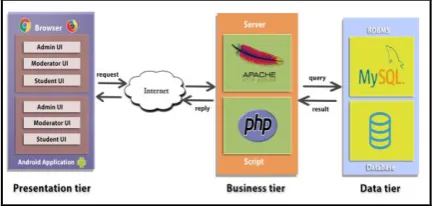
[image:2.595.53.270.627.730.2]The figure 4.1 represents the high end architecture of the application and shows that it takes the input from the user either from the web page through Mozilla Firefox, Google Chrome, Internet Explorer or any other web browsers or from the android application. The request is sent to the apache server where the data is processed by the server and sends a query to the database if any records needs to be fetched and fetches the information from the database. If the requested data is present in the database then the results are retrieved by the server and the reply is sent to the user.
Figure 4.1: High end architecture
The High end architecture consists of three different tiers, which are used to receive and display the result according to the user’s requirement. The requested query
from the user is fetched from the database, if requested data is present then it is retrieved back to the user according to his requirement. Examination management automation system consists of following tiers.
1.Presentation tier. 2.Business tier. 3.Data tier.
A. Presentation Tier
The presentation tier is the logical group of components that provide a user interface. These components can include server pages, forms and reports, the components allow the users to interact with the application, but they do not process data, handle business rules, directly access databases or other storage media. The Front end of the Examination Cell Automation System is called as Presentation tier was designed using Hypertext Markup Language (HTML), Cascading Style Sheets (CSS), Bootstrap and JavaScript. Presentation tier is the GUI, from where the user can request the server and view the results that were displayed on the screen. The presentation tier consists of four different user interfaces based on the type of users.
1. Admin UI. 2. Moderator UI. 3. Student UI. 4. Staff UI
B. Business Tier
The business tier is a heavyweight processing, validation, business rules, workflow and interfaces to external systems. Business tier components run on the middle tier and thus have historically been referred to as middleware. These components run within an application server, which provides the container for the components. The business tier consists of components that provide the business logic for an application. The business tier is the intermediate between the presentation tier and the data tier. All the business logics are performed in this tier, it takes the input from the presentation tier execute the query and fetches the data from database. It uses Apache server and PHP Scripting for doing the operations.
C. Data Tier
5. APPLICATION FLOW GRAPH
A. Admin UI
From the figure 5.1 the admin has to log on to the web page using his/her credentials like username and password then redirected to new page showing different modules like Staff, Student, Rooms. It is responsibility of the admin to upload all the student details like registered number, name, department etc., availability staff in the institute and the examination halls details like the capacity of the hall. The admin module consists of the following features/functions.
Figure5.1: Admin user interface
Staff
In this panel the admin can add the staff into the database by clicking on the add staff icon, details required for adding the staff are staff id, staff name, designation, department, email, contact and status of the staff. If the staff is on leave then the status is updated as not available. The admin can delete, view and finally edit and update the staff details and acknowledgement can be displayed.
Student
In this panel the admin enters the students into the database by clicking on the add student icon. Unlike staff the admin can directly upload the excel sheet of student details into the database. The admin can deletes entire students list or can be done on individual. There is also a feature to view and finally edit and update the student details by giving the inputs like academic year, year of study and semester.
Rooms
In this panel the admin allocate the rooms to the students by clicking on the add room icon, details required are room number, type, capacity and status of the room. If the room is not available, then the status is updated as not available so that the room will not comes under invigilation duties. Admin can also delete, edit, update and view rooms. Staff can view the rooms that are allotted to them during the invigilation.
B. Moderator UI
Figure 5.2 : Moderator user interface
From the figure 5.2, the moderator will login to the application by providing his credentials like username and password. The moderator plays an important role in the examination automation system. The moderator has the maximum control on the overall system when compared to the admin, moderator performs different operations like view the number of students present, availability of faculty and rooms. The moderator performs the core operations in the examination cell automation system, and the module consists of different panels like Absentees Statement, Staff Status, Bundle Handover, Seating arrangement, Circular generation and finally posts the notice into the system.
Absentees Statement
In this panel the moderator can create, update the absentees statement by selecting the academic year, year of study, semester and exam type, by selecting these options related database will be created in the backend. Once the absentees statement is created the moderator can update the statement by entering the registered numbers of absentees to a particular exam and the absentees count. Finally the absentees report will be generated.
Staff Status
In this panel, the moderator can be able to edit the staff status. If any staff is under leave for any other reasons, the moderator can update the staff status as unavailable. When the status is set as unavailable, then he/she won’t come in invigilation allotment. Moderator can be able to edit the invigilation count of the staff if there is any exchange of the invigilation duty with another staff.
Seating Arrangement
Post Notices
Information about the examination activities like examination time table, allocation of rooms etc., is posted by the moderator in this panel. Any changes in the examination time table due to any internal or external factors are posted in the notification panel in the application and the students, faculty are notified and updated.
Bundle Report
In this panel the moderator can create, update the bundle handover by selecting the academic year, year of study, semester and exam type, by selecting these options related database will be created in the backend. Moderator can update the report by selecting all requirements, and then a report will be displayed showing details like subject code, subject name, faculty name to their respective sections. Whenever the faculty receives or returns the bundle to the examination cell coordinator, then the work of the faculty is completed.
C. Student UI
As soon as the moderator updates any information related to the examination cell, the students are immediately notified if they are connected to the application. If any file or documents are placed in the notice board along with the message students can access the file /document. The Student UI consists of the notice board and the description of the examination cell.
6. RESULTS
[image:4.595.339.524.141.397.2]A. Circular Generation
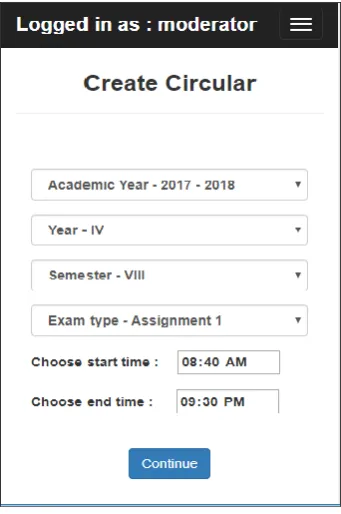
Figure 6.1: Create Circular
From figure 6.1, moderator selects the academic year, year of study, semester and exam type, start time and end time.
[image:4.595.333.534.483.775.2]When clicked in ‘Continue’ button it will be navigated for selecting the dates as shown in the figure 6.2. The date that needs to be selected are based on the number of subjects. Once the selection of dates is completed the user needs to click on the ‘Generate’ button to generate the circular.
Figure 6.2: Selecting Dates
The circular generated is as show in the figure 6.3. It consists of date and day on which the exam needs to be conducted and subject’s codes with titles are fetched from the database along with names of the staff of both the sections.
[image:4.595.76.247.487.744.2]B. Absentees Statement
Figure 6.4: Update Absentees Statement
From the figure 6.4 the moderator needs to give the inputs like academic year, year of study and the corresponding semester and the click on the ‘Fetch Subject Codes’ button. All the subjects code will be fetched from the database based on the given inputs and form is generated as shown in the figure 6.5. The moderator needs to update the absentees list in the text area provided and then the absentees count. When ‘Update’ button is clicked the values stored in the database. Figure 6.6 shows the absentees statement report.
[image:5.595.74.258.85.328.2]Figure 6.5: Updating Absentees List
Figure 6.6: Absentees Statement
C. Staff Invigilation Allotment
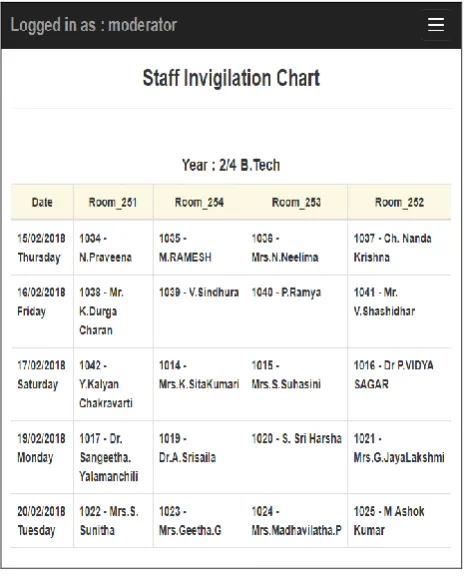
From the figure 6.7 when moderator selects the dates and rooms the faculty are allotted to the rooms based of the invigilation’s that they have done previously. The invigilation duty is allotted to the faculty such that no overlapping the invigilation duty will occur which means that same faculty will not get the invigilation duty on the same date and the same room.
[image:5.595.318.551.474.763.2] [image:5.595.71.253.475.719.2]D. Student Seating Allotment
Figure 6.8: Student Seating Chart
Figure 6.8 shows the student seating chart which consists of registration number and the room allotted to them.
E. Bundle Handover
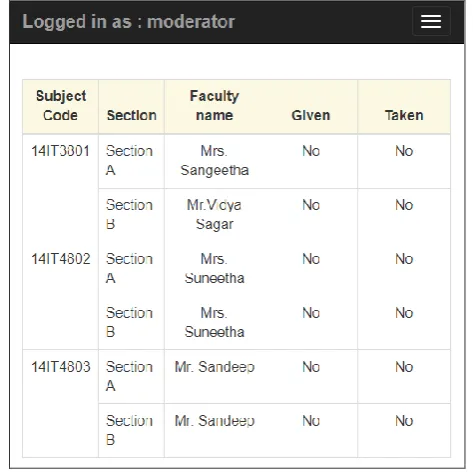
Figure 6.9 shows the updating of the bundle handover. The ‘given’ represents the hand over of the bundle to the staff and ‘taken’ represents the handover of the bundle to the examination cell by the staff. The yes or no represents the bundle is hand overed or not.
[image:6.595.43.280.90.321.2]Similarly figure 6.10 represents the report of the bundle handover. The moderator needs to provide the inputs like academic year, year and semester and type of the exam. Based on the inputs provided the subject code and name of the staff are generated and their corresponding results are fetched from the database and report is generated as shown in the figure.
Figure 6.9: Updating Bundle Handover
Figure 6.10: Bundle Handover Report
7.CONCLUSION
Ultimately the output of the project reduces the manpower, workload on students as well as staff. It benefits all the educational institutes by reducing the complexity involved while allocating the exam duty for the staff, examination rooms for the students. All these data is stored in a centralized database which can be accessed whenever needed.
ACKNOWLEDGEMENT
We would like to thank our guide Mr.Y.Kalyan Chakravarthi, M.Tech and Dr.M.Suneetha, Ph.D, H.O.D. (IT) for giving us this opportunity and the necessary facilities to present this report and providing us with various opportunities to learn. It wouldn’t have been possible without their kind support.
REFERENCES
[1] S. Priya Dharshini, M. Selva Sudha, Mrs.V.Anithalakshmi,
“Exam Cell Automation System,” International Journal of Engineering Science and Computing (2017), Volume 7, Issue no3.
[2] Dayanand G Savakar, Ravi Hosur, “Automation of
Examination System”, International Journal of Science and Research, Volume 4 Issue 11 November 2015.
[3] Bondre Rutuja Avinash, Durgi Varsha Vijaykumar,
[image:6.595.45.286.556.773.2][4] S. S. Aravinth, G. Pavithra, M. Myvizhimalar, D. Divya,
M.Rathinakrithika, “EXAM HALL SEATING ARRANGEMENT SYSTEM USING PHP,” International Journal of Innovative Research and Technology, 2014 IJIRT Volume 1 Issue 11, ISSN: 2349-6002.
AUTHOR BIOGRAPHIES
Vamsi Krishna Yepuri was born in India on September 25th 1996 and pursuing B.Tech (IT) in VR Siddhartha Engineering College.
Gopi Chand Pamu was born in India on November 18th 1996 and pursuing B.Tech (IT) in VR Siddhartha Engineering College.
Naveen Kodali was born in India on April 11th 1996 and pursuing B.Tech (IT) in VR Siddhartha Engineering College.