government implementation
Emmanouilidou, M and Kreps, DGP
http://dx.doi.org/10.1504/EG.2010.033591
Title A framework for accessible mgovernment implementation Authors Emmanouilidou, M and Kreps, DGP
Type Article
URL This version is available at: http://usir.salford.ac.uk/10324/ Published Date 2010
USIR is a digital collection of the research output of the University of Salford. Where copyright permits, full text material held in the repository is made freely available online and can be read, downloaded and copied for noncommercial private study or research purposes. Please check the manuscript for any further copyright restrictions.
A Framework for Accessible m-Government Implementation
Maria Emmanouilidou
Salford Business School
University of Salford
43 The Crescent
Manchester, M5 4WT, UK
Phone number: 0161 295 2091
Email: [email protected]
David Kreps
Salford Business School
University of Salford
43 The Crescent
Manchester, M5 4WT, UK
Phone number: 0161 295 5884
Email: [email protected]
Abstract: The great popularity and rapid diffusion of mobile technologies at worldwide level
has also been recognized by the public sector, leading to the creation of m-Government. A
major challenge for m-Government is accessibility – the provision of an equal service to all
citizens irrespective of their psychical, mental or technical capabilities. This paper sketches
the profiles of six citizen groups: Visually Impaired, Hearing Impaired, Motor Impaired,
aforementioned groups are discussed and a framework for accessible m-Government
implementation with reference to the W3C Mobile Web Best Practices is proposed.
Keywords: mobile government; electronic government; accessibility; usability; social
inclusion; elderly; disabled.
Biographical notes: Maria Emmanouilidou is a PhD candidate and earned a position of a
Graduate Teaching Assistant (GTA) within the Business School at the University of Salford.
She holds a BSc in Computer Science from the University of Leeds and an MSc in Advanced
Computer Science with ICT (Information and Communication Technologies) Management
from the University of Manchester. Her research interests are centred on the areas of strategic
IT management, e-Healthcare systems and e-Inclusion with a focus on the usability and
accessibility effect of electronic and mobile government and commerce systems to particular
populations, such as the elderly and people with disabilities.
Dr. David Kreps is an 'early adopter', pioneering thinker and commentator, with a fascination
for technology and its impact upon society, and a background in Cultural Studies and
Sociology. A web developer since 1995, he did his PhD thesis on Cyborgism, and has since
become an expert on Web Accessibility, and explorer into the philosophy of Virtuality. David
was PI on the recent Combating e-Discrimination European Social Fund project, and has
published widely in Information Systems journals and conferences on e-Accessibility and
Virtuality. David Lectures in Web Development, and Emerging Technologies at the
1 Introduction
Both the internet as a whole, and e-Government (electronic government) in particular, have
been the focus of attention for those concerned with ensuring issues of social inclusion are
not ignored (for examples see Adam and Kreps, 2006a; Marincu and McMullin, 2004). The
World Wide Web, on the face of it, is a great leveller, granting access to information and
services to many for whom such access has been difficult in the past. The opportunities of
e-Commerce have granted small and medium sized enterprises (SMEs) the world over with a
shop window on a par with global corporations, and enabled virtual organisations, without
the overheads of their corporate cousins, a chance to flourish. Ostensibly, members of any
ethnic, gender or minority grouping have equal access to the potential of the web – as long as
they can gain access to it. The issue of the digital divide has been much discussed in the
literature, between those who have access and those who do not (for examples see Loader,
1998; Marshall et al., 2003; Norris, 2001; Servon, 2002) and raises in importance as
governments around the globe become more and more technically savvy (Choudrie et al.,
2007). However, there is one group of people for whom the web presents many problems,
even if they have a computer or other internet device, and that group is disabled people.
This group is identified among others as a key stakeholder group whose needs should be
considered by governments so that they will not be excluded from embracing the
opportunities of e-Government (Chircu, 2008). Disabled people use a range of assistive
technologies to bridge the gap of their disability: screen readers for the blind and dyslexic,
alternative kinds of mouse for those with physical disabilities unable to use the standard
interface, and others. The techniques to ensure that web pages are accessible to such assistive
devices were developed in the late 1990s, not long after the web itself and have been
2008; Kreps and Adam, 2006). Encouraging web designers to use such techniques has clearly
proven very difficult.
In the arena of Public Policy, however, governments have been in a position to take a lead,
and have mandated such techniques in public sector websites, as part of the roll-out of
e-Government, since the turn of the millennium. The United States (US) has its Section 508 of
the new Rehabilitation Act 1998, mandating specified practices on Federal websites, and the
European Union (EU) parliament and commission have made a number of statements
mandating the World Wide Web Consortium’s Web Content Accessibility Guidelines for
e-Government websites across Europe (Council of Europe, 2003).
UNDPEPA (2002) in Choudrie et al. (2004, p.105) define e-Government as “an
internet-driven activity that improves citizen access to government information, services and expertise
to ensure citizen participation in and satisfaction with the government process”. In general,
“e-Government involves the electronic provision of information to geographically diverse but
technologically homogeneous ICTs (such as personal computers and information kiosks) in
fixed locations” (Carroll, 2006, p.3). In recent years however, there has been a “rapid
diffusion of mobile ICTs such as laptops, mobile phones, PDAs (Personal Digital Assistants),
pocket PCs, along with emails, instant messaging, and other networking services” (Song and
Cornford, 2006, p.208). The availability of such mobile devices has brought increasing
pressure to provide access to government services while mobile – to make m-Government
(mobile government) versions of e-Government services. Government agencies have
therefore begun to adjust their activities to this trend, to make convenient and efficient
interactions available for all parties involved (Kushchu and Kuscu, 2003).
Kushchu and Kuscu (2003, p.2) define m-Government as a “strategy and its implementation
and devices for improving benefits to the parties involved in e-Government including
citizens, businesses and all government units”. In contrast to e-Government, in
m-Government the use contexts are not known and the physical constraints of interacting with
mobile devices limit both the amount and type of information that can be located and
accessed. Moreover, accessing a government service within a mobile environment is
frequently one of several other activities that are undertaken simultaneously. (Carroll, 2006)
Although Government is still in its relatively early days, it appears rather promising.
m-Government is expected to be widely embraced, as it promises access to government services
at any place and time – a key citizen demand. The real value of such ‘anytime-anywhere
availability’ can be better appreciated, if m-Government is regarded as an effective means for
reaching more easily those characterised more broadly as socially excluded. The term
socially excluded has a great range of meanings, often depending upon the context. It is used
here to refer to people living in rural areas and people from lower income and academic
backgrounds that often cannot afford a home computer or lack the skills required for
mastering the use of a personal computer. Choudrie et al. (2007) emphasise that
apprehensions attributed to social exclusions that can occur due to inequitable ICT
dissemination can in turn result in citizens falling under the above mentioned category not
having access to information technology. A novel form of digital divide can therefore emerge
which can lead to a new dimension of the notion of disability that expands from the
traditional physical and mental in nature disability to disability also caused by ethnicity, age
or even literacy (Choudrie et al., 2007).
By contrast mobile devices have achieved much greater ubiquity. In the United Kingdom
(UK), for example, over 75 per cent of adults had a mobile phone by 2003, and some 56 per
Comscore (2007), use of the internet over mobile devices in the UK was already a fifth of
that over personal computers by May 2007. Across the developed and the developing world
access to mobile phones and other wireless devices has surpassed that of PCs (Personal
Computers) with internet access. Recent statistics show that mobile phone penetration was
expected to reach 61 per cent by the end of 2008 (International Telecommunication Union,
2008) – some 3.6 billion. PC usage worldwide is around 1 billion, which corresponds to
about 15 per cent of the global population, with internet penetration projected to reach 20 per
cent by year 2008 (Computer Economics, 2007; Meyer, 2008; U.S. Census Bureau, 2008). It
is therefore clear that cell phones are far more popular than computers.
Why is this so? For a large proportion of the world’s population the use of computers and the
internet is not always a trivial task. One user group that may face serious problems with ICTs
is the elderly, as a significant proportion of this group – despite the oft trailed ‘silver surfers’
whose number, though growing, is frequently exaggerated (Kok, 2009) – lack technological
capabilities related to internet and PC usage. According to Dwivedi and Williams (2008)
older people’s unwillingness to engage with ICT (including the internet) can be explained
due to their lack of basic skills to operate a computer and lack of possession of a home
computer. The result can be that older people may be slow in adopting e-Government
services, a fact that is further supported by their frequent unawareness of the potential
benefits of e-Government services and new developments (Dwivedi and Williams, 2008).
All these are quite apart from the disabilities that come with old age. Interestingly enough,
Vincent and Harris (2008) identify mobile phones (and digital television) as possible suitable
future routes for the provision of public services in particular to the elderly population.
For the public sector therefore, m-Government appears to be an attractive alternative, as well
rates are very low, but mobile phone penetration is growing rapidly (Kumar and Sinha,
2007). Within this context, m-Government could aid in creating more socially inclusive
government services. It could be argued that mobile devices with their simplicity and
popularity among different populations could provide a solution for overcoming the digital
divide barriers imposed by traditional e-Government applications. Nevertheless, m-
Government is unlikely to replace e-Government, but rather constitute a complementary
communication channel of e-Government. A recent study by Verdegem and Hauttekeete
(2008) in Flanders, Belgium, looking at the potential and added value of new channels, such
as digital television and mobile applications, for the delivery of public services, shows
people’s future intentions for accessing government services remain via the traditional
channels of counter, telephone, mail and internet, with the new media neglected or forgotten
as potential candidates for interaction with the public sector. Verdegem and Hauttekeete
(2008) justify this trend in terms of people’s unawareness of the possibilities or
functionalities of these new media. It is also possible that the usability and accessibility of
mobile phones is a key deciding factor. Thus m-Government may only become a reality if
there is a substantial change in both social and technical practices (Vincent and Harris, 2008).
In the arena of Public Policy, we argue, as with e-Government, it is likely that with
m-Government, governments are in a position to take a lead, and should mandate an
e-Accessibility aware approach to the roll out of m-Government applications and services.
Recent work by Wu et al. (2009) pinpoints as one fundamental challenge for
the successful deployment of m-Government how the technology can be
accessible in two particular populations, the physically challenged and the
aging. Ease of access to m-Government information will be crucial in order
aim of this paper is to identify the e-Accessibility challenges that are present for the
development of mobile government services, and explore the status of recent mobile
government initiatives for disabled users. We propose a framework that addresses the key
characteristics and requirements of those citizen groups that may be disadvantaged through
disability when interacting with m-Government applications and services.
The paper is structured in the following way: in section two, we introduce some of the
specific accessibility challenges for mobile devices, and set out a table of disabled groups and
the potential problems they may encounter, and the assistive technologies which may assist
them in overcoming such access problems. In section three we identify a number of
m-Government implementations for use by disabled people, and in section four we outline our
framework for accessible m-Government implementation.
2 Accessibility Challenges for Mobile Devices, Disabled People and Assistive
Technologies for Mobile Platforms
The accessibility challenges associated with the use of mobile devices imply that some
services may not be suitable for consideration as part of the m-Government agenda. This fact
is also apparent in e-Government attempts. Evidence of the UK’s government failure to
appreciate that some services may not be relevant or desirable for online delivery is shown by
Kolsaker and Lee-Kelley (2007). Within the mobile context in particular, the accessibility
challenges are intensified by the fact that there are no standard browsers for mobile and
wireless devices nor is there a single standard for all wireless devices. Furthermore, wireless
devices have different display capabilities that are limited by display size, support for colour
and graphics as well as limited input capabilities (for example lack of a full keyboard,
Other limitations of mobile devices involve limited computational power and memory, short
battery life, higher risk of data storage and transaction errors, lower display resolution, less
surfing ability, and unfriendly user-interfaces. Moreover, technical restrictions related to
connectivity, such as low bandwidth and limited geographical scope, limit the speed of access
and the amount, type and scope of information accessed (Sheng and Trimi, 2008; Trimi and
Sheng, 2008).
Echoing a study by Blechar et al. (2006) that explored mobile service use in Denmark it is
illustrated that although participants initially felt positive in using and welcoming new mobile
services; after the trial period of the services they became less favourable. A similar change
in participants’ attitude also occurred in terms of future mobile service intention and
predictions of longer-term mobile service use. One reason for this shift in mobile phone
usage perception that was identified during the evaluation stage was that the usability of
mobile phones prevented the participants from using the different possibilities within the
phone (Blechar et al., 2006). All the issues addressed above place usability and accessibility
as top priorities for the successful implementation and wide adoption of m-Government
applications.
Section 2.1 provides a brief profile of the key groups which governments need to take into
account in order to promote their e-Accessibility strategy within m-Government initiatives.
Although disabled people as individuals may in practice not fall easily into any one category,
and may make use of a number of different assistive technologies, for the purposes of this
paper we set out a framework including the following groupings: the Visually Impaired,
Hearing Impaired, Motor Impaired, Speech Impaired, Cognitive Impaired and Elderly.
Section 2.2 discusses the assistive technologies available for mobile devices that can be
2.1 Disabled People
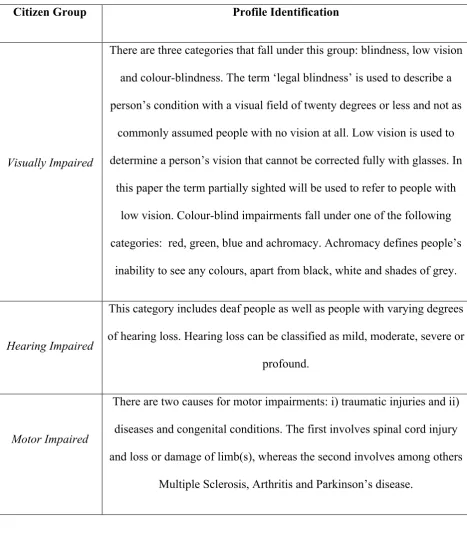
Table 1 outlines briefly the profile of the six citizen groups that are the focus of this paper.
Due to the complex issues that define the condition of these target groups it is not possible to
[image:11.595.69.537.243.780.2]provide a complete profile analysis in this paper.
Table 1 – Key Groups of Disabled People(Becker, 2005; Emmanouilidou, 2005)
Citizen Group Profile Identification
Visually Impaired
There are three categories that fall under this group: blindness, low vision
and colour-blindness. The term ‘legal blindness’ is used to describe a
person’s condition with a visual field of twenty degrees or less and not as
commonly assumed people with no vision at all. Low vision is used to
determine a person’s vision that cannot be corrected fully with glasses. In
this paper the term partially sighted will be used to refer to people with
low vision. Colour-blind impairments fall under one of the following
categories: red, green, blue and achromacy. Achromacy defines people’s
inability to see any colours, apart from black, white and shades of grey.
Hearing Impaired
This category includes deaf people as well as people with varying degrees
of hearing loss. Hearing loss can be classified as mild, moderate, severe or
profound.
Motor Impaired
There are two causes for motor impairments: i) traumatic injuries and ii)
diseases and congenital conditions. The first involves spinal cord injury
and loss or damage of limb(s), whereas the second involves among others
Speech Impaired
Speech impairments can be the result of cleft lip (the incomplete joining
of the upper lip) or cleft palate (the abnormal passageway though the roof
of the mouth into the airway of the nose). Other causes i.e. Parkinson’s
disease can also result to speech impairments.
Cognitive Impaired
This category includes people with Learning disabilities, Dyslexia,
Attention Deficit Hyperactivity Disorders (ADHD), Brain injuries and
Genetic diseases.
Elderly
Older people may present any or a combination of visual, cognitive and
physical impairments as part of the normal ageing process. The decline in
visual acuity this group may encounter can affect their ability to see
objects clearly, decrease their capacity to focus at close range or increase
their sensitivity to glare from light reflecting or shining into the eye,
which can impact their ability to read or distinguish objects. Because this
group is likely to experience a decrease in motor coordination a difficulty
in using a mouse, scrolling down a webpage and clicking on standard-size
links can be expected. The ability to discern details in the presence of
distracting information and perform spatial memory tasks declinesas the
age process. This aspect is of importance if complex navigation schemes,
poorly designed search capabilities, and cluttered web pages are
2.2 Assistive Technologies for Mobile Platforms
Subsections 2.2.1 and 2.2.2 discuss the most popular assistive technologies that disabled
people make use of when viewing content via mobile devices. For the purpose of this paper
mobile devices are considered visual means rather than auditory communication means. This
is why the readers will find in the following subsections only the relevant affected groups
(Visually Impaired - Blind, Partially Sighted, Colour Blind -, Motor Impaired, Cognitive
Impaired and Elderly). The Hearing and Speech Impaired groups are not present in this
discussion as their visual interaction with government applications through mobile devices
does not place an accessibility challenge that will render the use of an assistive technology
essential.
2.2.1 Blind, Motor Impaired and Cognitive Impaired
TALKS is a popular technology for blind people developed by Nuance Communications Inc.,
formerly known as ScanSoft, a global leader in speech and imaging solutions. TALKS
converts the display text of a cell phone in highly intelligent speech. The software works with
the phone’s existing interface and reads aloud the text in a natural-sounding, synthesised
voice. Although it was originally designed to meet the needs of the blind community other
groups can also benefit, such as people with severe motor impairments, who would rather not
use their hands for mobile device interaction, as well as cognitive impaired (Axistive, 2007).
2.2.2 Partially Sighted, Colour Blind and Elderly
Due to the reduced size of the mobile phones screen displays text and images can become
unreadable. A particular technology that can be employed to overcome this issue is Nuance
ZOOMS. ZOOMS is a magnifying glass, which can be used to move across the screen in
order to enlarge various elements. The portion of the screen that is enlarged depends on the
ZOOMS can magnify each item. Users can move the magnifier on an object using key
commands. When an object does not fit entirely on the screen, such as menu items, the smart
scrolling feature automatically begins to scroll through the text after a brief delay. Through
intelligent auto-scrolling and auto-zooming capabilities users can jump directly to areas of
their interest on their cell phone. The application’s Distributed Views mode can magnify all
the important areas of the display at once and improve the legibility of on-screen text and
graphics by allowing users to invert colour palettes or change the display to black and white,
or greyscale. This last feature can be useful not only to partially sighted and older people, but
also to colour blind (BusinessWire, 2005; Web Site Accessibility Blog, 2005).
3 m-Government Implementations and their Use by Disabled People
Lee et al. (2006) classify m-Government practices, based on the initiator and intensity of
information exchange, into three categories: (1) Government’s alert, (2) User retrieval or
update and (3) Transaction. The first involves government agencies sending messages to
mobile device holders with SMS being the ‘killer’ application. The second category allows
mobile device holders to send messages to government agencies in order to request
information or update records. The third, regardless of who the initiator is, involves an
intensive information exchange among governments and mobile device holders via wireless
networks requiring advanced data connection and synchronisation applications. This
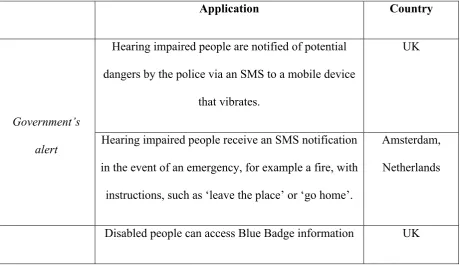
classification is employed in Table 2 to illustrate m-Government services that the literature
identifies as examples that have been implemented to specifically target disabled people
(Amine and Yosra, 2005; Directgov, 2008; Rannu and Semevsky, 2005; USE-ME.GOV, no
Of particular interest with respect to transactions is the ME.GOV project.
USE-ME.GOV (USability-drivEn open platform for MobilE GOVernment) was a project funded
under the 6th Framework Programme with the goal to “support and encourage public
administrations to provide access to new e-Government services at anytime and anywhere
through the use of mobile communications” (USE-ME.GOV, 2005, p.1). The project
identified as a major design challenge the achievement of intuitive and efficient user
interfaces for very heterogeneous use conditions. This challenge is strongly linked with the
service simplicity requirement, in other words the creation of understand and
easy-to-use services on mobile devices. The importance of service simplicity is underpinned by three
factors: 1) infrequent use, suggesting that users will always need to be appropriately guided
through the service, 2) input and output constraints (for example reduced screen size, few
keys) and 3) mobile use conditions, which are typically less convenient to those available at
[image:15.595.69.530.492.757.2]office or home and far more distractive (USE-ME.GOV, 2005).
Table 2 – m-Government Implementations for Disabled People
Application Country
Hearing impaired people are notified of potential
dangers by the police via an SMS to a mobile device
that vibrates.
UK
Government’s
alert Hearing impaired people receive an SMS notification
in the event of an emergency, for example a fire, with
instructions, such as ‘leave the place’ or ‘go home’.
Amsterdam,
Netherlands
(i.e. disabled parking spaces, nearby public toilets
and petrol stations) by texting the word ‘blue’ to the
number 83377.
UK
Hearing and/or speech impaired can send an SMS in
an emergency, such as a serious illness, a traffic
accident and so on to request help from the police.
Hong Kong User retrieval or
update
Deaf people and older adults with hearing difficulties
can send a text message to a central police mobile
number to request assistance in an emergency
situation.
West Midlands,
UK
Transaction
In the Health Care Information Service, one of the
USE-ME.GOV pilot mobile services, citizens could
access health related information, such as healthcare
prevention programmes and initiatives targeting
specific populations, such as the elderly and request
appointments at the healthcare centre according to
their needs (for example medical specialty) and
preferences (for example date and time).
Gdynia, Poland
4 A Framework for Accessible m-Government Implementation
The continuous increase in the use of mobile devices together with the latest trends for online
access via such devices has pushed bodies to publish guidelines for the delivery of web
consortium of academics and corporations, whose mission is to “to lead the World Wide Web
to its full potential by developing protocols and guidelines that ensure long-term growth for
the Web”, published in July 2008 the Mobile Web Best Practices (MWBP) standard as a
‘Formal Recommendation’. The aim of MWBP is to improve the overall user experience of
the web when accessed through such devices (W3C, 2008a). These practices have been
assembled by a number of sources, such as the Web Content Accessibility Guidelines
(WCAG) 1.0, iMode Guidelines, Opera's “Making Small Devices Look Great”, Openwave
Guidelines, Nokia's Series 60 XHTML-MP Guidelines, Browsing on Mobile Phones by
Nokia and Little Spring Design, building on each of them to provide a definitive set of best
practices for developers for the mobile web. They are therefore the most complete and
detailed set of guidelines for mobile environments currently available. Following on from the
widespread adoption by governments of the W3C’s WCAG, for the World Wide Web, it
makes sense that m-Government should also adopt the W3C’s guidelines for the Mobile
Web. The guidelines are grouped into five categories: 1) Overall Behaviour, 2) Navigation &
Links, 3) Page Layout & Content, 4) Page Definition and 5) User Input (W3C, 2008b).
This section presents a technical framework for the six groups of disabled people discussed in
section 2.1 based on their mobile accessibility requirements. Each requirement is linked with
the relevant W3C Mobile Web Best Practice. The purpose of this framework is to contribute
to government efforts to ensure that e-Accessibility is part of the design of future
m-Government applications and services.
4.1 Visually Impaired
Subsections 4.1.1 - 4.1.2 discuss the accessibility requirements for blind and partially sighted
4.1.1 Blind
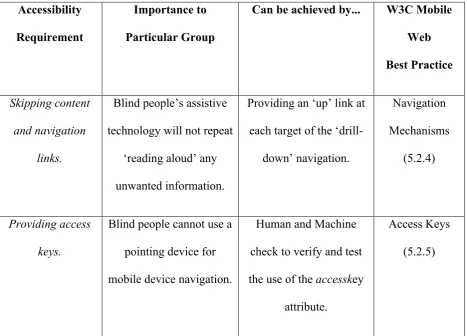
Blind people’s main requirement is to be able to skip entire sections or navigation links in a
website in order to find the information they are looking for with the least effort possible.
Access keys (or keyboard shortcuts) can greatly assist the blind population while navigating
within the different pages of a website. Link names must be meaningful otherwise this group
will experience problems finding the desired webpage. Non-text items, such as images, must
be accompanied by a text equivalent to convey the meaning of the image. Form elements (for
example text boxes, check boxes and radio buttons) also require an associated label so that
[image:18.595.66.534.411.747.2]blind people can easily identify each box or button. Table 3 summarises these requirements.
Table 3 – Accessibility Requirements for Blind (W3C, 2008b)
Accessibility
Requirement
Importance to
Particular Group
Can be achieved by... W3C Mobile
Web
Best Practice
Skipping content
and navigation
links.
Blind people’s assistive
technology will not repeat
‘reading aloud’ any
unwanted information.
Providing an ‘up’ link at
each target of the
‘drill-down’ navigation.
Navigation
Mechanisms
(5.2.4)
Providing access
keys.
Blind people cannot use a
pointing device for
mobile device navigation.
Human and Machine
check to verify and test
the use of the accesskey
attribute.
Access Keys
Providing concise
and descriptive
link names.
Blind people can decide
whether to visit a link
when their assistive
technology ‘reads aloud’
a webpage’s link name.
Human check to identify
non-intuitive link names,
such as ‘click here’.
Link Target Identification (5.2.6) Providing text-equivalents for non-text elements.
Blind people’s assistive
technology ‘reads aloud’
a description for non-text
items (e.g. images).
Human and Machine
check to verify and test
the use of the alt and
longdesc attributes.
Non-Text Items
(5.4.5)
Providing
accompanying
labels for form
controls.
Eliminates entry errors
when blind people are
required to enter their
personal details in form
elements, such as text
boxes.
Machine check to test the
presence of a label
element in form controls
and Human check to
verify whether labels are
properly positioned.
Labels for Form
Controls
(5.5.3)
4.1.2 Partially Sighted and Colour Blind
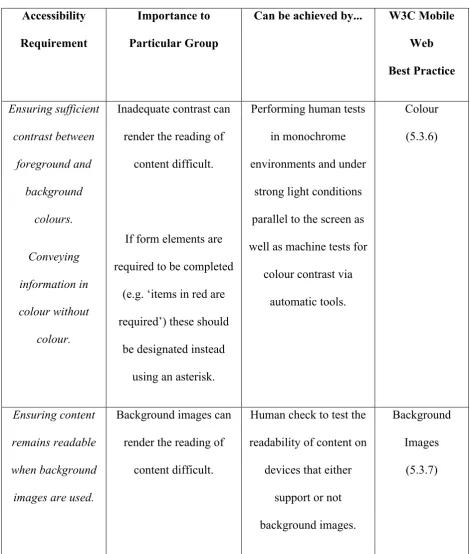
Good choice of background and foreground colours is a significant requirement for both
partially sighted and colour blind people. In the mobile context this issue is even more
important due to the often poor colour contrast of mobile devices and the less-than-ideal
lighting conditions in which these devices are used. This is also true for background images.
Colour blind people to whom colour is useless, should be presented any information
conveyed in colour in an alternative way. Table 4 provides an overview of these
Table 4 – Accessibility Requirements for Partially Sighted and Colour Blind (W3C, 2008b)
Accessibility
Requirement
Importance to
Particular Group
Can be achieved by... W3C Mobile
Web Best Practice Ensuring sufficient contrast between foreground and background colours. Conveying information in colour without colour.
Inadequate contrast can
render the reading of
content difficult.
If form elements are
required to be completed
(e.g. ‘items in red are
required’) these should
be designated instead
using an asterisk.
Performing human tests
in monochrome
environments and under
strong light conditions
parallel to the screen as
well as machine tests for
colour contrast via
automatic tools. Colour (5.3.6) Ensuring content remains readable when background
images are used.
Background images can
render the reading of
content difficult.
Human check to test the
readability of content on
devices that either
support or not
background images.
Background
Images
(5.3.7)
4.2 Hearing Impaired
Any information provided in audio format imposes accessibility barriers to people with
format. Text format is suitable to those suffering from mild to moderate hearing loss, but not
sufficient to those with severe hearing loss that rely on lip-reading techniques. These people
require instead information to be provided in sign language. The requirements for the hearing
impaired discussed here do not link to any of the W3C Mobile Web Best Practices.
4.3 Motor Impaired
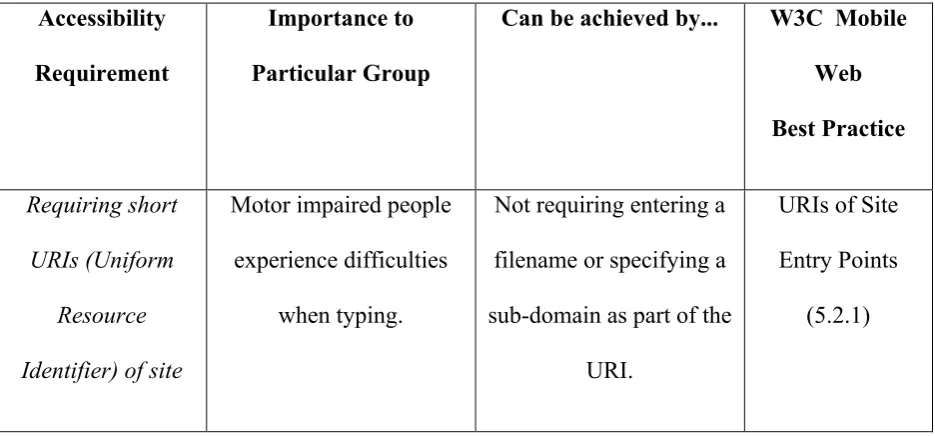
Motor impaired people should be able to access information or perform a task with the
minimum typing and scrolling possible. Typing is of particular importance to mobile devices
due to the input constraints associated with these devices. Scrolling should be limited in one
direction. If elements, such as maps and images on a page, require secondary scrolling then
the remainder of the page must not require this too. Tables in general are not suitable for
limited size screens as users may need to scroll horizontally to read them. If navigational
links are included into tables then users may have to scroll both horizontally and vertically to
[image:21.595.68.536.534.752.2]view possible navigational choices. Table 5 further describes these points.
Table 5 – Accessibility Requirements for Motor Impaired (W3C, 2008b)
Accessibility
Requirement
Importance to
Particular Group
Can be achieved by... W3C Mobile
Web
Best Practice
Requiring short
URIs (Uniform
Resource
Identifier) of site
Motor impaired people
experience difficulties
when typing.
Not requiring entering a
filename or specifying a
sub-domain as part of the
URI.
URIs of Site
Entry Points
entry points.
Positioning clearly
primary and
secondary
navigation.
Eliminates the scrolling
required to access the
main links of a website.
Providing primary
navigation at the top of
the page and any
secondary at the bottom.
Navigation Bar
(5.2.2)
Balancing the
number of
navigation links on
pages and the
number of links
required to reach
content.
Eliminates the scrolling
required to reach
information.
Providing easy reach to
frequently accessed
information with a
minimum number of
page retrievals. Balanced Structure (5.2.3) Providing access keys.
Eliminates the need to
scroll via a pointing
device.
Human and Machine
check to verify and test
the use of the accesskey
attribute.
Access Keys
(5.2.5)
Limiting scrolling
to one direction.
Eliminates the scrolling
required.
Presenting images on a
separate page with a link
back to the main content
if images larger than the
screen size cannot be
avoided.
Scrolling
(5.3.3)
tables. required to read the
content of tables.
and the use of tables for
layout and styling
purposes.
(5.4.4)
Minimizing user
input.
Eliminates error entry
when for example filling
a form.
Providing selection lists,
radio buttons and other
controls, using wherever
possible previous entries
as default values and
allowing item selection
using navigation keys
and/or numeric input.
Input
(5.5.1)
4.4 Speech Impaired
Accessibility barriers can occur for speech impaired people who suffer from other diseases,
such as Parkinson’s disease or mental retardation problems. The requirements for this group
[image:23.595.66.536.86.415.2]are presented in Table 6.
Table 6 – Accessibility Requirements for Speech Impaired (W3C, 2008b)
Accessibility
Requirement
Importance to
Particular Group
Can be achieved by... W3C Mobile
Web
Best Practice
Providing access
keys.
Speech impaired who
suffer from Parkinson’s
Human and Machine
check to verify and test
Access Keys
disease to eliminate the
need to scroll via a
pointing device.
the use of the accesskey
attribute.
Providing suitable
error messages.
Speech impaired with
mental retardation
problems to eliminate
confusion.
Providing clear error
messages that indicate if
the issue is temporary or
permanent, if users can
solve it themselves (for
example by changing
input data or a handset
setting), or if the issue is
escalated to the content
provider or network
operator. In the latter
case, contact details, such
as an SMS address or a
support line number,
should be included.
‘Back’, ‘Retry’ and/or
‘Home’ links should also
be provided.
Error Messages
4.5 Cognitive Impaired
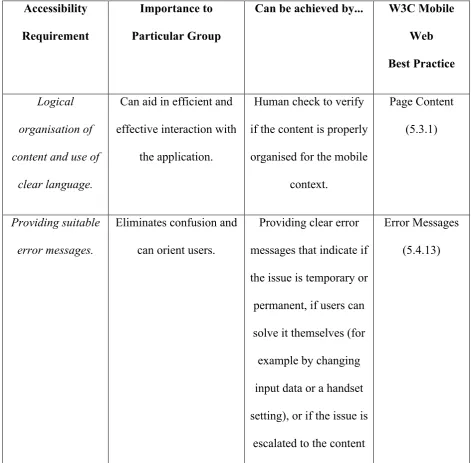
This group’s main requirements are clear website structure, simple language and minimum
user input. The most appropriate information should be provided first and mechanisms for
distinguishing information should be placed at the beginning of headings, paragraphs and
[image:25.595.64.536.292.755.2]lists, for contextualization purposes. Table 7 addresses these requirements in detail.
Table 7 – Accessibility Requirements for Cognitive Impaired (W3C, 2008b)
Accessibility
Requirement
Importance to
Particular Group
Can be achieved by... W3C Mobile
Web
Best Practice
Logical
organisation of
content and use of
clear language.
Can aid in efficient and
effective interaction with
the application.
Human check to verify
if the content is properly
organised for the mobile
context.
Page Content
(5.3.1)
Providing suitable
error messages.
Eliminates confusion and
can orient users.
Providing clear error
messages that indicate if
the issue is temporary or
permanent, if users can
solve it themselves (for
example by changing
input data or a handset
setting), or if the issue is
escalated to the content
Error Messages
provider or network
operator. In the latter
case, contact details,
such as an SMS address
or a support line
number, should be
included. ‘Back’,
‘Retry’ and/or ‘Home’
links should also be
provided.
Minimizing user
input.
Eliminates error entry
when for example filling
a form.
Providing selection lists,
radio buttons and other
controls, using wherever
possible previous
entries as default values
and allowing item
selection using
navigation keys and/or
numeric input.
Input
(5.5.1)
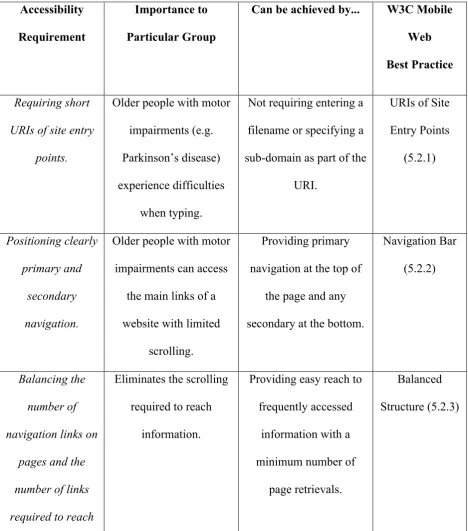
4.6 Elderly
A possible combination of visual, hearing, motor, speech, and/or cognitive disabilities that
a simple, easy to use application where minimum trying and scrolling is required. Table 8
[image:27.595.67.536.205.737.2]summarises the key requirements for this group.
Table 8 – Accessibility Requirements for Elderly (W3C, 2008b)
Accessibility
Requirement
Importance to
Particular Group
Can be achieved by... W3C Mobile
Web
Best Practice
Requiring short
URIs of site entry
points.
Older people with motor
impairments (e.g.
Parkinson’s disease)
experience difficulties
when typing.
Not requiring entering a
filename or specifying a
sub-domain as part of the
URI.
URIs of Site
Entry Points (5.2.1) Positioning clearly primary and secondary navigation.
Older people with motor
impairments can access
the main links of a
website with limited
scrolling.
Providing primary
navigation at the top of
the page and any
secondary at the bottom.
Navigation Bar
(5.2.2)
Balancing the
number of
navigation links on
pages and the
number of links
required to reach
Eliminates the scrolling
required to reach
information.
Providing easy reach to
frequently accessed
information with a
minimum number of
page retrievals.
Balanced
content.
Providing access
keys.
Eliminates the need to
scroll via a pointing
device.
Human and Machine
check to verify and test
the use of the accesskey
attribute.
Access Keys
(5.2.5)
Limiting scrolling
to one direction.
Eliminates the scrolling
required.
Presenting images on a
separate page with a link
back to the main content
if images larger than the
screen size cannot be
avoided. Scrolling (5.3.3) Ensuring sufficient contrast between foreground and background colours. Conveying information in colour without colour.
Older people with visual
impairments to whom
inadequate contrast can
cause difficulties in
reading the text.
If form elements are
required to be completed
(e.g. ‘items in red are
required’) these should
be designated instead
using an asterisk.
Performing human tests
in monochrome
environments and under
strong light conditions
parallel to the screen as
well as machine tests for
colour contrast via
automatic tools.
Colour
(5.3.6)
remains readable
when background
images are used.
render the reading of
content difficult.
readability of content on
devices that either
support or not
background images.
Images (5.3.7)
Avoiding the use of
tables.
Eliminates the scrolling
required to read the
content of tables.
Avoiding nested tables
and the use of tables for
layout and styling
purposes.
Tables
(5.4.4)
Providing suitable
error messages.
Older people who lack
familiarity with the use
of mobile technologies to
eliminate confusion and
orient them.
Providing clear error
messages that indicate if
the issue is temporary or
permanent, if users can
solve it themselves (for
example by changing
input data or a handset
setting), or if the issue is
escalated to the content
provider or network
operator. In the latter
case, contact details, such
as an SMS address or a
support line number,
should be included.
Error Messages
‘Back’, ‘Retry’ and/or
‘Home’ links should also
be provided.
Minimizing user
input.
Older people with
cognitive impairments
and those who lack
familiarity with the use
of mobile technologies to
eliminate error entry
when for example filling
a form.
Providing selection lists,
radio buttons and other
controls, using wherever
possible previous entries
as default values and
allowing item selection
using navigation keys
and/or numeric input.
Input
(5.5.1)
5 Conclusion
The recent developments in mobile technologies present great opportunities for governments
wishing to go mobile in both the developed and the developing world. As-Saber et al. (2007)
emphasise the need for a ‘socio-technical’ approach in e-Governance, as neither technology
nor people alone can bring the success of e-Government. This is also true for m-Government.
Mobile devices may have become part of our everyday lives, but they are mainly employed
for personal and entertainment use, and as Verdegem and Hautekeete (2008) point out, only
by specific sectors of the wider population. The accessibility challenges that elderly and
disabled people can face when using mobile devices could render the realisation of
value-added m-Government very difficult indeed.
This paper has provided some insights into the accessibility requirements of key citizen
Impaired and Elderly) and reviewed some exemplary m-Government projects that are
targeted at ensuring disabled people have access to government services. We have proposed a
framework for accessible m-Government implementation as part of preliminary research in
the area of socially inclusive m-Government. We have seen that the example of
e-Government, in taking the lead in promoting e-Accessibility on the Web, can be mirrored in
m-Government with the prospect that future mobile services in the private sector may take
accessibility more into account than perhaps at present.
We claim that the need for the design of citizen-centric government services and the
investigation of citizens’ service needs as stated respectively in Kolsaker and Lee-Kelley
(2007) and Shareef et al. (2009) are both important parameters for the successful
technology-enabled delivery and wide embracement of any future government service. A study
performed by Shareef et al. (2009) to identify the factors that influence citizens’ adoption of
e-Government found among others the perceived ease of use of an e-Government system to
be a fundamental factor. From our review on the m-Government area and the associated
challenges we have shown that this factor is also relevant to the m-Government environment.
We conclude that future research should measure what Lee et al. (2006) define as ‘user
readiness’ – the extent to which users have access to mobile devices and the user’s
technological competency in using mobile devices. The latter refers to the degree to which
users can conduct serious activities, such as interacting formally with government, via mobile
devices. Similarly, Wu et al. (2009) suggest that future research on m-Government
should focus on user aspects, as well as adoption and usage patterns of
mobile devices. We estimate that a thorough investigation of the user readiness of the
aforementioned groups could result in much more usable and accessible m-Government
References
Adam, A. and Kreps, D. (2006a) ‘Enabling or Disabling Technologies?: A Critical Approach
to Web Accessibility ’, Information Technology and People, Vol. 19, No. 3, pp.203-218.
Adam, A. and Kreps, D. (2006b) ‘Web Accessibility: A Digital Divide for the Disabled?’, In:
Trauth, E., Howcroft, D., Butler, T., Fitzgerald, B., DeCross, J. (eds.), IFIP International
Federation for Information Processing, Social Inclusion: Societal & Organizational
Implications for Information Systems, (pp.217-228), Boston: Springer.
Amine, B. and Yosra, K. (2005) ‘M-Government: The Convergence Between E-Government
and Wireless Technology’. Paper Presented at the 1st International E-Business Conference.
June 23-25, 2005. Hammamet, Tunisia.
As-Saber, S., Hossain, K. and Srivastava, A. (2007) ‘Technology, society and e-government:
in search of an eclectic framework’, Electronic Government: An International Journal, Vol.
4, No. 2, pp.156-178.
Axistive (2007). SpeechPAK TALKS for Speech-Enabled Mobile Phones. Obtained through
the Internet:
http://www.axistive.com/speechpak-talks-for-speech-enabled-mobile-phones.html, [accessed 15/12/2008]
Becker, S. A. (2005) ‘E-government Usability for Older Adults’, Communications of the
ACM, Vol. 48, No. 2, pp.102-104.
Blechar, J., Constantiou, I. and Damsgaard, J. (2006) ‘Understanding behavioural patterns of
advanced mobile service users’, Electronic Government: An International Journal, Vol. 3,
BusinessWire (2005). Nuance Introduces the Nuance Accessibility Suite; Provides
Unprecedented User Accessibility to Mobile Devices. Obtained through the Internet:
http://www.businesswire.com/portal/site/google/index.jsp?ndmViewId=news_view&newsId=
20051213005193&newsLang=en, [accessed 15/12/2008]
Carroll, J. (2006) ‘‘What’s in It for Me?’: Taking M-Government to the People’. Paper
Presented at the 19th Bled eConference eValue. June 5-7, 2006. Bled, Slovenia.
Chircu, A. M. (2008) ‘E-government evaluation: towards a multidimensional framework’,
Electronic Government: An International Journal, Vol. 5, No. 4, pp.345-363.
Choudrie, J., Brinkman, W. P. and Pathania, R. (2007) ‘Using diffusion theory to determine
the digital divide in e-services: two UK local-area perspectives’, Electronic Government: An
International Journal, Vol. 4, No. 3, pp.345-359.
Choudrie, J., Ghinea, G. and Weerakkody, V. (2004) ‘Evaluating Global e-Government Sites:
A View using Web Diagnostic Tools’, Electronic Journal of E-Government, Vol. 2, No. 2,
pp.105-114.
Computer Economics (2007). Internet and Broadband Growth Accelerates Worldwide.
Obtained through the Internet: http://www.computereconomics.com/article.cfm?id=1206,
[accessed 15/12/2008]
Comscore (2007). Mobile Web Audience Already One-Fifth the Size of PC-Based Internet
Audience in the U.K.. Obtained through the Internet:
Council of Europe (2003). Council Resolution on ‘eAccessibility’ – improving the access of
people with disabilities to the Knowledge Based Society. SOC 5. MI 4. EDUC 2. TELECOM
1.
Directgov (2008). About the Blue Badge map. Obtained through the Internet:
http://www.direct.gov.uk/en/disabledpeople/motoringandtransport/dg_10038295, [accessed
15/12/2008]
Dwivedi, Y. K. and Williams, M. D. (2008) ‘Demographic influence on UK citizens’
e-government adoption’, Electronic Government: An International Journal, Vol. 5, No. 3,
pp.261-274.
Emmanouilidou, M. (2005) Towards Socially Inclusive E-government. MSc thesis.
Department of Computer Science, University of Manchester, Manchester, United Kingdom.
International Telecommunication Union (2008). Worldwide mobile cellular subscribers to
reach 4 billion mark late 2008. Obtained through the Internet:
http://www.itu.int/newsroom/press_releases/2008/29.html, [accessed 15/12/2008]
Kreps, D. (2008) ‘How the Web Continues to Fail People with Disabilities’. Paper Presented
at ALT-C 2008: Rethinking the Digital Divide.September 9-11, 2008. Leeds, UK.
Kreps, D. and Adam, A. (2006) ‘Failing the Disabled Community?: The Continuing Problem
of Web Accessibility’, In: Kurniawan, S. and Zaphiris, P. (eds.), Advances in Universal Web
Kok, A. (2009). Asian Silver Surfers Surge Online. FutureGov. Obtained through the Internet:
http://www.futuregov.net/articles/2009/may/05/silver-surfers-surge-online/, [accessed
15/12/2008]
Kolsaker, A., Lee-Kelley, L. (2007) ‘G2C e-government: modernisation of transformation?’,
Electronic Government: An International Journal, Vol. 4, No. 1, pp.68-75.
Kumar, M. and Sinha, O. P., (2007) ‘M-Government – Mobile Technology for
e-Government’, In: Bhattacharya J. (ed.), Towards Next Generation E-government, iceg’07.
Obtained through the Internet: http://www.iceg.net/2007/books/2/32_343_2.pdf [accessed
15/12/2008]
Kushchu, I. and Kuscu, H. (2003) ‘From E-government to M-government: Facing the
Inevitable’. Paper Presented at the European Conference on E-Government (ECEG 2003).
July 3-4, 2003. Trinity College, Dublin.
Lee, S. M., Tan, X. and Trimi, S. (2006) ‘M-government, from rhetoric to reality: learning
from leading countries’, Electronic Government: An International Journal, Vol. 3, No. 2,
pp.113-126.
Loader, B.D., ed., (1998) Cyberspace Divide: Equality, Agency and Policy in the Information
Society. London and New York: Routledge.
Marincu, C. and McMullin, B. (2004) ‘A comparative assessment of Web accessibility and
Marshall, S., Taylor, W. and You, X., eds., (2003) Closing the Digital Divide: Transforming
Regional Economies and Communities with Information Technology. Westport, CT and
London: Praeger.
Meyer, D. (2008). One billion PCs now is use worldwide. ZDNet.co.uk. Obtained through the
Internet: http://news.zdnet.co.uk/hardware/0,1000000091,39437717,00.htm, [accessed
15/12/2008]
Norris, P. (2001) Digital Divide: Civic Engagement, Information Poverty, and the Internet
Worldwide, Cambridge, UK: Cambridge University Press.
Office for National Statistics (2007). Use of ICT at Home – 2 in 3 UK homes have digital TV
service. Obtained through the Internet: http://www.statistics.gov.uk/cci/nugget.asp?id=1710,
[accessed 15/12/2008]
Rannu, R. and Semevsky, M. (2005). Mobile Services in Tartu – Existing services, best
practices, methodology and suggestions for future development. Mobi Solutions Ltd.
Obtained through the Internet:
http://www.ega.ee/files/Mobile%20services%20in%20Tartu%20FINAL1.pdf, [accessed
15/12/2008]
Servon, L. J. (2002) Bridging the Digital Divide: Technology, Community and Public Policy,
Malden, MA and Oxford: Blackwell.
Shareef, M. A., Kumar, U., Kumar, V. and Dwivedi, Y. K. (2009) ‘Identifying critical factors
for adoption of e-government’, Electronic Government: An International Journal, Vol. 6, No.
Sharma, S. K. and Gupta, J. N. D. (2004) ‘Web services architecture for m-government:
issues and challenges’, Electronic Government: An International Journal, Vol. 1, No. 4,
pp.462-474.
Sheng, H. and Trimi, S. (2008) ‘M-government: technologies, applications and challenges’,
Electronic Government: An International Journal, Vol. 5, No. 1, pp.1-18.
Song, G. and Cornford, T. (2006) ‘Mobile Government: Towards a Service Paradigm’. Paper
Presented at the 2nd International Conference on e-Government. October 12-13. University
of Pittsburgh, Pittsburgh, USA.
Trimi, S. and Sheng, H. (2008) ‘Emerging trends in M-government’, Communications of the
ACM, Vol. 51, No. 5, pp.53-58.
UNDPEPA (2002). Benchmarking E-Government – A Global Perspective. Obtained through
the Internet: www.unpan.org/egovernment2.asp, [accessed 03/11/2008]
U.S. Census Bureau (2008). World POPClock Projection. Obtained through the Internet:
http://www.census.gov/ipc/www/popclockworld.html, [accessed 15/12/2008]
USE-ME.GOV (no date). Gdynia – Healthcare Information. Obtained through the Internet:
http://www.usemegov.org/pilot_services/gdynia.php, [accessed 05/12/2008]
USE-ME.GOV (2005). USability-drivEn open platform for MobilE GOVernment.
eGovernment research in FP6 and beyond (cluster workshop), Brussels, March 1 – 2, 2005.
Obtained through the Internet:
Verdegem, P. and Hauttekeete, L. (2008) ‘The user at the centre of the development of
one-stop government’, International Journal of Electronic Governance, Vol. 1, No. 3,
pp.258-274.
Vincent, J. and Harris, L. (2008) ‘Effective Use of Mobile Communications in
E-government: How do we reach the tipping point?’, Information, Communication & Society,
Vol. 11, No. 3, pp.395-413.
W3C (2008a). About the World Wide Web Consortium (W3C). Obtained through the
Internet: http://www.w3.org/Consortium/, [accessed 10/12/2008]
W3C (2008b). Mobile Web Best Practices 1.0. Obtained through the Internet:
http://www.w3.org/TR/2008/REC-mobile-bp-20080729/, [accessed 10/12/2008]
Web Site Accessibility Blog (2005). Increased Accessibility for Mobile Devices. Obtained
through the Internet:
http://www.accessibilityblog.com/2005/12/20/increased-accessiblity-for-mobile-devices/, [accessed 15/12/2008]
Wu, H., Ozok, A. A., Gurses, A. P. and Wei, J. (2009) ‘User aspects of electronic and mobile
government: results from a review of current research’, Electronic Government: An
International Journal, Vol. 6, No. 3, pp.233-251.
Zalesak, M. (2005). M-Government Case Studies – SMS messages for education. SMS and
Citizen M-Safety. Other interesting m-Government services. Web Projects Ltd. Obtained
through the Internet: