60497800
/ f f ^ y
CONTROL DATA
CORPORATION
r
FORTRAN EXTENDED
VERSION 4
REFERENCE MANUAL
CDC ® OPER AT IN G S Y S TE M S :
NOS 1
REVISION RECORD
/f*3S*j\
Revision A (11/01/75)
B (03/05/76) C (04/15/77) 0 (03/31/78)
E (07/20/79) F (08/22/80) G (01/15/81) H (08/13/82) J (06/10/83)
Description Original release.
This revision documents Version 4.6 of FORTRAN Extended. Features documented include CP155, Compiler Enhancements, and CP079, Math Library Upgrade.
Revised to include feature F7540, CYBER 170 Model 176 Support, as well as miscellaneous technical corrections, at PSR level 446.
This revision documents Version 4.7 of FORTRAN Extended. Features documented include CP091 and CP162, CRM products BAM and AAM, 191, Math Library Upgrade, CP184, Fast Overlay Loading, and 66, CYBER Interactive Debug interface. Also documented is the implementa tion of STATIC mode memory management, as well as miscellaneous technical changes and corrections.
This revision documents Version 4.8 of FORTRAN Extended. The Post Mortem Dump facility is documented with this release, as well as numerous technical changes.
This revision documents changes to Post Mortem Dump, adds the FORTRAN Interface to Common Memory Manager, and adds the STATIC option to FORTRAN Extended. Numerous technical
changes are included. PSR level 524.
This revision documents release of Post Mortem Dump and STATIC option under SCOPE 2. Numerous technical changes are included. PSR level 533.
This revision documents numerous technical changes and corrections. PSR level 552. This revision documents numerous technical and editorial corrections. PSR level 577.
REVISION LETTERS I, 0, Q, AND X ARE NOT USED ©COPYRIGHT CONTROL DATA CORPORATION
1975, 1976, 1977, 1978, 1979, 1980, 1981, 1982, 1983 All Rights Reserved
Printed in the United States of America
Address comments concerning this manual to: CONTROL DATA CORPORATION
Publications and Graphics Division P. 0. BOX 3492
SUNNYVALE, CALIFORNIA 94088-3492
or use Comment Sheet in the back of this manual
LIST OF EFFECTIVE PAGES
J0B&K,
New features, as well as changes, deletions, and additions to information in this manual are indicated by bars in the margins or by a dot near the page number if the entire page is affected. A bar by the page number indicates pagination rather than content has changed.
ijfpSN
/*$RN
/0S\
r
Page Revision Page Revision Page Revision
Front Cover 5-11 thru 5-■19 8-7
Inside Front Cover 5-20 8-8
Title Page 5-21 8-9
i i 5-22 8-10
i i i 5-23 8-11 thru 8-16
iv 5-24 8-16.1/8-16.2
v d 5-25 thru 5-■28 8-17
vi 6-1 8-18
v i i / v i i i 6-2 8-19
ix 6-3 8-20
X J 6-4 8-21
xi 6-5 8-22
x i i 6-6 thru (5-8 8-23
1-1 thru 1-4 6-9 8-24
1-5 6-10 8-25
1-6 thru 1-9 6-11 thru 6-■17 8-26
1-10 6-18 8-26.1/8-26.2
1-11 thru 1-17 6-18.1/6-18.2 8-27
2-1 6-19 thru 6-■21 8-28
2-2 6-22 8-29
2-3 6-23 8-30
2-4 6-24 8-31
2-5 6-25 thru 6- 27 8-32
2-6 6-28 8-32.1 /8-32.2
2-7 thru 2-20 6-29 8-33 thru 8-35
3-1 thru 3-9 6-30 8-36
3-10 6-31 8-37
3-11 6-32 8-38
3-12 6-33 8-39
3-13 6-34 8-40
3-14 6-35 thru 6- 37 8-41
3-15 7-1 8-42
3-16 7-2 8-43
3-17 7-3 8-44
3-18 7-4 8-45 thru 8-47
3-19 7-5 thru 7-S 8-48 thru 8-51
3-20 7-10 8-52
3-21 7-11 8-53
4-1 7-12 8-54
4-2 7-13 thru 7- 15 8-55
4-3 7-16 8-56
4-4 7-17 8-56.1/8-56.2
4-5 thru 4-9 7-18 8-57 thru 8-61
4-10 7-19 9-1
4-11 7-20 9-2 thru 9-4
4-12 7-21 9-5
4-13 7-22 9-6
4-14 thru 4-16 7-23 9-7
5-1 7-24 thru 7-28 9-8
5-2 8-1 9-9
5-3 8-2 9-10
5-4 thru 5-6 8-3 9-11 thru 9-29
5-7 8-4 10-1
5-8 8-5 10-2
5-9 8-6 10-3
Revision Page Revision Page Revision 10-5 thru 10-7
10-8 10-9 10-10 11-1 11-2 11-3 11-4 11-5 11-6 11-7 12-1 12-2 12-3 12-4 12-5 13-1 13-2 13-3 13-4
13-5 thru 13-8 13-9 13-10 13-11 13-12 13-13 13-14 13-15
13-16 thru 13-20 13-21
14-1 14-2 14-3
15-1 thru 15-3 16-1 16-2 16-3 16-4 16-5 16-6 16-7 16-8 16-9 16-10 16-11 16-12 16-13 ' 17-1 17-2 17-3 17-4 17-5 17-6 18-1
18-2 thru 18-6 18-7
18-8
18-9 thru 18-11 19-1
19-2 19-3
19-4 thru 19-7 19-8
19-9 thru 19-11 19-12
19-13 thru 19-18 19-19
19-20 thru 19-27 .19-28
19-29 thru 19-32 19-33
19-34
20-1 A - l A-2 A-3
B-l thru B-4 B-5 B-6 B-7 B-8 B-9 B-10
B-ll thru B-14 B-15 B-16 B-17 B-18 B-19 B-20 B-21 B-22
B-23 thru B-26 B-27
B-28 B-29 B-30
B-31 thru B-33 B-34
B-35 B-36 B-37
B-38 thru B-41 B-42
B-43
B-44 thru B-49 B-50
B-51 thru B-64 B-65
B-66 B-67 B-68
B-69 thru B-76 B-77 B-78 B-79 B-80 B-81 B-82 B-83 B-84 B-85 B-86 B-87 B-88 B-89 B-90 B-91 B-92 B-93 B-94 B-95 B-96 B-97
C-l thru C-8 C-9 thru C-ll
D-l D-2 D-3 thru D-6 D-7 D-8 E-l thru Index-1 D-5 E-6 Index-2 Index-3 Index-4 Index-5 Index-6 Comment Sheet Mailer Back Cover yfS&Sv .■**^^\
• I V 60497800 J
PREFACE
f This manual describes the FORTRAN Extended 4.8 language. FORTRAN Extended is designed to comply with American National Standards Institute FORTRAN language, as described in X3.9-1966. It is assumed the reader has knowledge of an existing FORTRAN language and is familiar with the computer system on which the /^^ language is used.
The FORTRAN Extended compiler operates in conjunction with the COMPASS 3 assembly language processor ^p^ under control of the following operating systems:
NOS 1 for the CONTROL DATA® CYBER 170 Series, CYBER 70 Models 71, 72, 73, 74, and 6000 Series | Computer Systems
NOS 2 for the CDC® CYBER 170 Series, CYBER 70 Models 71, 72, 73, 74, and 6000 Series Computer | Systems
NOS/BE 1 for the CDC CYBER 170 Series, CYBER 70 Models 71, 72, 73, 74, and 6000 Series Computer | 0 s \ S y s t e m s
SCOPE 2 for the CONTROL DATA CYBER 170 Model 176, CYBER 70 Model 76, and 7600 Computer / ^ S y s t e m s
All references in this manual to NOS 1 refer to both NOS 1 and NOS 2.
Due to capsule loading, relocatable binaries compiled by versions of FORTRAN Extended prior to version 4.7 cannot be run with CRM BAM 1.5 or AAM 2; they must be recompiled.
Control Data extensions to the FORTRAN language are indicated by shading. Example programs or parts of programs are shaded in their entirety if they contain lines using extensions to the ANSI standard (unless the only such extension is the PROGRAM statement). Shading is used only in sections 1 through 8, which contain the f specification of the FORTRAN Extended language; later sections describe the implementation of these
specifications and shading is not used. /*"5Rx
r Extended memory for the CYBER 170 Model 176 is large central memory (LCM) or large central memoryextended (LCME). Extended memory for the CYBER 170 800 Series Computer Systems is unified extended memory (UEM). Extended memory for all other NOS or NOS/BE computer systems is extended core storage
(ECS) or extended semiconductor memory (ESM). In this manual, the acronym ECS refers to all forms of 0^ extended memory unless otherwise noted. Programming information for the various forms of extended memory
can be found in the COMPASS reference manual and in the appropriate computer system hardware reference manual.
\. Related material is contained in the listed publications. These publications are listed alphabetically and grouped according to their importance to the FORTRAN user. The NOS 1, NOS 2, and NOS/BE 1 manual abstracts are pocket-sized manuals containing brief descriptions of the contents and intended audience of all {■^ operating system and product set manuals. The abstracts manuals can be useful in determining which manualsare of greatest interest to a particular user.
The following publications are of primary interest: Publication P u b l i c a t i o n N u m b e r FORTRAN Common Library
Mathematical Routines
R e f e r e n c e M a n u a l 6 0 4 9 8 2 0 0 FORTRAN Extended Version 4
D E B U G U s e r ' s G u i d e 6 0 4 9 8 0 0 0 FORTRAN Extended Version 4
U s e r ' s G u i d e 6 0 4 9 9 7 0 0 NOS Version 1 Reference Manual
V o l u m e 1 o f 2 6 0 4 3 5 4 0 0 NOS Version 2 Reference Set
Volume 3, System Commands 60459680 NOS/BE Version 1
R e f e r e n c e M a n u a l 6 0 4 9 3 8 0 0 SCOPE Version 2
R e f e r e n c e M a n u a l 6 0 3 4 2 6 0 0 The following publications are of secondary interest:
Publication PublicationNumber Common Memory Manager
Version 1 Reference Manual 60499200 COMPASS Version 3
R e f e r e n c e M a n u a l 6 0 4 9 2 6 0 0 CYBER Interactive Debug
Version 1 Reference Manual 60481400 CYBER Interactive Debug
Version 1 Guide for Users
of FORTRAN Extended Version 4 60482700 CYBER Loader Version 1
R e f e r e n c e M a n u a l 6 0 4 2 9 8 0 0 CYBER Record Manager
Advanced Access Methods
Version 2 Reference Manual 60499300 CYBER Record Manager
Advanced Access Methods
Version 2 User's Guide 60499400 CYBER Record Manager
Basic Access Methods
Version 1.5 Reference Manual 60495700 CYBER Record Manager
Basic Access Methods
Version 1.5 User's Guide 60495800
NOS1 NOS 2 NOS/BE 1 SCOPE 2
X X X X X X X X X X X X X X
0 £ & $ $ \
X
X
NOS1 NOS 2 NOS/BE 1 SCOPE 2 ,<*^*\ X X X X X X X X X X .y<S^^V /•/5-^V X X X
0^\
Publication DMS-170
DDL Version 3 Reference Manual Volume 1: Schema Definition for Use With:
COBOL FORTRAN
Publication
Number NOS1 NOS 2 NOS/BE 1 SCOPE 2
Query Update 60481900 FORTRAN Data Base Facility
Version 1 Reference Manual 60482200 INTERCOM Interactive Guide
for Users of FORTRAN Extended 60495000 INTERCOM Version 5
Reference Manual 60455010 Loader Version 1 User's Guide 60482300 Network Products
Interactive Facility Version 1
Reference Manual 60455250 NOS Version 1 Diagnostic Index 60455720 NOS Version 1 Manual Abstracts 84000420 NOS Version 2 Diagnostic Index 60459390 NOS Version 2 Manual Abstracts 60485500 NOS Version 2 Reference Set
Volume 1, Introduction to
Interactive Usage 60459660 NOS/BE Version 1
Diagnostic Index 60456490 NOS/BE Version 1
Manual Abstracts 84000470 SCOPE Version 2 Loader
Reference Manual 60454780 SCOPE Version 2 Record Manager
Reference Manual 60495700 Software Publications
Release History 60481000 Sort/Merge Versions 4 and 1
Reference Manual 60497500
CDC manuals can be ordered from Control Data Corporation, Literature and Distribution Services, 308 North Dale Street, St. Paul, Minnesota 55103.
CONTENTS
1. FORTRAN LANGUAGE ELEMENTS Coding FORTRAN Statements
FORTRAN Character Set Column Usage Comments Statement Labels Continuation Columns 73-80 Statement Separator Blank Lines Data
Ordering of Statements Constants
Integer Constant Real Constant
Double Precision Constant Complex Constant Octal Constant Hollerith Constant
nHf and #?* nRf and nLf Logical Constant Variables
Integer Variables Real Variables
Double Precision Variables Complex Variables Logical Variables Arrays Subscripts Array Structure 1-1 1-1 1-1 1-1 1-3 1-3 1-3 1-3 1-3 1-4 1-4 1-4 1-5 1-5 1-5 1-6 1-7 1-8 1-9 1-10 1-11 1-11 1-11 1-12 1-12 1-13 1-13 1-13 1-13 1-15 1-16
IMPLICIT Type Statement DIMENSION Statement COMMON Statement EQUIVALENCE Statement EQUIVALENCE and COMMON LEVEL Statement
EXTERNAL Statement DATA Statement
Implied DO in Data List
4. FLOW CONTROL STATEMENTS GO TO Statement
Unconditional GO TO Statement Computed GO TO Statement ASSIGN Statement
Assigned GO TO Statement Arithmetic IF Statement
Three-Branch Arithmetic IF Statement Two-Branch Arithmetic IF Statement Logical IF Statement
Standard-Form Logical IF Statement Two-Branch Logical IF Statement DO Statement
DO Loops Nested DO Loops CONTINUE Statement PAUSE Statement STOP Statement END Statement RETURN Statement 3-3 3-4 3-5 3-8 3-11 3-12 3-14 3-15 3-19 4-1 4-1 4-1 4-2 4-3 4-4 4-5 4-5 4-5 4-6 4-6 4-7 4-7 4-8 4-9 4-12 4-13 4-14 4-14 4-15 2. EXPRESSIONS AND ASSIGNMENT
STATEMENTS 2-1
Expressions
Arithmetic Expressions Evaluation of Expressions Type of Arithmetic Expressions Exponentiation
Relational Expressions Logical Expressions Masking Expressions Assignment Statements
Arithmetic Assignment Statements Conversion to Integer
Conversion to Double Precision Conversion to Complex Conversion to Real Logical Assignment Masking Assignment Multiple Assignment
3. SPECIFICATION STATEMENTS Type Statements
Explicit Type Declarations INTEGER
REAL COMPLEX
DOUBLE PRECISION
2-1 5. INPUT/OUTPUT STATEMENT 2-1
2-2 Formatted Input/Output
2-5 Formatted Output Statements
2-6 PRINT
2-7 PUNCH
2-9 WRITE
2-12 Formatted READ 2-14 Unformatted Input/Output 2-15 Unformatted WRITE 2-16 Unformatted READ 2-16 List Directed Input/Output 2-17 List Directed Input 2-18 List Directed Output 2-18 NAMELIST
2-19 Input 2-19 Output
Arrays in NAMELIST Buffer Statements 3-1 BUFFER IN
BUFFER OUT 3-1 ENCODE and DECODE
3-1 ENCODE
3-1 DECODE
3-2 File Manipulation Statements
/ ^ $ $ K
6. INPUT/OUTPUT LISTS AND FORMAT Miscellaneous Utility Subprograms 8-8
STATEMENTS 6-1 Random Number Generator 8-8
Operating System Interface Routines 8-9
Input/Output Lists 6-1 Debugging Aids 8-14
Implied DO in I/O List 6-2 Input/Output Status Checking 8-23 FORMAT Statement 6-5 Other Input/Output Subprograms 8-25
Data Conversion 6-6 ECS/LCM/UEM Subprograms 8-26.1/
Conversion Specification 6-7 8-26.2
Iw and Iw.z Input 6-7 Terminal Interface Subprograms 8-27 Iw and Iw.z Output 6-8 Mass Storage Input/Output 8-29 Ew.d, Ew.dEe and Ew.dDe Output 6-9 Random File Access 8-29 Ew.d, Ew.dEe and Ew.dDe Input 6-10 Mass Storage Subroutines 8-30
Fw.d Output 6-13 Opening a File 8-30
Fw.d Input 6-13 Writing Records 8-31
Gw.d Input 6-14 Reading Records 8-32
Gw.d Output 6-14 Closing a File 8-32
Dw.d Output 6-16 Specifying a Different Index 8-32.1/
Dw.d Input 6-16 8-32.2
Ow Input 6-17 Index Key Types 8-33
Ow Output 6-17 Master Index 8-33
Zw Input and Output 6-18 Sub-Index 8-33
Aw Input 6-18.1/ Multi-Level File Indexing 8-33 6-18.2 Compatibility With Previous Mass
Aw Output 6-19 Storage Routines 8-39
Rw Input 6-20 FORTRAN-CYBER Record Manager Interface 8-39
Rw Output 6-21 Parameters 8-39
Lw Input 6-21 Subroutines 8-42
Lw Output 6-21 Error Checking 8-44
Scale Factors 6-21 Multiple Index Processing 8-45 Fw.d Scaling 6-22 FORTRAN-Sort/Merge Interface 8-46 Ew.d and Dw.d Scaling 6-23 FORTRAN-CYBER Interactive Debug Interface 8-51
Gw.d Scaling 6-23 Control Statement 8-51
X Specification 6-24 User-CID Interaction 8-52
nH Output 6-25 CID Output 8-52
nH Input 6-26 Batch Debugging 8-52
End of Record Slash 6-28 Interface to Common Memory Manager 8-52 Repeated Format Specification 6-29 Post Mortem Dump 8-53 Printer Control Character 6-31
Tn Specification 6-32
V Specification 6-34 9. DEBUGGING FACILITY 9-1
Equals Sign 6-34
Execution Time Format Specification 6-36 Debugging Statements 9-3
7. PROGRAM UNITS, PROCEDURES, AND OVERLAYS
Main Programs
PROGRAM Statement Format PROGRAM Statement Usage Block Data Subprogram
Procedures
Subroutine Subprogram Function Subprogram Basic External Function Intrinsic Function Statement Function Procedure Communication
Passing Values to a Procedure Using Arguments Using Common Using Arrays Referencing a Function
Calling a Subroutine Subprogram Using the ENTRY Statement Overlays
Overlay Communication Creating an Overlay Calling an Overlay
8. FORTRAN EXTENDED SUPPLIED PROCEDURES
Intrinsic Functions Basic External Functions
7-1 7-2 7-2 7-3 7-5 7-6 7-6 7-8 7-9 7-10 7-10 7-12 7-12 7-12 7-14 7-14 7-15 7-16 Continuation Line ARRAYS Statement CALLS Statement FUNCS Statement STORES Statement Variable Names Relational Operators Checking Operators Hollerith Data GOTOS Statement TRACE Statement NOGO Statement Debug Deck Structure DEBUG Statement AREA Statement OFF Statement Printing Debug Output STRACE Entry Point
10. FTN CONTROL STATEMENT
9-3 9-3 9-5 9-7 9-10 9-11 9-12 9-13 9-13 9-14 9-15 9-17 9-17 9-22 9-23 9-26 9-27 9-28 10-1
7-18 Parameters 10-1
7-19 A Exit Parameter 10-2
7-21 B Binary Object File 10-2 7-21 BL Burstable Listing 10-2 7-23 C COMPASS Assembly
CC Control Statement Continuation 10-2
Parameter 10-2
8-1 D Debugging Mode Parameter 10-3 DB CYBER Interactive Debug Parameter 10-3 8-1 E Editing Parameter 10-3
8-1 EL Error Level 10-4
60497800 J
/<^!v
/ * e $ ! \
> ^ V
0^*-E R E r r o r R e c o v e r y 1 0 - 4 G G e t S y s t e m T e x t F i l e 1 0 - 4 GO Automatic Execution (Load and Go) 10-4 I S o u r c e I n p u t F i l e 1 0 - 5 L L i s t O u t p u t F i l e 1 0 - 5 LCM Level 2 and Level 3 Storage Access 10-5 M L M o d l e v e l 1 0 - 5 O L O b j e c t L i s t 1 0 - 5 O P T O p t i m i z a t i o n P a r a m e t e r 1 0 - 6 P P a g i n a t i o n 1 0 - 6 P D P r i n t D e n s i t y 1 0 - 6 P L P r i n t L i m i t 1 0 - 6 P M D P o s t M o r t e m D u m p 1 0 - 6 P S P a g e S i z e 1 0 - 6 P W P a g e W i d t h 1 0 - 7 Q P r o g r a m V e r i fi c a t i o n 1 0 - 7 R S y m b o l i c R e f e r e n c e M a p 1 0 - 7 ROUND Rounded Arithmetic Computations 10-7 S S y s t e m T e x t ( L i b r a r y ) F i l e 1 0 - 8 S E Q S e q u e n c e d I n p u t 1 0 - 8 S L S o u r c e L i s t 1 0 - 8 S T A T I C S t a t i c L o a d i n g 1 0 - 8 S Y S E D I T S y s t e m E d i t i n g 1 0 - 8 T E r r o r T r a c e b a c k 1 0 - 9 T S T i m e s h a r i n g M o d e 1 0 - 9 U O U n s a f e O p t i m i z a t i o n 1 0 - 9 X E x t e r n a l T e x t N a m e 1 0 - 9 Z Z e r o P a r a m e t e r 1 0 - 9 F T N C o n t r o l S t a t e m e n t E x a m p l e s 1 0 - 1 0
Time-Sharing Mode R=l Maps R=2, R=3 Maps Common Blocks Entry Points External References Statement Labels Variables
14. OBJECT CODE Optimizing Mode
Subroutine and Function Structure Main Program Structure
Renaming Conventions Register Names
External Procedure Names Listing Format
Time-Sharing Mode Listing Format
15. EXECUTION CONTROL STATEMENT Alternate File Name Specification Print Limit Specification
Post Mortem Dump Parameters
13-15 13-16 13-17 13-18 13-18 13-18 13-19 13-20 14-1 14-1 14-1 14-2 14-2 14-2 14-2 14-3 14-3 14-3 15-1 15-1 15-2 15-2 11. COMPILATION MODES AND
OPTIMIZATION 11-1
Optimizing Mode 11-2
/0S\ Object Code OptimizationOPT=0 11-211-2
OPT=l 11-2
OPT=2 11-2
UO 11-3
Source Code Optimization 11-4
Time-Sharing Mode 11-6
TS Listings 11-7
/f|S\ Sequenced Line Format 11-7
12. COMPILER LISTINGS 12-1 0 ^ \ Optimizing Mode Listings 12-1 Time-Sharing Mode Listings 12-2 0 S \
Listing Control Directives 12-2 13. CROSS REFERENCE MAP 13-1
/ i ^ N Optimizing Compilation ModeSource Program 13-1
13-2
R=l Maps 13-3
R=2/R=3 Maps 13-4
0O&\ Entry PointsVariables 13-513-6
File Names 13-7
External References 13-8 Inline Functions 13-9
J*$^N Namelists 13-10
Statement Labels 13-10
DO Loops 13-11
Common Blocks 13-12
/""S"N
Equivalence Classes 13-13 Program Statistics 13-14
Error Messages 13-14
Debugging (Using the Reference Map) 13-14
16. INPUT/OUTPUT IMPLEMENTATION Execution-Time Input/Output
File and Record Definitions Structure of Input/Output Files
Sequential Files
Mass Storage Input/Output FILE Control Statement Sequential File Operations
BACKSPACE/REWIND ENDFILE
Input/Output Restrictions
Record Manager Error Suppression Compile-Time Input/Output
Source Input File Structure Coded Output File Structure Binary Output File Structure
17. COMPASS SUBPROGRAM LINKAGE Call by Name and Call by Value
Call by Name Sequence Call by Value Sequence Intermixed COMPASS Subprograms Entry Point
Restrictions on Using Library Function Names
18. SAMPLE DECK STRUCTURES FORTRAN Source Program with Control
Statements
Compilation Only
TS Mode Compilation Only Compilation and Execution
FORTRAN Compilation With COMPASS Assembly and Execution
Compile and Execute With FORTRAN Sub routine and COMPASS Subprogram
Compile and Produce Binary Cards Load and Execute Binary Program Compile and Execute With Relocatable
Binary Deck
Compile Once and Execute With Different Data Decks
Preparation of Overlays
Compilation and 2 Executions With Overlays 19. SAMPLE PROGRAMS
Program OUT Program B Program MASK Program EQUIV Program COME Program UBS Program PIE Program ADD DECODE (READ) ENCODE (WRITE) Program PASCAL Program X Program VARDIM Program VARDIM2 SUBROUTINE IOTA SUBROUTINE SET Function AVG Function PVAL Function MULT
Main Program - VARDIM2 Program CIRCLE
Program OCON
List Directed Input/Output 20. STATIC OPTION
18-6
18-7 APPENDIXES
A Standard Character Set 18-8 B FORTRAN Diagnostics
C Statement Forms 18-9 D Arithmetic 18-10
18-11 E Glossary 19-1 INDEX
A - l B-l C-l D-l E - l
/ f * * " ^ ? * \
19-1 19-3
19-5 FIGURES 19-7
19-9 1-1 Program PASCAL 1-2 s ^ \
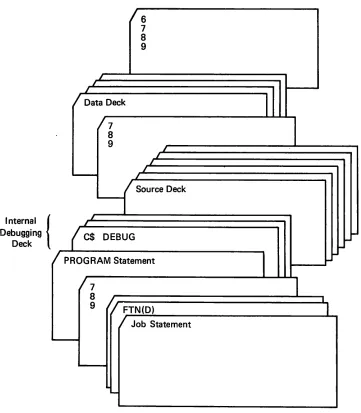
19-11 9-1 Example of Interspersed Debugging
19-13 Statements 9-18
19-15 9-2 External Debugging Deck 9-19 /*^\ 19-15 9-3 Example of Internal Debugging Deck 9-20
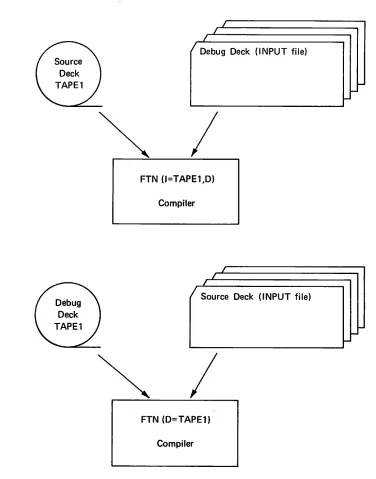
19-15 9-4 Example of External Deck on Separate
19-18 File 9-21
19-19
19-21 /<*S"X
19-23 TABLES 19-23
19-23 2-1 Mixed Type Arithmetic Expressions ^*^\ 19-23 With + - * / Operators 2-5
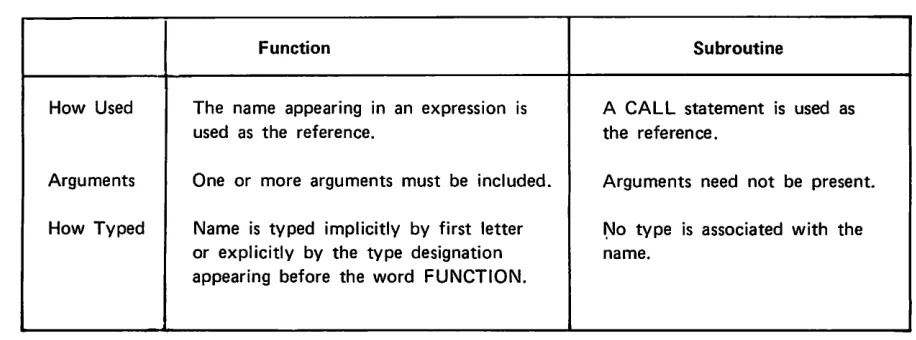
19-24 7-1 Differences Between a Function and
19-25 Subroutine Subprogram 7-1
19-25 7-2 Procedure and Subprogram Inter /Cc£$V
19-28 relationships 7-2
19-30 8-1 Intrinsic Functions 8-2 19-33 8-2 Basic External Functions 8-6
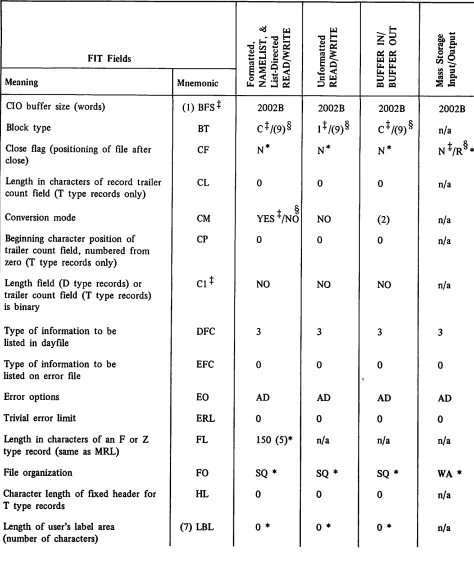
8-3 LABINFO Block Content 8-26 * r * ^ \ 16-1 Defaults for FIT Fields Under FORTRAN
20-1 Extended 16-3
/®ft\
>«"»fe\
FORTRAN LANGUAGE ELEMENTS
A FORTRAN program contains executable and non-executable statements. Executable statements specify actions the program is to take, and non-executable statements describe characteristics of operands, statement functions, arrangement of data, and format of data.
CODING FORTRAN STATEMENTS
The FORTRAN source program is written on the coding form illustrated in figure 1-1. Each line on the coding form represents an 80-column source line (terminal line or card image). The FORTRAN character set is used to code statements.
FORTRAN CHARACTER SET Alphabetic A to Z Numeric 0 to 9
Special = equal ) right parenthesis
+ plus , comma
- minus . decimal point * asterisk $ dollar sign
/ slash blank
(left parenthesis •£ or " quote
In addition, any character (Appendix A) may be used in Hollerith constants and in comments. Blanks are not significant except in Hollerith fields.
COLUMN USAGE
Column 1 C or $ or * indicates comment line
Columns 1-2 C$ indicates a debug directive if In DEBUG mode. Columns 1-2 C/ indicates a list directive.
Columns 1-5 Statement label.
Column 6 Any character other than blank or zero denotes continuation; does not apply to comment lines or list directives. A debug continuation line must contain C$ in columns 1-2.
Columns 7-72 Statement.
,-sS^v
/ ^ ^ V
j t c « ta tc S Ul 3
SS » te is s f -z Ul £ Ul c a 1 SC f a o I L IM < fi IN lil <
u . £
Z -1
o <• ■
o
o i
a S N <
a • o t a .
r-s 3 5 s 8 S 8 fi S 10 3 3 S 8 S 8 a a K 8 ID S a t-l l -< ■i i"-3 3 X a s s V CO *• » •* **2 V h •* s 8 8 8 S a a 2 t -?! 8 R 8 a 3 8 8 •a
1
•J) "2 z oa .-< 5 . "5 ^ -IN 8 .n" ■ST S" ■i -SS /-* ■» V w Ui »' /■■; *>» - 4 • *1 ~
•*+ * 1
< "■<» .
-iT
it
"5
ii ' - 5
j L o
■ y±
F » — .-o •a i-i 61 t v i i
. i n
M
• ri
T i IS) a ■^ 1 1 13
.*2. Z H '■ Oi a cv a. •5 UJ 01
o o z t-= tfl- I D
s ▶*■
f e s z . . — cvt "2
f > tu 111 •o
^$*\ <^*fi$\ < o < B to k f eo O U i cu
a
£ ,/t^^v1-2 60497800 A
0 S \
COMMENTS
^^ In column I a C, *, or $ indicates a comment line. Comments do not affect the program; they can be written in column 2 to 80 and can be placed anywhere within the program. If a comment occupies more than one line, each line must begin with C, *, or $ in column 1. In a comment line a character in column 6 /^ is not recognized as a continuation character. Comments can appear between continuation lines; they do not
interrupt the statement continuation.
/^ Comment lines following an END line are listed at the beginning of the next program unit unless the END line is continued.
f S T A T E M E N T L A B E L S
A statement label (any 1- to 5-digit integer) uniquely identifies a statement so it can be referenced by ^^ another statement. Statements that will not be referenced do not need labels. Blanks and leading zeros are
not significant. Labels need not occur in numerical order; however, a given label must not be used more than once in the same program unit. A label is known only in the program unit containing it; it cannot be refer-/^ enced from a different program unit. Any statement can be labeled, but only FORMAT and executable state
ment labels can be referenced by other statements. A label on a continuation line is ignored.
/ f S V
/fp**»
CONTINUATION
Statements are coded in columns 7-72. If a statement is longer than 66 columns, it can be continued on as many as 19 continuation lines. A character other than blank or zero in column 6 indicates a continuation line.
Column 1 can contain any character other than C, *, or $; columns 2, 3, 4, and 5 can contain any character. Any statement except a comment or a list directive can be continued, including the END statement.
COLUMNS 73-80
Any information can appear in columns 73-80 because they are not part of the statement. Entries in these columns are copied to the source program listing. They are generally used to order the lines in a deck, but can contain information for DEBUG AREA processing.
STATEMENT SEPARATOR
Several statements can be written on one line if they are separated by the special character $. Each state ment following a $ sign is treated as a separate statement. For example:
ACUM=24.$I=0 $ IDIFF-1970-1626 is the same as
ACUM =. 24. I - . ' 0 '
IDIFP = 1970-1626
$ can be used following any statement except FORMAT statements or list and debug directives. The state ment following $ cannot be labeled; the information following $ is treated exactly as if it were in column 7 on
BLANK LINES
Blank lines can be used freely between statements to produce blank lines on the source listing. Unlike a comment line; a blank line interrupts statement continuation, and the line following the blank line is the be ginning of a new statement. This line can optionally have the form of a continuation line.
DATA
No restrictions are imposed on the format of data read by the source program. Data input on cards is limited to 80 characters per card, but a record can span more than one card. The maximum length in characters for formatted, list directed, and NAMELIST records must agree with the length, r, specified in the PROGRAM statement. If r is not specified, a default value of 150 is used.
^ ^ s
/ " " ^ v
ORDERING OF STATEMENTS
The following table shows the general form of a FORTRAN program unit. Statements within a group can appear in any order, but groups must be ordered as shown. Comment lines can appear anywhere within the program.
STATEMENTS
■"""3^
1 OVERLAY
2
PROGRAM* FUNCTION* SUBROUTINE* BLOCK DATA 3 IMPLICIT
4
type COMMON DIMENSION EQUIVALENCE EXTERNAL* LEVEL
5 Statement function* definitions
in
§ §
nt
l i t
IS
i i i
Hi
6
ENTRY* Executable statements*
7 END
F<S^N.
Not allowed in BLOCK DATA Subprograms
Namelist group name must be defined before it is used
,**fs§\
x*"S"X
■ffspN
CONSTANTS
A constant is a fixed quantity. The seven types of constants are: integer, real, double precision, complex, octal, Hollerith, and logical.
INTEGER CONSTANT n1 n2 • ■ ' nm
n is a decimal digit (0-9) 1 <m < 18
pies:
2 3 7 - 7 4 + 1 3 6 7 7 2 -0024
An integer constant is a string of 1-18 decimal digits written without a decimal point. It may be positive, negative or zero. If the integer is positive, the plus sign may be omitted; if it is negative, the minus sign must be present. An integer constant must not contain a comma. The range of an integer constant is - (259-l) to 2s9-1 (2S9-1 = 576 460 752 303 423 487).
Examples of invalid integer constants:
46. (decimal point not allowed) 23A (letter not allowed)
7,200 (comma not allowed)
When an integer constant is used as a subscript, or as an index in a DO statement or implied DO, the maximum value is 217-1 (217-1 = 131 071), and the minimum is 1.
Integers used in multiplication, division, and exponentiation, whether constant or variable, should be in the range - (248 -1) to 248 -1 (248 -1 = 281 474 976 710 655). The result of such operations also should be in this
range. If an integer constant exceeding this range is used, a fatal diagnostic is issued. Any other cases are not diagnosed, and the results are unpredictable. For integer addition and subtraction (where both operands are integers), the full 60-bit word is used.
When values are converted from real to integer or from integer to real (in an expression or assignment state ment), the valid range is also from - (248-l) to 248-l . For values outside this range, the high order bits are lost and no diagnostic is provided.
REAL CONSTANT
n . n . n n . n . n E ± s . n E ± s n . E ± s n E ± s
/*""SsS\
A real constant consists of a string of decimal digits written with a decimal point or an exponent, or both.
C o m m a s a r e n o t a l l o w e d . I f t h e e x p o n e t i s p o s i t i v e , t h e p l u s s i g n i s o p t i o n a l . > * « % The range of a real constant is IO"293 to 10+322; if this range is exceeded, a diagnostic is printed. Precision is
approximately 14 decimal digits, and the constant is stored internally in one computer word. Examples:
7 . 5 - 3 . 2 2 + 4 0 0 0 . 2 3 7 9 8 . 1 4 . 5 - . 7 2 4 2 . E l 7 0 0 . E - 2 Examples of invalid real constants:
3 , 5 0 . ( c o m m a n o t a l l o w e d ) 2 . 5 A ( l e t t e r n o t a l l o w e d )
Optionally, a real constant can be followed by a decimal exponent, written as the letter E and an integer con stant indicating the power of ten by which the number is to be multiplied. If the E is present, the integer constant following the letter E must not be omitted. The sign may be omitted if the exponent is positive, but it must be present if the exponent is negative.
/**S"j\
*^*^s
Examples:
4 2 . E l ( 4 2 . X I O 1 = 4 2 0 . ) .00028E+5 (.00028 X IO5 = 28.)
6.205E12 (6.205 X IO12 = 6205000000000.) 8.0E+6 (8. x IO6 = 8000000.)
700.E-2 (700. X 10~2 = 7.)
7E20 (7. X IO20 = 70 000 000 000 000 000 0000.)
E x a m p l e o f i n v a l i d r e a l c o n s t a n t s : ^ 1 7. 2E3.4 exponent not an integer
DOUBLE PRECISION CONSTANT
| n.nD±s .nD±s n.D±s nD±s|
n C o e f fi c i e n t )
D ± s E x p o n e n t ( b a s e 1 0 )
/SfPV,
Double precision constants are written in the same way as real constants except the exponent is specified by the letter D instead of E. Double precision values are represented internally by two computer words, giving extra precision. A double precision constant is accurate to approximately 29 decimal digits. If the exponent is positive, the plus sign is optional.
Examples:
f * 5 . 8 3 4 D 2 ( 5 . 8 3 4 X I O 2 = 5 8 3 . 4 ) 14.D-5 (14. X IO"5 = .00014) 9.2D03 (9.2 x 103 = 9200.) ^ - 7 . D 2 ( - 7 . X 1 0 2 = - 7 0 0 . )
3120D4 (3120. X IO4 = 31200000.)
0^\
Examples of invalid double precision constants: 0 * ^ 7 . 2 D e x p o n e n t m i s s i n g
D5 exponent alone not allowed 1 2 , 1 . 3 D 2 c o m m a i l l e g a l
i 3 . 1 4 1 5 9 2 6 5 3 5 8 9 7 9 3 2 3 8 4 6 2 6 4 3 3 8 3 2 7 9 D a n d e x p o n e n t m i s s i n g
f * C O M P L E X C O N S T A N T
(M,r2)
r l R e a l p a r t r 2 I m a g i n a r y p a r t
Complex constants are written as a pair of real constants separated by a comma and enclosed in parentheses.
FORTRAN Coding Complex Number
( 1 . , 7 . 5 4 ) 1 . + 7 . 5 4 i i = y f ~ A ~ (-2.1E1, 3.24) -21. + 3.24i
The first constant represents the real part of the complex number, and the second constant represents the imaginary part. The parentheses are part of the constant and must always appear. Either constant may be preceded by a plus or minus sign. Complex values are represented internally by two consecutive computer words.
Both parts of complex constants must be real; they may not be integer. Examples of invalid complex constants:
(275, 3.24) 275 is an integer
(12.7D-4 16.1) comma missing and double precision not allowed 4.7E+2,l.942 parentheses missing
( 0 , 0 ) 0 i s a n i n t e g e r
Real constants which form the complex constant can range from IO"293 to 10+322. Division of complex numbers might result in underflow or overflow (see Appendix D) even when this range is not exceeded.
/*"3!"\
O C T A L C O N S T A N T . « * \
0f&$\
n 1 i • • • n m Bm
n is an octal digit, 0 through 7. 1 < m < 20 octal digits
An octal constant consists of 1 to 20 octal digits suffixed with the letter B. .-*..• /*m*\ Examples:
777777B 52525252B 500127345B Invalid octal constants:
8 9 2 7 7 7 B 8 a n d 9 a r e n o n - o c t a l d i g i t s . ■'■■'■, ; . :■; •■; * * • » & 7 7 0 0 0 0 0 0 0 0 7 7 7 7 7 5 2 5 2 5 2 5 2 B e x c e e d s 2 0 d i g i t s i . . .
0 7 7 6 6 O n o t a l l o w e d
An octal constant must not exceed 20 digits nor contain a non-octal digit. If it does, a fatal compiler diagnostic is printed. When fewer than 20 octal digits are specified, the digits are right justified and zero filled. Octal constants can be used anywhere integer constants can be used, except that they cannot be used as statement labels or statement label references, in a FORMAT statement, or as the character count when a Hollerith constant is specified.
They can be used in DO statements, expressions, and DATA statements, and as dimension specifications.
,|p\
Examples:
BAT - (I * 5252B) . OR. JAY masking expression
J = jMAXO (I, iooob , J, K+40B) octal constant used as parameter in function masking expression
arithmetic expression dimension specification NAME -.1 ..AND. 77700000B
J = (5252B + N)/K DIMENSION BUF(IOOOB)
When an octal constant is used in an expression, it assumes the type of the dominant operand of the expression (Table 2-1, section 2).
HOLLERITH CONSTANT
j*$pn
>ip£\
/*^\
0&>\
nHf nRf
nLf =£f-v±
f
H L
R
Unsigned decimal integer representing number of characters in string including blanks; must be greater than zero.
String of characters; must contain at least one character String delimiter
Left justified with blank fill Left justified with binary zero fill Right justified with binary zero fill
A Hollerith constant has two forms: one is an unsigned decimal integer followed by the letter H, L, or R and a string of characters; the other is a •?■= delimited string.
Hollerith constants can be used in DATA statements, as arguments in subroutine calls or function references, and in expressions. In an expression, they are limited to 10 characters; and in a DATA statement they should be limited to 10 characters (see section 3). If a Hollerith constant is used as an operand of an arithmetic operation, an informative diagnostic is given. If a Hollerith constant is used as an argument in a subprogram call, it is
,<«*r«t*X
The Hollerith specification in a FORMAT statement (see section 6) is not the same as a Hollerith constant.
Example:; "V./>- '":-"" ."* 'v-••-*•■.• •"-.''''' ,l' •' ;■' ;,'*.'* '"- - "" ' - -' ""-* "-/•"' "; - • •-'-- /
PROGRAM HOLL (OUTPUT)
I
*
6 H A B C D E F
* * * )
J-=6LABCDEF
K
• * '
6 R A B C D E F
A
L
=
* A B C D E F #
^
P R I N T
I t
I t I » J » J f K » K » L » L
^ '
'
1 F O R M A T < 0 2 4 t A 1 5 ) ^
- S T O P ^
END
/**"^"\ S t o r e d I n t e r n a l l y : D i s p l a y C o d e :
0 1 0 2 0 3 0 4 0 5 0 6 5 5 5 5 5 5 5 5
A B C D E F
H
f o r m a t
^
0 1 0 2 0 3 0 4 0 5 0 6 0 0 0 0 0 0 0 0
A B C D E F : : : :
I - f o r m a t
?
00000000010203040506 ::::ABC0EF R format'
0 1 0 2 0 3 0 4 0 5 0 6 5 5 5 5 5 5 5 5
A B C D E F
• *
f o r m a t
^
n H f a n d • J 6 f * ? f e ^ \
These two forms produce left-justified display code constants with 10 characters per word. If the string length is not a multiple of 10, the final word is blank filled.
y-^-W^V
nHf Examples:
18HTHIS IS A CONSTANT
7 H T H E E N D ^
19HRESULT NUMBER THREE
0 t E x a m p l e s : " - . , ,■ " • . ' ' ; " ' ' ' V ' - . - V ' . y : . . ' _ " - " . r « ■• . " ' _ ■ ' " ^
. F ( V . E Q . ¥ Y , E S - # Y » Y + 1 . ' _ ' , ' . ,■ ? • * . ' . . , . " . " ' . " . „ . " • - • - ' " ' -■' • ' ' • P R I N T I ^ S Q R T ^ . S Q R T R ) = , . . ; ; .
1 F O R M A T ( A 1 0 . F 1 0 . 2 ) " " *
P R I N T 2 , = # T E S T P A S S E D - ? * - . .■'■: ■■ > • . ; ' — ■* • • ^ 2 F O R M AT ( 2 A 1 0 )
I N T E G E R L I N E C 7 ) , N 1 T H R U 9 . / = % >
L O G I C A L N E W P A G E , ' , '
IF (NEWPAGE) LINE{7);= -£PAGE0-£ + N1 THRU 9
/***^\
-**s^^.
/ c r ^ \
nRf and nLf
These two forms produce display code constants with 10 characters per word. If the string length is not a multiple of 10, the final word is zero-filled, and justified; nRf indicates right justification and nLf indicates left justification.
nRf Example:
I VAL (IJ;- 1RA
nLf Example:
INDEX {■} - 3LLGO
LOGICAL CONSTANT
A logical constant takes the forms:
.TRUE. or .T. representing the value true .FALSE, or fF. representing the value false
The decimal points are part of the constant and must appear. Examples:
LOGICAL XI, X2
XI = .TRUE. X2 = .FALSE.
VARIABLES
A variable represents a quantity whose value can be varied; this value can be changed repeatedly during program execution. Variables are identified by a symbolic name of one to seven letters or digits, beginning with a letter. A variable is associated with a storage location; whenever a variable is used, it references the value currently in that location.
«"-^\
-ExjaMpleV" 1 ' *;" , : .'--.„,. " ^: /|^lPL(C^:pOMiUiE^f^ECISION (A)
\:CQWPL'EX>lprtA \, >'L . /
APPLE«ORANGES+PEARS
Ah, explicit declaration overrides an IMPLICIT declaration. Therefore, ALPHA is type complex; APPLE is type double precision.
Default typing of variables: A-H,0-Z Real
I-N Integer
INTEGER VARIABLES
An integer variable is a variable that is typed explicitly or implicitly as described under Variables.
The value range is - (2S9-1) to 2S9-1. When an integer variable is used as a subscript, the maximum value is 217-1. The resulting absolute value of conversion from integer to real, or real to integer must be less than 248. The operands, as well as the result, of an integer multiplication or division must be less than 248 in absolute value. If any of these restrictions are violated, the results are unpredictable. For integer addition and subtraction, the full 60-bit word is used; the resulting absolute value must be less than 2s9.
See section 4 for restrictions or integers used in DO statements. An integer variable occupies one word of memory.
Examples:
I T E M 1 N S U M J S U M N 7 2 J K 2 S 0 4
REAL VARIABLES
A real variable is a variable that is typed explicitly or implicitly as described under Variables.
The value range is IO"293 to 10+322 with approximately 14 significant digits of precision. A real variable occupies one word of storage.
Examples:
A V A R S U M 3 R E S U L T T O T A L 2 B E T A X X X X
1 - 1 2 6 0 4 9 7 8 0 0 A
/**^S*v
/-"SsX
00$$^
DOUBLE PRECISION VARIABLES
Double precision variables must be typed by a type declaration. The value of a double precision variable can range from IO"293 to 10+322 with approximately 29 significant digits of precision.
Double precision variables occupy two consecutive words of memory. The first word contains the more significant part of the number and the second contains the less significant part.
Example:
IMPLICIT DOUBLE PRECISION(A) DOUBLE PRECISION OMEGA.X.IOTA
The variables OMEGA, X, IOTA and all variables whose first letter is A are double precision. COMPLEX VARIABLES
Complex variables must be typed by a type declaration. A complex variable occupies two words of memory; each word contains a real number. The first word represents the real part of the number and the second
represents the imaginary part. Example:
COMPLEX ZERA,MU.LAMBDA
LOGICAL VARIABLES
V Logical variables must be typed by a type declaration. A logical variable has the value true or false and occupies one word of memory.
/**P\
\ E x a m p l e :
r L O G I C A L L 3 3 , P R A V D A , V A L U E
_
A R R A Y S
A FORTRAN array is a set of elements identified by a single name composed of one to seven letters and digits beginning with a letter. Each array element is referenced by the array name and a subscript. The type (^ of the array elements is determined by the array name in the same manner as the type of a variable is deter
mined by the variable name (see Variables in this section). The array name and its dimensions must be de clared in a DIMENSION or COMMON statement or a type declaration. Arrays can have one, two, or three dimensions.
REAL STOR{3,7) declares a two-dimensional array of three rows and seven columns
LOGICAL STOR(6.6,3) declares a three-dimensional array of six rows, six columns and three planes The entire array may be referenced by the unsubscripted array name when it is used as an item in an input/
output list, as an actual parameter, or in a DATA statement. In any other context, only the first element of the array is implied by the unsubscripted, array name.
Example 1:
The array N consists of six values in the order: 10, 55, 11, 72, 91, 7
i*C5*^y
N(l) value 10 N(2) value 55 N(3) value 11 N(4) value 72 N(5) value 91 N(6) value 7 Example 2:
The two-dimensional array TABLE (4,3) has four rows and three columns.
Column 1 Column 2 Column 3
Row 1 44 10 105
Row 2 72 20 200
Row 3 11 30
Row 4 91 76 714
To refer to the number in row two, column three write TABLE(2,3). TABLE(3,3) = 30 TABLE(1,1) = 44 TABLE(4,1) = 91
TABLE(4,4) would be outside the bounds of the array and results are unpredictable. Example 3: ,' .
. PROGRAM VARDIM <OUTPUT•TAPE6=bUTPUT>
COMMON X<4*3)
■
'"' • ' -REAL Y<6)
CALL IOTA <Xil2>
CALL IOTA <Y*6>
WRITE (6fl00) X*Y
100 FORMAT (* ARRAY X « *tl2E9„l»5X»*ARRAY Y * *6E9.1>
STOP
E N D
•
■
•
•
.
The program declares and references two arrays;' X is a two-dimensional'.array of 12 elements and Y is a one-dimensional array of six elements.
i*lip\
SUBSCRIPTS
A subscript indicates the position of a particular element in an array. A subscript consists of a pair of parentheses enclosing from one to three subscript expressions which are separated by commas. The subscript follows the array name. A subscript expression can be any valid arithmetic expression. If the value of the expression is not integer, it is truncated to integer.
If the number of subscript expressions is less than the number of declared dimensions, the compiler assumes the omitted subscripts have a value of one. The number of subscript expressions in a reference must not exceed the number of declared dimensions.
The value of a subscript must never be zero or negative. It should be less than or equal to the product
of the declared dimensions, or the reference will be outside the array. If the reference is outside the bounds of the array, results are unpredictable.
The amount of storage allocated to arrays is discussed under DIMENSION declarations in section 3. Valid subscript forms:
A(l.K)
B(l+2,J-3,6*K+2) LAST(6) ARAYD(1,3.2) STRING (3*K*ITEM+3)
Invalid subscript forms:
ATLAS (0) D(1 .GE. K) A(,l) or A(I„K)
zero subscript causes a reference outside of the array relational or logical expression illegal
commas can only be used to separate adjacent subscript expressions Example:
Plane 1
C o M C o l 2 C o l 3
Plane 2
Col 1 Col 2 Col 3
22 51
0 98
3 207 99
the single subscript
NEXT (3): represents NEXT (3,1,1)
NEXT (3,2)V-NEXT (2,2) represents represents NEXT (3,2,1) NEXT (2,2,1)
Plane 3
Col 1 Col 2 Col 3
2 1 552
77 60
85 100
ARRAY STRUCTURE
Arrays are stored in ascending locations: the value of the first subscript increases most rapidly, and the value of the last increases least rapidly.
Example:
/"""SIS
In an array declared as A(3,3,3), the elements of the array are stored by columns in ascending locations. Plane 1
Col 1 Col 2 Col 3
Plane 2 Col 1 Col 2 Col 3
/■Ss?K Row 1 A111 [-A121 i*A131
\
1
1
Row 2 A211 A221 A231
j ,
1 i
Row 3 A311-1 A 3 2 1 J A331 Row 1 Row 2 Row 3
A112 r A 1 2 2 r*A132
J
1
\A212 t A222 , A232
\
1
\A312-J A322-1 A332
Plane 3 Col 1 Col 2 Col 3 N*.
Row 1 Row 2 Row 3
A113 r~A123 r-A133
1
\ \A213 A223 A233
1
1
1
A313-1 A323J A333
The array is stored in linear sequence as follows: Location Relative Element to first Element A ( l , l , l )
A(2,l,l) A(3,l,l) A(l,2,l) A(2,2,l) A(3,2,l) A(l,3,l) A(2,3,l) A(3,3,l) A(l,l,2) A(2,l,2) 10 A(3,l,2) 11
A( 1,2,2) 12
A(2,2,2) 13
Location Relative Element to first Element
A(3,2,2) 14
A( 1,3,2) 15
A(2,3,2) 16
A(3,3,2) 17
A(l,l,3) 18
A(2,l,3) 19
A(3,l,3) 20
A( 1,2,3) 21
A(2,2,3) 22 A(3,2,3) 23 A(l,3,3) 24 A(2,3,3) 25 A(3,3,3) 26 0*&fa\
^ m $ \
To find the location of an element in the linear sequence of storage locations the following method can be used:
Number of Dimensions
Array
Dimension Subscript
Location of Element Relative to Starting Location
1 ALPHA(K) ALPHA(k) (k-1)XE
2 ALPHA(K.M) ALPHA(k,m) (k-1+KX(m-1) )XE
3 ALPHA(K,M,N) ALPHA(k,m,n) (k-1+KX(m-1+MX(n-1)))XE
K, M, and N are dimensions of the array.
k,m, and n are the subscript expression values of the array.
1 is subtracted from each subscript value because the subscript starts with 1, not 0.
E is length of the element. For real, logical, and integer arrays, E = 1. For complex and double precision arrays, E = 2.
Examples:
Subscript
Location of Element Relative to Starting Location INTEGER ALPHA (3) ALPHA(2) (2-1)X1 = 1
REAL ALPHA (3,3) ALPHA(3,1) (3-1+3X(1-1))X1 =2
COMPLEX ALPHA (3,3,3) ALPHA(3,2,1) (3-1+3X(2-1+3X(1-1)))X2 = 10
■ ^
^
i f f S ^ .
EXPRESSIONS AND ASSIGNMENT STATEMENTS
EXPRESSIONS
FORTRAN expressions are arithmetic, masking, logical and relational. Arithmetic and masking, expressions yield numeric values, and logical and relational expressions yield truth values.
ARITHMETIC EXPRESSIONS
An arithmetic expression is a sequence of unsigned constants, variables, array elements, and function references separated by operators and parentheses. For example,
(A-B)*F + C/D**E is a valid arithmetic expression.
The FORTRAN arithmetic operators are: + a d d i t i o n
subtraction * multiplication / d i v i s i o n ** exponentiation
An arithmetic expression may consist of a single constant, variable, array element, or function reference. If X is an expression, then (X) is an expression. If X and Y are expressions, then the following are expressions:
All operations must be specified explicitly. For example, to multiply two variables A and B, the expression A*B must be used. AB, (A)(B), or A.B will not result in multiplication.
Expression Value
3 . 7 8 5 4 2 Real constant 3.78542 A ( 2 * J ) Array element A (2*J) B I L L Variable BILL
SQRT(5.0)
xTT
A+B Sum of the values A and B
C*D/E Product of C times D divided by E
J * * I Value of J raised to the power of I (200 - 50)*2 300
EVALUATION OF EXPRESSIONS
The sequence in which an expression is evaluated is governed by the following rules, listed in descending precedence: 1. References to external functions are evaluated.
2. Arithmetic statement functions and intrinsic functions are expanded.
3. Subexpressions delimited by parentheses are evaluated, beginning with the innermost subexpressions. 4. Subexpressions defined by arithmetic, relational, and logical operators are evaluated according to the
following precedence hierarchy:
(exponentiation)
/ (division or multiplication) + (addition or subtraction) GT. .GE. XT. .LE. .EQ. .NE. (relational)
.NOT. (logical)
.AND. (logical)
.OR. (logical)
- f * * ^ * \ \
Ajfi^\
'e^\
^ S K
0*^>
5. Subexpressions containing operators of equal precedence are evaluated from left to right. However, individual operations that are mathematically associative and/or commutative may be reordered by the '
compiler to perform optimizations such as removal of repeated subexpressions or improvement of functional unit usage. The evaluation of the expression A/B*C is guaranteed to algebraically equal AC -5- B, not A -h BC, but the specific order of evaluation here is indeterminate. Subexpressions containing integer divisions are not reordered within the * / precedence level because the truncation resulting from an integer division renders these operations non-associative.
Unary addition and subtraction are treated as follows: +n the same as n
- n n e g a t e n
An array element (a subscripted variable) used in an expression requires the evaluation of its subscript. The type of the expression in which a function reference or subscript appears does not affect, nor is it affected by, the evaluation of the arguments or subscripts.
The evaluation of an expression having any of the following conditions is undefined: Negative-value quantity raised to a real, double precision, or complex exponent Zero-value quantity raised to a zero-value exponent
Infinite or indefinite operand (Appendix D)
Element for which a value is not mathematically defined, such as division by zero
If the error traceback option (T) is selected on the FTN control statement (section 10), the first three conditions produce informative diagnostics during execution. If the traceback option is not selected, a mode error message is printed (Appendix D).
In the case of invalid exponentiation, a diagnostic might be issued by one of the library routines ALOG, EXP, or DEXP when the exponent is real, complex, or double precision, and the base is integer, real or double precision. Two operators must not be used together. A*-B and Z/ + X are not allowed. However, a unary + or - can
be separated from another operator in an expression by using parentheses. For example, A*(-B) andZ/(+X) Valid expressions
B*-A andX/-Y*z Invalid expressions
Each left parenthesis must have a corresponding right parenthesis. Example:
(F + (X * Y) Incorrect, right parenthesis missing (F + (X * Y)) Correct
Examples:
In the expression A-B*C
^^\
0^$$\ The expression A/B-C*D**E is evaluated as follows:
D is raised to the power of E. A is divided by B.
C is multiplied by the result of D**E.
The product of C*D**E is subtracted from the quotient of A divided by B.
The expression -A**C is evaluated as 0-A**C; A is first raised to the power of C and the result is then subtracted from zero.
The expression A*B*C may be evaluated as ((A*B)*C), ((A*C)*B) or (A*(B*C)), since the operator * is associative.
The expression A**B**C is evaluated as ((A**B)**C), since the operator ** is not associative. ,**■*■■* Dividing an integer by another integer yields a truncated result; 11/3 produces the result 3. Therefore,
when an integer expression is evaluated from left to right, J/K*I may give a different result than I*J/K. '^ Example:
I « 4 J = 3 K = 2 J
J / K * I I * J / K }
I
3 / 2 * 4 = 4 4 * 3 / 2 - 6
An integer divided by an integer of larger magnitude yields the result 0.
E x a m p l e : ' • *■%
N = 2 4 M = 2 7 K = 2 R/M*K
24/27*2 - 0
Examples of valid expressions:
3 . 1 4 1 5 9 B + 16.427
( X B A R + ( B ( I , J + I , K ) / 3 . 0 ) )
- ( C + D E L T A * A E R O ) ^
/*"S\
( - B - S Q R T ( B * * 2 - ( 4 * A * C ) ) ) / ( 2 . 0 * A ) GROSS - (TAX*0.04)
TEMP + V(M,AMAX1(A,B))*Y**C/ (H-FACT(K+3))
TYPE OF ARITHMETIC EXPRESSIONS
An arithmetic expression may be of type integer, real, double precision, or complex. The order of dominance from highest to lowest is as follows:
Complex
Double Precision Real
[image:35.610.127.532.366.591.2]Integer
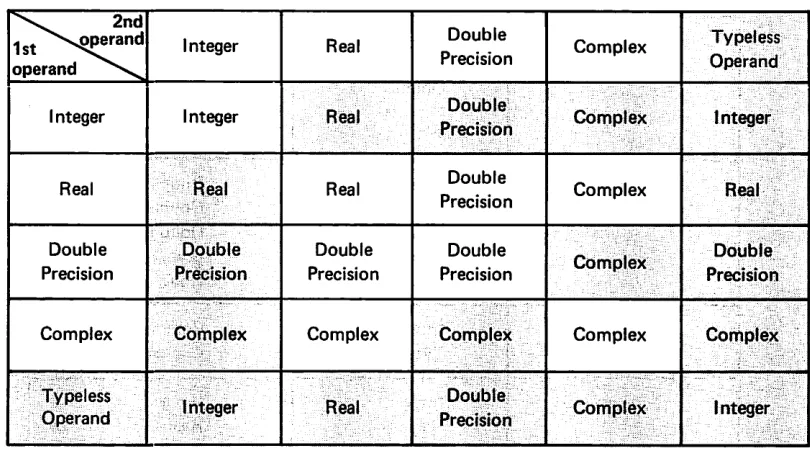
Table 2-1. Mixed Type Arithmetic Expressions with + - * / Operators
\ . 2 n d 1st^vjoperand o p e r a n d n ^
Integer Real Double
Precision Complex
Typeless Operand Integer Integer Real PrecisionDouble Complex Integer
Real Real Real Double
Precision Complex Real Double
Precision
Double Precision
Double Precision
Double
Precision Complex
Double Precision Complex Complex Complex Complex Complex Complex Typeless
Operand Integer Real
Double
Precision Complex Integer
When an expression contains operands of different types, type conversion takes place during evaluation. Before each operation is performed, operands are converted to the type of the dominant operand. Thus the type of the value of the expression is determined by the dominant operand. For example, in the expression A*B-I/J, A is multiplied by B, I is divided by J as integer, converted to real, and subtracted from the result of A multiplied by B.
EXPONENTIATION
In exponentiation, the following types of base and exponent are permitted: Base Integer Real Double Precision Complex Typeless Exponent
Integer, Real, Double Precision, Complex, Typeless Integer, Real, Double Precision, Complex, Typeless Integer, Real, Double Precision, Complex, Typeless
Integer, Typeless
Integer, Real, Double Precision, Complex, Typeless
/""SSi"!
.f**"StN
The exponentation is evaluated from left to right. The expression A**B**C is evaluated, as ((A**B)**C) In an expression of the form A**B the type of the result is determined as follows:
Type of A Type of B Type of Resultof A**B
Integer Integer Real Double Complex . Typeless Integer Real Double Complex Integer Real Integer Real Double Complex "Typeless Real Real Double Cpmplex Real -,'. Double Integer Real Double Complex Typeless Double Double Double Complex Double Complex Integer Typeless Complex Complex Typeless Integer
Real , Double Cornplex > Typeless Integer* . Real Double Complex Integer
The expression -2**2 is equivalent to 0-2**2. An exponent may be an expression. The following examples are all acceptable.
B**2. B**N B**(2*N-1) (A+B)**(-J)
A negetive exponent must be enclosed in parentheses: A**(-B)
NSUM**(-J)
2-6 60497800 D
/*f^\
When the exponent is of a type other than integer, exponentiation is performed by means of a call to FORTRAN Common Library routines. The value of the result in these cases is determined according to the formula:
xy = ey<Mx))
/*f^\
where In is the natural logarithm function. •fjf^V Examples:
Expression Type
0$^s
C VA B * * ( I - 3 ) Real**Integer
J p \ D**B
C * * I
Real** Real Complex** Integer JsP^V
B A S E ( M , K ) * * 2 . 1 Double Precision
**Real
/fPN
K * * 5 Integer* *Integer 3 1 4 D - 0 2 * * 3 . 1 4 D - 0 2 Double Precision
**Double Precision
Result
Real Real Complex
Double Precision
Integer
Double Precision
RELATIONAL EXPRESSIONS
'1 o p a .
a|,a2 op
Arithmetic or masking expression Relational operator
A relational expression is constructed from arithmetic or masking expressions and relational operators. Arithmetic expressions may be type integer, real, double precision, or complex. The relational operators are:
.GT. Greater than
.GE. Greater than or equal to
.LT. Less than
.LE. Less than or equal to
.EQ. Equal to
Two expressions separated by a relational operator constitute a basic logical element. The value of this element is either true or false. If the expressions satisfy the relation specified by the operator, the value is
true; if not, it is false. For example:
X + Y . G T. 5 . 3
If X + Y is greater than 5.3 the value of the expression is true. If X + Y is less than or equal to 5.3 the value of the expression is false.
A relational expression can have only two operands combined by one operator, a, op a2 op a3 is not valid. Relational operands may be of type integer, real, double precision, or complex, but not logical. With complex operands, the relational operators .EQ. and .NE. test for equality oh both the real and imaginary parts; for all other relational operators only the real parts are compared.
Examples: J.LT.ITEM 580.2 .GT. VAR
B . GE. (2.7,5. 9E3) real part of cornplex number is used in evaluation E.EQ..5
(I) . EQ . (J( K) )
C . LT. 1 . 5 D 4 m o s t s i g n i fi c a n t p a r t o f d o u b l e p r e c i s i o n n u m b e r i s u s e d i n evaluation
Relational expressions are evaluated according to the rules governing arithmetic expressions. Each expression is evaluated and compared with zero to determine the truth value. For example, the expression
p.EQ.q is equivalent to the question, does p - q = 0? q is subtracted from p and the result is tested for zero. ^% If the difference is zero or minus zero the relation is true. Otherwise, the relation is false.
I f p i s 0 a n d q i s - 0 t h e r e l a t i o n i s t r u e . . - * * * % Expressions are evaluated from left to right. Parentheses enclosing an operand do not affect evaluation; for
e x a m p l e , t h e f o l l o w i n g r e l a t i o n a l e x p r e s s i o n s a r e e q u i v a l e n t : * * ® \ A.GT.B
<**^K
A . G T . ( B ) '
( A ) . G T . B
( A ) . G T . ( B )
ySSsEX
>^*^\
Examples:
JPN
REAL A A . G T. 7 2 0
INTEGER I,J I . E Q . J ( K ) ( I ) . E Q . ( N * J ) B . L E . 3 . 7 5 4 Z . LT. 3 5 . 3 D + 5
Examples of invalid expressions: A .GT. 720 .LE. 900 B .LE. 3.754 .EQ. C
DOUBLE PRECISION BILL, PAY BILL .LT. PAY
A+B.GE.Z**2 300.+B.EQ.A-Z
.5+2. .GT. .8+AMNT
2 relational operators must not appear in a relational expression
LOGICAL EXPRESSIONS L. op L, op L, op ...L, L,...Ln
op
logical operand or relational expression logical operator
A logical expression is a sequence of logical constants, logical variables, logical array elements, or relational expressions separated by logical operators and possibly parentheses. After evaluation, a logical expression has the value true or false.
Logical operators: .NOT. or .N. .AND. or ,A. .OR. or .0.
logical negation logical multiplication inclusive OR
The logical operators are defined as follows (p and q represent LOGICAL expressions): .NOT.p
p.AND.q p.OR.q
If p is true, .NOT.p has the value false. If p is false, .NOT.p has the value true.
If p and q are both true, p.AND.q has the value true. Otherwise, false. If either p or q, or both, are true then p.OR.q has the value true. If both p and q are false, then p.OR.q has the value false.
Truth Table
p q p .AND. q p .OR. q .NOT. p
T T T T F
T F F T F
F T F T T
F F F F T
If precedence is not established explicitly by parentheses, operations are executed in the following order: . N O T . . A N D . . O R .
Example:
C
c
c
c
PROGRAM L0GIC,(0UTPUTtTAPE6=0UTPUT)
THIS PROGRAM PRINTS OUT A TRUTH TABLE FOR LOGICAL
OPERATIONS WITH P AND Q
LOGICAL P»Q»L0GNEG,L0GMLT»L0GSUM»TABLE(4»2)
DATA TABLE/.TRUE.t.TRUE.
♦
.FALSfc.*.FALSE.».TRUE.».FALSE.t.TRUE.9
1.FALSE./
WRITE(6»10)
1 0
F 0 R M A T < 6 1 H 1
P
Q
. N O T .
Q
P
. A N D
Q
P
. 0
1R. Q /10X» 51UH-))
DO 20 I = l*«f
LOGNEG = .NOT. TAbLE<I*2)
LOGMLT = TA6LE<I»D -AND. TABLE(I»2> LOGSUM = TA6LEU»1) .OR. TABLE(I»2>
20 WRITE(6»30) (TABLE(I 9J),J=l»2>t LOGNEG, LOGMLT* LOGSUM 3 0 F O R M AT U H 0 * 5 ( L 1 D )
STOP END
>**^v
/*""*s*\
2-10 60497800 A
0SS,
Output:
p U . N O T . Q P . A N D U P . O K . Q
T T F T T
T F T F T
F T F F T
F F T F F
The operator .NOT. which indicates logical negation appears in the form: .NOT. p
.NOT. can appear in combination with .AND. or .OR. only as follows (p and q are logical expressions): p .AND..NOT. q
p .OR..NOT. q p .AND.(.NOT. q ) p .OR.(.NOT. q )
.NOT. can appear adjacent to itself only when the second operator is enclosed in parentheses, as in .NOT. (.NOT.p). Two logical operators can appear in sequence only in the forms .OR..NOT. and .AND..NOT.
Valid logical expressions, where M, L, and Z are logical variables, are: .NOT.L
.NOT.(X .GT. Y) X .GT. Y .AND..NOT.Z (L) .AND. M
Invalid logical expressions, where P and R are logical variables, are:
.AND. P .AND. must be preceded by a logical expression K .EQ. 1 .OR. 2 .OR. must be followed by a logical expression
Examples:
A, X, B, C, J, L, and K are type logical. Expression h § ^ ; i ^ i ^
A .AND. .NOT. X -:. A|^A;.:;^i;N :|;^Z-^H;10-3 ©f .NOT.B
S»^l|g§^
A.AND.C
HSSiiiSJSSSS^SB
J.OR.L.OR.Kiiiiiii§#gig^5^^ig
Examples:
B-C < A < B+C is written asB-C .LE. A .AND. A .LE. B+C
FICA >176. andPAYNB = 5889. is written FICA .GT. 176. .AND. PAYNB .EQ. 5889. MASKING EXPRESSIONS
Masking expressions are similar to logical expressions, but the elements of the masking expressions are any type of variable, constant, or expression other than logical.
Examples:
J .AND. N .NOT. 55 ,NOT. (B) KAY .OR. 63
Masking operators are identical in appearance to logical operators but meanings differ. In order of dominance from highest to lowest, they are:
.NOT. or .N. .AND. or .A. .OR. or .0.
Complement the operand
Form the bit-by-bit logical product (AND) of two operands Form the bit-by-bit logical sum (OR) of two operands
The enclosing decimal points are part of the operator and must be present. Masking operators are distinguished from logical operators by non-logical operands.
Examples:
Expression Alternative Form
B .OR. D B .0. D
A .AND. .NOT. C A . A . . N . C BILL .AND. BOB B I L L . . A . B O B
I .OR. J- .OR. K .OR. N I . 0 . J . 0 . K . 0 . N . ( . N O T. ( . n o t . ( , : n o t . A .OR. B ) ) ) ( . N . ( . N . ( . N . A . O R . B ) ) )
/fSofev
/r*^\
'*t*^?X
The operands may be any type variable, constant, or expression (other than logical).
■ E x a m p l e s :
0 m \ T A X . A N D . I N T
\ . N O T . 5 5
734 .OR. 82
r A . A N D . 7 7 B B . O R . C L o g i c a l s u m o f t h e c o n t e n t s o f B a n d CE x t r a c t t h e l o w o r d e r 6 b i t s o f A M . A N D . . N O T. 7 7 B C l e a r t h e l o w o r d e r 6 b i t s o f M .
,***S\
v In masking operations operands are considered to have no type. If either operand is type COMPLEX, operations are performed only on the real part. If the operand is DOUBLE PRECISION only the most 0$zs significant word is used. The operation is performed bit-by-bit on the entire 60-bit word. For simplicity, V only 10 bits are shown in the following examples. Masking operations are performed as follows:
^ J = 0 1 0 1 0 1 1 1 0 1 a n d I = 1 1 0 0 1 1 0 1 0 1 J .AND. I ■ '
V The bit-by-bit logical product is formed
^ • N J 0 1 0 1 0 1 1 1 0 1 ■/■_ , '■,
I 1100110101
ifs^V
0100010101 Result after masking J .OR. I
The bit-by-bit logical sum is formed J 0101011101
I 1100110101
101111101 Result after masking .NOT. Complement the operand
.NOT. I I 1100110101
,<eS8\
Using vthe following values:
•';-:;;'/•.;-*'■/. v?X 77770060600000000000 ^.V.\''JV". .".'.;'^-.- D 00000000777777777777 . ' . , _ , . B 0 0 0 0 0 0 0 0 0 0 0 0 0 0 0 0 1 7 6 3 ; , ; C 2 0 0 4 5 0 0 0 0 0 0 0 0 0 0 0 0 0 0 0 Masking operations produce the following octal results:
octal constant ; octal constant
octal form of integer constant octal form of real constant
y«£#&\
^ N O T ^ A / - ^ • ; A A N D i . C " -' ■A \ a N D ; " ; N , Q T. . C " ' ' ^ ^ O J t . : ' ^ O T. ' ' D - ;
Invalid example: ;:'; LOGICAL. A
A .AND. B .OR. C
is. : 00007777777777777777 is . -20040000000000000000 is 57730000000000000000. is 77777777000000001763
masking expression must not contain logical operand Example:
1 PROGRAM MASK CINPUT,OUTPUT)FORMAT <iHi»5X»^HNAME»///> PRINT i
2 FORMAT <3A1Q,I1>
3 READ 2,LNAME,FNAHE,ISTATE,KST0P IFCKSTOP.EQ.DSTCP
C IF FIRST TWO CHARACTERS OF ISTATE NOT EQUAL TO CA REA0 NEXT CARO
IFf(ISTATE»AND.77770000000000000000B).NE.(2HCA.ANOo777700000000000 KOOO00B)) GO TO 3
11 F O R M AT < 5 X , 2 A 1 0 > 10 PRINT 11,LNAM6,FNAME
GO TO 3 END
ASSIGNMENT STATEMENTS
An assignment statement evaluates an expression and assigns this value to a variable or array element. The statement is written as follows:
v = expression
v is a variable or an array element
^3k£V