University of Huddersfield Repository
Pein, Raoul Pascal, Lu, Joan and Stav, John Birger
Integrating Mobile Computing Solutions into Distance Learning Environments
Original Citation
Pein, Raoul Pascal, Lu, Joan and Stav, John Birger (2009) Integrating Mobile Computing Solutions
into Distance Learning Environments. In: International Conference on Mobile Communications and
Pervasive Computing (MCPC 2009), 23rd25th March 2009, Leipzig, Germany.
This version is available at http://eprints.hud.ac.uk/id/eprint/7668/
The University Repository is a digital collection of the research output of the
University, available on Open Access. Copyright and Moral Rights for the items
on this site are retained by the individual author and/or other copyright owners.
Users may access full items free of charge; copies of full text items generally
can be reproduced, displayed or performed and given to third parties in any
format or medium for personal research or study, educational or notforprofit
purposes without prior permission or charge, provided:
•
The authors, title and full bibliographic details is credited in any copy;
•
A hyperlink and/or URL is included for the original metadata page; and
•
The content is not changed in any way.
For more information, including our policy and submission procedure, please
contact the Repository Team at: [email protected].
Integrating Mobile Computing Solutions into Distance Learning Environments
Raoul Pascal Pein
1, Joan Lu
1and John Birger Stav
21School of Computing and Engineering, Department of Informatics, University of Huddersfield
Queensgate, Huddersfield HD1 3DH, United Kingdom
2Faculty of Technology, Sør-Trøndelag University College
N7004 Trondheim, Norway
Email:{r.p.pein; j.lu}@hud.ac.uk, [email protected]
Abstract: This paper assumes that in the near future most stu-dents at universities are in possession of a mobile device with the ability to access the world wide web and display multime-dia content. Observing the current development trends of mo-bile hardware, this seems to be justified. Even common momo-bile phones have multiple wireless communication interfaces and colour displays. More expensive devices are equipped with a large touch screen and are able to play videos in a reason-able quality. It is attempted to exploit this development and en-hance the learning experience of students by gradually building up a pervasive computing infrastructure. A design is proposed that offers an open and extensible (distance) learning environ-ment. Flexible standards such as the Hypertext Transfer Pro-tocol (HTTP) for communication and the Extensible Markup Language (XML) for document transfer are used. This design allows to access and modify learning material stored in learn-ing management systems (LMS), multimedia repositories and electronic voting system (EVS) locally and remotely. The sup-ported technology ranges from PCs and laptops to mobile de-vices.
Keywords: mobile devices, education, distance learning, elec-tronic voting system, multimedia, learning management sys-tem
1. Introduction
Mobile computing in learning environments is getting popular in recent years [15, 11, 16]. A typical example is that learners and teachers can make conversation through a handy mobile device. This research is to develop a novel system of web-based services to achieve that students have mobile access to all relevant learning material at any time and any place. The proposed structure propagates the use of open and flexible standards to allow adaptive representation of the content to match the constraints of the receiving device. It is assumed that in the near future most students will have a mobile device with a reasonable wireless connectivity and display.
Quite clearly, the use of mobile devices in education is capable of yielding many advantages, if introduced properly. At the current stage, there are learning management systems (LMS) solutions available and also systems that link them with an electronic voting system (EVS) or multimedia repositories. The LMS are growing in functionality more and more and may become an universal knowledge data base for a university or school. They may not only store name lists and course
documents, but also provide a source for multimedia content. Decreasing storage prices and increasing bandwidths allow to offer those services for low cost. From a distance it becomes clear that a modern e-learning environment introduces various intertwined services.
Learning seems to be more efficient, if it includes interac-tion and dialogue [6]. It can be argued that it is impossible to introduce very small learning groups everywhere to optimize the contact between teacher and learner. The interaction de-creases even further, if distance learning technology such as video streaming is used [13].
In principle, the required functionality can be made accessi-ble on mobile devices. Sufficiently powerful devices are even able to display multimedia content. This may simplify com-munication via LMS and other sources, where lecture material is made available for students. On top of the document man-aging these systems usually provide facilities to ask questions, discuss topics and send private messages.
1.1 Identification of Problems
Most teaching in universities and schools traditionally relies on lectures, meaning a single lecturer standing in front of a large audience. The audience is usually passive and listens to the speech of the teacher. In this kind of scenario, a real dialogue between teacher and learner cannot be established. Occasional questions where the learners either reply verbally or by show-ing hands are still no dialogue as described by Laurillard [6]. The majority of learners is not urged to think about the ques-tion or even justify a response. Thus, the feedback the lecturer receives is very low and does not indicate misunderstandings or other potential problems.
Current learning systems are usually relatively isolated ap-plications that only run in a specific environment. The data pro-vided is either stored in proprietary data formats or can only be exported in something like comma separated value (CSV) files, which are undeniably either too simplified or too complex to process easily. Also the communication interfaces and proto-cols are often highly specific.
1.2 Aims & Objectives
It is attempted to enhance the learning experience of students by gradually building up a pervasive computing infrastructure. The research focuses on the construction of an evolutionary design to allow a stepwise improvement of mobile computing support in educational environments and distance learning. The basic use case scenario for this research is described by Stav et al. [14].
The aim is the development of a generic system design to offer services for static and mobile devices that improve interaction between teacher and audience, independent from the location of each person. A common learning service is the LMS functionality which may be enriched with EVS and a multimedia repository.
To be flexible and extensible, the system should be pred-icated on web services and agent technology. This allows to swap or add components if required. Each service should offer a simple interface and share data in an easily readable format. This allows user interfaces to be independent from the technol-ogy used and scalable to different input-output-devices.
2. Research Approach
In this paper, the use of an agent based design with flexible standard technology is suggested. This way, unnecessary over-head that may overburden simple devices is avoided. Yet, much more importantly an open system is provided that can be easily integrated in existing systems or can be extended in the future. The following use-case is assumed: A university wants to enrich an existing LMS with educational EVS in lectures and a multimedia repository. The e-learning environment shall grow in the subsequent years and gradually offer better accessibility. At the same time, a distance learning solution shall be merged into the system [14].
Initially, the EVS is planned to be run in only a single lecture theatre for 100 students. Later, more rooms shall be equipped and students shall use their personal mobile devices for voting and browsing the on-line content. The response system shall also be working in distance learning set-ups with video streaming [12, 13]. The multimedia repository is filled with initial annotated example data of medical and technical images. Those samples visualize things like different stages of diseases or structural weaknesses of mechanical components. This illustrative material shall be used in interactive questions during lectures and also be accessible on-line.
This environment suggests an agent based architecture, in which every part offers and/or consumes services from other parts. Each part manages a set of resources (e.g. slides, mul-tiple choice questions) that can be read or modified by oth-ers (e.g. beamer display, voting device). The representation of each resource depends on the technical capabilities of the con-sumer (e.g. handset, monitor). Thus, each concon-sumer should be able to request a preferred response format. These character-istics match the Representational State Transfer (REST) style [4].
This style recommends to keep the transaction context on the clients, rather than on the server, which induces a high vis-ibility, reliability, and scalability. Even though this inevitably
increases the communication overhead, the impact on the mo-bile voting is expected to be rather low. In the voting scenario, the context merely includes student authentication in order to submit a valid choice. This is an atomic transaction without further dependencies. This message should easily fit into a sin-gle transmission frame containing merely header information and the target URL. In return, the concept of caching can be applied to minimize the transfer of multimedia content.
Taking a look at the sophisticated EVS systems during elec-tions shows technologies which may also be useful in learning environments. An example is the choice of voting devices. Cur-rent EVS systems in lectures require special hardware during the lecture. If the questions are available on-line, other voting devices are possible. A suggested framework for elections at universities proposes the use of various input devices [10]. Of course, ballot-rigging in simple education obviously has a less hazardous impact than in politics. Security issues do not have to be taken as seriously, making things much easier.
Getting responses from the whole audience is only feasible in very small groups and does not scale very well. The intro-duction of EVS [7, 1] to improve the situation requires to equip each person in the audience with a voting device. This raises the question, how these are distributed or if learners may also use their own mobile equipment for answering. In the latter case, it is important to have access to the voting software and to register non-system hardware in it.
Concerning multimedia documents, even modern mobile devices only have a restricted screen size. While the progress of technology introduces higher memory capacities and faster connections, the display size itself has physical boundaries. Unless this could be solved by something like folding screens or miniature beamer technology, this will remain a serious con-straint. Hence, specially designed user interfaces for mobile devices are required. The screen resolution/size is very low and does not allow to show many preview images at the same time. For those devices, the images need to be scaled down, which also saves bandwidth. A reasonable resolution for big screens seems to be at least 128x128 pixels, whereas small devices may require 64x64 or even smaller.
2.1 Techniques Deployed
As a design following the REST style is recommended, the use of a widely used communication protocol such as the Hy-pertext Transfer Protocol (HTTP) is obvious. All required re-sources can be made accessible via Uniform Resource Loca-tor (URL). This way, most clients are able to communicate with the services. Linking all resources to a URL enables users to access especially multimedia content with their preferred software. Grounding the system on HTTP in the first place, instantly allows to make all services accessible virtually any-where in the world wide web. Additionally alternatives such as the Wireless Application Protocol (WAP) or the Short Message Service (SMS) could be offered for mobile clients to provide a simplified gateway to the system.
en-sures a high portability and allows external services to process the data easily. Further, it allows for the design of different user interfaces for a range of devices without much additional effort.
To visualize information, the best format needs to be cho-sen for each single case. Texts are usually displayable directly on most devices, either unformatted or formatted. Depending on the capabilities of the client device, the documents could be converted into formats such as HyperText Markup Language (HTML), Extensible Hypertext Markup Language (XHTML) or Wireless Markup Language (WML). The most severe issue would be the coding of special characters in very simple envi-ronments. A promising format for complex documents could be the OpenDocument format (ODF), which is not specialized for web browsing, but is also based on XML and is well docu-mented [2].
In the use case discussed, pixel images and video streams are used during lectures. In order to keep the additional net-work traffic at a reasonable level this paper focuses on im-ages but maintains space for further extensions. The original images should be store lossless, which may be done in the Tagged Image File Format (TIFF). Previews should prefer-ably use common formats, such as Joint Photographic Experts Group (JPEG) and Portable Network Graphics (PNG) due to the wide support by clients. For vector graphics, such as the visualization of statistics, using the Scalable Vector Graphics (SVG) format is advisable, which is also derived from XML. In this scenario, the teacher may still include other media con-tent such as audio/video that is displayed at the front and does not need to be widely distributed to wireless computers at that time.
For the transmission between voting device and voting server, several options are available. Commercial handsets of-ten use infra-red or any type of radio. Other devices that can be used for wireless voting, such as mobile phones or PDAs (other gadgets with wireless transmission included) offer a wide range of solutions with individual advantages and draw-backs. The common Infrared Data Association (IrDA) is the only widespread optical system, but is unsuitable due to the short transmission range and error-proneness. Mobile phones use communication such as Global System for Mobile com-munications (GSM), General Packet Radio Service (GPRS) or Universal Mobile Telecommunications System (UMTS), which is in most scenarios reliable in lecture theatres (to the displeasure of lecturers). For this service, a commercial net-work provider needs to be paid for the transmissions. In en-closed areas the use of Wi-Fi (IEEE 802.11), Bluetooth or ZigBee offers a cheap and easily controllable alternative. Yet, not all mobile devices offer these options.
In the initial stage of EVS introduction, there should be sufficient distributed handsets available for the audience. For transmission, Wi-Fi technology is used in the initial setting. It provides a high bandwidth and reliability for lecture theatres and a low effort to set it up. A single access point should be able to handle at least 25 clients at the same time [5].
In the future, the handsets could be gradually substituted by personal devices such as mobile phones and PDAs. As many people already carry around a mobile device with wireless
capabilities, these should also be used for voting. A possible drawback is that the attention of the audience may be distracted to the device, especially if it offers further services such as chatting or games. In the future, other wireless options may become available.
An example for a multimedia repository is described in the master thesis and a further publication of one of the authors [8, 9]. It provides access to image data in multiple ways and introduces a query language for mixed textual and content based queries.
2.2 Methods
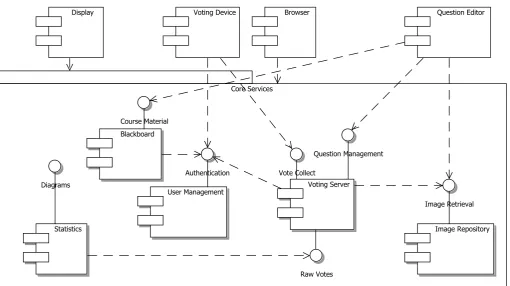
The framework design is separated into two main layers: the core services and various clients. The component diagram (fig. 1) is simplified and omits the persistence layer. It is considered to be a minimal system, containing all the relevant services for an e-learning environment offering LMS, EVS and multimedia content. As the design is meant to be openly accessible and extensible, further services could be added later on.
Each one of the core services offers a set of interfaces that can be accessed by other services or external clients. The main tasks and interfaces are described below.
The user management has a very important task. It holds information of all users that are allowed to use the restricted services. In this service, students could securely register mo-bile devices for detailed information access and the permit for participating in votes.
The LMS offers the common services. It is a central com-munication point where lecturers and students exchange infor-mation about different modules and other university related content. It also acts as a document repository for course ma-terial where students can find the slides of a lecture, tasks, assignments and additional information. In the use-case de-scribed above, the LMS should also be used to publish the URLs of multimedia content (i.e. images) which is stored in the image repository.
The image repository is a specialized storage for images. This service could either store the original images themselves or only the corresponding URL plus downscaled preview im-ages. The main benefits of this service would be the ability to perform content-based image retrieval (CBIR).
Question Editor
Core Services
Vote Collect
User Management Blackboard
Diagrams
Image Repository Statistics
Raw Votes
Image Retrieval Course Material
Voting Server Question Management
Authentication Voting Device
[image:5.595.45.556.64.350.2]Display Browser
Fig. 1. The Framework Component Diagram shows the main interaction between the services. The persistence layer and global authentication links are omitted. Clients that may access all services point to the complete subsystem.
In the simplest case, all the services are directly accessed via the HTTP protocol. However, mobile devices may have some specific needs. In addition to the appropriate transmis-sion hardware on the university side, it is crucial to support WML and maybe a plain format for SMS texts. Those devices could either directly request their preferred format from each server or need to be routed through a gateway that translates the requests into HTTP. It is hoped that gateways are only a transitional solution and can be omitted at some point in the future.
The second part of the proposed system deals with the de-vices for interaction. The hardware can range from desktop PCs down to minimal mobile devices.
The most powerful part is the browser. It is independent from the hardware, and its main task is to browse the services along different links. The browser accepts URLs as input and loads the content from the given location. The returned docu-ment is usually formatted in an XML derived format that has been requested by the browser. Inside the document should preferably be a set of further URLs to continue browsing.
To meet the lecture and EVS requirements, three special-ized components need to be considered. First of all, lectur-ers can create slides and questions with a question editor. The slides are uploaded into the LMS and contain links to the cor-responding votes, which are stored on the voting server. Those slides may also contain links to multimedia content from the repository. During a lecture, the slides appear on a display, vis-ible to all students. For every question, the voting server waits for the votes from students, who can submit their choice with any previously registered voting device. After a certain time,
the display reads the newly generated charts from the statistics service.
In the diagram, the display is an independent output-only component. In a real application, this is usually the computer at the lecturers desk which is connected to the beamer. Unlike in simple EVS scenarios, the machine containing the presentation and the machine displaying it, are separated. Depending on the specific needs, the voting server can remain accessible, even if the machine in the lecture theatre (display) is switched off.
2.3 Implementation
As mentioned above, the main interface of the services is implemented in RESTful HTTP. This allows for direct access to resources, supports underlying caching functionality and provides a high extensibility. The four most important methods are GET,PUT,POST and DELETE. As GET is defined as side-effect free, it is easily possible to use existing caching approaches, reducing the overall traffic [4].
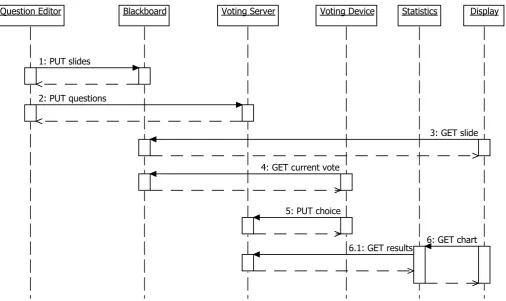
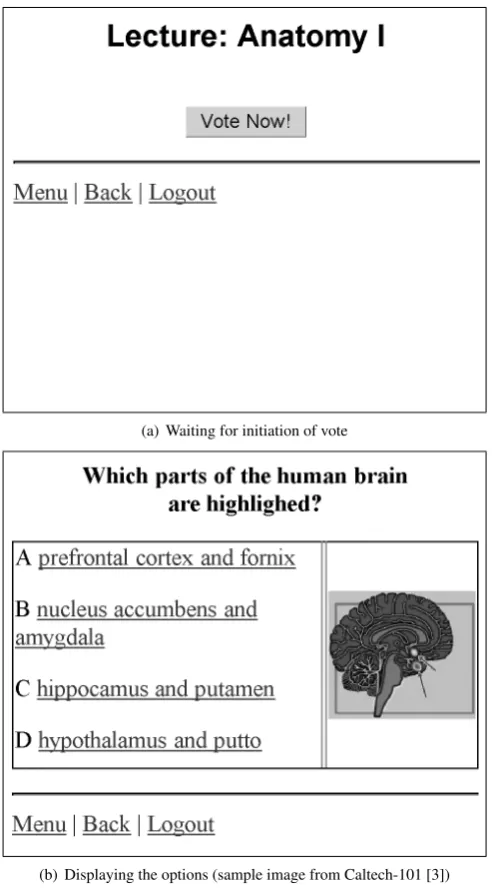
In this section, some interface examples are explained on the base of a sequence diagram (fig. 2) that describes a minimal voting scenario. The commands in the example are shortened and do not contain the actual data that is transferred. Figure 3 shows the voting process from the view of a mobile voting device with a colour display. The student sees the vote as depicted in figure 2.3.
Prior to a lecture, the lecturer creates a set of slides with questions and uploads them to the LMS blackboard (1.) and voting server (2.).
PUT slides
Question Editor
Blackboard Voting Server Voting Device Statistics Display
4: GET current vote 1: PUT slides
6: GET chart 3: GET slide
5: PUT choice 2: PUT questions
[image:6.595.47.554.66.367.2]6.1: GET results
Fig. 2. Sequence Diagram for a minimal voting scenario that shows the communication between different agents.
Mobile Client
GET current vote Blackboard
Voting Server
Statistics XML response
4. GET current vote
XML response
5. PUT choice
OK
6. GET chart
SVG response
6
.1
G
E
T
re
su
lts XM
L
re
sp
o
n
se
Fig. 3. Collaboration Diagram from the view of a mobile client.
<lecture>/<session>/
PUT questions
http://votingserver.example.net/ <lecture>/<session>/
Later in the lecture, the laptop of the lecturer subsequently reads the slides from blackboard (3.).
GET slide
http://blackboard.example.net/ <lecture>/<session>/<page>
At some point, a slide containing a question pops up on the display. The URL to the current question could be displayed to allow students to follow the link with any mobile device. Alternatively, the voting device asks at the blackboard to return the URL to the current question (4.). If not done automatically, the student triggers this event. The display title (figure 4(a)) is to confirm that the student is sitting in the right lecture.
GET current vote
http://votingserver.example.net/ <lecture>/<session>/current
The voting URL can be used to submit a choice (5.). De-pendent on the type of question, this choice may differ. In the returning dataset, the voting server confirms the reception of the vote and may also indicate the correct answer. If it has the appropriate capabilities, it can display the different options as shown in figure 4(b). In this case, an optional GET access to the image repository is triggered. Otherwise it simply renders a textual representation.
PUT choice
http://votingserver.example.net/
<lecture>/<session>/<questionId>/<choiceId>
After a certain amount of time, the vote is finished and the lecturer opens up the vote results on the beamer. This is done by asking the statistics service to generate a chart (6.). The statistics service reads the results from the voting server (6.1) and returns a generated vector image. On a mobile device, this may look like figure 4(c).
GET chart
[image:6.595.44.286.403.579.2](a) Waiting for initiation of vote
(b) Displaying the options (sample image from Caltech-101 [3])
[image:7.595.44.291.75.522.2](c) Showing the results
Fig. 4. Display on a voting device during a vote
GET results
http://votingserver.example.net/ <lecture>/<session>/<questionId>
2.4 Discussion
The system is specifically designed to be extensible. Deploying the system can be done subsequently. The most likely starting point is an already existing LMS with a user management. This minimal configuration can be used without any additional services.
The voting server can be added at any time. The crucial part is to create slides with the correct URLs for voting. The perfect solution would be the use of an XML based slide format that contains the URLs in specific tags. In early stages, a simple somehow tagged URL in the slide body would be enough, as long as the LMS can extract it from the presentation file. Also, it should be possible to send each slide separately on a GET slide call. This way, the LMS server is able to keep track of the current progress of the lecture and can return the correct voting URL on aGET current vote. Each slide may also contain multimedia content, by linking the corresponding URL from the repository. The remaining involved statistics services can be minimal in the first version, simply generating a bar chart from the raw results. In later versions, it should also generate aggregated reports over a complete session or lecture. If the voting is not anonymous, it may also alert the lecturer to initiate additional help to weak students.
The system described above contains all important compo-nents required by the use-case (section 2).
3. Conclusion and Future Work
This paper suggests an open system consisting of multiple loosely coupled agents. In the current stage, it is designed to cover the interaction between LMS, EVS and multime-dia repositories. Implementing simple interfaces based on the plain HTTP protocol enables virtually any web enabled client to access the resources offered at any location. The use of XML documents as a default response provides a great flexibility for generating appropriate end user documents.
The user interface of the EVS is reduced to the essentials. Users from the audience only need to input the initial URL to the voting service and push a few buttons in order to par-ticipate. The implemented system currently merges EVS and image retrieval. Each vote may be enriched by URLs of corsponding images from the repository. Reversely, the EVS re-sults can be stored as meta information to tag the images (e.g. “Please select the most aesthetic image.”).
3.1 Problems Remaining
Finally, the impact of hundreds of students browsing the servers and downloading multimedia content at the same time may cause problems, if not controlled carefully.
3.2 Future Work
In the next stage, it is attempted to integrate presentation files into the EVS, first by a dedicated service, later within a real LMS. At that stage, the described voting scenario will be complete and the system will then be tested in on-site and in distance learning lectures.
Acknowledgements
This project has been funded with support from the European Commission. This publication reflects the views only of the author, and the Commission cannot be held responsible for any use which may be made of the information contained therein.
References
[1] S W Draper, J Cargill and Q Cutts, Electronically enhanced classroom interaction. Australian Journal of Educational Technology, Vol. 18, No. 1, 2002, pp. 13–23.
[2] P Durusau, M Brauer and L Oppermann, Open Document Format for Office Applications (OpenDocument) v1.1, Oasis standard, OASIS Open, 2007.
[3] R Fergus, P Perona and A Zisserman, Object class recognition by unsupervised scale-invariant learning. Proceedings of the IEEE Conference on Computer Vision and Pattern Recognition Madison, Wisconsin, 2003, Vol. 2, pp. 264–271.
[4] R T Fielding, Architectural Styles and the Design of Network-based Software Architectures, PhD thesis, University of California, Irvine, 2000.
[5] IEEE 802.11-2007, Wireless LAN Medium Access Control (MAC) and Physical Layer (PHY) Specifications, 2007. [6] D Laurillard, Rethinking University Teaching: A Framework for
the Effective Use of Educational Technology, RoutledgeFalmer, 1993.
[7] D G Morris, M A Bakewell, S M Buzila, H Duyverman, J G Mitchell, R S Morris and P J Robinson, The enhancement of audience participation in telemedicine education by the use of electronic voting. J Telemed Telecare, Vol. 5, No. 1, 1999, pp. 12–14.
[8] R P Pein, Hot-Pluggable Multi-Feature Search Engine. Master’s thesis, Hamburg University of Applied Sciences, 2008.
[9] R P Pein, J Lu and W Renz, An Extensible Query Language for Content Based Image Retrieval based on Lucene. Computer and Information Technology, 2008. CIT 2008. 8th IEEE International Conference on 2008, pp. 179–184.
[10] G Z Qadah and R Taha, Electronic voting systems: Require-ments, design, and implementation. Computer Standards & Interfaces, Vol. 29, No. 3, 2007, pp. 376 – 386.
[11] J Roschelle, M Sharples and T W Chan, Introduction to the special issue on wireless and mobile technologies in education. Journal of Computer Assisted Learning, Vol. 21, No. 3, 2005, pp. 159–161.
[12] J B Stav, Experiences with activity based training methods in vocational education. IASTED international Conference Computers and Advanced Technologies in Education 2008. [13] J B Stav, Experiences with IP-Based video services in
skills upgrading processes in industry. International IADS WWW/Internet Conference 2008 2008.
[14] J B Stav, E Engh, T M Thorseth, R Bergh, K Arnesen and J Lu, Exploiting novel iSelect learning objects to foster inquiry and problem based learning in skills upgrading processes, to be published in the proceedings from The International Technology, Education and Development Conference, Valencia, Spain, March
9-8, 2009.
[15] P Thornton and C Houser, Using mobile phones in education. Wireless and Mobile Technologies in Education, IEEE Interna-tional Workshop on, Vol. 0, 2004, p. 3.