Systems Reference Library
COBOL (on Disk) Specifications
IBM 1401, 1440,and 1460
This publication is intended for programmers who have a basic knowledge of COBOL programming. It
in-cludes the additional specifications necessary to write a COBOL program for the IBM 1401, 1440, and 1460 Data Processing Systems with disk storage.
Specific examples show how many COBOL statements are coded. A general explanation of these statements is also given.
A sample problem shows entries for all divisions.
This publication is a major reVlSlon of form C24-3235-1 and obsoletes it and prior editions. In addition to incorporating in-formation released in Technical Newsletter N24-0293, addition-al infonnation concerning programming considerations is pro-vided.
Contents
The COBOL Language . . . 5
Machine Requirements . . . 5
COBOL Language Notation. . . 5
IBM 1401, 1440, and 1460 COBOL Programming. . 7
Environment Division. . . 7
Configuration Section . . . 7
Input-Output Section. . . . 9
Data Division . ... . 12
Record Formats for Tape Files. . . . .. 12
Record Formats for Punched-Card Files. . . . .. 13
Record Formats for Disk Files. . . . .. 13
Data Division Language Specifications. . . . .. 13
File Section. . . . .. 14
The Constant and Working-Storage Sections. . . . .. 21
Procedure Division . . . .. 21
General Information . ... . 29
Character Sets. . . .. 29
Figurative Constants . . . .. 29
Word Lists ... " 29 Class Conditions. . . . .. 29
Continuation of Alpha Literals. . . . 30
Reference Formats . . . .. 30
Sample Problem ... " 37 Programming Considerations ... 40
Aids ... '" .. . ... .. . ... . ·1:0 Techniques . . . .. 40
Area Allocation in the Data Division. . . .. 40
Tables... .... .. ... .... ... .. . .... . ... .. ... 40
Move Verb . . . .. 40
If Statement. . . .. 41
Arithmetic Verbs. . . .. 41
Perform and Alter Statements . . . .. 42
Input/Output Verbs . . . .. 42
Optional COBOL Words... ... ... .. ... 42
Object Time Subroutines . . . .. 42
Acknowledgment
In accordance with the reql:lirements of the official government manual describing COBOL-1961 extended, the following extract from that manual is presented for the information and guidance of the user:
"This publication is based on the COBOL System developed in 1959 by a committee composed of government users and com-puter manufacturers. The organizations participating in the orig-inal development were:
Air Material Command, United States Air Force
Bureau of Standards, United States Department of Commerce Burroughs Corporation
David Taylor Model Basin, Bureau of Ships, United States Navy
Electronic Data Processing Division, Minneapolis-Honeywell Regulator Company
International Business Machines Corporation Radio Corporation of America
Sylvania Electric Products, Inc.
UNIVAC Division of Sperry Rand Corporation
"In addition to the organizations listed above, the following other organizations participated in the work of the Maintenance Group:
Allstate Insurance Company
The Bendix Corporation, Computer Division Control Data Corporation
E. I. DuPont de Nemours and Company General Electric Company
General Motors Corporation Lockheed Aircraft Corporation The National Cash Register Company Philco Corporation
Standard Oil Company (New Jersey) United States Steel Corporation
"This manual is the result of contributions made by all of the above-mentioned organizations. No warranty, expressed or
im-plied, is made by any contributor or by the committee as to the accuracy and functioning of the programming system and lan-guage. Moreover, no responsibility is assumed by any contribu-tor, or by the committee, in connection therewith.
"It is reasonable to assume that a number of improvements and additions will be made to COBOL. Every effort will be made to insure that the improvements and corrections will be made in an orderly fashion, with due recognition of existing users' invest-ments in programming. However, this protection can be posi-tively assured only by individual implementors.
"Procedures have been established for the maintenance of COBOL. Inquiries concerning the procedures and the methods for proposing changes should be directed to the Executive Com, mittee of the Conference on Data Systems Languages.
"The authors and copyright holders of the copyrighted ma-terial used herein: FLOW-MATIC (Trade-mark of Sperry Rand Corporation), Programming for the UNIV AC® I and II, Data Automation Systems © 1958, 1959, Sperry Rand Corporation;
IBM Commercial Translator, Form No. F28-8013, copyrighted
The programmer's responsibility in preparing a COBOL
program is to:
1. Identify the program.
2. Specify the features and devices of the IBM 1401,
1440, or 1460 Data Processing System that will be used to compile and execute the resultant machine-language object program.
3. Describe the data to be processed. 4. State the procedure to process the data.
The programmer uses the characters, words, and ex-pressions that make up the COBOL language. He writes
them according to a standard reference format that is outlined on the COBOL program sheet (Form X28-1464).
This standard coding sheet is used with all IBM COBOL
systems to record the source program.
The COBOL source-program card deck is punched
from these coding sheets. These cards make up the
COBOL source-program card input to the COBOL proc-essor.
Machine Requirements
To process a COBOL source program, the following
min-imum machine configurations are specified. An IBM 1401 system with:
4,000 positions of core storage Advanced Programming Feature High-Low-Equal Compare Feature
One IBM 1311 Disk Storage Drive with an IBM 1316
Disk Pack
One IBM 1402 Card Read-Punch
One IBM 1403 Printer.
An IBM 1440 system with:
4,000 positions of core storage
Indexing and Store Address Register Feature One IBM 1311 Disk Storage Drive with an IBM 1316
Disk Pack
One IBM 1442 Card Reader One IBM 1443 Printer.
An IBM 1440 system with:
8,000 positions of core storage
Indexing and Store Address Register Feature One IBM 1301 Disk Storage
One IBM 1442 Card Reader
One IBM 1443 Printer
The COBOL Language
An IBM 1460 system with:
8,000 positions of core storage
Indexing and Store Address Register Feature One IBM 1311 Disk Storage Drive with an IBM 1316
Disk Pack, or one IBM 1301 Disk Storage
One IBM 1402 Card Read-Punch
One IBM 1403 Printer.
The system on which the object program is to be executed must have:
1. A card reader or a disk file to load the object pro-gram resulting from the Autocoder assembly. 2. Sufficient core storage to contain the program
gener-ated by the COBOL processor. If the object program
requires more than the available core-storage ca-pacity, either the program must be executed in sec-tions (overlays) or the job must be divided into
multiple runs. This requirement is a significant consideration when planning to implement COBOL
on a system with 4,000 positions of core storage. 3. The input and output devices defined in the
FILE-CONTROL paragraph.
4. Sense switches if they are referred to in the SPECIAL-NAMES paragraph.
5. The expanded print-edit feature when any of the following COBOL editing functions are used:
a. High-order CR or minus signs and high-order DB or plus signs.
b. Floating plus and minus signs, and floating dol-lar signs.
c. Check protection (asterisk fill ) .
d. Decimal suppression for blank or zero fields.
COBOL Language Notation
The entire COBOL language is described in detail in
the SRL publication COBOL General Information Afanual (F28-8053). COBOL (on Disk) Specifications for IBM 1401,1440, and 1460 contains additional infor-mation that enables the programmer to apply the
COBOL language to the IBM 1401, 1440, and 1460.
Throughout this publication, basic formats are pre-scribed for the various verbs, clauses, entries, and other essential elements of the COBOL language. These are
generalized formats intended to guide the programmer in writing his own statements. These rules of notation must be followed:
1. All words printed entirely in capital letters are
COBOL words. They have preassigned meanings in
the COBOL system. For example: IDENTIFICATION DIVISION. When the COBOL processor sees these two
words, it notes the beginning of the identification of the program.
2. All underlined words are required unless the por-tion of the format containing them is enclosed in square brackets. Square brackets [ ] indicate an optional portion of a COBOL format. Underlined
words are key words. If any key word is missing or misspelled, it is considered an error in the pro-gram. For example:
SEEK file-name RECORD
is the COBOL format for the SEEK verb. The
program-mer may write either of the following entries as-suming that PAYROLL is the file-name.
SEEK PAYROLL RECORD SEEK PAYROLL
SEEK is a key word and must be included.
How-ever, RECORD is an optional word and may be
omit-ted if the user so chooses.
3. All COBOL words not underlined may be included
or omitted at the option of the programmer. These words, called optional words, are used only for the sake of readability. Misspelling constitutes an error.
4. All lower-case words represent information that the programmer must supply. The nature of the information required is indicated. In most instances, the programmer must provide an appropriate data-name, procedure-data-name, or literal. For example, file-description format is
FD file-name
The programmer writes
FD ACCOUNTS-RECEIVABLE
ACCOUNTS-RECEIV ABLE has been used as the
file-name for this file-description entry.
5. Material enclosed in square backets can be used or omitted as required by the program. For exam-ple, the format for the PERFORM verb is
PERFORM procedure-name-l [THRU procedure-name-.9J
The programmer can write one of the following statements:
PERFORM GROSS PAY
PERFOR~I GROSS PAY THRU NET PAY
The first statement can be used to specify calcula-tion of gross pay. The second can be used to calcu-late gross pay and then net pay.
6. Braces mean that one and only one of the enclosed items must be chosen. Other items are to be omit-ted. For example:
LABEL RECORD[S] ~ ARE
t
~ STANDARDt
1
IS ~1
OMITTED ~The statement LABEL RECORDS ARE OMITTED is
cor-rect.
7. Punctuation, where shown, is essential. The pro-grammer can insert other punctuation in accord-ance with the rules outlined in this publication.
8. Special characters, such as the equal sign, are es-sential where shown, although they may not be underlined.
9. In certain cases, a succession of operands or other elements may be used in the same statement. In such a case, the possibility is indicated by the use of three dots following the item affected. The dots apply to the last complete element preceding them. Thus, if a group of operands and key words is en-closed within brackets and the closing bracket is followed by three dots, the entire group (not merely the last operand) must be repeated if any repeti-tion is required.
IBM 1401, 1440, and 1460 COBOL Programming
The COBOL source program has four major divisions. Each division has its own set of statements, which are written according to the rules established for the COBOL language, as described in the IBM COBOL General In-formation ~lanual (F2B-B053). These division-state-ment sets must be arranged for presentation to the 1401, 1440, and 1460 COBOL processor in this order: IDENTIFICATION DIVISION.
ENVIRONMENT DIVISION. DATA DIVISION.
PROCEDURE DIVISION.
The IDENTIFICATION DIVISION entries are written as described in the mM COBOL General Information Manual.
Environment Division
In this part of the COBOL source program, the program-mer specifies the physical characteristics of the par-ticular mM 1401, 1440, and/or 1460 system ( s) to be used to compile and to execute the object program.
The ENVIRONMENT DIVISION has two major sections, each of which has a fixed section name: CONFIGURA-TION and INPUT-OUTPUT.
The 1401, 1440, and 1460 COBOL presentation format for this is:
ENVIRONMENT DIVISION. CONFIGURATION SECTION. SOURCE-COMPUTER.
OBJECT -COMPUTER. SPECIAL-NAMES.
INPUT-OUTPUT SECTION. FILE-CONTROL.
I-O-CONTROL.
Configuration Section
The CONFIGURATION section has three paragraphs. The SOURCE-COMPUTER paragraph names the system that will compile the object program from the COBOL source statements.
The OBJECT-COMPUTER paragraph names and de-scribes the system that will execute the object program.
The SPECIAL-NAMES paragraph equates: mnemonic names to standard names for actual machine devices,
condition-names to standard names for the status of actual machine switches, and Autocoder-names to COBOL-names.
Source-Computer Paragraph Reference Format
SOURCE-COMPUTER. {
IBM-l40l} IBM-1440 . IBM-1460
This statement is required in all 1401, 1440, and 1460 COBOL source programs.
Obiect-Computer Paragraph Reference Format
OBJECT-COMPUTER. {
IBM-140l} IBM-1440 IBM-1460
( 4000) ) 8000 ~
) 12000 ( CHARACTERS \ 16000 )
. jTHROUGH
t
MEMORY SIZE ADDRESS mteger
1
THRU ~S
:g~g}
) 12000
~ 16000
[NO-PRINT-STORAGE]
[NO-MULTIPLY -DIVIDE]
[NO-DIRECT-SEEKJ
[ NO-OVERLAP]
[NO-CONSOLE-PRINTER] .
storage, and/or if any of these features are not present in the object machine, the appropriate clause must be included in the source program.
, 4000) ) 8000 \.
) 12000 ( CHARACTERS ,16000 )
. jTHROUGH
t
MEMORY SIZE ADDRESS mteger1!!!illl
f
f
:g:}
) 12000
t 16000
This clause tells the processor how many positions of core storage are available in the object machine and the starting core-storage address of the object program.
If the programmer wishes the program to start at any location other than 334, and if a printer is not to be used as an output device, he can use the ADDRESS in-teger THRU option and write the numerical address of
this location in the integer portion. This number should
not be less than 334. If a printer is to be used as an out-put device, the program starts at location 469. If the programmer wishes the program to start at any loca-tion other than 469, and if a printer is to be used as an output device, the integer portion of the ADDRESS in-teger THRU option must be greater than 469.
If the MEMORY SIZE statement is omitted from the COBOL source program, the processor assumes that the object computer has 16,000 positions and starts the object program at core-storage location 334.
[NO-PRINT-STORAGE]
[NO-MULTIPLY ..:DIVIDE ]
[NO-DIRECT-SEEKJ
[ NO-OVERLAP]
[r\O-CONSOLE-PRINTERJ .
These clauses tell the processor that the object ma-chine is not equipped with certain special features.
If either NO-PRINT-STORAGE or NO-DIRECf-SEEK is speci-fied, the IOCS generated instructions will not use those machine features.
If NO-MULTIPLY-DIVIDE is specified, a subroutine will be included in and used by the object program when-ever COMPUTE is used with
*, /,
or **, or whenever MULTIPLY or DIVIDE is used. If the NO-MULTIPLY-DIVIDE clause is not specified, the multiply/divide special feature will be used by the object program.The lXO-OVERLAP option must be included only if the object computer is an IBM 1401 or IBM 1460 that does not have the processing overlap feature.
If the system is 1440 or 1460, and if an mM 1447 is
included in the system, the No-CONSOLE-PRINTER option will cause a SToP-literal statement to display the literal itseH or its address in the B-address register. If this clause is omitted, the literal will be displayed on the console printer.
Special-Names Paragraph
Reference Format
SPECIAL-NAMES.
[device-name IS mnemonic-name
[devlce .... me IS mnernonic-name
J] .
[Switch-name
l
g~F
f
STATUS IS condition-name[l
g~F
f
STATUS IS condition-name ][ swltch-Mme • • • ] ] •
[ autocoder-name!§ cobol-name
[ autocoder -name .. ]
J.
This paragraph equates: mnemonic names to the standard names for actual machine devices, condition-names to the status of actual machine switches, and Autocoder-names to COBOL-names.
Device-Names
The standard device-names for the IBM 1401, 1440, and
1460 systems indicate to the COBOL processor which de-vices are available in the object computer. They are written with the mnemonic-name the programmer has used to refer to them in the PROCEDURE DIVISION. This is a list of device-names:
Device-Name Actual Device
1402-R, n 1402 Card Reader 1442-R, n 1442 Card Reader 1402-P, n 1402 Card Punch 1442-P, n 1442 Card Punch 1444-P 1444 Card Punch 1403-P 1403 Printer 1443-P 1443 Printer 1403-CT,11 1403 Carriage Tape 1443-CT, n 1443 Carriage Tape 1447-CP 1447 Console Printer
1401 and 1460 Device-Names. For the 1402-R and
(punch select), or 8 (common). If one of the digits is not included with a 1402 device-name, the processor assumes that the stacker desired is 1 for a read oper-ation and 4 for a punch operoper-ation. If n is coded, there mus,t be a space between it and the device-name as in 1402-R,I.
1440 Device-Names. For the 1442-R and 1442-P, n
is the digit (lor 2) that specifies the unit (1442 Unit 1 or 1442 Unit 2) of the card read-punch to which the device-name is assigned. If n is not specified, the processor will assume Unit 1. If n is coded, there must be a space between it and the device-name as in 1442-R, 1. 1444-P refers to the 1444 card punch unit 3.
For all systems, the printer is the assumed stand-ard output unit for use with the DiSPLAY verb. The card reader is the standard input device for use with the ACCEPT verb. However, if the IBM 1447 Console Printer is equated with a special name, that unit may be specified as an input or output unit (or both) with the ACCEPT and DISPLAY verbs.
For the carriage tape device-name. n specifies which channel in the carriage tape terminates a particular carriage skip. It can be any number from 1 to 12. This name is used with the ADV ANCIl'I:G option of the WRITE verb (see Procedure Division). If n is not coded, the processor assumes that the skip is to channel 1. If n is coded, there must be a space between it and the device-name as in 1443-CT, 3 or 1403-CT, 3.
Note: Punched-card input and'outpu.t devices should
not be used with both the DISPLAY and WRITE verbs in the same program. The same restriction applies to using these devices with both the ACCEPT and READ verbs.
[ autocoder-name IS cobol-name]
General Description: This statement enables the
pro-grammer to write Autocoder statements that refer to COBOL data-names and procedure-names (see ENTER).
If an Autocoder-name is used to refer to an area that has been defined by a COBOL statement, the COBOL name must be equated to the Autocoder-name.
Example: If TOTALS is a COBOL-name used to define
a COBOL area and the symbol TOTLS is used in an Autocoder statement to refer to the same area, the statement shown in Figure 1 must appear in the SPECIAL-NAMES paragraph of the COBOL program.
I
~IA:8
.
T
!" .. ..
u n ~ M ~ . . q[ : : :
:~":':: ~ :':~ ~q:~:~ ~
: : : " : : : : : : : : : : : : : : : : : : : : :
Figure 1. Equating an Autocoder-Name to a COBOL-Name
A symbol used as an Autocoder-name must meet these requirements:
1. It must be five characters long.
2. It must begin with an alphabetic character. 3. It cannot contain a special character. 4. A blank cannot appear within the symbol.
The COBOL-name must be a non-qualified pro-cedure-name or data-name. It cannot be a condition-name.
Switch-Names and Conditions
General Description: A switch-name is written
fol-lowed by the condition-names used to identify ON STATUS and OFF STATUS.
The standard switch-names are:
5 witcll-N arne
1403-P-CB 1443-P-CB 1403-P-C9 1443-P-C9 1403-P-CV 1443-P-CV 1460-SS x 1401-55 x 1440-55 x
Indicates
Printer Carriage Busy Printer Carriage Busy
Sense Carriage Tape Channel 9 Sense Carriage Tape Channel 9
Sense Carriage Tape Channel 12 (Overflow) Sense Carriage Tape Channel 12 (Overflow) Sense Switch
Sense Switch Sense Switch
The x in the sense switch is the actual letter that represents a specific 1401, 1440, or 1460 sense switch. This must be a letter within the range A-G. There must be at least one space between the switch desig-nation and the letter used for x. For example, 1401-SS C.
The status of 1401, 1440, and 1460 switches may be interrogated by expressions in the PROCEDURE
DIVI-SION that use condition-names.
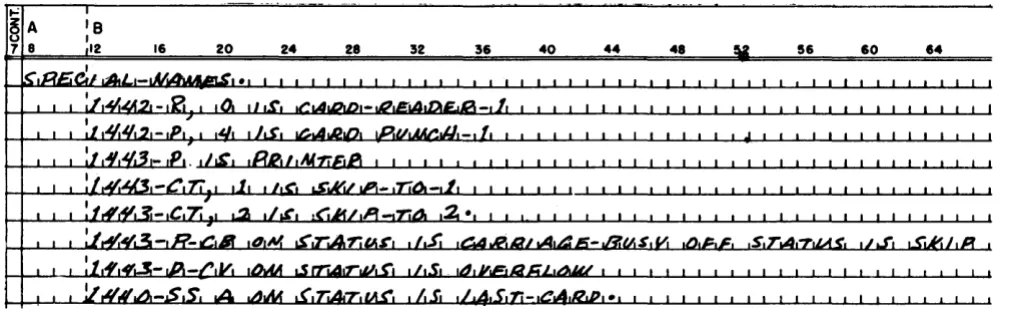
Examples: Figures 2 and 3 show examples of
SPECIAL-NAMES paragraphs.
Input-Output Section
The INPUT-OUTPUT section has two paragraphs. The FILE-CONTROL paragraph names each file, identi-fies its input or output medium, and assigns it to one or more input/output devices.
File-Control Paragraph Reference Format
FILE-CONTROL. SELECT /ile-name-l
ASSIGN TO device-name
[RESERVE
l
~of
ALTERNATE AREA[SU'Figure 2. 1401 and 1460 SPECIAL-NAMES Paragraph
Figure 3. 1440 SPECIAL-NAMES Paragraph
This paragraph names each file used in the source program, identifies its media, and assigns it to an input or output device. It also permits the programmer of 1401 and 1460 systems to specify an alternate input! output area for magnetic tape files if the 1401 or 1460 has the processing-overlap feature.
SELECT file-name-l
Each file to be processed by the READ or WRITE verbs in the PROCEDURE DIVISION must be named in a SELECT file-name entry. This file-name must be unique within the source program and must be described by a file-description entry in the DATA DIVISION of the source program.
Example: Figure 4 shows a sample SELECT file-name entry.
>'
§A
:8
7 • II
..
20 24 I I 51,.
40 44 4' [image:10.613.45.515.58.199.2]'
...
,~ _ ,/oJIAD"AT,_,r.1 .LoII!.Figure 4. SELECT
ASSIGN TO device-name-l
This clause is used to assign a file to an input or output device-name. The device-names that are valid in the FILE-CONTROL paragraph are:
Device-Name
1402-R, n 1442-R, n 1402-P, n 1442-P, n 1444-P 1403-P 1443-P 1311-D, d 1301-D, d TAPE(S) U, a
Actual Device
1402 Card Reader 1442 Card Reader 1402 Card Punch 1442 Card Punch 1444 Card Punch 1403 Printer 1443 Printer
1311 Disk Storage Drive 1301 Disk Storage
729 or 7330 or 7335 Magnetic Tape Unit
Punched-Card Device-Names
The punched-card devices that are valid in the FILE-CONTROL paragraph are the card reader, the card punch, and the printer.
[image:10.613.45.554.251.407.2]must be 0 (normal punch), 4 (punch select), or 8 (com-mon). If one of the digits is not included with a 1402 device-name, the processor assumes that the stacker desired is 1 for a read operation and 4 for a punch operation. If n is coded, there must be a space between it and the device-name as in 1402-R, 1.
For the 1442-R and 1442-P device-names, n is a digit (lor 2) specifying the unit in which a file is to be placed. If n is not coded, the processor assumes unit 1.
If n is coded, there must be a space between it and the device-name as in 1442-R, 1.
Disk-Storage Device-Names
For disk files, 1311-D or IS01-D is the device-name.
It indicates that the file is to be assigned to either a 1301 or a 1311. For both the 1301 and 1311, the d specifies the particular unit and can be any digit from
°
to 4. There must be a space between the comma and the digit.Example: Figure 5 shows an ASSIGN statement for a 1311 disk file.
:e
,2 II; 20 24 28 32 36 40 44 48
~.sS,16oA1 ,Tot:), IJ,I,1 -,D ,0,.
[image:11.613.64.300.339.379.2]! I I , I ! ! I , , I L ' ! I ! ! , ! 1 ! , I I I I , , ! ! I I , ! I I I , I , , , ! !
Figure 5. ASSIGN Disk-File
Magnetic-Tape Device-Names
For magnetic-tape files, TAPE(S) is the device-name. It indicates that the file is to be assigned to a tape unit. The u specifies the particular unit to be assigned. It can be any digit from 1 to 6 with the 1401 or 1460. For the
1440, u can be 1 or 2. The a specifies that an alternate
unit is to be assigned. It can be any digit from 1 to 6 with the 1401 or 1460, but should not be the same digit that is used for u. For the 1440, a can be 1 or 2, but
should not be the same digit that is used for u. The same tape unit (or alternate tape unit) should not be assigned more than once in a COBOL source program. There must be a space between u and a.
Example: Figure 6 shows an ASSIGN statement for a
tape file.
32 36 40 44 41
I ! ! I ! I ! I ! I I I ! ! I " ,
Figure 6. ASSIGN Tape-File
[RESERVE
~ ~O ~
ALTERNATE AREA[S]].This statement reserves one or no alternate area for a magnetic-tape file. One alternate area may be
speci-ned only if the object machine has the processing over-lap feature. If this clause is missing from the source program, the processor reserves no alternate area.
Example: Figure 7 shows a sample RESERVE
state-ment.
Figure 7. RESERVE
Note. In the SPECIAL-NAMES paragraph and the FILE-CONTROL paragraph, two unit-record files cannot be assigned
to the same device. For example, if the punch is defined in the SPECIAL-NAMES paragraph, it cannot be defined again in the SPECIAL-NAMES paragraph, nor can it be defined in the FILE-CONTROL paragraph.
I-O-Control Paragraph
Reference Format
I-O-CONTROL.
~ TYPE-A-LABEL
!
APPLY
I
TYPE-B-LABEL ON file-name [APPLY ..J .
TYPE-C-LABELThe I-O-CONTROL paragraph is used to specify the type of the label records for tape files.
Type-A, -B, and -C label records contain 120, 80, and 84 characters, respectively. The file-name refers to the file-name assigned to the file in the associated FD entry.
Example: Figure 8 shows a sample APPLY statement.
Figure 8. APPLY
Deferred Elements of the Environment Division
Several elements described in the COBOL General In-formation Manual are not contained in this COBOL proc-essor. These should not be coded in the ENVIRONMENT DIVISION entries for a 1401, 1440, or 1460 COBOL pro-gram. They are stated here for reference.
1, The OPTIONAL option of the FILE-CONTROL para-graph.
2. The MULTIPLE REEL option in the FILE-CONTROL para-graph and all other features that provide for auto-matic assignments of tape units for a file.
4. The entire copy option. (The library tape for the 1401 COBOL processor does not presently support the copy feature.)
4. The RERUN option of the I-O-CONTROL paragraph.
Not Applicable
The ASSIGN option of the OBJECf-COMPUTER paragraph.
Data Division
Each file, record, and data item is described within a program by writing data-description entries in the source program. Every data-name referred to in the PROCEDURE DIVISION except figurative constants must be described in the DATA DIVISION. Items and records are described by record-descriptiO'n entries, and files are
described by file-description entries (MD and FD
en-tries).
Detailed information a bout record formats is pre-sented in the SRL publications Input/Output Control System (on Disk) for IBM 1401/1460: Specifications
(C24-1489) and Input/Output Control System for IBM 1440: Specifications (C24-3011). General information is
presented in the following sections.
Record formats for Tape
filesForm-l Records
Form-l tape records are fixed length, unblocked, with or without record marks. Fixed-length implies that all
records in the file have the same number of characters.
Unblocked means that one data record is contained in
one tape record. A record mark (+) is a special char-acter written at the end of a data record to indicate that the preceding character is the last record charac-ter. If input records are form-l but are to be written as output in form-2 or form-4, they should have record marks. Otherwise the use of record marks is optional. Tape records are physically separated by a section of blank tape called an Interrecord Gap (IRG). Fig-ures 9 and 10 show examples of form-l records with and without record marks.
,
I
*'
IForm-2 Records
Form-2 records are fixed length, blocked, with record marks, and with padding of short-length blocks.
Blocked means that more than one data record is
con-tained in one tape record (two or more data records occupy the space between two interrecord gaps). Record marks must be used to separate the data rec-ords.
Padding means that nines (9's) are used to fill the
last block for a file if there are not sufficient data
records to fill it. Thus, a fixed-length block will always contain the same number of characters, but a padded record ( s) will be substituted if there are not enough data records to fill the last block.
Figure 11 shows fixed-length, blocked tape records with record marks and padding. Each block contains four records.
Form-3 Records
Form-3 records (variable unblocked) are not permitted with COBOL.
Form-4 Records
Form-4 tape records are variable-length, blocked, with record marks and a Record Character-Count (RCC) field in each record, and a Block Character-Count (BCC) field in each block. Variable length implies that
all the records in a file do not contain the same num-ber of characters.
Block Character-Count Field
A four-character field at the beginning of each block contains a count of the total number of characters in the block (including the block character-count field it-self). The BCC field has AB zone bits (IBM card code 12-punch) over the units position. This count is used to check wrong-length record conditions.
Record Character-Count Field
A record character-count field of three characters in each record contains a count of the number of
charac-*'
I 4: I~
R Record 1 R Record 2 R Record 3 R )G G G G
~
Figure 9. Fonn-1 Records with Record Marks
Record 1 Record 2 Record 3
1 4 - - - -
Block1---..
Figure 11. Fonn-2 Records with Paddingters in that record, including the RCC field itself and the record mark. This field must be in the same rela-tive position in each record (the character size of each C1 in Figure 12 is the same). Figure 12 shows the rec-ord format for a form-4 recrec-ord.
Note: For form-2 and form-4 records, it is the
pro-grammer's responsibility to place all record marks in the file-description entries, and in the work areas,
where applicable.
Record
Formats
for Punched-CardFiles
Card Read-Punch Records
Records of files assigned to the card reader and the card punch must be eighty characters long, unblocked, and mayor may not have record marks in the 80th character position (card column 80). This is equivalent to the form-1 record described previously.
Printer Records
Records of files assigned to the printer must also have form-1 record format. For the printer the fixed record size must be equal to the number of print positions on the printer. A maximum of 132 print positions is used by the COBOL compiler.
Record
Formats
for DiskFiles
COBOL can process disk records that are fixed-length unblocked (form-I), fixed-length blocked (form-2), or variable-length blocked records (form-4). The maxi-mum size of a record is 999 characters. Figure 22 shows the record forms permitted for each type of access mode.
1
1
To process blocked records, the COBOL processor re-quires the following.
1. A block may contain a maximum of ten records for random files, one hundred for sequential files, and thirty for control-sequential files.
rCl~
rCl~
,
I*
I:
I B : R : I I
R
C
IC
I I IG
C
: C:
I I I I1 4 - - - -Block 2 - - - . - . 1
2. In blocked files, each record in every block must contain a record mark as its last character.
3. For variable-length records, a block-length field must be included in each block, and a record-length field in each record (see Figure 13).
As the name implies, block length is the total
num-ber of characters in the block, including itself and record marks. The block-length field must always be recorded in the first four positions of the block. When output records are created by COBOL, this count is generated automatically.
Record length .is the total number of characters in
the record, including itself and the record mark. The record-length field is a three-position field and must be located in the same three positions within each record in the file.
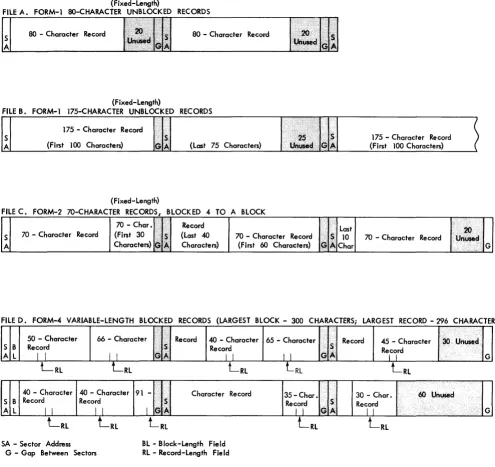
Figure 13 shows examples of the various types of disk records that this COBOL processor can handle.
Data Division
Language
SpecificationsThe DATA DIVISION of a COBOL source program is di-vided into three major sections:
FILE SECfION.
WORKING-STORAGE SECTION. CONSTANT SECTION.
The FILE SECTION describes the input and output files with respect to content and organizational format. It
has two major subdivisions: the file-description entry that specifies the physical characteristics and organi-zation of the input and/or output data and the record-description entry that describes the individual items contained in the file records.
The WORKING-STORAGE SECTION describes the areas of core storage where intermediate results and other items are stored temporarily at object-program execu-tion time.
The CONSTANT SECTION describes fixed items of data which remain unchanged during the running of the
r
c1\2i1
*
T I 1 I*
II I
I I R
I I
G
I I
[image:13.613.67.558.622.702.2](Fixed-Length)
FILE A. FORM-1 8O-CHARACTER UNBLOCKED RECORDS
mm---f0IT8'·El~
80 - Character Record 80 - Character Record
(Fixed-Length)
FILE B, FORM-l 175-CHARACTER UNBLOCKED RECORDS
175 - Character Record S
A (First 100 Characters)
(Fixed-Length) FILE C, FORM-2 7O-CHARACTER RECORDS
70 - Character Record
70 - Char, (First 30 Characters) •.
(Last 75 Characters)
TO A BLOCK Record
(Last 40 Characters)
70 - Character Record (First 60 Characters)
175 - Character Record (First 100 Characters)
Last
10 70 - Character Record Char
FILE D FORM-4 VARIABLE-LENGTH BLOCKED RECORDS (LARGEST BLOCK - 300 CHARACTERS; LARGEST RECORD - 296 CHARACTERS)
< ...
50 - Character 66 - Character Record 40 - Character 65 - Character •... Record 45 - Character 3OUrius.,<i
~I
S B Record Record
A L I I I I I I
L
RLL
RLL RL
40 - Character 40 - Character 91
-
Character Record S B Record RecordA L I I I I
LRL
LRL
[image:14.613.45.540.55.522.2]SA - Sector Address G - Gap Between Sectors
Figure 13. Schematic Records on Disk
S
I GA
LRL
BL - Block-Length Field RL - Record-Length Fie Id
object program. A date, for example, might be a fixed item, or a constant.
The COBOL presentation format for the DATA DIVISION
is:
DATA DIVISION. FILE SECTION.
File-Description Entries and Record -Description Entries
WORKING-STORAGE SECTION.
Record -Description Entries
CONSTANT SECTION.
Record-Description Entries
Record
I I 11 G
LRL
LRL
•
35-Char'I.·. 30 - Char. 60 Un~d
Record S Record
I I GA I I I ... . ...•... G
LRL
LRL
File Section
The file-description entries and record-description en-tries describe the files to be processed by the object program. The file-description entries are of two major types: those that involve the disk-storage unit and those that involve other input or output media.
File-Description Entries
File-Description Entry-Tape Files
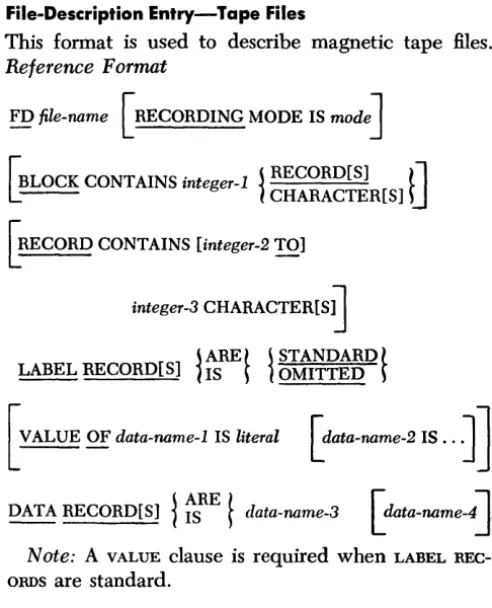
This format is used to describe magnetic tape files.
Reference Format
FD file-name [RECORDING MODE IS mode]
'BLOCK CONTAINS inte er-l
~
RECORD[S]t
1
~-- g
1
CHARACTER[S]U
GmCORD CONTAINS [integer-2 TO]
integer-3
CHARACTER[S~
~ ARE t ~ STANDARD
t
LABEL RECORD[S]1
IS ~I
OMITTED ~[VALUE OF data-name-l IS literal [data-name-2 IS ..
J]
DATA RECORD[S]
1
ts
RE!
data-name-3 [data-name~.
Note: A VALUE clause is required when LABEL REC-ORDS are standard.
FD file-name
The level indicator identifies the beginning of the file-description entry and precedes the file-name as-signed by the programmer. (Example: Figure 14.)
[image:15.620.60.306.57.361.2]24 28 32 36 40 44 48
Figure 14. FD File-Name
[RECORDING MODE IS
1]
This clause specifies the mode in which the file is recorded. A 1 indicates the move mode, even-parity. RECORDING MODE 1 is the only recording mode imple-mented by this COBOL processor.
'BLOCK CONTAINS inte er-l
~
RECORD[S]tl
L--
gI
CHARACTER[S]U
This clause must be included if more than one data record is included in a tape record (other than form-I).
It indicates the size of the block in records or charac-ters. The size may be stated in terms of RECORD(S) for form-l or form-2 records where integer-l is the
num-ber of data records in the block.
The size must be stated in terms of CHARAcrER(S)
for form-4 records where integer-l is equal to or
greater than the number of characters in the longest block of the file. This number includes the four-char-acter block count field (BCC). See also Form-4 Records.
Example: The largest block in the PAYRLMASTR file contains 500 characters plus the Bec field (Figure 15).
>-8 A
:e
7 8 12 16 20 24 28 32 36 40 44 48
« , « , , «, , I
Figure 15. BLOCK CONTAINS
[RECORD CONTAINS [integer-2 TO]
integer-3 CHARACTER[S] ]
The RECORD CONTAINS clause may be used to specify the number of characters in the data records. Because the record-description entries define the size of each data record, this clause is never necessary. However,
if the programmer wishes to include it, integer-2 speci~ fies the number of characters in the smallest record in the file, and integer-3 specifies the number of char-acters in the largest record.
Fixed-length records must be specified using
integer-3 only. Variable-length records are specified by using both integer-2 and integer-3.
Example: The records for a certain file are variable
length. The smallest record size is 75 characters; the largest is 86 characters (Figure 16). When levels are defined in the FD, 86 must be defined before 75.
Figure 16. RECORD CONTAINS
Note: Both the block count and the record count
must include the record mark ( *) in the count. ~ ARE
t
~ STANDARDt
LABEL RECORD[S]1
IS ~I
OMITTED ~This required clause states whether header and trailer label records are standard or omitted. This COBOL processor can handle only standard type-A, type-B, and type-C tape labels and standard disk labels. For punched-card files the OMITTED option must be used.
Example: Figure 17 shows a LABEL RECORD entry for a punched-card input file.
I-'
8
A:8
16 20 24
7 8 12 28 32 36 40 44 48
:Io.<l.RoFoi n~~ ~.A." ,A,DoE f t
-~"
Today's Date
if standard label records are specified for output files, today's date must be in core storage at object-program execution time.
To enter the current date in the object program, insert a date card just ahead of the -EX card produced by the Autocoder processor. The EX card is the last card in the object program. The format for the date card is:
Columns Punch Description
1-3 082 Storage Location 4-5 05 Number of Characters 6 0-5-8 Word Separator 7-11 xx xxx Today's Date
YRDAY
r
L
VALUE OF data-name-1 IS literal [ data-name-2 IS ..
J ]
The COBOL programmer may specify the items of
in-formation that appear in the label records of tape files. These items must be supplied by using a VALUE OF
clause if standard tape header-label records are used. Data-name is the name of a field contained in the header label record; literal refers to the contents of the field. Figure 18 is a chart showing data-names and lengths of fields used in standard tape header label records.
COMPLETE CHECKING
LABEL RECORD INPUT OUTPUT
FiElD A B C A B C A
IDENTIFICATION 10 10 18 10 10 18 10
Lobe/Information (Header Labe/ Records)
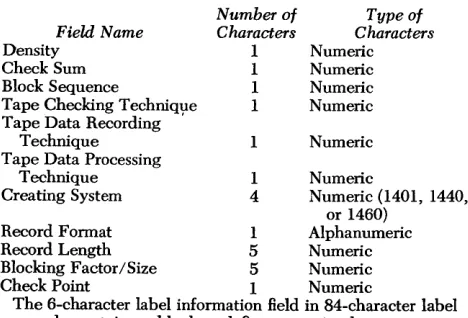
The 22-character label-information field in 120-char-acter label records contains these fields:
Field Name
Density Check Sum Block Sequence
Tape Checking Technique Tape Data Recording ,
Technique Tape Data Processing
Technique Creating System Number of Characters 1 1 1 1 1 1 4 Type of Characters Numeric Numeric Numeric Numeric Numeric Numeric
Numeric (1401, 1440, or 1460)
Record Format 1 Alphanumeric
Record Length 5 Numeric
Blocking Factor/Size 5 Numeric
Check Point 1 Numeric
The 6-character label information field in 84-character label records contains a blank and five numeric characters.
Tape Trailer Labels
The following information is contained in IBM standard
trailer labels:
Positions Contents
TYPE-A-LABELS 1-5 1 EORb
(120 characters) 1 EOFb
67-72 XXXXXX (Block Count)
TYPE-B-LABELS 1-5 1 EORb
(80 characters) lEOFb
6-10 XXXXX (Block Count) TYPE-C-LABELS 1-6 1 EOR bb
(84 characters) 1 EOFbb
PARTIAL CHECKING 7-12 XXXXXX (Block Count)
INPUT OUTPUT
B C A B C
10 18 10 10 18
(or 10) A/N A/N A/N A/N A/N A/N A/N A/N A/N A/N A/NA/N
CREATlON- 5 5 5
DATE N N N
**
RETENTION- 4 3 3 4
CYCLE N N N N
***
FILE-SERIAL- 5 5 5 5
NUMBER N N N N
**
REEL-SEQUENCE- t4 +3 t4 t4
NUMBER N N N N
LABEL- * 22 A6 * 22
INFORMATION A/N A/N A/N
t
If not present, 001 or 000 1 will be assumed. * All 22 characters are checked.3 3
N N
5 5
N N
+3 +4
N N
66 A/N
** If the label type requires only 3 digits, the thousands position must be zero. *** The use of FILE-SERIAL-NUMBER implies full label checking for this file.
[image:16.612.314.548.98.257.2]ll. Optional but checked.
Figure 18. Header Label Records for Tape Files
4 3 3
Figure 19 shows how the identification of a payroll master file is supplied.
28 52 S. 40 44 41
Figure 19. IDENTIFICATION
Examples: Figure 20 shows how IDENTIFICATION and a retention cycle of 286 days are supplied for an out-put file.
sa 40 41
[image:17.612.58.302.480.724.2]/
Figure 20. IDENTIFICATION and Retention Cycle
j ARE
t
DATA RECORD[S]
1
IS ~ data-name-3Data-name-3, data-name-4, etc., must each be the
subject of a record-description entry that has a level-number of 01.
If the file contains more than one type of record, a different data-name must appear for each type. Data-name order is not important.
Note: If one record is read from a given file and another is read from the same file, the second record replaces the first in the read-in area. Thus, if two records are needed for processing at the sa.me time, the first record must be saved by moving it to an-other area of storage (such as a work area) before the second record is read.
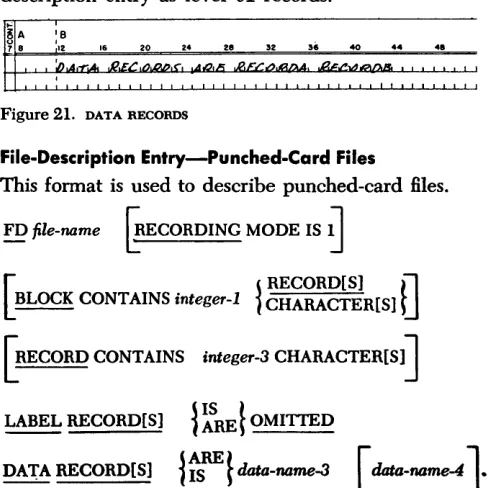
Examples: Figure 21 shows a sample DATA RECORD clause. In this example, RECORDA and RECORDB are both records in the same file and are described in a record-description entry as level 01 records.
'"
~A
:8
16 20 24
7 8 12 28 32 36 40 44 .1
:0 ... ,..,. .... nr-/'",.. - o.JJ.,olL5 n r / " - " - 01".0_
,
Figure 21. DATA RECORDS
File-Description Entry-Punched-Card Files
This format is used to describe punched-card files.
FD file-name
~ECORDING
MODE IS~
[
j RECORD[S]
0
BLOCK CONTAINS integer-1
1
CHARACTER[S] ~[RECORD CONTAINS integer-3 CHARACTER(Sl]
LABEL RECORD[S]
1
~RE ~
OMITTEDDATA RECORD(Sl
l~}data-name-3
[data-name-4J.
Mass Storage Files
With this COBOL processor, the term mass-storage
file
refers to any group of records read from, stored on, or written on a disk storage unit.Three reference formats exist that allow the user to specify random processing, control-sequential proc-essing, or sequential processing (see Access Modes).
In anyone COBOL source program, a maximum of seven MD entries can be used.
Random Access
Reference Format
MD file-name
[RECORDING MODE IS SECTOR]
PROCESSING MODE IS SEQUENTIAL
ACCESS MODE IS RANDOM
ACTUAL KEY IS data-name
[SYMBOLIC KEY IS data-name ]
FILE-LIMIT[S]
l
~REf
integer{~UGH
f integer[ BLOCK CONTAINS integer
1
~~~~g~~R[S] ~
][ RECORD CONTAINS integer CHARACTER[S]
J
LABEL RECORD[Sl j IS
t
j STANDARDt
- - !J
1
ARE ~1
OMITTED ~[ VALUE OF data-name IS literal [data-name IS ...
J]
DATA RECORD[S]
l
~RE~
data-name [ data-name . .. ]Control-Sequential Access
Reference Format
MD file-name
[RECORDING MODE IS SECTOR]
PROCESSING MODE IS SEQUENTIAL
ACCESS MODE IS ~ CONTROL-SEQUENTIAL-A
l
1
CONTROL-SEQUENTIAL-Bf
FILE-LIMIT(SJ
{~RE ~
integer{~UGH
f
integer[ BLOCK CONTAINS . integer ~
I
CHARACTER[S] RECORD[S]tJ
~[ RECORD CONTAINS integer CHARACTER [S]
J
LABEL RECORD[S] ~ IS
l
j STANDARDl
- -
1
ARE ~I
OMITTEDf
[ VALUE OF data-name IS literal [data-name IS ..
.J ]
DATA RECORD[S]
{~REf
data-name [data-name . .oJ
Sequential Access
MD file-name
[RECORDING MODE IS SECTOR]
PROCESSING MODE IS SEQUENTIAL ACCESS MODE IS SEQUENTIAL
FILE-LIMIT[S]
~ ~RE~integer~
=UGHf
integer·I,
.
jRECORD[S]tl
L~LOCK CONTAINS mteger lCHARACTER[S]U
[RECORD CONTAINS [integer TO]
integer CHARACfER[S]]
LABEL RECORDrS' j IS
l
j STANDARDt
L' ~
1
ARE~I
OMITTED ~[VALUE OF data-name IS literal [data-name IS ...
JJ
DATA RECORD[S]
~ ~RE~
data-name [data-name 0 0 oJ .Clause Description
The file-description entry clauses that have not been described previously are described here.
[ RECORDING MODE IS SECTOR
J
A recording mode is significant only for mass-storage files. All files will be recorded and read without word marks. The key word SECTOR is used to 'specify the
par-ticular disk-recording mode for a specific file. Data is read or written by sector (100 characters per sector).
PROCESSING MODE IS SEQUENTIAL
This clause is used to describe all mass-storage files for the IBM 1401, 1440, or 1460 Data Processing
Sys-tems. The clause refers to the order of action of the access mechanisms. Because the 1311 has only one access mechanism, the access order is sequential. (Rec-ord 1 is retrieved, followed by rec(Rec-ord 2, etc., as called for by the object program.)
RANDOM
J
CONTHOL-SEQUENTIAL-A }ACCESS MODE IS
t
CONTROL-SEQUENTIAL-BSEQUENTIAL
This clause must be included in an MD entry and specifies the organization of the file. The terms RAN-DOM, CONTROL-SEQUENTIAL, and SEQUENTIAL apply to
the means of retrieving and storing disk records.
RANDOM
In the RANDOM access mode, each record has a unique
disk address. Records can be arranged in random order because the unique address can refer to only one rec-ord in the file. In a purely random file, one seek and one read per record is necessary.
SEQUENTIAL
In the SEQUENTIAL access mode, records are arranged
in sequence by control field. They are stored in con-secutive locations in the disk-storage unit between addresses established by the user as the upper and lower limits of the file area. To process a sequential file, the program requires only the upper and lower limits of this file area. It begins with the first record and processes each record in sequence.
CONTROL-SEQUENTIAL-A and CONTROL-SEQUENTIAL-B
In the CONTROL-SEQUENTIAL access mode, records are
CONTROL-SEQUENTIAL-B refers to records with record marks. Records to be added to the file are written into a separate area of disk storage. The address of the added record is written in the sequence-link field of the record that sequentially precedes the added record. Similarly, a record can be deleted and the sequence re-established by placing the address of the following rec-ord in the sequence-link field of the preceding recrec-ord. When the file is processed, the program checks the sequence-link of a record. If it is a blank, the next con-secutive disk location is read. However, if the sequence-link field contains an address, the program seeks and reads the record stored at that address.
The length of the sequence-link field is a: 1. Six-digit address, if the file is unblocked, or a 2. Seven-digit address, if the file is blocked and the
blocking factor is two to ten records per block, or a 3. Seven-digit address with zone bits over the seventh position, if the file is blocked and the blocking fac-tor is eleven to thirty records per block, or an 4. Eight-digit address, where the eighth digit identifies
the record mark (
*).
Standard six-digit addresses are used in an un-blocked file. A seventh digit (R) is added to the ad-dresses used with blocked files, when the blocking factor is two to ten records per block. These addresses are in the form SSSSSSR. The first six digits are the address of the first sector of the block. The seventh digit (R) designates the position of the record within the block. An eighth digit (R) is added for a record mark. These addresses are in the form SSSSSSRR. The first six digits are the address of the first sector of the block. The seventh digit designates the position of the record within the block. The eighth digit is used to identify a record mark.
The COBOL processor handles the various disk rec-ord forms as shown in Figure 22.
RECORD FORM PERMITTED? ACCESS MODE FILE TYPE FIXED - LENGTH VARIABLE-LENGTH
UNBLOCKED BLOCKED BLOCKED (Form-I) (Form-2) (Form-4)
RANDOM INPUT OR Yes Yes No
INPUT - OUTPUT
RANDOM OUTPUT Yes No No
CONTROL INPUT OR Yes Yes No
SEQUENTIAL INPUT - OUTPUT
SEQUENTIAL INPUT Yes Yes Yes
SEQUENTIAL OUTPUT Yes Yes Yes
Figure 22. Record Fonnats for Disk Files
The maximum blocking factor (number of logical records per block) is ten for random files, one hundred for sequential files, and thirty for control-sequential files.
[ ACTUAL KEY IS data-name]
This clause is required if the access mode of a mass-storage file has been specified as RANDOM.
Data-name is the name given by the programmer to
the core-storage field that will contain the disk address of the record currently being processed in a given file during execution of the object program. This field will be updated in one of two ways:
1. By PROCEDURE DIVISION statements written by the
source programmer.
2. By statements developed by the processor from specifications given in the KEY-CONVERSION section in association with the USE verb.
The format of the data-name field must be: SSSSSSR. The first six digits (SSSSSS) are the actual address of the disk sector where the block of records is stored. If
the block of records covers more than one sector, the data-name field contains the address of the first sector. The seventh digit (R) indicates which record in the block is to be made available for processing. This digit (R) may be any digit 0-9. The digit 0 represents the first record in the block; the digit 1 represents the second record, etc. If the file consists of unblocked, random-access records, the seventh digit (R) must be
o.
[ SYMBOLIC KEY IS data-name]
The SYMBOLIC KEY clause must be used only if a KEY-CONVERSION has been specified for a RANDOM file. If no KEY-CONVERSION has been specified, the SYMBOLIC KEY clause must be omitted.
Data-name is the field operated on in the section that makes the KEY-CONVERSION (see Procedure Division). The SYMBOLIC KEY is the indirect reference to data-name.
Example (Figure 23): To compute the address of any
record needed by this program, the factor +3000 is added to the contents of the SYMBOLIC KEY field and the sum is divided by 25. The result is the ACTUAL KEY. (See Declarative section for a description of the USE verb.)
Figure 23. KEY-CONVERSION
These two integers are the sector addresses of the first and last physical records of the file. Each integer contains six numeric characters.
If the RD LIN macro is used to redefine the file limits of the file, the new labels must not create the need for handling the cylinder-overflow condition if the file limits used at compile time did not imply cylinder overflow.
Example: The lower and upper limits for a given file are 000199 and 002199. Figure 24 shows a correct FILE-LIMITS entry.
1'"'1 '
18
A :8
718 '2 16 20 24 28 32 56 40 44 48
r
1 1 1 ;;;/,L.6-,LrlM/1U'" )4.13814rDa,lr'~"
ITN1JilLA ,"dart,';., •• , 1 • I I I 1,1!:
! , , ! ! I ! I I I I , ! " I ! ! I I I I " ' " I " I I " I I I I , , Figure 24. FILE-LIMITS[ VALUE OF data-name IS literal [ data-name IS ... ] ]
The VALUE OF clause is used in a file-description
entry if the file has standard label records. The follow-ing sets of keywords and descriptions of literals are used as entries of this clause.
Data-Name
{ :gENTIFICATION}
CREATION-DATE RETENTION-CYCLE FILE-SERIAL-NUMBER FILE-SEQUENCE-NUMBER PACK-SERIAL-NUMBER
Literal
lO-character AN
5-digit numeric 4-digit numeric 5-digit numeric 4-digit numeric 5-digit numeric
Use of the PACK-SERIAL-NUMBER entry implies complete
label checking for this file.
The processor selects particular label-checking pro-cedures based upon the entries in the VALUE OF clause.
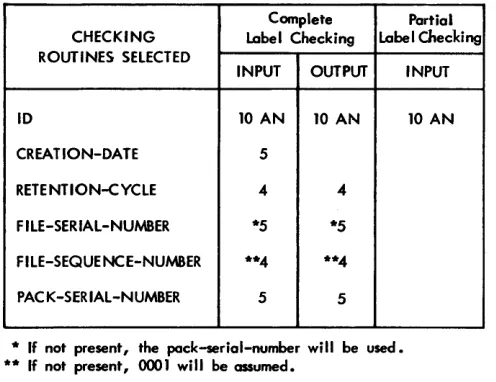
The relations between the entries, the types of files, and the label-checking procedures selected are shown in Figure 25.
Disk Trailer Labels
The following information is contained in IBM standard
disk trailer labels.
Trailer Label
(contains as many characters as the user's records)
Record-Description Entries
Positions
1-5
Contents
1 EOR b 1 EOFb
This section supplements the clause descriptions given in the COBOL General Information Manual.
Complete Partial CHECKING Label Checking Label Checking ROUTINES SELECTED
INPUT OUTPUT
10 10 AN 10 AN
CREA TlON-DA TE 5
RETENTION-CYCLE 4 4
F ILE-SERIAL-NUMBER *5 *5
FILE-SEQUE NCE-NUMBER **4 **4
PAC K-SER IAL-NUMBER 5 5
[image:20.612.302.550.57.248.2] [image:20.612.43.258.372.458.2]* If not present, the pock-serial-number will be used. ** If not present, 0001 will be assumed.
Figure 25. Label Checking
SIZE
INPUT
10 AN
This clause tells the processor how many characters (or digits) the data item contains. The general refer-ence format for a SIZE clause is:
[ SIZE IS Gnteger-l TO] integer-2 [ ~
1
CHARACTER[S] DIGIT[S]tJ]
~[ DEPENDING ON data-name ]
This size is interpreted by the COBOL processor in
terms of characters if either the optional word CHAR-ACTER[S] or DIGIT[S] is used or if neither of the
op-tional words is used.
To specify the sizes of variable-length records, (form-4) integer-l and integer-2 and DEPENDING ON
data-name must be used. Integer-l specifies the num-ber of characters in the smallest record and integer-2 specifies the number of characters in the largest record.
DEPE~DING ON data-name identifies the elementary
items whose value is the record character count (refer to Record Character-Count Field). Integer-l and DE-PENDING ON data-name may be used only with fonn-4
records.
Example: Figure 26 shows a SIZE entry for a fonn-4
record which can contain from 50 to 150 characters.
RECCOUNT is the data-name the programmer has used
to identify the RCC field.
52 56 40 44 48
The size of fixed-length records is specified by using the form:
[ SIZE IS integer-2D
~~zrnR[Sl
DJ
where integer-2 is the exact number of characters
con-tained in the record or item of data.
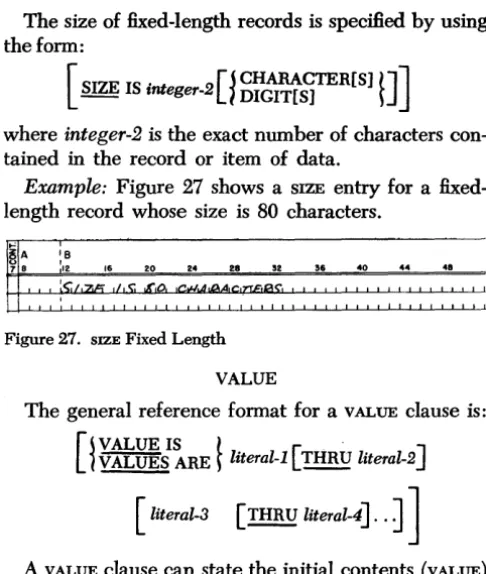
Example: Figure 27 shows a SIZE entry for a fixed-length record whose size is 80 characters.
'"'
~A
:e
16 24
7 8 12 20 28 52 36 40 44 48
~S;/o2n ,/,,," ~,o " . , I .n.
~-,
Figure 27. SIZE Fixed Length
VALUE
The general reference format for a VALUE clause is: [
~ ~;~RE ~
literal-l [ THRU literal-2 ][ literal-3 [ rnR U literal-4]. .
J ]
A VALUE clause can state the initial contents (VALUE) of a data item in the WORKING-STORAGE SECTION or CON-STANT SECTION. It can also be used to define the value of a condition-name (level-88 item) in the FILE SECTION and WORKING-STORAGE SECTION.If the VALUE clause is not used to define the initial values of WORKING-STORAGE ITEMS~ their contents at program execution time will be unpredictable.
If the VALUE clause specifies a numerical literal~ an operational sign will be developed (placed over the units position of the numerical field), only if the literal is preceded by a plus or minus sign. A figurative con-stant may be used in the VALUE entry where a literal is specified.
The THRU option is not described in the COBOL Gen-eral Information Manual. It may be used only with condition-names as shown in Figure 28.
[image:21.618.59.302.60.347.2]44
Figure 28. THRU Option
The Constant and Working Storage Sections
The record-description entries described for the FILE
SECTION apply also to the CONSTANT and WORKING-STORAGE SECTIONS.
These sections begin with the header line WORKING-STORAGE SECTION or CONSTANT SECTION and are followed immediately by the record-description entries.
Added Elective Elements of the Data Division
These elective elements of the record-description entry are not specified in the COBOL General Informa-tion Manual, but are contained in this COBOL processor: 1. The DEPENDING ON data-name and the TO integer-2
options of the SIZE clause.
2. The THRU literal-2 and the literal-3 THRU literal-4 options of the VALUE clause.
3. All entries on mass storage.
Deferred Elements of the Data Division
1. The COpy option is contained in the COBOL General Information Manual, but is not contained in this COBOL processor.
2. The following editing functions cannot be specified by editing clauses or picture clauses:
a. Editing of a single digit field.
b. Single-position zero suppression. For example, Z9 is incorrect but ZZ is correct.
3. No item may exceed 999 characters.
Not Applicable
The USAGE, SIGNED, and SYNCHRONIZED clauses have no meaning in a 1401, 1440, or 1460 COBOL program and should not be used.
Nate: A decimal insertion character cannot be used as the rightmost PIGrURE character. For example, the following entry will not be considered valid:
02 NAME PICTURE Z,ZZZ,ZZ9. OCCURS 12 TIMES.
Procedure Division
The PROCEDURE DIVISION is the operational part of the COBOL source program. Once the data has been de-scribed, the programmer tells the COBOL processor what steps the machine must take to read the input data, process it, and write it as output on punched cards, magnetic tape, or a printed form.
The COBOL verbs are the main elements in the PROCE-DURE DIVISION. They are described in detail in the COBOL General Information Manual. However, some verbs have special meaning when used in a 1401, 1440, and 1460 COBOL source program. This additional in-formation is presented in the following section.
Decla ratives Reference Format.
DECLARATIVES.
Section-name-l SECTION.
USE FOR KEY-CONVERSION ON
~ ALL FILES
t
1
file-name [file-name] . . . ~ •Declaratives are procedures that operate either under control of the main body of the PROCEDURE DIVISION or under control of the Input/Output Control System. They consist of sentences and associated procedures designed to give special information to the COBOL compiler.
If declaratives are used in a COBOL source program: 1. They must be grouped together and placed at the
beginning of the PROCEDURE DIVISION, and
2. The group of declaratives must be preceded by the key word, DECLARATIVES, and must be followed by the keywords, END DECLARA TIVES.
Each declarative occupies a single section and must conform to the rules of procedure formation as described in the Procedure Division section of the
COBOL General Information Manual. The source pro-grammer must write the DECLARA TIVES and END DECLARA TIVES entries beginning in column 8. The USE declarative is used in the 1401, 1440, and 1460 COBOL to specify the KEY-CONVERSION procedure which is to be used for developing disk addresses. This enables the source programmer to supply his own con-version factors and techniques for obtaining disk ad-dresses.
A USE declarative may be used to specify the KEY-CONVERSION for more than one file. Thus, if a general key conversion algorithm must operate on different data names for different files, the ACTUAL KEY and SYM-BOLIC KEY clauses may be used. These clauses appear in the MD entries of the DATA DIVISION. (See
Mass-Storage Files.) Each MD that specifies the ACTUAL KEY
and SYMBOLIC KEY clauses implies a USE declarative. The processor will associate the ACTUAL KEY and SYM-BOLIC KEY functions by file.
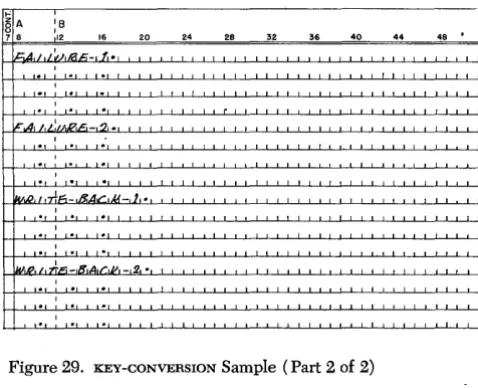
Example: In the example shown in Figure 29, the
same key-conversion procedure is used for two differ-ent files. The MD differ-entries inform the processor of the particular data-names which must be associated with ACTUAL KEY and SYMBOLIC KEY for each file. When the disk addresses for file records are computed at object-program execution time, the contents of the SYMBOLIC KEY field will be added to F ACTOR-l and the sum will be divided by FACTOR-2. The result is the ACTUAL KEY.
The DISPLAY Verb
The printer is the standard output unit for the DIS-PLAY verb. However, information may also be dis-played via the card read-punch or the console printer. As many printer lines or punched cards will be used as are necessary to display the information contain~d in the area of core storage whose data-name is speci-fied in the DISPLAY statement.
The object program initiates a skip to channell in the carriage tape if a form overflow occurs in the
printer. If the DISPLAY verb is used in the PROCEDURE DIVISION to address the printer, the processor assumes that the printer will have a carriage tape with punches in channels 1 and 12 (overflow) at object program exe-cution time.
Examples: The statement shown in Figure 30 will cause the contents of the area whose data-name is GRAND-TOTAL to be displayed on the printer.
The statement shown in Figure 31 will cause the contents of GRAND-TOTAL to be punched into cards, if
the mnemonic-name CARD-PUNCH has been assigned to 1402-P or 1442-P or 1444-P in the SPECIAL-NAMES para-graph of the ENVIRONMENT DIVISION.
The ACCEPT Verb
A card reader is the standard input device for the ACCEPT verb. However, the console printer can also serve as an input device. When ACCEPT is from a card reader, the minimum area that can be declared is 80 positions.
Example: Figure 32 shows an ACCEPT statement that
will cause data to be read from the card reader and moved to an area whose data-name is CANCELLATIONS.
If more than 80 storage positions are defined by
CAN-cELLATIoNs' multiple cards will be read from the card reader until the area is filled.
The ENTER Verb
The ENTER verb permits the programmer to use Auto-coder statements in a COBOL source program.
The language-name used with 1401, 1440, and 1460
COBOL is AUTOCODER. The Autocoder statements must be presented to the COBOL processor immediately fol-lowing the ENTER AUTOCODER statement, and they must be followed by an ENTER COBOL entry that indi-cates the point at which the COBOL source language is resumed. Each ENTER AUTOCODER statement must con-stitute a separate paragraph in the source program and must appear on the same line as the name of the paragraph. The ENTER COBOL