University of Huddersfield Repository
McCluskey, T.L. and Simpson, R.M.
Using GIPO to support learning in knowledge acquisition and automated planning
Original Citation
McCluskey, T.L. and Simpson, R.M. (2005) Using GIPO to support learning in knowledge
acquisition and automated planning. In: The Twentyfifth SGAI International Conference on
Innovative Techniques and Applications of Artificial Intelligence Workshop on Artificial
Intelligence in Education, 12th14th December 2005, Peterhouse College, Cambridge, UK.
This version is available at http://eprints.hud.ac.uk/id/eprint/3247/
The University Repository is a digital collection of the research output of the
University, available on Open Access. Copyright and Moral Rights for the items
on this site are retained by the individual author and/or other copyright owners.
Users may access full items free of charge; copies of full text items generally
can be reproduced, displayed or performed and given to third parties in any
format or medium for personal research or study, educational or notforprofit
purposes without prior permission or charge, provided:
•
The authors, title and full bibliographic details is credited in any copy;
•
A hyperlink and/or URL is included for the original metadata page; and
•
The content is not changed in any way.
For more information, including our policy and submission procedure, please
contact the Repository Team at: [email protected].
Using GIPO to support learning in knowledge acquisition
and automated planning
T. L. McCluskey and R. M.Simpson
School of Computing and Engineering The University of Huddersfield,
Huddersfield HD1 3DH, UK t.l.mccluskey,[email protected] http://scomeng.hud.ac.uk/planform/gipo/
Abstract
The process of how knowledge is acquired and formulated in knowledge-intensive AI is difficult for a student to grasp without practical experience. Often, AI text books and lecture notes contain examples of logic formula or structured knowledge represen-tations which are well refined and bug free. These polished examples are then used to show reasoning mechanisms or the execu-tion of AI search methods. The process of how the knowledge representations them-selves are acquired and validated is often neglected. In this paper we describe the use of a tool called GIPO for teaching AI students. GIPO helps students understand and integrate aspects of knowledge acqui-sition, knowledge engineering, automated planning and machine learning. We show how the tool’s features supports teaching and the student’s learning experience, and helps integrate the theory and practice in a range of AI and related subject areas.
1. Introduction
Very often AI practical classes, AI text books and AI lecture notes start with exam-ples of logic formula or structured knowl-edge representations which are well refined and bug free. These polished examples are then used to show reasoning mechanisms or the execution of AI search methods. For example, in AI planning, students are given a set of crafted action representations and are then shown how planning algo-rithms reason with these structures to gen-erate plans. Both the structured representa-tions employed, and the reasoning mecha-nisms themselves, are difficult for students to grasp, and they require a set of integrated knowledge from previous courses on logic and computer science.
The peculiar problems to do with acquir-ing and craftacquir-ing knowledge bases about
ac-tions and change is another factor as to why the teaching of knowledge-intensive AI is difficult. Students may have encoded dy-namic knowledge in other parts of the cur-riculum: they represent dynamic systems informally in object-oriented analysis and design, or formally using a process algebra. However, representing knowledge about ac-tions and change for automated reasoning purposes presents more problems.
is-sues such as domain modelling would be harder to illustrate.
Here we describe the use of a tool called GIPO for teaching AI students. It has been used since its creation in 2001 for edge engineering of AI Planning knowl-edge. We argue that GIPO meets the criteria in the paragraph about and helps students understand and integrate aspects of knowl-edge acquisition, knowlknowl-edge engineering, automated planning and machine learning. We show how the tool’s features supports teaching and the student ’s learning expe-rience, and helps integrate the theory and practice in a range of AI and related subject areas.
2. Overview of GIPO
GIPO1 the ’Graphical Interface for
Plan-ning with Objects’ (Simpson et al. 2001) (pronounced GeePo) is the name of a fam-ily of experimental tools environments pro-viding help for those involved in knowl-edge acquisition, domain modelling, task description, plan generation and plan exe-cution. GIPO was an output of the PLAN-FORM project (Planform 1999), and has been demonstrated in several major AI con-ferences. GIPO won the prize for best gen-eral tool at the first international competi-tion for knowledge engineering in AI plan-ning, held at Monterey, USA in June 2005. Three versions of GIPO - GIPO I,II, and III are available for downloading from the website. GIPO integrates a range of plan-ning tools to help the user explore the do-main encoding, and determine the kind of planner that may be suitable to use with the domain. In particular it has:
graphical tools and visual aids for the input/display of objects, object classes (sorts), predicates, constraints, states, op-erator schema, and tasks. There are fa-miliar point and click, drag and drop functions to help the user build up a new domain or reuse existing components. validation checks for consistency across parts of the developing domain model. Once operator schema have been de-veloped GIPO features a ’plan stepper’ which helps the user build up their own solutions to problems in a kind of ’mixed-initiative’ mode.
resident plan generation engines, and an API for plugging in to third party AI
1http://scom.hud.ac.uk/planform/gipo
planners. A plan animator / visualiser displays a planner’s solution to a problem in terms of the objects which are effected by the plan. This can be stepped through by the user to see the effects of operators on objects and their properties.
A key design goal in building the tool’s interface has been to allow the creation of a specification in terms of images that de-scribe domain structure at a high level of generality. The tool takes care of the de-tail of the syntax of the underlying specifi-cation, making it impossible to construct a syntactically ill-formed specification. The process of domain model development on which this is based is detailed in the litera-ture, see references (McCluskey & Porteous 1997; Liu & McCluskey 2000) for more de-tails.
3. Capturing Domain Structure
Students learn how to use GIPO in two ways: Firstly, they can investigate and exe-cute one of the several pre-engineered appli-cations domains that is supplied with GIPO. The student can use these at an early stage to see the result of domain building. They are able to bind the models with a planner of choice and use GIPO to solve planning problems and execute the solutions. Sec-ondly, the student can use GIPO’s tutori-als. These lead the student through a staged method of domain development using ap-propriate examples. This is a similar to the tutorial material written for the Protege tool (Gennari et al. 2003) which introduces the user to Description Logic.
The central conception in domain capture is that planning essentially involves chang-ing properties and relationships of the ob-jects that inhabit the domain. This appeals to computing students’ intuition and is con-sistent with their studies in object-oriented programming and design. Knowledge is structured around object descriptions, their relationships and the changes they undergo as a result of the application of operators during plan execution (in contrast to the tra-ditional literal-based approach used in Plan-ning languages such as PDDL (Ghallab et
al. 1998)). The student identifies the kinds
Figure 1: Snapshot of the Sort Editor
other object in the sort. To assist in this el-ement of the conceptualisation GIPO pro-vides a visual tree editor (Figure 1). Do-main checking at this initial stage involves enforcing the tree structure and requiring that node names (for sorts and objects) are unique.
The next step if for the student to specify the sorts in the domain by identifying pred-icates that characterise the properties of a typical object of each sort and relationships that hold between objects. GIPO provides an editor to define predicates by a process of drag and drop from the sort tree previ-ously defined. Next, the student specifies
domain invariants. The most important
in-variants are those characterising the range of states that an object of each sort can oc-cupy. These form the basis of the static validity checks that can be carried out on the completed domain specification. For ex-ample, if the sort representing the physi-cal entity is ’door’, and the predicates are closed, locked and unlocked, then the stu-dent would use the tool to state that the only possible interpretations that can be true are: locked and closed;
unlocked and open; unlocked and closed
Any other combinations (eg open and locked; or locked, closed and open) are
ex-cluded. The collection of all such states for the object will be such that at any instance in time exactly one such description will be true of the object (see Figure 2).
When specifying object states, the pos-sible unifications of variables of the same sort or between variables belonging to the same path in the sort tree hierarchy can be restricted using a visual indication of uni-fying variables as shown in the figure. The student selects from a popup menu how an individual variable is to unify with a target variable and if the decision is that they must be distinct then a not equals clause is gen-erated. This strategy for dealing with the unification of variables is pervasive in the GIPO tool set.
4. Capturing Domain Operators
The next stage of the knowledge acquisi-tion method, and most difficult task for the student, is to specify operators representing domain actions. Operators in GIPO are con-ceptualised as sets of parameterised object transitions, LHS
RHS, where the LHS
exe-Figure 2: Editor for Specifying Object State Invariants
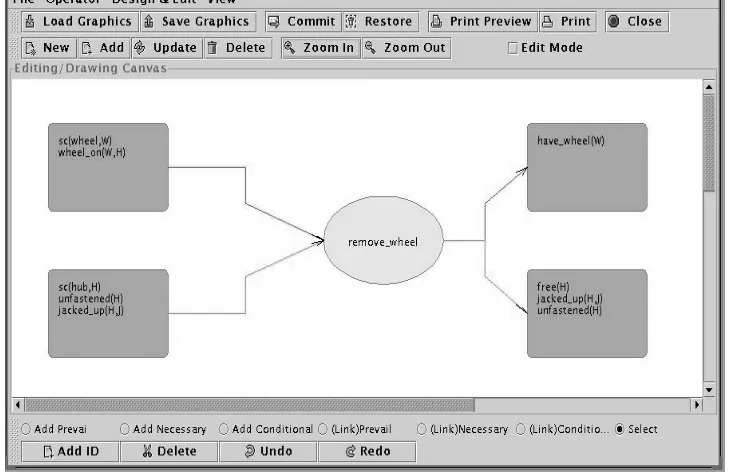
cuted the object affected will be in the situ-ation specified by a fully instantiated RHS. The GIPO operator editor helps the student create a graph representation of an opera-tor where the nodes are the LHS and RHS states of the object sorts involved in the op-erator. Each such node contains an editable state definition(see Figure 3).
While the use of the ’Operator Editor’ is adequate to define operators, students have difficulty primarily due to the possible co-designation of variables across the different nodes presented to the user (although the underlining and right click mechanism de-scribed in the state editor is used). Using this manual operator tool illustrates to the student the difficulty of knowledge formu-lation, particularly to do with actions.
5. Capturing Domain Operators using Induction from Examples
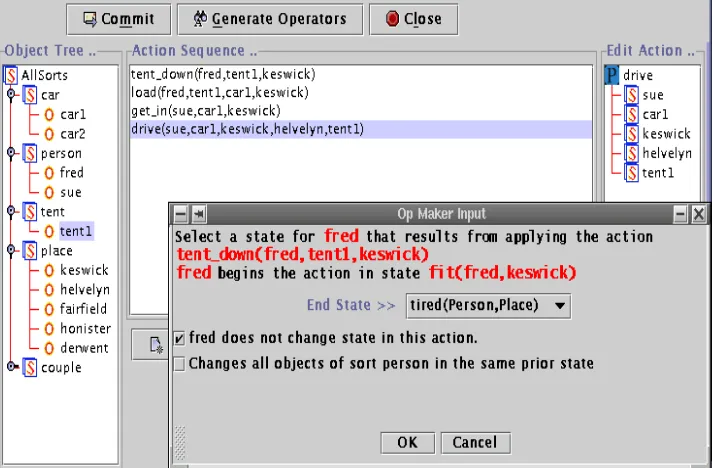
A semi-automated knowledge acquisition tool in GIPO is ’OpMaker (McCluskey, Richardson, & Simpson 2002): this helps the user to create an operator set simply by providing example solution sequences. The exercise illustrates some of the con-cepts of ’Learning from Examples’ in ma-chine learning - in particular inductive gen-eralisation.
To help explain OpMaker, we use a planning domain that is supplied with GIPO -the ’Lazy Hikers’ domain. Two people (hik-ers) go hiking and driving around regions of the Lake District, with objects such as
tents, cars, regions, and actions such as put-down, load, getin, getout, drive, unload, putup, walk, sleepintent. They do one ’leg’
of a long circular track each day, as they get tired and have to sleep in their tent to re-cover for the next leg. Their equipment is heavy, so they have two cars which can be used to carry their tent and themselves to the start/end of a leg. To use OpMaker, the student must first create a ’partial’ domain model, containing objects, sorts, predicates and state invariants describing the problem domain. The student then constructs (via a drag and drop process) a solution to a pre-defined task - for instance the following is a solution to the task of doing one leg of the circular track and being ready for the next leg in the morning:
putdown
tent1 fred keswick; load
fred tent1 car1 keswick; getin
sue keswick car1; drive
[image:5.612.114.473.29.274.2]Figure 3: Operator Editor Tool
getout
sue buttermere car1; unload
sue tent1 car1 buttermere; putup
tent1 sue buttermere; getin
sue buttermere car1; drive
sue car1 buttermere keswick; getout
sue keswick car1; walk
sue fred keswick buttermere; sleepintent
sue fred tent1 buttermere
The student is encouraged to think of each action in terms of a sentence describing what happens. For example in the last ac-tion we think of this as ’Sue and fred sleep in their tent in Buttermere’. Each ‘action’ consists of an action identifier followed by a sequence of objects that the action depends on or changes. From the input of a plan such as the example above, and a partial domain model, a full operator set can be induced with the tool (see Figure 4).
6. Student Learning Opportunities
From this stage in process, the students learn the difficulty in acquiring knowl-edge about actions, and how using
ma-chine learning techniques one can poten-tially avoid the need to hand craft action knowledge. They can compare these ac-quisition methods: After OpMaker has pro-duced the set of inpro-duced operators, another learning opportunity for the student is to compare this set with the handcrafted set supplied with GIPO. They can explore the problems and limitations of learning from examples to do with convergence of gen-eralisations, the need for knowledge refine-ment and the importance of ’good’ exam-ples in learning.
The construction of operators provides a good opportunity to compare the planning model with work in formal specification of software. For example, many of our stu-dents used the ’B-toolkit’ (B-Core (UK) Ltd ) to create software specifications. The pre-and post-condition version of a GIPO op-erator and an operation specified in B have great similarities as they both specify deter-ministic, instantaneous actions in terms of predicate descriptions.
7. Validation in GIPO
Figure 4: OpMaker Induction Tool
specification, this splits into internal
valida-tion: checking the model for inconsistencies
between component parts, and external
val-idation checking the model’s accuracy with
respect to what is being modelled. With tools such as GIPO, ’local’ consistency checks on name uniqueness and hierarchy definition are automatic when these compo-nents are being built. Additionally, internal validation includes checks on global
con-sistency through various forms of ’static’
validation. Most effective in GIPO are the checks which verify that operator defini-tions do not compromise the invariants.
8. Dynamic Validation
The student has several opportunities to learn about and carry out ’dynamic’ internal and external validation resulting in the re-pair of inconsistent, inaccurate or incorrect knowledge.
the reachability analysis tool: after the student has specified state invariants and an operator set, the student can use this tool to check whether the operator set is sufficent to reach all states allowed by the invariants. The reachability tool can be used in conjunction with OpMaker: it can indicate if the deduced operators do not give an adequate coverage. This is shown
by the existence of defined states that are not referenced by any operators.
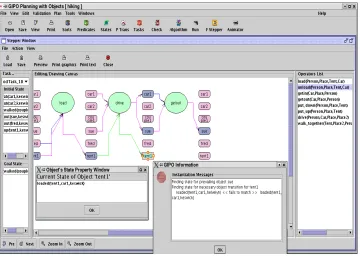
the plan stepper: the student can dynam-ically check a domain is adequately spec-ified against a set of problems by using the plan stepper. The student uses drag and drop to select operators, and pop-up menus to instantiate them, effectively attempting to solve their own planning problems using the model. Each opera-tor is applied in the current state to gen-erate the consequent state. The student proceeds in this manner to verify that the domain and operator definitions do sup-port the known plans for given problems within the domain. The stepper operates as a manual forward planner, with results of each object transition caused by an op-erator shown graphically (see Figure 5). This tool is very useful for checking
hier-archical operators - that is those that
en-capsulate other operators. In Figure 6 we show a snapshot of the use of the stepper to execute plans invovling hierachical op-erators.
care-Figure 5: The GIPO Plan Stepper
fully controlled by the tutor and GIPO. Depending on the planner / task combi-nation chosen, the solution may not be found for a good period of time. GIPO has its own planning engines, but third party planners are easy to integrate (we often use the FF (Hoffmann 2000) planer, which was a past winner of the Inter-national Planning Competition). After a planner has returned a solution, the stu-dent can step through the solution using GIPO’s animator tool. This takes the re-sults of a planner and produces a graph-ical representation of the object transi-tions using the same layout as the stepper.
We have outlined the main components of GIPO above - more details can be found in the AI Planning literature e.g (Mc-Cluskey, Richardson, & Simpson 2002). To enable GIPO to be used as a general domain modelling tool we have developed transla-tors between our internal language and the planning domain language PDDL (Simpson
et al. 2000). The API enables external
plan-ning systems to interface to the tools, to pro-vide scope for testing and fielding alterna-tive planning algorithms to those internal to GIPO.
9. Using GIPO in Teaching and Learning
GIPO has been used in the teaching of in-termediate and final year undergraduates, in both introductory and advanced AI mod-ules since its creation in 2001. It offers a wide range of learning opportunities in AI, through knowledge acquisition, knowledge formulation, validation and maintenance of domain models, inductive learning and au-tomated plan generation. Although num-bers of student groups (typically 15-20) are too small to make any statistical claims, anecdotally GIPO seems to help students to
integrate AI knowledge learned in lectures,
and to reach a deeper level of understand-ing of ’dry’ subject matter on for example the acquisition and engineering of symbolic knowledge.
[image:8.612.114.474.20.276.2]Figure 6: Using the Plan Stepper in Hierarchical Domains
method. Whereas the tutorials lead the student through the features methodically, for learning about specific features GIPO has an online, hyperlinked user manual. For those students who need to dig deeper (for example final year project students) GIPO also has a language manual which de-fines the underlying knowledge representa-tion language.
10. Conclusions
In this paper we have illustrated the use of the GIPO tool, and shown how it helps stu-dents apply AI theory that they have learned during lectures. Its interface and underly-ing language uses the object metaphor sim-ilar to other tools that students use in the computing curriculum. Students are able to use it both to gain experience of a wide range of AI topics (knowledge acquisition, automated planning, learning from exam-ples) and to obtain a deep knowledge of topics in these areas. For example, a stu-dent may learn about algorithms for learn-ing from examples, and representations for planning operators, but without application the knowledge is somewhat stale. Using GIPO the student can use the OpMaker tool to induce planning operators, thus both sustaining their knowledge of these areas
and integrating the two together. Addition-ally, we have argued that GIPO helps stu-dents see the commonalities between AI with other subject areas, helping them to in-tegrate new knowledge with other parts of the curriculum.
This year our final year undergraduates will be using the award winning GIPO III software on the AI module. Amongst other innovations, this version has an interface based on object life histories This forms an-other knowledge acquisition input into the tool (in the same way as OpMaker). It al-lows the student to enter a diagram record-ing the transitions of objects, and it auto-matically creates domain operators. It also allows the user to re-use pre-stored object patterns that represent typical dynamic ob-jects. For example, Lazy Hiking domain object behaviour can be derived from a combination of generic objects we call
mo-bile, bistate and portable (see (McCluskey
& Simpson 2004) for details).
References
B-Core (UK) Ltd. http://www.b-core.com/.
2003. The evolution of Protege: an envi-ronment for knowledge-based systems de-velopment. Int. J. Hum.-Comput. Stud. 58. Ghallab, M.; Howe, A.; Knoblock, C.; McDermott, D.; Ram, A.; Veloso, M.; Weld, D.; and Wilkins, D. 1998. Pddl -the planning domain definition language. Technical Report CVC TR-98-003/DCS TR-1165, Yale Center for Computational Vision and Control.
Hoffmann, J. 2000. A Heuristic for Do-main Independent Planning and its Use in an Enforced Hill-climbing Algorithm. In Proceedings of the 14th Workshop on
Planning and Configuration - New Results in Planning, Scheduling and Design.
Liu, D., and McCluskey, T. L. 2000. The OCL Language Manual, Version 1.2. Technical report, Department of Comput-ing and Mathematical Sciences, University of Huddersfield .
McCluskey, T. L., and Porteous, J. M. 1997. Engineering and Compiling Plan-ning Domain Models to Promote Valid-ity and Efficiency. Artificial Intelligence 95:1–65.
McCluskey, T. L., and Simpson, R. M. 2004. Knowledge Formulation for AI Planning. Proceedings of 4th International Conference on Knowledge Engineering and Knowledge Management (EKAW 2004) Whittlebury Hall, Northampton-shire, UK, 2004. Published by Springer in the LNAI series.
McCluskey, T. L.; Richardson, N. E.; and Simpson, R. M. 2002. An Interactive Method for Inducing Operator Descrip-tions. In The Sixth International
Con-ference on Artificial Intelligence Planning Systems.
Planform. 1999. An open en-vironment for building planners. http://scom.hud.ac.uk/planform.
Simpson, R. M.; McCluskey, T. L.; Liu, D.; and Kitchin, D. E. 2000. Knowledge Representation in Planning: A PDDL to
OCLh Translation. In Proceedings of the
12th International Symposium on Method-ologies for Intelligent Systems.
Simpson, R. M.; McCluskey, T. L.; Zhao, W.; Aylett, R. S.; and Doniat, C. 2001. GIPO: An Integrated Graphical Tool to support Knowledge Engineering in AI Planning. In Proceedings of the 6th