2017 2nd International Conference on Computer Engineering, Information Science and Internet Technology (CII 2017) ISBN: 978-1-60595-504-9
Based on the Cordova Framework the File Browsing
App Implementation and Deployed on Azure
YUXUAN ZHOU, JIN DUAN, YIFENG ZHU, YANFANG MA and FUCHENG BAO
ABSTRACT
Cordova hybrid development is a mobile application development between Web-App and Native-Web-App, it combines the advantages of Native-Web-App’s a good user experience and Web-App’s cross-platform development, so it is a very popular way of developing mobile applications. This article is through the Visual Studio developing tools and can be used directly to the Cordova platform to develop a hybrid app. The use of Microsoft Azure cloud services can be very simple to deploy the applications, and achieve the direct service to users.
INTRODUCTION
The full name of Cordova is Apache Cordova, which is an open source mobile development framework. Phone Gap is the predecessor of Cordova. In 2011, Phone Gap was purchased by Adobe, but it was donated to the Apache foundation soon and renamed as Cordova. Adobe reduced user concerns by open resource; this promoted the commercial application of the Cordova mobile development framework, and established the dominant position of Cordova.
Currently, there are two ways to develop the mobile app. One is the native development, the other is the hybrid development. The native development of apps cannot be used in cross-platform. The development of native applications which want to cross-platform should need two groups of developers. One group of developers should have Xcode or App Code development tools and use Obj-C or Swift to develop iOS applications, another group of developers should have Eclipse or Android Studio development tools and use Java or C++ to develop Android applications. But hybrid applications do not need two groups of developers. The main technology is based on HTML5 front-end development technology, JavaScript can call the Cordova mobile development framework plugins to use the native features of mobile device, its performance is no less than the native development of mobile app.
Cordova contains a set of device API, which allows mobile developers to call these API through JavaScript and transfer many native functions of the device. Such as cameras, accelerometers, sensors, etc. Based on the package of HTML, CSS and JS. The Web App can be embedded into iOS or Android system comes with a browser. Developers can build an app in mobile phone. This development model is also known as hybrid development. The Cordova will be different equipment features a unified package. Developers do not need to know the details of the primary equipment, so the _________________________________________
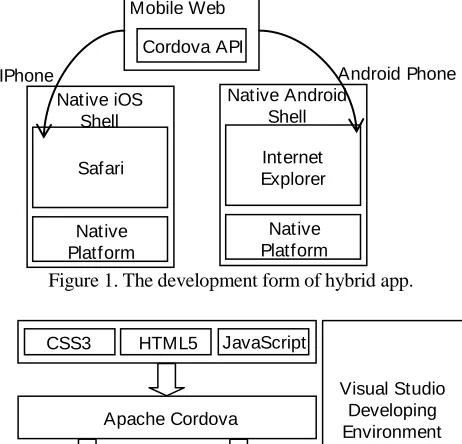
development of an APP can be compiled to run on different platforms in order to achieve cross platform development. Figure 1 shows the development form of mobile app based on the Cordova development framework.
This paper will implement a file browsing of the mobile app with Cordova mobile framework, and this development will start in the Visual Studio development environment. Visual Studio 2013 from Update4 has support for Cordova development, and Visual Studio support for Azure is also very perfect. This paper will also make this mobile app to deploy in Microsoft Azure public cloud.
BUILD THE DEVELOPMENT ENVIRONMENT
The Introduction of Visual Studio and the Development Thinking Based on VS
[image:2.612.182.413.397.619.2]Visual Studio is always one of the best development tools in the world. It can use open source technology to develop Linux, Android and iOS applications. At present, Visual Studio has integrated the Cordova plugins, can create a new Cordova project in Visual Studio. In the past, the development of using PhoneGap or Cordova to create a new project must have command window to use Cordova plugin. This mode of operation is very complex. Since Visual Studio support Cordova project, it has been changed. Everything became so easy. Visual Studio create a template for Cordova, the template can be used in hybrid app project. Figure 2 is a cross-platform hybrid app development based on Visual Studio.
Figure 1. The development form of hybrid app.
Figure 2. The development of thinking based on Visual Studio.
Native Android Shell IPhone
Mobile Web App
Cordova API
Native Platform
API Safari Native iOS
Shell
Native Platform
API Internet Explorer
Android Phone
Visual Studio Developing Environment
CSS3 HTML5 JavaScript
iOS Platform
Apache Cordova
The Choice of Emulators
Emulator is a very important part of the development environment, the emulator can determine whether the project development can proceed smoothly, the difficulty of the project and the development environment is conducive to the operation of the developers.
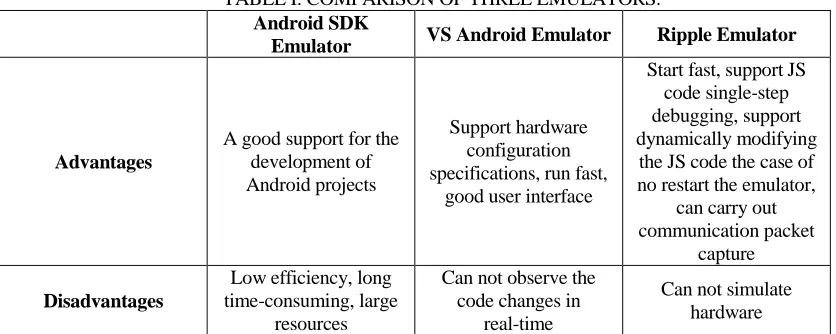
This section introduces the emulator of Cordova and the comparison and selection of emulator. In the preparation of the Cordova project often debugging on the emulator. The emulator debugging have many kinds of choice, the most common is the use of the emulator as the following three types: Android SDK Visual Studio emulator, VS Android emulator and Ripple emulator.
Table 1 shows the comparison of the three emulators. This paper will use Ripple to realize the simulation, and the Ripple emulator will make the development more concise and efficient with its unique advantages.
The Download of Visual Studio and Set up the Development Environment
Visit Microsoft official website “www.microsoft.com”, click the product for developersIT professionalVisual Studio, open the “www.visualstudio.com” page. Click to download the Visual Studio Community. When download the installation package is success, click to run the package and install Visual Studio development environment.
[image:3.612.90.508.483.650.2]After installing the Visual Studio development tools. Open the Visual Studio development tool, click FileNewProject, click the Javascript section, select Apache Cordova Apps, select Cordova engineering template, fill in the project information, click OK, the project is completed. After Cordova-based project template is completed, we need to add Cordova plugins in it. Click the file project “config.xml” directory, download the cordova-plugin-file which has file browsing function, and add the emulator we select into Visual Studio development tools. At this point, the building of development environment is basically completed.
TABLE I. COMPARISON OF THREE EMULATORS.
Android SDK
Emulator VS Android Emulator Ripple Emulator
Advantages
A good support for the development of Android projects
Support hardware configuration specifications, run fast,
good user interface
Start fast, support JS code single-step debugging, support dynamically modifying
the JS code the case of no restart the emulator,
can carry out communication packet
capture
Disadvantages
Low efficiency, long time-consuming, large
resources
Can not observe the code changes in
real-time
Figure 3. System overall development framework.
DESIGN AND IMPLEMENTATION
System Framework
This article needs to achieve the file browsing app is different from the native App. Its interactive interface is mainly used in the current front-end development of the more popular HTML5 technology. When using some other front-end development framework based on HTML5, the human-machine interactive interface is more perfect, through the JavaScript call Cordova plugins to access some of the native features of the device. The development environment used in this article is Visual Studio, which integrates Cordova project, and can use Microsoft Azure cloud services. Visual Studio development environment can be directly based on Cordova mobile development framework to make the hybrid mobile app project, as is shown in Figure 3 that is the system framework.
File Browsing Plugin: Cordova-Plugin-File
Cordova provides a File plugin, which follows the HTML5 File API protocol. HTML5 File API protocol family is mainly used to solve the HTML5 application file and localized storage problems. In hybrid application, local storage is a very common needs. Through the localization of storage can make the file, picture and multimedia backup and restore.
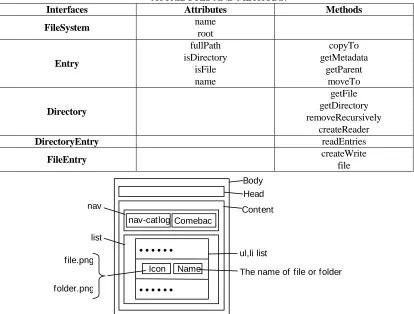
The Cordova File plugin can be found on the config.xml directory in the project. Its name is cordova-plugin-file, which can be used when we download the plugin. The use of this plugin is as an interface to achieve. In order to use JavaScript we can invoke the window object to make the attributes and methods in project. Provide many functions in this file browsing app, the attributes and methods of each interface is shown in Table 2.
Cordova Piugins Registry User experience
(HTML&CSS)
Various front-end development framew orks
Application logic JavaScript
Apache Cordova
File plugin
Other plugins
Microsoft services Active Directory,
Office365
Custom API Azure Mobile Service, Web
TABLE II. HTML5 FILE API PROTOCOL FOR EACH INTERFACE ATTRIBUTES AND METHODS.
Interfaces Attributes Methods
FileSystem name
root
Entry
fullPath copyTo
isDirectory getMetadata
isFile getParent
name moveTo
Directory
getFile getDirectory removeRecursively
createReader
DirectoryEntry readEntries
FileEntry createWrite
file
Figure 4. The interface frame diagram of file browsing.
Page Framework and Style Code
The overall framework of the page is composed of tags in HTML5. The layout style is similar to Web page. The basic structure is composed of div-boxe. CSS3 can adjust these boxes to make them look like the file interactive interface. Figure 4 is the file browser page framework. This article needs to achieve the file browsing mobile applications mainly by the two parts of the head and content.
Through the analysis of its framework can be written in its HTML5 front-end of the overall framework code and CSS3 style code. The main HTML5 overall framework code is as follows:
1 <body>
2 <div class=”head”>FILE BROWSING</div> 3 <div class=”content”>
4 <div class=”nav”>
5 <div id=”nav-catlog”>Folder:<span></span></div> 6 <div class=”upper”>comeback</div>
7 </div>
8 <div class=”list” id=”file-list”> 9 <ul>
10 <li class=”template”> nav
list
Name Icon
nav-catlogComebac
k
The name of file or folder ul,li list
Content Body Head
11 <div class=”icon”></div> 12 <div class=”name”></div>
13 </li>
14 </ul> 15 </div> 16 </div> 17 </body>
Not only have that, in the HTML5 specification also needed to set the page style. Its function not only to adjust the page layout, there are some styles can be used to achieve some animation. This part of the need to use CSS3 to set. The CSS main code is as follows:
1 *{-webkit-tap-highlight-color:rgba(0,0,0,0)} 2 ul,li{margin:0;padding:0;list-style:none;} 3 .template {display:none;}
4 .content{position:absolute;top:2rem;bottom:0;left:0;right:0;} 5 .content .list ul li .pressed {background-color:#888;}
Page Logic Code and Call the Plugin
This section describes the hybrid app logic how to achieve. For a file browser hybrid application, which mainly to achieve the click function, open the folder function and cloning list to read the various file or folder nodes. Through the realization of these functions, you can complete its file browsing function.
CLICK FUNCTION IMPLEMENTATION
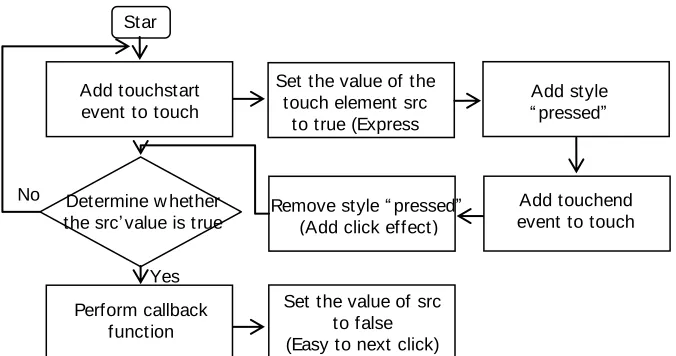
[image:6.612.129.467.504.682.2]Click event is often happen in the file browsing. In order to facilitate the use of this event quickly, we need to write and encapsulate a click function. In order to click on a div-box or a list can use this click function binding other methods to achieve a specific function. As is shown in Figure 5 is the main code of the click function.
Figure 5. The main flow chart of click event.
Yes No
Set the value of the touch element src
to true (Express touch)
Perform callback function
Set the value of src to false (Easy to next click)
Add style “ pressed” (Add click effect)
Add touchend event to touch element src Add touchstart
event to touch element src
Star t
Remove style “ pressed” (Add click effect) Determine w hether
In the preparation of the click function, the need to give this function named “attach Event”. This function should have two parameters, respectively, click on the object and click on the generated value. A complete click event need to have two processes, touch start and touchend. The main JS code of this function as follows:
1 $(src).bind (“touchstart”, function (event) { 2 $(this).data (“touchon”, true);
3 $(this).addClass(“pressed”); 4 });
5 $(src).bind (“touchend”, function () { 6 $(this).removeClass(“pressed”); 7 if($(this).data(“touchon”)){ 8 cb.bind(this)();
9 }
10 $(this).data (“touchon”, false); 11});
For ease to use in the future, you can encapsulate this function:
1 $.fn.bindtouch=function (cb){ 2 attachEvent($(this).cb); 3 };
CLONE LIST, OPEN THE FOLDER AND RETURN FUNCTION
First, in the HTML div-box we define a li list. But the files and folders could not only one. So we need to clone the list can be enough to these file or folder points, the main code is as follows:
1 var cloned=$(“#file-listli. template”).clone ().remove Class (“template”) .addClass (item);
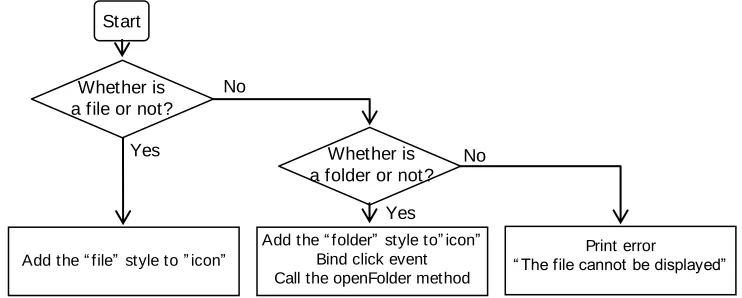
[image:7.612.120.491.551.700.2]After cloning the li list and placing all the file folders, we need to pass the values of all the files and folders to cloned-data and judge whether it is a file or a folder. Here we are using the is File attribute and is Directory attribute of the Entry interface. Their role is to determine whether the file system node is a file or a folder. Figure 6 is a flow chart to determine whether the file node is a file or a folder.
Figure 6. The flow chart to determine whether the node is a file or a folder.
No No
Yes
Yes
Print error “ The file cannot be displayed”
Whether is a folder or not?
Add the “ folder” style to” icon” Bind click event Call the openFolder method Add the “ file” style to ” icon”
Whether is a file or not?
If judged as a folder. We can bind click event. So as to achieve the function of opening a folder to access its child nodes. The main code is as follows:
1 cloned.data(“entry”,entry); 2 if(entry.isFile){
3 cloned.find(“.icon”).addClass(“file”); 4 }else if(entry.isDirectory){
5 cloned.find(“.icon”).addClass(“folder”); 6 cloned.bindtouch(function(){
7 var entry=$(this).data(“entry”); 8 openFolder(entry);
9 }); 10 else{
11 alert(“This file cannot be displayed!”); 12 }
13 cloned.find(“.name”).html(entry.name); 14 $(“#file-list ul”).append(cloned);
Not only have that, in the open folder also needed to return to the upper. In order to achieve a return to the upper, we need to use the get Parent method of Entry interface. This method is to obtain the Entry of the parent node. By obtaining the parent node of this file system. The app can come back to the upper. The main code is as follows:
1 $(“.upper”).bindtouch(function(){ 2 entry.getParent(function(parentry){ 3 openFolder(parentry); 4 }, function () {
5 alert(“Failed to return to the upper level!”); 6 })
7 });
GET THE FILE SYSTEM DIRECTORY AND PACKAGE ALL THE FUNCTIONS
In order to achieve the file browsing function. Firstly, we need a file system directory for the query and read. Through the window object using the FileSystem interface to call the local file directory. By packaging of click event, open the folder event and clone list event. We can write a “ready” function to prepared, in which to call the openFolder method we packaged before. In order to achieve the combination of these three functions. The main code is as follows:
1 window.resolveLocalFileSystemURL(cordova.file.localSystem, 2 function (entries) {
3 openFolder(entries); 4 }, function () {
5 alert ("Failed to open the folder!"); 6 }
Through the name attribute of Entry interface, the file browser can obtain the name of the file system node. By pointing to the <span> tag and calling this attribute to use the HTML method. We can view the file directory in real time. The main code is as follows:
1 $(“#nav-path span”).html(entry.name);
Through the above three steps of the logic code writing, this article based on the Cordova framework of the file browser Hybrid App project has basically completed.
Deploy on Microsoft Azure
INTRODUCTION OF AZURE
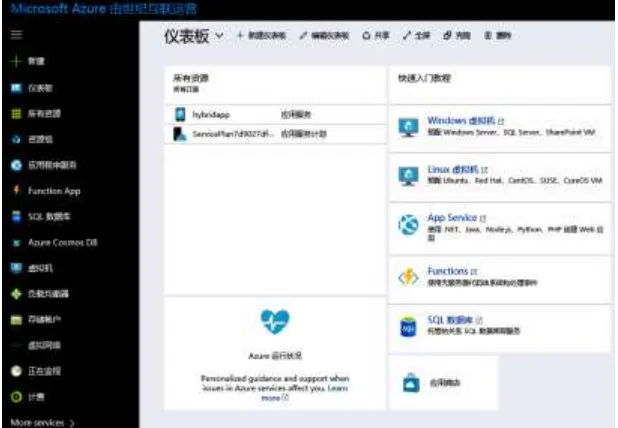
[image:9.612.152.461.408.622.2]The full name of Azure is Microsoft Azure. It is a public cloud platform of Microsoft. It has three main services are IaaS (infrastructure as a service), PaaS (platform as a service), SaaS (software as a service). This paper mainly uses PaaS, the use of public cloud platform as a service. The platform can be more convenient for developers to implement the deployment. Users can build their own services in Azure. Such as virtual machine, database, mobile site or web site and a series of services. Azure has good support for the Visual Studio, can provide a series of services for Visual Studio, which also makes the HTML5 front-end development technologies a large number of front-end developers can get involved in the field of mobile application development based on expanding the number of developers, reduce development difficulty and cost, which makes the developers for mobile applications, creative, real now the way becomes simpler. Figure 7 is the Azure service interface.
Figure 8. The flow chart of azure cloud service to set up and publish.
SET UP AND PUBLISH
“Set up” is set up the mobile app site, through this mobile site. The developer can make hybrid app service direct to users. Microsoft Azure provides a service to set up the mobile site. This service is not only easy to use but also suitable for developers to quickly develop and deploy. As shown in Figure 8 is the flow chart of set up the mobile site and publish the service.
Firstly, we need to apply for an Azure account, through this account can log Azure service interface. In the upper left corner of the service interface, there is a New button, click New, select”web + mobile” action. Then select Mobile app to open the site settings interface. Add information to enter the site and click to create, mobile app site is created.
After setting up a mobile Mobile app site, you need to send the application to the site, so that the service can direct to users. Open the file browsing hybrid app project in Visual Studio, right-click the project in the project directory, select the “Publish” release option to open the publish command window, move the project folder to the site file collection, and click to deploy the project.
ENGINEERING TESTING
This article introduces the hybrid application based on Cordova mobile development framework and the deployment of the mobile app on Microsoft Azure. The experiment simulation test is mainly based on the following two methods: First, the file is scanned on the simulator to browse the file, open the folder and return to the basic functions of the normal level can be achieved; Second, in the Microsoft Azure cloud platform interface can run the application.
Login to Azure cloud services
Publish Engineering Project
(Based on the Cordova Framew ork the File Brow sing App)
Deployment success Set up the site
Set the site Information Start
Mobile App Web+ Mobile
New Apply for
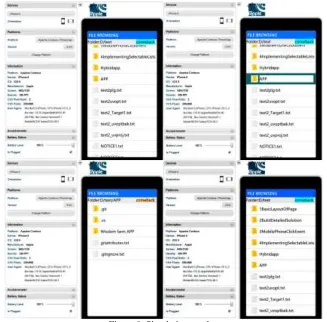
Through the discussion of the second chapter of this article, the advantages of the Ripple simulator are determined, which is suitable for the simulation of the hybrid application. The simulation test shows that there are obvious errors and defects in the application. As shown in Fig. 9, for the operation of the project under the Ripple emulator, this time based on Cordova mobile development framework developed mobile phone App can achieve some simple file browsing function, to achieve the desired goal.
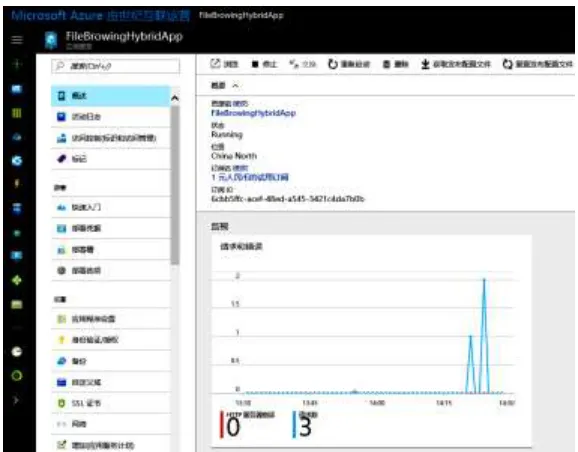
[image:11.612.134.461.232.554.2]Through the use of Azure cloud services, we can develop a good mobile application deployment, this experiment is to log in Azure cloud interface console to view the application deployment and operation, as is shown in Figure 10. The system works well on Microsoft Azure, mobile applications based on Cordova mobile development framework has been successfully deployed.
Figure 10. The control interface of Azure cloud service.
CONCLUSION
This article has designed and implemented a hybrid application based on the Cordova mobile development framework with the help of the Visual Studio development environment. This hybrid app enables a simple file browsing. And this article also describes how to deploy the application on the Azure to make service direct to users. Hybrid applications can use the current relatively simple and popular HTML5 technology to develop. Reduce the mobile app development entry threshold, and also cross-platform development. So that developers can develop only once, run everywhere.
Meanwhile, there are still many areas to be improved in the hybrid application system. For example, we did not use other interface methods and attributes during the use of file plugin, which results in a simple file browsing app that can only read and open file, but cannot achieve other functions. In addition, the project did not use other popular development framework such as Ionic, leading to the interaction interface and functional experience is poor. These aspects remain to be improved in the future.
REFERENCES
1. Li Zheng and Zhang Guangyun. 2017. “Practicing Microsoft Open Source and Cross-Platform Mobile Development,” M. Beijing: Tsinghua University Press.
2. Zhu Kainan, Li Yanpin and Sheng Yanchun. 2015. “The Research of Multi-platform Apps Based On Ionic and Cordova,” J.Computer Knowledge and Technology, (12):60-64.
3. Tang Bingwen, Dai Ailing and Cheng Yazhou. 2016. “Research on Cross-platform APP for Minxi's Pig Disease Base on CORDOVA and Its Implementation,” J.Journal of Wuyi University, (1):119-121.
4. Xiao ming. 2015. “Development of Apache Cordova based Cross-platform Smart Home Terminal Application,”D. South China University of Technology.
6. Lu Chaohui. 2014. “Based on Windows Azure The Large-scale Web Application Design,” J. Computer Technology and Development, (12):57-60.
7. Yi Xiaolin and Ning Yihuang. 2013. “The Development of a Mobile Terminal Middleware Platform Based on HTML5,”J. Journal of Software, (5):136-141.